chapter 7 HYUNDAI KONA EV 2022 Owner's Manual
[x] Cancel search | Manufacturer: HYUNDAI, Model Year: 2022, Model line: KONA EV, Model: HYUNDAI KONA EV 2022Pages: 548, PDF Size: 49.14 MB
Page 171 of 548
Instrument cluster
4-28
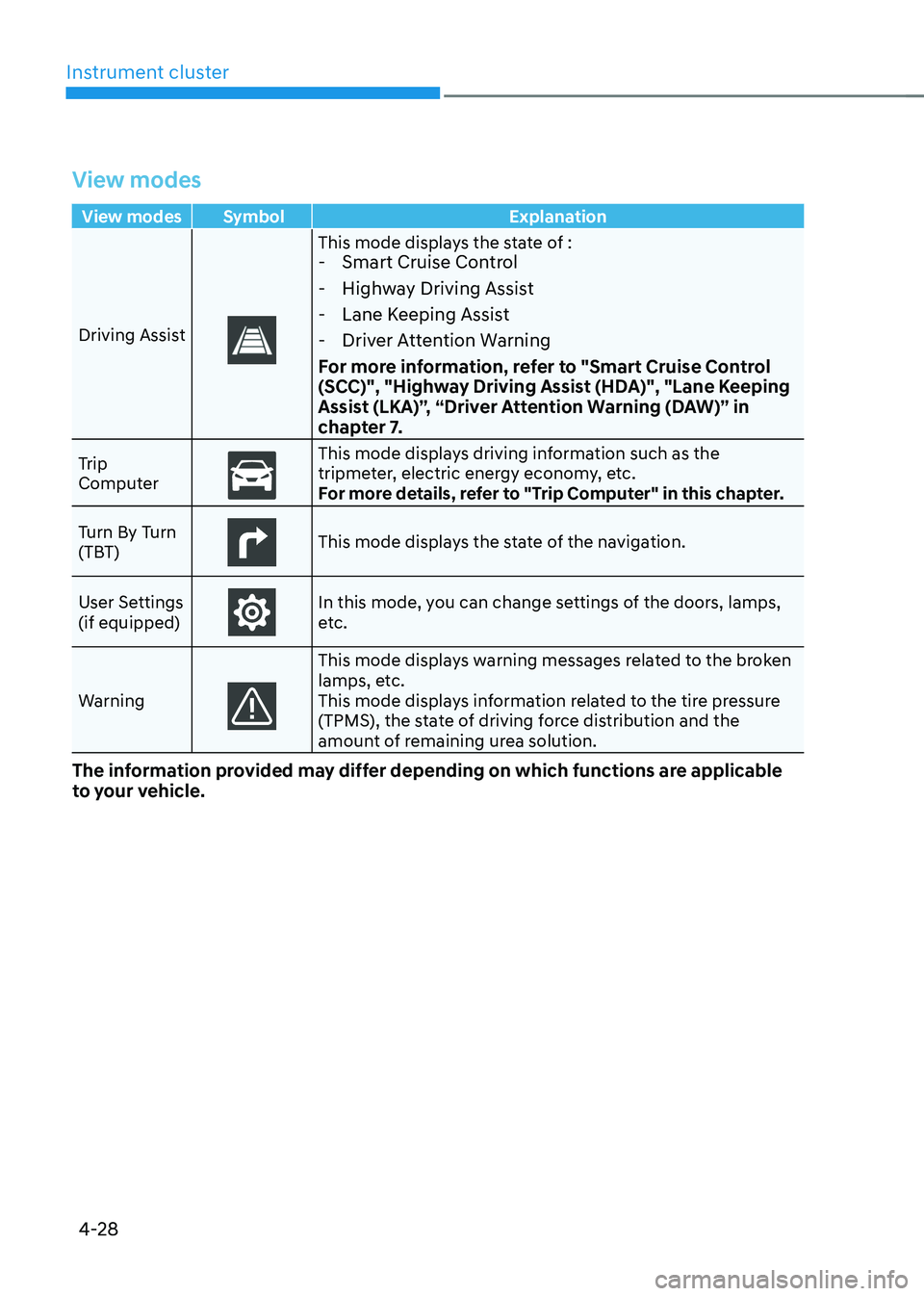
View modes
View modes Symbol Explanation
Driving Assist
This mode displays the state of : - Smart Cruise Control
- Highway Driving Assist
- Lane Keeping Assist
- Driver Attention Warning
For more information, refer to "Smart Cruise Control
(SCC)", "Highway Driving Assist (HDA)", "Lane Keeping
Assist (LKA)”, “Driver Attention Warning (DAW)” in
chapter 7.
Trip
Computer
This mode displays driving information such as the
tripmeter, electric energy economy, etc.
For more details, refer to "Trip Computer" in this chapter.
Turn By Turn
(TBT)
This mode displays the state of the navigation.
User Settings (if equipped)
In this mode, you can change settings of the doors, lamps,
etc.
Warning
This mode displays warning messages related to the broken
lamps, etc.
This mode displays information related to the tire pressure
(TPMS), the state of driving force distribution and the
amount of remaining urea solution.
The information provided may differ depending on which functions are applicable
to your vehicle.
Page 172 of 548
04
4-29
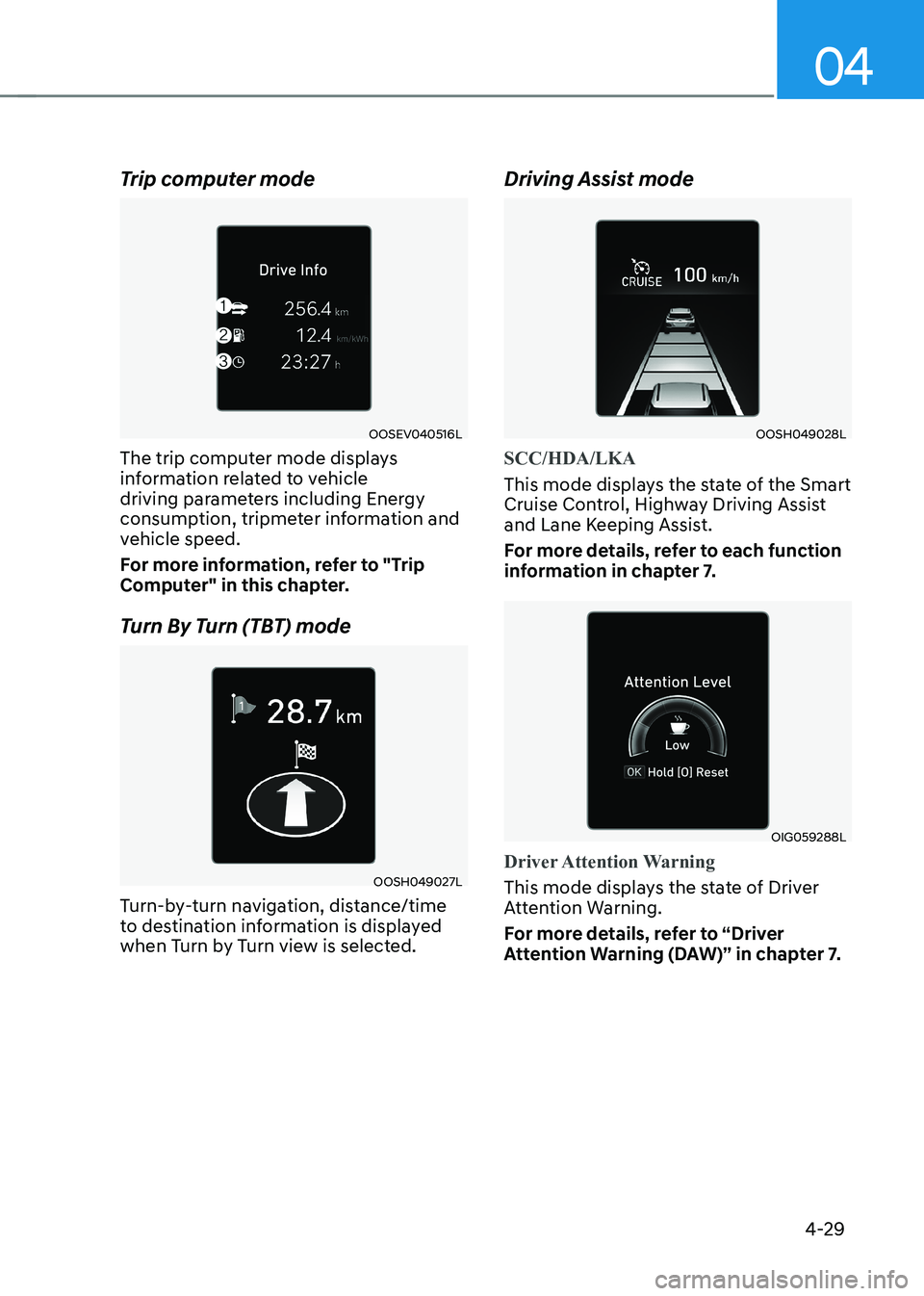
Trip computer mode
OOSEV040516L
The trip computer mode displays
information related to vehicle
driving parameters including Energy
consumption, tripmeter information and
vehicle speed.
For more information, refer to "Trip
Computer" in this chapter.
Turn By Turn (TBT) mode
OOSH049027L
Turn-by-turn navigation, distance/time
to destination information is displayed
when Turn by Turn view is selected. Driving Assist mode
OOSH049028L
SCC/HDA/LKA
This mode displays the state of the Smart
Cruise Control, Highway Driving Assist
and Lane Keeping Assist.
For more details, refer to each function
information in chapter 7.
OIG059288L
Driver Attention Warning
This mode displays the state of Driver
Attention Warning.
For more details, refer to “Driver
Attention Warning (DAW)” in chapter 7.
Page 173 of 548
Instrument cluster
4-30
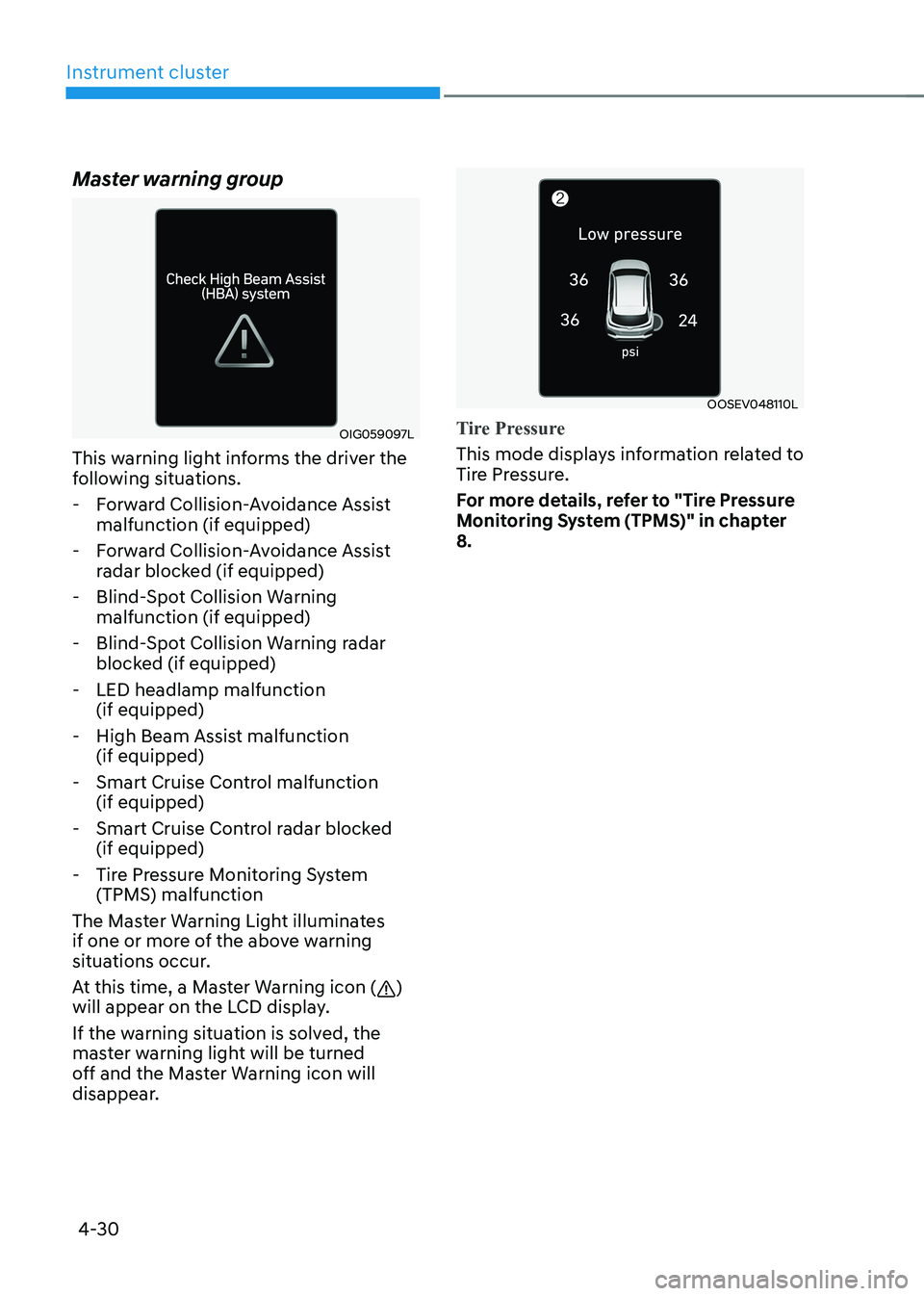
Master warning group
OIG059097L
This warning light informs the driver the
following situations.
- Forward Collision-Avoidance Assist malfunction (if equipped)
- Forward Collision-Avoidance Assist radar blocked (if equipped)
- Blind-Spot Collision Warning malfunction (if equipped)
- Blind-Spot Collision Warning radar blocked (if equipped)
- LED headlamp malfunction (if equipped)
- High Beam Assist malfunction (if equipped)
- Smart Cruise Control malfunction (if equipped)
- Smart Cruise Control radar blocked (if equipped)
- Tire Pressure Monitoring System (TPMS) malfunction
The Master Warning Light illuminates
if one or more of the above warning
situations occur.
At this time, a Master Warning icon (
)
will appear on the LCD display.
If the warning situation is solved, the
master warning light will be turned
off and the Master Warning icon will
disappear.
OOSEV048110L
Tire Pressure
This mode displays information related to
Tire Pressure.
For more details, refer to "Tire Pressure
Monitoring System (TPMS)" in chapter 8.
Page 175 of 548
Instrument cluster
4-32
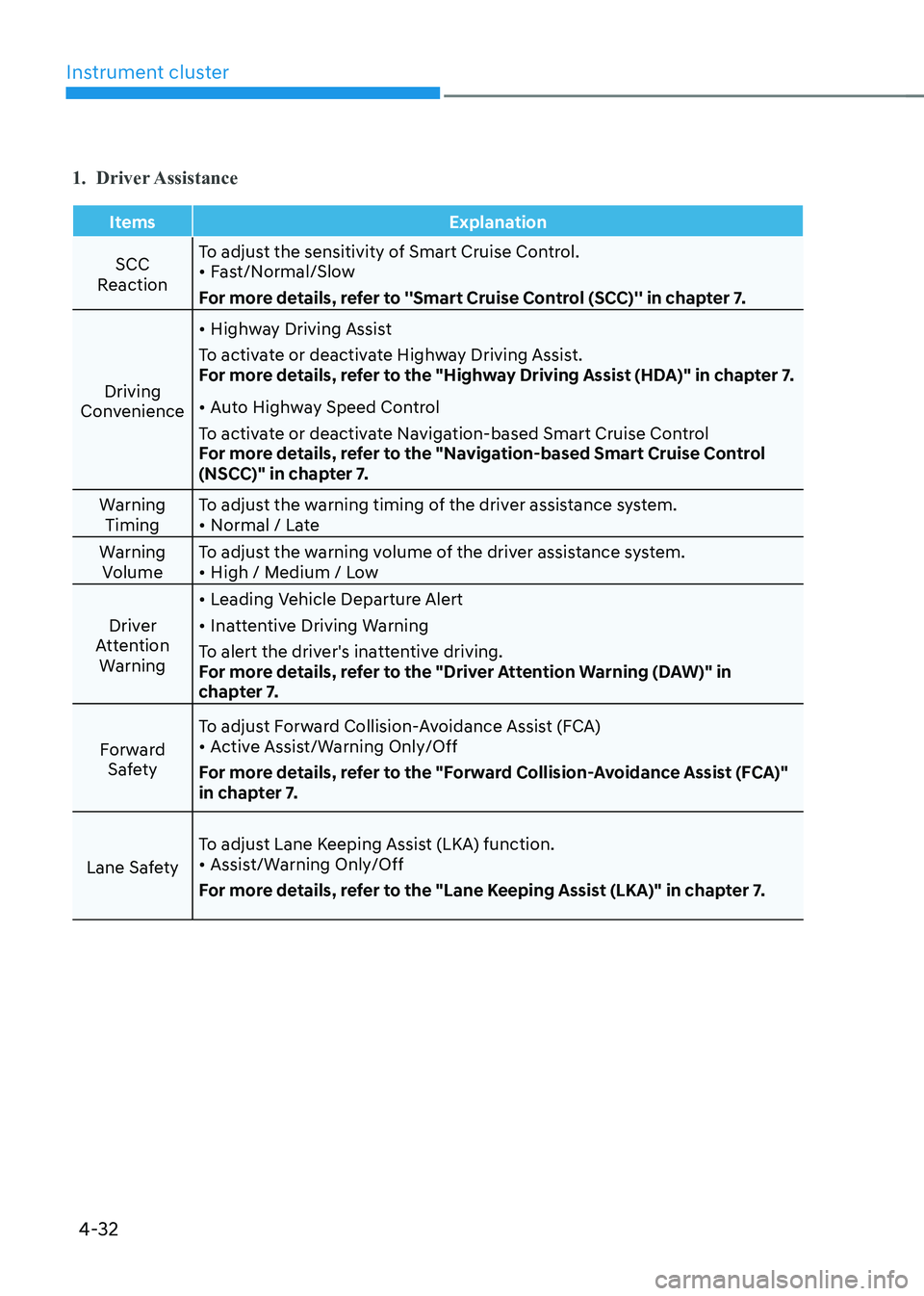
1. Driver Assistance
Items Explanation
SCC
Reaction To adjust the sensitivity of Smart Cruise Control. •
Fast/Normal/Slow
For more details, refer to ''Smart Cruise Control (SCC)'' in chapter 7.
Driving
Convenience •
Highway Driving Assist
To activate or deactivate Highway Driving Assist.
For more details, refer to the "Highway Driving Assist (HDA)" in chapter 7. • Auto Highway Speed Control
To activate or deactivate Navigation-based Smart Cruise Control
For more details, refer to the "Navigation-based Smart Cruise Control
(NSCC)" in chapter 7.
Warning Timing To adjust the warning timing of the driver assistance system.•
Normal / Late
Warning Volume To adjust the warning volume of the driver assistance system.•
High / Medium / Low
Driver
Attention Warning •
Leading Vehicle Departure Alert
• Inattentive Driving Warning
To alert the driver's inattentive driving.
For more details, refer to the "Driver Attention Warning (DAW)" in
chapter 7.
Forward Safety To adjust Forward Collision-Avoidance Assist (FCA)•
Active Assist/Warning Only/Off
For more details, refer to the "Forward Collision-Avoidance Assist (FCA)"
in chapter 7.
Lane Safety To adjust Lane Keeping Assist (LKA) function.•
Assist/Warning Only/Off
For more details, refer to the "Lane Keeping Assist (LKA)" in chapter 7.
Page 176 of 548
04
4-33
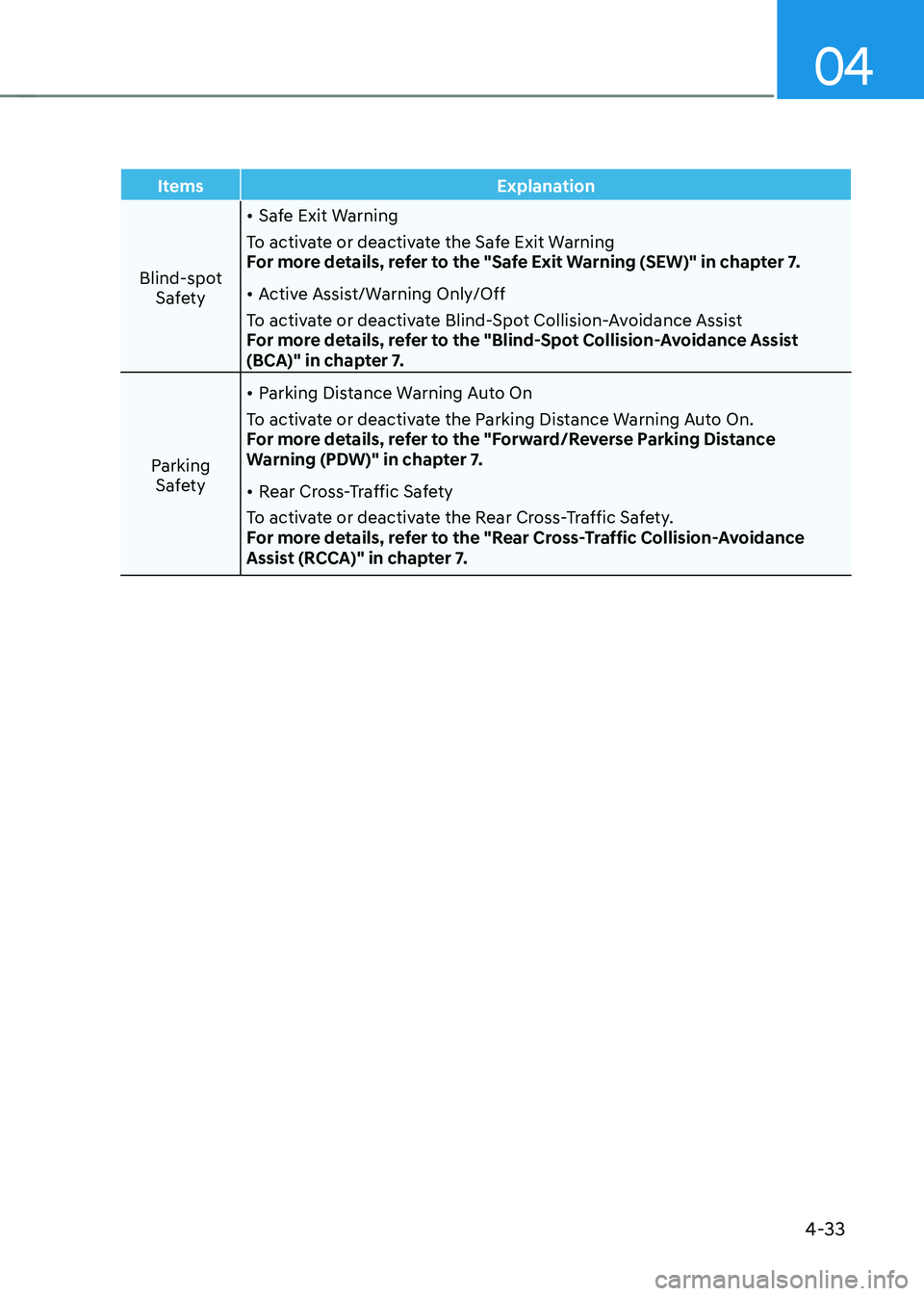
Items Explanation
Blind-spot Safety •
Safe Exit Warning
To activate or deactivate the Safe Exit Warning
For more details, refer to the "Safe Exit Warning (SEW)" in chapter 7. • Active Assist/Warning Only/Off
To activate or deactivate Blind-Spot Collision-Avoidance Assist
For more details, refer to the "Blind-Spot Collision-Avoidance Assist
(BCA)" in chapter 7.
Parking Safety •
Parking Distance Warning Auto On
To activate or deactivate the Parking Distance Warning Auto On.
For more details, refer to the "Forward/Reverse Parking Distance
Warning (PDW)" in chapter 7. • Rear Cross-Traffic Safety
To activate or deactivate the Rear Cross-Traffic Safety.
For more details, refer to the "Rear Cross-Traffic Collision-Avoidance
Assist (RCCA)" in chapter 7.
Page 177 of 548
Instrument cluster
4-34
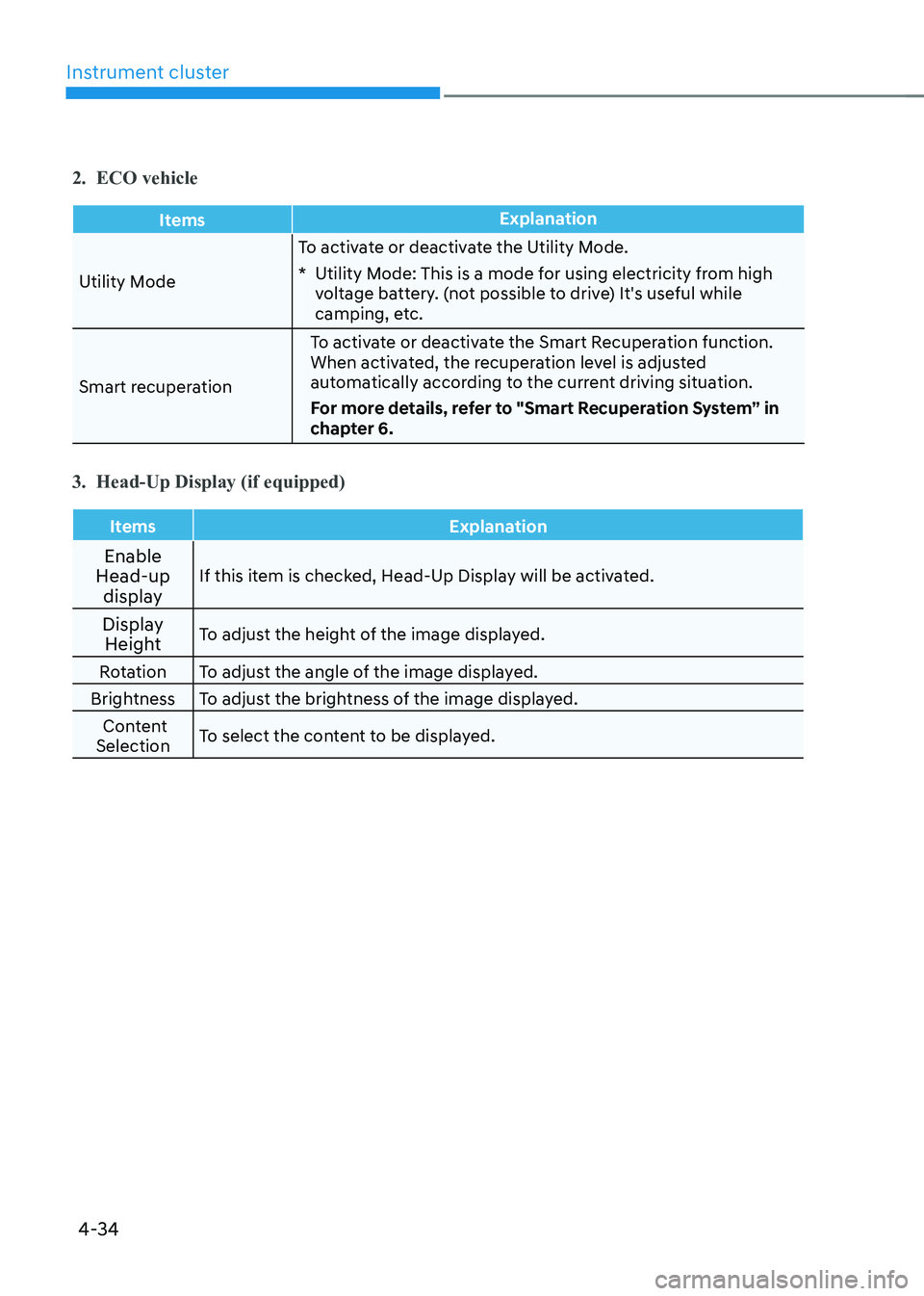
2. ECO vehicle
ItemsExplanation
Utility ModeTo activate or deactivate the Utility Mode.
* Utility Mode: This is a mode for using electricity from high
voltage battery. (not possible to drive) It's useful while
camping, etc.
Smart recuperation To activate or deactivate the Smart Recuperation function.
When activated, the recuperation level is adjusted
automatically according to the current driving situation.
For more details, refer to "Smart Recuperation System” in
chapter 6.
3. Head-Up Display (if equipped)
Items Explanation
Enable
Head-up
display If this item is checked, Head-Up Display will be activated.
Display Height To adjust the height of the image displayed.
Rotation To adjust the angle of the image displayed.
Brightness To adjust the brightness of the image displayed. Content
Selection To select the content to be displayed.
Page 179 of 548
Instrument cluster
4-36
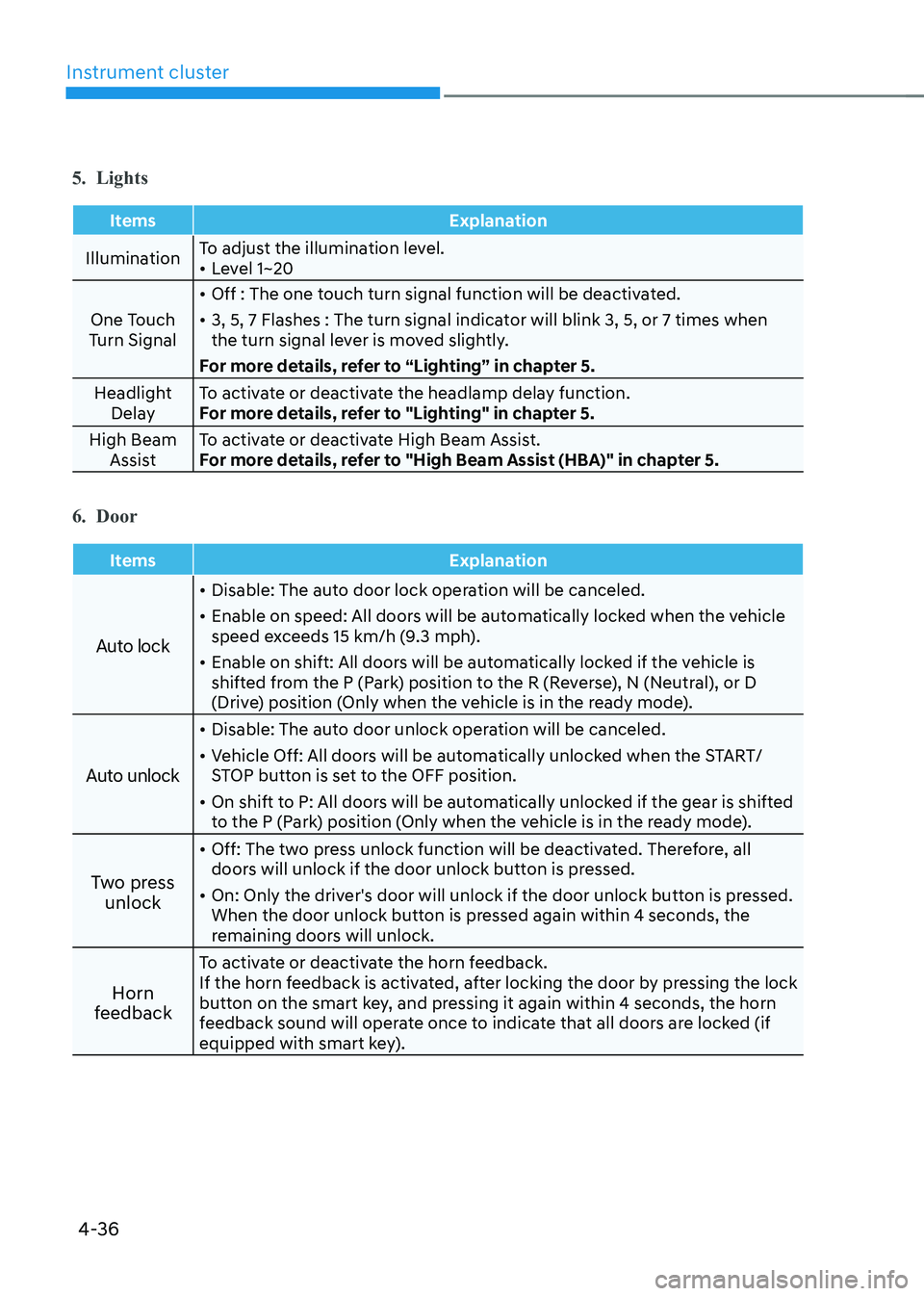
5. Lights
Items Explanation
IlluminationTo adjust the illumination level. •
Level 1~20
One Touch
Turn Signal •
Off : The one touch turn signal function will be deactivated.
• 3, 5, 7 Flashes : The turn signal indicator will blink 3, 5, or 7 times when
the turn signal lever is moved slightly.
For more details, refer to “Lighting” in chapter 5.
Headlight Delay To activate or deactivate the headlamp delay function.
For more details, refer to "Lighting" in chapter 5.
High Beam Assist To activate or deactivate High Beam Assist.
For more details, refer to "High Beam Assist (HBA)" in chapter 5.
6. Door
Items Explanation
Auto lock
•
Disable: The auto door lock operation will be canceled.
• Enable on speed: All doors will be automatically locked when the vehicle
speed exceeds 15 km/h (9.3 mph).
• Enable on shift: All doors will be automatically locked if the vehicle is
shifted from the P (Park) position to the R (Reverse), N (Neutral), or D
(Drive) position (Only when the vehicle is in the ready mode).
Auto unlock
• Disable: The auto door unlock operation will be canceled.
• Vehicle Off: All doors will be automatically unlocked when the START/
STOP button is set to the OFF position.
• On shift to P: All doors will be automatically unlocked if the gear is shifted
to the P (Park) position (Only when the vehicle is in the ready mode).
Two press unlock •
Off: The two press unlock function will be deactivated. Therefore, all
doors will unlock if the door unlock button is pressed.
• On: Only the driver's door will unlock if the door unlock button is pressed.
When the door unlock button is pressed again within 4 seconds, the
remaining doors will unlock.
Horn
feedback To activate or deactivate the horn feedback.
If the horn feedback is activated, after locking the door by pressing the lock
button on the smart key, and pressing it again within 4 seconds, the horn
feedback sound will operate once to indicate that all doors are locked (if
equipped with smart key).
Page 180 of 548
04
4-37
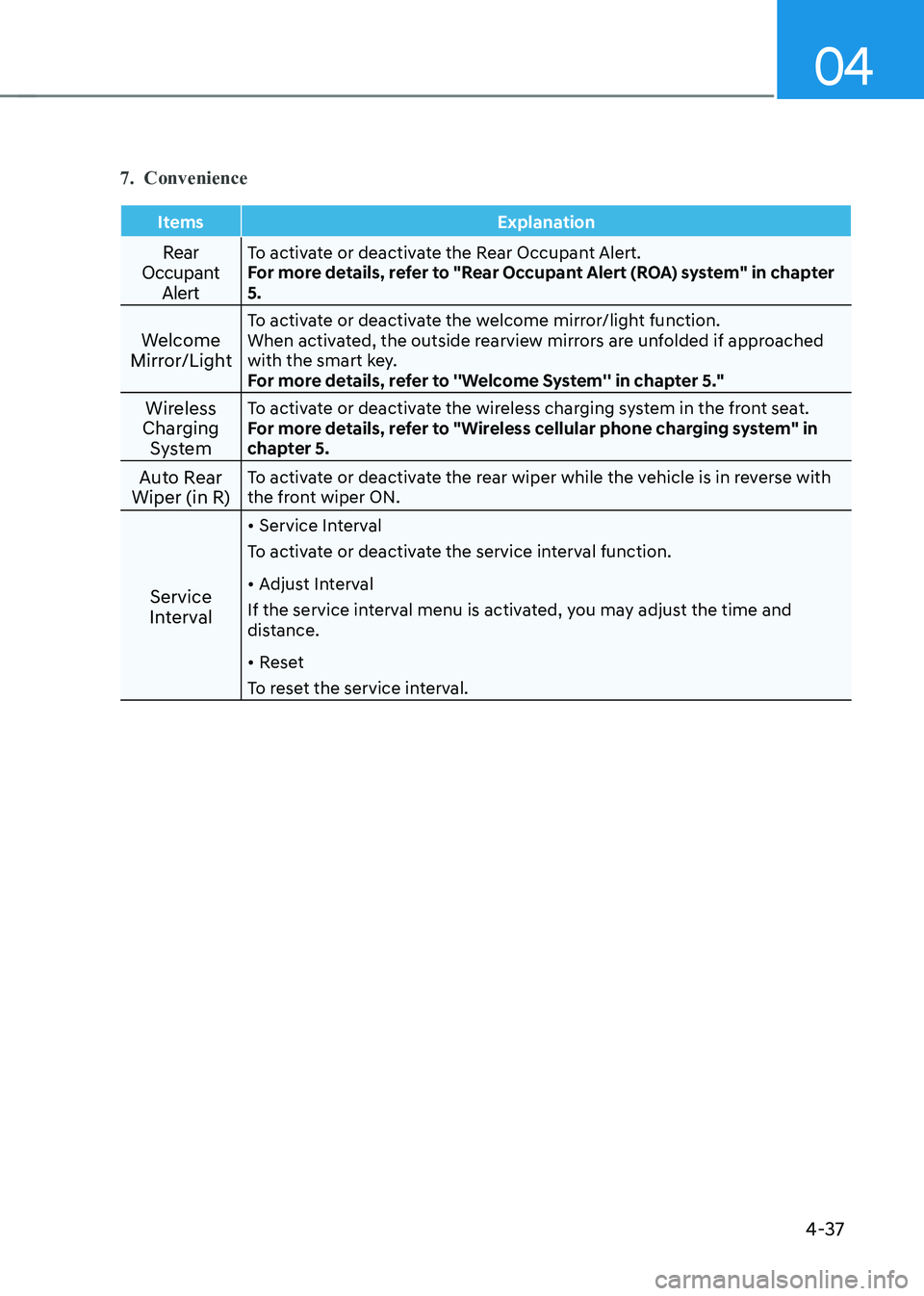
7. Convenience
Items Explanation
Rear
Occupant AlertTo activate or deactivate the Rear Occupant Alert.
For more details, refer to "Rear Occupant Alert (ROA) system" in chapter 5.
Welcome
Mirror/Light To activate or deactivate the welcome mirror/light function.
When activated, the outside rearview mirrors are unfolded if approached
with the smart key.
For more details, refer to ''Welcome System'' in chapter 5."
Wireless
Charging System To activate or deactivate the wireless charging system in the front seat.
For more details, refer to "Wireless cellular phone charging system" in
chapter 5.
Auto Rear
Wiper (in R) To activate or deactivate the rear wiper while the vehicle is in reverse with
the front wiper ON.
Service
Interval •
Service Interval
To activate or deactivate the service interval function. • Adjust Interval
If the service interval menu is activated, you may adjust the time and
distance. • Reset
To reset the service interval.
Page 190 of 548
Convenient features
5-6
Start-up
You can start the vehicle without
inserting the key.
For detailed information refer to the
START/STOP button in chapter 5.
NOTICE
To prevent damaging the smart key: • Keep the smart key away from water
or any liquid and fire. If the inside
of the smart key gets damp (due to
drinks or moisture), or is heated,
internal circuit may malfunction and
may void the vehicle warranty.
• Avoid dropping or throwing the
smart key.
• Protect the smart key from extreme
temperatures. Remotely starting vehicle
You can start the vehicle using the
Remote Start button on the smart key.
To start the vehicle remotely:
1. Press the door lock button on the
smart key within 10 m (32 feet) from
the vehicle.
2. Press the Remote Start button for more than 2 seconds within 4 seconds
after pressing the door lock button.
3. The hazard warning lights will blink and the vehicle will start.
4. To turn off the remote start function,
press the Remote Start button once.
Information
• The vehicle must be in P (Park) for the
remote start function to start.
• The motor turns off if you get on the
vehicle without a registered smart key.
• The motor turns off if you do not get
on the vehicle within 10 minutes after
remotely starting the vehicle.
• The Remote Start button may not operate if the smart key is not within 10 m (32 feet).
• The vehicle will not remotely start if the
hood or tailgate is opened.
• Do not idle the vehicle for a long period.
Page 197 of 548
05
5-13
WARNING
Do not leave children or animals
unattended in your vehicle. An enclosed
vehicle can become extremely hot,
causing death or serious injury to
unattended children or animals who
cannot escape the vehicle. Children
might operate features of the vehicle
that could injure them, or they could
encounter other harm, possibly from
someone gaining entry to the vehicle.
WARNING
Leaving your vehicle unlocked increases
the potential risk to you or others from
someone hiding in your vehicle.
To secure your vehicle, while
depressing the brake, move the shift
lever to the P (Park) position, engage
the parking brake, and place the START/
STOP button OFF position, close all
windows, lock all doors, and always
take the key with you.
CAUTION
Opening a door when something is
approaching may cause damage or
injury. Be careful when opening doors
and watch for vehicles, motorcycles,
bicycles or pedestrians approaching the
vehicle in the path of the door.
WARNING
If you stay in the vehicle for a long time
while the weather is very hot or cold,
there are risks of injuries or danger to
life. Do not lock the vehicle from the
outside when someone is in the vehicle.
Auto door lock/unlock features
Impact sensing door unlock system (if equipped)
All doors will be automatically unlocked
when an impact causes the air bags to
deploy.
Speed sensing door lock system (if equipped)
All doors will be automatically locked
when vehicle speed exceeds 15 km/h
(9 mph).
You can activate or deactivate the Auto
Door Lock/Unlock features from the User
Settings mode on the LCD display. For
more details, refer to “LCD Display” in
this chapter.