chapter 7 HYUNDAI KONA EV 2022 Owner's Guide
[x] Cancel search | Manufacturer: HYUNDAI, Model Year: 2022, Model line: KONA EV, Model: HYUNDAI KONA EV 2022Pages: 548, PDF Size: 49.14 MB
Page 230 of 548
Convenient features
5-46
OOSEV050125L
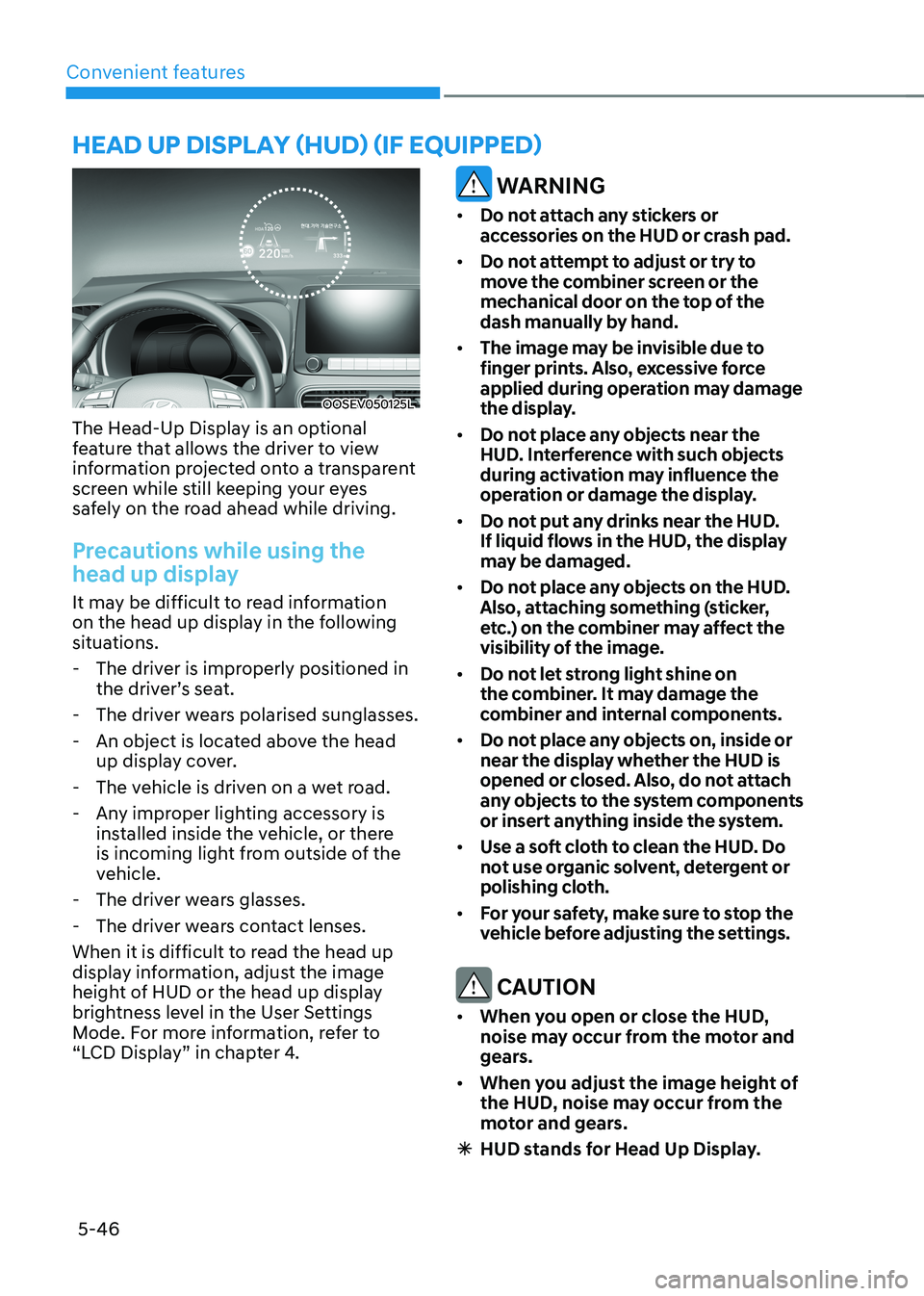
The Head-Up Display is an optional
feature that allows the driver to view
information projected onto a transparent
screen while still keeping your eyes
safely on the road ahead while driving.
Precautions while using the
head up display
It may be difficult to read information
on the head up display in the following
situations. - The driver is improperly positioned in the driver’s seat.
- The driver wears polarised sunglasses.
- An object is located above the head up display cover.
- The vehicle is driven on a wet road.
- Any improper lighting accessory is installed inside the vehicle, or there
is incoming light from outside of the
vehicle.
- The driver wears glasses.
- The driver wears contact lenses.
When it is difficult to read the head up
display information, adjust the image
height of HUD or the head up display
brightness level in the User Settings
Mode. For more information, refer to
“LCD Display” in chapter 4.
WARNING
• Do not attach any stickers or
accessories on the HUD or crash pad.
• Do not attempt to adjust or try to
move the combiner screen or the
mechanical door on the top of the
dash manually by hand.
• The image may be invisible due to
finger prints. Also, excessive force
applied during operation may damage
the display.
• Do not place any objects near the
HUD. Interference with such objects
during activation may influence the
operation or damage the display.
• Do not put any drinks near the HUD.
If liquid flows in the HUD, the display
may be damaged.
• Do not place any objects on the HUD.
Also, attaching something (sticker,
etc.) on the combiner may affect the
visibility of the image.
• Do not let strong light shine on
the combiner. It may damage the
combiner and internal components.
• Do not place any objects on, inside or
near the display whether the HUD is
opened or closed. Also, do not attach
any objects to the system components
or insert anything inside the system.
• Use a soft cloth to clean the HUD. Do
not use organic solvent, detergent or
polishing cloth.
• For your safety, make sure to stop the
vehicle before adjusting the settings.
CAUTION
• When you open or close the HUD,
noise may occur from the motor and
gears.
• When you adjust the image height of
the HUD, noise may occur from the
motor and gears.
à HUD stands for Head Up Display.
head up display (hud) (if equipped)
Page 231 of 548
05
5-47
Head Up Display ON/OFF
OOSEV040061L
Use the head-up display ON/OFF button
to activate or deactivate the head-up
display when the START/STOP button is
in the ON position or when the vehicle is
in the ready (
) mode.
The head-up display will retract
automatically when the vehicle is turned
OFF and the doors are locked with the
Smart Key or when pressing the button on the outside door handle.
Note that if the vehicle is turned OFF and
the doors are not locked, the head-up
display will automatically retract after
approximately five minutes.
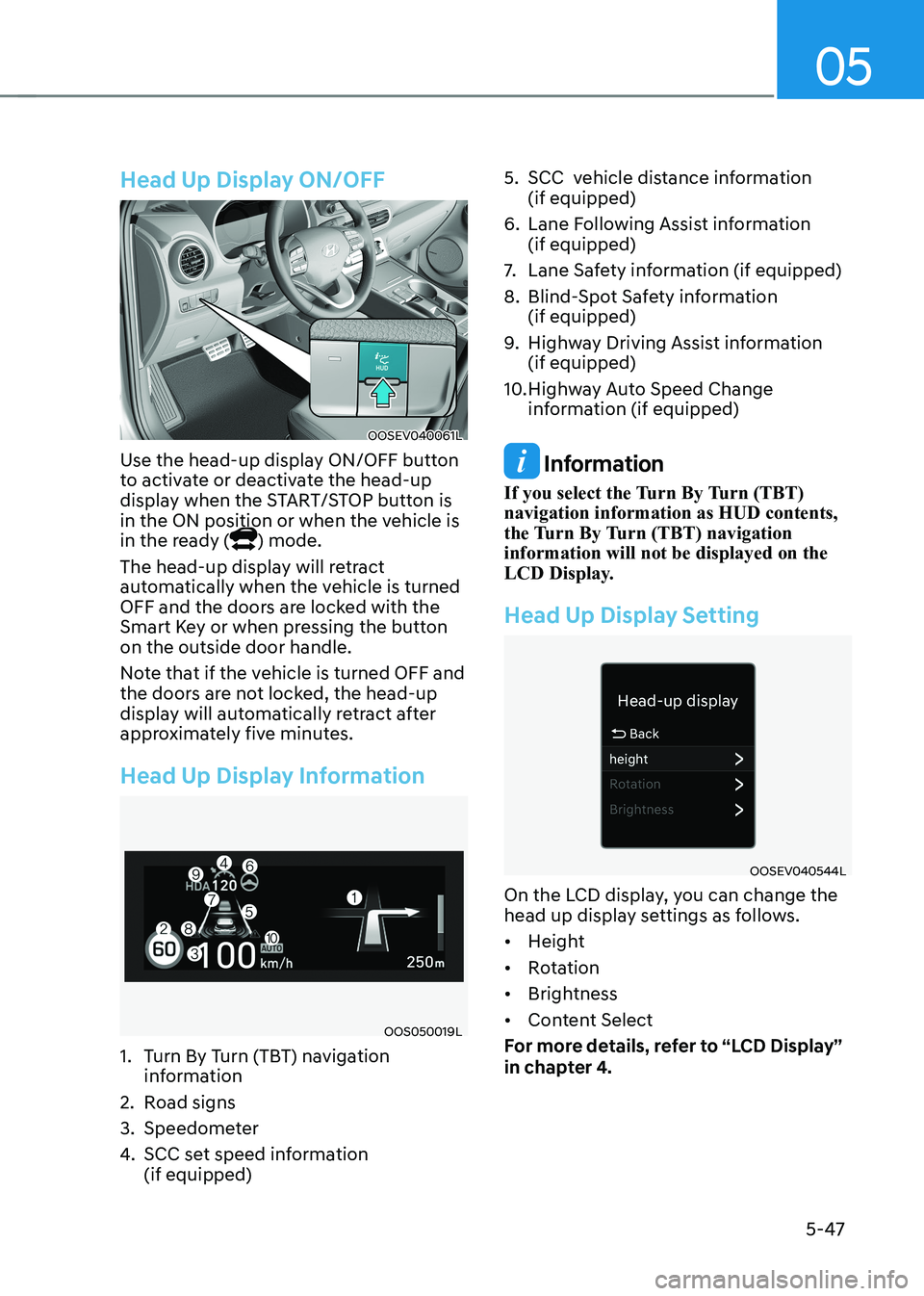
Head Up Display Information
OOS050019L
1. Turn By Turn (TBT) navigation information
2. Road signs
3. Speedometer
4. SCC set speed information (if equipped) 5. SCC vehicle distance information
(if equipped)
6. Lane Following Assist information (if equipped)
7. Lane Safety information (if equipped)
8. Blind-Spot Safety information (if equipped)
9. Highway Driving Assist information (if equipped)
10. Highway Auto Speed Change information (if equipped)
Information
If you select the Turn By Turn (TBT) navigation information as HUD contents,
the Turn By Turn (TBT) navigation information will not be displayed on the
LCD Display.
Head Up Display Setting
OOSEV040544L
On the LCD display, you can change the
head up display settings as follows. • Height
• Rotation
• Brightness
• Content Select
For more details, refer to “LCD Display”
in chapter 4.
Page 234 of 548
Convenient features
5-50
Turn signals and lane change signals
OOS047410N
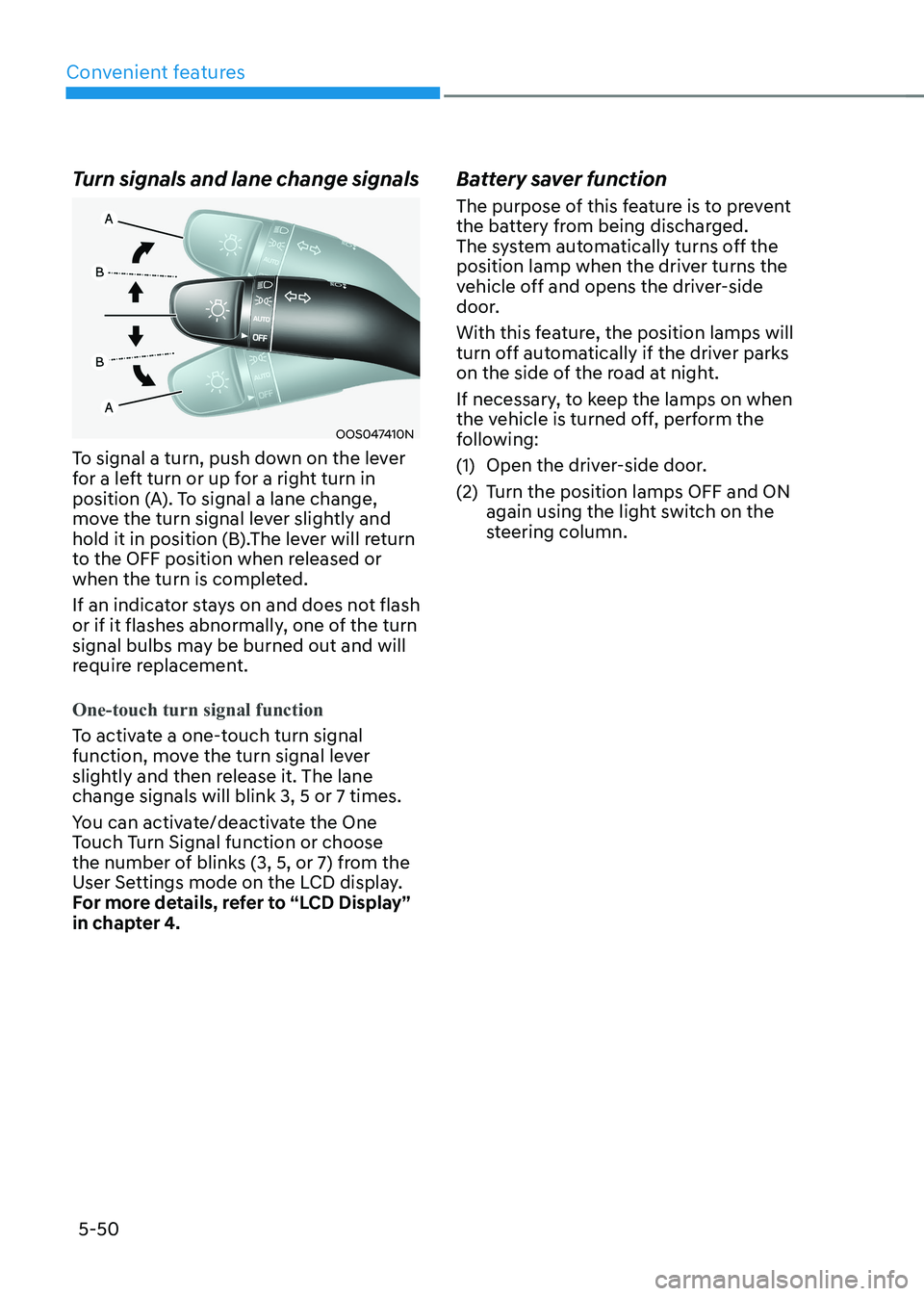
To signal a turn, push down on the lever
for a left turn or up for a right turn in
position (A). To signal a lane change,
move the turn signal lever slightly and
hold it in position (B).The lever will return
to the OFF position when released or
when the turn is completed.
If an indicator stays on and does not flash
or if it flashes abnormally, one of the turn
signal bulbs may be burned out and will
require replacement.
One-touch turn signal function
To activate a one-touch turn signal
function, move the turn signal lever
slightly and then release it. The lane change signals will blink 3, 5 or 7 times.
You can activate/deactivate the One
Touch Turn Signal function or choose
the number of blinks (3, 5, or 7) from the
User Settings mode on the LCD display.
For more details, refer to “LCD Display”
in chapter 4. Battery saver function
The purpose of this feature is to prevent
the battery from being discharged.
The system automatically turns off the
position lamp when the driver turns the
vehicle off and opens the driver-side
door.
With this feature, the position lamps will
turn off automatically if the driver parks
on the side of the road at night.
If necessary, to keep the lamps on when
the vehicle is turned off, perform the
following:
(1) Open the driver-side door.
(2) Turn the position lamps OFF and ON
again using the light switch on the
steering column.
Page 235 of 548
05
5-51
Headlamp delay function (if equipped)
If you place the START/STOP button
to the ACC or OFF position with the
headlamps ON, the headlamps (and/or
position lamps) remain on for about 5
minutes. However, with the vehicle off if
the driver’s door is opened and closed,
the headlamps (and/or position lamps)
are turned off after 15 seconds.
The headlamps (and/or position lamps)
can be turned off by pressing the lock
button on the smart key twice or turning
the light switch to the OFF or AUTO
position. However, if you turn the light
switch to the AUTO position when it is
dark outside, the headlamps will not be
turned off.
You can activate or deactivate the
Headlamp Delay function from the User
Settings mode on the LCD display. For
more details, refer to “LCD Display” in
chapter 4.
NOTICE
If the driver gets out of the vehicle
through other doors (except driver’s
door), the battery saver function
does not operate and the headlamp
delay function does not turn off
automatically. Therefore, It causes the
battery to be discharged. In this case,
make sure to turn off the headlamps
before getting out of the vehicle.
Welcome system (if equipped)
Headlamp and position lamp
When the headlamp (lamp switch in the
headlamp or AUTO position) is on and
all doors (and tailgate) are locked and closed, the position lamp and headlamp
will come on for 15 seconds when the
door unlock button is pressed on the
smart key.
At this time, if you press the door lock
or unlock button, the position lamp and
headlamp will turn off immediately
Interior lamp
When the interior lamp switch is in
the DOOR position and all doors (and
tailgate) are closed and locked, the room
lamp will come on for 30 seconds if any
of the below is performed. • When the door unlock button is
pressed on the smart key.
• When the button of the outside door
handle is pressed with the smart key in possession.
At this time, if you press the door lock or
unlock button, the room lamp will turn
off immediately.
Page 239 of 548
05
5-55
OPDE046057
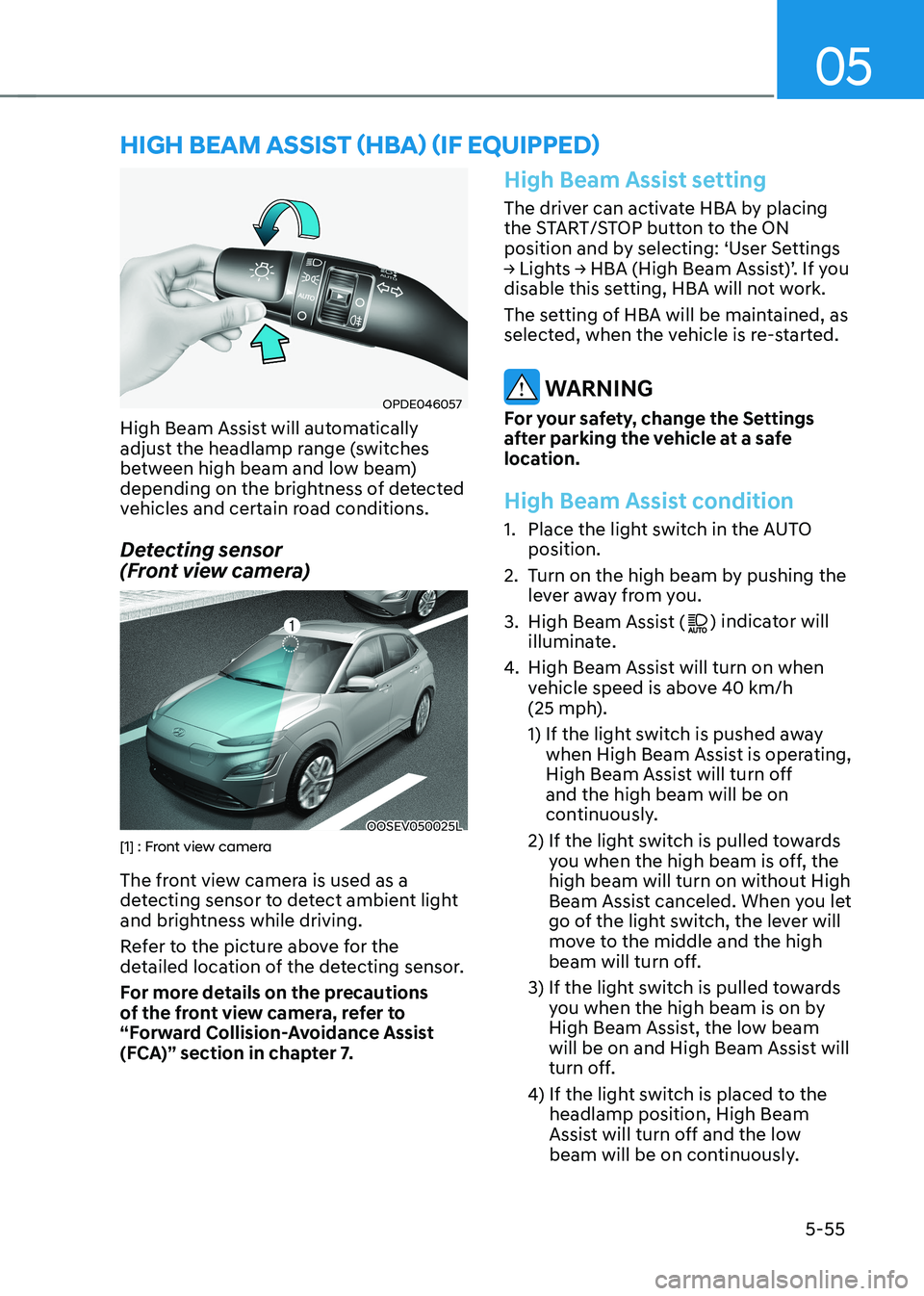
High Beam Assist will automatically
adjust the headlamp range (switches
between high beam and low beam)
depending on the brightness of detected
vehicles and certain road conditions.
Detecting sensor
(Front view camera)
OOSEV050025L[1] : Front view camera
The front view camera is used as a
detecting sensor to detect ambient light
and brightness while driving.
Refer to the picture above for the
detailed location of the detecting sensor.
For more details on the precautions
of the front view camera, refer to
“Forward Collision-Avoidance Assist
(FCA)” section in chapter 7.
High Beam Assist setting
The driver can activate HBA by placing
the START/STOP button to the ON
position and by selecting: ‘User Settings
→ Lights → HBA (High Beam Assist)’. If you
disable this setting, HBA will not work.
The setting of HBA will be maintained, as
selected, when the vehicle is re-started.
WARNING
For your safety, change the Settings
after parking the vehicle at a safe
location.
High Beam Assist condition
1. Place the light switch in the AUTO position.
2. Turn on the high beam by pushing the lever away from you.
3. High Beam Assist (
) indicator will
illuminate.
4. High Beam Assist will turn on when
vehicle speed is above 40 km/h
(25 mph).
1) If the light switch is pushed away
when High Beam Assist is operating,
High Beam Assist will turn off and the high beam will be on
continuously.
2) If the light switch is pulled towards you when the high beam is off, the high beam will turn on without High
Beam Assist canceled. When you let
go of the light switch, the lever will
move to the middle and the high
beam will turn off.
3) If the light switch is pulled towards you when the high beam is on by
High Beam Assist, the low beam
will be on and High Beam Assist will
turn off.
4) If the light switch is placed to the headlamp position, High Beam
Assist will turn off and the low
beam will be on continuously.
high Beam assisT (hBa) (if equipped)
Page 241 of 548
05
5-57
Limitations of High Beam Assist
High Beam Assist may not work properly
in the following situations: •
Light from a vehicle is not detected
because of lamp damage, or because
it is hidden from sight, etc.
• Headlamp of a vehicle is covered with
dust, snow or water.
• A vehicle’s headlamps are off but the
fog lamps are on and etc.
• There is a lamp that has a similar
shape as a vehicle’s lamp.
• Headlamps have been damaged or
not repaired properly.
• Headlamps are not aimed properly.
• Driving on a narrow curved road,
rough road, uphill or downhill.
• Vehicle in front is partially visible on a
crossroad or curved road.
• There is a traffic light, reflecting sign,
flashing sign or mirror ahead.
• There is a temporary reflector or flash
ahead (construction area).
• The road conditions are bad such as
being wet, iced or covered with snow.
• A vehicle suddenly appears from a
curve.
• The vehicle is tilted from a flat tire or
is being towed.
• Light from a vehicle is not detected
because of exhaust fume, smoke, fog,
snow, etc.
NOTICE
For more details on the limitations
of the front view camera, refer to
“Forward Collision-Avoidance Assist
(FCA)” section in chapter 7.
WARNING
• At times, High Beam Assist may
not work properly. The system is
for your convenience only. It is the
responsibility of the driver for safe
driving practices and always check
the road conditions for your safety.
• When High Beam Assist does
not operate normally, change the headlamp position manually
between high beam and low beam.
Page 256 of 548
Convenient features
5-72
Air conditioning
HYUNDAI Air Conditioning Systems are
filled with R-134a or R-1234yf refrigerant.
1. Start the vehicle. Push the air
conditioning button.
Set the mode to the (
) position.
2. Set the air intake control to recirculation mode temporarily to
allow the cabin to cool quickly. When
the desired temperature in the cabin
is reached, change the air intake
control back to Fresh mode.
3. Adjust the fan speed control and temperature control to maintain
maximum comfort.
Information
Your vehicle is filled with R-134a or
R-1234yf according to the regulation in
your country at the time of production.
You can find out which air conditioning
refrigerant is applied to your vehicle on
the label located inside of the hood. Refer
to chapter 5 for the location of the air
conditioning refrigerant label.
NOTICE
• The refrigerant system should only
be serviced by trained and certified
technicians to insure proper and safe
operation.
• The refrigerant system should be
serviced in a well-ventilated place.
• The air conditioning evaporator
(cooling coil) should never be
repaired or replaced with one
removed from a used or salvaged
vehicle and new replacement MAC
evaporators should be certified (and
labeled) as meeting SAE Standard J2842.
NOTICE
When opening the windows in humid
weather air conditioning may create
water droplets inside the vehicle. Since
excessive water droplets may cause
damage to electrical equipment, air
conditioning should only be used with
the windows closed.
Page 263 of 548
05
5-79
Information
• When the air conditioning is turned
on by Auto defogging system, if you
try to turn off the air conditioning,
the indicator will blink 3 times and
the air conditioning will not be
turned off.
• To maintain the effectiveness and
efficiency of the Auto Defogging
System, do not select Recirculation
mode while the system is operating.
• When the Auto Defogging System is
operating, the fan speed adjustment
knob, the temperature adjustment
knob, and the air intake control
button are all disabled.
NOTICE
Do not remove the sensor cover located
on the top of the windshield glass.
Damage to system parts could occur
and may not be covered by your vehicle
warranty.
Defroster
NOTICE
To prevent damage to the conductors
bonded to the inside surface of the rear
window, never use sharp instruments or
window cleaners containing abrasives
to clean the window.
Information
If you want to defrost and defog the
front windshield, refer to “Windshield
Defrosting and Defogging” in this chapter.
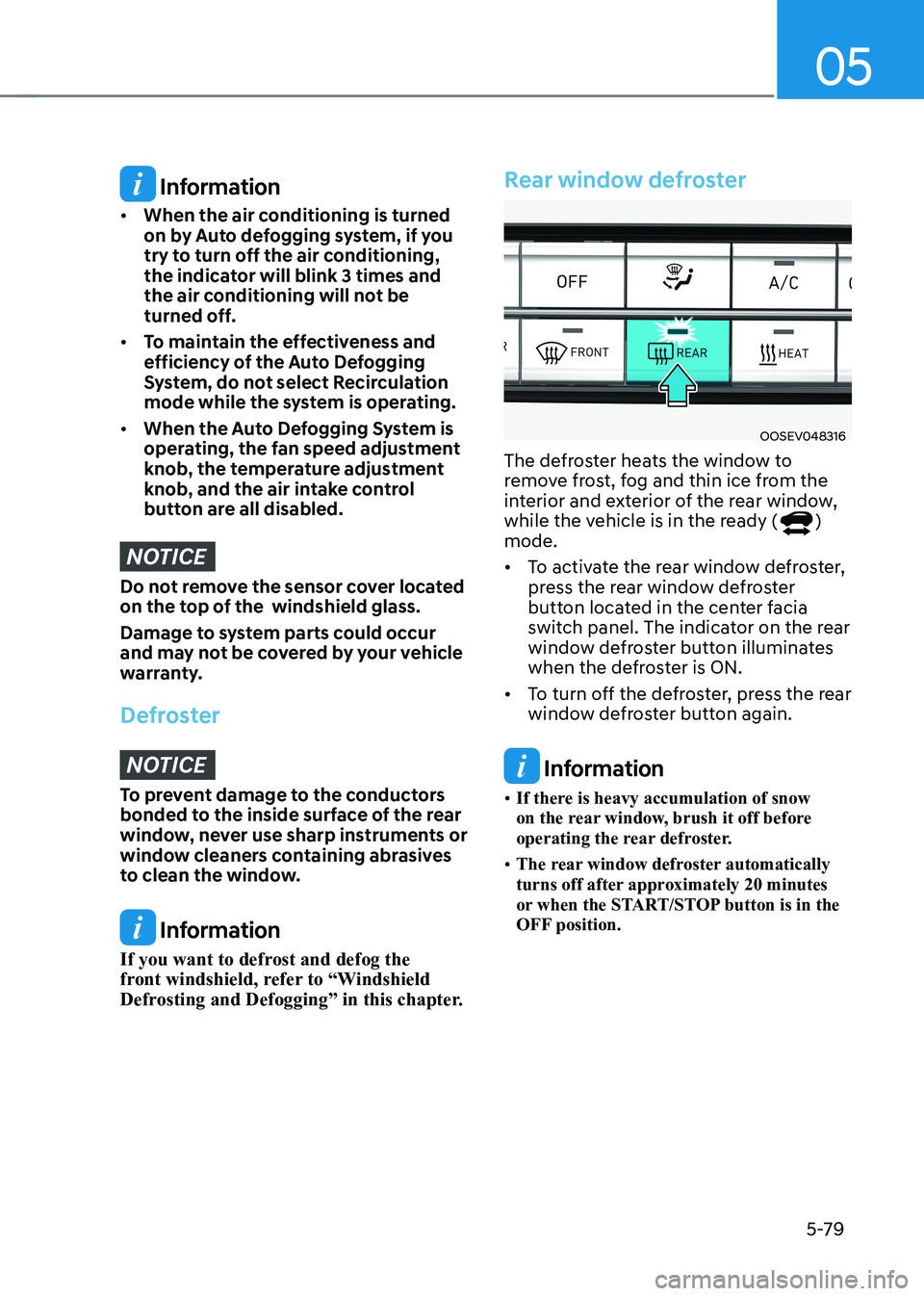
Rear window defroster
OOSEV048316
The defroster heats the window to
remove frost, fog and thin ice from the
interior and exterior of the rear window,
while the vehicle is in the ready (
)
mode. • To activate the rear window defroster,
press the rear window defroster
button located in the center facia
switch panel. The indicator on the rear
window defroster button illuminates
when the defroster is ON.
• To turn off the defroster, press the rear
window defroster button again.
Information
• If there is heavy accumulation of snow
on the rear window, brush it off before
operating the rear defroster.
• The rear window defroster automatically
turns off after approximately 20 minutes
or when the START/STOP button is in the
OFF position.
Page 271 of 548
![HYUNDAI KONA EV 2022 Owners Guide 05
5-87
Wireless cellular phone charging
system (if equipped)
OOSEV041034N
[A] : Indicator light, [B] : Charging pad
There is a wireless cellular phone charger
inside the front console.
The sy](/img/35/56171/w960_56171-270.png "HYUNDAI KONA EV 2022 Owners Guide 05
5-87
Wireless cellular phone charging
system (if equipped)
OOSEV041034N
[A] : Indicator light, [B] : Charging pad
There is a wireless cellular phone charger
inside the front console.
The sy")
05
5-87
Wireless cellular phone charging
system (if equipped)
OOSEV041034N
[A] : Indicator light, [B] : Charging pad
There is a wireless cellular phone charger
inside the front console.
The system is available when all doors
are closed, and when the START/STOP
button is in the ON position (1).
After use, to close the cover, slightly pull
down the cover.
The system is available when all doors
are closed, and when the START/STOP
button is in the ON or START position.
To charge a cellular phone
The wireless cellular phone charging
system charges only the Qi-enabled cellular phones (
). Read the label on
the cellular phone accessory cover or
visit your cellular phone manufacturer’s
website to check whether your cellular
phone supports the Qi technology.
The wireless charging process starts
when you put a Qi-enabled cellular
phone on the wireless charging unit.
1. Remove other items, including the smart key, from the wireless charging
unit. If not, the wireless charging
process may be interrupted. Place
the cellular phone on the center of
charging pad.
2. The indicator light is orange when the cellular phone is charging. The
indicator light turns green when
phone charging is complete. 3. You can turn ON or OFF the wireless
charging function in the User Settings
mode on the instrument cluster. For
further information, refer to the “User
setting mode” in chapter 4.
If your cellular phone is not charging: - Slightly change the position of the cellular phone on the charging pad.
- Make sure the indicator light is orange.
The indicator light will blink orange for 10
seconds if there is a malfunction in the
wireless charging system.
In this case, temporarily stop the
charging process, and re-attempt to
wirelessly charge your cellular phone again.
The system warns you with a message
on the LCD display if the cellular phone
is still on the wireless charging unit after
the vehicle is turned OFF and the front door is opened. • High speed wireless charging can
be activated only when the cellular
phones equipped with a wireless
charging function is on the charging pad. Information
For some manufacturers’ cellular phones, the system may not warn you even though
the cellular phone is left on the wireless
charging unit. This is due to the particular
characteristic of the cellular phone and
not a malfunction of the wireless charging.
Page 283 of 548
06
6-3
Before entering the vehicle
• Be sure all windows, outside mirror(s),
and outside lights are clean and
unobstructed.
• Remove frost, snow, or ice.
• Visually check the tires for uneven
wear and damage.
• Check under the vehicle for any sign
of leaks.
• Be sure there are no obstacles behind
you if you intend to back up.
Before starting
• Make sure the hood, the tailgate, and
the doors are securely closed and
locked.
• Adjust the position of the seat and
steering wheel.
• Adjust the inside and outside rearview
mirrors.
• Verify all the lights work.
• Fasten your seat belt. Check that all
passengers have fastened their seat belt.
• Check the gauges and indicators
in the instrument panel and the
messages on the instrument display
when the START/STOP button is in the ON position.
• Check that any items you are carrying
are stored properly or fastened down
securely.
WARNING
To reduce the risk of SERIOUS INJURY or
DEATH, take the following precautions: • ALWAYS wear your seat belt. All
passengers must be properly belted
whenever the vehicle is moving.
For more information, refer to “Seat
Belts” in chapter 3.
• Always drive defensively. Assume
other drivers or pedestrians may be
careless and make mistakes.
• Stay focused on the task of driving.
Driver distraction can cause
accidents.
• Leave plenty of space between you
and the vehicle in front of you.
WARNING
NEVER drink or take drugs and drive. Drinking or taking drugs and driving
is dangerous and may result in an
accident and SERIOUS INJURY or
DEATH. Drunk driving is the number one
contributor to the highway death
toll each year. Even a small amount
of alcohol will affect your reflexes,
perceptions and judgment. Just
one drink can reduce your ability to
respond to changing conditions and
emergencies and your reaction time
gets worse with each additional drink.
Driving while under the influence
of drugs is as dangerous or more
dangerous than driving under the
influence of alcohol.
You are much more likely to have a
serious accident if you drink or take
drugs and drive. If you are drinking or
taking drugs, don’t drive. Do not ride
with a driver who has been drinking
or taking drugs. Choose a designated
driver or call a taxi.
BEFORE DRIVING