lock Hyundai Matrix 2006 Owner's Manual
[x] Cancel search | Manufacturer: HYUNDAI, Model Year: 2006, Model line: Matrix, Model: Hyundai Matrix 2006Pages: 490, PDF Size: 11.58 MB
Page 352 of 490

1CONTROLS AND EQUIPMENT
72HATCHBACK DOOR
o Automotive fuels are flammable/
explosive materials. When refuel- ing, please note the following guidelines carefully.
o Before touching the fuel nozzle or fuel filler cap, have one's hands incontact with metal parts away from the filler neck to discharge staticelectricity.
o Do not get back in the vehicle
whilst refueling. Do not operateanything that can produce static electricity. Static electricity dis- charge can ignite fuel vapors re-sulting in explosion.
o When using a portable fuel con-
tainer be sure to place the con-tainer on the ground whilst refuel- ing. Static electricity discharge from the container can ignite fuelvapors causing a fire. Whilst start- ing refueling contact should be maintained until the filling is com-plete. o Do not use cellular phones around
a gas station. The electric currentor electronic interference from cellular phones can ignite fuel vapors causing a fire.
o When refueling always shut the engine off. Sparks by electricalequipment of the engine can ig-nite fuel vapors causing a fire. After refueling, check to make sure the fuel filler cap is securely closed,and then start the engine.
o Do not smoke or try to light ciga-
rettes around a gas station. Auto-motive fuels are flammable.
!
B540A01FC-EAT
WARNING:
The hatchback door should always be kept completely closed whilst the vehicle is in motion. If it is left open or ajar, poisonous exhaust gasesmay enter the car resulting in seri- ous illness or death to the occu- pants. See additional warnings con-cerning exhaust gases on page 2-2. B540A02FC
LOCK
UNLOCK
Page 353 of 490
1
CONTROLS AND EQUIPMENT
73
!
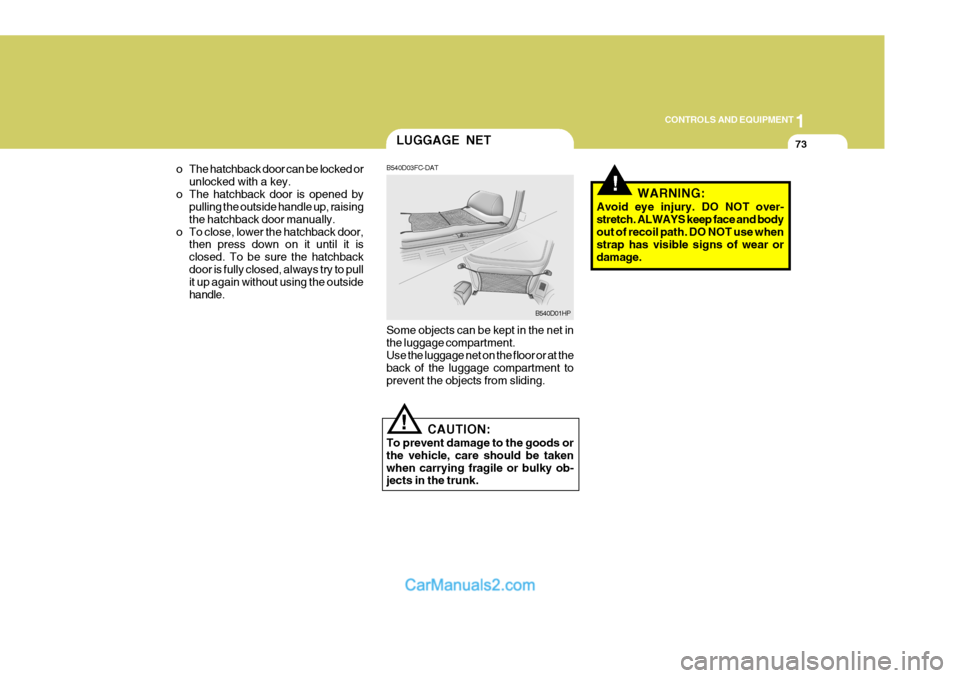
B540D03FC-DAT Some objects can be kept in the net in the luggage compartment. Use the luggage net on the floor or at the back of the luggage compartment toprevent the objects from sliding.
B540D01HP
LUGGAGE NET
CAUTION:
To prevent damage to the goods or the vehicle, care should be takenwhen carrying fragile or bulky ob- jects in the trunk. WARNING:
Avoid eye injury. DO NOT over- stretch. ALWAYS keep face and body out of recoil path. DO NOT use when strap has visible signs of wear ordamage.
o The hatchback door can be locked or
unlocked with a key.
o The hatchback door is opened by pulling the outside handle up, raisingthe hatchback door manually.
o To close, lower the hatchback door, then press down on it until it isclosed. To be sure the hatchbackdoor is fully closed, always try to pull it up again without using the outside handle.
!
Page 355 of 490

1
CONTROLS AND EQUIPMENT
75AUTO FUEL CUT SWITCH
!
To adjust the steering wheel:
1. Push the lever downward to unlock.
2. Raise or lower the steering wheel to
the desired position.
3. After adjustment, securely tighten the lever by pulling it upward
SB520A1-F
STEERING WHEEL TILT LEVER
HORN
HFC2041
WARNING:
Do not attempt to adjust the steering wheel whilst driving as this mayresult in loss of control of the vehicle and result in death or serious injury. B610A01S-EATHFC2099
Press the pad of the steering wheel to sound the horn.
!
B560B01O-GAT (Petrol Engine)
The auto fuel cut switch is located on the driver's side of the engine compartment. In the event of a collision or suddenimpact, the auto fuel cut device cuts off the fuel supply. If this device is acti- vated, it must be reset by pressing in onthe top of the switch before the engine can be restarted.
HFC4001
WARNING:
Before resetting the auto fuel cut switch, the fuel line should be checked for fuel leaks. With Airbag
Page 362 of 490

1CONTROLS AND EQUIPMENT
82
B730A01L-EAT Operation Tips
o To keep dust or unpleasant fumesfrom entering the car through the ventilation system, temporarily set the air intake control at "Recircula- tion". Be sure to return the control to"Fresh" when the irritation has passed to keep fresh air in the ve- hicle. This will help keep the driveralert and comfortable.
o Air for the heating/cooling system is
drawn in through the grilles just aheadof the windscreen. Care should be taken that these are not blocked by leaves, snow, ice or other obstruc-tions.
o To prevent interior fog on the
windscreen, set the air intake controlto the fresh air ( ) position, and fan speed to the desired position, turn on the air conditioning system,and adjust temperature control to desired temperature.AIR CONDITIONING SYSTEM
B740A01S-EAT Air Conditioning Switch (Not all models)
HFC2069
To remove the frost or exterior fog on the windscreen;
o Set the air flow control to the defrost (
) position. (The A/C will turn on
automatically and "Fresh" mode will be activated.)
o Set the temperature control to warm.
o Set the fan speed control to position
"3" or "4".
NOTE: When the A/C is operated continu- ously on the floor-defrost level (
) or
defrost level (
), it may cause fog to
form on the exterior windscreen. If this occurs, set the air flow control tothe face level position (
)and fan
speed control to the low position. HFC2108
The air conditioning is turned on or off by pushing the A/C button on the heat- ing/air conditioning control panel.
Page 366 of 490

1CONTROLS AND EQUIPMENT
86
B970C01NF-EAT Automatic Operation The FATC (Full Automatic Tempera- ture Control) system automatically con- trols the heating and cooling by doing as follows:
1. Push the "AUTO" switch. The indi-
cator light will illuminate confirming that the Face, Floor and/or Bi-Level modes as well as the blower speed and air conditioner will be controlledautomatically. 2. Turn the "TEMP" knob to set the
desired temperature.The temperature will increase to the maximum 90°F(32°C) by turning the knob clockwise.The temperature will decrease to the minimum 62°F(17°C) by turning the knob counterclockwise.
NOTE:
o If the battery has been discharged or disconnected, the temperature mode will reset to Centigrade de- gree. This is a normal condition andyou can adjust the temperature mode from Centigrade to Fahren- heit as follows; Press the "OFF" and "AUTO" but-ton simultaneously for 3 seconds.The display shows that the unit of temperature is adjusted to Centi- grade or Fahrenheit.(°C
°F or °F
°C)
HFC227 HFC229
B970C01FC-D
Photo Sensor
o Never place anything covering the photo sensor which is located inthe car on the instrument panel toensure better control of the heat- ing and cooling system.
Page 374 of 490

1CONTROLS AND EQUIPMENT
94
o Station Swapping - As a FM signalweakens, another more powerful sig- nal near the same frequency may begin to play. This is because your radio is designed to lock onto the clearest signal. If this occurs, selectanother station with a stronger sig- nal.
o Multi-Path Cancellation - Radio sig- nals being received from several di-rections can cause distortion or flut- tering. This can be caused by adirect and a reflected signal from the same station, or by signals from two stations with close frequencies. Ifthis occurs, select another station until the condition has passed. B750B02Y-AAT Using a cellular phone or a two- way radio When a cellular phone is used inside the vehicle, noise may be produced from the audio equipment. This doesnot mean that something is wrong with the audio equipment. In such a case, use the cellular phone at a place as faras possible from the audio equipment.
!
CAUTION:
When using a communication sys- tem such as a mobile phone or aradio inside the vehicle, a separate external antenna must be fitted. When a mobile phone or a radio set isused with an internal antenna alone, it may interfere with the vehicle's electrical system and adversely affectsafe operation of the vehicle.
!WARNING:
Don't use a mobile phone when you are driving, you must stop at a safe place to use a mobile phone.
B750A05L
Page 375 of 490
1
CONTROLS AND EQUIPMENT
95
!
CAUTION:
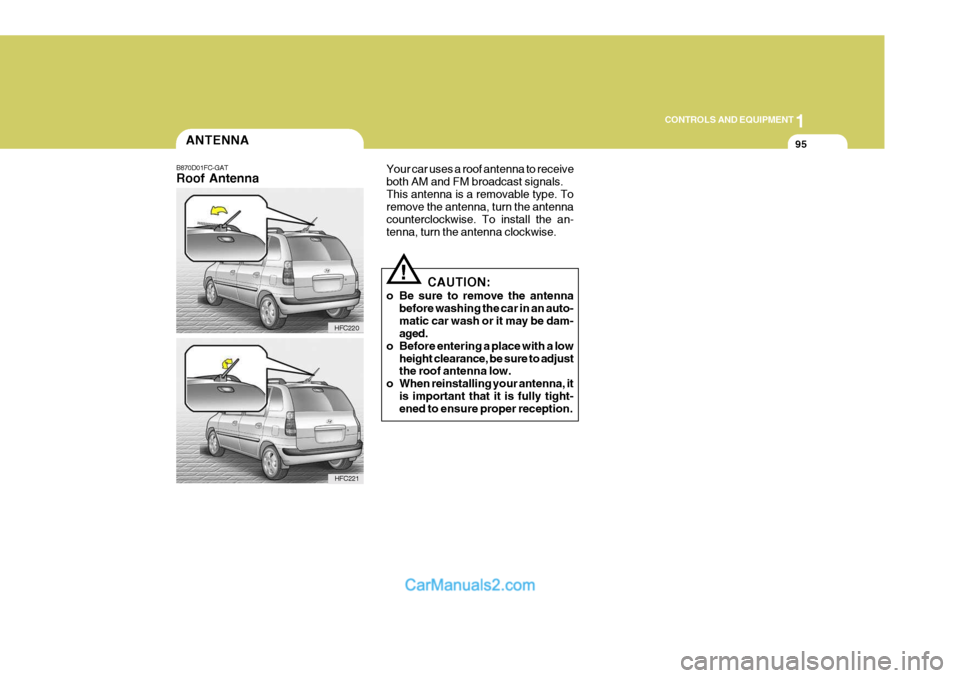
o Be sure to remove the antenna before washing the car in an auto- matic car wash or it may be dam- aged.
o Before entering a place with a low height clearance, be sure to adjustthe roof antenna low.
o When reinstalling your antenna, it is important that it is fully tight-ened to ensure proper reception.
ANTENNA
B870D01FC-GAT Roof Antenna
HFC220 Your car uses a roof antenna to receive both AM and FM broadcast signals.This antenna is a removable type. To remove the antenna, turn the antenna counterclockwise. To install the an-tenna, turn the antenna clockwise.
HFC221
Page 376 of 490

2
Before Starting the Engine ........................................... 2-3
Key Positions ................................................................ 2-4Starting......................................................................... 2-5
Manual Transaxle ......................................................... 2-8Automatic Transaxle .................................................... 2-10
Anti-Lock Brake System (ABS) ................................... 2-14
Brake Traction Control System (BTCS) ...................... 2-14
Electronic Stability Program (ESP) ..............................2-16
Driving for Economy .................................................... 2-18
Smooth Cornering ........................................................ 2-19
Winter Motoring ............................................................ 2-19
Trailer and Caravan Towing .......... ..............................2-21
DRIVING YOUR HYUNDAI
2
Page 378 of 490
2
DRIVING YOUR HYUNDAI
3
!
TO START THE ENGINEBEFORE STARTING THE ENGINE
C020A01O-EAT Before you start the engine, you should always:
1. Look around the vehicle to be sure
there are no flat tyres, puddles of oil or water or other indications of pos- sible trouble.
2. After entering the car check to be
sure the parking brake is engaged.
3. Check that all windows, and lights
are clean.
4. Check that the interior and exterior mirrors are clean and in position.
5. Check your seat, seatback and headrestraint to be sure they are intheir proper positions.
6. Close all doors.
7. Fasten your seat belt and be sure that all other occupants have fas-tened theirs.
8. Turn off all lights and accessories that are not needed. SC040A1-F COMBINATION IGNITION SWITCH AND STEERING LOCK
o If your Hyundai is equipped with a
manual transaxle, place the shift lever in neutral and depress the clutch pedal fully.
o If your Hyundai has an automatic
transaxle, place the shift lever in "P"(park).
o To start the engine, insert the ignition key and turn it to the "START" posi-tion. Release it as soon as the en- gine starts. Do not hold the key in the"START" position for more that 15 seconds.
NOTE: For safety, the engine will not start if the shift lever is not in "P" or "N" Position (automatic transaxle).
9. When you turn the ignition switch to
"ON" check that all appropriate warn- ing lights are operating and that you have sufficient fuel.
10.Check the operation of warning lights
and all bulbs when key is in the "ON"position.
WARNING (DIESEL ENGINE):
To ensure that sufficient vacuum ex- ists within the brake system during cold weather start-up conditions, it is necessary to run the engine at idle for several seconds after starting theengine.
Page 379 of 490

2 DRIVING YOUR HYUNDAI
4
!
KEY POSITIONS
SB050B1-E STEERING WHEEL LOCK When the key is removed, the steering column lock will be activated and willengage when the steering wheel is turned to the appropriate position. It is not necessary to turn the wheel until lockedeach time the key is removed since in the event of any unauthorised attempt at removal, the lock will become effec-tive as soon as the steering wheel is turned. To unlock the steering, insert the key and turn to the "ACC" position.If the steering is locked, it may be necessary to rock the steering wheel slightly to facilitate turning the key.Under no circumstances should the key be forced since breakage of the key will occur.
NOTE: Do not hold the key in the "START" position for more than 15 seconds.
o "ON" When the key is at the "ON" position, the ignition and all accessories are available for use. If the engine is not running, the keyshould not be left at this position since the battery will become discharged and damage to the ignition system mayalso result. For information regarding engine starting, refer to "STARTING THE ENGINE".
o "ACC" When the ignition key is at the "ACC" position, the radio and other accesso- ries may be used.
o "LOCK" The ignition key may only be inserted or removed at this position.
SC050A2-E
C040A01E
LOCK
ACC
ON
START
WARNING:
The engine must never be turned offand the key removed from the igni- tion key cylinder whilst the vehicle is in motion since the steering lock willoperate and control of the vehicle will be lost.
o "START" The engine is started in this position. It will crank until you release the key.