parking brake HYUNDAI PALISADE 2022 Service Manual
[x] Cancel search | Manufacturer: HYUNDAI, Model Year: 2022, Model line: PALISADE, Model: HYUNDAI PALISADE 2022Pages: 663, PDF Size: 15.74 MB
Page 458 of 663
5-124
Driving your vehicle
Take the following precautions
when using Rear Cross-Traffic
Collision-Avoidance Assist:
For your safety, change the
Settings after parking the
vehicle at a safe location.
If any other system’s warning
message is displayed or audi-
ble warning is generated,
Rear Cross-Traffic Collision-
Avoidance Assist’s warning
message may not be dis-
played and audible warning
may not be generated.
You may not hear the warning
sound of Rear Cross-Traffic
Collision-Avoidance Assist if
the surrounding is noisy.
Rear Cross-Traffic Collision-
Avoidance Assist may not
operate if the driver applies
the brake pedal to avoid colli-
sion.
During Rear Cross-Traffic
Collision-Avoidance Assist
operation, the vehicle may
stop suddenly injuring pas-
sengers and shifting loose
objects. Always have the seat
belt on and keep loose
objects secured.
Even if there is a problem with
Rear Cross-Traffic Collision-
Avoidance Assist, the vehi-
cle’s basic braking perform-
ance will operate normally.
Rear Cross-Traffic Collision-
Avoidance Assist does not
operate in all situations or
cannot avoid all collisions.
During emergency braking,
braking control by the system
will automatically cancel
when the driver excessively
depresses the accelerator
pedal.The driver should hold the
responsibility to control the
vehicle. Do not solely depend
on Rear Cross-Traffic
Collision-Avoidance Assist.
Rather, maintain a safe brak-
ing distance, and if necessary,
depress the brake pedal to
reduce driving speed or to
stop the vehicle.
Never deliberately operate
Rear Cross-Traffic Collision-
Avoidance Assist on people,
animal, objects, etc. It may
cause serious injury or death.WARNING
Page 461 of 663
5-127
Driving your vehicle
5
Limitations of Rear Cross-Traffic Collision-AvoidanceAssist
Rear Cross-Traffic Collision-
Avoidance Assist may not operate
normally, or the function may operate
unexpectedly under the following cir-
cumstances:
Departing from where trees or
grass are overgrown
Departing from where roads are wet
Speed of the approaching vehicle is fast or slow Braking control may not work, dri-
ver’s attention is required in the fol-
lowing circumstances:
The vehicle severely vibrates while
driving over a bumpy road, uneven
road or concrete patch
Driving on a slippery surface due to snow, water puddle, ice, etc.
The tire pressure is low or a tire is damaged
The brake is reworked
Remote Smart Parking Assist is operating (if equipped)
For more details on the limita-
tions of the rear corner radar,
refer to “Blind-Spot Collision-
Avoidance Assist (BCA)” sec-
tion in chapter 5.
CAUTION
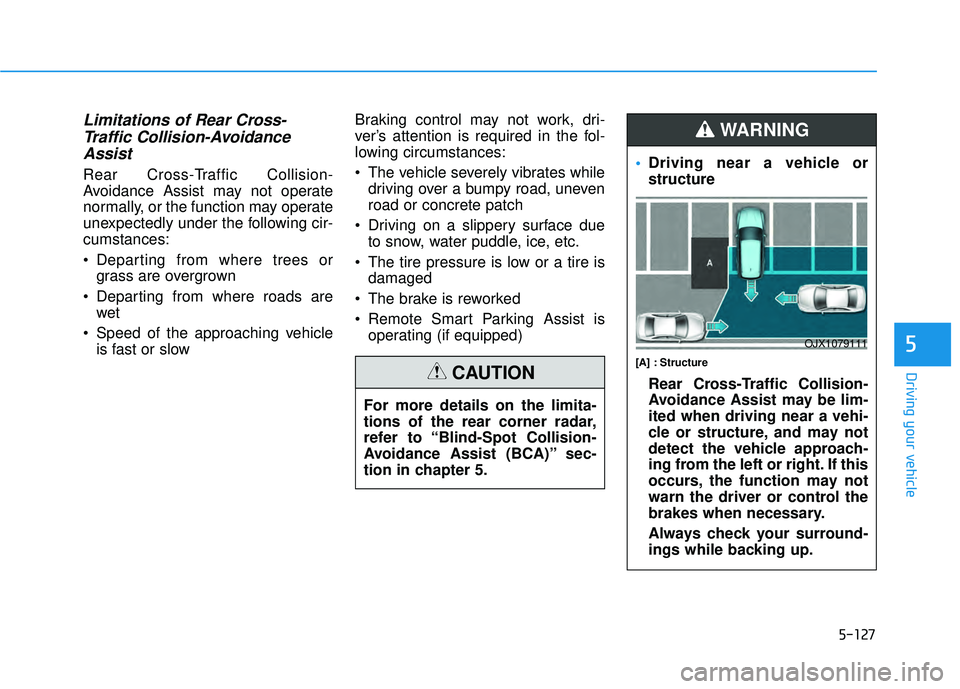
Driving near a vehicle or
structure
[A] : Structure
Rear Cross-Traffic Collision-
Avoidance Assist may be lim-
ited when driving near a vehi-
cle or structure, and may not
detect the vehicle approach-
ing from the left or right. If this
occurs, the function may not
warn the driver or control the
brakes when necessary.
Always check your surround-
ings while backing up.
WARNING
OJX1079111
Page 462 of 663
5-128
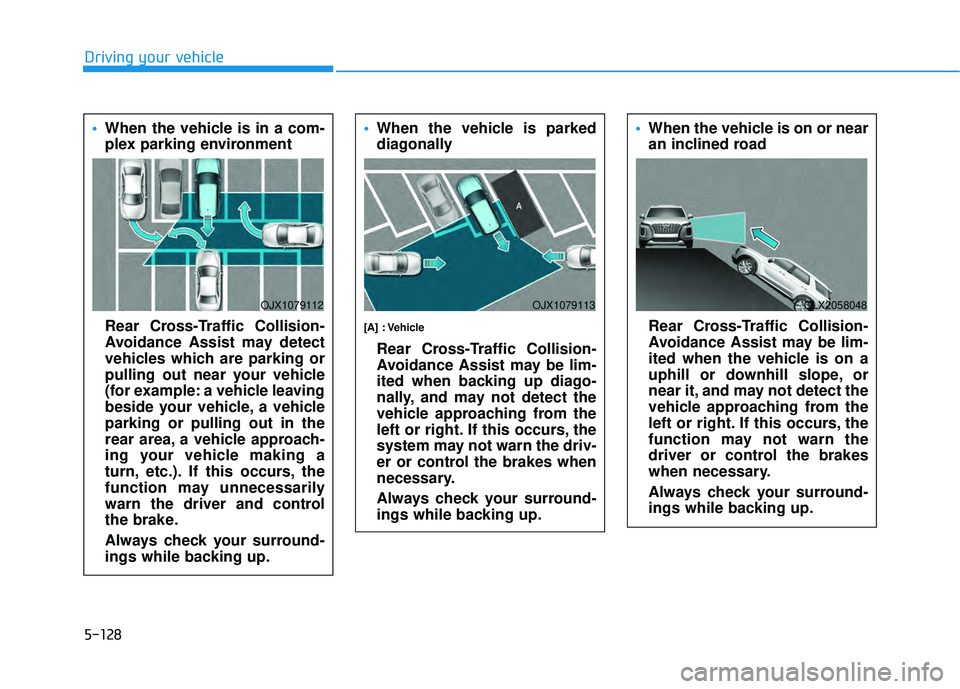
Driving your vehicle When the vehicle is in a com-
plex parking environment
Rear Cross-Traffic Collision-
Avoidance Assist may detect
vehicles which are parking or
pulling out near your vehicle
(for example: a vehicle leaving
beside your vehicle, a vehicle
parking or pulling out in the
rear area, a vehicle approach-
ing your vehicle making a
turn, etc.). If this occurs, the
function may unnecessarily
warn the driver and control
the brake.
Always check your surround-
ings while backing up.
OJX1079112
When the vehicle is parked
diagonally
[A] : Vehicle
Rear Cross-Traffic Collision-
Avoidance Assist may be lim-
ited when backing up diago-
nally, and may not detect the
vehicle approaching from the
left or right. If this occurs, the
system may not warn the driv-
er or control the brakes when
necessary.
Always check your surround-
ings while backing up.
OJX1079113
When the vehicle is on or near
an inclined road
Rear Cross-Traffic Collision-
Avoidance Assist may be lim-
ited when the vehicle is on a
uphill or downhill slope, or
near it, and may not detect the
vehicle approaching from the
left or right. If this occurs, the
function may not warn the
driver or control the brakes
when necessary.
Always check your surround-
ings while backing up.
OLX2058048
Page 463 of 663
5-129
Driving your vehicle
5
When you are towing a trailer
or another vehicle, we recom-
mend that Rear Cross-Traffic
Collision-Avoidance Assist is
turned off due to safety rea-
sons.
Rear Cross-Traffic Collision-
Avoidance Assist may not
operate normally if interfered
by strong electromagnetic
waves.
Rear Cross-Traffic Collision-
Avoidance Assist may not
operate for 15 seconds after
the vehicle is started, or the
rear corner radars are initial-
ized.
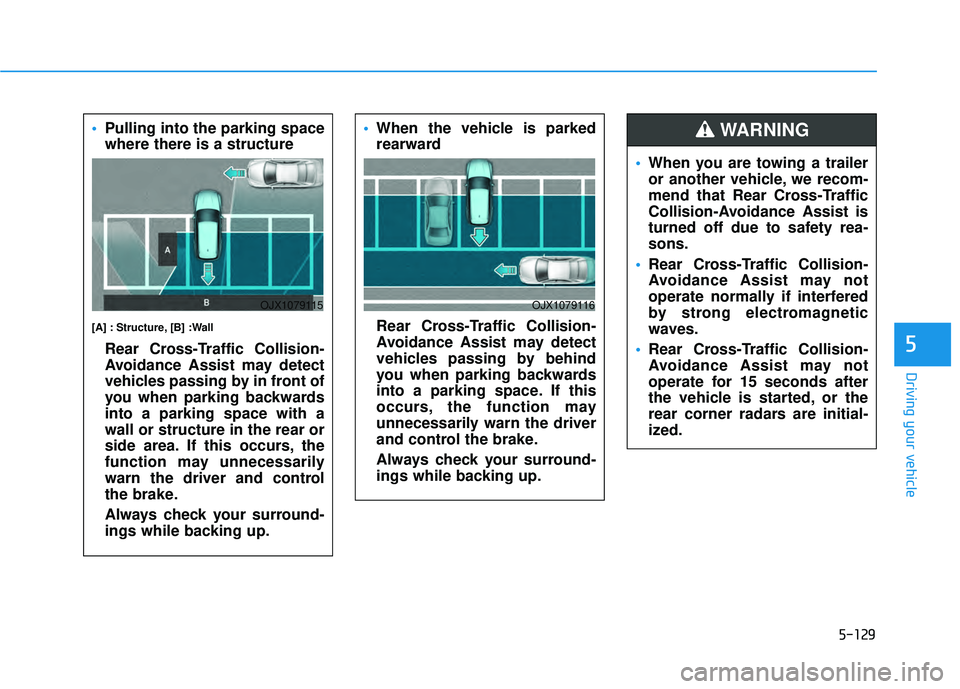
WARNING Pulling into the parking space
where there is a structure
[A] : Structure, [B] :Wall
Rear Cross-Traffic Collision-
Avoidance Assist may detect
vehicles passing by in front of
you when parking backwards
into a parking space with a
wall or structure in the rear or
side area. If this occurs, the
function may unnecessarily
warn the driver and control
the brake.
Always check your surround-
ings while backing up.
OJX1079115
When the vehicle is parked
rearward
Rear Cross-Traffic Collision-
Avoidance Assist may detect
vehicles passing by behind
you when parking backwards
into a parking space. If this
occurs, the function may
unnecessarily warn the driver
and control the brake.
Always check your surround-
ings while backing up.
OJX1079116
Page 490 of 663
5-156
Driving your vehicle
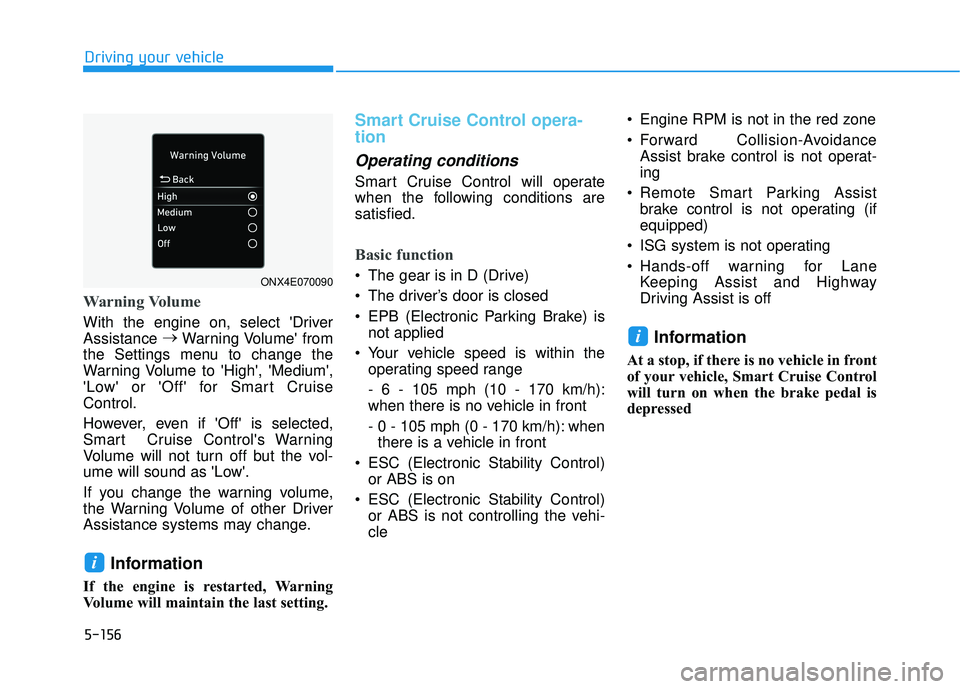
Warning Volume
With the engine on, select 'Driver
Assistance →
Warning Volume' from
the Settings menu to change the
Warning Volume to 'High', 'Medium',
'Low' or 'Off' for Smart Cruise
Control.
However, even if 'Off' is selected,
Smart Cruise Control's Warning
Volume will not turn off but the vol-
ume will sound as 'Low'.
If you change the warning volume,
the Warning Volume of other Driver
Assistance systems may change.
Information
If the engine is restarted, Warning
Volume will maintain the last setting.
Smart Cruise Control opera-
tion
Operating conditions
Smart Cruise Control will operate
when the following conditions are
satisfied.
Basic function
The gear is in D (Drive)
The driver’s door is closed
EPB (Electronic Parking Brake) is not applied
Your vehicle speed is within the operating speed range
- 6 - 105 mph (10 - 170 km/h):
when there is no vehicle in front
- 0 - 105 mph (0 - 170 km/h): whenthere is a vehicle in front
ESC (Electronic Stability Control) or ABS is on
ESC (Electronic Stability Control) or ABS is not controlling the vehi-
cle Engine RPM is not in the red zone
Forward Collision-Avoidance
Assist brake control is not operat-
ing
Remote Smart Parking Assist brake control is not operating (if
equipped)
ISG system is not operating
Hands-off warning for Lane Keeping Assist and Highway
Driving Assist is off
Information
At a stop, if there is no vehicle in front
of your vehicle, Smart Cruise Control
will turn on when the brake pedal is
depressed
i
i
ONX4E070090
Page 493 of 663
5-159
Driving your vehicle
5
Smart Cruise Control temporari-ly canceled
Smart Cruise Control will be tem-
porarily canceled automatically
when:
The vehicle speed is above 105
mph (170 km/h)
The vehicle is stopped for a certain period of time
The accelerator pedal is continu- ously depressed for a certain peri-
od of time
The conditions for the Smart Cruise Control to operate is not
satisfied If Smart Cruise Control is temporari-
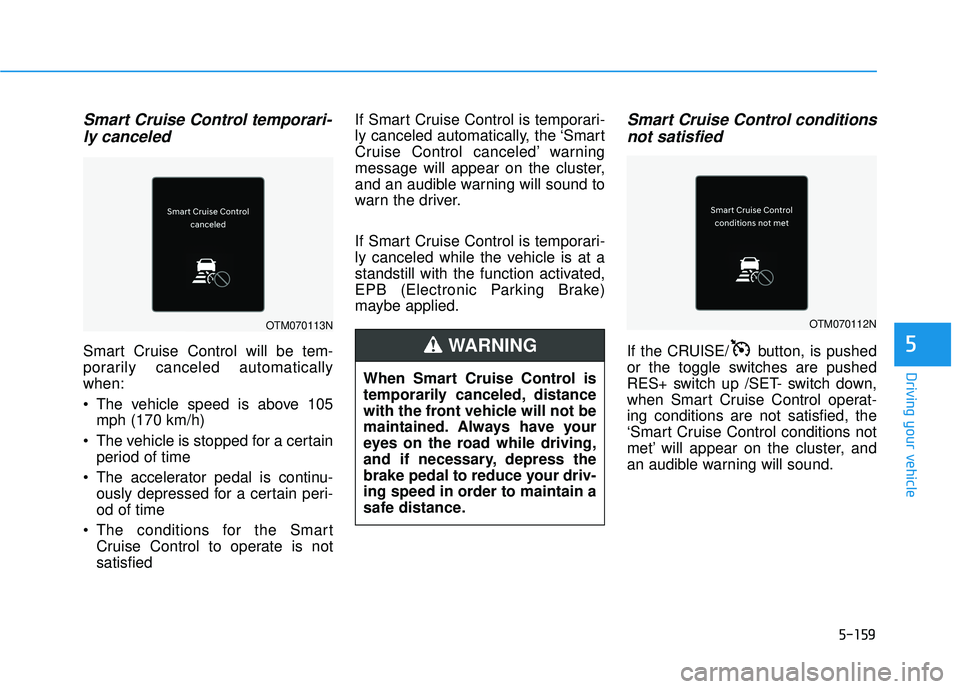
ly canceled automatically, the ‘Smart
Cruise Control canceled’ warning
message will appear on the cluster,
and an audible warning will sound to
warn the driver.
If Smart Cruise Control is temporari-
ly canceled while the vehicle is at a
standstill with the function activated,
EPB (Electronic Parking Brake)
maybe applied.
Smart Cruise Control conditions
not satisfied
If the CRUISE/ button, is pushed
or the toggle switches are pushed
RES+ switch up /SET- switch down,
when Smart Cruise Control operat-
ing conditions are not satisfied, the
‘Smart Cruise Control conditions not
met’ will appear on the cluster, and
an audible warning will sound.
When Smart Cruise Control is
temporarily canceled, distance
with the front vehicle will not be
maintained. Always have your
eyes on the road while driving,
and if necessary, depress the
brake pedal to reduce your driv-
ing speed in order to maintain a
safe distance.
WARNING
OTM070112NOTM070113N
Page 517 of 663
5-183
Driving your vehicle
5
Damage to your vehicle caused by
improper tire chain use is not cov-
ered by your vehicle manufacturer’s
warranty.Information
• Install tire chains on both left andright front tires. It should be noted
that installing tire chains on the
tires will provide a greater driving
force, but will not prevent side
skids.
• Do not install studded tires without first checking local, state and
municipal regulations for possible
restrictions against their use.
Chain installation
When installing tire chains, follow the
manufacturer’s instructions and
mount them as tightly possible. Drive
slowly (less than 20 mph (30 km/h))
with chains installed. If you hear the
chains contacting the body or chas-
sis, stop and tighten them. If they still
make contact, slow down until the
noise stops. Remove the tire chains
as soon as you begin driving on
cleared roads.
When mounting snow chains, park
the vehicle on level ground away
from traffic. Turn on the vehicle
Hazard Warning Flasher and place a
triangular emergency warning device
behind the vehicle (if available).
Always place the vehicle in P (Park),
apply the parking brake and turn off
the engine before installing snow
chains.i
The use of tire chains may
adversely affect vehicle han-
dling:
Drive less than 20 mph
(30 km/h) or the chain manu-
facturer's recommended speed
limit, whichever is lower.
Drive carefully and avoid
bumps, holes, sharp turns,
and other road hazards, which
may cause the vehicle to
bounce.
Avoid sharp turns or locked
wheel braking.
WARNING
Page 519 of 663
5-185
Driving your vehicle
5
Check spark plugs and ignitionsystem
Inspect your spark plugs as
described in chapter 7 and replace
them if necessary. Also check all
ignition wiring and components to be
sure they are not cracked, worn or
damaged in any way.
Use approved window washeranti-freeze in system
To keep the water in the window
washer system from freezing, add an
approved window washer anti-freeze
solution in accordance with instruc-
tions on the container. Window wash-
er anti-freeze is available from an
authorized HYUNDAI dealer and
most auto parts outlets. Do not use
engine coolant or other types of anti-
freeze as these may damage the
paint finish.
Do not let your parking brakefreeze
Under some conditions your parking
brake can freeze in the engaged
position. This is most likely to happen
when there is an accumulation of
snow or ice around or near the rear
brakes or if the brakes are wet. If
there is a risk the parking brake may
freeze, apply it only temporarily while
you put the gear in P and block the
rear wheels so the car cannot roll.
Then release the parking brake.
Do not let ice and snow accu-mulate underneath
Under some conditions, snow and
ice can build up under the fenders
and interfere with the steering. When
driving in severe winter conditions
where this may happen, you should
periodically check underneath the
car to be sure the movement of the
front wheels and the steering com-
ponents is not obstructed.
Don't place foreign objects ormaterials in the engine com-partment
Placement of foreign object or mate-
rials which prevent cooling of the
engine, in the engine compartment,
may cause a failure or combustion.
The manufacturer is not responsible
for the damage caused by such
placement.
To keep locks from freezing
To keep the locks from freezing,
squirt an approved de-icer fluid or
glycerine into the key opening. If a
lock is covered with ice, squirt it with
an approved de-icing fluid to remove
the ice. If the lock is frozen internally,
you may be able to thaw it out by
using a heated key. Handle the heat-
ed key with care to avoid injury.
Page 525 of 663
5-191
Driving your vehicle
5
Driving on hills
Reduce speed and shift to a lower
gear before you start down a long or
steep downgrade. If you don't shift
down, you might have to use your
brakes so much that they would get
overheated and may not operate effi-
ciently.
On a long uphill grade, shift down
and reduce your speed to around 45
mph (70 km/h) to reduce the possi-
bility of engine and transmission
overheating.
If your trailer weighs more than the
maximum trailer weight without trailer
brakes, you should drive in D (Drive)
when towing a trailer. Operating your
vehicle in D (Drive) when towing a
trailer will minimize heat build-up and
extend the life of your transmission.To prevent engine and/or trans-
mission overheating:
When towing a trailer on steep
grades (in excess of 6%) pay
close attention to the engine
coolant temperature gauge to
ensure the engine does not
overheat. If the needle of the
coolant temperature gauge
moves towards "H" (HOT), pull
over and stop as soon as it is
safe to do so, and allow the
engine to idle until it cools
down. You may proceed once the
engine has cooled sufficiently.
When towing a trailer, your vehi- cle speed may be much slower
than the general flow of traffic,
especially when climbing an
uphill grade. Use the right hand
lane when towing a trailer on an
uphill grade. Choose your vehi-
cle speed according to the max-
imum posted speed limit for
vehicles with trailers, the steep-
ness of the grade, and your trail-
er weight.
Parking on hills
Generally, if you have a trailer attached
to your vehicle, you should not park
your vehicle on a hill.
However, if you ever have to park your
trailer on a hill, here's how to do it:
1. Pull the vehicle into the parking area.
Turn the steering wheel in the direction of the curb (right if head-
ed down hill, left if headed up hill).
2. Shift the vehicle to P (Park).
3. Set the parking brake and shut off the vehicle.
4. Place wheel chocks under the trailer wheels on the down hill side
of the wheels.
NOTICE
Page 526 of 663
5-192
Driving your vehicle
5. Start the vehicle, apply the brakes, shift to neutral, release the park-
ing brake and slowly release the
brakes until the trailer chocks
absorb the load.
6. Reapply the brakes and parking brakes.
7. Move the shift lever to P (Park).
8. Shut off the vehicle and release the vehicle brakes but leave the
parking brake set.
Driving the vehicle after it hasbeen parked on a hill
1. With the gear shift lever in P
(Park), apply the brakes and hold
the brake pedal down while per-
forming the following:
and
2. Slowly remove your foot from the brake pedal.
3. Drive slowly until the trailer is clear of the chocks.
4. Stop and have someone pick up and store the chocks.
Maintenance when trailer tow-
ing
Your vehicle will need service more
often when you regularly pull a trail-
er. Important items to pay particular
attention to include engine oil, auto-
matic transmission fluid, axle lubri-
cant and cooling system fluid. Brake
condition is another important item to
frequently check. If you're trailering,
it’s a good idea to review these items
before you start your trip. Don't forget
to also maintain your trailer and
hitch. Follow the maintenance sched-
ule that accompanied your trailer and
check it periodically. Preferably,
inspect the vehicle and trailer at the
start of each day's driving. Inspect
the hitch mounting to make sure the
hitch is properly secured to the vehi-
cle. Inspect the trailer electrical
wiring to make sure brake lights, turn
signal lights, running lights, and haz-
ard lights are working properly.
Do not get out of the vehicle
without the parking brake
firmly set. If you have left the
engine running, the vehicle
can move suddenly. You and
others could be seriously or
fatally injured.
Do not apply the accelerator
pedal to hold the vehicle on
an uphill.
WARNING