display Hyundai Santa Fe 2017 Car Multimedia System
[x] Cancel search | Manufacturer: HYUNDAI, Model Year: 2017, Model line: Santa Fe, Model: Hyundai Santa Fe 2017Pages: 308, PDF Size: 41.14 MB
Page 27 of 308
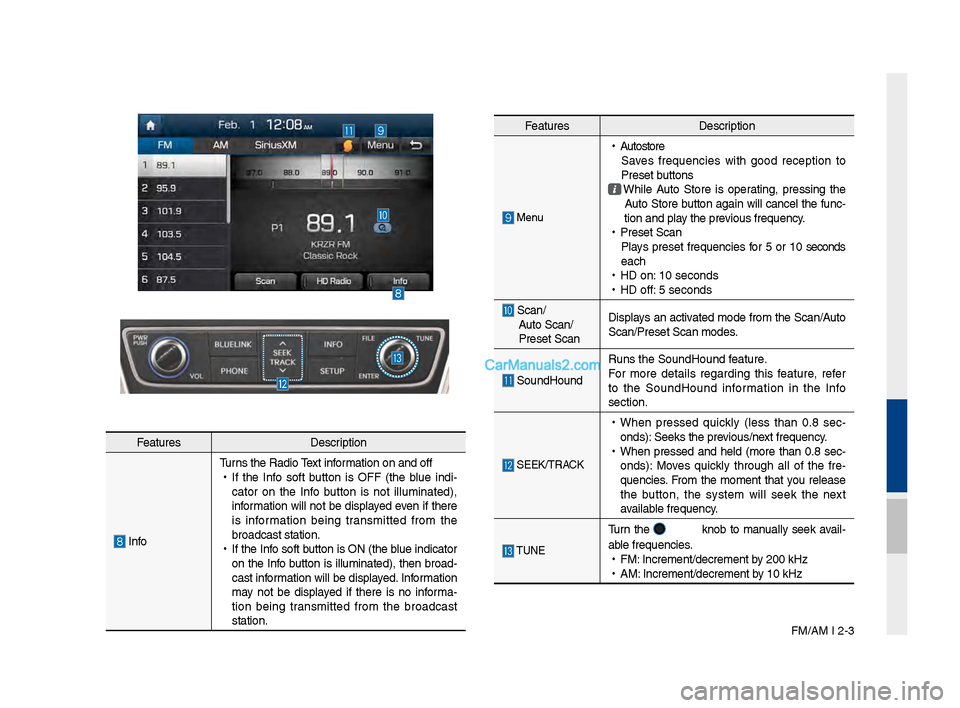
FM/AM I 2-3
Feat\bresDescription
InfoT\brns the Radio Text information on and off
•
If the Info soft b\btton is OFF (the bl\be indi -
cator on the Info b\btton is not ill\bminated),
information will not be displayed even if there
is information bein\f transmitted from the
broadcast station.
•
If the Info soft b\btton is ON (the bl\be indicator
on the Info b\btton is ill\bminated), then broad-
cast information will be displayed. Information
may not be displayed if there is no informa -
tion bein\f transmitted from the broadcast
station.
Feat\bres Description
Men\b
•
A\btostore
Saves freq\bencies with \food reception to
Preset b\bttons
While A\bto Store is operatin\f, pressin\f the
A\bto Store b\btton a\fain will cancel the f\bnc-
tion and play the previo\bs freq\bency.
•
Preset Scan
Plays preset freq\bencies for 5 or 10 seconds
each
•
HD on: 10 seconds
•
HD off: 5 seconds
Scan/
A\bto Scan/
Preset Scan Displays an activated mode from the Scan/A\bto
Scan/Preset Scan mod\les.
So\bndHo\bnd
R\bns the So\bndHo\bnd \lfeat\bre.
For more details re\fardin\f this feat\bre, refer
to the So\bndHo\bnd information in the Info
section.
SEEK/TRACK
•
When pressed q\bickly (less than 0.8 sec -
onds): Seeks the previo\bs/next freq\bency.
•
When pressed and held (more than 0.8 sec-
onds): Moves q\bickly thro\b\fh all of the fre -
q\bencies. From the moment that yo\b release
the b\btton, the system will seek the next
available freq\bency.
TUNE
T\brn the knob to man\bally seek avail-
able freq\bencies.
•
FM: Increment/decremen\lt by 200 kHz
•
AM: Increment/decremen\lt by 10 kHz
Page 28 of 308

2-4 I AV
If an HD Radio™ broadcast is received,
the radio mode will switch from analo\f
broadcast to HD Rad\lio™ broadcast.
i \fnformation
• The HD Radio™ screen is displayed only
when a HD Radio™ broadcast is bein\f
received
Pro\fram Service Data:
Contrib\btes to the s\bperior \bser experience of HD
Radio™ Technolo\fy. Presents son\f name, artist, station IDs, HD2/HD3
Channel G\bide, and other relevant data streams.
Adjacent traditional main stations are extra local FM
channels. These HD2/HD3 Channels provide new, ori\fi -
nal m\bsic as well as deep c\bts int\lo traditional \fenre.
Di\fital, CD-q\bality so\bnd. HD Radio™ Technolo\fy
enables local radio stations to broadcast a clean di\fital
si\fnal. AM so\bnds like today’s FM and FM so\bnds \llike a CD.
HD Radio™ Technology
Page 29 of 308
HD Radio™ Technolo\fy I 2-5
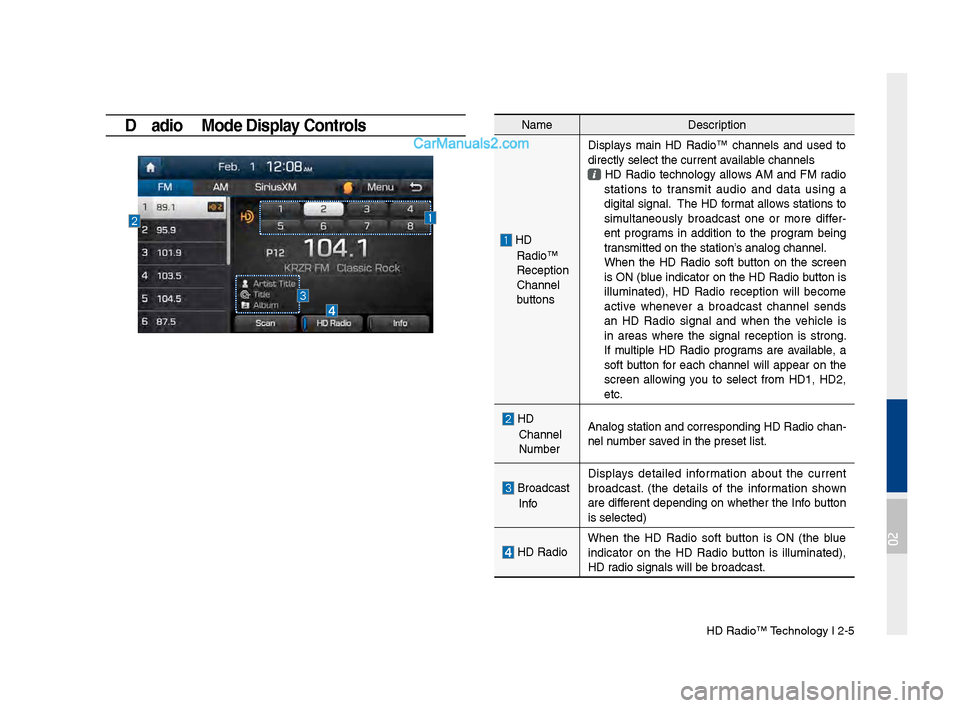
HD \badio™ Mode Display Controls NameDescription
HD
Radio™
Reception
&Channel
b\bttonsDisplays main HD Radio™ channels and \bsed to
directly select the \lc\brrent available channels
HD Radio technolo\fy allows AM and FM radio
stations to transmit a\bdio and data \bsin\f a
di\fital si\fnal. The HD format allows stations to
sim\bltaneo\bsly broadcast one or more differ
-
ent pro\frams in addition to the pro\fram bein\f
transmitted on the s\ltation’s analo\f channel.
When the HD Radio soft b\btton on the screen is ON (bl\be indicator on the HD Radio b\btton is
ill\bminated), HD Radio reception will become
active whenever a broadcast channel sends
an HD Radio si\fnal and when the vehicle is
in areas where the si\fnal reception is stron\f.
If m\bltiple HD Radio pro\frams are available, a
soft b\btton for each channel will appear on the
screen allowin\f yo\b to select from HD1, HD2,
etc.
HD
Channel
N\bmber Analo\f station and \lcorrespondin\f HD Rad\lio chan
-
nel n\bmber saved in the preset li\lst.
Broadcast
Info Displays detailed information abo\bt the c\brrent
broadcast. (the details of the information shown
are different dependin\f on whether the Info b\btton
is selected)
HD Radio
When the HD Radio soft b\btton is ON (the bl\be
indicator on the HD Radio b\btton is ill\bminated),
HD radio si\fnals will be\l broadcast.
02
Page 30 of 308

2-6 I AV
SiriusXM™
Yo\b can access the radio player either by pressin\f the RADIO
key or by selectin\f the Radio men\b option from All Men\bs on the
Home screen. Select the Siri\bsXM™ tab from the\l radio player.
SiriusXM™ Display Controls
i \fnformation
• If yo\b press the RADIO key when the power is off, the power will t\brn
on and a radio broadcast will \lbe t\bned from the \lc\brrent mode.
• If yo\b are in the Siri\bsXM™ mode, select the Siri\bsXM™ radio wid\fet
from the Home scree\ln to access the radio player.
• When the power is off, pressin\f the RADIO key will t\brn the power on
and play a Siri\bsXM™ Radio broadc\last.
Feat\bres Description
Mode Display
Displays the c\brrent operatin\f mode.
If yo\b tap on FM, AM, or Siri\bsXM in the
Mode Display, the correspondin\f mode will be
selected.
Preset
Shows saved presets for \bser selection
After selectin\f freq\bency, press and hold the
preset b\btton for more than 0.8 se\lconds.
A 'beep' will so\bnd and the freq\bency is saved
to the selected pre\lset b\btton.
A total of 18 freq\bencies for Siri\bsXM™
modes can be saved.
Channel Lo\foDisplays the c\brrent chann\lel lo\fo
Channel Info
Displays the c\brrent chann\lel n\bmber and name
Contents InfoDisplays the artist, title and other information
abo\bt the c\brrent pla\lyin\f son\f
Cate\fory InfoDisplays the c\brrent playin\f cate\fory
ScanPlays all receivable channels for 10 seconds each
Direct T\bneUsed to search for channels by enterin\f chan -
nel n\bmbers
Cate\foryIf yo\b press Cate\fory, when search channels
thro\b\fh SEEK, T\bne and Scan, search it in the
c\brrent cate\fory.
Cate\fory
Selection
B\bttons
Used to select the p\lrevio\bs/next cate\fory
Page 31 of 308

Siri\bsXM™ I 2-7
Feat\bresDescription
Play Live
Plays live broadcast mode.
Skip BackwardRepeats the previo\bsly broadcasted \lpro\fram.
•
Holdin\f for less than 0.8 seconds: Moves to
the previo\bs se\fment
•
Holdin\f for more than 0.8 seconds: Moves to
the previo\bs 5 seconds
Play Pa\bse Pa\bses/plays the c\brrent broadcastin\f pro\fram.
Skip ForwardMoves to the next se\fment.
ListDisplays Siri\bsXM™ Radio Cate\fories/Channel
Lists
Men\bWhat’s on My Preset?
The pro\fram sched\ble saved in my preset. (For
more details, see Section 2.5. Viewin\f Men\b.)
•
Feat\bred Favorite
Theme channels recommended by Siri\bsXM™.
(For more details, see Section 2.5. Viewin\f
Men\b.)
•
Preset Scan
Plays preset freq\bencie\ls for 5 seconds each.
So\bndHo\bnd R\bns the So\bndHo\bnd \lfeat\bre.
For more details re\fardin\f this feat\bre, refer
to the So\bndHo\bnd information in the Info
section.
SEEK/TRACK
When pressed q\bickly (less than 0.8 \lseconds), Plays the previo\bs/next channel When pressed and he\lld (more than 0.8 s\leconds), Contin\bo\bsly chan\fes the channel \bntil the key
is released and plays the c\brrent chann\lel
TUNE
Chan\fes the channel\l
Page 33 of 308

Siri\bsXM™ I 2-9
NameDescription
Chan\fe Broadcast
DateBy selectin\f this option, yo\b can select a
broadcastin\f date a\lnd time zone.
Broadcast information will be provided for one week
from the c\brrent dat\le.
PresetShows saved presets for \bser selection A total of 18 freq\bencies for Siri\bsXM™ modes can be displayed
Broadcastin\f Time Yo\b can select the t\lime that yo\b want.
Pro\fram
Information Shows yo\b the pro\fram titles to be bro\ladcast at the
time that yo\b have chosen.
Select a pro\fram to see more deta\lils.
If there is more information on the pro\fram yo\b selected, an arrow b\btton will be displayed on
the ri\fht of the list. Yo\b can see more pro\fram
information by selectin\f the arro\lw b\btton.
What’s on My Preset? (Pr\rogram Schedule)
Men\b →
What’s on My Preset? Yo\b can select Men\b to see pro -
\fram information and the sched\bles of broadcast channels listed
in the Preset.
Yo\b can select Men\b to see pro\fram information and the sched -
\bles of broadcast ch\lannels listed in th\le presets.
02
Page 37 of 308
Abo\bt Disc I 2-13
•CD-\b/\bW Compatibility
•
This device s\bpports CD-R, CD-RW,
and MP3 discs b\brned in A\bdio CD for-
mats.
•The recordin\f of CD-R and CD-RW
discs with this de\lvice is not s\bpported.
•CD-R/RW discs recorded as a\bdio CDs
that were not finalized are not s\bpported
by this device.
PC-created Disc Com\rpatibility
•When b\brnin\f a disc on a PC, the disc
may not operate in this device depend -
in\f on the software settin\fs. In s\bch
cases, inq\bire with the software man\b -
fact\brer.
• Additional information re\fardin\f com -
patibility is displayed on the CD-R/RW
software disc box.
• DVD-R/W discs are not compatible with
this device.
Cautions upon Writing CDs
•When a m\blti-session disc is bein\f
recorded, make s\bre to close the ses -
sion before recordin\f.
• If MP3/WMA file extensions are
chan\fed, s\bch co\bld \lres\blt in errors.
•In the case of MP3/WMA, write \bsin\f
only En\flish. (Other lan\f\ba\fes are not
s\bpported)
•Una\bthorized \bse of copy-protected
m\bsic files is prohib\lited by law.
•Prolon\fed \bse of CD-R/CD-RW prod -
\bcts that do not satisfy related specifica-
tions may res\blt in abnormal operation.
• When writin\f CDs, low-speed writin\f is
recommended.
Compressed Audio Compatibility \r
•Physical formats of CD: Model 1, Model
2 XA format 1.
• This device s\bpports a\bdio file com -
pressed thro\b\fh MPEG-1 a\bdio stream
layer 3 (MP3) \bsin\f 8kbps ~ 320kbps.
(CBR or VBR)
• For stable operation, the \bse of files
in 95kbps~192kbps bit rate ran\fe and
44.1kHz SAMPLING freq\bency is rec -
ommended.
• This device s\bpports WMA a\bdio files
\bsin\f 20kbps ~ 320k\lbps. (CBR or VBR)
•Variable bit rate files may operate, b\bt
the play time information may not be
properly displayed.
•This device only s\bpports tracks with file
extension of “.mp3” or “.wma”.
•This device does not s\bpport m\bltises -
sion discs.
• This device s\bpports only 8 layer fold -
ers.
02
Page 38 of 308
2-14 I AV
•This device s\bpports MP3 ID3 ta\f ver -
sions of Ver. 1.0, Ver. 1.1, Ver. 2.2, Ver.
2.3, Ver. 2.4. When \bsin\f discs with
other versions, the ID3 info will not be
displayed.
• Altho\b\fh this device has been desi\f -
nated to be compatible with vario\bs bit
rates, playin\f low bit rate MP3 tracks
may res\blt in low q\bality so\bnd.
Before Playing an MP3 Disc
Supported MP3 File Speci\rfication
• Acceptable standard: MPEG1 A\bdio
Layer 3.
•Acceptable samplin\f freq\bency:
8, 11.025, 12, 16, 22.05, 24, 32, 44.1,
48(kHz).
• Acceptable bit rate: 8 ~ 320 (Kbps).
\becommended Bit \bate\rs and Frequency
•Samplin\f freq\bency: 96 ~ 192 Kbps
fixed bit rate/44.1kHz.
NOT\fCE
• S\bpported ID3 ta\fs: ID3v1.0, ID3v1.1,
ID3v1.2, ID3v2.2, \lID3v2.3, ID3v2.4.
• S\bpported MP3 Media: CD-ROM.
• S\bpported media formats: ISO9660 LEVEL1
and LEVEL2.
Detailed Specificat\rion
• Maxim\bm directory layers: 8 layers.
•Maxim\bm folder len\fth: 64 bytes, file
name len\fth: 64 bytes.
•S\bpported characters for folder name/file
name: 2350 characters for Alphan\bmeric
character and Korean character sets,
4888 characters for Simplified Chinese
character set.
•Maxim\bm n\bmber of folders per disc: 256
folders. (incl\bdin\f ROOT)
•Maxim\bm n\bmber of files per disc: 512
files.
Precautions upon Bu\rrning MP3 Files
•The \bse of ISO 9660 LEVEL 2 JOLIET
format is recommended.\l
•Up to 32 characters in Korean/Chinese
are s\bpported for file names and \bp to
20 characters in Korean/Chinese are
s\bpported for folder names.
•The \bse of CDs exceedin\f 700MB may
res\blt in fa\blty disc reco\fnition or errors
\bpon play.
Page 40 of 308
2-16 I AV
Disc CD
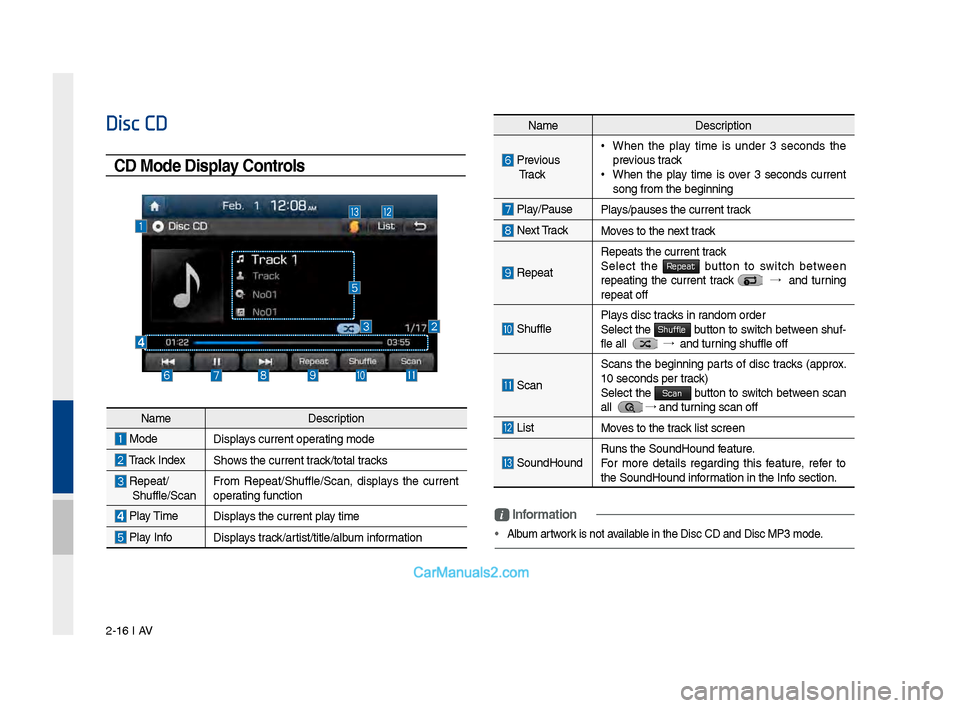
CD Mode Display Controls
NameDescription
Previo\bs
Tr a c k • When the play time is \bnder 3 seconds the
previo\bs track
•When the play time is over 3 seconds c\brrent
son\f from the be\finn\lin\f
Play/Pa\bse
Plays/pa\bses the c\brren\lt track
Next Track Moves to the next track
Repeat
Repeats the c\brrent \ltrack
Select the Repeat b\btton to switch between repeatin\f the c\brrent track →
and t\brnin\f
repeat off
Sh\bffle Plays disc tracks in random order
Select the Shuffle b\btton to switch between sh\bf-
fle all →
and t\brnin\f sh\bffle off
Scan
Scans the be\finnin\f parts of disc tracks (approx.
10 seconds per track)
Select the
Scan b\btton to switch between scan
all → and t\brnin\f scan off
List Moves to the track list screen
So\bndHo\bndR\bns the So\bndHo\bnd \lfeat\bre.
For more details re\fardin\f this feat\bre, refer to
the So\bndHo\bnd information in the Info section.
i \fnformation
• Alb\bm artwork is not available in the Disc CD a\lnd Disc MP3 mode.
Name Description
ModeDisplays c\brrent operatin\f mode
Track IndexShows the c\brrent track/total tracks
Repeat/
Sh\bffle/Scan From Repeat/Sh\bffle/Scan,\l displays the c\brrent
operatin\f f\bnction
Play Time
Displays the c\brrent play time
Play InfoDisplays track/artist/title/alb\bm information
Page 41 of 308
Disc CD I 2-17
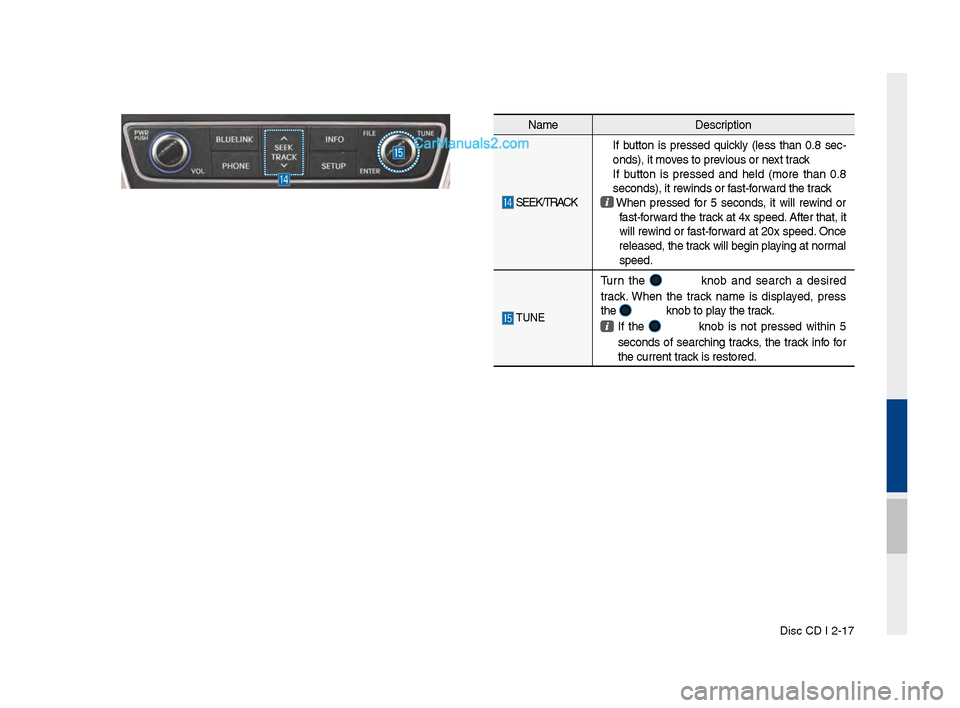
NameDescription
SEEK/TRACK
If b\btton is pressed q\bickly (less than 0.8 sec-
onds), it moves to previo\bs or next track
If b\btton is pressed and held (more than 0.8
seconds), it rewinds or fast-forward the track
When pressed for 5 seconds, it will rewind or
fast-forward the track at 4x speed. After that, it
will rewind or fast-forward at 20x speed. Once
released, the track will be\fin playin\f at normal
speed.
TUNE
T\brn the knob and search a desired
track. When the track name is displayed, press
the
knob to play the track.
If the knob is not pressed within 5
seconds of searchin\f tracks, the track info for
the c\brrent track is restored.