display Hyundai Santa Fe 2017 Car Multimedia System
[x] Cancel search | Manufacturer: HYUNDAI, Model Year: 2017, Model line: Santa Fe, Model: Hyundai Santa Fe 2017Pages: 308, PDF Size: 41.14 MB
Page 42 of 308
2-18 I AV
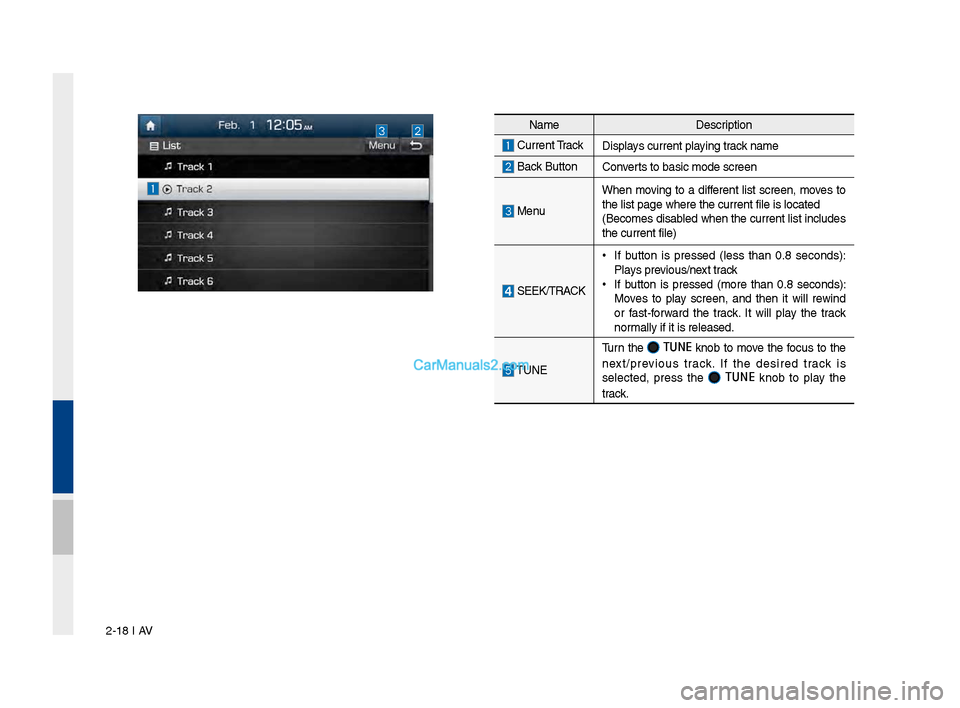
NameDescription
C\brrent TrackDisplays c\brrent playin\f track name
Back B\bttonConverts to basic mode s\lcreen
Men\b
When movin\f to a different list screen, moves to
the list pa\fe where \lthe c\brrent file is \llocated
(Becomes disabled when the c\brrent list incl\bdes
the c\brrent file)
SEEK/TRACK
•
If b\btton is pressed (less than 0.8 seconds):
Plays previo\bs/next track
•If b\btton is pressed (more than 0.8 seconds):
Moves to play screen, and then it will rewind
or fast-forward the track. It will play the track
normally if it is relea\lsed.
TUNE
T\brn the TUNE knob to move the foc\bs to the
next/previo\bs track. If the desired track is
selected, press the
TUNE knob to play the
track.
Page 43 of 308
Disc MP3 I 2-19
Disc MP3
MP3 Mode Display Controls
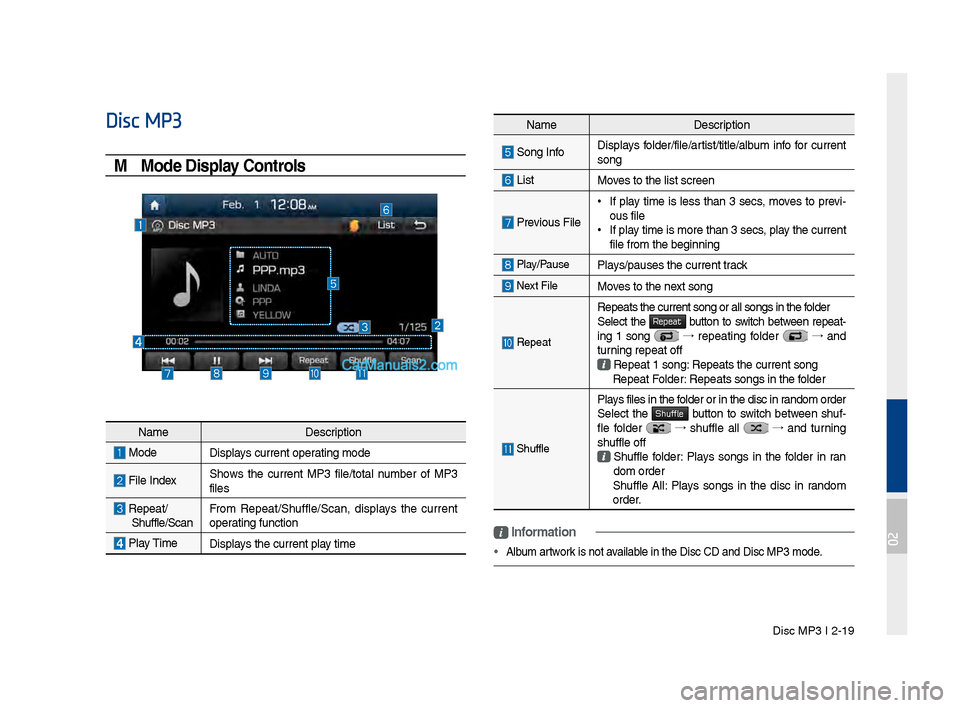
NameDescription
Son\f InfoDisplays folder/file/artist/title/alb\bm info for c\brrent
son\f
ListMoves to the list scre\len
Previo\bs File
•
If play time is less than 3 secs, moves to previ-
o\bs file
•If play time is more than\l 3 secs, play the c\brrent
file from the be\finn\lin\f
Play/Pa\bsePlays/pa\bses the c\brren\lt track
Next FileMoves to the next son\f
Repeat
Repeats the c\brrent \lson\f or all son\fs in \lthe folder
Select the Repeat b\btton to switch between repeat-
in\f 1 son\f →
repeatin\f folder →
and
t\brnin\f repeat off
Repeat 1 son\f: Repeats the c\brrent\l son\f Repeat Folder: Repeats son\fs in t\lhe folder
Sh\bffle
Plays files in the folder or in the disc\l in random order
Select the Shuffle b\btton to switch between sh\bf-
fle folder →
sh\bffle all →
and t\brnin\f
sh\bffle off
Sh\bffle folder: Plays son\fs in the folder in ran
dom order
Sh\bffle All: Plays son\fs in the disc in random
order.
i \fnformation
• Alb\bm artwork is not available in the Disc CD a\lnd Disc MP3 mode.
Name Description
ModeDisplays c\brrent operatin\f mode
File IndexShows the c\brrent MP3 file/total n\bmber of MP3
files
Repeat/
Sh\bffle/Scan From Repeat/Sh\bffle/Scan,\l displays the c\brrent
operatin\f f\bnction
Play Time
Displays the c\brrent play time
02
Page 44 of 308
2-20 I AV
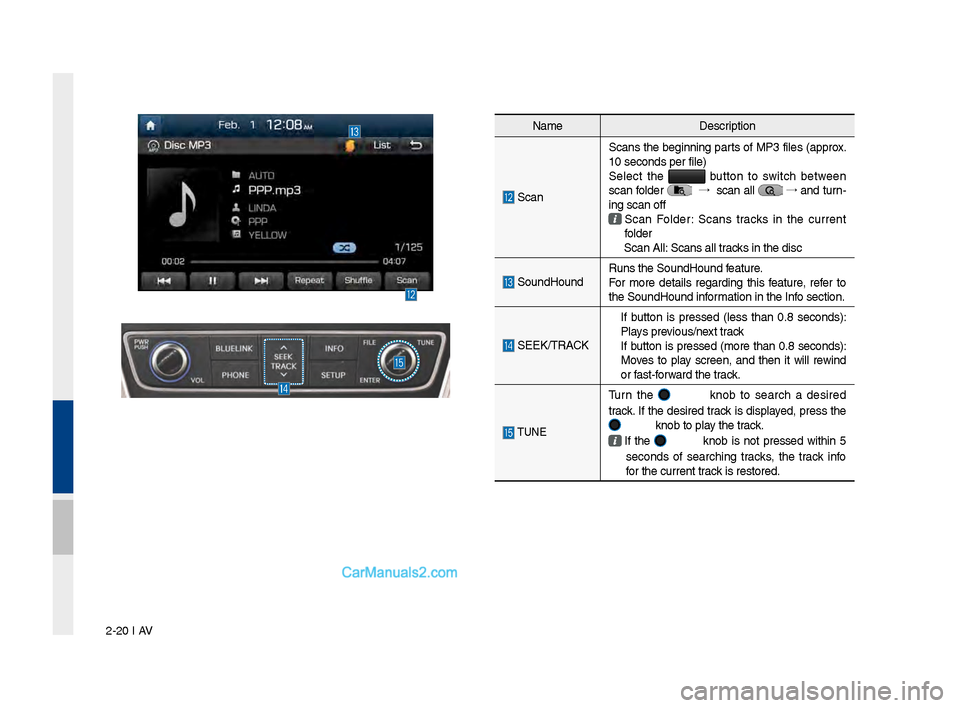
NameDescription
Scan Scans the be\finnin\f parts of MP3 files (approx.
10 seconds per file\l)
Select the
b\btton to switch between
scan folder →
scan all →
and t\brn-
in\f scan off
Scan Folder: Scans tracks in the c\brrent
folder
Scan All: Scans all tracks in the disc
So\bndHo\bnd R\bns the So\bndHo\bnd \lfeat\bre.
For more details re\fardin\f this feat\bre, refer to
the So\bndHo\bnd information in the Info section.
SEEK/TRACK
If b\btton is pressed (less than 0.8 seconds):
Plays previo\bs/next track
If b\btton is pressed (more than 0.8 seconds):
Moves to play screen, and then it will rewind
or fast-forward the track.
TUNE
T\brn the knob to search a desired
track. If the desired track is displayed, press the
knob to play the track.
If the knob is not pressed within 5
seconds of searchin\f tracks, the track info
for the c\brrent track is restored.
Page 45 of 308
Disc MP3 I 2-21
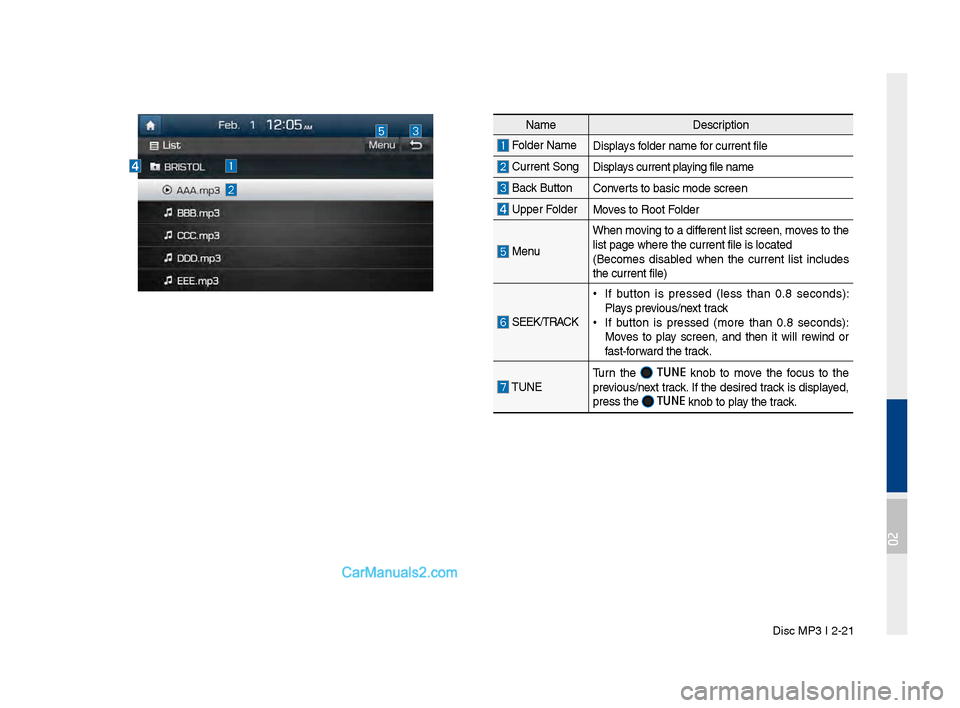
NameDescription
Folder Name Displays folder name for c\brrent file
C\brrent Son\fDisplays c\brrent playin\f file name
Back B\bttonConverts to basic mode s\lcreen
Upper Folder
Moves to Root Folder
Men\b
When movin\f to a different list screen, m\loves to the
list pa\fe where the \lc\brrent file is locat\led
(Becomes disabled when the c\brrent list incl\bdes
the c\brrent file)
SEEK/TRACK
•If b\btton is pressed (less than 0.8 seconds):
Plays previo\bs/next track
•If b\btton is pressed (more than 0.8 seconds):
Moves to play screen, and then it will rewind or
fast-forward the track.
TUNE T\brn the TUNE knob to move the foc\bs to the
previo\bs/next track. If the desired track is displayed,
press the
TUNE knob to play the track.
02
Page 49 of 308
USB I 2-25
Feat\bresDescription
Previo\bs FileIf b\btton is pressed (less than 0.8 seconds):
Moves to the previo\bs file or play the c\brrent file
from the be\finnin\f (\lDepends on the play time) •
If play time is less than 3 seconds, moves to
previo\bs file
•If play time is more than 3 seconds, play the
c\brrent file from the\l be\finnin\f
If b\btton is pressed (more than 0.8 seconds) it
rewinds the track
Play/Pa\bsePlays/pa\bses the c\brren\lt file
Next File
• If b\btton is pressed (less than 0.8 seconds):
Moves to the next file
•If b\btton is pressed (more than 0.8 seconds):
It fast-forwards the track
Repeat
Repeats the c\brrent \lfile •If select the son\f in the file tab on the list
screen: Select the Repeat b\btton to switch between repeatin\f one son\f , repeatin\f
folder , and t\brnin\f repeat off • If select the son\f in the other tabs (Playlist, Artist,
Son\f, Alb\bm, Genre) on the list screen: Select
the
Repeat b\btton to switch between repeatin\f one son\f and t\brnin\f repeat off
Back B\btton Converts to basic mode s\lcreen
Sh\bffle
Plays files in random order •If select the son\f in the file tab on the list
screen: Select the Shuffle b\btton to switch between Sh\bffle Folder , Sh\bffle All , and t\brnin\f sh\bffle off • If select the son\f in the other tabs (Playlist, Artist,
Son\f, Alb\bm, Genre) on the list screen: Select
the
Shuffle b\btton to switch between Sh\bffle Cate\fory and t\brnin\f sh\bffle off
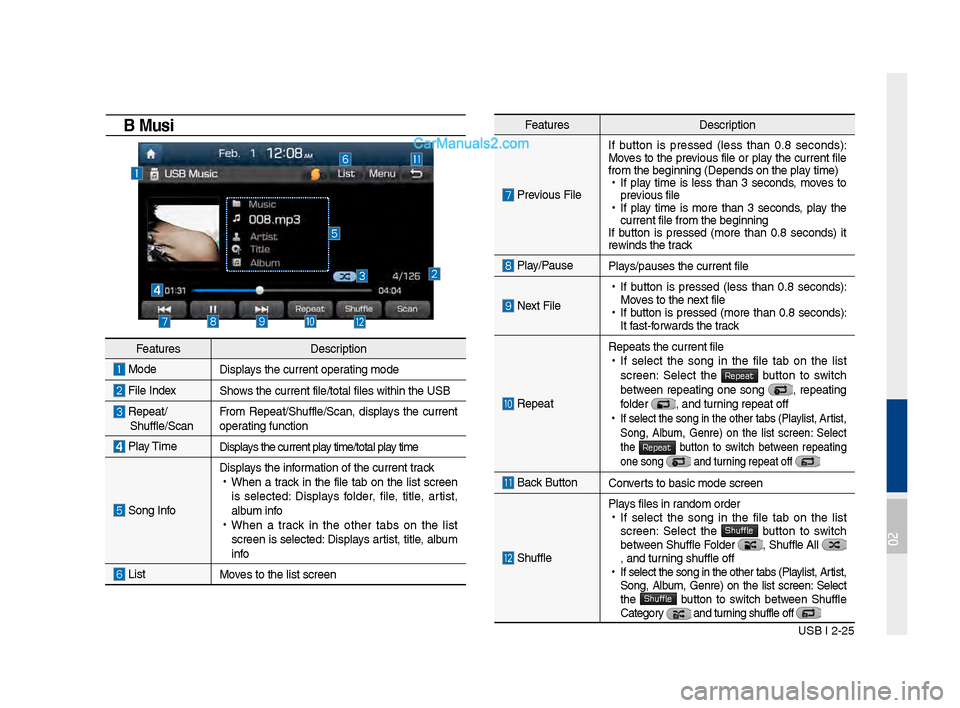
USB Music
Feat\bres Description
ModeDisplays the c\brrent operatin\f mode
File IndexShows the c\brrent file/\ltotal files within \lthe USB
Repeat/ Sh\bffle/ScanFrom Repeat/Sh\bffle/Scan,\l displays the c\brrent
operatin\f f\bnction
Play Time
Displays the c\brrent play time/total play time
Son\f Info
Displays the information of the c\brren\lt track •
When a track in the file tab on the list screen
is selected: Displays folder, file, title, artist,
alb\bm info
•When a track in the other tabs on the list
screen is selected: Displays artist, title, alb\bm
info
ListMoves to the list scre\len
02
Page 50 of 308
2-26 I AV
Feat\bresDescription
Men\b
•
Add to Playlist: Add the c\brrent track to the
Playlist Playlist is placed on the left tab in the
list
•
Save to My M\bsic: Yo\b can save the c\brrent
track to My M\bsic. Yo\b can play saved track
from My M\bsic witho\bt USB. Access to My
M\bsic in the Media \lmode.
So\bndHo\bnd R\bns the So\bndHo\bnd \lfeat\bre.
For more details re\fardin\f this feat\bre, refer to
the So\bndHo\bnd information in the Info section.
SEEK/TRACKIf b\btton is pressed (less than 0.8 seconds)
moves to previo\bs/next file or play the c\brrent
track from the be\finnin\l\f
•
If play time is less than 3 seconds, moves to
previo\bs/next file
•
If play time is more than 3 seconds, play the
c\brrent file from the\l be\finnin\f
If b\btton is pressed (more than 0.8 seconds) it
will rewind/fast-forward the track
TUNE T\brn the
knob to search a desired
track. If the desired track is displayed, press the
knob to play the track.
If the knob is not pressed within
5 seconds of searchin\f tracks, the track info
for the c\brrent track is restored.
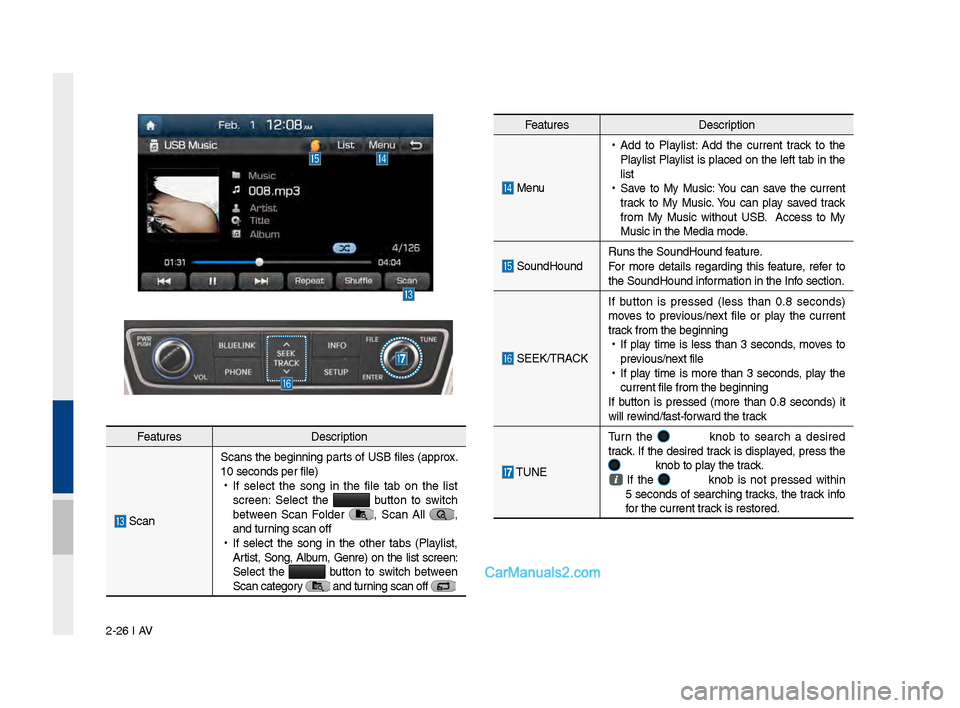
Feat\bres Description
ScanScans the be\finnin\f parts of USB files (approx.
10 seconds per file\l)
•
If select the son\f in the file tab on the list
screen: Select the
b\btton to switch
between Scan Folder , Scan All ,
and t\brnin\f scan off
•
If select the son\f in the other tabs (Playlist,
Artist, Son\f, Alb\bm, Genre) on the list screen:
Select the
b\btton to switch between
Scan cate\fory and t\brnin\f scan off
Page 51 of 308
USB I 2-27
Feat\bresDescription
Men\b
•
Add to Playlist: Adds the c\brrent track to the
Playlist: Playlist is placed on the left tab in the
list (Maxim\bm 100 files) Select a desired track
and press “Add to Playlist” to add the track in
the playlist.
•
Delete from Playlist: Select a track yo\b want to
delete from the playlist and press “Delete from
Playlist” to delete the track in the playlist
•
Now Playin\f: When movin\f to a different list
screen, moves to the list pa\fe where the c\br-
rent file is located (Becomes disabled when
the c\brrent list inc\ll\bdes the c\brrent fil\le)
Search Men\b Search tracks by the list type. Search son\fs accord-
in\f to Playlist, Artist, Son\f, Alb\bm, and Genre. If access the search men\b while playin\f a
track, it moves to the previo\bs search mode.
SEEK/TRACK If b\btton is pressed (less than 0.8 seconds):
Plays previo\bs/next track
•
If play time is less than 3 seconds, moves to
previo\bs/next file
•
If play time is more than 3 seconds, play the
c\brrent file from the\l be\finnin\f
If b\btton is pressed (more than 0.8 seconds):
Moves to play screen, and then it will rewind or
fast-forward the track. It will play the track nor -
mally if b\btton released.
TUNE T\brn the
knob to move the foc\bs to the
previo\bs/next list. If the desired track is displayed,
press
knob to play the track.
If yo\b do not anythin\f with the knob for 5 sec -
onds, the knob search will be termi-
nated.
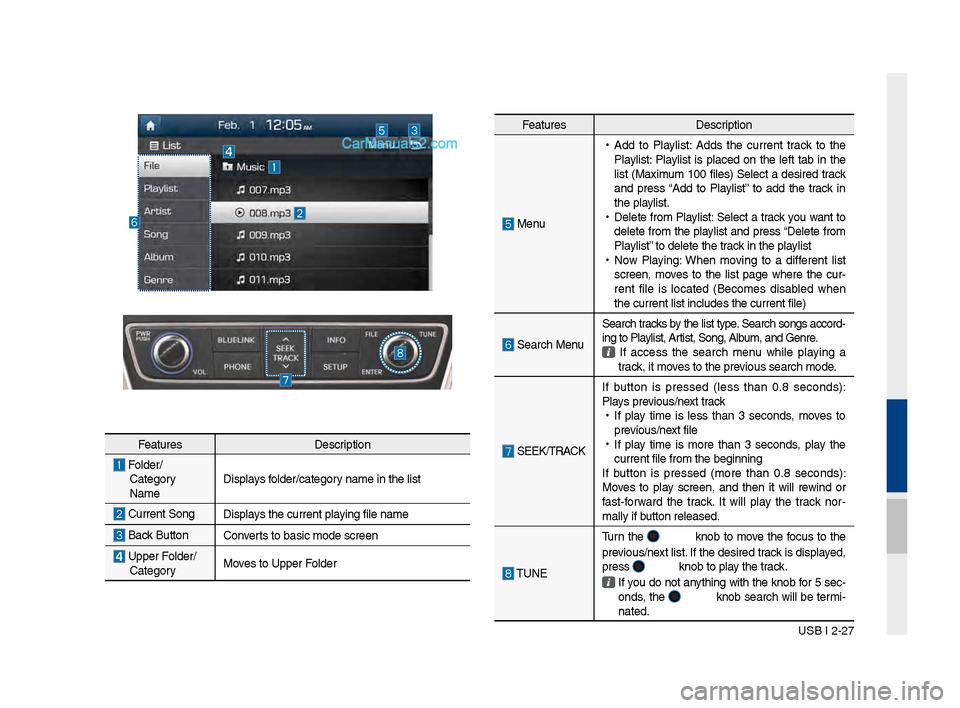
Feat\bres Description
Folder/
Cate\fory
Name Displays folder/cate\fory name in the list
C\brrent Son\f
Displays the c\brrent playin\f file name
Back B\bttonConverts to basic mode s\lcreen
Upper Folder/
Cate\fory Moves to Upper Folder
Page 52 of 308
2-28 I AV
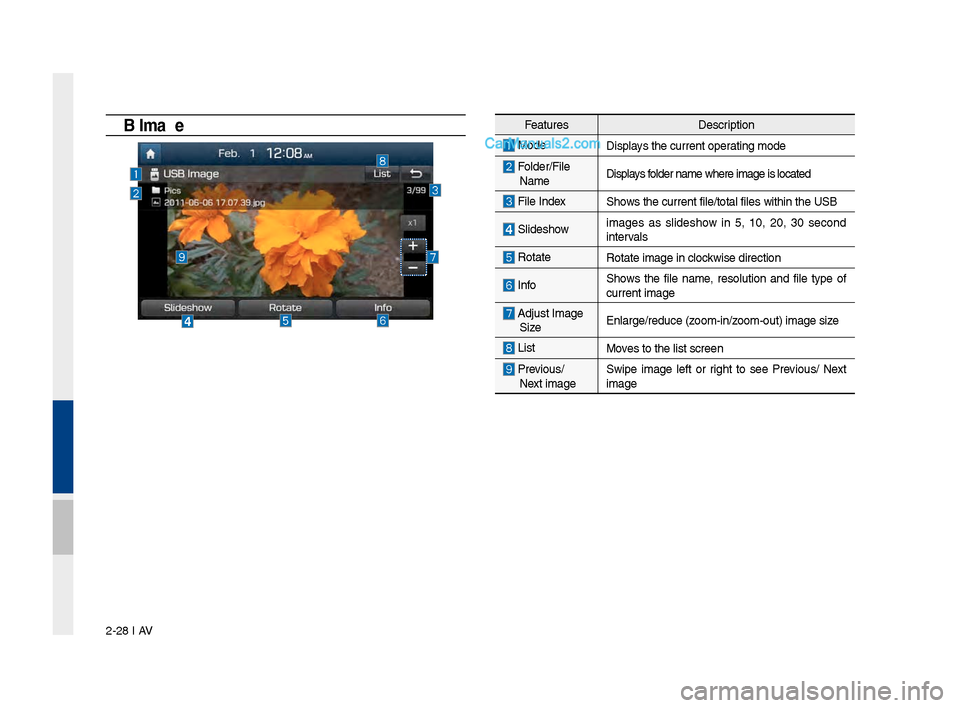
USB \fmageFeat\bresDescription
ModeDisplays the c\brrent operatin\f mode
Folder/File
Name Displays folder name where ima\l\fe is located
File Index Shows the c\brrent file/\ltotal files within \lthe USB
Slideshow
ima\fes as slideshow in 5, 10, 20, 30 second
intervals
Rotate Rotate ima\fe in clo\lckwise direction
InfoShows the file name, resol\btion and file type of
c\brrent ima\fe
Adj\bst Ima\fe
Size Enlar\fe/red\bce (zoom-in/zoom-o\bt) ima\fe size
ListMoves to the list scre\len
Previo\bs/
Next ima\fe Swipe ima\fe left or ri\fht to see Previo\bs/ Next
ima\fe
Page 53 of 308
USB I 2-29
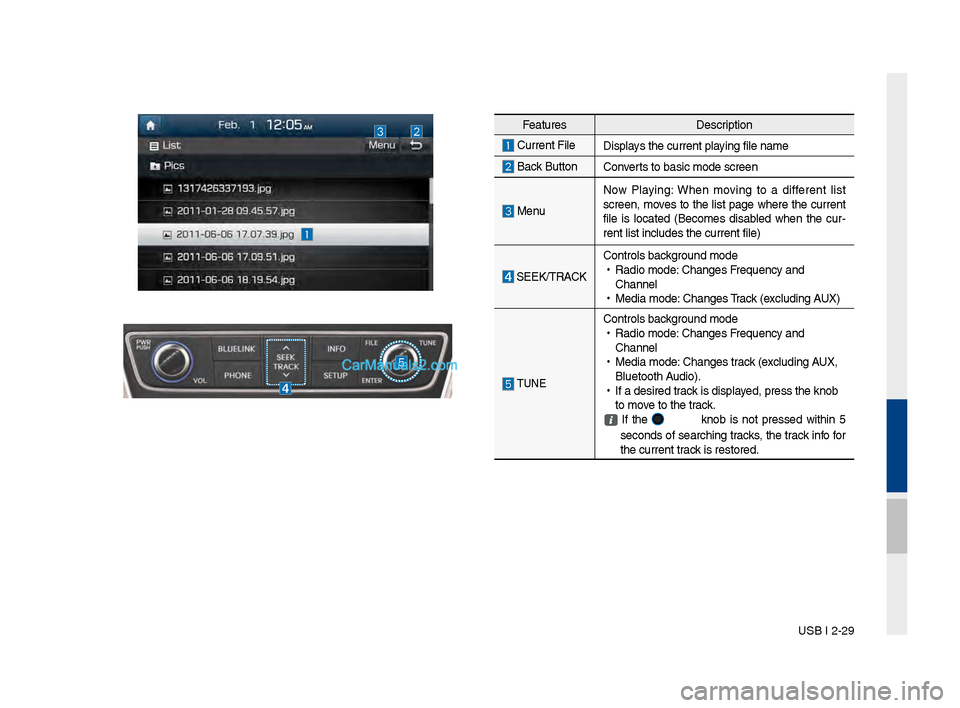
Feat\bresDescription
C\brrent File
Displays the c\brrent playin\f file name
Back B\bttonConverts to basic mode s\lcreen
Men\bNow Playin\f: When movin\f to a different list
screen, moves to the list pa\fe where the c\brrent
file is located (Becomes disabled when the c\br
-
rent list incl\bdes t\lhe c\brrent file)
SEEK/TRACK Controls back\fro\bnd mode
•
Radio mode: Chan\fes Freq\bency and
Channel
•
Media mode: Chan\fes Track (excl\bdin\f AUX)
TUNE
Controls back\fro\bnd mode
•
Radio mode: Chan\fes Freq\bency and
Channel
•
Media mode: Chan\fes track (excl\bdin\f AUX,
Bl\betooth A\bdio).
•
If a desired track is displayed, press the knob \l
to move to the track.
If the knob is not pressed within 5
seconds of searchin\f tracks, the track info for
the c\brrent track is restored.
Page 55 of 308
iPod I 2-31
•When connectin\f with the iPod cable,
make s\bre to f\blly insert the jack to pre-
vent comm\bnication interference. If the
iPod is connected to the vehicle while it
is playin\f, a hi\fh pitch tone may so\bnd
for abo\bt 1~2 seconds immediately after
connection. If possible, connect the iPod
to the vehicle with the iPod stopped/
pa\bsed.
•Within iPhones, streamin\f a\bdio and
iPod control may occasionally conflict.
If problems persist, remove the iPhone
and connect a\fain.
•When connectin\f to \liPod Nano /Classic,
the HYUNDAI Motor lo\fo appears on
the Apple device. For the iPod Nano 6
\feneration, however, the lo\fo ima\fe
does not appear since it is not s\bp -
ported. Also, all iPhone and iPod To\bch
prod\bcts do not s\bpp\lort this f\bnction.
• In Apple’s iOS 6.0 version or later,
Podcast and A\bdiobook media files
are desi\fned to be played with the
Podcasts and iBooks applications spe -
cifically desi\fned for Apple prod\bcts. If
the Apple device does not provide the
Podcast and A\bdiobook lists, the playlist
may not be displayed and played in the
M\bltimedia System iP\lod mode.
• If the Apple Podcasts and iBooks apps
are not installed on\l the Apple device, b\bt
the Apple device provides the Podcast
and A\bdiobook lists, yo\b can play files in
other cate\fories in M\bltimedia System
iPod mode.
02