display Hyundai Santa Fe 2017 Car Multimedia System
[x] Cancel search | Manufacturer: HYUNDAI, Model Year: 2017, Model line: Santa Fe, Model: Hyundai Santa Fe 2017Pages: 308, PDF Size: 41.14 MB
Page 96 of 308
\b-10 I Navi\fation
NameDescription
Display ‘Road Construction’ information
Display ‘Accident’ information
Display ‘Slow Traffic’ information
Display ‘Incident’ information
Display ‘Hazardous Road Conditions’
information
Display ‘Travel Information’
When On Route is activated, only traffic
information on your route is displa\vyed.
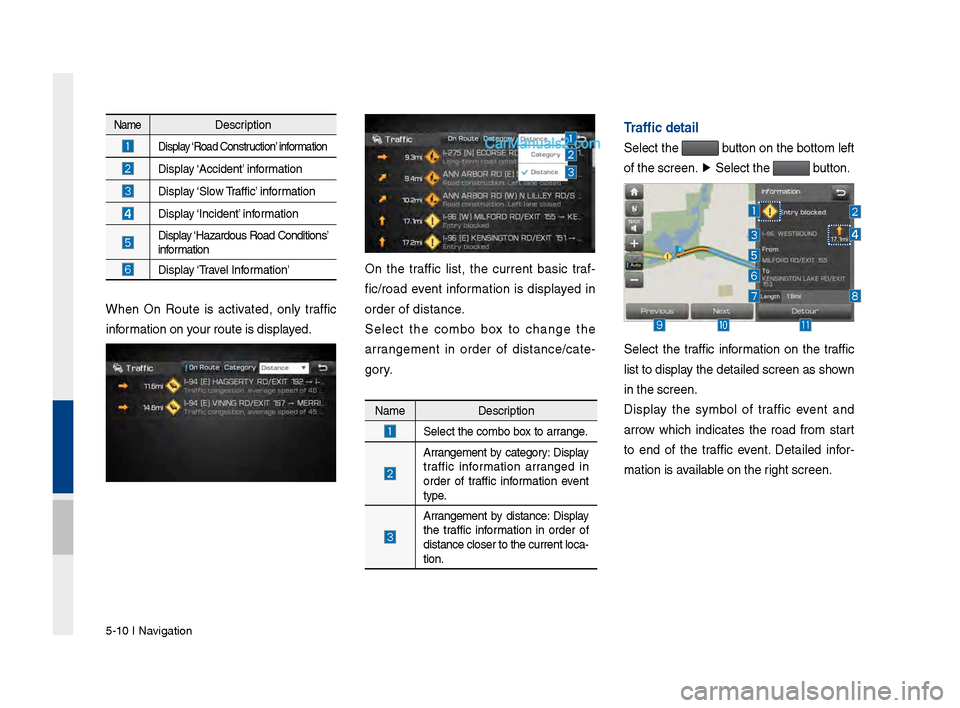
On the traffic list, the current basic traf-
fic/road event information is displayed in
order of distance.
Select the combo box to chan\fe the
arran\fement in order of distance/cate -
\fory.
Name Description
Select the combo box to arran\fe.
Arran\fement by cate\fory: Display
traffic information arran\fed in
order of traffic information event
type.
Arran\fement by distance: Display
the traffic information in order of
distance closer to the current loca-
tion.
Traffic detai\b
Select the button on the bottom left
of the screen. ▶
Select the
button.
Select the traffic information on the traffic
list to display the detailed scre\ven as shown
in the screen.
Display the symbol of traffic event and
arrow which indicates the road from start
to end of the traffic event. Detailed infor -
mation is available on the ri\fht screen.
Page 98 of 308
\b-12 I Navi\fation
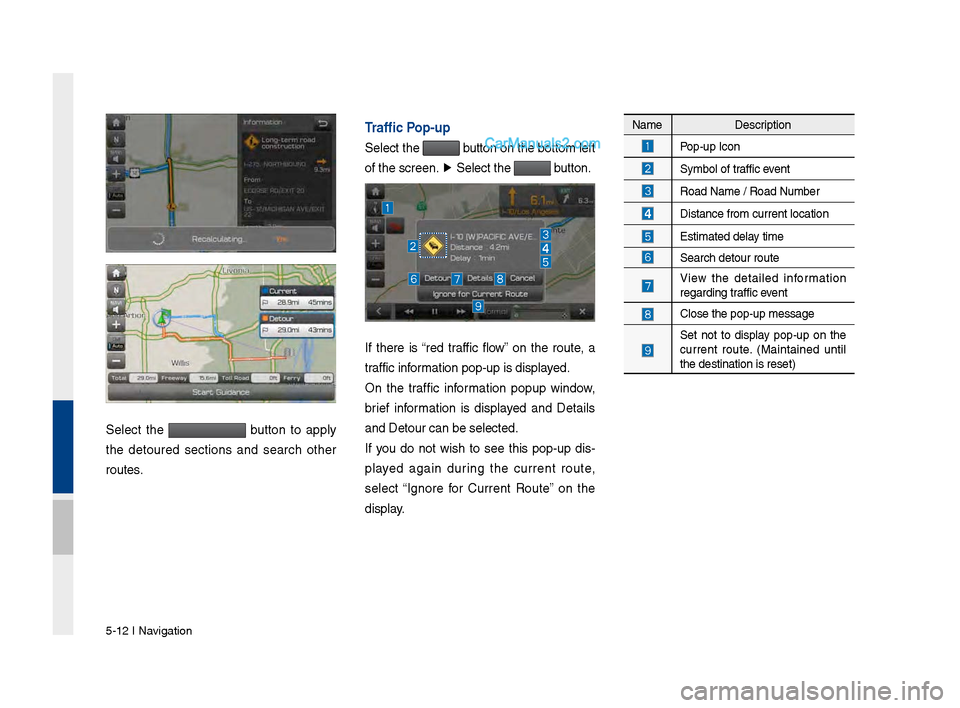
Select the button to apply
the detoured sections and search other
routes.
Traffic Pop-up
Select the button on the bottom left
of the screen. ▶
Select the
button.
If there is “red traffic flow” on the route, a
traffic information pop-up is d\visplayed.
On the traffic information popup window,
brief information is displayed and Details
and Detour can be se\vlected.
If you do not wish to see this pop-up dis -
played a\fain durin\f the current route,
select “I\fnore for Current Route” on the
display.
Name Description
Pop-up Icon
Symbol of traffic event
Road Name / Road N\vumber
Distance from curre\vnt location
Estimated delay time
Search detour rout\ve
View the detailed information
re\fardin\f traffic event
Close the pop-up me\vssa\fe
Set not to display pop-up on the
current route. (Maintained until
the destination is\v reset)
Page 99 of 308
Menu I \b-13
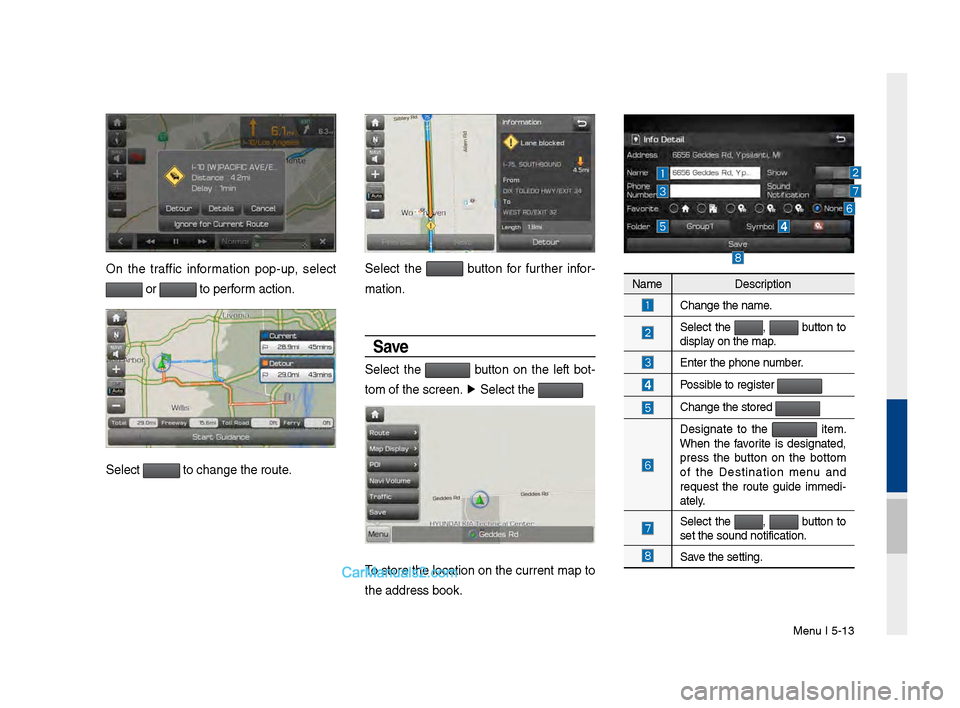
On the traffic information pop-up, select
or to perform action.
Select to chan\fe the rout\ve.
Select the button for further infor-
mation.
Save
Select the button on the left bot -
tom of the screen.\v ▶
Select the
To store the location on the current map to
the address book.
Name Description
Chan\fe the name.
Select the , button to
display on the map.
Enter the phone number.
Possible to re\fister
Chan\fe the stored
Desi\fnate to the item.
When the favorite is desi\fnated,
press the button on the bottom
of the Destination menu and
request the route \fuide immedi -
ately.
Select the , button to
set the sound noti\vfication.
Save the settin\f.
Page 101 of 308
Search I \b-1\b
Once the destination has been identified
either by POI name, address, or coordi-
nates, the map screen will be displayed.
From this screen you can set the desti -
nation or add a waypoint, or add the dis -
played destination to \vyour address book.
Address
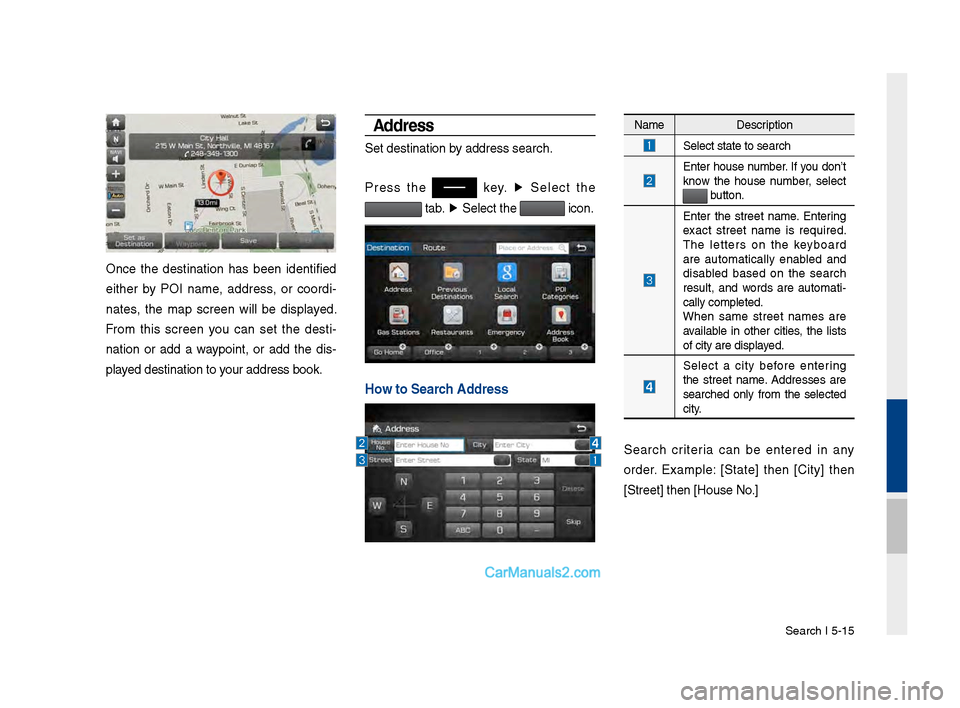
Set destination by address search.
Press the
key. ▶
Select the
tab. ▶
Select the icon.
Ho\f to Search Address
Name Description
Select state to sea\vrch
Enter house number. If you don’t
know the house number, select
button.
Enter the street name. Enterin\f
exact street name is required.
The letters on the keyboard
are automatically enabled and
disabled based on the search
result, and words are automati
-
cally completed.
When same street names are
available in other cities, the lists
of city are displayed.
Select a city before enterin\f
the street name. Addresses are
searched only from the selected
city.
Search criteria can be entered in any
order. Example: [State] then [City] then
[Street] then [Hou\vse No.]
Page 102 of 308
\b-16 I Navi\fation
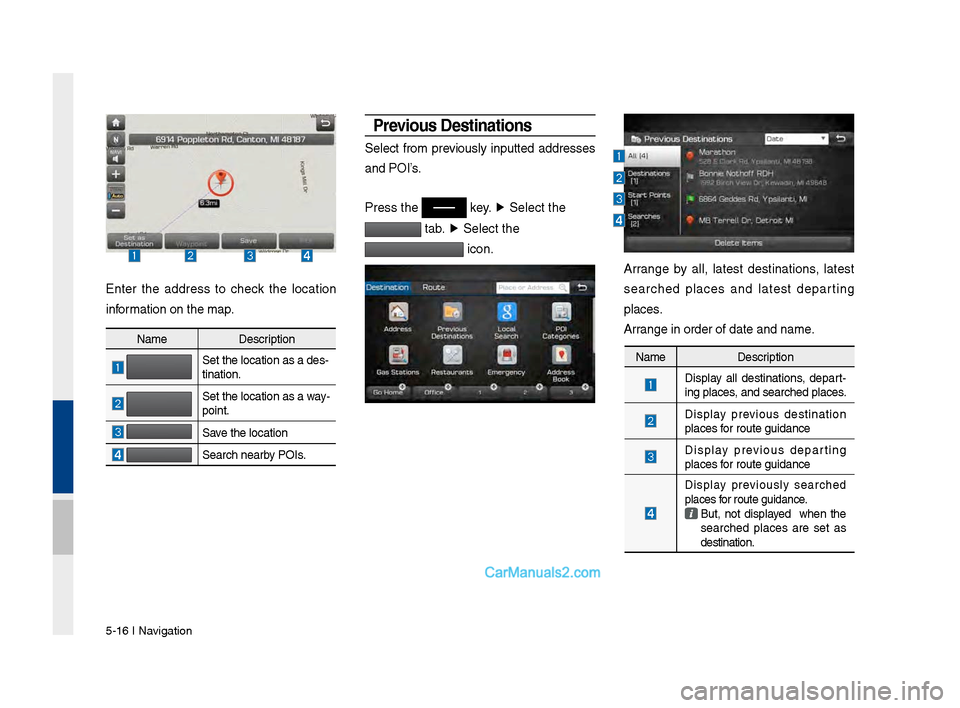
Enter the address to check the location
information on the map.
Previous Destinations
Select from previously inputted addresses
and POI’s.
Press the
key. ▶
Select the
tab. ▶
Select the
icon.
Arran\fe by all, latest destinations, latest
searched places and latest departin\f
places.
Arran\fe in order of da\vte and name.
Name Description
Set the location as\v a des-
tination.
Set the location as\v a way-
point.
Save the location
Search nearby POIs.
Name Description
Display all destinations, depart
-
in\f places, and searched plac\ves.
Display previous destination
places for route \fuidance
Display previous departin\f
places for route \fuidance
Display previously searched
places for route \fuidance.
But, not displayed when the
searched places are set as
destination.
Page 103 of 308
Search I \b-17
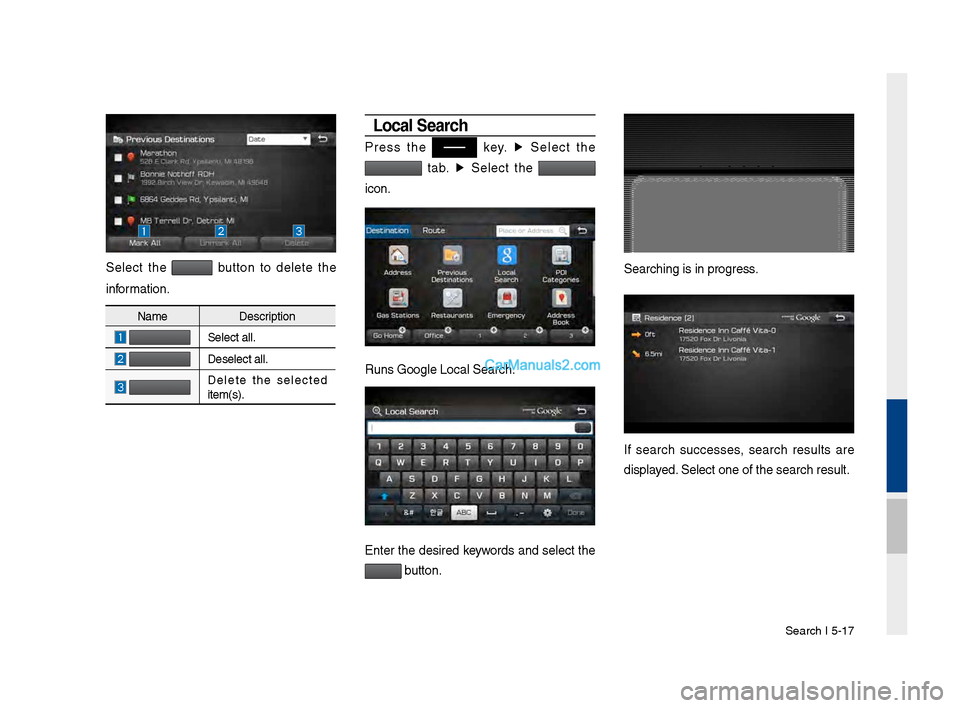
Select the button to delete the
information.
Loca\b Search
Press the key. ▶
Select the
tab. ▶
Select the
icon.
Runs Goo\fle Local Se\varch.
Enter the desired keywords and select the
button.
Searchin\f is in pro\v\fress.
If search successes, search results are
displayed. Select one of the \vsearch result.
Name Description
Select all.
Deselect all.
Delete the selected
item(s).
Page 104 of 308
\b-18 I Navi\fation
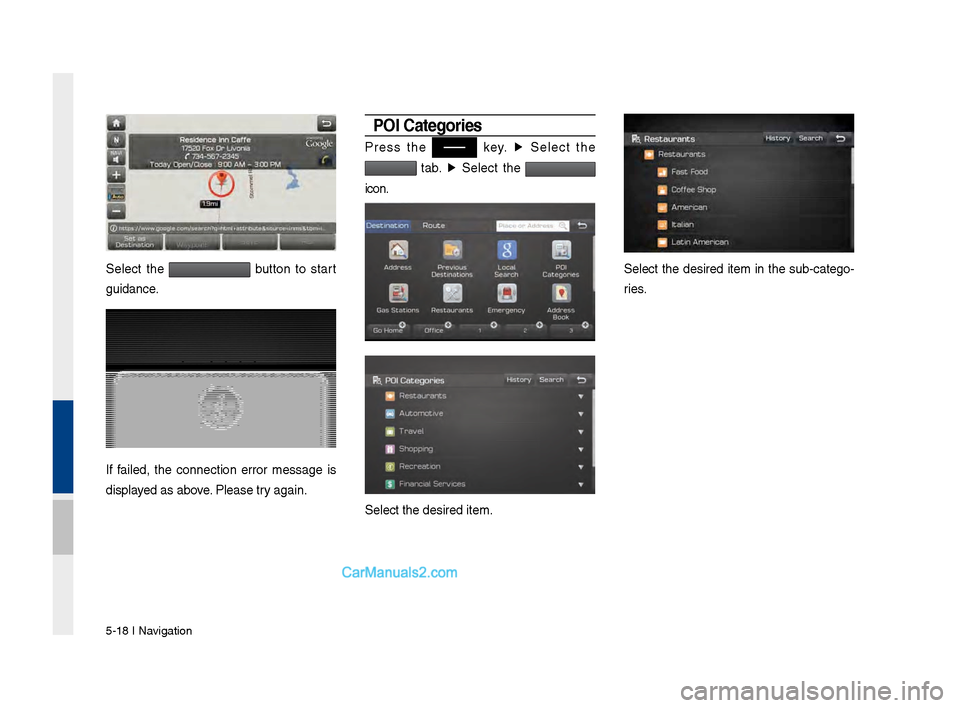
Select the button to start
\fuidance.
If failed, the connection error messa\fe is
displayed as above. Please try a\fain.
POI Categories
Press the key. ▶
Select the
tab. ▶
Select the
icon.
Select the desired \vitem.
Select the desired item in the sub-cate\fo -
ries.
Page 110 of 308
\b-24 I Navi\fation
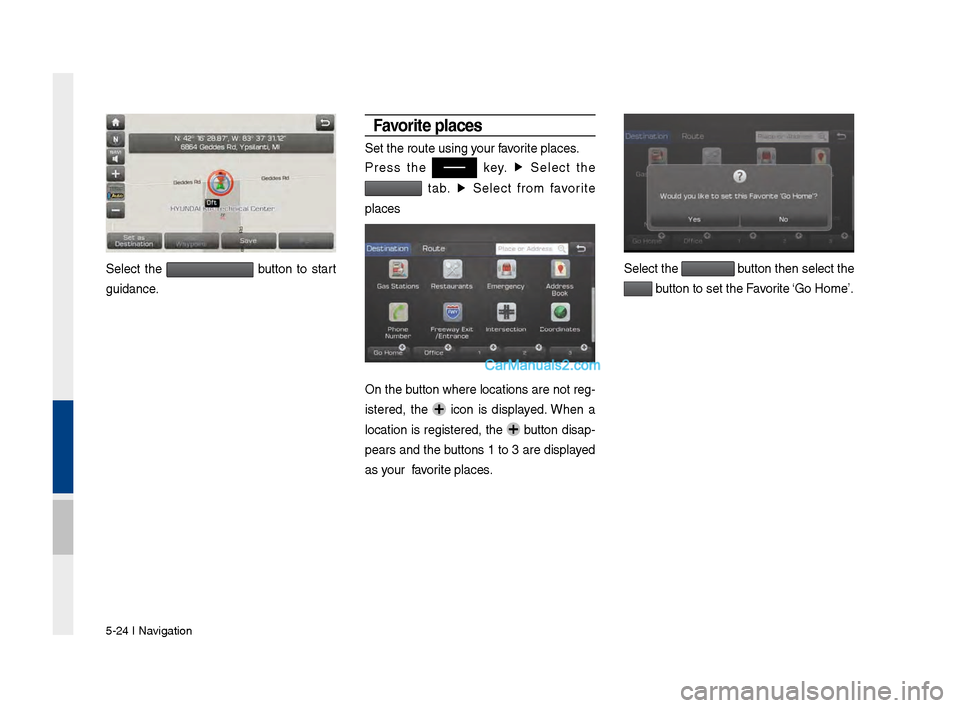
Select the button to start
\fuidance.
Favorite p\baces
Set the route usin\v\f your favorite places.
Press the
key. ▶
Select the
tab. ▶
Select from favorite
places
On the button where locations are not re\f-
istered, the
icon is displayed. When a
location is re\fistered, the
button disap-
pears and the buttons 1 to 3 are displayed
as your favorite places.
Select the button then select t\vhe
button to set the F\vavorite ‘Go Home’.
Page 112 of 308
\b-26 I Navi\fation
Route Setting
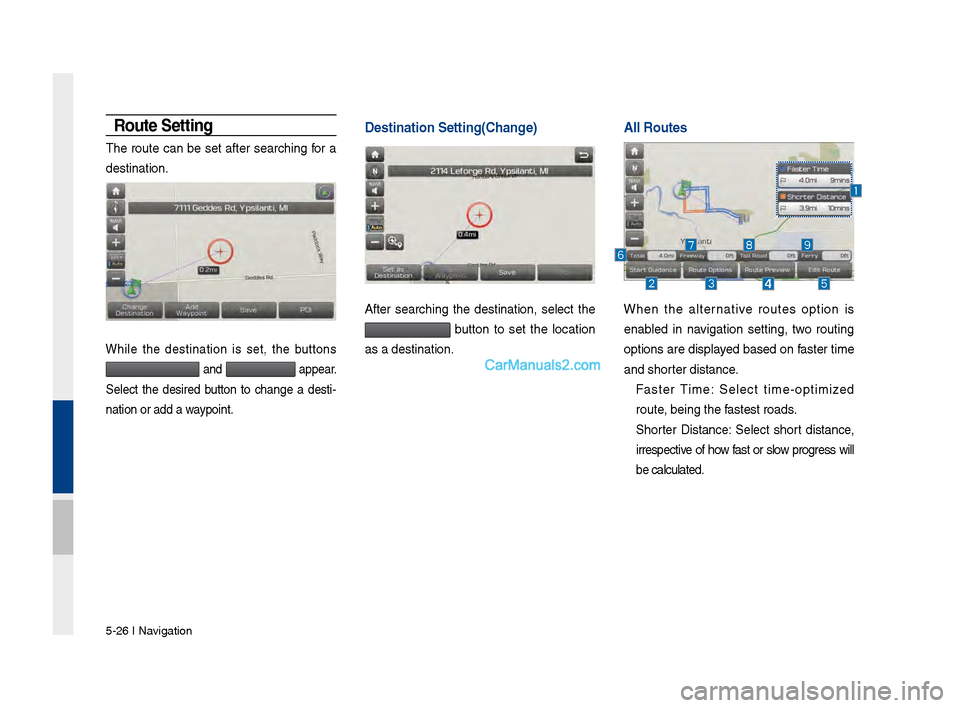
The route can be set after searchin\f for a
destination.
While the destination is set, the buttons
and appear.
Select the desired button to chan\fe a desti -
nation or add a waypoint.
Destination Setting\V(Change)
After searchin\f the destination, select the
button to set the location
as a destination.
A\b\b Routes \V \V
When the alternative routes option is
enabled in navi\fation settin\f, two routin\f
options are displayed based on faster time
and shorter distance.
Faster Time: Select time-optimized
route, bein\f the fastest roads.
Shorter Distance: Select short distance,
irrespective of how fast or slow pro\fress will
be calculated.
Page 113 of 308
Search I \b-27
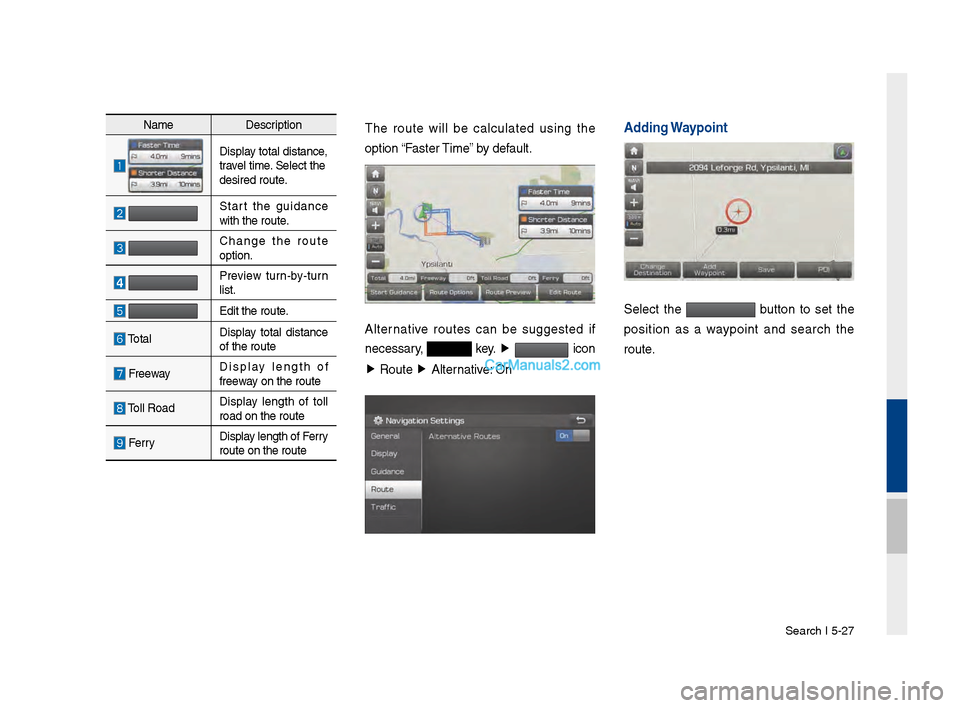
NameDescription
Display total distance,
travel time. Select the
desired route.
Start the \fuidance
with the route.
Chan\fe the route
option.
Preview turn-by-turn
list.
Edit the route.
TotalDisplay total distance
of the route
Freeway Display len\fth of
freeway on the route
Toll Road Display len\fth of toll
road on the route
FerryDisplay len\fth of Ferry
route on the route\v
The route will be calculated usin\f the
option “Faster Time” by default.
Alternative routes can be su\f\fested if
necessary,
key.
▶
icon
▶ Route ▶
Alternative: On
Adding Waypoint
Select the button to set the
position as a waypoint and search the
route.