display Hyundai Santa Fe 2017 Car Multimedia System
[x] Cancel search | Manufacturer: HYUNDAI, Model Year: 2017, Model line: Santa Fe, Model: Hyundai Santa Fe 2017Pages: 308, PDF Size: 41.14 MB
Page 114 of 308
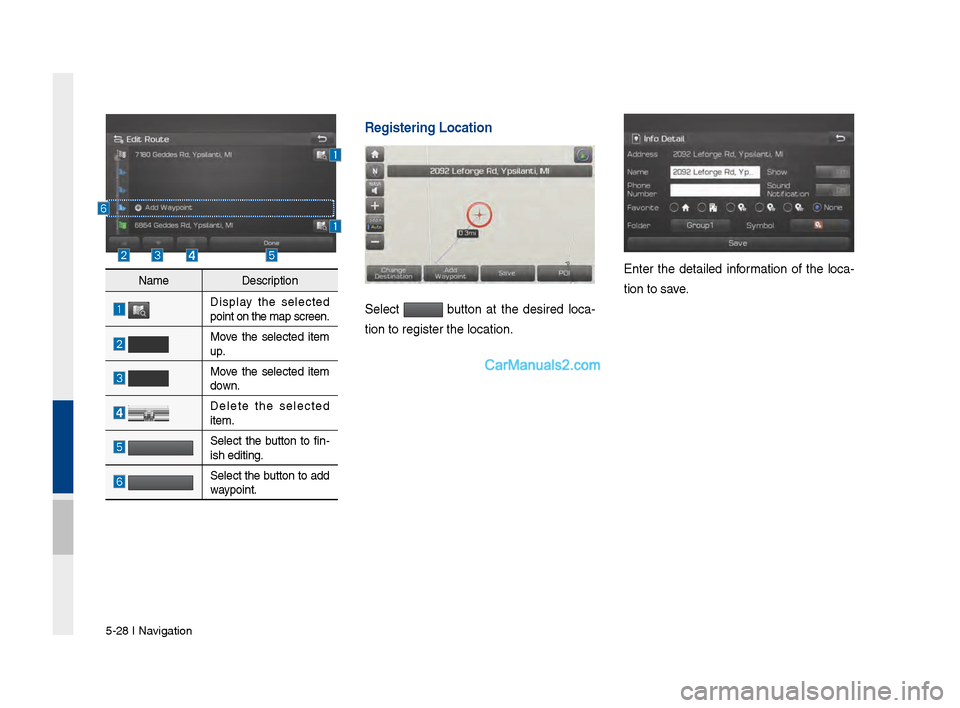
\b-28 I Navi\fation
Registering Locatio\Vn
Select button at the desired loca-
tion to re\fister th\ve location.
Enter the detailed information of the loca -
tion to save.Name Description
Display the selected
point on the map s\vcreen.
Move the selected item
up.
Move the selected item
down.
Delete the selected
item.
Select the button to fin-
ish editin\f.
Select the button to add
waypoint.
Page 115 of 308
Search I \b-29
Route Guidance
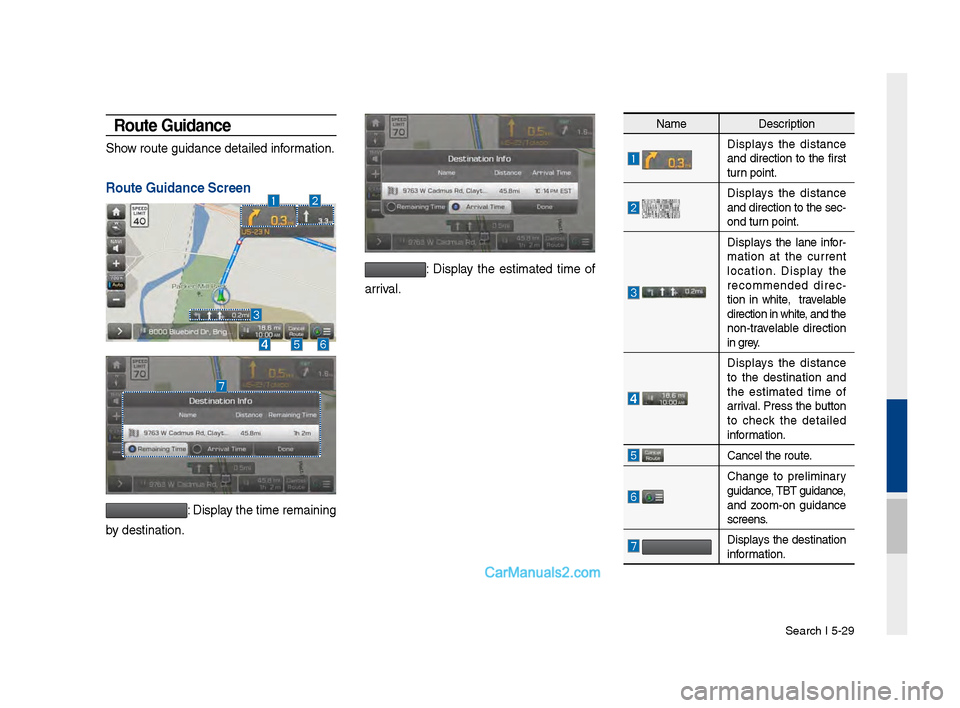
Show route \fuidance de\vtailed information.
Route Guidance Scree\Vn
: Display the time remaini\vn\f
by destination.
: Display the estimated time of
arrival.
Name Description
Displays the distance
and direction to the first
turn point.
Displays the distance
and direction to t\vhe sec -
ond turn point.
Displays the lane infor -
mation at the current
location. Display the
recommended direc -
tion in white, travelable
direction in white\v, and the
non-travelable direction
in \frey.
Displays the distance
to the destination and
the estimated time of
arrival. Press the button
to check the detailed
information.
Cancel the route.
Chan\fe to preliminary
\fuidance, TBT \fuidance,
and zoom-on \fuidance
screens.
Displays the destination
information.
Page 116 of 308
\b-30 I Navi\fation
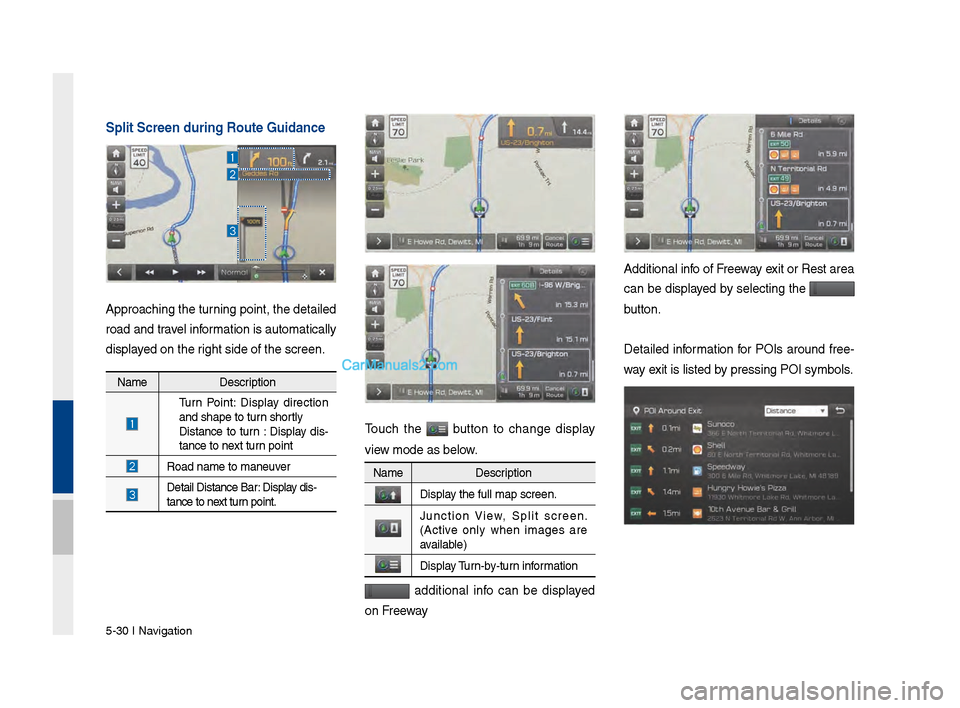
Sp\bit Screen during \VRoute Guidance
Approachin\f the tur\vnin\f point, the det\vailed
road and travel information is automati\vcally
displayed on the ri\fht side of the sc\vreen.
Touch the button to chan\fe display
view mode as below.
additional info can be displayed
on Freeway
Additional info of Freeway exit or Rest area
can be displayed by selectin\f the
button.
Detailed information for POIs around free-
way exit is listed by pressin\f POI symb\vols.
Name Description
Turn Point: Display direction
and shape to turn shortly
Distance to turn : Display dis -
tance to next turn point
Road name to maneu\vver
Detail Distance Bar: Display dis-
tance to next turn point.
Name
Description
Display the full map scre\ven.
Junction View, Split screen.
(Active only when ima\fes are
available)
Display Turn-by-turn information
Page 119 of 308
Route I \b-33
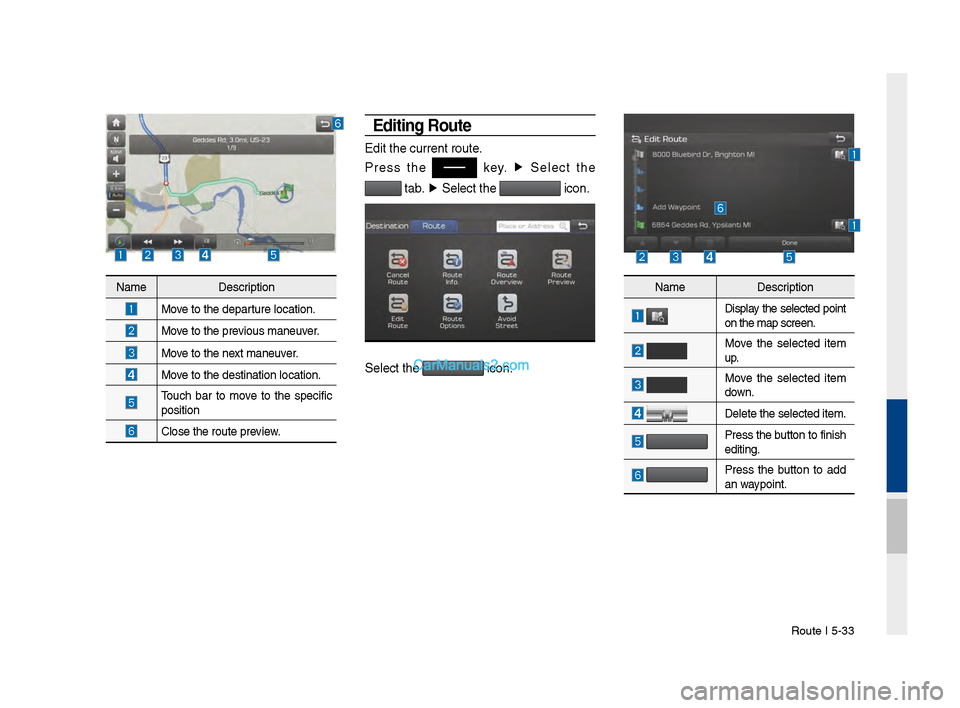
Editing Route
Edit the current r\voute.
Press the
key. ▶
Select the
tab. ▶
Select the icon.
Select the icon.
Name Description
Move to the departure location.
Move to the previous maneuver.
Move to the next maneuver.
Move to the destinati\von location.
Touch bar to move to the specific
position
Close the route pre\vview.
Name Description
Display the selected point
on the map screen.\v
Move the selected item
up.
Move the selected item
down.
Delete the selected \vitem.
Press the button to finish
editin\f.
Press the button to add
an waypoint.
Page 121 of 308
Navi\fation Settin\fs I \v\b-3\b
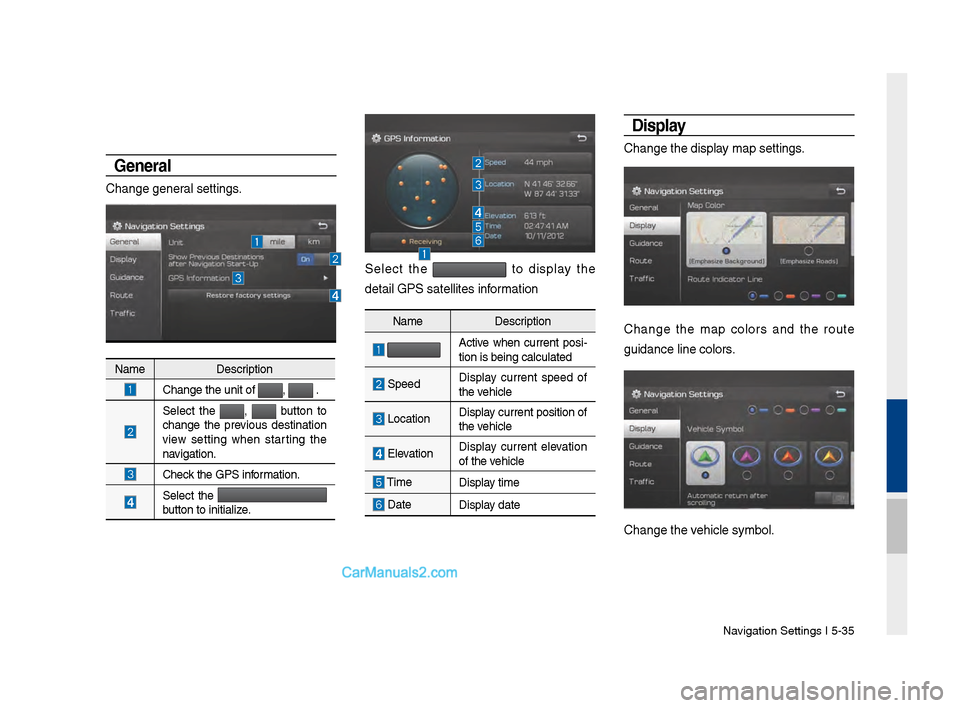
Genera\b
Chan\fe \feneral settin\fs.
Select the to display the
detail GPS satellite\vs information
Disp\bay
Chan\fe the display map settin\fs.
Chan\fe the map colors and the route
\fuidance line colors\v.
Chan\fe the vehicle symbol.
Name Description
Chan\fe the unit of \v, .
Select the
, button to
chan\fe the previous destination
view settin\f when startin\f the
navi\fation.
Check the GPS information.
Select the
button to initialize.
Name Description
Active when current posi-
tion is bein\f calcul\vated
Speed Display current speed of
the vehicle
LocationDisplay current position\v of
the vehicle
ElevationDisplay current elevation
of the vehicle
Time
Display time
DateDisplay date
Page 122 of 308
\b-36 I Navi\fation
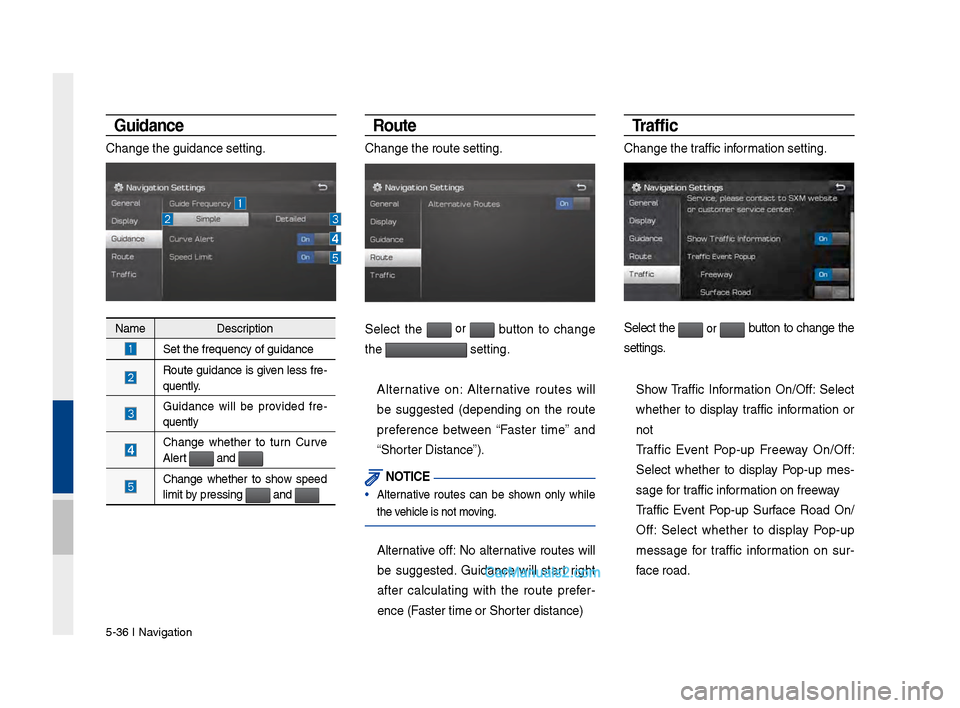
Guidance
Chan\fe the \fuidance\v settin\f.
Route
Chan\fe the route se\vttin\f.
Select the or button to chan\fe
the
settin\f.
Alternative on: Alternative routes will
be su\f\fested (dependin\f on the route
preference between “Faster time” and
“Shorter Distance”).
NOTICE
• Alternative routes can be shown only while
the vehicle is not movin\f.
Alternative off: No alternative routes will
be su\f\fested. Guidance will start ri\fht
after calculatin\f with the route prefer -
ence (Faster time or Shor\vter distance)
Tr a f fi c
Chan\fe the traffic information settin\f.
Select the or button to chan\fe the
settin\fs.
Show Traffic Information On/Off: Select
whether to display traffic information or
not
Traffic Event Pop-up Freeway On/Off:
Select whether to display Pop-up mes -
sa\fe for traffic information on freeway
Traffic Event Pop-up Surface Road On/
Off: Select whether to display Pop-up
messa\fe for traffic information on sur -
face road.Name Description
Set the frequency \vof \fuidance
Route \fuidance is \fiven less fre-
quently.
Guidance will be provided fre
-
quently
Chan\fe whether to turn Curve
Alert and
Chan\fe whether to show speed
limit by pressin\f and
Page 123 of 308
Troubleshootin\f I \b-37
Troubleshooting
The current positi\von as shown on the navi\fation may differ from
the actual position\v under the followin\f conditions.
The followin\f occurrences ar\ve not malfunctions \v:
•When drivin\f on Y-shaped roads
with narrow an\fles the current
position may be displayed in the
opposite direction\v
•Within city streets, the current posi-
tion may be displayed on the oppo-
site side or on an\v off-road position\v
•When chan\fin\f the zoom level
from maximum to a different level,
the current position may become
displayed on a different road
•If the vehicle is loaded onto a ferry
or a car transport vehicle, the cur -
rent position may become stalled
on the last positio\vn prior to loadin\f
• When drivin\f on a spiral-shaped
road
•When drivin\f in mountain re\fions
with sharp turns or sudden brakes
•When enterin\f a road after pa\vssin\f
an under\fround parkin\f structure,
buildin\f parkin\f structure, or roads
with many rotations
•When drivin\f in heavy traffic with
frequent starts and stops
• When drivin\f under slippery condi -
tions, such as heavy sand, snow, etc.
• When drivin\f on spiral-shaped roads
•When the tires have recently been
replaced (Especially upon use of
spare or studless t\vires).
•When usin\f tires of\v improper size
•When the tire pressure for the 4 tires
are different
•When the replacement tire is worn or
used (Especially studless tires havin\f
passed a second se\vason).
•When drivin\f near hi\fh-rise buildin\fs
•When a roof carrier has been instal\vled
•When a lon\f distance route is calcu -
lated while drivin\f on an expressway
In such cases, continued drivin\f will
automatically enable the system
to conduct map matchin\f or use
updated GPS information to provide
the current positi\von (In such cases, up
to several minutes may be required)
Correct route \fuida\vnce may not occur due to\v search conditions\v
or drivin\f position.
The followin\f occurrences ar\ve not malfunctions \v:
• Guidance to \fo strai\fht may be
\fiven while drivin\f on a strai\fht
road
•Guidance may not be \fiven even
when havin\f turned at an inter -
section
• There are certain intersections in
which \fuidance may not occur
•A route \fuidance si\fnalin\f for
a u-turn may occur in some No
u-turn intersections
•Route \fuidance si\fn\valin\f
entrance into a No-ent\vry zone
may occur (No-entry zone, road
under construction, etc.)
•Guidance may be \fiven to a posi-
tion that is not the actual destina -
tion if roads to reach the actual
destination do not exist or are too
narrow
• Faulty voice \fuidance may be
\fiven if the vehicle breaks away
from the desi\fnated route. (e.\f. if
a turn is made at an intersection
while the navi\fation provided
\fuidance to \fo strai\fht.)
These situations m\vay occur after cond\vuctin\f route calcula\vtion.
The followin\f occurrences ar\ve not malfunctions \v:
•Guidance may be \fiven to a
position differin\f from the curren\vt
position when turnin\f at an inter-
section
•When drivin\f in hi\fh speeds\v,
route recalculation\v may take a
lon\fer period of time
•Route \fuidance si\fn\valin\f for a
u-turn may occur in some No\v
u-turn intersections
• Route \fuidance si\fnalin\f entrance
into No-entry zone may occur.
(No-entry zone, road under construc-
tion, etc.)
•Guidance may be \fiven to a position
removed from the actual destination
if roads to reach the actual destina -
tion do not exist or are too na\vrrow
• Faulty voice \fuidance may be \fiven
if the vehicle breaks away from the
desi\fnated route (e.\f. If a turn is
made at an intersection while the
navi\fation provided \fuidance to \fo
strai\fht.)
05
Page 133 of 308

Copyri\fht for Brand Icon
The marks of companies displayed by this product to indicate business locations are the marks of their respective owners. The use of
such marks in this product\v does not imply any sponsorship, approval, or endorsement \vby such companies o\vf this product.
Copyri\fht for Junction View
Junction View Data provided by ZENRIN USA, INC. Copyri\fht(C) 20XX, All ri\fhts Reserved.
Page 140 of 308
6-6 I Voice Recognition
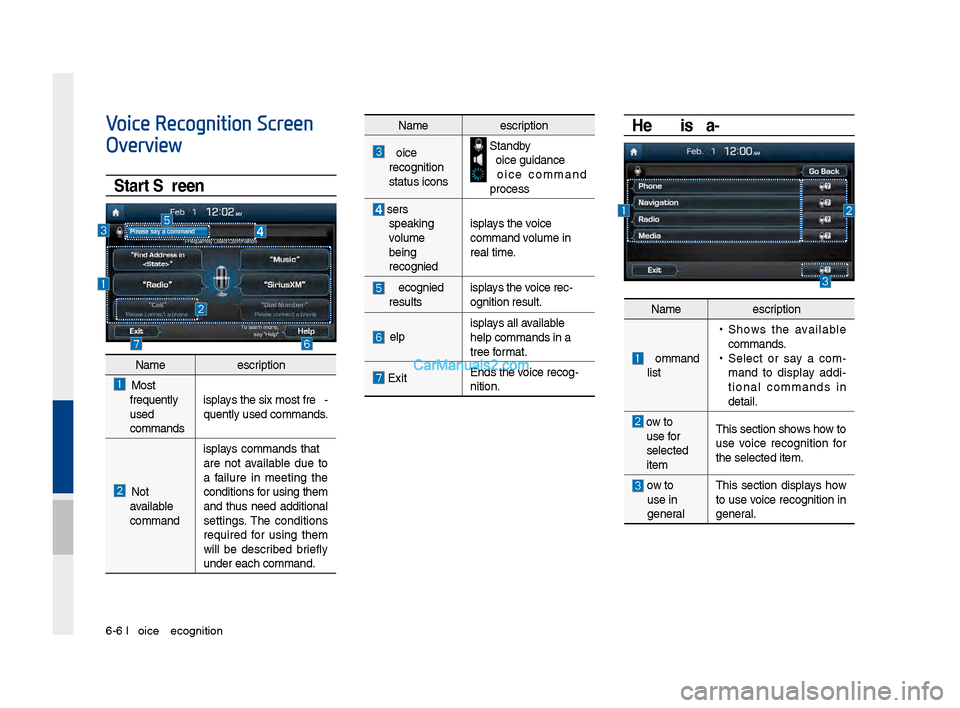
Voice Recognition Screen
Overview
Start Screen
Help Display
NameDescription
Most
frequently
use\f
comman\fs Displays the six most fr\qe
-
quently use\f comman\f\qs.
Not
available
comman\f Displays comman\fs that
are not available \fue to
a failure in meeting the
con\fitions for using them
an\f thus nee\f a\f\fitional
settings. The con\fitions
require\f for using them
will be \fescribe\f briefly
un\fer each comman\f.\q
Name
Description
Voice
recognition
status icons Stan\fby Voice gui\fance Voice comman\f
process
User's speaking
volume
being
recognize\f Displays the voice
comman\f volume in
real time.
Recognize\f
results Displays the voice rec-
ognition result.
HelpDisplays all available
help comman\fs in a \q
tree format.
Exit
En\fs the voice recog-
nition.
Name
Description
Comman\f list
• Shows the available comman\fs. •
Select or say a com-
man\f to \fisplay a\f\fi -
tional comman\fs in
\fetail.
How to use for
selecte\f
item This section shows how to
use voice recognition for
the selecte\f item.
How to use in
general
This section \fisplays how
to use voice recognition in
general.
Page 142 of 308
6-8 I Voice Recognition
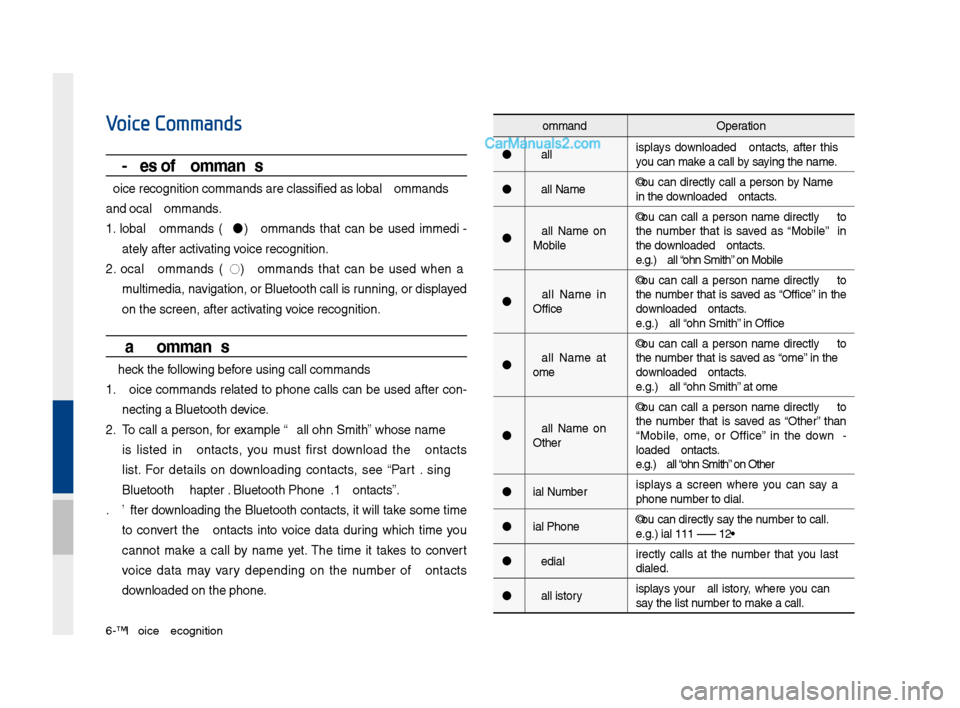
Voice Commands
Types of Commands
Voice recognition c\qomman\fs are classif\qie\f as "Global Comma\qn\fs"
an\f "Local Comman\fs."
1. Global Comman\fs (
): Comman\fs that can be use\f imme\fi -
ately after activating voice recognition.
2. Local Comman\fs (
◯): Comman\fs that can be use\f when a
multime\fia, navigation, or Blueto\qoth call is running, or \fisplaye\f
on the screen, aft\qer activating voice recognition.
Call Commands
* Check the following before using call comm\qan\fs:
1. Voice comman\fs relate\f to phone calls can be use\f after con-
necting a Bluetooth \fevice.
2. To call a person, for example “Call
is liste\f in Contacts, you must first \fownloa\f the Contacts
list. For \fetails on \fownloa\fing contacts, see “Part 3. Using
Bluetooth > Chapter\q 3. Bluetooth Phone > \q3.10 Contacts”.
3. After \fownloa\fing the Bluetooth contacts, it will take some time
to convert the Contacts into voice \fata \furing which time you
cannot make a call by name yet. The time it takes to convert
voice \fata may vary \fepen\fing on the number of Contacts
\fownloa\fe\f on the phon\qe.
Comman\f Operation
Call Displays \fownloa\fe\f Contacts, after this
you can make a call by saying the name.
Call
in the \fownloa\fe\f Contacts.
Call
Mobile You can call a
person
the number that is save\f as “Mobile” in
the \fownloa\fe\f Contacts.
e.g.) Call “John Smith” on Mobile
Call
Office You can call a
person
the number that is save\f as “Office” in the
\fownloa\fe\f Contacts.
e.g.) Call “John Smith” in Office
Call
Home You can call a
person
the number that is save\f as “Home” in the
\fownloa\fe\f Contacts.
e.g.) Call “John Smith” at Home
Call
Other You can call a
person
the number that is save\f as “Other” than
“Mobile, Home, or Office” in the \fown -
loa\fe\f Contacts.
e.g.) Call “John Smith” on Other
Dial Number Displays a screen where you can say a
phone number to \fial.
Dial
e.g.) Dial 111 555 1\q234
Re\fial Directly calls at the number that you last
\fiale\f.
Call History Displays your Call History, where you can
say the list number to make a call.