display HYUNDAI SONATA HYBRID 2019 Workshop Manual
[x] Cancel search | Manufacturer: HYUNDAI, Model Year: 2019, Model line: SONATA HYBRID, Model: HYUNDAI SONATA HYBRID 2019Pages: 546, PDF Size: 78.75 MB
Page 231 of 546
3-95
Convenient features of your vehicle
3
Instant Fuel Economy (3)
This mode displays the instant fueleconomy during the last few sec-
onds when the vehicle speed ismore than 6.2 MPH (10 km/h).
Accumulated Info display
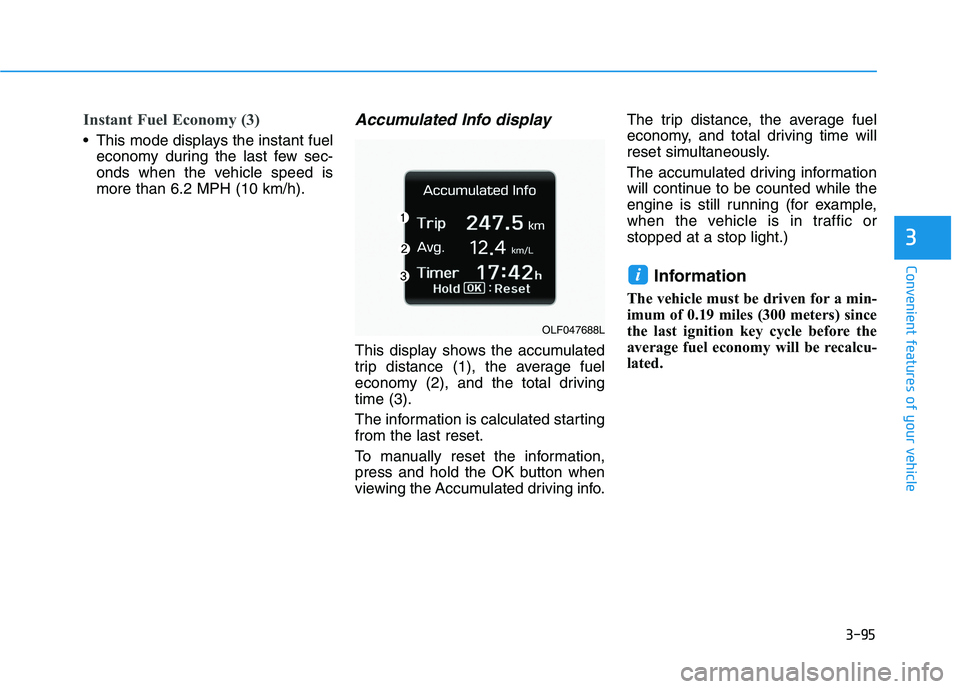
This display shows the accumulated
trip distance (1), the average fuel
economy (2), and the total drivingtime (3).
The information is calculated starting from the last reset.
To manually reset the information,
press and hold the OK button when
viewing the Accumulated driving info. The trip distance, the average fuel
economy, and total driving time will
reset simultaneously.
The accumulated driving information
will continue to be counted while the
engine is still running (for example,
when the vehicle is in traffic orstopped at a stop light.)
Information
The vehicle must be driven for a min-
imum of 0.19 miles (300 meters) since
the last ignition key cycle before the
average fuel economy will be recalcu-
lated.
i
OLF047688L
Page 232 of 546
3-96
Convenient features of your vehicle
Driving Info display
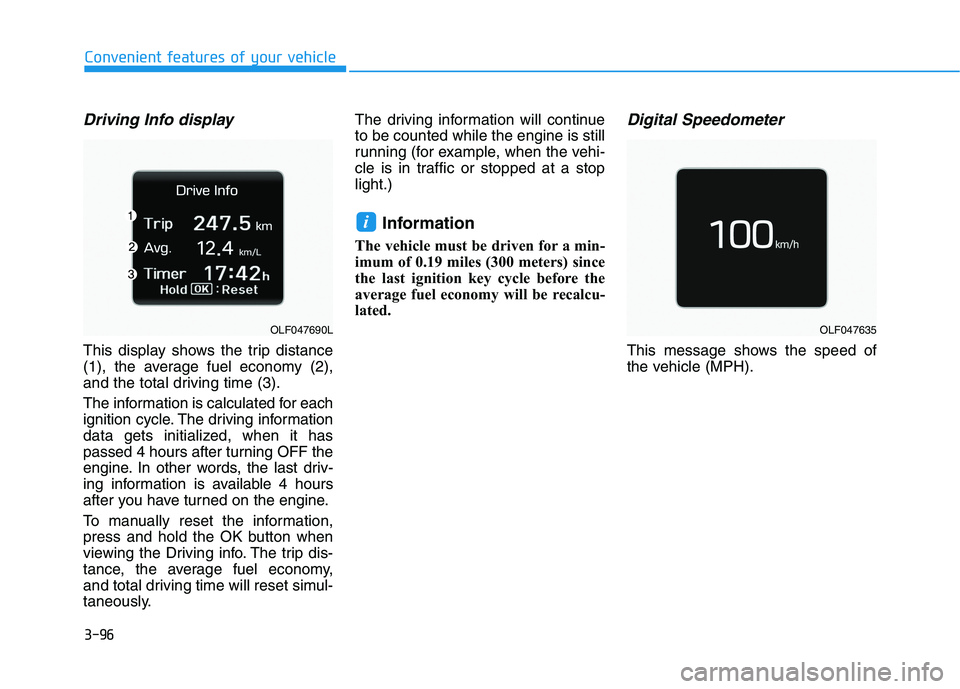
This display shows the trip distance
(1), the average fuel economy (2),
and the total driving time (3).
The information is calculated for each
ignition cycle. The driving information
data gets initialized, when it has
passed 4 hours after turning OFF the
engine. In other words, the last driv-
ing information is available 4 hours
after you have turned on the engine.
To manually reset the information,
press and hold the OK button when
viewing the Driving info. The trip dis-
tance, the average fuel economy,
and total driving time will reset simul-
taneously.The driving information will continueto be counted while the engine is still
running (for example, when the vehi-
cle is in traffic or stopped at a stoplight.)
Information
The vehicle must be driven for a min-
imum of 0.19 miles (300 meters) since
the last ignition key cycle before the
average fuel economy will be recalcu-
lated.
Digital Speedometer
This message shows the speed of
the vehicle (MPH).
i
OLF047690LOLF047635
Page 233 of 546
3-97
Convenient features of your vehicle
3
Driving style
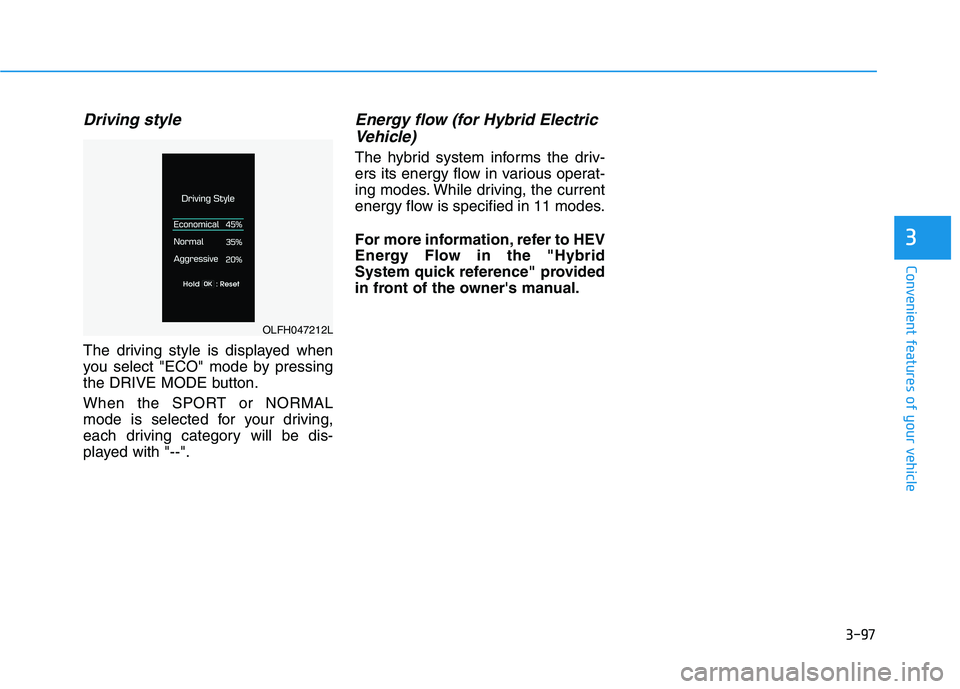
The driving style is displayed when
you select "ECO" mode by pressing
the DRIVE MODE button.
When the SPORT or NORMAL
mode is selected for your driving,
each driving category will be dis-
played with "--".
Energy flow (for Hybrid ElectricVehicle)
The hybrid system informs the driv-
ers its energy flow in various operat-
ing modes. While driving, the current
energy flow is specified in 11 modes.
For more information, refer to HEV
Energy Flow in the "Hybrid
System quick reference" provided
in front of the owner's manual.
OLFH047212L
Page 239 of 546
3-103
Convenient features of your vehicle
3
Turn signals and lane changesignals
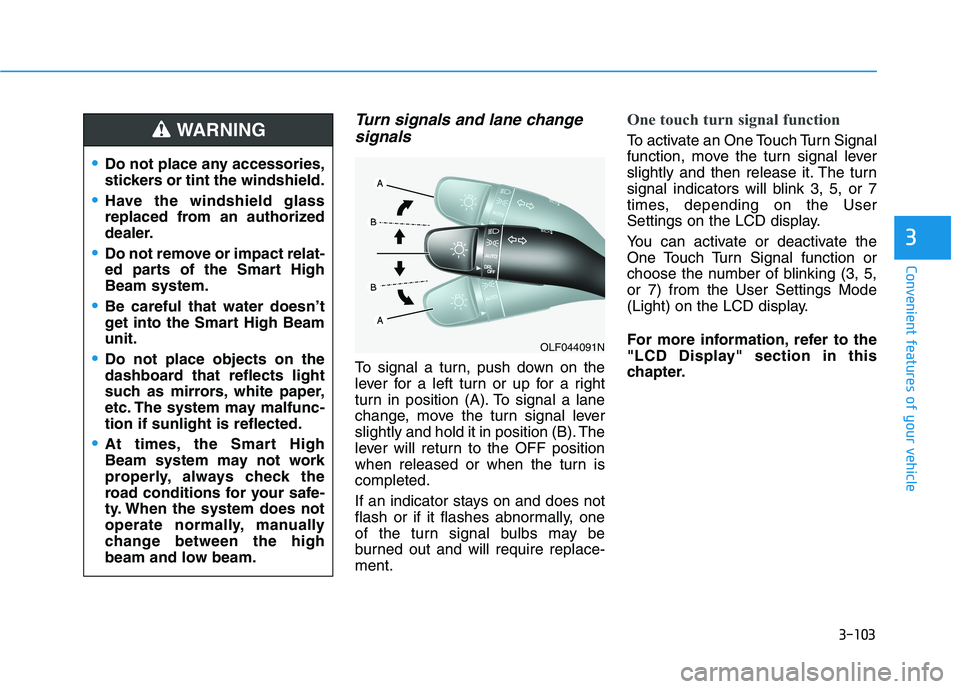
To signal a turn, push down on the
lever for a left turn or up for a right
turn in position (A). To signal a lane
change, move the turn signal lever
slightly and hold it in position (B). The
lever will return to the OFF position
when released or when the turn iscompleted.
If an indicator stays on and does not
flash or if it flashes abnormally, one
of the turn signal bulbs may be
burned out and will require replace-ment.
One touch turn signal function
To activate an One Touch Turn Signal
function, move the turn signal lever
slightly and then release it. The turn
signal indicators will blink 3, 5, or 7
times, depending on the User
Settings on the LCD display.
You can activate or deactivate the
One Touch Turn Signal function or
choose the number of blinking (3, 5,or 7) from the User Settings Mode
(Light) on the LCD display.
For more information, refer to the
"LCD Display" section in this
chapter.
OLF044091N
Do not place any accessories,
stickers or tint the windshield.
Have the windshield glass
replaced from an authorized
dealer.
Do not remove or impact relat-
ed parts of the Smart HighBeam system.
Be careful that water doesn’t
get into the Smart High Beamunit.
Do not place objects on the
dashboard that reflects light
such as mirrors, white paper,
etc. The system may malfunc-tion if sunlight is reflected.
At times, the Smart High
Beam system may not work
properly, always check the
road conditions for your safe-
ty. When the system does not
operate normally, manually
change between the high
beam and low beam.
WARNING
Page 240 of 546
3-104
Convenient features of your vehicle
Battery saver function
The purpose of this feature is to pre-
vent the battery from being dis-
charged. The system automatically
turns off the parking lamp when the
driver turns the engine off and opens
the driver-side door.
With this feature, the parking lamps
will turn off automatically if the driver
parks on the side of road at night.
If necessary, to keep the lamps on
when the engine is turned off, perform
the following:
1) Open the driver-side door.
2) Turn the parking lamps OFF andON again using the light switch on
the steering column.
Headlamp delay function
(if equipped)
If engine Start/Stop button is in the
ACC or OFF position with the head-lamps ON, the headlamps (and/or
parking lamps) remain on for about 5
minutes. However, if the driver’s dooris opened and closed, the head-
lamps are turned off after 15 sec-
onds. However, with the engine off if
the driver’s door is opened and
closed, the headlamps (and/or park-
ing lamps) are turned off after 15
seconds.
The headlamps (and/or parking
lamps) can be turned off by pressing
the lock button on the smart key
twice or turning the light switch to the
OFF or AUTO position. However, if
you turn the light switch to the AUTO
position when it is dark outside, the
headlamps will not be turned off.
You can activate or deactivate the
Headlamp Delay function from theUser Settings Mode (Light) on the
LCD display.
For more information, refer to the
"LCD Display" section in this
chapter. If the driver gets out of the vehicle
through other doors (except dri-
ver’s door), the battery saver func-tion does not operate and the
headlamp delay function does not
turn off automatically. Therefore, It
causes the battery to be dis-
charged. In this case, make sure
to turn off the lamp before getting
out of the vehicle.
NOTICE
Page 242 of 546
3-106
Convenient features of your vehicle
Welcome System (if equipped)
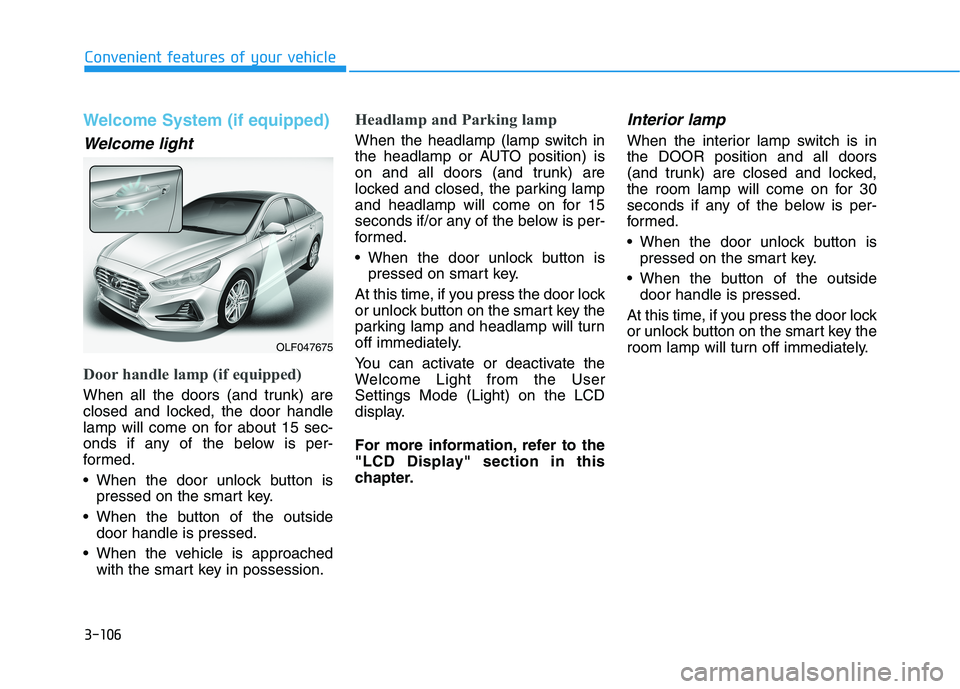
Welcome light
Door handle lamp (if equipped)
When all the doors (and trunk) are
closed and locked, the door handle
lamp will come on for about 15 sec-
onds if any of the below is per-
formed.
When the door unlock button ispressed on the smart key.
When the button of the outside door handle is pressed.
When the vehicle is approached with the smart key in possession.
Headlamp and Parking lamp
When the headlamp (lamp switch in
the headlamp or AUTO position) is
on and all doors (and trunk) are
locked and closed, the parking lamp
and headlamp will come on for 15
seconds if/or any of the below is per-
formed.
When the door unlock button ispressed on smart key.
At this time, if you press the door lock
or unlock button on the smart key the
parking lamp and headlamp will turn
off immediately.
You can activate or deactivate the
Welcome Light from the UserSettings Mode (Light) on the LCD
display.
For more information, refer to the
"LCD Display" section in this
chapter.
Interior lamp
When the interior lamp switch is inthe DOOR position and all doors
(and trunk) are closed and locked,
the room lamp will come on for 30
seconds if any of the below is per-
formed.
When the door unlock button is pressed on the smart key.
When the button of the outside door handle is pressed.
At this time, if you press the door lock
or unlock button on the smart key the
room lamp will turn off immediately.
OLF047675
Page 249 of 546
3-113
Convenient features of your vehicle
3
DDRRIIVV EERR AA SSSSIISS TT SS YY SSTT EEMM
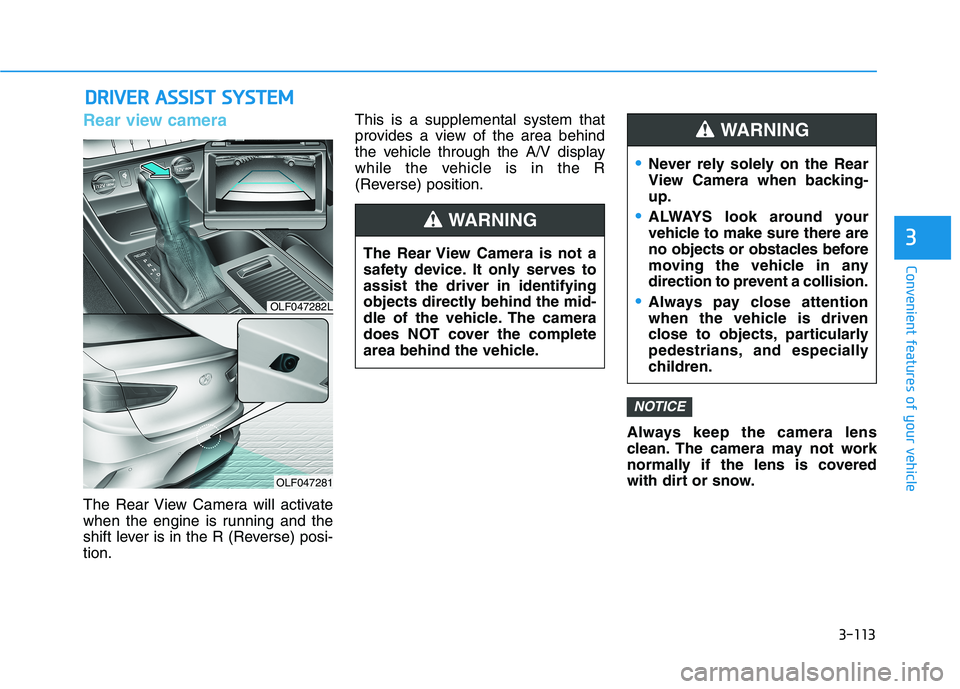
Rear view camera
The Rear View Camera will activate
when the engine is running and the
shift lever is in the R (Reverse) posi-tion. This is a supplemental system that
provides a view of the area behind
the vehicle through the A/V display
while the vehicle is in the R
(Reverse) position.
Always keep the camera lens
clean. The camera may not work
normally if the lens is covered
with dirt or snow.
NOTICE
The Rear View Camera is not a
safety device. It only serves toassist the driver in identifying
objects directly behind the mid-
dle of the vehicle. The camera
does NOT cover the complete
area behind the vehicle.
WARNING
Never rely solely on the Rear
View Camera when backing-up.
ALWAYS look around your
vehicle to make sure there are
no objects or obstacles before
moving the vehicle in any
direction to prevent a collision.
Always pay close attention
when the vehicle is driven
close to objects, particularly
pedestrians, and especially
children.
WARNING
OLF047282L
OLF047281
Page 256 of 546
3-120
Convenient features of your vehicle
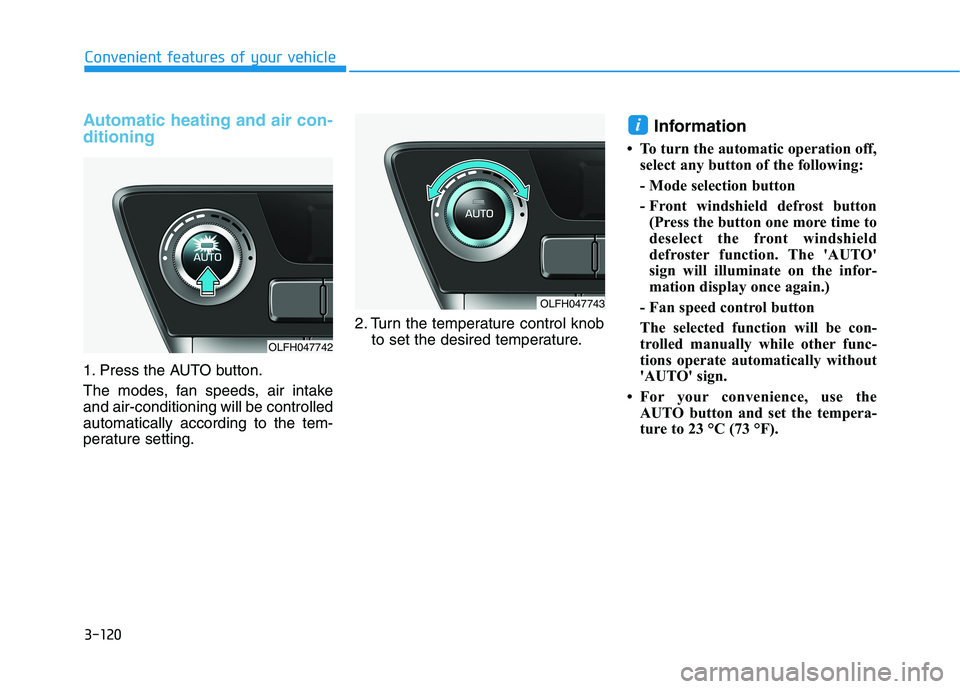
Automatic heating and air con- ditioning
1. Press the AUTO button.
The modes, fan speeds, air intake and air-conditioning will be controlledautomatically according to the tem-
perature setting.2. Turn the temperature control knob
to set the desired temperature. Information
To turn the automatic operation off, select any button of the following:
- Mode selection button
- Front windshield defrost button(Press the button one more time to
deselect the front windshield
defroster function. The 'AUTO'
sign will illuminate on the infor-
mation display once again.)
- Fan speed control button
The selected function will be con-
trolled manually while other func-
tions operate automatically without
'AUTO' sign.
For your convenience, use the AUTO button and set the tempera-
ture to 23 °C (73 °F).
i
OLFH047742
OLFH047743
Page 261 of 546
3-125
Convenient features of your vehicle
3
Temperature conversion
If the battery has been discharged or
disconnected, the temperature mode
display will reset to Centigrade.
You can switch the temperature
mode between Centigrade to
Fahrenheit as follows;
- Automatic climate control system
While pressing the OFF button,
press the AUTO button for 3 seconds
or more. The display will change from
Centigrade to Fahrenheit, or from
Fahrenheit to Centigrade.
- "User setting mode" in the cluster :You can change the temperature
unit in the "Other features -
Temperature unit"
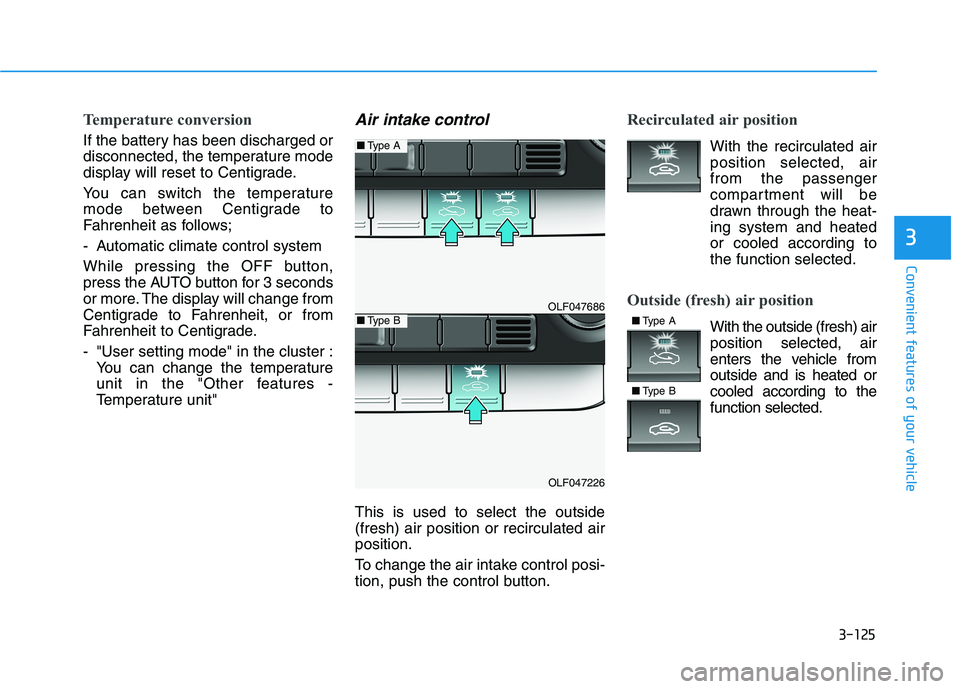
Air intake control
This is used to select the outside(fresh) air position or recirculated airposition.
To change the air intake control posi-
tion, push the control button.
Recirculated air position
With the recirculated airposition selected, air from the passenger
compartment will be
drawn through the heat-ing system and heated
or cooled according tothe function selected.
Outside (fresh) air position
With the outside (fresh) air position selected, air
enters the vehicle fromoutside and is heated orcooled according to thefunction selected.
OLF047686
OLF047226
■ Type A
■Type B■Type A
■ Type B
Page 269 of 546
3-133
Convenient features of your vehicle
3
WWIINN DDSSHH IIEE LLDD DD EEFFRR OO SSTT IINN GG AA NN DD DD EEFFOO GGGGIINN GG
For maximum windshield defrost-
ing, set the temperature control
knob to the highest temperature
setting and the fan control knob to
the highest fan speed. Select the
front defrost button on the climate
control display. After the engine
warm-up period, warm air will bedirected to the front windshield.
If warm air to the floor is desired while defrosting or defogging, setthe mode to the floor-defrost posi-tion.
Before driving, clear all snow and ice from the windshield, rear win-
dow, outside rear view mirrors, and
all side windows.
Clear all snow and ice from the hood and air inlet in the cowl grill to
improve heater and defroster effi-ciency and to reduce the probabili-
ty of fogging up the inside of thewindshield.
To reduce tendency of the glass fogging and also to improve visibil-
ity, keep the interior surface of the
windshield clean by wiping it with a
clean cloth and glass cleaner. If the engine temperature is still
cold after starting, then a brief
engine warm up period may be
required for the vented air flow tobecome warm or hot.NOTICE
Windshield heating
Do not use the or posi- tion during cooling operation in
extremely humid weather. The
difference between the temper-ature of the outside air and thatof the windshield could causethe outer surface of the wind-
shield to fog up, causing loss ofvisibility could cause an acci-
dent resulting in serious injury
or death. In this case, set the
mode selection knob or button
to the position and fan
speed control knob or button to
a lower speed.
WARNING