Water Hyundai Terracan 2003 User Guide
[x] Cancel search | Manufacturer: HYUNDAI, Model Year: 2003, Model line: Terracan, Model: Hyundai Terracan 2003Pages: 349, PDF Size: 4.56 MB
Page 61 of 349
FEATURES OF YOUR HYUNDAI 1- 53
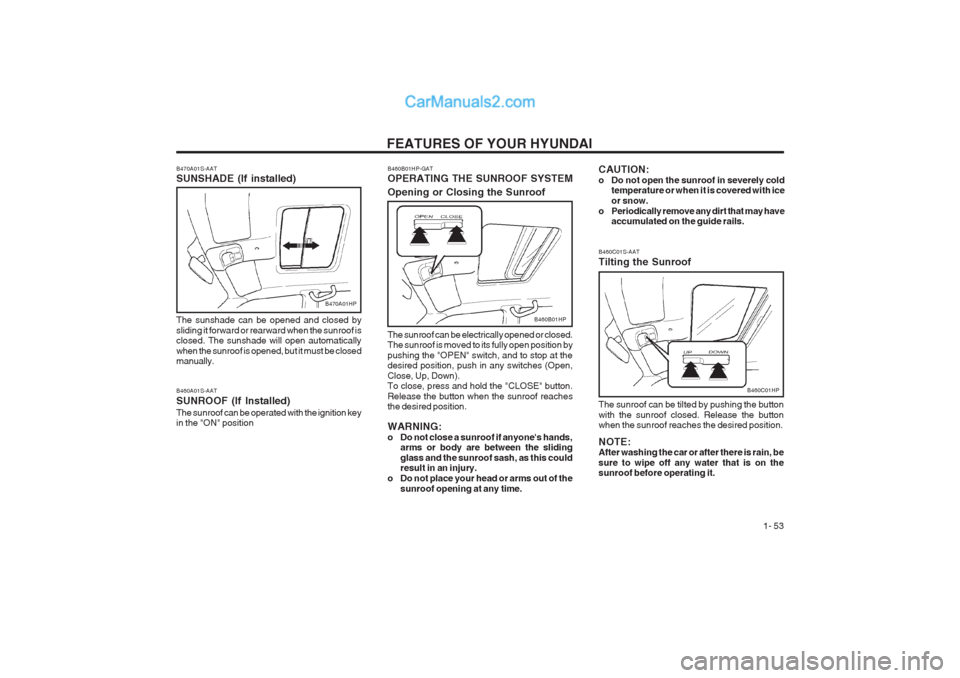
B460C01S-AAT Tilting the Sunroof
B460C01HP
The sunroof can be tilted by pushing the button with the sunroof closed. Release the button when the sunroof reaches the desired position. NOTE: After washing the car or after there is rain, be sure to wipe off any water that is on the sunroof before operating it.
B460B01HP-GAT OPERATING THE SUNROOF SYSTEM Opening or Closing the Sunroof
B460B01HP
The sunroof can be electrically opened or closed. The sunroof is moved to its fully open position by
pushing the "OPEN" switch, and to stop at the desired position, push in any switches (Open, Close, Up, Down). To close, press and hold the "CLOSE" button. Release the button when the sunroof reaches the desired position. WARNING:
o Do not close a sunroof if anyone's hands, arms or body are between the slidingglass and the sunroof sash, as this could result in an injury.
o Do not place your head or arms out of the
sunroof opening at any time.
B460A01S-AAT SUNROOF (If Installed)The sunroof can be operated with the ignition key in the "ON" position
B470A01S-AAT SUNSHADE (If installed)
B470A01HP
The sunshade can be opened and closed by sliding it forward or rearward when the sunroof is closed. The sunshade will open automatically when the sunroof is opened, but it must be closed manually.
CAUTION:
o Do not open the sunroof in severely cold temperature or when it is covered with iceor snow.
o Periodically remove any dirt that may have accumulated on the guide rails.
Page 100 of 349
FEATURES OF YOUR HYUNDAI
1- 92
H290F02O-GAT
1. CD Select Button
o Insert the CD with the label facing upward.
o Insert the CD to start CD playback, during
radio operation or cassette tape playing.
o When a disc is in the CD deck, if you press the
CD/CDC button the CD player will beginplaying even if the radio or cassette player is being used.
o The CD player can be used when the ignition
switch is in either the "ON" or "ACC" position.
2. FF/REW ( / ) If you want to fast forward or reverse through the compact disc track, push and hold the FF ( ) or REW ( ) button. When you release the button, the compact disc player will resume playing.
3. TRACK UP/DOWN
o The desired track on the disc currently being played can be selected using the track num- ber.
o Press button once to skip forward to the
beginning of the next track. Press button once to skip back to the beginning of the track.
4. REPEAT
o To repeat the track you are currently listening to, press the RPT button. To cancel, press again. o If you do not release RPT operation when the
track ends, it will automatically be replayed. This process will be continued until you push the button again.
5. EQUALIZER Button Press the EQ button to select the CLASSIC, JAZZ, ROCK and DEFEAT MODE for the de- sired tone quality. Each press of the button changes the display as follows; NOTE:
o To assure proper operation of the unit,
keep the vehicle interior temperaturewithin a normal range by using the vehicle's air conditioning or heating sys- tem.
o When replacing the fuse, replace it with a
fuse having the correct capacity.
o The preset station frequencies are all
erased when the car battery is discon- nected. Therefore, all data will have to be set again if this should occur.
o Do not add any oil to the rotating parts.
Keep magnets, screwdrivers and other metallic objects away from the tape mecha- nism and head.
o This equipment is designed to be used
only in a 12 volt DC battery system with negative ground.
o This unit is made of precision parts. Do not attempt to disassemble or adjust any parts.
o When driving your vehicle, be sure to keep
the volume of the unit set low enough to allow you to hear sounds coming from the outside.
o Do not expose this equipment (including
the speakers and tape) to water or exces- sive moisture.
CAUTION: Do not insert warped or poor quality discs into the CD player as damage to the unit may occur.
CLASSIC JAZZ ROCK DEFEAT
6. CD EJECT Button When the button is pressed with a CD loaded, the CD will eject.
7. SCAN Button (If installed)
o Press the SCAN button to playback the first 10 seconds of each track.
o Press the SCAN button again within 10 sec. when you have reached the desired track.
Page 108 of 349
DRIVING YOUR HYUNDAI
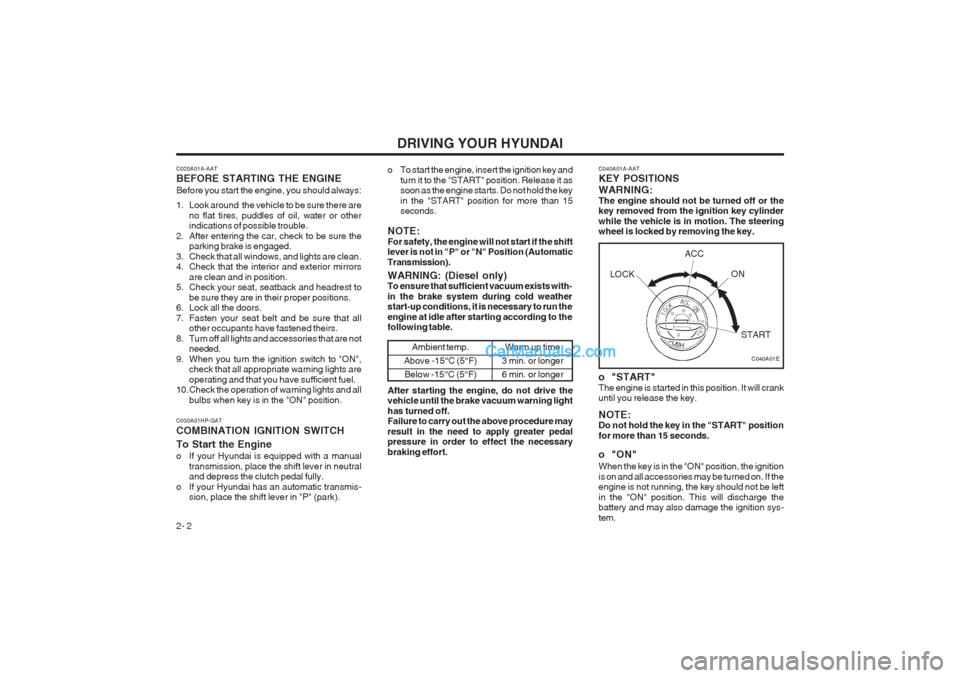
2- 2 C040A01A-AAT KEY POSITIONS WARNING: The engine should not be turned off or the key removed from the ignition key cylinder while the vehicle is in motion. The steering wheel is locked by removing the key.
o "START" The engine is started in this position. It will crank until you release the key. NOTE: Do not hold the key in the "START" position for more than 15 seconds.
o "ON" When the key is in the "ON" position, the ignition is on and all accessories may be turned on. If the engine is not running, the key should not be left in the "ON" position. This will discharge the battery and may also damage the ignition sys- tem.
C020A01A-AAT BEFORE STARTING THE ENGINE Before you start the engine, you should always:
1. Look around the vehicle to be sure there are
no flat tires, puddles of oil, water or other indications of possible trouble.
2. After entering the car, check to be sure the parking brake is engaged.
3. Check that all windows, and lights are clean.
4. Check that the interior and exterior mirrors are clean and in position.
5. Check your seat, seatback and headrest to
be sure they are in their proper positions.
6. Lock all the doors.
7. Fasten your seat belt and be sure that all other occupants have fastened theirs.
8. Turn off all lights and accessories that are not needed.
9. When you turn the ignition switch to "ON", check that all appropriate warning lights areoperating and that you have sufficient fuel.
10. Check the operation of warning lights and all
bulbs when key is in the "ON" position. o To start the engine, insert the ignition key and
turn it to the "START" position. Release it as soon as the engine starts. Do not hold the key in the "START" position for more than 15 seconds.
NOTE: For safety, the engine will not start if the shift lever is not in "P" or "N" Position (Automatic Transmission).
C030A01HP-GAT COMBINATION IGNITION SWITCH To Start the Engine
o If your Hyundai is equipped with a manual transmission, place the shift lever in neutral and depress the clutch pedal fully.
o If your Hyundai has an automatic transmis- sion, place the shift lever in "P" (park).
C040A01E
WARNING: (Diesel only) To ensure that sufficient vacuum exists with- in the brake system during cold weather start-up conditions, it is necessary to run the engine at idle after starting according to the following table.
Ambient temp.
Above -15°C (5°F) Below -15°C (5°F)Warm up time
3 min. or longer 6 min. or longer
After starting the engine, do not drive the vehicle until the brake vacuum warning light has turned off. Failure to carry out the above procedure may result in the need to apply greater pedal pressure in order to effect the necessary braking effort. LOCK
ACC
ON
START
Page 116 of 349
DRIVING YOUR HYUNDAI
2- 10
conventional 2-wheel drive vehicles any more than low-slung sports cars are designed to perform satisfactorily under off-road condi- tions. If at all possible, avoid sharp turns or abrupt maneuvers. As with other vehicles of this type, failure to operate this vehicle cor- rectly may result in loss of control or vehicle rollover.
o Do not grip the inside or spokes of the steer-
ing wheel when driving off-road. The steering wheel could jerk and injure your hands. Al- ways firmly hold the outer steering wheel when you are driving off-road.
o Drive at lower speeds in strong crosswinds. Because of your vehicle’s high center of gravity, its stability will be affected in cross- winds. Slower speeds ensure better vehicle control.
o Check your brake condition once you are out
of mud or water. Press the brake several times as you move slowly until your feel normal braking forces return.
o Four-wheel driving on flat and normal roads
can result in a severe binding condition when turning the steering wheel.
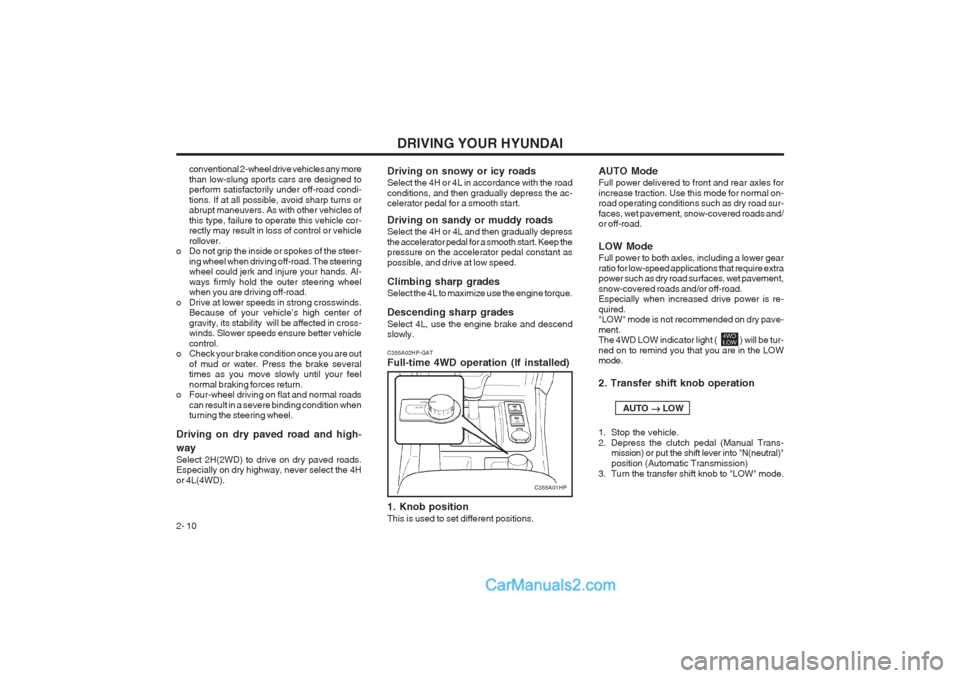
Driving on dry paved road and high- way Select 2H(2WD) to drive on dry paved roads. Especially on dry highway, never select the 4H or 4L(4WD). C355A02HP-GAT Full-time 4WD operation (If installed) 1. Knob position This is used to set different positions.Driving on snowy or icy roads Select the 4H or 4L in accordance with the road conditions, and then gradually depress the ac- celerator pedal for a smooth start. Driving on sandy or muddy roads Select the 4H or 4L and then gradually depress the accelerator pedal for a smooth start. Keep the pressure on the accelerator pedal constant as possible, and drive at low speed. Climbing sharp grades Select the 4L to maximize use the engine torque. Descending sharp grades Select 4L, use the engine brake and descend slowly. AUTO Mode Full power delivered to front and rear axles for increase traction. Use this mode for normal on- road operating conditions such as dry road sur- faces, wet pavement, snow-covered roads and/ or off-road. LOW Mode Full power to both axles, including a lower gear ratio for low-speed applications that require extra power such as dry road surfaces, wet pavement, snow-covered roads and/or off-road. Especially when increased drive power is re- quired. "LOW" mode is not recommended on dry pave- ment. The 4WD LOW indicator light ( ) will be tur- ned on to remind you that you are in the LOW mode. 2. Transfer shift knob operation AUTO
LOW
1. Stop the vehicle.
2. Depress the clutch pedal (Manual Trans- mission) or put the shift lever into "N(neutral)"position (Automatic Transmission)
3. Turn the transfer shift knob to "LOW" mode.
C355A01HP
Page 117 of 349
DRIVING YOUR HYUNDAI 2- 11
LOW
AUTO
1. Stop the vehicle.
2. Depress the clutch pedal (Manual Trans- mission) or put the shift lever into "N (neu-tral)" position (Automatic Transmission).
3. Turn the transfer shift knob to "AUTO" mode. Driving 4WD Safely
(1) Be sure to wear the seat belt.
(2) Drive at lower speeds in strong crosswinds. Because of your vehicle’s high center of gravity, its stability will be affected in cross- winds. Slower speeds ensure better vehicle control.
(3) Check the brake condition after driving in wet or muddy conditions. Press the brakeseveral times as you move slowly until you feel normal braking forces return.
(4) Do not drive the vehicle through water. (i.e. streams, rivers, lakes, etc.)
(5) The stopping distance of the full-time 4WD vehicle differs very little from that of the 2WD vehicle.
When driving on a snow-covered road or a slippery, muddy surface, make sure thatyou keep a sufficient distance between your vehicle and the one ahead of you.
(6) Since the driving torque is always applied to
the 4 wheels, the performance of the full- time 4WD vehicle is greatly affected by the condition of the tires. Be sure to equip it with all four tires of the same size and type. o When replacement of any of the tires or
disc wheels is necessary, replace all ofthem.
o Rotate the tires and check the tire pres- sure at regular intervals.
(7) The full-time 4WD vehicle cannot be towed by an ordinary tow truck. Makesure that the vehicle is towed with its four wheels raised off the ground.
o If the vehicle is towed with its only two wheels raised off the ground, the 4WDsystem could be damaged.
o In unavoidable case, if the vehicle is being towed with all four wheels on theground, it should be towed only forward direction with rope.
o While towing, check the following items. 1. The ignition switch is in "ACC" or"ON".
2. Place the shift lever in neutral (For Automatic Transmission, "N" posi-tion).
3. Release the parking brake.
NOTE: To avoid serious damage to your 4WD ve- hicle, limit towing to 15km/h (10 mph) and not for more than 1.5km (1 mile) at ANY TIME.
(8) For speedometer test or inspection/mainte- nance (I/M) program of full-time 4WD ve- hicle, use a four-wheel chassis dynamom- eter.
CAUTION:Never engage the parking brake while per- forming these tests.
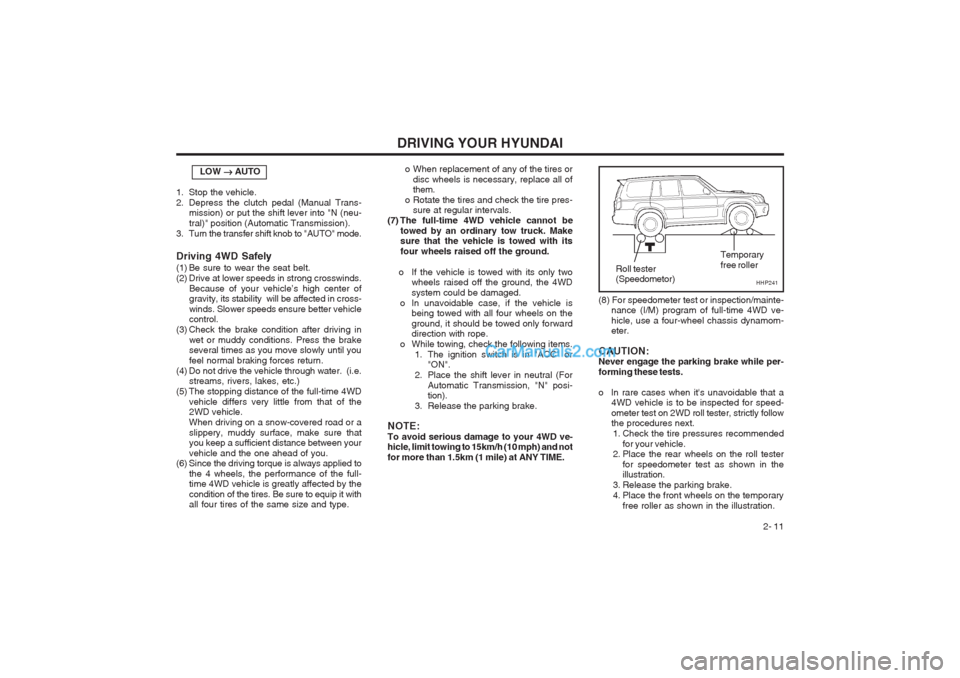
o In rare cases when it's unavoidable that a 4WD vehicle is to be inspected for speed- ometer test on 2WD roll tester, strictly follow the procedures next.
1. Check the tire pressures recommended for your vehicle.
2. Place the rear wheels on the roll tester
for speedometer test as shown in theillustration.
3. Release the parking brake.
4. Place the front wheels on the temporary free roller as shown in the illustration.
HHP241
Roll tester (Speedometor) Temporary free roller
Page 118 of 349
DRIVING YOUR HYUNDAI
2- 12 C130A01HP-GAT GOOD BRAKING PRACTICES WARNING: Nothing should be carried on top of the cargo area cover behind the rear seat. If there were an accident or a sudden stop, such objects could move forward and cause damage to the vehicle or injure the occupants.
o After being parked, check to be sure the
parking brake is not engaged and that the parking brake indicator light is out before driving away.
o Driving through water may get the brakes
wet. They can also get wet when the car is washed. Wet brakes can be dangerous! Your car will not stop as quickly if the brakes are wet. Wet brakes cause the car to pull to one side. To dry the brakes, apply the brakes lightly until the braking action returns to nor- mal, taking care to keep the car under control at all times. If the braking action does not return to normal, stop as soon as it is safe to do so and call your Hyundai dealer for assis- tance.
o Don’t coast down hills with the car out of gear.
This is extremely hazardous. Keep the car in gear at all times, use the brakes to slow down, then shift to a lower gear so that engine braking will help you maintain a safe speed.
D190A01O-GAT LIMITED-SLIP DIFFERENTIAL (If installed) A limited-slip differential, if equipped, is for the rear wheel differential only. The features of this limited-slip differential are described below: Just as with a conventional differential, the wheel on one side is allowed to turn at a different speed from the wheel on the other side when the vehicle is cornering. The difference between the limited- slip differential and a conventional differential is that if the wheel on one side of the vehicle loses traction, a greater amount of torque is applied to the rear wheel on the other side to improve traction.
WARNING:Keep away from the front of the vehicle while inspecting. This is very dangerous as the vehicle can jump forward and cause serious injury or death.
(9) When using tire chains, always attach them
to the rear wheels.
(10) I f the front or rear wheels get stuck in the
mud, do not spin them recklessly. The 4WD system could be damaged.
CAUTION:
o While the full-time 4WD vehicle is being raised on a jack, never start the engine orcause the tires to rotate. There is the danger that rotating tires touching the ground could cause the ve- hicle to go off the jack and to jump for- ward.
o If one of the front or rear wheels begins to
spin in mud, snow, etc., the vehicle can sometimes be driven out by depressing the accelerator pedal further; however, avoid running the engine continuously at high rpm because doing so could damage the 4WD system. WARNING:
o Avoid high cornering speeds.
o Do not make quick steering wheel move-
ments, such as sharp lane charges or fast,sharp turns.
o The risk of rollover is greatly increased if you lose control of your vehicle at high- way speeds.
o In a collision crash, an unbelted person is
significantly more likely to die than a per- son wear a seatbelt.
o Loss of control often occurs if two or more wheels drop off the roadway and the driver oversteers to reenter the roadway.
o In the event your vehicle leaves the road-
way, do not steer sharply. Instead, slow down before pulling back into the travel lanes.
Page 120 of 349
DRIVING YOUR HYUNDAI
2- 14 C160C01A-AAT Use High Quality Ethylene Glycol Coolant Your Hyundai is delivered with high quality ethyl- ene glycol coolant in the cooling system. It is the only type of coolant that should be used because it helps prevent corrosion in the cooling system, lubricates the water pump and prevents freezing. Be sure to replace or replenish your coolant in accordance with the maintenance schedule in Section 5. Before winter, have your coolant test- ed to assure that its freezing point is sufficient for the temperatures anticipated during the winter. C160D01A-AAT Check Battery and Cables Winter puts additional burdens on the battery system. Visually inspect the battery and cables as described in Section 6. The level of charge in your battery can be checked by your Hyundai dealer or a service station. C160E01A-AAT Change to "Winter Weight" Oil if Necessary In some climates it is recommended that a lower viscosity "winter weight" oil be used during cold weather. See Section 9 for recommendations. If you aren’t sure what weight oil you should use, consult your Hyundai dealer.
o Remember, your Hyundai does not require
extended warm-up. As soon as the engine is running smoothly, you can drive away. In very cold weather, however, give your engine a slightly longer warm-up period.
o Don't "lug" or "over-rev" the engine. Lugging is driving too slowly in too high a gear result- ing in the engine bucking. If this happens, shift to a lower gear. Over-revving is racing the engine beyond its safe limit. This can be avoided by shifting at the recommended speeds.
o Use your air conditioning sparingly. The air
conditioning system is operated by engine power so your fuel economy is reduced when you use it.
C160A01A-AAT WINTER DRIVING The more severe weather conditions of winter result in greater wear and other problems. To minimize the problems of winter driving, you should follow these suggestions:
C150A01A-AAT SMOOTH CORNERING Avoid braking or gear changing in corners, espe- cially when roads are wet. Ideally, corners should always be taken under gentle acceleration. If you follow these suggestions, tire wear will be held to a minimum. C160B01A-GAT Snowy or Icy Conditions To drive your vehicle in deep snow, it may be necessary to use snow tires or to install tire chains on your tires. If snow tires are needed, it is necessary to select tires equivalent in size and type of the original equipment tires. Failure to do so may adversely affect the safety and handling of your car. Furthermore, speeding, rapid accel- eration, sudden brake applications, and sharp turns are potentially very hazardous practices. During deceleration, use engine braking to the fullest extent. Sudden brake applications on snowy or icy roads may cause skids to occur. You need to keep sufficient distance between the vehicle in operation in front and your vehicle. Also, apply the brake gently. It should be noted that installing tire chains on the tire will provide a greater driving force, but will not prevent side skids. NOTE: Tire chains are not legal in all provinces. Check province laws before fitting tire chains.
Page 121 of 349
DRIVING YOUR HYUNDAI 2- 15
C160H01A-AAT Use Approved Anti-Freeze in Window Washer System To keep the water in the window washer system from freezing, add an approved anti-freeze solu- tion in accordance with instructions on the con- tainer. Window washer anti-freeze is available from Hyundai dealers and most auto parts out- lets. Do not use engine coolant or other types of anti-freeze as these may damage the finish.
C160F01A-AAT Check Spark Plugs and Ignition System Inspect your spark plugs as described in Section 6 and replace them if necessary. Also check all ignition wiring and components to be sure they are not cracked, worn or damaged in any way.
C160G02A-GAT To Keep Locks from Freezing To keep the locks from freezing, squirt an ap- proved de-icer fluid or glycerine into the key opening. If a lock is covered with ice, squirt it with an approved de-icing fluid to remove the ice. If the lock is frozen internally, you may be able to thaw it out by using a heated key. Handle the heated key with care to avoid
injury.
NOTE: The proper temperature for using the immo- bilizer key is from -40°C (-40°F) to 80°C (176°F). If you heat the immobilizer key over 80°C (176°F) to open the frozen lock, it may cause damage to the transponder in its head. C160I01HP-GAT Don’t Let Your Parking Brake Freeze Under some conditions your parking brake can freeze in the engaged position. This is most likely to happen when there is an accumulation of snow or ice around or near the rear brakes or if the brakes are wet. If there is a risk the parking brake may freeze, apply it only temporarily while you put the gear selector lever in "P" (automatic) or in first or reverse gear (manual transmission) and block the rear wheels so the car cannot roll. Then release the parking brake. C160K01A-AAT Carry Emergency Equipment Depending on the severity of the weather where you drive your car, you should carry appropriate emergency equipment. Some of the items you may want to carry include tire chains, tow straps or chains, flashlight, emergency flares, sand, a shovel, jumper cables, a window scraper, gloves, ground cloth, coveralls, a blanket, etc.
C160J01A-AAT Don’t Let Ice and Snow Accumulate Underneath Under some conditions, snow and ice can build up under the fenders and interfere with the steer- ing. When driving in severe winter conditions where this may happen, you should periodically check underneath the car to be sure the move- ment of the front wheels and the steering compo- nents is not obstructed.
C180A01A-AAT USE OF LIGHTS Check your lights regularly for correct operation and always keep them clean. When driving dur- ing the day in conditions of poor visibility, it is helpful to drive with headlights on low beam. This enables you to be seen as well as to see.
C170A01A-AAT HIGHER SPEED MOTORING Pre-Trip Inspections 1. Tires: Adjust the tire inflation pressures to specifica- tion. Low tire inflation pressures will result in overheating and possible failure of the tires. Avoid using worn or damaged tires which may result in reduced traction or tire failure. NOTE: Never exceed the maximum tire inflation pres- sure shown on the tires. 2. Fuel, engine coolant and engine oil: High speed travel consumes more fuel than urban motoring. Do not forget to check both engine coolant and engine oil. 3. Drive belt: A loose or damaged drive belt may result in overheating of the engine.
Page 125 of 349
WHAT TO DO IN AN EMERGENCY 3-1
3. WHAT TO DO IN ANEMERGENCY
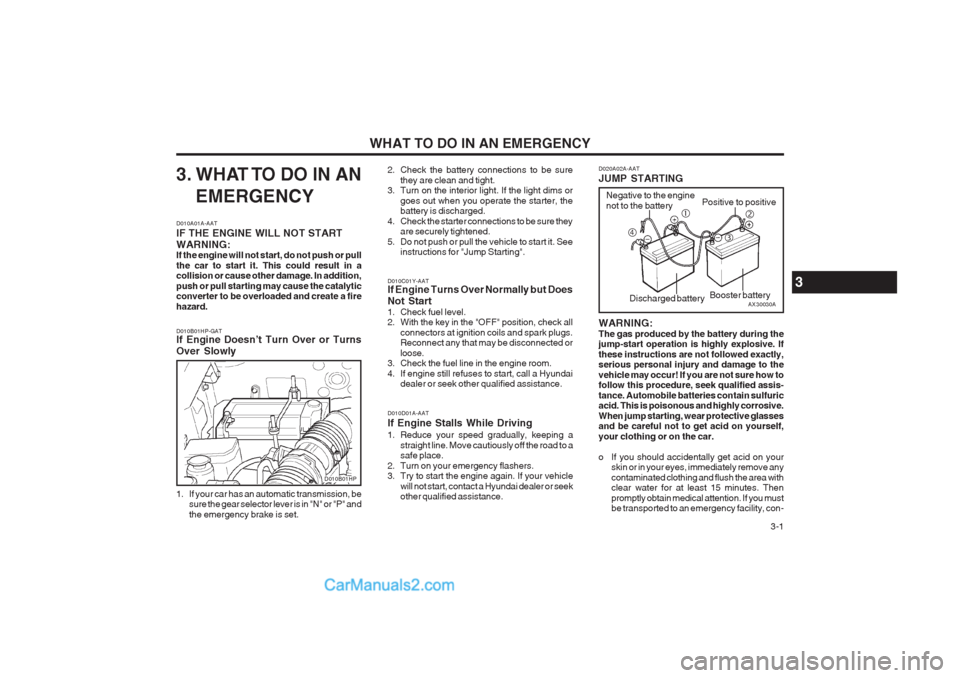
D010A01A-AAT IF THE ENGINE WILL NOT START WARNING: If the engine will not start, do not push or pull the car to start it. This could result in a collision or cause other damage. In addition, push or pull starting may cause the catalytic converter to be overloaded and create a fire hazard. D010B01HP-GAT If Engine Doesn’t Turn Over or Turns Over Slowly
1. If your car has an automatic transmission, be sure the gear selector lever is in "N" or "P" and the emergency brake is set. 2. Check the battery connections to be sure
they are clean and tight.
3. Turn on the interior light. If the light dims or
goes out when you operate the starter, the battery is discharged.
4. Check the starter connections to be sure they are securely tightened.
5. Do not push or pull the vehicle to start it. See instructions for "Jump Starting". D020A02A-AAT JUMP STARTING WARNING: The gas produced by the battery during the jump-start operation is highly explosive. If these instructions are not followed exactly, serious personal injury and damage to the vehicle may occur! If you are not sure how to follow this procedure, seek qualified assis- tance. Automobile batteries contain sulfuric acid. This is poisonous and highly corrosive. When jump starting, wear protective glasses and be careful not to get acid on yourself, your clothing or on the car.
o If you should accidentally get acid on your
skin or in your eyes, immediately remove any contaminated clothing and flush the area with clear water for at least 15 minutes. Then promptly obtain medical attention. If you must be transported to an emergency facility, con-
D010C01Y-AAT If Engine Turns Over Normally but Does Not Start
1. Check fuel level.
2. With the key in the "OFF" position, check all
connectors at ignition coils and spark plugs.Reconnect any that may be disconnected or loose.
3. Check the fuel line in the engine room.
4. If engine still refuses to start, call a Hyundai dealer or seek other qualified assistance.
D010D01A-AAT If Engine Stalls While Driving
1. Reduce your speed gradually, keeping a straight line. Move cautiously off the road to a safe place.
2. Turn on your emergency flashers.
3. Try to start the engine again. If your vehicle will not start, contact a Hyundai dealer or seekother qualified assistance.
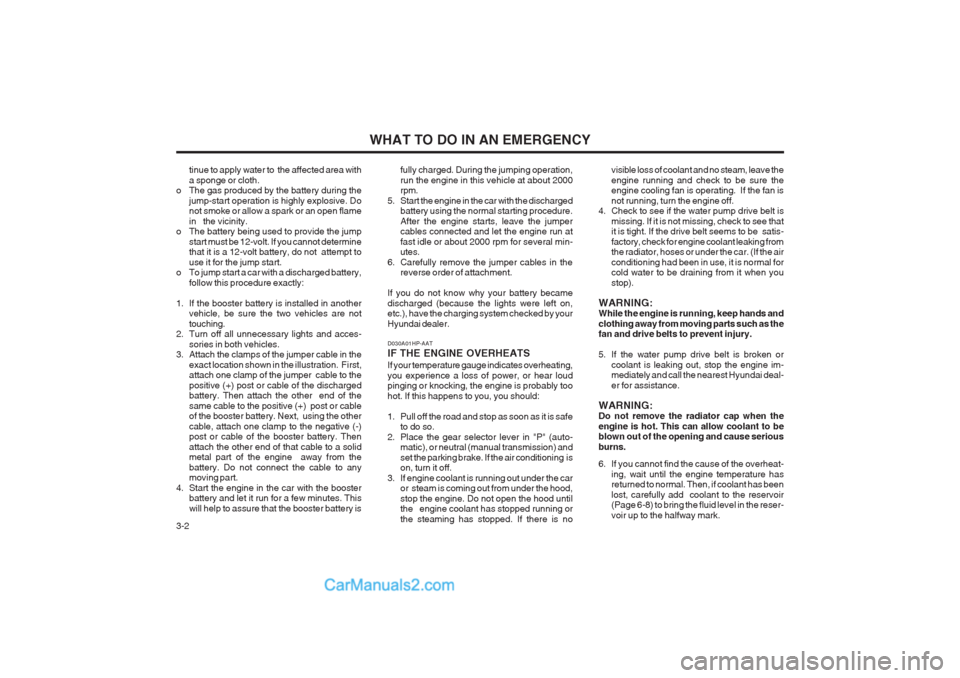
AX30030A
Negative to the engine not to the battery
Positive to positive
Booster battery
c
e
f d
Discharged battery
D010B01HP
3
Page 126 of 349
WHAT TO DO IN AN EMERGENCY
3-2 tinue to apply water to the affected area with a sponge or cloth.
o The gas produced by the battery during the
jump-start operation is highly explosive. Do not smoke or allow a spark or an open flame in the vicinity.
o The battery being used to provide the jump
start must be 12-volt. If you cannot determine that it is a 12-volt battery, do not attempt to use it for the jump start.
o To jump start a car with a discharged battery,
follow this procedure exactly:
1. If the booster battery is installed in another vehicle, be sure the two vehicles are nottouching.
2. Turn off all unnecessary lights and acces-
sories in both vehicles.
3. Attach the clamps of the jumper cable in the
exact location shown in the illustration. First, attach one clamp of the jumper cable to the positive (+) post or cable of the discharged battery. Then attach the other end of the same cable to the positive (+) post or cable of the booster battery. Next, using the other cable, attach one clamp to the negative (-) post or cable of the booster battery. Then attach the other end of that cable to a solid metal part of the engine away from the battery. Do not connect the cable to any moving part.
4. Start the engine in the car with the booster battery and let it run for a few minutes. This will help to assure that the booster battery is fully charged. During the jumping operation,run the engine in this vehicle at about 2000 rpm.
5. Start the engine in the car with the discharged battery using the normal starting procedure. After the engine starts, leave the jumper cables connected and let the engine run at fast idle or about 2000 rpm for several min- utes.
6. Carefully remove the jumper cables in the reverse order of attachment.
If you do not know why your battery became discharged (because the lights were left on, etc.), have the charging system checked by your Hyundai dealer. visible loss of coolant and no steam, leave theengine running and check to be sure the engine cooling fan is operating. If the fan is not running, turn the engine off.
4. Check to see if the water pump drive belt is
missing. If it is not missing, check to see that it is tight. If the drive belt seems to be satis- factory, check for engine coolant leaking from the radiator, hoses or under the car. (If the air conditioning had been in use, it is normal for cold water to be draining from it when you stop).
WARNING: While the engine is running, keep hands and clothing away from moving parts such as the fan and drive belts to prevent injury.
5. If the water pump drive belt is broken or coolant is leaking out, stop the engine im- mediately and call the nearest Hyundai deal- er for assistance.
WARNING: Do not remove the radiator cap when the engine is hot. This can allow coolant to be blown out of the opening and cause serious burns.
6. If you cannot find the cause of the overheat- ing, wait until the engine temperature has returned to normal. Then, if coolant has been lost, carefully add coolant to the reservoir (Page 6-8) to bring the fluid level in the reser- voir up to the halfway mark.
D030A01HP-AAT IF THE ENGINE OVERHEATS If your temperature gauge indicates overheating, you experience a loss of power, or hear loud pinging or knocking, the engine is probably too hot. If this happens to you, you should:
1. Pull off the road and stop as soon as it is safe
to do so.
2. Place the gear selector lever in "P" (auto- matic), or neutral (manual transmission) and set the parking brake. If the air conditioning is on, turn it off.
3. If engine coolant is running out under the car or steam is coming out from under the hood, stop the engine. Do not open the hood until the engine coolant has stopped running or the steaming has stopped. If there is no