battery INFINITI FX35 2008 Service Manual
[x] Cancel search | Manufacturer: INFINITI, Model Year: 2008, Model line: FX35, Model: INFINITI FX35 2008Pages: 3924, PDF Size: 81.37 MB
Page 925 of 3924

IVIS (INFINITI VEHICLE IMMOBILIZER SYSTEM-NATS)
BL-191
< SERVICE INFORMATION >
C
D E
F
G H
J
K L
M A
B
BL
N
O P
Terminal and Reference Value for Steeri ng Lock Unit/with Intelligent Key System
INFOID:0000000001327927
Terminal and Reference Value for Intelli gent Key Unit/with Intelligent Key System
INFOID:0000000001327928
Te r -
minal Wire
color Signal Designation Signal
Input/
output Measuring condition
Voltage (V)
(Approx.)
Ignition knob
position Operation or conditions
1 L/R Power source (Fuse) Input LOCK — Battery voltage
2R/W Steering lock unit power
supply
Input LOCK — 5
3R/B Steering lock unit com-
munication signal Input LOCKPress ignition knob with Intel-
ligent Key inside vehicle.
Other than the above 5
4Y/B Steering lock unit
ground
—— — 0
SIIA1911J
Te r -
minal Wire
color Signal designation Signal
Input/
output Measuring condition
Voltage (V)
(Approx.)
Ignition knob
position Operation or conditions
1R/W Steering lock unit power
supply Output LOCK — 5
2 L CAN-H Input/
Output —— —
3 P CAN-L Input/
Output —— —
6W Ignition power supply
(ON) Input ON
Ignition knob ON or START
position Battery voltage
7 B/W Key switch Input LOCK Insert mechanical key into
ignition key cylinder.
Battery voltage
Remove mechanical key
from ignition key cylinder. 0
11 L/R Power source (Fuse) Input — — Battery voltage
12 B Ground — — — 0
27 L/W Ignition knob switch Input — Press ignition knob. Battery voltage
Return ignition knob to
LOCK position.
0
31 Y/B Steering lock unit
ground —— — 0
3AA93ABC3ACD3AC03ACA3AC03AC63AC53A913A773A893A873A873A8E3A773A983AC73AC93AC03AC3
3A893A873A873A8F3A773A9D3AAF3A8A3A8C3A863A9D3AAF3A8B3A8C
Page 926 of 3924

BL-192
< SERVICE INFORMATION >
IVIS (INFINITI VEHICLE IMMOBILIZER SYSTEM-NATS)
Terminal and Reference Value for BCM
INFOID:0000000001327929
*: With Intelligent Key system
CONSULT-III FunctionINFOID:0000000001327930
CONSULT-III DIAGNOSTIC TEST MODE FUNCTION
NATS SELF-DIAGNOSTIC RESULT ITEM CHART
32 R/B Steering lock unit com-
munication signal Output LOCKPress ignition knob with In-
telligent Key inside vehicle.
Other than the above 5
Te r -
minal Wire
color Signal designation Signal
Input/
output Measuring condition
Voltage (V)
(Approx.)
Ignition knob
position Operation or conditions
SIIA1911J
Te r -
minal Wire
color Signal designation Signal
Input/
output Measuring condition
Voltage (V)
(Approx.)
Ignition knob
position Operation or conditions
21 G/B NATS antenna amp. Input/
Output —
Ignition knob OFF
→ ON po-
sition Tester pointer should move just
after turning ignition knob “ON”
23 G/OR Security indicator lamp Output LOCK Goes OFF
→ illuminates (Ev-
ery 2.4 seconds) Battery voltage
→ 0
25 BR NATS antenna amp. Input/
Output —Ignition knob or switch OFF
→
ON position Tester pointer should move just
after turning ignition knob “ON”
37* B/W Key switch Input — Insert mechanical key into ig-
nition key cylinder
Battery voltage
Remove mechanical key
from ignition key cylinder 0
38 W/L Ignition power supply
(ON) Input ONIgnition knob ON or START
position Battery voltage
39 L CAN-H Input/
Output —— —
40 P CAN-L Input/
Output —— —
42 L/R Power source (Fuse) Input — — Battery voltage
49 B Ground — — — 0
52 B Ground — — — 0
55 G Power source (Fuse) Input — — Battery voltage
CONSULT-III DIAGNOSTIC TEST MODE Description
C/U INITIALIZATION When replacing any of the following three components, C/U initialization is necessary.
[IVIS (NATS) ignition key/ BCM/ ECM]
SELF- DIAGNOSTIC RESULTS Detected items (screen terms) are as shown in the chart.
PIN READ Individual control unit number can be read.
For future information,
refer to operation manual NATS-IVIS/NVIS
3AA93ABC3ACD3AC03ACA3AC03AC63AC53A913A773A893A873A873A8E3A773A983AC73AC93AC03AC3
3A893A873A873A8F3A773A9D3AAF3A8A3A8C3A863A9D3AAF3A8B3A8C
Page 929 of 3924

IVIS (INFINITI VEHICLE IMMOBILIZER SYSTEM-NATS)
BL-195
< SERVICE INFORMATION >
C
D E
F
G H
J
K L
M A
B
BL
N
O P
Trouble Diagnosis Symptom ChartINFOID:0000000001327932
*: When IVIS (NATS) detects trouble, the security indica tor lights up while electronic key is in the “ON” position.
Security Indicator InspectionINFOID:0000000001327933
*: CONSULT-III self-diagnostic results display screen “no malfunction is detected”.
Diagnosis Procedure 1INFOID:0000000001327934
Self-diagnostic results:
“CHAIN OF ECM-IMMU” is display on CONSULT-III screen
First perform the “SELF-DIAG RESULTS” in “BCM” wi th CONSULT-III, then perform the trouble diag-
nosis of malfunction system indicated “SEL F-DIAG RESULTS” of “BCM”. Refer to BCS-13, "
U1000
CAN Communication Circuit".
1.CONFIRM SELF-DIAGNOSTIC RESULTS
Confirm that SELF-DIAGNOSTIC RESULTS “CHAIN OF ECM-IMMU” is displayed on the screen?
Does CONSULT-III screen display as shown in figure?
SYMPTOM Displayed “SELF-DIAG
RESULTS” on CON- SULT-III screen. DIAGNOSTIC PROCE-
DURE SYSTEM (Malfunctioning part or mode)
Security indicator lighting up*
Engine hard to start CHAIN OF ECM-IMMU
[P1612] Refer to
BL-195, "
Diag-
nosis Procedure 1".Open circuit in battery voltage line to BCM (NATS
IMMU) circuit
Open circuit in ignition
line to BCM (NATS IMMU) cir-
cuit
Open circuit in ground line to BCM (NATS IMMU) cir-
cuit
Open or short circuit between BCM (NATS IMMU)
and ECM communication line.
ECM
BCM (NATS IMMU)
DIFFERENCE OF KEY [P1615] Refer to
BL-197, "
Diag-
nosis Procedure 2".Unregistered key
NATS IMMU
CHAIN OF IMMU-KEY [P1614] Refer to
BL-198, "
Diag-
nosis Procedure 5".Open or short circuit between BCM (NATS IMMU)
and NATS antenna amp.
Malfunction of key ID chip
BCM (NATS IMMU)
Antenna amp.
ID DISCORD, IMM-ECM [P1611] Refer to
BL-197, "
Diag-
nosis Procedure 3"
System initialization has not yet been completed.
ECM
LOCK MODE [P1610] Refer to
BL-197, "
Diag-
nosis Procedure 4".LOCK MODE
MIL staying ON
Security indicator lighting up* DON'T ERASE BEFORE
CHECKING ENG DIAG Refer to
BL-194, "
Diag-
nosis Procedure".Engine trouble data and IVIS (NATS) trouble data
have been detected in ECM
SYMPTOM
SYSTEM
(Malfunctioning part or mode) DIAGNOSTIC PROCEDURE
Security indicator does not operate* Security indicator
Refer to BL-200, "
Diagnosis
Procedure 6".
Open circuit between Fuse and BCM (NATS IM-
MU)
Continuation of initialization mode
BCM (NATS IMMU)
3AA93ABC3ACD3AC03ACA3AC03AC63AC53A913A773A893A873A873A8E3A773A983AC73AC93AC03AC3
3A893A873A873A8F3A773A9D3AAF3A8A3A8C3A863A9D3AAF3A8B3A8C
Page 930 of 3924

BL-196
< SERVICE INFORMATION >
IVIS (INFINITI VEHICLE IMMOBILIZER SYSTEM-NATS)
YES >> GO TO 2.
NO >> Refer to BL-195, "
Trouble Diagnosis Symptom Chart".
2.CHECK POWER SUPPLY CIRCUIT FOR BCM
1. Turn ignition switch OFF.
2. Disconnect BCM connector M4.
3. Check voltage between BCM connector M4 terminals and ground.
OK or NG
OK >> GO TO 3.
NG >> Check the following. 50A fusible link [Letter M, located in fuse block (J/B)]
15A fuse [No.22, located in fuse block (J/B)]
Harness for open or short between fusible link or fuse
and BCM.
3.CHECK IGNITION SWITCH ON SIGNAL
1. Turn ignition switch ON.
2. Check voltage between BCM connector M3 terminal and ground.
OK or NG
OK >> GO TO 4.
NG >> Check the following. 15A fuse [No.1, located in fuse block (J/B)]
Harness for open or short between fuse and BCM.
4.CHECK GROUND CIRCUIT FOR BCM
1. Turn ignition switch OFF.
2. Check continuity between BCM connecto r M4 terminals 49 (B), 52 (B) and ground.
OK or NG
OK >> GO TO 5.
NG >> Repair or replace harness between BCM and ground.
5.REPLACE BCM
1. Replace BCM.
2. Perform initialization with CONSULT-III. For initialization, refer to “CONSULT -III Operation Manual NATS-IVIS/NVIS”.
Does the engine start?
YES >> BCM is malfunctioning. Replace BCM.
Perform initialization with CONSULT-III.
For initialization, refer to “CONSULT -III Operation Manual NATS-IVIS/NVIS”.
NO >> ECM is malfunctioning. 42 (L/R) – Ground : Battery voltage
55 (G) – Ground : Battery voltage
PIIA6143E
38 (W/L) – Ground : Battery voltage
PIIA6144E
49 (B) – Ground : Continuity should exist.
52 (B) – Ground : Continuity should exist.
PIIA5084E
3AA93ABC3ACD3AC03ACA3AC03AC63AC53A913A773A893A873A873A8E3A773A983AC73AC93AC03AC3
3A893A873A873A8F3A773A9D3AAF3A8A3A8C3A863A9D3AAF3A8B3A8C
Page 933 of 3924

IVIS (INFINITI VEHICLE IMMOBILIZER SYSTEM-NATS)
BL-199
< SERVICE INFORMATION >
C
D E
F
G H
J
K L
M A
B
BL
N
O P
NG >> Reinstall NATS antenna amp. correctly.
3.CHECK KEY ID CHIP
Start engine with another registered ignition key or mechanical key.
Does the engine start?
YES >> Ignition key or mechanical key ID chip is malfunctioning. Replace the ignition key or mechanical key.
Perform initialization with CONSULT-III.
For initialization, refer to “CONSULT -III Operation Manual NATS–IVIS/NVIS”.
NO >> GO TO 4.
4.CHECK POWER SUPPLY FOR NATS ANTENNA AMP.
Check voltage between NATS antenna amp. connector M25 terminal 1 (L/R) and ground with CONSULT-III or
tester.
OK or NG
OK >> GO TO 5.
NG >> Check harness for open or short between NATS antenna amp. and fuse.
5.CHECK NATS ANTENNA AMP. SIGNAL LINE- 1
Check voltage between NATS antenna amp. connector M25 terminal 2 (G/B) and ground with analogue tester.
OK or NG
OK >> GO TO 6.
NG >> Check harness for open or short between NATS antenna amp. and BCM.
NOTE:
If harness is OK, replace BCM, perform initialization
with CONSULT-III. For initialization, refer to “CONSULT-III Operation Manual NATS–IVIS/NVIS”.
6.CHECK NATS ANTENNA AMP. SIGNAL LINE- 2
Check voltage between NATS antenna amp. connector M 25 terminal 4 (BR) and ground with analogue tester.
OK or NG
OK >> GO TO 7.
NG >> Check harness for open or short between NATS antenna amp. and BCM.
NOTE:
If harness is OK, replace BCM, perform initialization
with CONSULT-III. For initialization, refer to “CONSULT-III Operation Manual NATS–IVIS/NVIS”.
1 (L/R) – Ground : Battery voltage
PIIA6145E
Before inserting mechani
cal key in ignition knob
Voltage: 0V
Just after inserting mechanical key in ignition knob : Pointer of tester should move.
PIIA6146E
Before inserting mechani cal key in ignition knob
Voltage: 0V
Just after inserting mechanical key in ignition knob : Pointer of tester should move.
PIIA6147E
3AA93ABC3ACD3AC03ACA3AC03AC63AC53A913A773A893A873A873A8E3A773A983AC73AC93AC03AC3
3A893A873A873A8F3A773A9D3AAF3A8A3A8C3A863A9D3AAF3A8B3A8C
Page 934 of 3924
BL-200
< SERVICE INFORMATION >
IVIS (INFINITI VEHICLE IMMOBILIZER SYSTEM-NATS)
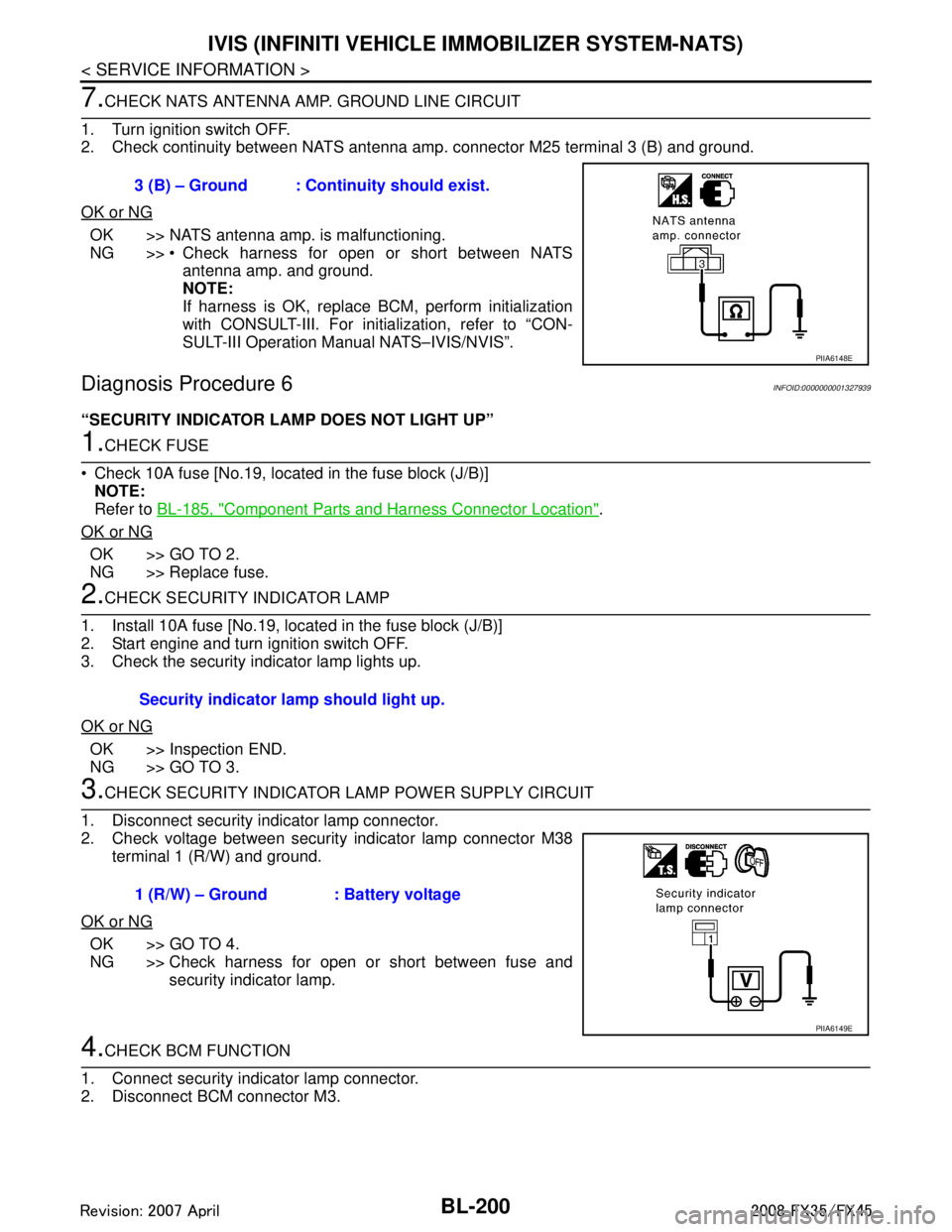
7.CHECK NATS ANTENNA AMP. GROUND LINE CIRCUIT
1. Turn ignition switch OFF.
2. Check continuity between NATS antenna am p. connector M25 terminal 3 (B) and ground.
OK or NG
OK >> NATS antenna amp. is malfunctioning.
NG >> Check harness for open or short between NATS antenna amp. and ground.
NOTE:
If harness is OK, replace BCM, perform initialization
with CONSULT-III. For initialization, refer to “CON-
SULT-III Operation Manual NATS–IVIS/NVIS”.
Diagnosis Procedure 6INFOID:0000000001327939
“SECURITY INDICATOR LAMP DOES NOT LIGHT UP”
1.CHECK FUSE
Check 10A fuse [No.19, located in the fuse block (J/B)] NOTE:
Refer to BL-185, "
Component Parts and Harness Connector Location".
OK or NG
OK >> GO TO 2.
NG >> Replace fuse.
2.CHECK SECURITY INDICATOR LAMP
1. Install 10A fuse [No.19, located in the fuse block (J/B)]
2. Start engine and turn ignition switch OFF.
3. Check the security indicator lamp lights up.
OK or NG
OK >> Inspection END.
NG >> GO TO 3.
3.CHECK SECURITY INDICATOR LA MP POWER SUPPLY CIRCUIT
1. Disconnect security indicator lamp connector.
2. Check voltage between security indicator lamp connector M38 terminal 1 (R/W) and ground.
OK or NG
OK >> GO TO 4.
NG >> Check harness for open or short between fuse and security indicator lamp.
4.CHECK BCM FUNCTION
1. Connect security indicator lamp connector.
2. Disconnect BCM connector M3. 3 (B) – Ground : Continuity should exist.
PIIA6148E
Security indicator lamp should light up.
1 (R/W) – Ground : Battery voltage
PIIA6149E
3AA93ABC3ACD3AC03ACA3AC03AC63AC53A913A773A893A873A873A8E3A773A983AC73AC93AC03AC3
3A893A873A873A8F3A773A9D3AAF3A8A3A8C3A863A9D3AAF3A8B3A8C
Page 935 of 3924
IVIS (INFINITI VEHICLE IMMOBILIZER SYSTEM-NATS)
BL-201
< SERVICE INFORMATION >
C
D E
F
G H
J
K L
M A
B
BL
N
O P
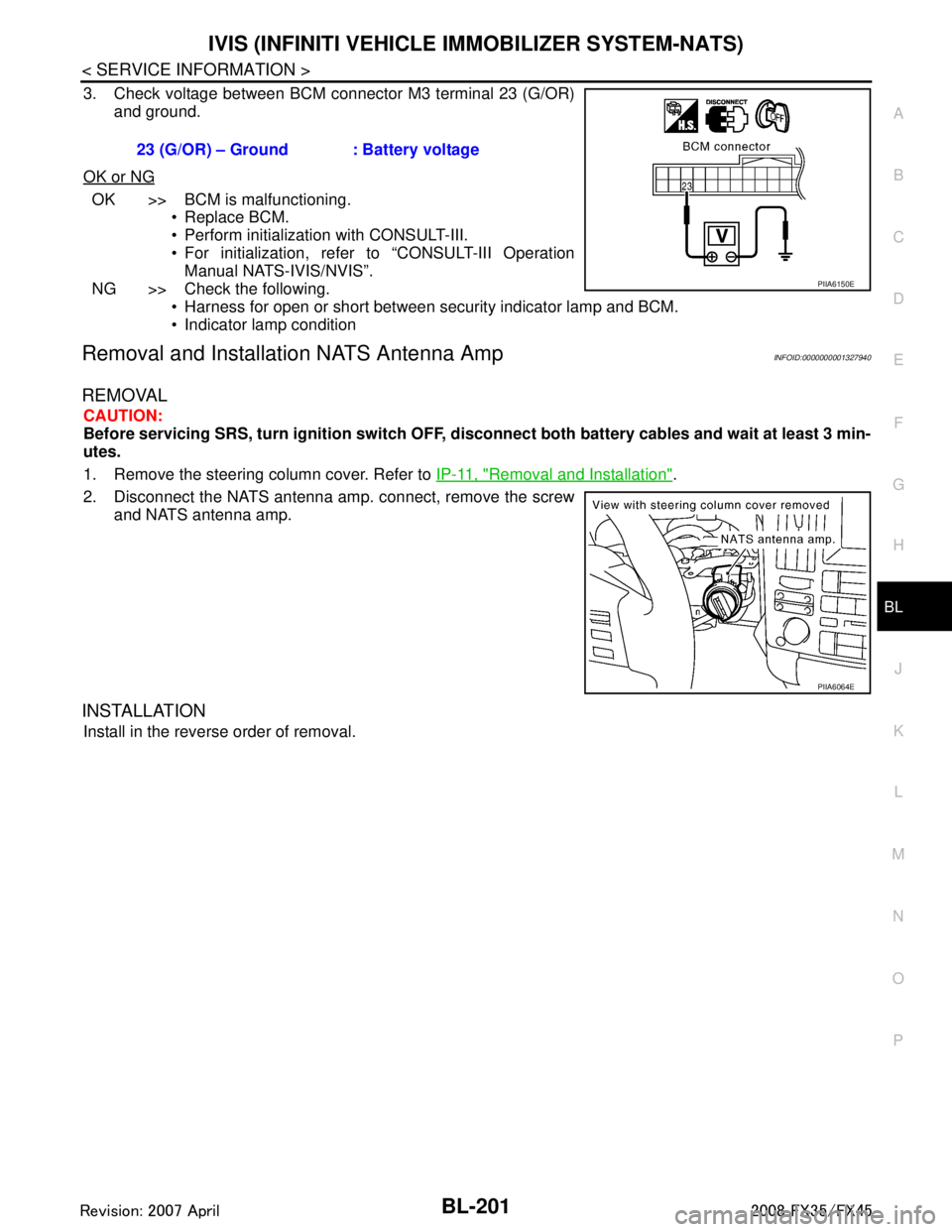
3. Check voltage between BCM connector M3 terminal 23 (G/OR) and ground.
OK or NG
OK >> BCM is malfunctioning. Replace BCM.
Perform initialization with CONSULT-III.
For initialization, refer to “CONSULT-III OperationManual NATS-IVIS/NVIS”.
NG >> Check the following. Harness for open or short between security indicator lamp and BCM.
Indicator lamp condition
Removal and Installa tion NATS Antenna AmpINFOID:0000000001327940
REMOVAL
CAUTION:
Before servicing SRS, turn ignition switch OFF, disconnect both battery cables and wait at least 3 min-
utes.
1. Remove the steering column cover. Refer to IP-11, "
Removal and Installation".
2. Disconnect the NATS antenna amp. connect, remove the screw and NATS antenna amp.
INSTALLATION
Install in the reverse order of removal. 23 (G/OR) – Ground : Battery voltage
PIIA6150E
PIIA6064E
3AA93ABC3ACD3AC03ACA3AC03AC63AC53A913A773A893A873A873A8E3A773A983AC73AC93AC03AC3
3A893A873A873A8F3A773A9D3AAF3A8A3A8C3A863A9D3AAF3A8B3A8C
Page 937 of 3924
INTEGRATED HOMELINK TRANSMITTERBL-203
< SERVICE INFORMATION >
C
DE
F
G H
J
K L
M A
B
BL
N
O P
Before conducting the procedure given below, make su re that system receiver (garage door opener, etc.)
operates with original, hand-held transmitter. If NG, re ceiver or hand-held transmitter is malfunctioning, not
vehicle related.
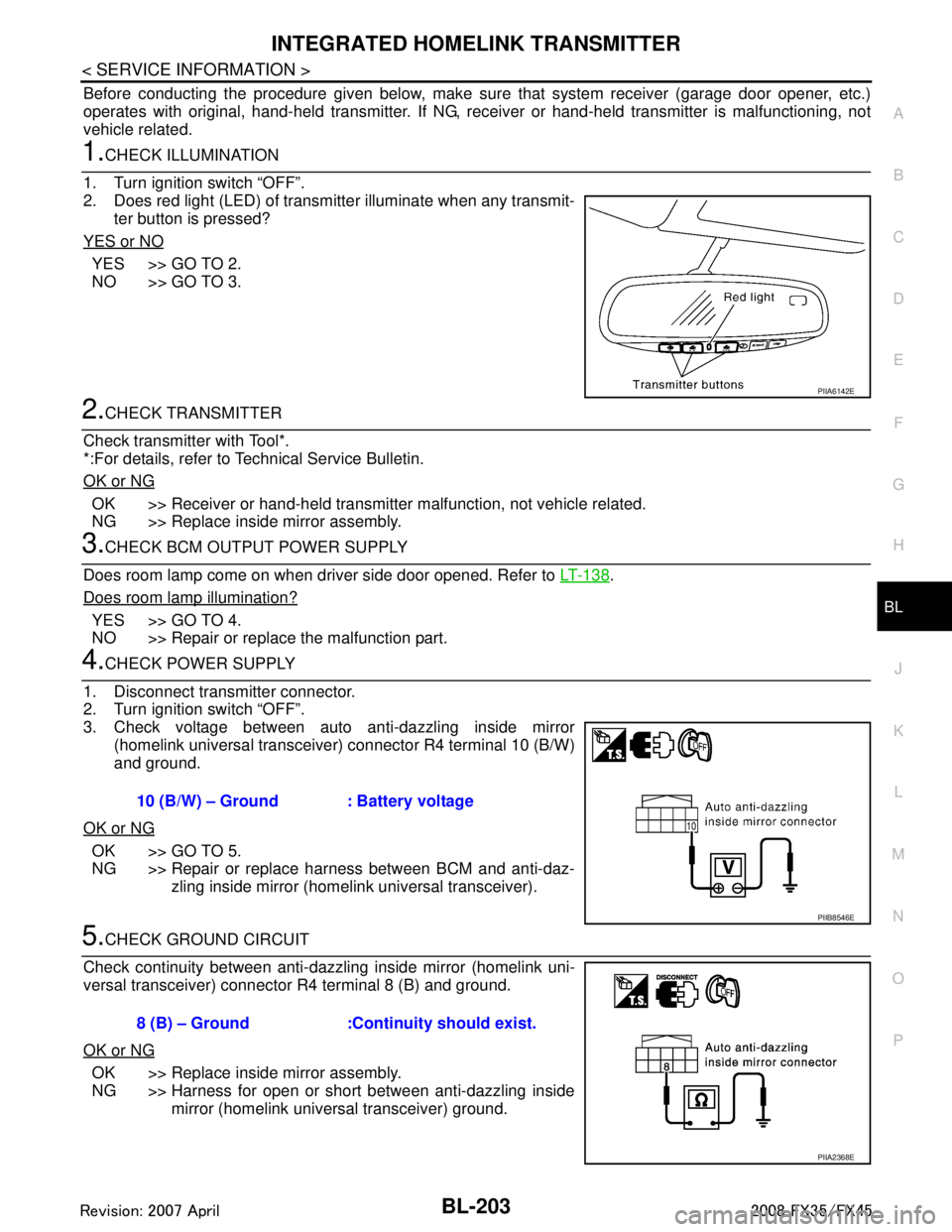
1.CHECK ILLUMINATION
1. Turn ignition switch “OFF”.
2. Does red light (LED) of transmitter illuminate when any transmit- ter button is pressed?
YES or NO
YES >> GO TO 2.
NO >> GO TO 3.
2.CHECK TRANSMITTER
Check transmitter with Tool*.
*:For details, refer to Technical Service Bulletin.
OK or NG
OK >> Receiver or hand-held transmitter malfunction, not vehicle related.
NG >> Replace inside mirror assembly.
3.CHECK BCM OUTPUT POWER SUPPLY
Does room lamp come on when driver side door opened. Refer to LT-138
.
Does room lamp illumination?
YES >> GO TO 4.
NO >> Repair or replace the malfunction part.
4.CHECK POWER SUPPLY
1. Disconnect transmitter connector.
2. Turn ignition switch “OFF”.
3. Check voltage between auto anti-dazzling inside mirror (homelink universal transceive r) connector R4 terminal 10 (B/W)
and ground.
OK or NG
OK >> GO TO 5.
NG >> Repair or replace harness between BCM and anti-daz- zling inside mirror (homelink universal transceiver).
5.CHECK GROUND CIRCUIT
Check continuity between anti-dazzling inside mirror (homelink uni-
versal transceiver) connector R4 terminal 8 (B) and ground.
OK or NG
OK >> Replace inside mirror assembly.
NG >> Harness for open or short between anti-dazzling inside mirror (homelink universal transceiver) ground.
PIIA6142E
10 (B/W) – Ground : Battery voltage
PIIB8546E
8 (B) – Ground :Continuity should exist.
PIIA2368E
3AA93ABC3ACD3AC03ACA3AC03AC63AC53A913A773A893A873A873A8E3A773A983AC73AC93AC03AC3
3A893A873A873A8F3A773A9D3AAF3A8A3A8C3A863A9D3AAF3A8B3A8C
Page 960 of 3924

BL-226
< SERVICE INFORMATION >
BODY REPAIR
1. When repairing and painting a portion of the body adjacent to plastic parts, consider their characteristics
(influence of heat and solvent) and remove them if neces sary or take suitable measures to protect them.
2. Plastic parts should be repaired and painted using methods suiting the materials
, characteristics.
Abbre- viation Material name Heat resisting
temperature °C( °F) Resistance to gasoline and
solvents Other cautions
PE Polyethylene 60(140) Gasoline and most solvents are
harmless if applied for a very
short time (wipe up quickly).Flammable
PVC Poly Vinyl Chloride 80(176) Same as above. Poison gas is emitted
when burned.
EPM/
EPDM Ethylene Propylene (Diene) co-
polymer
80(176) Same as above. Flammable
PP Polypropylene 90(194) Same as above. Flammable, avoid bat-
tery acid.
UP Unsaturated Polyester 90(194) Same as above. Flammable
PS Polystyrene 80(176) Avoid solvents. Flammable
ABS Acrylonitrile Butadiene Styrene 80(176) Avoid gasoline and solvents.
AES Acrylonitrile Ethylene Styrene 80(176) Same as above.
PMMA Poly Methyl Methacrylate 85(185) Same as above.
EVAC Ethylene Vinyl Acetate 90(194) Same as above.
ASA Acrylonitrile Styrene Acrylate 100(222) Same as above. Flammable
PPE Poly Phenylene Ether 110(230) Same as above.
PC Polycarbonate 120(248) Same as above.
PAR Polyarylate 180(356) Same as above.
PUR Polyurethane 90(194) Same as above.
POM Poly Oxymethylene 120(248) Same as above. Avoid battery acid.
PBT+
PC Poly Butylene Terephthalate +
Polycarbonate
120(248) Same as above. Flammable
PA Polyamide 140(284) Same as above. Avoid immersing in wa-
ter.
PBT Poly Butylene Terephthalate 140(284) Same as above.
PET Polyester 180(356) Same as above.
PEI Polyetherimide 200(392) Same as above.
3AA93ABC3ACD3AC03ACA3AC03AC63AC53A913A773A893A873A873A8E3A773A983AC73AC93AC03AC3
3A893A873A873A8F3A773A9D3AAF3A8A3A8C3A863A9D3AAF3A8B3A8C
Page 986 of 3924

BR-2
< SERVICE INFORMATION >
PRECAUTIONS
SERVICE INFORMATION
PRECAUTIONS
Precaution for Supplemental Restraint System (SRS) "AIR BAG" and "SEAT BELT
PRE-TENSIONER"
INFOID:0000000001612918
The Supplemental Restraint System such as “A IR BAG” and “SEAT BELT PRE-TENSIONER”, used along
with a front seat belt, helps to reduce the risk or severi ty of injury to the driver and front passenger for certain
types of collision. This system includes seat belt switch inputs and dual stage front air bag modules. The SRS
system uses the seat belt switches to determine the front air bag deployment, and may only deploy one front
air bag, depending on the severity of a collision and w hether the front occupants are belted or unbelted.
Information necessary to service the system safely is included in the “SUPPLEMENTAL RESTRAINT SYS-
TEM” and “SEAT BELTS” of this Service Manual.
WARNING:
• To avoid rendering the SRS inopera tive, which could increase the risk of personal injury or death in
the event of a collision which would result in air bag inflation, all maintenance must be performed by
an authorized NISS AN/INFINITI dealer.
Improper maintenance, including in correct removal and installation of the SRS, can lead to personal
injury caused by unintent ional activation of the system. For re moval of Spiral Cable and Air Bag
Module, see the “SUPPLEMEN TAL RESTRAINT SYSTEM”.
Do not use electrical test equipmen t on any circuit related to the SRS unless instructed to in this
Service Manual. SRS wiring harnesses can be identi fied by yellow and/or orange harnesses or har-
ness connectors.
Precaution for Procedure without Cowl Top CoverINFOID:0000000001612920
When performing the procedure after removing cowl top cover, cover
the lower end of windshield with urethane, etc.
Precaution for Brake SystemINFOID:0000000001327604
Clean dust on front brake and rear brake with a vacuum dust collector. Do not blow with compressed air.
Recommended fluid is brake fluid “DOT 3”. MA-9, "
Fluids and Lubricants".
Do not reuse drained brake fluid.
Be careful not to splash brake fluid on painted areas.
To clean or wash all parts of master cylinder, disc brake caliper and wheel cylinder, use new brake fluid.
Do not use mineral oils such as gasoline or kerosene. They will ruin rubber parts of the hydraulic system.
Use a flare nut crowfoot and torque wrench when installing brake
tube.
When installing brake piping, be sure to check torque.
Before working, turn ignition switch OFF and disconnect connec- tors for ABS actuator and electric unit (control unit) or battery neg-
ative terminal.
Burnish the brake contact surfaces after refinishing or replacing drums or rotors, after replacing pads or linings, or if a soft pedal
occurs at very low mileage.
Refer to BR-23, "
Brake Burnishing Procedure" (Front disc brake),
BR-29, "
Brake Burnishing Procedure" (Rear disc brake).
WARNING:
Clean brake pads and shoes with a waste cl oth, then clean with a dust collector.
PIIB3706J
SBR686C
3AA93ABC3ACD3AC03ACA3AC03AC63AC53A913A773A893A873A873A8E3A773A983AC73AC93AC03AC3
3A893A873A873A8F3A773A9D3AAF3A8A3A8C3A863A9D3AAF3A8B3A8C