ad blue INFINITI FX35 2008 User Guide
[x] Cancel search | Manufacturer: INFINITI, Model Year: 2008, Model line: FX35, Model: INFINITI FX35 2008Pages: 3924, PDF Size: 81.37 MB
Page 657 of 3924

AV-110
< SERVICE INFORMATION >
NAVIGATION SYSTEM
46 (R) Ground RGB signal (G: green) Input ONStart Confirmation/Adjust-
ment (Navigation) mode,
and then display color bar by
selecting “Color Spectrum
bar” on Display Diagnosis
screen
47 — Shield — — — —
48 (B) Ground RGB signal (B: blue) Input ON Start Confirmation/Adjust-
ment (Navigation) mode,
and then display color bar by
selecting “Color Spectrum
bar” on Display Diagnosis
screen
49 — Shield — — — —
50 (G) Ground RGB signal (R: red) Output ON Start Confirmation/Adjust-
ment mode, and then dis-
play color bar by selecting
“Display Color Spectrum
Bar” on Display Diagnosis
screen
51 (B) Ground RGB area (YS) signal Output ON Set the selector lever in R
position, and then display
the rear view image
52 (Y) Ground RGB signal (G: green) Output ON Start Confirmation/Adjust-
ment mode, and then dis-
play color bar by selecting
“Display Color Spectrum
Bar” on Display Diagnosis
screen
53 (W) Ground Ve r t i c a l
synchronizing (VP)
signal Input ON —
Te r m i n a l
(Wire color) ItemSignal
input/
output Condition
Reference value
+– Ignition
switch Operation
SKIB7361E
SKIB7362E
SKIB7769E
SKIB3599E
SKIB7770E
SKIB3598E
3AA93ABC3ACD3AC03ACA3AC03AC63AC53A913A773A893A873A873A8E3A773A983AC73AC93AC03AC3
3A893A873A873A8F3A773A9D3AAF3A8A3A8C3A863A9D3AAF3A8B3A8C
Page 658 of 3924

NAVIGATION SYSTEMAV-111
< SERVICE INFORMATION >
C
DE
F
G H
I
J
L
M A
B
AV
N
O P
Terminal and Referenc e Value for DisplayINFOID:0000000001328749
54 (L) Ground RGB signal (B: blue) Output ON Start Confirmation/Adjust-
ment mode, and then dis-
play color bar by selecting
“Display Color Spectrum
Bar” on Display Diagnosis
screen
55 (R) Ground Horizontal
synchronizing (HP)
signal
Input ON —
56 (G) Ground RGB synchronizing
signal Output ONWhen displaying RGB im-
age
Te r m i n a l
(Wire color) ItemSignal
input/
output Condition
Reference value
+– Ignition
switch Operation
SKIB7771E
SKIB3601E
SKIB3603E
Te r m i n a l
(Wire color) ItemSignal
input/
output Condition
Reference value
+– Ignition
switch Operation
1 (B) Ground Ground — ON — Approx. 0 V
2 (W/G) Ground Power supply (Invert-
er)
Input ON — Approx. 9 V
3 (BR/W) Ground Power supply (Signal) Input ON — Approx. 9 V
6 (Y) Ground RGB signal (G: green) Input ON Start Confirmation/Adjust-
ment mode, and then dis-
play color bar by selecting
“Display Color Spectrum
Bar” on Display Diagnosis
screen
7—Shield —— — —
8 (R) Ground Horizontal
synchronizing (HP)
signal
Output ON —
SKIB7770E
SKIB3601E
3AA93ABC3ACD3AC03ACA3AC03AC63AC53A913A773A893A873A873A8E3A773A983AC73AC93AC03AC3
3A893A873A873A8F3A773A9D3AAF3A8A3A8C3A863A9D3AAF3A8B3A8C
Page 659 of 3924

AV-112
< SERVICE INFORMATION >
NAVIGATION SYSTEM
9 (B) Ground RGB area (YS) signal Input ONSet the selector lever in R
position, and then display
the rear view image
11 (PU) Ground Communication signal
(DCU-DSP)
Input ON —
13 (P) Ground Ground (Inverter) — ON — Approx. 0 V
14 (P/L) Ground Ground (Signal) — ON — Approx. 0 V
17 (G) Ground RGB sign al (R: red) Input ON Start Confirmation/Adjust-
ment mode, and then dis-
play color bar by selecting
“Display Color Spectrum
Bar” on Display Diagnosis
screen
18 (L) Ground RGB signal (B: blue) Input ON Start Confirmation/Adjust-
ment mode, and then dis-
play color bar by selecting
“Display Color Spectrum
Bar” on Display Diagnosis
screen
19 (G) Ground RGB synchronizing
signal Input ONWhen displaying RGB im-
age
20 (W) Ground Ve r t i c a l
synchronizing (VP)
signal Output ON —
21 — Shield — — — — Te r m i n a l
(Wire color) ItemSignal
input/
output Condition
Reference value
+– Ignition
switch Operation
SKIB3599E
SKIB3607E
SKIB7769E
SKIB7771E
SKIB3603E
SKIB3598E
3AA93ABC3ACD3AC03ACA3AC03AC63AC53A913A773A893A873A873A8E3A773A983AC73AC93AC03AC3
3A893A873A873A8F3A773A9D3AAF3A8A3A8C3A863A9D3AAF3A8B3A8C
Page 668 of 3924

NAVIGATION SYSTEMAV-121
< SERVICE INFORMATION >
C
DE
F
G H
I
J
L
M A
B
AV
N
O P
VEHICLE SIGNALS
A comparison check can be made of each actual vehicle signal and
the signals recognized by the display control unit.
NOTE:
In case of confirming light signal, set the following D/N mode to ON/
OFF of lighting switch (normal setting).
OFF: D (Day mode)
ON: N (Night mode)
Unless above setting, light signal (ON/OFF) may not be accurately
displayed.
AUTO CLIMATE CONTROL
Refer to ATC-43, "Self-Diagnosis Function".
NAVIGATION
Each diagnosis is shown by selecting each screen switch on Confir-
mation/Adjustment screen.
Display Diagnosis
R (red) signal error : Light blue (Cyan) tint
G (green) signal error : Purple (Magenta) tint
B (blue) signal error : Yellow tint
SKIB7778E
Diagnosis item Display Condition Remarks
Vehicle Speed ON When vehicle speed is more than 0 km/h (0 MPH)
Changes in indication may be delayed.
This is normal.
OFF When vehicle speed is 0 km/h (0 MPH)
— Ignition switch in ACC position
IGN ON Ignition switch ON
—
OFF Ignition switch ACC position
Reverse ON Selector lever in R position
Changes in indication may be delayed.
This is normal.
OFF Selector lever in any position other than R position
— Ignition switch in ACC position
IVCS OFF — This vehicle does not use it.
Light ON Lighting switch ON
—
OFF Lighting switch OFF
SKIB7386E
3AA93ABC3ACD3AC03ACA3AC03AC63AC53A913A773A893A873A873A8E3A773A983AC73AC93AC03AC3
3A893A873A873A8F3A773A9D3AAF3A8A3A8C3A863A9D3AAF3A8B3A8C
Page 669 of 3924

AV-122
< SERVICE INFORMATION >
NAVIGATION SYSTEM
Color tone and shading of the NAVI control unit-generated image can be checked by the display of a color bar
and a gray scale.
If RGB signal is malfunctioning, the tint of the color bar display is as follows.
Vehicle Signals
A comparison check can be made of each actual vehicle signal and
the signals recognized by the NAVI control unit.
Navigation
Steering Angle AdjustmentR (red) signal error : Light blue (Cyan) tint
G (green) signal error :
Purple (Magenta) tint
B (blue) signal error : Yellow tint
SKIB6976E
SKIB6977E
Diagnosis item Display Condition Remarks
Vehicle speed ON When vehicle speed is more than 0 km/h (0 MPH)
Changes in indication may be delayed.
This is normal.
OFF When vehicle speed is 0 km/h (0 MPH)
— Ignition switch in ACC position
Lights ON Lighting switch ON
—
OFF Lighting switch OFF
Ignition ON Ignition switch ON
—
OFF Ignition switch ACC position
Reverse ON Selector lever in R position
Changes in indication may be delayed.
This is normal.
OFF Selector lever in any position other than R position
— Ignition switch in ACC position
3AA93ABC3ACD3AC03ACA3AC03AC63AC53A913A773A893A873A873A8E3A773A983AC73AC93AC03AC3
3A893A873A873A8F3A773A9D3AAF3A8A3A8C3A863A9D3AAF3A8B3A8C
Page 679 of 3924

AV-132
< SERVICE INFORMATION >
NAVIGATION SYSTEM
Check NAVI control unit reverse signal circuit, and repair malfunctioning part.
Tint Is Strange for the RGB ImageINFOID:0000000001328763
Symptom: Tint of all RGB images is strange.
1.CHECK HARNESS
1. Turn ignition switch OFF.
2. Disconnect display control unit and display connectors.
3. Check the malfunctioning circuit according to the symptoms.
Light blue (Cyan) tinged screen
Check continuity between display control unit harness connector
(A) M76 terminal 50 and display harness connector (B) M63 termi-
nal 17.
Check continuity between display control unit harness connector
(A) M76 terminal 50 and ground.
Purple (Magenta) tinged screen
Check continuity between display control unit harness connector
(A) M76 terminal 52 and display harness connector (B) M63 termi-
nal 6.
Check continuity between display control unit harness connector
(A) M76 terminal 52 and ground.
Yellow tinged screen
Check continuity between display control unit harness connector
(A) M76 terminal 54 and display harness connector (B) M63 termi-
nal 18.
Check continuity between display control unit harness connector
(A) M76 terminal 54 and ground.
OK or NG
OK >> GO TO 2.
NG >> Repair harness or connector.
2.CHECK RGB SIGNAL
1. Connect display control unit and display connectors.
2. Turn ignition switch ON.
3. Start Confirmation/Adjustment mode. Refer to AV-119, "
Confirmation/Adjustment Mode".
4. Display color bar by selecting “Display Color Spectrum Bar” on Display Diagnosis screen. Refer to AV-
119, "Confirmation/Adjustment Mode".
5. Check the malfunctioning circuit according to the symptoms. 50 – 17 : Continuity should exist.
50 – Ground : Continuity should not exist.
SKIB7853E
52 – 6 : Continuity should exist.
52 – Ground : Continuity should not exist.
SKIB7854E
54 – 18 : Continuity should exist.
54 – Ground : Continuity should not exist.
SKIB7855E
3AA93ABC3ACD3AC03ACA3AC03AC63AC53A913A773A893A873A873A8E3A773A983AC73AC93AC03AC3
3A893A873A873A8F3A773A9D3AAF3A8A3A8C3A863A9D3AAF3A8B3A8C
Page 680 of 3924

NAVIGATION SYSTEMAV-133
< SERVICE INFORMATION >
C
DE
F
G H
I
J
L
M A
B
AV
N
O P
Light blue (Cyan) tinged screen
Check voltage waveform between display control unit harness con-
nector M76 terminal 50 and ground with CONSULT-III or oscillo-
scope.
Purple (Magenta) tinged screen
Check voltage waveform between display control unit harness con-
nector M76 terminal 52 and ground with CONSULT-III or oscillo-
scope.
Yellow tinged screen
Check voltage waveform between display control unit harness con-
nector M76 terminal 54 and ground with CONSULT-III or oscillo-
scope.
OK or NG
OK >> Replace display.
NG >> Replace display control unit.
Tint Is Strange for the RG B Image (Only NAVI Screen)INFOID:0000000001328764
Symptom: Tint of map screen is strange. (Status screen for audio and A/C, TRIP screen and FUEL ECON-
OMY screen are normal.)
1.CHECK HARNESS
1. Turn ignition switch OFF.
2. Disconnect NAVI control unit and display unit connectors.
3. Check the malfunctioning circuit according to the symptoms.
Light blue (Cyan) tinged screen 50 – Ground:
SKIB7856ESKIB7769E
52 – Ground:
SKIB7857ESKIB7770E
54 – Ground:
SKIB7858ESKIB7771E
3AA93ABC3ACD3AC03ACA3AC03AC63AC53A913A773A893A873A873A8E3A773A983AC73AC93AC03AC3
3A893A873A873A8F3A773A9D3AAF3A8A3A8C3A863A9D3AAF3A8B3A8C
Page 681 of 3924

AV-134
< SERVICE INFORMATION >
NAVIGATION SYSTEM
Check continuity between NAVI control unit harness connector (A)
B207 terminal 44 and display control unit harness connector (B)
M76 terminal 44.
Check continuity between NAVI control unit harness connector (A)
B207 terminal 44 and ground.
Purple (Magenta) tinged screen
Check continuity between NAVI control unit harness connector (A)
B207 terminal 45 and display control unit harness connector (B)
M76 terminal 46.
Check continuity between NAVI control unit harness connector (A)
B207 terminal 45 and ground.
Yellow tinged screen
Check continuity between NAVI control unit harness connector (A)
B207 terminal 46 and display control unit harness connector (B)
M76 terminal 48.
Check continuity between NAVI control unit harness connector (A)
B207 terminal 46 and ground.
OK or NG
OK >> GO TO 2.
NG >> Repair harness or connector.
2.CHECK RGB SIGNAL
1. Connect NAVI control unit and display control unit connectors.
2. Turn ignition switch ON.
3. Start Confirmation/Adjustment (Navigation) mode. Refer to AV-119, "
Confirmation/Adjustment Mode".
4. Display color bar by selecting “Color Spectrum bar” on Display Diagnosis screen. Refer to AV-119, "
Confir-
mation/Adjustment Mode".
5. Check the malfunctioning circuit according to the symptoms.
Light blue (Cyan) tinged screen 44 – 44 : Continuity should exist.
44 – Ground : Continuity should not exist.
SKIB7859E
45 – 46 : Continuity should exist.
45 – Ground : Continuity should not exist.
SKIB7860E
46 – 48 : Continuity should exist.
46 – Ground : Continuity should not exist.
SKIB7861E
3AA93ABC3ACD3AC03ACA3AC03AC63AC53A913A773A893A873A873A8E3A773A983AC73AC93AC03AC3
3A893A873A873A8F3A773A9D3AAF3A8A3A8C3A863A9D3AAF3A8B3A8C
Page 705 of 3924
AV-158
< SERVICE INFORMATION >
TELEPHONE
TELEPHONE
System DescriptionINFOID:0000000001328789
HANDS-FREE PHONE SYSTEM
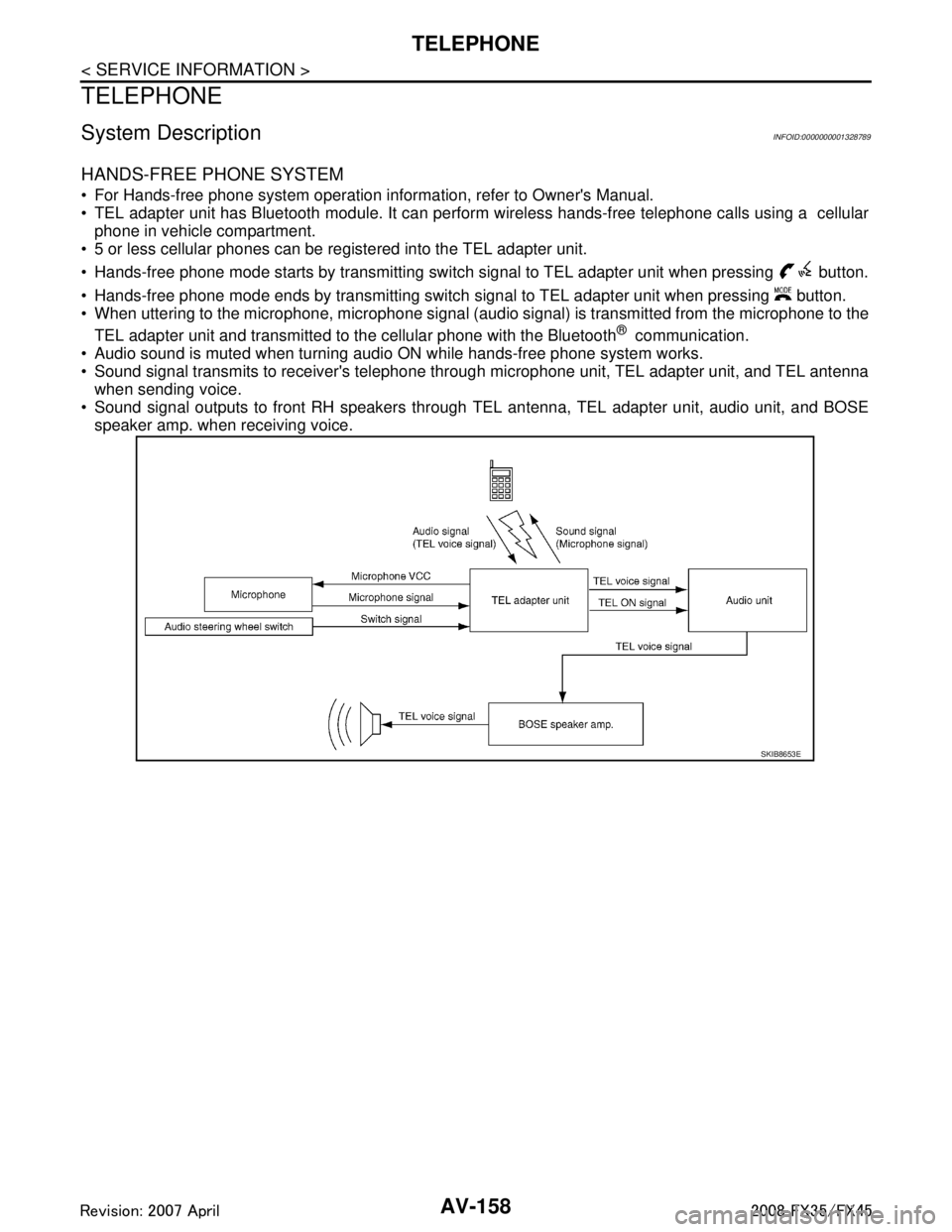
For Hands-free phone system operation information, refer to Owner's Manual.
TEL adapter unit has Bluetooth module. It can perform wireless hands-free telephone calls using a cellularphone in vehicle compartment.
5 or less cellular phones can be registered into the TEL adapter unit.
Hands-free phone mode starts by transmitting switch signal to TEL adapter unit when pressing button.
Hands-free phone mode ends by transmitting switch signal to TEL adapter unit when pressing button.
When uttering to the microphone, microphone signal (audio signal) is transmitted from the microphone to the
TEL adapter unit and transmitted to the cellular phone with the Bluetooth
® communication.
Audio sound is muted when turning audio ON while hands-free phone system works.
Sound signal transmits to receiver's telephone through microphone unit, TEL adapter unit, and TEL antenna when sending voice.
Sound signal outputs to front RH speakers through TEL antenna, TEL adapter unit, audio unit, and BOSE
speaker amp. when receiving voice.
SKIB8653E
3AA93ABC3ACD3AC03ACA3AC03AC63AC53A913A773A893A873A873A8E3A773A983AC73AC93AC03AC3
3A893A873A873A8F3A773A9D3AAF3A8A3A8C3A863A9D3AAF3A8B3A8C
Page 715 of 3924
AV-168
< SERVICE INFORMATION >
TELEPHONE
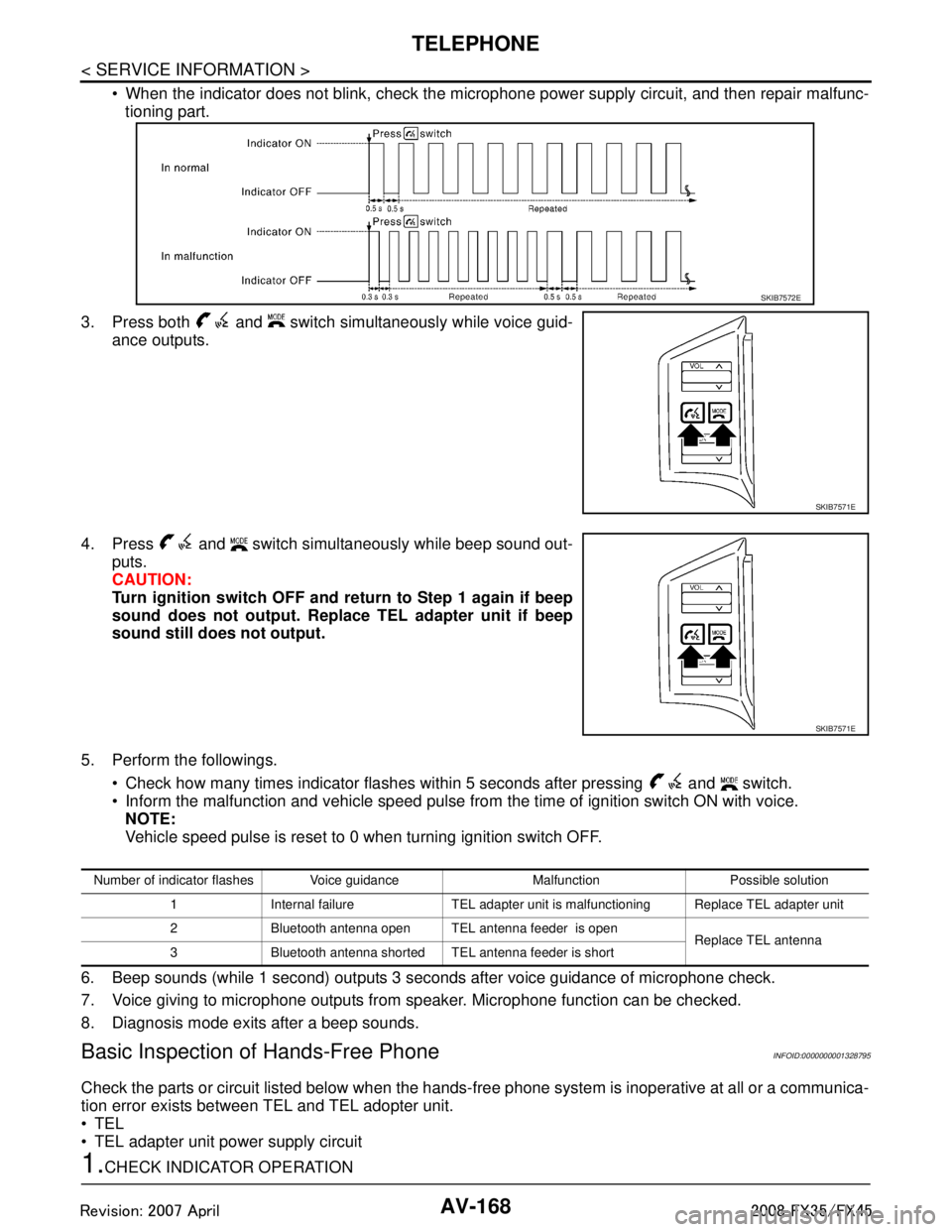
When the indicator does not blink, check the microphone power supply circuit, and then repair malfunc-
tioning part.
3. Press both and switch simultaneously while voice guid- ance outputs.
4. Press and switch simultaneously while beep sound out- puts.
CAUTION:
Turn ignition switch OFF and re turn to Step 1 again if beep
sound does not output. Replace TEL adapter unit if beep
sound still does not output.
5. Perform the followings. Check how many times indicator flashes within 5 seconds after pressing and switch.
Inform the malfunction and vehicle speed pulse from the time of ignition switch ON with voice.
NOTE:
Vehicle speed pulse is reset to 0 when turning ignition switch OFF.
6. Beep sounds (while 1 second) outputs 3 seconds after voice guidance of microphone check.
7. Voice giving to microphone outputs from speaker. Microphone function can be checked.
8. Diagnosis mode exits after a beep sounds.
Basic Inspection of Hands-Free PhoneINFOID:0000000001328795
Check the parts or circuit listed below when the hands-f ree phone system is inoperative at all or a communica-
tion error exists between TEL and TEL adopter unit.
TEL
TEL adapter unit power supply circuit
1.CHECK INDICATOR OPERATION
SKIB7572E
SKIB7571E
SKIB7571E
Number of indicator flashes Voice guidance Malfunction Possible solution
1 Internal failure TEL adapter unit is malfunctioning Replace TEL adapter unit
2 Bluetooth antenna open TEL antenna feeder is open Replace TEL antenna
3 Bluetooth antenna shorted TEL antenna feeder is short
3AA93ABC3ACD3AC03ACA3AC03AC63AC53A913A773A893A873A873A8E3A773A983AC73AC93AC03AC3
3A893A873A873A8F3A773A9D3AAF3A8A3A8C3A863A9D3AAF3A8B3A8C