light INFINITI FX35 2008 Workshop Manual
[x] Cancel search | Manufacturer: INFINITI, Model Year: 2008, Model line: FX35, Model: INFINITI FX35 2008Pages: 3924, PDF Size: 81.37 MB
Page 817 of 3924

INTELLIGENT KEY SYSTEMBL-83
< SERVICE INFORMATION >
C
DE
F
G H
J
K L
M A
B
BL
N
O P
Intelligent Key remote controller button and door reques t switch operations change the engine startup function
settings (startup enabled/disabled) for each Intelligent Key independently.
Settings Change Procedure1. With the ignition switch is in the LOCK positi on (ignition knob not pressed), hold down both the LOCK and
UNLOCK remote control buttons on the Intelligent Key at the same time for at least 10 seconds (The yard-
stick is that the Intelligent Key LED flashes 20 times.)
2. Within 5 seconds of releasing the Intelligent Key remote controller buttons, press the driver door request
switch.
3. The KEY warning lamp in combination meter lights up for 3 seconds (engine starting enabled → starting
disabled: lights up red, engine starting disabled → flashes green). This completes the settings change.
Changing Settings Using CONSULT-III
The settings for the Intelligent Key system func tions can be changed using CONSULT-III (WORK SUPPORT).
Refer to BL-104, "
CONSULT-III Application Item".
NOTE:
Once a function setting is changed, it will remain effective even if the battery is disconnected.
Changing Settings Using Display Unit
The settings of the Intelligent Key system can be changed, using CONSULT-III, display unit, Intelligent Key
and door request switch in the cent er of the instrument panel.
NOTE:
Once a function setting is changed, it will remain effective even if the battery is disconnected.
INTELLIGENT KEY REGISTRATION
Intelligent Key-ID registration is executed using the CONSULT-III. Up to 4 can be registered.
CAUTION:
After a new Intelligent Key-ID is regi stered, be sure to check the function.
When registering an additional Intelligent Key-ID , take any Intelligent Keys already registered and
Intelligent Keys for any other vehicles out of the vehicle before starting.
CONSULT-III can be used to check and delete Intelligent Key-IDs.
For future information, see the CO NSULT-III Operation Manual NATS.
STEERING LOCK UNIT REGISTRATION
Steering Lock Unit ID Registration
CAUTION:
The method for registering a steering lock unit ID depends on the status of the steering lock unit and
Intelligent Key unit (new or old unit).
After registration is completed, press ignition knob with a portable unit in the vehicle so that it can
be rotated, and confirm that it cannot be rotated even when ignition switch is pressed without a por-
table unit in the vehicle.
For further information, see the CONS ULT-III Operation Manual NATS.
CAN Communication System DescriptionINFOID:0000000001327838
CAN (Controller Area Network) is a serial communication li ne for real time application. It is an on-vehicle mul-
tiplex communication line with high data communication speed and excellent error detection ability. Many elec-
tronic control units are equipped onto a vehicle, and each control unit shares information and links with other
control units during operation (not independent). In CAN communication, control units are connected with 2
communication lines (CAN H line, CAN L line) allowing a high rate of information transmission with less wiring.
Each control unit transmits/receives data but selectively reads required data only.
Setting item Description
Intelligent Key Lock Response-Sound The sound pattern of the Intelligent Key operation can be set as desired. (Setting value:
OFF, Beeper or Horn chirp)
Intelligent Key Unlock Response-Beep
Sound The beep sound when unlocking door with the Intelligent Key operation can be turned ON
or OFF.
Intelligent Key Engine Start Function This function can be performed to ON or OFF.
Intelligent Key Lock/Unlock Function The door handle request switch lock/unlock operation with the Intelligent Key can be can-
celed or activated.
Return All Settings to Default The all settings made by VEHICLE ELECTRONICS will return to default.
3AA93ABC3ACD3AC03ACA3AC03AC63AC53A913A773A893A873A873A8E3A773A983AC73AC93AC03AC3
3A893A873A873A8F3A773A9D3AAF3A8A3A8C3A863A9D3AAF3A8B3A8C
Page 835 of 3924

INTELLIGENT KEY SYSTEMBL-101
< SERVICE INFORMATION >
C
DE
F
G H
J
K L
M A
B
BL
N
O P
Terminal and Reference Va lue for Steering Lock unitINFOID:0000000001327843
Terminal and Reference Value for BCMINFOID:0000000001327844
39 R/Y Park position switch Input LOCK A/T selector lever in “P” position. 0
A/T selector lever in other posi-
tion.
Battery voltage
40 BR/
W Door lock relay Output LOCK Door request switch (passenger
side) pressedBattery voltage
→ 0 → Battery
voltage
Te r -
minal Wire
color Item Signal
Input/
output Condition
Voltage (V)(Approx.)
Ignition
knob po-
sition Operation or conditions
Te r -
minal Wire
color Item Signal
Input/
output Condition
Voltage (V)
(Approx.)
Ignition knob
position Operation or conditions
1 L/R Power source (Fuse) Input LOCK — Battery voltage
2R/W Steering lock unit pow-
er supply Input LOCK — 5
3R/B Steering lock unit com-
munication signal
Input LOCKPress ignition knob with In-
telligent Key inside vehicle.
Other than the above 5
4Y/B Steering lock unit
ground —— — 0
SIIA1911J
Te r m i -
nal Wire
color ItemSignal
Input/
output Condition
Voltage (V)
(Approx.)
1PU Key ring illumination
output signal OutputKey ring illumination is lighting. Battery voltage
Key ring illumination is being turned off. 0
12 P/B Front door switch (Pas-
senger side)
Input Door open (ON)
→ Close (OFF) 0 → Battery voltage
13 P/L Rear door switch RH Input Door open (ON) → Close (OFF) 0 → Battery voltage
37 B/W Key switch Input Insert mechanical key from ignition key
cylinder.
Battery voltage
Remove mechanical key from ignition
key cylinder. 0
38 W/L Ignition switch (ON) Input Ignition switch is in ON or START posi-
tion
Battery voltage
39 L CAN-H Input/
Output ——
40 P CAN-L Input/
Output ——
41 R/B Battery saver output
signal Output30 minutes after ignition switch is turned
to OFF
0
Ignition switch is in ON position Battery voltage
3AA93ABC3ACD3AC03ACA3AC03AC63AC53A913A773A893A873A873A8E3A773A983AC73AC93AC03AC3
3A893A873A873A8F3A773A9D3AAF3A8A3A8C3A863A9D3AAF3A8B3A8C
Page 836 of 3924

BL-102
< SERVICE INFORMATION >
INTELLIGENT KEY SYSTEM
*1: In the state that hazard reminder operates.
*2: In the state that room lamp switch is in “DOOR” position.
Terminal and Reference Value for IPDM E/RINFOID:0000000001327845
42 L/R Power source (Fuse) Input — Battery voltage
44 YDriver door lock actua-
tor (Unlock) Output
Door lock / unlock switch
(Free
→ Unlock) 0
→ Battery voltage
45 G/W Left turn signal lamp Output When door lock or unlock is operated us-
ing Intelligent Key.*
1
(ON
→ OFF) Battery voltage
→ 0
46 BR/W Right turn signal lamp Output When door lock or unlock is operated us-
ing Intelligent Key.*
1
(ON
→ OFF) Battery voltage
→ 0
47 Y/R Step lamp output signal Output Step lamp is lighting. 0
Step lamp is being turned off. Battery voltage
48 PU/W Room lamp output sig-
nal OutputRoom lamp is lighting.*
20
Room lamp is being turned off.*
2Battery voltage
49 B Ground — — 0
50 PU Door lock actuator
(Lock) Output
Door lock / unlock switch
(Free
→ Lock) 0
→ Battery voltage
51 W/B Passenger and rear
doors lock actuator
(Unlock) Output
Door lock / unlock switch
(Free
→ Unlock) 0
→ Battery voltage
52 B Ground — — 0
54 W Power source (power
window)
Input — Battery voltage
55 G Power source (Fusible
link) Input — Battery voltage
58 L Back door switch Input Back door open (ON) → Close (OFF) 0 → 9
62 W Front door switch (Driv-
er side) Input Door open (ON)
→ Close (OFF) 0 → Battery voltage
63 P Rear door switch LH Input Door open (ON) → Close (OFF) 0 → Battery voltage
Te r m i -
nal Wire
color ItemSignal
Input/
output Condition
Voltage (V)
(Approx.)
Te r m i - nal Wire
color ItemSignal
Input/
output Condition
Voltage (V)
(Approx.)
38 B Ground — — 0
48 L CAN – H Input/
Output ——
49 R CAN – L Input/
Output ——
51 SB Horn relay Output When panic alarm is operated using In-
telligent Key (OFF
→ ON) Battery voltage
→ 0
60 B Ground — — 0
3AA93ABC3ACD3AC03ACA3AC03AC63AC53A913A773A893A873A873A8E3A773A983AC73AC93AC03AC3
3A893A873A873A8F3A773A9D3AAF3A8A3A8C3A863A9D3AAF3A8B3A8C
Page 840 of 3924

BL-106
< SERVICE INFORMATION >
INTELLIGENT KEY SYSTEM
Trouble Diagnosis Symptom Chart
INFOID:0000000001327851
ALL FUNCTIONS OF THE INTELLIGENT KEY ARE NOT OPERATING
Selective door unlock function using Intelli-
gent Key remote controller button operation ××× ×××
Door lock/unlock operation using mechani-
cal key ×
Ignition knob rotation permission using In-
telligent Key ××× × × × × ×
Ignition knob rotation permission using me-
chanical key ×× × × ×× ×
Engine start using Intelligent Key × × × ××× ×××
Engine start using mechanical key ×× ×× ×××
Key reminder door lock operation ××××××××
Selector lever reminder operation ×× ××× ×
Ignition switch return forgotten warning ××× × × × ×
Ignition key warning (when using mechani-
cal key) ××××
Ignition switch OFF position warning (for in-
side car: when door closed) ×××× × × ×
Ignition switch OFF position warning (for
outside car: when door opened/closed) ×××× × ×× × ××
Warning for removal of Intelligent Key to
outside the car (when door open/closed) ××× × × ×× × × ×
Warning for removal of Intelligent Key to
outside the car (from window) ××× × × × × ×
Door lock non-operation warning × ××× ××× × ×
Intelligent key low battery warning ×× ×××
Will not operate if there is a malfunction in
the area where there is a ×.
Intelligent Key
Key switch
Ignition knob switch ACC switch
Ignition switch
Door unlock sensor
Door switch
Door request switch
Inside key antenna
Out side key antenna
Intelligent Key warning buzzer Intelligent Key unit
CAN communication system
BCM
Combination meter
Steering lock unitSto p l am p s w it ch Detention switch
Passenger side select unlock relay
Symptom Diagnoses service procedure Refer to page
“KEY” and “P shift” warning lamps in combination
meter do not light up at all. 1.
Check Intelligent Key unit power supply and ground cir-
cuit B L - 111
2. Check CAN co
mmunication BCS-13
3. Replace Intelligent Key unit BL-130
3AA93ABC3ACD3AC03ACA3AC03AC63AC53A913A773A893A873A873A8E3A773A983AC73AC93AC03AC3
3A893A873A873A8F3A773A9D3AAF3A8A3A8C3A863A9D3AAF3A8B3A8C
Page 843 of 3924

INTELLIGENT KEY SYSTEMBL-109
< SERVICE INFORMATION >
C
DE
F
G H
J
K L
M A
B
BL
N
O P
Mechanical Key Operation Inspection
WARNING CHIME FUNCTION MALFUNCTION
Before conducting the diagnosis in the following table, c
heck “key reminder function” with power door lock sys-
tem.
Symptom Diagnoses service procedure Refer to page
Ignition knob can not turn
KEY warning lamp on combination meter
lights up in red when ignition knob is
pressed. (door lock functions normal) 1. Intelligent Key battery inspection
BL-130
2. Check inside key antennaBL-123
3. Replace Intelligent Key unitBL-130
KEY warning lamp on combination meter
lights up in green when ignition knob is
pressed.1. Check ignition knob switch
BL-1142. Check steering lock unitBL-124
3. Check Intelligent Key unit power supply and ground circuit B L - 111
4. Replace Intelligent Key unitBL-130
Ignition knob turns even without both Intelli-
gent Key and mechanical key.Replace steering lock unit —
Security indicator will still flash when ignition
knob is pressed. 1. Check key switch (Intelligent Key unit input)
BL-112
2. Replace Intelligent Key unitBL-130
Security indicator does not flash with ignition
knob released at LOCK position. (push
switch OFF)1. CAN communication system
BCS-13
2. Ignition knob switch system BL-114
3. Intelligent Key unit power supply and ground circuit B L - 111
Starter motor does not cranking.
(Ignition knob can turn)1. Check detention switch
BL-1262. Check stop lamp switchBL-126
3. Replace Intelligent Key unitBL-130
Symptom Diagnoses service procedure Refer to page
Ignition knob can not turn
Security indicator remains flashing with me-
chanical key inserted.1. Check key switch (BCM input)
BL-113
2. Replace Intelligent Key unitBL-130
KEY indicator and security indicator does
not flashing with mechanical key inserted. 1. Check stop lamp switch
BL-126
2. Replace Intelligent Key unitBL-130
Starter motor does not cranking.
(Ignition knob can turn)1. Check detention switch
BL-1262. Check stop lamp switchBL-126
3. Replace Intelligent Key unitBL-130
Symptom Diagnoses service procedure Refer to page
Ignition key warning chime is inoperative.
(When mechanical key used) 1. Check CAN communication
BCS-13
2. Check key switch (Intelligent Key unit input) BL-112
3. Check door switchBL-115
4. Inspect combination meter (warning) DI-5
5. Replace Intelligent Key unitBL-130
Ignition knob OFF position warning chime
(for inside vehicle) does not sound.
(Ignition key warning chime operates)1. Check CAN communication
BCS-132. Check ignition knob switch BL-114
3. Check key switch (Intelligent Key unit input)BL-112
4. Replace Intelligent Key unitBL-130
3AA93ABC3ACD3AC03ACA3AC03AC63AC53A913A773A893A873A873A8E3A773A983AC73AC93AC03AC3
3A893A873A873A8F3A773A9D3AAF3A8A3A8C3A863A9D3AAF3A8B3A8C
Page 844 of 3924

BL-110
< SERVICE INFORMATION >
INTELLIGENT KEY SYSTEM
Ignition knob OFF position warning chime
(for outside vehicle: after door open/
closed) does not sound.1. Check CAN communication
BCS-132. Check ignition knob switch BL-114
3. Check door switchBL-115
4. Check Intelligent Key warning buzzerBL-120
5. Replace Intelligent Key unitBL-130
Intelligent Key take out warning chime
(when door open/closed) does not sound.1. Check CAN communication
BCS-13
2. Intelligent Key battery inspection BL-130
3. Check ignition knob switch BL-114
4. Check door switchBL-115
5. Check Intelligent Key warning buzzerBL-120
6. Replace Intelligent Key unitBL-130
Intelligent Key take out warning chime
(when door opened/closed) sounds even
though Intelligent Key is in vehicle.1. Check inside key antenna
BL-123
2. Intelligent Key battery inspectionBL-130
3. Replace Intelligent Key unitBL-130
P position selecting warning lamp does
not light up1. Check detention switch
BL-1262. Check combination meter DI-5
3. Replace Intelligent Key unitBL-130
Intelligent Key take out warning chime
(when selector lever is except P position)
does not sound.1. Check CAN communication
BCS-13
2. Check detention switch BL-126
3. Replace Intelligent Key unitBL-130
Intelligent Key take out warning chime
(through window) does not sound 1.
Check if Intelligent Key removal warning (take out from
window) was canceled by CONSULT-III settings change
function BL-1042. Check CAN communication
BCS-13
3. Intelligent Key battery inspection BL-130
4. Check ignition knob switch BL-114
5. Replace Intelligent Key unitBL-130
Intelligent Key take out warning chime
(through window) sounds even though In-
telligent Key is in vehicle.1. Check inside key antenna
BL-123
2. Intelligent Key battery inspectionBL-130
3. Replace Intelligent Key unitBL-130
Symptom Diagnoses service procedure Refer to page
3AA93ABC3ACD3AC03ACA3AC03AC63AC53A913A773A893A873A873A8E3A773A983AC73AC93AC03AC3
3A893A873A873A8F3A773A9D3AAF3A8A3A8C3A863A9D3AAF3A8B3A8C
Page 863 of 3924

INTELLIGENT KEY SYSTEMBL-129
< SERVICE INFORMATION >
C
DE
F
G H
J
K L
M A
B
BL
N
O P
Check Horn FunctionINFOID:0000000001327868
First perform the “SELF-DIAG RESULTS” in “BCM” with CONSULT-III, then perform the trouble diagnosis of
malfunction system indicated “SELF-DI AG RESULTS” of “BCM”. Refer to BCS-13, "
U1000 CAN Communica-
tion Circuit".
1.CHECK HORN FUNCTION
Does horn sound with horn switch?
YES or NO
YES >> Horn circuit is OK.
NO >> Check horn circuit. Refer to WW-48, "
Wiring Diagram - HORN -".
Check Headlamp FunctionINFOID:0000000001327869
First perform the “SELF-DIAG RESULTS” in “BCM” with CONSULT-III, then perform the trouble diagnosis of
malfunction system indicated “SELF-DI AG RESULTS” of “BCM”. Refer to BCS-13, "
U1000 CAN Communica-
tion Circuit".
1.CHECK HEADLAMP OPERATION
Does headlamp come on when turning lighting switch “ON”?
YES or NO
YES >> Headlamp operation circuit is OK.
NO >> Check headlamp system. Refer to LT- 5 , "
System Description".
Check IPDM E/R OperationINFOID:0000000001327870
1.CHECK IPDM E/R INPUT VOLTAGE
Check voltage between IPDM E/R connector E9 terminal 51 (SB) and ground.
OK or NG
OK >> Replace IPDM E/R.
NG >> GO TO 2.
2.CHECK IPDM E/R HARNESS
1. Turn ignition switch OFF.
2. Disconnect IPDM E/R and horn relay connector.
3. Check continuity between IPDM E/R connector E9 terminal 51 (SB) and horn relay connector E10 termi-
nal 1 (SB).
OK or NG
OK >> Check harness connection.
NG >> Repair or replace harness. 51 (SB) – Ground : Battery voltage
PIIA6403E
51 (SB) – 1 (SB) : Continuity should exist.
PIIA6404E
3AA93ABC3ACD3AC03ACA3AC03AC63AC53A913A773A893A873A873A8E3A773A983AC73AC93AC03AC3
3A893A873A873A8F3A773A9D3AAF3A8A3A8C3A863A9D3AAF3A8B3A8C
Page 875 of 3924
BACK DOORBL-141
< SERVICE INFORMATION >
C
DE
F
G H
J
K L
M A
B
BL
N
O P
BACK DOOR
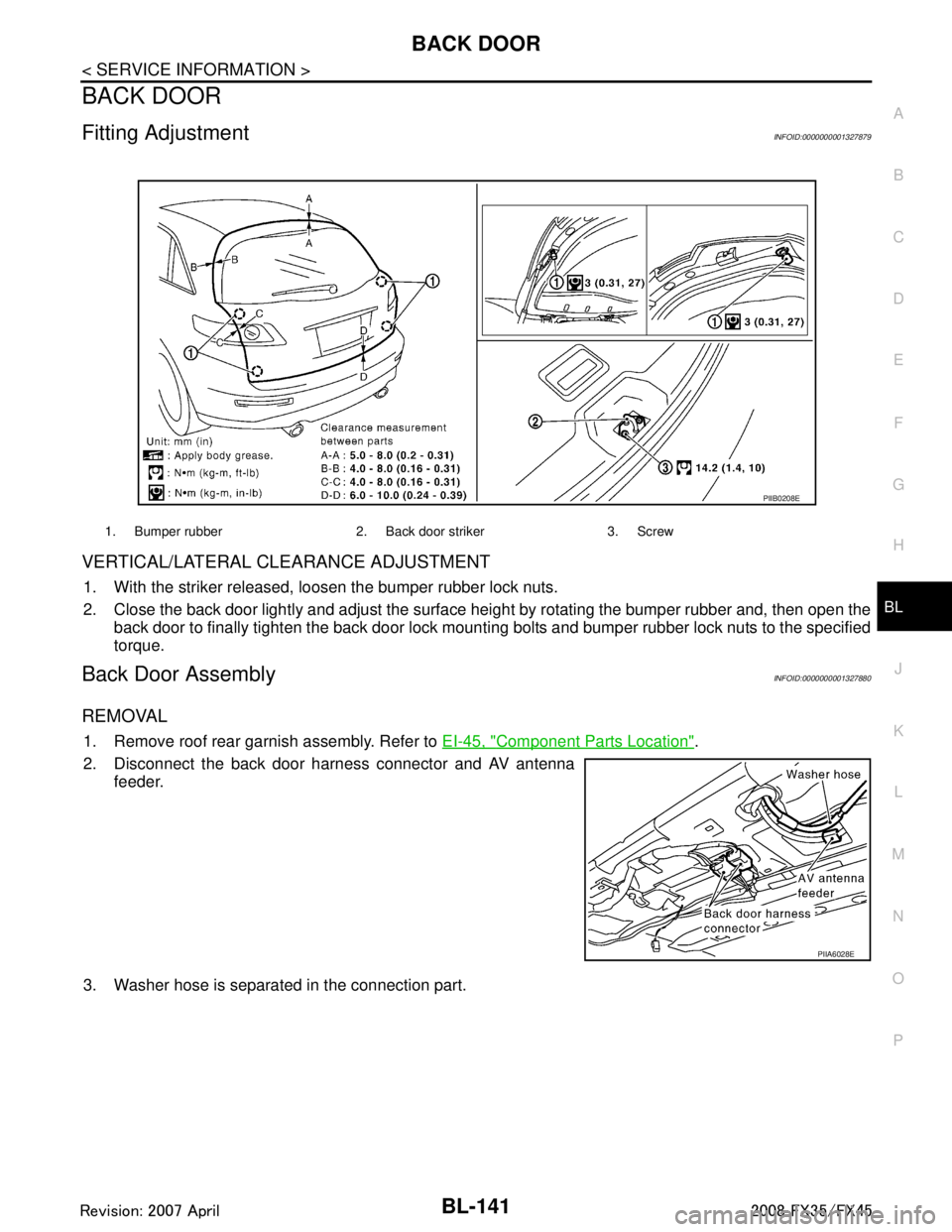
Fitting AdjustmentINFOID:0000000001327879
VERTICAL/LATERAL CLEARANCE ADJUSTMENT
1. With the striker released, loosen the bumper rubber lock nuts.
2. Close the back door lightly and adjust the surface height by rotating the bumper rubber and, then open the
back door to finally tighten the back door lock mounti ng bolts and bumper rubber lock nuts to the specified
torque.
Back Door AssemblyINFOID:0000000001327880
REMOVAL
1. Remove roof rear garnish assembly. Refer to EI-45, "Component Parts Location".
2. Disconnect the back door harness connector and AV antenna feeder.
3. Washer hose is separated in the connection part.
1. Bumper rubber 2. Back door striker 3. Screw
PIIB0208E
PIIA6028E
3AA93ABC3ACD3AC03ACA3AC03AC63AC53A913A773A893A873A873A8E3A773A983AC73AC93AC03AC3
3A893A873A873A8F3A773A9D3AAF3A8A3A8C3A863A9D3AAF3A8B3A8C
Page 908 of 3924

BL-174
< SERVICE INFORMATION >
VEHICLE SECURITY (THEFT WARNING) SYSTEM
Terminal and Reference Value for IPDM E/R
INFOID:0000000001327911
CONSULT-III FunctionINFOID:0000000001327912
WORK SUPPORT
DATA MONITOR
62 W Front door switch
driver side signal Input ON (Open)
→ OFF (Closed) 0 → Battery voltage
63 P Rear door (LH) switch sig-
nal Input ON (Open)
→ OFF (Closed) 0 → Battery voltage
Terminal Wire color Item
Signal
Input/
output Condition
Voltage (V)
(Approx.)
Terminal Wire color Item Signal
Input/
output Condition
Voltage (V)
(Approx.)
20 LG Headlamp low (RH) Output Lighting switch 2ND position
ON
→ OFF Battery voltage
→ 0
27 BR Headlamp high (RH) Output Lighting switch HIGH or PASS
position
ON
→ OFF Battery voltage
→ 0
28 SB Headlamp high (LH) Output Lighting switch HIGH or PASS
position
ON
→ OFF Battery voltage
→ 0
30 GY Headlamp low (LH) Output Lighting switch 2ND position
ON
→ OFF Battery voltage
→ 0
38 B Ground (power) — — 0
48 L CAN-H Input/
Output ——
49 R CAN-L Input/
Output ——
51 SB Horn relay control signal Output Panic alarm is operating 0
Other than above Battery voltage
56 LG Hood switch signal Input ON (Open) → OFF (closed) 0 → Battery voltage
60 B Ground (signal) — — 0
BCM diagnosis test item Check item diagnosis test mode Content
Theft alm WORK SUPPORT Change setting of each function.
DATA MONITOR Displays the input data of BCM real time. ACTIVE TEST Gives a drive signal to a load to check the operation.
Test Item Description
SECURITY ALARM SET This mo de is able to confirm and change security alarm ON-OFF setting.
THEFT ALM TRG The switch which triggered vehicle security alarm is recorded. This mode is able to confirm and
erase the record of vehicle security alarm. The trigger data can be erased by touching “CLEAR” on
CONSULT-III screen.
3AA93ABC3ACD3AC03ACA3AC03AC63AC53A913A773A893A873A873A8E3A773A983AC73AC93AC03AC3
3A893A873A873A8F3A773A9D3AAF3A8A3A8C3A863A9D3AAF3A8B3A8C
Page 918 of 3924

BL-184
< SERVICE INFORMATION >
VEHICLE SECURITY (THEFT WARNING) SYSTEM
1.CHECK HEADLAMP OPERATION
Check if headlamp operates by lighting switch.
Does headlamp come on when turning switch
“ON”?
YES >> Headlamp alarm circuit is OK.
NO >> Check headlamp system. Refer to LT- 5
or LT- 3 2.
Diagnosis Procedure 6INFOID:0000000001327921
DOOR LOCK AND UNLOCK SWITCH CHECK
1.CHECK DOOR LOCK AND UNLOCK SWITCH INPUT SIGNAL
Check if power door lock operated by door lock and unlock switch.
Do doors lock / unlock when using each door lock and unlock switches?
YES >> Door lock and unlock switch is OK.
NO >> Check door lock and unlock switch. Refer to BL-43, "
Check Door Lock and Unlock Switch".
3AA93ABC3ACD3AC03ACA3AC03AC63AC53A913A773A893A873A873A8E3A773A983AC73AC93AC03AC3
3A893A873A873A8F3A773A9D3AAF3A8A3A8C3A863A9D3AAF3A8B3A8C