880 INFINITI FX35 2008 Service Manual
[x] Cancel search | Manufacturer: INFINITI, Model Year: 2008, Model line: FX35, Model: INFINITI FX35 2008Pages: 3924, PDF Size: 81.37 MB
Page 10 of 3924
![INFINITI FX35 2008 Service Manual
AUTOMATIC SPEED CONTROL DEVICE (ASCD)ACS-3
< SERVICE INFORMATION > [ASCD]
C
D
E
F
G H
I
J
L
M A
B
ACS
N
O P
SERVICE INFORMATION
AUTOMATIC SPEED CONTROL DEVICE (ASCD)
DescriptionINFOID:000000000132880](/img/42/57017/w960_57017-9.png "INFINITI FX35 2008 Service Manual
AUTOMATIC SPEED CONTROL DEVICE (ASCD)ACS-3
< SERVICE INFORMATION > [ASCD]
C
D
E
F
G H
I
J
L
M A
B
ACS
N
O P
SERVICE INFORMATION
AUTOMATIC SPEED CONTROL DEVICE (ASCD)
DescriptionINFOID:000000000132880")
AUTOMATIC SPEED CONTROL DEVICE (ASCD)ACS-3
< SERVICE INFORMATION > [ASCD]
C
D
E
F
G H
I
J
L
M A
B
ACS
N
O P
SERVICE INFORMATION
AUTOMATIC SPEED CONTROL DEVICE (ASCD)
DescriptionINFOID:0000000001328801
Regarding the information for ASCD system, refer to EC-37 (VQ35DE), EC-615 (VK45DE).
3AA93ABC3ACD3AC03ACA3AC03AC63AC53A913A773A893A873A873A8E3A773A983AC73AC93AC03AC3
3A893A873A873A8F3A773A9D3AAF3A8A3A8C3A863A9D3AAF3A8B3A8C
Page 12 of 3924
![INFINITI FX35 2008 Service Manual
PRECAUTIONSACS-5
< SERVICE INFORMATION > [ICC]
C
D
E
F
G H
I
J
L
M A
B
ACS
N
O P
PRECAUTIONS
Precaution for Supplemental Restraint System (SRS) "AIR BAG" and "SEAT BELT
PRE-TENSIONER"
INFOID:000000](/img/42/57017/w960_57017-11.png "INFINITI FX35 2008 Service Manual
PRECAUTIONSACS-5
< SERVICE INFORMATION > [ICC]
C
D
E
F
G H
I
J
L
M A
B
ACS
N
O P
PRECAUTIONS
Precaution for Supplemental Restraint System (SRS) \"AIR BAG\" and \"SEAT BELT
PRE-TENSIONER\"
INFOID:000000")
PRECAUTIONSACS-5
< SERVICE INFORMATION > [ICC]
C
D
E
F
G H
I
J
L
M A
B
ACS
N
O P
PRECAUTIONS
Precaution for Supplemental Restraint System (SRS) "AIR BAG" and "SEAT BELT
PRE-TENSIONER"
INFOID:0000000001612901
The Supplemental Restraint System such as “A IR BAG” and “SEAT BELT PRE-TENSIONER”, used along
with a front seat belt, helps to reduce the risk or severi ty of injury to the driver and front passenger for certain
types of collision. This system includes seat belt switch inputs and dual stage front air bag modules. The SRS
system uses the seat belt switches to determine the front air bag deployment, and may only deploy one front
air bag, depending on the severity of a collision and whether the front occupants are belted or unbelted.
Information necessary to service the system safely is included in the “SUPPLEMENTAL RESTRAINT SYS-
TEM” and “SEAT BELTS” of this Service Manual.
WARNING:
To avoid rendering the SRS inoper ative, which could increase the risk of personal injury or death in
the event of a collision which would result in air bag inflation, all maintenance must be performed by
an authorized NISSAN/INFINITI dealer.
Improper maintenance, including in correct removal and installation of the SRS, can lead to personal
injury caused by unintentional act ivation of the system. For removal of Spiral Cable and Air Bag
Module, see the “SUPPLEMEN TAL RESTRAINT SYSTEM”.
Do not use electrical test equipm ent on any circuit related to the SRS unless instructed to in this
Service Manual. SRS wiring harnesses can be identi fied by yellow and/or orange harnesses or har-
ness connectors.
Precaution for ICC System ServiceINFOID:0000000001328803
Never look straight into the laser beam discharger when adjusting laser beam aiming.
Turn the MAIN switch OFF in conditions similar to dr iving, such as free rollers or a chassis dynamometer.
Do not use the ICC sensor removing from v ehicle, disassemble, or remodel the sensor.
Erase DTC when replacing parts of ICC system, then c heck the operation of ICC system after adjusting laser
beam aiming if necessary.
3AA93ABC3ACD3AC03ACA3AC03AC63AC53A913A773A893A873A873A8E3A773A983AC73AC93AC03AC3
3A893A873A873A8F3A773A9D3AAF3A8A3A8C3A863A9D3AAF3A8B3A8C
Page 13 of 3924
![INFINITI FX35 2008 Service Manual
ACS-6
< SERVICE INFORMATION >[ICC]
PREPARATION
PREPARATION
Special Service ToolINFOID:0000000001328804
The actual shapes of Kent-Moore tools may differ fr
om those of special service tools illustrate](/img/42/57017/w960_57017-12.png "INFINITI FX35 2008 Service Manual
ACS-6
< SERVICE INFORMATION >[ICC]
PREPARATION
PREPARATION
Special Service ToolINFOID:0000000001328804
The actual shapes of Kent-Moore tools may differ fr
om those of special service tools illustrate")
ACS-6
< SERVICE INFORMATION >[ICC]
PREPARATION
PREPARATION
Special Service ToolINFOID:0000000001328804
The actual shapes of Kent-Moore tools may differ fr
om those of special service tools illustrated here.
Tool number
(Kent-Moore No.)
Tool name Description
KV99110100
(J-45718)
ICC target board Uses for laser beam aiming adjustment
PKIA0358J
3AA93ABC3ACD3AC03ACA3AC03AC63AC53A913A773A893A873A873A8E3A773A983AC73AC93AC03AC3
3A893A873A873A8F3A773A9D3AAF3A8A3A8C3A863A9D3AAF3A8B3A8C
Page 14 of 3924
![INFINITI FX35 2008 Service Manual
DESCRIPTIONACS-7
< SERVICE INFORMATION > [ICC]
C
D
E
F
G H
I
J
L
M A
B
ACS
N
O P
DESCRIPTION
OutlineINFOID:0000000001328805
The Intelligent Cruise Control (ICC) system automatically maintains a sele](/img/42/57017/w960_57017-13.png "INFINITI FX35 2008 Service Manual
DESCRIPTIONACS-7
< SERVICE INFORMATION > [ICC]
C
D
E
F
G H
I
J
L
M A
B
ACS
N
O P
DESCRIPTION
OutlineINFOID:0000000001328805
The Intelligent Cruise Control (ICC) system automatically maintains a sele")
DESCRIPTIONACS-7
< SERVICE INFORMATION > [ICC]
C
D
E
F
G H
I
J
L
M A
B
ACS
N
O P
DESCRIPTION
OutlineINFOID:0000000001328805
The Intelligent Cruise Control (ICC) system automatically maintains a selected distance from the vehicle
ahead according to that vehicle's speed, or at the set speed, if the road ahead is clear.
The ICC function has two cruise control modes and brake assist (with preview function).
VEHICLE-TO-VEHICLE DISTANCE CONTROL MODE
With vehicle-to-vehicle distance control mode, the driver can maintain the same speed as other vehicles with-
out the constant need to adjust the set speed as the driver would with a normal cruise control system.
The system is intended to enhance the operation of the vehicle when following the vehicle traveling in the
same lane and direction.
If the distance sensor detects a sl ower moving vehicle ahead, the system wil l reduce speed so that the vehicle
ahead can be followed at the selected distance.
The system automatically controls the throttle and applie s the brakes (up to 25% of vehicle braking power) if
necessary.
The detection range of the sensor is approximately 120 m (390 ft) ahead.
Refer to Owner's Manual for Intelligent Cruise Control System operating instructions.
CONVENTIONAL (FIXED SPEED) CRUISE CONTROL MODE
Conventional (fixed speed) cruise contro l mode is cruising at preset speeds.
Refer to Owner's Manual for Intelligent Cruise Control System operating instructions.
BRAKE ASSIST (WITH PREVIEW FUNCTION)
When the force applied to brake pedal exceeds a certain level, the Brake Assist is activated and generates a
greater braking force than that of a convent ional brake booster even with light pedal force.
When the Preview Function identifies the need to apply the sudden brake by sensing the vehicle ahead in the
same lane and the distance and relative speed from it, it applies the brake pre-pressure before driver depress
the brake pedal and improves brake re sponse by reducing its free play.
Refer to Owner's Manual for BRAKE ASSIST (W ITH PREVIEW FUNCTION) operating instructions.
Functional DiagramINFOID:0000000001328806
Items of input/output signal to be checked with CONSULT-III
PKIC8700E
3AA93ABC3ACD3AC03ACA3AC03AC63AC53A913A773A893A873A873A8E3A773A983AC73AC93AC03AC3
3A893A873A873A8F3A773A9D3AAF3A8A3A8C3A863A9D3AAF3A8B3A8C
Page 16 of 3924
![INFINITI FX35 2008 Service Manual
DESCRIPTIONACS-9
< SERVICE INFORMATION > [ICC]
C
D
E
F
G H
I
J
L
M A
B
ACS
N
O P
ACTIVE TEST ITEM LIST
Component DescriptionINFOID:0000000001328807
CAN CommunicationINFOID:0000000001328808
CAN (Contr](/img/42/57017/w960_57017-15.png "INFINITI FX35 2008 Service Manual
DESCRIPTIONACS-9
< SERVICE INFORMATION > [ICC]
C
D
E
F
G H
I
J
L
M A
B
ACS
N
O P
ACTIVE TEST ITEM LIST
Component DescriptionINFOID:0000000001328807
CAN CommunicationINFOID:0000000001328808
CAN (Contr")
DESCRIPTIONACS-9
< SERVICE INFORMATION > [ICC]
C
D
E
F
G H
I
J
L
M A
B
ACS
N
O P
ACTIVE TEST ITEM LIST
Component DescriptionINFOID:0000000001328807
CAN CommunicationINFOID:0000000001328808
CAN (Controller Area Network) is a serial communication li ne for real time application. It is an on-vehicle mul-
tiplex communication line with high data communication speed and excellent error detection ability. Many elec-
tric control units are equipped onto a vehicle, and eac h control unit shares information and links with other
control units during operation (not independent). In CAN communication, control units are connected with 2
communication lines (CAN-H line, CAN-L line) allowing a high rate of information transmission with less wiring.
Each control unit transmits/receives data but selectively reads required data only.
CAN COMMUNICATION UNIT
Refer to LAN-43, "CAN System Specification Chart".
Output CONSULT-III ICC
[ACTIVE TEST]
Item CAN Description
Combination
meter ICC BUZZER 1
×Able to start ICC warning chime with a driving signal from ICC unit.
METER LAMP ×Able to turn ICC system display ON with a driving signal from ICC unit.
ICC brake hold
relay STOP LAMP Able to start ICC brake hold relay with a driving signal from ICC unit.
Booster sole-
noid BOOSTER SOL/V
3
Able to start booster solenoid with a driving signal from ICC unit.
ComponentVehicle-to-
vehicle
distance
control mode Conventional
(fixed speed)
cruise
control mode Brake assis
(with preview function) Description
ICC unit ××× Operates electric throttle control actuator and brake
booster based on that sensor signals and CAN commu-
nication data, then controls vehicle distance.
ICC sensor ×× Irradiates laser beam, and receives reflected laser beam
to measure distance from preceding vehicle.
ECM ××× Transmits throttle position signal and ICC steering switch
signal to ICC unit through CAN communication.
ABS actuator and electric
unit (control unit) ××× Transmits wheel speed sensor signal to ICC unit through
CAN communication.
Brake pressure sensor ×× Detects fluid pressure in master cylinder.
Brake booster ×× Adjusts brake fluid pressure, based on command from
ICC unit.
BCM × Transmit front wiper request signal to ICC unit through
CAN communication.
TCM ×× Transmits gear position signal and output shaft revolu-
tion signal to ICC unit through CAN communication.
Unified meter and A/C amp. ××× Receives ICC system display signal, ICC warning lamp
signal and buzzer output signal from ICC unit through
CAN communication.
ICC brake switch, stop lamp
switch ××× Transmit operating signal to ICC unit when touching
brake pedal. ICC unit cancels cruise system at driver's
brake operation.
ICC brake hold relay × Receives stop lamp driving signal from ICC unit, and
turns stop lamp ON.
Parking brake switch ×× The cruise system is cancelled when applied.
3AA93ABC3ACD3AC03ACA3AC03AC63AC53A913A773A893A873A873A8E3A773A983AC73AC93AC03AC3
3A893A873A873A8F3A773A9D3AAF3A8A3A8C3A863A9D3AAF3A8B3A8C
Page 17 of 3924
![INFINITI FX35 2008 Service Manual
ACS-10
< SERVICE INFORMATION >[ICC]
DESCRIPTION
Switch Operation
INFOID:0000000001328809
The system is operated by MAIN switch and four control switches, all mounted on the steering wheel.
ICC Syste](/img/42/57017/w960_57017-16.png "INFINITI FX35 2008 Service Manual
ACS-10
< SERVICE INFORMATION >[ICC]
DESCRIPTION
Switch Operation
INFOID:0000000001328809
The system is operated by MAIN switch and four control switches, all mounted on the steering wheel.
ICC Syste")
ACS-10
< SERVICE INFORMATION >[ICC]
DESCRIPTION
Switch Operation
INFOID:0000000001328809
The system is operated by MAIN switch and four control switches, all mounted on the steering wheel.
ICC System DisplayINFOID:0000000001328810
No. Switch name Description
1 RESUME/ACCELERATE switch Resumes set speed or increases speed incrementally.
2 SET/COAST switch Sets desired cruise speed, reduces speed incrementally.
3 CANCEL switch Deactivates system without erasing set speed.
4 MAIN switch Master switch to activate the system
5 DISTANCE switch Changes the following distance from: Long, Middle, Short.
SKIB8558E
SKIA6177E
No. Display items Description
1 Set vehicle speed indicator Indicates the set vehicle speed.
For CANADA models: km/h
For US models: MPH
2 Vehicle ahead detection indicator Indicates whether it detects a vehicle ahead.
3 Set distance indicator Display the selected distance between vehicles set with the DISTANCE switch.
4 Own vehicle indicator Indicates the base vehicle.
5 MAIN switch indicator lamp (Green) Indicates that the MAIN switch is ON.
6 Intelligent cruise control system warning lamp
(Orange) The light comes on if there is a malfunction in the ICC system.
7 SET switch indicator lamp Indicates that the conventional cruise control mode is controlled.
3AA93ABC3ACD3AC03ACA3AC03AC63AC53A913A773A893A873A873A8E3A773A983AC73AC93AC03AC3
3A893A873A873A8F3A773A9D3AAF3A8A3A8C3A863A9D3AAF3A8B3A8C
Page 720 of 3924
TELEPHONEAV-173
< SERVICE INFORMATION >
C
DE
F
G H
I
J
L
M A
B
AV
N
O P
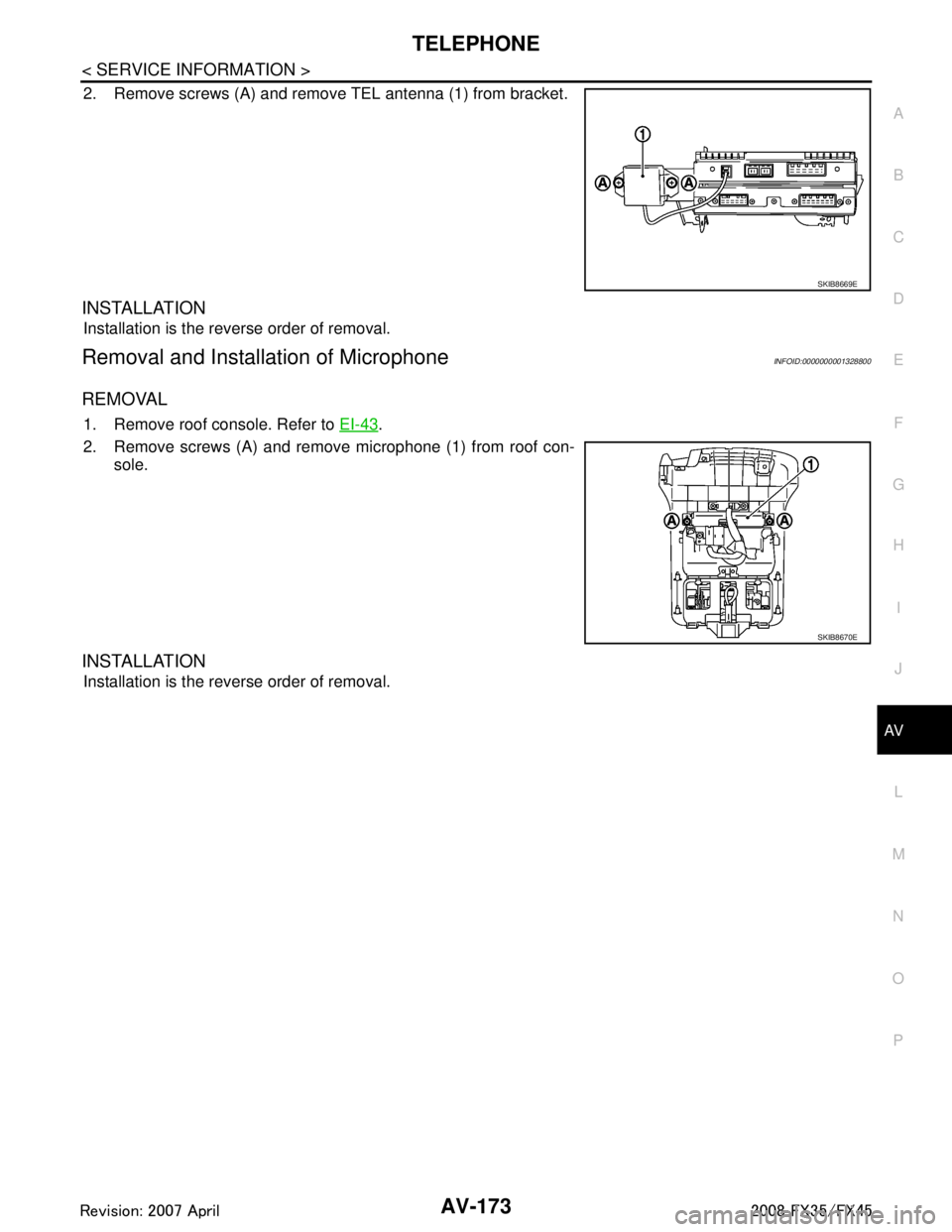
2. Remove screws (A) and remove TEL antenna (1) from bracket.
INSTALLATION
Installation is the reverse order of removal.
Removal and Installation of MicrophoneINFOID:0000000001328800
REMOVAL
1. Remove roof console. Refer to EI-43.
2. Remove screws (A) and remove microphone (1) from roof con- sole.
INSTALLATION
Installation is the reverse order of removal.
SKIB8669E
SKIB8670E
3AA93ABC3ACD3AC03ACA3AC03AC63AC53A913A773A893A873A873A8E3A773A983AC73AC93AC03AC3
3A893A873A873A8F3A773A9D3AAF3A8A3A8C3A863A9D3AAF3A8B3A8C
Page 792 of 3924

BL-58
< SERVICE INFORMATION >
REMOTE KEYLESS ENTRY SYSTEM
Terminal and Reference Value for BCM
INFOID:0000000001327818
Te r m i - nal Wire
Color ItemSignal In-
put/ out- put Condition
Voltage (V)
Approx.
1PU Key ring illumination output
signal
Output Key ring illumination is lighting. Battery voltage
Key ring illumination is being turned
off.
0
11 LG Ignition switch Input Ignition switch is in ACC or ON po-
sitionBattery voltage
12 P/B Front door switch (Passen-
ger side) InputON (door open)
→ OFF (door
closed) 0
→ Battery voltage
13 P/L Rear door switch RH Input ON (door open)
→ OFF (door
closed) 0
→ Battery voltage
18 B Remote keyless entry re-
ceiver (Ground)
—— 0
19 R Remote keyless entry re-
ceiver (Power supply) OutputKey is inserted in IGN key cylinder 0
All door closed
20 Y Remote keyless entry re-
ceiver (Signal)
InputKey is inserted in IGN key cylinder 0
Waiting
(All door closed)
When signal is received
(All door closed)
37 B/W Key switch Input ON (Key is inserted in IGN key cyl-
inder)
→ OFF (Key is removed
from IGN key cylinder) Battery voltage
→ 0
38 W/L Ignition switch Input Ignition switch is in ON or START
positionBattery voltage
39 L CAN H Input/
Output ——
40 P CAN L Input/
Output ——
41 R/B Battery saver output signal Output 30 minutes after ignition switch is
turned to OFF
0
Ignition switch is in ON position Battery voltage
42 L/R Battery power supply (fuse) Input — Battery voltage
OCC3881D
OCC3879D
OCC3880D
3AA93ABC3ACD3AC03ACA3AC03AC63AC53A913A773A893A873A873A8E3A773A983AC73AC93AC03AC3
3A893A873A873A8F3A773A9D3AAF3A8A3A8C3A863A9D3AAF3A8B3A8C
Page 803 of 3924

REMOTE KEYLESS ENTRY SYSTEMBL-69
< SERVICE INFORMATION >
C
DE
F
G H
J
K L
M A
B
BL
N
O P
1. Disconnect key switch connector.
2. Check continuity between key switch terminals 1 and 2.
OK or NG
OK >> Check the following. 15A fuse [No. 22, located in fuse block (J/B)]
Harness for open or short between key switch and fuse
Harness for open or short between BCM and key switch
NG >> Replace key switch.
Check Remote Keyless Entry ReceiverINFOID:0000000001327827
1.CHECK REMOTE KEYLESS ENTRY RECEIVER OUTPUT SIGNAL
1. Turn ignition switch OFF.
2. Check remote keyless entry receiver connector M98 terminal 2 (L) and ground signal with oscilloscope.
OK or NG
OK >> Remote keyless entry receiver circuit is OK.
NG >> GO TO 2.
2.CHECK REMOTE KEYLESS ENTRY RECEIVER INPUT VOLTAGE
1. Disconnect remote keyless entry receiver connector.
2. Check voltage between remote keyless entry receiver connector M98 terminal 4 (R) and ground.
Terminal Key switch condition Continuity
12 Key is inserted in IGN key cylinder. Yes
Key is removed from IGN key cylinder No
PIIA2627E
Connector Te r m i n a l
(Wire color) Condition
of keyfob Voltag e
(Reference value)
(+) (–)
M98 2 Ground No function
Any button is pressed
PIIB1375E
OCC3879D
OCC3880D
3AA93ABC3ACD3AC03ACA3AC03AC63AC53A913A773A893A873A873A8E3A773A983AC73AC93AC03AC3
3A893A873A873A8F3A773A9D3AAF3A8A3A8C3A863A9D3AAF3A8B3A8C
Page 875 of 3924
BACK DOORBL-141
< SERVICE INFORMATION >
C
DE
F
G H
J
K L
M A
B
BL
N
O P
BACK DOOR
Fitting AdjustmentINFOID:0000000001327879
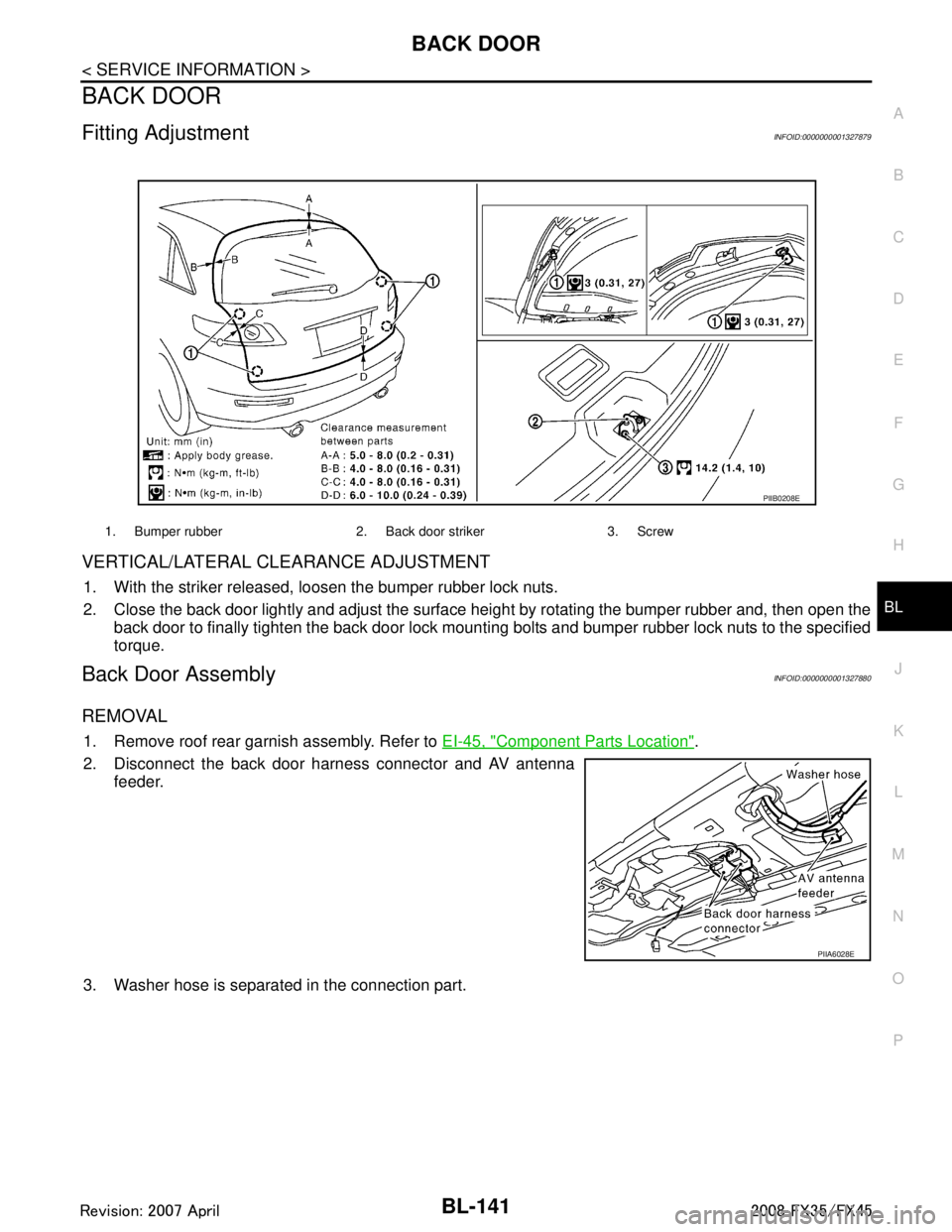
VERTICAL/LATERAL CLEARANCE ADJUSTMENT
1. With the striker released, loosen the bumper rubber lock nuts.
2. Close the back door lightly and adjust the surface height by rotating the bumper rubber and, then open the
back door to finally tighten the back door lock mounti ng bolts and bumper rubber lock nuts to the specified
torque.
Back Door AssemblyINFOID:0000000001327880
REMOVAL
1. Remove roof rear garnish assembly. Refer to EI-45, "Component Parts Location".
2. Disconnect the back door harness connector and AV antenna feeder.
3. Washer hose is separated in the connection part.
1. Bumper rubber 2. Back door striker 3. Screw
PIIB0208E
PIIA6028E
3AA93ABC3ACD3AC03ACA3AC03AC63AC53A913A773A893A873A873A8E3A773A983AC73AC93AC03AC3
3A893A873A873A8F3A773A9D3AAF3A8A3A8C3A863A9D3AAF3A8B3A8C