power steering INFINITI M35 2006 Factory User Guide
[x] Cancel search | Manufacturer: INFINITI, Model Year: 2006, Model line: M35, Model: INFINITI M35 2006Pages: 5621, PDF Size: 65.56 MB
Page 689 of 5621
![INFINITI M35 2006 Factory User Guide AV-68
[WITHOUT MOBILE ENTERTAINMENT SYSTEM]
TERMINALS AND REFERENCE VALUE FOR CONTROL UNIT
Revision: 2006 January2006 M35/M45
*1: 2WD models without navigation system and RAS
*2: Except *1
Audio Unit](/img/42/57023/w960_57023-688.png "INFINITI M35 2006 Factory User Guide AV-68
[WITHOUT MOBILE ENTERTAINMENT SYSTEM]
TERMINALS AND REFERENCE VALUE FOR CONTROL UNIT
Revision: 2006 January2006 M35/M45
*1: 2WD models without navigation system and RAS
*2: Except *1
Audio Unit")
AV-68
[WITHOUT MOBILE ENTERTAINMENT SYSTEM]
TERMINALS AND REFERENCE VALUE FOR CONTROL UNIT
Revision: 2006 January2006 M35/M45
*1: 2WD models without navigation system and RAS
*2: Except *1
Audio Unit for BOSE SystemNKS0048M
51
(R)GroundCommunication signal
(SAT-AUDIO)Input ON Satellite radio mode is ON.
53 Ground Antenna amp ON signal Output ON
Approx. 12 V
54 – AM-FM main Input – – –
55 – FM sub Input – – –Te r m i n a l
(Wire color)
ItemSignal
input/
outputCondition
Reference value
+–Ignition
switchOperation
SKIB3824E
Te r m i n a l
(Wire color)
ItemSignal
input/
outputCondition
Reference value
+–Ignition
switch Operation
2
(R/L)3
(W)Audio signal LH Output ON Receive audio signal.
6
(BR)15
(G)Steering switch signal A Input ONKeep pushing SOURCE
switch.approx. 0 V
Keep pushing MENU UP
switch.Approx. 1.2 V
Keep pushing MENU DOWN
switch.Approx. 2.5 V
Keep pushing ENTER
switch.Approx. 3.7 V
Except for above. Approx. 5 V
7
(V)Ground ACC power supply Input ACC
Battery voltage
8
(R/Y)Ground Illumination control signal Input OFFIllumination control switch is
operated by lighting switch
in ON position.Change between approx. 0 V
and approx. 12 V
9
(R)Ground Illumination signal Input OFFLighting switch is OFF. Approx. 0 V
Lighting switch is ON. Approx. 12 V
11
(P)12
(L)Audio signal RH Output ON Receive audio signal.
SKIB3609E
SKIB3609E
Page 690 of 5621
![INFINITI M35 2006 Factory User Guide TERMINALS AND REFERENCE VALUE FOR CONTROL UNIT
AV-69
[WITHOUT MOBILE ENTERTAINMENT SYSTEM]
C
D
E
F
G
H
I
J
L
MA
B
AV
Revision: 2006 January2006 M35/M45
15
(G)GroundSteering switch signal
ground– ON](/img/42/57023/w960_57023-689.png "INFINITI M35 2006 Factory User Guide TERMINALS AND REFERENCE VALUE FOR CONTROL UNIT
AV-69
[WITHOUT MOBILE ENTERTAINMENT SYSTEM]
C
D
E
F
G
H
I
J
L
MA
B
AV
Revision: 2006 January2006 M35/M45
15
(G)GroundSteering switch signal
ground– ON")
TERMINALS AND REFERENCE VALUE FOR CONTROL UNIT
AV-69
[WITHOUT MOBILE ENTERTAINMENT SYSTEM]
C
D
E
F
G
H
I
J
L
MA
B
AV
Revision: 2006 January2006 M35/M45
15
(G)GroundSteering switch signal
ground– ON – Approx. 0 V
16
(O)15
(G)Steering switch signal B Input ONKeep pushing VOL DOWN
switch.Approx. 0 V
Keep pushing VOL UP
switch.Approx. 1.2 V
Keep pushing TEL, PTT
switch.Approx. 2.5 V
Keep pushing BACK switch. Approx. 3.7 V
Except for above. Approx. 5V
19
(Y)Ground Battery power supply Input OFF
Battery voltage
20
(B)Ground Ground – ON – Approx. 0 V
21
*
(B/R)25
*
(BR)Sound signal LH
Input ONWhen playing DVD
(Down mix is ON)
22
*
(B/W)26
*
(L)Sound signal RH
23
(Y)–Communication signal
(H)Input/
Output–– –
24
(O)–Communication signal
(L)Input/
Output–– –
27
*– Shield––
30
(BR)31
(B/R)TEL voice signal Input ONWhen inputting TEL voice
signal.
37 – Shield – – – –
41
(R)45
(G)Audio signal LH Input ON Satellite radio mode is ON.
42
(B)46
(W)Audio signal RH Input ON Satellite radio mode is ON. Terminal
(Wire color)
ItemSignal
input/
outputCondition
Reference value
+–Ignition
switch Operation
SKIB3609E
SKIB3609E
SKIB3609E
SKIB3609E
Page 738 of 5621
![INFINITI M35 2006 Factory User Guide TROUBLE DIAGNOSIS
AV-117
[WITHOUT MOBILE ENTERTAINMENT SYSTEM]
C
D
E
F
G
H
I
J
L
MA
B
AV
Revision: 2006 January2006 M35/M45
2. CHECK HARNESS BETWEEN AV (NAVI) CONTROL UNIT AND MIC.
1. Turn ignition sw](/img/42/57023/w960_57023-737.png "INFINITI M35 2006 Factory User Guide TROUBLE DIAGNOSIS
AV-117
[WITHOUT MOBILE ENTERTAINMENT SYSTEM]
C
D
E
F
G
H
I
J
L
MA
B
AV
Revision: 2006 January2006 M35/M45
2. CHECK HARNESS BETWEEN AV (NAVI) CONTROL UNIT AND MIC.
1. Turn ignition sw")
TROUBLE DIAGNOSIS
AV-117
[WITHOUT MOBILE ENTERTAINMENT SYSTEM]
C
D
E
F
G
H
I
J
L
MA
B
AV
Revision: 2006 January2006 M35/M45
2. CHECK HARNESS BETWEEN AV (NAVI) CONTROL UNIT AND MIC.
1. Turn ignition switch OFF.
2. Disconnect AV (NAVI) control unit connector and MIC. connector.
3. Check continuity between AV (NAVI) control unit harness con-
nector (A) M78 terminals 6, 7, 8 and MIC. harness connector (B)
R52 terminals 4, 2, 1.
4. Check continuity between AV (NAVI) control unit harness con-
nector (A) M78 terminals 6, 7, 8 and ground.
OK or NG
OK >> GO TO 3.
NG >> Repair harness or connector.
3. CHECK MIC. POWER SUPPLY
1. Connect AV (NAVI) control unit and MIC. connector.
2. Turn ignition switch ON.
3. Check voltage between AV (NAVI) control unit harness connec-
tor M78 terminals 6 and 7.
OK or NG
OK >> GO TO 4.
NG >> Replace AV (NAVI) control unit.
4. CHECK MIC. SIGNAL
1. Check signal between AV (NAVI) control unit harness connector
M78 terminals 8 and 7.
OK or NG
OK >> Replace AV (NAVI) control unit.
NG >> Replace MIC.
THE SCREEN IS NOT SWITCHED BY PRESSING THE STEERING SWITCH
Refer to AV- 11 8 , "Steering Switch Cannot Be Operated" . 6 – 4 : Continuity should exist.
7 – 2 : Continuity should exist.
8 – 1 : Continuity should exist.
6, 7, 8 – Ground : Continuity should not exist.
SKIB4632E
6 – 7 : Approx. 5 V
SKIB4633E
8 – 7:Give a voice
SKIB4634EPKIB5037J
Page 825 of 5621
![INFINITI M35 2006 Factory User Guide AV-204
[WITH MOBILE ENTERTAINMENT SYSTEM]
TERMINALS AND REFERENCE VALUE FOR CONTROL UNIT
Revision: 2006 January2006 M35/M45
TERMINALS AND REFERENCE VALUE FOR CONTROL UNITPFP:00000
Audio UnitNKS004AL
T](/img/42/57023/w960_57023-824.png "INFINITI M35 2006 Factory User Guide AV-204
[WITH MOBILE ENTERTAINMENT SYSTEM]
TERMINALS AND REFERENCE VALUE FOR CONTROL UNIT
Revision: 2006 January2006 M35/M45
TERMINALS AND REFERENCE VALUE FOR CONTROL UNITPFP:00000
Audio UnitNKS004AL
T")
AV-204
[WITH MOBILE ENTERTAINMENT SYSTEM]
TERMINALS AND REFERENCE VALUE FOR CONTROL UNIT
Revision: 2006 January2006 M35/M45
TERMINALS AND REFERENCE VALUE FOR CONTROL UNITPFP:00000
Audio UnitNKS004AL
Te r m i n a l
(Wire color)
ItemSignal
input/
outputCondition
Reference value
+–Ignition
switch Operation
2
(R/L)3
(W)Audio signal LH Output ON Receive audio signal.
6
(BR)15
(G)Steering switch signal A Input ONKeep pushing SOURCE
switch.approx. 0 V
Keep pushing MENU UP
switch.Approx. 1.2 V
Keep pushing MENU DOWN
switch.Approx. 2.5 V
Keep pushing ENTER
switch.Approx. 3.7 V
Except for above. Approx. 5 V
7
(V)Ground ACC power supply Input ACC
Battery voltage
8
(R/Y)Ground Illumination control signal Input OFFIllumination control switch is
operated by lighting switch
in ON position.Change between approx. 0 V
and approx. 12 V
9
(R)Ground Illumination signal Input OFFLighting switch is OFF. Approx. 0 V
Lighting switch is ON. Approx. 12 V
11
(P)12
(L)Audio signal RH Output ON Receive audio signal.
15
(G)GroundSteering switch signal
ground– ON – Approx. 0 V
16
(O)15
(G)Steering switch signal B Input ONKeep pushing VOL DOWN
switch.Approx. 0 V
Keep pushing VOL UP
switch.Approx. 1.2 V
Keep pushing TEL, PTT
switch.Approx. 2.5 V
Keep pushing BACK switch. Approx. 3.7 V
Except for above. Approx. 5 V
19
(Y)Ground Battery power supply Input OFF
Battery voltage
20
(B)Ground Ground – ON – Approx. 0 V
SKIB3609E
SKIB3609E
Page 893 of 5621
![INFINITI M35 2006 Factory User Guide AV-272
[WITH MOBILE ENTERTAINMENT SYSTEM]
TROUBLE DIAGNOSIS
Revision: 2006 January2006 M35/M45
Voice Activated Control System Is Not ActivatedNKS004BB
THE SCREEN IS SWITCHED BY PRESSING THE STEERING S](/img/42/57023/w960_57023-892.png "INFINITI M35 2006 Factory User Guide AV-272
[WITH MOBILE ENTERTAINMENT SYSTEM]
TROUBLE DIAGNOSIS
Revision: 2006 January2006 M35/M45
Voice Activated Control System Is Not ActivatedNKS004BB
THE SCREEN IS SWITCHED BY PRESSING THE STEERING S")
AV-272
[WITH MOBILE ENTERTAINMENT SYSTEM]
TROUBLE DIAGNOSIS
Revision: 2006 January2006 M35/M45
Voice Activated Control System Is Not ActivatedNKS004BB
THE SCREEN IS SWITCHED BY PRESSING THE STEERING SWITCH
1. VOICE MICROPHONE TEST
Turn “Voice Microphone Test” ON at Confirmation/Adjustment mode, and then check the sounds emitted from
the speaker. Refer to AV- 2 4 2 , "
Voice Microphone Test" .
Is the sound output?
YES >> Replace AV (NAVI) control unit.
NO >> GO TO 2.
2. CHECK HARNESS BETWEEN AV (NAVI) CONTROL UNIT AND MIC.
1. Turn ignition switch OFF.
2. Disconnect AV (NAVI) control unit connector and MIC. connector.
3. Check continuity between AV (NAVI) control unit harness con-
nector (A) M78 terminals 6, 7, 8 and MIC. harness connector (B)
R52 terminals 4, 2, 1.
4. Check continuity between AV (NAVI) control unit harness con-
nector (A) M78 terminals 6, 7, 8 and ground.
OK or NG
OK >> GO TO 3.
NG >> Repair harness or connector.
3. CHECK MIC. POWER SUPPLY
1. Connect AV (NAVI) control unit and MIC. connector.
2. Turn ignition switch ON.
3. Check voltage between AV (NAVI) control unit harness connec-
tor M78 terminals 6 and 7.
OK or NG
OK >> GO TO 4.
NG >> Replace AV (NAVI) control unit.6 – 4 : Continuity should exist.
7 – 2 : Continuity should exist.
8 – 1 : Continuity should exist.
6, 7, 8 – Ground : Continuity should not exist.
SKIB4632E
6 – 7 : Approx. 5 V
SKIB4633E
Page 940 of 5621

BL-1
BODY, LOCK & SECURITY SYSTEM
I BODY
CONTENTS
C
D
E
F
G
H
J
K
L
M
SECTION BL
A
B
BL
Revision: 2006 January2006 M35/M45
BODY, LOCK & SECURITY SYSTEM
PRECAUTIONS .......................................................... 6
Precautions for Supplemental Restraint System
(SRS) “AIR BAG” and “SEAT BELT PRE-TEN-
SIONER” .................................................................. 6
Precautions for Procedures without Cowl Top Cover ..... 6
Precautions Necessary for Steering Wheel Rotation
after Battery Disconnect ........................................... 6
OPERATION PROCEDURE ................................. 6
Precautions for Work ...........................................
..... 7
PREPARATION ........................................................... 8
Special Service Tools ............................................... 8
Commercial Service Tools ........................................ 8
SQUEAK AND RATTLE TROUBLE DIAGNOSIS ...... 9
Work Flow ................................................................ 9
CUSTOMER INTERVIEW ..................................... 9
DUPLICATE THE NOISE AND TEST DRIVE ..... 10
CHECK RELATED SERVICE BULLETINS ......... 10
LOCATE THE NOISE AND IDENTIFY THE
ROOT CAUSE .................................................... 10
REPAIR THE CAUSE ......................................... 10
CONFIRM THE REPAIR ...................................... 11
Generic Squeak and Rattle Troubleshooting .......... 11
INSTRUMENT PANEL ......................................... 11
CENTER CONSOLE ............................................ 11
DOORS ................................................................ 11
TRUNK ................................................................ 12
SUNROOF/HEADLINING ................................... 12
SEATS ................................................................. 12
UNDERHOOD ..................................................... 12
Diagnostic Worksheet ............................................ 13
HOOD ....................................................................... 15
Fitting Adjustment .................................................. 15
Removal and Installation of Hood Assembly .......... 17
REMOVAL ........................................................
... 17
INSTALLETION ................................................... 18
Removal and Installation of Hood Lock Control ..... 18
REMOVAL ........................................................
... 18
INSTALLATION ................................................... 19
Hood Lock Control Inspection ................................ 20RADIATOR CORE SUPPORT .................................. 21
Removal and Installation ........................................ 21
REMOVAL ........................................................
... 21
INSTALLATION ................................................... 22
FRONT FENDER ................................................... ... 23
Removal and Installation ........................................ 23
REMOVAL ........................................................
... 23
INSTALLATION ................................................... 23
POWER DOOR LOCK SYSTEM .............................. 24
Component Parts and Harness Connector Location ... 24
System Description ................................................. 25
DOOR LOCK ACTUATOR OPERATION ............. 26
FUEL LID OPERATION ....................................... 26
OUTLINE ............................................................. 26
CAN Communication System Description .............. 26
CAN Communication Unit ....................................... 26
Schematic ............................................................... 27
Wiring Diagram —D/LOCK— ................................. 28
Terminals and Reference Value of BCM ................. 31
Work Flow ............................................................... 31
CONSULT-II Function (BCM) ................................. 32
CONSULT-II INSPECTION PROCEDURE .......... 32
CONSULT-II APPLICATION ITEMS .................... 33
Trouble Diagnosis Chart by Symptom .................... 34
Power Supply and Ground Circuit Check of BCM ... 35
Check Door Lock and Unlock Switch ..................... 36
Check Door Lock Actuator/Driver Side ................... 38
Check Door Lock Actuator/Passenger Side ........... 39
Check Door Lock Actuator/Rear LH ....................... 40
Check Door Lock Actuator/Rear RH ....................... 40
Check Fuel Lid Opener Actuator ............................ 41
Door Key Cylinder Switch Check ............................ 42
INTELLIGENT KEY SYSTEM ................................... 44
Component Parts and Harness Connector Location ... 44
System Description ................................................. 48
DOOR LOCK/UNLOCK/TRUNK OPEN FUNC-
TION .................................................................... 48
REMOTE KEYLESS ENTRY FUNCTIONS ......... 52
ENGINE START FUNCTION ............................... 54
WARNING FUNCTION ........................................ 55
Page 941 of 5621

BL-2Revision: 2006 January2006 M35/M45 CHANGE SETTINGS FUNCTION ....................... 60
INTELLIGENT KEY REGISTRATION .................. 60
STEERING LOCK UNIT REGISTRATION .......... 60
CAN Communication System Description .............. 60
CAN Communication Unit ....................................... 60
Schematic ............................................................... 61
Wiring Diagram — I/KEY— .................................... 63
Terminals and Reference Value for Intelligent Key
Unit ......................................................................... 74
Terminals and Reference Value for BCM ................ 77
Terminals and Reference Value for IPDM E/R ........ 77
Trouble Diagnosis Procedure ................................. 78
WORK FLOW ...................................................... 78
CONSULT-II Functions (INTELLIGENT KEY) ........ 80
CONSULT-II Inspection Procedure ......................... 80
BASIC OPERATION ............................................ 80
CONSULT-II Application Items ............................... 81
SELF-DIAGNOSTIC RESULTS ........................... 81
DATA MONITOR .................................................. 82
WORK SUPPORT ............................................... 83
ACTIVE TEST ..................................................... 84
Trouble Diagnosis Symptom Chart ......................... 86
ALL FUNCTIONS OF INTELLIGENT KEY SYS-
TEM DOES NOT OPERATE ............................... 86
DOOR LOCK/UNLOCK FUNCTION MALFUNC-
TION .................................................................... 86
REMOTE KEYLESS ENTRY FUNCTION MAL-
FUNCTION .......................................................... 87
TRUNK OPEN FUNCTION MALFUNCTION ...... 88
HAZARD AND BUZZER REMINDER FUNC-
TION MALFUNCTION ......................................... 89
HAZARD AND HORN REMINDER FUNCTION
MALFUNCTION ................................................... 89
POWER WINDOW DOWN FUNCTION MAL-
FUNCTION .......................................................... 90
WARNING FUNCTION MALFUNCTION ............. 90
Check CAN Communication System ...................... 92
Check Power Supply and Ground Circuit ............... 93
Check Key Slot ....................................................... 94
Check Door Switch ..............................................
... 96
Check Trunk Room Lamp Switch ........................... 99
Check Door Request Switch .................................101
Check Trunk Opener Request Switch ..................103
Check Unlock Sensor ...........................................105
Check Intelligent Key Warning Buzzer .................107
Check Outside Key Antenna (Driver Side and Pas-
senger Side) .........................................................108
Check Outside Key Antenna (Trunk Room) .........110
Check Inside Key Antenna ...................................112
Check Park Position Switch ..................................115
Check Ignition Switch Position .............................117
Check Remote Keyless Entry Receiver ................117
Check Trunk Lid Opener Cancel Switch ...............121
Check Key Slot Illumination ..................................123
Check Horn Function ............................................124
Check Combination Meter Display Function .........124
Check Warning Chime Function ...........................125
Removal and Installation of Intelligent Key Unit ...125
REMOVAL ........................................................
.125INSTALLATION ..................................................125
Intelligent Key Battery Replacement .....................126
DISASSEMBLY AND ASSEMBLY OF INTELLI-
GENT KEY .........................................................126
INTELLIGENT KEY BATTERY INSPECTION ...126
INTELLIGENT KEY SYSTEM/ENGINE START
FUNCTION ..............................................................127
Component Parts and Harness Connector Location .127
System Description ...............................................128
PRECAUTIONS FOR INTELLIGENT KEY SYS-
TEM ...................................................................129
Operation Description ...........................................129
SYSTEM DIAGRAM ..........................................129
OPERATION WHEN INTELLIGENT KEY IS
CARRIED ...........................................................129
OPERATION WHEN KEY SLOT IS USED ........130
PUSH-BUTTON IGNITION SWITCH OPERA-
TION PROCEDURE ..........................................130
CAN Communication System Description ............131
CAN Communication Unit .....................................131
Schematic .............................................................132
Wiring Diagram —ENG/ST— ................................134
Terminals and Reference Value for Intelligent Key
Unit ........................................................................143
Terminals and Reference Value for Steering Lock
Unit ........................................................................146
Terminals and Reference Value for BCM ..............147
Terminals and Reference Value for IPDM E/R ......147
Terminals and Reference Value for PDU ..............148
Work Flow .............................................................149
CONSULT-II Functions (INTELLIGENT KEY) .......151
CONSULT-II Inspection Procedure .......................151
BASIC OPERATION ..........................................151
CONSULT-II Application Items ..............................152
SELF-DIAGNOSTIC RESULTS .........................152
DATA MONITOR ................................................153
WORK SUPPORT .............................................154
ACTIVE TEST ....................................................155
DTC B2013 STRG COMM 1 .................................157
DIAGNOSIS DESCRIPTION .............................157
TERMINALS AND REFERENCE VALUE FOR
INTELLIGENT KEY UNIT ..................................157
SELF-DIAGNOSTIC LOGIC ..............................157
DIAGNOSTIC PROCEDURE .............................157
DTC B2551 STEERING LOCK UNIT ....................159
DIAGNOSIS DESCRIPTION .............................159
TERMINALS AND REFERENCE VALUE ..........159
SELF-DIAGNOSTIC LOGIC .............................
.160
DIAGNOSTIC PROCEDURE .............................160
DTC B2552 INTELLIGENT KEY ...........................163
DIAGNOSIS DESCRIPTION .............................163
DTC B2553 IGN POWER CIRCUIT ......................163
DIAGNOSIS DESCRIPTION .............................163
TERMINAL AND REFERENCE VALUE FOR
INTELLIGENT KEY UNIT ..................................163
CONSULT-II DATA MONITOR STANDARD
VALUE ...............................................................163
SELF-DIAGNOSTIC LOGIC ..............................164
DIAGNOSTIC PROCEDURE .............................164
Page 943 of 5621

BL-4Revision: 2006 January2006 M35/M45 Terminals and Reference Value for BCM ..............213
CONSULT-II Function (BCM) ................................214
CONSULT-II INSPECTION PROCEDURE ........214
DATA MONITOR ................................................215
ACTIVE TEST ...................................................215
Trouble Diagnosis .................................................216
TRUNK DOSE NOT OPEN WITH TRUNK LID
OPENER SWITCH / WITH INTELLIGENT KEY .216
VEHICLE SECURITY (THEFT WARNING) SYSTEM .220
Component Parts and Harness Connector Location .220
System Description ...............................................222
DESCRIPTION ..................................................222
POWER SUPPLY AND GROUND CIRCUIT .....223
INITIAL CONDITION TO ACTIVATE THE SYS-
TEM ...................................................................223
VEHICLE SECURITY SYSTEM ALARM OPER-
ATION ................................................................224
VEHICLE SECURITY SYSTEM DEACTIVATION .224
PANIC ALARM OPERATION .............................224
CAN Communication System Description ............224
CAN Communication Unit .....................................224
Schematic .............................................................225
Wiring Diagram —VEHSEC— ..............................226
Terminals and Reference Value of BCM ...............232
Terminals and Reference Value of IPDM E/R .......232
CONSULT-II Function (BCM) ................................233
CONSULT-II APPLICATION ITEM .....................234
Trouble Diagnosis Work Flow ...............................235
Preliminary Check ................................................235
Trouble Diagnosis Symptom Chart .......................237
Diagnostic Procedure 1 ........................................238
DOOR SWITCH CHECK ...................................238
HOOD SWITCH CHECK ...................................241
TRUNK ROOM LAMP SWITCH CHECK ..........243
Diagnostic Procedure 2 ........................................245
SECURITY INDICATOR LAMP CHECK ............245
Diagnostic Procedure 3 ........................................246
FRONT DOOR KEY CYLINDER SWITCH
CHECK ..............................................................246
Diagnostic Procedure 4 ........................................246
VEHICLE SECURITY HORN ALARM CHECK . 246
Diagnostic Procedure 5 ........................................247
VEHICLE SECURITY HEADLAMP ALARM
CHECK ..............................................................247
Diagnostic Procedure 6 ........................................247
DOOR LOCK AND UNLOCK SWITCH CHECK .247
Diagnostic Procedure 7 ........................................247
VEHCLE SECURITY HAZARD LAMP ALARM
CHECK ..............................................................247
IVIS (INFINITI VEHICLE IMMOBILIZER SYSTEM-
NATS) ......................................................................248
Component Parts and Harness Connector Location .248
System Description ...............................................250
DESCRIPTION ..................................................250
PRECAUTIONS FOR KEY REGISTRATION ....250
SECURITY INDICATOR ....................................250
Operation Description ...........................................251
SYSTEM DIAGRAM ..........................................251
OPERATION WHEN INSERTING TO KEY SLOT .251OPERATION WHEN INTELLIGENT KEY IS
CARRIED ...........................................................251
PUSH-BUTTON IGNITION SWITCH OPERA-
TION PROCEDURE ..........................................251
ECM Re-Communicating Function .......................252
Schematic .............................................................254
Wiring Diagram — NATS — ..................................256
Terminals and Reference Value for Intelligent Key
Unit ........................................................................264
Terminals and Reference Value for Steering Lock
Unit ........................................................................266
Terminals and Reference Value for BCM ..............266
Terminals and Reference Value for IPDM E/R ......267
Terminals and Reference Value for PDU ..............267
CONSULT-II ..........................................................268
CONSULT-II INSPECTION PROCEDURE ........268
CONSULT-II DIAGNOSTIC TEST MODE FUNC-
TION ..................................................................270
HOW TO READ SELF-DIAGNOSTIC RESULTS .270
“NATS V5.0” SELF-DIAGNOSTIC RESULTS
ITEM CHART .....................................................271
“NATS BCM OR S/ENT” SELF-DIAGNOSTIC
RESULTS ITEM CHART ....................................271
“NATS I-KEY” SELF-DIAGNOSTIC RESULTS
ITEM CHART .....................................................272
Work Flow .............................................................272
Trouble Diagnoses Flow Chart for IVIS (NATS) ....275
Symptom Chart for Security Indicator ...................277
CONDITIONS OF VEHICLE (OPERATING CON-
DITIONS) ...........................................................277
Check Security Indicator Harness .........................277
DTC P1612 CHAIN of ECM-IMMU .......................278
DTC P1611 ID DISCORD, IMM-ECM ...................280
Removal and Installation of Key Slot ....................280
REMOVAL ..........................................................280
INSTALLATION ..................................................280
INTEGRATED HOMELINK TRANSMITTER ...........281
Wiring Diagram —TRNSCV— ..............................281
Trouble Diagnoses ................................................282
DIAGNOSTIC PROCEDURE .............................282
BODY REPAIR ........................................................284
Body Exterior Paint Color ......................................284
Body Component Parts .........................................285
UNDERBODY COMPONENT PARTS ...............285
BODY COMPONENT PARTS ............................287
Corrosion Protection ..........................................
...289
DESCRIPTION ..................................................289
UNDERCOATING ..............................................290
Body Sealing .........................................................291
DESCRIPTION ..................................................291
Body Construction .................................................294
BODY CONSTRUCTION ...................................294
Body Alignment .....................................................295
BODY CENTER MARKS ...................................295
PANEL PARTS MATCHING MARKS .................296
DESCRIPTION ..................................................297
ENGINE COMPARTMENT ................................298
UNDERBODY ....................................................300
PASSENGER COMPARTMENT ........................302
Page 945 of 5621

BL-6
PRECAUTIONS
Revision: 2006 January2006 M35/M45
PRECAUTIONSPFP:00001
Precautions for Supplemental Restraint System (SRS) “AIR BAG” and “SEAT
BELT PRE-TENSIONER”
NIS001WA
The Supplemental Restraint System such as “AIR BAG” and “SEAT BELT PRE-TENSIONER”, used along
with a front seat belt, helps to reduce the risk or severity of injury to the driver and front passenger for certain
types of collision. This system includes seat belt switch inputs and dual stage front air bag modules. The SRS
system uses the seat belt switches to determine the front air bag deployment, and may only deploy one front
air bag, depending on the severity of a collision and whether the front occupants are belted or unbelted.
Information necessary to service the system safely is included in the SRS and SB section of this Service Man-
ual.
WAR NING :
To avoid rendering the SRS inoperative, which could increase the risk of personal injury or death
in the event of a collision which would result in air bag inflation, all maintenance must be per-
formed by an authorized NISSAN/INFINITI dealer.
Improper maintenance, including incorrect removal and installation of the SRS, can lead to per-
sonal injury caused by unintentional activation of the system. For removal of Spiral Cable and Air
Bag Module, see the SRS section.
Do not use electrical test equipment on any circuit related to the SRS unless instructed to in this
Service Manual. SRS wiring harnesses can be identified by yellow and/or orange harnesses or
harness connectors.
Precautions for Procedures without Cowl Top CoverNIS001WB
When performing the procedure after removing cowl top cover, cover
the lower end of windshield with urethane, etc.
Precautions Necessary for Steering Wheel Rotation after Battery DisconnectNIS001WC
NOTE:
Before removing and installing any control units, first turn the push-button ignition switch to the LOCK
position, then disconnect both battery cables.
After finishing work, confirm that all control unit connectors are connected properly, then re-connect both
battery cables.
Always use CONSULT-II to perform self-diagnosis as a part of each function inspection after finishing
work. If a DTC is detected, perform trouble diagnosis according to self-diagnosis results.
This vehicle is equipped with a push-button ignition switch and a steering lock unit.
If the battery is disconnected or discharged, the steering wheel will lock and cannot be turned.
If turning the steering wheel is required with the battery disconnected or discharged, follow the procedure
below before starting the repair operation.
OPERATION PROCEDURE
1. Connect both battery cables.
NOTE:
Supply power using jumper cables if battery is discharged.
2. Carry the Intelligent Key or insert it to the key slot and turn the push-button ignition switch to ACC position.
(At this time, the steering lock will be released.)
3. Disconnect both battery cables. The steering lock will remain released with both battery cables discon-
nected and the steering wheel can be turned.
4. Perform the necessary repair operation.
PIIB3706J
Page 960 of 5621
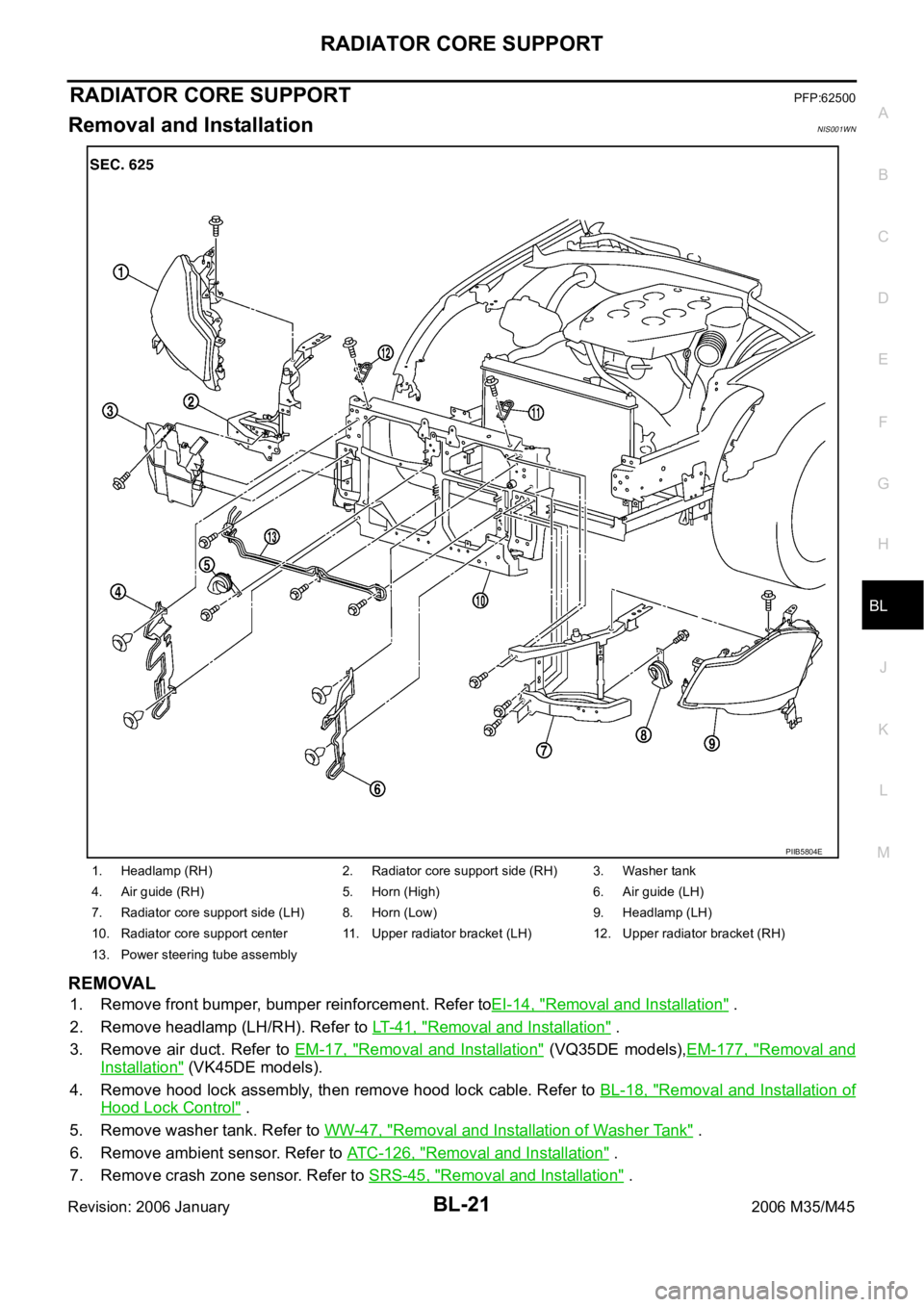
RADIATOR CORE SUPPORT
BL-21
C
D
E
F
G
H
J
K
L
MA
B
BL
Revision: 2006 January2006 M35/M45
RADIATOR CORE SUPPORTPFP:62500
Removal and InstallationNIS001WN
REMOVAL
1. Remove front bumper, bumper reinforcement. Refer toEI-14, "Removal and Installation" .
2. Remove headlamp (LH/RH). Refer to LT- 4 1 , "
Removal and Installation" .
3. Remove air duct. Refer to EM-17, "
Removal and Installation" (VQ35DE models),EM-177, "Removal and
Installation" (VK45DE models).
4. Remove hood lock assembly, then remove hood lock cable. Refer to BL-18, "
Removal and Installation of
Hood Lock Control" .
5. Remove washer tank. Refer to WW-47, "
Removal and Installation of Washer Tank" .
6. Remove ambient sensor. Refer to ATC-126, "
Removal and Installation" .
7. Remove crash zone sensor. Refer to SRS-45, "
Removal and Installation" .
1. Headlamp (RH) 2. Radiator core support side (RH) 3. Washer tank
4. Air guide (RH) 5. Horn (High) 6. Air guide (LH)
7. Radiator core support side (LH) 8. Horn (Low) 9. Headlamp (LH)
10. Radiator core support center 11. Upper radiator bracket (LH) 12. Upper radiator bracket (RH)
13. Power steering tube assembly
PIIB5804E