start ISUZU KB P190 2007 Workshop Repair Manual
[x] Cancel search | Manufacturer: ISUZU, Model Year: 2007, Model line: KB P190, Model: ISUZU KB P190 2007Pages: 6020, PDF Size: 70.23 MB
Page 5372 of 6020
8A-434 ELECTRICAL-BODY AND CHASSIS
INSPECTION AND REPAIR
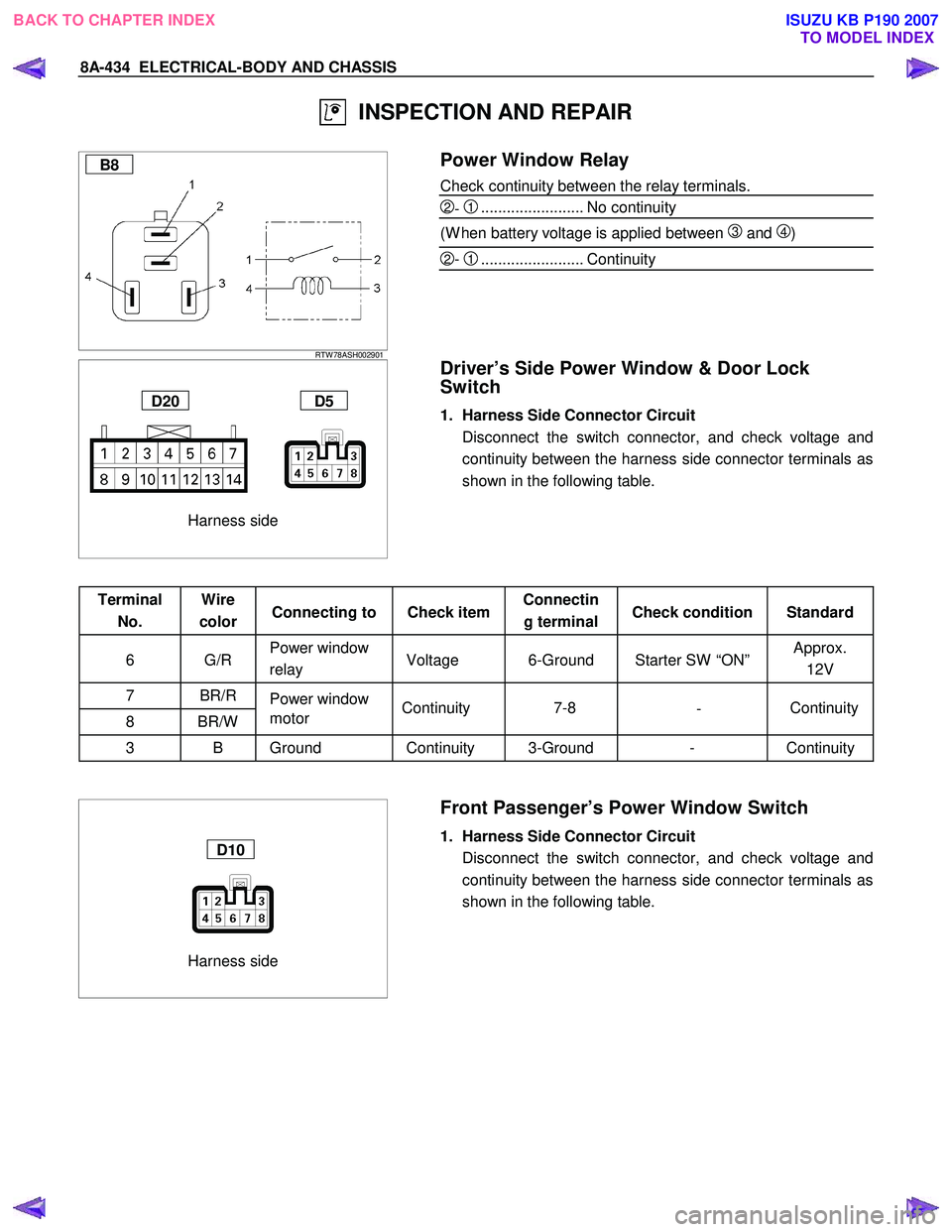
B8
RTW 78ASH002901
Power Window Relay
Check continuity between the relay terminals.
2- 1........................ No continuity
(W hen battery voltage is applied between
3 and 4)
2- 1........................ Continuity
Harness side
D20 D5
Driver’s Side Power Window & Door Lock
Switch
1. Harness Side Connector Circuit
Disconnect the switch connector, and check voltage and continuity between the harness side connector terminals as
shown in the following table.
Terminal No. Wire
color Connecting to Check item Connectin
g terminal Check condition Standard
6 G/R Power window
relay Voltage 6-Ground Starter SW “ON” Approx.
12V
7 BR/R Power window
8 BR/W motor
3 B Ground Continuity 3-Ground - Continuity
Harness side
D10
Front Passenger’s Power Window Switch
1. Harness Side Connector Circuit
Disconnect the switch connector, and check voltage and continuity between the harness side connector terminals as
shown in the following table.
Continuity
-
7-8
Continuity
BACK TO CHAPTER INDEX
TO MODEL INDEXISUZU KB P190 2007
Page 5373 of 6020

ELECTRICAL-BODY AND CHASSIS 8A-435
Terminal No. Wire
color Connecting to Check item Connectin
g terminal Check condition Standard
6 G/R Power window
relay Voltage 6-Ground Starter SW “ON” Approx.
12V
8 BR/R
7 BR/W Power window
motor Continuity 8-7
- Continuity
1,3 B Ground Continuity 1,3-Ground - Continuity
Harness side
D12 D16
Rear Power Window Switch-LH & RH
1. Harness Side Connector Circuit
Disconnect the switch connector, and check voltage and continuity between the harness side connector terminals as
shown in the following tables.
D12 (RR-LH)
Terminal No. Wire
color Connecting to Check item Connectin
g terminal Check condition Standard
6 G/R Power window
relay Voltage 6-Ground Starter SW “ON” Approx.
12V
8 BR/R
7 BR/W Power window
motor Continuity 8-7
- Continuity
3 B
4 B Ground Continuity 3,4-Ground - Continuity
D16 (RR-RH)
Terminal
No. Wire
color Connecting to Check item Connectin
g terminal Check condition Standard
6 G/R Power window
relay Voltage 6-Ground Starter SW “ON” Approx.
12V
8 BR/R
7 BR/W Power window
motor Continuity 8-7
- Continuity
3 B Ground Continuity 3-Ground - Continuity
BACK TO CHAPTER INDEX
TO MODEL INDEXISUZU KB P190 2007
Page 5400 of 6020
8A-462 ELECTRICAL-BODY AND CHASSIS
TROUBLESHOOTING
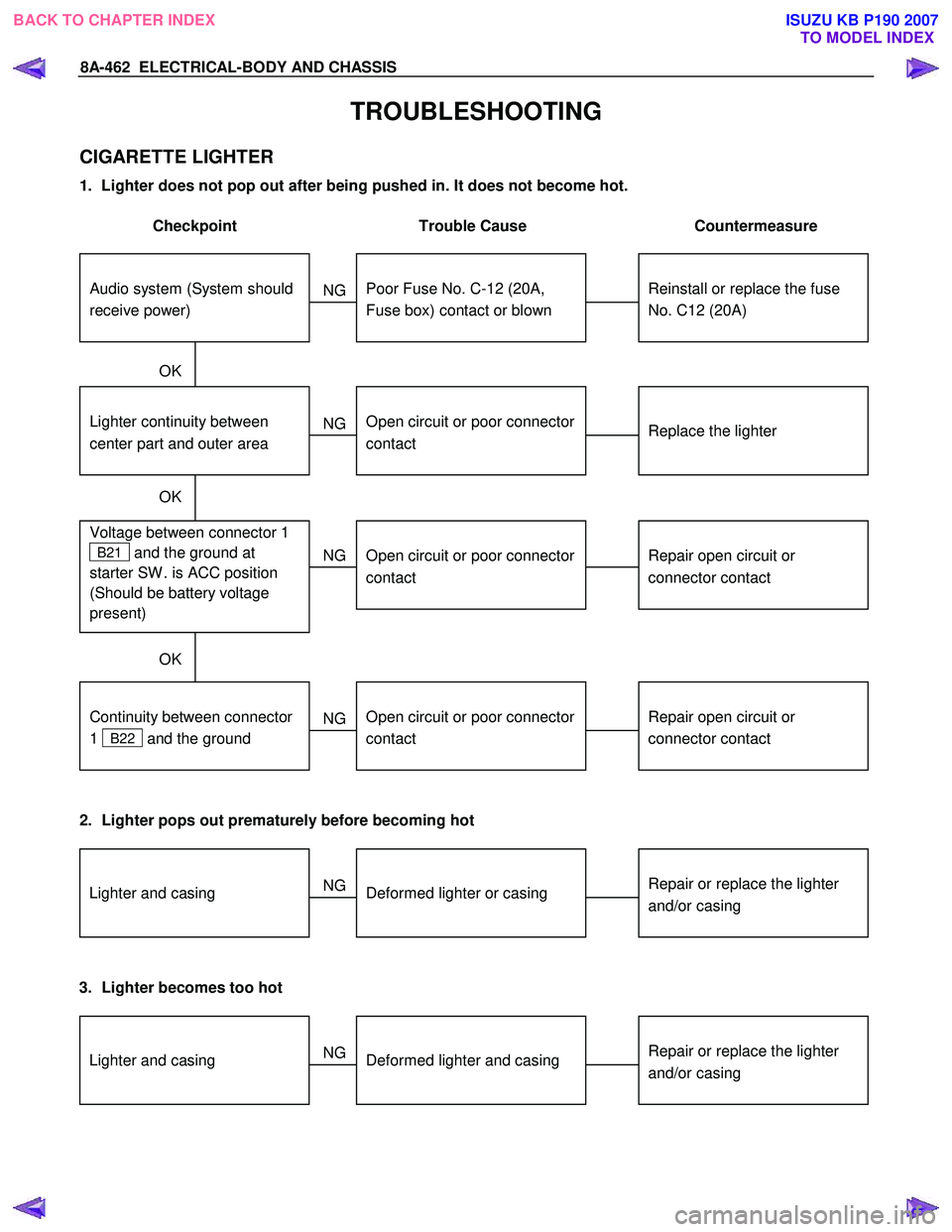
CIGARETTE LIGHTER
1. Lighter does not pop out after being pushed in. It does not become hot.
Checkpoint Trouble Cause Countermeasure
Reinstall or replace the fuse
No. C12 (20A)
Poor Fuse No. C-12 (20A,
Fuse box) contact or blown
NG
Replace the lighter
Lighter continuity between
center part and outer area
Open circuit or poor connector
contact
Repair open circuit or
connector contact
Voltage between connector 1
B21 and the ground at
starter SW . is ACC position
(Should be battery voltage
present)
Open circuit or poor connector
contact
NG
NG
OK
OK
OK
Audio system (System should
receive power)
Repair open circuit or
connector contact
Open circuit or poor connector
contact
NG
Continuity between connector
1
B22 and the ground
2. Lighter pops out prematurely before becoming hot
Repair or replace the lighter
and/or casingDeformed lighter or casing
NGLighter and casing
3. Lighter becomes too hot
Repair or replace the lighter
and/or casingDeformed lighter and casing
NGLighter and casing
BACK TO CHAPTER INDEX
TO MODEL INDEXISUZU KB P190 2007
Page 5416 of 6020

8A-478 ELECTRICAL-BODY AND CHASSIS
• W hen there is no continuity at either one of the circuit
No, 5, 7, 8, or 10, the motor in the mirror of the circuit o
r
the circuit itself is defective.
Terminal No. Wire
color Connection to Check item
Connecting
terminal Check condition Standard
7 W /B
LH mirror & RH
mirror Continuity 7-Ground - No continuity
4 R/Y Fuse C11 (10A) Voltage 4-Ground
Starter SW “ACC”
position Approx.
12V
10 W /R RH mirror-LH/RH 10-7 -
2 B/W RH mirror-Up/Down 2-7 -
3 B/R LH mirror-Up/Down Continuity 3-7 - Continuity
8 B Ground 8-Ground -
9 W /G LH mirror-LH/RH 9-7 -
Harness side
D19
Door Mirror
1. Door Mirror Control Switch Connector Circuit
Disconnect the switch connector
D19 , apply the battery
voltage to the harness side connector terminals and check
its function.
Connector
No. D19
Operating
Terminal
Mirror No. 9 10 7 3 2direction
+ - Left
- + Right
- +Up
+ -Down
+ - Left
- + Right
- + Up
+ - Down
Left
Right
BACK TO CHAPTER INDEX
TO MODEL INDEXISUZU KB P190 2007
Page 5424 of 6020

8A-486 ELECTRICAL-BODY AND CHASSIS
TROUBLE SHOOTING
Rear defogger inoperative
Checkpoint Trouble Cause Countermeasure
Reinstall or replace the fuse
No. C7 (10A) and 9
B56
Poor fuse contact or blown
NG
Reinstall or replace the fuse
C18 (20A)
C18 (20A, Fuse box)
Poor fuse contact or blown
Replace the rear defogger
switch
Rear defogger switch function
Switch malfunction
NG
NG
OK
OK
OK
Fuse No. C3 (10A, Fuse box)
and 9
B56
Replace the rear defogger
relay
Relay malfunction
NG
Continued on the next page
Rear defogger relay function
Repair grounding point contact
Grounding point
C2
Poor grounding point contact
NG
OK
Repair open circuit or poor
connector contact between
fuse No. C3 (10A) and 3
B7 , C18 (20A) and 1
B7 , 2 B7 (3 B55) and
1
L4 , 4 B7 (3 B54)
and 3
B46 or 1 B46 and
C2
Voltage between 1 L4 -
ground when the starter switch
and the rear defogger switch
are at on position (should be
battery voltage present)
Open circuit or poor connector
contact
NG
OK
BACK TO CHAPTER INDEX
TO MODEL INDEXISUZU KB P190 2007
Page 5481 of 6020
ELECTRICAL-BODY AND CHASSIS 8A-543
RUW 580SH001101
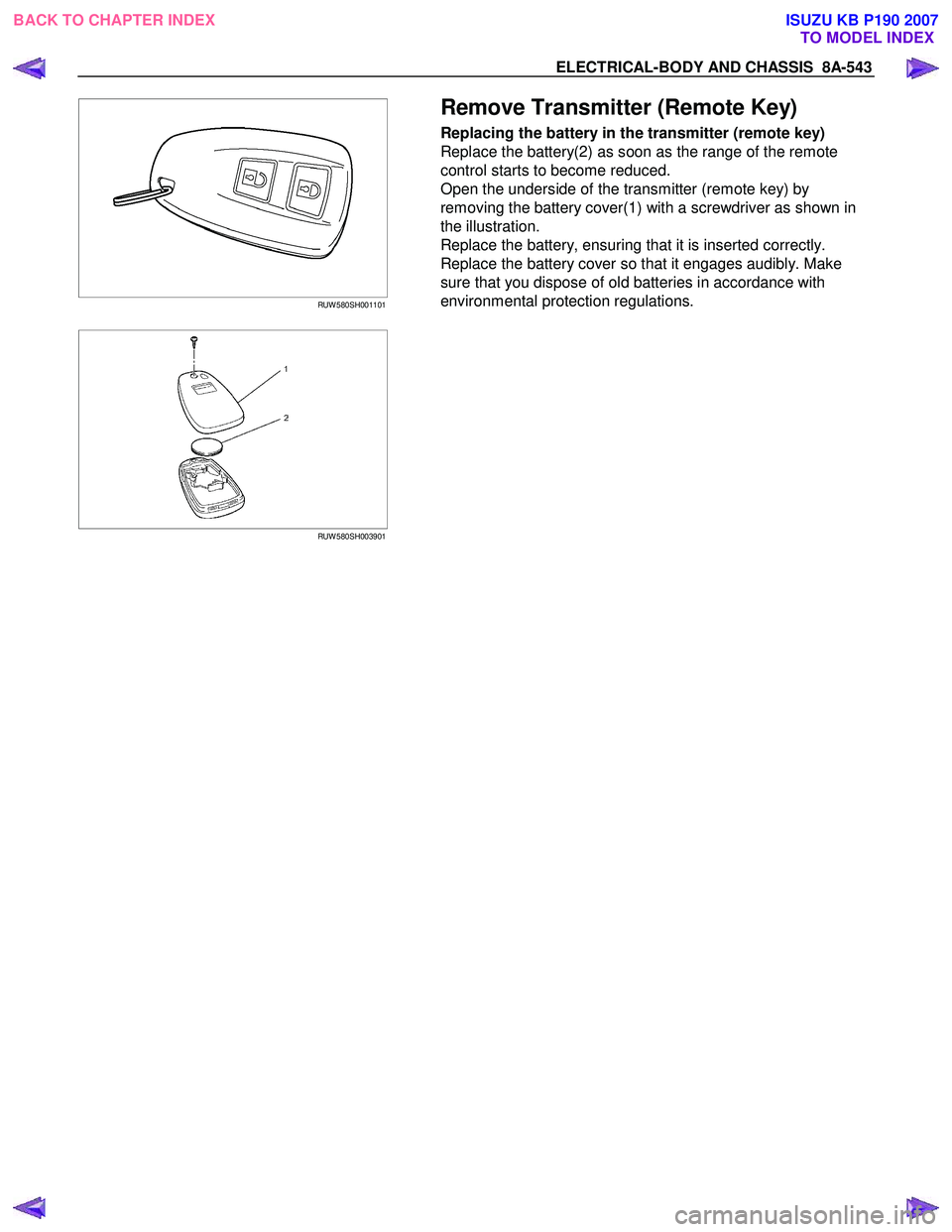
Remove Transmitter (Remote Key)
Replacing the battery in the transmitter (remote key)
Replace the battery(2) as soon as the range of the remote
control starts to become reduced.
Open the underside of the transmitter (remote key) by
removing the battery cover(1) with a screwdriver as shown in
the illustration.
Replace the battery, ensuring that it is inserted correctly.
Replace the battery cover so that it engages audibly. Make
sure that you dispose of old batteries in accordance with
environmental protection regulations.
RUW 580SH003901
BACK TO CHAPTER INDEX
TO MODEL INDEXISUZU KB P190 2007
Page 5486 of 6020
8A-548 ELECTRICAL-BODY AND CHASSIS
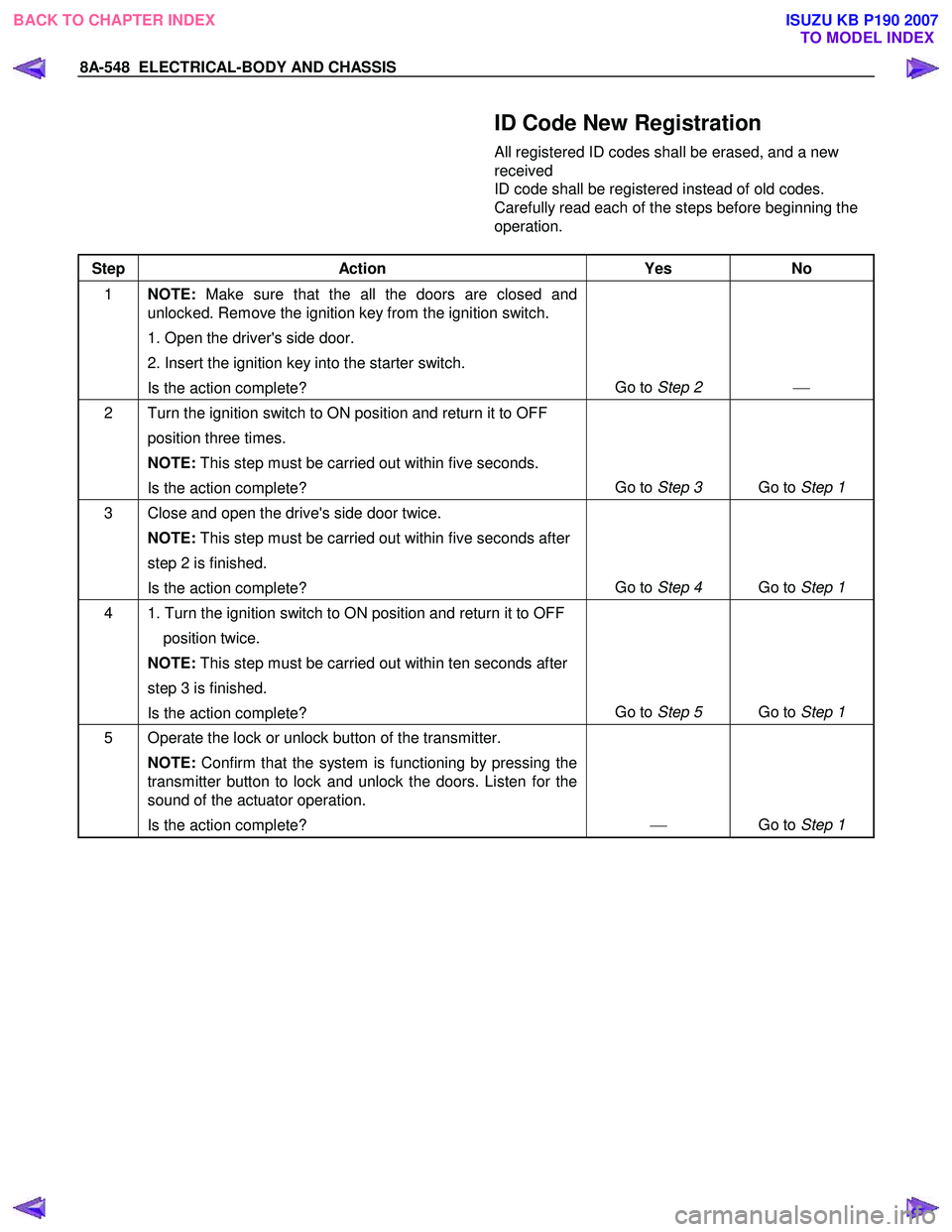
ID Code New Registration
All registered ID codes shall be erased, and a new
received
ID code shall be registered instead of old codes.
Carefully read each of the steps before beginning the
operation.
Step Action Yes No
1 NOTE: Make sure that the all the doors are closed and
unlocked. Remove the ignition key from the ignition switch.
1. Open the driver's side door.
2. Insert the ignition key into the starter switch.
Is the action complete? Go to
Step 2
2 Turn the ignition switch to ON position and return it to OFF
position three times.
NOTE: This step must be carried out within five seconds.
Is the action complete? Go to
Step 3 Go to Step 1
3 Close and open the drive's side door twice.
NOTE: This step must be carried out within five seconds after
step 2 is finished.
Is the action complete? Go to
Step 4 Go to Step 1
4 1. Turn the ignition switch to ON position and return it to OFF
position twice.
NOTE: This step must be carried out within ten seconds after
step 3 is finished.
Is the action complete? Go to
Step 5 Go to Step 1
5 Operate the lock or unlock button of the transmitter.
NOTE: Confirm that the system is functioning by pressing the
transmitter button to lock and unlock the doors. Listen for the
sound of the actuator operation.
Is the action complete?
Go to Step 1
BACK TO CHAPTER INDEX TO MODEL INDEXISUZU KB P190 2007
Page 5488 of 6020
8A-550 ELECTRICAL-BODY AND CHASSIS
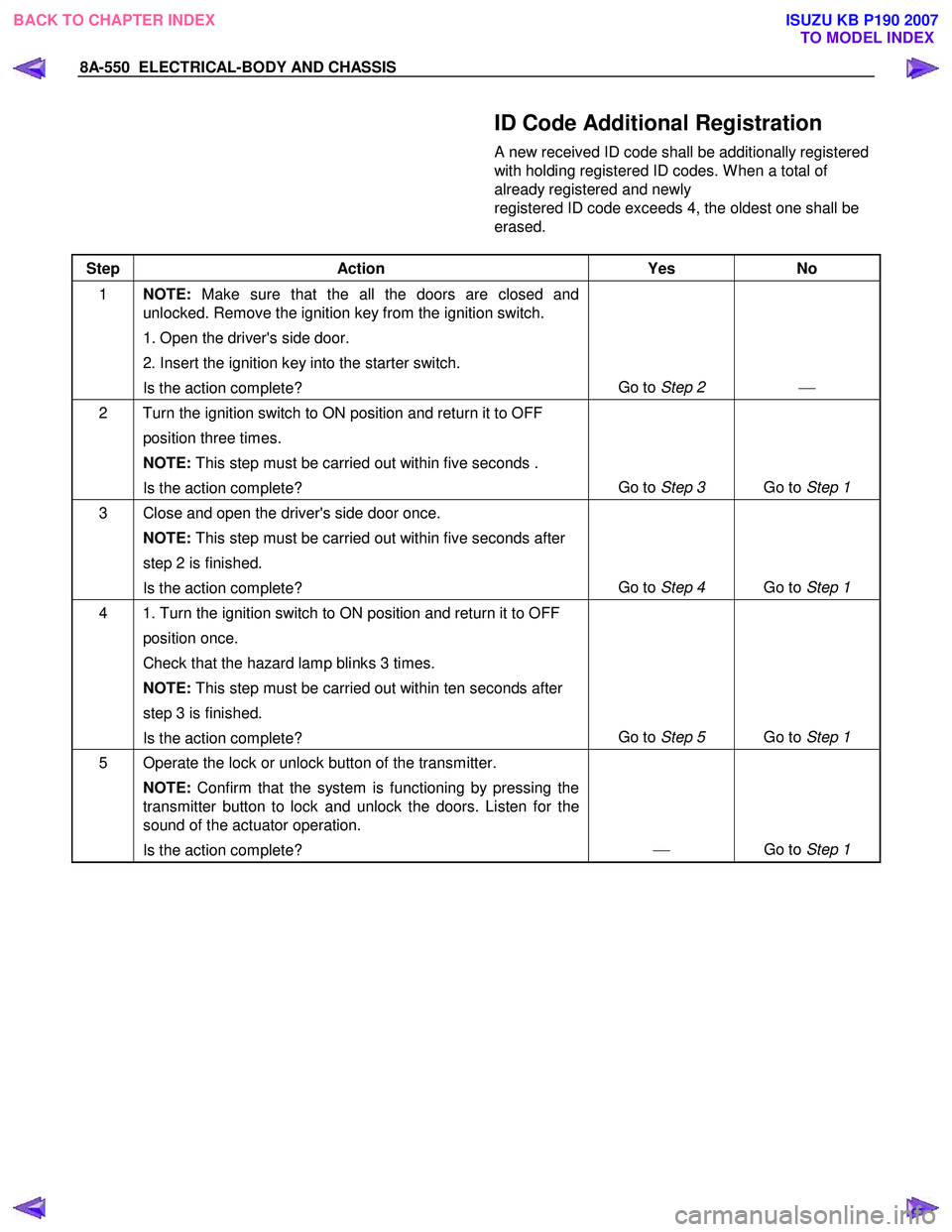
ID Code Additional Registration
A new received ID code shall be additionally registered
with holding registered ID codes. W hen a total of
already registered and newly
registered ID code exceeds 4, the oldest one shall be
erased.
Step Action Yes No
1 NOTE: Make sure that the all the doors are closed and
unlocked. Remove the ignition key from the ignition switch.
1. Open the driver's side door.
2. Insert the ignition key into the starter switch.
Is the action complete? Go to
Step 2
2 Turn the ignition switch to ON position and return it to OFF
position three times.
NOTE: This step must be carried out within five seconds .
Is the action complete? Go to
Step 3 Go to Step 1
3 Close and open the driver's side door once.
NOTE: This step must be carried out within five seconds after
step 2 is finished.
Is the action complete? Go to
Step 4 Go to Step 1
4 1. Turn the ignition switch to ON position and return it to OFF
position once.
Check that the hazard lamp blinks 3 times.
NOTE: This step must be carried out within ten seconds after
step 3 is finished.
Is the action complete? Go to
Step 5 Go to Step 1
5 Operate the lock or unlock button of the transmitter.
NOTE: Confirm that the system is functioning by pressing the
transmitter button to lock and unlock the doors. Listen for the
sound of the actuator operation.
Is the action complete?
Go to Step 1
BACK TO CHAPTER INDEX
TO MODEL INDEXISUZU KB P190 2007
Page 5517 of 6020
ELECTRICAL-BODY AND CHASSIS 8A-579
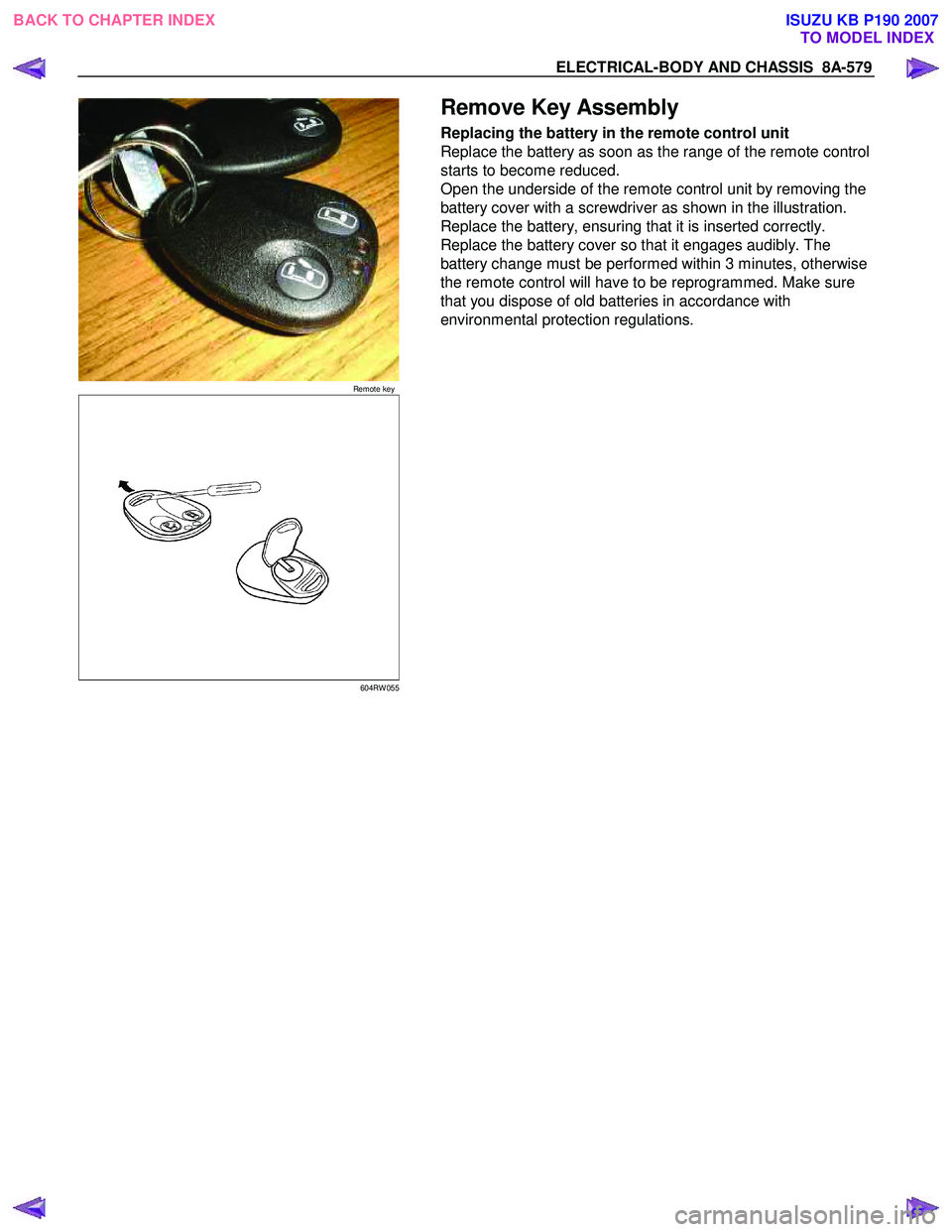
Remote key
Remove Key Assembly
Replacing the battery in the remote control unit
Replace the battery as soon as the range of the remote control
starts to become reduced.
Open the underside of the remote control unit by removing the
battery cover with a screwdriver as shown in the illustration.
Replace the battery, ensuring that it is inserted correctly.
Replace the battery cover so that it engages audibly. The
battery change must be performed within 3 minutes, otherwise
the remote control will have to be reprogrammed. Make sure
that you dispose of old batteries in accordance with
environmental protection regulations.
604RW 055
BACK TO CHAPTER INDEX TO MODEL INDEXISUZU KB P190 2007
Page 5519 of 6020
ELECTRICAL-BODY AND CHASSIS 8A-581
060RW 009
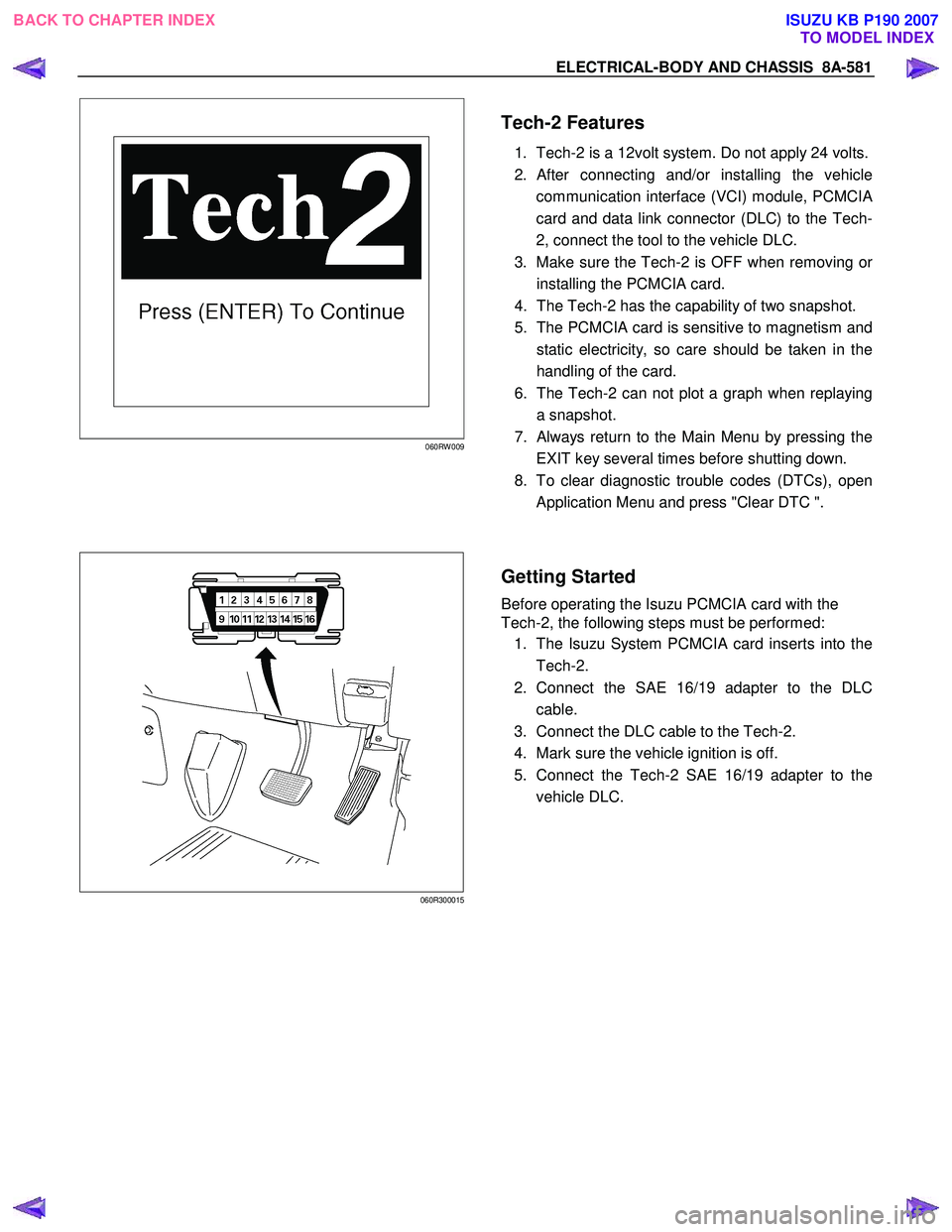
Tech-2 Features
1. Tech-2 is a 12volt system. Do not apply 24 volts.
2.
After connecting and/or installing the vehicle
communication interface (VCI) module, PCMCI
A
card and data link connector (DLC) to the Tech-
2, connect the tool to the vehicle DLC.
3. Make sure the Tech-2 is OFF when removing o
r
installing the PCMCIA card.
4. The Tech-2 has the capability of two snapshot.
5. The PCMCIA card is sensitive to magnetism and
static electricity, so care should be taken in the
handling of the card.
6. The Tech-2 can not plot a graph when replaying
a snapshot.
7.
Always return to the Main Menu by pressing the
EXIT key several times before shutting down.
8. To clear diagnostic trouble codes (DTCs), open
Application Menu and press "Clear DTC ".
060R300015
Getting Started
Before operating the Isuzu PCMCIA card with the
Tech-2, the following steps must be performed:
1. The Isuzu System PCMCIA card inserts into the
Tech-2.
2. Connect the SAE 16/19 adapter to the DLC
cable.
3. Connect the DLC cable to the Tech-2.
4. Mark sure the vehicle ignition is off.
5. Connect the Tech-2 SAE 16/19 adapter to the
vehicle DLC.
BACK TO CHAPTER INDEX TO MODEL INDEXISUZU KB P190 2007