lock ISUZU TROOPER 1995 Workshop Manual
[x] Cancel search | Manufacturer: ISUZU, Model Year: 1995, Model line: TROOPER, Model: ISUZU TROOPER 1995Pages: 1928
Page 425 of 1928
4-WHEEL ANTILOCK BRAKE SYSTEM (ABS) 5A4-15
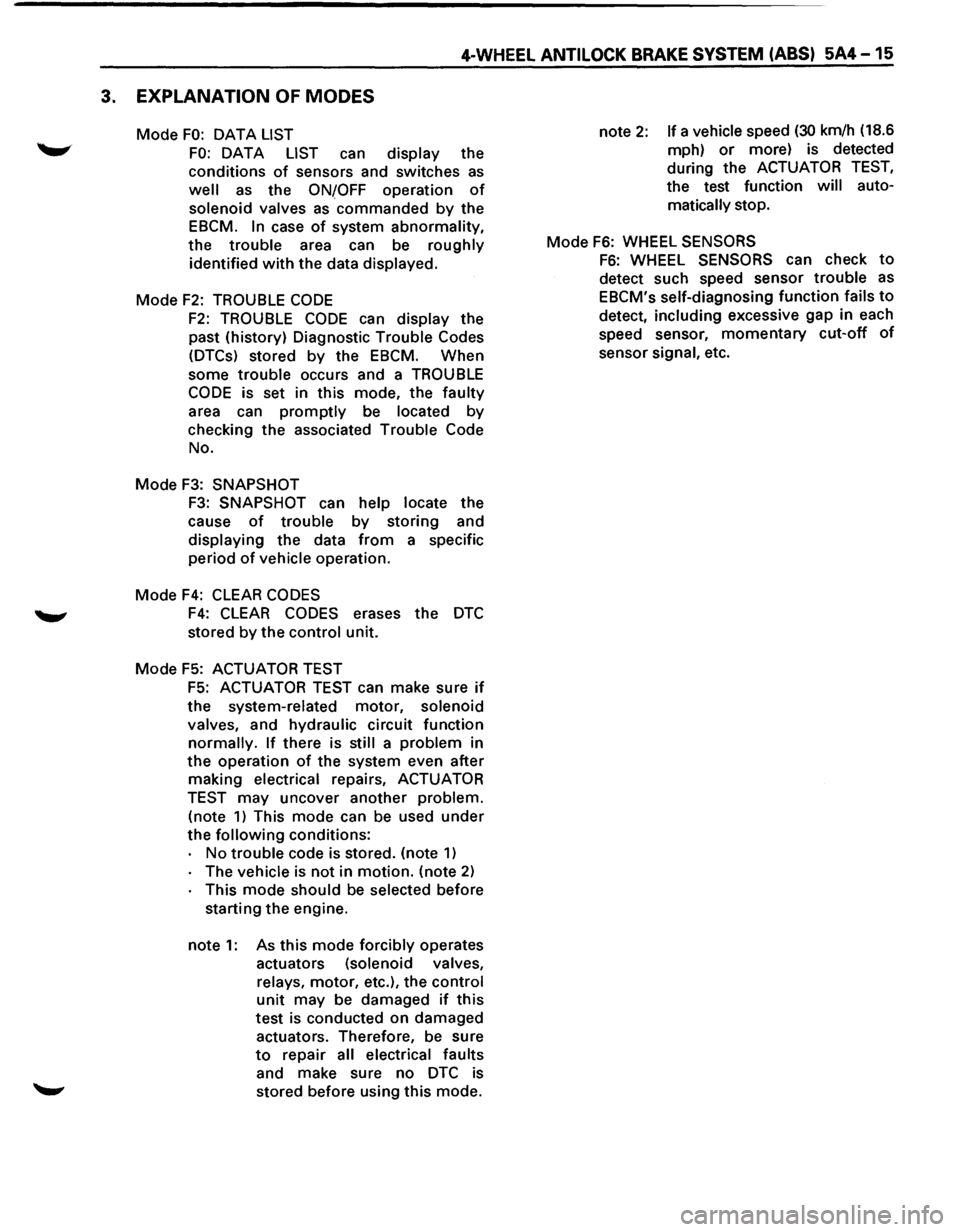
3. EXPLANATION OF MODES
Mode FO: OAT A LIST
FO: DATA LIST can display the
conditions
of sensors and switches as
well as the ONfOFF operation of
solenoid valves as commanded by the
EBCM.
In case of system abnormality,
the trouble area can be roughly
identified
with the data displayed.
Mode
F2: TROUBLE CODE
F2: TROUBLE CODE can display the
past (history) Diagnostic Trouble Codes
(DTCs) stored
by the EBCM. When
some
trouble occurs and a TROUBLE
CODE is set in this mode, the faulty
area can
promptly be located by
checking the associated Trouble Code
No.
Mode
F3: SNAPSHOT
F3: SNAPSHOT can help locate the
cause
of trouble by storing and
displaying the data
from a specific
period
of vehicle operation.
Mode
F4: CLEAR CODES
F4: CLEAR CODES erases the DTC
stored by the control unit.
Mode F5: ACTUATOR TEST
F5: ACTUATOR TEST can make sure if
the system-related motor, solenoid
valves, and hydraulic circuit function
normally. If there is still a problem in
the operation of the system even after
making electrical repairs, ACTUATOR
TEST may uncover another problem.
(note
1) This mode can be used under
the
following conditions:
No
trouble code is stored. (note 1)
The vehicle is not in motion. (note 2)
This mode should be selected before
starting the engine.
note
1: As this mode forcibly operates
actuators (solenoid valves,
relays, motor, etc.), the control
unit may be damaged if this
test
is conducted on damaged
actuators. Therefore, be sure
to repair all electrical faults
and make sure no
DTC is
stored before using this mode. note
2: If a vehicle speed (30 km/h
(18.6
mph)
or more) is detected
during the ACTUATOR
TEST,
the test function will auto
matically stop.
Mode
F6: WHEEL SENSORS
F6: WHEEL SENSORS can check to
detect such speed sensor trouble as
EBCM's self-diagnosing function fails to
detect, including excessive gap in each
speed sensor,
momentary cut-off of
sensor signal, etc.
Page 426 of 1928
5A4-16 4-WHEEL ANTILOCK BRAKE SYSTEM (ABS)
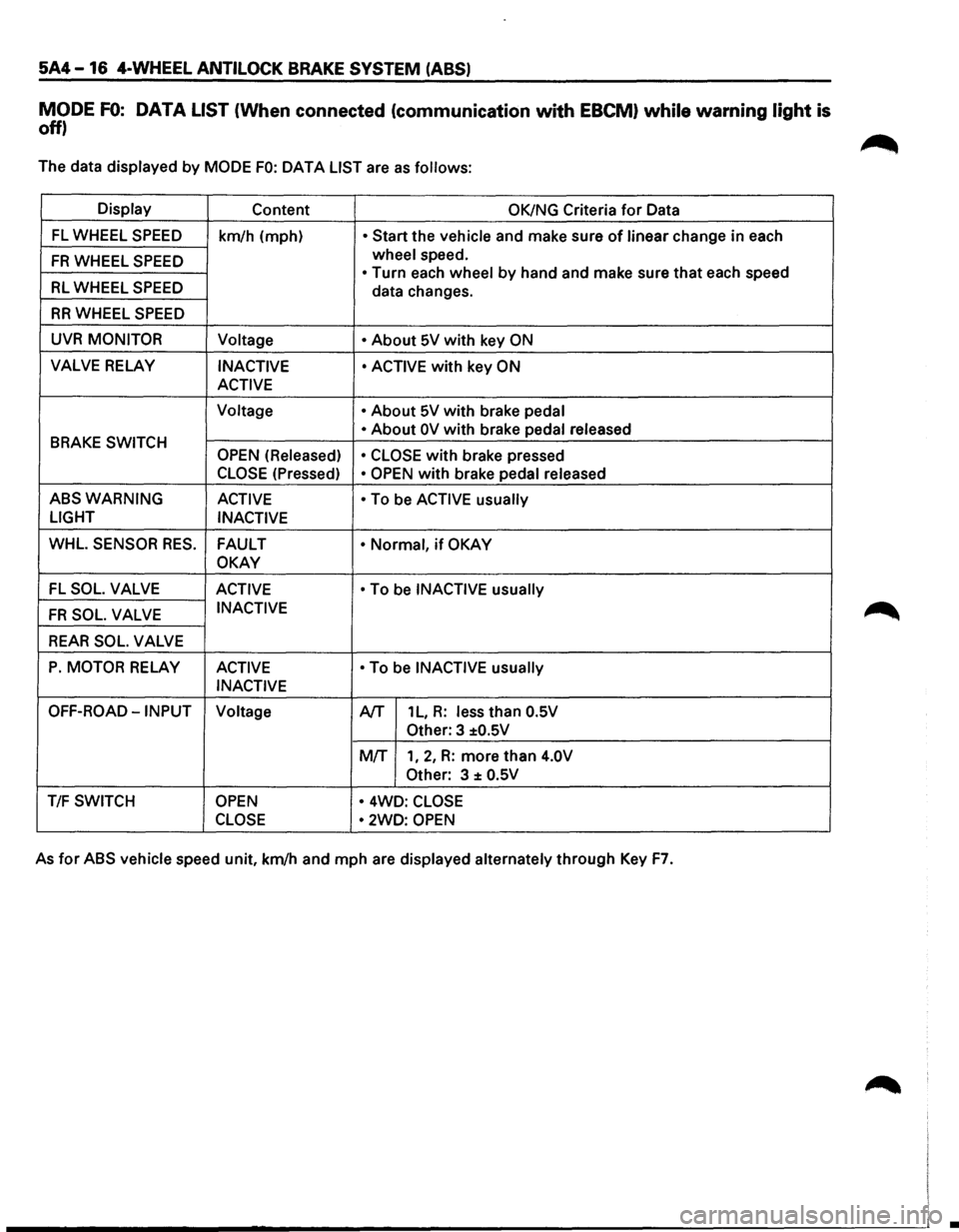
MODE FO: DATA LIST (When connected (communication with EBCM) while warning light is
off)
The data displayed by MODE FO: OAT A LIST are as follows:
Display Content OK/NG Criteria for Data
FL WHEEL SPEED km/h (mph) • Start the vehicle and make sure of linear change in each
FR WHEEL SPEED wheel speed.
• Turn each wheel by hand and make sure that each speed RL WHEEL SPEED data changes.
RR WHEEL SPEED
UVR MONITOR
Voltage • About 5V with key ON
VALVE RELAY INACTIVE • ACTIVE with key ON
ACTIVE
Voltage •
About 5V with brake pedal
BRAKE SWITCH • About OV with brake pedal
released
OPEN (Released)
• CLOSE
with brake pressed
CLOSE (Pressed) • OPEN with brake pedal released
ABSWARNING ACTIVE
• To be ACTIVE usually
LIGHT
INACTIVE
WHL. SENSOR RES. FAULT • Normal, if OKAY
OKAY
-FL SOL. VALVE ACTIVE • To be INACTIVE usually
FR SOL. VALVE INACTIVE
REAR SOL. VALVE
P. MOTOR RELAY ACTIVE • To be INACTIVE usually
INACTIVE
OFF-ROAD-INPUT Voltage A/T 1 L, R: less than O.SV
Other: 3 ±O.SV
MIT 1, 2, R: more than 4.0V
Other:
3 ± O.SV
T/F SWITCH OPEN • 4WD: CLOSE
CLOSE •
2WD: OPEN
As for ABS vehicle speed unit, km/h and mph are displayed alternately through Key F7.
•
Page 427 of 1928
4-WHEEL ANTILOCK BRAKE SYSTEM (ABS) 5A4-17
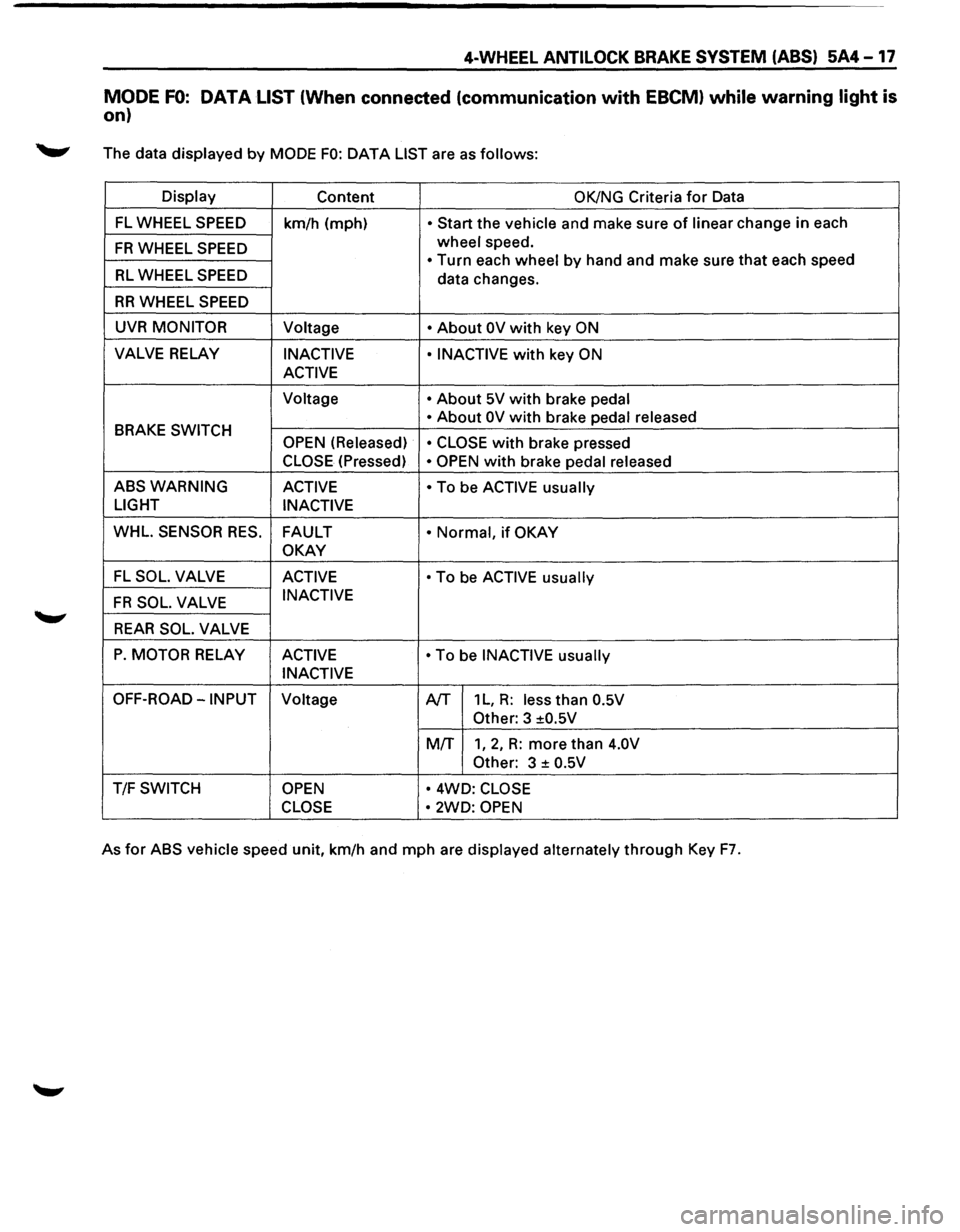
MODE FO: DATA LIST (When connected (communication with EBCM) while warning light is
on)
._,. The data displayed by MODE FO: DATA LIST are as follows:
Display
Content OK/NG Criteria for Data
FL WHEEL SPEED
km/h (mph) • Start the vehicle and make sure of linear change in each
FR WHEEL SPEED wheel speed.
• Turn each wheel by hand and make sure that each speed RL WHEEL SPEED data changes.
RR WHEEL SPEED
UVR MONITOR Voltage • About OV with key ON
VALVE RELAY INACTIVE • INACTIVE with key ON
ACTIVE
Voltage • About 5V with brake pedal
BRAKE
SWITCH • About OV with brake
pedal released
OPEN (Released) • CLOSE with brake pressed
CLOSE (Pressed) • OPEN with brake pedal released
ABSWARNING ACTIVE • To be ACTIVE usually
LIGHT
INACTIVE
WHL.
SENSOR RES. FAULT • Normal, if OKAY
OKAY
FL SOL. VALVE ACTIVE • To be ACTIVE usually
FR SOL. VALVE INACTIVE
REAR SOL. VALVE
P. MOTOR RELAY
ACTIVE • To be INACTIVE usually
INACTIVE
OFF-ROAD-INPUT Voltage A/T 1 L, R: less than 0.5V
Other:
3 ±0.5V
MIT
1, 2, R: more than 4.0V
Other:
3 ± 0.5V
T/F SWITCH OPEN • 4WD: CLOSE
CLOSE •
2WD: OPEN
As for ABS vehicle speed unit, km/h and mph are displayed alternately through Key F7.
Page 428 of 1928
5A4-18 4-WHEEL ANTILOCK BRAKE SYSTEM (ABS)
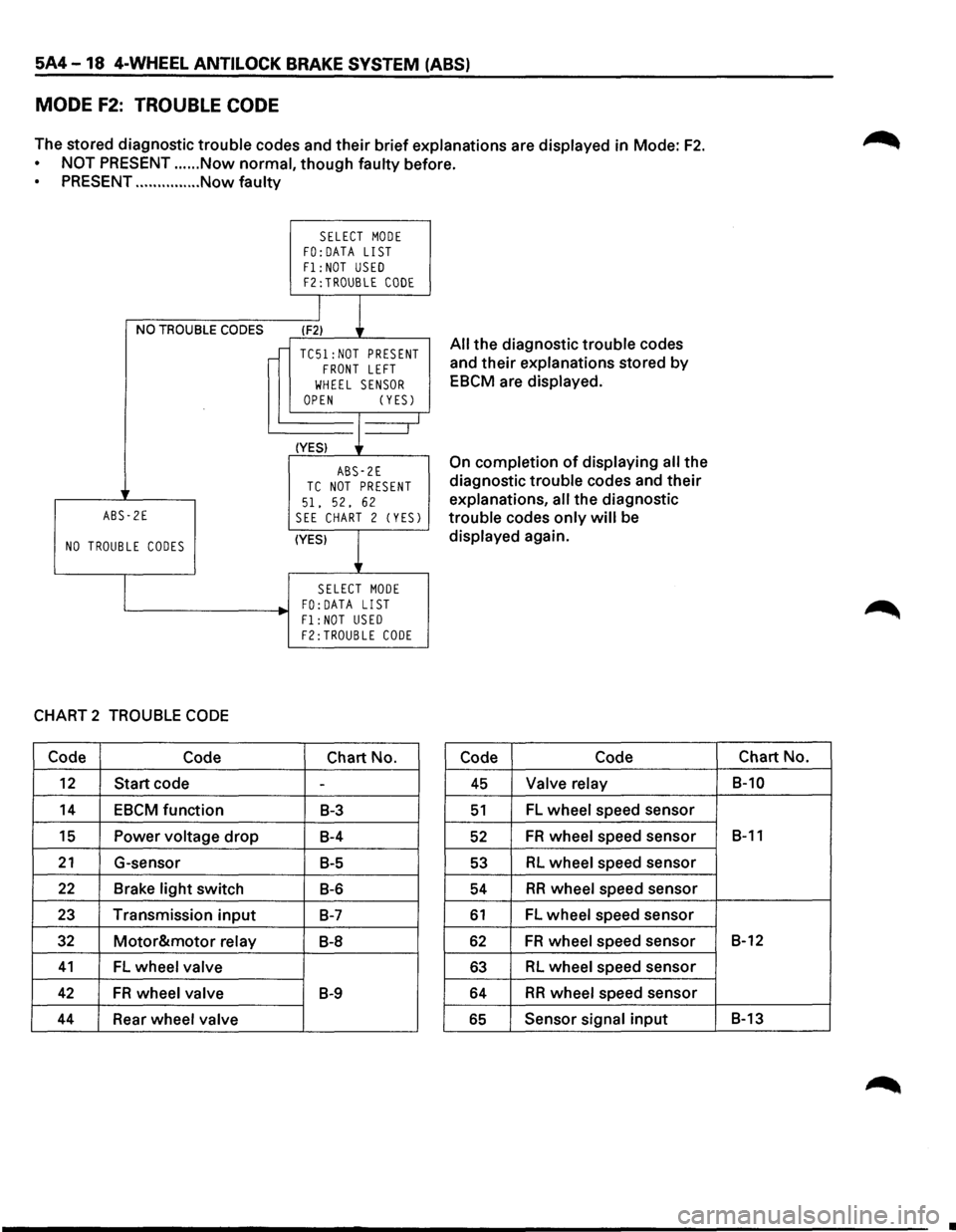
MODE F2: TROUBLE CODE
The stored diagnostic trouble codes and their brief explanations are displayed in Mode: F2.
NOT PRESENT ...... Now normal, though faulty before.
PRESENT ............... Now faulty
NO TROUBLE CODES
ABS-2E
NO TROUBLE CODES
CHART 2 TROUBLE CODE
Code Code
12 Start code
14 EBCM function
15 Power voltage drop
21 G-sensor
22 Brake light switch
23 Transmission input
32 Motor&motor relay
41 FL wheel valve
42 FR wheel valve
44 Rear wheel valve
SELECT MODE FO:DATA LIST
F1: NOT USED F2:TROUBLE CODE
I
l (F2)
TC51:NOT PRESENT FRONT LEFT
WHEEL SENSOR OPEN (YESJ
(YES) J--_j
ABS-2E TC NOT PRESENT
51. 52, 62 SEE CHART 2 (YESJ
(YES)
l
SELECT MODE FO: DATA LIST
Fl:NOT USED F2:TROUBLE CODE
Chart No.
-
B-3
B-4
B-5
B-6
B-7
B-8
B-9
All the diagnostic trouble codes
and
their explanations stored by
EBCM are displayed.
On completion of displaying all the
diagnostic trouble codes and
their
explanations, all the diagnostic
trouble codes
only will be
displayed again.
Code Code
45 Valve relay
51 FL wheel speed sensor
52 FR wheel speed sensor
53 RL wheel speed sensor
54 RR wheel speed sensor
61 FL wheel speed sensor
62 FR wheel speed sensor
63 RL wheel speed sensor
64 RR wheel speed sensor
65 Sensor signal input
Chart No.
B-10
B-11
B-12
B-13
•
Page 429 of 1928
4-WHEEL ANTILOCK BRAKE SYSTEM (ABS) 5A4-19
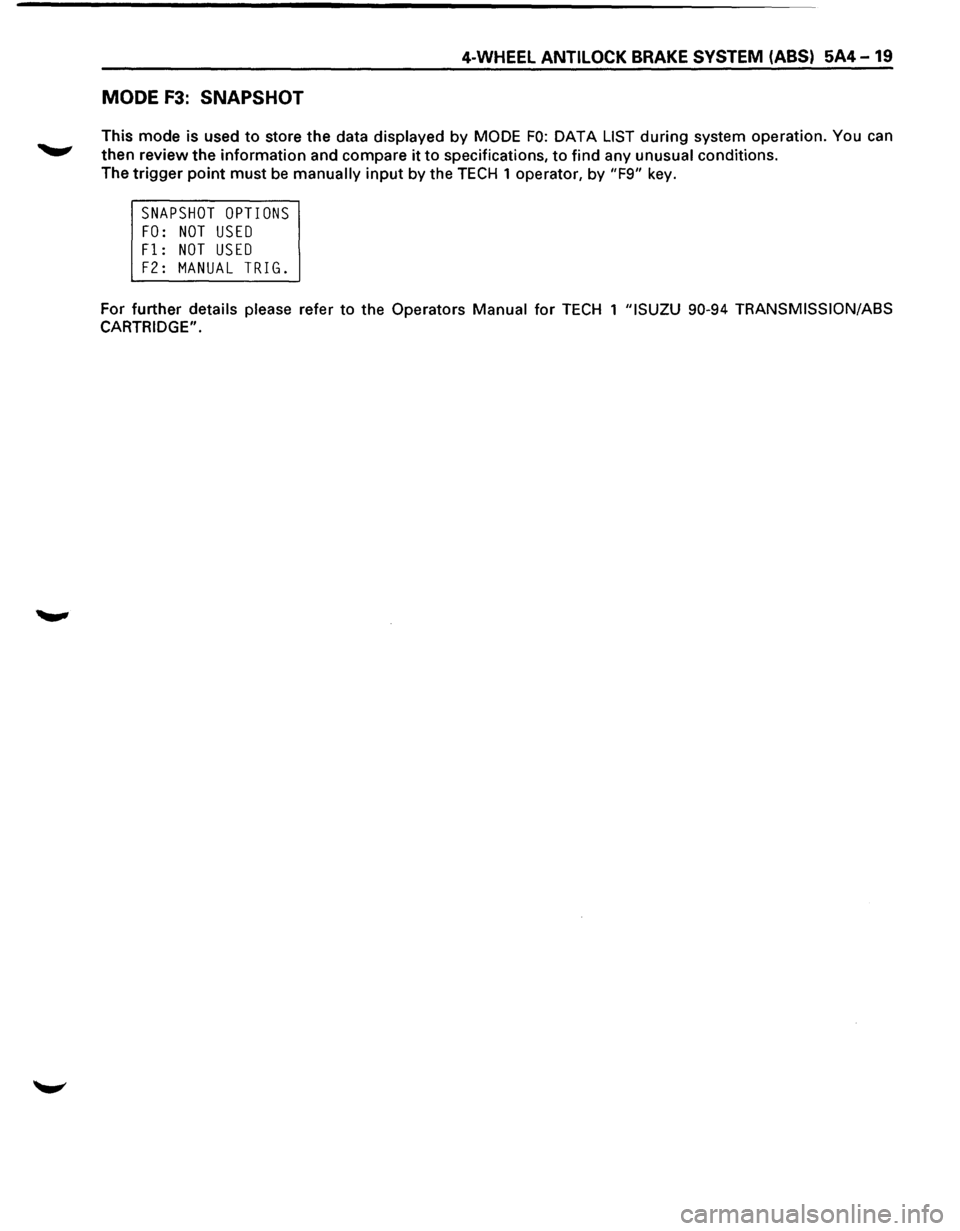
MODE F3: SNAPSHOT
This mode is used to store the data displayed by MODE FO: DATA LIST during system operation. You can
then review the information and compare it to specifications, to find any unusual conditions.
The
trigger point must be manually input by the TECH 1 operator, by "F9" key.
SNAPSHOT OPTIONS
FO: NOT USED
Fl: NOT USED
F2: MANUAL TRIG.
For further details please refer to the Operators Manual for TECH 1 "ISUZU 90-94 TRANSMISSION/ASS
CARTRIDGE".
Page 430 of 1928
5A4-20 4-WHEEL ANTILOCK BRAKE SYSTEM (ABS)
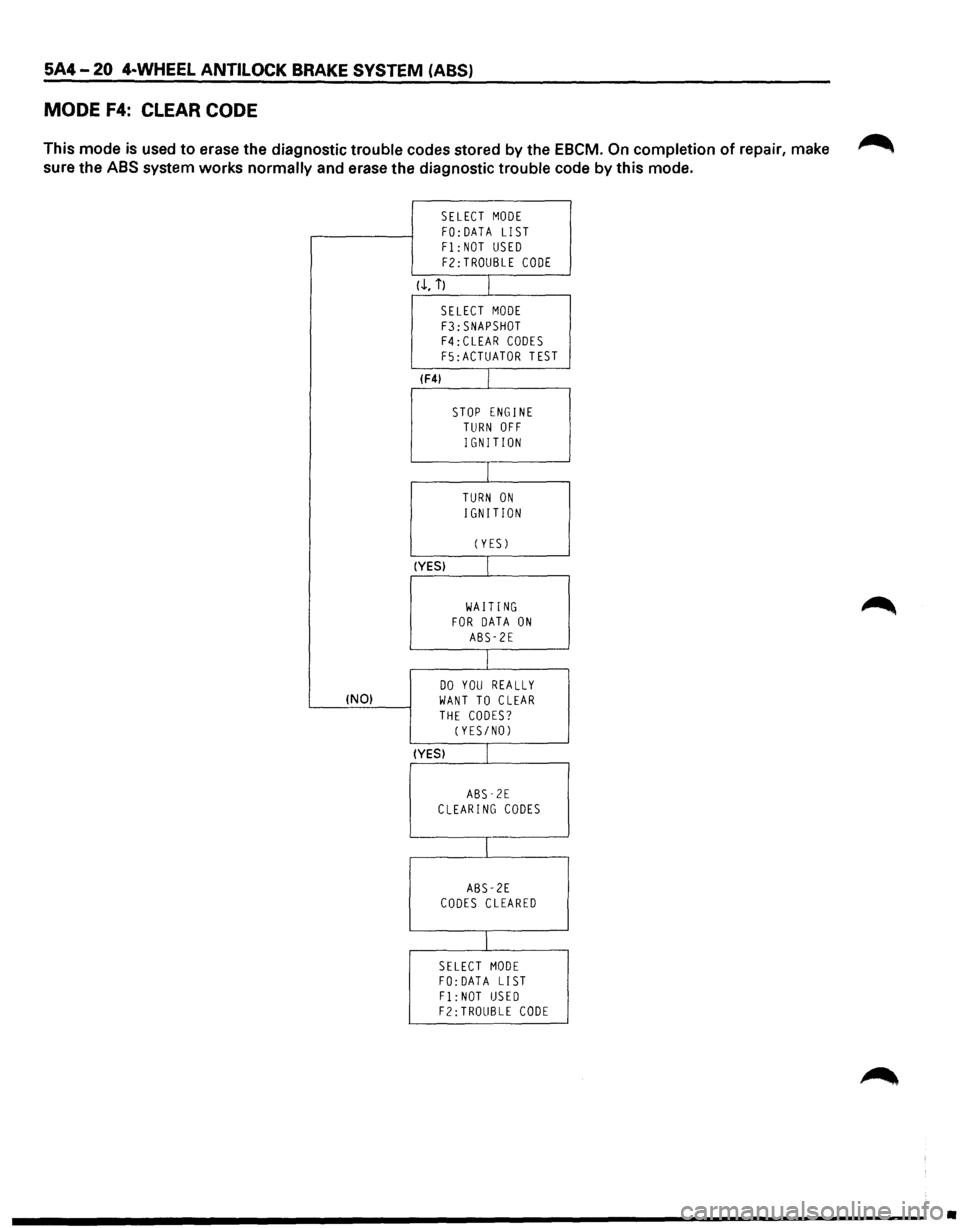
MODE F4: CLEAR CODE
This mode is used to erase the diagnostic trouble codes stored by the EBCM. On completion of repair, make ~
sure the ABS system works normally and erase the diagnostic trouble code by this mode.
SELECT MODE
FO:DATA LIST Fl: NOT USED
F2:TROUBLE CODE
(.!., i) I
SELECT MODE
F3:SNAPSHOT F4:CLEAR CODES F5:ACTUATOR TEST
(F4) L
STOP ENGINE TURN OFF
IGNITION
I
TURN ON
IGNITION
CYES)
(YES) I
WAITING FOR DATA ON ABS-2E
I
DO YOU REALLY !NO) WANT TO CLEAR
THE CODES? (YES/NO)
(YES) I
ABS-2E CLEARING CODES
I
ABS-2E CODES CLEARED
I
SELECT MODE FO: DATA LIST
Fl:NOT USED F2:TROUBLE CODE
•
Page 431 of 1928
4-WHEEL ANTILOCK BRAKE SYSTEM (ABS) 5A4-21
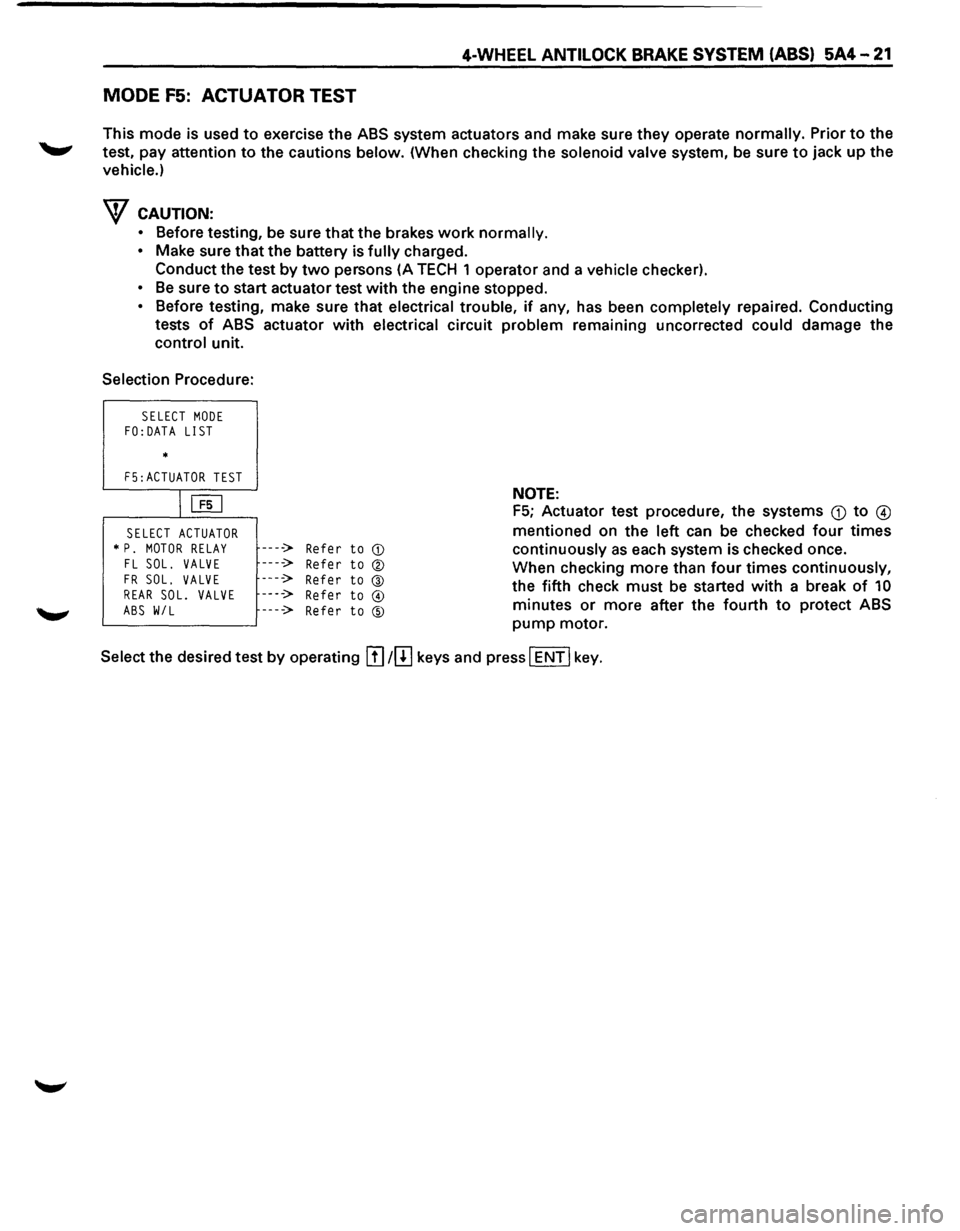
MODE F5: ACTUATOR TEST
This mode is used to exercise the ABS system actuators and make sure they operate normally. Prior to the
test, pay attention
to the cautions below. (When checking the solenoid valve system, be sure to jack up the
vehicle.)
w CAUTION:
• Before testing, be sure that the brakes work normally.
• Make sure that the battery is fully charged.
Conduct the test
by two persons (A TECH 1 operator and a vehicle checker).
• Be sure to start actuator test with the engine stopped.
• Before testing, make sure that electrical trouble, if any, has been completely repaired. Conducting
tests
of ABS actuator with electrical circuit problem remaining uncorrected could damage the
control unit.
Selection Procedure:
SELECT MODE FO:DATA LIST
*
F5:ACTUATOR TEST
IUiJ
SELECT ACTUATOR * P. MOTOR RELAY FL SOL. VALVE
FR SOL. VALVE REAR SOL. VALVE
ABS W/L
----> Refer to CD
----> Refer to ®
----> Refer to @ ----> Refer to @
----> Refer to ®
NOTE:
F5; Actuator test procedure, the systems Q) to @
mentioned on the left can be checked four times
continuously as each system is checked once.
When checking more than
four times continuously,
the fifth check
must be started with a break of 10
minutes or more after the fourth to protect ABS
pump motor.
Select the desired test
by operating !I] 1[!] keys and press I ENT I key.
Page 432 of 1928
5A4-22 4-WHEEL ANTI LOCK BRAKE SYSTEM (ABS)
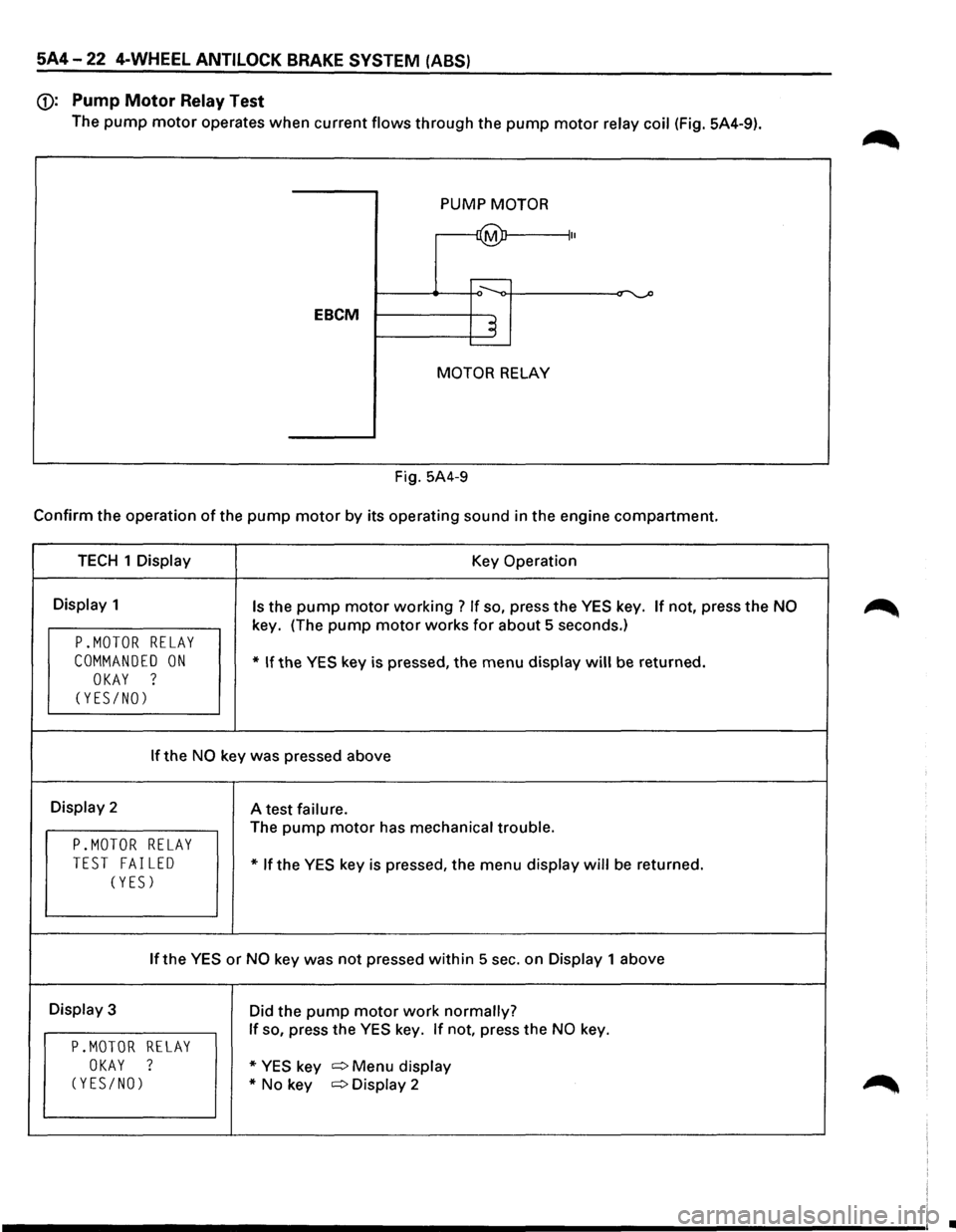
(j): Pump Motor Relay Test
The pump motor operates when current flows through the pump motor relay coil (Fig. 5A4-9).
PUMP
MOTOR
~ II
....----
EBCM ~ .____
MOTOR RELAY
Fig. 5A4-9
Confirm the operation of the pump motor by its operating sound in the engine compartment.
TECH 1 Display Key Operation
Display 1 Is the pump motor working ? If so, press the YES key. If not, press the NO
key. (The pump motor works for about 5 seconds.)
P.MOTOR RELAY
COMMANDED ON * If the YES key is pressed, the menu display will be returned.
OKAY ?
(YES/NO)
If the NO key was pressed above
Display 2
A test failure.
The pump motor has mechanical trouble.
P.MOTOR RELAY
TEST FAILED * If the YES key is pressed, the menu display will be returned.
(YES)
If the YES or NO key was not pressed within 5 sec. on Display 1 above
Display 3
Did the pump motor work normally?
If so, press the YES key. If not, press the NO key.
P.MOTOR RELAY
OKAY ? * YES key c:::> Menu display
(YES/NO) *No key c:::>Display 2
•
Page 433 of 1928
4-WHEEL ANTILOCK BRAKE SYSTEM (ABS) 5A4-23
BRAKE
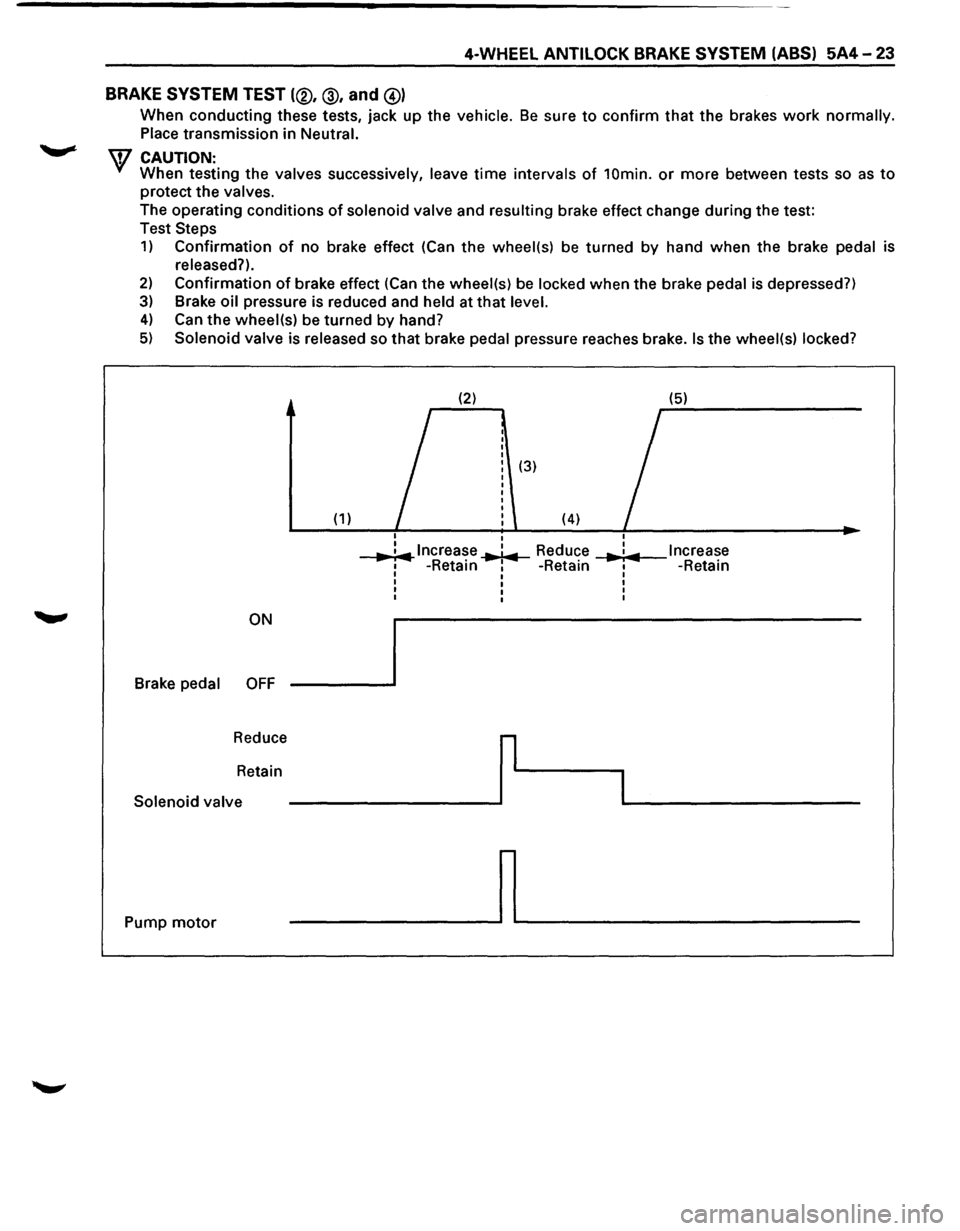
SYSTEM TEST (®, @, and @)
When conducting these tests, jack up the vehicle. Be sure to confirm that the brakes work normally.
Place transmission
in Neutral.
\V CAUTION: When testing the valves successively, leave time intervals of 10min. or more between tests so as to
protect the valves.
The operating conditions
of solenoid valve and resulting brake effect change during the test:
Test
Steps
1) Confirmation of no brake effect (Can the wheel(s) be turned by hand when the brake pedal is
released?).
2) Confirmation of brake effect (Can the wheel(s) be locked when the brake pedal is depressed?)
3) Brake oil pressure is reduced and held at that level.
4) Can the wheel(s) be turned by hand?
5) Solenoid valve is released so that brake pedal pressure reaches brake. Is the wheel(s) locked?
(2) (5)
I
(3)
(1) (4) I
I
..,. ;.,.. lncrea~e ..,.1.,.. Reduce I Increase ... : ... 1 -Retam 1 -Retain I -Retain I I I
I I I
I I I
I I I
ON
Brake
pedal OFF
Reduce
r
Retain
I Solenoid valve
Pump
motor ~
Page 434 of 1928
5A4-24 4-WHEEL ANTILOCK BRAKE SYSTEM (ABS)
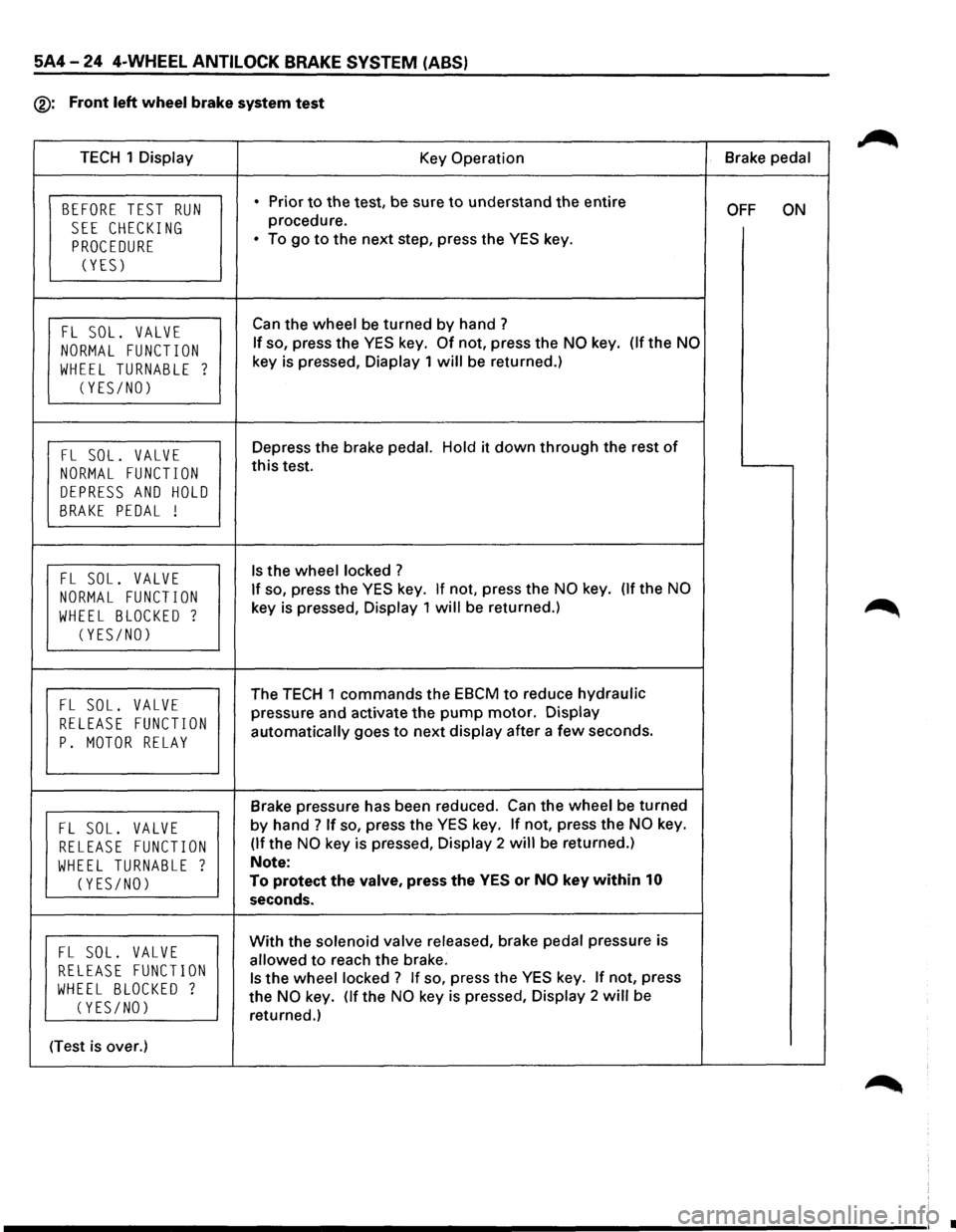
®: Front left wheel brake system test
TECH 1 Display
Key Operation Brake
pedal
BEFORE TEST RUN • Prior to the test, be sure to understand the entire OFF ON
SEE CHECKING procedure.
PROCEDURE • To go to the next step, press the YES key.
(YES)
FL SOL. VALVE Can the wheel be turned by hand?
NORMAL FUNCTION If so, press the YES key. Of not, press the NO key. (lfthe NO
WHEEL TURNABLE ? key is pressed, Diaplay 1 will be returned.)
(YES/NO)
FL SOL. VALVE Depress the brake pedal. Hold it down through the rest of
NORMAL FUNCTION this test.
DEPRESS AND HOLD
BRAKE PEDAL !
FL SOL. VALVE Is the wheel locked ?
NORMAL FUNCTION If so, press the YES key. If not, press the NO key. (If the NO
WHEEL BLOCKED ? key is pressed, Display 1 will be returned.)
(YES/NO)
FL SOL. VALVE The TECH 1 commands the EBCM to reduce hydraulic
RELEASE FUNCTION pressure and activate the pump motor. Display
p. MOTOR RELAY automatically goes to next display after a few seconds.
Brake pressure has been reduced. Can the wheel be turned
FL SOL. VALVE by hand ? If so, press the YES key. If not, press the NO key.
RELEASE FUNCTION (If the NO key is pressed, Display 2 will be returned.)
WHEEL TURNABLE ? Note:
(YES/NO) To protect the valve, press the YES or NO key within 10
seconds.
FL SOL. VALVE With the solenoid valve released, brake pedal pressure is
RELEASE FUNCTION allowed to reach the brake.
WHEEL BLOCKED ? Is the wheel locked ? If so, press the YES key. If not, press
(YES/NO) the NO key. (If the NO key is pressed, Display 2 will be
returned.)
(Test is over.)
•