fog light ISUZU TROOPER 1995 Owner's Guide
[x] Cancel search | Manufacturer: ISUZU, Model Year: 1995, Model line: TROOPER, Model: ISUZU TROOPER 1995Pages: 1928
Page 1413 of 1928
STARTER SWITCH
Refer to "START AND CHARGING" in this section.
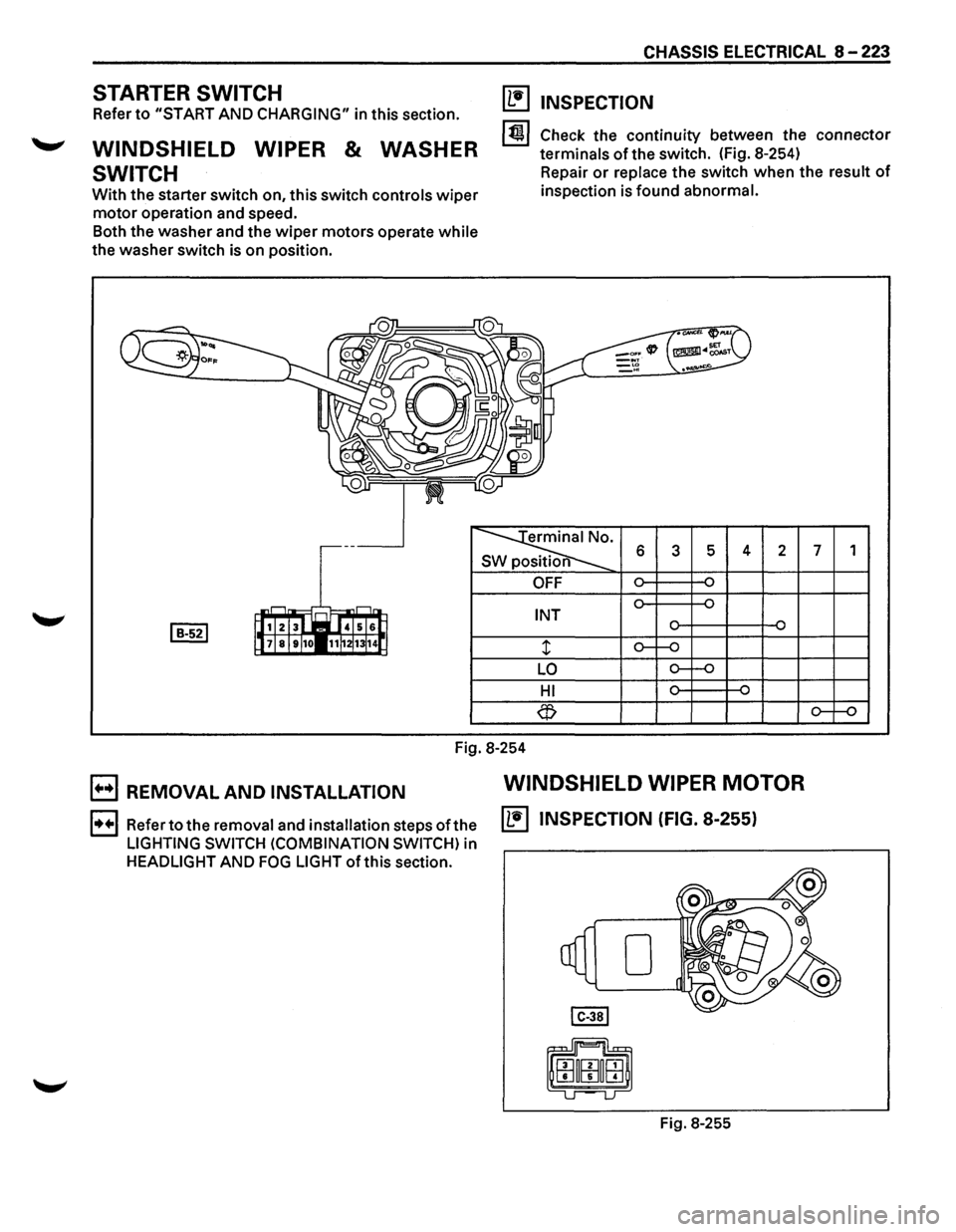
WINDSHIELD WIPER & WASHER
SWITCH
With the starter switch on, this switch controls wiper
motor operation and speed.
Both the washer and the
wiper motors operate while
the washer switch is on position.
CHASSIS ELECTRICAL 8 -223
(1!1 INSPECTION
1~1 Check the continuity between the connector
terminals
of the switch. (Fig. 8-254)
Repair
or replace the switch when the result of
inspection is found abnormal.
erminal No.
SW position 6 3 5 4 2 7 1
OFF
INT
LO
HI
Fig.
8-254
B REMOVAL AND INSTALLATION WINDSHIELD WIPER MOTOR
1••1 Refer to the removal and installation steps ofthe IL•IINSPECTION (FIG. 8-255)
LIGHTING SWITCH (COMBINATION SWITCH) in
HEADLIGHT AND FOG LIGHT ofthis section.
Fig. 8-255
Page 1417 of 1928
![ISUZU TROOPER 1995 Owners Guide ~ INSPECTION
I 4131 2 1 i~~j
l~ 101918 71615 jJ [ill]
~
s 6 7 8 2 3 s position
CD
OFF
~ ON o-~
...... ~ ~ ...... OFF
CD ~ ON o-~
Fig. 8-263
Check
the continuity between the connector
te](/img/61/57183/w960_57183-1416.png "ISUZU TROOPER 1995 Owners Guide ~ INSPECTION
I 4131 2 1 i~~j
l~ 101918 71615 jJ [ill]
~
s 6 7 8 2 3 s position
CD
OFF
~ ON o-~
...... ~ ~ ...... OFF
CD ~ ON o-~
Fig. 8-263
Check
the continuity between the connector
te")
~ INSPECTION
I 4131 2 1 i~~j
l~ 101918 71615 jJ [ill]
~
s 6 7 8 2 3 s position
CD
OFF
~ ON o-~
...... ~ ~ ...... OFF
CD ~ ON o-~
Fig. 8-263
Check
the continuity between the connector
terminals of the switch. (Fig. 8-263)
Repair
or replace the switch when the result of
inspection is found abnormal.
E) REMOVAL (FIG. 8-264)
Preparation: Disconnect the battery ground cable.
This illustration is based on rear defogger SW removal.
Fig. 8-264
'-"' 1. Front console assembly
2. lower cluster assembly
3. Instrument panel driver lower cover
4. Instrument panel cluster assembly
CHASSIS ELECTRICAL 8-227
o Refer to FOG LIGHT SWITCH removal steps in
this section.
5. Rear wiper & washer switch
• To remove the switch, pushing the lock from
the back side of the cluster assembly.
B INSTALLATION
To install, follow the removal steps in the reverse
order, noting the
following point.
1. Push the switch with your fingers until it locks
securely.
REAR WIPER MOTOR
~ INSPECTION
Fig. 8-265
With the battery
(+)terminal connected to the wiper
motor connector termina12l G-6 land the H terminal
to the connector 41 G-6 I, check to see if the motor
rotates. (Fig. 8-265)
Repair
or replace the motor when the result of
inspection is found abnormal.
E) REMOVAL (FIG. 8-266)
Preparation: Disconnect the battery ground cable.
-,
Fig. 8-266
Page 1432 of 1928
8-242 CHASSIS ELECTRICAL
STARTER SWITCH
Refer to "START AND CHARGING" of this section.
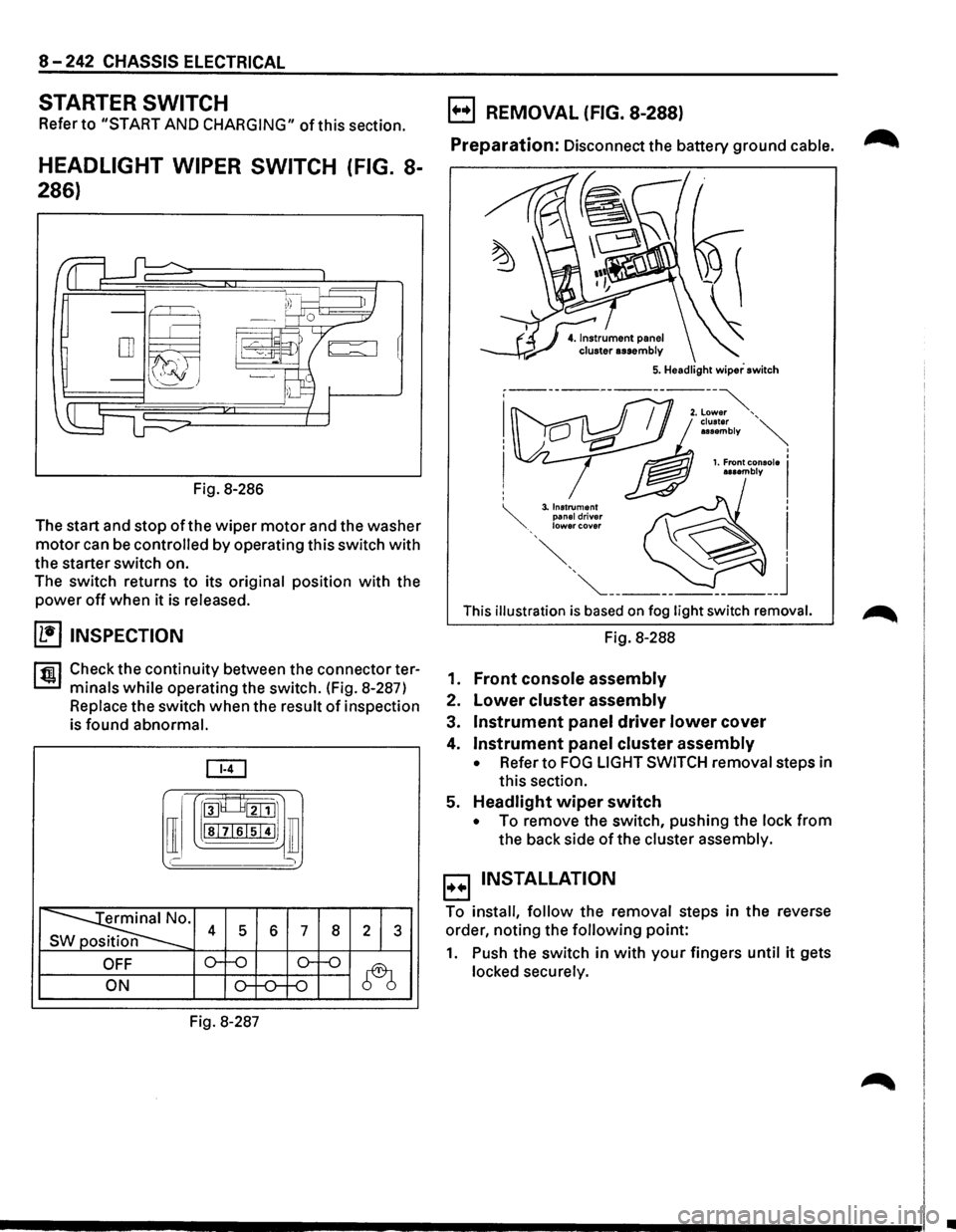
HEADLIGHT WIPER SWITCH (FIG. 8-
286)
Fig. 8-286
The start and stop
of the wiper motor and the washer
motor can be controlled by operating this switch with
the starter switch on.
The switch returns to its
original position with the
power off when it is released.
(1!] INSPECTION
rfiil Check the continuity between the connector ter
L:::.I minals while operating the switch. (Fig. 8-287)
Replace the switch when the result of inspection
is
found abnormal.
[ill
[I
roo8___8tillJ1
lsl7lslsi4IJ ill
' )
~· s 4 5 6 7 8 2 1 3
OFF o--o o-f-o
~ ON o-f-0--f-0
Fig. 8-287
B REMOVAL (FIG. 8-288)
Preparation: Disconnect the battery ground cable. ~
This illustration is based on fog light switch removal.
Fig. 8-288
1.
Front console assembly
2. Lower cluster assembly
3. Instrument panel driver lower cover
4. Instrument panel cluster assembly
• Refer to FOG LIGHT SWITCH removal steps in
this section.
5.
Headlight wiper switch
• To remove the switch, pushing the lock from
the back side of the cluster assembly.
B INSTALLATION
To install, follow the removal steps in the reverse
order, noting the
following point:
1. Push the switch in with your fingers until it gets
locked securely.
•
Page 1442 of 1928
8-252 CHASSIS ELECTRICAL
1. Front console assembly
2. Lower cluster assembly
3. Instrument panel driver lower cover
4. Instrument panel cluster assembly
• Refer to FOG LIGHT SWITCH removal steps in
this section.
5. Digital clock
• To remove the clock, pushing the lock from the
back side
of the cluster assembly.
E) INSTALLATION
To install, follow the removal steps in the reverse
order.
Page 1454 of 1928
8-264 CHASSIS ELECTRICAL
STARTER SWITCH
Refer to "START AND CHARGING" in this section.
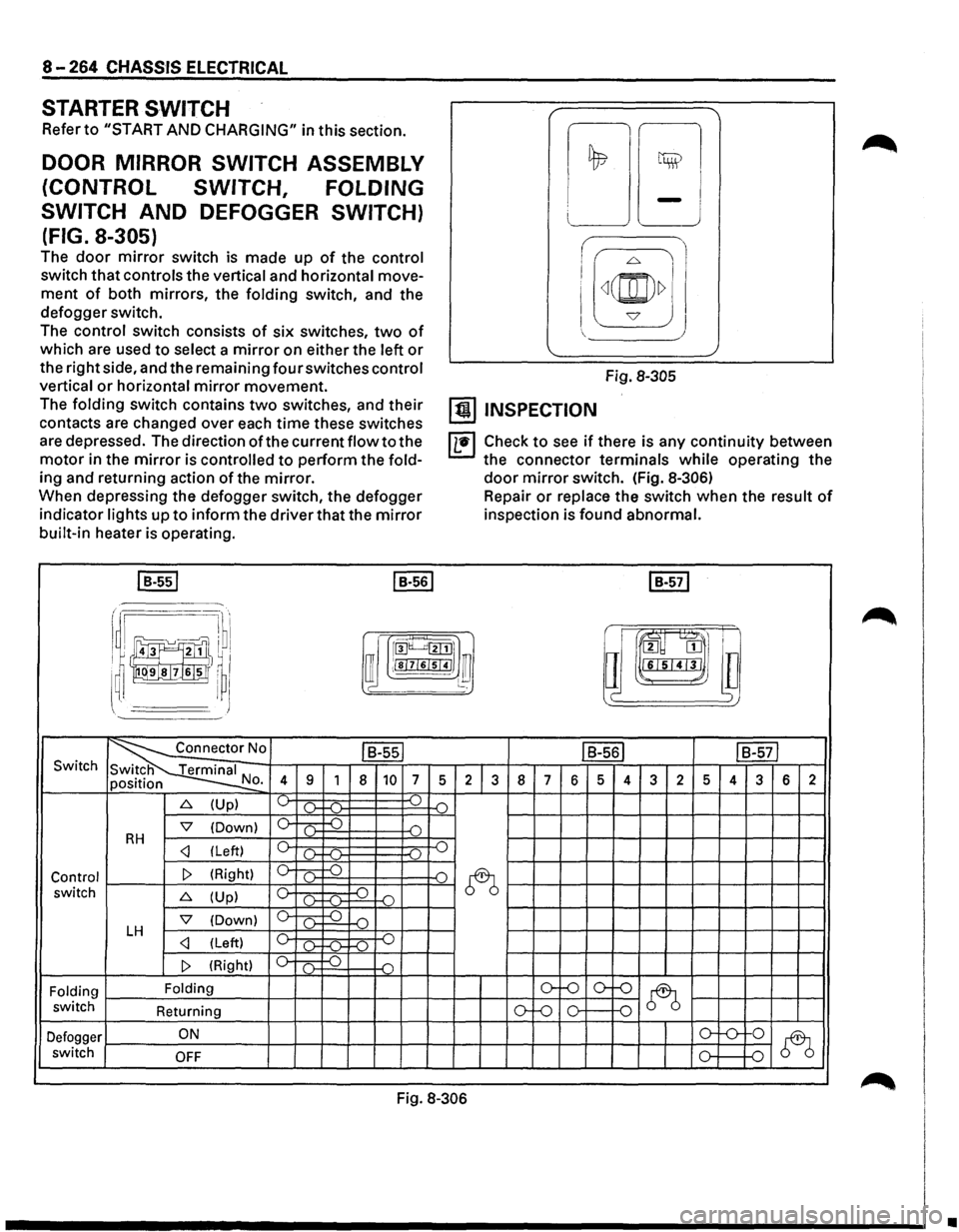
DOOR MIRROR SWITCH ASSEMBLY
(CONTROL SWITCH, FOLDING
SWITCH
AND DEFOGGER SWITCH)
(FIG. 8-305)
The door mirror switch is made up of the control
switch that controls the vertical and horizontal move
ment of both mirrors, the folding switch, and the
defogger switch.
The control switch consists of six switches, two of
which are used to select a mirror on either the left or
the right side, and the remaining four switches control
vertical or horizontal mirror movement.
The folding switch contains two switches, and their
contacts are changed over each time these switches
are depressed. The direction of the current flow to the
motor in the mirror is controlled to perform the fold
ing and returning action of the mirror.
When depressing the defogger switch, the defogger
indicator lights up to inform the driver that the mirror
built-in heater is operating.
I B-551 I B-561
i I I
!;l ~
LJ -J
I
I[~(@)~] J
Fig. 8-305
[!) INSPECTION
IL•I Check to see if there is any continuity between
the connector terminals while operating the
door mirror switch. (Fig. 8-306)
Repair or replace the switch when the result of
inspection is found abnormal.
I B-571
r .·~·· I ~ru·l
~~J!]}I ~ rroo~~l]
i !)~~1,1
a m
I ~ I ffi ;!sl7l6lsl41 ~ l~ lll"L•I'J'I•J ~~~
~' I J )
~0 ls-ssl IB-561 IB-571 Switch
N 4 9 1 8 10 7 5 2 3 8 7 6 5 4 3 2 5 4 3 6 2 o.
6. (Up) ~ ).. ...( ) .(")
'7 (Down) 0 c .) D RH c _.)
~ switch 6. (Up) c ~ -o ()-f-(l-
'7 (Down) 0 ( ) D LH c _.)
Folding Folding o-f-0 o--()
~ switch
Returning ()-Lo 0 0
Defogger ON o-'-0-
0
~ switch OFF 0 D
Fig. 8-306
•
Page 1474 of 1928
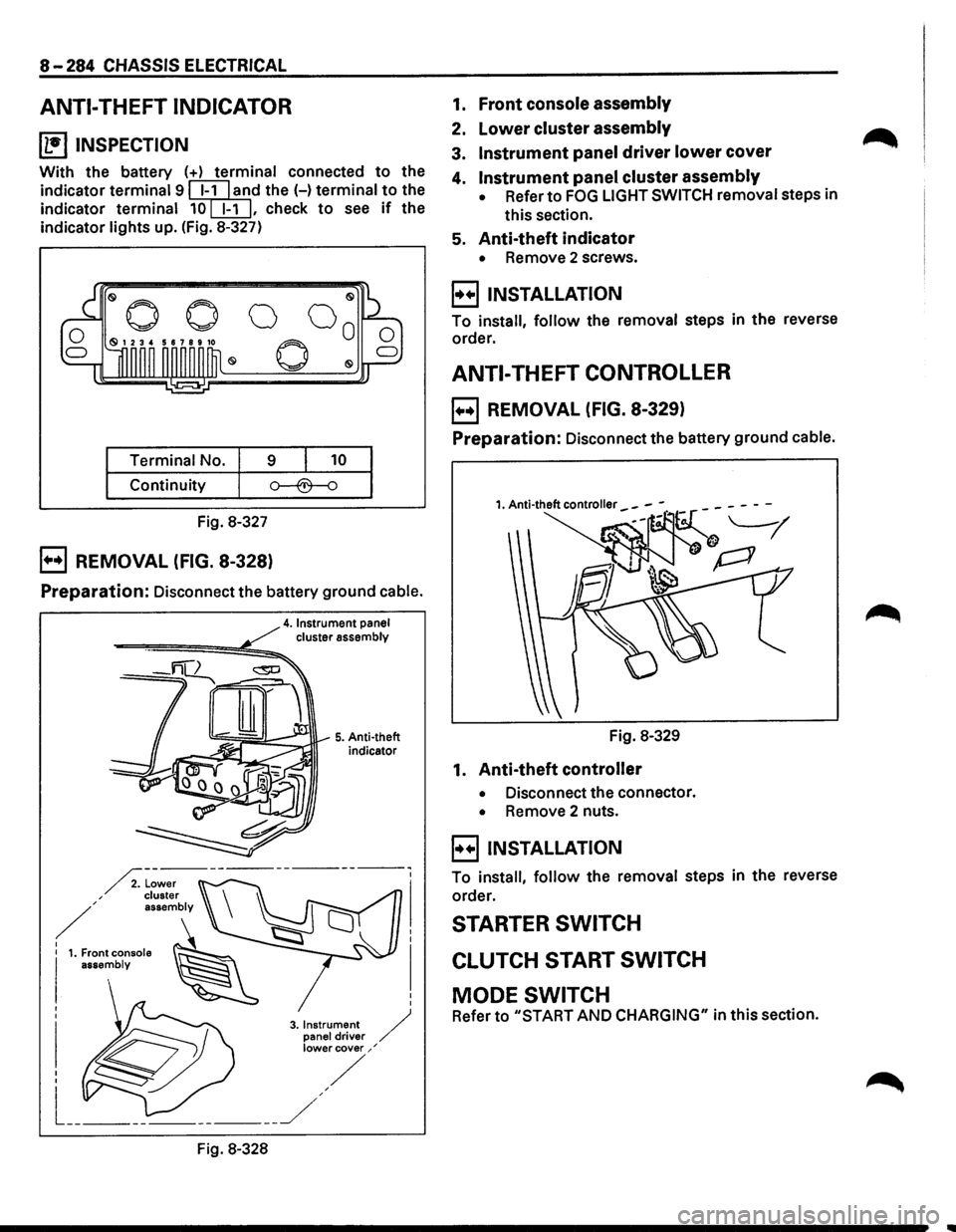
8-284 CHASSIS ELECTRICAL
ANTI-THEFT INDICATOR
~ INSPECTION
With the battery (+) terminal connected to the
indicator
terminal 9 ~l'ld the H terminal to the
indicator
terminal 10[EIJ, check to see if the
indicator
lights up. (Fig. 8-327)
Terminal No. 9 10
Continuity
Fig. 8-327
B REMOVAL (FIG. 8-328)
Preparation: Disconnect the battery ground cable.
4. Instrument panel cluster assembly
-====-==============~!!;!;::,..
Fig. 8-328
5. Anti-theft
indicator
1. Front console assembly
2. lower cluster assembly
3. Instrument panel driver lower cover
4. Instrument panel cluster assembly
• Refer to FOG LIGHT SWITCH removal steps in
this section.
5. Anti-theft indicator
• Remove 2 screws.
B INSTALLATION
To install, follow the removal steps in the reverse
order.
ANTI-THEFT CONTROLLER
B REMOVAL (FIG. 8-329)
Preparation: Disconnect the battery ground cable.
Fig. 8-329
1. Anti-theft controller
• Disconnect the connector.
• Remove 2 nuts.
B INSTALLATION
To install, follow the removal steps in the reverse
order.
STARTER SWITCH
CLUTCH START SWITCH
MODE SWITCH
Refer to "START AND CHARGING" in this section.
Page 1505 of 1928
STARTER SWITCH
Refer to "START AND CHARGING" in this section.
'--LIGHTING SWITCH/DIMMER •
PASSING SWITCH/HEADLIGHT
Refer to "HEADLIGHT AND FOG LIGHT" in this sec-
tion.
TURN SIGNAL SWITCH
Refer to "TURN SIGNAL LIGHT, HAZARD WARNING
LIGHT, CORNERING LIGHT, BACKUP LIGHT AND
HORN" in this section.
ILLUMINATION CONTROLLER
Refer to the "FRONT SIDE MARKER LIGHT, PARKING
LIGHT, TAILLIGHT, LICENSE PLATE LIGHT AND ILLU
MINATION LIGHT"
in this section.
CHASSIS ELECTRICAL 8-315
Page 1508 of 1928
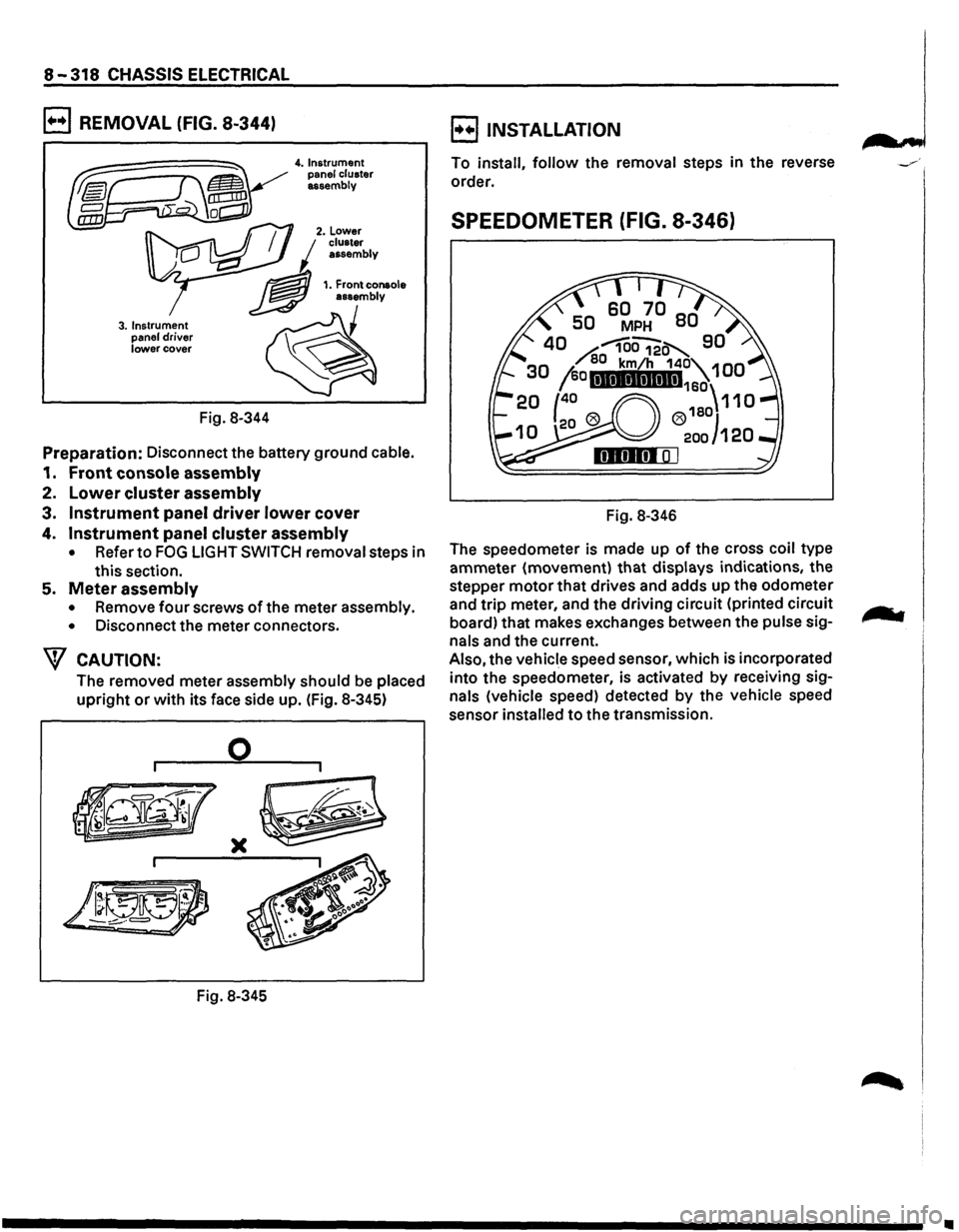
8-318 CHASSIS ELECTRICAL
B REMOVAL (FIG. 8-344)
3. Instrument
panel driver lower cover
Fig. 8-344
4. Instrument
panel cluster
assembly
Preparation: Disconnect the battery ground cable.
1. Front console assembly
2. Lower cluster assembly
3. Instrument panel driver lower cover
4. Instrument panel cluster assembly
• Refer to FOG LIGHT SWITCH removal steps in
this section.
5. Meter assembly
• Remove four screws of the meter assembly.
•
Disconnect the meter connectors.
W CAUTION:
The removed meter assembly should be placed
upright or with its face side up. (Fig. 8-345)
0
)(
Fig. 8-345
B INSTALLATION
To install, follow the removal steps in the reverse
order.
SPEEDOMETER (FIG. 8-346)
Fig. 8-346
The speedometer is made up
of the cross coil type
ammeter (movement)
that displays indications, the
stepper
motor that drives and adds up the odometer
and
trip meter, and the driving circuit (printed circuit
board) that makes exchanges between the
pulse sig
nals and the current.
Also, the vehicle speed sensor, which is incorporated
into the speedometer, is activated
by receiving sig
nals (vehicle speed) detected by the vehicle speed
sensor
installed to the transmission.
•
Page 1583 of 1928
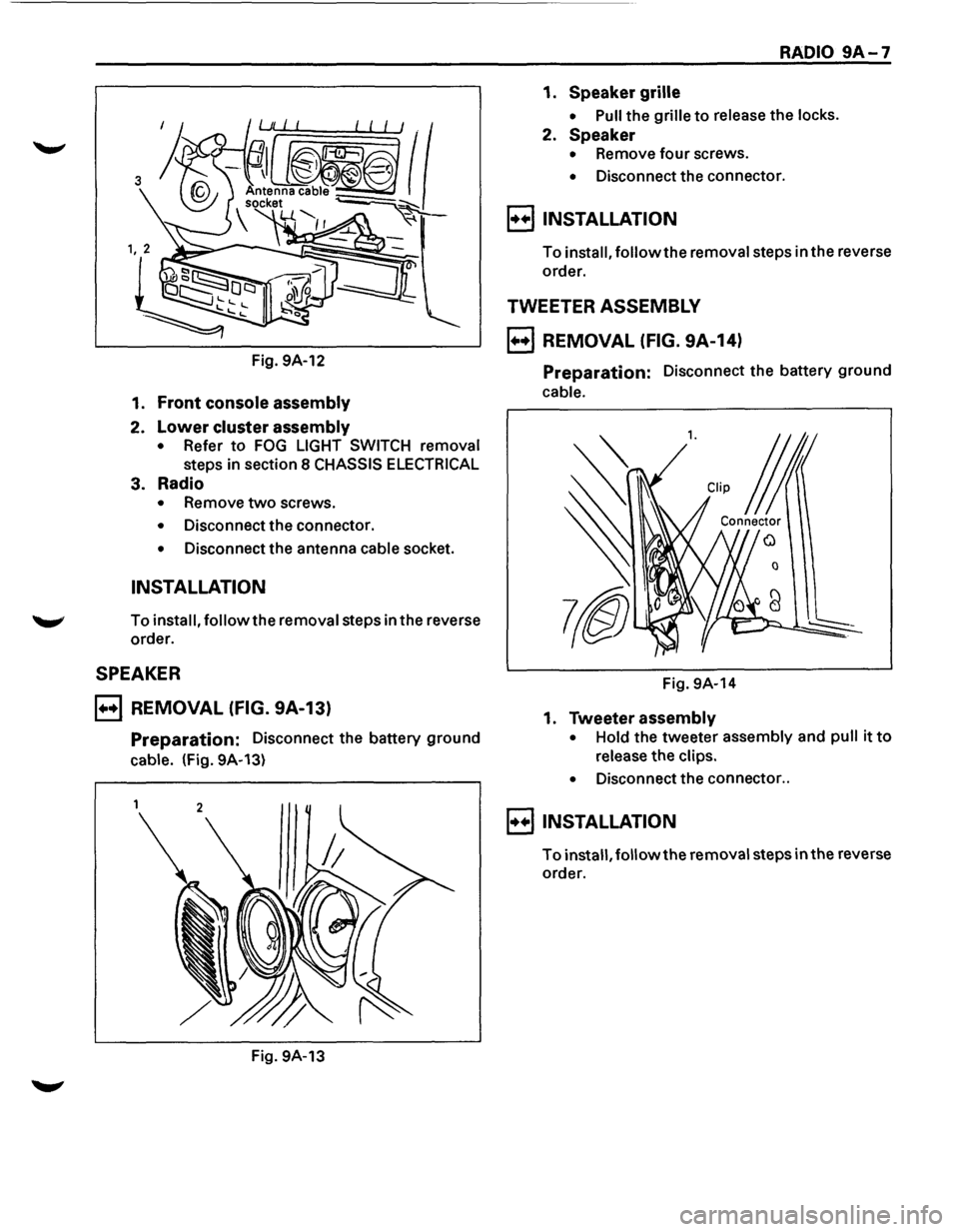
Fig. 9A-12
1. Front console assembly
2. Lower cluster assembly
• Refer to FOG LIGHT SWITCH removal
steps in section 8 CHASSIS ELECTRICAL
3. Radio
• Remove two screws.
• Disconnect the connector.
• Disconnect the antenna cable socket.
INSTALLATION
To install, follow the removal steps in the reverse
order.
SPEAKER
B REMOVAL (FIG. 9A-13)
Preparation: Disconnect the battery ground
cable. (Fig. 9A-13)
Fig. 9A-13
RADIO 9A-7
1. Speaker grille
• Pull the grille to release the locks.
2. Speaker
• Remove four screws.
• Disconnect the connector.
8 INSTALLATION
To install, followthe removal steps in the reverse
order.
TWEETER ASSEMBLY
B REMOVAL (FIG. 9A-14)
Preparation: Disconnect the battery ground
cable.
l. CUp j
Connector
0
Fig. 9A-14
1. Tweeter assembly
• Hold the tweeter assembly and pull it to
release the clips.
•
Disconnect the connector ..
8 INSTALLATION
To install, followthe removal steps in the reverse
order.
Page 1615 of 1928
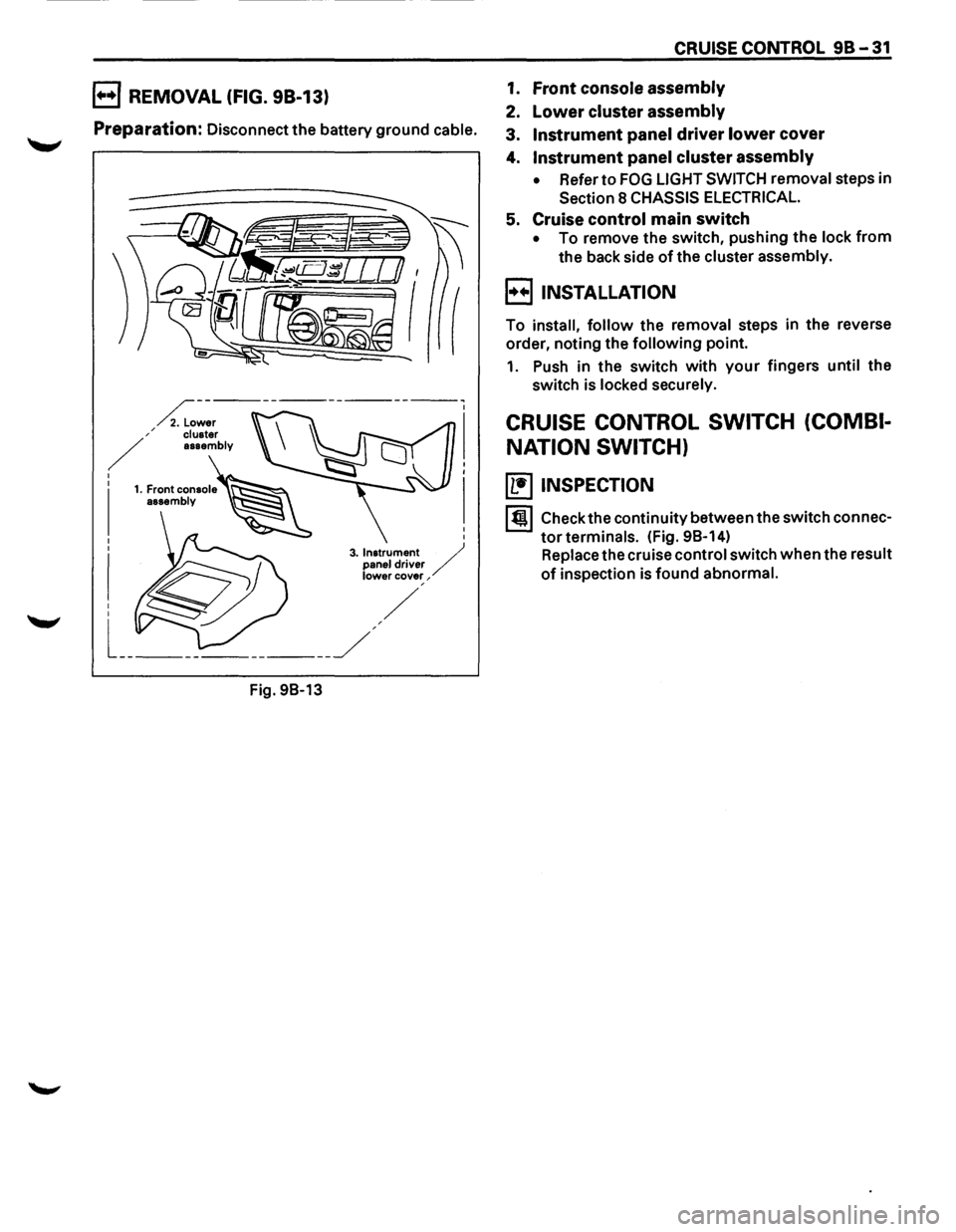
B REMOVAL (FIG. 98-13)
Preparation: Disconnect the battery ground cable.
Fig.
98-13
CRUISE CONTROL 98-31
1. Front console assembly
2. Lower cluster assembly
3. Instrument panel driver lower cover
4. Instrument panel cluster assembly
• Refer to FOG LIGHT SWITCH removal steps in
Section 8 CHASSIS ELECTRICAL.
5. Cruise control main switch
• To remove the switch, pushing the lock from
the back side of the cluster assembly.
B INSTALLATION
To install, follow the removal steps in the reverse
order, noting the
following point.
1. Push in the switch with your fingers until the
switch is locked securely.
CRUISE CONTROL SWITCH (COMBI
NATION SWITCH)
(b!] INSPECTION
I till Check the continuity between the switch connec
tor terminals. (Fig. 98-14)
Replace the cruise control switch when the result
of inspection is found abnormal.