fog light ISUZU TROOPER 1995 Owner's Manual
[x] Cancel search | Manufacturer: ISUZU, Model Year: 1995, Model line: TROOPER, Model: ISUZU TROOPER 1995Pages: 1928
Page 1267 of 1928
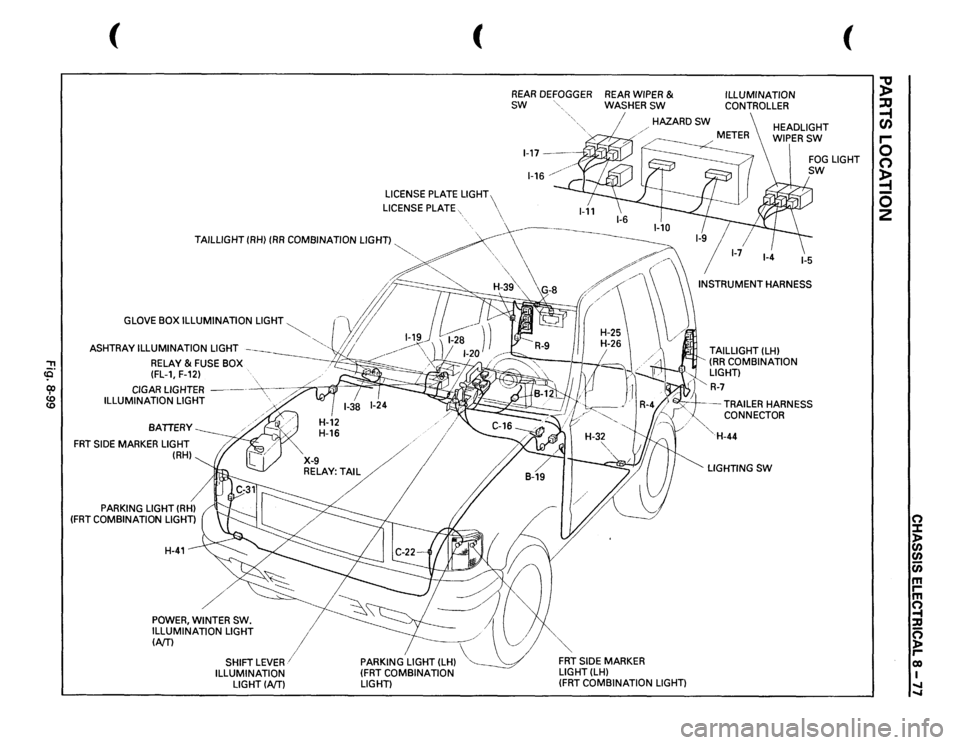
'"T1 (Q cp
GLOVE BOX ILLUMINATION
LIGHT
ASHTRAY ILLUMINATION
LIGHT
RELAY
& FUSE BOX
(FL-1, F-12)
CIGAR LIGHTER
-----
-~----~
ILLUMINATION
LIGHT
'>
./
BATIERY
FRT
SIDE
MARKER LIGHT
(RH)
PARKING
LIGHT (RHl
(FRT
COMBINATION
LIGHT) H-41
/
I
X-9
....
/
RELAY:T/
I
POWER,
WINTER
SW.
ILLUMINATION LIGHT
I
(NT)
1
PARKING
LIGHT (LH)
(FRT
COMBINATION
LIGHT)
SHIFT
LEVER/
ILLUMINATION
LIGHTINTl
(
REAR
DEFOGGER
REAR
WIPER
&
SW
WASHERSW
ILLUMINATION CONTROLLER
(
HAZARDSW
HEADLIGHT WIPERSW
H-32
",,
FRT
SIDE
MARKER
LIGHT(LH)
(FRT
COMBINATION
LIGHT) TAILLIGHT
(LH)
(RR
COMBINATION
LIGHT)
l"
R-7
FOG
LIGHT
sw
-TRAILER
HARNESS
CONNECTOR
'· 'H-44 LIGHTING
SW
;g ;:Q ~ r-0 0 ~ 0 2
0 :::t )> en en c;; m rm ~ :a 0 )> reo I .... ....
Page 1269 of 1928
(
I
.. 0 0
I
't. :1: ~I
I
b;
I
.. ~ .. ~ ;;; ~ ..
0.38
0.38
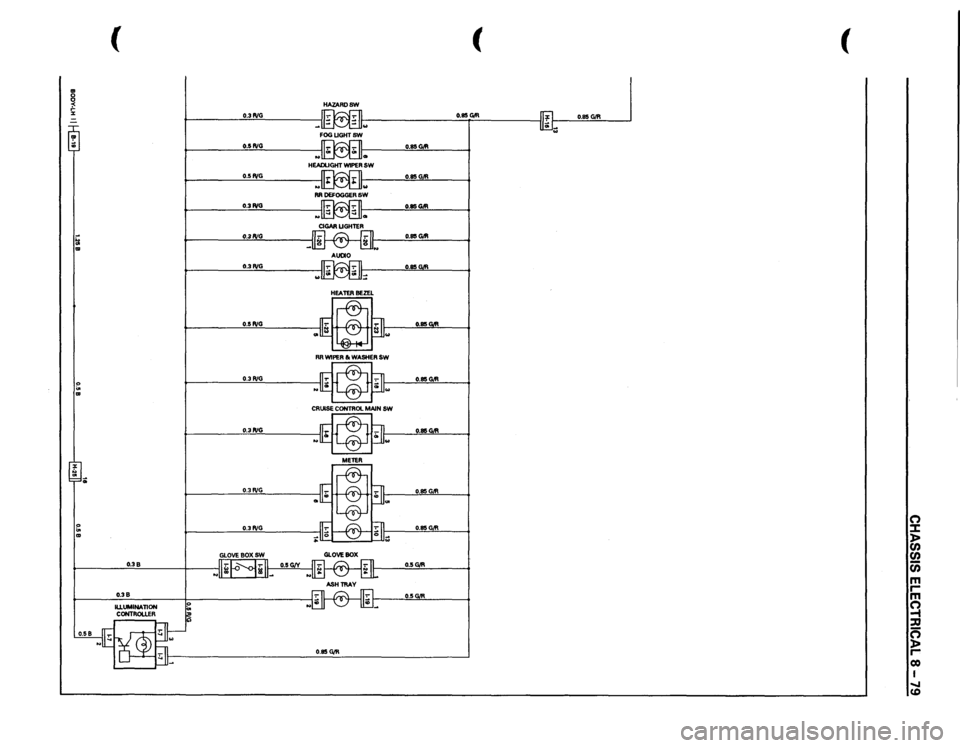
HAZARDSW
0.3PJG
~I FOGUGHTSW
0.5PJG
~
.. ..
HEADLIGHT WIPER
SW
0.5~
"
..
RR DEFOGGER
SW
0.3PJG
~
0.85C>Ift
0.3PJG
11-:-1
C
IT· II
0.85C>Ift
AUDIO
.
0.3P,IG
0.5PJG 0.3 PJG 0.3PJG
0.3PJG
0.3PJG
0.50/R
0.85C>Ift
(
o.es
C>tR
lift
0.85
GiR
'";;;
(
I
0 :I: )> en en iii m .... m ~ :a g .... co I ...... (0
Page 1277 of 1928
LIGHTING SWITCH
Refer to "HEADLIGHT AND FOG LIGHT" in this
~ section.
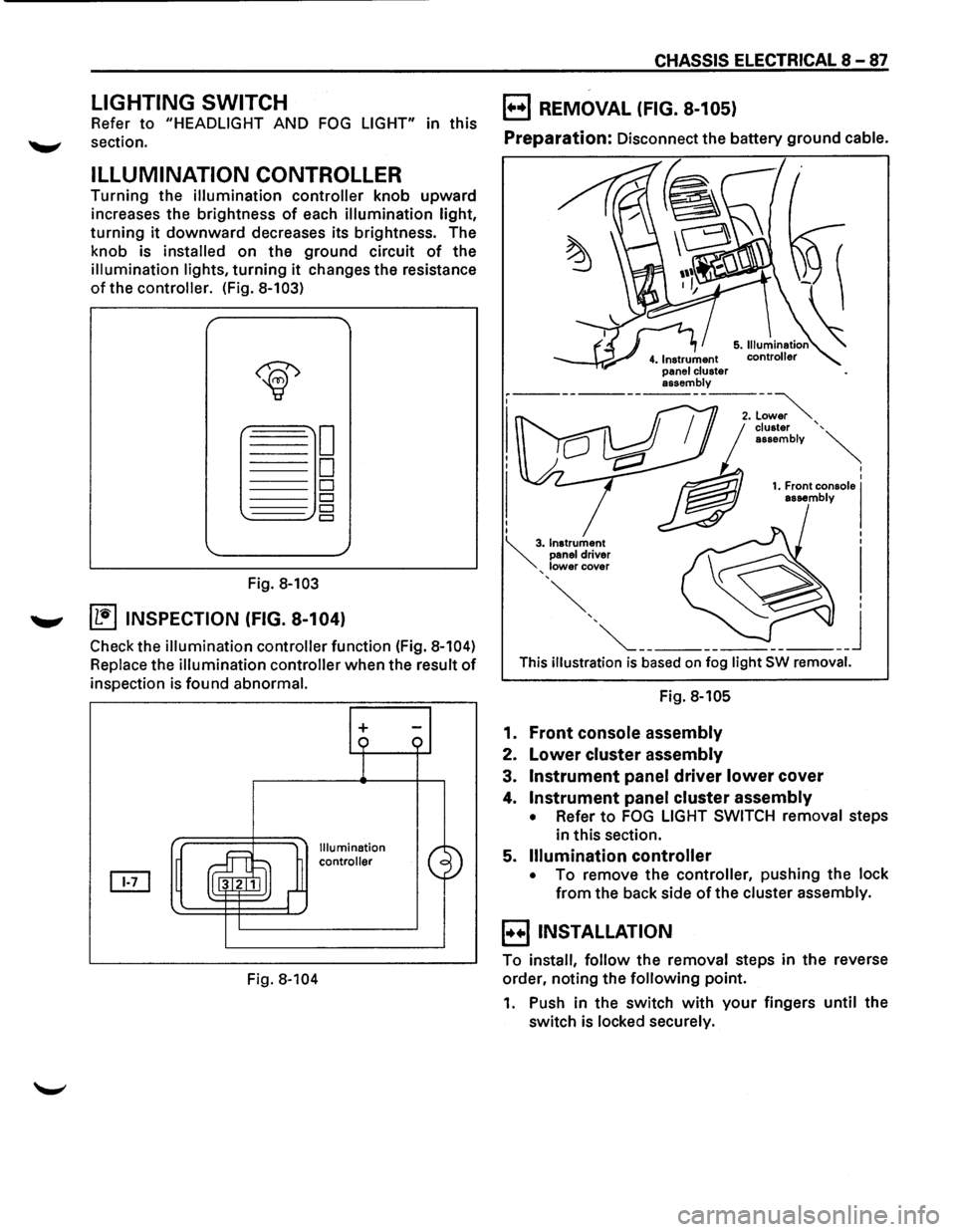
ILLUMINATION CONTROLLER
Turning the illumination controller knob upward
increases the brightness
of each illumination light,
turning it downward decreases its brightness. The
knob is
installed on the ground circuit of the
illumination lights, turning it changes the resistance
of the controller. (Fig. 8-103)
Fig. 8-103
....._., ~ INSPECTION (FIG. 8-104)
Check the illumination controller function (Fig. 8-104)
Replace the illumination controller when the result of
inspection is found abnormal.
Fig.
8-104
+
Illumination
controller
CHASSIS ELECTRICAL 8-87
B REMOVAL (FIG. 8-105)
Preparation: Disconnect the battery ground cable.
This illustration is based on fog light SW removal.
Fig. 8-105
1. Front console assembly
2. Lower cluster assembly
3. Instrument panel driver lower cover
4. Instrument panel cluster assembly
• Refer to FOG LIGHT SWITCH removal steps
in this section.
5.
Illumination controller
• To remove the controller, pushing the lock
from the back side of the cluster assembly.
B INSTALLATION
To install, follow the removal steps in the reverse
order, noting the
following point.
1. Push in the switch with your fingers until the
switch is locked securely.
Page 1282 of 1928
I
8 -92 CHASSIS ELECTRICAL I
STOPLIGHT AND REAR DEFOGGER I
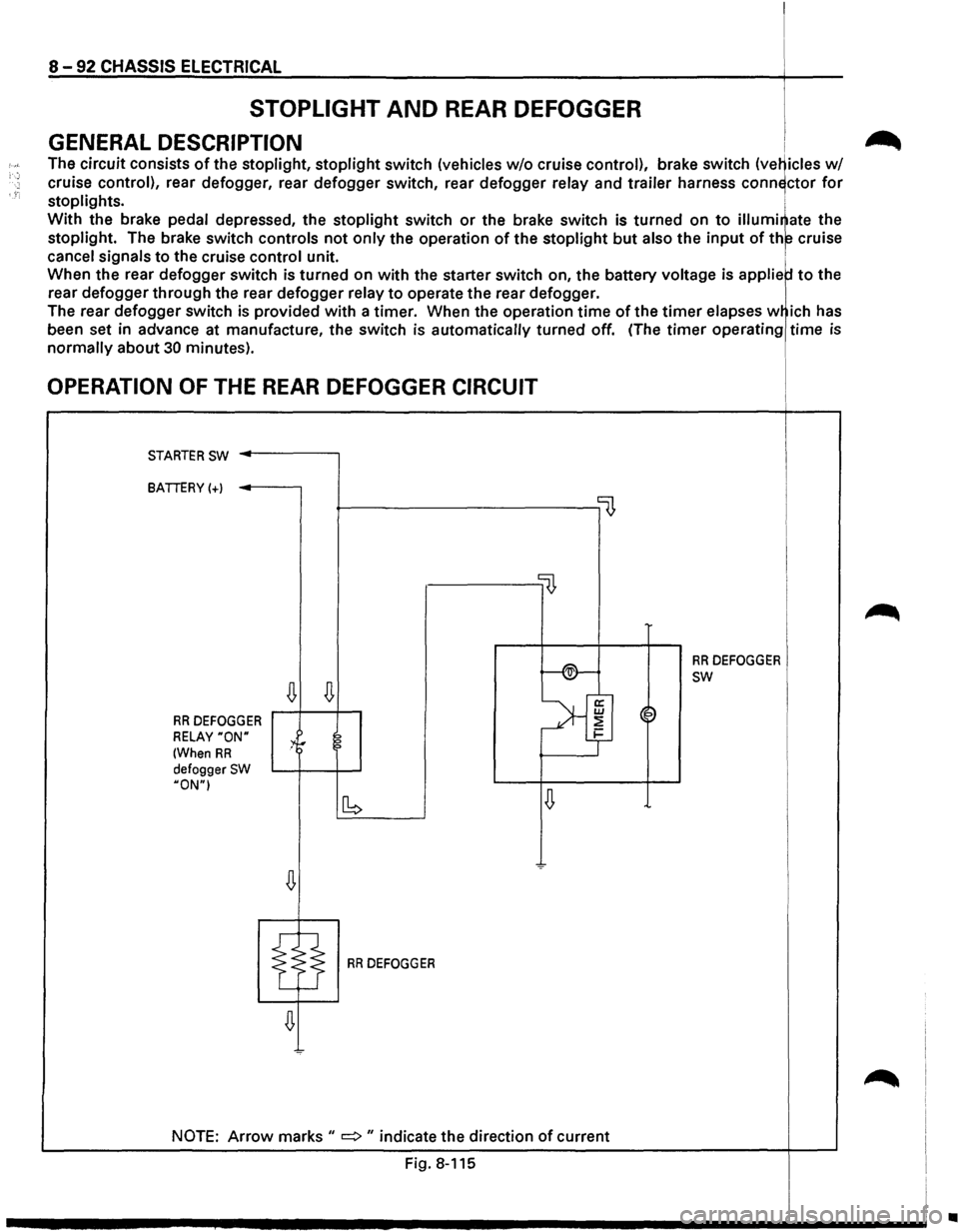
GENERAL DESCRIPTION i .-_
The circuit consists of the stoplight, stoplight switch (vehicles w/o cruise control), brake switch (ve~icles w/
cruise control), rear defogger, rear defogger switch, rear defogger relay and trailer harness conn~ctor for
stoplights. i
With the brake pedal depressed, the stoplight switch or the brake switch is turned on to illumi~ate the
stoplight. The brake switch controls not only the operation of the stoplight but also the input of th~ cruise
cancel signals to the cruise control unit. 1
When the rear defogger switch is turned on with the starter switch on, the battery voltage is applie to the
rear
defogger through the rear defogger relay to operate the rear defogger.
The rear
defogger switch is provided with a timer. When the operation time of the timer elapses w ich has
been set in advance at manufacture,
the switch is automatically turned off. (The timer operating time is
normally about 30 minutes).
OPERATION OF THE REAR DEFOGGER CIRCUIT
STARTER SW ..------,
BATTERY(+)
~----------------0
llJ,
f-®-
RR DEFOGGER
~
SW
~
>'f RR DEFOGGER ~~
RELAY "ON" :4r 2 1-
(When RR ?
defogger SW HON"I
~ [b
RR DEFOGGER
NOTE: Arrow marks II => II indicate the direction of current
Fig. 8-115
~
•
Page 1283 of 1928
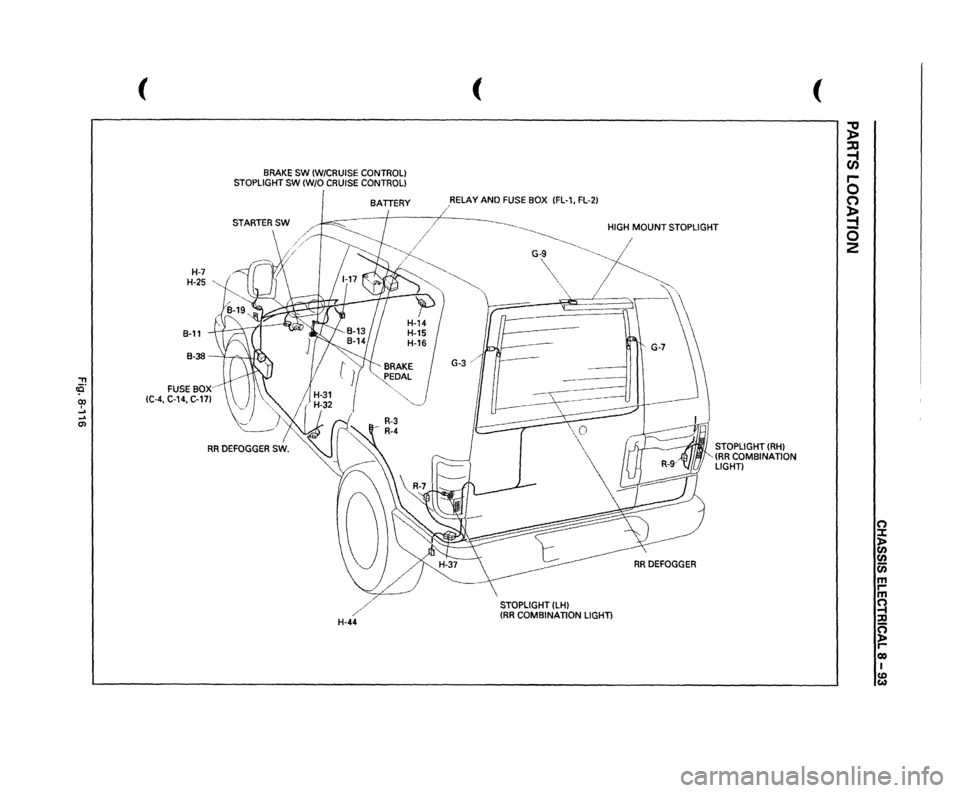
"T1 tO. 00 I _. ... 0>
(
H-7 H-25
,,
B-11
BRAKE
SW
(W/CRUISE
CONTROL)
STOPLIGHT
SW
(W/0
CRUISE
CONTROL) BATTERY
B-38
-
'I ,....., , lUI,).,.
FUSE
sox~
!C-4,
C-14,
C-17l
/
H-44
(
,RELAY
AND
FUSE
BOX
IFL-1,
FL-21
/
~----._
HIGH
MOUNT
STOPLIGHT
~-----
~
G-,~,
~-~------
-~,
I
"~
'
RRDEFOGGER
STOPLIGHT
(LHI
{RR
COMBINATION
LIGHT)
STOPLIGHT
(RHI
(RR
COMBINATION
LIGHT)
(
;g ::xJ ~ r-0 (') ~ -0 2
(') ::t l> en
en en m rm ~ ::Jl ~ Cl) I CD w
Page 1286 of 1928
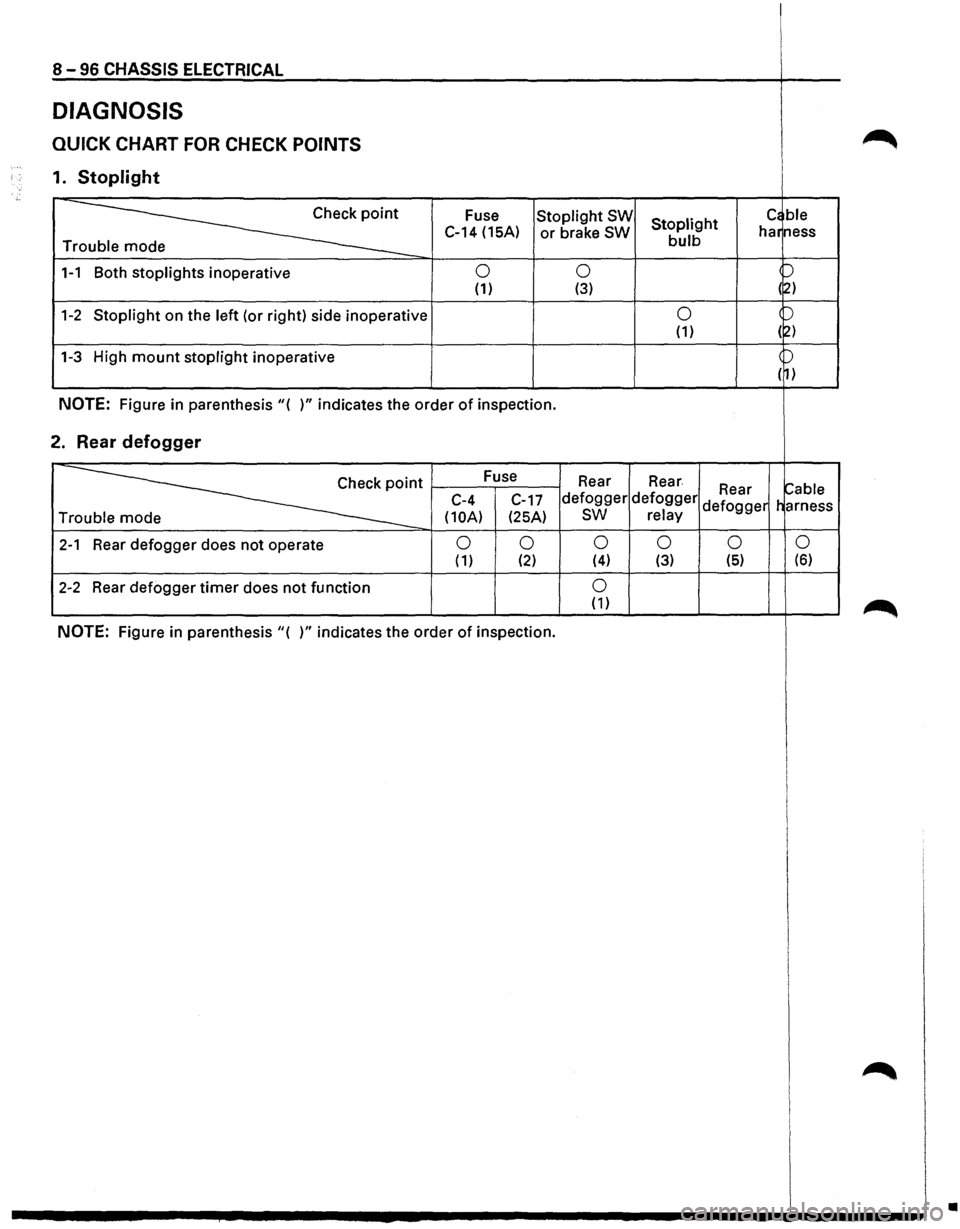
8-96 CHASSIS ELECTRICAL
DIAGNOSIS
QUICK CHART FOR CHECK POINTS
1. Stoplight
~
Fuse Stoplight SW Stoplight c~ ble
C-14 (15A) or brake SW bulb har
ness
Tr
1-1 Both stoplights inoperative 0 0 p
(1) (3) (~)
1-2 Stoplight on the left (or right) side inoperative 0 )
(1) (2)
1-3 High mount stoplight inoperative )
( 1)
NOTE: Figure in parenthesis"( )" indicates the order of inspection.
2. Rear defogger
~·
Fuse
Rear Rear ~able C-4
C-17 defogger defogger Rear
Tr
(10A) (25A) sw relay defogger
harness
2-1 Rear defogger does not operate 0 0 0 0 0
0 ( 1) (2) (4) (3) (5) (6)
2-2 Rear
defogger timer does not function 0 (1)
NOTE: Figure in parenthesis"( )" indicates the order of inspection.
•
Page 1293 of 1928
![ISUZU TROOPER 1995 Owners Manual REAR DEFOGGER SWITCH
(1!] INSPECTION
I~~ Check to see if there is any continuity between
the terminals
of the defogger switch. (Fig. 8-127)
Replace the switch, when the result
of inspecti](/img/61/57183/w960_57183-1292.png "ISUZU TROOPER 1995 Owners Manual REAR DEFOGGER SWITCH
(1!] INSPECTION
I~~ Check to see if there is any continuity between
the terminals
of the defogger switch. (Fig. 8-127)
Replace the switch, when the result
of inspecti")
REAR DEFOGGER SWITCH
(1!] INSPECTION
I~~ Check to see if there is any continuity between
the terminals
of the defogger switch. (Fig. 8-127)
Replace the switch, when the result
of inspection
is found abnormal.
a [~~·~] ]]
r ~)
~0. s 1
4
ON o-r--0---
OFF o-~
Fig. 8-127
B REMOVAL (FIG. 8-128)
5. Rear defogger switch
Fig. 8-128
[ill
5 2 1 s
-o
~
4. Instrument panel
.cluster assembly
CHASSIS ELECTRICAL 8-103
Preparation: Disconnect the battery ground cable.
1.
Front console assembly
2. Lower cluster assembly
3. Instrument panel driver lower cover
4. Instrument panel cluster assembly
• Refer to FOG LIGHT SWITCH removal steps
in
this section.
5.
Rear defogger switch
• To remove the switch, pushing the lock from
the back side of the cluster assembly.
E) INSTALLATION
To install, follow the removal steps in the reverse
order, noting
the following point.
1. Push in the switch with your fingers until it locks
securely.
REAR DEFOGGER HEAT WIRES
w CAUTION:
• Heat wires are printed on the inner side of
the rear glass.
To clean, use a
soft cloth and wipe horizon
tally along the wires.
• Never use glass cleaner or equivalent.
~ INSPECTION
It~ I Measure the voltage of heat wire.
Repair the heat wire
when the result of inspection
is found abnormal.
'f CAUTION:
• When measuring voltage, wind a piece of
tin foil around the tip of the negative probe
and press
the foil against the wire with your
finger (Fig. 8-129).
1. Turn the starter switch on.
2. Turn the rear defogger switch on.
3. Measure the voltage between the three points
on
the heat wire and the(-) terminal with a voltmeter.
4. Check that the voltage becomes smaller from ®
to @to© (Fig. 8-130).
5. If there is a place where the voltage suddenly
changes
to OV, there is a OPEN CIRCUIT between
there and the
prior point.
Page 1310 of 1928
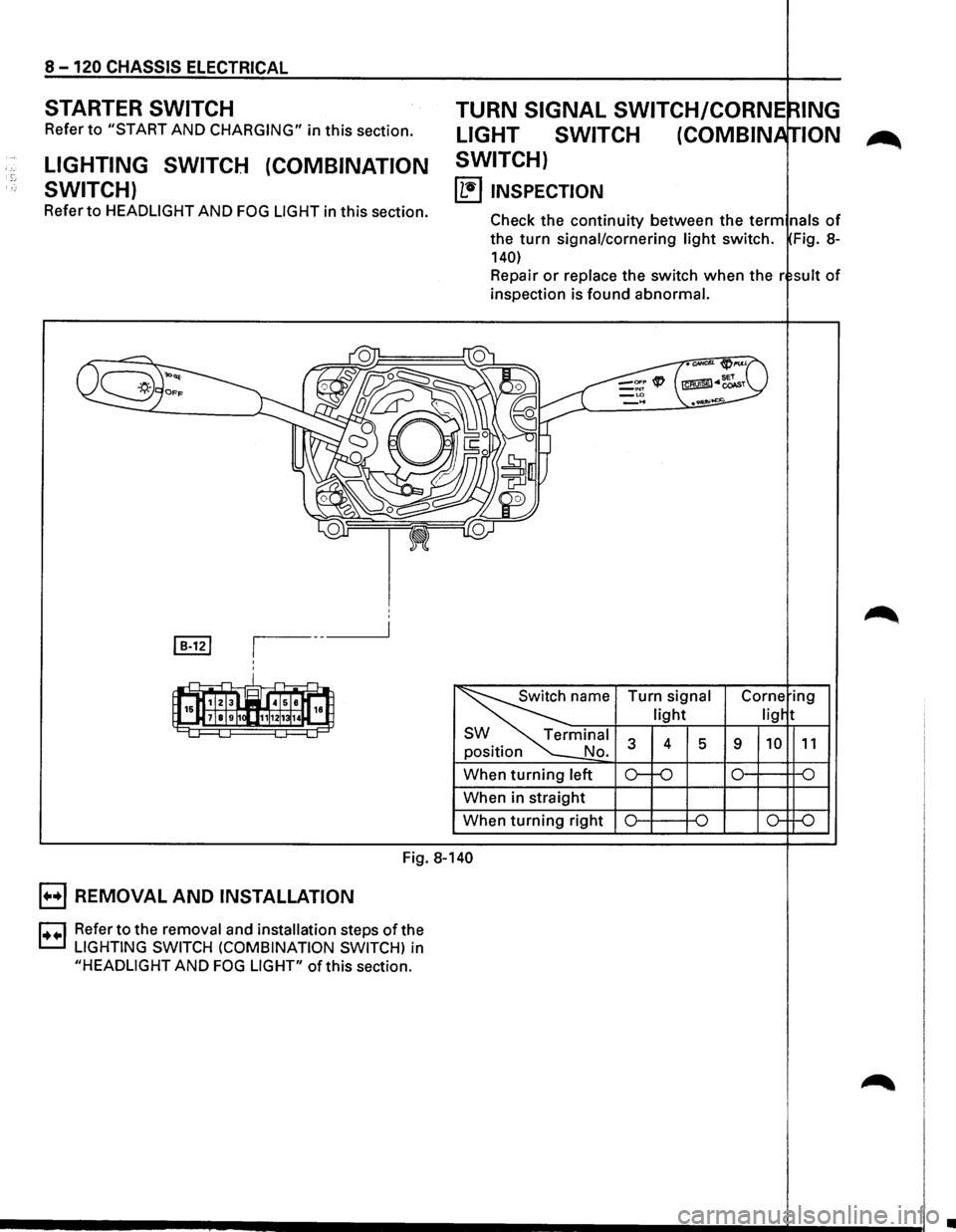
8 -120 CHASSIS ELECTRICAL
STARTER SWITCH
Refer to "START AND CHARGING" in this section.
LIGHTING SWITCH (COMBINATION
SWITCH)
Refer to HEADLIGHT AND FOG LIGHT in this section.
TURN SIGNAL SWITCH/CORNE
LIGHT SWITCH (COMBIN
SWITCH)
~ INSPECTION
lNG
ION
Check the continuity between the term nals of
the turn signal/cornering light switch. Fig. 8-
140)
Repair or replace the switch when the r suit of
inspection is found abnormal.
position
When
turning left
When in straight
When
turning right Turn
signal
light
4 5 9
Fig. 8-140
B REMOVAL
AND INSTALLATION
D Refer to the removal and installation steps of the
t.::.l LIGHTING SWITCH (COMBINATION SWITCH) in
"HEADLIGHT AND FOG LIGHT" of this section.
•
Page 1312 of 1928
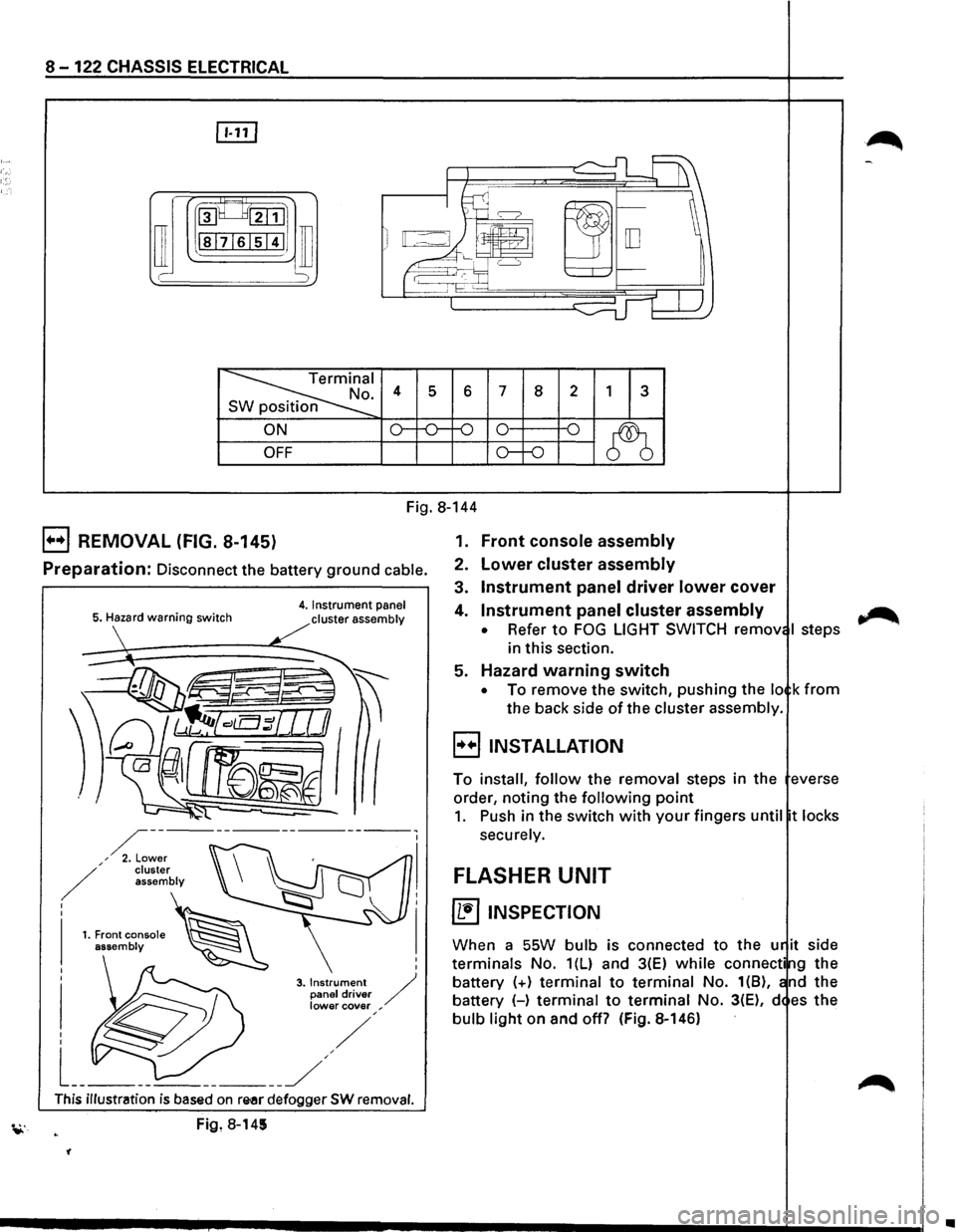
8-122 CHASSIS ELECTRICAL
rn
~~:::1
ill I -
~I . 4 s 6 7 8 2 1 3 n
ON o--o-f-0 0 -o
~ OFF o--o
Fig. 8-144
B REMOVAL (FIG. 8-145)
Preparation: Disconnect the battery ground cable.
5. Hazard warning switch 4. Instrument panel
cluster assembly
I
I
3. Instrument / panel driver lower cover ,
This illustration is based on re-ar defogger SW removal.
Fig, 8-145
'(
1. Front console assembly
2. Lower cluster assembly
3. Instrument panel driver lower cover
4. Instrument panel cluster assembly
• Refer to FOG LIGHT SWITCH remov I steps
in this section.
5. Hazard warning switch
• To remove the switch, pushing the lo k from
the back side of the cluster assembly.
B INSTALLATION
To install, follow the removal steps in the everse
order, noting the
following point
1. Push in the switch with your fingers until t locks
securely.
FLASHER UNIT
~ INSPECTION
When a SSW bulb is connected to the u it side
terminals No. 1(L) and 3(E) while connecti g the
battery
(+) terminal to terminal No. 1(8), nd the
battery (-)
terminal to terminal No. 3(E), d es the
bulb light on and off? (Fig. 8-146)
~
•
Page 1394 of 1928
·;.
8 -204 CHASSIS ELECTRICAL
STARTER SWITCH
Refer to "START AND CHARGING" in this section.
STOPLIGHT
STOPLIGHT SWITCH
BRAKE SWITCH
Refer to "STOPLIGHT AND REAR DEFOGGER" in
,c, this section.
SHIFT LOCK CONTROLLER
Refer to the shift lock controller in Section 7 A
"AUTOMATIC TRANSMISSION."
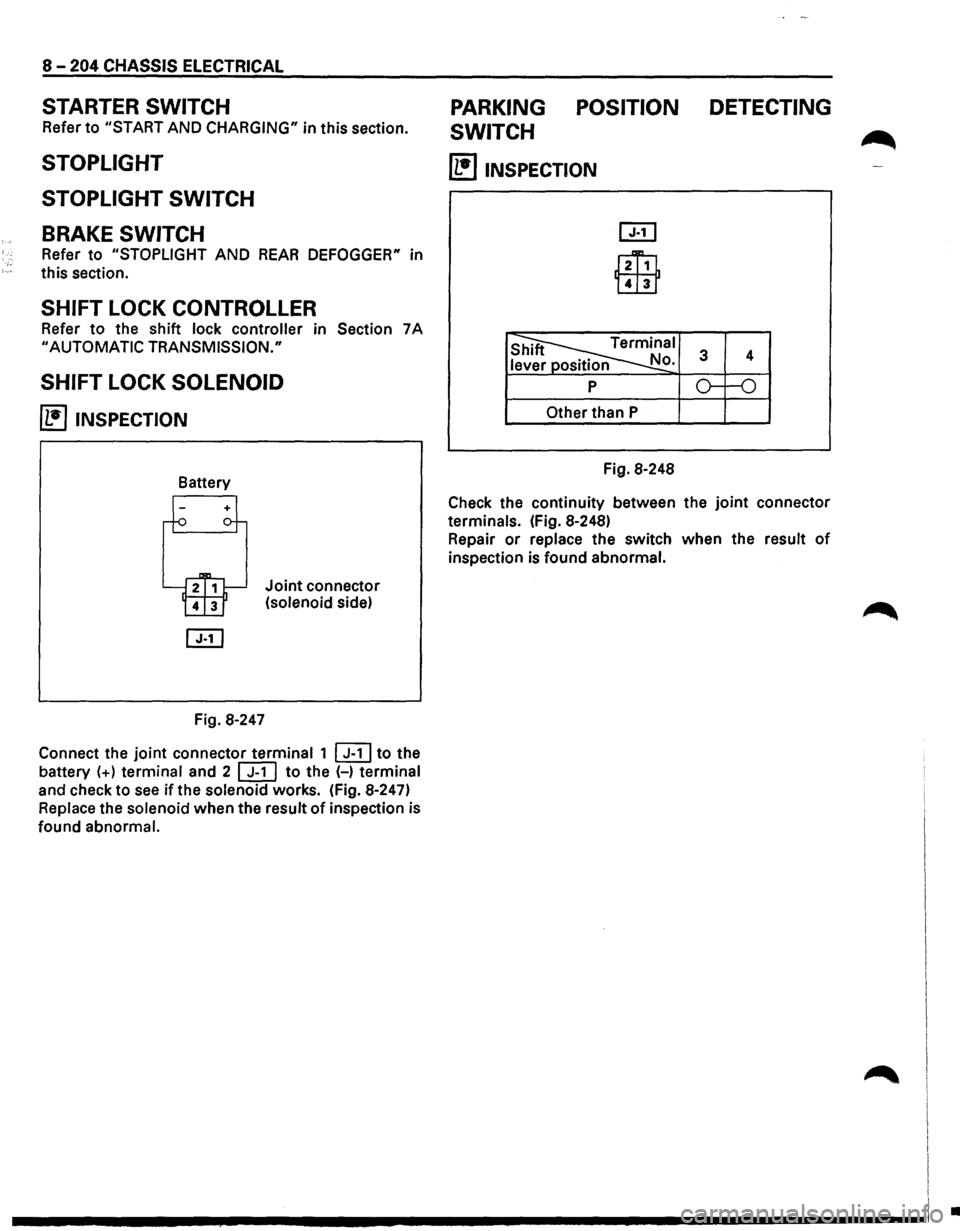
SHIFT LOCK SOLENOID
~ INSPECTION
Fig. 8-247
Joint connector
(solenoid side)
Connect the
joint connector terminal 1 ~to the
battery
(+) terminal and 2 [ill to the (-) terminal
and check to
see if the solenoid works. (Fig. 8-247)
Replace the solenoid when the result
of inspection is
found abnormal.
PARKING POSITION DETECTING
SWITCH
~
(1!]1NSPECTION
l2Ti1
Lill1
Other than P
Fig. 8-248
Check the continuity between the
joint connector
terminals. (Fig. 8-248)
Repair
or replace the switch when the result of
inspection is found abnormal.
I
I I
.............. ~ ................................ -----------------1 .