ISUZU TROOPER 1995 Workshop Manual
Manufacturer: ISUZU, Model Year: 1995, Model line: TROOPER, Model: ISUZU TROOPER 1995Pages: 1928
Page 481 of 1928
4-WHEEL ANTILOCK BRAKE SYSTEM (ABS) 5A4 -71
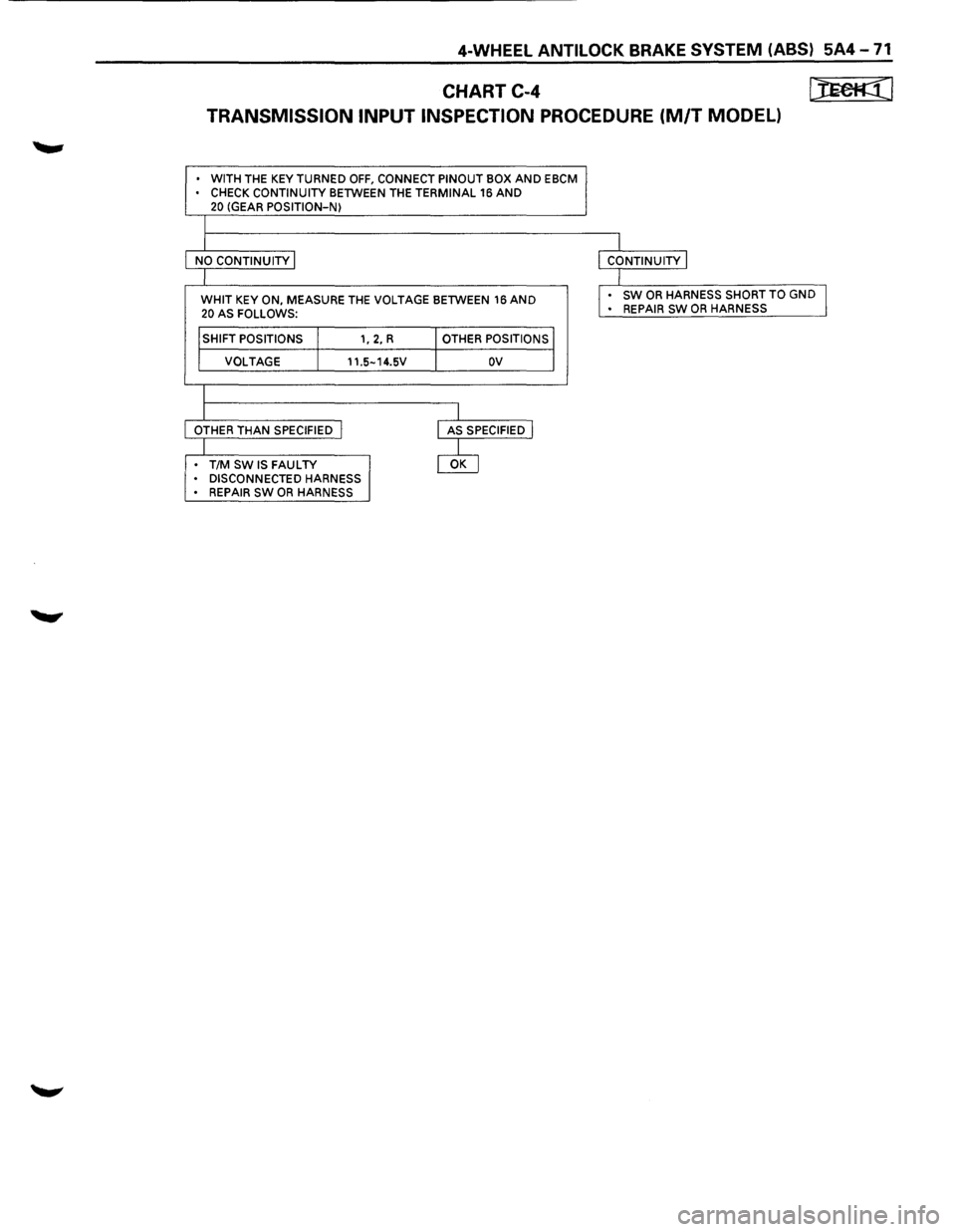
CHART C-4 [JEefl:(l
TRANSMISSION INPUT INSPECTION PROCEDURE (M/T MODEL)
• WITH THE KEY TURNED OFF, CONNECT PINOUT BOX AND EBCM • CHECK CONTINUITY BETWEEN THE TERMINAL 16 AND 20 (GEAR POSITION-N)
I
I I
NO
CONTINUITY I I CONTINUITY I
I I
WHIT KEY ON, MEASURE
THE VOLTAGE BETWEEN 16 AND I . sw OR HARNESS SHORT TO GND I
20 AS FOLLOWS: •
REPAIR SW OR HARNESS
I SHIFT POSITIONS I 1, 2, R I OTHER POSITIONS I
I
VOLTAGE I 11.5-14.5V I ov I
I
I I
OTHER THAN SPECIFIED I
I AS SPECIFIED I
I @ . T/M SW IS FAULTY • DISCONNECTED HARNESS • REPAIR SW OR HARNESS
Page 482 of 1928
5A4-72 4-WHEEL ANTILOCK BRAKE SYSTEM (ABS)
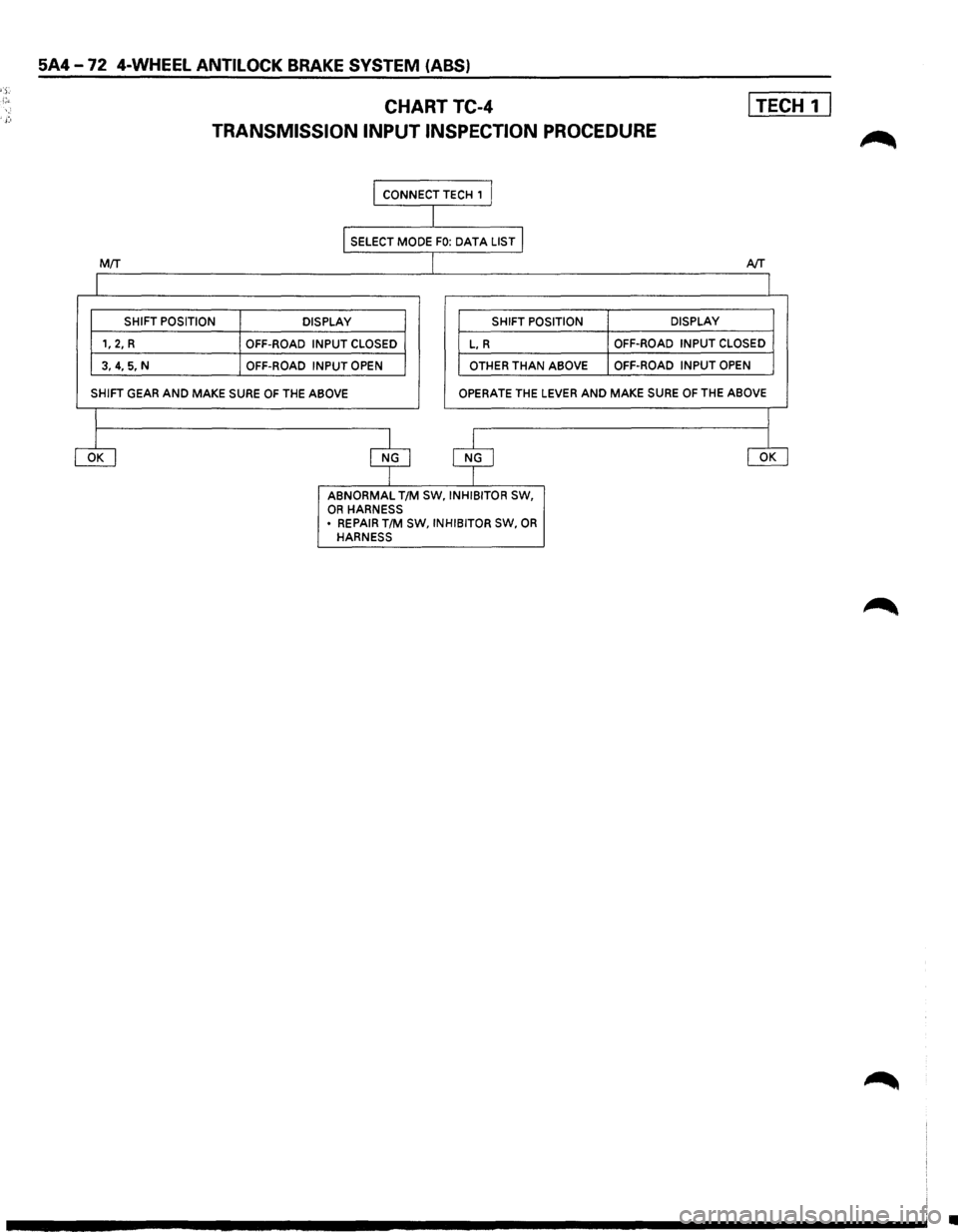
CHARTTC-4 I TECH 1 I
TRANSMISSION INPUT INSPECTION PROCEDURE
I CONNECT TECH , I
I
I SELECT MODE FO: DATA LIST I
MIT J AfT
I I
SHIFT POSITION
DISPLAY SHIFT POSITION DISPLAY
1,
2, R OFF-ROAD INPUT CLOSED L, R OFF-ROAD
INPUT CLOSED
3, 4, 5, N
OFF-ROAD INPUT OPEN OTHER THAN ABOVE OFF-ROAD
INPUT OPEN
SHIFT GEAR AND MAKE SURE OF THE ABOVE OPERATE THE LEVER AND MAKE SURE OF THE ABOVE
I I
ciJ $ $ ciJ
ABNORMAL T/M SW, INHIBITOR SW, OR HARNESS
• REPAIR T/M SW, INHIBITOR SW, OR HARNESS
•
Page 483 of 1928
4-WHEEL ANTILOCK BRAKE SYSTEM (ABS) 5A4-73
ON-VEHICLE SERVICE
W CAUTION:
~ Replace all components included in repair kits used to service this system. Lubricate rubber parts with
clean, fresh brake fluid to ease assembly. Do not use shop air with in-line lubricators on brake parts,
as
damage to rubber components may result. If any hydraulic component is removed or brake line
disconnected,
it may be necessary to bleed part or all of the brake system.
NOTE:
The use of rubber hoses or parts other than those furnished specifically for the Anti lock Brake System may
lead to functional problems requiring major overhaul.
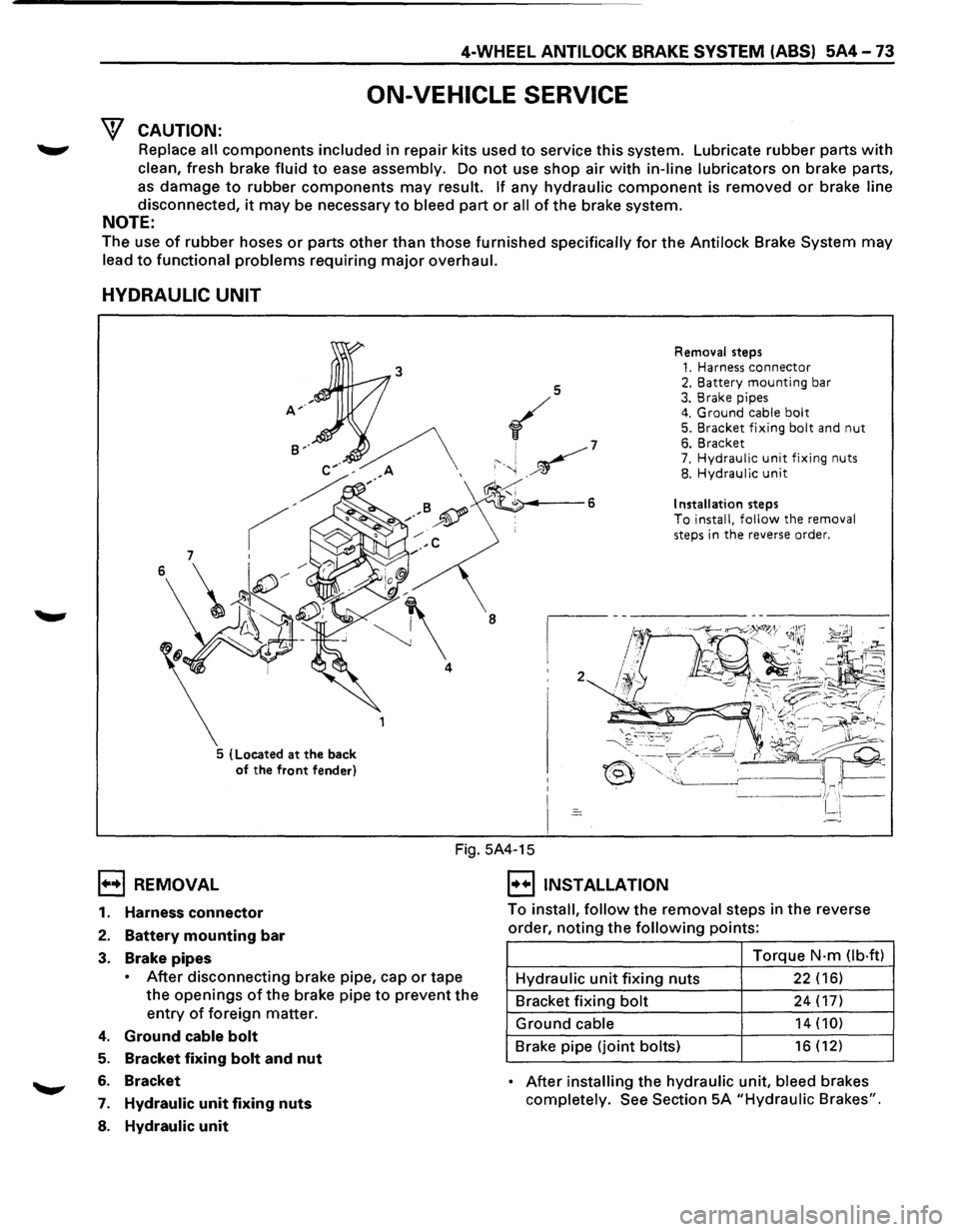
HYDRAULIC UNIT
5 (Located at the back
of the front fender) Removal
steps
1. Harness connector 2. Battery mounting bar 3. Brake pipes 4. Ground cable bolt 5. Bracket fixing bolt and nut 6. Bracket 7. Hydraulic unit fixing nuts 8. Hydraulic unit
Installation steps To install, follow the removal
steps in the reverse order.
1••1 REMOVAL
Fig. 5A4-15
I••IINSTALLATION
1. Harness connector
2. Battery mounting bar
3. Brake pipes
• After disconnecting brake pipe, cap or tape
the
openings of the brake pipe to prevent the
entry of foreign matter.
4. Ground cable bolt
5. Bracket fixing bolt and nut
6. Bracket
7. Hydraulic unit fixing nuts
8. Hydraulic unit
To install, follow the removal steps in the reverse
order,
noting the following points:
Torque
N·m Ob·ftl
Hydraulic unit fixing nuts 22 (16)
Bracket fixing bolt 24 (17)
Ground cable 14 (10)
Brake pipe (joint bolts) 16 (12)
• After installing the hydraulic unit, bleed brakes
completely.
See Section 5A "Hydraulic Brakes".
Page 484 of 1928
5A4-74 4-WHEEL ANTILOCK BRAKE SYSTEM (ABS)
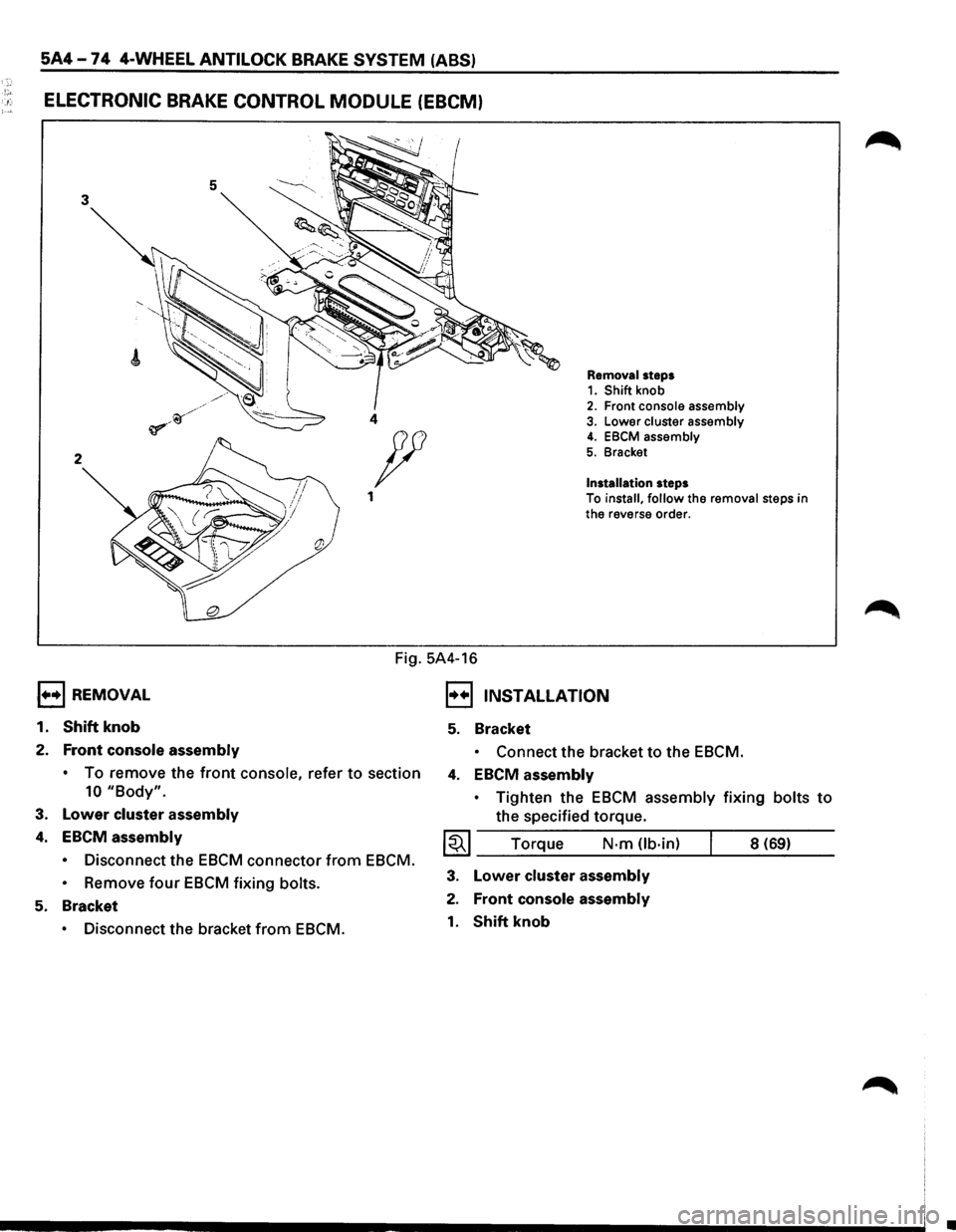
!"' . .: ELECTRONIC BRAKE CONTROL MODULE (EBCM)
5 3
2
1••1 REMOVAL
1.
Shift knob
2. Front console assembly
Removal steps 1. Shift knob 2. Front console assembly 4 3. Lower cluster assembly
Installation steps
4. EBCM assembly
5. Bracket p
1 To install, follow the removal steps in
the reverse order.
Fig. 5A4-16
I••IJNSTALLATION
5. Bracket
• Connect the bracket to the EBCM.
•
To remove the front console, refer to section 4. EBCM assembly
10 "Body".
3. Lower cluster assembly
4. EBCM assembly
• Disconnect the EBCM connector from EBCM.
•
Remove four EBCM fixing bolts.
5. Bracket
• Disconnect the bracket from EBCM. •
Tighten
the EBCM assembly fixing bolts to
the specified torque.
~~~ Torque N·m Ub·in) 8 (69)
3. Lower cluster assembly
2. Front console assembly
1. Shift knob
•
Page 485 of 1928
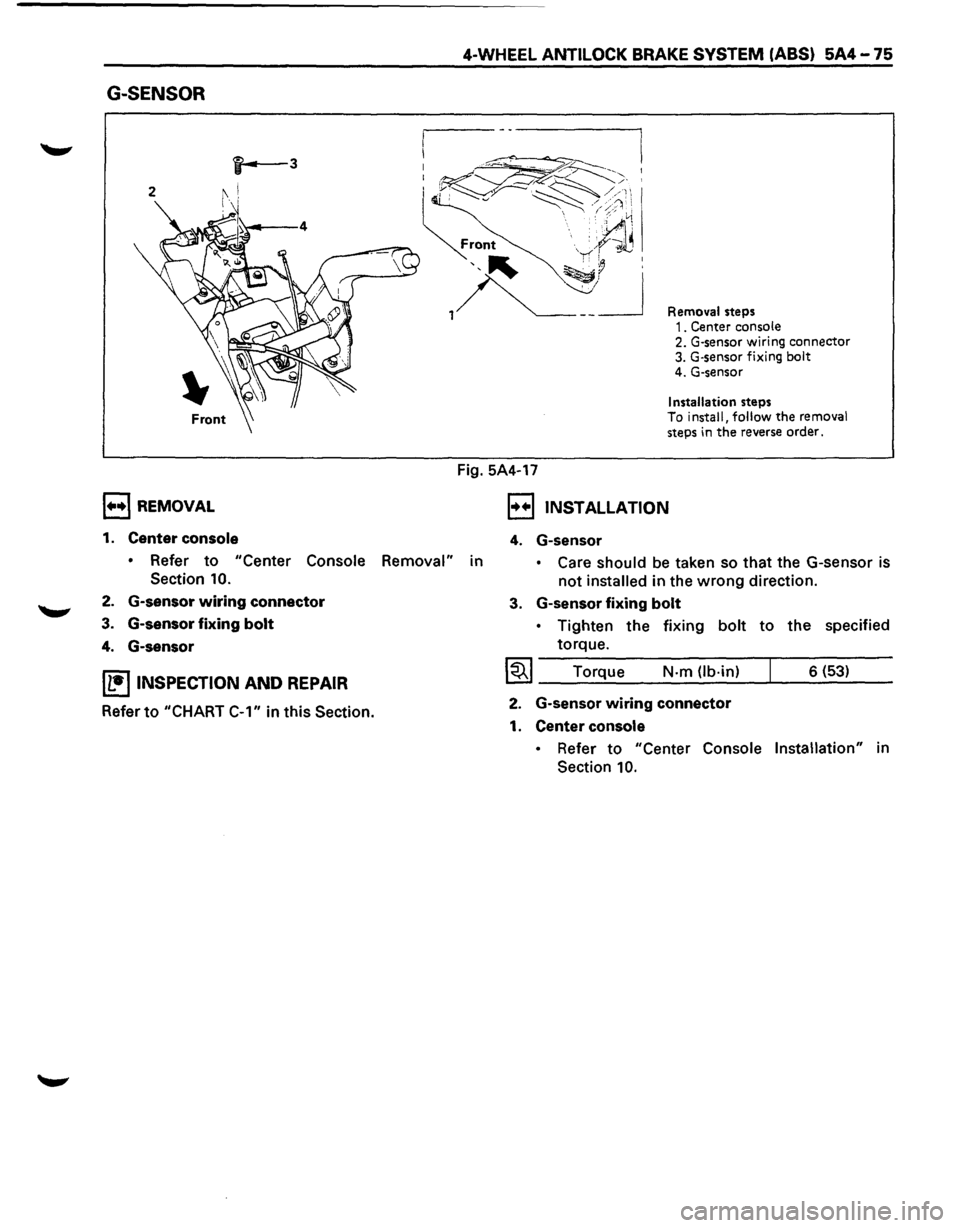
G-SENSOR
, .... ,REMOVAL
1. Center console
4-WHEEL ANTILOCK BRAKE SYSTEM (ABS) 5A4-75
Fig. 5A4-17
Removal steps 1. Center console 2. G-sensor wiring connector 3. G·sensor fixing bolt 4. G-sensor
Installation steps To install, follow the removal steps in the reverse order.
, .. .,, INSTALLATION
4. G-sensor
• Refer to "Center Console Removal" in • Care should be taken so that the G-sensor is
not installed in the wrong direction.
Section 10.
2. G-sensor wiring connector
3. G-sensor fixing bolt
4. G-sensor
IL•ItNSPECTION AND REPAIR
Refer to "CHART
C-1" in this Section.
3. G-sensor fixing bolt
• Tighten the fixing bolt to the specified
torque.
I~I ____ T_o_rq~u~e ____ N~·-m~(lb_·_in~)--~ ___ 6_(_53~) __ __
2. G-sensor wiring connector
1. Center console
• Refer to "Center Console Installation" in
Section
10.
Page 486 of 1928
if.. ~ ' -
5A4-76 4-WHEEL ANTILOCK BRAKE SYSTEM (ABS)
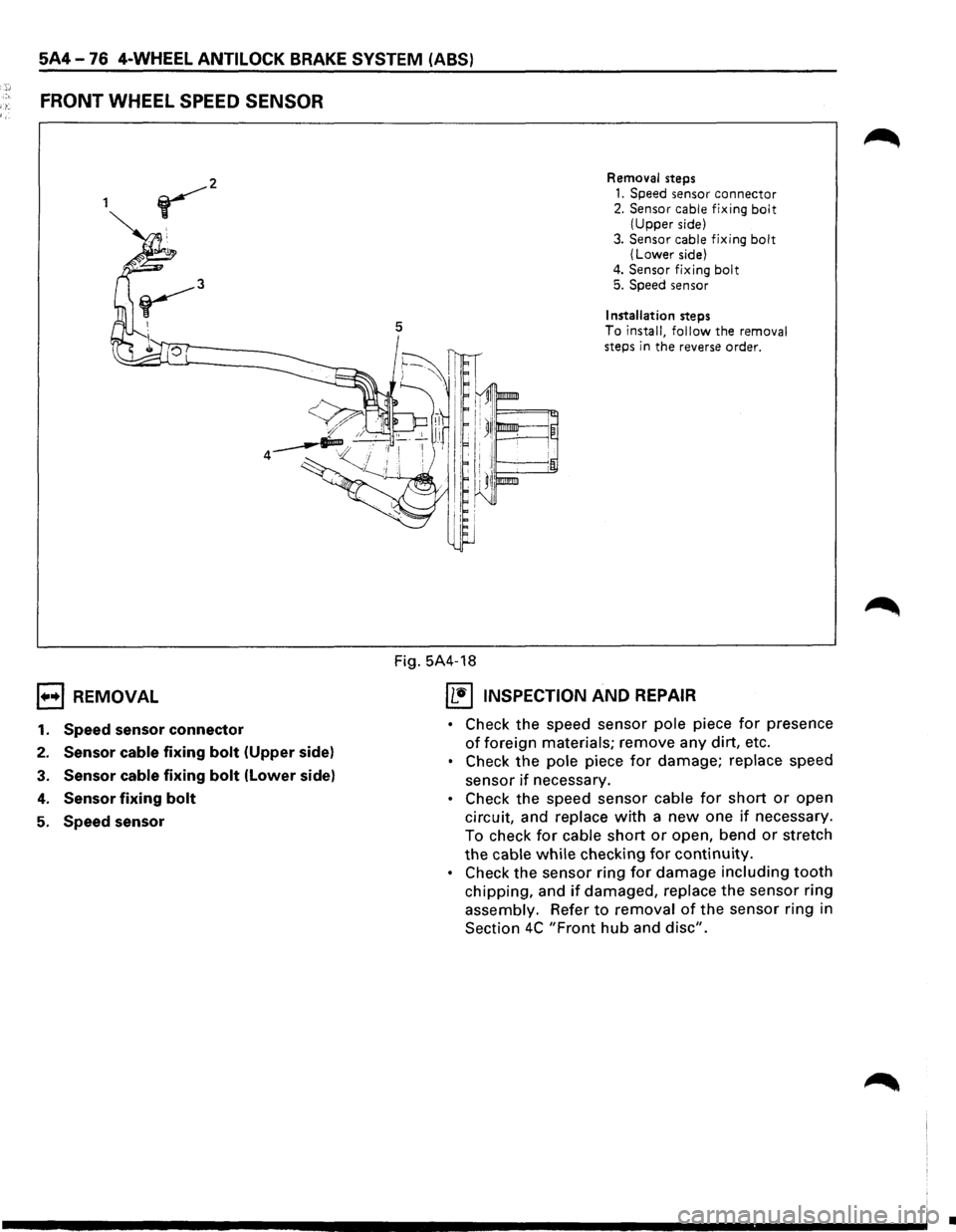
FRONT WHEEL SPEED SENSOR
1••1 REMOVAL
1. Speed sensor connector
2. Sensor cable fixing bolt (Upper side)
3. Sensor cable fixing bolt (Lower side)
4. Sensor fixing bolt
5. Speed sensor
5
Removal steps
1. Speed sensor connector 2. Sensor cable fixing bolt (Upper side)
3.
Sensor cable fixing bolt (Lower side)
4. Sensor fixing bolt 5. Speed sensor
Installation steps
To install, follow the removal
steps in the reverse order.
Fig. 5A4-18
IL•IINSPECTION AND REPAIR
• Check the speed sensor pole piece for presence
of foreign materials; remove any dirt, etc.
• Check the pole piece for damage; replace speed
sensor
if necessary.
• Check the speed sensor cable for short or open
circuit, and replace
with a new one if necessary.
To check
for cable short or open, bend or stretch
the
cable while checking for continuity.
• Check the sensor ring for damage including tooth
chipping, and if damaged, replace the sensor ring
assembly. Refer
to removal of the sensor ring in
Section
4C "Front hub and disc".
•
Page 487 of 1928
I••! INSTALLATION
5. Speed sensor
4-WHEEL ANTILOCK BRAKE SYSTEM (ABS) 5A4-77
,.....,. • Take care not to hit the speed sensor pole
piece during installation.
4. Speed sensor fixing bolt
• Tighten the fixing bolt to the specified
torque.
1~1 Torque N·m (lb·in) 8 (69)
3. Speed sensor cable fixing bolt (lower side)
• Tighten the fixing bolt to the specified
torque.
~~~ Torque N·m (lb-ft) 24 (18)
2. Speed sensor cable fixing bolt (Upper side)
• Tighten
torque.
1~1 Torque the
fixing
bolt to the specified
N-m (lb·in) 6 (52)
• Confirm that a white line marked on the
cable is not twisted when connecting the
speed sensor
cable.
1. Speed sensor connector
Page 488 of 1928
5A4-78 4-WHEEL ANTILOCK BRAKE SYSTEM (ABS)
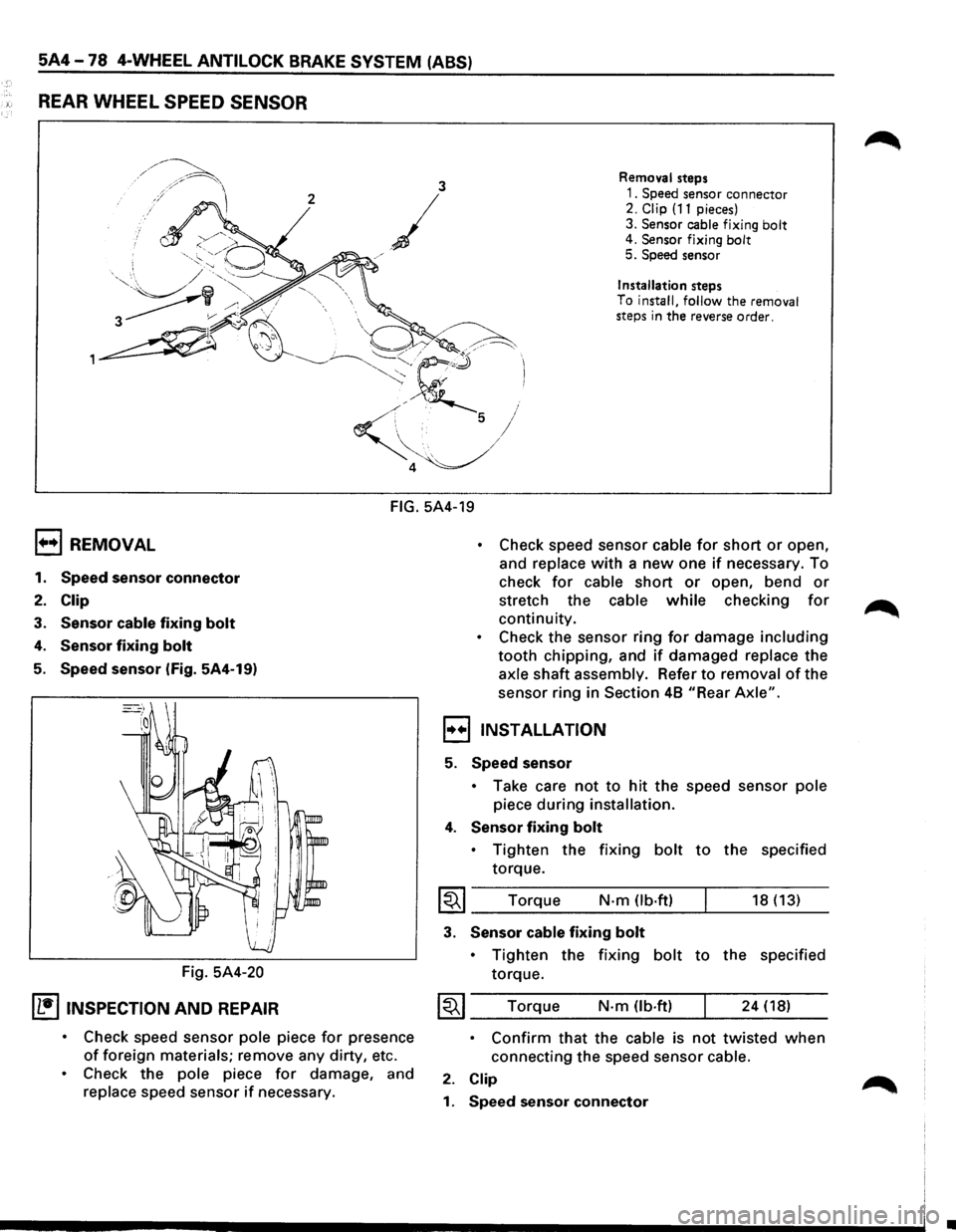
REAR WHEEL SPEED SENSOR
3 Removal steps
2
/
1. Speed sensor connector 2. Clip (11 pieces)
3.
Sensor cable fixing bolt 4. Sensor fixing bolt 5. Speed sensor
j
/
Installation steps
To
install, follow the removal
steps in the reverse order.
FIG. 5A4-19
1+•1 REMOVAL
1. Speed sensor connector
2. Clip
3. Sensor cable fixing bolt
4. Sensor fixing bolt
5. Speed sensor (Fig. 5A4-19)
Fig.
5A4-20
IL•ItNSPECTION AND REPAIR
• Check speed sensor pole piece for presence
of foreign materials; remove any dirty, etc.
• Check the pole piece for damage, and
replace speed sensor if necessary.
• Check speed sensor cable for short or open,
and
replace with a new one if necessary. To
check
for cable short or open, bend or
stretch the cable while checking for
continuity.
• Check the sensor ring for damage including
tooth chipping, and if damaged replace the
axle shaft assembly. Refer to removal of the
sensor ring in
Section 48 "Rear Axle".
,,..,,INSTALLATION
5. Speed sensor
• Take care not to hit the speed sensor pole
piece during installation.
4. Sensor fixing bolt
• Tighten the fixing bolt to the specified
torque.
I~I ____ T_o_rq~u_e ____ N __ ·m __ O_b·_ft_) __ ~ ____ 18_(_1_3_) __
3. Sensor cable fixing bolt
• Tighten the fixing bolt to the specified
torque.
~~~ Torque N·m (lb.ft) 24 (18)
• Confirm that the cable is not twisted when
connecting the speed sensor cable.
2. Clip
1. Speed sensor connector
•
Page 489 of 1928
ILLUSTRATION
'~ ~··
J -
~
. .
"
~
"f'38~
0
~~ '~
--~ S::S.·f
-~; -~b'
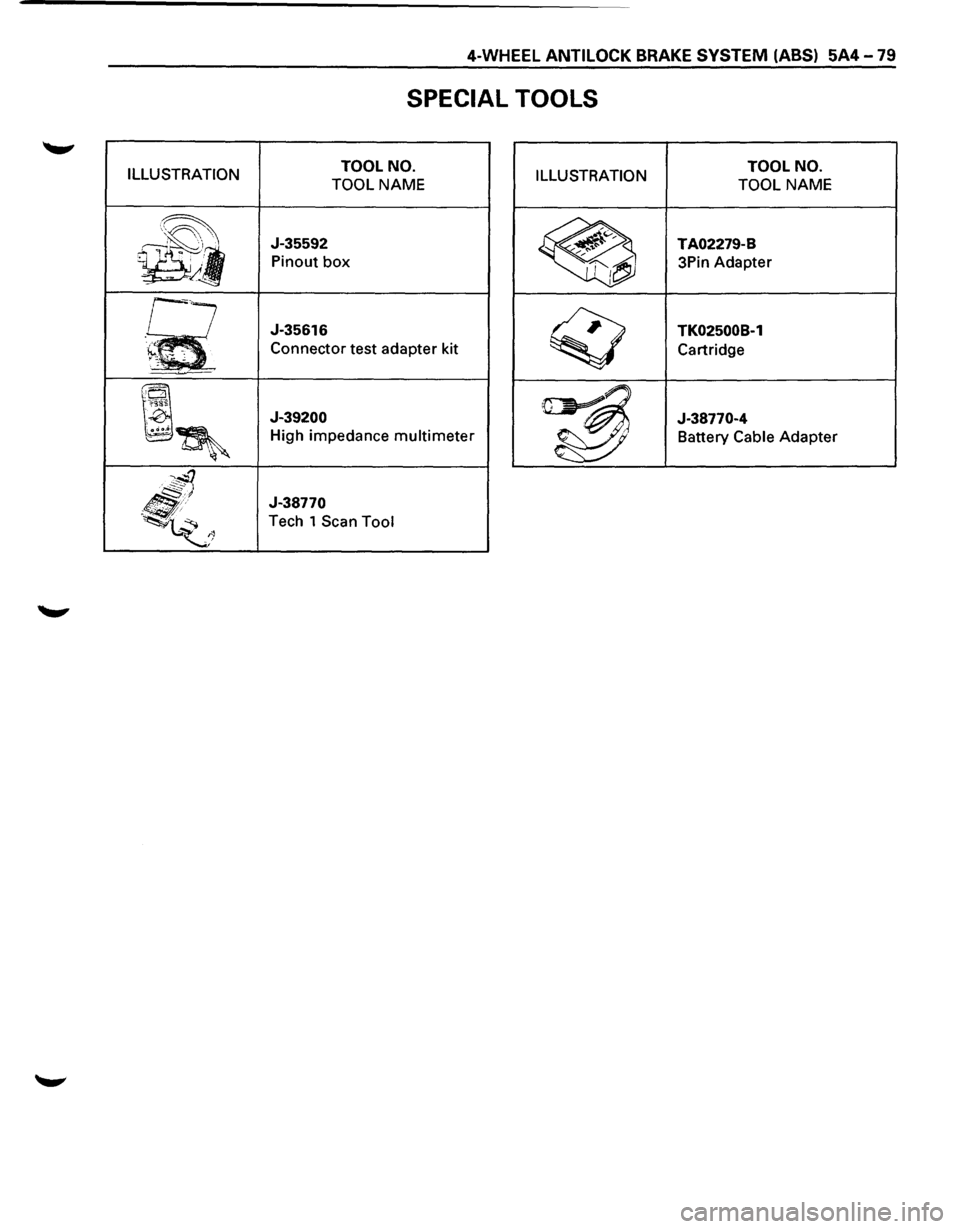
SPECIAL TOOLS
TOOL NO.
TOOL
NAME ILLUSTRATION
J-35592
Pinout box
J-35616
Connector test adapter kit
J-39200
High impedance multimeter
J-38770
Tech 1 Scan Tool
TOOL NO.
TOOL
NAME
TA02279-B
3Pin Adapter
TK02500B-1
Cartridge
J-38770-4 Battery
Cable Adapter
Page 490 of 1928
MEMO
. i ~·
•