wheel bolts JAGUAR X308 1998 2.G User Guide
[x] Cancel search | Manufacturer: JAGUAR, Model Year: 1998, Model line: X308, Model: JAGUAR X308 1998 2.GPages: 2490, PDF Size: 69.81 MB
Page 120 of 2490

Install but do not tighten
stabilizer bar LH mounting
bracket securing bolts.
Inst al
l stabilizer bar RH moun
ting bracket securing bolts
and tighten to 30-40Nm.
Tigh ten LH mountin
g bracke
t bolts to 30-40Nm.
6. Secure link arms to
stabilizer bar.
Tighten LH li
nk arm ball joint to stabilizer bar securing nut
to 60-80Nm.
Ti ghten R
H link arm ball joint to stabilizer bar securing nut
to 60-80Nm.
7. Using screws or new scrivets , secure undertray to fr
ont
bumper cover.
8. Usi n
g a new tiestrap, secure undertray to crossbeam brace.
9. Using new scrivets, secure un dertray to each wheelarch
liner.
Page 136 of 2490

Remova
l
CAUTI
O
N: Replacement of
nuts and bolts: Various thread-locking devises are used on nuts and bolts throughout the
vehicle. These devises restrict the number of times a nut or bolt can be used. See section 100-00 for information.
1 8
G 1004
1.
Re
move vertical link and hub as
sembly. Refer to 60.25.38.90.
2. Re
move brake disc shield from vertical link.
1. Remove screws.
2. Remove disc shield.
3. Us
ing special tool, secure vertical link and hub assembly in a
vise.
Secure special tool
in a vise.
Posit
i
on hub in tool.
Inst
al
l wheel nuts.
4. Re
move rotor nut spring-clip.
5. Remove rotor nut.
Us
ing special tool 206-066A remove rotor nut.
Page 140 of 2490

slots.
Install rotor nut spring-clip.
Inst al
l spring clip in hub retaining holes and castellated
slots of the rotor nut.
9. Inst al
l disc shield.
1. Position disc shield on vertical link.
2. Install bolts.
10. Install vertical link and hub as sembly on vehicle. Refer to
60.25.38.90.
11. Carry out steering geometry an d wheel alignment checks and
if necessary adjust. Refer to 57.65.01.
Page 142 of 2490

Remova
l
CAUTI
O
N: Replacement of
nuts and bolts: Various thread-locking devises are used on nuts and bolts throughout the
vehicle. These devises restrict the number of times a nut or bolt can be used. Refer to Section 100-00 for further
information.
1 8
G 1004
1.
Ra
ise front of vehicle and support on stands. Refer to Section
100-02.
2. Remove appropriate road wheel. Refer to Section 100-02.
3. Remove front brake disc. Refer to 70.10.12.
4. Remove vertical link and hub assembly. Refer to operation
60.25.38.90.
5. Re
move brake-disc shield from vertical link.
1. Remove screws.
2. Remove disc shield.
6. Us
ing special tool, secure vertical link and hub assembly in a
vise.
Secu re spe
cial tool 204-195 in a vise.
Posit
i
on hub in tool.
Inst
al
l wheel nuts.
7. Remove rotor nut spring-clip.
Page 146 of 2490
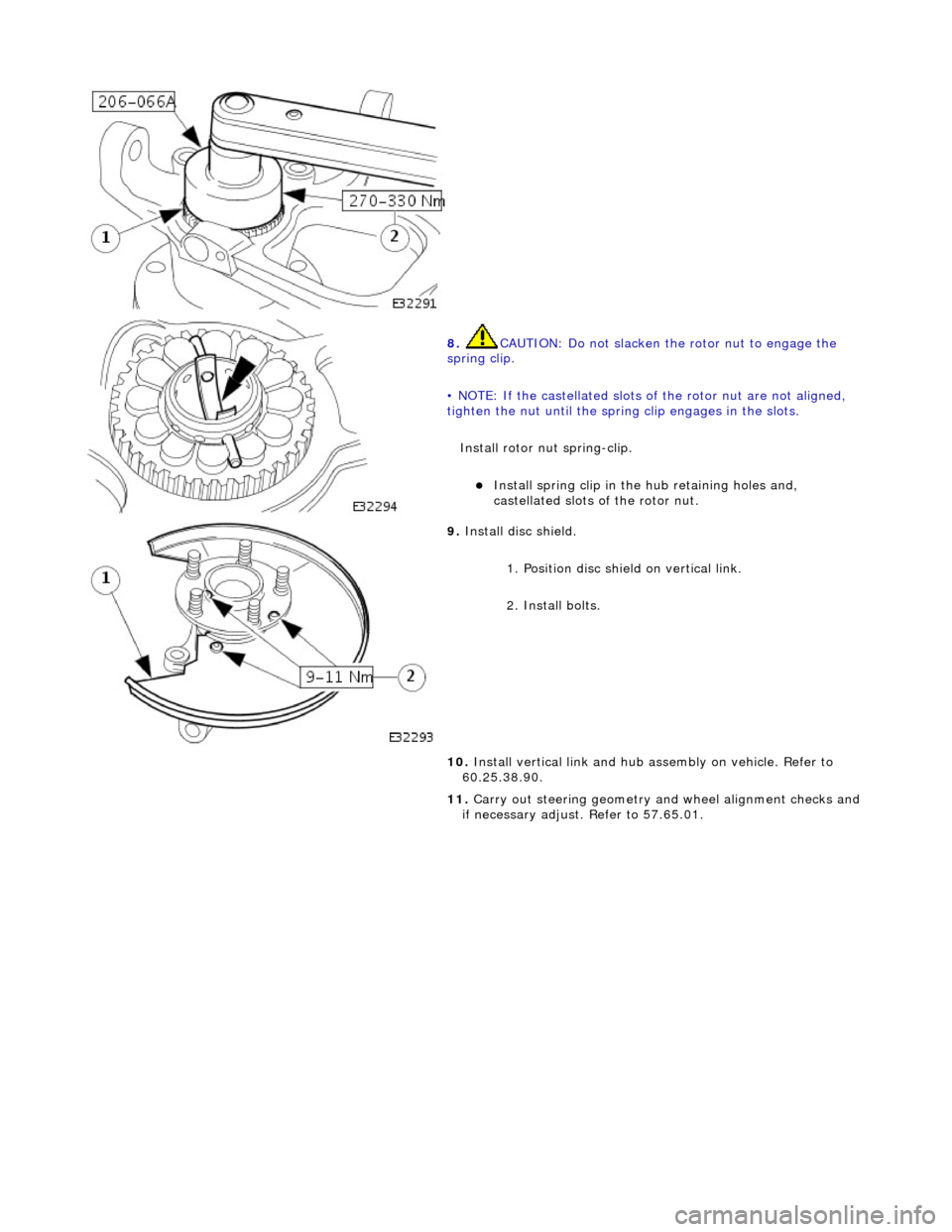
8.
CAUTIO
N: Do not slacken the rotor nut to engage the
spring clip.
• NOTE: If the castellated slots of the rotor nut are not aligned,
tighten the nut until the spring clip engages in the slots.
Install rotor nut spring-clip.
Inst
all spring clip in the hub retaining holes and,
castellated slots of the rotor nut.
9. Inst al
l disc shield.
1. Position disc shield on vertical link.
2. Install bolts.
10. Install vertical link and hub as sembly on vehicle. Refer to
60.25.38.90.
11. Carry out steering geometry an d wheel alignment checks and
if necessary adjust. Refer to 57.65.01.
Page 148 of 2490

Remova
l
CAUTI
O
N: Replacement of
nuts and bolts: Various thread-locking devises are used on nuts and bolts throughout the
vehicle. These devises restrict the number of times a nut or bolt can be used. See section 100-00 for information.
1 8
G 1004
1.
Ra
ise front of vehicle and support on stands. Refer to Section
100-02.
2. Remove appropriate road wheel. Refer to Section 100-02.
3. Remove front brake disc. Refer to 70.10.12.
4. Remove vertical link and hub assembly. Refer to operation
60.25.38.90.
5. Re
move brake-disc shield from vertical link.
1. Remove screws.
2. Remove disc shield.
6. Us
ing special tool, secure vertical link and hub assembly in a
vise.
Secure special tool
in a vise.
Posit
i
on hub in tool.
Inst
al
l wheel nuts.
7. Re
move rotor nut spring-clip.
Page 152 of 2490

tigh
ten the nut until the spring clip engages in the slots.
Install rotor nut spring-clip.
Inst al
l spring clip in hub retaining holes and castellated
slots of the rotor nut.
9. Ins t
all disc shield on vertical link.
1. Position disc shield.
2. Install bolts.
10. Install vertical link and hub as sembly on vehicle. Refer to
60.25.38.90.
11. Carry out steering geometry an d wheel alignment checks and
if necessary adjust. Refer to 57.65.01.
Page 169 of 2490
Rear Suspension - Axle B
ump Stop
Re
moval and Installation
Remov
al
CAUTI
ON: Replacement of
nuts and bolts: Various thread-locking devices are used on nuts and bolts throughout the
vehicle. These devices restrict the number of times a nut or bolt can be used. See section 100-00 for information.
I
nstallation
1.
R
aise rear of vehicle and support
on stands. Refer to Section
100-02.
2. Remove appropriate road wheel. Refer to Section 100-02.
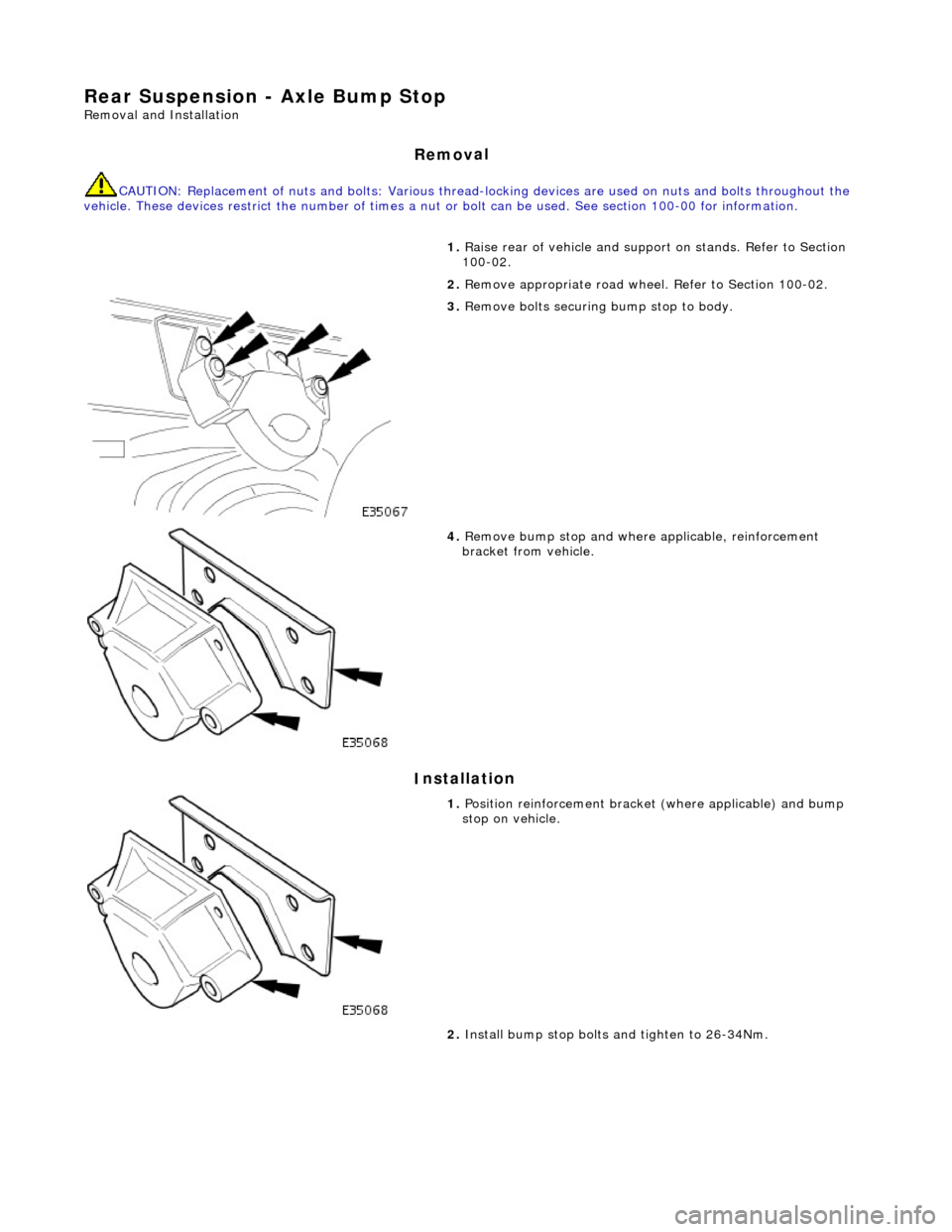
3. Remove bolts securing bump stop to body.
4. Remove bu
mp stop and where applicable, reinforcement
bracket from vehicle.
1. Position reinforcemen t brac
ket (where a
pplicable) and bump
stop on vehicle.
2. Install bump stop bolts and tighten to 26-34Nm.
Page 171 of 2490
Rear
Suspension - Rear Susp
ension and Axle Assembly
Re
moval and Installation
Remov
al
1.
CAUTI
ON: Replacement of nuts and bolts: Various
thread-locking devices are used on nuts and bolts throughout the
vehicle. These devices restrict the number of times a nut or bolt
can be used.
For additional informat ion, refer to Section 100
-0
0 General
Informati
on
.
R
aise the rear of the vehicle
and support on axle stands.
For additional informat ion, refer to Section 100
-0
2 Jacking and
Liftin
g
.
2.
R
emove the rear wheels.
For additional informat ion, refer to Section 204
-04
Wheels and
Tire
s
.
3. CAUTI
ON: Do not suspend the caliper from the brake
hose as this will damage the hose.
• NOTE: Right-hand shown, left-hand similar
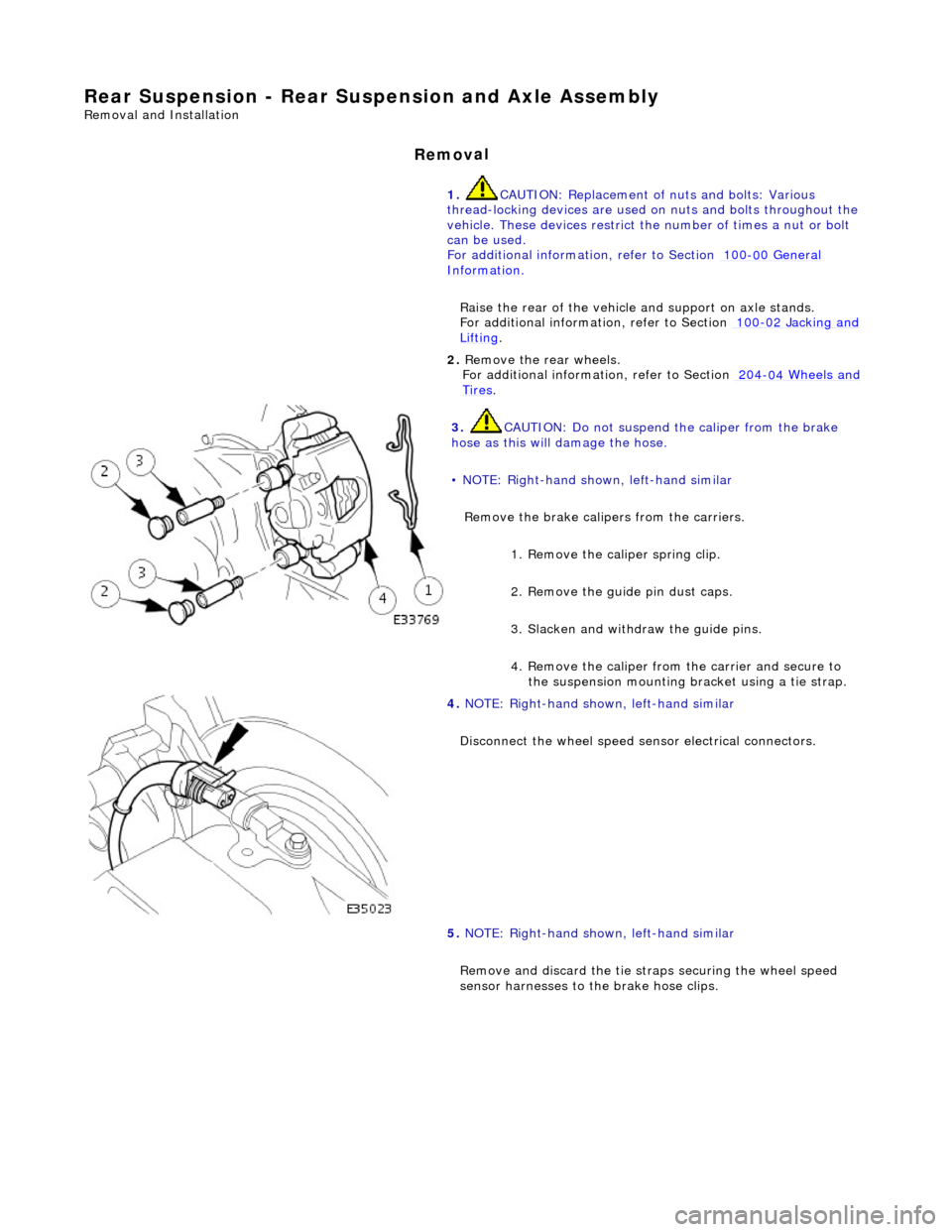
Remove the brake calipers from the carriers.
1. Remove the caliper spring clip.
2. Remove the guide pin dust caps.
3. Slacken and withdr aw the guide pins.
4. Remove the caliper from the carrier and secure to the suspension mounting bracket using a tie strap.
4. NOTE
: Right-hand shown, left-hand similar
Disconnect the wheel speed sensor electrical connectors.
5. NOTE: Right-hand shown, left-hand similar
Remove and discard th e tie straps securing the wheel speed
sensor harnesses to the brake hose clips.
Page 180 of 2490

Rear Su
spension - Rear Shock Absorber
Re
mo
val and Installation
Remov
a
l
S
p
ecial Tool(s)
Spri
ng C
ompressors
204-179 (JD 199)
Spri ng Re
taining straps
204-179-1 (JD 199-1)
1. CAUTION: Replacement of nuts and bolts: Various
thread-locking devices are used on nuts and bolts throughout the
vehicle. These devices restrict the number of times a nut or bolt
can be used.
For additional informat ion, refer to Section 100
-00
General
Informati
o
n
.
R a
ise the rear of the vehicle
and support on axle stands.
For additional informat ion, refer to Section 100
-02
Jacking and
Liftin
g.
2. Re
move the relevant rear wheel.
For additional informat ion, refer to Section 204
-04 W
heels and
Tire
s.
3. CAUTIO
N: Do not suspend the caliper from the brake
hose as this will damage the hose.
Remove the brake caliper from the carrier.
1. Remove the caliper spring clip.
2. Remove the guide pin dust caps.
3. Slacken and withdr aw the guide pins.
4. Remove the caliper from the carrier and secure to the suspension mounting bracket using a tie strap.
4. Disc
onnect the wheel speed sensor electrical connector.