Cat JAGUAR XF 2009 1.G Owners Manual
[x] Cancel search | Manufacturer: JAGUAR, Model Year: 2009, Model line: XF, Model: JAGUAR XF 2009 1.GPages: 391, PDF Size: 19.32 MB
Page 300 of 391
Portable audio
300
Connecting an iPod
On the audio Home screen, select Audio/TV,
then Portable audio , then iPod.
Note: You can also press the SOURCE button
repeatedly to select Portable audio device .
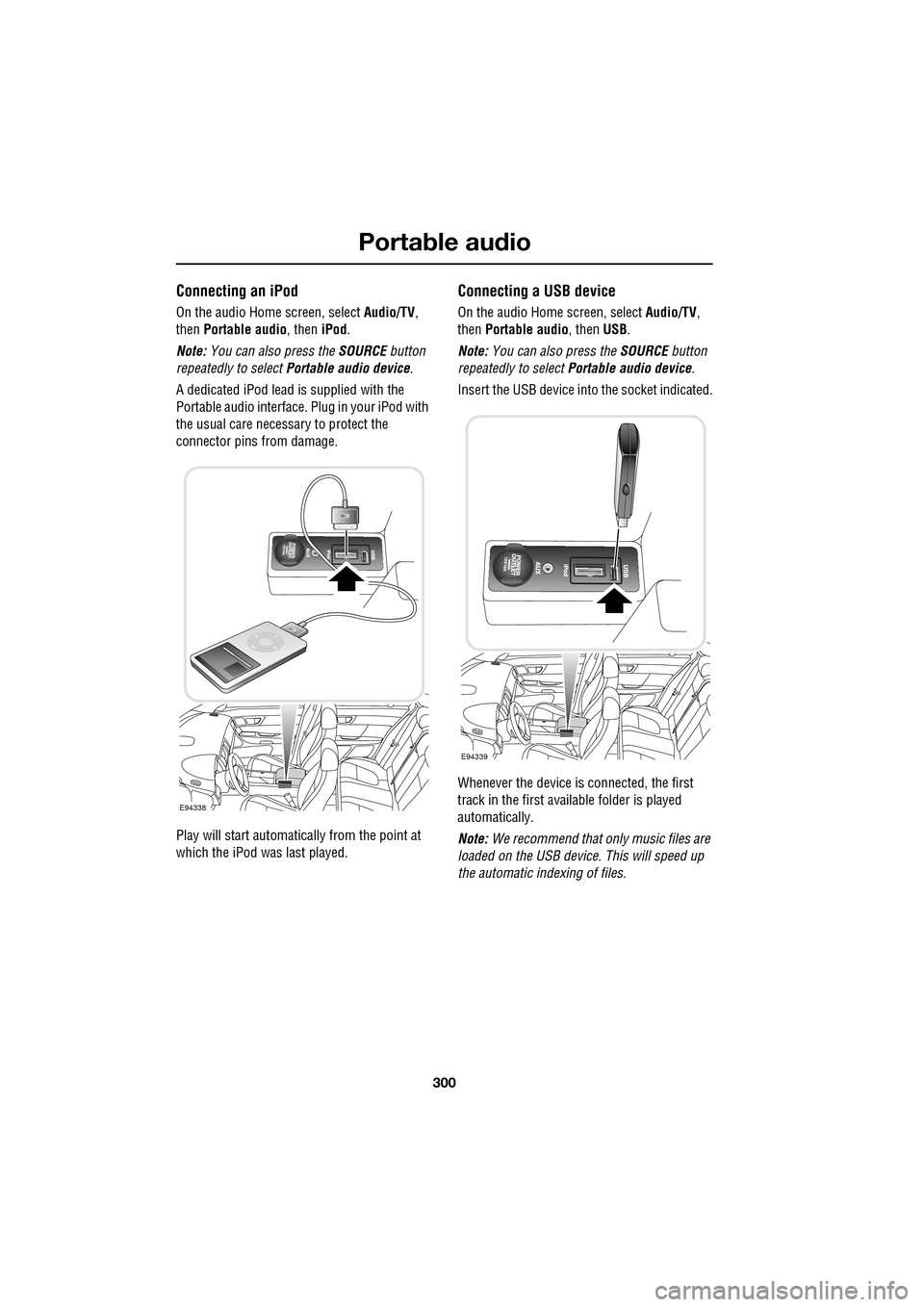
A dedicated iPod lead is supplied with the
Portable audio interface. Plug in your iPod with
the usual care necess ary to protect the
connector pins from damage.
Play will start automatically from the point at
which the iPod was last played.
Connecting a USB device
On the audio Home screen, select Audio/TV,
then Portable audio, then USB.
Note: You can also press the SOURCE button
repeatedly to select Portable audio device .
Insert the USB device into the socket indicated.
Whenever the device is connected, the first
track in the first available folder is played
automatically.
Note: We recommend that only music files are
loaded on the USB devi ce. This will speed up
the automatic i ndexing of files.
E94338
E94339
Page 301 of 391
301
Portable audio
Connecting an auxiliary device
On the audio Home screen, select Audio/TV
and then select Portable audio.
Note: You can also press the SOURCE button
repeatedly to select Portable audio device .
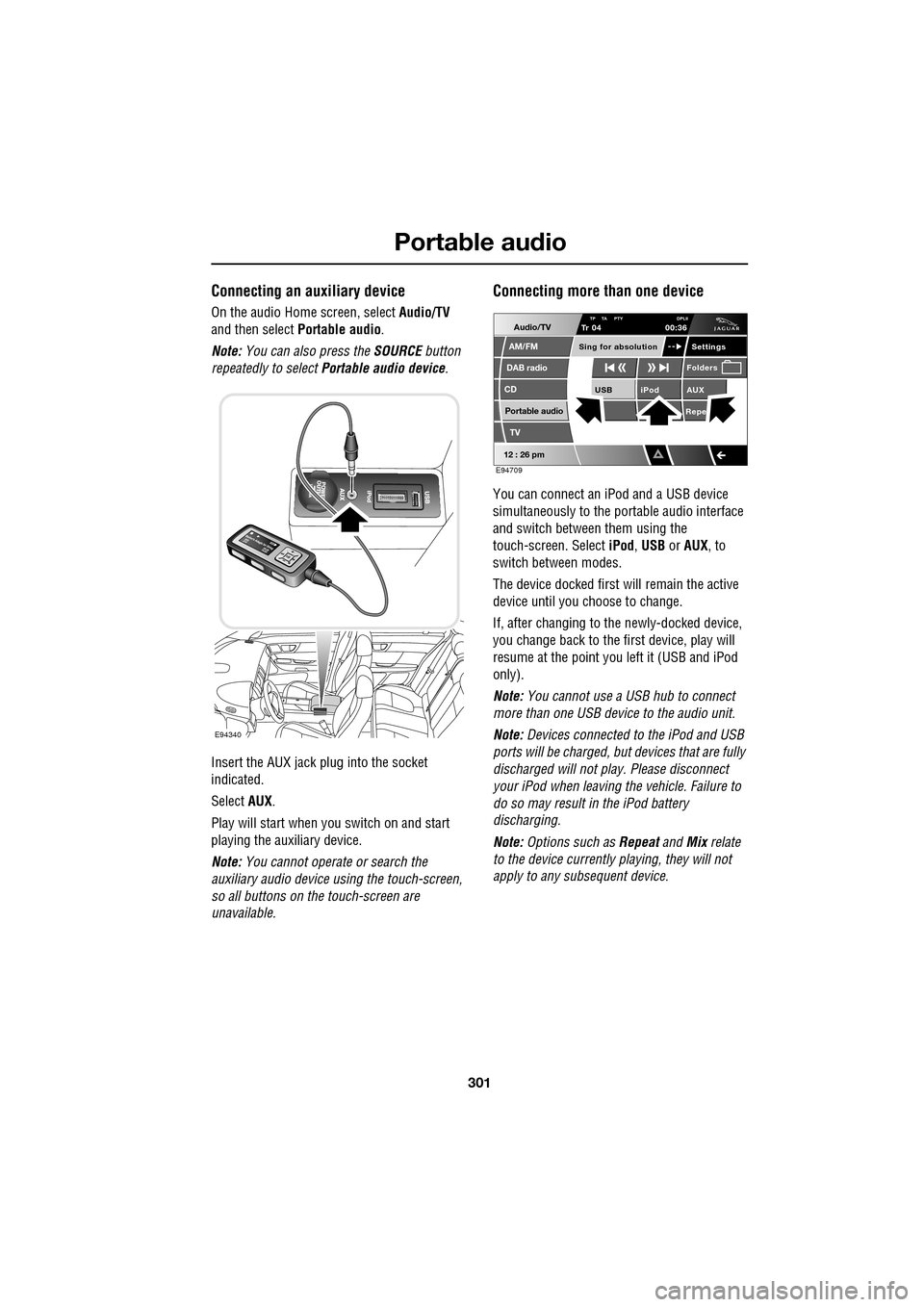
Insert the AUX jack plug into the socket
indicated.
Select AUX.
Play will start when you switch on and start
playing the auxiliary device.
Note: You cannot operate or search the
auxiliary audio device using the touch-screen,
so all buttons on the touch-screen are
unavailable.
Connecting more than one device
You can connect an iPod and a USB device
simultaneously to the portable audio interface
and switch between them using the
touch-screen. Select iPod, USB or AUX , to
switch between modes.
The device docked first will remain the active
device until you choose to change.
If, after changing to the newly-docked device,
you change back to the first device, play will
resume at the point you left it (USB and iPod
only).
Note: You cannot use a USB hub to connect
more than one USB device to the audio unit.
Note: Devices connected to the iPod and USB
ports will be charged, but devices that are fully
discharged will not play. Please disconnect
your iPod when leaving the vehicle. Failure to
do so may result in the iPod battery
discharging.
Note: Options such as Repeat and Mix relate
to the device currently playing, they will not
apply to any subsequent device.
E94340
Audio/TV
DAB radio
CD
AM/FM
12 : 26 pm
iPod AUX
RepeUSB
Settings
Folders
TP TA PTY DPLIITr 04
Portable audio
TV
Sing for absolution
00:36
E94709
Page 307 of 391
307
Telephone
GENERAL INFORMATIONNote: The vehicle telephone system is
designed to function with a wide variety of
Bluetooth® telephones.
As these telephones have a wide range of audio
and echo characteristics, it may take a few
seconds for the vehicle telephone system to
adapt and deliver optimum audio performance.
It may be necessary to reduce the in-vehicle
volume slightly, to fully optimise audio
performance and reduce echo.
In order to achieve th e best possible audio
performance, it may be necessary to select a
lower speed on the heat er blower and reduce
the system volume slightly, when using certain
mobile phones.
Telephone networks
The telephone network standard allows you to
use your telephone in many countries.
However, telephone rece ption may be poor or
unavailable in remote re gions. This may be due
to the inadequate power of the transmitter,
which results in a weak signal or incomplete
coverage.
What is Bluetooth®?
Jaguar Bluetooth® Connectivity was
developed to be used wi th a selected range of
mobile phones, from a number of different
manufacturers. Some mobile phones feature
different operating soft ware versions - the
correct version is needed for successful
integration with the Jaguar Bluetooth®
system.
Bluetooth is an intern ational standard that
allows electronic com ponents to communicate
with each other, using a short-range radio link.
Bluetooth eliminates the need for wires or
cables: Typically, devices can communicate at
a range of up to 10 metres (33 feet).
WARNING
Using the telephone near the car: Do
not telephone inside a garage or near
an open car bonnet. The air may
contain fuel vapours a nd the telephone could
produce sparks and start a fire.
Unusual ambient conditions: Switch
off the telephone in areas where high
explosives are being used. High
frequency remote controls could be interfered
with and cause an explos ion. Switch off your
telephone in areas with a high explosion risk.
This includes filling st ations, fuel storage
areas or chemical factories, as well as places
where the air contains fuel vapour, chemicals
or metal dust. The telephone might produce
sparks and cause a fire or explosion.
Medical equipment: The functioning
of cardiac pacemakers or hearing aids
may be impaired when the phone is in
use. Check with a doctor or manufacturer
whether any such devices you or your
passengers are using, are sufficiently
protected against high-frequency energy.
Always stow your mobile phone
securely. In an accident, loose items
can cause injury.
Using any hand-held appliance while
driving, can be dangerous and is
illegal in cert ain countries.
Page 308 of 391
Telephone
308
The Bluetooth in-car telephone system allows
certain mobile phones to be used hands-free in
your vehicle. There is no need to connect the
mobile phone to a cradle or cable.
Bluetooth® is a registered trademark of
Bluetooth SIG, Inc.
Please refer to the Owner section of the Jaguar
website at www.jaguar.com , for a list of
compatible phones. Altern atively, please refer
to your Dealer/Authorised Repairer.
Note: The Bluetooth technology phones listed
on Jaguar.com, have been tested for
compatibility with Jaguar vehicles.
Performance will vary, based on phone
software version, covera ge and your wireless
carrier. Phones are warranted by their
manufacturer, not Jaguar.
If your mobile phone battery charge becomes
low it may switch off its Bluetooth link to the
vehicle. This is normal operation for mobile
phones, to help preserve the remaining battery
charge. In this event, the touch-screen will
display a phone connection message.
The mobile phone must be paired and docked
with the vehicle system before use.
See TELEPHONE PAIRING AND DOCKING
(page 309). Once paired and docked, the
phone can be operated via the steering wheel
switches or the touch-screen. The mobile
phone doesn’t need to be physically connected
to the vehicle, it can be left in a jacket pocket,
for instance. Calls are routed through the
vehicle’s audio speake rs, and a dedicated
microphone is fitted within the overhead
console and is directionally biased towards the
driver.
You can use the system to answer or reject
incoming calls, make outgoing calls or alter the
call volume. The system does not support SMS
text messaging. Note:
The vehicle ignition system must be on
and the touch-screen system must be active, in
order to use the phone.
Call volume
The volume of telephone calls can be adjusted
for hands-free operation. To adjust the volume,
operate the audio system’s volume control
during a phone call.
If the audio system is in use when the phone
becomes active, the audio system source is
suppressed for the duration of the call.
Charging your phone
It is possible to use the in-car 12V/USB socket
to charge your mobile phone. Refer to the
mobile phone operating instructions for
charging information.
Page 311 of 391
311
Telephone
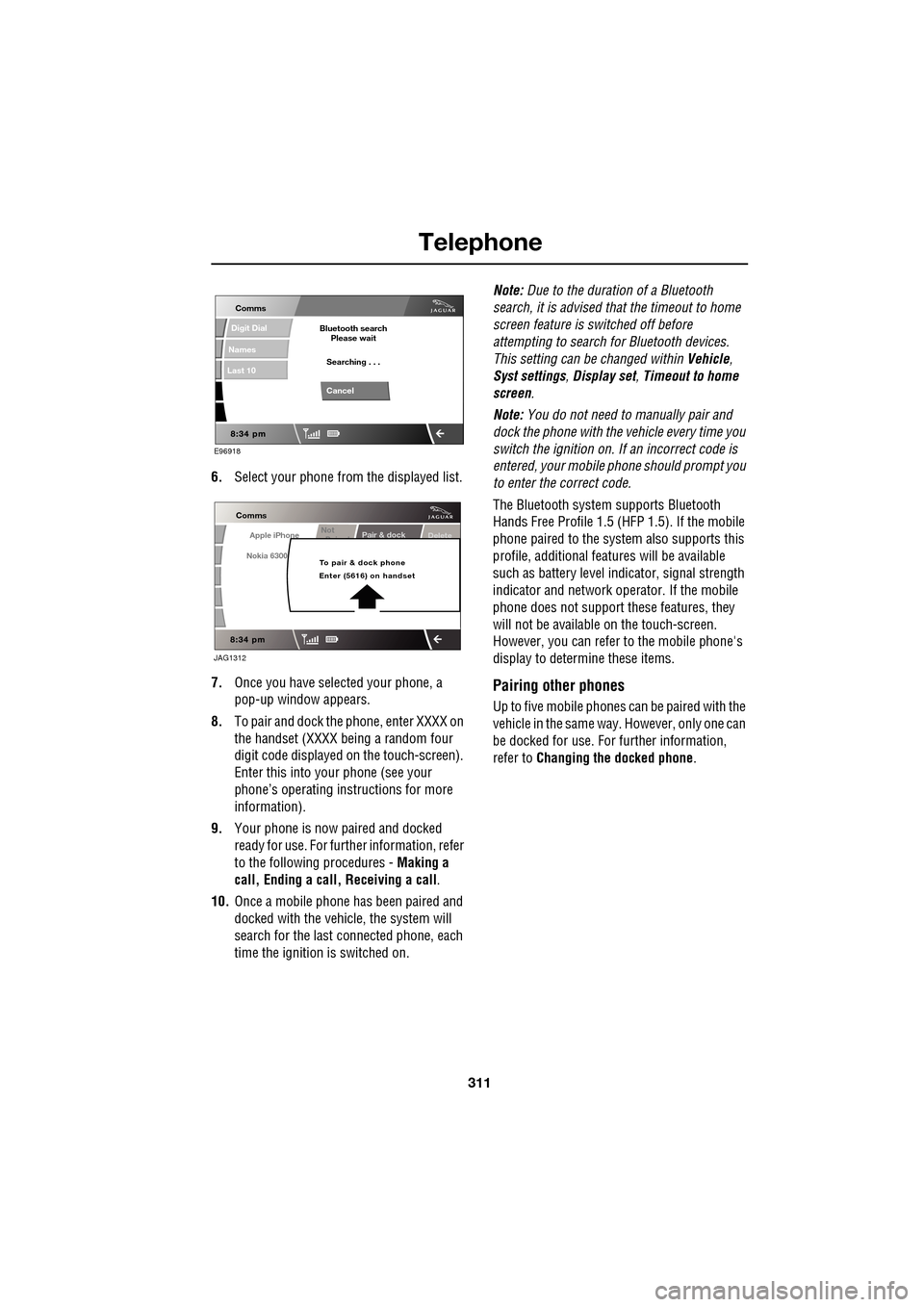
6.Select your phone from the displayed list.
7. Once you have sele cted your phone, a
pop-up window appears.
8. To pair and dock the phone, enter XXXX on
the handset (XXXX being a random four
digit code displayed on the touch-screen).
Enter this into y our phone (see your
phone’s operating instructions for more
information).
9. Your phone is now paired and docked
ready for use. For further information, refer
to the following procedures - Making a
call, Ending a call, Receiving a call .
10. Once a mobile phone has been paired and
docked with the vehicle, the system will
search for the last connected phone, each
time the ignition is switched on. Note:
Due to the duration of a Bluetooth
search, it is advised that the timeout to home
screen feature is switched off before
attempting to search fo r Bluetooth devices.
This setting can be changed within Vehicle,
Syst settings , Display set , Timeout to home
screen .
Note: You do not need to manually pair and
dock the phone with the vehicle every time you
switch the ignition on. If an incorrect code is
entered, your mobile phone should prompt you
to enter the correct code.
The Bluetooth system supports Bluetooth
Hands Free Profile 1.5 (H FP 1.5). If the mobile
phone paired to the system also supports this
profile, additional featur es will be available
such as battery level indicator, signal strength
indicator and network ope rator. If the mobile
phone does not support these features, they
will not be available on the touch-screen.
However, you can refer to the mobile phone's
display to determine these items.
Pairing other phones
Up to five mobile phones can be paired with the
vehicle in the same way. However, only one can
be docked for use. For further information,
refer to Changing the docked phone .
E96918
Comms
Digit Dial
Names
Last 10
Cancel
Bluetooth search
Please wait
Searching . . .
Apple iPhone
Comms
Nokia 6300
Pair & dockDeleteNot
P i d
To pair & dock phone
Enter (5616) on handset
JAG1312
Page 316 of 391
Telephone
316
The Bluetooth system will disconnect the
currently docked phone and will be able to
receive phonebook data se nt from that phone.
Please refer to y our phone's operating
instructions for details of how to send
phonebook data using Bluetooth.
Once the phonebook data ha s been sent, select
Exit to reconnect the last docked phone.
The vehicle's Bluetoot h system will now
display the manually downloaded phonebook
data. For more information, refer to your
phone's operating instructions.
Note: This feature only allows you to send
phonebook data from the last docked phone.
You cannot download data from the Bluetooth
system to a mobile phone.
Once a paired phone is de leted from the paired
phone list, the phonebook data associated with
this phone is deleted.
Erase entire phonebook
To erase the entire phonebook:
Select Phone options (1), then select
Phonebook (3).
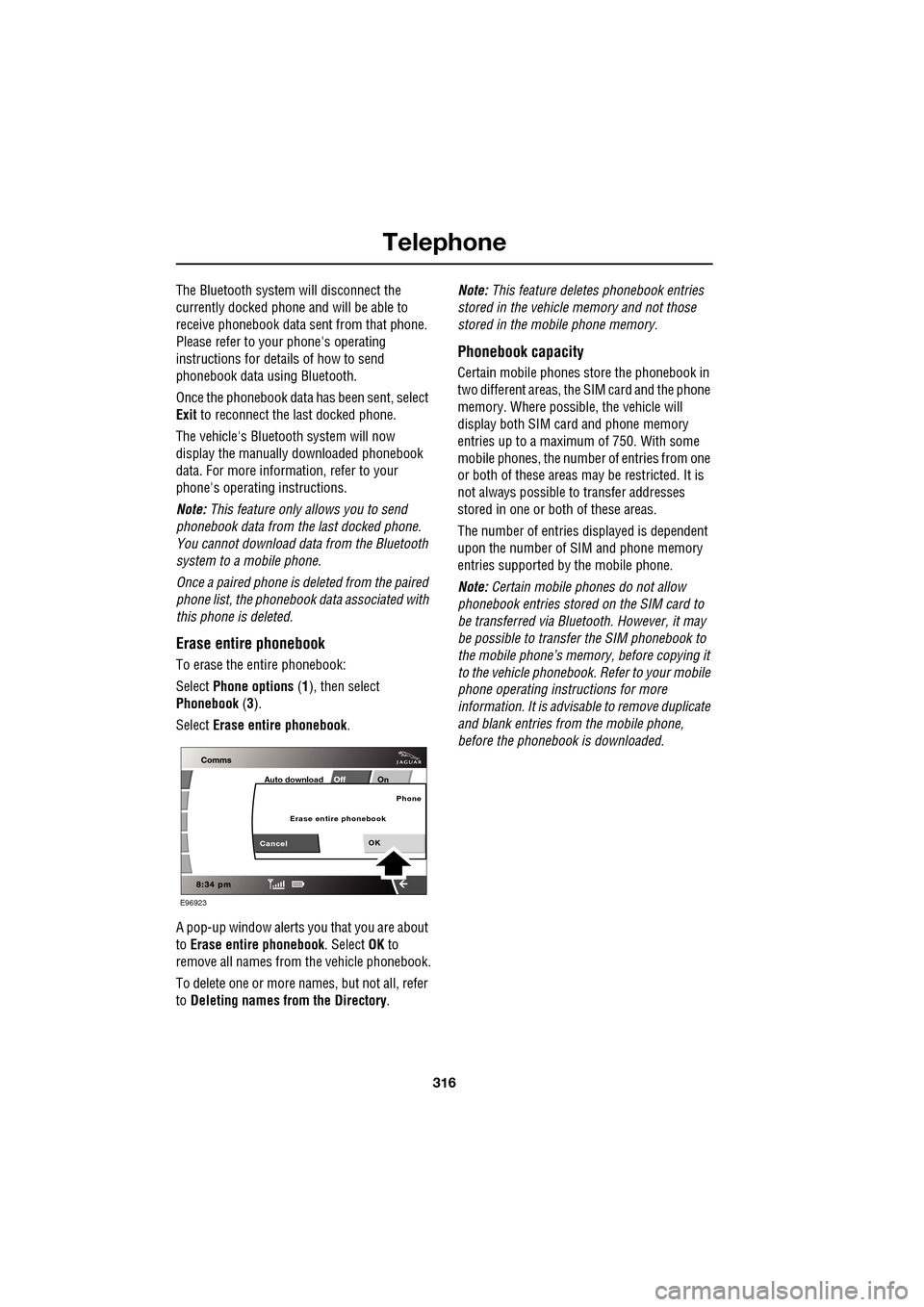
Select Erase entire phonebook .
A pop-up window alerts you that you are about
to Erase entire phonebook . Select OK to
remove all names from the vehicle phonebook.
To delete one or more na mes, but not all, refer
to Deleting names from the Directory. Note:
This feature deletes phonebook entries
stored in the vehicle memory and not those
stored in the mobile phone memory.
Phonebook capacity
Certain mobile phones store the phonebook in
two different areas, the SIM card and the phone
memory. Where possible, the vehicle will
display both SIM card and phone memory
entries up to a maximum of 750. With some
mobile phones, the number of entries from one
or both of these areas may be restricted. It is
not always possible to transfer addresses
stored in one or both of these areas.
The number of entries displayed is dependent
upon the number of SIM and phone memory
entries supported by the mobile phone.
Note: Certain mobile phones do not allow
phonebook entries stored on the SIM card to
be transferred via Bluetooth. However, it may
be possible to transfer the SIM phonebook to
the mobile phone’s memo ry, before copying it
to the vehicle phonebook. Refer to your mobile
phone operating instructions for more
information. It is advisable to remove duplicate
and blank entries from the mobile phone,
before the phonebook is downloaded.
E96923
Off OnAuto download
OK
Phone
CancelErase entire phonebook
Page 319 of 391
319
Telephone
Directory contact types
If your phone supports contact type data, you
will be able to see a contact type icon in the
vehicle's phonebook dire ctory. These can be
seen on the right-hand side of each contact in
the directory and will indicate one of the
following types:
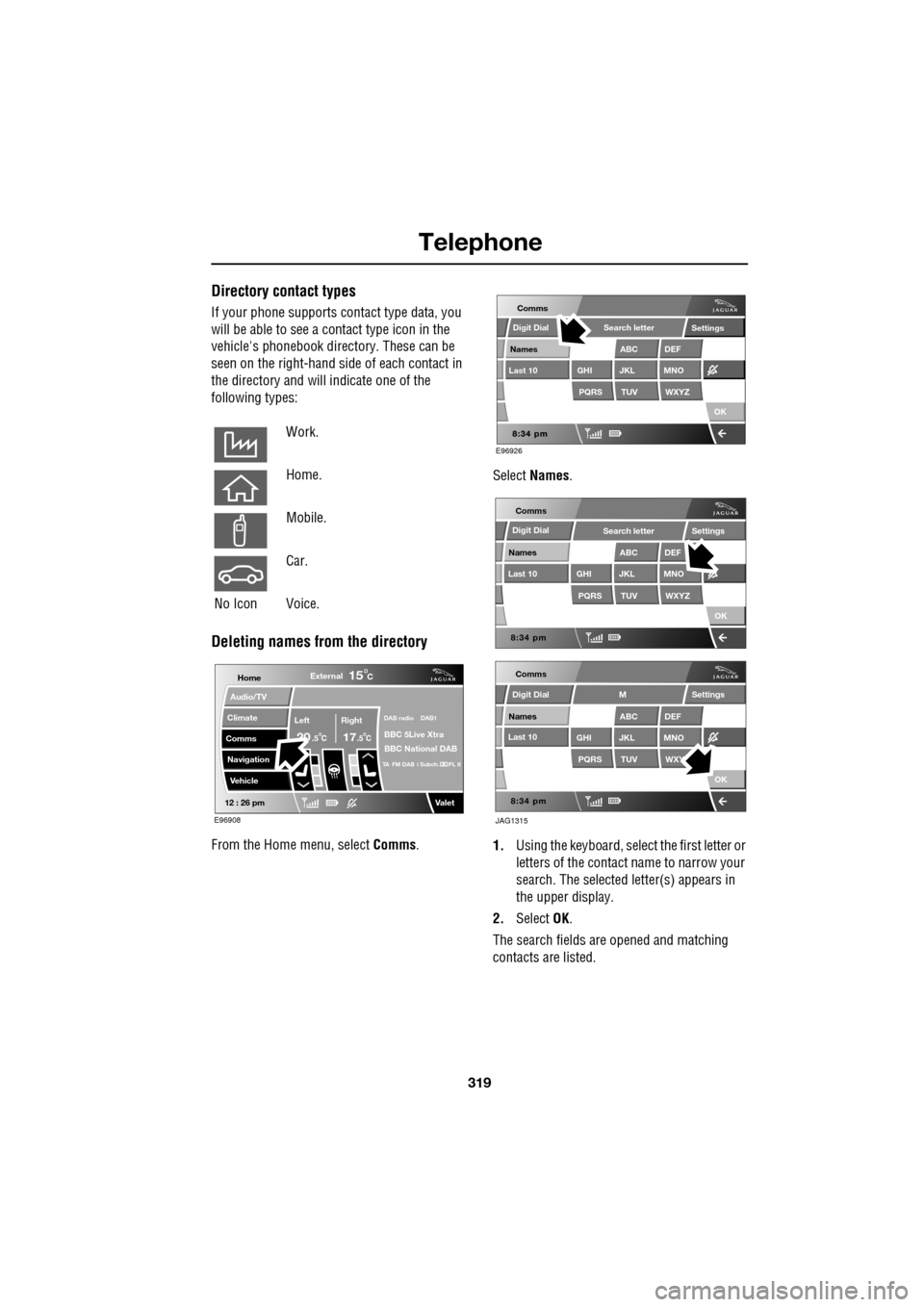
Deleting names from the directory
From the Home menu, select Comms. Select
Names .
1. Using the keyboard, select the first letter or
letters of the contact name to narrow your
search. The selected letter(s) appears in
the upper display.
2. Select OK.
The search fields ar e opened and matching
contacts are listed.
Work.
Home.
Mobile.
Car.
No Icon Voice.
Home
Audio/TV
Climate
Comms
Navigation
VehicleExternal
Left Right
20 17CC
15C
.5 .5
DAB radio DAB1
BBC 5Live Xtra
BBC National DAB
TA FM DAB i Subch. PL II
Valet12 : 26 pm
E96908
E96926
Comms
Digit Dial
Names
Last 10
Settings
PQRS
GHITUV
ABC
JKL
WXYZ
DEF
MNO
Search letter
OK
Comms
Comms
Names
Last 10
Settings
PQRS
GHITUV
ABC
JKL
WXYZ
DEF
MNO
Search letter
OK
Names
Last 10
Settings
PQRS
GHITUV
ABC
JKL
WXY
DEF
MNO
M
OK
JAG1315
Digit Dial
Digit Dial
Page 321 of 391
321
Telephone
HANDS-FREE CONTROLS
Four system adjustment controls are situated
on the left-hand side of the steering wheel,
duplicating functions of buttons on the
touch-screen. Using these buttons is the
preferred method of adjustment, as driver
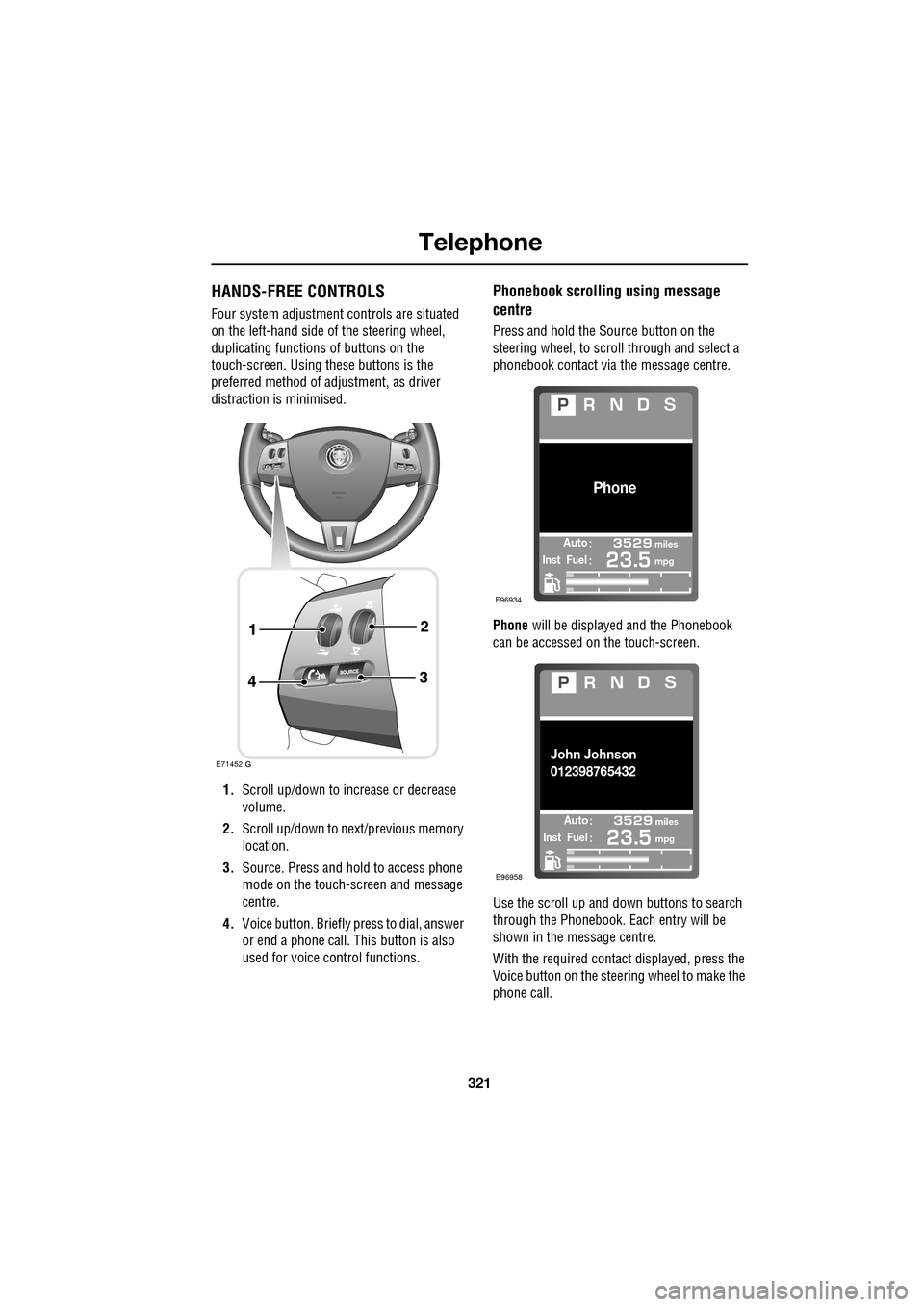
distraction is minimised.
1. Scroll up/down to increase or decrease
volume.
2. Scroll up/down to ne xt/previous memory
location.
3. Source. Press and hold to access phone
mode on the touch-screen and message
centre.
4. Voice button. Briefly press to dial, answer
or end a phone call. This button is also
used for voice control functions.
Phonebook scrolling using message
centre
Press and hold the Source button on the
steering wheel, to scroll through and select a
phonebook contact via the message centre.
Phone will be displayed and the Phonebook
can be accessed on the touch-screen.
Use the scroll up and down buttons to search
through the Phonebook. Each entry will be
shown in the message centre.
With the required contact displayed, press the
Voice button on the steering wheel to make the
phone call.
E71452
Automiles
Inst Fuelmpg
Phone
E96934
Automiles
Inst Fuelmpg
John Johnson
012398765432
E96958
Page 322 of 391
Telephone
322
Making/ending a call
To dial:
Key in the phone number, including the area
code. The number will be displayed.
To connect:
To end a call:
OTHER FEATURES
Keyboard magnification
This option allows the user to increase the
keyboard size.
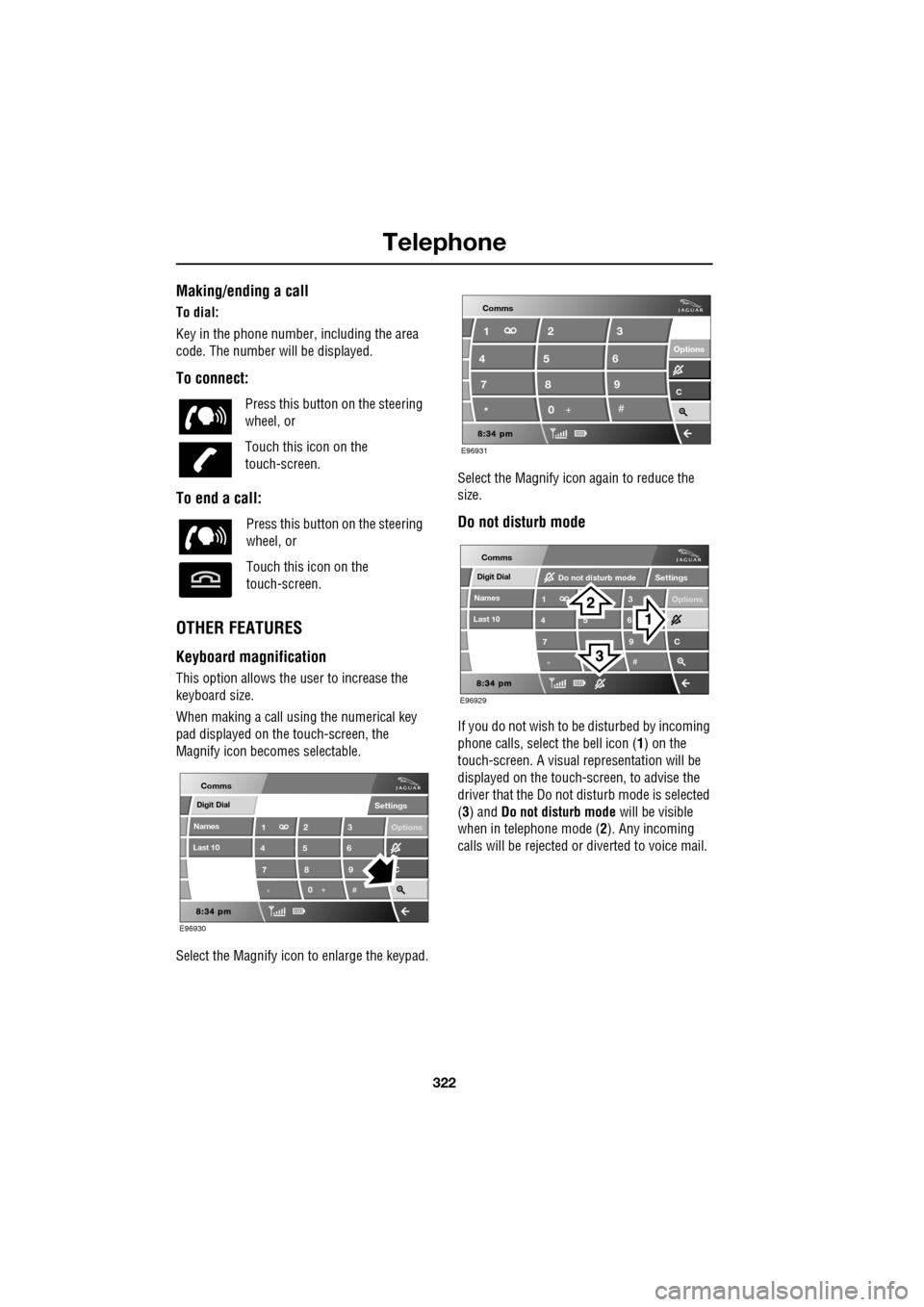
When making a call using the numerical key
pad displayed on the touch-screen, the
Magnify icon becomes selectable.
Select the Magnify icon to enlarge the keypad. Select the Magnify icon
again to reduce the
size.
Do not disturb mode
If you do not wish to be disturbed by incoming
phone calls, select the bell icon (1) on the
touch-screen. A visual representation will be
displayed on the touch-screen, to advise the
driver that the Do not di sturb mode is selected
(3) and Do not disturb mode will be visible
when in telephone mode ( 2). Any incoming
calls will be rejected or diverted to voice mail.
Press this button
on the steering
wheel, or
Touch this icon on the
touch-screen.
Press this button on the steering
wheel, or
Touch this icon on the
touch-screen.
Digit Dial
Names
Last 10
Settings
7
1
4
*8
2
5
0 9
3
6
Options
C
E96930
Comms
E96931
Comms
Options Options
C7 1
4
* 82
5
0 93
6
Digit Dial
Names
Last 10
Settings
7
1
4
*
5 9
3
6
Options
C
E96929
Comms
Do not disturb mode
Page 328 of 391
Television
328
GENERAL INFORMATION
Introduction
TV viewing is possible when the vehicle is
stationary with the transmission in the P (Park)
position. The TV pictur e can be viewed in
preview mode or full-screen.
If the vehicle is moving when TV is selected or
if the vehicle is driven off when the TV is
operating, a warning message will display, the
TV picture will cease and only audio reception
is available.
Note: Japan market: The TV will operate
normally up to speeds of 5 km/h (3 mph), after
which the TV picture will cease and only audio
reception is available.
TV sound is provided through the audio system
speakers.
TV reception
Repositioning the vehicle may improve the
picture whereas in diffic ult locations (distant
transmitter, hills etc.), reception may not be
possible at all. Sound quality may also be
affected to a lesser degree by loss of signal,
which can give rise to variable quality over
short distances while on the move.
Note: Television systems re quire consistent
and strong signals for go od quality reception.
These signals are affected by transmitter
coverage and surrounding features (hills, high
buildings, trees etc.) which will reduce the
signal, thus redu cing picture quality.
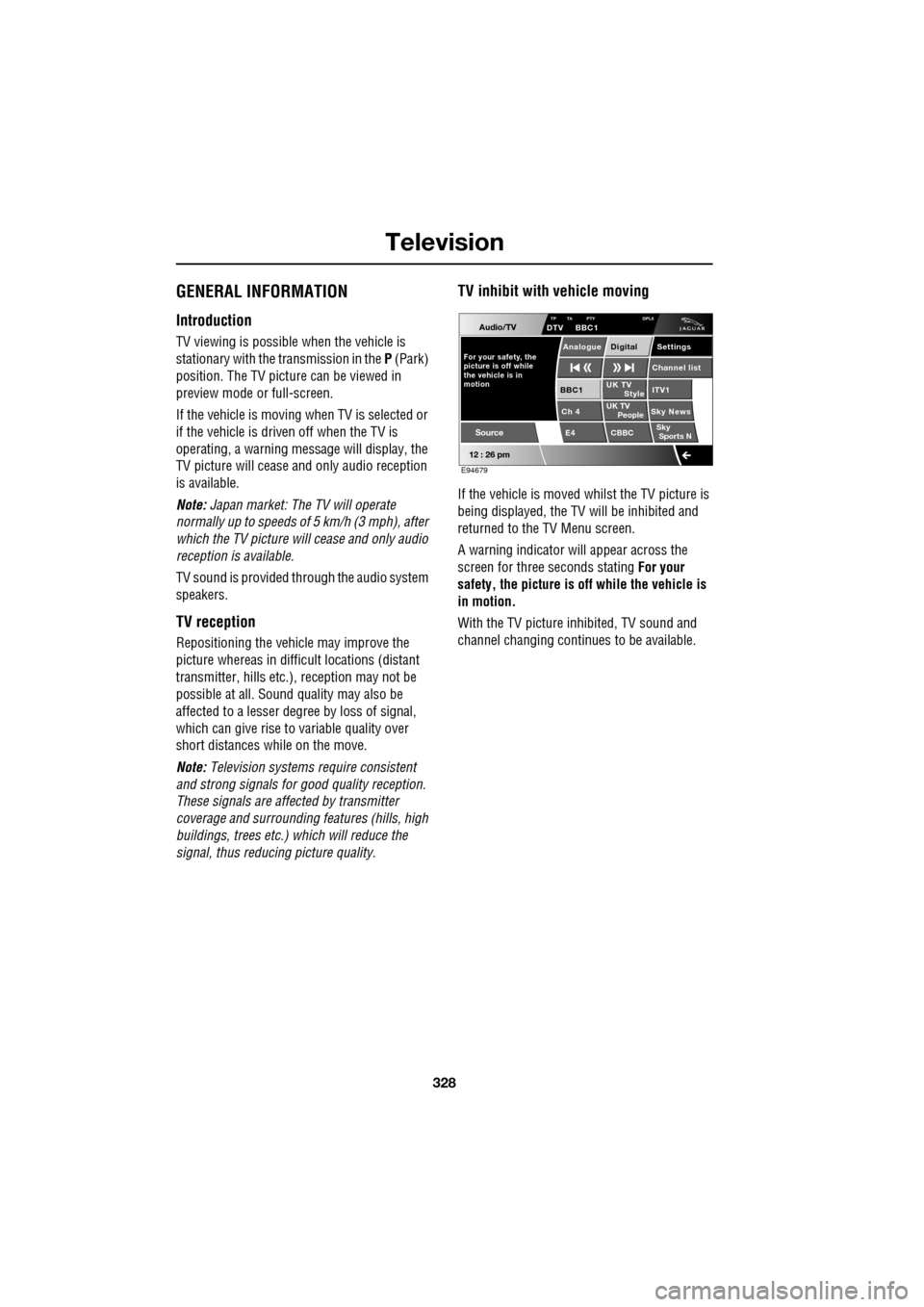
TV inhibit with vehicle moving
If the vehicle is moved whilst the TV picture is
being displayed, the TV will be inhibited and
returned to the TV Menu screen.
A warning indicator will appear across the
screen for three seconds stating For your
safety, the picture is of f while the vehicle is
in motion.
With the TV picture inhibited, TV sound and
channel changing contin ues to be available.
Audio/TV
12 : 26 pm
UK TV
ITV1
Ch 4 Sky News E4 CBBCBBC1
Settings
Channel list
TP TA PTY DPLIIDTV BBC1
Style
UK TV People
SkySports N
Source
For your safety, the
picture is off while
motion the vehicle is inAnalogue Digital
E94679