Start JAGUAR XF 2009 1.G User Guide
[x] Cancel search | Manufacturer: JAGUAR, Model Year: 2009, Model line: XF, Model: JAGUAR XF 2009 1.GPages: 391, PDF Size: 19.32 MB
Page 29 of 391
29
Locks
To lock: Ensure all the doors are closed, then
turn the key blade towards the front of the
vehicle and release. Thi s will lock all doors but
will not arm the alarm.
To unlock: Turn the key blade towards the rear
of the vehicle and release. If the security
system is disarmed, al l doors and the luggage
compartment will be unloc ked. If the security
system is armed, only the front left-hand door
will unlock. The interior lighting will be turned
on at reduced level for two minutes.
If the vehicle is unloc ked using the emergency
key blade with the security system armed, the
alarm will sound when a door is opened. To
deactivate the alarm, press the unlock button
on the Jaguar Smart Key or press the engine
START/STOP button with the Smart Key inside
the vehicle. If the Jaguar Smart Key is
inoperable, the alarm ca n be deactivated by
docking the Smart Key into the starter control
unit. See DOCKING/UNDOCKING THE JAGUAR
SMART KEY (page 20).
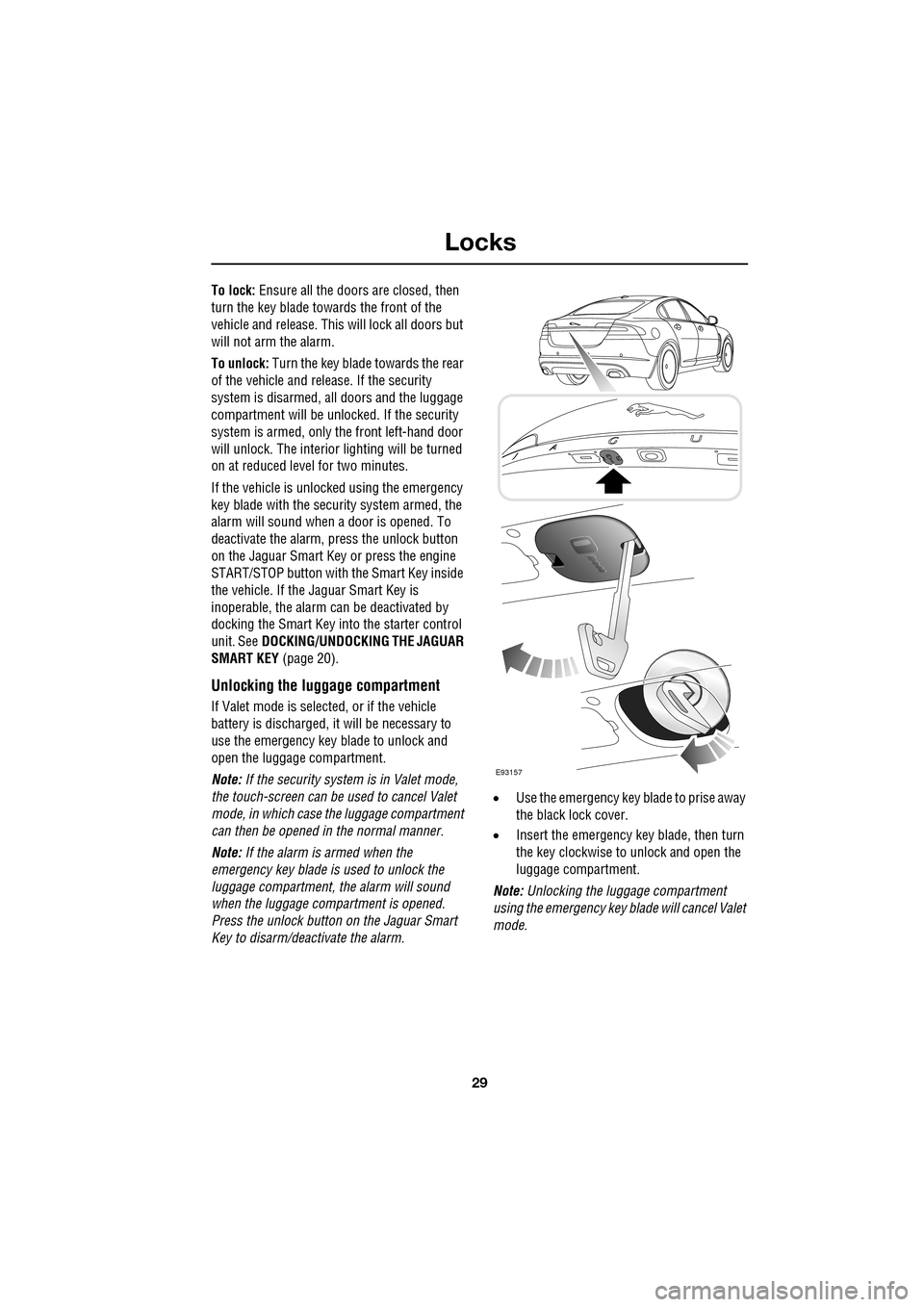
Unlocking the luggage compartment
If Valet mode is selected, or if the vehicle
battery is discharged, it will be necessary to
use the emergency key blade to unlock and
open the luggage compartment.
Note: If the security system is in Valet mode,
the touch-screen can be used to cancel Valet
mode, in which case the luggage compartment
can then be opened in the normal manner.
Note: If the alarm is armed when the
emergency key blade is used to unlock the
luggage compartment, the alarm will sound
when the luggage compartment is opened.
Press the unlock button on the Jaguar Smart
Key to disarm/deactivate the alarm. •
Use the emergency key blade to prise away
the black lock cover.
• Insert the emergency key blade, then turn
the key clockwise to unlock and open the
luggage compartment.
Note: Unlocking the luggage compartment
using the emergency key blade will cancel Valet
mode.
E93157
Page 35 of 391
35
Locks
Steering column lock
Your vehicle is fitted with an electronic steering
column lock. The column unlocks when it
detects a Jaguar Smart Key inside the vehicle.
The steering column automatically locks when
the starter switch is turned off and the driver's
door is opened.
Any malfunction of the steering column lock
will be indicated by the message STEERING
COLUMN LOCKED displaying in the message
centre. If this occurs:
1. Press the starter button to return to the
convenience mode.
2. Try again to unlock the steering column
lock, by turning the steering wheel gently
to the left and right.
3. If the malfunction st ill persists, seek
qualified assistance as soon as possible.
GLOBAL OPENING AND CLOSING
Global opening and closi ng is enabled/disabled
via the touch-screen.See PROGRAMMING THE
REMOTE CONTROL (page 21).
Window global opening
Press and hold the unlock button
on the Jaguar Smart Key for at least
three seconds. The alarm will
disarm, all doors and the luggage
compartment will unlock and all the windows
and sunroof will open.
Note: The windows and sunroof will continue
to open when the unlock button is released.
Press and hold the inte rior unlock button on
the fascia. After three seconds, all the windows
and the sunroof will open.
Note: The windows and sunroof will stop
opening when the unlock button is released.
CAUTION
During vehicle recovery, the Jaguar
Smart Key must remain inside the
vehicle (or be stowed in the starter control unit
in the centre console), so that the steering
column remains unlocked.WARNING
Accidental closing of an electrically
operated window or sunroof on
fingers, hands or any vulnerable part
of the body, can result in serious injury.
Always observe the following precautions:
Ensure that you have a clear view of all open
apertures on the vehicle and that all apertures
are unobstructed before activating global
closing.
Page 37 of 391
37
Alarm
ARMING THE ALARM
The engine is automatically
immobilised when the Jaguar
Smart Key is removed from the
vehicle. The alarm system is armed when the
lock button on the Jaguar Smart Key is pressed
or the button on the ex terior door handle is
pressed with a valid Jaguar Smart Key in close
proximity. The hazard lamps will flash to
indicate that the alarm is armed (in certain
markets, an audible tone will sound). The alarm
can also arm automatically (known as passive
arming), 30 seconds afte r all doors, luggage
compartment and bonnet apertures are closed,
and the Jaguar Smart Key is removed from the
vehicle. Passive arming does not lock the
vehicle.
This feature can be enab led/disabled using the
vehicle touch-screen. See PROGRAMMING
THE REMOTE CONTROL (page 21).
Full alarm
To set full alarm protection, ensure that all the
windows and the sunroof are closed. Then, on
vehicles fitted with doubl e-locking, press the
lock button twice within three seconds. The
hazard warning lights will flash twice to
confirm the alarm state and, in some markets,
an audible tone will sound.
Once fully armed the alarm will sound if:-
• The bonnet, luggage compartment, or a
door are opened.
• If a front door is unlocked using the
emergency key blade or the interior door
lock release levers and then opened.
• Movement is detected within the vehicle
interior.
• A window, front or rear windscreen, or
sunroof glass are broken.
• The vehicle is raised or tilted.
• The vehicle battery is disconnected. •
An attempt is made to disconnect the
alarm siren.
• An attempt is made to start the vehicle,
without a valid Jaguar Smart Key present.
Note: If the alarm is armed and a window or the
sunroof are left open, the alarm may sound due
to movement of air currents.
Note: Some of the above conditions are market
or option dependent a nd therefore may not
apply to your vehicle.
Perimeter alarm
To set perimeter alarm pr otection, briefly press
the lock button once. The hazard warning lights
will flash once to confirm the alarm state.
Once armed the perimeter alarm will sound if:-
• The bonnet, luggage compartment, or a
door are opened.
• If a front door is unlocked using the
emergency key blade or the interior door
lock release levers and then opened.
• The vehicle battery is disconnected.
• An attempt is made to disconnect the
alarm siren.
• An attempt is made to start the vehicle,
without a valid Jaguar Smart Key present.
Note: This setting should be used in
circumstances such as travelling on a ferry,
when pets are to be left in the vehicle, when a
window must be left open etc.
Note: Some of the above conditions are market
or option dependent a nd therefore may not
apply to your vehicle.
Page 38 of 391
Alarm
38
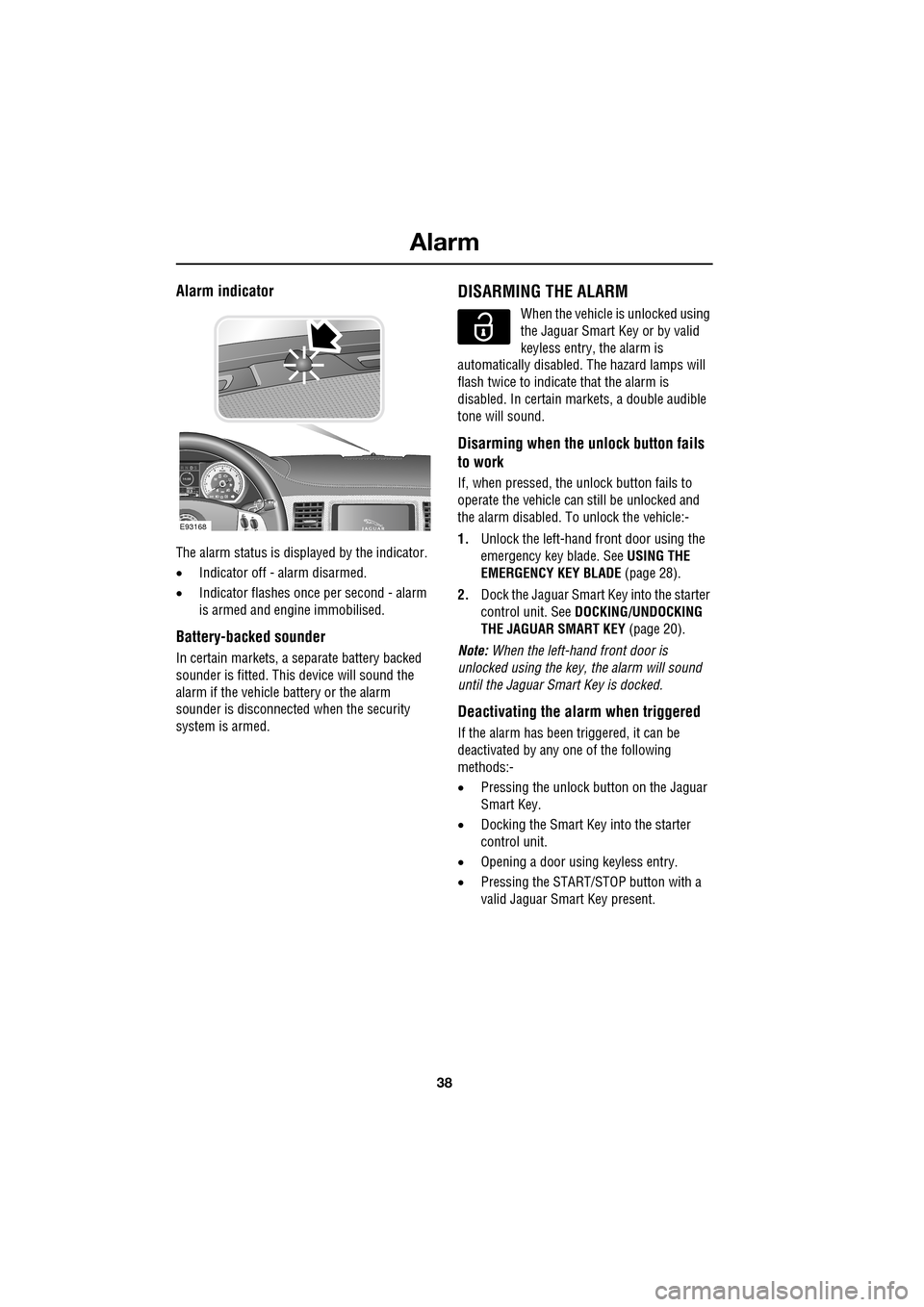
Alarm indicator
The alarm status is displayed by the indicator.
•Indicator off - alarm disarmed.
• Indicator flashes onc e per second - alarm
is armed and engine immobilised.
Battery-backed sounder
In certain markets, a separate battery backed
sounder is fitted. This device will sound the
alarm if the vehicle battery or the alarm
sounder is disconnected when the security
system is armed.
DISARMING THE ALARM
When the vehicle is unlocked using
the Jaguar Smart Key or by valid
keyless entry, the alarm is
automatically disabled. The hazard lamps will
flash twice to indicate that the alarm is
disabled. In certain ma rkets, a double audible
tone will sound.
Disarming when the unlock button fails
to work
If, when pressed, the unlock button fails to
operate the vehicle can still be unlocked and
the alarm disabled. To unlock the vehicle:-
1. Unlock the left-hand front door using the
emergency key blade. See USING THE
EMERGENCY KEY BLADE (page 28).
2. Dock the Jaguar Smart Key into the starter
control unit. See DOCKING/UNDOCKING
THE JAGUAR SMART KEY (page 20).
Note: When the left-hand front door is
unlocked using the key, the alarm will sound
until the Jaguar Smart Key is docked.
Deactivating the alarm when triggered
If the alarm has been triggered, it can be
deactivated by any one of the following
methods:-
• Pressing the unlock button on the Jaguar
Smart Key.
• Docking the Smart Key into the starter
control unit.
• Opening a door using keyless entry.
• Pressing the START/ST OP button with a
valid Jaguar Smart Key present.
km/ 0 km
E93168
Page 57 of 391
57
Supplementary restraints system
AIRBAG WARNING LAMP
The airbag warning indicator is
mounted in the instrument pack,
and will illuminate as a bulb check
when the starter switch is turned on.
If any of the following warning indicator
conditions occur, the vehicle should be
checked by your Dealer /Authorised repairer
immediately.
• The warning indicator fails to illuminate
when the starter switch is initially turned
on.
• The warning indicator fails to extinguish
within six seconds of the starter switch
being turned on.
• The warning indicator illuminates at any
time other than the bulb check, when the
starter switch is on.
WHIPLASH PROTECTION
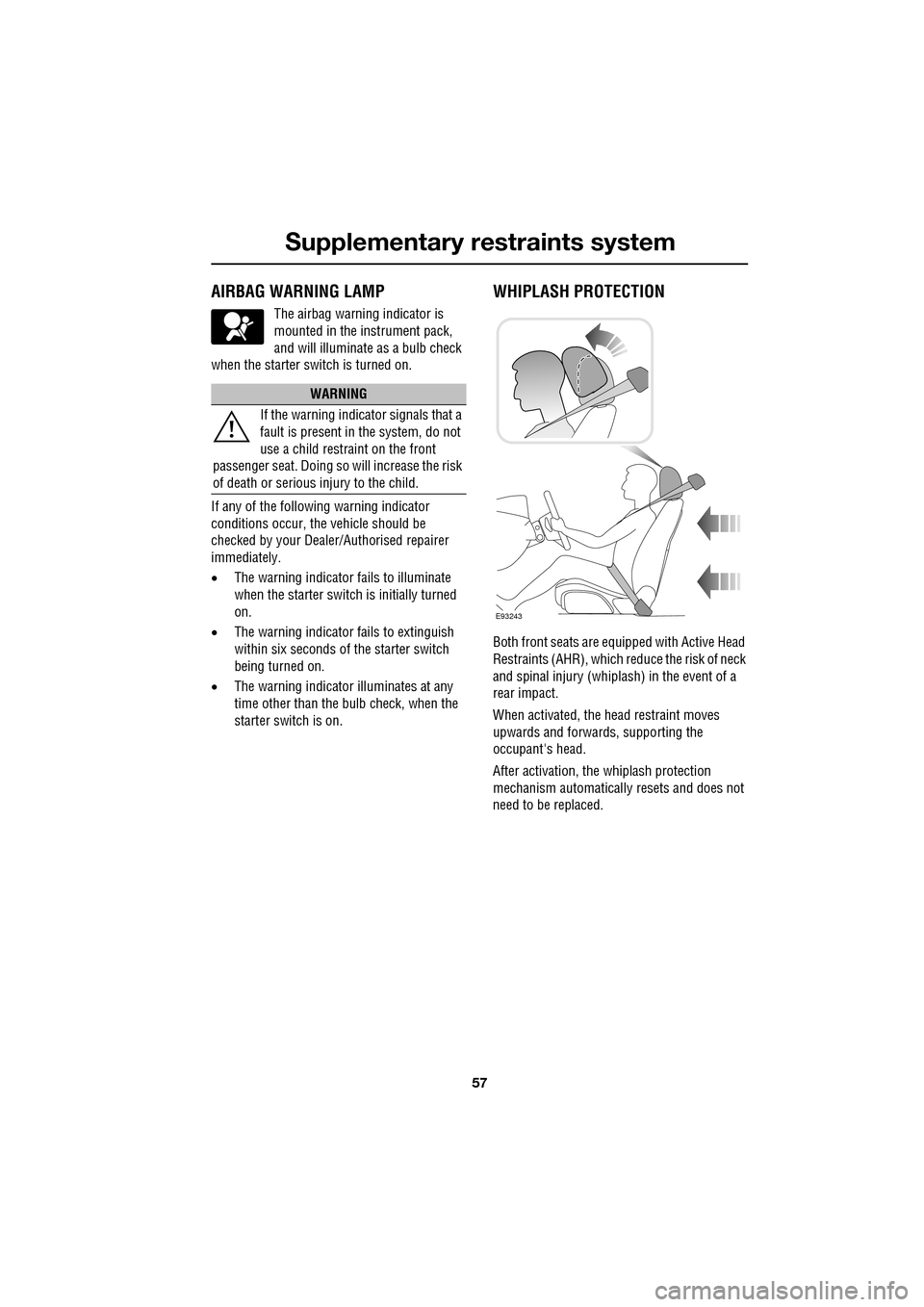
Both front seats are equi pped with Active Head
Restraints (AHR), which reduce the risk of neck
and spinal injury (whiplash) in the event of a
rear impact.
When activated, the head restraint moves
upwards and forwards, supporting the
occupant's head.
After activation, the whiplash protection
mechanism automatically resets and does not
need to be replaced.
WARNING
If the warning indica tor signals that a
fault is present in the system, do not
use a child restraint on the front
passenger seat. Doing so will increase the risk
of death or serious injury to the child.
E93243
Page 66 of 391
Pedestrian protection
66
PRINCIPLE OF OPERATION
The pedestrian protection system has been
designed to reduce lower leg and head injuries
in the event of a frontal collision with a
pedestrian.
The bumper includes energy absorbing foam
and plastics in its cons truction to reduce leg
injuries and sensors th at detect the collision
with a pedestrian.
Deployment
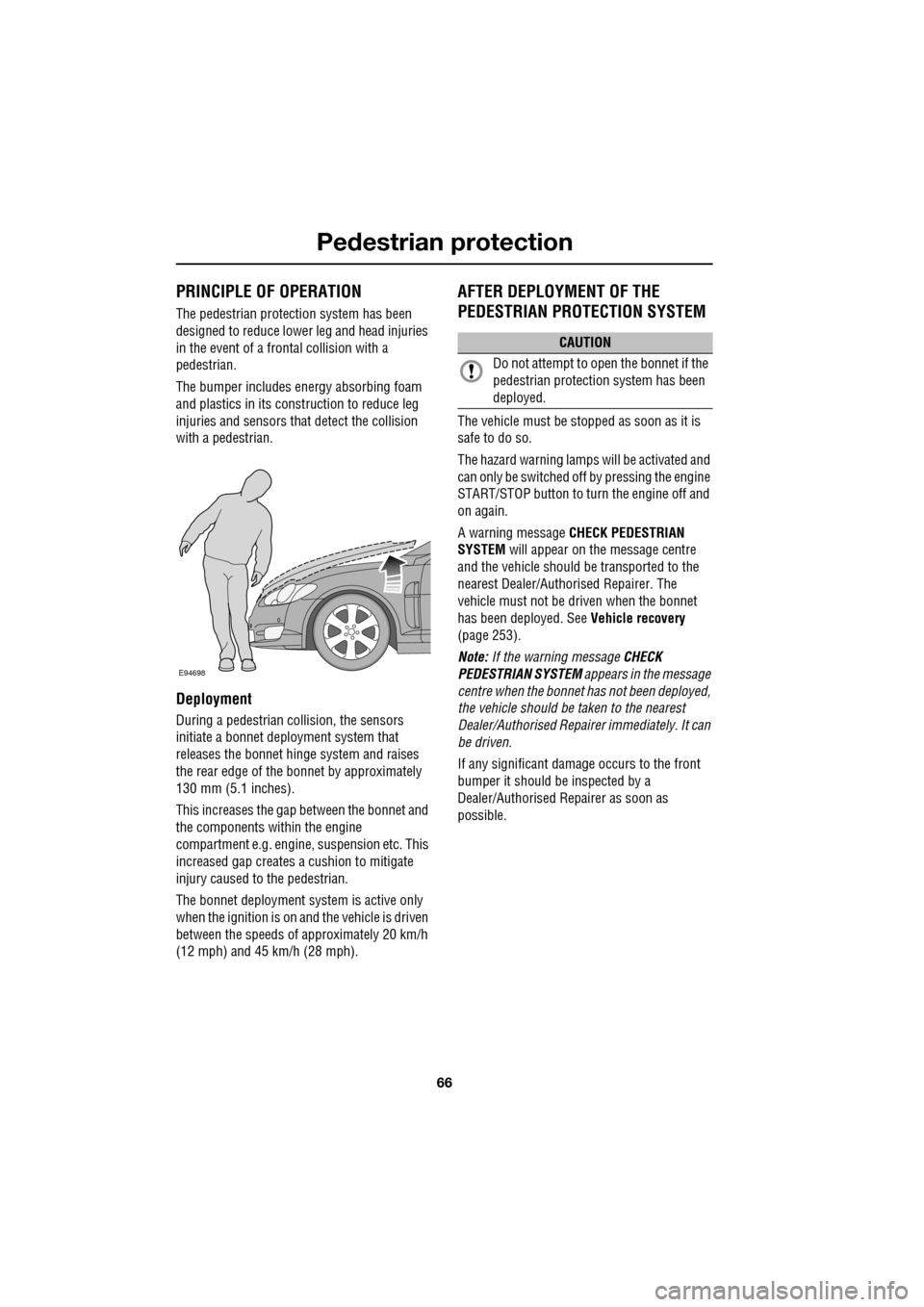
During a pedestrian co llision, the sensors
initiate a bonnet deploy ment system that
releases the bonnet hinge system and raises
the rear edge of the bonnet by approximately
130 mm (5.1 inches).
This increases the gap between the bonnet and
the components within the engine
compartment e.g. engine, suspension etc. This
increased gap creates a cushion to mitigate
injury caused to the pedestrian.
The bonnet deployment system is active only
when the ignition is on and the vehicle is driven
between the speeds of approximately 20 km/h
(12 mph) and 45 km/h (28 mph).
AFTER DEPLOYMENT OF THE
PEDESTRIAN PROTECTION SYSTEM
The vehicle must be stopped as soon as it is
safe to do so.
The hazard warning lamp s will be activated and
can only be switched off by pressing the engine
START/STOP button to turn the engine off and
on again.
A warning message CHECK PEDESTRIAN
SYSTEM will appear on the message centre
and the vehicle should be transported to the
nearest Dealer/Author ised Repairer. The
vehicle must not be driven when the bonnet
has been deployed. See Vehicle recovery
(page 253).
Note: If the warning message CHECK
PEDESTRIAN SYSTEM appears in the message
centre when the bonnet ha s not been deployed,
the vehicle should be taken to the nearest
Dealer/Authorised Repairer immediately. It can
be driven.
If any significant damage occurs to the front
bumper it should be inspected by a
Dealer/Authorised Repairer as soon as
possible.
E94698
CAUTION
Do not attempt to open the bonnet if the
pedestrian protection system has been
deployed.
Page 71 of 391
71
Steering wheel
Cancelling voice control
To cancel a voice command, press and hold the
Voice button on the steering wheel until a
double tone is heard.
Note: If a phone call is received during a voice
session, voice control is cancelled.
Voice system tutorial
To listen to a tutorial on how to use
JaguarVoice, press and release the voice
button and, after the tone, say VOICE
TUTORIAL .
The tutorial is divided into four lessons and has
a total duration of approximately four minutes.
The tutorial can only be undertaken with the
vehicle stationary and parked.
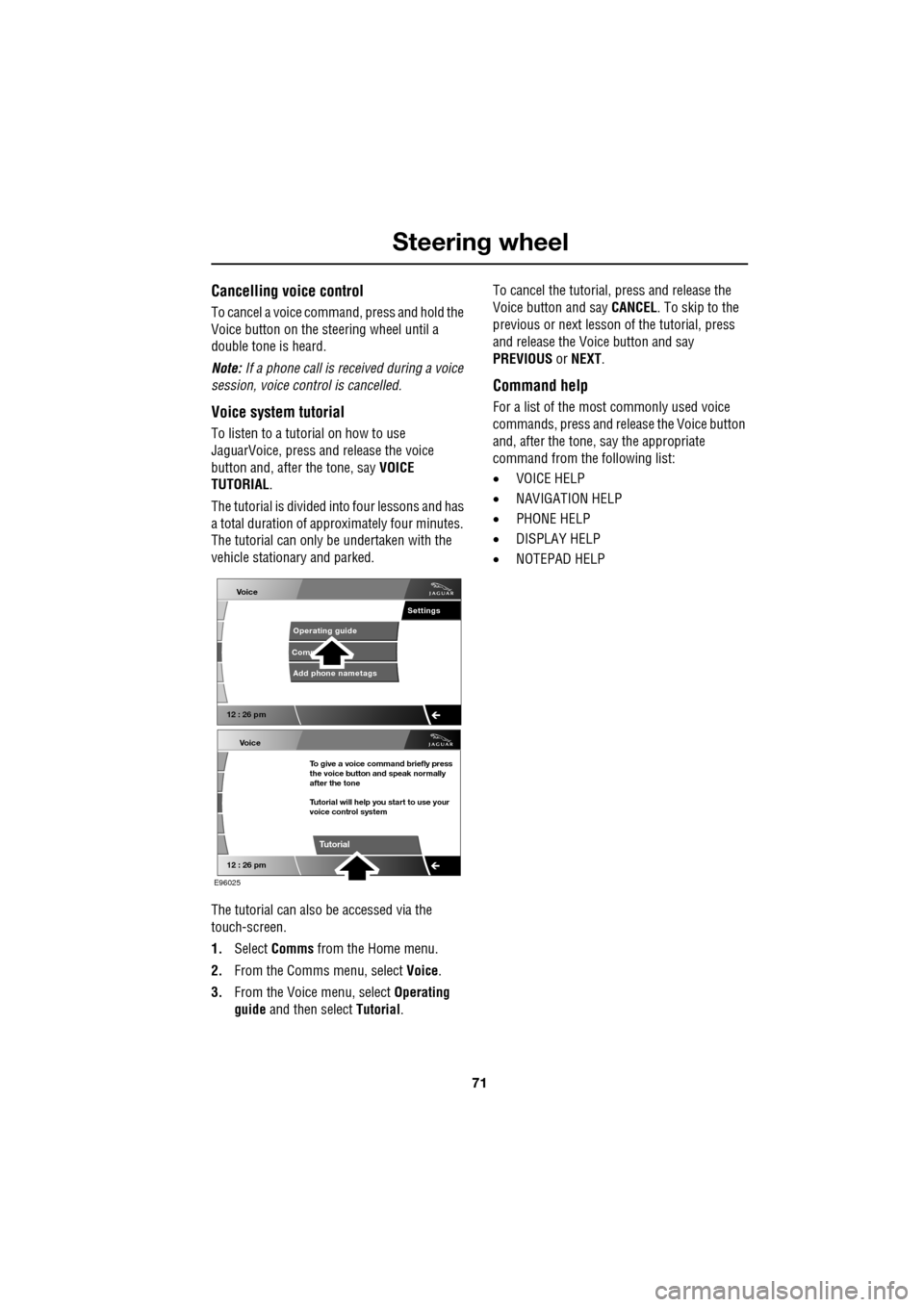
The tutorial can also be accessed via the
touch-screen.
1. Select Comms from the Home menu.
2. From the Comms menu, select Voice.
3. From the Voice menu, select Operating
guide and then select Tutorial. To cancel the tutorial, press and release the
Voice button and say
CANCEL. To skip to the
previous or next lesson of the tutorial, press
and release the Voice button and say
PREVIOUS or NEXT .
Command help
For a list of the most commonly used voice
commands, press and release the Voice button
and, after the tone, say the appropriate
command from the following list:
• VOICE HELP
• NAVIGATION HELP
• PHONE HELP
• DISPLAY HELP
• NOTEPAD HELP
Voice
12 : 26 pm
Add phone nametags
Comm Operating guide
Settings
E96025
Voice
12 : 26 pm
To give a voice command briefly press
the voice button and speak normally
after the tone
Tutorial will help you start to use your
voice control system
Tutorial
Page 81 of 391
81
Lighting
Note: For lamps controlled by proximity
sensors, the wearing of gloves may interfere
with operation. If you are wearing gloves, it
may be necessary to touch the proximity
switch to operate the lamps.
Ambience lighting
Ambience lighting. Automatically illuminates
when the headlamps are on. Ambience lighting
creates a blue glow ar ound the centre console
and front door armrests.
Luggage compartment lamp
Automatically illuminates when the luggage
compartment is opened.
APPROACH LAMPS
This feature is activated by pressing
the headlamp icon button on the
Jaguar Smart Key. See USING THE
REMOTE CONTROL (page 17). The headlamps
will remain on for 25 seconds or until the
button is pressed again, or until the engine
START/STOP button is pressed.
REMOVING A HEADLAMP
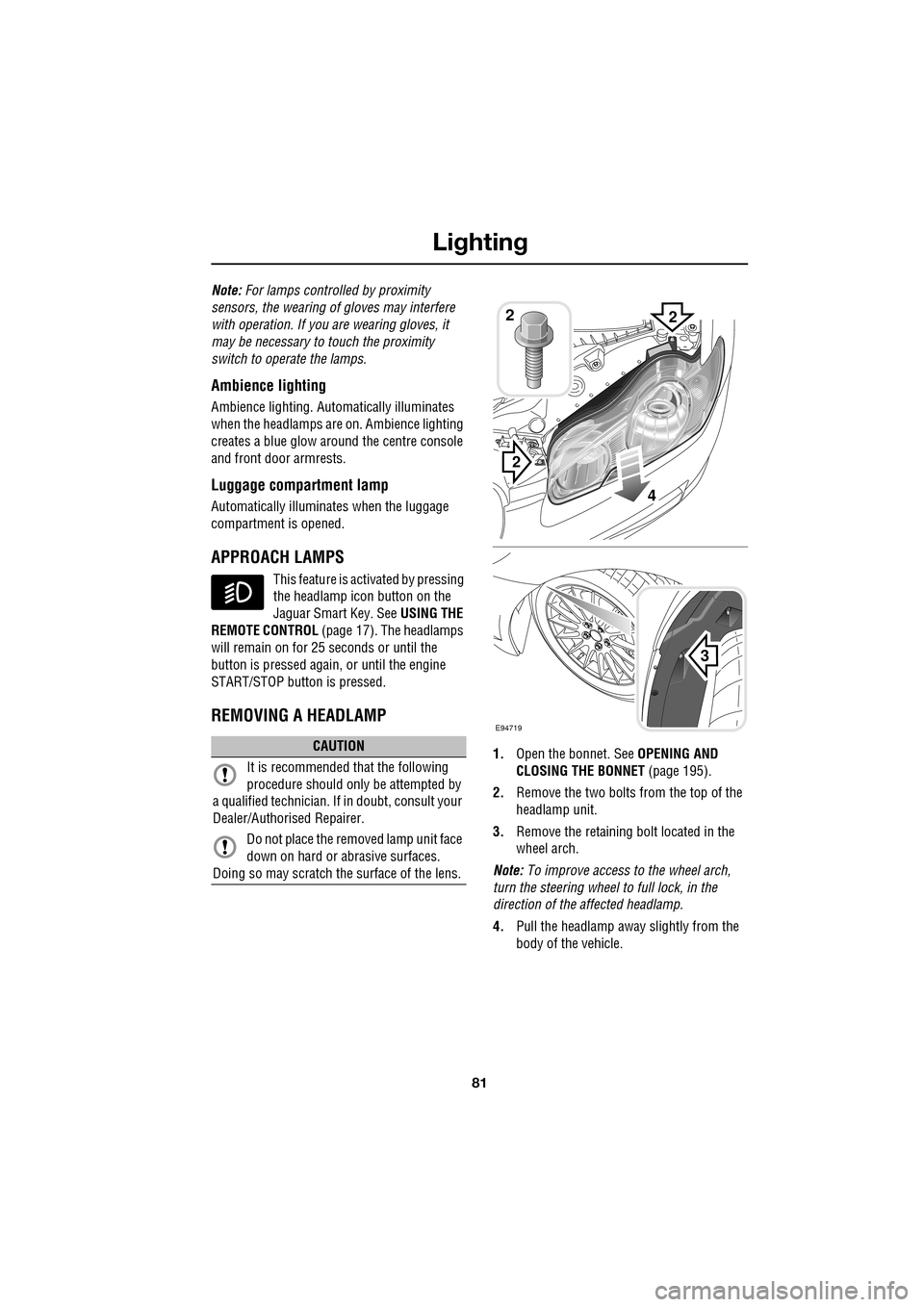
1. Open the bonnet. See OPENING AND
CLOSING THE BONNET (page 195).
2. Remove the two bolts from the top of the
headlamp unit.
3. Remove the retaining bolt located in the
wheel arch.
Note: To improve access to the wheel arch,
turn the steering wheel to full lock, in the
direction of the affected headlamp.
4. Pull the headlamp away slightly from the
body of the vehicle.CAUTION
It is recommended that the following
procedure should only be attempted by
a qualified technician. If in doubt, consult your
Dealer/Authorised Repairer.
Do not place the removed lamp unit face
down on hard or abrasive surfaces.
Doing so may scratch the surface of the lens.
3
2
2
E94719
2
4
Page 91 of 391
91
Wipers and washers
CHANGING THE WIPER BLADES
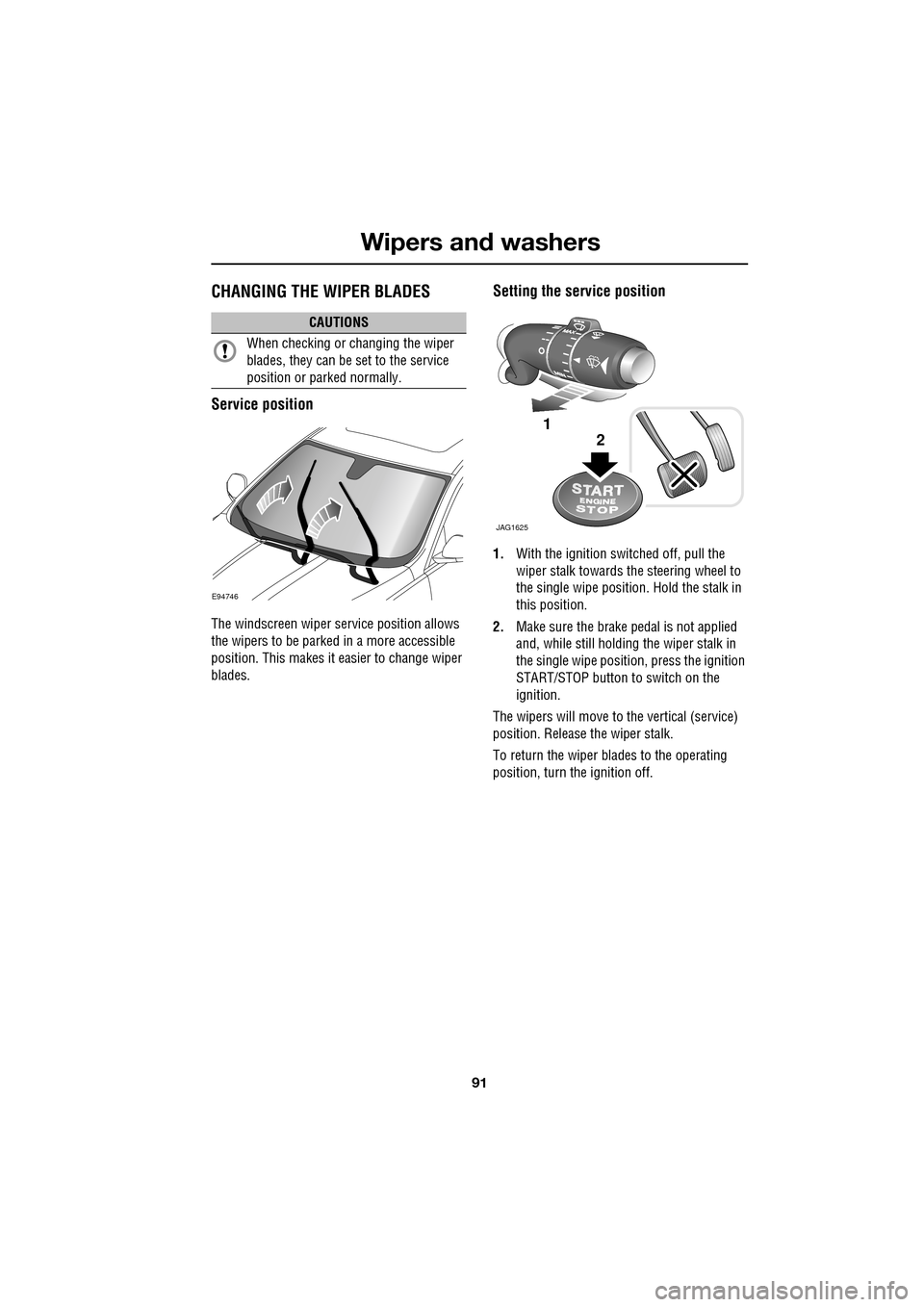
Service position
The windscreen wiper service position allows
the wipers to be parked in a more accessible
position. This makes it easier to change wiper
blades.
Setting the service position
1.With the ignition switched off, pull the
wiper stalk towards the steering wheel to
the single wipe position. Hold the stalk in
this position.
2. Make sure the brake pedal is not applied
and, while still holding the wiper stalk in
the single wipe positi on, press the ignition
START/STOP button to switch on the
ignition.
The wipers will move to the vertical (service)
position. Release the wiper stalk.
To return the wiper blades to the operating
position, turn the ignition off.
CAUTIONS
When checking or changing the wiper
blades, they can be set to the service
position or parked normally.
E94746
JAG1625
1
2
Page 102 of 391
Instruments
102
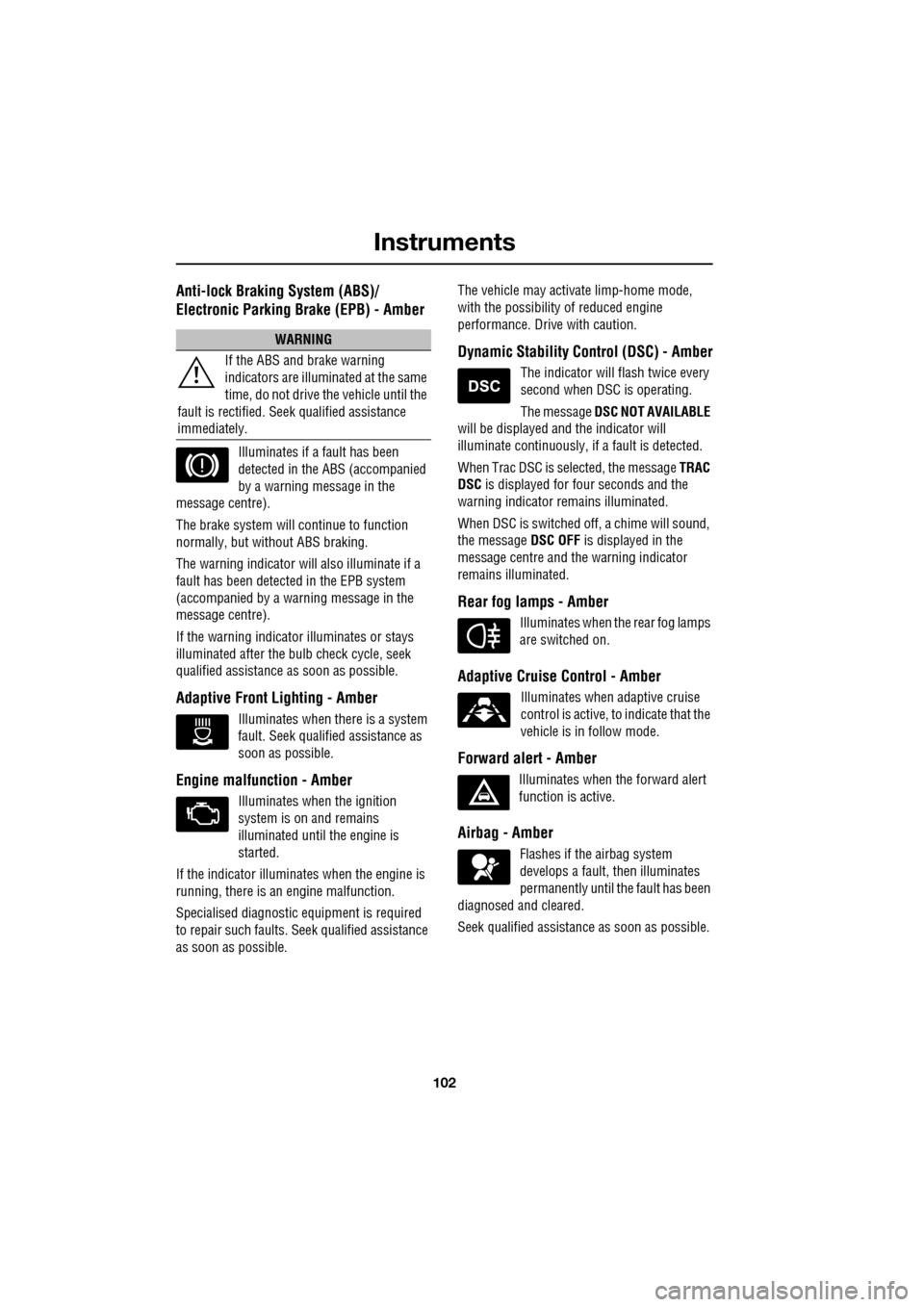
Anti-lock Braking System (ABS)/
Electronic Parking Brake (EPB) - Amber
Illuminates if a fault has been
detected in the ABS (accompanied
by a warning message in the
message centre).
The brake system will c ontinue to function
normally, but without ABS braking.
The warning indicator will also illuminate if a
fault has been detected in the EPB system
(accompanied by a warning message in the
message centre).
If the warning indicato r illuminates or stays
illuminated after the bulb check cycle, seek
qualified assistance as soon as possible.
Adaptive Front Lighting - Amber
Illuminates when there is a system
fault. Seek qualified assistance as
soon as possible.
Engine malfunction - Amber
Illuminates when the ignition
system is on and remains
illuminated until the engine is
started.
If the indicator illuminates when the engine is
running, there is an engine malfunction.
Specialised diagnostic equipment is required
to repair such faults. Seek qualified assistance
as soon as possible. The vehicle may acti
vate limp-home mode,
with the possibility of reduced engine
performance. Driv e with caution.
Dynamic Stability Control (DSC) - Amber
The indicator will flash twice every
second when DSC is operating.
The message DSC NOT AVAILABLE
will be displayed and the indicator will
illuminate continuously, if a fault is detected.
When Trac DSC is selected, the message TRAC
DSC is displayed for f our seconds and the
warning indicator remains illuminated.
When DSC is switched off, a chime will sound,
the message DSC OFF is displayed in the
message centre and the warning indicator
remains illuminated.
Rear fog lamps - Amber
Illuminates when the rear fog lamps
are switched on.
Adaptive Cruise Control - Amber
Illuminates when adaptive cruise
control is active, to indicate that the
vehicle is in follow mode.
Forward alert - Amber
Illuminates when the forward alert
function is active.
Airbag - Amber
Flashes if the airbag system
develops a fault, then illuminates
permanently until the fault has been
diagnosed and cleared.
Seek qualified assistance as soon as possible.
WARNING
If the ABS and brake warning
indicators are illuminated at the same
time, do not drive the vehicle until the
fault is rectified. Seek qualified assistance
immediately.