ignition JAGUAR XF 2009 1.G User Guide
[x] Cancel search | Manufacturer: JAGUAR, Model Year: 2009, Model line: XF, Model: JAGUAR XF 2009 1.GPages: 391, PDF Size: 19.32 MB
Page 87 of 391
87
Lighting
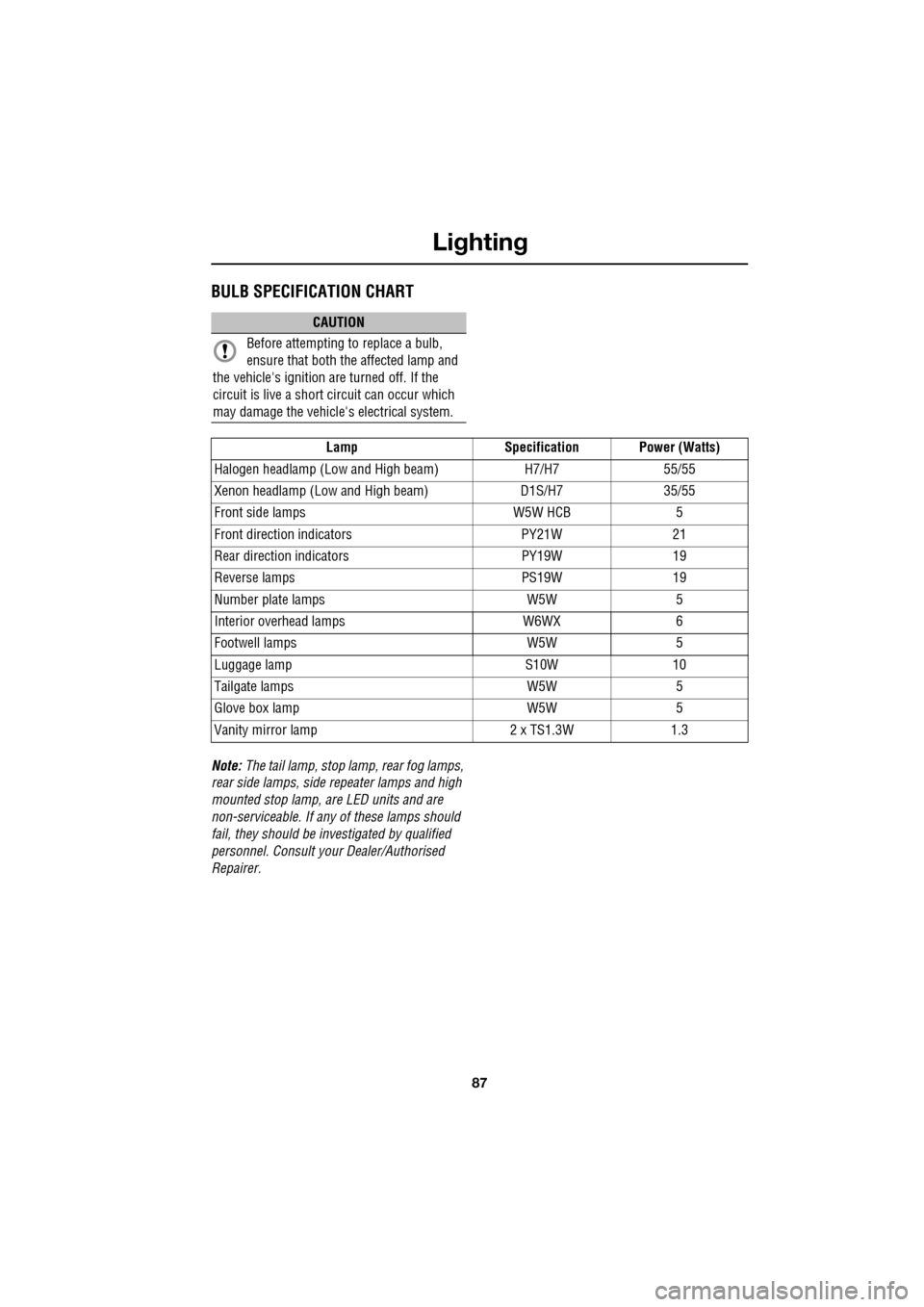
BULB SPECIFICATION CHART
Note: The tail lamp, stop lamp, rear fog lamps,
rear side lamps, side repeater lamps and high
mounted stop lamp, ar e LED units and are
non-serviceable. If an y of these lamps should
fail, they should be investigated by qualified
personnel. Consult your Dealer/Authorised
Repairer.
CAUTION
Before attempting to replace a bulb,
ensure that both the affected lamp and
the vehicle's ignition are turned off. If the
circuit is live a short circuit can occur which
may damage the vehicle's electrical system.
Lamp Specification Power (Watts)
Halogen headlamp (Low and High beam) H7/H755/55
Xenon headlamp (Low and High beam) D1S/H735/55
Front side lamps W5W HCB5
Front direction indicators PY21W21
Rear direction indicators PY19W19
Reverse lamps PS19W19
Number plate lamps W5W5
Interior overhead lamps W6WX6
Footwell lamps W5W5
Luggage lamp S10W10
Tailgate lamps W5W5
Glove box lamp W5W5
Vanity mirror lamp 2 x TS1.3W1.3
Page 88 of 391
Wipers and washers
88
WINDSCREEN WIPERS
Note: If the wiper blades become stuck or
jammed, an electronic cut-out may temporarily
halt wiper operation. If this happens, switch off
the wipers and the ignition. Clear any
obstructions and free th e wiper blades, before
attempting to switch on the ignition.
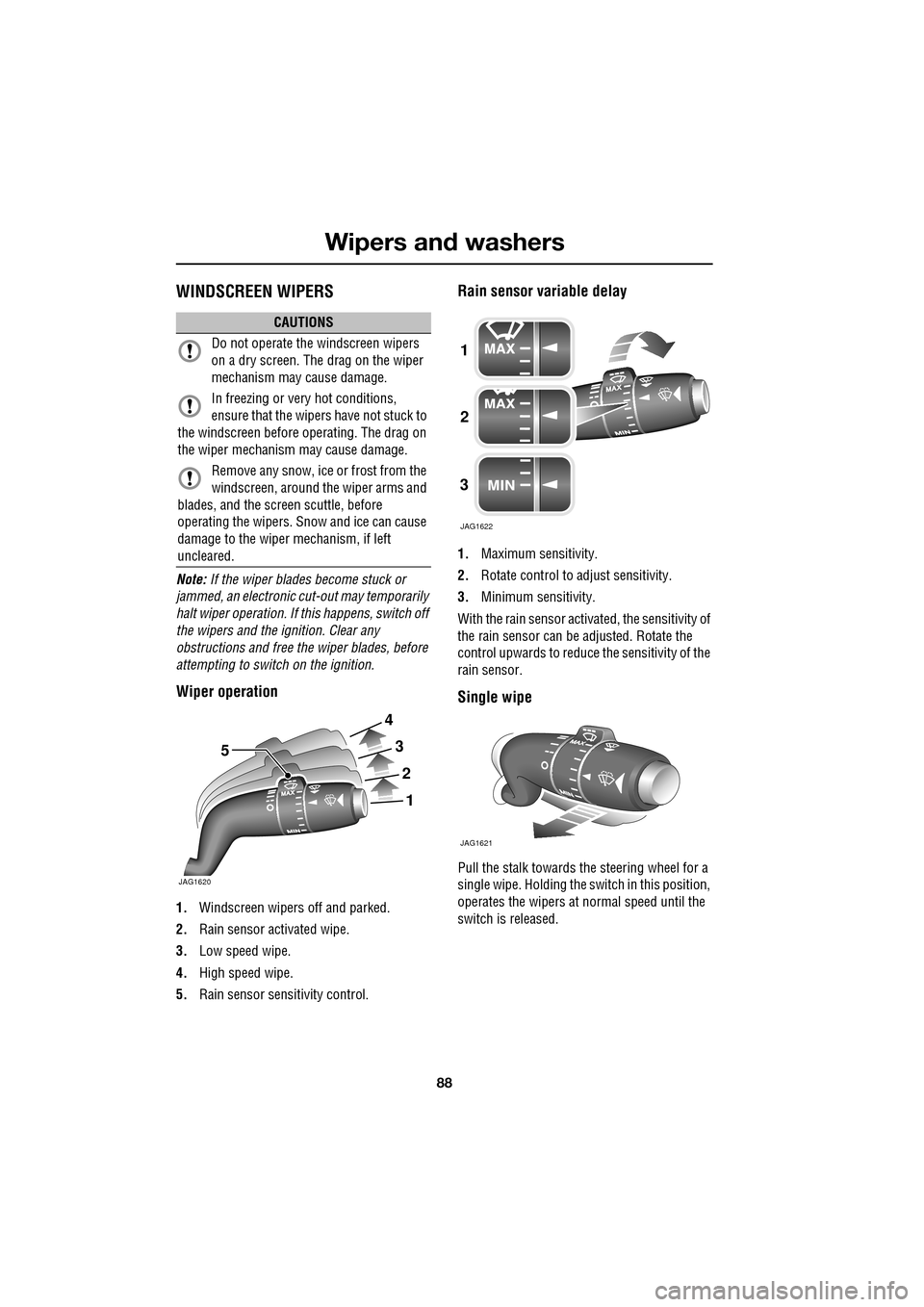
Wiper operation
1. Windscreen wipers off and parked.
2. Rain sensor activated wipe.
3. Low speed wipe.
4. High speed wipe.
5. Rain sensor sensitivity control.
Rain sensor variable delay
1.Maximum sensitivity.
2. Rotate control to adjust sensitivity.
3. Minimum sensitivity.
With the rain sensor acti vated, the sensitivity of
the rain sensor can be adjusted. Rotate the
control upwards to reduce the sensitivity of the
rain sensor.
Single wipe
Pull the stalk towards the steering wheel for a
single wipe. Holding the sw itch in this position,
operates the wipers at normal speed until the
switch is released.
CAUTIONS
Do not operate the windscreen wipers
on a dry screen. The drag on the wiper
mechanism may cause damage.
In freezing or very hot conditions,
ensure that the wipers have not stuck to
the windscreen before operating. The drag on
the wiper mechanism may cause damage.
Remove any snow, ice or frost from the
windscreen, around the wiper arms and
blades, and the screen scuttle, before
operating the wipers. S now and ice can cause
damage to the wiper mechanism, if left
uncleared.
JAG1620
5
1
2
3
4
1
2
3
JAG1622
JAG1621
Page 89 of 391
89
Wipers and washers
Speed-dependent mode
If vehicle speed drops below 2 km/h (1.2 mph)
with the wipers operating, the wiper frequency
automatically reduces. The wipers will switch
to the next lowest speed. When the vehicle’s
speed increases to over 8 km/h (5 mph), the
original wiper speed settings are restored
automatically.
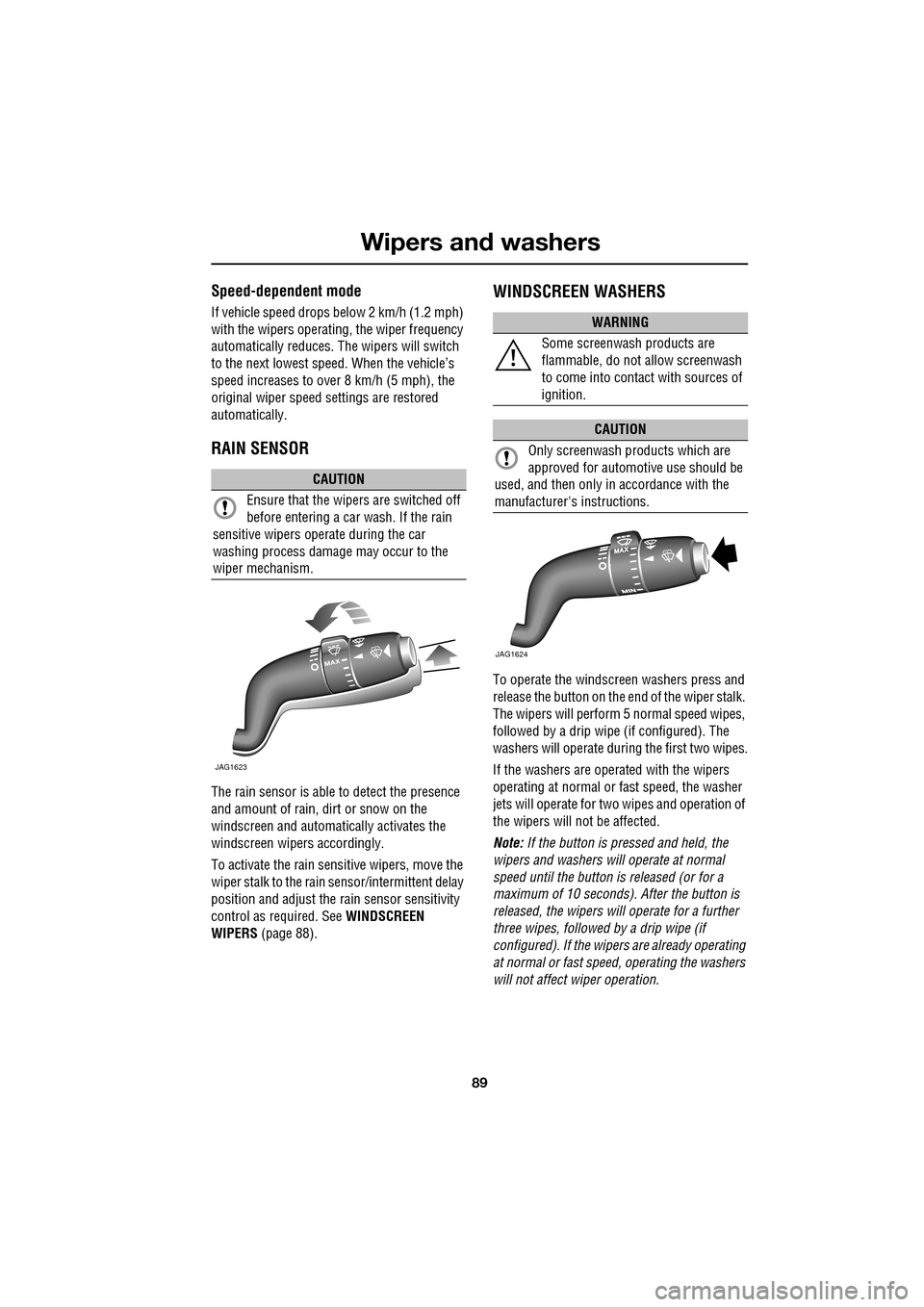
RAIN SENSOR
The rain sensor is able to detect the presence
and amount of rain, dirt or snow on the
windscreen and automatically activates the
windscreen wipers accordingly.
To activate the rain sensitive wipers, move the
wiper stalk to the rain sensor/intermittent delay
position and adjust the ra in sensor sensitivity
control as required. See WINDSCREEN
WIPERS (page 88).
WINDSCREEN WASHERS
To operate the windscreen washers press and
release the button on the e nd of the wiper stalk.
The wipers will perform 5 normal speed wipes,
followed by a drip wipe (if configured). The
washers will operate during the first two wipes.
If the washers are operated with the wipers
operating at normal or fast speed, the washer
jets will operate for tw o wipes and operation of
the wipers will not be affected.
Note: If the button is pressed and held, the
wipers and washers w ill operate at normal
speed until the button is released (or for a
maximum of 10 seconds). After the button is
released, the wipers will operate for a further
three wipes, followed by a drip wipe (if
configured). If the wipe rs are already operating
at normal or fast speed, operating the washers
will not affect wiper operation.
CAUTION
Ensure that the wipers are switched off
before entering a car wash. If the rain
sensitive wipers operate during the car
washing process damage may occur to the
wiper mechanism.
MAX
JAG1623
WARNING
Some screenwash products are
flammable, do not allow screenwash
to come into contact with sources of
ignition.
CAUTION
Only screenwash products which are
approved for automotive use should be
used, and then only in accordance with the
manufacturer's instructions.
JAG1624
Page 90 of 391
Wipers and washers
90
Low screen wash
If the low washer fluid warning is on, the
windscreen wipers will not operate when the
wash/wipe is activated, even though there may
be washer fluid remaining in the reservoir
which is sprayed onto the screen. This is to
prevent damage to the wiper blades, scratching
of the glass or smearing dirt across the screen.
Normal, fast or single wipe can be selected
manually, to clear any spray from the
windscreen.
Timed jet function
If the timed jet func tion is configured,
the washer jets will only operate on the
up stroke of the wipers.
This function can be enabled/disabled by your
Dealer/Authorised Repairer.
Drip wipe
If the drip wipe function is configured,
the wipers will operate four seconds
after a wash wipe cycle has finished, to
clear any remaining drips from the windscreen.
This function can be enabled/disabled by your
Dealer/Authorised Repairer.
Blocked jets
If a washer jet becomes blocked, use a thin
strand of wire to unblock the jet by inserting
the wire into the jet. Ensure that the wire is
completely remove d after unblocking.
HEADLAMP WASHERS
Headlamp power wash operates automatically
with the windscreen wash, and will only
operate if the headlamps are switched on and
there is sufficient washer fluid in the reservoir.
Headlamp wash operates with every fourth
operation of the screen wa shers, provided that
ten minutes have elapsed since the last
operation of the headlamp washers.
Note: The power wash sequence is reset when
the headlamps or the ignition are turned off.
Note: Headlamp power wash is inhibited when
the low washer fluid warning is on.
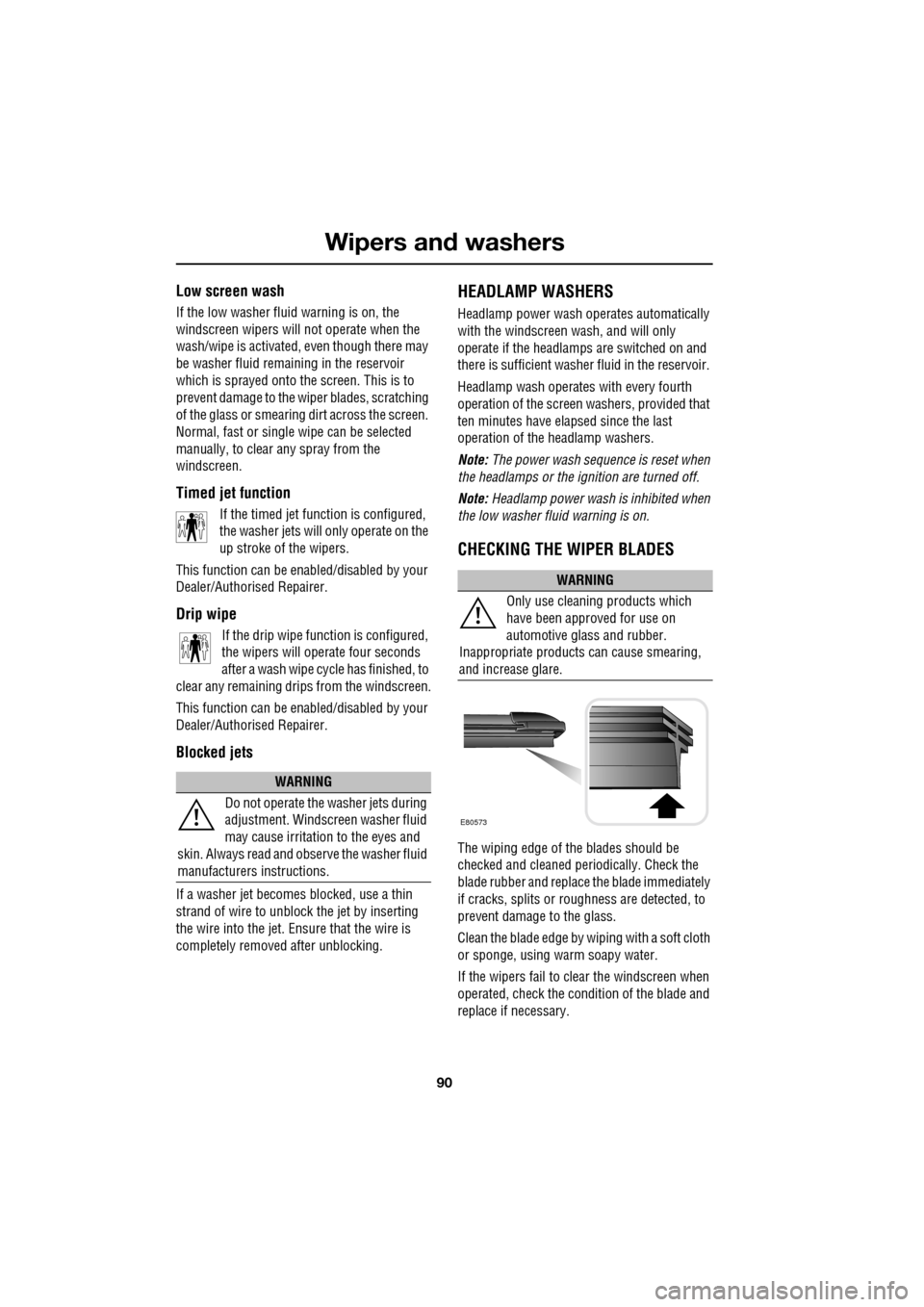
CHECKING THE WIPER BLADES
The wiping edge of the blades should be
checked and cleaned periodically. Check the
blade rubber and replace the blade immediately
if cracks, splits or roughness are detected, to
prevent damage to the glass.
Clean the blade edge by wiping with a soft cloth
or sponge, using wa rm soapy water.
If the wipers fail to clear the windscreen when
operated, check the cond ition of the blade and
replace if necessary.
WARNING
Do not operate the washer jets during
adjustment. Windscreen washer fluid
may cause irritation to the eyes and
skin. Always read and observe the washer fluid
manufacturers instructions.
WARNING
Only use cleani ng products which
have been approved for use on
automotive glass and rubber.
Inappropriate products can cause smearing,
and increase glare.
E80573
Page 91 of 391
91
Wipers and washers
CHANGING THE WIPER BLADES
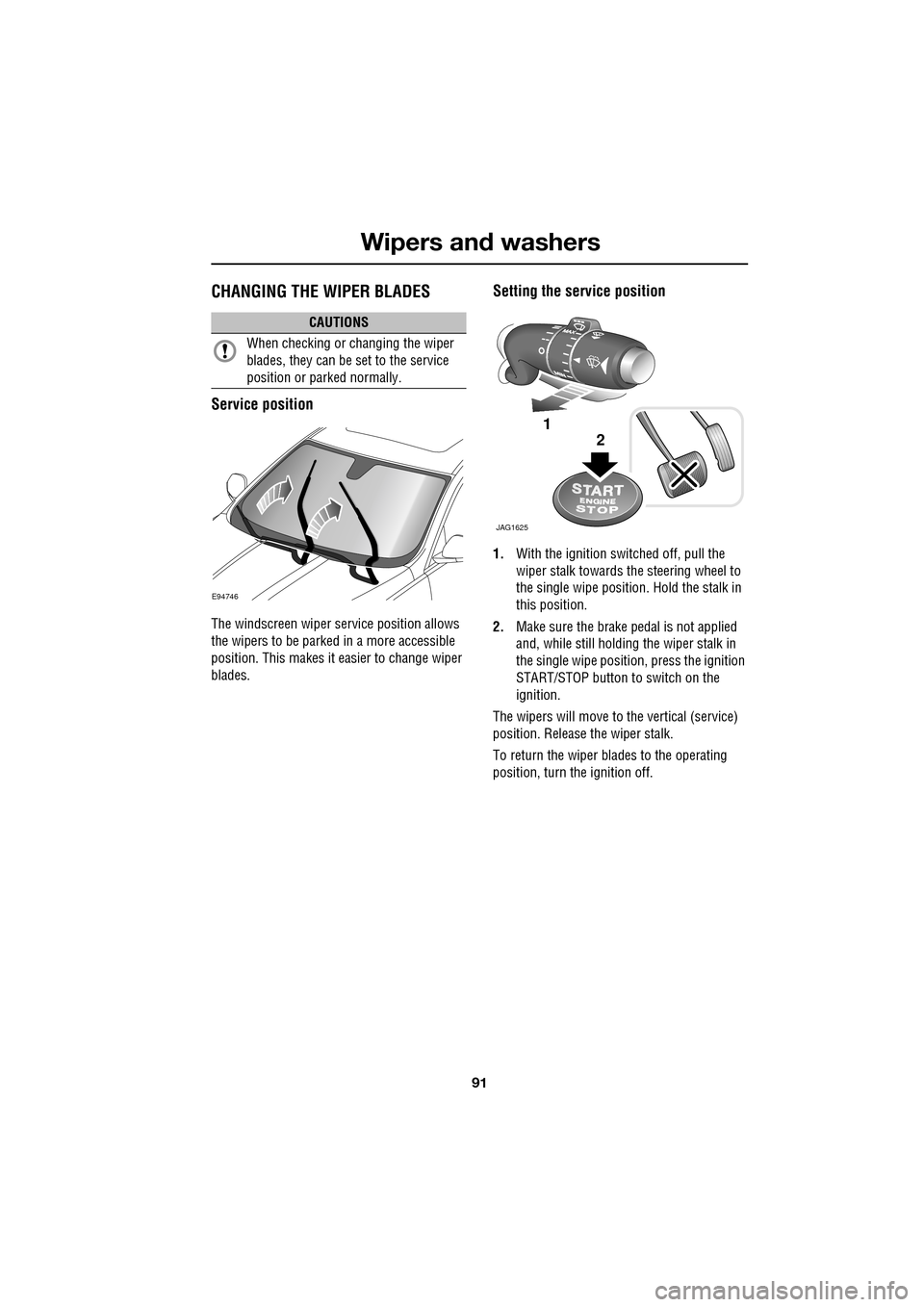
Service position
The windscreen wiper service position allows
the wipers to be parked in a more accessible
position. This makes it easier to change wiper
blades.
Setting the service position
1.With the ignition switched off, pull the
wiper stalk towards the steering wheel to
the single wipe position. Hold the stalk in
this position.
2. Make sure the brake pedal is not applied
and, while still holding the wiper stalk in
the single wipe positi on, press the ignition
START/STOP button to switch on the
ignition.
The wipers will move to the vertical (service)
position. Release the wiper stalk.
To return the wiper blades to the operating
position, turn the ignition off.
CAUTIONS
When checking or changing the wiper
blades, they can be set to the service
position or parked normally.
E94746
JAG1625
1
2
Page 93 of 391
93
Windows and mirrors
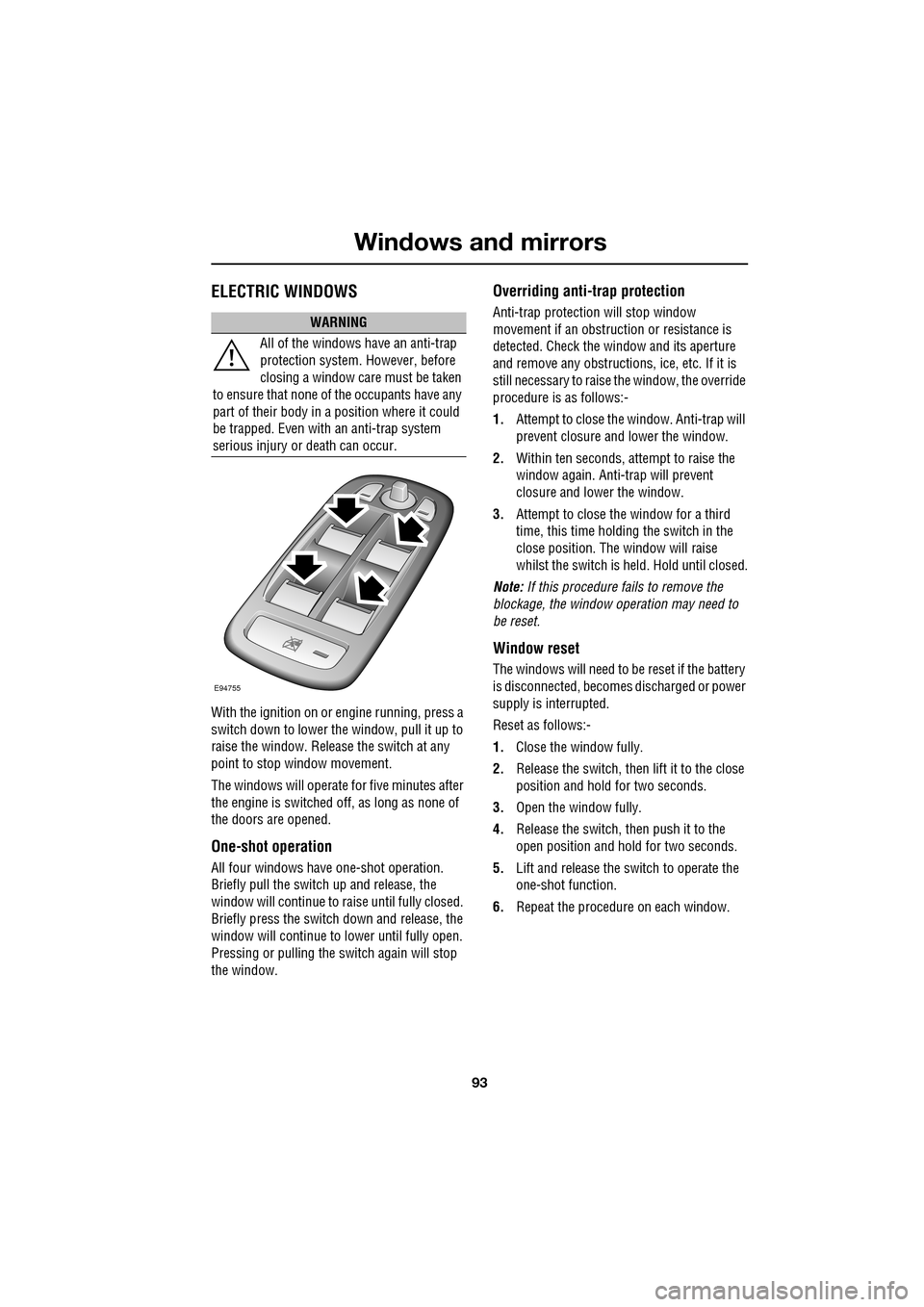
ELECTRIC WINDOWS
With the ignition on or engine running, press a
switch down to lower the window, pull it up to
raise the window. Release the switch at any
point to stop window movement.
The windows will operate for five minutes after
the engine is switched off, as long as none of
the doors are opened.
One-shot operation
All four windows have one-shot operation.
Briefly pull the switch up and release, the
window will continue to raise until fully closed.
Briefly press the switch down and release, the
window will continue to lower until fully open.
Pressing or pulling the switch again will stop
the window.
Overriding anti-trap protection
Anti-trap protection will stop window
movement if an obstruction or resistance is
detected. Check the window and its aperture
and remove any obstructions, ice, etc. If it is
still necessary to raise the window, the override
procedure is as follows:-
1. Attempt to close the window. Anti-trap will
prevent closure and lower the window.
2. Within ten seconds, attempt to raise the
window again. Anti-t rap will prevent
closure and lower the window.
3. Attempt to close the window for a third
time, this time holding the switch in the
close position. The window will raise
whilst the switch is held. Hold until closed.
Note: If this procedure fails to remove the
blockage, the window operation may need to
be reset.
Window reset
The windows will need to be reset if the battery
is disconnected, becomes discharged or power
supply is interrupted.
Reset as follows:-
1. Close the window fully.
2. Release the switch, then lift it to the close
position and hold for two seconds.
3. Open the window fully.
4. Release the switch, then push it to the
open position and hold for two seconds.
5. Lift and release the switch to operate the
one-shot function.
6. Repeat the procedure on each window.
WARNING
All of the windows have an anti-trap
protection system. However, before
closing a window care must be taken
to ensure that none of the occupants have any
part of their body in a position where it could
be trapped. Even with an anti-trap system
serious injury or death can occur.
E94755
Page 95 of 391
95
Windows and mirrors
EXTERIOR MIRRORS
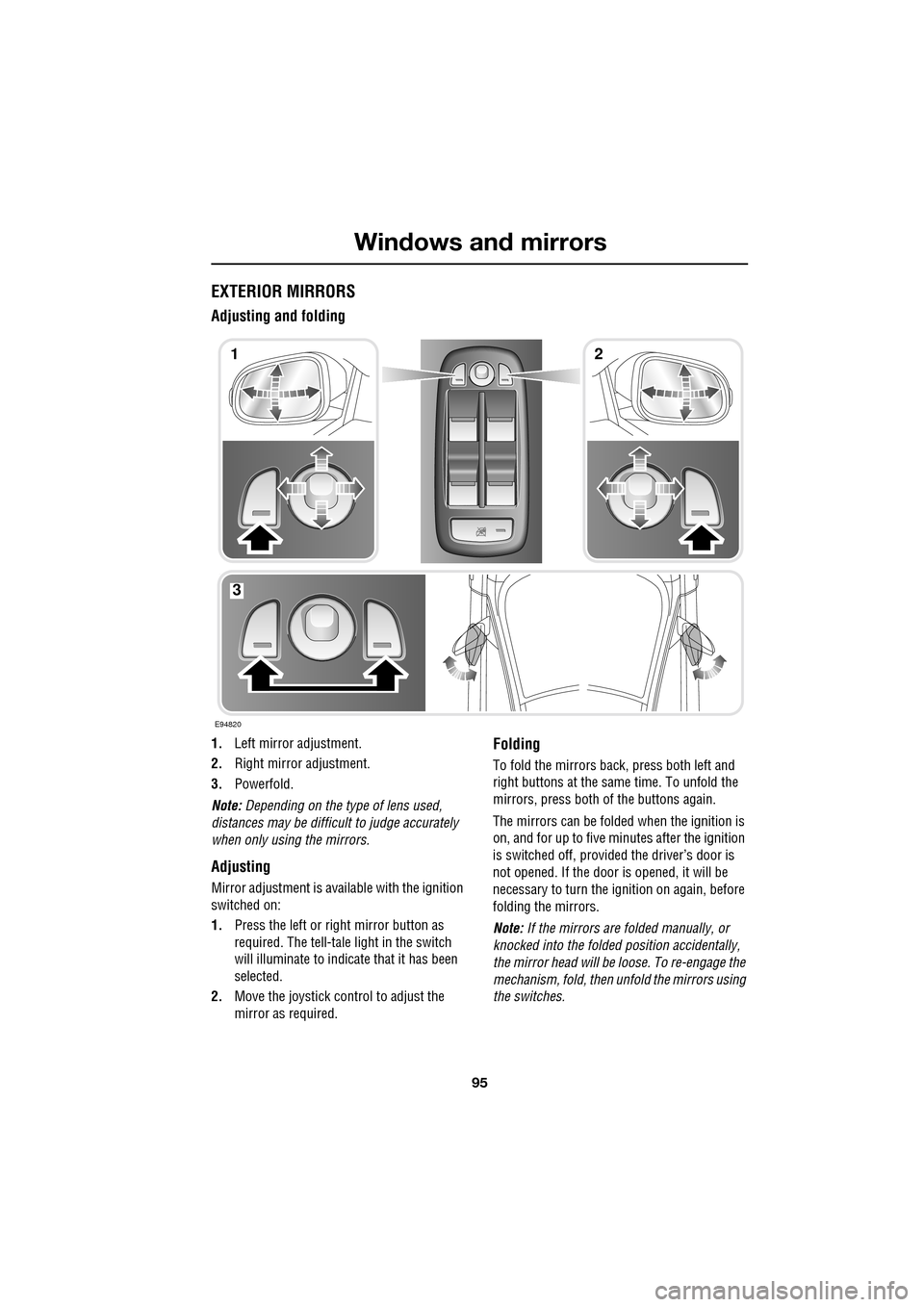
Adjusting and folding
1.Left mirror adjustment.
2. Right mirror adjustment.
3. Powerfold.
Note: Depending on the type of lens used,
distances may be difficult to judge accurately
when only using the mirrors.
Adjusting
Mirror adjustment is avai lable with the ignition
switched on:
1. Press the left or right mirror button as
required. The tell-tale light in the switch
will illuminate to indica te that it has been
selected.
2. Move the joystick control to adjust the
mirror as required.
Folding
To fold the mirrors back, press both left and
right buttons at the sa me time. To unfold the
mirrors, press both of the buttons again.
The mirrors can be folded when the ignition is
on, and for up to five minutes after the ignition
is switched off, provid ed the driver’s door is
not opened. If the door is opened, it will be
necessary to turn the ignition on again, before
folding the mirrors.
Note: If the mirrors are folded manually, or
knocked into the folded position accidentally,
the mirror head will be loose. To re-engage the
mechanism, fold, then unfold the mirrors using
the switches.
E94820
12
3
Page 100 of 391
Instruments
100
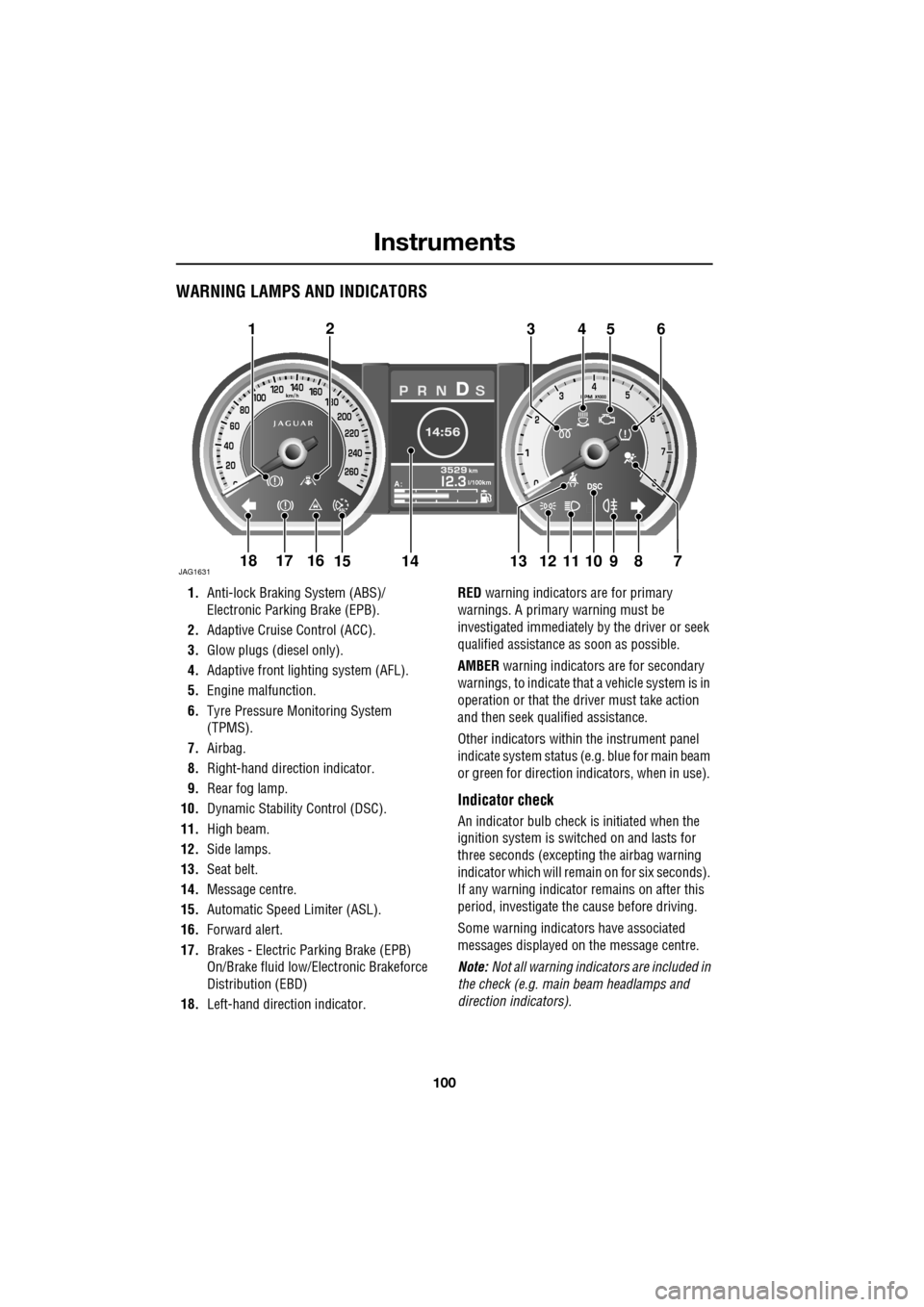
WARNING LAMPS AND INDICATORS
1.Anti-lock Braking System (ABS)/
Electronic Parking Brake (EPB).
2. Adaptive Cruise Control (ACC).
3. Glow plugs (diesel only).
4. Adaptive front lighting system (AFL).
5. Engine malfunction.
6. Tyre Pressure M onitoring System
(TPMS).
7. Airbag.
8. Right-hand direct ion indicator.
9. Rear fog lamp.
10. Dynamic Stability Control (DSC).
11. High beam.
12. Side lamps.
13. Seat belt.
14. Message centre.
15. Automatic Speed Limiter (ASL).
16. Forward alert.
17. Brakes - Electric Parking Brake (EPB)
On/Brake fluid low/El ectronic Brakeforce
Distribution (EBD)
18. Left-hand direction indicator. RED
warning indicators are for primary
warnings. A primary warning must be
investigated immediately by the driver or seek
qualified assistance as soon as possible.
AMBER warning indicators are for secondary
warnings, to indicate that a vehicle system is in
operation or that the driver must take action
and then seek qualified assistance.
Other indicators within the instrument panel
indicate system status (e .g. blue for main beam
or green for direction indicators, when in use).
Indicator check
An indicator bulb check is initiated when the
ignition system is switched on and lasts for
three seconds (excepting the airbag warning
indicator which will remain on for six seconds).
If any warning indicator remains on after this
period, investigate the cause before driving.
Some warning indicators have associated
messages displayed on the message centre.
Note: Not all warning indicators are included in
the check (e.g. main beam headlamps and
direction indicators).
Akm
l/100km
JAG1631
123456
789101817161514131211
Page 101 of 391
101
Instruments
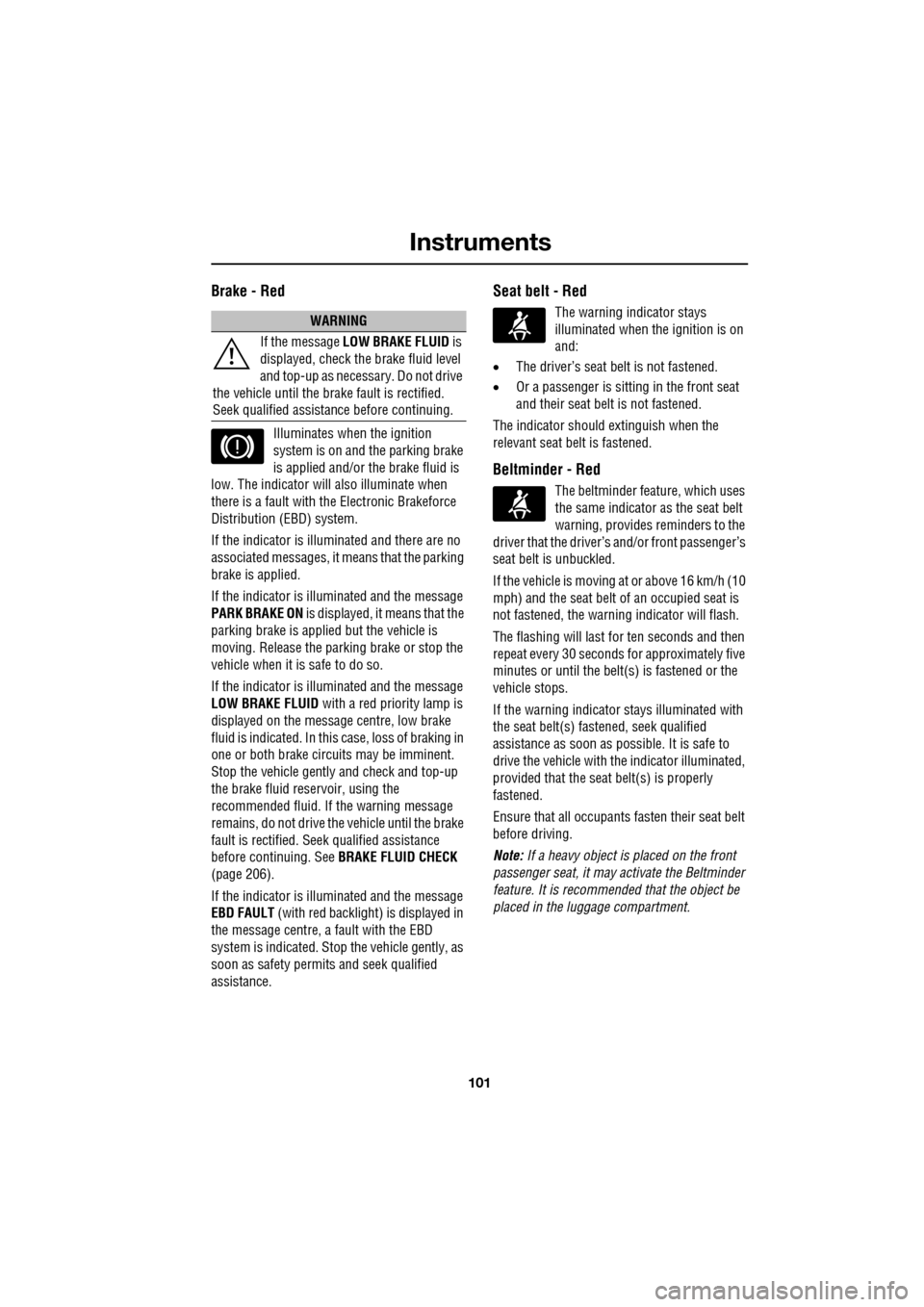
Brake - Red
Illuminates when the ignition
system is on and the parking brake
is applied and/or the brake fluid is
low. The indicator will also illuminate when
there is a fault with the Electronic Brakeforce
Distribution (EBD) system.
If the indicator is illu minated and there are no
associated messages, it means that the parking
brake is applied.
If the indicator is illuminated and the message
PARK BRAKE ON is displayed, it means that the
parking brake is applied but the vehicle is
moving. Release the parking brake or stop the
vehicle when it is safe to do so.
If the indicator is illuminated and the message
LOW BRAKE FLUID with a red priority lamp is
displayed on the message centre, low brake
fluid is indicated. In this case, loss of braking in
one or both brake circ uits may be imminent.
Stop the vehicle gently and check and top-up
the brake fluid reservoir, using the
recommended fluid. If the warning message
remains, do not drive the vehicle until the brake
fault is rectified. Se ek qualified assistance
before continuing. See BRAKE FLUID CHECK
(page 206).
If the indicator is illuminated and the message
EBD FAULT (with red backlight) is displayed in
the message centre, a fault with the EBD
system is indicated. Stop the vehicle gently, as
soon as safety permit s and seek qualified
assistance.
Seat belt - Red
The warning indicator stays
illuminated when the ignition is on
and:
• The driver’s seat be lt is not fastened.
• Or a passenger is sitting in the front seat
and their seat belt is not fastened.
The indicator should extinguish when the
relevant seat belt is fastened.
Beltminder - Red
The beltminder feat ure, which uses
the same indicator as the seat belt
warning, provides reminders to the
driver that the driver’s and/or front passenger’s
seat belt is unbuckled.
If the vehicle is moving at or above 16 km/h (10
mph) and the seat belt of an occupied seat is
not fastened, the warning indicator will flash.
The flashing will last for ten seconds and then
repeat every 30 seconds for approximately five
minutes or until the belt(s ) is fastened or the
vehicle stops.
If the warning indicator stays illuminated with
the seat belt(s) fastened, seek qualified
assistance as s oon as possible. It is safe to
drive the vehicle with th e indicator illuminated,
provided that the seat belt(s) is properly
fastened.
Ensure that all occupants fasten their seat belt
before driving.
Note: If a heavy object is placed on the front
passenger seat, it may activate the Beltminder
feature. It is recommended that the object be
placed in the luggage compartment.
WARNING
If the message LOW BRAKE FLUID is
displayed, check the brake fluid level
and top-up as necessary. Do not drive
the vehicle until the brake fault is rectified.
Seek qualified assistan ce before continuing.
Page 102 of 391
Instruments
102
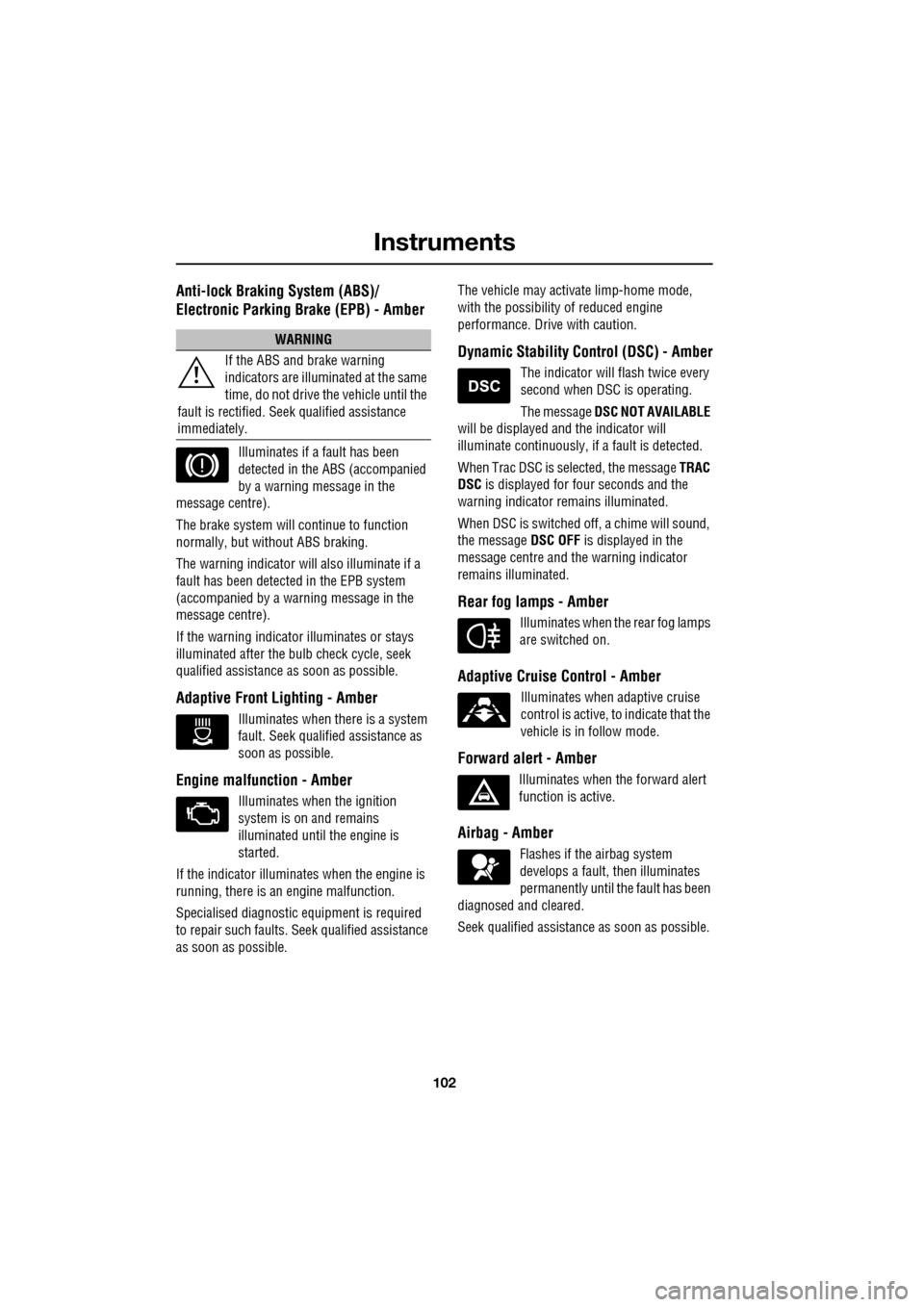
Anti-lock Braking System (ABS)/
Electronic Parking Brake (EPB) - Amber
Illuminates if a fault has been
detected in the ABS (accompanied
by a warning message in the
message centre).
The brake system will c ontinue to function
normally, but without ABS braking.
The warning indicator will also illuminate if a
fault has been detected in the EPB system
(accompanied by a warning message in the
message centre).
If the warning indicato r illuminates or stays
illuminated after the bulb check cycle, seek
qualified assistance as soon as possible.
Adaptive Front Lighting - Amber
Illuminates when there is a system
fault. Seek qualified assistance as
soon as possible.
Engine malfunction - Amber
Illuminates when the ignition
system is on and remains
illuminated until the engine is
started.
If the indicator illuminates when the engine is
running, there is an engine malfunction.
Specialised diagnostic equipment is required
to repair such faults. Seek qualified assistance
as soon as possible. The vehicle may acti
vate limp-home mode,
with the possibility of reduced engine
performance. Driv e with caution.
Dynamic Stability Control (DSC) - Amber
The indicator will flash twice every
second when DSC is operating.
The message DSC NOT AVAILABLE
will be displayed and the indicator will
illuminate continuously, if a fault is detected.
When Trac DSC is selected, the message TRAC
DSC is displayed for f our seconds and the
warning indicator remains illuminated.
When DSC is switched off, a chime will sound,
the message DSC OFF is displayed in the
message centre and the warning indicator
remains illuminated.
Rear fog lamps - Amber
Illuminates when the rear fog lamps
are switched on.
Adaptive Cruise Control - Amber
Illuminates when adaptive cruise
control is active, to indicate that the
vehicle is in follow mode.
Forward alert - Amber
Illuminates when the forward alert
function is active.
Airbag - Amber
Flashes if the airbag system
develops a fault, then illuminates
permanently until the fault has been
diagnosed and cleared.
Seek qualified assistance as soon as possible.
WARNING
If the ABS and brake warning
indicators are illuminated at the same
time, do not drive the vehicle until the
fault is rectified. Seek qualified assistance
immediately.