ignition JAGUAR XF 2009 1.G Owner's Manual
[x] Cancel search | Manufacturer: JAGUAR, Model Year: 2009, Model line: XF, Model: JAGUAR XF 2009 1.GPages: 391, PDF Size: 19.32 MB
Page 104 of 391
Instruments
104
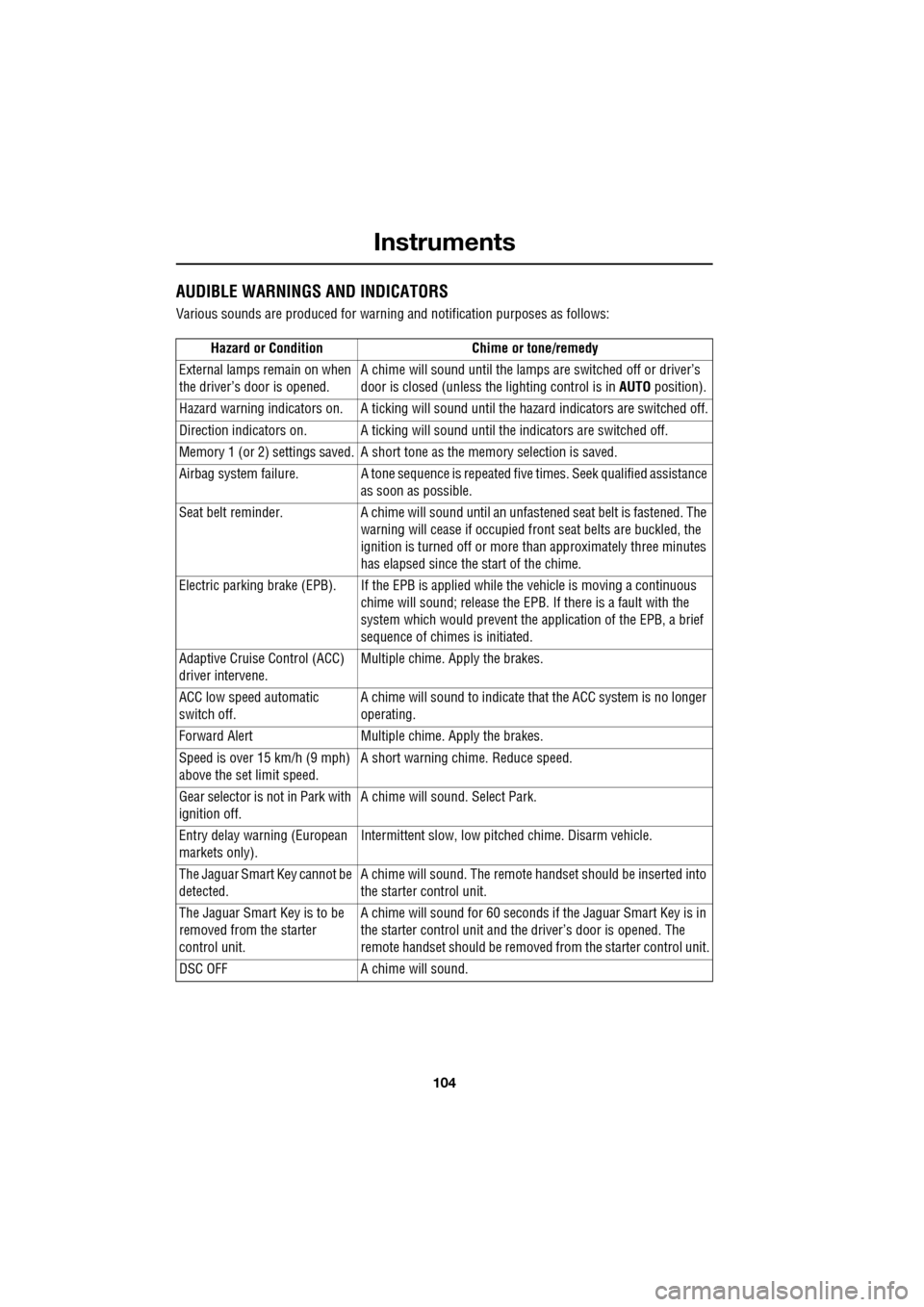
AUDIBLE WARNINGS AND INDICATORS
Various sounds are produced for warning and notification purposes as follows:Hazard or Condition Chime or tone/remedy
External lamps remain on when
the driver’s door is opened. A chime will sound until the lamps are switched off or driver’s
door is closed (unless the lighting control is in
AUTO position).
Hazard warning indicators on. A ti cking will sound until the hazard indicators are switched off.
Direction indicators on. A tick ing will sound until the indicators are switched off.
Memory 1 (or 2) settings saved. A short tone as the memory selection is saved.
Airbag system failure. A tone sequence is repeated five times. Seek qualified assistance as soon as possible.
Seat belt reminder. A chime will sound until an unfastened se at belt is fastened. The
warning will cease if occupied fr ont seat belts are buckled, the
ignition is turned off or more than approximately three minutes
has elapsed since the start of the chime.
Electric parking brake (EPB). If the EPB is a pplied while the vehicle is moving a continuous
chime will sound; release the EPB. If there is a fault with the
system which would prevent the a pplication of the EPB, a brief
sequence of chimes is initiated.
Adaptive Cruise Control (ACC)
driver intervene. Multiple chime. Apply the brakes.
ACC low speed automatic
switch off. A chime will sound to indicate that the ACC system is no longer
operating.
Forward Alert Multiple chime. Apply the brakes.
Speed is over 15 km/h (9 mph)
above the set limit speed. A short warning chime. Reduce speed.
Gear selector is not in Park with
ignition off. A chime will sound.
Select Park.
Entry delay warning (European
markets only). Intermittent slow, low pitc
hed chime. Disarm vehicle.
The Jaguar Smart Key cannot be
detected. A chime will sound. The remote ha
ndset should be inserted into
the starter control unit.
The Jaguar Smart Key is to be
removed from the starter
control unit. A chime will sound for 60 seconds if
the Jaguar Smart Key is in
the starter control unit and the driver’s door is opened. The
remote handset should be remove d from the starter control unit.
DSC OFF A chime will sound.
Page 106 of 391
Information displays
106
WARNING AND INFORMATION
MESSAGES
Most displayed warning messages have an
associated warning indicator, which will
illuminate on to indicate the message priority.
Also from time to time information messages
will be displayed.
If more than one message is active, each is
displayed in turn for two seconds in order of
priority.
Messages take priority over the trip computer
data and will be displayed when the ignition is
on.
Note: The message centre information
messages and their meanings, are detailed
where necessary within the appropriate subject
sections.
Clearing messages from the display
It is possible to temporarily clear certain
warning or information messages from the
message centre.
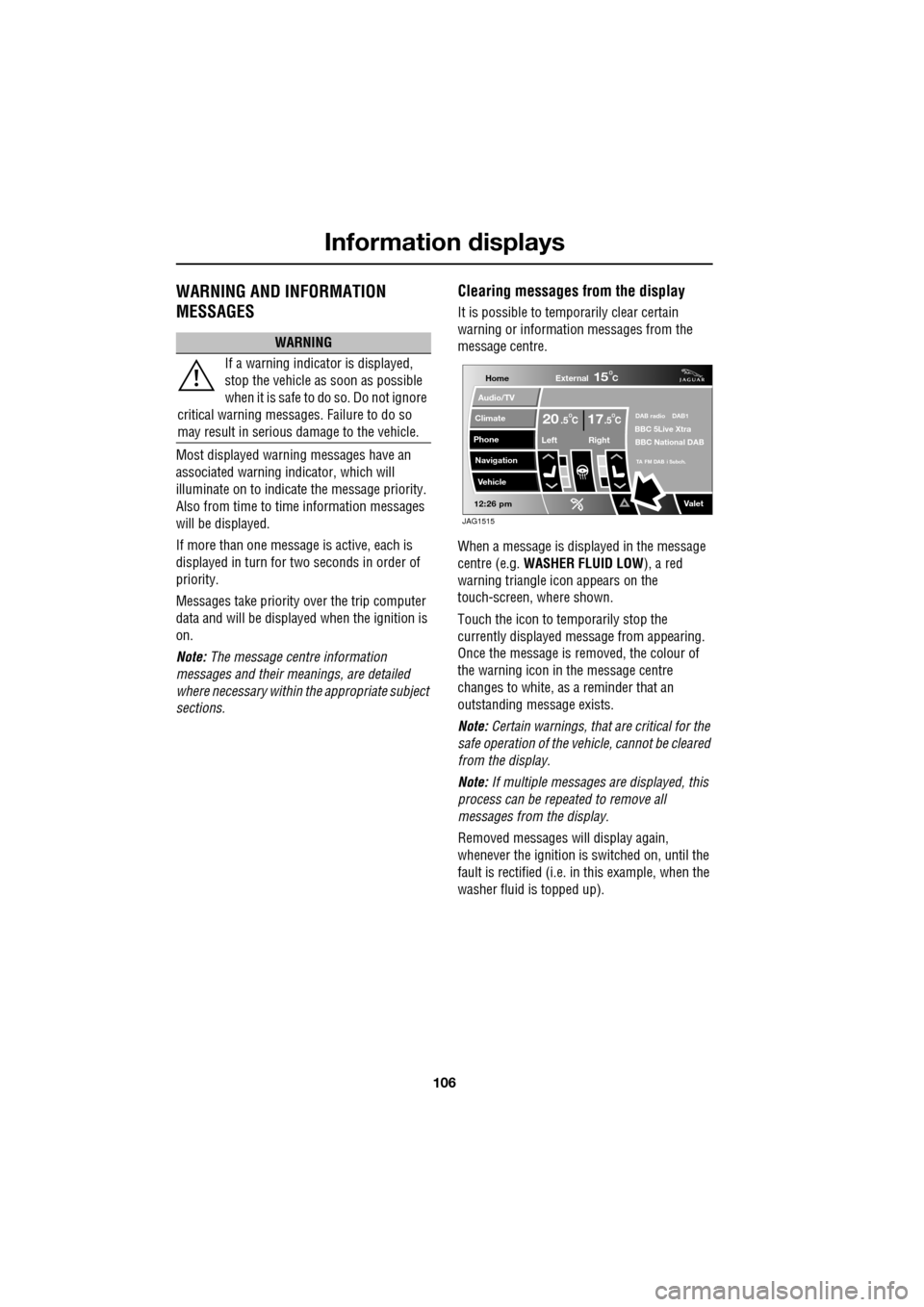
When a message is displayed in the message
centre (e.g. WASHER FLUID LOW ), a red
warning triangle icon appears on the
touch-screen, where shown.
Touch the icon to temporarily stop the
currently displayed message from appearing.
Once the message is removed, the colour of
the warning icon in the message centre
changes to white, as a reminder that an
outstanding message exists.
Note: Certain warnings, that are critical for the
safe operation of the vehi cle, cannot be cleared
from the display.
Note: If multiple messages are displayed, this
process can be repeated to remove all
messages from the display.
Removed messages will display again,
whenever the ignition is switched on, until the
fault is rectified (i.e. in this example, when the
washer fluid is topped up).
WARNING
If a warning indicato r is displayed,
stop the vehicle as soon as possible
when it is safe to do so. Do not ignore
critical warning messages. Failure to do so
may result in serious damage to the vehicle.
Home
Audio/TV
Climate
Phone
Navigation
Vehicle
Valet12:26 pm
External15C
Left Right
20 17CC.5 .5DAB radio DAB1BBC 5Live Xtra
BBC National DAB
TA FM DAB i Subch.
JAG1515
Page 107 of 391
107
Information displays
TRIP COMPUTER
The computer memory stores data for a
journey or series of journeys until it is reset to
zero.
The displayed information is for guidance only,
as it can be affected by traffic, road and
weather conditions.
Three independent memories are available, A,
B and Auto. A and B me mories can be set
independently, while the Auto trip will reset
after every ignition cycle as the vehicle moves.
Full trip computer information for the trip
memories can be displayed on the vehicle
touch-screen located in the centre console,
while current selected trip computer
information is displayed on the instrument
panel message centre.
To access the trip computer touch-screen
settings:
• From the touch-screen Home menu, select
Vehicle .
• Select Trip computer .
• Select requirement s from the menu.
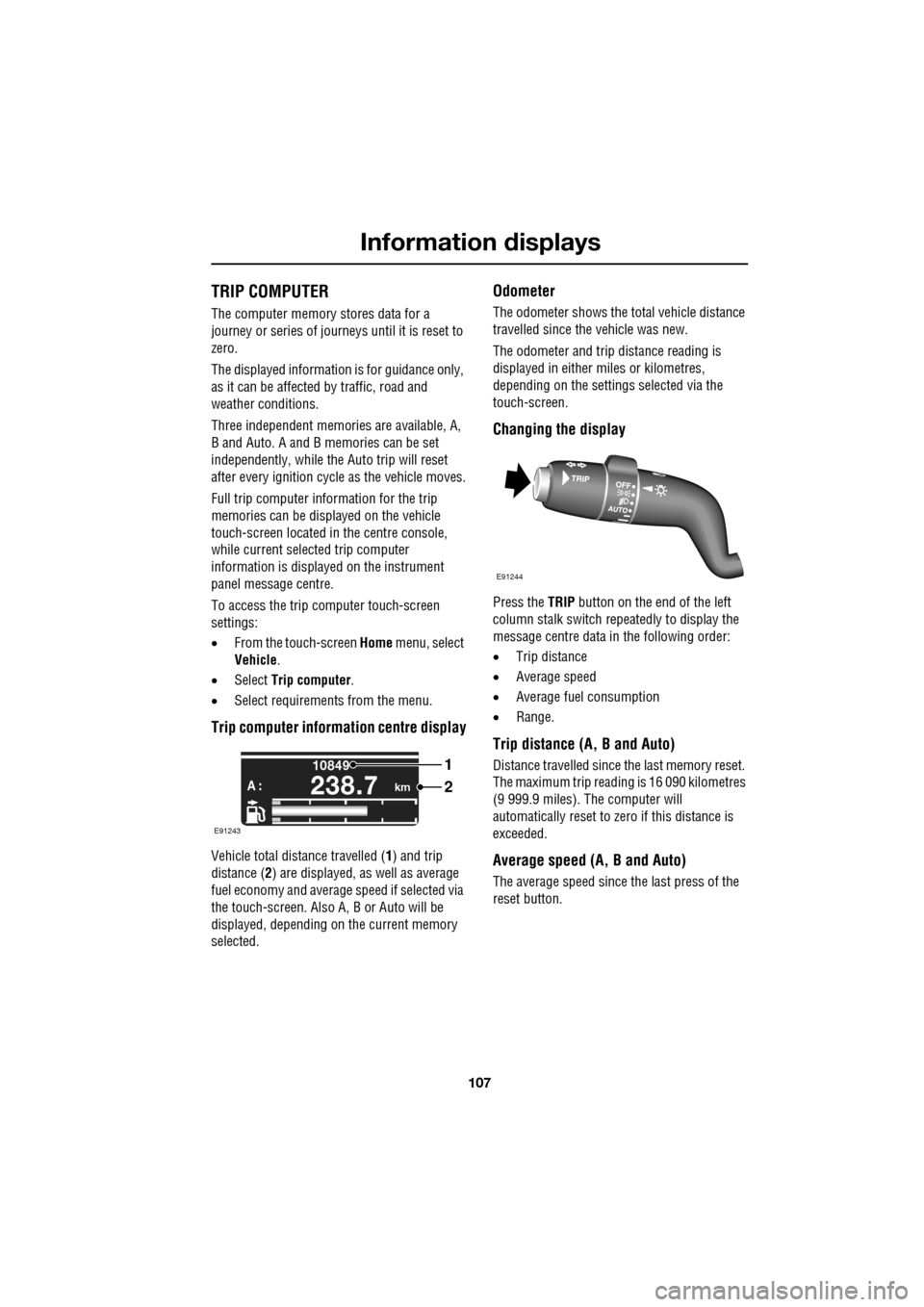
Trip computer information centre display
Vehicle total distance travelled ( 1) and trip
distance ( 2) are displayed, as well as average
fuel economy and average speed if selected via
the touch-screen. Also A, B or Auto will be
displayed, depending on the current memory
selected.
Odometer
The odometer shows the total vehicle distance
travelled since the vehicle was new.
The odometer and trip distance reading is
displayed in either miles or kilometres,
depending on the settings selected via the
touch-screen.
Changing the display
Press the TRIP button on the end of the left
column stalk switch repeatedly to display the
message centre data in the following order:
• Trip distance
• Average speed
• Average fuel consumption
• Range.
Trip distance (A, B and Auto)
Distance travelled since the last memory reset.
The maximum trip reading is 16 090 kilometres
(9 999.9 miles). The computer will
automatically reset to zero if this distance is
exceeded.
Average speed (A, B and Auto)
The average speed since the last press of the
reset button.
km
10849
A :238.7
1
2
E91243
E91244
Page 108 of 391
Information displays
108
Average fuel consumption (A, B and
Auto)
The average fuel consumption, stated as litres
per 100 kilometres (except Japan, kilometres
per litre), miles per litre or miles per gallon (UK
only), based on the accumulated distance
travelled and the accumulated fuel used.
Range
This shows the predicte d distance, miles or
kilometres, that the vehi cle should travel on the
remaining fuel, assuming average fuel
economy and fuel consum ption stay constant.
Electronic dipstick (diesel and V8 petrol
engines only)
This shows the current engine oil level and any
associated warnings. SeeENGINE OIL CHECK -
V8 Petrol engines (page 199).
ML-km (also Miles-litre)
The display of metric or imperial units is
selected via the touch-screen.
Display language
The display language is selected via the
touch-screen.
Reset
Resetting of the trip memo ries is carried out via
the touch-screen.
Service interval indicator
The service interval message will only be
displayed when the vehicle has less than
3400 km (2000 miles) before the service is
due.
When the ignition is switched on, and the
vehicle has started it s service countdown,
SERVICE REQ'D XXXX km (XXXX MLS) is
displayed in the message centre. At the same
time the display will glow Amber.
After approximat ely five seconds, the display
reverts to show the preset requirements.
When the service distance has been reached,
SERVICE REQUIRED is displayed in the
message centre and the display will glow Red.
After approximat ely five seconds, the display
reverts to show the preset requirements.
The distance countdown re duces in increments
of 50 km or 50 miles, depending on which
display units have been selected.
The distance countdown is controlled by the
engine management system and is
automatically adjusted to allow for driving style
and conditions. This ga uges when the service
becomes necessary.
Note: After the completion of each service, the
Dealer/Authorised Repairer will reset the
distance display to commence the countdown
to the next service.
CAUTION
If no service interv al indicator is
displayed during the vehicle service
cycle, make sure that your vehicle is serviced
in accordance with the intervals, as stated in
the Service Portfolio.
Page 115 of 391
115
Climate control
AIR VENTS
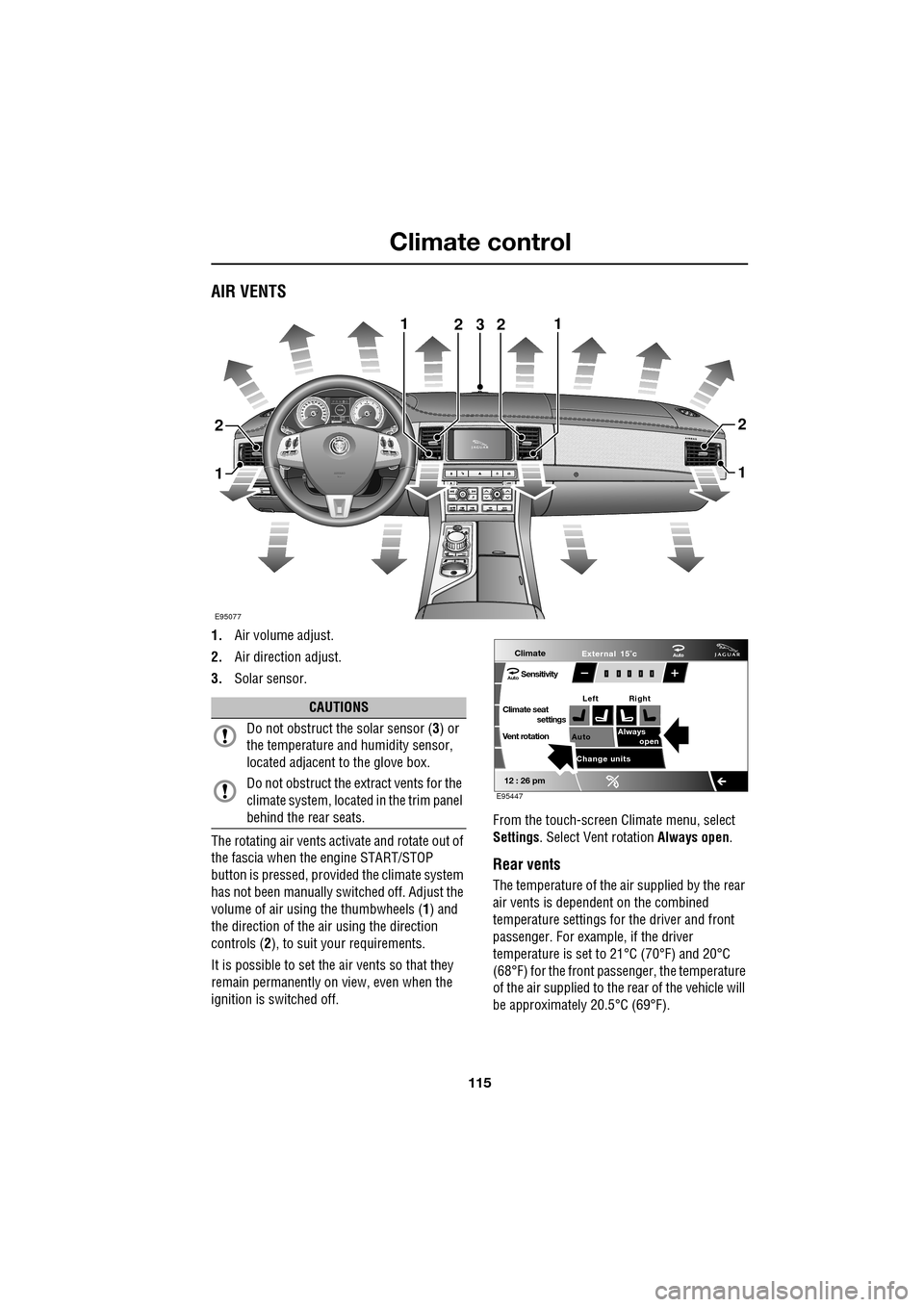
1.Air volume adjust.
2. Air direction adjust.
3. Solar sensor.
The rotating air vents acti vate and rotate out of
the fascia when the engine START/STOP
button is pressed, provided the climate system
has not been manually switched off. Adjust the
volume of air usi ng the thumbwheels ( 1) and
the direction of the air using the direction
controls ( 2), to suit your requirements.
It is possible to set the air vents so that they
remain permanently on view, even when the
ignition is switched off. From the touch-screen Climate menu, select
Settings
. Select Vent rotation Always open .
Rear vents
The temperature of the air supplied by the rear
air vents is dependent on the combined
temperature settings for the driver and front
passenger. For example, if the driver
temperature is set to 21°C (70°F) and 20°C
(68°F) for the front passenger, the temperature
of the air supplied to the rear of the vehicle will
be approximately 20.5°C (69°F).
AkI t F1 k
E95077
11
1
23
2
1
2
2
CAUTIONS
Do not obstruct the solar sensor ( 3) or
the temperature a nd humidity sensor,
located adjacent to the glove box.
Do not obstruct the extract vents for the
climate system, located in the trim panel
behind the rear seats.
Climate
SensitivityAuto
Climate seat settings
Vent rotation
12 : 26 pm
Auto Always
open
Change units External 15˚c
Left Right
Auto
E95447
Page 121 of 391
121
Climate control
ELECTRIC SUNROOF
Operation
The sunroof can only be operated with the
ignition on.
Tilt
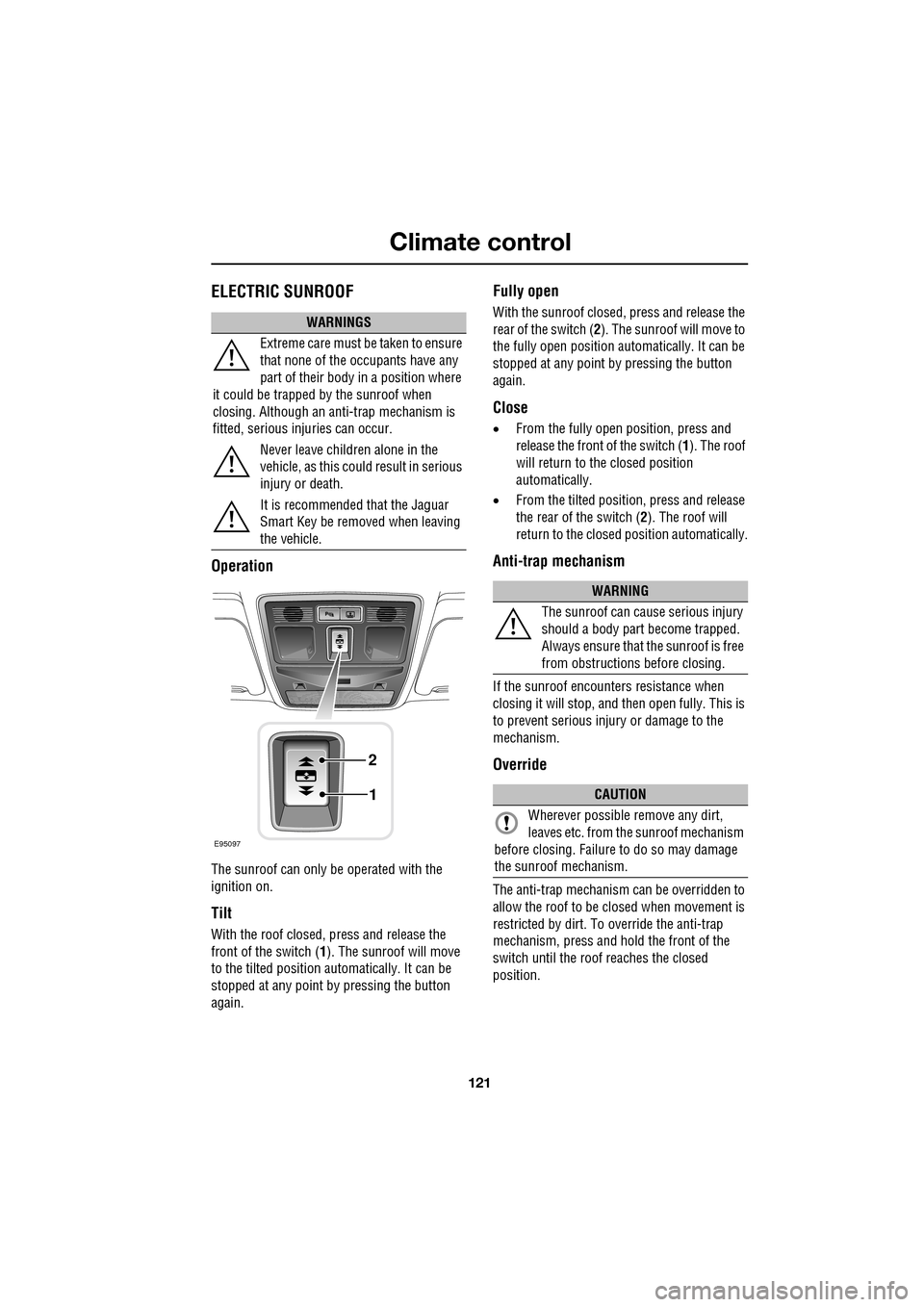
With the roof closed, press and release the
front of the switch (1). The sunroof will move
to the tilted position automatically. It can be
stopped at any point by pressing the button
again.
Fully open
With the sunroof closed, press and release the
rear of the switch ( 2). The sunroof will move to
the fully open position auto matically. It can be
stopped at any point by pressing the button
again.
Close
• From the fully open position, press and
release the front of the switch ( 1). The roof
will return to the closed position
automatically.
• From the tilted position, press and release
the rear of the switch ( 2). The roof will
return to the closed position automatically.
Anti-trap mechanism
If the sunroof encounters resistance when
closing it will stop, and then open fully. This is
to prevent serious injury or damage to the
mechanism.
Override
The anti-trap mechanism can be overridden to
allow the roof to be closed when movement is
restricted by dirt. To override the anti-trap
mechanism, press and hold the front of the
switch until the roof reaches the closed
position.
WARNINGS
Extreme care must be taken to ensure
that none of the oc cupants have any
part of their body in a position where
it could be trapped by the sunroof when
closing. Although an anti-trap mechanism is
fitted, serious injuries can occur.
Never leave children alone in the
vehicle, as this could result in serious
injury or death.
It is recommended that the Jaguar
Smart Key be removed when leaving
the vehicle.
E95097
1
2
WARNING
The sunroof can cause serious injury
should a body part become trapped.
Always ensure that the sunroof is free
from obstructions before closing.
CAUTION
Wherever possible remove any dirt,
leaves etc. from the sunroof mechanism
before closing. Failure to do so may damage
the sunroof mechanism.
Page 122 of 391
Climate control
122
Calibration
If the battery is disconnected, or the power
supply is interrupted, whilst the sunroof is
partially open it will need to be recalibrated.
Once the battery is reconnected, or the power
supply is restored, recalibrate the sunroof as
follows:
1. Switch the ignition on.
2. Press the front of the switch, so that the
sunroof is in the tilt position, then release
the switch.
3. Press the front of the sunroof switch, and
hold for thirty seconds.
4. After thirty seconds the sunroof will begin
to move. Keep the front of the switch
pressed until the sunroof has fully opened,
then closed.
5. Once the open/close cycle has completed
and the sunroof ha s stopped moving,
release the switch.
The sunroof can now be operated as normal.
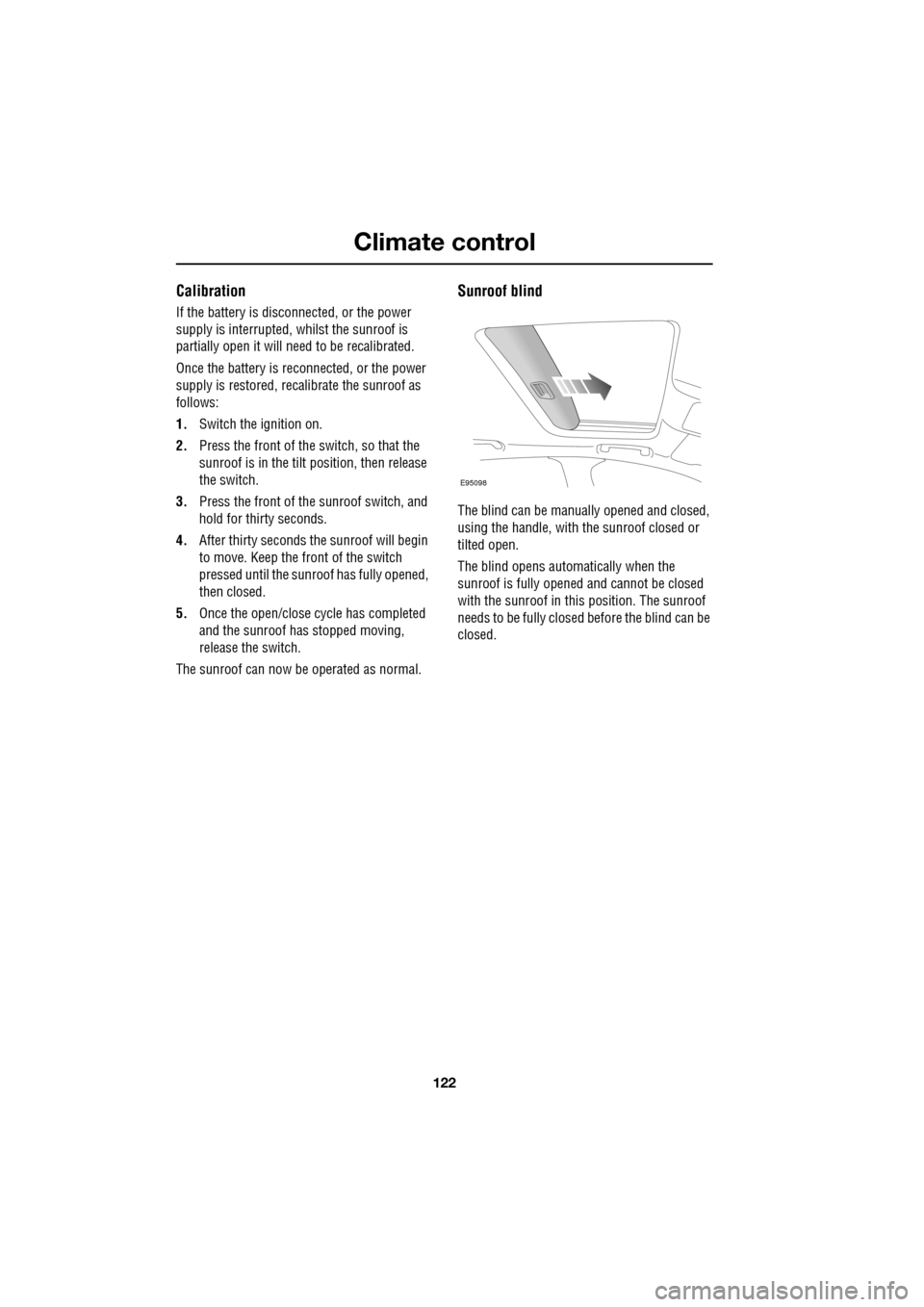
Sunroof blind
The blind can be manua lly opened and closed,
using the handle, with the sunroof closed or
tilted open.
The blind opens automatically when the
sunroof is fully opened and cannot be closed
with the sunroof in this position. The sunroof
needs to be fully closed before the blind can be
closed.
E95098
Page 129 of 391
129
Convenience features
To erase all programming
For first time programming, ensure that the
engine is switched off:
1.Ensure that the ignition system is in
convenience mode.
2. Press and hold the two outer buttons on
the transceiver in th e rear-view mirror.
Keep the buttons pressed until the
indicator lamp begins to flash (this will
take approximately 20 seconds), then
release the buttons.
All memories in the gara ge door opener have
now been cleared.
Note: Do not perform this procedure when
programming the addi tional garage door
opener buttons.
Programming
Ensuring that the engine is switched off:
1. Ensure that the ignition system is on.
2. Hold the end of the original garage door
opener hand-held transmitter
approximately 50 to 150 mm (2 to 6
inches) away from the transceiver in the
rear-view mirror, keeping the indicator
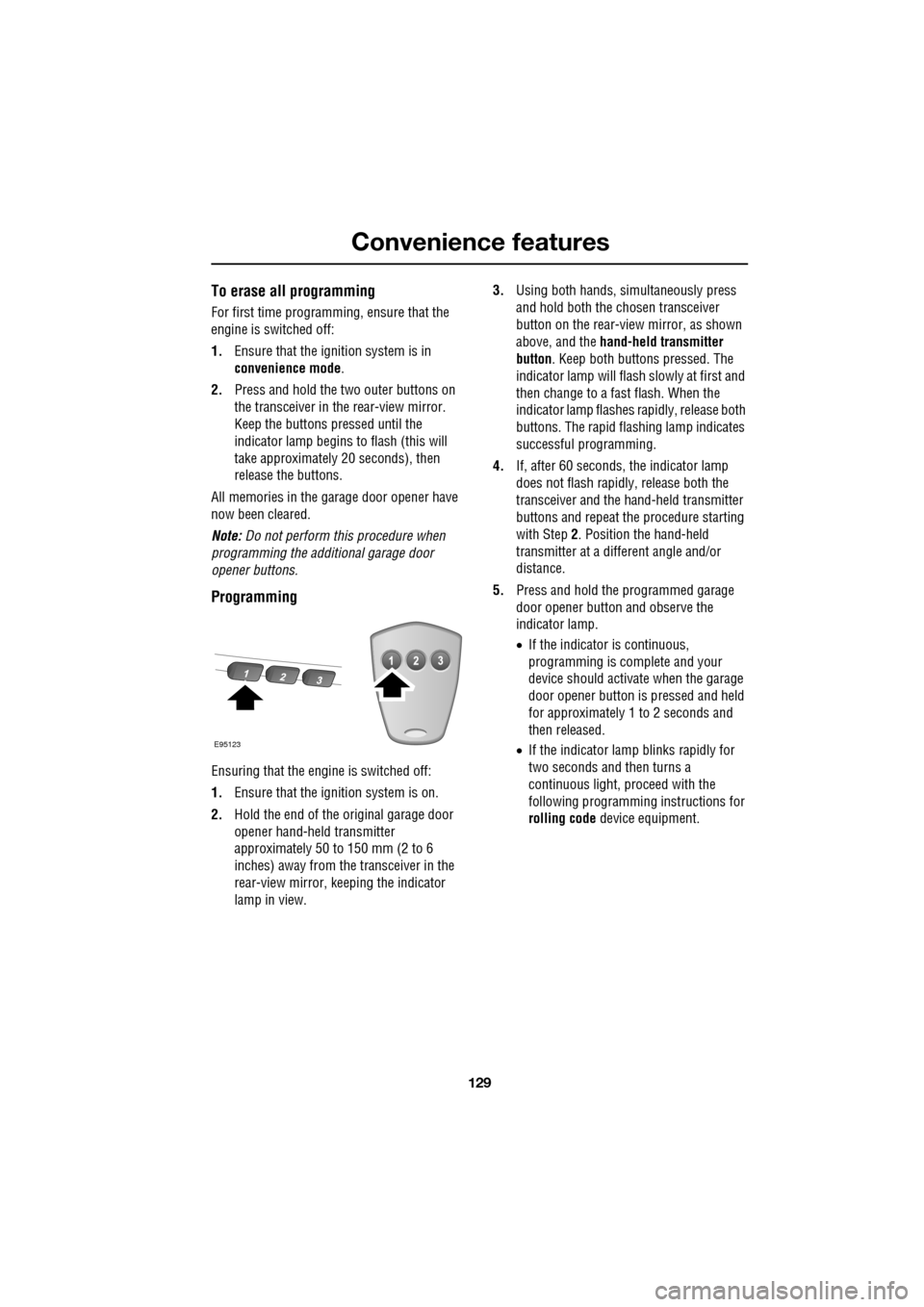
lamp in view. 3.
Using both hands , simultaneously press
and hold both the chosen transceiver
button on the rear-view mirror, as shown
above, and the hand-held transmitter
button. Keep both buttons pressed. The
indicator lamp will flash slowly at first and
then change to a fast flash. When the
indicator lamp flashes rapidly, release both
buttons. The rapid flas hing lamp indicates
successful programming.
4. If, after 60 seconds, the indicator lamp
does not flash rapidl y, release both the
transceiver and the hand-held transmitter
buttons and repeat the procedure starting
with Step 2. Position the hand-held
transmitter at a diffe rent angle and/or
distance.
5. Press and hold the programmed garage
door opener button and observe the
indicator lamp.
•If the indicator is continuous,
programming is complete and your
device should activate when the garage
door opener button is pressed and held
for approximately 1 to 2 seconds and
then released.
• If the indicator lamp blinks rapidly for
two seconds and then turns a
continuous light, pr oceed with the
following programming instructions for
rolling code device equipment.
E95123
Page 132 of 391
Starting the engine
132
GENERAL INFORMATION
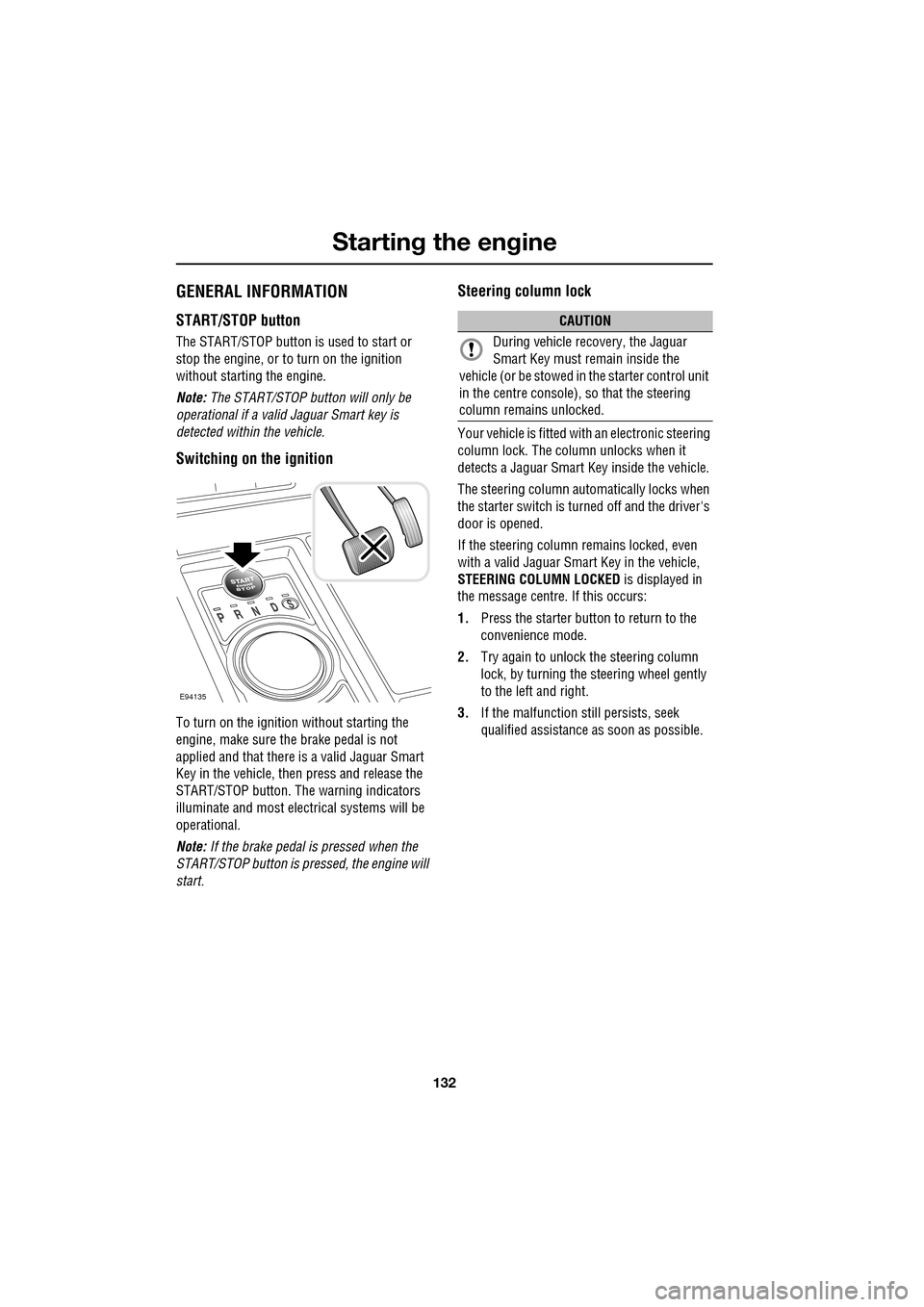
START/STOP button
The START/STOP button is used to start or
stop the engine, or to turn on the ignition
without starting the engine.
Note: The START/STOP button will only be
operational if a valid Jaguar Smart key is
detected within the vehicle.
Switching on the ignition
To turn on the ignition without starting the
engine, make sure the brake pedal is not
applied and that there is a valid Jaguar Smart
Key in the vehicle, then press and release the
START/STOP button. The warning indicators
illuminate and most electr ical systems will be
operational.
Note: If the brake pedal is pressed when the
START/STOP button is pressed, the engine will
start.
Steering column lock
Your vehicle is fitted with an electronic steering
column lock. The column unlocks when it
detects a Jaguar Smart Key inside the vehicle.
The steering column automatically locks when
the starter switch is turned off and the driver's
door is opened.
If the steering column remains locked, even
with a valid Jaguar Smart Key in the vehicle,
STEERING COLUMN LOCKED is displayed in
the message centre. If this occurs:
1. Press the starter button to return to the
convenience mode.
2. Try again to unlock the steering column
lock, by turning the steering wheel gently
to the left and right.
3. If the malfunction still persists, seek
qualified assistance as soon as possible.
E94135
CAUTION
During vehicle recovery, the Jaguar
Smart Key must remain inside the
vehicle (or be stowed in the starter control unit
in the centre console), so that the steering
column remains unlocked.
Page 133 of 391
133
Starting the engine
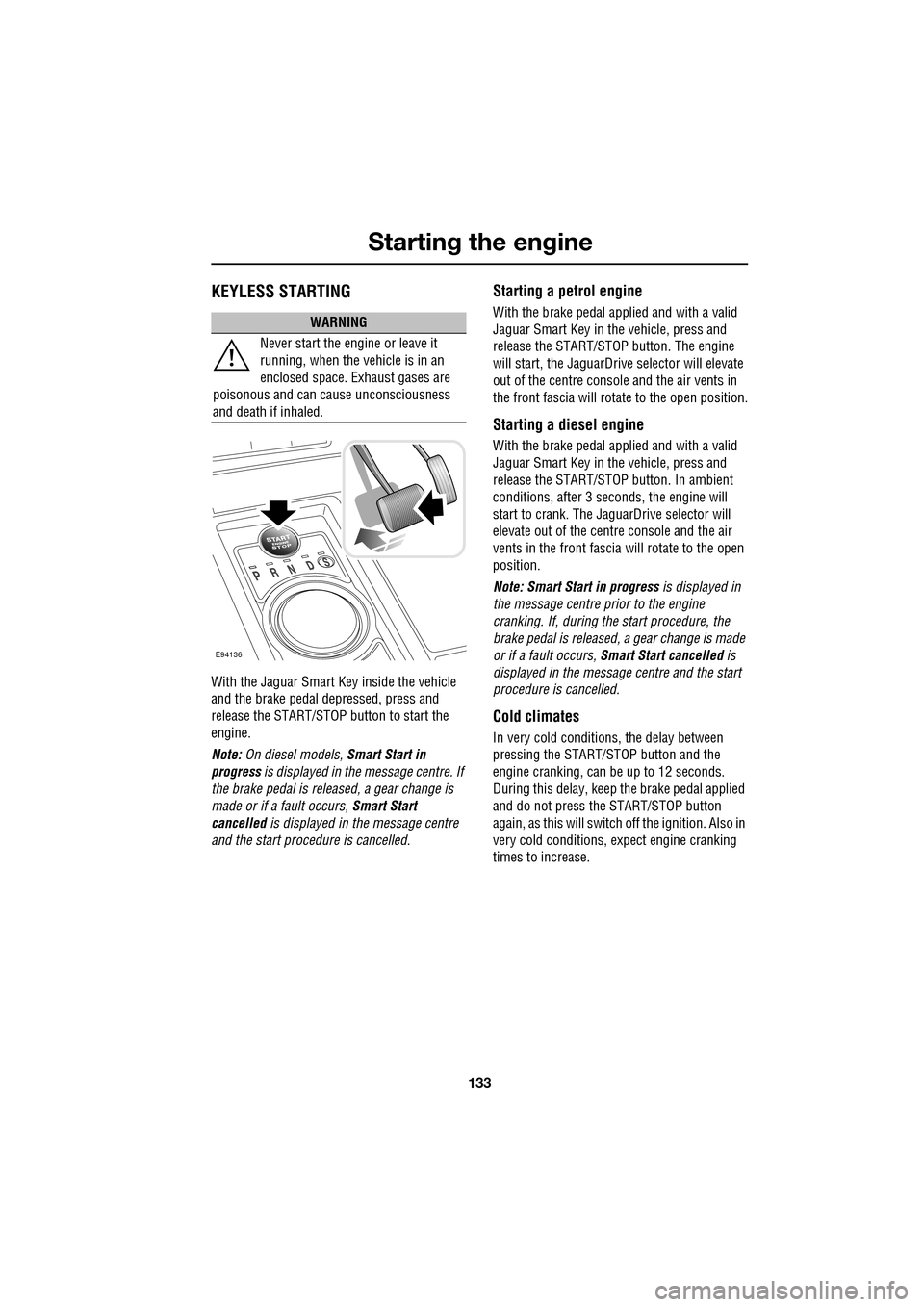
KEYLESS STARTING
With the Jaguar Smart Key inside the vehicle
and the brake pedal depressed, press and
release the START/STOP button to start the
engine.
Note: On diesel models, Smart Start in
progress is displayed in the message centre. If
the brake pedal is released, a gear change is
made or if a fault occurs, Smart Start
cancelled is displayed in the message centre
and the start procedure is cancelled.
Starting a petrol engine
With the brake pedal applied and with a valid
Jaguar Smart Key in the vehicle, press and
release the START/STOP button. The engine
will start, the JaguarDrive selector will elevate
out of the centre console and the air vents in
the front fascia will ro tate to the open position.
Starting a diesel engine
With the brake pedal applied and with a valid
Jaguar Smart Key in the vehicle, press and
release the START/STOP button. In ambient
conditions, after 3 seconds, the engine will
start to crank. The JaguarDrive selector will
elevate out of the centre console and the air
vents in the front fascia will rotate to the open
position.
Note: Smart Start in progress is displayed in
the message centre prior to the engine
cranking. If, during the start procedure, the
brake pedal is released, a gear change is made
or if a fault occurs, Smart Start cancelled is
displayed in the message centre and the start
procedure is cancelled.
Cold climates
In very cold conditions, the delay between
pressing the START/STOP button and the
engine cranking, can be up to 12 seconds.
During this delay, keep the brake pedal applied
and do not press the START/STOP button
again, as this will switch off the ignition. Also in
very cold conditions, expect engine cranking
times to increase.
WARNING
Never start the engine or leave it
running, when the vehicle is in an
enclosed space. Exhaust gases are
poisonous and can cause unconsciousness
and death if inhaled.
E94136