vehicle setting JAGUAR XF 2009 1.G User Guide
[x] Cancel search | Manufacturer: JAGUAR, Model Year: 2009, Model line: XF, Model: JAGUAR XF 2009 1.GPages: 391, PDF Size: 19.32 MB
Page 67 of 391
67
Steering wheel
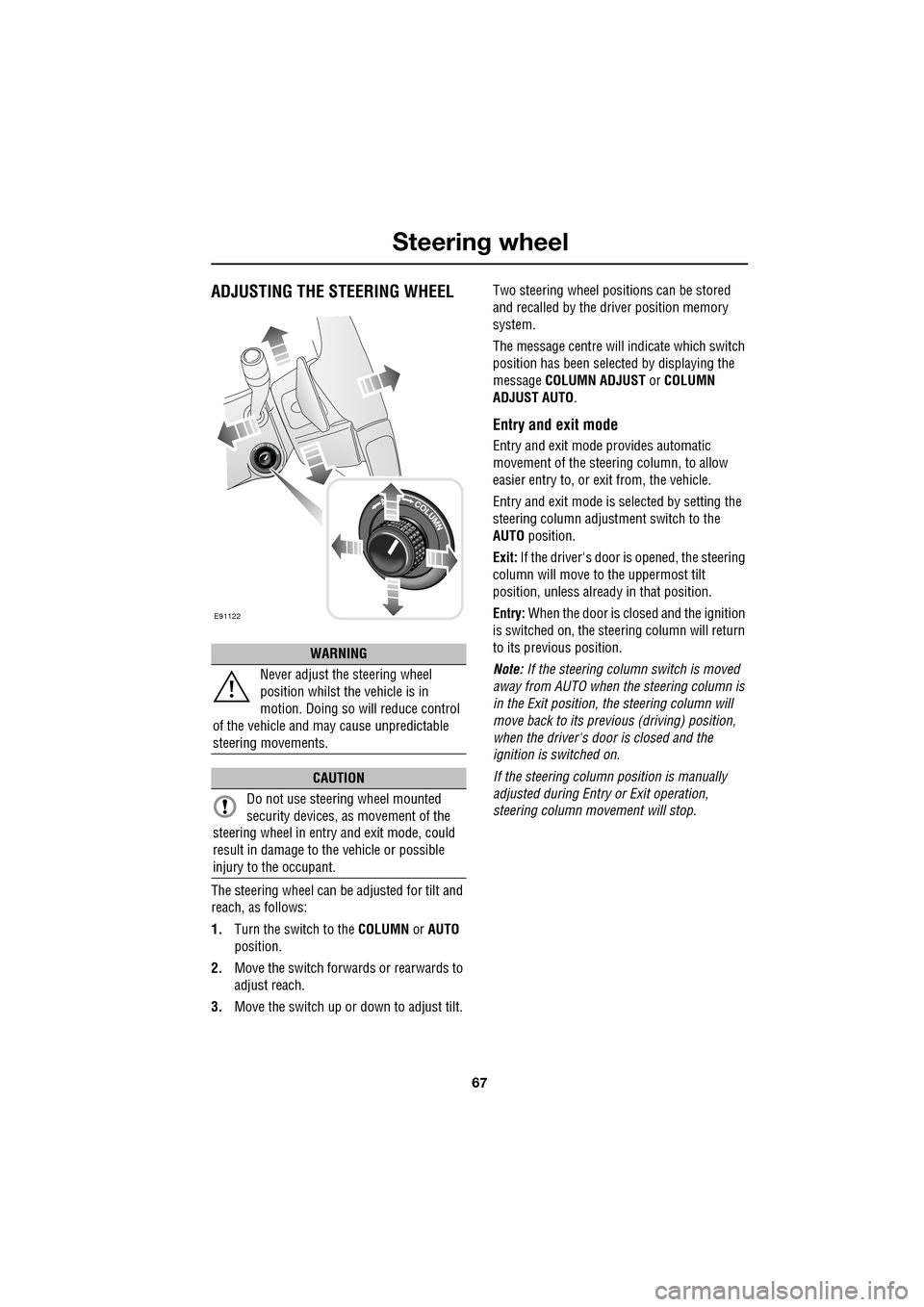
ADJUSTING THE STEERING WHEEL
The steering wheel can be adjusted for tilt and
reach, as follows:
1.Turn the switch to the COLUMN or AUTO
position.
2. Move the switch forwards or rearwards to
adjust reach.
3. Move the switch up or down to adjust tilt. Two steering wheel positions can be stored
and recalled by the dr
iver position memory
system.
The message centre will indicate which switch
position has been select ed by displaying the
message COLUMN ADJUST or COLUMN
ADJUST AUTO .
Entry and exit mode
Entry and exit mode provides automatic
movement of the steering column, to allow
easier entry to, or exit from, the vehicle.
Entry and exit mode is selected by setting the
steering column adjustment switch to the
AUTO position.
Exit: If the driver's door is opened, the steering
column will move to the uppermost tilt
position, unless alread y in that position.
Entry: When the door is closed and the ignition
is switched on, the steering column will return
to its previous position.
Note: If the steering column switch is moved
away from AUTO when the steering column is
in the Exit position, the steering column will
move back to its previous (driving) position,
when the driver's door is closed and the
ignition is switched on.
If the steering column position is manually
adjusted during Entry or Exit operation,
steering column movement will stop.
WARNING
Never adjust the steering wheel
position whilst the vehicle is in
motion. Doing so will reduce control
of the vehicle and may cause unpredictable
steering movements.
CAUTION
Do not use steering wheel mounted
security devices, as movement of the
steering wheel in entr y and exit mode, could
result in damage to the vehicle or possible
injury to the occupant.
E91122
Page 68 of 391
Steering wheel
68
HORN
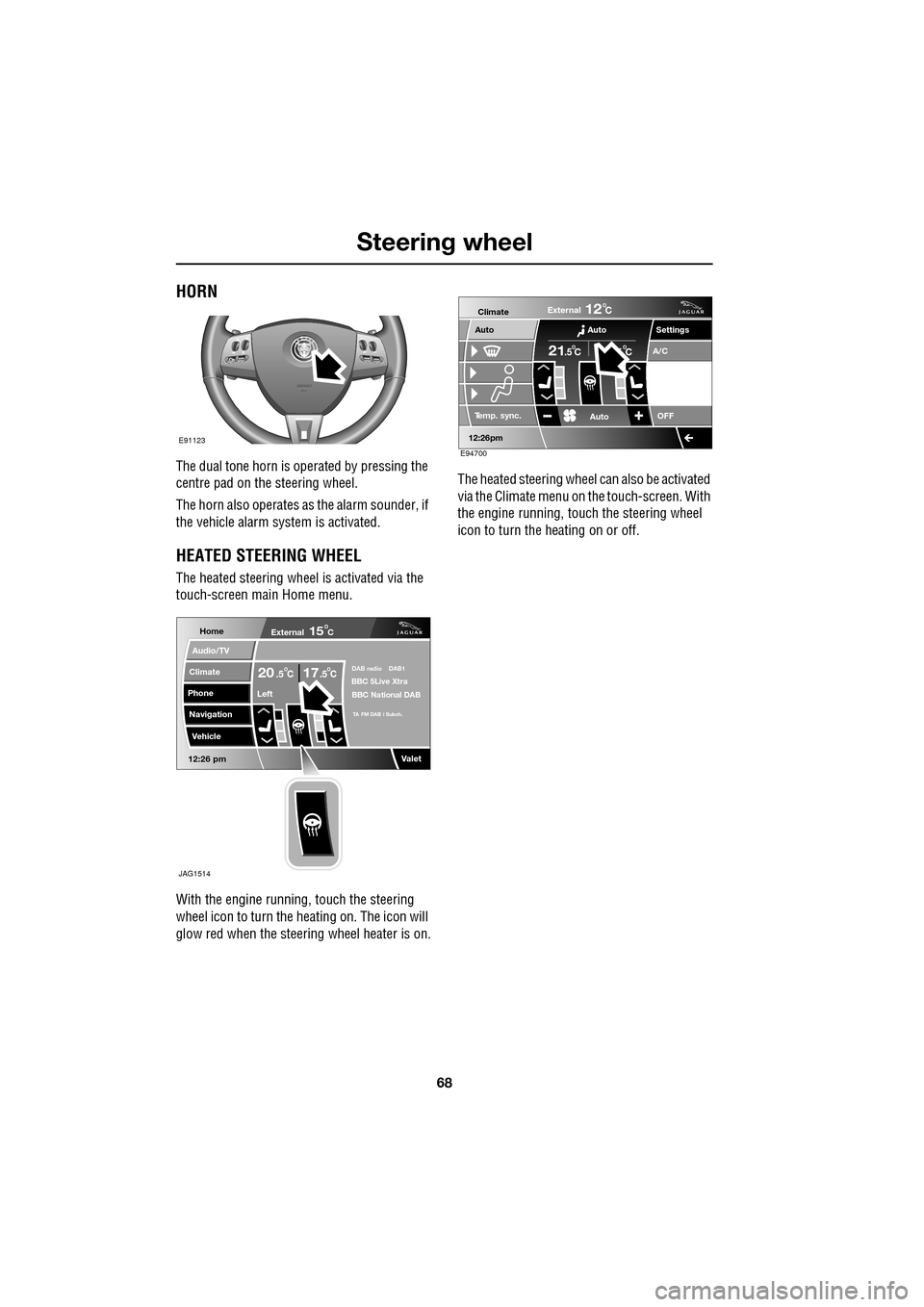
The dual tone horn is operated by pressing the
centre pad on the steering wheel.
The horn also operates as the alarm sounder, if
the vehicle alarm system is activated.
HEATED STEERING WHEEL
The heated steering wheel is activated via the
touch-screen main Home menu.
With the engine running, touch the steering
wheel icon to turn the heating on. The icon will
glow red when the steering wheel heater is on. The heated steering wheel
can also be activated
via the Climate menu on the touch-screen. With
the engine running, touch the steering wheel
icon to turn the heating on or off.
E91123
Home
Audio/TV
Climate
Phone
Navigation
Vehicle
Valet12:26 pm
External15C
Left
20 17CC.5 .5DAB radio DAB1BBC 5Live Xtra
BBC National DAB
TA FM DAB i Subch.
JAG1514
Settings
Te m p . sync. External
12C
Auto
21C5 C
Auto
A/C
OFF
.5
Climate
12 : 26 pm
Auto
E94700
Page 71 of 391
71
Steering wheel
Cancelling voice control
To cancel a voice command, press and hold the
Voice button on the steering wheel until a
double tone is heard.
Note: If a phone call is received during a voice
session, voice control is cancelled.
Voice system tutorial
To listen to a tutorial on how to use
JaguarVoice, press and release the voice
button and, after the tone, say VOICE
TUTORIAL .
The tutorial is divided into four lessons and has
a total duration of approximately four minutes.
The tutorial can only be undertaken with the
vehicle stationary and parked.
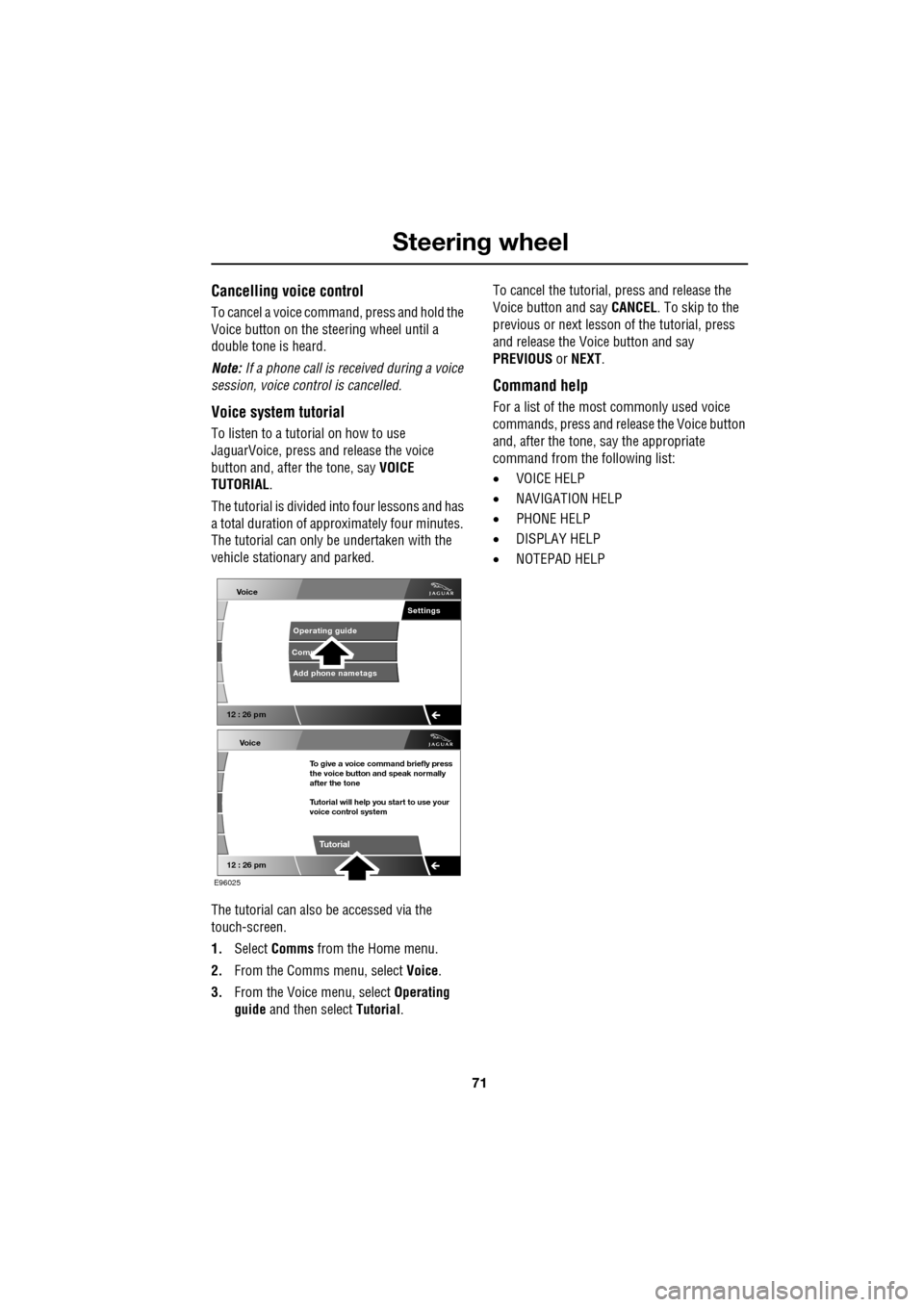
The tutorial can also be accessed via the
touch-screen.
1. Select Comms from the Home menu.
2. From the Comms menu, select Voice.
3. From the Voice menu, select Operating
guide and then select Tutorial. To cancel the tutorial, press and release the
Voice button and say
CANCEL. To skip to the
previous or next lesson of the tutorial, press
and release the Voice button and say
PREVIOUS or NEXT .
Command help
For a list of the most commonly used voice
commands, press and release the Voice button
and, after the tone, say the appropriate
command from the following list:
• VOICE HELP
• NAVIGATION HELP
• PHONE HELP
• DISPLAY HELP
• NOTEPAD HELP
Voice
12 : 26 pm
Add phone nametags
Comm Operating guide
Settings
E96025
Voice
12 : 26 pm
To give a voice command briefly press
the voice button and speak normally
after the tone
Tutorial will help you start to use your
voice control system
Tutorial
Page 73 of 391
73
Steering wheel
Notepad
The notepad facility enables the user to record
a note, up to a maximum of 30 seconds
duration, which can be subsequently recalled.
Note: To hear information on notepad
commands, press the Voice button, wait for the
tone to sound and then say NOTEPAD HELP.
Recording a note
1.Press and release the Voice button, wait
for the tone to sound, then say RECORD
NOTE .
2. Say the words of the note to be recorded,
then press and hold the Voice button to
end and save the note.
Note: The maximum length of a note is 30
seconds, after wh ich time the recording of the
note will be ended automatically.
Playing a note
Press and release the Voice button, wait for the
tone to sound, then say PLAY NOTEPAD. If
multiple notes are stored on the system, press
and release the Voice button during playback
and say NEXT, to skip to the next note.
Deleting notes
To delete an individual note, press and release
the Voice button during playback of the note to
be deleted and say DELETE.
To delete all notes stored on the system, press
and release the Voice button and say CLEAR
NOTEPAD .
Voice volume adjustment
The volume level for voice recognition can be
adjusted independently, either by using the
steering wheel controls or using the
touch-screen:
•Press the voice button on the steering
wheel, to initiate a voice session. Use the
volume control thumbwheel on the
steering wheel to adjust the volume, as
required.
• Select Vehicle from the touch-screen
Home menu, then select Veh. settings.
Find the correct entry from the menu of
infotainment volume settings and adjust as
required.
Voice commands
This is a list and a de scription of the basic
Voice commands used to operate the system.
A list and description of telephone and
Navigation system commands, is detailed later
in this handbook. See TELEPHONE VOICE
CONTROL (page 323). See NAVIGATION
SYSTEM VOICE COMMANDS (page 374).
Command Description
VOICE HELP Plays information on
operating the Voice
system.
VOICE TUTORIAL Initiates a four-part tutorial on use of the
Voice system.
DISPLAY HELP Plays information on touch-screen display
voice commands.
DISPLAY SHOW
PHONE The Phone menu is
displayed on the
touch-screen.
Page 74 of 391
Steering wheel
74
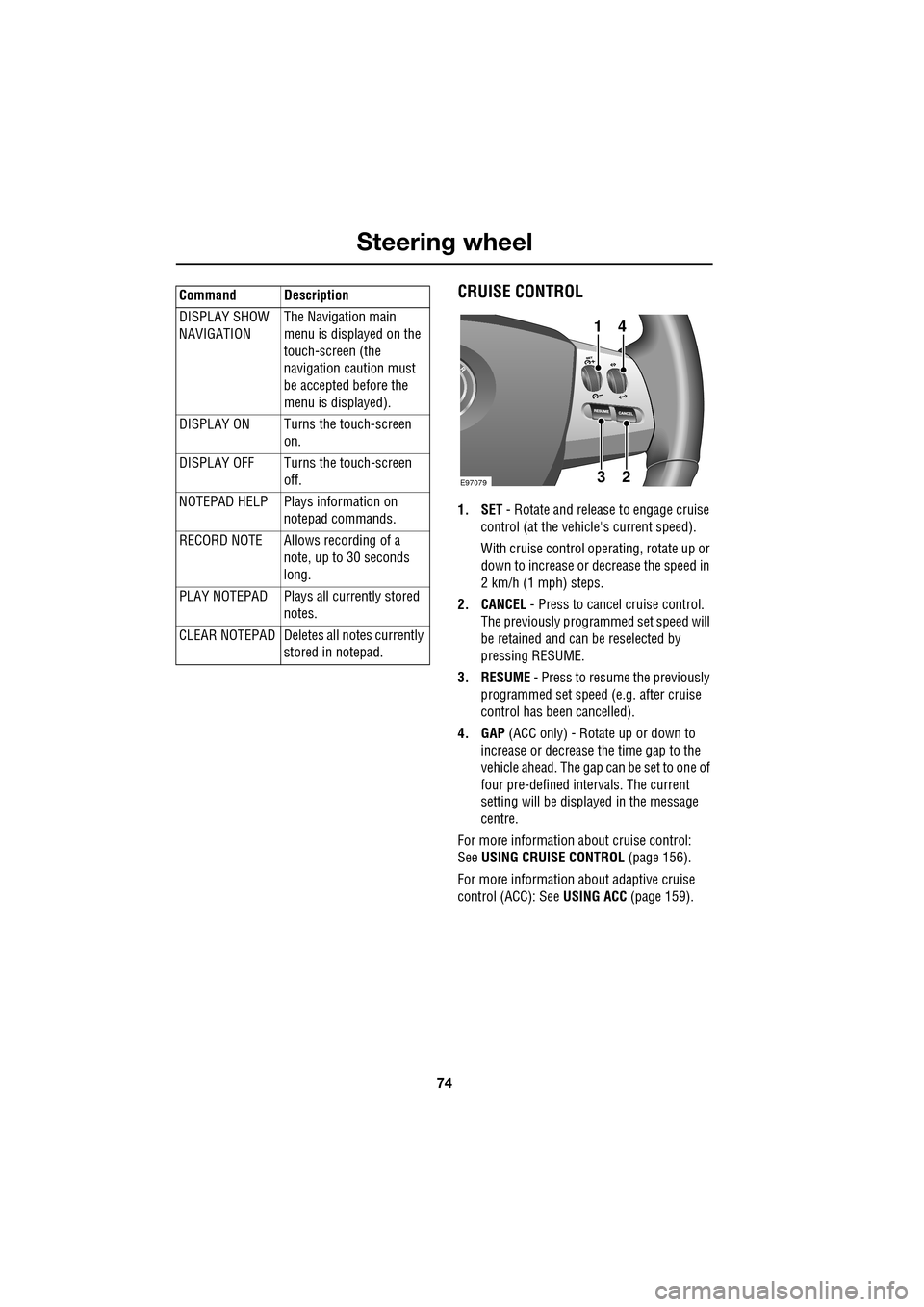
CRUISE CONTROL
1. SET - Rotate and releas e to engage cruise
control (at the vehicle's current speed).
With cruise control operating, rotate up or
down to increase or decrease the speed in
2 km/h (1 mph) steps.
2. CANCEL - Press to cancel cruise control.
The previously programmed set speed will
be retained and can be reselected by
pressing RESUME.
3. RESUME - Press to resume the previously
programmed set speed (e.g. after cruise
control has been cancelled).
4. GAP (ACC only) - Rotate up or down to
increase or decrease the time gap to the
vehicle ahead. The gap can be set to one of
four pre-defined inte rvals. The current
setting will be displayed in the message
centre.
For more information about cruise control:
See USING CRUISE CONTROL (page 156).
For more information about adaptive cruise
control (ACC): See USING ACC (page 159).
DISPLAY SHOW
NAVIGATION
The Navigation main
menu is displayed on the
touch-screen (the
navigation caution must
be accepted before the
menu is displayed).
DISPLAY ON Turns the touch-screen on.
DISPLAY OFF Turns the touch-screen off.
NOTEPAD HELP Play s information on
notepad commands.
RECORD NOTE Allows recording of a note, up to 30 seconds
long.
PLAY NOTEPAD Plays all currently stored notes.
CLEAR NOTEPAD Deletes all notes currently
stored in notepad.
Command Description
E9707923
41
Page 77 of 391
77
Lighting
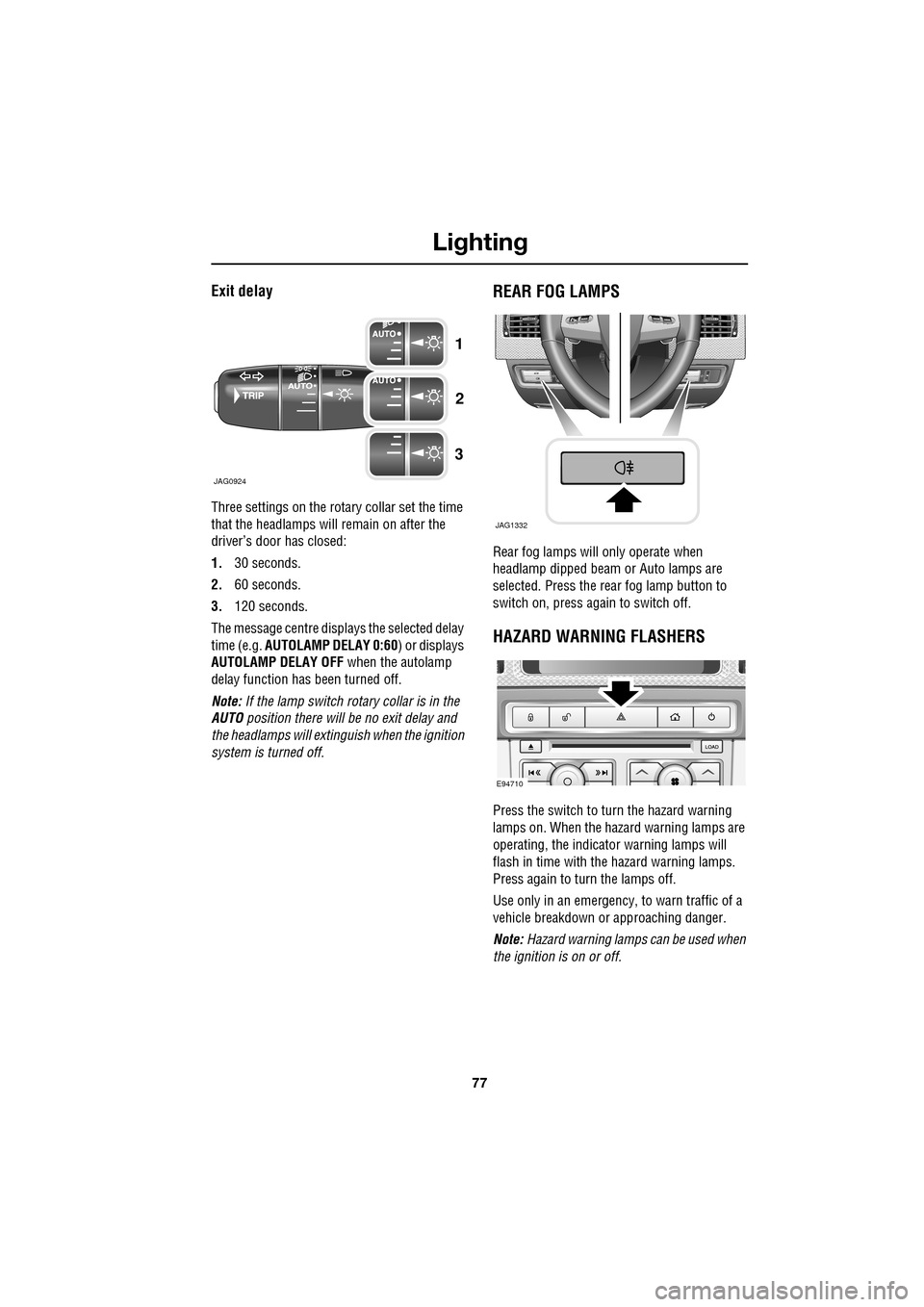
Exit delay
Three settings on the rotary collar set the time
that the headlamps will remain on after the
driver’s door has closed:
1.30 seconds.
2. 60 seconds.
3. 120 seconds.
The message centre displays the selected delay
time (e.g. AUTOLAMP DELAY 0:60 ) or displays
AUTOLAMP DELAY OFF when the autolamp
delay function has been turned off.
Note: If the lamp switch ro tary collar is in the
AUTO position there will be no exit delay and
the headlamps will extinguish when the ignition
system is turned off.
REAR FOG LAMPS
Rear fog lamps will only operate when
headlamp dipped beam or Auto lamps are
selected. Press the rear fog lamp button to
switch on, press again to switch off.
HAZARD WARNING FLASHERS
Press the switch to turn the hazard warning
lamps on. When the hazard warning lamps are
operating, the indicator warning lamps will
flash in time with the hazard warning lamps.
Press again to turn the lamps off.
Use only in an emergency, to warn traffic of a
vehicle breakdown or approaching danger.
Note: Hazard warning lamps can be used when
the ignition is on or off.
JAG0924
1
2
3
JAG1332
E94710
Page 89 of 391
89
Wipers and washers
Speed-dependent mode
If vehicle speed drops below 2 km/h (1.2 mph)
with the wipers operating, the wiper frequency
automatically reduces. The wipers will switch
to the next lowest speed. When the vehicle’s
speed increases to over 8 km/h (5 mph), the
original wiper speed settings are restored
automatically.
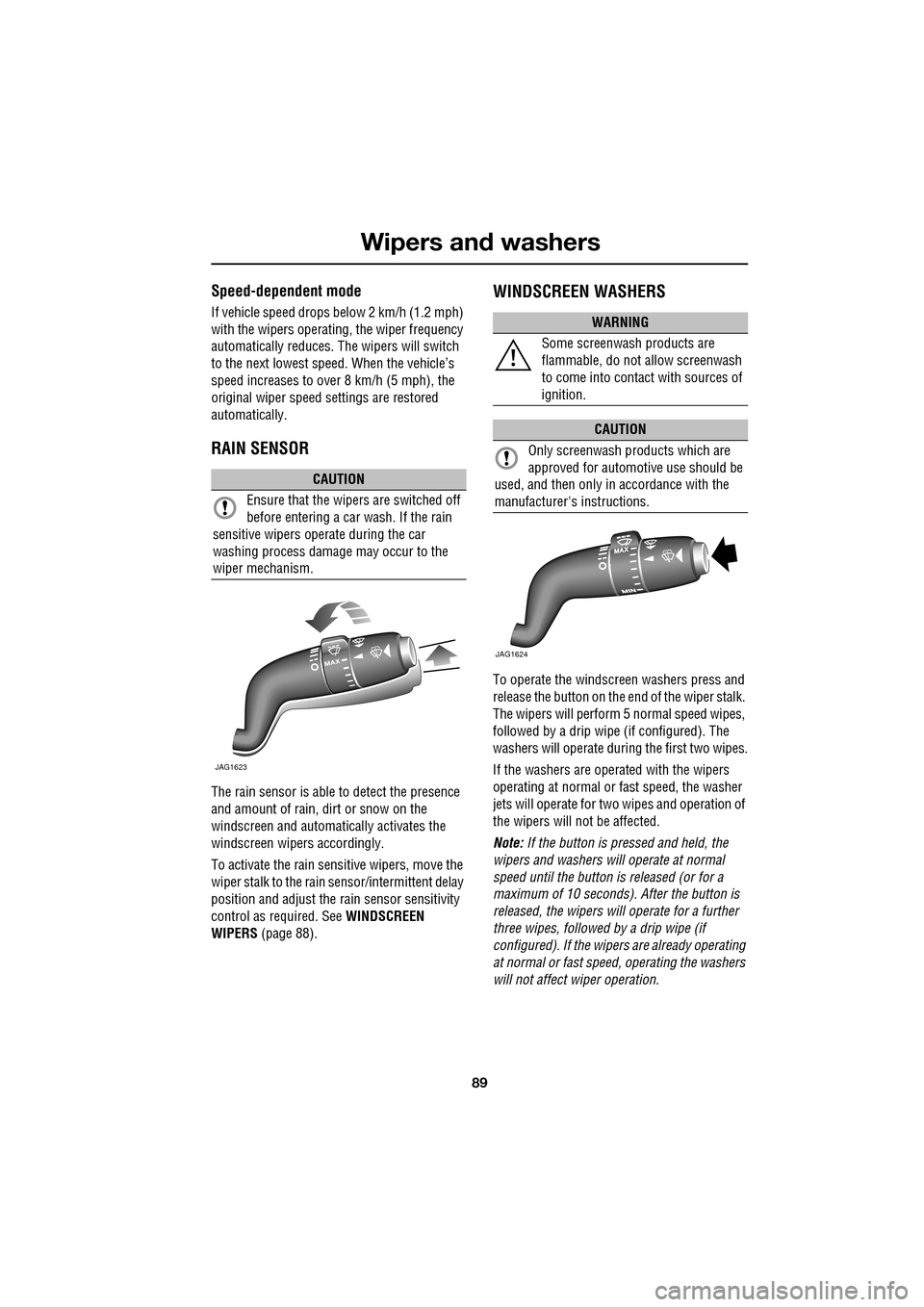
RAIN SENSOR
The rain sensor is able to detect the presence
and amount of rain, dirt or snow on the
windscreen and automatically activates the
windscreen wipers accordingly.
To activate the rain sensitive wipers, move the
wiper stalk to the rain sensor/intermittent delay
position and adjust the ra in sensor sensitivity
control as required. See WINDSCREEN
WIPERS (page 88).
WINDSCREEN WASHERS
To operate the windscreen washers press and
release the button on the e nd of the wiper stalk.
The wipers will perform 5 normal speed wipes,
followed by a drip wipe (if configured). The
washers will operate during the first two wipes.
If the washers are operated with the wipers
operating at normal or fast speed, the washer
jets will operate for tw o wipes and operation of
the wipers will not be affected.
Note: If the button is pressed and held, the
wipers and washers w ill operate at normal
speed until the button is released (or for a
maximum of 10 seconds). After the button is
released, the wipers will operate for a further
three wipes, followed by a drip wipe (if
configured). If the wipe rs are already operating
at normal or fast speed, operating the washers
will not affect wiper operation.
CAUTION
Ensure that the wipers are switched off
before entering a car wash. If the rain
sensitive wipers operate during the car
washing process damage may occur to the
wiper mechanism.
MAX
JAG1623
WARNING
Some screenwash products are
flammable, do not allow screenwash
to come into contact with sources of
ignition.
CAUTION
Only screenwash products which are
approved for automotive use should be
used, and then only in accordance with the
manufacturer's instructions.
JAG1624
Page 104 of 391
Instruments
104
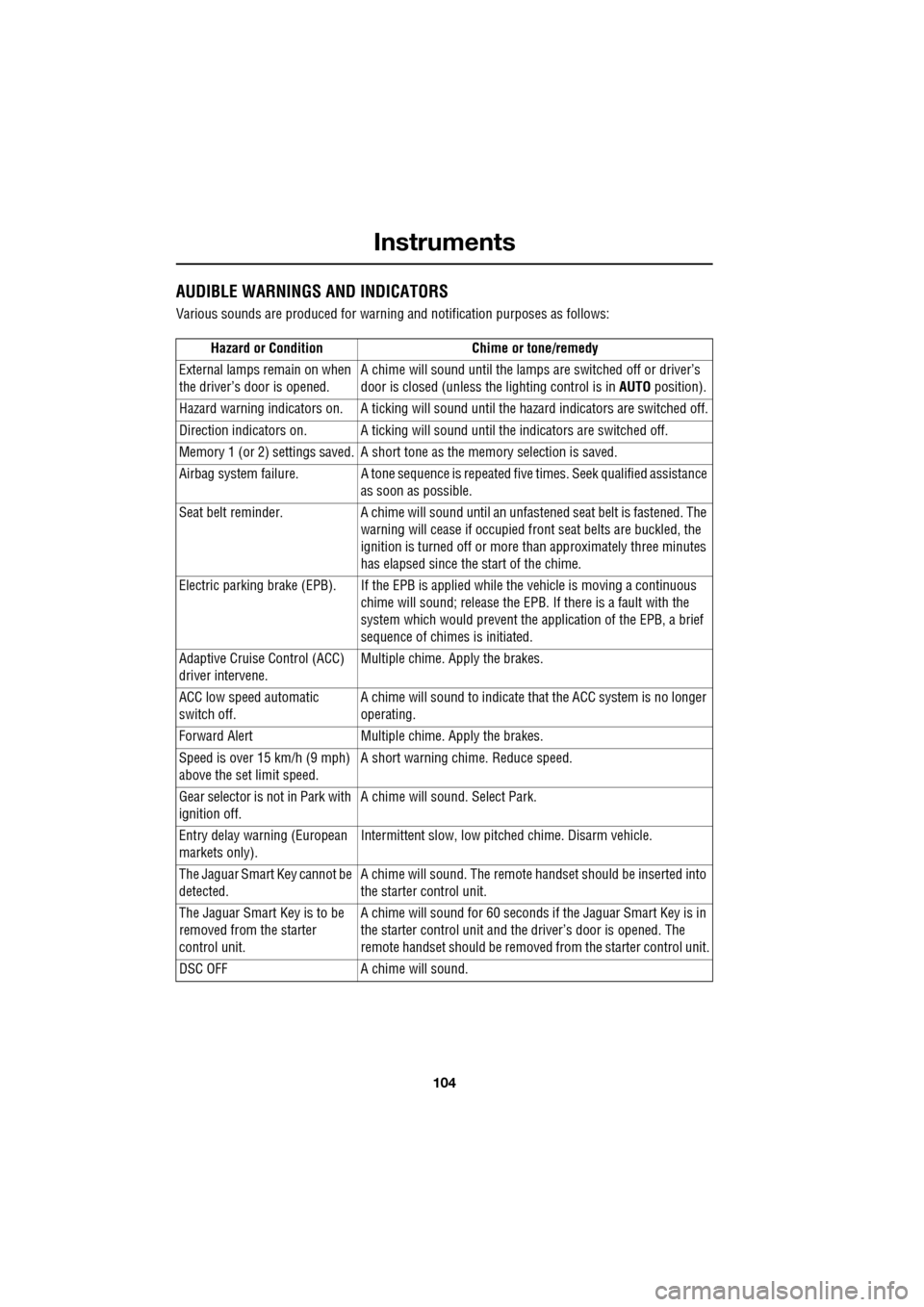
AUDIBLE WARNINGS AND INDICATORS
Various sounds are produced for warning and notification purposes as follows:Hazard or Condition Chime or tone/remedy
External lamps remain on when
the driver’s door is opened. A chime will sound until the lamps are switched off or driver’s
door is closed (unless the lighting control is in
AUTO position).
Hazard warning indicators on. A ti cking will sound until the hazard indicators are switched off.
Direction indicators on. A tick ing will sound until the indicators are switched off.
Memory 1 (or 2) settings saved. A short tone as the memory selection is saved.
Airbag system failure. A tone sequence is repeated five times. Seek qualified assistance as soon as possible.
Seat belt reminder. A chime will sound until an unfastened se at belt is fastened. The
warning will cease if occupied fr ont seat belts are buckled, the
ignition is turned off or more than approximately three minutes
has elapsed since the start of the chime.
Electric parking brake (EPB). If the EPB is a pplied while the vehicle is moving a continuous
chime will sound; release the EPB. If there is a fault with the
system which would prevent the a pplication of the EPB, a brief
sequence of chimes is initiated.
Adaptive Cruise Control (ACC)
driver intervene. Multiple chime. Apply the brakes.
ACC low speed automatic
switch off. A chime will sound to indicate that the ACC system is no longer
operating.
Forward Alert Multiple chime. Apply the brakes.
Speed is over 15 km/h (9 mph)
above the set limit speed. A short warning chime. Reduce speed.
Gear selector is not in Park with
ignition off. A chime will sound.
Select Park.
Entry delay warning (European
markets only). Intermittent slow, low pitc
hed chime. Disarm vehicle.
The Jaguar Smart Key cannot be
detected. A chime will sound. The remote ha
ndset should be inserted into
the starter control unit.
The Jaguar Smart Key is to be
removed from the starter
control unit. A chime will sound for 60 seconds if
the Jaguar Smart Key is in
the starter control unit and the driver’s door is opened. The
remote handset should be remove d from the starter control unit.
DSC OFF A chime will sound.
Page 105 of 391
105
Information displays
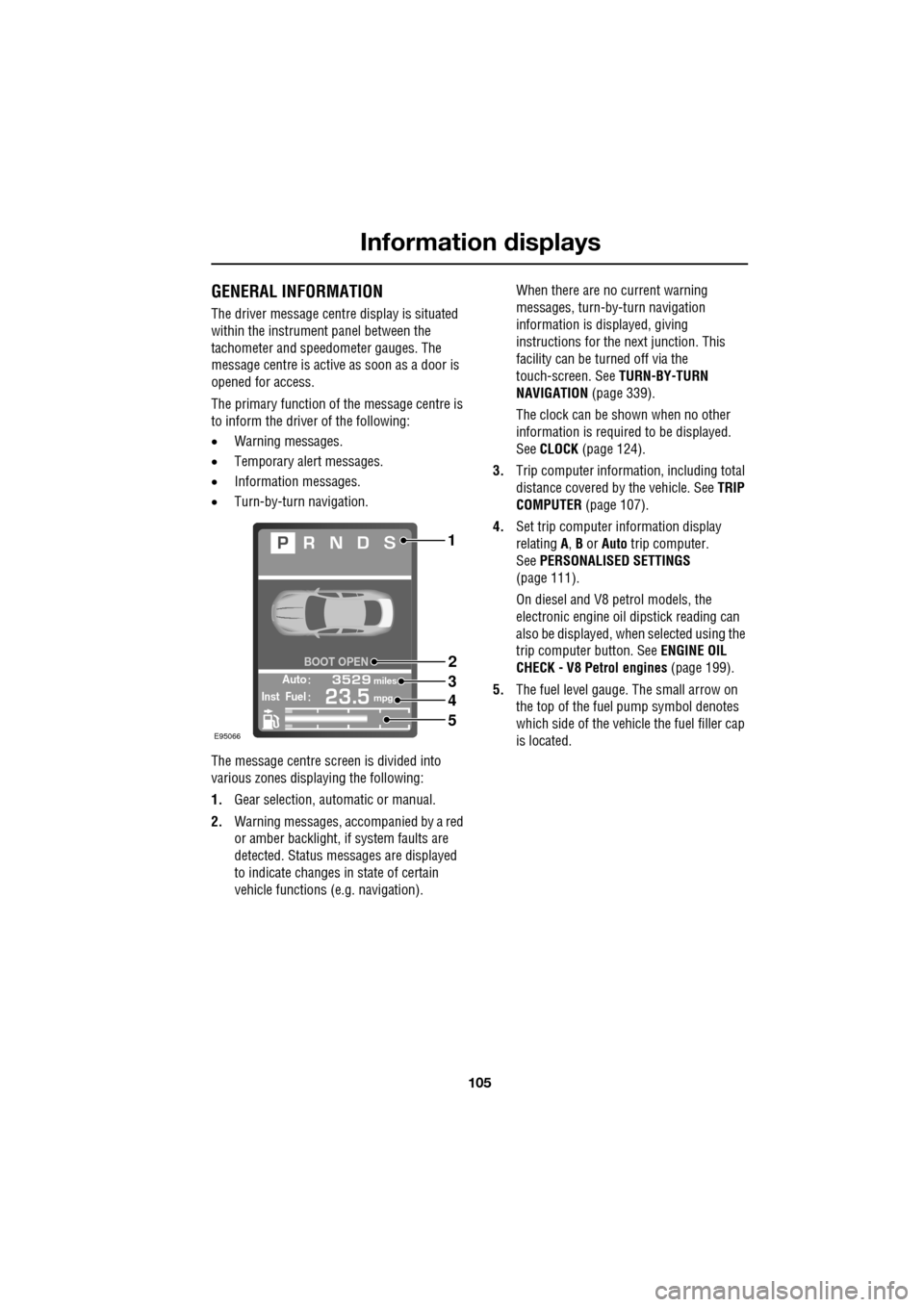
GENERAL INFORMATION
The driver message centre display is situated
within the instrument panel between the
tachometer and speedometer gauges. The
message centre is active as soon as a door is
opened for access.
The primary function of the message centre is
to inform the driver of the following:
• Warning messages.
• Temporary alert messages.
• Information messages.
• Turn-by-turn navigation.
The message centre screen is divided into
various zones displaying the following:
1. Gear selection, automatic or manual.
2. Warning messages, accompanied by a red
or amber backlight, if system faults are
detected. Status messages are displayed
to indicate changes in state of certain
vehicle functions (e.g. navigation). When there are no current warning
messages, turn-by-turn navigation
information is displayed, giving
instructions for the next junction. This
facility can be turned off via the
touch-screen. See
TURN-BY-TURN
NAVIGATION (page 339).
The clock can be shown when no other
information is required to be displayed.
See CLOCK (page 124).
3. Trip computer information, including total
distance covered by the vehicle. See TRIP
COMPUTER (page 107).
4. Set trip computer information display
relating A, B or Auto trip computer.
See PERSONALISED SETTINGS
(page 111).
On diesel and V8 petrol models, the
electronic engine oil dipstick reading can
also be displayed, when selected using the
trip computer button. See ENGINE OIL
CHECK - V8 Petrol engines (page 199).
5. The fuel level gauge. The small arrow on
the top of the fuel pump symbol denotes
which side of the vehi cle the fuel filler cap
is located.
Automiles
Inst Fuelmpg
BOOT OPEN
E95066
1
2
3
4
5
Page 107 of 391
107
Information displays
TRIP COMPUTER
The computer memory stores data for a
journey or series of journeys until it is reset to
zero.
The displayed information is for guidance only,
as it can be affected by traffic, road and
weather conditions.
Three independent memories are available, A,
B and Auto. A and B me mories can be set
independently, while the Auto trip will reset
after every ignition cycle as the vehicle moves.
Full trip computer information for the trip
memories can be displayed on the vehicle
touch-screen located in the centre console,
while current selected trip computer
information is displayed on the instrument
panel message centre.
To access the trip computer touch-screen
settings:
• From the touch-screen Home menu, select
Vehicle .
• Select Trip computer .
• Select requirement s from the menu.
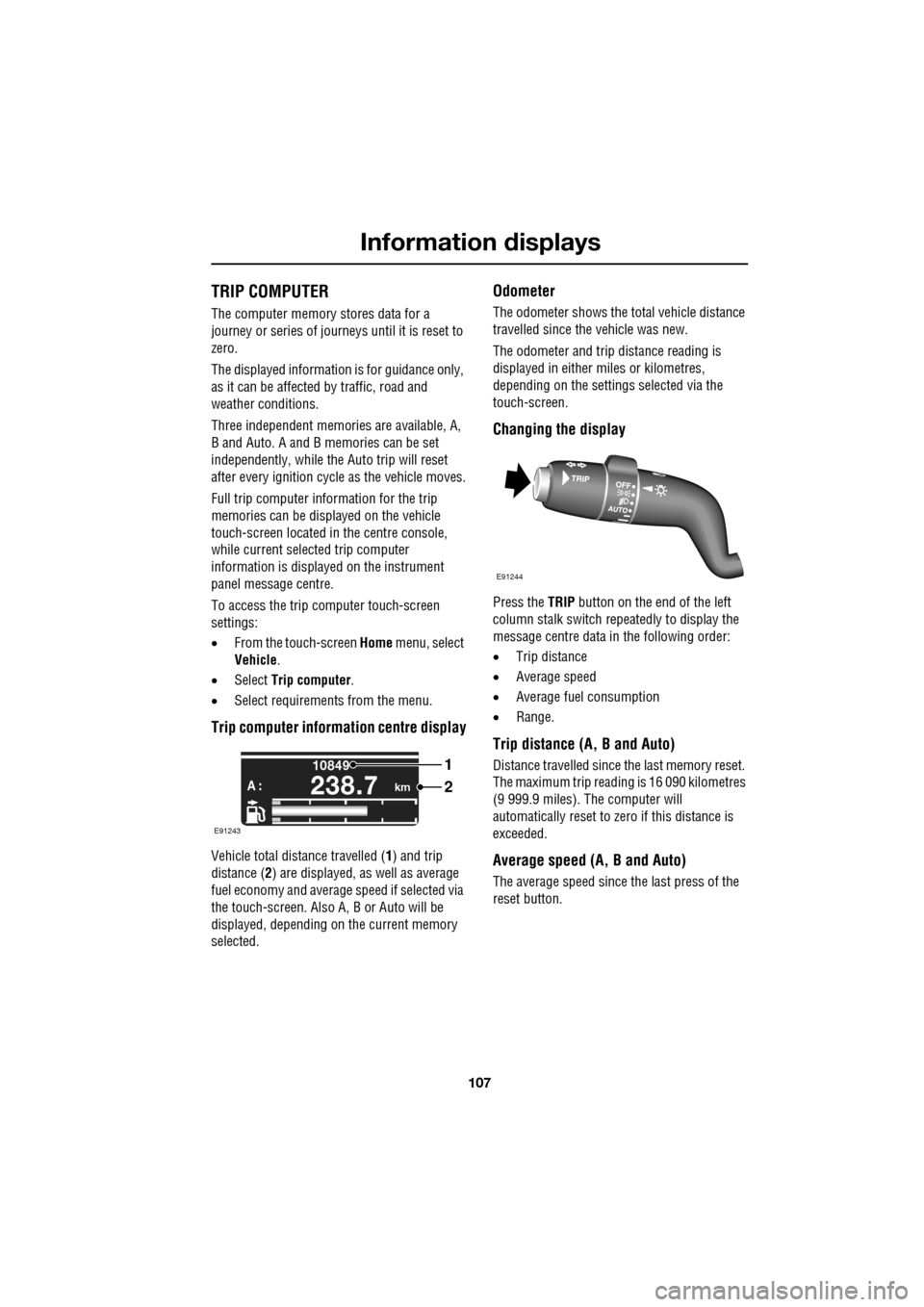
Trip computer information centre display
Vehicle total distance travelled ( 1) and trip
distance ( 2) are displayed, as well as average
fuel economy and average speed if selected via
the touch-screen. Also A, B or Auto will be
displayed, depending on the current memory
selected.
Odometer
The odometer shows the total vehicle distance
travelled since the vehicle was new.
The odometer and trip distance reading is
displayed in either miles or kilometres,
depending on the settings selected via the
touch-screen.
Changing the display
Press the TRIP button on the end of the left
column stalk switch repeatedly to display the
message centre data in the following order:
• Trip distance
• Average speed
• Average fuel consumption
• Range.
Trip distance (A, B and Auto)
Distance travelled since the last memory reset.
The maximum trip reading is 16 090 kilometres
(9 999.9 miles). The computer will
automatically reset to zero if this distance is
exceeded.
Average speed (A, B and Auto)
The average speed since the last press of the
reset button.
km
10849
A :238.7
1
2
E91243
E91244