Def JAGUAR XF 2009 1.G Owner's Manual
[x] Cancel search | Manufacturer: JAGUAR, Model Year: 2009, Model line: XF, Model: JAGUAR XF 2009 1.GPages: 391, PDF Size: 19.32 MB
Page 218 of 391
Wheels and tyres
218
All of the vehicle's tyres (including the spare)
should be checked regularly for damage, wear
and distortion. If you are in any doubt about the
condition of a tyre, have it checked immediately
by a tyre repair centre or your
Dealer/Authorised repairer.
Checking the tyre pressures
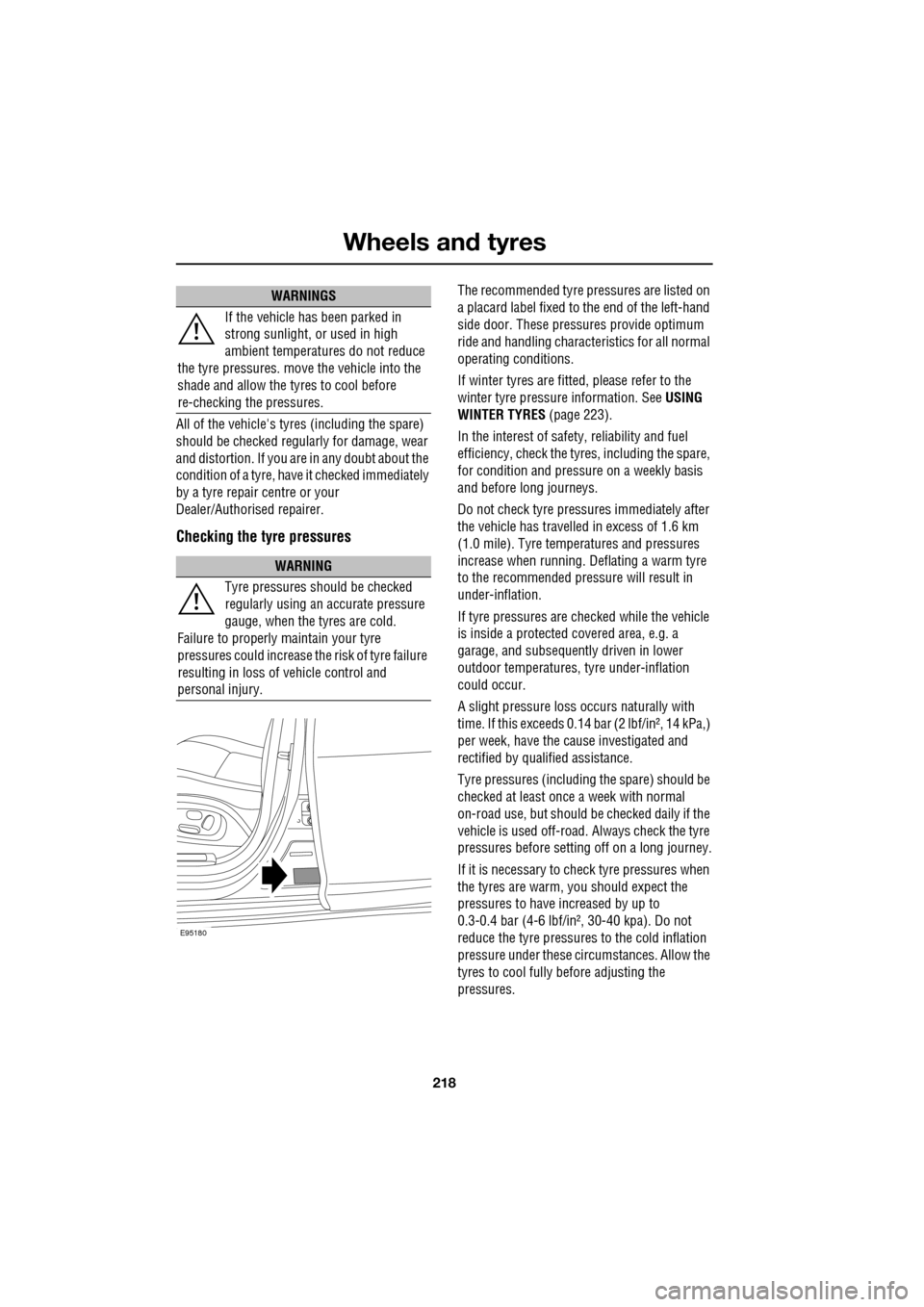
The recommended tyre pressures are listed on
a placard label fixed to the end of the left-hand
side door. These pressures provide optimum
ride and handling charac teristics for all normal
operating conditions.
If winter tyres are fitted, please refer to the
winter tyre pressure information. SeeUSING
WINTER TYRES (page 223).
In the interest of safe ty, reliability and fuel
efficiency, check the tyres, including the spare,
for condition and pressu re on a weekly basis
and before long journeys.
Do not check tyre pressures immediately after
the vehicle has travelled in excess of 1.6 km
(1.0 mile). Tyre temperatures and pressures
increase when running. Deflating a warm tyre
to the recommended pressure will result in
under-inflation.
If tyre pressures are checked while the vehicle
is inside a protected covered area, e.g. a
garage, and subsequent ly driven in lower
outdoor temperatures, tyre under-inflation
could occur.
A slight pressure loss occurs naturally with
time. If this exceeds 0.14 bar (2 lbf/in², 14 kPa,)
per week, have the cause investigated and
rectified by qualified assistance.
Tyre pressures (including the spare) should be
checked at least once a week with normal
on-road use, but should be checked daily if the
vehicle is used off-road. Always check the tyre
pressures before setti ng off on a long journey.
If it is necessary to check tyre pressures when
the tyres are warm, you should expect the
pressures to have increased by up to
0.3-0.4 bar (4-6 lbf/in², 30-40 kpa). Do not
reduce the tyre pressures to the cold inflation
pressure under these circumstances. Allow the
tyres to cool fully before adjusting the
pressures.
If the vehicle has been parked in
strong sunlight, or used in high
ambient temperatures do not reduce
the tyre pressures. move the vehicle into the
shade and allow the tyres to cool before
re-checking the pressures.
WARNING
Tyre pressures should be checked
regularly using an accurate pressure
gauge, when the tyres are cold.
Failure to properly maintain your tyre
pressures could increase the risk of tyre failure
resulting in loss of vehicle control and
personal injury.
WARNINGS
E95180
Page 221 of 391
221
Wheels and tyres
Wear indicators
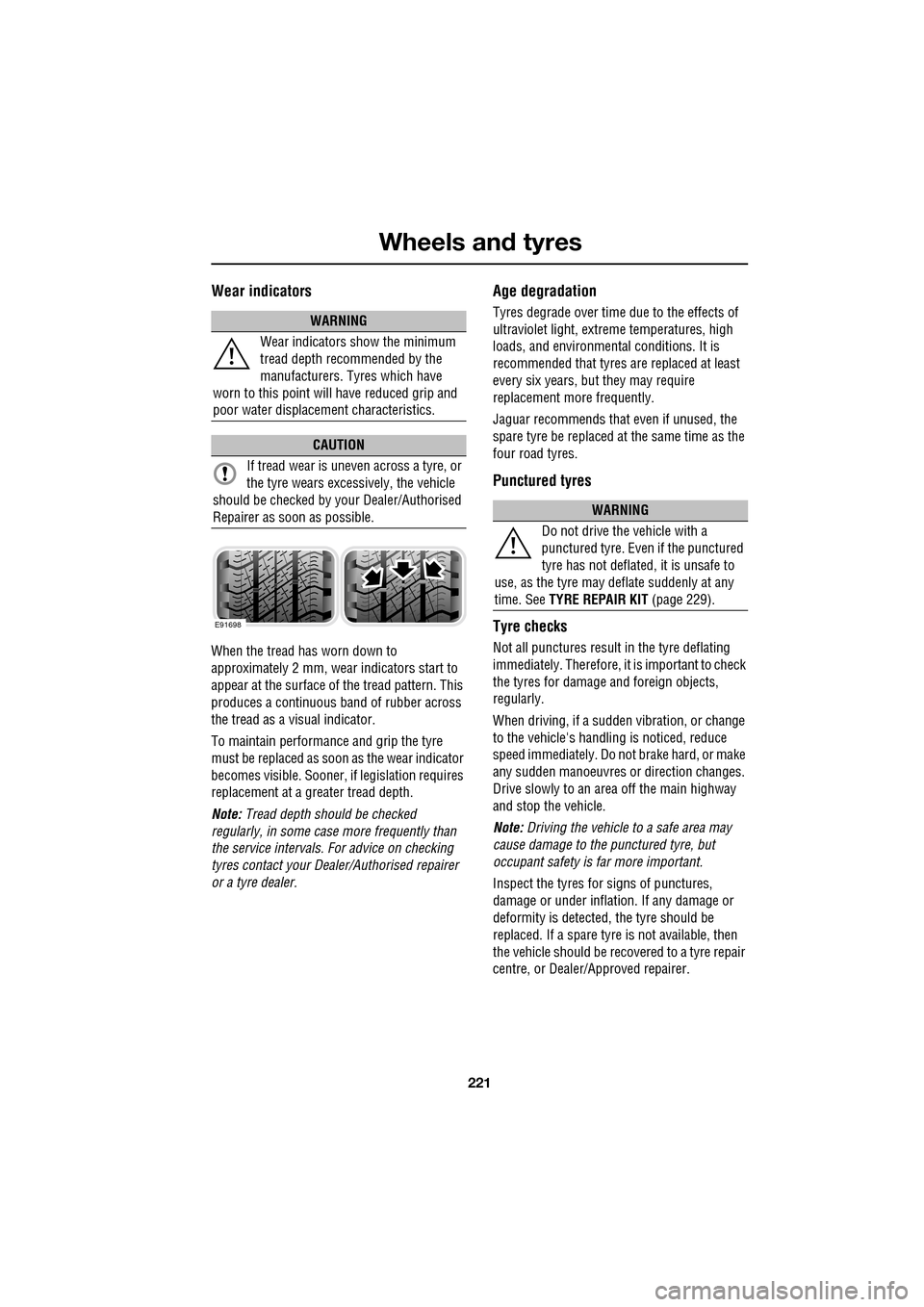
When the tread has worn down to
approximately 2 mm, wear indicators start to
appear at the surface of the tread pattern. This
produces a continuous band of rubber across
the tread as a visual indicator.
To maintain performance and grip the tyre
must be replaced as soon as the wear indicator
becomes visible. Sooner, if legislation requires
replacement at a greater tread depth.
Note: Tread depth should be checked
regularly, in some case more frequently than
the service intervals. For advice on checking
tyres contact your Dealer/Authorised repairer
or a tyre dealer.
Age degradation
Tyres degrade over time due to the effects of
ultraviolet light, extreme temperatures, high
loads, and environmen tal conditions. It is
recommended that tyres are replaced at least
every six years, but they may require
replacement more frequently.
Jaguar recommends that even if unused, the
spare tyre be replaced at the same time as the
four road tyres.
Punctured tyres
Tyre checks
Not all punctures result in the tyre deflating
immediately. Therefore, it is important to check
the tyres for damage and foreign objects,
regularly.
When driving, if a sudden vibration, or change
to the vehicle's hand ling is noticed, reduce
speed immediately. Do not brake hard, or make
any sudden manoeuvres or direction changes.
Drive slowly to an area off the main highway
and stop the vehicle.
Note: Driving the vehicle to a safe area may
cause damage to th e punctured tyre, but
occupant safety is far more important.
Inspect the tyres for signs of punctures,
damage or under inflati on. If any damage or
deformity is detected, the tyre should be
replaced. If a spare tyre is not available, then
the vehicle should be reco vered to a tyre repair
centre, or Dealer/Approved repairer.
WARNING
Wear indicators show the minimum
tread depth recommended by the
manufacturers. Tyres which have
worn to this point will have reduced grip and
poor water displacement characteristics.
CAUTION
If tread wear is uneve n across a tyre, or
the tyre wears excessively, the vehicle
should be checked by your Dealer/Authorised
Repairer as soon as possible.
E91698
WARNING
Do not drive the vehicle with a
punctured tyre. Even if the punctured
tyre has not deflated, it is unsafe to
use, as the tyre may deflate suddenly at any
time. See TYRE REPAIR KIT (page 229).
Page 224 of 391
Wheels and tyres
224
RUN FLAT TYRES
Run-flat tyres can be identified by the lettering
RSC on the sidewall. The tyre construction
utilises a specially reinforced sidewall, which
allows the vehicle to be driven at restricted
speeds, even when the tyre is depressurised.
Run-flat tyres can only be fitted to special rims,
constructed for ru n-flat tyre use.
A tyre pressure monitoring system is
mandatory when the vehicle is fitted with
run-flat tyres. See TYRE PRESSURE
MONITORING SYSTEM (page 234).
If the tyre has deflated, the vehicle should be
driven with caution, as handling characteristics
will be different compared to a fully inflated
tyre.
If the vehicle is fully la den with passengers and
luggage, the maximum di stance that can be
completed on a fully deflated tyre, is
approximately 80 kilo metres (50 miles).
Stop immediately if the tyre construction
begins to break down or if the tyre dislodges
from the wheel rim. Typi cally, this will be
accompanied by excessive vibration.
A tyre driven in a defl ated condition must be
replaced as s oon as possible. Vehicles fitted with run-flat tyres are not fitted
with a spare wheel or jacking equipment.
Therefore, run-flat tyre
s should be replaced
with the same type of tyre.
TOOL KIT
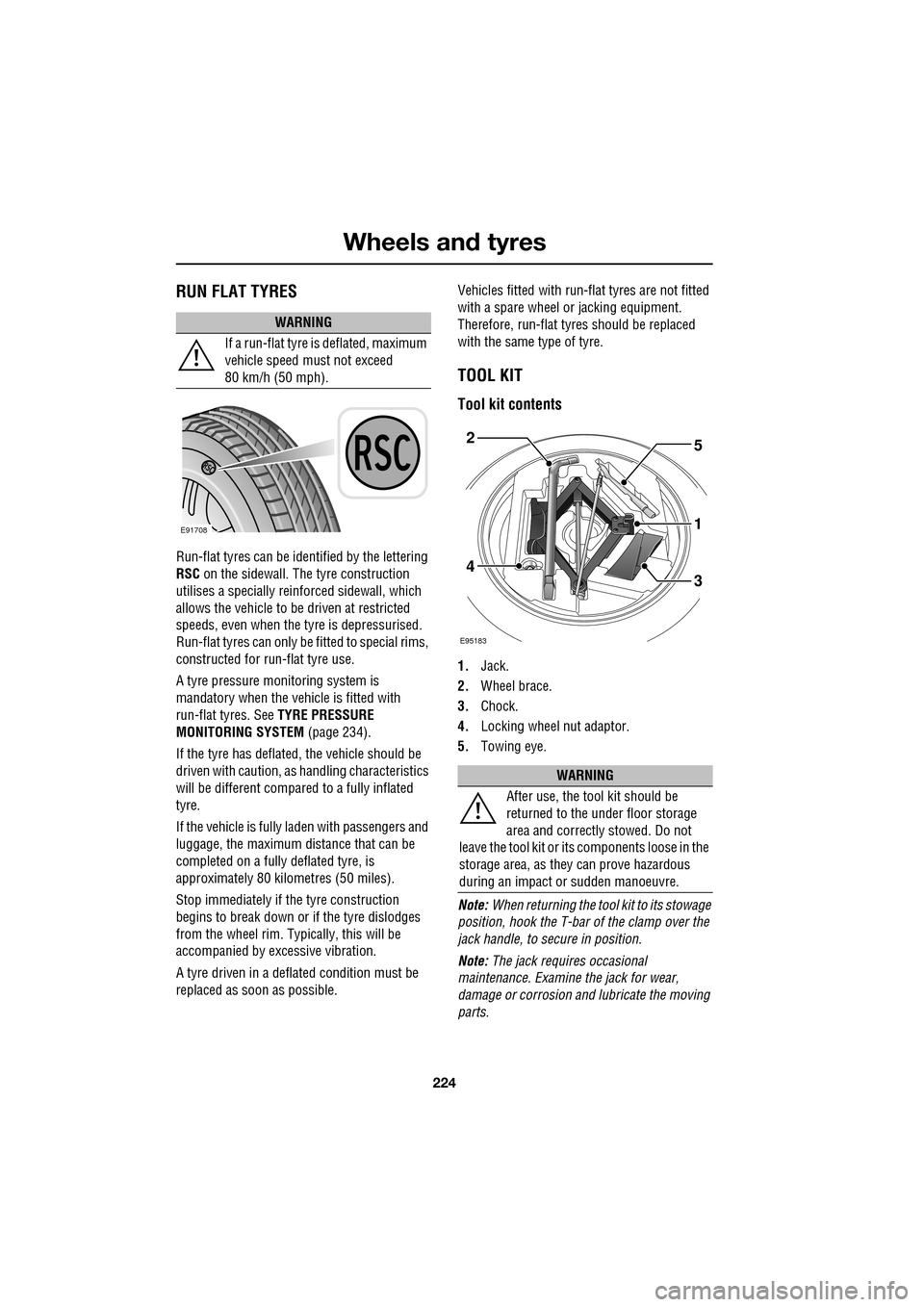
Tool kit contents
1. Jack.
2. Wheel brace.
3. Chock.
4. Locking wheel nut adaptor.
5. Towing eye.
Note: When returning the tool kit to its stowage
position, hook the T-bar of the clamp over the
jack handle, to se cure in position.
Note: The jack requi res occasional
maintenance. Examine the jack for wear,
damage or corrosion and lubricate the moving
parts.
WARNING
If a run-flat tyre is deflated, maximum
vehicle speed must not exceed
80 km/h (50 mph).
E91708
WARNING
After use, the tool kit should be
returned to the under floor storage
area and correctly stowed. Do not
leave the tool kit or it s components loose in the
storage area, as they can prove hazardous
during an impact or sudden manoeuvre.
E95183
5
1
34
2
Page 230 of 391
Wheels and tyres
230
Jaguar tyre repair kit safety information
WARNINGS
Some tyre damage may only be
partially sealed, or may not seal at all,
depending on the amount and type of
damage. Any loss of tyre pressure can
seriously affect vehicle safety.
Do not use the tyre repair kit if the tyre
has been damaged by driving while
under-inflated.
Only use the tyre repair kit to seal
damage located within the tyre tread
area.
Do not use the tyre repair kit to seal
damage to the tyre sidewall.
Do not exceed 80 km/h (50 mph)
when a repaired tyre is fitted to the
vehicle.
The maximum distan ce that should
be driven when a repaired tyre is
fitted, is 200 km (125 miles).
When a repaired tyre is fitted, drive
with caution and avoid sudden
braking or steering manoeuvres.
Only use the tyre repair kit for the
vehicle with which it was supplied.
Do not use the tyre repair kit for any
other purpose than tyre repair.
Never leave the tyre repair kit
unattended when in use.
Only use the tyre repair kit within the
-30 °C to +70 °C temperature range.
Always keep children and animals at a
safe distance from the tyre repair kit
when in use.
Do not stand dire ctly beside the
compressor when it is operating.Check the tyre sidewall prior to
inflation. If any cracks, damage or
deformities are apparent, do not
inflate the tyre.
Watch the tyre sidewall during
inflation. If any cracks, bumps or
similar damage, or deformities
appear, switch off the compressor and deflate
the tyre.
WARNINGS
Page 233 of 391
233
Wheels and tyres
9.Unless the vehicle is in an enclosed area,
start the engine.
10. Set the compressor switch to the on ( I)
position.
11. Inflate the tyre to a minimum of 1.9 bar
(26 lbf/in²) and a maximum of 3.5 bar
(51 lbf/in²).
•When pumping the sealant through the
tyre valve, the pressure may rise up to 6
bar (87 lbf/in²). The pressure will drop
again after approximately 30 seconds.
12. During the inflation, switch the
compressor off briefly, to check the tyre
pressure using the gauge mounted on the
compressor.
• It should not take longer than seven
minutes to inflate the tyre. If, after seven
minutes, the tyre has not yet reached
minimum pressure, the tyre should not
be used.
13. Once the tyre has been inflated, switch off
the compressor. If desired, the engine may
be turned off after the compressor has
been turned off.
14. Remove the power connector from the
auxiliary power socket.
15. Remove the inflation hose from the tyre
valve, by unscrewing it as quickly as
possible (count er-clockwise).
16. Replace the inflation hose protective cap
and the tyre valve cap.
17. Do not remove the sealant bottle from the
receiver.
18. Ensure that the tyre repair kit (including
the bottle and receiver caps) are placed
securely in the vehicle. You will need to
use the kit to check the tyre pressure after
approximately 3 km (2 miles), so ensure
they are easily accessible. 19.
Immediately drive the vehicle for
approximately 3 km (2 miles), to allow the
sealant to coat the inner surface of the tyre
and form a seal at the puncture.
Checking the tyre pressure after a repair
1.Drive the vehicle for 3 km (2 miles) then
stop in a safe place. Carry out a visual
examination of the tyres condition.
2. Make sure that the sealant container
section is in its original position.
3. Screw the inflation hos e connector firmly
onto the tyre valve.
4. Read the tyre pressure from the gauge.
5. If the pressure of the sealant filled tyre is
above 1.3 bar (19 lb/in²) adjust the
pressure to the correct value. See TYRE
CARE (page 217).
6. Ensure that the compressor switch is in
the off (O ) position and insert the power
cable connector into the auxiliary power
socket.
If the vehicle is in a well ventilated area,
start the engine.
WARNINGS
When driving the vehicle, if you
experience vibr ations, abnormal
steering, or noises, reduce speed
immediately. Drive with extreme caution and
reduced speed, to the first safe place to stop
the vehicle. Visually examine the tyre and
check its pressure. If there are any signs of
damage or deformity to the tyre, or the tyre
pressure is below 1.3 bar (19 lb/in²), do not
continue driving.
Consult a tyre repair centre or your
Dealer/Authorised Repairer, for
advice concerning the replacement of
a tyre after using a tyre repair kit.
Page 237 of 391
237
Wheels and tyres
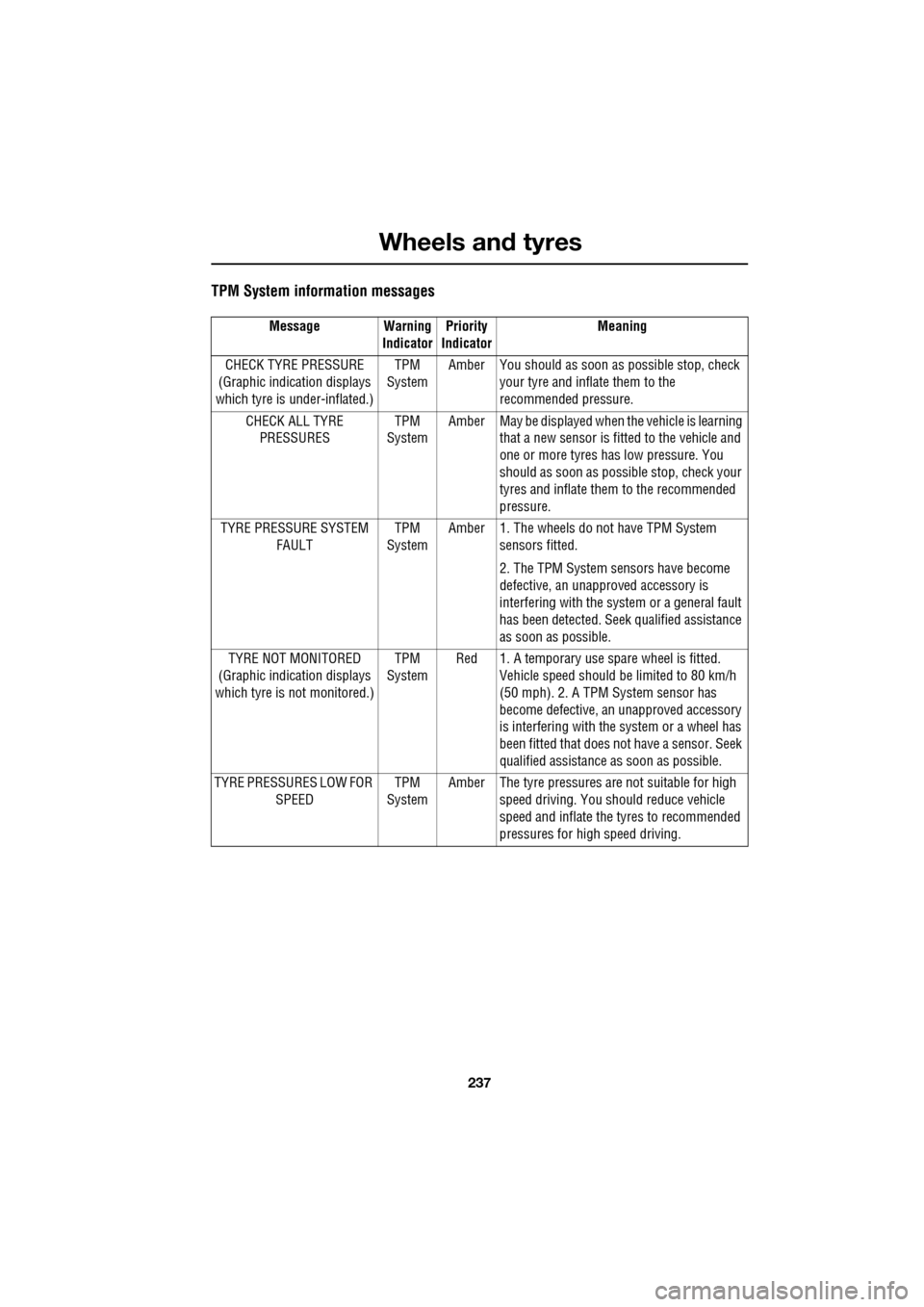
TPM System information messages
Message Warning IndicatorPriority
Indicator Meaning
CHECK TYRE PRESSURE
(Graphic indication displays
which tyre is under-inflated.) TPM
System Amber You should as soon as
possible stop, check
your tyre and inflate them to the
recommended pressure.
CHECK ALL TYRE PRESSURES TPM
System Amber May be displayed when
the vehicle is learning
that a new sensor is fitted to the vehicle and
one or more tyres has low pressure. You
should as soon as possi ble stop, check your
tyres and inflate them to the recommended
pressure.
TYRE PRESSURE SYSTEM FAULT TPM
System Amber 1. The wheels do
not have TPM System
sensors fitted.
2. The TPM System se nsors have become
defective, an unapproved accessory is
interfering with the syst em or a general fault
has been detected. Seek qualified assistance
as soon as possible.
TYRE NOT MONITORED
(Graphic indication displays
which tyre is not monitored.) TPM
System Red 1. A temporary use spare wheel is fitted.
Vehicle speed should be limited to 80 km/h
(50 mph). 2. A TPM System sensor has
become defective, an unapproved accessory
is interfering with the system or a wheel has
been fitted that does not have a sensor. Seek
qualified assistance as soon as possible.
TYRE PRESSURES LOW FOR SPEED TPM
System Amber The tyre pressures ar
e not suitable for high
speed driving. You should reduce vehicle
speed and inflate the tyres to recommended
pressures for high speed driving.
Page 252 of 391
Status after a collision
252
When driving
When driving a vehicle which has been
involved in a collision use caution and pay extra
attention to the operation of the vehicle. If any
changes in vehicle operation after the collision
are noted when compared to it's operation
before the collision, do not continue to drive
the vehicle. Stop the vehi cle as soon as it is
safe to do so, and have the vehicle recovered.
Pay particular attent ion to changes in:-
• Steering.
• Braking.
• Unusual noises.
• Warning lights or messages displayed.
• Problems with electrical systems.
INSPECTING SAFETY SYSTEM
COMPONENTS
Following a collision the seat belt and
Supplementary Restrain t System components
should be inspected for damage and/or
deformity. The inspection and any subsequent
repair work should only be carried out by a
Dealer/Authorised Repair er, or other suitably
qualified personnel.
Components which require inspection
include:-
• Seat belt webbing and mechanisms.
• Seat belt pre-tensioners.
• Airbag covers and modules.
• Seat frames a nd mounting points.
• Child seats.
• Child seat anchor points.
• Pedestrian prot ection system.
Note: This list is not exhaustive.
In addition to the physical items checked, the
electronic control system and its associated
wiring should also be checked thoroughly. This
process will include a diagnostic check which
can only be carried out by a Dealer/Authorised
repairer or suitably qualified and equipped
persons.
WARNING
It is not recommended that the
vehicle be driven or used until all of
the occupant protection systems
have been checked.
Page 268 of 391
Audio introduction
268
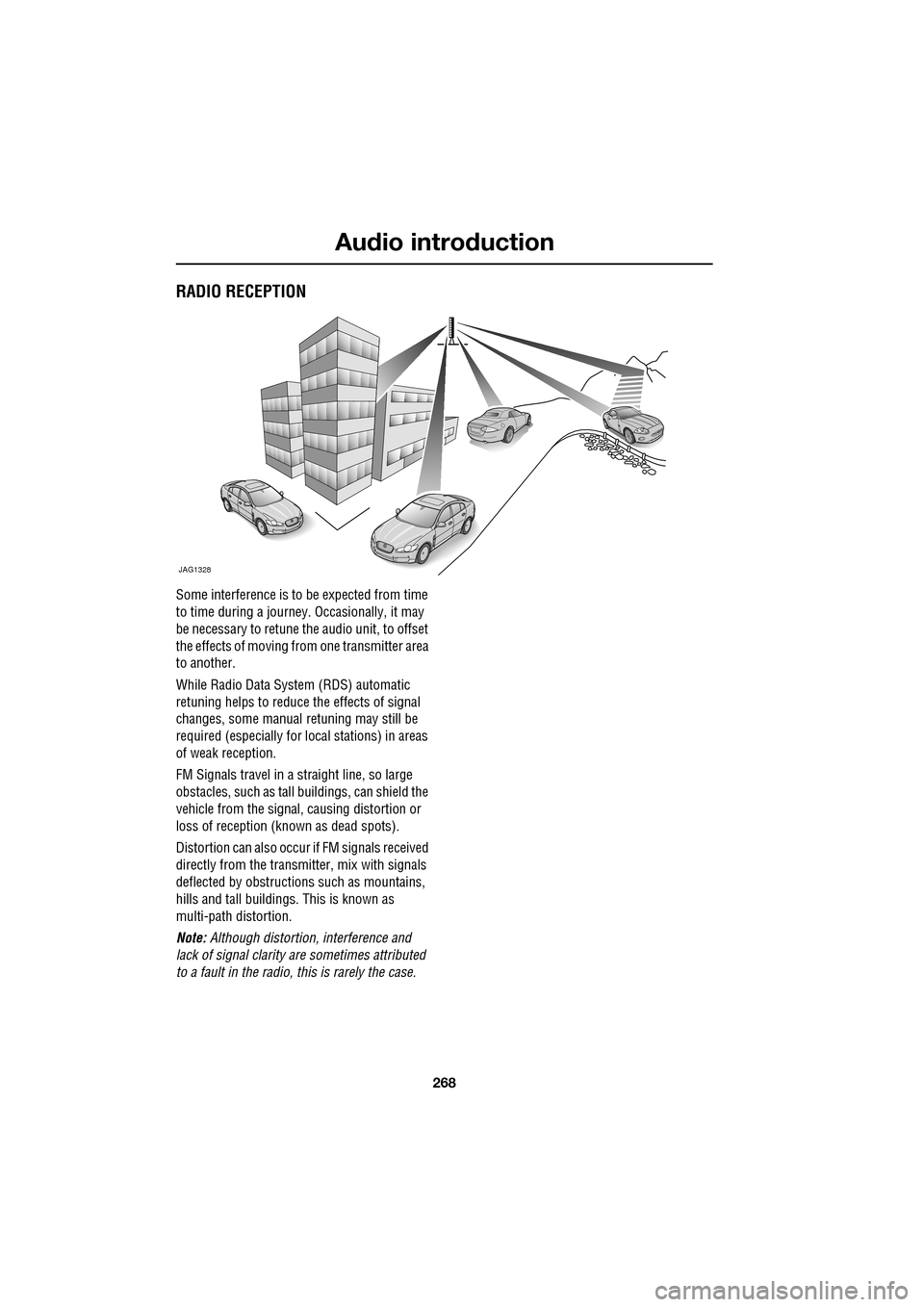
RADIO RECEPTION
Some interference is to be expected from time
to time during a journey. Occasionally, it may
be necessary to retune the audio unit, to offset
the effects of moving from one transmitter area
to another.
While Radio Data System (RDS) automatic
retuning helps to reduce the effects of signal
changes, some manual retuning may still be
required (especially for lo cal stations) in areas
of weak reception.
FM Signals travel in a straight line, so large
obstacles, such as tall buildings, can shield the
vehicle from the signal, causing distortion or
loss of reception (known as dead spots).
Distortion can also occur if FM signals received
directly from the transmitter, mix with signals
deflected by obstructions such as mountains,
hills and tall buildin gs. This is known as
multi-path distortion.
Note: Although distortion, interference and
lack of signal clarity are sometimes attributed
to a fault in the radio, this is rarely the case.
JAG1328
Page 272 of 391
Audio unit operation
272
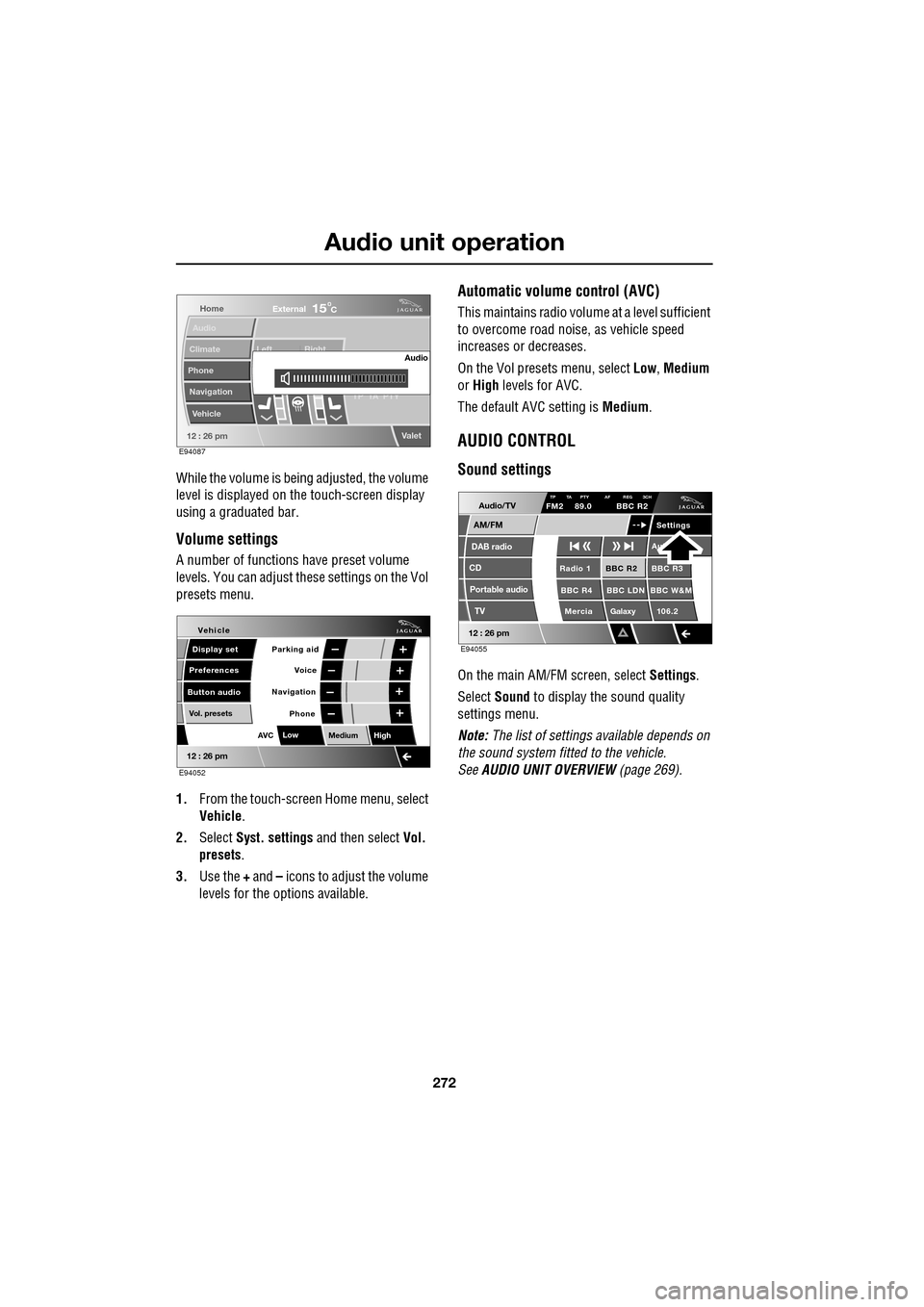
While the volume is being adjusted, the volume
level is displayed on the touch-screen display
using a graduated bar.
Volume settings
A number of functions have preset volume
levels. You can adjust these settings on the Vol
presets menu.
1. From the touch-screen Home menu, select
Vehicle .
2. Select Syst. settings and then select Vol.
presets .
3. Use the + and – icons to adjust the volume
levels for the options available.
Automatic volume control (AVC)
This maintains radio volume at a level sufficient
to overcome road noise, as vehicle speed
increases or decreases.
On the Vol presets menu, select Low, Medium
or High levels for AVC.
The default AVC setting is Medium.
AUDIO CONTROL
Sound settings
On the main AM/FM screen, select Settings.
Select Sound to display the sound quality
settings menu.
Note: The list of settings available depends on
the sound system fitted to the vehicle.
See AUDIO UNIT OVERVIEW (page 269).
Home
Audio
Climate
Phone
Navigation
Vehicle Left Right
TP T
A PTY
Valet12 : 26 pm
Audio
External15C
E94087
Voice
Vehicle
Display set
Preferences
Button audioParking aid
Vol. presets
AVC Low
MediumHigh
12 : 26 pm
Navigation
Phone
E94052
Audio/TV
DAB radio
CD
AM/FM
12 : 26 pm
BBC R2 BBC R3
BBC R4 BBC LDN BBC W&M Mercia Galaxy 106.2Radio 1
Settings
Aut
TP TA PTY AF REG 3CHFM2 89.0 BBC R2
Portable audio TV
E94055
Page 274 of 391
Audio unit operation
274
WAVEBAND BUTTON
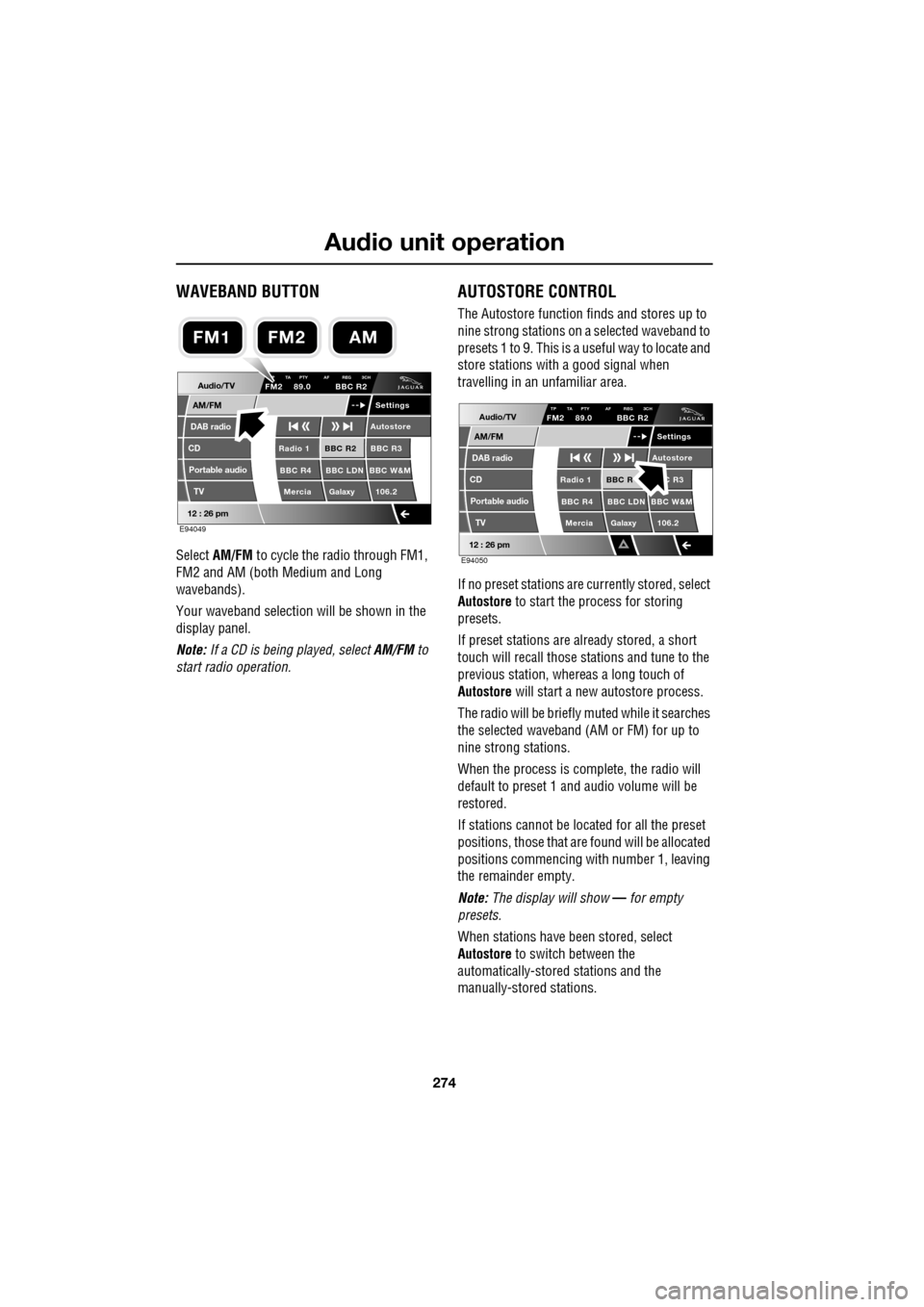
Select AM/FM to cycle the radio through FM1,
FM2 and AM (both Medium and Long
wavebands).
Your waveband selection will be shown in the
display panel.
Note: If a CD is being played, select AM/FM to
start radio operation.
AUTOSTORE CONTROL
The Autostore function fi nds and stores up to
nine strong stations on a selected waveband to
presets 1 to 9. This is a useful way to locate and
store stations with a good signal when
travelling in an unfamiliar area.
If no preset stations are currently stored, select
Autostore to start the process for storing
presets.
If preset stations are already stored, a short
touch will recall those stations and tune to the
previous station, whereas a long touch of
Autostore will start a new autostore process.
The radio will be briefly muted while it searches
the selected waveband (AM or FM) for up to
nine strong stations.
When the process is co mplete, the radio will
default to preset 1 and audio volume will be
restored.
If stations cannot be located for all the preset
positions, those that are found will be allocated
positions commencing with number 1, leaving
the remainder empty.
Note: The display will show — for empty
presets.
When stations have been stored, select
Autostore to switch between the
automatically-stored stations and the
manually-stored stations.
Audio/TV
DAB radio
CD
AM/FM
12 : 26 pm
BBC R2 BBC R3
BBC R4 BBC LDN BBC W&M Mercia Galaxy 106.2Radio 1
Settings
Autostore
P TA PTY AF REG 3CHFM2 89.0 BBC R2
Portable audio TV
E94049
FM2AMFM1
Audio/TV
DAB radio
CD
AM/FM
12 : 26 pm
BBC R C R3
BBC R4 BBC LDN BBC W&M Mercia Galaxy 106.2Radio 1
Settings
Autostore
TP TA PTY AF REG 3CHFM2 89.0 BBC R2
Portable audio TV
E94050