Def JAGUAR XF 2009 1.G Service Manual
[x] Cancel search | Manufacturer: JAGUAR, Model Year: 2009, Model line: XF, Model: JAGUAR XF 2009 1.GPages: 391, PDF Size: 19.32 MB
Page 349 of 391
349
Navigation system
VOICE GUIDANCE
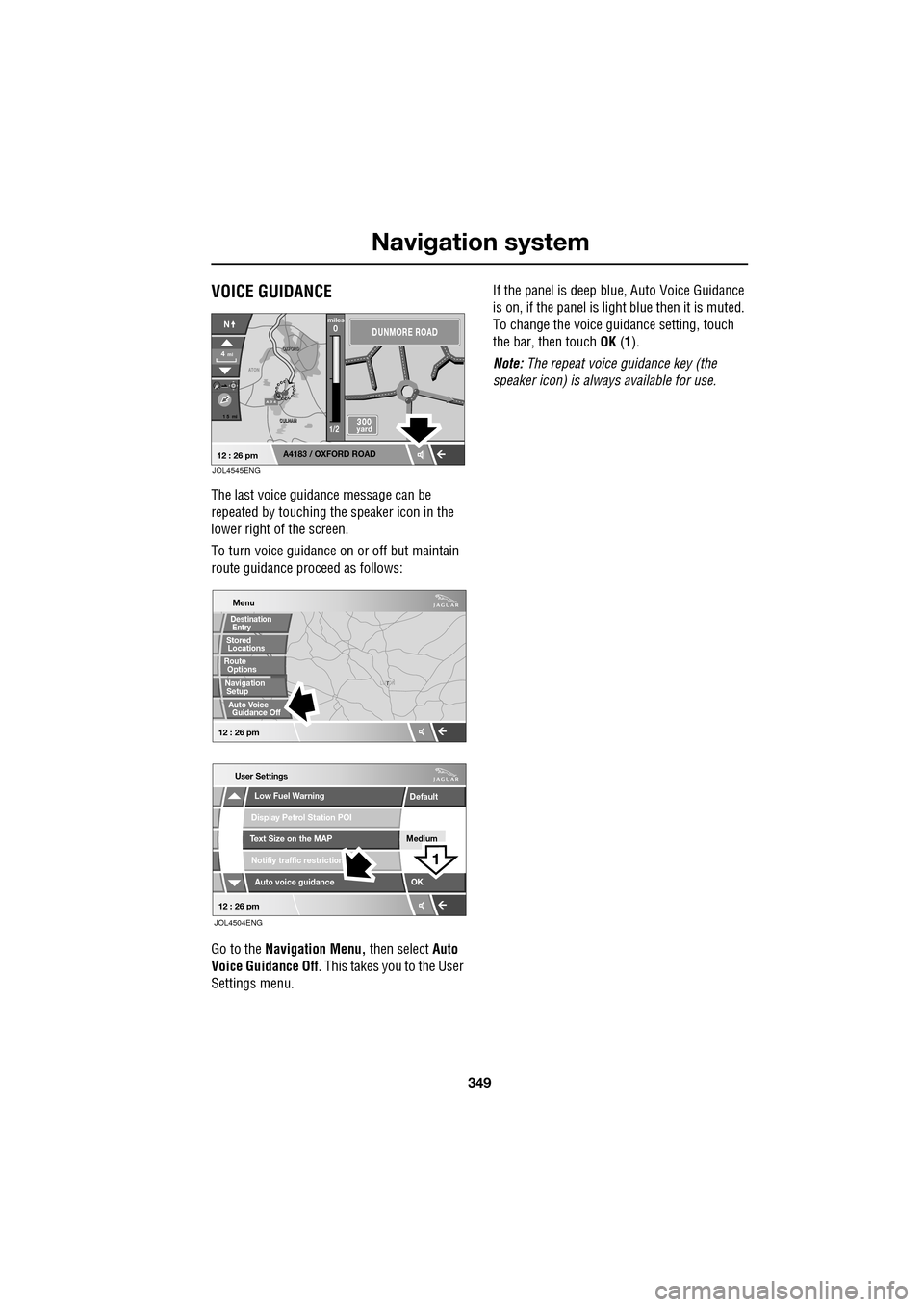
The last voice guidance message can be
repeated by touching the speaker icon in the
lower right of the screen.
To turn voice guidance on or off but maintain
route guidance proceed as follows:
Go to the Navigation Menu, then select Auto
Voice Guidance Off . This takes you to the User
Settings menu. If the panel is deep blue, Auto Voice Guidance
is on, if the panel is light
blue then it is muted.
To change the voice gui dance setting, touch
the bar, then touch OK (1).
Note: The repeat voice guidance key (the
speaker icon) is always available for use.
A 3 4
OXFORD
OXFORD
CULHAM
CULHAM
ATON
1 5 mi
A4183 / OXFORD ROAD
4mi
NDUNMORE ROAD
300 yard
miles0
1/2
12 : 26 pmJOL4545ENG
T
LUTON
Menu
Low Fuel Warning
User Settings
Display Petrol Station POI
Text Size on the MAP
Notifiy traffic restriction
Auto voice guidance
Medium
OK
Default
12 : 26 pm
12 : 26 pm
1
JOL4504ENG
Stored
Destination
Auto Voice
Entry
Guidance Off
Locations
Navigation SetupRoute Options
Page 350 of 391
Navigation system
350
CANCEL GUIDANCE
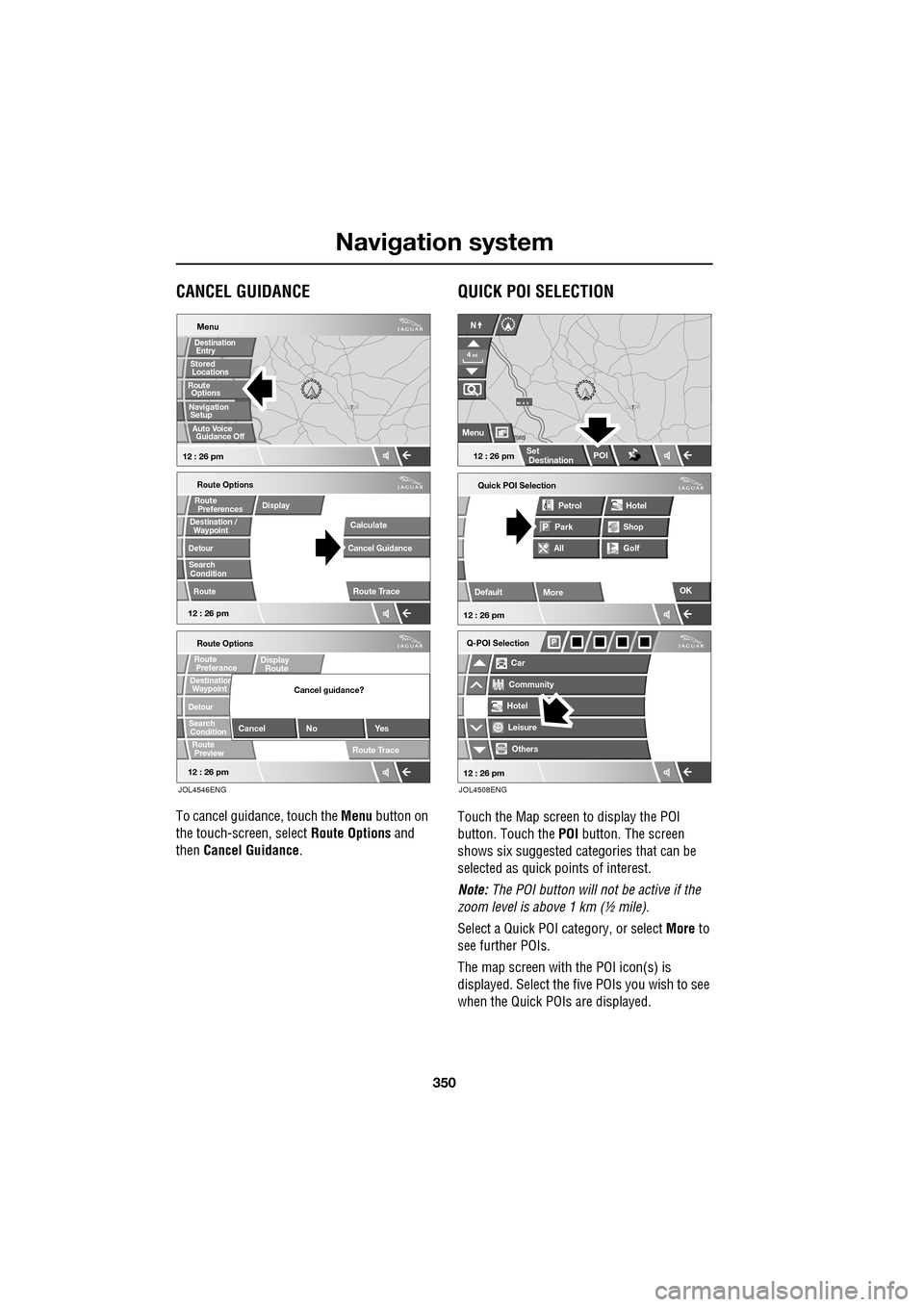
To cancel guidance, touch the Menu button on
the touch-screen, select Route Options and
then Cancel Guidance .
QUICK POI SELECTION
Touch the Map screen to display the POI
button. Touch the POI button. The screen
shows six suggested ca tegories that can be
selected as quick points of interest.
Note: The POI button will not be active if the
zoom level is above 1 km (½ mile).
Select a Quick POI category, or select More to
see further POIs.
The map screen with the POI icon(s) is
displayed. Select the five POIs you wish to see
when the Quick POIs are displayed.
T
LUTON
Menu
12 : 26 pm
Stored
Destination
Auto Voice
Entry
Guidance Off
Locations
Navigation SetupRoute Options
12 : 26 pm
Route Options
Destination /
Detour
Search
Route
RouteDisplay
Preferences
Condition
Calculate
Cancel Guidance
Route Trace
12 : 26 pm
Route Options
Waypoint
Detour
Search
Route
Preview
RouteDisplay
RoutePreferance
ConditionDestination
Cancel No Yes
Cancel guidance?
Route Trace
Waypoint
JOL4546ENG
Quick POI Selection
DefaultOK
All
Park Petrol
Golf ShopHotel
Car
Q-POI Selection
Community
Hotel
Leisure
Others
12 : 26 pm
12 : 26 pm
More
FORD
FORD T
LUTON
M 4 0
12 : 26 pm
4
N
Set
Destination
Menu
POI
mi
JOL4508ENG
Page 351 of 391
351
Navigation system
CALIBRATION
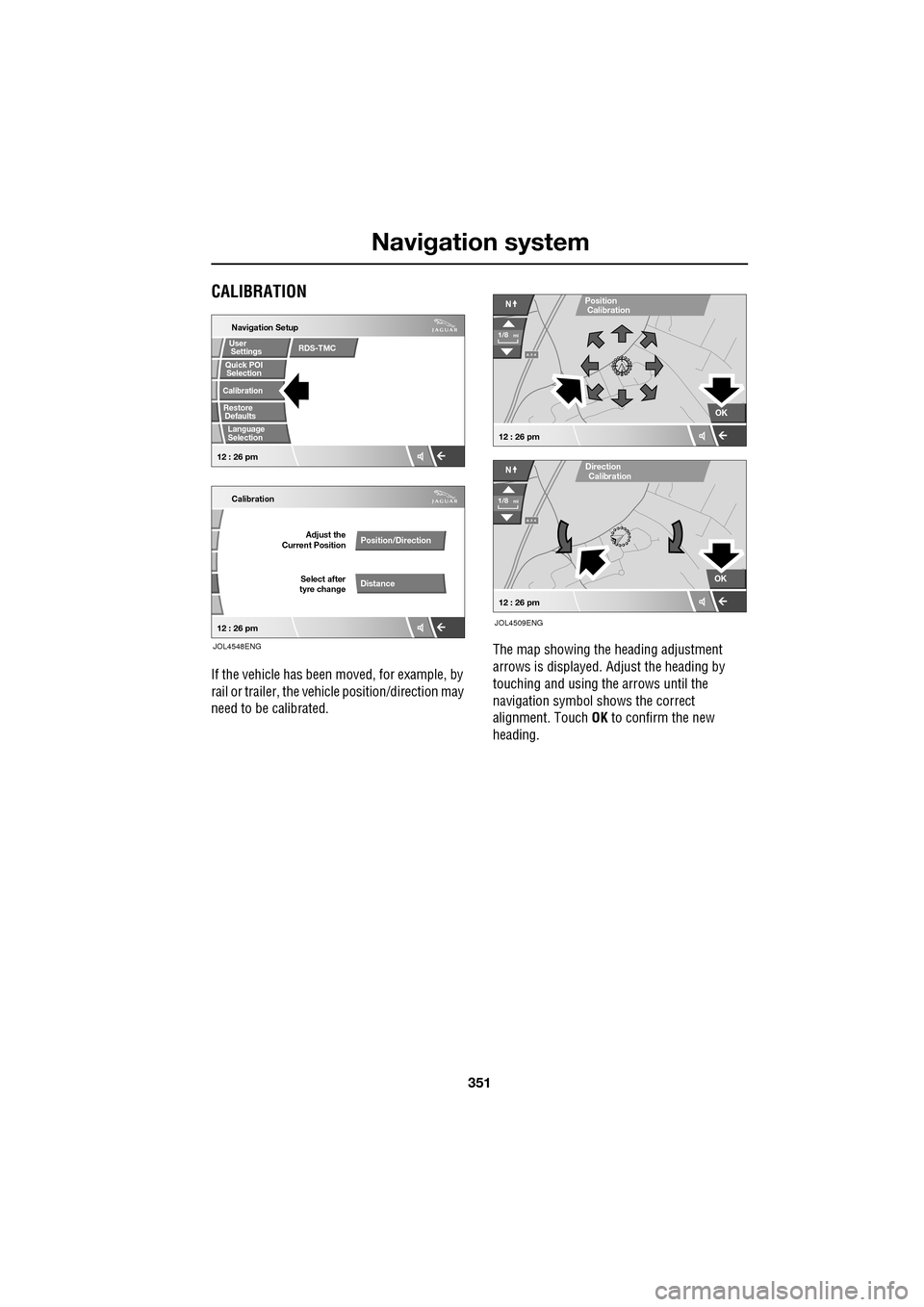
If the vehicle has been moved, for example, by
rail or trailer, the vehi cle position/direction may
need to be calibrated. The map showing the heading adjustment
arrows is displayed. Adjust the heading by
touching and using th
e arrows until the
navigation symbol shows the correct
alignment. Touch OK to confirm the new
heading.
Quick POI
Navigation Setup
Calibration
Select after
tyre change Adjust the
Current Position
Position/Direction
Distance
12 : 26 pm 12 : 26 pm
Selection
Calibration
Restore User
Settings
Defaults Quick POI
JOL4548ENG
RDS-TMC
Language
Selection
A 3 4
OK
NPosition
A 3 4
N
Calibration
OK
1/8mi
1/8mi
12 : 26 pm
12 : 26 pm
Direction
Calibration
JOL4509ENG
Page 352 of 391
Navigation system
352
RESTORE SYSTEM DEFAULTS
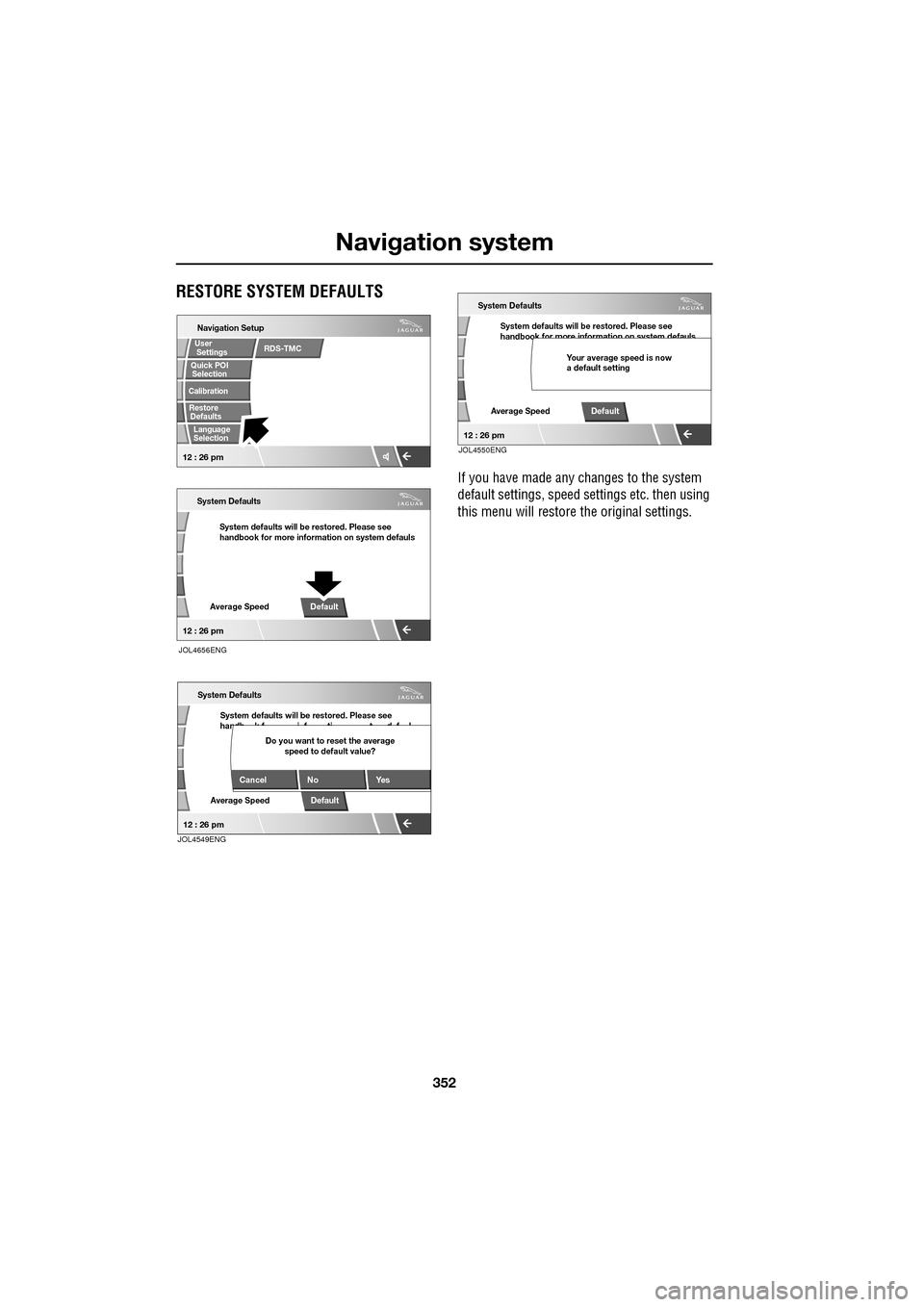
If you have made any changes to the system
default settings, speed settings etc. then using
this menu will restore th e original settings.
Navigation Setup
System defaults will be restored. Please see
handbook for more information on system defauls
System Defaults
Average SpeedDefault
Selection
Calibration
RestoreUser
Settings
Defaults Quick POI
12 : 26 pm
12 : 26 pm
JOL4656ENG
RDS-TMC
Language
Selection
System defaults will be restored. Please see
handb k f i f ti t d f l
System Defaults
Average SpeedDefault
Cancel No
Yes
Do you want to reset the average
speed to default value?
12 : 26 pmJOL4549ENG
System defaults will be restored. Please see
handbook for more information on system defauls
System Defaults
Average SpeedDefault
Your average speed is now
a default setting
12 : 26 pmJOL4550ENG
Page 353 of 391
353
Navigation system
LANGUAGE SELECTION
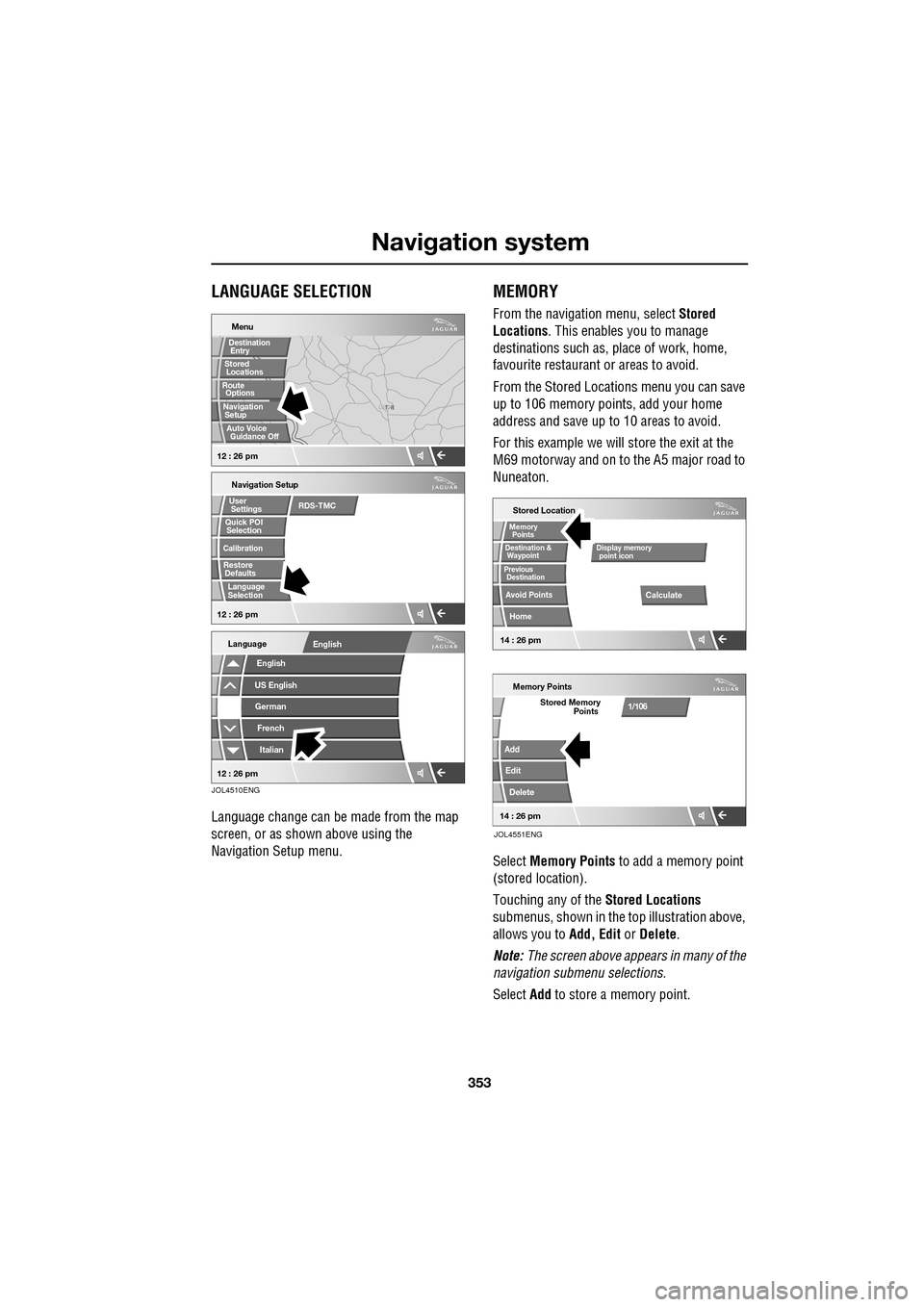
Language change can be made from the map
screen, or as shown above using the
Navigation Setup menu.
MEMORY
From the navigation menu, select Stored
Locations . This enables you to manage
destinations such as, place of work, home,
favourite restaurant or areas to avoid.
From the Stored Locations menu you can save
up to 106 memory points, add your home
address and save up to 10 areas to avoid.
For this example we will store the exit at the
M69 motorway and on to the A5 major road to
Nuneaton.
Select Memory Points to add a memory point
(stored location).
Touching any of the Stored Locations
submenus, shown in the top illustration above,
allows you to Add, Edit or Delete .
Note: The screen above appears in many of the
navigation submenu selections.
Select Add to store a memory point.
T N
LUTON
Menu
Navigation Setup
Selection
Calibration
Restore User
Settings
Defaults Quick POI
12 : 26 pm 12 : 26 pm
Stored
Destination
Auto Voice
Entry
Guidance Off
Locations
Navigation SetupRoute Options
RDS-TMC
Language
Selection
English
Language
US EnglishGerman
French
Italian
English
12 : 26 pm
JOL4510ENG
Stored Location
Destination &
Waypoint
Previous
Avoid Points
Home
Memory
Calculate
Display memory
Memory Points
Add
Edit
Delete
Stored Memory1/106
point icon
Points
Destination
Points
JOL4551ENG
14 : 26 pm14 : 26 pm
Page 366 of 391
Navigation system
366
OTHER SELECTION METHODS
Town centres
The POI database holds town centre locations.
To select a town centre, proceed as follows:
•From the Input POI Na me screen, enter the
town name required in the Name text area
(do not select the Town button).
• Touch List to display the list of matches.
• For the town centre, select the entry
showing the town name only.
Note: In some cases, more than one town
centre location may be listed.
CATEGORIES AND SUB-CATEGORIES
The POI database is divided into a number of
categories. Each main category is further
divided into a number of sub-categories.
The first entry in the list of Restaurant
sub-categories, is ALL. This selects all of the
Restaurant sub-categories.
To narrow the search, touch the Town button.
This will display the alpha keyboard, to allow
the desired town na me to be entered.
Search area
When searching the database, only points of
interest in the current search area are included,
except for the sub-categories marked All
search areas in the POI category list.
List button
The List button becomes active, when the
characters entered reduce the possible entries
to a small enough number (the list is displayed
automatically when the number of entries
reduces to four or less).
You can also select List (when active) without
entering a POI name. All the relevant points of
interest will be displayed, e.g. in a selected
town or category.
All button
The All button returns to searching all
categories after sele cting one category.
POI ENTRY MESSAGES
While searching for point s of interest, you may
encounter one of the following messages:
1. There are no POIs in this Category.
2. No POIs Found in this Town.
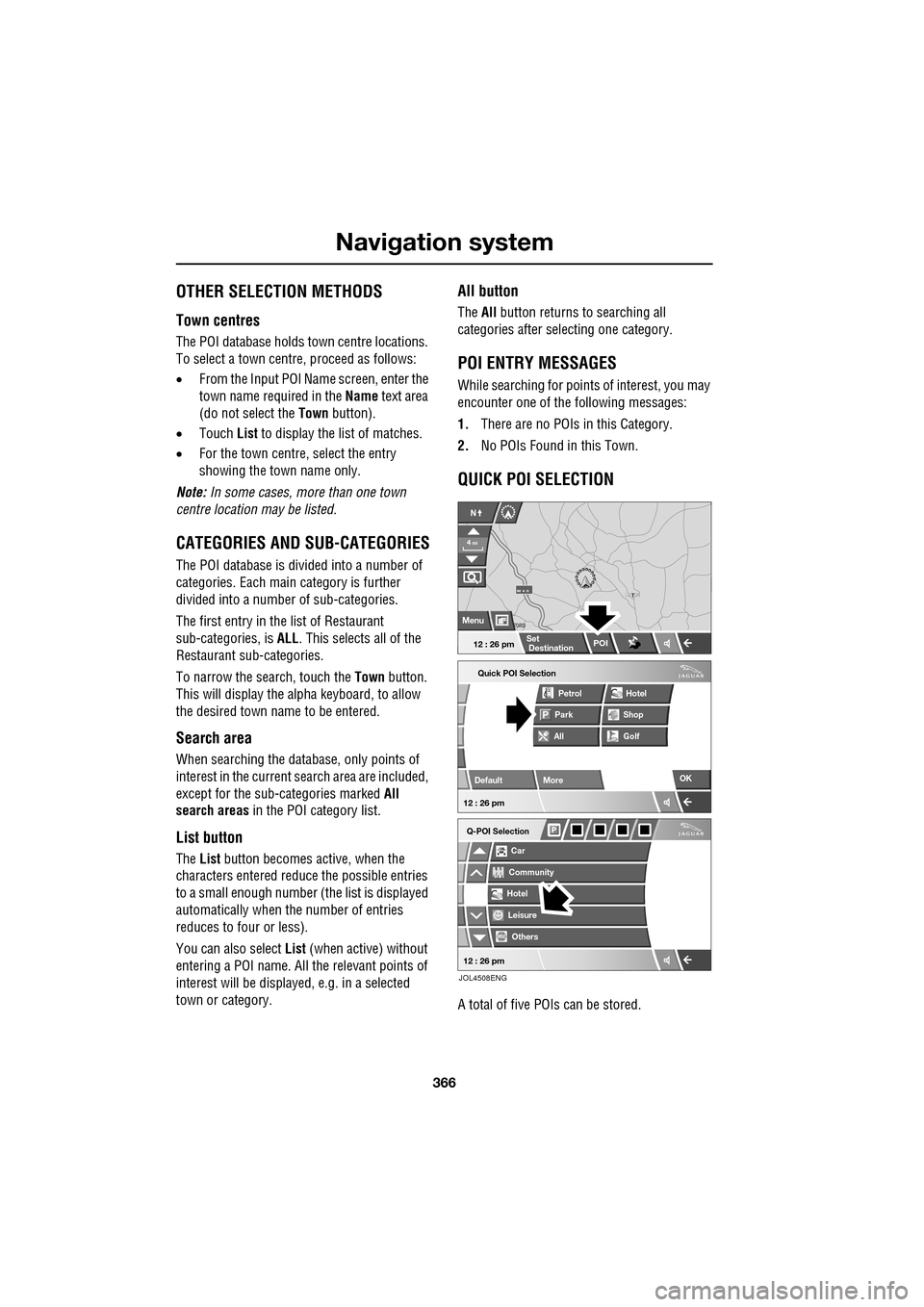
QUICK POI SELECTION
A total of five POIs can be stored.
Quick POI Selection
DefaultOK
AllPark Petrol
Golf ShopHotel
Car
Q-POI Selection
Community
Hotel
Leisure
Others
12 : 26 pm
12 : 26 pm
More
FORD
FORD T
LUTON
M 4 0
12 : 26 pm
4
N
Set
Destination
Menu
POI
mi
JOL4508ENG
Page 367 of 391
367
Navigation system
Changing the Quick POI Categories
The five default Quick POI categories can be
changed as required.
•At the Map screen, touch anywhere on the
map.
• Touch the POI button.
• Select the Quick POI category that you
wish to replace.
The screen shows the full list of POI categories.
• Select the new categor y required from the
list.
The screen shows the new selection of
category icons.
• Repeat for another category icon if
required.
• Touch OK to apply the new settings.
SELECTING A QUICK POI CATEGORY
• Touch the Initial Map screen, then touch
the POI button. The screen shows six
suggested categories th at can be selected
as quick points of interest.
Note: The POI button will not be active if the
zoom level is below 1 km (½ mile).
• Select a Quick POI category.
The map screen is disp layed with POI icons.
Other categories
You can also select from the complete list of
POI categories.
•Touch List Categories and select a
category from the list displayed.
Local POI search
This selects the points of interest in all
categories within 32 kilometres (20 miles) of
the vehicle.
• Touch the All Local POIs button.
MEMORY POINTS
The procedure for using memory points is
functionally the same as for using the Quick
Points of Interest.
The map display shows the location of all
stored memory points in view.
•For information about a particular memory
point, touch the desired memory point
icon.
After touching the memo ry point icon, the
name of the selected memory point is
displayed at the top of the screen.
Note: Unlike POIs, memory points are
displayed at all zoom levels.
Memory point details
• Touch Info. to display the details of the
selected memory point.
The details include Ic on, Name, Position and
Tel.
The telephone number can be called by
touching the telephone button, if a Jaguar
telephone is fitted.
The memory point deta ils can be edited.
Page 372 of 391
Navigation system
372
SURVEILLANCE SETTING
If you frequently travel through an area that is
subject to slow or stat ionary traffic, it is
possible to set a surveillance area which can be
viewed at any time.
Up to three areas can be set for this
surveillance.
RDS-TMC radio data for the selected
surveillance area must be available and TMC
must be enabled in order to show TMC events
in this area
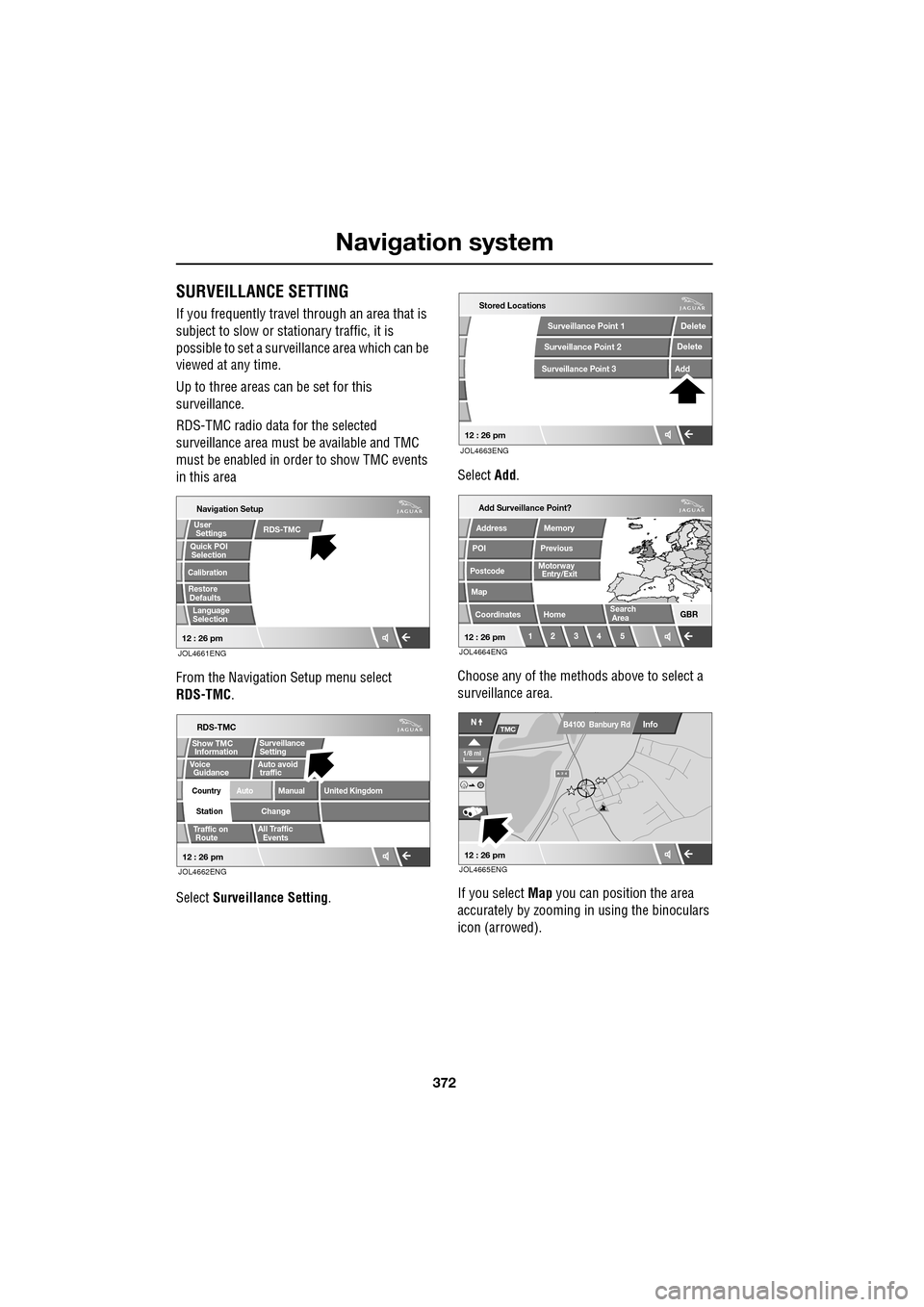
From the Navigation Setup menu select
RDS-TMC .
Select Surveillance Setting . Select
Add.
Choose any of the met hods above to select a
surveillance area.
If you select Map you can position the area
accurately by zooming in using the binoculars
icon (arrowed).
JOL4661ENG
Quick POI
Navigation Setup
Selection
Calibration
Restore User
Settings
Defaults Quick POI
12 : 26 pm
RDS-TMC
Language
Selection
JOL4662ENG
RDS-TMC
Traffic on
Show TMC
Auto avoid
All Traffic
United Kingdom
Country
Station
Manual
Change
Auto
Surveillance
Events
Voice
Guidance
12 : 26 pm
Information Setting
traffic
Route
JOL4663ENG
Stored Locations
Surveillance Point 2
Surveillance Point 3
Surveillance Point 1 Delete
Add
Delete
12 : 26 pm
Add Surveillance Point?
POI
Postcode
Map
Coordinates
Address
HomeGBR
12 3 4 5
PreviousMemory
12 : 26 pm
Search
Motorway
Entry/Exit
Area
JOL4664ENG
A 3 4
Info
N
1/8 ml
TMC
12 : 26 pm
B4100 Banbury Rd
JOL4665ENG
Page 373 of 391
373
Navigation system
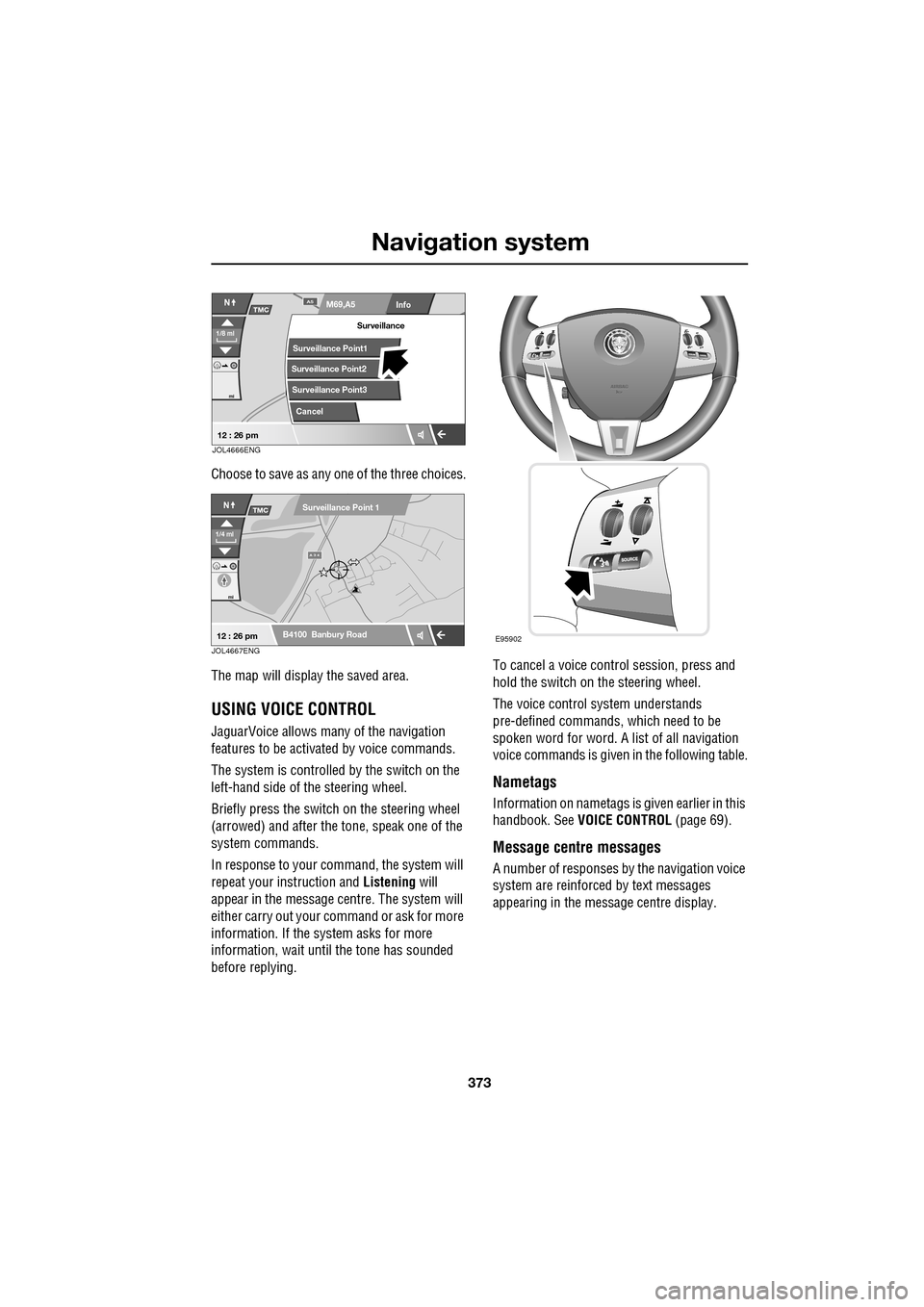
Choose to save as any one of the three choices.
The map will display the saved area.
USING VOICE CONTROL
JaguarVoice allows many of the navigation
features to be activa ted by voice commands.
The system is controlled by the switch on the
left-hand side of th e steering wheel.
Briefly press the switch on the steering wheel
(arrowed) and after the tone, speak one of the
system commands.
In response to your command, the system will
repeat your instruction and Listening will
appear in the message centre. The system will
either carry out your command or ask for more
information. If the system asks for more
information, wait until the tone has sounded
before replying. To cancel a voice control session, press and
hold the switch on the steering wheel.
The voice control system understands
pre-defined commands, which need to be
spoken word for word. A list of all navigation
voice commands is given
in the following table.
Nametags
Information on nametags is given earlier in this
handbook. See VOICE CONTROL (page 69).
Message centre messages
A number of responses by the navigation voice
system are reinforced by text messages
appearing in the message centre display.
Info
N
1/8 ml
M69,A5A5
mi
TMC
Surveillance Point2
Surveillance Point3 Surveillance
Cancel
Surveillance Point1
12 : 26 pmJOL4666ENG
A 3 4
mi
NTMC
B4100 Banbury Road
Surveillance Point 1
1/4 ml
12 : 26 pmJOL4667ENGE95902
Page 380 of 391
Navigation system
380
THE DISCLAIMER OF WARRANTY AND
LIMITATION OF LIABILITY, SET FORTH IN
THIS AGREEMENT, DO NOT AFFECT OR
PREJUDICE YOUR STATUTORY RIGHTS
WHERE YOU HAVE ACQUIRED THE
DATABASE OTHERWISE THAN IN THE
COURSE OF A BUSINESS. Some states and
laws do not allow the exclusion of implied
warranties, so the abov e disclaimer may not
apply to you.
Government end users
If the DATABASE is for a region of North
America and is being acqui red by or on behalf
of the United States government or any other
entity seeking or applyi ng rights similar to
those customarily claimed by the United States
government, the DATABASE is licensed with
‘limited rights’. Utilization of the DATA
BASE is subject to the
restrictions specified in the ‘Rights in Technical
Data and Computer Database’ clause at DFARS
252.227–7013, or the equivalent clause for
non-defence agencies. Manufacturer of the
DATABASE of North America is NAVTEQ
Corporation, 10400 W. Higgins Road, Suite
400, Rosemont, Illinois 60018, USA.
EUROPEAN DECLARATION OF
CONFORMITY
Hereby, DENSO CORPORATION
declares that this DN-NS-019 is in
compliance with the essential
requirements and other relevant
provisions of Directive 1999/5/EC.WARNING
The DATABASE reflects reality as
existing before you received the
DATABASE and it comprises data and
information from government and other
sources, which may contain errors and
omissions. Accordingly, the DATABASE may
contain inaccurate or incomplete information
due to the passage of time, changing
circumstances, and due to the nature of the
sources used. The DATABASE does not
include or reflect inform ation on - inter alia -
neighbourhood safety; law enforcement;
emergency assistance; construction work;
road or lane closures; vehicle or speed
restrictions; road slope or grade; bridge
height, weight or other limits; road or traffic
conditions; special even ts; traffic congestion;
or travel time.