radio JAGUAR XF 2009 1.G Owner's Manual
[x] Cancel search | Manufacturer: JAGUAR, Model Year: 2009, Model line: XF, Model: JAGUAR XF 2009 1.GPages: 391, PDF Size: 19.32 MB
Page 248 of 391

Fuses
248
Luggage compartment fuse box
F31 15A Blue Sunroof.
F32 5A Tan Jaguar Smart Key docking station.
F33 5A Tan Diagnostic connector.
F34 5A Tan Instrument pack.
F35 15A Blue Interior lamps.
F36 10A Red Suspension system.
Fuse No Rating
(amps) Fuse
Colour Circuit
Fuse No Rating
(amps) Fuse
Colour Circuit
F1 30A Pink Air blower.
F2 30A Pink Electric parking brake.
F3 - - Not used.
F4 - - Not used.
F5 - - Not used.
F6 - - Not used.
F7 30A Pink Heated rear screen.
F8 30A Pink Audio system (Premium audio only).
F9 50A Red RBD link.
F10 40A Green Rear electronic differential (e-Diff).
F11 - - Not used.
F12 - - Not used.
F13 - - Not used.
F14 5A Tan Telephone.
F15 10A Red TV. DVD. DAB radio.
F16 - - Not used.
F17 - - Not used.
F18 - - Not used.
F19 - - Not used.
F20 - - Not used.
F21 - - Not used.
F22 - - Not used.
Page 268 of 391
Audio introduction
268
RADIO RECEPTION
Some interference is to be expected from time
to time during a journey. Occasionally, it may
be necessary to retune the audio unit, to offset
the effects of moving from one transmitter area
to another.
While Radio Data System (RDS) automatic
retuning helps to reduce the effects of signal
changes, some manual retuning may still be
required (especially for lo cal stations) in areas
of weak reception.
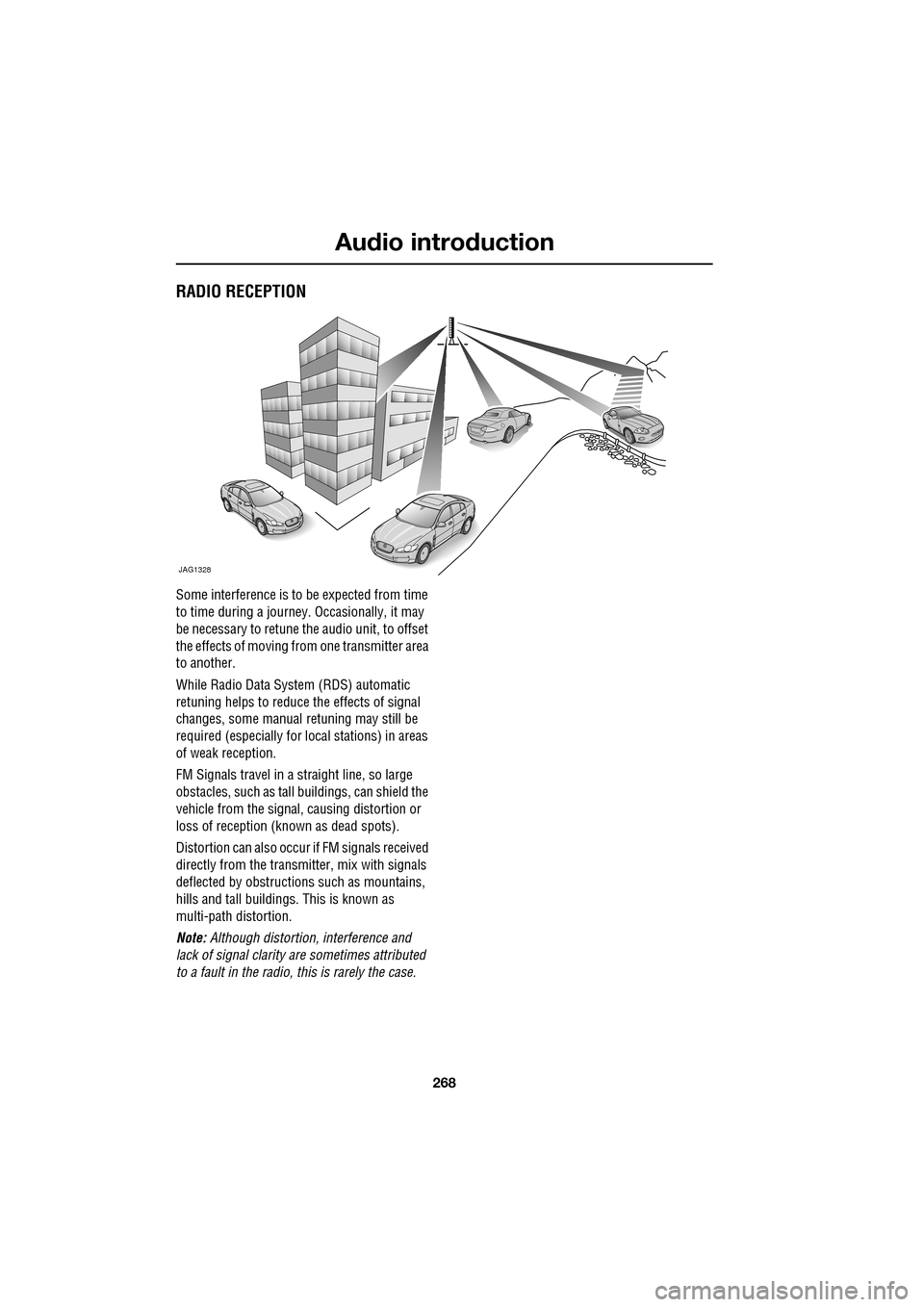
FM Signals travel in a straight line, so large
obstacles, such as tall buildings, can shield the
vehicle from the signal, causing distortion or
loss of reception (known as dead spots).
Distortion can also occur if FM signals received
directly from the transmitter, mix with signals
deflected by obstructions such as mountains,
hills and tall buildin gs. This is known as
multi-path distortion.
Note: Although distortion, interference and
lack of signal clarity are sometimes attributed
to a fault in the radio, this is rarely the case.
JAG1328
Page 269 of 391
269
Audio unit overview
AUDIO UNIT OVERVIEW
The Jaguar infotainment system contains
AM/FM radio, compact disc player and portable
audio interface. Digital (DAB) radio, six-disc CD
player and TV are optional.
Audio controls
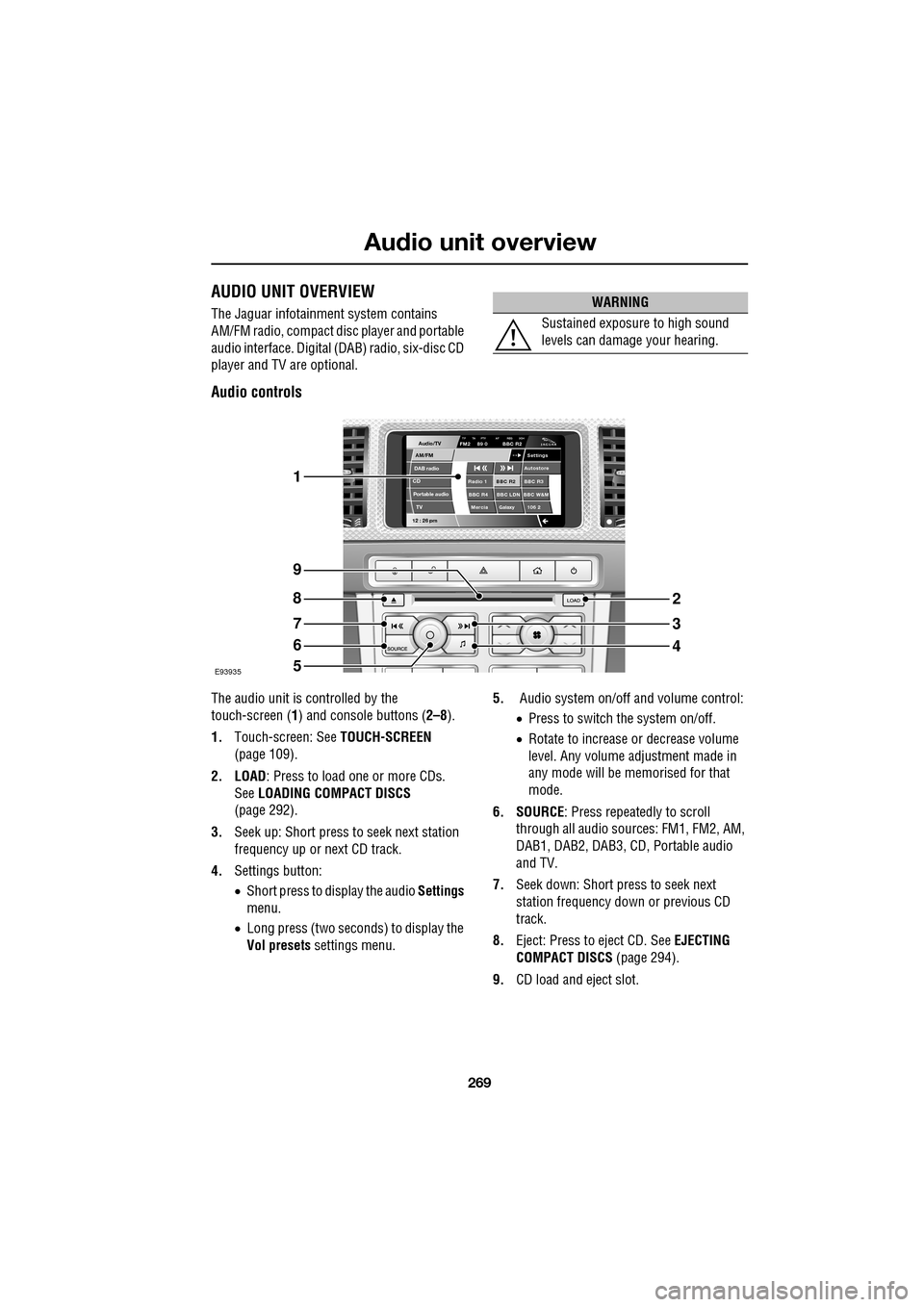
The audio unit is c ontrolled by the
touch-screen ( 1) and console buttons ( 2–8).
1. Touch-screen: See TOUCH-SCREEN
(page 109).
2. LOAD : Press to load one or more CDs.
See LOADING COMPACT DISCS
(page 292).
3. Seek up: Short press to seek next station
frequency up or next CD track.
4. Settings button:
•Short press to display the audio Settings
menu.
• Long press (two seconds) to display the
Vol presets settings menu. 5.
Audio system on/off and volume control:
•Press to switch the system on/off.
• Rotate to increase or decrease volume
level. Any volume adjustment made in
any mode will be memorised for that
mode.
6. SOURCE : Press repeatedly to scroll
through all audio sources: FM1, FM2, AM,
DAB1, DAB2, DAB3, CD , Portable audio
and TV.
7. Seek down: Short press to seek next
station frequency down or previous CD
track.
8. Eject: Press to eject CD. See EJECTING
COMPACT DISCS (page 294).
9. CD load and eject slot.
WARNING
Sustained exposure to high sound
levels can damage your hearing.
Audio/TV
DAB radio
CDAM/FM
12 : 26 pm
BBC R2 BBC R3
BBC R4 BBC LDN BBC W&M Mercia Galaxy 106 2Radio 1
Settings
Autostore
TP TA PTY AF REG 3CHFM2 89 0 BBC R2
Portable audio TV
E93935
1
9
8
7
6
5
2
3
4
Page 270 of 391
Audio unit overview
270
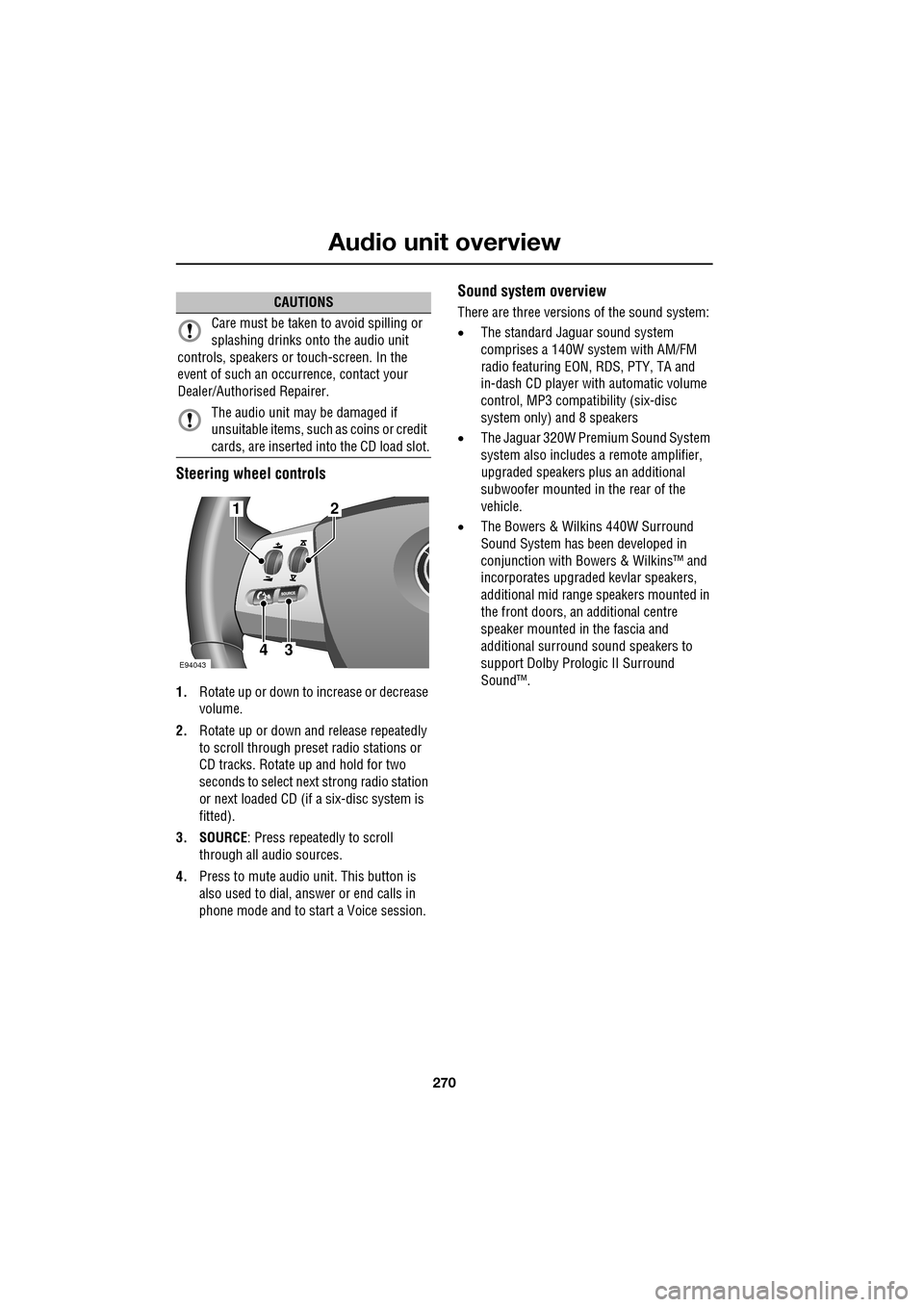
Steering wheel controls
1.Rotate up or down to increase or decrease
volume.
2. Rotate up or down and release repeatedly
to scroll through preset radio stations or
CD tracks. Rotate up and hold for two
seconds to select next strong radio station
or next loaded CD (if a six-disc system is
fitted).
3. SOURCE : Press repeatedly to scroll
through all audio sources.
4. Press to mute audio unit. This button is
also used to dial, answer or end calls in
phone mode and to st art a Voice session.
Sound system overview
There are three versions of the sound system:
• The standard Jaguar sound system
comprises a 140W sy stem with AM/FM
radio featuring EON, RDS, PTY, TA and
in-dash CD player with automatic volume
control, MP3 compatibility (six-disc
system only) and 8 speakers
• The Jaguar 320W Premium Sound System
system also includes a remote amplifier,
upgraded speakers plus an additional
subwoofer mounted in the rear of the
vehicle.
• The Bowers & Wilkins 440W Surround
Sound System has been developed in
conjunction with Bowe rs & Wilkins™ and
incorporates upgraded kevlar speakers,
additional mid range sp eakers mounted in
the front doors, an additional centre
speaker mounted in the fascia and
additional surround sound speakers to
support Dolby Prologic II Surround
Sound™.CAUTIONS
Care must be taken to avoid spilling or
splashing drinks onto the audio unit
controls, speakers or touch-screen. In the
event of such an occurrence, contact your
Dealer/Authorised Repairer.
The audio unit may be damaged if
unsuitable items, such as coins or credit
cards, are inserted into the CD load slot.
E94043
12
43
Page 271 of 391
271
Audio unit operation
ON/OFF CONTROL
The audio system can be used with the vehicle
ignition on or off, but will switch off
automatically when the ignition is switched off.
To operate the audio system when the ignition
has been switched off, press the On/off volume
control.
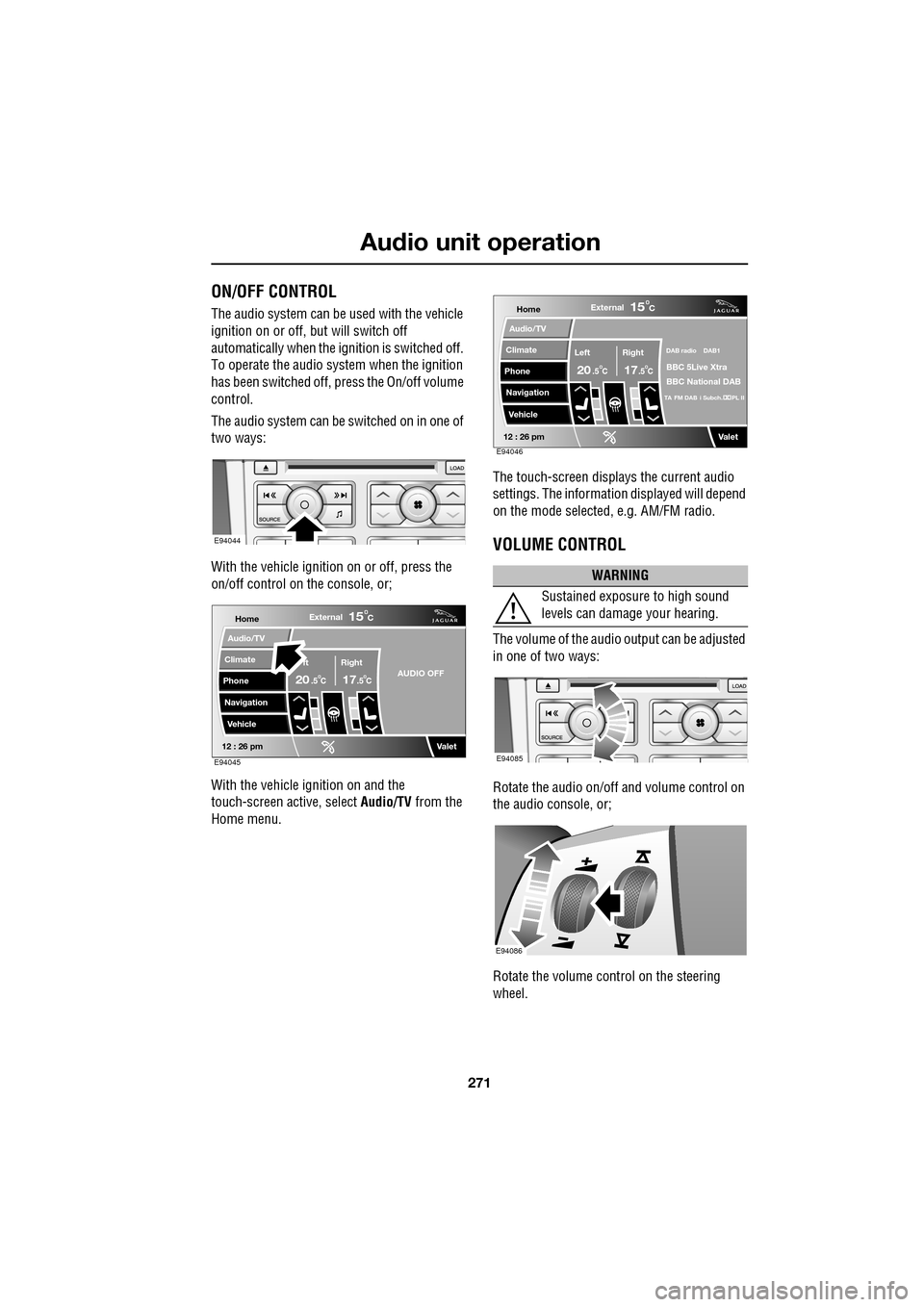
The audio system can be switched on in one of
two ways:
With the vehicle ignition on or off, press the
on/off control on the console, or;
With the vehicle ignition on and the
touch-screen active, select Audio/TV from the
Home menu. The touch-screen displays the current audio
settings. The informati
on displayed will depend
on the mode selected , e.g. AM/FM radio.
VOLUME CONTROL
The volume of the audio output can be adjusted
in one of two ways:
Rotate the audio on/off and volume control on
the audio console, or;
Rotate the volume control on the steering
wheel.
E94044
Home
Audio/TV
Climate
Phone
Navigation
VehicleExternal
ft Right
20 17CC
15C
.5 .5AUDIO OFF
Valet12 : 26 pmE94045
WARNING
Sustained exposure to high sound
levels can damage your hearing.
Home
Audio/TV
Climate
Phone
Navigation
VehicleExternal
Left Right
20 17CC
15C
.5 .5
DAB radio DAB1
BBC 5Live Xtra
BBC National DAB
TA FM DAB i Subch. PL II
Valet12 : 26 pmE94046
E94085
E94086
Page 272 of 391
Audio unit operation
272
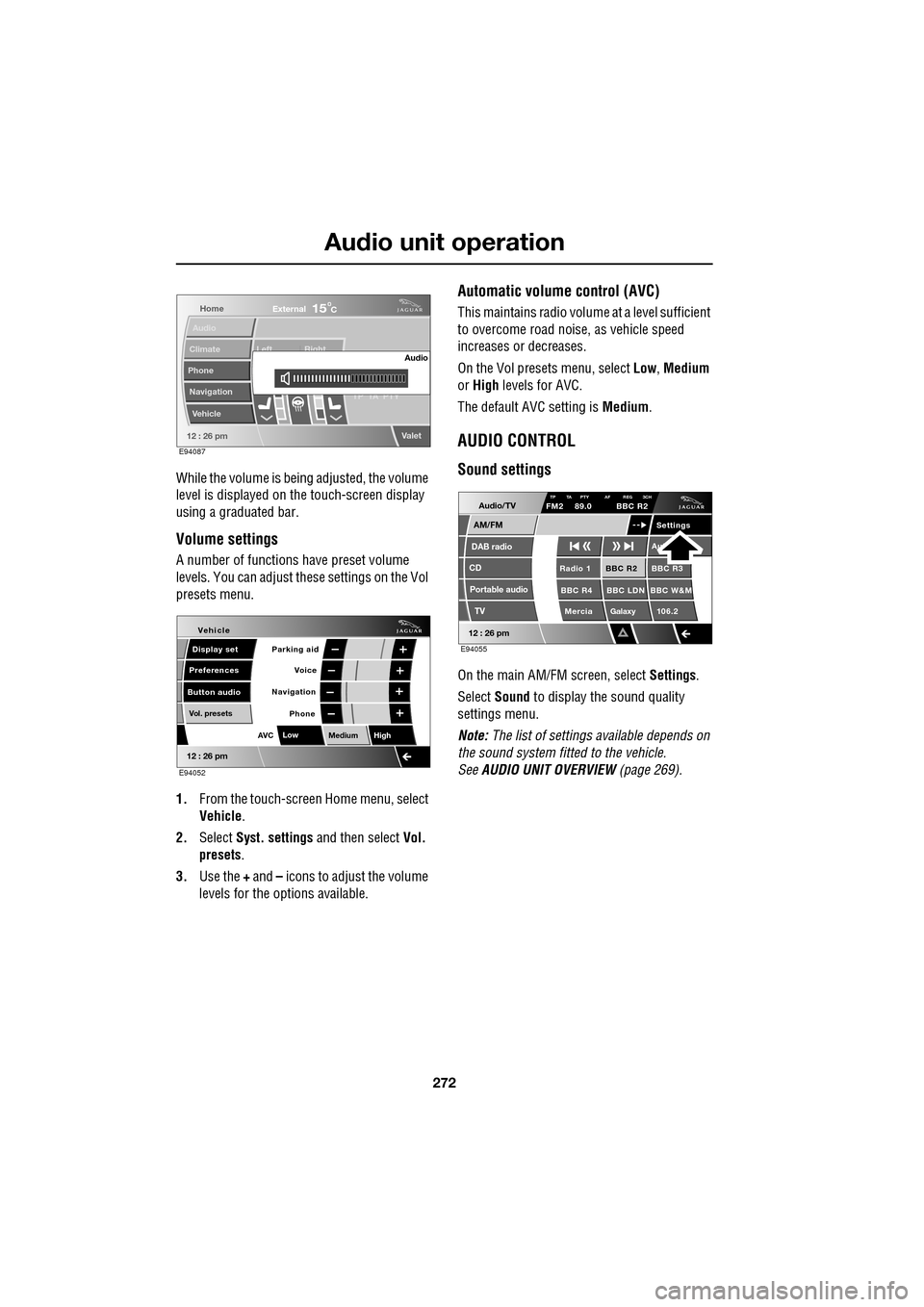
While the volume is being adjusted, the volume
level is displayed on the touch-screen display
using a graduated bar.
Volume settings
A number of functions have preset volume
levels. You can adjust these settings on the Vol
presets menu.
1. From the touch-screen Home menu, select
Vehicle .
2. Select Syst. settings and then select Vol.
presets .
3. Use the + and – icons to adjust the volume
levels for the options available.
Automatic volume control (AVC)
This maintains radio volume at a level sufficient
to overcome road noise, as vehicle speed
increases or decreases.
On the Vol presets menu, select Low, Medium
or High levels for AVC.
The default AVC setting is Medium.
AUDIO CONTROL
Sound settings
On the main AM/FM screen, select Settings.
Select Sound to display the sound quality
settings menu.
Note: The list of settings available depends on
the sound system fitted to the vehicle.
See AUDIO UNIT OVERVIEW (page 269).
Home
Audio
Climate
Phone
Navigation
Vehicle Left Right
TP T
A PTY
Valet12 : 26 pm
Audio
External15C
E94087
Voice
Vehicle
Display set
Preferences
Button audioParking aid
Vol. presets
AVC Low
MediumHigh
12 : 26 pm
Navigation
Phone
E94052
Audio/TV
DAB radio
CD
AM/FM
12 : 26 pm
BBC R2 BBC R3
BBC R4 BBC LDN BBC W&M Mercia Galaxy 106.2Radio 1
Settings
Aut
TP TA PTY AF REG 3CHFM2 89.0 BBC R2
Portable audio TV
E94055
Page 273 of 391
273
Audio unit operation
Standard and Premium sound systems
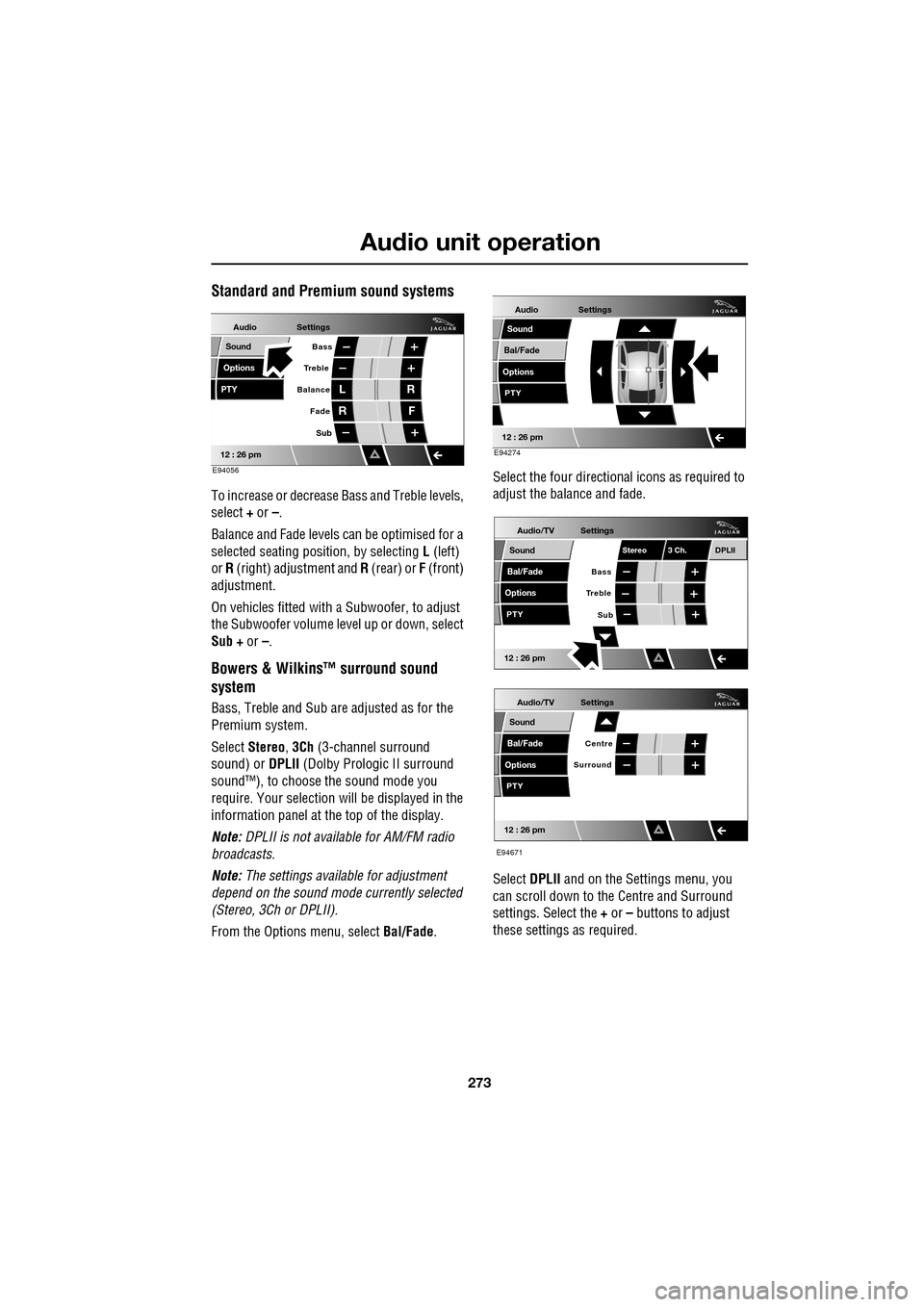
To increase or decrease Bass and Treble levels,
select + or –.
Balance and Fade levels can be optimised for a
selected seating posit ion, by selecting L (left)
or R (right) adjustment and R (rear) or F (front)
adjustment.
On vehicles fitted with a Subwoofer, to adjust
the Subwoofer volume le vel up or down, select
Sub + or –.
Bowers & Wilkins™ surround sound
system
Bass, Treble and Sub are adjusted as for the
Premium system.
Select Stereo , 3Ch (3-channel surround
sound) or DPLII (Dolby Prologic II surround
sound™), to choose the sound mode you
require. Your selection will be displayed in the
information panel at the top of the display.
Note: DPLII is not availa ble for AM/FM radio
broadcasts.
Note: The settings available for adjustment
depend on the sound mode currently selected
(Stereo, 3Ch or DPLII).
From the Options menu, select Bal/Fade. Select the four directio
nal icons as required to
adjust the balance and fade.
Select DPLII and on the Settings menu, you
can scroll down to the Centre and Surround
settings. Select the + or – buttons to adjust
these settings as required.
Audio
Options
PTY
Sound
12 : 26 pm
Settings
Treble Bass
Balance
FadeL
R R
F
E94056
Sub
Audio
Bal/Fade
Options
Sound
12 : 26 pm
Settings
PTY
E94274
Audio/TV
Bal/Fade
Options
Sound
12 : 26 pm
Settings
Treble
Sub
PTY
Bass
Stereo 3 Ch.DPLII
Audio/TV
Bal/Fade
Options
Sound
12 : 26 pm
Settings
Surround
PTY
Centre
E94671
Page 274 of 391
Audio unit operation
274
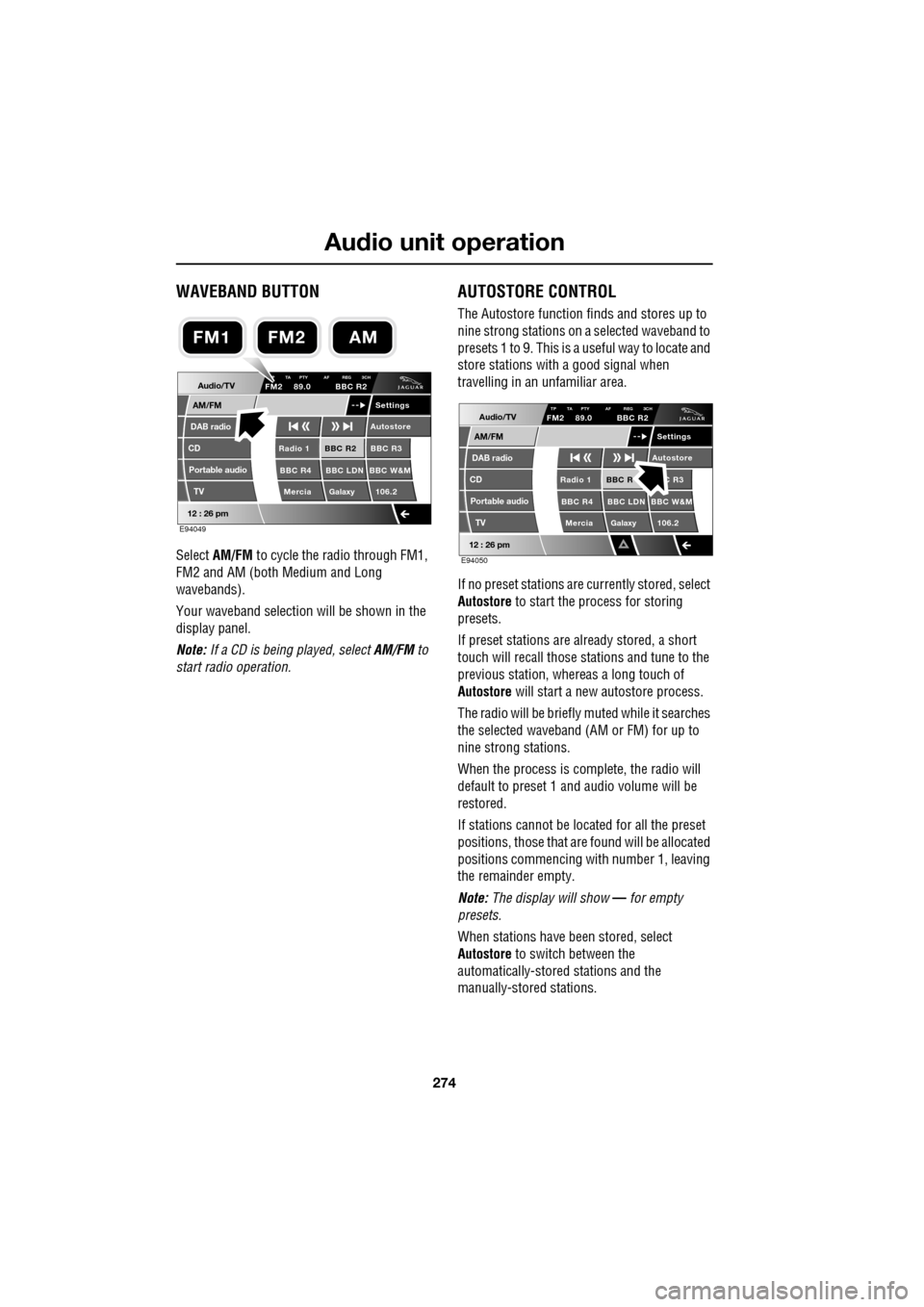
WAVEBAND BUTTON
Select AM/FM to cycle the radio through FM1,
FM2 and AM (both Medium and Long
wavebands).
Your waveband selection will be shown in the
display panel.
Note: If a CD is being played, select AM/FM to
start radio operation.
AUTOSTORE CONTROL
The Autostore function fi nds and stores up to
nine strong stations on a selected waveband to
presets 1 to 9. This is a useful way to locate and
store stations with a good signal when
travelling in an unfamiliar area.
If no preset stations are currently stored, select
Autostore to start the process for storing
presets.
If preset stations are already stored, a short
touch will recall those stations and tune to the
previous station, whereas a long touch of
Autostore will start a new autostore process.
The radio will be briefly muted while it searches
the selected waveband (AM or FM) for up to
nine strong stations.
When the process is co mplete, the radio will
default to preset 1 and audio volume will be
restored.
If stations cannot be located for all the preset
positions, those that are found will be allocated
positions commencing with number 1, leaving
the remainder empty.
Note: The display will show — for empty
presets.
When stations have been stored, select
Autostore to switch between the
automatically-stored stations and the
manually-stored stations.
Audio/TV
DAB radio
CD
AM/FM
12 : 26 pm
BBC R2 BBC R3
BBC R4 BBC LDN BBC W&M Mercia Galaxy 106.2Radio 1
Settings
Autostore
P TA PTY AF REG 3CHFM2 89.0 BBC R2
Portable audio TV
E94049
FM2AMFM1
Audio/TV
DAB radio
CD
AM/FM
12 : 26 pm
BBC R C R3
BBC R4 BBC LDN BBC W&M Mercia Galaxy 106.2Radio 1
Settings
Autostore
TP TA PTY AF REG 3CHFM2 89.0 BBC R2
Portable audio TV
E94050
Page 275 of 391
275
Audio unit operation
STATION PRESET BUTTONS
Tuning stations
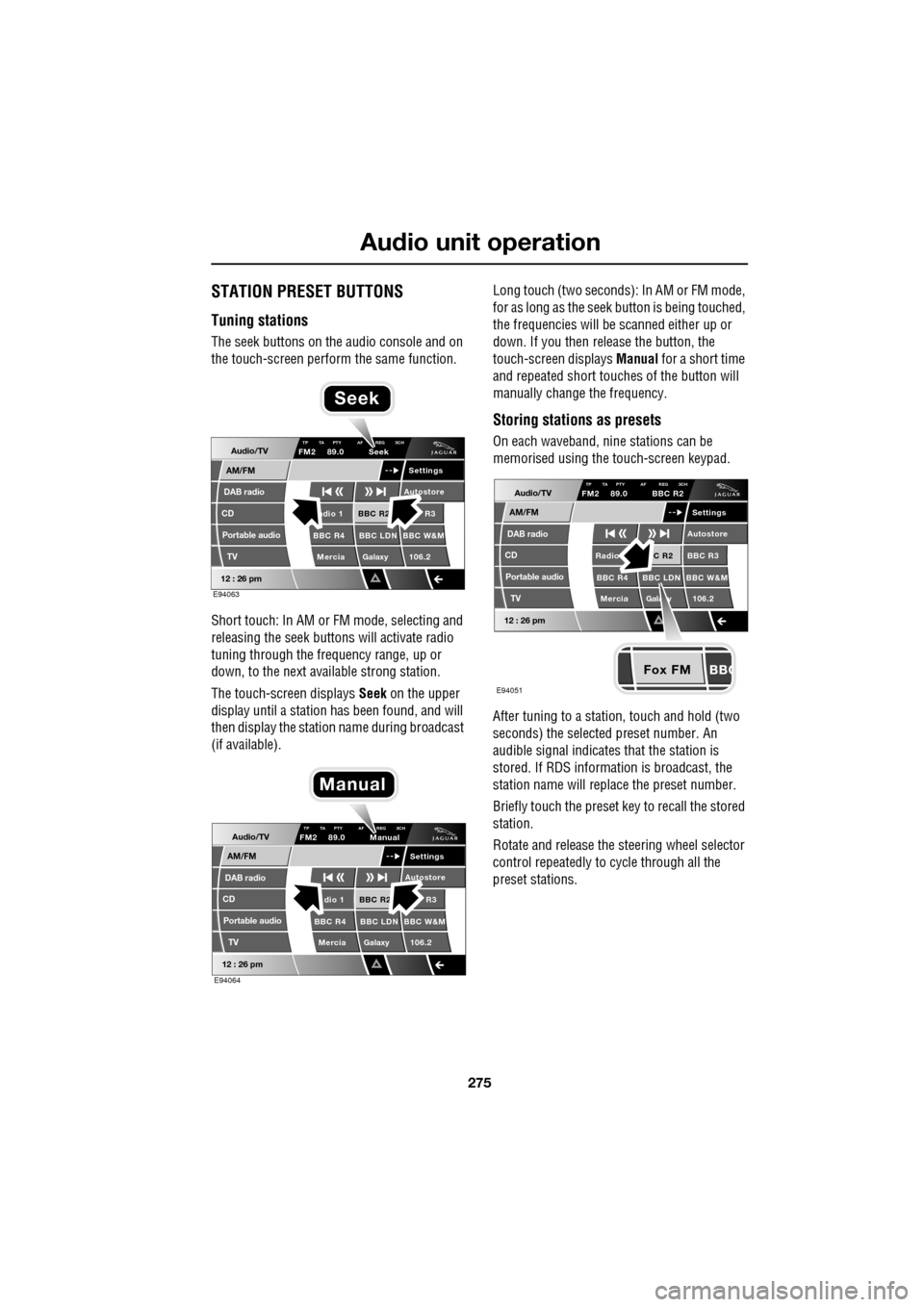
The seek buttons on the audio console and on
the touch-screen perform the same function.
Short touch: In AM or FM mode, selecting and
releasing the seek buttons will activate radio
tuning through the frequency range, up or
down, to the next available strong station.
The touch-screen displays Seek on the upper
display until a station has been found, and will
then display the station name during broadcast
(if available). Long touch (two seconds): In AM or FM mode,
for as long as the seek
button is being touched,
the frequencies will be scanned either up or
down. If you then release the button, the
touch-screen displays Manual for a short time
and repeated short touc hes of the button will
manually change the frequency.
Storing stations as presets
On each waveband, ni ne stations can be
memorised using the touch-screen keypad.
After tuning to a stati on, touch and hold (two
seconds) the selected preset number. An
audible signal indicates that the station is
stored. If RDS informat ion is broadcast, the
station name will replace the preset number.
Briefly touch the preset key to recall the stored
station.
Rotate and release the steering wheel selector
control repeatedly to cycle through all the
preset stations.Audio/TV
DAB radio
CD
AM/FM
12 : 26 pm
BBC R2 R3
BBC R4 BBC LDN BBC W&M Mercia Galaxy 106.2adio 1
Settings
Autostore
TP TA PTY AF REG 3CHFM2 89.0 Seek
Portable audio TV
E94063
Seek
Audio/TV
DAB radio
CD
AM/FM
12 : 26 pm
BBC R2 R3
BBC R4 BBC LDN BBC W&M Mercia Galaxy 106.2dio 1
Settings
Autostore
TP TA PTY AF REG 3CHFM2 89.0 Manual
Portable audio TV
E94064
Manual
Fox FM
Audio/TV
DAB radio
CD
AM/FM
12 : 26 pm
C R2 BBC R3
BBC R4 BBC LDN BBC W&M
Mercia Gala y 106.2Radio
Settings
Autostore
TP TA PTY AF REG 3CHFM2 89.0 BBC R2
Portable audio TV
E94051
Page 276 of 391
Audio unit operation
276
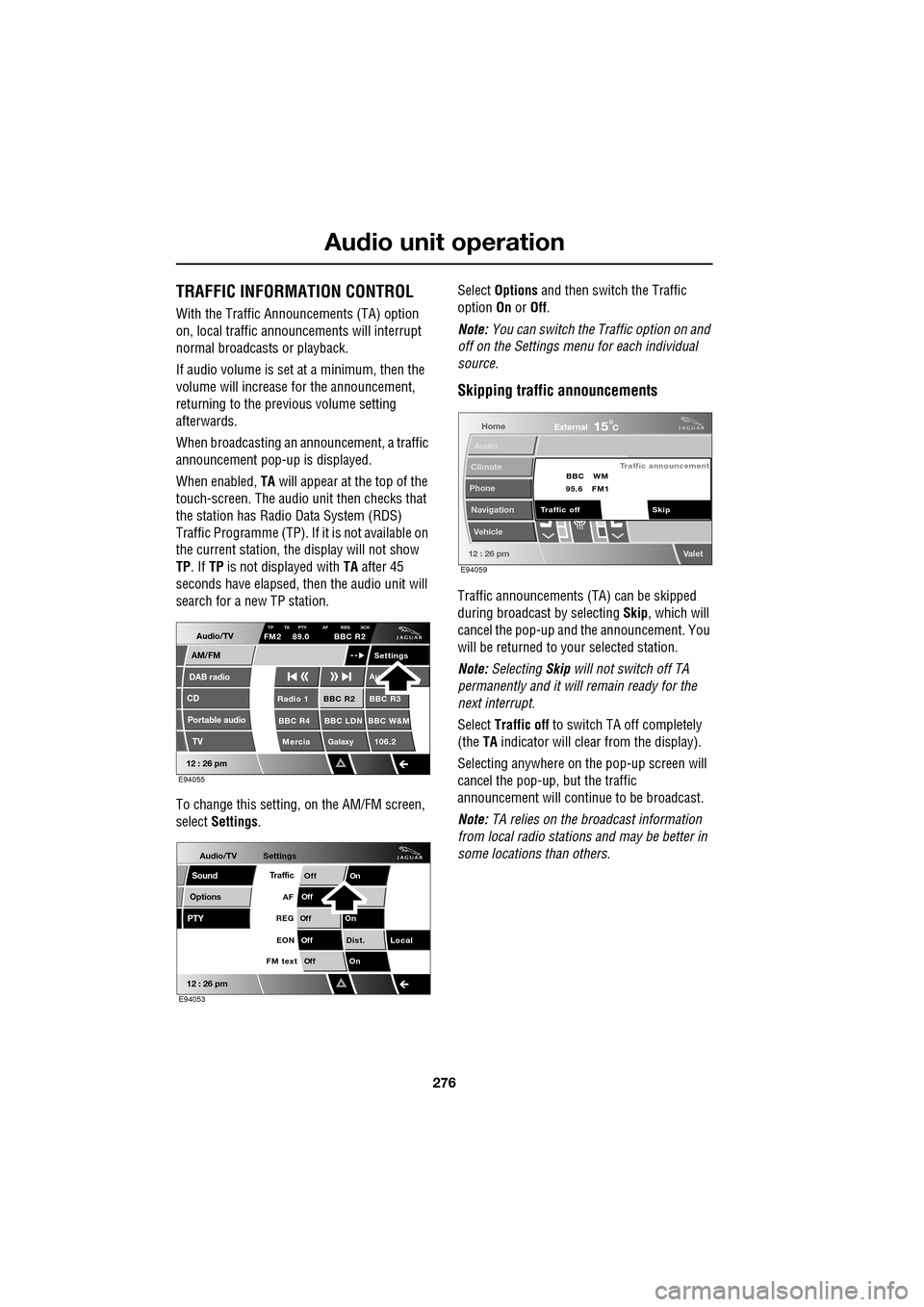
TRAFFIC INFORMATION CONTROL
With the Traffic Announcements (TA) option
on, local traffic announcements will interrupt
normal broadcasts or playback.
If audio volume is set at a minimum, then the
volume will increase for the announcement,
returning to the previous volume setting
afterwards.
When broadcasting an announcement, a traffic
announcement pop-up is displayed.
When enabled, TA will appear at the top of the
touch-screen. The audio un it then checks that
the station has Radio Data System (RDS)
Traffic Programme (TP). If it is not available on
the current station, th e display will not show
TP . If TP is not displayed with TA after 45
seconds have elapsed, th en the audio unit will
search for a new TP station.
To change this setting, on the AM/FM screen,
select Settings . Select
Options and then switch the Traffic
option On or Off.
Note: You can switch the Traffic option on and
off on the Settings menu for each individual
source.
Skipping traffic announcements
Traffic announcements (TA) can be skipped
during broadcast by selecting Skip, which will
cancel the pop-up and the announcement. You
will be returned to your selected station.
Note: Selecting Skip will not switch off TA
permanently and it will remain ready for the
next interrupt.
Select Traffic off to switch TA off completely
(the TA indicator will clear from the display).
Selecting anywhere on the pop-up screen will
cancel the pop-up, but the traffic
announcement will continue to be broadcast.
Note: TA relies on the broadcast information
from local radio stations and may be better in
some locations than others.
Audio/TV
DAB radio
CD
AM/FM
12 : 26 pm
BBC R2 BBC R3
BBC R4 BBC LDN BBC W&M Mercia Galaxy 106.2Radio 1
Settings
Au
TP TA PTY AF REG 3CHFM2 89.0 BBC R2
Portable audio TV
E94055
Audio/TV
Options
PTY
Sound
12 : 26 pm
Settings
TrafficOnOff
Of f
On
Of
f
Dist. Local
Of f
On
Of f
FM text EON
REG
AF
E94053
Home
Audio
Climate
Phone
Navigation
Vehicle
Valet12 : 26 pm
External15C
Traffic announcement
Skip
Traffic off BBC
95.6 WM
FM1
E94059