steering JAGUAR XF 2009 1.G Owner's Manual
[x] Cancel search | Manufacturer: JAGUAR, Model Year: 2009, Model line: XF, Model: JAGUAR XF 2009 1.GPages: 391, PDF Size: 19.32 MB
Page 81 of 391
81
Lighting
Note: For lamps controlled by proximity
sensors, the wearing of gloves may interfere
with operation. If you are wearing gloves, it
may be necessary to touch the proximity
switch to operate the lamps.
Ambience lighting
Ambience lighting. Automatically illuminates
when the headlamps are on. Ambience lighting
creates a blue glow ar ound the centre console
and front door armrests.
Luggage compartment lamp
Automatically illuminates when the luggage
compartment is opened.
APPROACH LAMPS
This feature is activated by pressing
the headlamp icon button on the
Jaguar Smart Key. See USING THE
REMOTE CONTROL (page 17). The headlamps
will remain on for 25 seconds or until the
button is pressed again, or until the engine
START/STOP button is pressed.
REMOVING A HEADLAMP
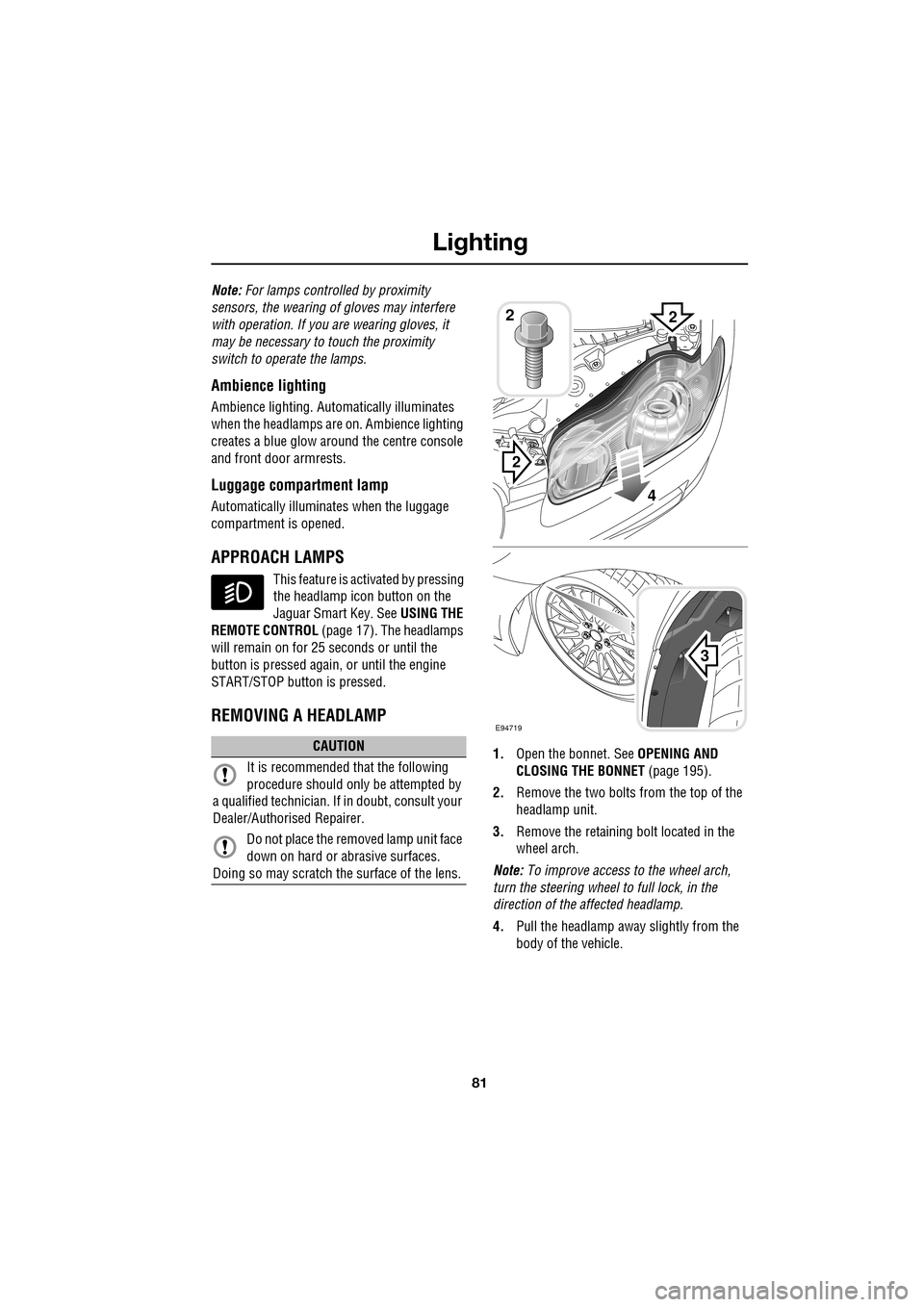
1. Open the bonnet. See OPENING AND
CLOSING THE BONNET (page 195).
2. Remove the two bolts from the top of the
headlamp unit.
3. Remove the retaining bolt located in the
wheel arch.
Note: To improve access to the wheel arch,
turn the steering wheel to full lock, in the
direction of the affected headlamp.
4. Pull the headlamp away slightly from the
body of the vehicle.CAUTION
It is recommended that the following
procedure should only be attempted by
a qualified technician. If in doubt, consult your
Dealer/Authorised Repairer.
Do not place the removed lamp unit face
down on hard or abrasive surfaces.
Doing so may scratch the surface of the lens.
3
2
2
E94719
2
4
Page 88 of 391
Wipers and washers
88
WINDSCREEN WIPERS
Note: If the wiper blades become stuck or
jammed, an electronic cut-out may temporarily
halt wiper operation. If this happens, switch off
the wipers and the ignition. Clear any
obstructions and free th e wiper blades, before
attempting to switch on the ignition.
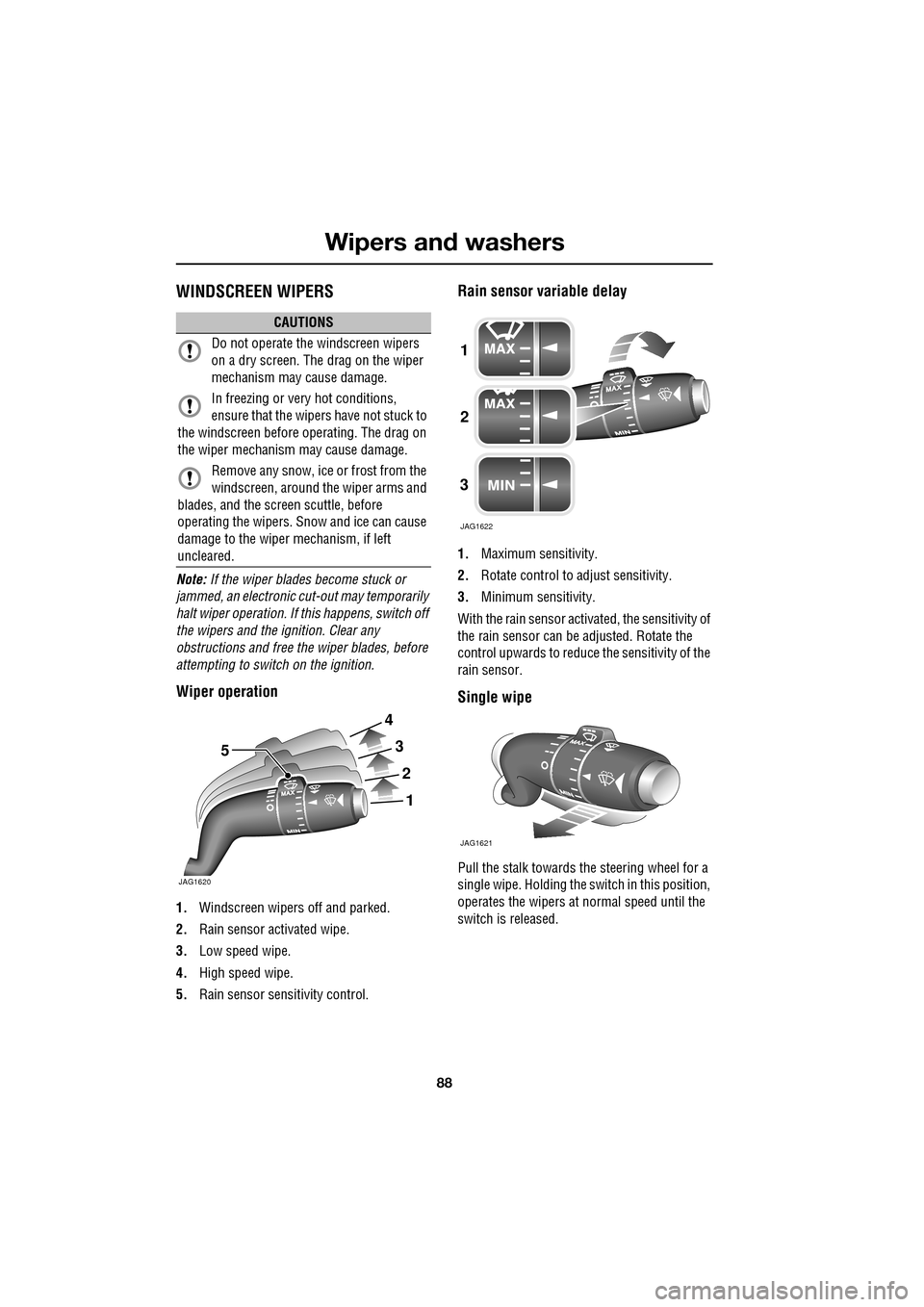
Wiper operation
1. Windscreen wipers off and parked.
2. Rain sensor activated wipe.
3. Low speed wipe.
4. High speed wipe.
5. Rain sensor sensitivity control.
Rain sensor variable delay
1.Maximum sensitivity.
2. Rotate control to adjust sensitivity.
3. Minimum sensitivity.
With the rain sensor acti vated, the sensitivity of
the rain sensor can be adjusted. Rotate the
control upwards to reduce the sensitivity of the
rain sensor.
Single wipe
Pull the stalk towards the steering wheel for a
single wipe. Holding the sw itch in this position,
operates the wipers at normal speed until the
switch is released.
CAUTIONS
Do not operate the windscreen wipers
on a dry screen. The drag on the wiper
mechanism may cause damage.
In freezing or very hot conditions,
ensure that the wipers have not stuck to
the windscreen before operating. The drag on
the wiper mechanism may cause damage.
Remove any snow, ice or frost from the
windscreen, around the wiper arms and
blades, and the screen scuttle, before
operating the wipers. S now and ice can cause
damage to the wiper mechanism, if left
uncleared.
JAG1620
5
1
2
3
4
1
2
3
JAG1622
JAG1621
Page 91 of 391
91
Wipers and washers
CHANGING THE WIPER BLADES
Service position
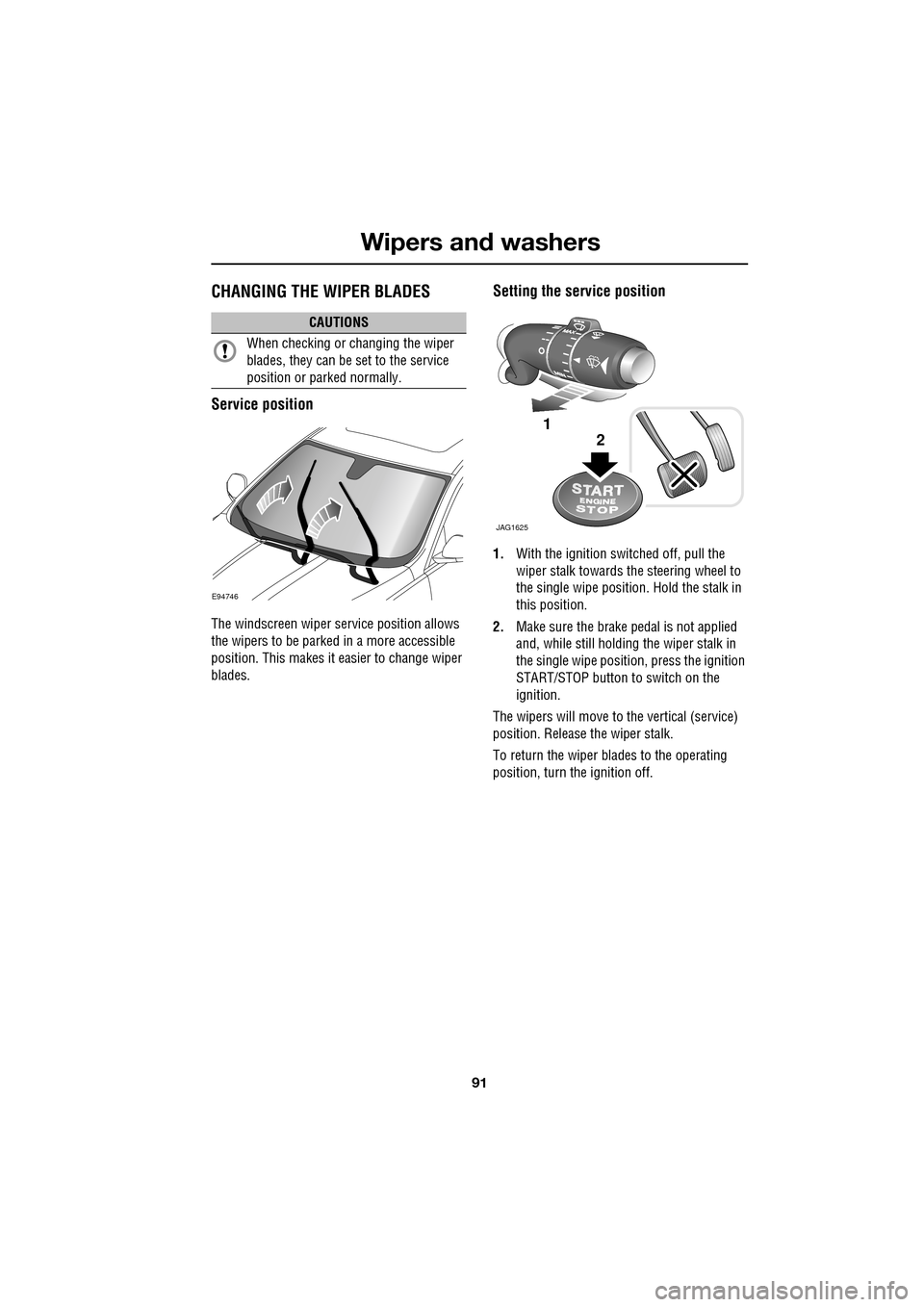
The windscreen wiper service position allows
the wipers to be parked in a more accessible
position. This makes it easier to change wiper
blades.
Setting the service position
1.With the ignition switched off, pull the
wiper stalk towards the steering wheel to
the single wipe position. Hold the stalk in
this position.
2. Make sure the brake pedal is not applied
and, while still holding the wiper stalk in
the single wipe positi on, press the ignition
START/STOP button to switch on the
ignition.
The wipers will move to the vertical (service)
position. Release the wiper stalk.
To return the wiper blades to the operating
position, turn the ignition off.
CAUTIONS
When checking or changing the wiper
blades, they can be set to the service
position or parked normally.
E94746
JAG1625
1
2
Page 109 of 391
109
Information displays
TOUCH-SCREEN
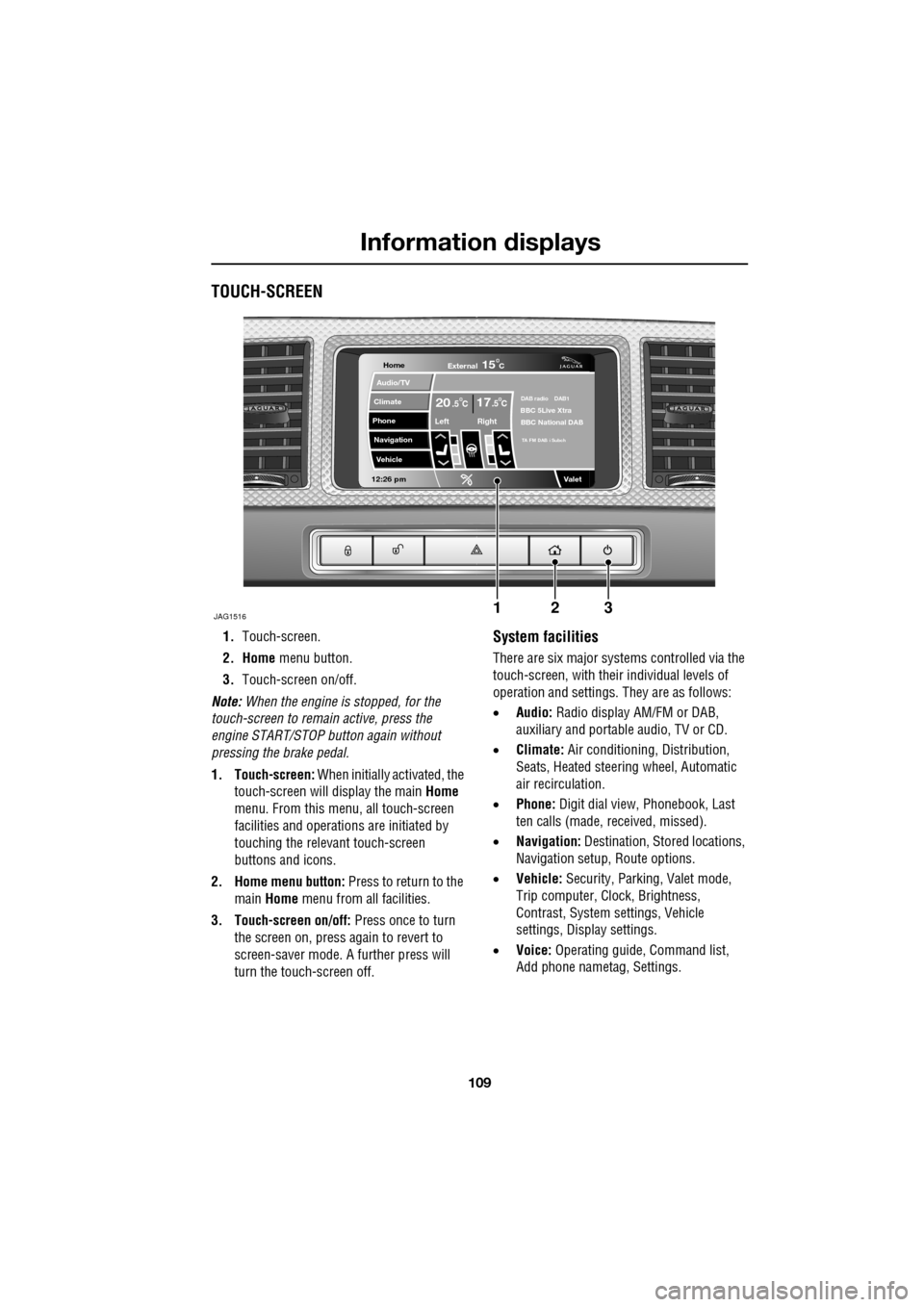
1.Touch-screen.
2. Home menu button.
3. Touch-screen on/off.
Note: When the engine is stopped, for the
touch-screen to remain active, press the
engine START/STOP button again without
pressing the brake pedal.
1. Touch-screen: When initially activated, the
touch-screen will display the main Home
menu. From this menu, all touch-screen
facilities and operati ons are initiated by
touching the relevant touch-screen
buttons and icons.
2. Home menu button: Press to return to the main Home menu from all facilities.
3. Touch-screen on/off: Press once to turn
the screen on, press again to revert to
screen-saver mode. A further press will
turn the touch-screen off.System facilities
There are six major systems controlled via the
touch-screen, with their individual levels of
operation and settings. They are as follows:
• Audio: Radio display AM/FM or DAB,
auxiliary and portable audio, TV or CD.
• Climate: Air conditioning, Distribution,
Seats, Heated steering wheel, Automatic
air recirculation.
• Phone: Digit dial view, Phonebook, Last
ten calls (made, received, missed).
• Navigation: Destination, St ored locations,
Navigation setup, Route options.
• Vehicle: Security, Parking, Valet mode,
Trip computer, Clock, Brightness,
Contrast, System settings, Vehicle
settings, Displa y settings.
• Voice: Operating guide, Command list,
Add phone nametag, Settings.
Home
Audio/TV
Climate
Phone
Navigation
Vehicle
Valet12:26 pm
JAG1516
External15C
Left Right
20 17CC.5 .5DAB radio DAB1BBC 5Live Xtra
BBC National DAB
TA FM DAB i Subch
123
Page 112 of 391
Information displays
112
Further adjustment of the touch-screen
brightness can be achieved by using the + or -
buttons in the Cont./Bright. screen or by
adjustment of the inst rument panel dimmer
switch. See INSTRUMENT LIGHTING DIMMER
(page 123).
Pop-up messages
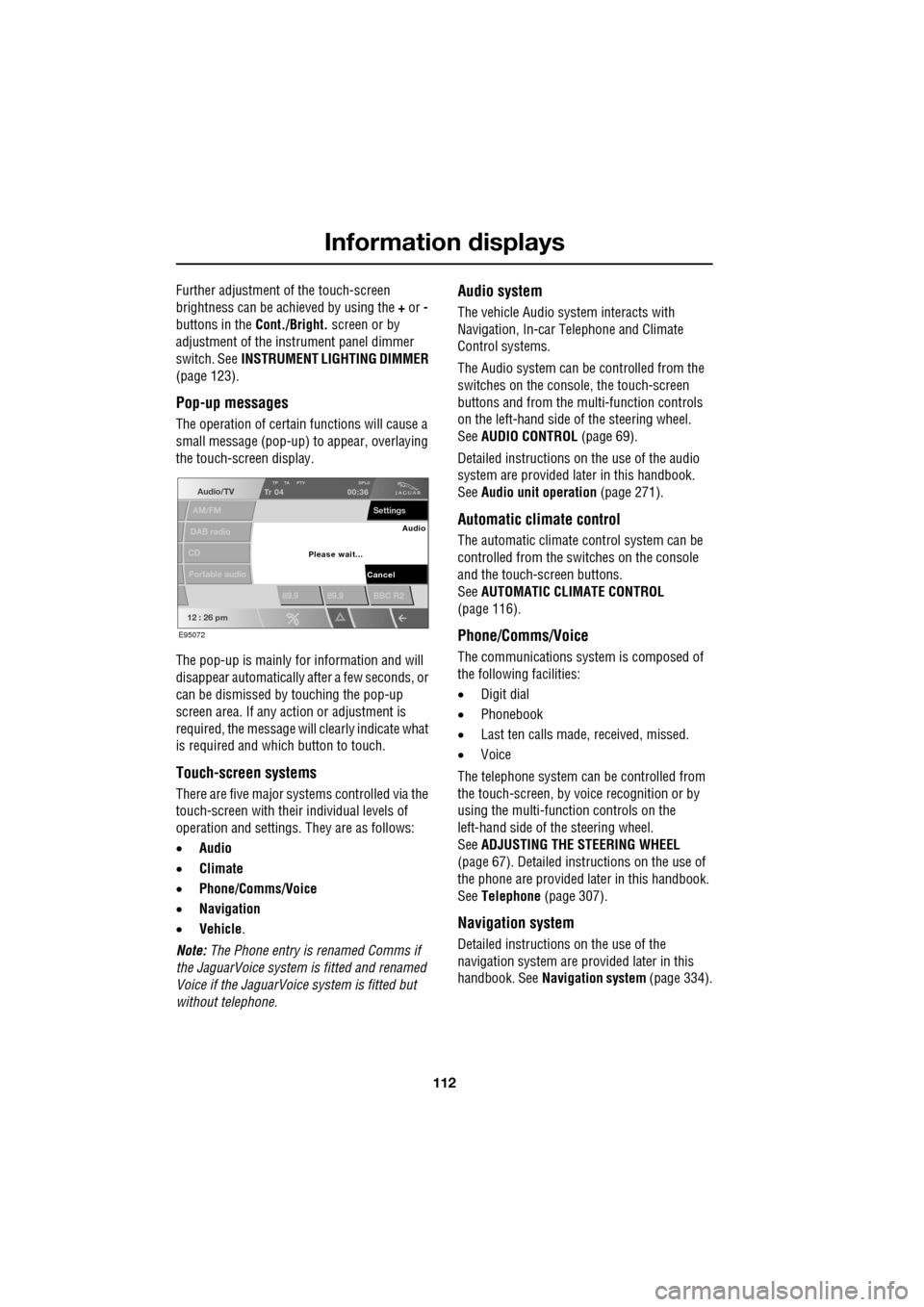
The operation of certain functions will cause a
small message (pop-up) to appear, overlaying
the touch-screen display.
The pop-up is mainly for information and will
disappear automatically after a few seconds, or
can be dismissed by touching the pop-up
screen area. If any action or adjustment is
required, the message will clearly indicate what
is required and which button to touch.
Touch-screen systems
There are five major systems controlled via the
touch-screen with thei r individual levels of
operation and settings . They are as follows:
• Audio
• Climate
• Phone/Comms/Voice
• Navigation
• Vehicle .
Note: The Phone entry is renamed Comms if
the JaguarVoice system is fitted and renamed
Voice if the JaguarVoice system is fitted but
without telephone.
Audio system
The vehicle Audio syst em interacts with
Navigation, In-car Telephone and Climate
Control systems.
The Audio system can be controlled from the
switches on the console, the touch-screen
buttons and from the multi-function controls
on the left-hand side of the steering wheel.
See AUDIO CONTROL (page 69).
Detailed instructions on the use of the audio
system are provided later in this handbook.
See Audio unit operation (page 271).
Automatic climate control
The automatic climate control system can be
controlled from the switches on the console
and the touch-screen buttons.
SeeAUTOMATIC CLIMATE CONTROL
(page 116).
Phone/Comms/Voice
The communications system is composed of
the following facilities:
• Digit dial
• Phonebook
• Last ten calls made, received, missed.
• Voice
The telephone system can be controlled from
the touch-screen, by voice recognition or by
using the multi-function controls on the
left-hand side of the steering wheel.
See ADJUSTING THE STEERING WHEEL
(page 67). Detailed instructions on the use of
the phone are provided later in this handbook.
See Telephone (page 307).
Navigation system
Detailed instructions on the use of the
navigation system are pr ovided later in this
handbook. See Navigation system (page 334).
Audio/TV
DAB radio
CD
AM/FM
12 : 26 pm
TP TA PTY DPLIITr 04
Portable audio
00:36
Settings
89.9 89.9 BBC R2
Cancel
Please wait... Audio
E95072
Page 118 of 391
Climate control
118
Blower speed
Set the blower speed as required by
adjusting the rotary control.
Press to turn the climate control
system on or off.
When operating in AUTO mode, blower speed
is controlled au tomatically and AUTO is
displayed on the touch-screen. Any adjustment
of the knob will cancel AUTO mode.
Note: In AUTO mode, if heating is required, the
blower only operates at low speed, until the
engine reaches normal operating temperature.
Recirculation
Press to turn recirculation on
or off. The button indicator
illuminates when recirculation
is turned on.
When selected, the air is recirculated inside the
vehicle. This helps to ma intain a high or low
temperature, and is useful for preventing
fumes from entering the vehicle.
Recirculation may also be selected in AUTO
mode, if the climate control system detects
high levels of pollution in the atmosphere
outside the vehicle (if a smog sensor is fitted).
Manual operation of the recirculation control
will override the automatic setting. This facility
can be switched off through the Settings menu
on the touch-screen.
Note: Prolonged use at low temperatures may
cause the windows to mist.
Air conditioning
Press the AUTO button to turn
the air conditioning on.
The air conditioning system is
controlled automatically in AUTO mode to
maintain the desired temperature and humidity
(even if higher temperature settings are
selected).
The air conditioning system is also switched on
automatically in defrost mode ( DEF) in order to
dehumidify the air.
Note: Water may collect unde rneath the vehicle
when parked. This is moisture expelled from
the interior of the vehicle by the air
conditioning system a nd is not cause for
concern.
Heated/climate seats and heated
steering wheel
The heated seats, climate seats and heated
steering wheel can be controlled from both the
Home and Climate menus on the touch-screen.
See HEATED SEATS (page 47). See CLIMATE
SEATS (page 48). See HEATED STEERING
WHEEL (page 68).
Page 132 of 391
Starting the engine
132
GENERAL INFORMATION
START/STOP button
The START/STOP button is used to start or
stop the engine, or to turn on the ignition
without starting the engine.
Note: The START/STOP button will only be
operational if a valid Jaguar Smart key is
detected within the vehicle.
Switching on the ignition
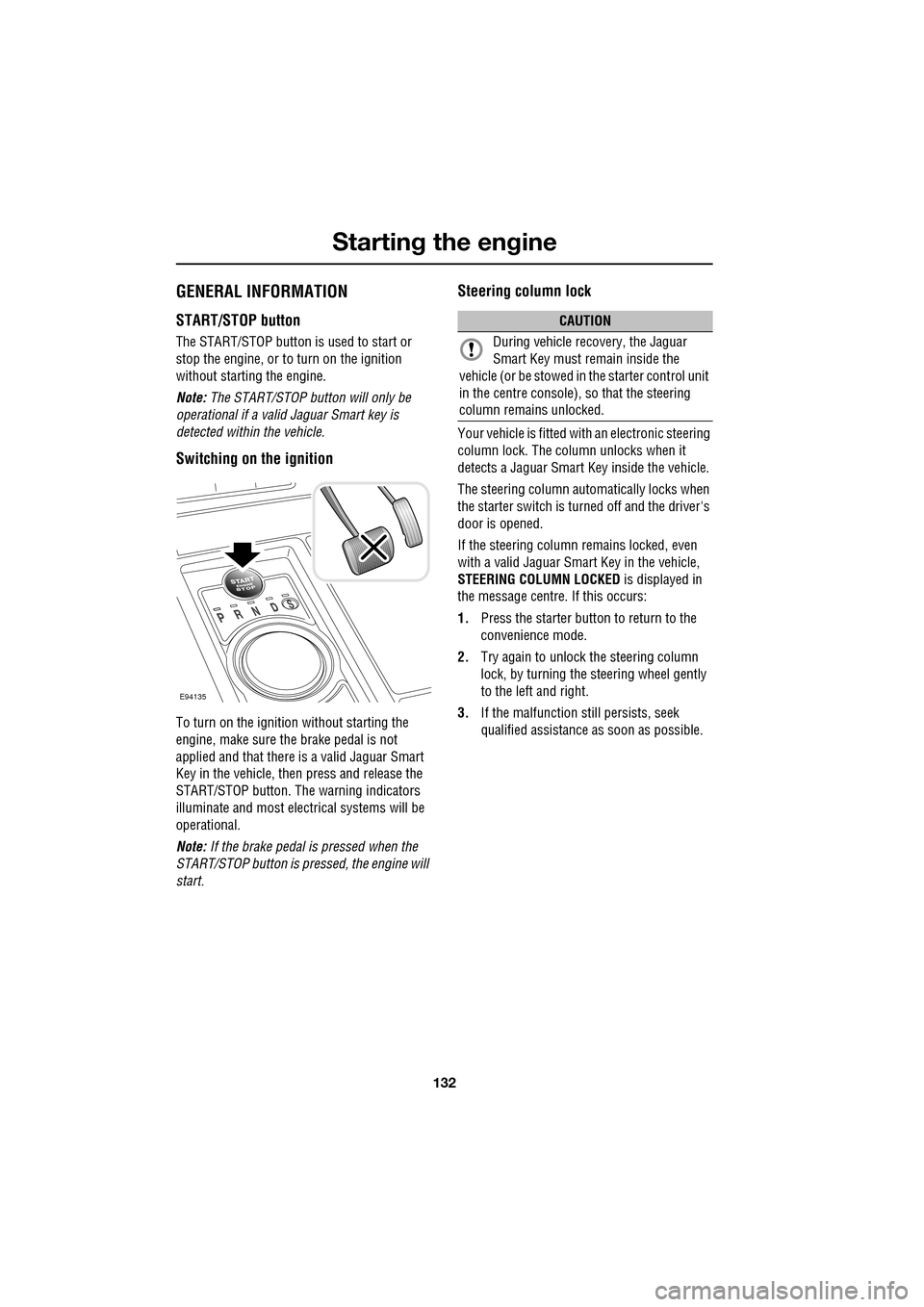
To turn on the ignition without starting the
engine, make sure the brake pedal is not
applied and that there is a valid Jaguar Smart
Key in the vehicle, then press and release the
START/STOP button. The warning indicators
illuminate and most electr ical systems will be
operational.
Note: If the brake pedal is pressed when the
START/STOP button is pressed, the engine will
start.
Steering column lock
Your vehicle is fitted with an electronic steering
column lock. The column unlocks when it
detects a Jaguar Smart Key inside the vehicle.
The steering column automatically locks when
the starter switch is turned off and the driver's
door is opened.
If the steering column remains locked, even
with a valid Jaguar Smart Key in the vehicle,
STEERING COLUMN LOCKED is displayed in
the message centre. If this occurs:
1. Press the starter button to return to the
convenience mode.
2. Try again to unlock the steering column
lock, by turning the steering wheel gently
to the left and right.
3. If the malfunction still persists, seek
qualified assistance as soon as possible.
E94135
CAUTION
During vehicle recovery, the Jaguar
Smart Key must remain inside the
vehicle (or be stowed in the starter control unit
in the centre console), so that the steering
column remains unlocked.
Page 137 of 391
137
Transmission
AUTOMATIC TRANSMISSION
The transmission system is designed to
operate in two distinct modes, conventional
automatic and Jaguar Sequential Shift.
The automatic modes are accessed by the gear
selector:
•D - Drive - automatic shifting.
• S - Sport - sport automatic shifting.
The Jaguar Sequential Shift mode enables
sequential manual gear selection in D
(temporary) and S (permanent) modes, via the
steering wheel m ounted paddles.
Note: In addition to the st andard shift patterns
available in D and S, the transmission will
adapt to differing conditions by modifying shift
points, based upon vehicl e sensor information
for road gradient, cornering, braking pressure
and driving style.
JaguarDrive selector
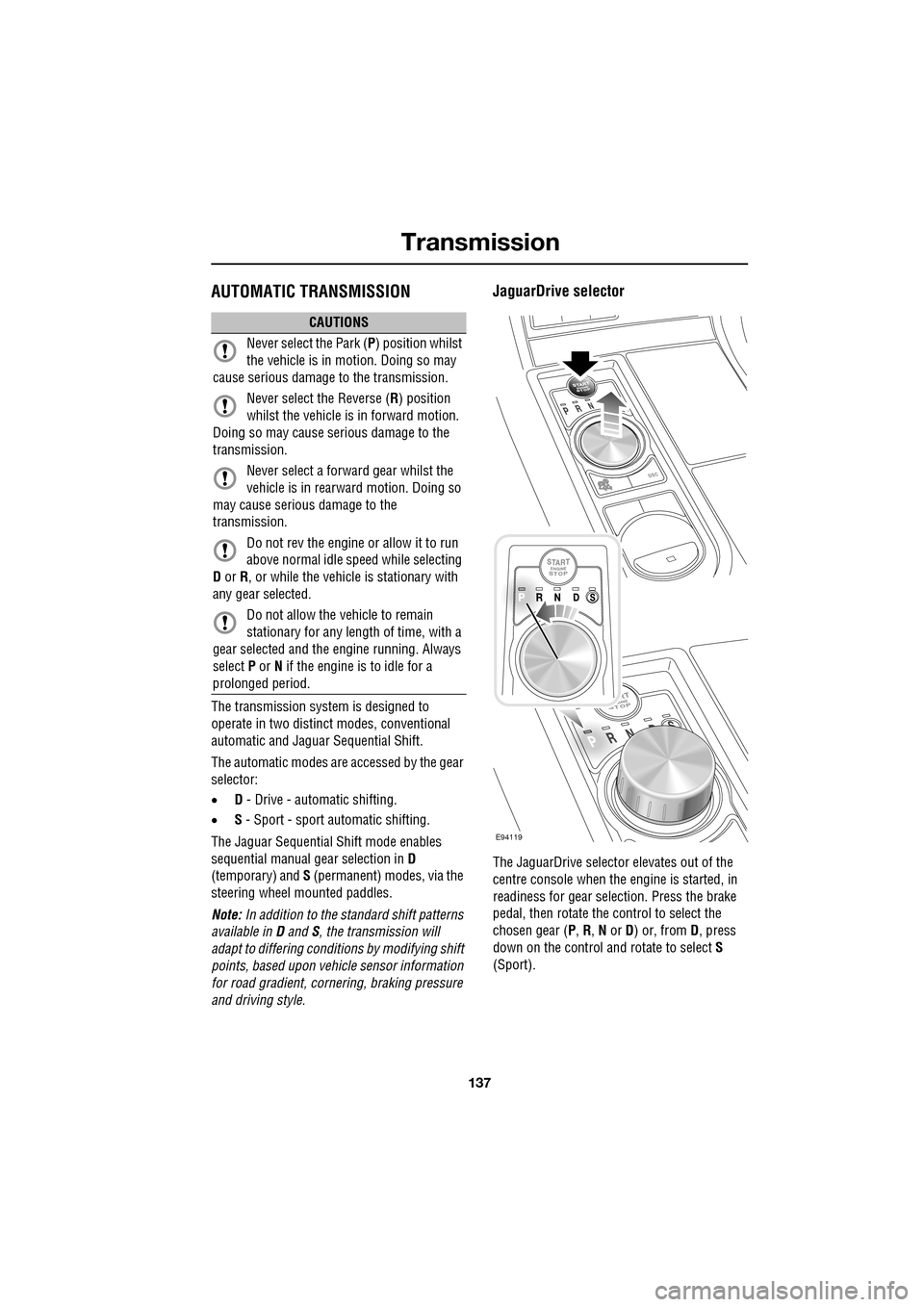
The JaguarDrive selector elevates out of the
centre console when the engine is started, in
readiness for gear selection. Press the brake
pedal, then rotate the control to select the
chosen gear ( P, R , N or D) or, from D, press
down on the control and rotate to select S
(Sport).
CAUTIONS
Never select the Park ( P) position whilst
the vehicle is in motion. Doing so may
cause serious damage to the transmission.
Never select the Reverse ( R) position
whilst the vehicle is in forward motion.
Doing so may cause serious damage to the
transmission.
Never select a forward gear whilst the
vehicle is in rearward motion. Doing so
may cause serious damage to the
transmission.
Do not rev the engine or allow it to run
above normal idle speed while selecting
D or R, or while the vehicle is stationary with
any gear selected.
Do not allow the vehicle to remain
stationary for any length of time, with a
gear selected and the engine running. Always
select P or N if the engine is to idle for a
prolonged period.
E94119
Page 141 of 391
141
Transmission
Driver type recognition
In Sport mode, the transmission monitors
driving style and in combination with sensors
in the vehicle, varies the shift schedule,
fast-off, corner recognition and shift adapt
under braking functions, according to the
driving style.
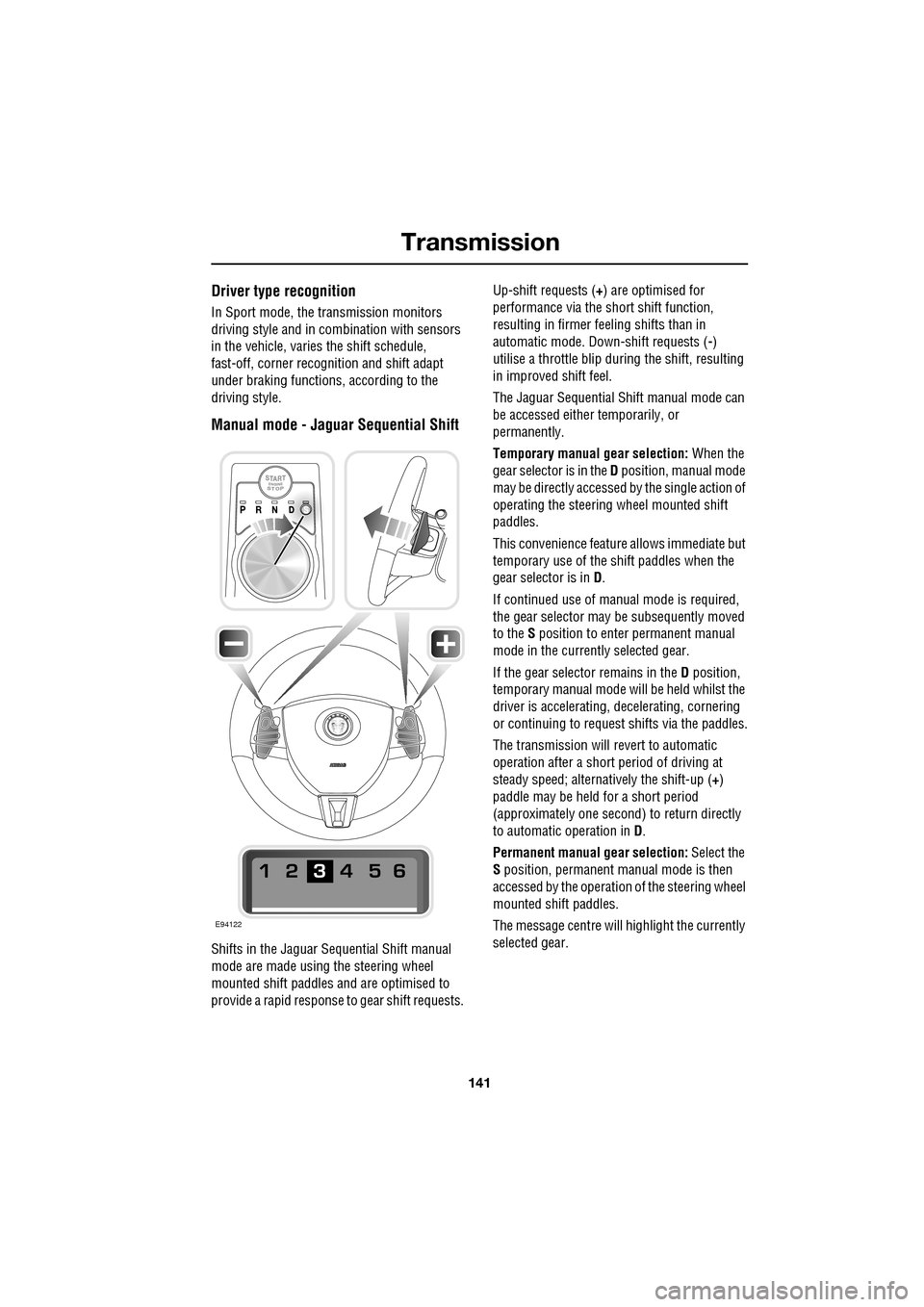
Manual mode - Jaguar Sequential Shift
Shifts in the Jaguar Sequential Shift manual
mode are made using the steering wheel
mounted shift paddles and are optimised to
provide a rapid response to gear shift requests. Up-shift requests (
+) are optimised for
performance via the s hort shift function,
resulting in firmer feeling shifts than in
automatic mode. Down-shift requests ( -)
utilise a throttle blip duri ng the shift, resulting
in improved shift feel.
The Jaguar Sequential Shift manual mode can
be accessed either temporarily, or
permanently.
Temporary manual gear selection: When the
gear selector is in the D position, manual mode
may be directly accessed by the single action of
operating the steering wheel mounted shift
paddles.
This convenience feature allows immediate but
temporary use of the sh ift paddles when the
gear selector is in D.
If continued use of manua l mode is required,
the gear selector may be subsequently moved
to the S position to enter permanent manual
mode in the currently selected gear.
If the gear selector remains in the D position,
temporary manual mode will be held whilst the
driver is accelerating, decelerating, cornering
or continuing to request shifts via the paddles.
The transmission will revert to automatic
operation after a short pe riod of driving at
steady speed; alternatively the shift-up ( +)
paddle may be held for a short period
(approximately one second) to return directly
to automatic operation in D .
Permanent manual gear selection: Select the
S position, permanent manual mode is then
accessed by the operation of the steering wheel
mounted shift paddles.
The message centre will highlight the currently
selected gear.
E94122
Page 142 of 391
Transmission
142
Note: When the transmission is set to
permanent manual mode (i.e. using the
paddles to change gear while in Sport mode)
and Dynamic mode is selected, transmission
up-shifts are fully controlled by the driver. This
means that the transmissi on will not change up
a gear automatically, even when the vehicle's
rev limit is reached. When the rev limit is
reached, the gear position indicator in the
message centre will glow amber, to indicate
that the next gear should be selected.
To exit from the Jaguar Sequential Shift
permanent manual mode, either pull and hold
the shift-up paddle for approximately one
second (to return directly to automatic
operation in S ), or rotate the gear selector to
the D position. The transmission will revert to
the D automatic shift mode.
Manual operation
To shift-up, briefly pull the shift-up ( +) paddle
on the right-hand side of the steering wheel
towards you.
To shift-down, briefly pull the shift-down
paddle ( -) on the left-hand side of the steering
wheel towards you.
The message centre display will change to
highlight the requested gear.
Note: The transmission will inhibit up-shifts
and down-shifts if the requested shift would
result in an engine speed outside the normal
operating range of the engine. If this occurs,
the message centre will briefly display the
requested gear selection, but will return to
displaying the current gear.
The Jaguar Sequential Shift mode also has the
following features: Kick-down:
Operation of kick-down in Jaguar
Sequential Shift mode will override the
currently selected gear. The lowest available
gear will be selected for maximum acceleration
and will be highlighted in the message centre
display. Subsequent manu al shifts may then be
selected as usual.
Positive torque: Provides throttle blips on
down-shifts, improving shift feel and response.
Shift assist: The transmission will
automatically up-shift at the engine speed
redline in Jaguar Sequential Shift mode, as if
commanded manually.
The transmission will automatically
down-shift, when the engine speed drops too
low for the currently selected gear.
When the vehicle approaches, or comes to
rest, second gear is au tomatically selected.
Subsequent pull-aways will occur in second
gear, unless the accelerator pedal demand is
high or a down-shift is manually selected, in
which case, first gear will be selected.
In all cases the message centre will display the
current gear.
Note: During sustained braking, if a down-shift
is selected at a speed which would result in the
engine speed exceeding its normal operating
range, the gear change wi ll be indicated in the
message centre, but the down-shift will be
delayed until the vehi cle speed has reduced
sufficiently for the gear selection to be made,
without causing the engine speed to exceed its
normal operating range.