steering JAGUAR XF 2009 1.G Workshop Manual
[x] Cancel search | Manufacturer: JAGUAR, Model Year: 2009, Model line: XF, Model: JAGUAR XF 2009 1.GPages: 391, PDF Size: 19.32 MB
Page 251 of 391
251
Status after a collision
DRIVING AFTER A COLLISION
Before starting or driving
If the vehicle has been involved in an accident
it should be checked thoroughly before
attempting to start the engine or drive the
vehicle.
Check for:-
• Fuel leaks.
• Fluid leaks.
• Battery damage.
• Damage to wiring.
• Damage to lights.
• Damage to steering, suspension, wheels
or tyres.
• Sharp or protruding bodywork.
• Operation of doors and locks.
• Condition and operation of seat belts and
SRS components.
• Activation of the pe destrian protection
system.
• Condition of chil d seats and their
mounting/attach ment points.
Note: This list is not exhaustive.
Resetting the fuel cut-off
The fuel system cut-off forms part of the Safety
and Restraint System (SRS) fitted to your
vehicle. Following an impact, and depending on
the severity, the fuel pump may be switched
off.
1.Switch the ignition off, and wait for 10
seconds.
2. Without pressing the brake pedal, press
the engine START/STOP button, to switch
the electrical circuits on. Wait for 30
seconds.
3. Check the vehicle thoroughly for fuel leaks.
If a leak is detected switch the ignition off
immediately.
•The vehicle must not be started if a leak
is present. Seek qualified advice, and
have the vehicle recovered.
4. If no leaks are detected, start the engine.
WARNING
If the vehicle is involved in a collision
it should be checked by a Dealer/
Authorised repairer, or suitably
qualified personnel, before starting or driving.
WARNING
The fuel cut-off should never be reset
if you can smell fuel, or a leak can be
seen. Doing so can lead to a fire
which may cause personal injury or death.
Page 252 of 391
Status after a collision
252
When driving
When driving a vehicle which has been
involved in a collision use caution and pay extra
attention to the operation of the vehicle. If any
changes in vehicle operation after the collision
are noted when compared to it's operation
before the collision, do not continue to drive
the vehicle. Stop the vehi cle as soon as it is
safe to do so, and have the vehicle recovered.
Pay particular attent ion to changes in:-
• Steering.
• Braking.
• Unusual noises.
• Warning lights or messages displayed.
• Problems with electrical systems.
INSPECTING SAFETY SYSTEM
COMPONENTS
Following a collision the seat belt and
Supplementary Restrain t System components
should be inspected for damage and/or
deformity. The inspection and any subsequent
repair work should only be carried out by a
Dealer/Authorised Repair er, or other suitably
qualified personnel.
Components which require inspection
include:-
• Seat belt webbing and mechanisms.
• Seat belt pre-tensioners.
• Airbag covers and modules.
• Seat frames a nd mounting points.
• Child seats.
• Child seat anchor points.
• Pedestrian prot ection system.
Note: This list is not exhaustive.
In addition to the physical items checked, the
electronic control system and its associated
wiring should also be checked thoroughly. This
process will include a diagnostic check which
can only be carried out by a Dealer/Authorised
repairer or suitably qualified and equipped
persons.
WARNING
It is not recommended that the
vehicle be driven or used until all of
the occupant protection systems
have been checked.
Page 256 of 391
Vehicle recovery
256
TOWING THE VEHICLE ON FOUR
WHEELS
Note: The recommended recovery method is
to raise all four wheels.
Towing procedure
1. The vehicle should be parked on firm level
ground, with the parking brake on, and the
gear selector in P (Park).
2. Secure the towing attachment from the
recovery vehicle to the front towing eye.
See TOWING POINTS (page 253).
3. Dock the Jaguar Smart Key and switch on
the ignition. See GENERAL INFORMATION
(page 132). 4.
Apply the foot brake and release the
parking brake.
5. With the foot brake st ill applied, activate
the Emergency Park Release (EPR).
See TRANSPORTING THE VEHICLE
(page 254).
6. The vehicle can now be towed a maximum
of 0.8 km (0.5 miles) at a maximum speed
of 48 kmh (30 mph).
7. Upon arrival at the destination, ensure
wherever possible that the vehicle is
parked on firm level ground.
8. Lower the Emergency Park Release (EPR)
lever, to cancel EP R and to re-engage P
(Park).
9. Apply the parking brake.
10. Switch off the ignition and remove the
Jaguar Smart Key.
11. Remove the towing attachment from the
towing eye.
WARNINGS
Ensure that the remote control
remains docked whilst the vehicle is
being towed. Removing the remote
control will engage the steering lock, which
will prevent the vehicle from steering
correctly.
If the engine cannot be run whilst the
vehicle is being towed, there will be
no power assistance for the steering
or brakes. This will result in greater effort
being required to steer or slow the vehicle, and
greatly increased stopping distances.
CAUTIONS
The vehicle should only be towed in a
forward direction with all four wheels on
the ground.
The vehicle should only be towed for a
maximum of 0.8 km (0.5 miles), at a
maximum speed of 48 km/h (30 mph). Towing
for a greater distance or at a higher speed, may
result in serious damage to the transmission.
CAUTION
Leaving the ignition switched on for
extended periods will cause the battery
to drain.
WARNING
Use extreme caution when detaching
towing equipment. Vehicle movement
is possible which can result in serious
injuries.
Page 270 of 391
Audio unit overview
270
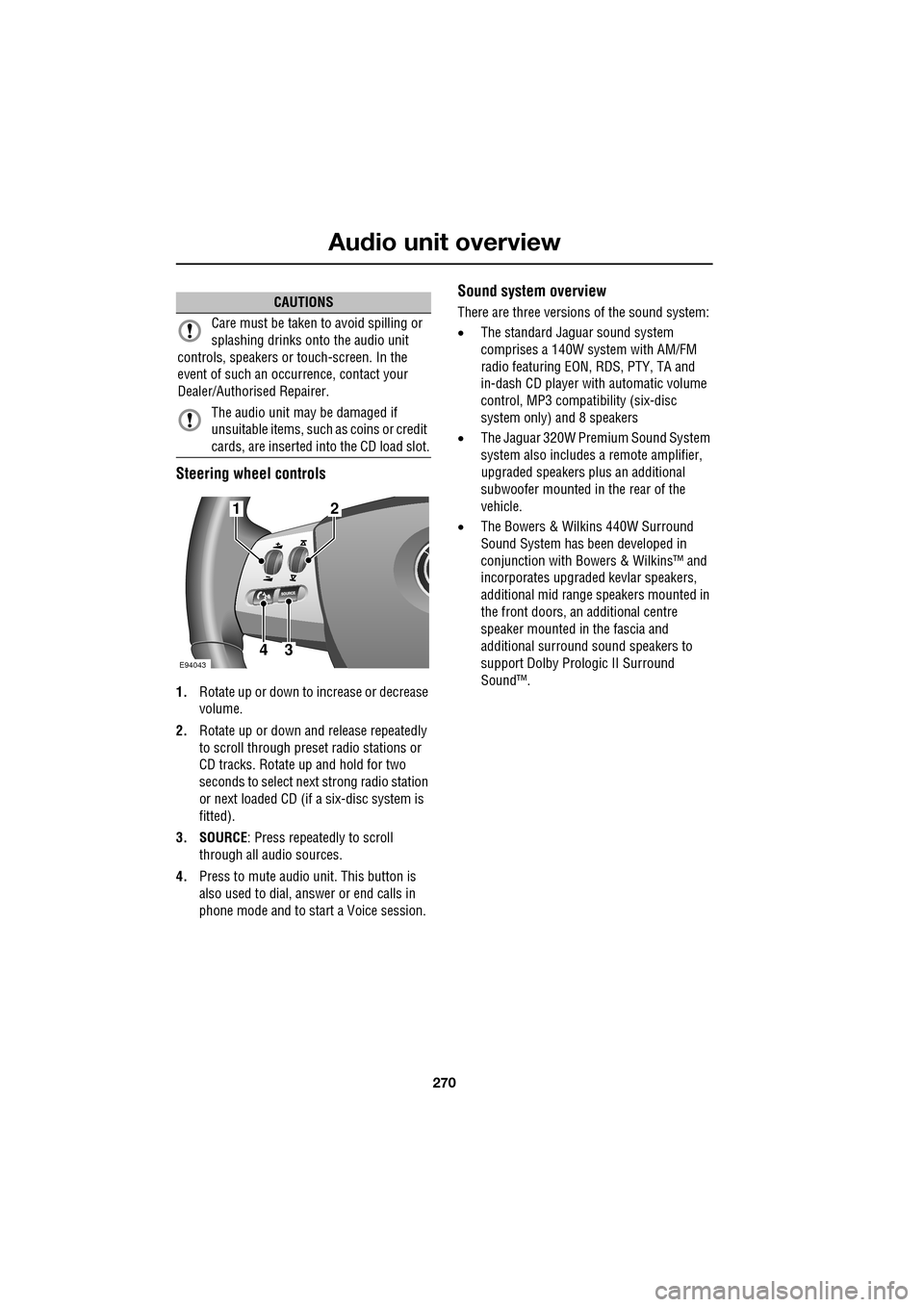
Steering wheel controls
1.Rotate up or down to increase or decrease
volume.
2. Rotate up or down and release repeatedly
to scroll through preset radio stations or
CD tracks. Rotate up and hold for two
seconds to select next strong radio station
or next loaded CD (if a six-disc system is
fitted).
3. SOURCE : Press repeatedly to scroll
through all audio sources.
4. Press to mute audio unit. This button is
also used to dial, answer or end calls in
phone mode and to st art a Voice session.
Sound system overview
There are three versions of the sound system:
• The standard Jaguar sound system
comprises a 140W sy stem with AM/FM
radio featuring EON, RDS, PTY, TA and
in-dash CD player with automatic volume
control, MP3 compatibility (six-disc
system only) and 8 speakers
• The Jaguar 320W Premium Sound System
system also includes a remote amplifier,
upgraded speakers plus an additional
subwoofer mounted in the rear of the
vehicle.
• The Bowers & Wilkins 440W Surround
Sound System has been developed in
conjunction with Bowe rs & Wilkins™ and
incorporates upgraded kevlar speakers,
additional mid range sp eakers mounted in
the front doors, an additional centre
speaker mounted in the fascia and
additional surround sound speakers to
support Dolby Prologic II Surround
Sound™.CAUTIONS
Care must be taken to avoid spilling or
splashing drinks onto the audio unit
controls, speakers or touch-screen. In the
event of such an occurrence, contact your
Dealer/Authorised Repairer.
The audio unit may be damaged if
unsuitable items, such as coins or credit
cards, are inserted into the CD load slot.
E94043
12
43
Page 271 of 391
271
Audio unit operation
ON/OFF CONTROL
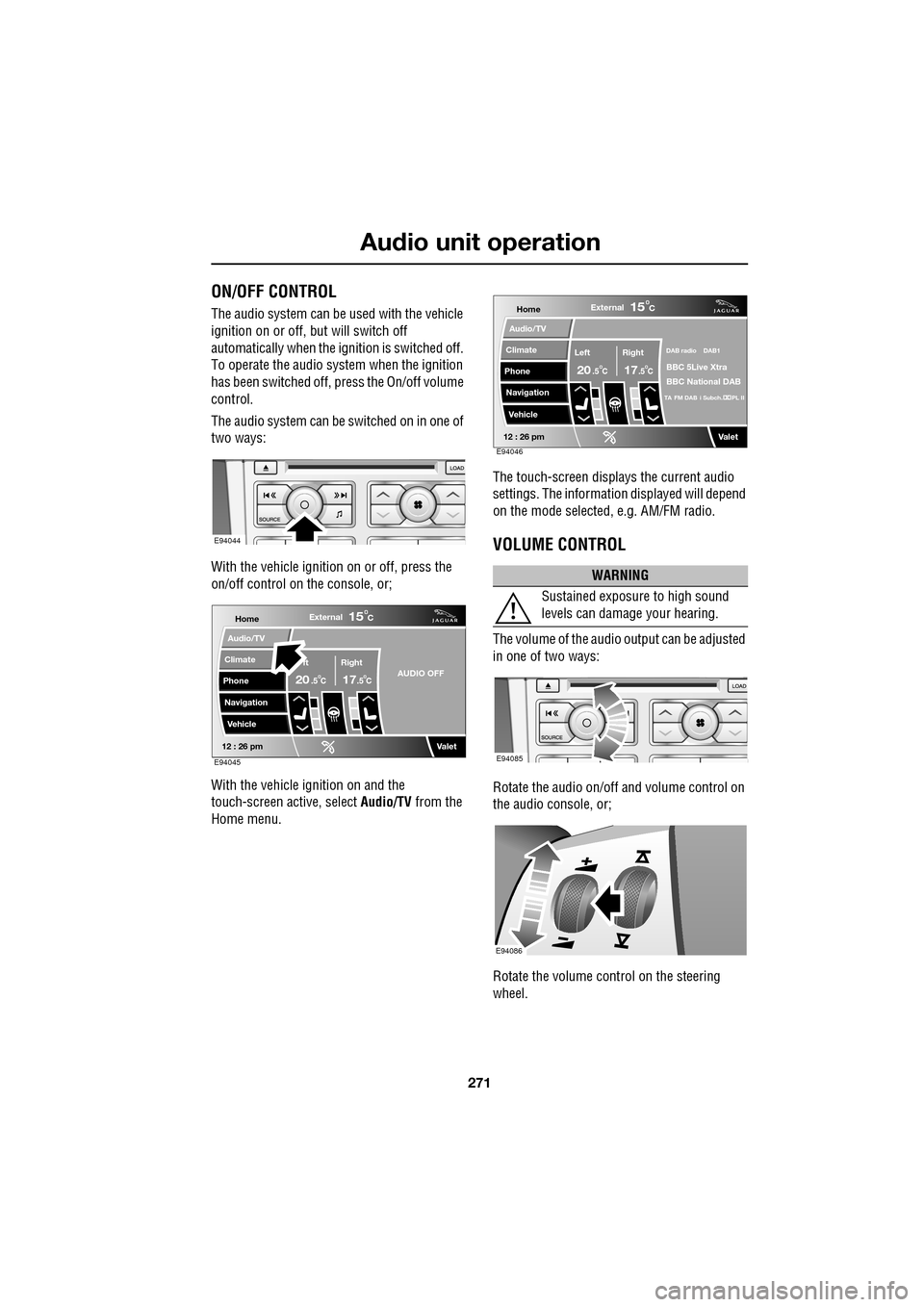
The audio system can be used with the vehicle
ignition on or off, but will switch off
automatically when the ignition is switched off.
To operate the audio system when the ignition
has been switched off, press the On/off volume
control.
The audio system can be switched on in one of
two ways:
With the vehicle ignition on or off, press the
on/off control on the console, or;
With the vehicle ignition on and the
touch-screen active, select Audio/TV from the
Home menu. The touch-screen displays the current audio
settings. The informati
on displayed will depend
on the mode selected , e.g. AM/FM radio.
VOLUME CONTROL
The volume of the audio output can be adjusted
in one of two ways:
Rotate the audio on/off and volume control on
the audio console, or;
Rotate the volume control on the steering
wheel.
E94044
Home
Audio/TV
Climate
Phone
Navigation
VehicleExternal
ft Right
20 17CC
15C
.5 .5AUDIO OFF
Valet12 : 26 pmE94045
WARNING
Sustained exposure to high sound
levels can damage your hearing.
Home
Audio/TV
Climate
Phone
Navigation
VehicleExternal
Left Right
20 17CC
15C
.5 .5
DAB radio DAB1
BBC 5Live Xtra
BBC National DAB
TA FM DAB i Subch. PL II
Valet12 : 26 pmE94046
E94085
E94086
Page 275 of 391
275
Audio unit operation
STATION PRESET BUTTONS
Tuning stations
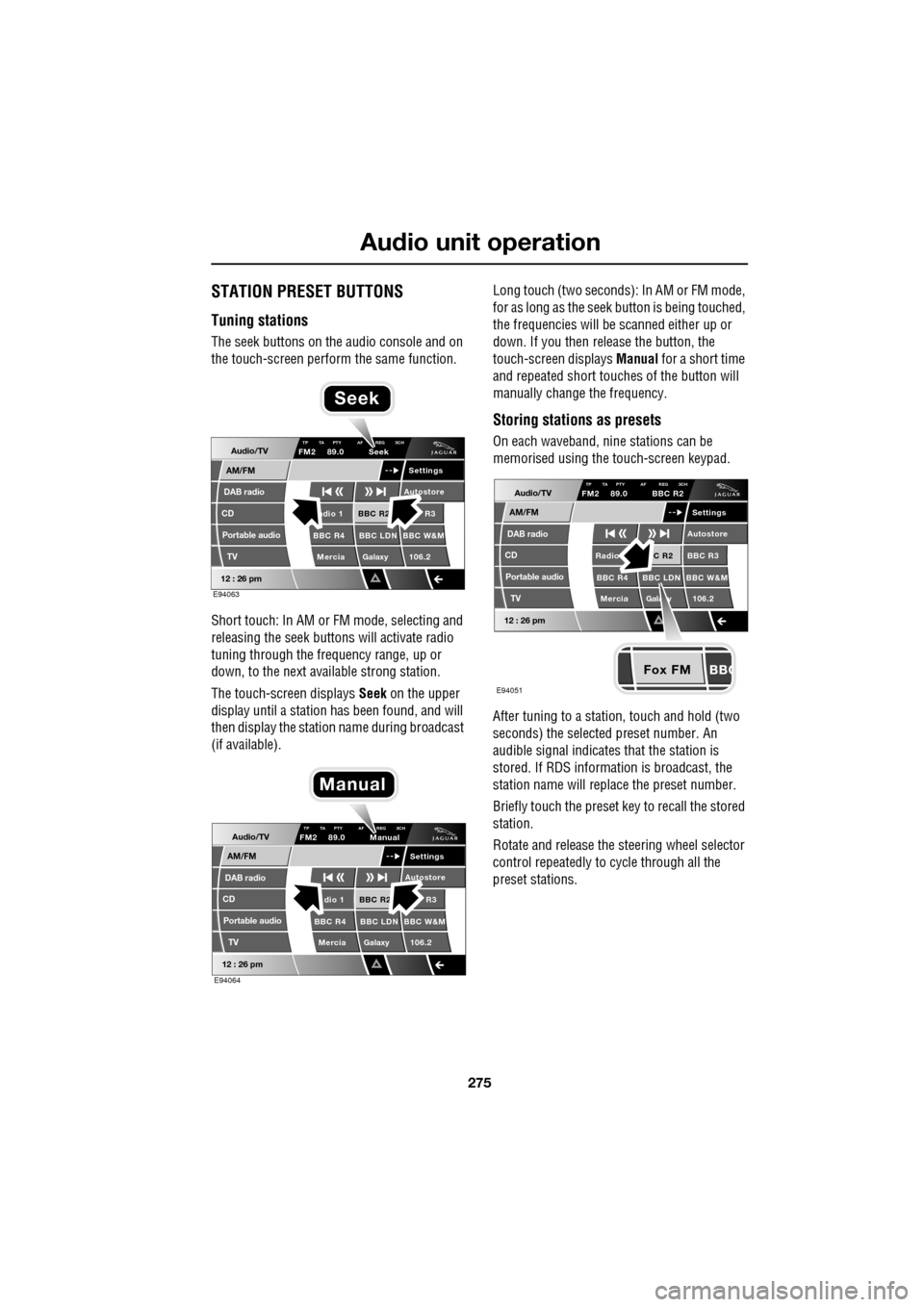
The seek buttons on the audio console and on
the touch-screen perform the same function.
Short touch: In AM or FM mode, selecting and
releasing the seek buttons will activate radio
tuning through the frequency range, up or
down, to the next available strong station.
The touch-screen displays Seek on the upper
display until a station has been found, and will
then display the station name during broadcast
(if available). Long touch (two seconds): In AM or FM mode,
for as long as the seek
button is being touched,
the frequencies will be scanned either up or
down. If you then release the button, the
touch-screen displays Manual for a short time
and repeated short touc hes of the button will
manually change the frequency.
Storing stations as presets
On each waveband, ni ne stations can be
memorised using the touch-screen keypad.
After tuning to a stati on, touch and hold (two
seconds) the selected preset number. An
audible signal indicates that the station is
stored. If RDS informat ion is broadcast, the
station name will replace the preset number.
Briefly touch the preset key to recall the stored
station.
Rotate and release the steering wheel selector
control repeatedly to cycle through all the
preset stations.Audio/TV
DAB radio
CD
AM/FM
12 : 26 pm
BBC R2 R3
BBC R4 BBC LDN BBC W&M Mercia Galaxy 106.2adio 1
Settings
Autostore
TP TA PTY AF REG 3CHFM2 89.0 Seek
Portable audio TV
E94063
Seek
Audio/TV
DAB radio
CD
AM/FM
12 : 26 pm
BBC R2 R3
BBC R4 BBC LDN BBC W&M Mercia Galaxy 106.2dio 1
Settings
Autostore
TP TA PTY AF REG 3CHFM2 89.0 Manual
Portable audio TV
E94064
Manual
Fox FM
Audio/TV
DAB radio
CD
AM/FM
12 : 26 pm
C R2 BBC R3
BBC R4 BBC LDN BBC W&M
Mercia Gala y 106.2Radio
Settings
Autostore
TP TA PTY AF REG 3CHFM2 89.0 BBC R2
Portable audio TV
E94051
Page 282 of 391
Digital audio broadcasting
282
AUDIO CONTROLS
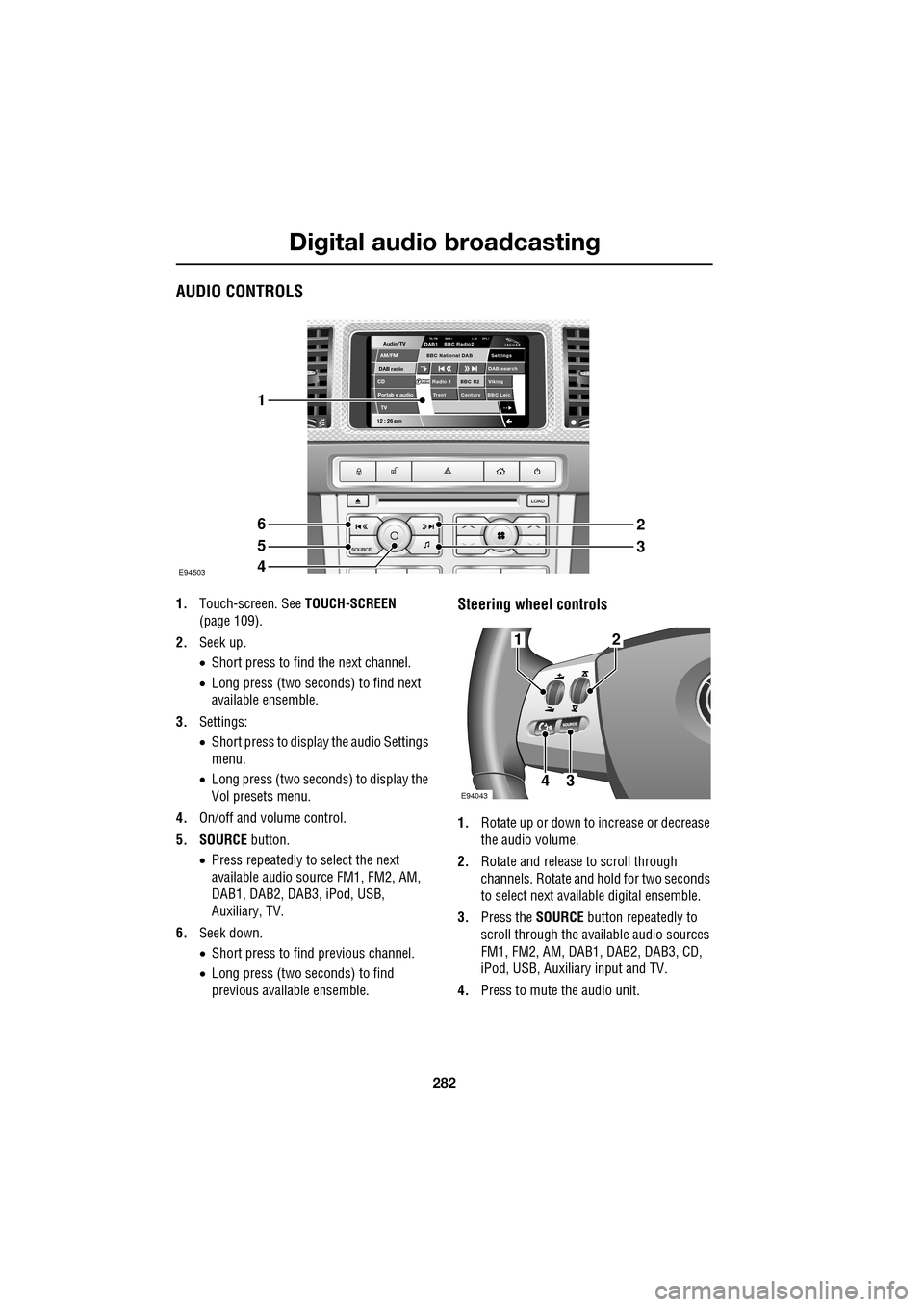
1.Touch-screen. See TOUCH-SCREEN
(page 109).
2. Seek up.
•Short press to find the next channel.
• Long press (two seconds) to find next
available ensemble.
3. Settings:
•Short press to display the audio Settings
menu.
• Long press (two seconds) to display the
Vol presets menu.
4. On/off and volume control.
5. SOURCE button.
• Press repeatedly to select the next
available audio sour ce FM1, FM2, AM,
DAB1, DAB2, DAB3, iPod, USB,
Auxiliary, TV.
6. Seek down.
•Short press to find previous channel.
• Long press (two seconds) to find
previous available ensemble.Steering wheel controls
1. Rotate up or down to increase or decrease
the audio volume.
2. Rotate and release to scroll through
channels. Rotate and hold for two seconds
to select next available digital ensemble.
3. Press the SOURCE button repeatedly to
scroll through the available audio sources
FM1, FM2, AM, DAB1, DAB2, DAB3, CD,
iPod, USB, Auxiliary input and TV.
4. Press to mute the audio unit.
Audio/TV
DAB radio
CDAM/FM
12 : 26 pm
BBC R2 Viking
Trent Century BBC LeicRadio 1
Settings
DAB search
TA-FM DAB-i L nk DPL IDAB1 BBC Radio2
Portab e audio
TV
BBC National DAB
E94503
1
6
5
4
2
3
E94043
12
43
Page 308 of 391
Telephone
308
The Bluetooth in-car telephone system allows
certain mobile phones to be used hands-free in
your vehicle. There is no need to connect the
mobile phone to a cradle or cable.
Bluetooth® is a registered trademark of
Bluetooth SIG, Inc.
Please refer to the Owner section of the Jaguar
website at www.jaguar.com , for a list of
compatible phones. Altern atively, please refer
to your Dealer/Authorised Repairer.
Note: The Bluetooth technology phones listed
on Jaguar.com, have been tested for
compatibility with Jaguar vehicles.
Performance will vary, based on phone
software version, covera ge and your wireless
carrier. Phones are warranted by their
manufacturer, not Jaguar.
If your mobile phone battery charge becomes
low it may switch off its Bluetooth link to the
vehicle. This is normal operation for mobile
phones, to help preserve the remaining battery
charge. In this event, the touch-screen will
display a phone connection message.
The mobile phone must be paired and docked
with the vehicle system before use.
See TELEPHONE PAIRING AND DOCKING
(page 309). Once paired and docked, the
phone can be operated via the steering wheel
switches or the touch-screen. The mobile
phone doesn’t need to be physically connected
to the vehicle, it can be left in a jacket pocket,
for instance. Calls are routed through the
vehicle’s audio speake rs, and a dedicated
microphone is fitted within the overhead
console and is directionally biased towards the
driver.
You can use the system to answer or reject
incoming calls, make outgoing calls or alter the
call volume. The system does not support SMS
text messaging. Note:
The vehicle ignition system must be on
and the touch-screen system must be active, in
order to use the phone.
Call volume
The volume of telephone calls can be adjusted
for hands-free operation. To adjust the volume,
operate the audio system’s volume control
during a phone call.
If the audio system is in use when the phone
becomes active, the audio system source is
suppressed for the duration of the call.
Charging your phone
It is possible to use the in-car 12V/USB socket
to charge your mobile phone. Refer to the
mobile phone operating instructions for
charging information.
Page 317 of 391
317
Telephone
MAKING A CALL
Before you make a call, your mobile phone
must be paired and docked with the vehicle’s
Bluetooth system.
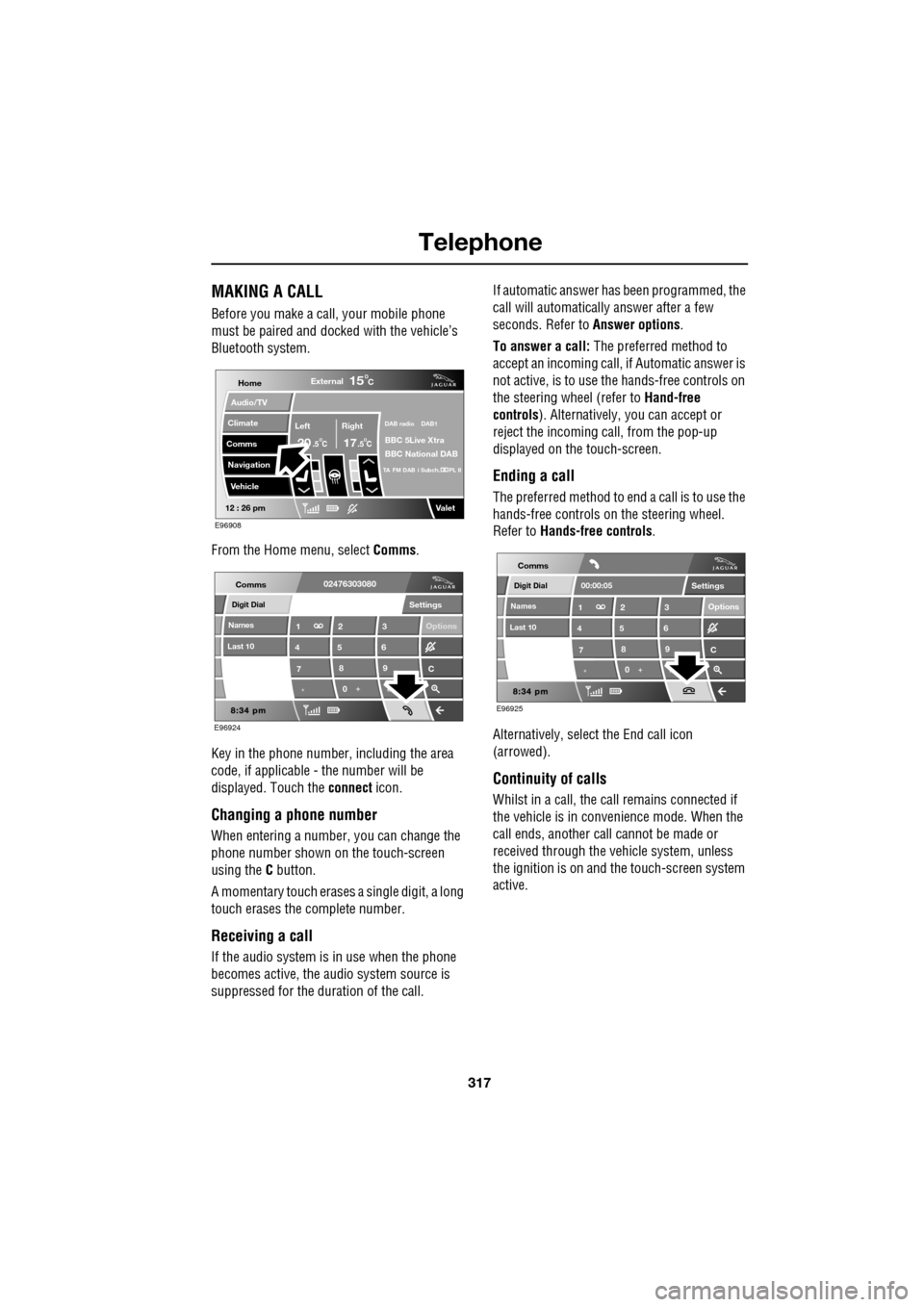
From the Home menu, select Comms.
Key in the phone number, including the area
code, if applicable - the number will be
displayed. Touch the connect icon.
Changing a phone number
When entering a number, you can change the
phone number shown on the touch-screen
using the C button.
A momentary touch erases a single digit, a long
touch erases the complete number.
Receiving a call
If the audio system is in use when the phone
becomes active, the audio system source is
suppressed for the dur ation of the call. If automatic answer has been programmed, the
call will automatically answer after a few
seconds. Refer to
Answer options.
To answer a call: The preferred method to
accept an incoming call, if Automatic answer is
not active, is to use th e hands-free controls on
the steering wheel (refer to Hand-free
controls ). Alternatively, you can accept or
reject the incoming call, from the pop-up
displayed on the touch-screen.
Ending a call
The preferred method to end a call is to use the
hands-free controls on the steering wheel.
Refer to Hands-free controls .
Alternatively, select the End call icon
(arrowed).
Continuity of calls
Whilst in a call, the ca ll remains connected if
the vehicle is in convenience mode. When the
call ends, another call cannot be made or
received through the vehicle system, unless
the ignition is on and the touch-screen system
active.
Home
Audio/TV
Climate
Comms
Navigation
VehicleExternal
Left Right
20 17CC
15C
.5 .5
DAB radio DAB1
BBC 5Live Xtra
BBC National DAB
TA FM DAB i Subch. PL II
Valet12 : 26 pm
E96908
Digit Dial
Names
Last 10
Settings
7
1
4
*8
2
5
0 9
3
6
Options
C
E96924
Comms02476303080Digit Dial
Names
Last 10
Settings
7
1
4
*8
2
5
0 9
3
6
Options
C
E96925
Comms
00:00:05
Page 321 of 391
321
Telephone
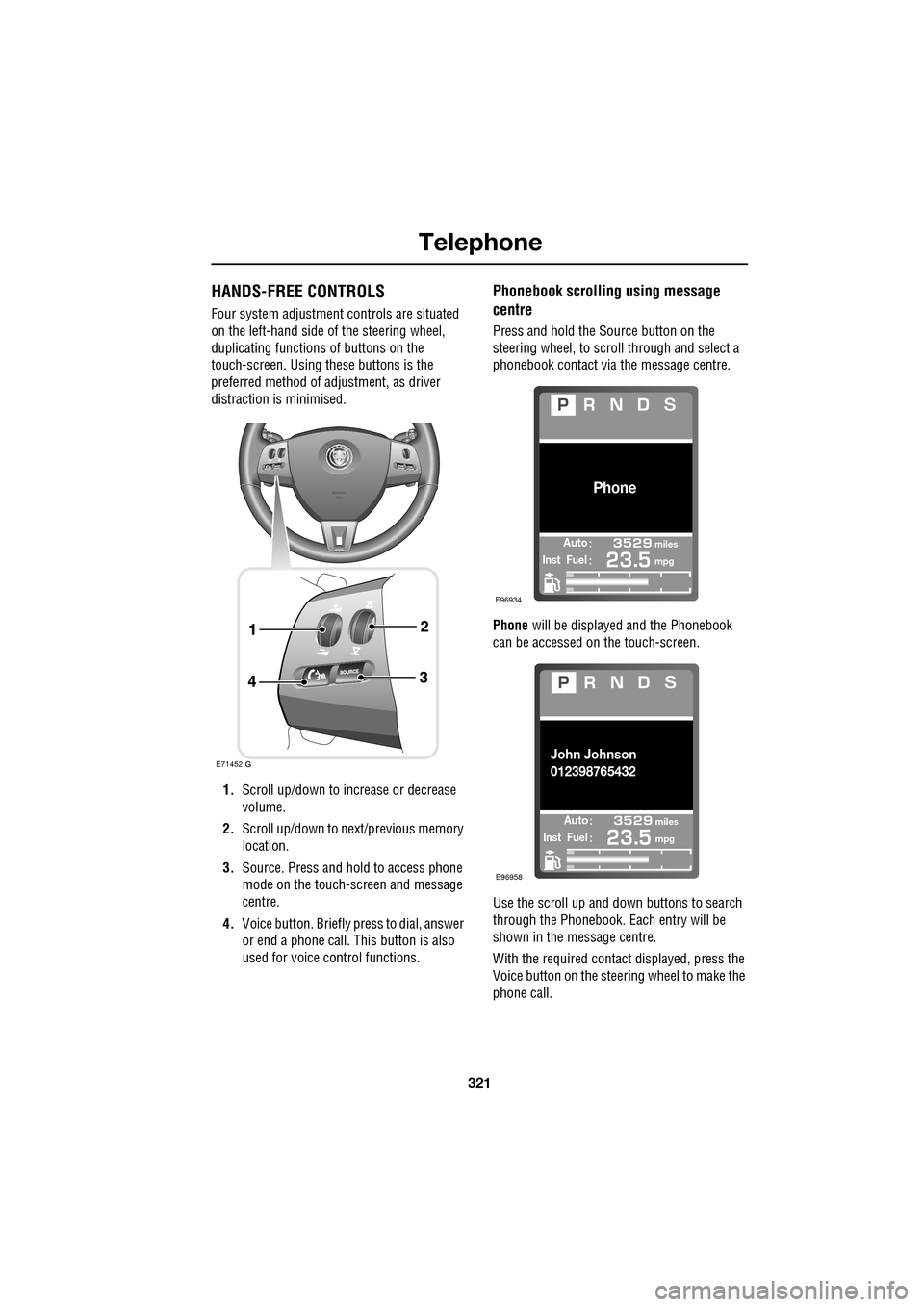
HANDS-FREE CONTROLS
Four system adjustment controls are situated
on the left-hand side of the steering wheel,
duplicating functions of buttons on the
touch-screen. Using these buttons is the
preferred method of adjustment, as driver
distraction is minimised.
1. Scroll up/down to increase or decrease
volume.
2. Scroll up/down to ne xt/previous memory
location.
3. Source. Press and hold to access phone
mode on the touch-screen and message
centre.
4. Voice button. Briefly press to dial, answer
or end a phone call. This button is also
used for voice control functions.
Phonebook scrolling using message
centre
Press and hold the Source button on the
steering wheel, to scroll through and select a
phonebook contact via the message centre.
Phone will be displayed and the Phonebook
can be accessed on the touch-screen.
Use the scroll up and down buttons to search
through the Phonebook. Each entry will be
shown in the message centre.
With the required contact displayed, press the
Voice button on the steering wheel to make the
phone call.
E71452
Automiles
Inst Fuelmpg
Phone
E96934
Automiles
Inst Fuelmpg
John Johnson
012398765432
E96958