steering JAGUAR XF 2009 1.G Repair Manual
[x] Cancel search | Manufacturer: JAGUAR, Model Year: 2009, Model line: XF, Model: JAGUAR XF 2009 1.GPages: 391, PDF Size: 19.32 MB
Page 322 of 391
Telephone
322
Making/ending a call
To dial:
Key in the phone number, including the area
code. The number will be displayed.
To connect:
To end a call:
OTHER FEATURES
Keyboard magnification
This option allows the user to increase the
keyboard size.
When making a call using the numerical key
pad displayed on the touch-screen, the
Magnify icon becomes selectable.
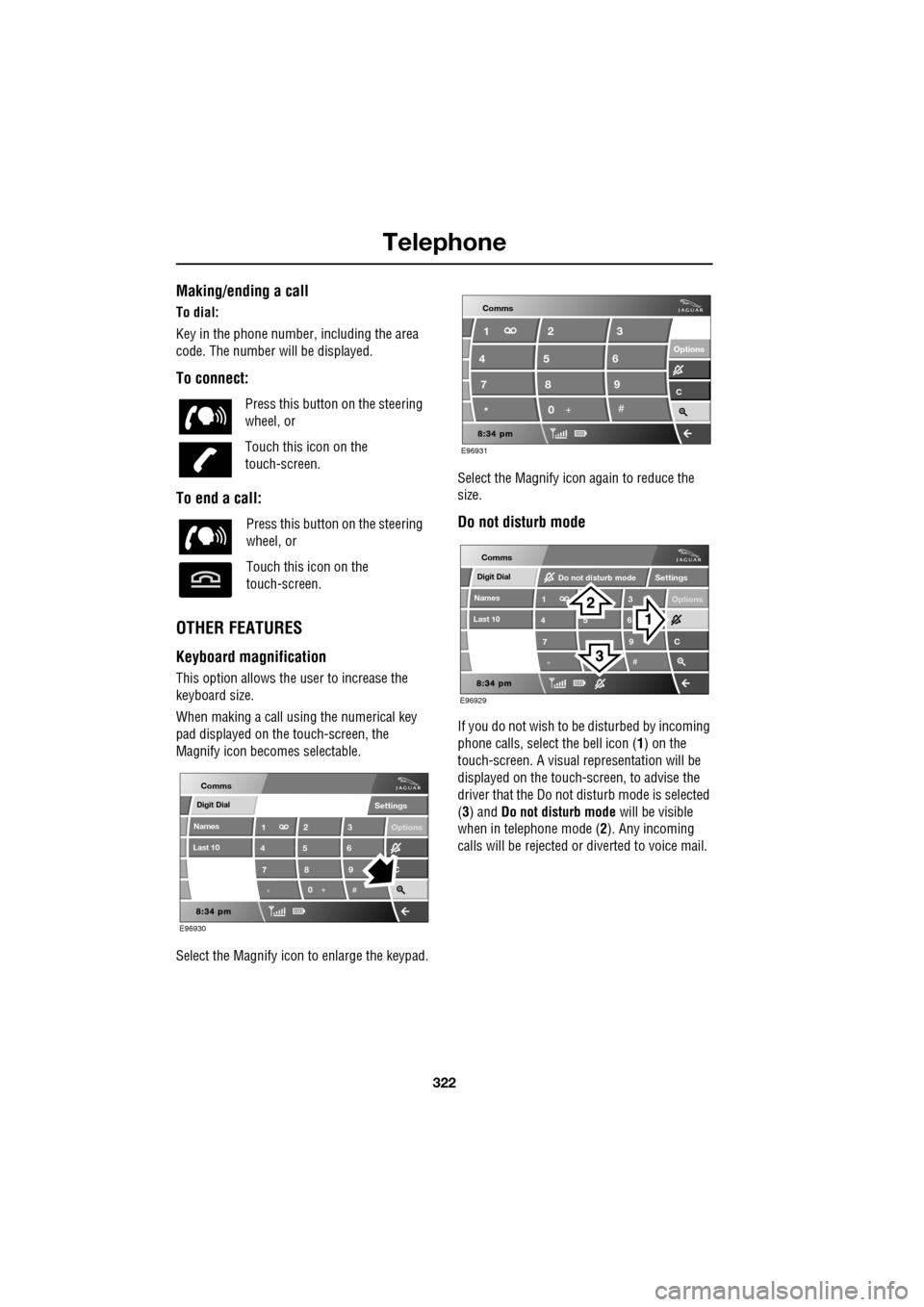
Select the Magnify icon to enlarge the keypad. Select the Magnify icon
again to reduce the
size.
Do not disturb mode
If you do not wish to be disturbed by incoming
phone calls, select the bell icon (1) on the
touch-screen. A visual representation will be
displayed on the touch-screen, to advise the
driver that the Do not di sturb mode is selected
(3) and Do not disturb mode will be visible
when in telephone mode ( 2). Any incoming
calls will be rejected or diverted to voice mail.
Press this button
on the steering
wheel, or
Touch this icon on the
touch-screen.
Press this button on the steering
wheel, or
Touch this icon on the
touch-screen.
Digit Dial
Names
Last 10
Settings
7
1
4
*8
2
5
0 9
3
6
Options
C
E96930
Comms
E96931
Comms
Options Options
C7 1
4
* 82
5
0 93
6
Digit Dial
Names
Last 10
Settings
7
1
4
*
5 9
3
6
Options
C
E96929
Comms
Do not disturb mode
Page 323 of 391
323
Telephone
TELEPHONE VOICE CONTROL
Voice control allows many of the telephone
features to be activa ted by voice commands.
The system is controlled by the
switch on the left -hand side of the
steering wheel.
Note: The voice control dire ctory is separate
from your phone SIM card address or
phonebook. See VOICE CONTROL (page 69).
The voice control sy stem understands
predefined commands which need to be
spoken word for word. A list of all telephone
voice commands is below.
• PHONE HELP
• PHONE DIAL NUMBER
• PHONE REDIAL
• PHONE STORE NAME
• PHONE DIAL NAME
• PHONE ACCEPT CALLS
• PHONE REJECT CALLS
• PHONE DIAL LAST ANSWERED CALL
• PHONE DIAL LAST MISSED CALL
• PHONE DIAL VOICEMAIL
• PHONE PLAY DIRECTORY
• PHONE DELETE DIRECTORY
• PHONE DIAL HANDSET NAME
Most of the above commands are self
explanatory, those whic h are not, are explained
more fully in the following section.
Operating the system
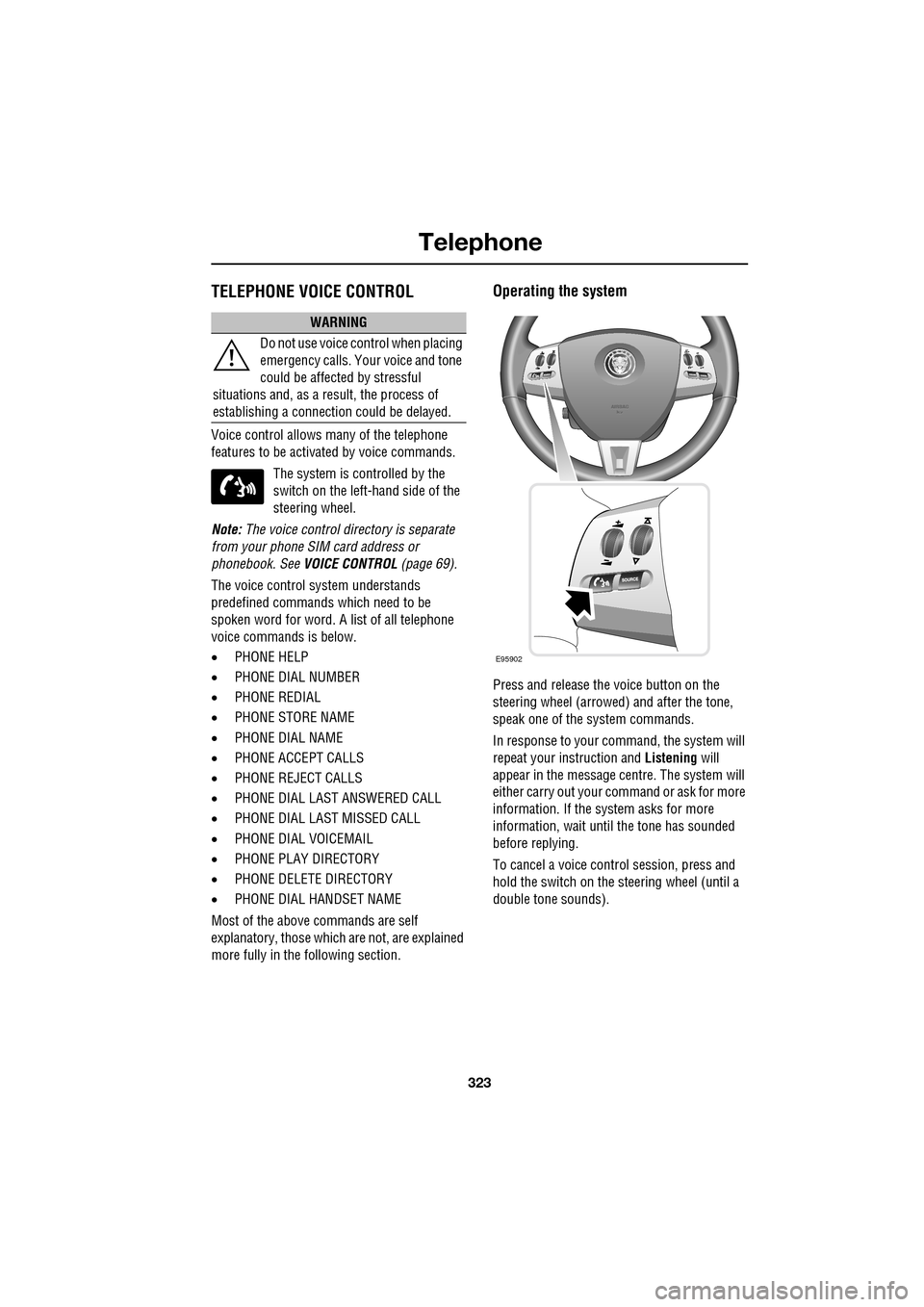
Press and release the voice button on the
steering wheel (arrowed) and after the tone,
speak one of the system commands.
In response to your command, the system will
repeat your instruction and Listening will
appear in the message centre. The system will
either carry out your command or ask for more
information. If the system asks for more
information, wait until the tone has sounded
before replying.
To cancel a voice control session, press and
hold the switch on the steering wheel (until a
double tone sounds).
WARNING
Do not use voice control when placing
emergency calls. Your voice and tone
could be affected by stressful
situations and, as a result, the process of
establishing a connecti on could be delayed.
E95902
Page 326 of 391
Telephone
326
Storing nametags using the
touch-screen
Nametags can also be added to the system by
using the Add Phone nametag feature on the
touch-screen, as described below.
1. From the Home menu, select the Comms
button.
2. From the Comms menu, select the Add
Phone Nametag button.
3. A numerical touch-screen is displayed.
Enter the phone number.
4. When the number is entered, select the
Add button in the top right-hand corner
and, once the tone ha s sounded, speak the
name that you wish the number to be
stored under.
Note: The storage of the nametag itself is
subject to the nameta g not being too short
(less than 0.4 seconds), too long (longer than
4 seconds), not sounding too much like
another stored nametag and relies on the
repetition of the nametag sounding the same
as the first utterance of it. If any of these criteria
are not met, the system will prompt you to give
a new nametag.
Note: The Add button will be greyed out if the
phone number is not valid.
Dialling a nametag
To dial a number stored under a nametag in the
directory, press and release the voice button
and say Phone dial name . The system will
repeat the command and will prompt you for a
stored nametag by saying Name please. After
the tone, speak the name tag of the required
number. The system will replay the stored
nametag and ask for confirmation that it is
correct. Answer with Yes or No, as appropriate.
Dialling voicemail
The number for your voicemail service needs
to be stored in the system, before using this
facility. To store the voicemail number:
• From the Home menu, select Comms.
• From the Comms menu, select Settings.
• The phone Settings me nu has a Voice mail
button, to allow your voicemail number to
be entered.
To dial the voicemail number, press and
release the Voice button on the steering wheel,
wait for the tone to sound, then say Phone dial
voicemail .
Play all stored nametags
To play all the nametags stored in the directory,
press and release the Voice button on the
steering wheel and after the tone, say Phone
play directory . The list can be interrupted at
any time, by pressing and releasing the button
again. Once interrupted, you can then use the
commands, REPLAY , DIAL , DELETE, EDIT or
CANCEL .
Dialling a nametag stored on the
handset
To dial a number associated with a nametag
stored on the phone hand set, press and release
the Voice button on the steering wheel and,
after the tone, say Phone dial handset name .
Page 330 of 391
Television
330
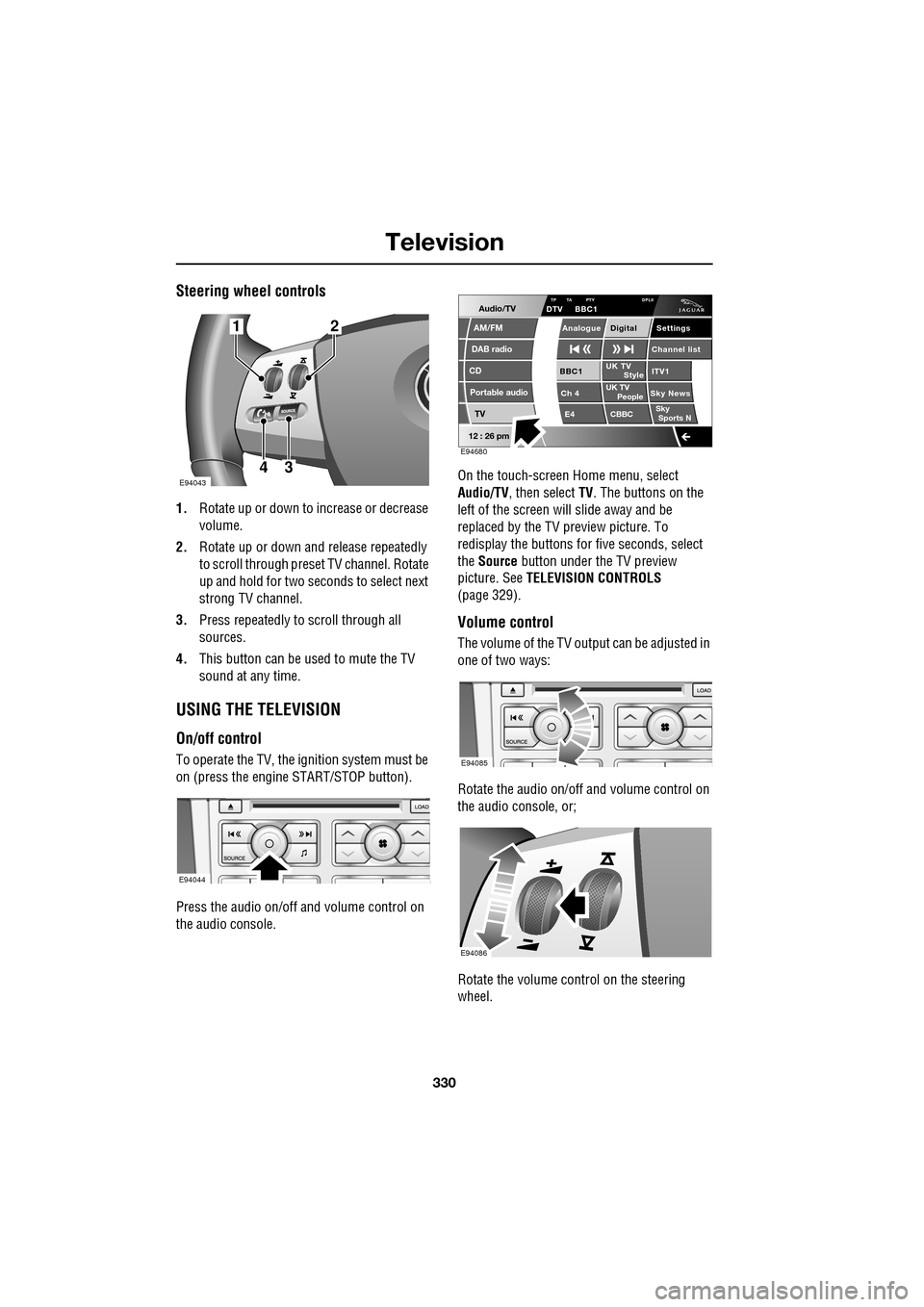
Steering wheel controls
1.Rotate up or down to increase or decrease
volume.
2. Rotate up or down and release repeatedly
to scroll through preset TV channel. Rotate
up and hold for two seconds to select next
strong TV channel.
3. Press repeatedly to scroll through all
sources.
4. This button can be used to mute the TV
sound at any time.
USING THE TELEVISION
On/off control
To operate the TV, the ignition system must be
on (press the engine START/STOP button).
Press the audio on/off and volume control on
the audio console. On the touch-screen
Home menu, select
Audio/TV , then select TV. The buttons on the
left of the screen will slide away and be
replaced by the TV preview picture. To
redisplay the buttons for five sec onds, select
the Source button under the TV preview
picture. See TELEVISION CONTROLS
(page 329).
Volume control
The volume of the TV output can be adjusted in
one of two ways:
Rotate the audio on/off and volume control on
the audio console, or;
Rotate the volume control on the steering
wheel.
E94043
12
43
E94044
Audio/TV
DAB radio
CD
AM/FM
12 : 26 pm
Portable audio
TV
UK TV ITV1
Ch 4 Sky News E4 CBBCBBC1
Settings
Channel list
TA PTY DPLIIDTV BBC1
Style
UK TV People
SkySports NTP
Analogue Digital
E94680
E94085
E94086
Page 332 of 391
Television
332
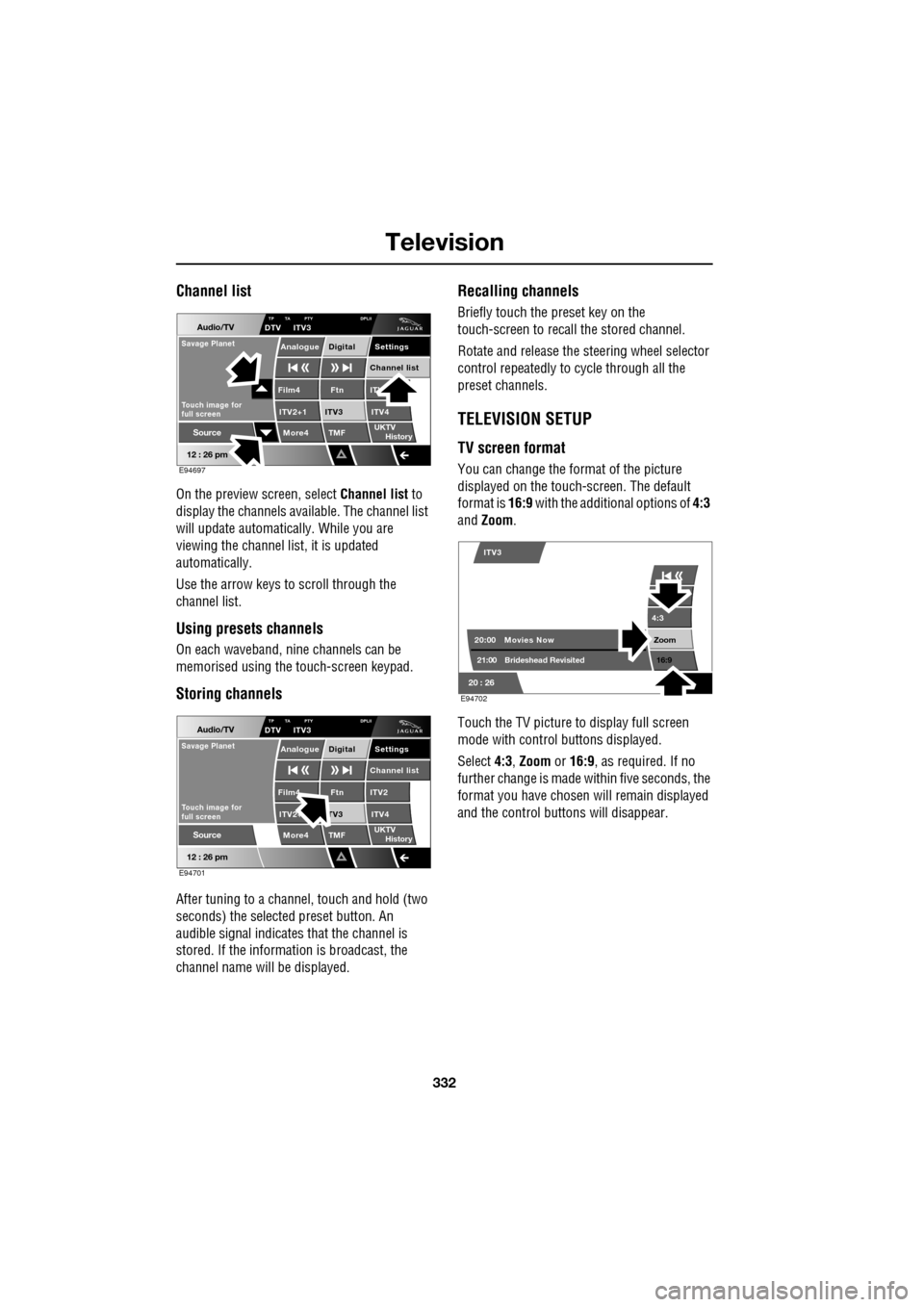
Channel list
On the preview screen, select Channel list to
display the channels available. The channel list
will update automatically. While you are
viewing the channel list, it is updated
automatically.
Use the arrow keys to scroll through the
channel list.
Using presets channels
On each waveband, ni ne channels can be
memorised using the touch-screen keypad.
Storing channels
After tuning to a channe l, touch and hold (two
seconds) the selected preset button. An
audible signal i ndicates that the channel is
stored. If the informat ion is broadcast, the
channel name wi ll be displayed.
Recalling channels
Briefly touch the preset key on the
touch-screen to recall the stored channel.
Rotate and release the steering wheel selector
control repeatedly to cycle through all the
preset channels.
TELEVISION SETUP
TV screen format
You can change the format of the picture
displayed on the touch-screen. The default
format is 16:9 with the additional options of 4:3
and Zoom .
Touch the TV picture to display full screen
mode with control buttons displayed.
Select 4:3, Zoom or 16:9 , as required. If no
further change is made within five seconds, the
format you have chosen will remain displayed
and the control butt ons will disappear.
Audio/TV
12 : 26 pm
More4 TMF
TP TA PTY DPLIIDTV ITV3
UKTV
HistorySource
ITV
ITV2+1 ITV4Film4
Settings
Channel listAnalogue Digital
Ftn
ITV3
Touch image for
full screen
Savage Planet
E94697
Audio/TV
12 : 26 pm
More4 TMF
TP TA PTY DPLIIDTV ITV3
UKTV
HistorySource
ITV2
ITV2+ ITV4Film4
Settings
Channel listAnalogue Digital
Ftn
TV3
Touch image for
full screen
Savage Planet
E94701
4:3
Zoom 16:9
ITV3
20:0021:00 Movies Now
Brideshead Revisited
20 : 26 E94702
Page 373 of 391
373
Navigation system
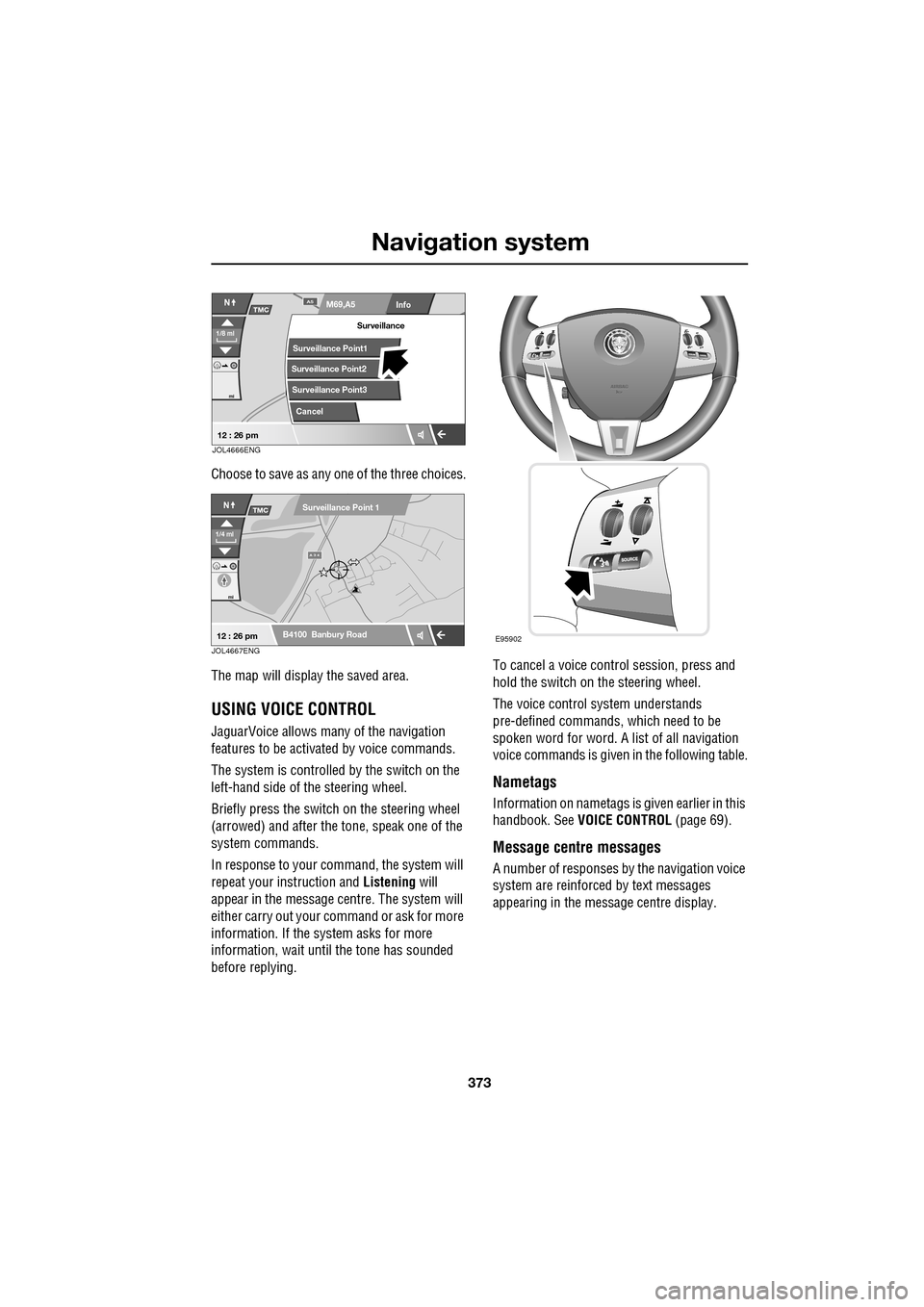
Choose to save as any one of the three choices.
The map will display the saved area.
USING VOICE CONTROL
JaguarVoice allows many of the navigation
features to be activa ted by voice commands.
The system is controlled by the switch on the
left-hand side of th e steering wheel.
Briefly press the switch on the steering wheel
(arrowed) and after the tone, speak one of the
system commands.
In response to your command, the system will
repeat your instruction and Listening will
appear in the message centre. The system will
either carry out your command or ask for more
information. If the system asks for more
information, wait until the tone has sounded
before replying. To cancel a voice control session, press and
hold the switch on the steering wheel.
The voice control system understands
pre-defined commands, which need to be
spoken word for word. A list of all navigation
voice commands is given
in the following table.
Nametags
Information on nametags is given earlier in this
handbook. See VOICE CONTROL (page 69).
Message centre messages
A number of responses by the navigation voice
system are reinforced by text messages
appearing in the message centre display.
Info
N
1/8 ml
M69,A5A5
mi
TMC
Surveillance Point2
Surveillance Point3 Surveillance
Cancel
Surveillance Point1
12 : 26 pmJOL4666ENG
A 3 4
mi
NTMC
B4100 Banbury Road
Surveillance Point 1
1/4 ml
12 : 26 pmJOL4667ENGE95902
Page 381 of 391
Index
381
A
ABS driving hints . . . . . . . . . . . . . . . . . . 144
ACC . . . . . . . . . . . . . . . . . . . . . . . . . . . . . 159
Accessories . . . . . . . . . . . . . . . . . . . . . . . . 14
Adaptive cruise control . . . . . . . . . . . . . . 159
Adaptive cruise control (ACC)principle of operation . . . . . . . . . . . . . 159
Adaptive dynamics . . . . . . . . . . . . . . . . . 172
Adjusting the headlamps . . . . . . . . . . . . . . 78
Adjusting the steering wheel . . . . . . . . . . . 67 entry and exit mode . . . . . . . . . . . . . . . 67
Advanced emergency brake assist . . . . . 165
AFS . . . . . . . . . . . . . . . . . . . . . . . . . . . . . . 79
Air vents . . . . . . . . . . . . . . . . . . . . . . . . . 115 rear vents . . . . . . . . . . . . . . . . . . . . . . 115
Airbag labels . . . . . . . . . . . . . . . . . . . . . . . 58
Airbag service information . . . . . . . . . . . . 58
Airbag warning lamp . . . . . . . . . . . . . . . . . 57
Alarm trigger information . . . . . . . . . . . . . . . . 39
Alarm sensor override . . . . . . . . . . . . . . . . 22
Approach lamps . . . . . . . . . . . . . . . . . . . . 81
Arming . . . . . . . . . . . . . . . . . . . . . . . . . . . 19
Arming the alarm . . . . . . . . . . . . . . . . . . . 37
alarm indicator . . . . . . . . . . . . . . . . . . . 38
battery-backed sounder . . . . . . . . . . . . 38
full alarm. . . . . . . . . . . . . . . . . . . . . . . . 37
perimeter alarm . . . . . . . . . . . . . . . . . . 37
ASL . . . . . . . . . . . . . . . . . . . . . . . . . . . . . 167
Audible warnings and indicators . . . . . . . 104
Audio portable interface . . . . . . . . . . . . . . . . 131
Audio control. . . . . . . . . . . . . . . . . . . 69, 272
sound settings . . . . . . . . . . . . . . . . . . 272
Audio controls . . . . . . . . . . . . . . . . . . . . . 282 steering wheel controls. . . . . . . . . . . . 282
Audio unit overview. . . . . . . . . . . . . . . . . 269 audio controls . . . . . . . . . . . . . . . . . . . 269
sound system overview . . . . . . . . . . . 270
Autolamps . . . . . . . . . . . . . . . . . . . . . . . . . 76 exit delay. . . . . . . . . . . . . . . . . . . . . . . . 77
windscreen wiper detection . . . . . . . . . 76
Automatic climate control . . . . . . . . . . . . 116 controls . . . . . . . . . . . . . . . . . . . . . . . 116
touch-screen operation . . . . . . . . . . . . 119 Automatic speed limiter . . . . . . . . . . . . . . 167
Automatic speed limiter (ASL)
principle of operation . . . . . . . . . . . . . . 167
Automatic transmission . . . . . . . . . . . . . . 137
automatic mode . . . . . . . . . . . . . . . . . . 139
JaguarDrive selector . . . . . . . . . . . . . . 137
limp-home mode . . . . . . . . . . . . . . . . . 143
manual mode . . . . . . . . . . . . . . . . . . . . 141
message centre display . . . . . . . . . . . . 143
sport mode . . . . . . . . . . . . . . . . . . . . . 140
starting. . . . . . . . . . . . . . . . . . . . . . . . . 139
Autostore control . . . . . . . . . . . . . . . . . . . 274
Auxiliary connections . . . . . . . . . . . . . . . . 299 connecting a USB device . . . . . . . . . . . 300
connecting an auxiliary device . . . . . . . 301
connecting an iPod . . . . . . . . . . . . . . . 300
connecting more than one device . . . . 301
portable audio overview . . . . . . . . . . . . 299
Auxiliary input devices . . . . . . . . . . . . . . . 302 displaying track information. . . . . . . . . 303
playing a portable device . . . . . . . . . . . 302
portable device settings . . . . . . . . . . . . 306
searching a portable device . . . . . . . . . 304
Auxiliary power sockets . . . . . . . . . . . . . . 125
B
Battery charging faults . . . . . . . . . . . . . . . . . . . 213
Battery care . . . . . . . . . . . . . . . . . . . . . . . 212 Battery Monitoring System (BMS) . . . . 213
Battery charging . . . . . . . . . . . . . . . . . . . . 215
Battery warning symbols . . . . . . . . . . . . . 212
Blind spot monitor . . . . . . . . . . . . . . . . . . . 97 sensor blockage . . . . . . . . . . . . . . . . . . . 98
system fault . . . . . . . . . . . . . . . . . . . . . . 98
Block heaters . . . . . . . . . . . . . . . . . . . . . . 134
Bonnet lock . . . . . . . . . . . . . . . . . . . . . . . 195
Booster cables . . . . . . . . . . . . . . . . . . . . . 214
Booster cushions . . . . . . . . . . . . . . . . . . . . 61
Brake fluid check . . . . . . . . . . . . . . . . . . . 206
checking the fluid level. . . . . . . . . . . . . 206
topping up the fluid . . . . . . . . . . . . . . . 207
Brakes
brake pads . . . . . . . . . . . . . . . . . . . . . . 144
pad wear warning. . . . . . . . . . . . . . . . . 144
principle of operation . . . . . . . . . . . . . . 144
Page 383 of 391
Index
383
D
Destination entry . . . . . . . . . . . . . . . . . . . 356choosing your route . . . . . . . . . . . . . . 356
coordinates . . . . . . . . . . . . . . . . . . . . . 357
map . . . . . . . . . . . . . . . . . . . . . . . . . . 357
memory . . . . . . . . . . . . . . . . . . . . . . . 358
motorway . . . . . . . . . . . . . . . . . . . . . . 359
points of interest. . . . . . . . . . . . . . . . . 356
postcode . . . . . . . . . . . . . . . . . . . . . . . 357
previous . . . . . . . . . . . . . . . . . . . . . . . 358
setting a destination . . . . . . . . . . . . . . 356
start guidance . . . . . . . . . . . . . . . . . . . 356
Diesel particulate filter (DPF). . . . . . . . . . 135 regeneration . . . . . . . . . . . . . . . . . . . . 135
regeneration procedure. . . . . . . . . . . . 136
warning indicators a nd messages. . . . 135
Digital audio broadcasting general information. . . . . . . . . . . . . . . 280
Dimensions . . . . . . . . . . . . . . . . . . . . . . . 260 brake pedal travel (China only) . . . . . . 261
wheel alignment data (C hina only) . . . 261
Dipstick - electronic . . . . . . . . . . . . 199, 202
Direction indicators . . . . . . . . . . . . . . . . . . 78
Disability modifications . . . . . . . . . . . . . . . 11
Disarming . . . . . . . . . . . . . . . . . . . . . . . . . 18
Disarming the alarm . . . . . . . . . . . . . . . . . 38 deactivating the alarm when triggered . 38
disarming when the unlock button fails to work . . . . . . . . . . . . . . . . . . . . . . . . . 38
Display options . . . . . . . . . . . . . . . . . . . . 283
DAB radio text. . . . . . . . . . . . . . . . . . . 283
touch-screen information panel . . . . . 283
Docking the Jaguar Smart Key . . . . . . . . . 20
DPF . . . . . . . . . . . . . . . . . . . . . . . . . . . . . 135
Drive control general information. . . . . . . . . . . . . . . 169
Driving after a collision . . . . . . . . . . . . . . 251 before starting or driving . . . . . . . . . . 251
resetting the fuel cut-off . . . . . . . . . . . 251
when driving . . . . . . . . . . . . . . . . . . . . 252
Dynamic mode . . . . . . . . . . . . . . . . . . . . 170
E
Economical driving . . . . . . . . . . . . . . . . . . 155 driving tips for economy . . . . . . . . . . . 155
maintenance and fuel economy . . . . . . 155
E-Diff (differential) . . . . . . . . . . . . . . . . . . 172
Ejecting compact discs . . . . . . . . . . . . . . . 294
Electric parking brake (EPB) . . . . . . . . . . . 146
Electric seats . . . . . . . . . . . . . . . . . . . . . . . 42 driving position memory . . . . . . . . . . . . 43
Electric sunroof . . . . . . . . . . . . . . . . . . . . 121 anti-trap mechanism . . . . . . . . . . . . . . 121
calibration . . . . . . . . . . . . . . . . . . . . . . 122
operation . . . . . . . . . . . . . . . . . . . . . . . 121
sunroof blind . . . . . . . . . . . . . . . . . . . . 122
Electric windows . . . . . . . . . . . . . . . . . . . . 93
one-shot operation. . . . . . . . . . . . . . . . . 93
overriding anti-trap protection . . . . . . . . 93
window isolator . . . . . . . . . . . . . . . . . . . 94
window reset . . . . . . . . . . . . . . . . . . . . . 93
Emergency brake assist (advanced) . . . . . 165
Emergency key blade . . . . . . . . . . . . . . 25, 28
Engine block heaters . . . . . . . . . . . . . . . . . . . . 134
Engine compartment overview . . . . . . . . . 196
brake fluid reservoir . . . . . . . . . . . . . . . 196
coolant reservoir . . . . . . . . . . . . . . . . . 197
engine oil dipsticks . . . . . . . . . . . . . . . 197
engine oil filler . . . . . . . . . . . . . . . . . . . 196
power steering fluid reservoir . . . . . . . 197
washer fluid reservoir . . . . . . . . . . . . . 196
Engine coolant check . . . . . . . . . . . . . . . . 204 checking the coolant level . . . . . . . . . . 204
topping up the coolant . . . . . . . . . . . . . 205
Engine number . . . . . . . . . . . . . . . . . . . . . 257 diesel engines . . . . . . . . . . . . . . . . . . . 257
petrol engines . . . . . . . . . . . . . . . . . . . 257
Engine oil check engine oil consumption . . . . . . . . 199, 201
engine oil specification. . . . . . . . . . . . . 203
V6 diesel engines . . . . . . . . . . . . . . . . . 201
V6 petrol engines . . . . . . . . . . . . . . . . . 197
V8 petrol engines . . . . . . . . . . . . . . . . . 199
Engine specifications . . . . . . . . . . . . . . . . 258
EPB. . . . . . . . . . . . . . . . . . . . . . . . . . . . . . 146
Errors in vehicle position . . . . . . . . . . . . . 335
Page 384 of 391
Index
384
Essential towing checks . . . . . . . . . . . . . 185
Event data recording . . . . . . . . . . . . . . . . . 11
Exterior mirrors . . . . . . . . . . . . . . . . . . . . . 95adjusting and folding . . . . . . . . . . . . . . 95
mirror dip when reversing. . . . . . . . . . . 96
F
Fascia - controls overview . . . . . . . . . . . . . 12
Fastening the seat belts . . . . . . . . . . . . . . . 51releasing the seat belts . . . . . . . . . . . . . 51
Ferry disarming the tilt alarm sensor . . . . . . . 22
Fire extinguisher . . . . . . . . . . . . . . . . . . . 250
First aid kit . . . . . . . . . . . . . . . . . . . . . . . . 250
Forward alert function . . . . . . . . . . . . . . . 164
Fuel
octane rating . . . . . . . . . . . . . . . . . . . . 175
petrol fuel guard . . . . . . . . . . . . . . . . . 180
refuelling . . . . . . . . . . . . . . . . . . . . . . . 179
Fuel cut-off . . . . . . . . . . . . . . . . . . . . . . . 177 resetting the fuel cut-off . . . . . . . . . . . 178
Fuel filler flap . . . . . . . . . . . . . . . . . . . . . . 178
Fuel guard . . . . . . . . . . . . . . . . . . . . . . . . 180
Fuel quality . . . . . . . . . . . . . . . . . . . . . . . 174 alternative fuels for pe trol engines . . . 175
diesel engined vehicles . . . . . . . . . . . . 176
petrol engined vehicles . . . . . . . . . . . . 174
unleaded fuel. . . . . . . . . . . . . . . . . . . . 175
Fuse box locations . . . . . . . . . . . . . . . . . . 242 engine compartment fuse box. . . . . . . 242
fuse and relay positions . . . . . . . . . . . 244
luggage compartment fuse box. . . . . . 243
passenger compartment fuse box . . . . 243
Fuse specification chart . . . . . . . . . . . . . . 245
G
Garage door transceiver . . . . . . . . . . . . . 128 before programming . . . . . . . . . . . . . . 128
entry gate programming . . . . . . . . . . . 130
information and assistance . . . . . . . . . 130
programming . . . . . . . . . . . . . . . . . . . 129
reprogramming a single garage door opener
button . . . . . . . . . . . . . . . . . . . . . . . 130
rolling code device equipment
programming . . . . . . . . . . . . . . . . . 130
to erase all programming . . . . . . . . . . 129 General information on
radio frequencies . . 16
Global opening and closing. . . . . . . . . . . . . 35 cancelling global opening/closing . . . . . 36
window global closing (not Japan). . . . . 36
window global opening . . . . . . . . . . . . . 35
Glove box . . . . . . . . . . . . . . . . . . . . . . . . . 125
H
Hazard warning flashers . . . . . . . . . . . 77, 250
Head restraints . . . . . . . . . . . . . . . . . . . . . . 44
head restraint removal . . . . . . . . . . . . . . 45
manual head restraints . . . . . . . . . . . . . . 45
tilt adjustment . . . . . . . . . . . . . . . . . . . . 44
whiplash protection . . . . . . . . . . . . . . . . 44
Headlamp adjustment . . . . . . . . . . . . . . . . . 78
Headlamp levelling . . . . . . . . . . . . . . . . . . . 79
halogen headlamps . . . . . . . . . . . . . . . . 79
xenon headlamps . . . . . . . . . . . . . . . . . . 79
Headlamp removal . . . . . . . . . . . . . . . . . . . 81
Headlamp washers . . . . . . . . . . . . . . . . . . . 90
Heated seats . . . . . . . . . . . . . . . . . . . . . . . . 47
Heated steering wheel. . . . . . . . . . . . . . . . . 68
Hints on driving with ABS . . . . . . . . . . . . . 144 ABS braking techniques . . . . . . . . . . . . 145
ABS warning indicator . . . . . . . . . . . . . 144
brake vacuum assist (V6 petrol models
only) . . . . . . . . . . . . . . . . . . . . . . . . 146
Electronic Brakeforce Distribution (EBD) . .
145
Emergency Brake Assist (EBA) . . . . . . . 146
Horn . . . . . . . . . . . . . . . . . . . . . . . . . . . . . . 68
I
Information displays general information . . . . . . . . . . . . . . . 105
Information messages . . . . . . . . . . . . . . . 106
Inspecting safety syst em components . . . 252
Instrument lighting dimmer . . . . . . . . . . . 123
Instrument panel overview . . . . . . . . . . . . . 99 instrument panel . . . . . . . . . . . . . . . . . . 99
Interior lamps . . . . . . . . . . . . . . . . . . . . . . . 80
rear interior lighting . . . . . . . . . . . . . . . . 80
Interior mirror . . . . . . . . . . . . . . . . . . . . . . . 94 auto dimming . . . . . . . . . . . . . . . . . . . . . 94
manual dimming . . . . . . . . . . . . . . . . . . 94
Isofix child restraints . . . . . . . . . . . . . . . . . 62
Page 385 of 391
Index
385
J
Jaguar Smart Key . . . . . . . . . . . . . . . . . . . 17system transmitters . . . . . . . . . . . . . . . 32
Jump starting . . . . . . . . . . . . . . . . . . . . . 214
K
Keyboard layout . . . . . . . . . . . . . . . . . . . 340
Keyless entry . . . . . . . . . . . . . . . . . . . . . . . 33 convenience mode . . . . . . . . . . . . . . . . 34
Jaguar Smart Key check . . . . . . . . . . . . 33
keyless locking . . . . . . . . . . . . . . . . . . . 34
steering column lock . . . . . . . . . . . . . . 35
Keyless starting . . . . . . . . . . . . . . . . . . . . 133
if the engine fails to start . . . . . . . . . . 134
starting a diesel engine . . . . . . . . . . . . 133
starting a petrol engine . . . . . . . . . . . . 133
Keys emergency key blade . . . . . . . . . . . 25, 28
Keys and remote controls
principle of operation . . . . . . . . . . . . . . 16
L
Lampscornering lamps . . . . . . . . . . . . . . . . . . 79
static bending lamps. . . . . . . . . . . . . . . 79
Language selection . . . . . . . . . . . . . . . . . 339
Levelling . . . . . . . . . . . . . . . . . . . . . . . . . 184
Lighting condensation . . . . . . . . . . . . . . . . . . . . 76
Lighting control . . . . . . . . . . . . . . . . . . . . . 75 daylight running lamps . . . . . . . . . . . . . 76
headlamps . . . . . . . . . . . . . . . . . . . . . . 75
off . . . . . . . . . . . . . . . . . . . . . . . . . . . . . 75
side lamps . . . . . . . . . . . . . . . . . . . . . . 75
Load carrying
general information. . . . . . . . . . . . . . . 182
Loading compact discs . . . . . . . . . . . . . . 292 loading a CD (player empty) . . . . . . . . 293
loading one CD (six CD player, part-loaded)
293
loading several CDs (six CD player) . . 294
Loading the map DVD . . . . . . . . . . . . . . . 334
Locking . . . . . . . . . . . . . . . . . . . . . . . . . . . 19 Locking and unlocking . . . . . . . . . . . . . . . . 26
locking and unlocking from inside the vehicle . . . . . . . . . . . . . . . . . . . . . . . . 27
locking and unlocking from outside the
vehicle . . . . . . . . . . . . . . . . . . . . . . . . 26
mislock . . . . . . . . . . . . . . . . . . . . . . . . . 28
using the emergency key blade . . . . . . . 28
valet mode . . . . . . . . . . . . . . . . . . . . . . . 30
Luggage anchor points . . . . . . . . . . . . . . . 182
M
Main menu . . . . . . . . . . . . . . . . . . . . . . . . 338
Maintenance
general information . . . . . . . . . . . . . . . 192
technical specifications . . . . . . . . . . . . 210
Map display icons. . . . . . . . . . . . . . . . . . . 342
Measurement units. . . . . . . . . . . . . . . . . . 340
Mirrors heated . . . . . . . . . . . . . . . . . . . . . . . . . . 96
MP3 file playback . . . . . . . . . . . . . . . . . . . 297 MP3 folder structure . . . . . . . . . . . . . . 298
using MP3 discs . . . . . . . . . . . . . . . . . 297
N
Navigationdigitised area . . . . . . . . . . . . . . . . . . . . 335
getting started . . . . . . . . . . . . . . . . . . . 336
map display icons . . . . . . . . . . . . . . . . 342
map screen . . . . . . . . . . . . . . . . . . . . . 341
memory . . . . . . . . . . . . . . . . . . . . . . . . 353
menu structure . . . . . . . . . . . . . . . . . . 337
route preference. . . . . . . . . . . . . . . . . . 347
saving preferences . . . . . . . . . . . . . . . . 339
setting a destination . . . . . . . . . . . . . . . 344
start guidance . . . . . . . . . . . . . . . . . . . 347
turn guidance off . . . . . . . . . . . . . . . . . 350
turn voice guidance on or off . . . . . . . . 349
Navigation overview
loading the DVD . . . . . . . . . . . . . . . . . . 334
Navigation setup calibration . . . . . . . . . . . . . . . . . . . . . . 351
language selection . . . . . . . . . . . . . . . . 353
quick POI selection . . . . . . . . . . . 350, 366
restore system defaults . . . . . . . . . . . . 352
user settings . . . . . . . . . . . . . . . . . . . . 338