Head JAGUAR XF 2009 1.G Workshop Manual
[x] Cancel search | Manufacturer: JAGUAR, Model Year: 2009, Model line: XF, Model: JAGUAR XF 2009 1.GPages: 391, PDF Size: 19.32 MB
Page 278 of 391
Audio unit menus
278
FM text
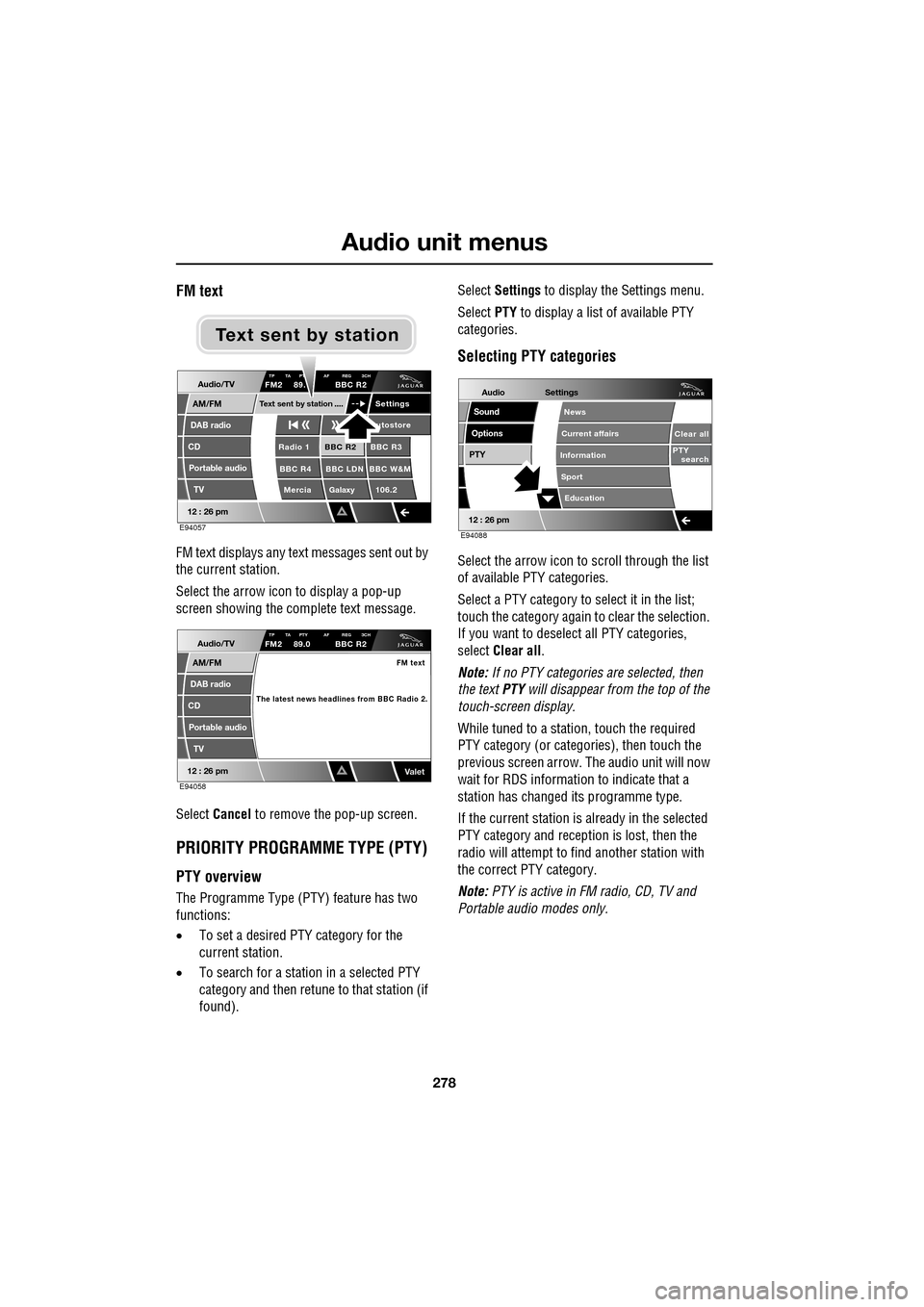
FM text displays any text messages sent out by
the current station.
Select the arrow icon to display a pop-up
screen showing the complete text message.
Select Cancel to remove the pop-up screen.
PRIORITY PROGRAMME TYPE (PTY)
PTY overview
The Programme Type (PTY) feature has two
functions:
•To set a desired PTY category for the
current station.
• To search for a station in a selected PTY
category and then retune to that station (if
found). Select
Settings to display the Settings menu.
Select PTY to display a list of available PTY
categories.
Selecting PTY categories
Select the arrow icon to scroll through the list
of available PTY categories.
Select a PTY category to select it in the list;
touch the category again to clear the selection.
If you want to deselect all PTY categories,
select Clear all .
Note: If no PTY categories are selected, then
the text PTY will disappear from the top of the
touch-screen display.
While tuned to a stati on, touch the required
PTY category (or categories), then touch the
previous screen arrow. The audio unit will now
wait for RDS informati on to indicate that a
station has changed its programme type.
If the current station is already in the selected
PTY category and reception is lost, then the
radio will attempt to fi nd another station with
the correct PTY category.
Note: PTY is active in FM radio, CD, TV and
Portable audi o modes only.
Audio/TV
DAB radio
CD
AM/FM
12 : 26 pm
BBC R2 BBC R3
BBC R4 BBC LDN BBC W&M Mercia Galaxy 106.2Radio 1
Settings
utostore
TP TA PT AF REG 3CHFM2 89. BBC R2
Portable audio TV
Text sent by station
E94057
Text sent by station
Audio/TV
DAB radio
CD
AM/FM
12 : 26 pm
TP TA PTY AF REG 3CHFM2 89.0 BBC R2
Portable audio
TV
FM text
The latest news headlines from BBC Radio 2.
ValetE94058
Audio
Options
PTY
Sound
12 : 26 pm
Settings
Clear all
PTY search
Education
News
Current affairs
Information
Sport
E94088
Page 283 of 391
283
Digital audio broadcasting
DISPLAY OPTIONS
Touch-screen information panel
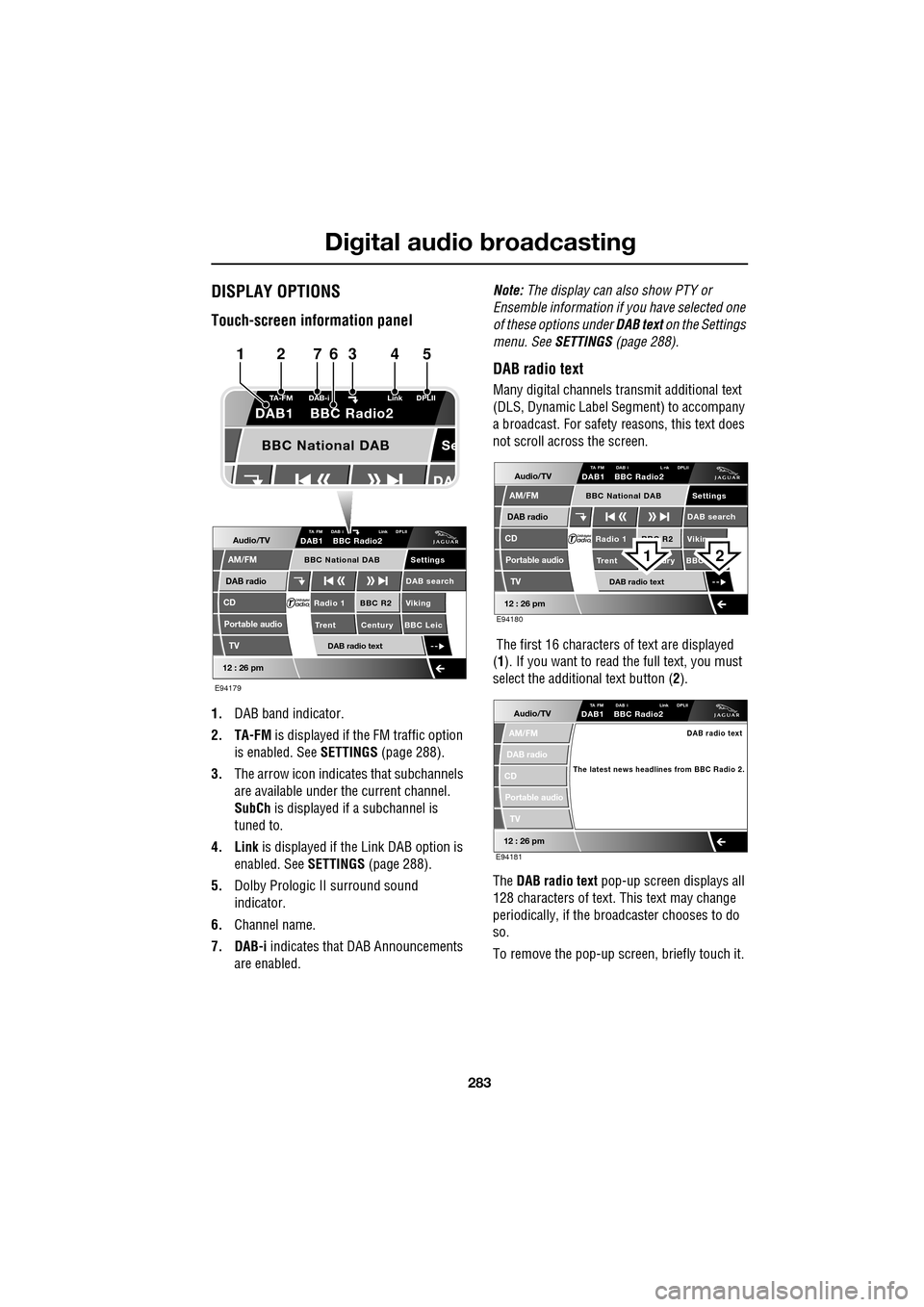
1.DAB band indicator.
2. TA-FM is displayed if the FM traffic option
is enabled. See SETTINGS (page 288).
3. The arrow icon indicates that subchannels
are available under the current channel.
SubCh is displayed if a subchannel is
tuned to.
4. Link is displayed if th e Link DAB option is
enabled. See SETTINGS (page 288).
5. Dolby Prologic II surround sound
indicator.
6. Channel name.
7. DAB-i indicates that DAB Announcements
are enabled. Note:
The display can also show PTY or
Ensemble information if you have selected one
of these options under DAB text on the Settings
menu. See SETTINGS (page 288).
DAB radio text
Many digital channels tr ansmit additional text
(DLS, Dynamic Label Segment) to accompany
a broadcast. For safety reasons, this text does
not scroll across the screen.
The first 16 characters of text are displayed
(1 ). If you want to read the full text, you must
select the additional text button ( 2).
The DAB radio text pop-up screen displays all
128 characters of text. This text may change
periodically, if the broadcaster chooses to do
so.
To remove the pop-up screen, briefly touch it.
Audio/TV
DAB radio
CD
AM/FM
12 : 26 pm
BBC R2 Viking
Trent Century BBC LeicRadio 1
Settings
DAB search
TA FM DAB i Link DPLIIDAB1 BBC Radio2
Portable audio
TV
DAB radio text
BBC National DAB
Se
TA-FM DAB-i
Link DPLII
DAB1 BBC Radio2
BBC National DAB
E94179
1234567
Audio/TV
DAB radio
CD
AM/FM
12 : 26 pm
BBC R2 Vikin
Trent ury BBC Radio 1
Settings
DAB search
TA FM DAB i L nk DPLIIDAB1 BBC Radio2
Portable audio
TV
DAB radio text
BBC National DAB
E94180
21
Audio/TV
DAB radio
CD
AM/FM
12 : 26 pm
TA FM DAB i Link DPLIIDAB1 BBC Radio2
Portable audio
TV
DAB radio text
The latest news headlines from BBC Radio 2.
E94181
Page 308 of 391
Telephone
308
The Bluetooth in-car telephone system allows
certain mobile phones to be used hands-free in
your vehicle. There is no need to connect the
mobile phone to a cradle or cable.
Bluetooth® is a registered trademark of
Bluetooth SIG, Inc.
Please refer to the Owner section of the Jaguar
website at www.jaguar.com , for a list of
compatible phones. Altern atively, please refer
to your Dealer/Authorised Repairer.
Note: The Bluetooth technology phones listed
on Jaguar.com, have been tested for
compatibility with Jaguar vehicles.
Performance will vary, based on phone
software version, covera ge and your wireless
carrier. Phones are warranted by their
manufacturer, not Jaguar.
If your mobile phone battery charge becomes
low it may switch off its Bluetooth link to the
vehicle. This is normal operation for mobile
phones, to help preserve the remaining battery
charge. In this event, the touch-screen will
display a phone connection message.
The mobile phone must be paired and docked
with the vehicle system before use.
See TELEPHONE PAIRING AND DOCKING
(page 309). Once paired and docked, the
phone can be operated via the steering wheel
switches or the touch-screen. The mobile
phone doesn’t need to be physically connected
to the vehicle, it can be left in a jacket pocket,
for instance. Calls are routed through the
vehicle’s audio speake rs, and a dedicated
microphone is fitted within the overhead
console and is directionally biased towards the
driver.
You can use the system to answer or reject
incoming calls, make outgoing calls or alter the
call volume. The system does not support SMS
text messaging. Note:
The vehicle ignition system must be on
and the touch-screen system must be active, in
order to use the phone.
Call volume
The volume of telephone calls can be adjusted
for hands-free operation. To adjust the volume,
operate the audio system’s volume control
during a phone call.
If the audio system is in use when the phone
becomes active, the audio system source is
suppressed for the duration of the call.
Charging your phone
It is possible to use the in-car 12V/USB socket
to charge your mobile phone. Refer to the
mobile phone operating instructions for
charging information.
Page 331 of 391
331
Television
Analogue/Digital option
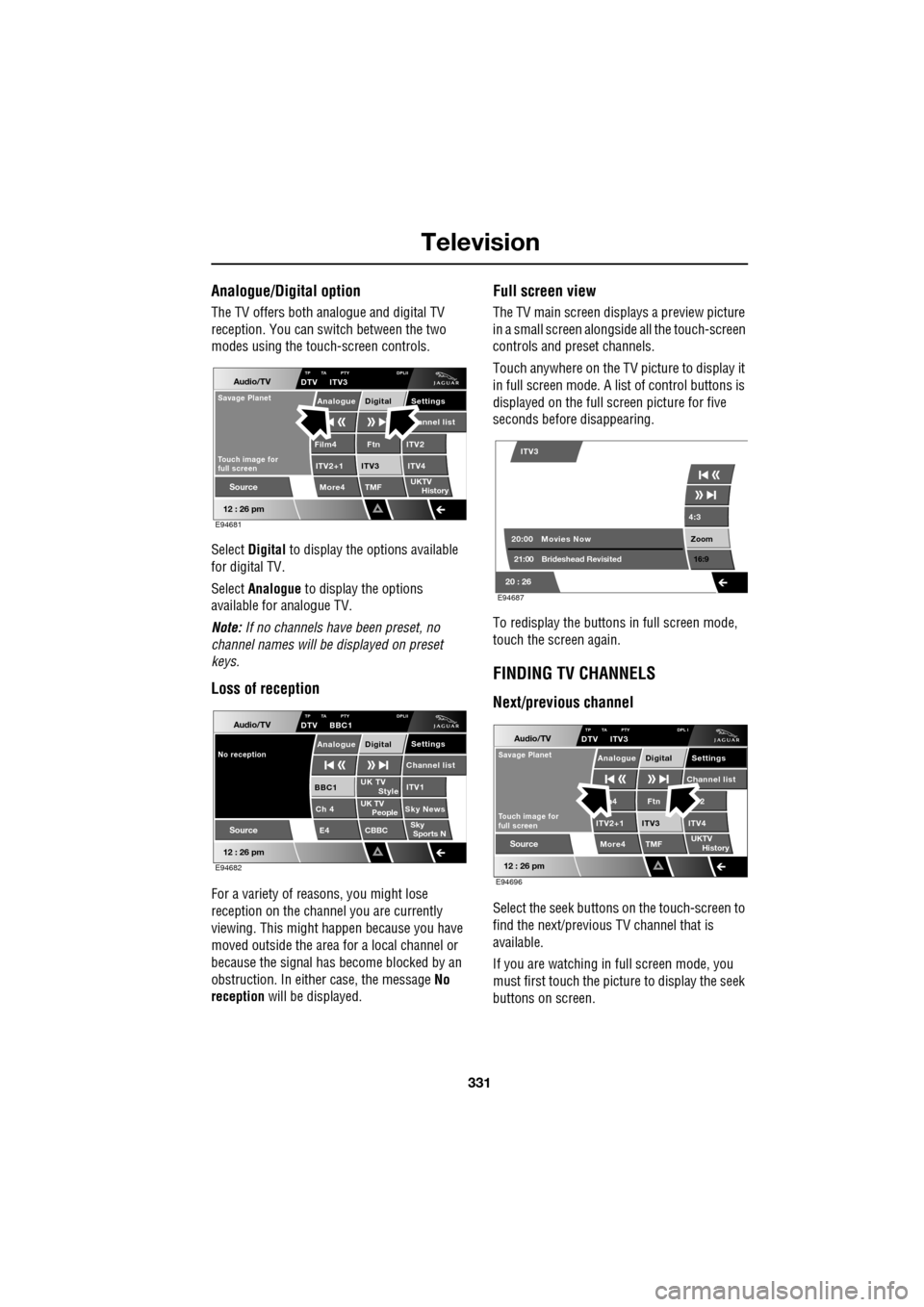
The TV offers both analogue and digital TV
reception. You can switch between the two
modes using the touc h-screen controls.
Select Digital to display the options available
for digital TV.
Select Analogue to display the options
available for analogue TV.
Note: If no channels have been preset, no
channel names will be displayed on preset
keys.
Loss of reception
For a variety of reasons, you might lose
reception on the channel you are currently
viewing. This might happen because you have
moved outside the area for a local channel or
because the signal has become blocked by an
obstruction. In either case, the message No
reception will be displayed.
Full screen view
The TV main screen disp lays a preview picture
in a small screen alongsid e all the touch-screen
controls and preset channels.
Touch anywhere on the TV picture to display it
in full screen mode. A list of control buttons is
displayed on the full screen picture for five
seconds before disappearing.
To redisplay the buttons in full screen mode,
touch the screen again.
FINDING TV CHANNELS
Next/previous channel
Select the seek buttons on the touch-screen to
find the next/previous TV channel that is
available.
If you are watching in full screen mode, you
must first touch the picture to display the seek
buttons on screen.
Audio/TV
12 : 26 pm
More4 TMF
TP TA PTY DPLIIDTV ITV3
UKTV
HistorySource
ITV2
ITV2+1 ITV4Film4
Settings annel listAnalogue Digital
Ftn
ITV3
Touch image for
full screen
Savage Planet
E94681
Audio/TV
12 : 26 pm
UK TV ITV1
Ch 4 Sky News E4 CBBCBBC1
Settings
Channel list
TP TA PTY DPLIIDTV BBC1
Style
UK TV People
SkySports N
Source
No receptionAnalogue Digital
E94682
4:3
Zoom 16:9
ITV3
20:0021:00 Movies Now
Brideshead Revisited
20 : 26 E94687
Audio/TV
12 : 26 pm
More4 TMF
TP TA PTY DPL IDTV ITV3
UKTV
HistorySource
2
ITV2+1 ITV4m4
Settings
Channel listAnalogue Digital
Ftn
ITV3
Touch image for
full screen
Savage Planet
E94696
Page 332 of 391
Television
332
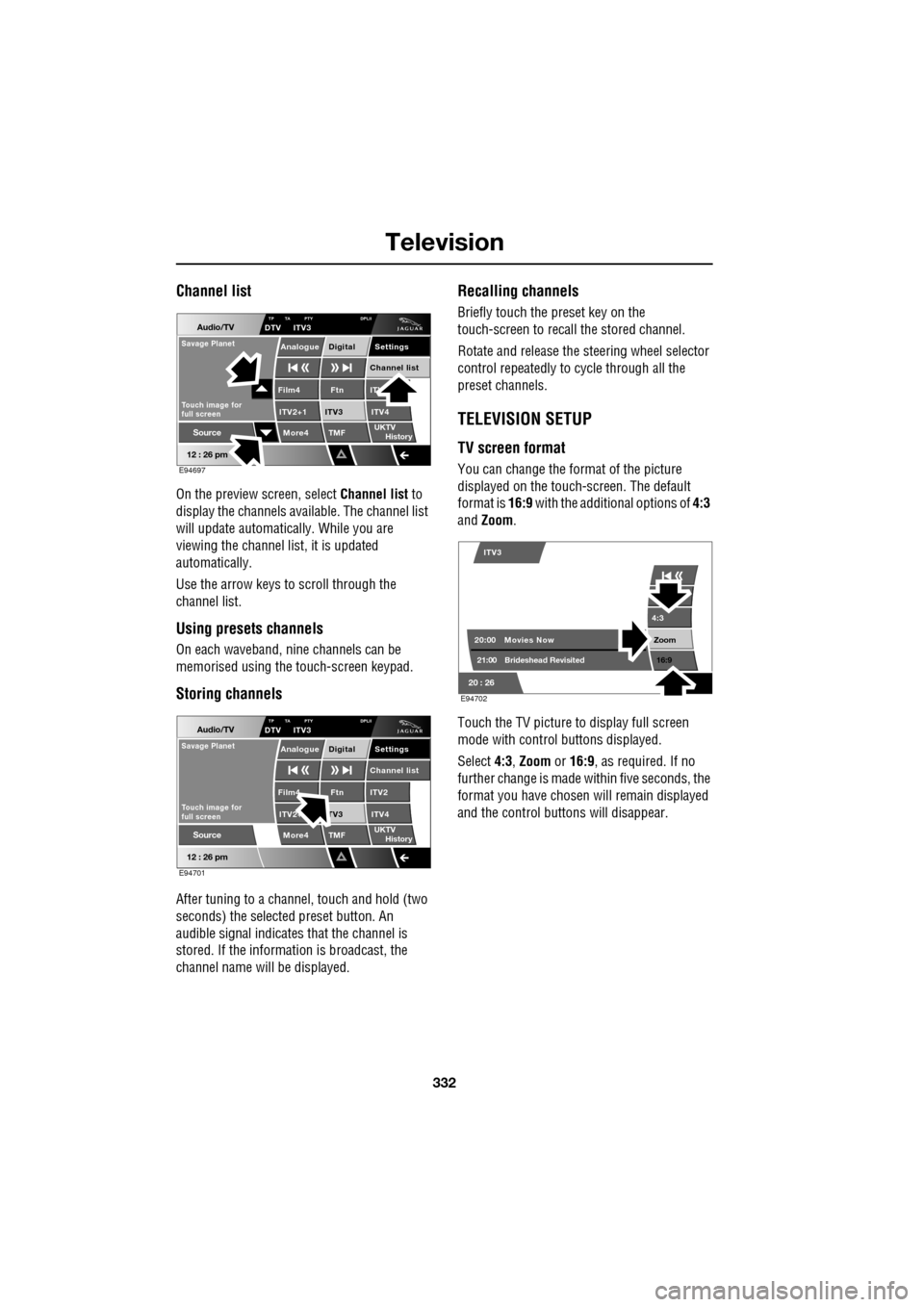
Channel list
On the preview screen, select Channel list to
display the channels available. The channel list
will update automatically. While you are
viewing the channel list, it is updated
automatically.
Use the arrow keys to scroll through the
channel list.
Using presets channels
On each waveband, ni ne channels can be
memorised using the touch-screen keypad.
Storing channels
After tuning to a channe l, touch and hold (two
seconds) the selected preset button. An
audible signal i ndicates that the channel is
stored. If the informat ion is broadcast, the
channel name wi ll be displayed.
Recalling channels
Briefly touch the preset key on the
touch-screen to recall the stored channel.
Rotate and release the steering wheel selector
control repeatedly to cycle through all the
preset channels.
TELEVISION SETUP
TV screen format
You can change the format of the picture
displayed on the touch-screen. The default
format is 16:9 with the additional options of 4:3
and Zoom .
Touch the TV picture to display full screen
mode with control buttons displayed.
Select 4:3, Zoom or 16:9 , as required. If no
further change is made within five seconds, the
format you have chosen will remain displayed
and the control butt ons will disappear.
Audio/TV
12 : 26 pm
More4 TMF
TP TA PTY DPLIIDTV ITV3
UKTV
HistorySource
ITV
ITV2+1 ITV4Film4
Settings
Channel listAnalogue Digital
Ftn
ITV3
Touch image for
full screen
Savage Planet
E94697
Audio/TV
12 : 26 pm
More4 TMF
TP TA PTY DPLIIDTV ITV3
UKTV
HistorySource
ITV2
ITV2+ ITV4Film4
Settings
Channel listAnalogue Digital
Ftn
TV3
Touch image for
full screen
Savage Planet
E94701
4:3
Zoom 16:9
ITV3
20:0021:00 Movies Now
Brideshead Revisited
20 : 26 E94702
Page 351 of 391
351
Navigation system
CALIBRATION
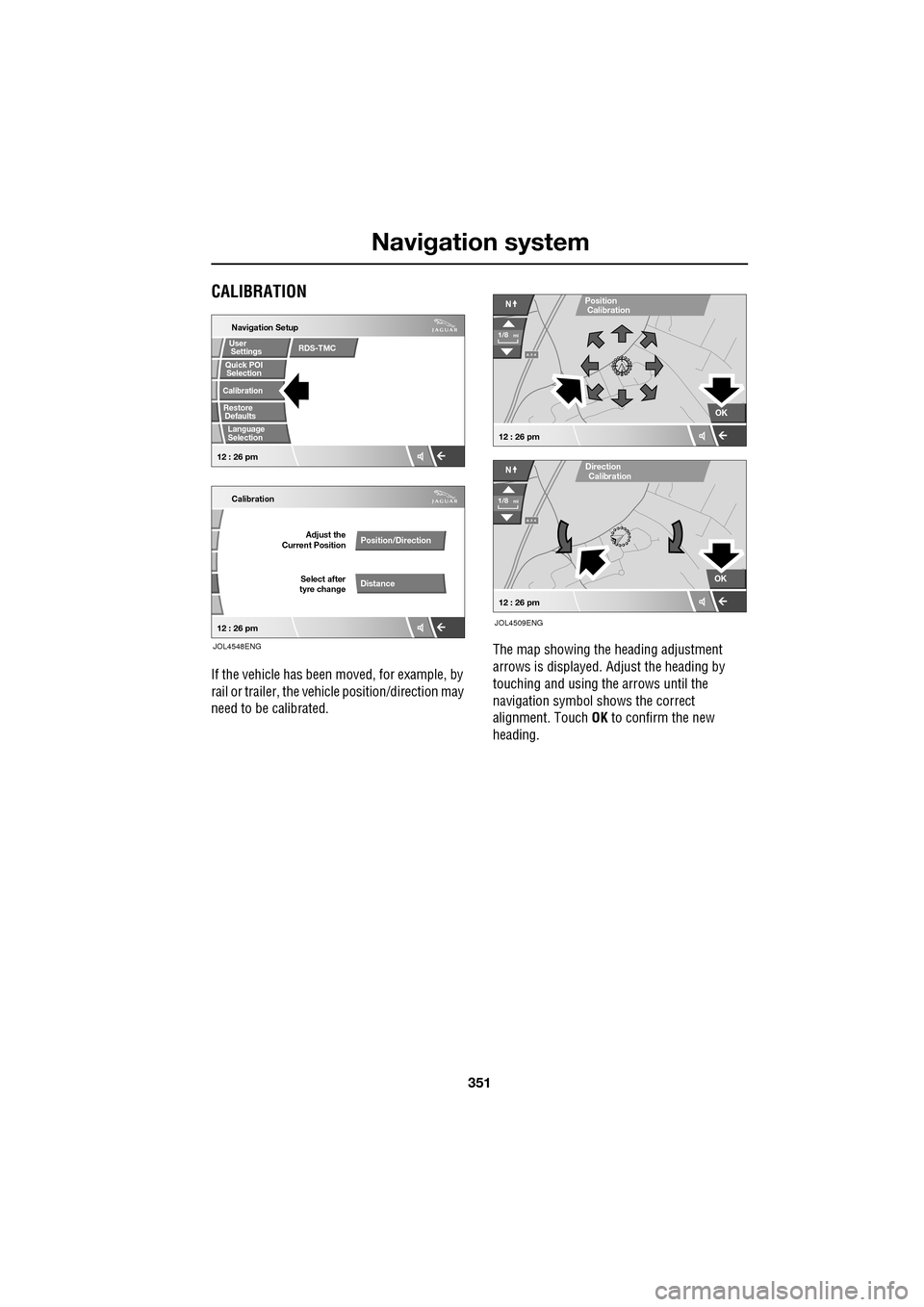
If the vehicle has been moved, for example, by
rail or trailer, the vehi cle position/direction may
need to be calibrated. The map showing the heading adjustment
arrows is displayed. Adjust the heading by
touching and using th
e arrows until the
navigation symbol shows the correct
alignment. Touch OK to confirm the new
heading.
Quick POI
Navigation Setup
Calibration
Select after
tyre change Adjust the
Current Position
Position/Direction
Distance
12 : 26 pm 12 : 26 pm
Selection
Calibration
Restore User
Settings
Defaults Quick POI
JOL4548ENG
RDS-TMC
Language
Selection
A 3 4
OK
NPosition
A 3 4
N
Calibration
OK
1/8mi
1/8mi
12 : 26 pm
12 : 26 pm
Direction
Calibration
JOL4509ENG
Page 369 of 391
369
Navigation system
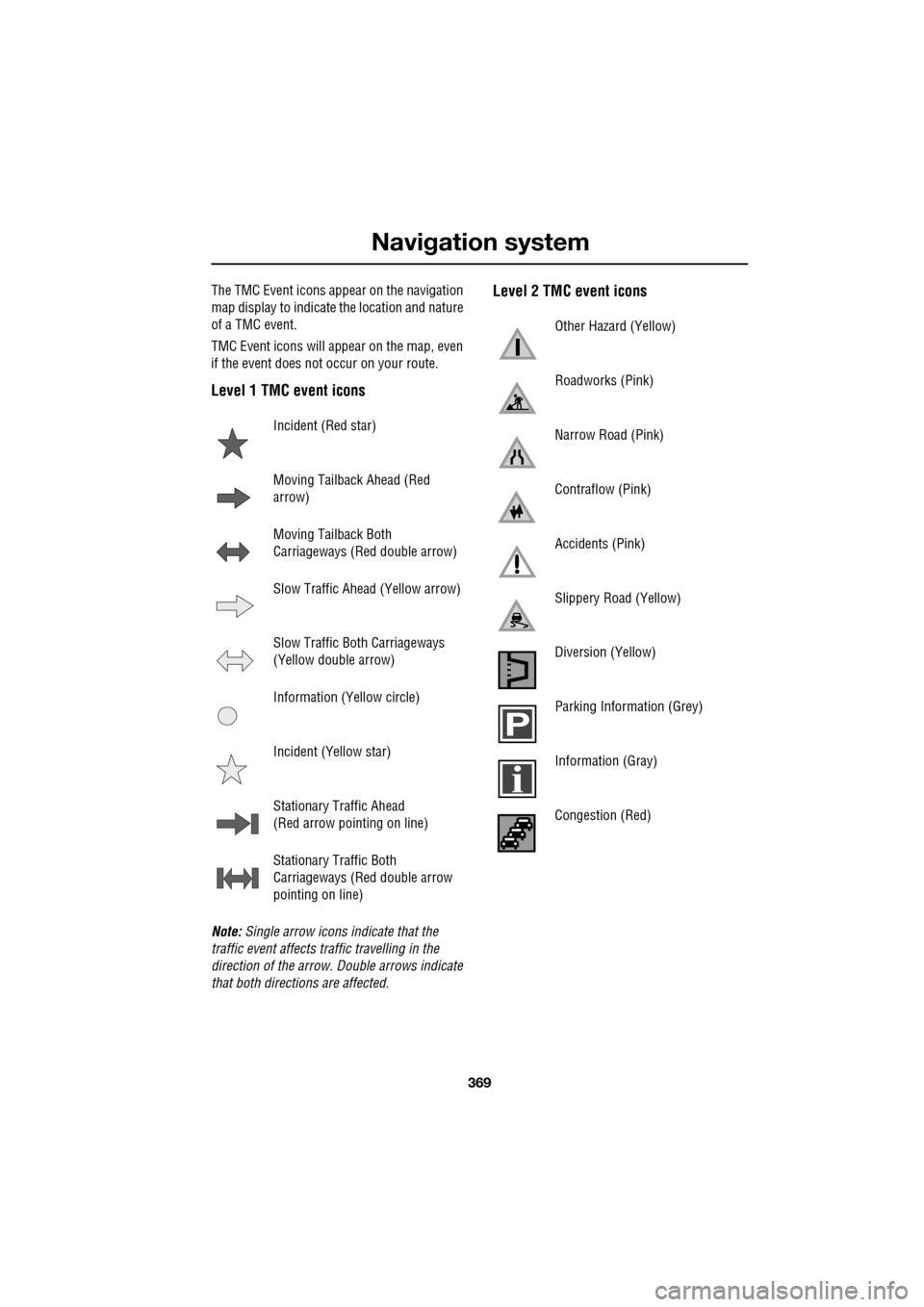
The TMC Event icons appear on the navigation
map display to indicate the location and nature
of a TMC event.
TMC Event icons will appear on the map, even
if the event does not occur on your route.
Level 1 TMC event icons
Note: Single arrow icons indicate that the
traffic event affects traffic travelling in the
direction of the arrow. Double arrows indicate
that both directions are affected.
Level 2 TMC event icons
Incident (Red star)
Moving Tailback Ahead (Red
arrow)
Moving Tailback Both
Carriageways (Red double arrow)
Slow Traffic Ahead (Yellow arrow)
Slow Traffic Both Carriageways
(Yellow double arrow)
Information (Yellow circle)
Incident (Yellow star)
Stationary Traffic Ahead
(Red arrow pointing on line)
Stationary Traffic Both
Carriageways (Red double arrow
pointing on line)
Other Hazard (Yellow)
Roadworks (Pink)
Narrow Road (Pink)
Contraflow (Pink)
Accidents (Pink)
Slippery Road (Yellow)
Diversion (Yellow)
Parking Information (Grey)
Information (Gray)
Congestion (Red)
Page 374 of 391
Navigation system
374
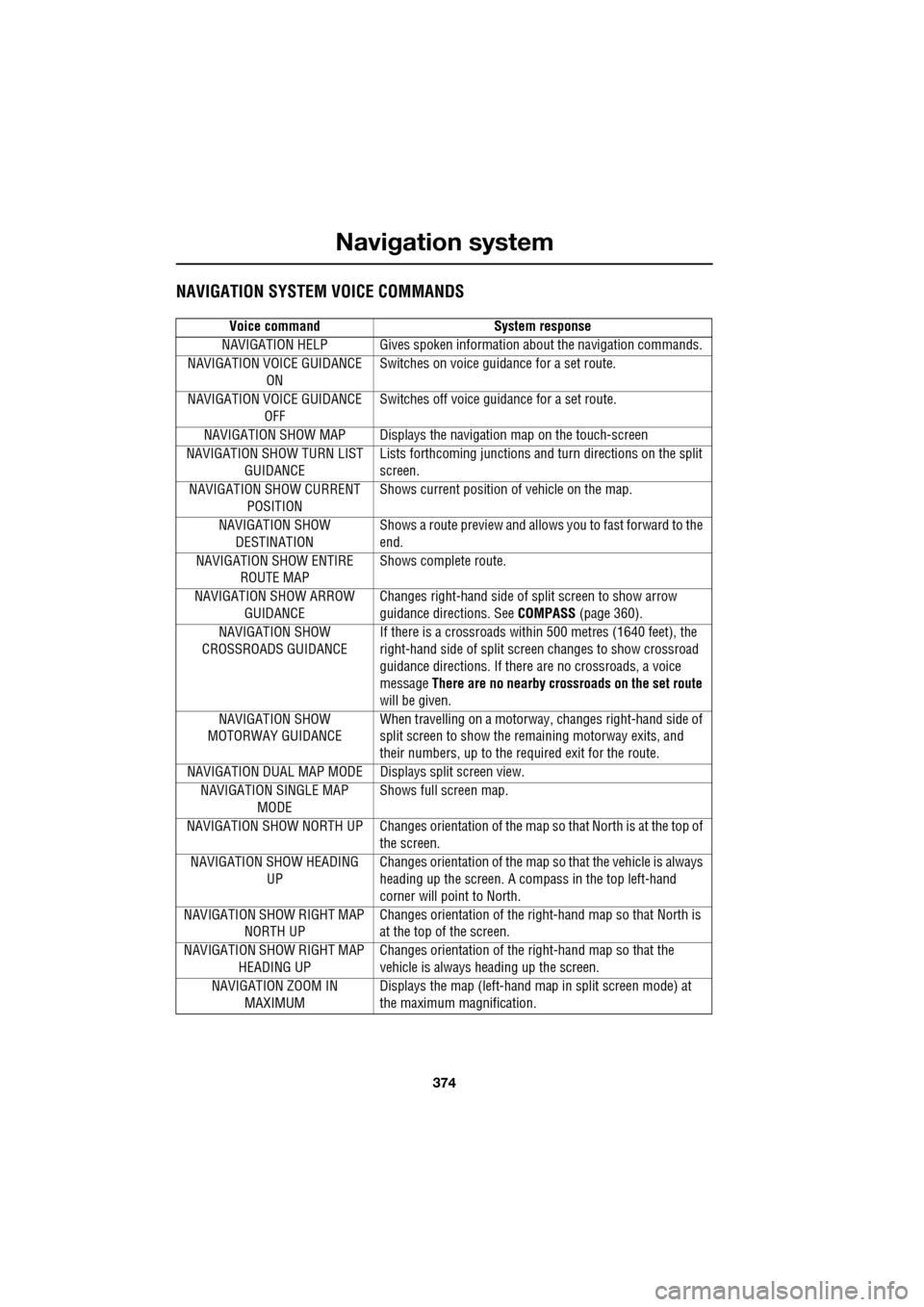
NAVIGATION SYSTEM VOICE COMMANDS
Voice commandSystem response
NAVIGATION HELP Gives s poken information about the navigation commands.
NAVIGATION VOICE GUIDANCE ON Switches on voice guidance for a set route.
NAVIGATION VOICE GUIDANCE OFF Switches off voice guidance for a set route.
NAVIGATION SHOW MAP Displays the navigation map on the touch-screen
NAVIGATION SHOW TURN LIST
GUIDANCE Lists forthcoming junctions and turn directions on the split
screen.
NAVIGATION SHOW CURRENT POSITION Shows current position of vehicle on the map.
NAVIGATION SHOW DESTINATION Shows a route preview and allows
you to fast forward to the
end.
NAVIGATION SHOW ENTIRE ROUTE MAP Shows complete route.
NAVIGATION SHOW ARROW GUIDANCE Changes right-hand side of sp
lit screen to show arrow
guidance directions. See COMPASS (page 360).
NAVIGATION SHOW
CROSSROADS GUIDANCE If there is a crossroads within 500 metres (1640 feet), the
right-hand side of split screen
changes to show crossroad
guidance directions. If there are no crossroads, a voice
message There are no nearby crossroads on the set route
will be given.
NAVIGATION SHOW
MOTORWAY GUIDANCE When travelling on a motorway
, changes right-hand side of
split screen to show the remaining motorway exits, and
their numbers, up to the required exit for the route.
NAVIGATION DUAL MAP MODE Displays split screen view. NAVIGATION SINGLE MAP MODE Shows full screen map.
NAVIGATION SHOW NORTH UP Change s orientation of the map so that North is at the top of
the screen.
NAVIGATION SHOW HEADING UP Changes orientation of the map so
that the vehicle is always
heading up the screen. A compass in the top left-hand
corner will point to North.
NAVIGATION SH OW RIGHT MAP
NORTH UP Changes orientation of
the right-hand map so that North is
at the top of the screen.
NAVIGATION SH OW RIGHT MAP
HEADING UP Changes orientation of the
right-hand map so that the
vehicle is always heading up the screen.
NAVIGATION ZOOM IN MAXIMUM Displays the map (left-hand map in split screen mode) at
the maximum magnification.
Page 381 of 391
Index
381
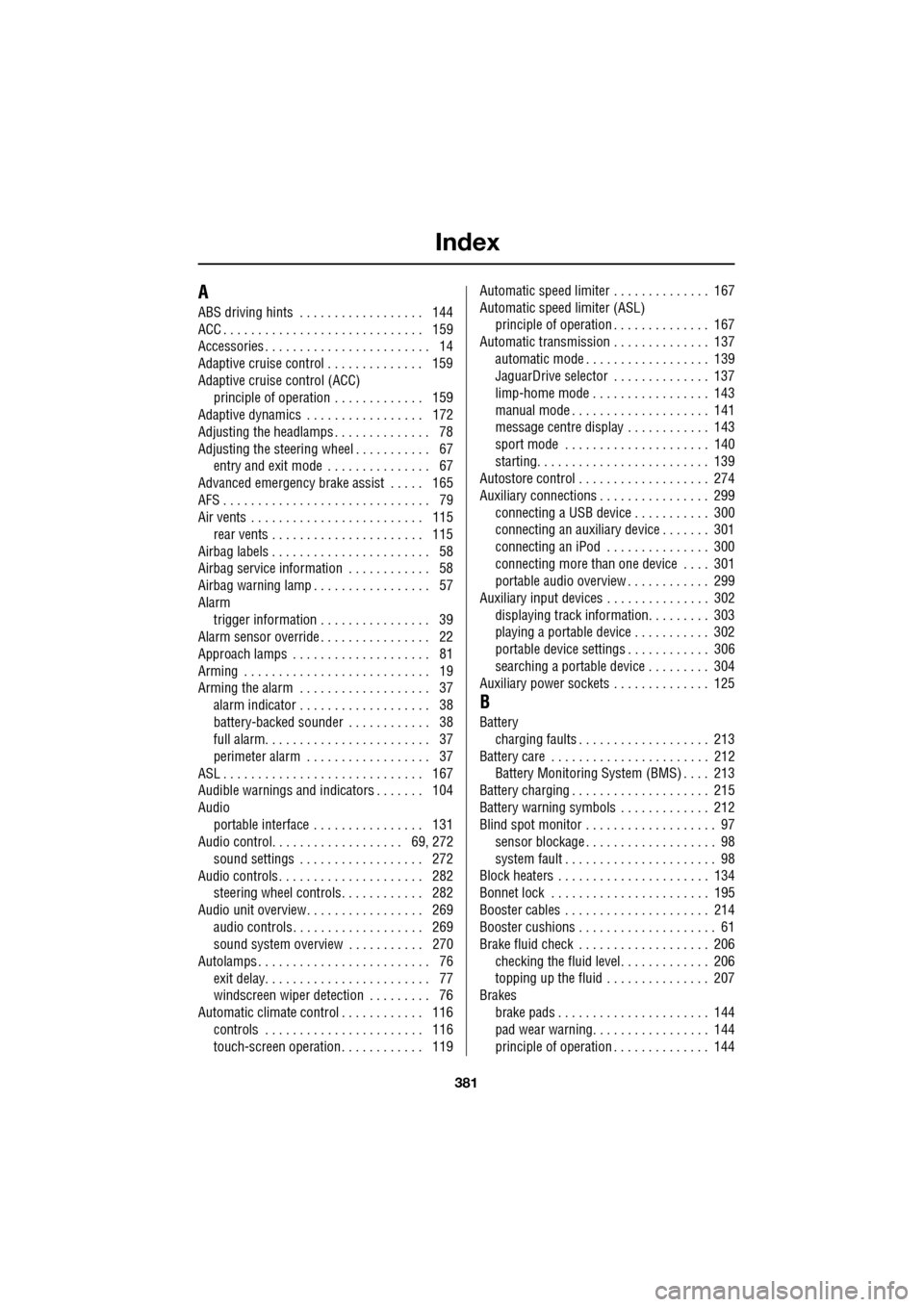
A
ABS driving hints . . . . . . . . . . . . . . . . . . 144
ACC . . . . . . . . . . . . . . . . . . . . . . . . . . . . . 159
Accessories . . . . . . . . . . . . . . . . . . . . . . . . 14
Adaptive cruise control . . . . . . . . . . . . . . 159
Adaptive cruise control (ACC)principle of operation . . . . . . . . . . . . . 159
Adaptive dynamics . . . . . . . . . . . . . . . . . 172
Adjusting the headlamps . . . . . . . . . . . . . . 78
Adjusting the steering wheel . . . . . . . . . . . 67 entry and exit mode . . . . . . . . . . . . . . . 67
Advanced emergency brake assist . . . . . 165
AFS . . . . . . . . . . . . . . . . . . . . . . . . . . . . . . 79
Air vents . . . . . . . . . . . . . . . . . . . . . . . . . 115 rear vents . . . . . . . . . . . . . . . . . . . . . . 115
Airbag labels . . . . . . . . . . . . . . . . . . . . . . . 58
Airbag service information . . . . . . . . . . . . 58
Airbag warning lamp . . . . . . . . . . . . . . . . . 57
Alarm trigger information . . . . . . . . . . . . . . . . 39
Alarm sensor override . . . . . . . . . . . . . . . . 22
Approach lamps . . . . . . . . . . . . . . . . . . . . 81
Arming . . . . . . . . . . . . . . . . . . . . . . . . . . . 19
Arming the alarm . . . . . . . . . . . . . . . . . . . 37
alarm indicator . . . . . . . . . . . . . . . . . . . 38
battery-backed sounder . . . . . . . . . . . . 38
full alarm. . . . . . . . . . . . . . . . . . . . . . . . 37
perimeter alarm . . . . . . . . . . . . . . . . . . 37
ASL . . . . . . . . . . . . . . . . . . . . . . . . . . . . . 167
Audible warnings and indicators . . . . . . . 104
Audio portable interface . . . . . . . . . . . . . . . . 131
Audio control. . . . . . . . . . . . . . . . . . . 69, 272
sound settings . . . . . . . . . . . . . . . . . . 272
Audio controls . . . . . . . . . . . . . . . . . . . . . 282 steering wheel controls. . . . . . . . . . . . 282
Audio unit overview. . . . . . . . . . . . . . . . . 269 audio controls . . . . . . . . . . . . . . . . . . . 269
sound system overview . . . . . . . . . . . 270
Autolamps . . . . . . . . . . . . . . . . . . . . . . . . . 76 exit delay. . . . . . . . . . . . . . . . . . . . . . . . 77
windscreen wiper detection . . . . . . . . . 76
Automatic climate control . . . . . . . . . . . . 116 controls . . . . . . . . . . . . . . . . . . . . . . . 116
touch-screen operation . . . . . . . . . . . . 119 Automatic speed limiter . . . . . . . . . . . . . . 167
Automatic speed limiter (ASL)
principle of operation . . . . . . . . . . . . . . 167
Automatic transmission . . . . . . . . . . . . . . 137
automatic mode . . . . . . . . . . . . . . . . . . 139
JaguarDrive selector . . . . . . . . . . . . . . 137
limp-home mode . . . . . . . . . . . . . . . . . 143
manual mode . . . . . . . . . . . . . . . . . . . . 141
message centre display . . . . . . . . . . . . 143
sport mode . . . . . . . . . . . . . . . . . . . . . 140
starting. . . . . . . . . . . . . . . . . . . . . . . . . 139
Autostore control . . . . . . . . . . . . . . . . . . . 274
Auxiliary connections . . . . . . . . . . . . . . . . 299 connecting a USB device . . . . . . . . . . . 300
connecting an auxiliary device . . . . . . . 301
connecting an iPod . . . . . . . . . . . . . . . 300
connecting more than one device . . . . 301
portable audio overview . . . . . . . . . . . . 299
Auxiliary input devices . . . . . . . . . . . . . . . 302 displaying track information. . . . . . . . . 303
playing a portable device . . . . . . . . . . . 302
portable device settings . . . . . . . . . . . . 306
searching a portable device . . . . . . . . . 304
Auxiliary power sockets . . . . . . . . . . . . . . 125
B
Battery charging faults . . . . . . . . . . . . . . . . . . . 213
Battery care . . . . . . . . . . . . . . . . . . . . . . . 212 Battery Monitoring System (BMS) . . . . 213
Battery charging . . . . . . . . . . . . . . . . . . . . 215
Battery warning symbols . . . . . . . . . . . . . 212
Blind spot monitor . . . . . . . . . . . . . . . . . . . 97 sensor blockage . . . . . . . . . . . . . . . . . . . 98
system fault . . . . . . . . . . . . . . . . . . . . . . 98
Block heaters . . . . . . . . . . . . . . . . . . . . . . 134
Bonnet lock . . . . . . . . . . . . . . . . . . . . . . . 195
Booster cables . . . . . . . . . . . . . . . . . . . . . 214
Booster cushions . . . . . . . . . . . . . . . . . . . . 61
Brake fluid check . . . . . . . . . . . . . . . . . . . 206
checking the fluid level. . . . . . . . . . . . . 206
topping up the fluid . . . . . . . . . . . . . . . 207
Brakes
brake pads . . . . . . . . . . . . . . . . . . . . . . 144
pad wear warning. . . . . . . . . . . . . . . . . 144
principle of operation . . . . . . . . . . . . . . 144
Page 382 of 391
Index
382
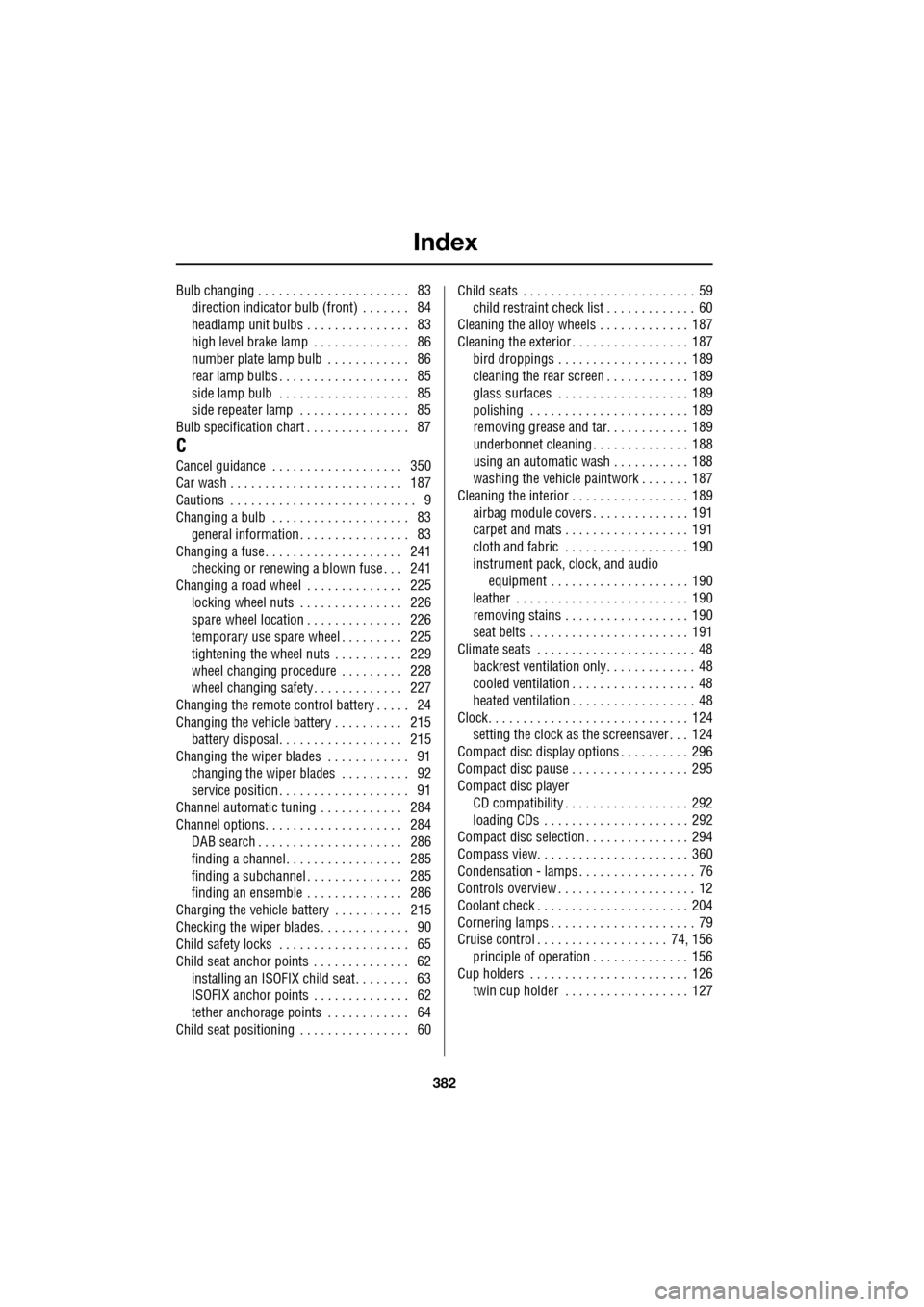
Bulb changing . . . . . . . . . . . . . . . . . . . . . . 83direction indicator bulb (front) . . . . . . . 84
headlamp unit bulbs . . . . . . . . . . . . . . . 83
high level brake lamp . . . . . . . . . . . . . . 86
number plate lamp bulb . . . . . . . . . . . . 86
rear lamp bulbs . . . . . . . . . . . . . . . . . . . 85
side lamp bulb . . . . . . . . . . . . . . . . . . . 85
side repeater lamp . . . . . . . . . . . . . . . . 85
Bulb specification chart . . . . . . . . . . . . . . . 87
C
Cancel guidance . . . . . . . . . . . . . . . . . . . 350
Car wash . . . . . . . . . . . . . . . . . . . . . . . . . 187
Cautions . . . . . . . . . . . . . . . . . . . . . . . . . . . 9
Changing a bulb . . . . . . . . . . . . . . . . . . . . 83 general information . . . . . . . . . . . . . . . . 83
Changing a fuse. . . . . . . . . . . . . . . . . . . . 241 checking or renewing a blown fuse . . . 241
Changing a road wheel . . . . . . . . . . . . . . 225
locking wheel nuts . . . . . . . . . . . . . . . 226
spare wheel location . . . . . . . . . . . . . . 226
temporary use spare wheel . . . . . . . . . 225
tightening the wheel nuts . . . . . . . . . . 229
wheel changing procedure . . . . . . . . . 228
wheel changing safety. . . . . . . . . . . . . 227
Changing the remote cont rol battery . . . . . 24
Changing the vehicle battery . . . . . . . . . . 215
battery disposal. . . . . . . . . . . . . . . . . . 215
Changing the wiper blades . . . . . . . . . . . . 91 changing the wiper blades . . . . . . . . . . 92
service position . . . . . . . . . . . . . . . . . . . 91
Channel automatic tuning . . . . . . . . . . . . 284
Channel options. . . . . . . . . . . . . . . . . . . . 284 DAB search . . . . . . . . . . . . . . . . . . . . . 286
finding a channel. . . . . . . . . . . . . . . . . 285
finding a subchannel . . . . . . . . . . . . . . 285
finding an ensemble . . . . . . . . . . . . . . 286
Charging the vehicle battery . . . . . . . . . . 215
Checking the wiper blades . . . . . . . . . . . . . 90
Child safety locks . . . . . . . . . . . . . . . . . . . 65
Child seat anchor points . . . . . . . . . . . . . . 62 installing an ISOFIX child seat. . . . . . . . 63
ISOFIX anchor points . . . . . . . . . . . . . . 62
tether anchorage points . . . . . . . . . . . . 64
Child seat positioning . . . . . . . . . . . . . . . . 60 Child seats . . . . . . . . . . . . . . . . . . . . . . . . . 59
child restraint check list . . . . . . . . . . . . . 60
Cleaning the alloy wheels . . . . . . . . . . . . . 187
Cleaning the exterior . . . . . . . . . . . . . . . . . 187
bird droppings . . . . . . . . . . . . . . . . . . . 189
cleaning the rear screen . . . . . . . . . . . . 189
glass surfaces . . . . . . . . . . . . . . . . . . . 189
polishing . . . . . . . . . . . . . . . . . . . . . . . 189
removing grease and tar. . . . . . . . . . . . 189
underbonnet cleaning . . . . . . . . . . . . . . 188
using an automatic wash . . . . . . . . . . . 188
washing the vehicle paintwork . . . . . . . 187
Cleaning the interior . . . . . . . . . . . . . . . . . 189 airbag module covers . . . . . . . . . . . . . . 191
carpet and mats . . . . . . . . . . . . . . . . . . 191
cloth and fabric . . . . . . . . . . . . . . . . . . 190
instrument pack, clock, and audio equipment . . . . . . . . . . . . . . . . . . . . 190
leather . . . . . . . . . . . . . . . . . . . . . . . . . 190
removing stains . . . . . . . . . . . . . . . . . . 190
seat belts . . . . . . . . . . . . . . . . . . . . . . . 191
Climate seats . . . . . . . . . . . . . . . . . . . . . . . 48 backrest ventilation only. . . . . . . . . . . . . 48
cooled ventilation . . . . . . . . . . . . . . . . . . 48
heated ventilation . . . . . . . . . . . . . . . . . . 48
Clock. . . . . . . . . . . . . . . . . . . . . . . . . . . . . 124 setting the clock as the screensaver . . . 124
Compact disc display options . . . . . . . . . . 296
Compact disc pause . . . . . . . . . . . . . . . . . 295
Compact disc player CD compatibility . . . . . . . . . . . . . . . . . . 292
loading CDs . . . . . . . . . . . . . . . . . . . . . 292
Compact disc selection . . . . . . . . . . . . . . . 294
Compass view. . . . . . . . . . . . . . . . . . . . . . 360
Condensation - lamps . . . . . . . . . . . . . . . . . 76
Controls overview . . . . . . . . . . . . . . . . . . . . 12
Coolant check . . . . . . . . . . . . . . . . . . . . . . 204
Cornering lamps . . . . . . . . . . . . . . . . . . . . . 79
Cruise control . . . . . . . . . . . . . . . . . . . 74, 156
principle of operation . . . . . . . . . . . . . . 156
Cup holders . . . . . . . . . . . . . . . . . . . . . . . 126 twin cup holder . . . . . . . . . . . . . . . . . . 127