hold JAGUAR XF 2009 1.G Repair Manual
[x] Cancel search | Manufacturer: JAGUAR, Model Year: 2009, Model line: XF, Model: JAGUAR XF 2009 1.GPages: 391, PDF Size: 19.32 MB
Page 368 of 391
Navigation system
368
RDS-TMC OVERVIEW
Radio Data System-Traffic Message Channel
(RDS-TMC) is a feature that announces traffic
hold-ups on your route, as broadcast by radio
stations that transmit TMC information.
Touch the RDS-TMC button on the Navigation
Menu to access the TMC menu.
Touch the Change button - the sy stem begins
a search of all radio stat ions being received in
your locality.
The tuner will scan the FM frequency once and
this may take a few minutes. Searching will be
displayed while sca nning is in progress.
When a station is found which is offering TMC
information, the RDS name is shown on the list
and the search for more stations will continue.
Note: In the United Kingdom the station giving
TMC information is Classic FM.
You can stop the search at any time and select
any stations presented on the list, by touching
the Change button or the button next to the
desired station in the list.
RDS-TMC display
When a TMC signal is received the icon in the
top left of the screen w ill appear gray. If a TMC
signal is not being rece ived, the icon will be
shown with a bar through it.
The system will inform the driver of any
roadworks, narrow road, contraflow,
accidents, slippery road, diversion,
information, parking in formation, congestion
or other hazard. The driver is informed of a traffic event as
follows:
•
A TMC Event icon shown on the map at the
location of the event.
• Text can be displaye d showing the details
of each occurrence wh ich can be selected
either by touching the screen icon or from
the traffic information list.
• Voice guidance will describe the event on
the route. This information will be repeated
when the repeat switch is selected.
• Dynamic route guidance, which calculates
an alternative route when the system
receives the traffic event warning affecting
the route currently set in the navigation
system.
• Traffic event list shows all events sorted by
road name/ distance on your selected
route in a straight line or along your actual
route.
The information rega rding the hold-up is
maintained and updated even if the vehicle
crosses into another country.RDS-TMC icons
Any traffic event (broadcast on TMC) in your
area, will be displayed as a warning icon on the
map and an alert may be displayed as a
message giving the road number(s) and
between which junctions the hold-up or event
occurs. Voice guidance will also inform you of
the hold-up when an event icon exists on the
current route.
This data is stored in the system for up to of 30
minutes.
The colour of the TMC icon changes in order to
show the type and priori ty of a TMC event. The
background colour of the icon returns to
normal when there is no longer an event or
hold-up, or if any re-route instructions are
calculated.
Page 373 of 391
373
Navigation system
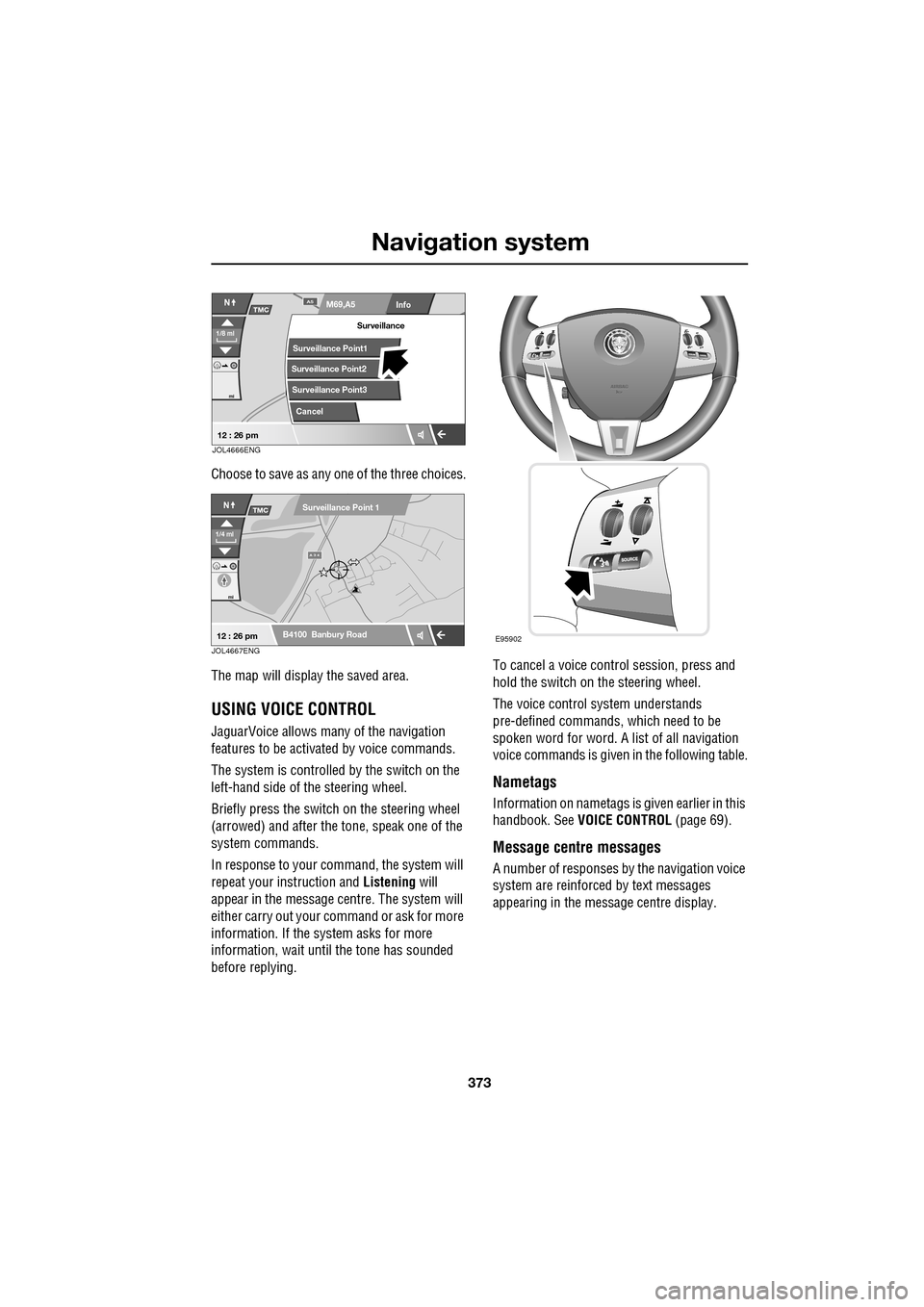
Choose to save as any one of the three choices.
The map will display the saved area.
USING VOICE CONTROL
JaguarVoice allows many of the navigation
features to be activa ted by voice commands.
The system is controlled by the switch on the
left-hand side of th e steering wheel.
Briefly press the switch on the steering wheel
(arrowed) and after the tone, speak one of the
system commands.
In response to your command, the system will
repeat your instruction and Listening will
appear in the message centre. The system will
either carry out your command or ask for more
information. If the system asks for more
information, wait until the tone has sounded
before replying. To cancel a voice control session, press and
hold the switch on the steering wheel.
The voice control system understands
pre-defined commands, which need to be
spoken word for word. A list of all navigation
voice commands is given
in the following table.
Nametags
Information on nametags is given earlier in this
handbook. See VOICE CONTROL (page 69).
Message centre messages
A number of responses by the navigation voice
system are reinforced by text messages
appearing in the message centre display.
Info
N
1/8 ml
M69,A5A5
mi
TMC
Surveillance Point2
Surveillance Point3 Surveillance
Cancel
Surveillance Point1
12 : 26 pmJOL4666ENG
A 3 4
mi
NTMC
B4100 Banbury Road
Surveillance Point 1
1/4 ml
12 : 26 pmJOL4667ENGE95902
Page 382 of 391
Index
382
Bulb changing . . . . . . . . . . . . . . . . . . . . . . 83direction indicator bulb (front) . . . . . . . 84
headlamp unit bulbs . . . . . . . . . . . . . . . 83
high level brake lamp . . . . . . . . . . . . . . 86
number plate lamp bulb . . . . . . . . . . . . 86
rear lamp bulbs . . . . . . . . . . . . . . . . . . . 85
side lamp bulb . . . . . . . . . . . . . . . . . . . 85
side repeater lamp . . . . . . . . . . . . . . . . 85
Bulb specification chart . . . . . . . . . . . . . . . 87
C
Cancel guidance . . . . . . . . . . . . . . . . . . . 350
Car wash . . . . . . . . . . . . . . . . . . . . . . . . . 187
Cautions . . . . . . . . . . . . . . . . . . . . . . . . . . . 9
Changing a bulb . . . . . . . . . . . . . . . . . . . . 83 general information . . . . . . . . . . . . . . . . 83
Changing a fuse. . . . . . . . . . . . . . . . . . . . 241 checking or renewing a blown fuse . . . 241
Changing a road wheel . . . . . . . . . . . . . . 225
locking wheel nuts . . . . . . . . . . . . . . . 226
spare wheel location . . . . . . . . . . . . . . 226
temporary use spare wheel . . . . . . . . . 225
tightening the wheel nuts . . . . . . . . . . 229
wheel changing procedure . . . . . . . . . 228
wheel changing safety. . . . . . . . . . . . . 227
Changing the remote cont rol battery . . . . . 24
Changing the vehicle battery . . . . . . . . . . 215
battery disposal. . . . . . . . . . . . . . . . . . 215
Changing the wiper blades . . . . . . . . . . . . 91 changing the wiper blades . . . . . . . . . . 92
service position . . . . . . . . . . . . . . . . . . . 91
Channel automatic tuning . . . . . . . . . . . . 284
Channel options. . . . . . . . . . . . . . . . . . . . 284 DAB search . . . . . . . . . . . . . . . . . . . . . 286
finding a channel. . . . . . . . . . . . . . . . . 285
finding a subchannel . . . . . . . . . . . . . . 285
finding an ensemble . . . . . . . . . . . . . . 286
Charging the vehicle battery . . . . . . . . . . 215
Checking the wiper blades . . . . . . . . . . . . . 90
Child safety locks . . . . . . . . . . . . . . . . . . . 65
Child seat anchor points . . . . . . . . . . . . . . 62 installing an ISOFIX child seat. . . . . . . . 63
ISOFIX anchor points . . . . . . . . . . . . . . 62
tether anchorage points . . . . . . . . . . . . 64
Child seat positioning . . . . . . . . . . . . . . . . 60 Child seats . . . . . . . . . . . . . . . . . . . . . . . . . 59
child restraint check list . . . . . . . . . . . . . 60
Cleaning the alloy wheels . . . . . . . . . . . . . 187
Cleaning the exterior . . . . . . . . . . . . . . . . . 187
bird droppings . . . . . . . . . . . . . . . . . . . 189
cleaning the rear screen . . . . . . . . . . . . 189
glass surfaces . . . . . . . . . . . . . . . . . . . 189
polishing . . . . . . . . . . . . . . . . . . . . . . . 189
removing grease and tar. . . . . . . . . . . . 189
underbonnet cleaning . . . . . . . . . . . . . . 188
using an automatic wash . . . . . . . . . . . 188
washing the vehicle paintwork . . . . . . . 187
Cleaning the interior . . . . . . . . . . . . . . . . . 189 airbag module covers . . . . . . . . . . . . . . 191
carpet and mats . . . . . . . . . . . . . . . . . . 191
cloth and fabric . . . . . . . . . . . . . . . . . . 190
instrument pack, clock, and audio equipment . . . . . . . . . . . . . . . . . . . . 190
leather . . . . . . . . . . . . . . . . . . . . . . . . . 190
removing stains . . . . . . . . . . . . . . . . . . 190
seat belts . . . . . . . . . . . . . . . . . . . . . . . 191
Climate seats . . . . . . . . . . . . . . . . . . . . . . . 48 backrest ventilation only. . . . . . . . . . . . . 48
cooled ventilation . . . . . . . . . . . . . . . . . . 48
heated ventilation . . . . . . . . . . . . . . . . . . 48
Clock. . . . . . . . . . . . . . . . . . . . . . . . . . . . . 124 setting the clock as the screensaver . . . 124
Compact disc display options . . . . . . . . . . 296
Compact disc pause . . . . . . . . . . . . . . . . . 295
Compact disc player CD compatibility . . . . . . . . . . . . . . . . . . 292
loading CDs . . . . . . . . . . . . . . . . . . . . . 292
Compact disc selection . . . . . . . . . . . . . . . 294
Compass view. . . . . . . . . . . . . . . . . . . . . . 360
Condensation - lamps . . . . . . . . . . . . . . . . . 76
Controls overview . . . . . . . . . . . . . . . . . . . . 12
Coolant check . . . . . . . . . . . . . . . . . . . . . . 204
Cornering lamps . . . . . . . . . . . . . . . . . . . . . 79
Cruise control . . . . . . . . . . . . . . . . . . . 74, 156
principle of operation . . . . . . . . . . . . . . 156
Cup holders . . . . . . . . . . . . . . . . . . . . . . . 126 twin cup holder . . . . . . . . . . . . . . . . . . 127