hold JAGUAR XF 2009 1.G Owner's Manual
[x] Cancel search | Manufacturer: JAGUAR, Model Year: 2009, Model line: XF, Model: JAGUAR XF 2009 1.GPages: 391, PDF Size: 19.32 MB
Page 86 of 391
Lighting
86
Number plate lamp bulb
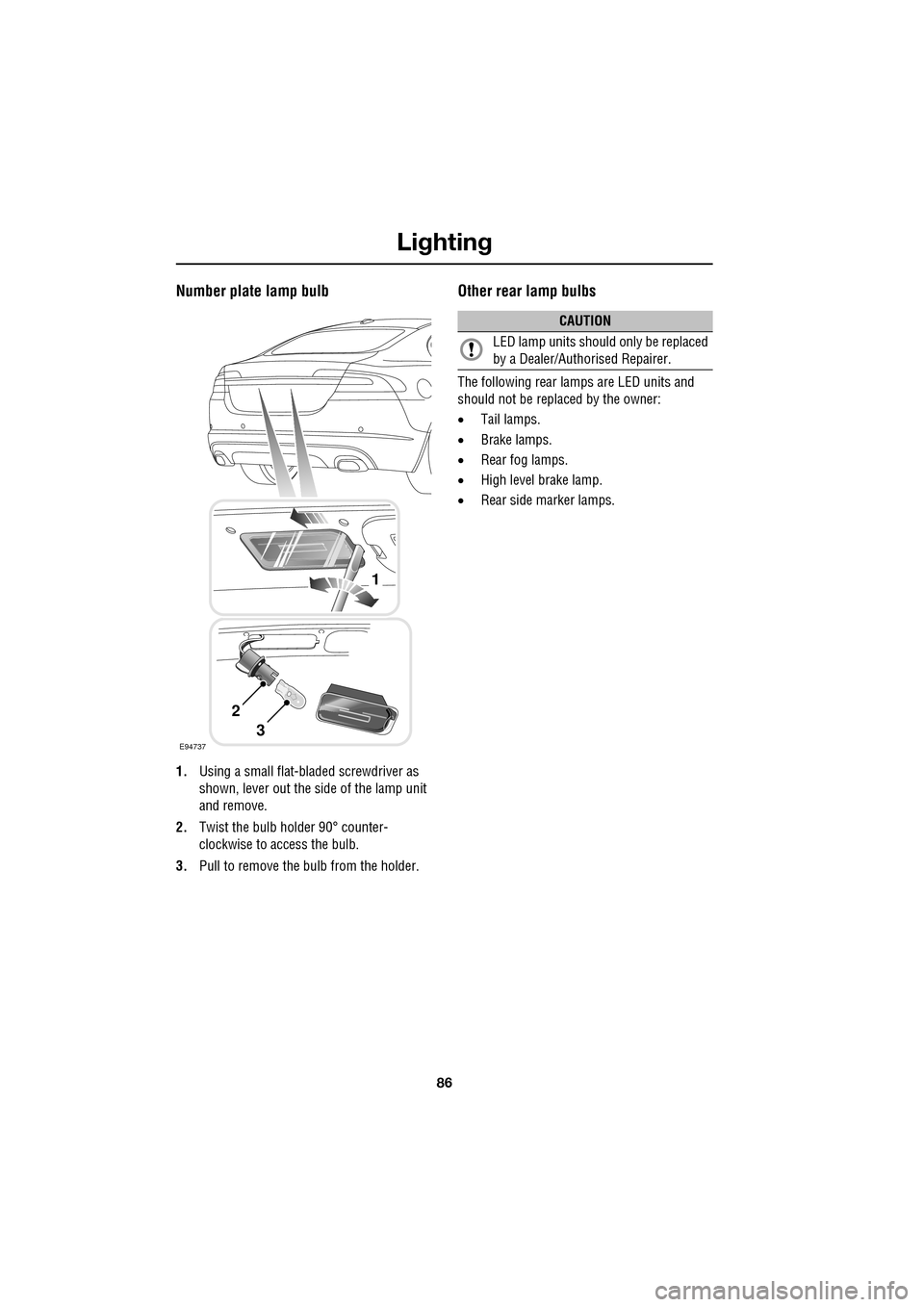
1.Using a small flat-bla ded screwdriver as
shown, lever out the si de of the lamp unit
and remove.
2. Twist the bulb holder 90° counter-
clockwise to access the bulb.
3. Pull to remove the bulb from the holder.
Other rear lamp bulbs
The following rear lamps are LED units and
should not be replaced by the owner:
•Tail lamps.
• Brake lamps.
• Rear fog lamps.
• High level brake lamp.
• Rear side marker lamps.
E94737
1
2
3
CAUTION
LED lamp units should only be replaced
by a Dealer/Authorised Repairer.
Page 88 of 391
Wipers and washers
88
WINDSCREEN WIPERS
Note: If the wiper blades become stuck or
jammed, an electronic cut-out may temporarily
halt wiper operation. If this happens, switch off
the wipers and the ignition. Clear any
obstructions and free th e wiper blades, before
attempting to switch on the ignition.
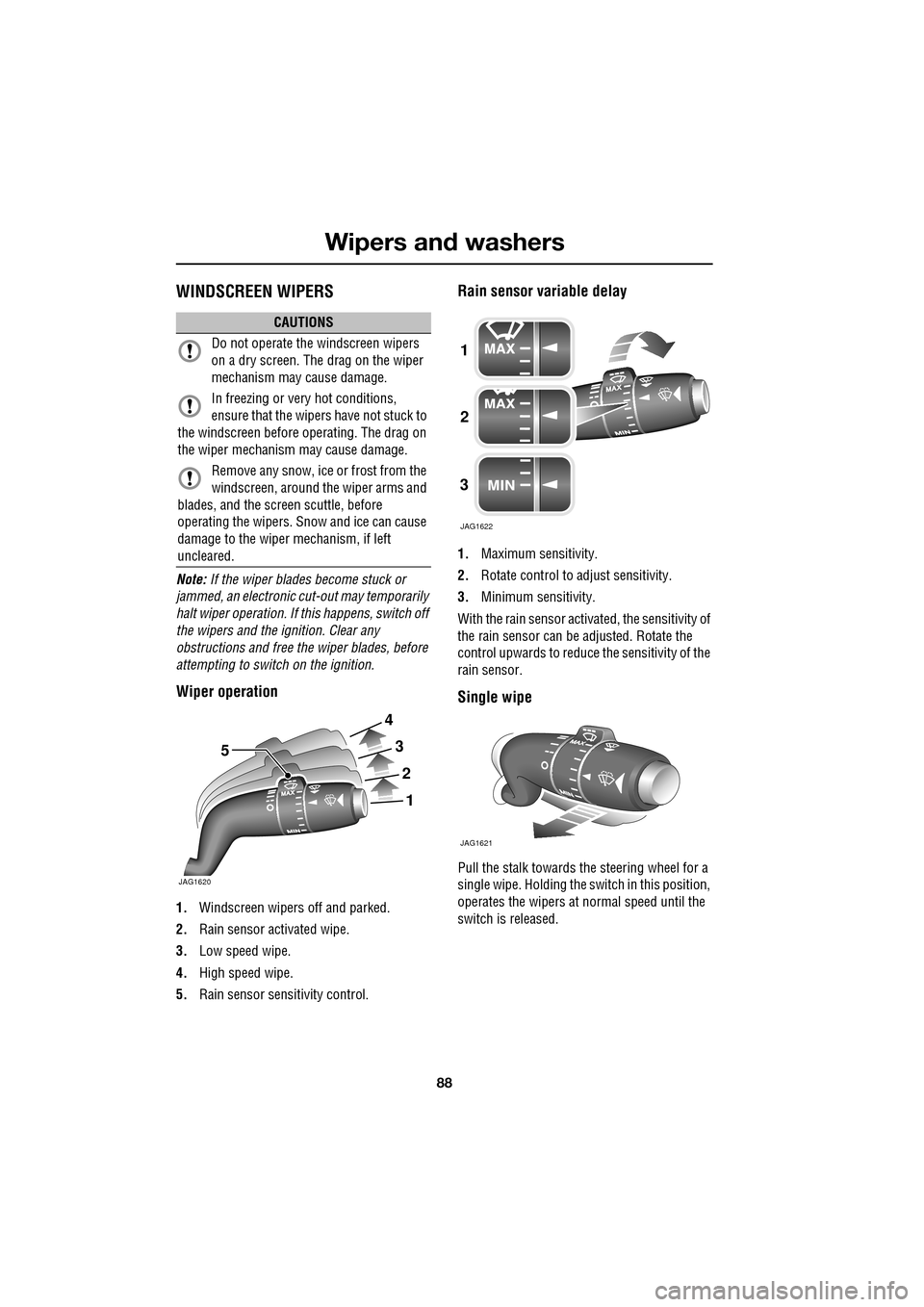
Wiper operation
1. Windscreen wipers off and parked.
2. Rain sensor activated wipe.
3. Low speed wipe.
4. High speed wipe.
5. Rain sensor sensitivity control.
Rain sensor variable delay
1.Maximum sensitivity.
2. Rotate control to adjust sensitivity.
3. Minimum sensitivity.
With the rain sensor acti vated, the sensitivity of
the rain sensor can be adjusted. Rotate the
control upwards to reduce the sensitivity of the
rain sensor.
Single wipe
Pull the stalk towards the steering wheel for a
single wipe. Holding the sw itch in this position,
operates the wipers at normal speed until the
switch is released.
CAUTIONS
Do not operate the windscreen wipers
on a dry screen. The drag on the wiper
mechanism may cause damage.
In freezing or very hot conditions,
ensure that the wipers have not stuck to
the windscreen before operating. The drag on
the wiper mechanism may cause damage.
Remove any snow, ice or frost from the
windscreen, around the wiper arms and
blades, and the screen scuttle, before
operating the wipers. S now and ice can cause
damage to the wiper mechanism, if left
uncleared.
JAG1620
5
1
2
3
4
1
2
3
JAG1622
JAG1621
Page 91 of 391
91
Wipers and washers
CHANGING THE WIPER BLADES
Service position
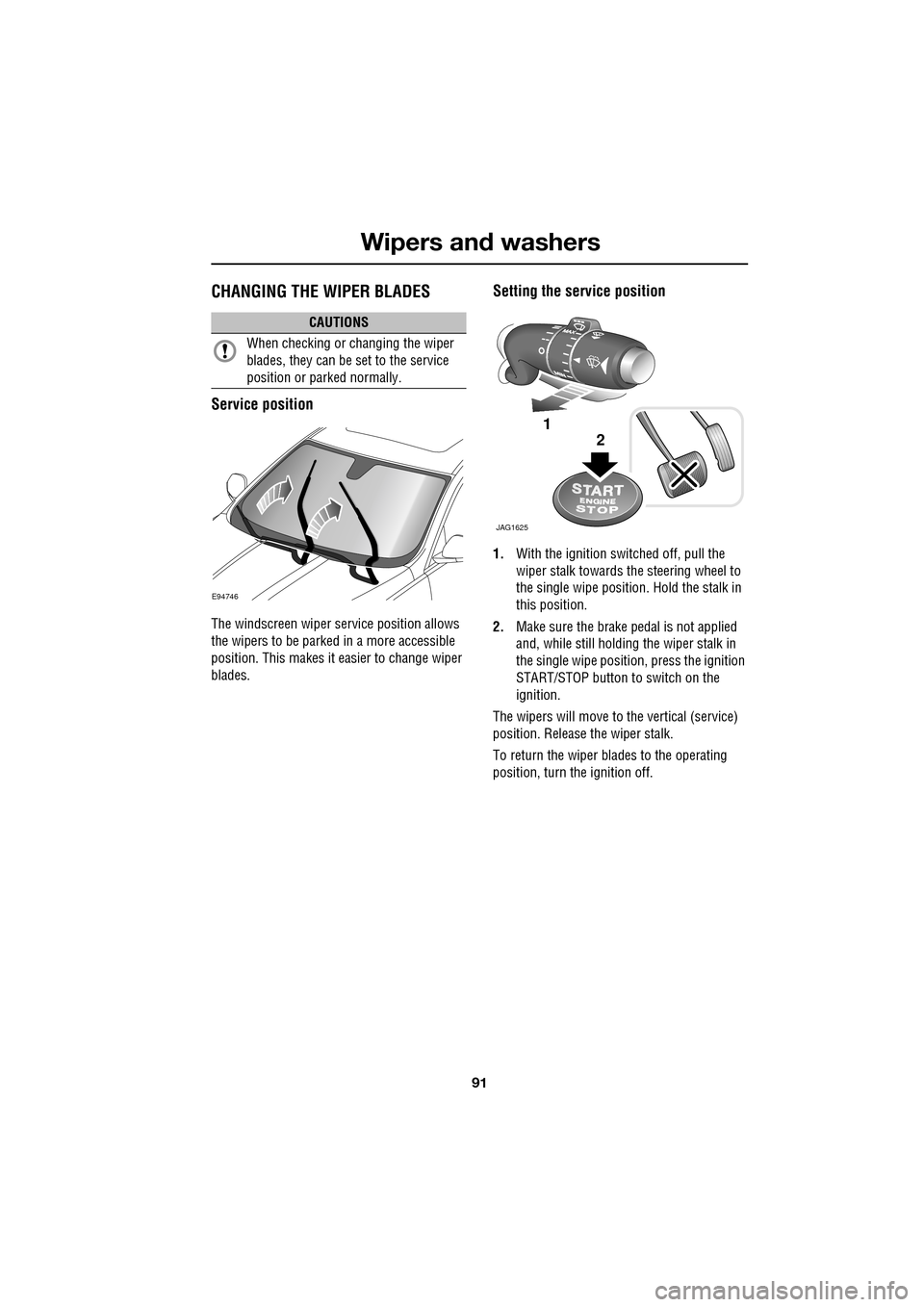
The windscreen wiper service position allows
the wipers to be parked in a more accessible
position. This makes it easier to change wiper
blades.
Setting the service position
1.With the ignition switched off, pull the
wiper stalk towards the steering wheel to
the single wipe position. Hold the stalk in
this position.
2. Make sure the brake pedal is not applied
and, while still holding the wiper stalk in
the single wipe positi on, press the ignition
START/STOP button to switch on the
ignition.
The wipers will move to the vertical (service)
position. Release the wiper stalk.
To return the wiper blades to the operating
position, turn the ignition off.
CAUTIONS
When checking or changing the wiper
blades, they can be set to the service
position or parked normally.
E94746
JAG1625
1
2
Page 93 of 391
93
Windows and mirrors
ELECTRIC WINDOWS
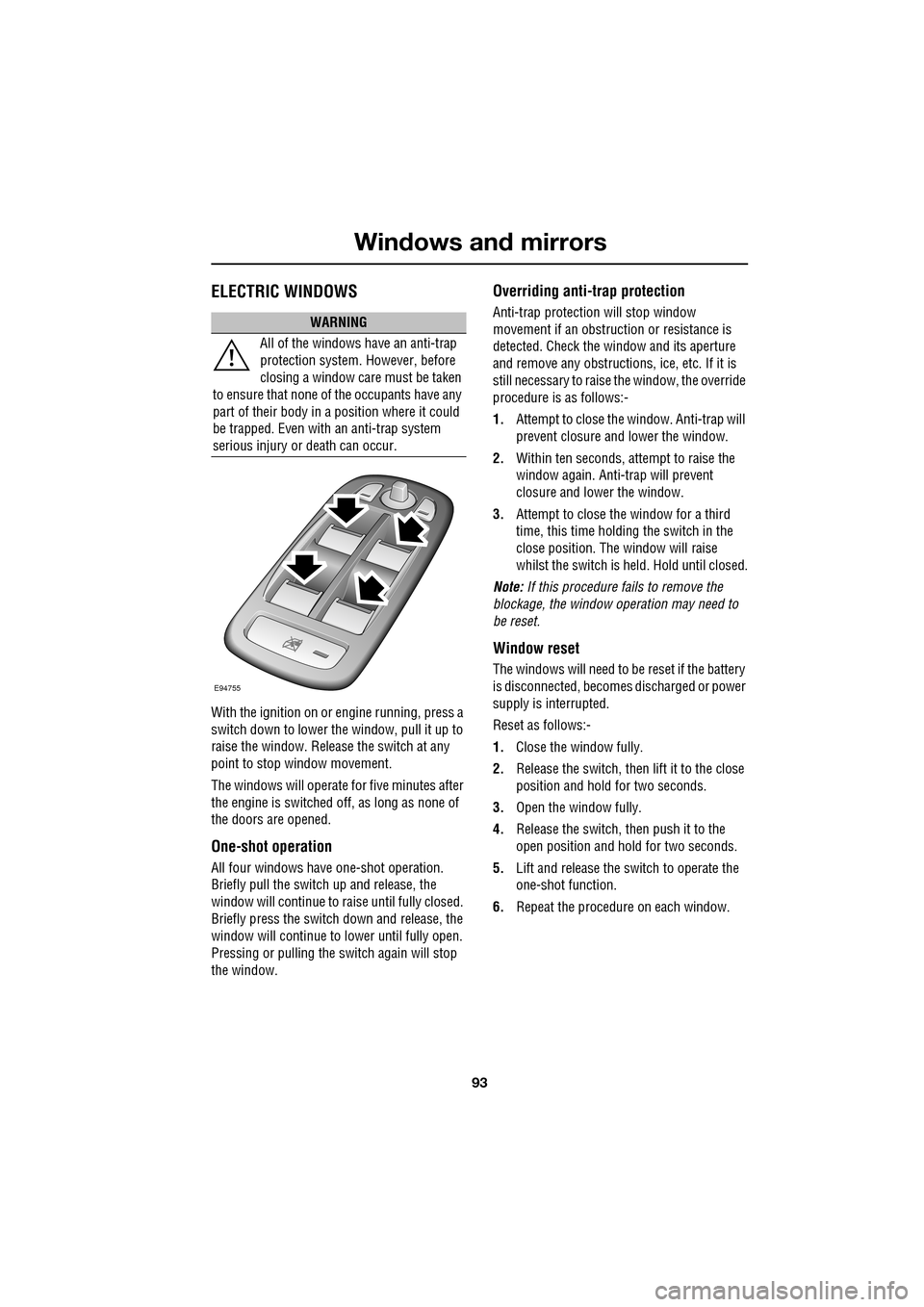
With the ignition on or engine running, press a
switch down to lower the window, pull it up to
raise the window. Release the switch at any
point to stop window movement.
The windows will operate for five minutes after
the engine is switched off, as long as none of
the doors are opened.
One-shot operation
All four windows have one-shot operation.
Briefly pull the switch up and release, the
window will continue to raise until fully closed.
Briefly press the switch down and release, the
window will continue to lower until fully open.
Pressing or pulling the switch again will stop
the window.
Overriding anti-trap protection
Anti-trap protection will stop window
movement if an obstruction or resistance is
detected. Check the window and its aperture
and remove any obstructions, ice, etc. If it is
still necessary to raise the window, the override
procedure is as follows:-
1. Attempt to close the window. Anti-trap will
prevent closure and lower the window.
2. Within ten seconds, attempt to raise the
window again. Anti-t rap will prevent
closure and lower the window.
3. Attempt to close the window for a third
time, this time holding the switch in the
close position. The window will raise
whilst the switch is held. Hold until closed.
Note: If this procedure fails to remove the
blockage, the window operation may need to
be reset.
Window reset
The windows will need to be reset if the battery
is disconnected, becomes discharged or power
supply is interrupted.
Reset as follows:-
1. Close the window fully.
2. Release the switch, then lift it to the close
position and hold for two seconds.
3. Open the window fully.
4. Release the switch, then push it to the
open position and hold for two seconds.
5. Lift and release the switch to operate the
one-shot function.
6. Repeat the procedure on each window.
WARNING
All of the windows have an anti-trap
protection system. However, before
closing a window care must be taken
to ensure that none of the occupants have any
part of their body in a position where it could
be trapped. Even with an anti-trap system
serious injury or death can occur.
E94755
Page 110 of 391
Information displays
110
Touch-screen use
When the engine START/STOP button is
pressed, the touch-screen is activated by the
on/off switch on the centre console.
The buttons on the centre console, below the
touch-screen display, are referred to as hard
buttons and should be pressed firmly. The
touch-screen buttons are soft buttons and only
require short, light pressu re to function. Do not
use excessive pressure.
When operating touch-sc reen buttons, always
extend the tip of one finger, and withhold the
thumb and remaining finge rs from the screen.
Touching the screen with more than one finger
at a time may cause false inputs.
Throughout the handbook, the expression
Select an item (or similar wording) means
touch the on-screen button to select or alter
the required item.
The handbook shows the on-screen menus,
explains how to oper ate the controls and
illustrates how to select or alter settings and
requirements. After becoming familiar with the
controls, follow the on-screen menus and
prompts, to operate th e system as required.
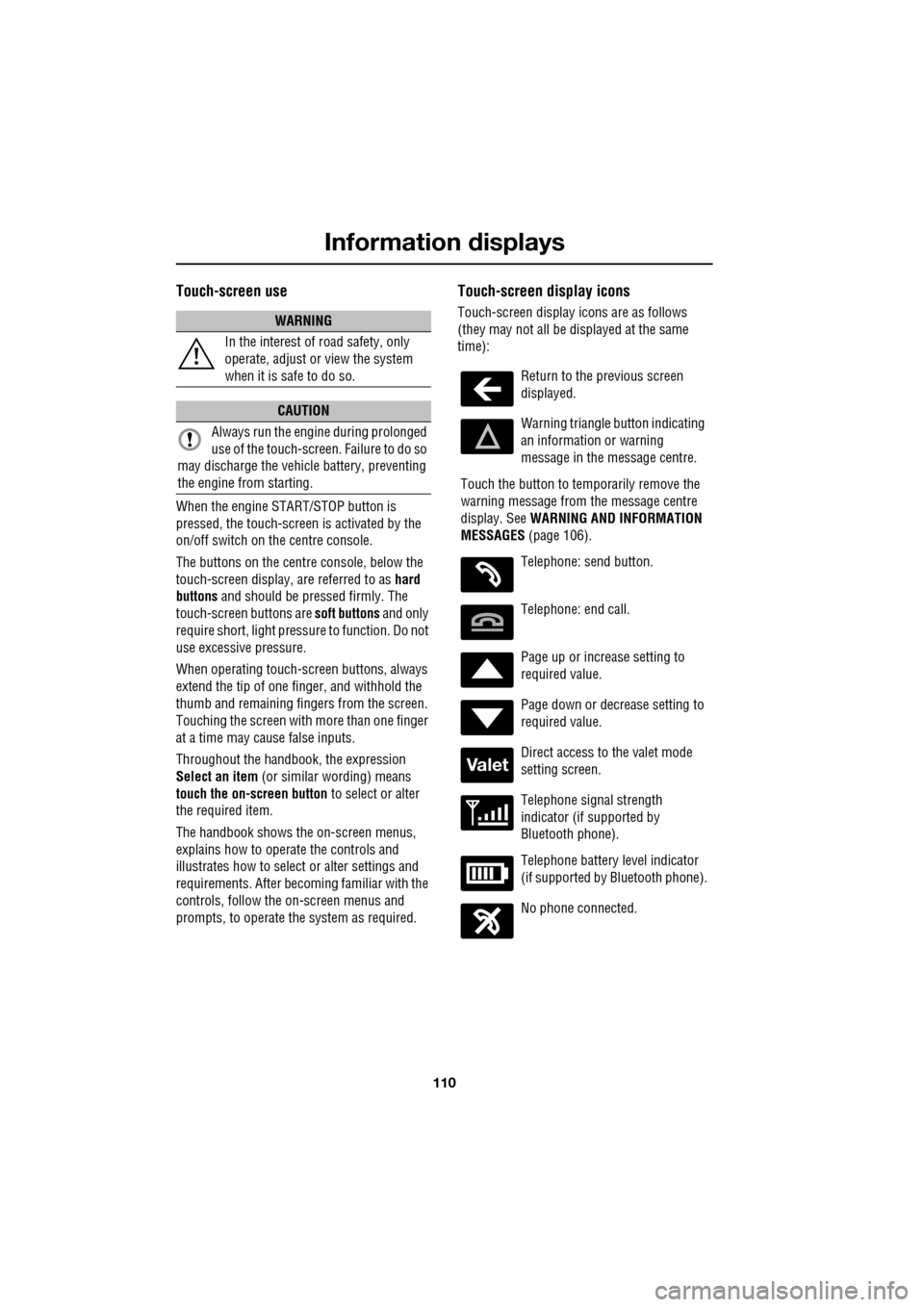
Touch-screen display icons
Touch-screen display icons are as follows
(they may not all be displayed at the same
time):WARNING
In the interest of road safety, only
operate, adjust or view the system
when it is safe to do so.
CAUTION
Always run the engine during prolonged
use of the touch-screen. Failure to do so
may discharge the vehicle battery, preventing
the engine from starting.
Return to the previous screen
displayed.
Warning triangle button indicating
an information or warning
message in the message centre.
Touch the button to temporarily remove the
warning message from the message centre
display. See WARNING AND INFORMATION
MESSAGES (page 106).
Telephone: send button.
Telephone: end call.
Page up or increase setting to
required value.
Page down or decrease setting to
required value.
Direct access to the valet mode
setting screen.
Telephone signal strength
indicator (if supported by
Bluetooth phone).
Telephone battery level indicator
(if supported by Bluetooth phone).
No phone connected.
Valet
Page 117 of 391
117
Climate control
Temperature controls
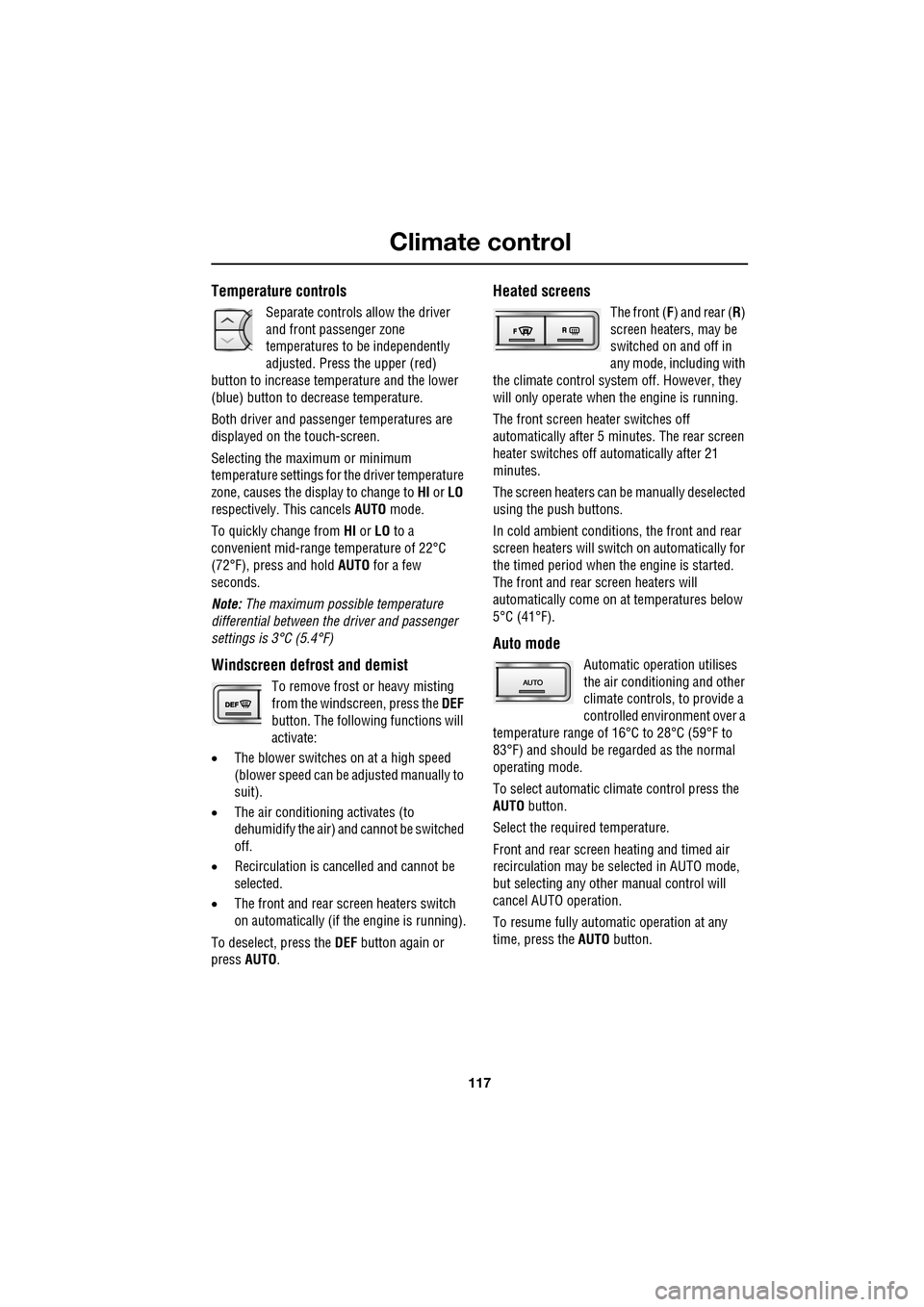
Separate controls allow the driver
and front passenger zone
temperatures to be independently
adjusted. Press the upper (red)
button to increase temperature and the lower
(blue) button to decrease temperature.
Both driver and passenger temperatures are
displayed on the touch-screen.
Selecting the maximum or minimum
temperature settings for the driver temperature
zone, causes the disp lay to change to HI or LO
respectively. This cancels AUTO mode.
To quickly change from HI or LO to a
convenient mid-rang e temperature of 22°C
(72°F), press and hold AUTO for a few
seconds.
Note: The maximum possible temperature
differential between the driver and passenger
settings is 3°C (5.4°F)
Windscreen defrost and demist
To remove frost or heavy misting
from the windscreen, press the DEF
button. The following functions will
activate:
• The blower switches on at a high speed
(blower speed can be adjusted manually to
suit).
• The air conditioni ng activates (to
dehumidify the air) and cannot be switched
off.
• Recirculation is canc elled and cannot be
selected.
• The front and rear screen heaters switch
on automatically (if th e engine is running).
To deselect, press the DEF button again or
press AUTO .
Heated screens
The front (F) and rear ( R)
screen heaters, may be
switched on and off in
any mode, including with
the climate control system off. However, they
will only operate when the engine is running.
The front screen heater switches off
automatically after 5 minutes. The rear screen
heater switches off automatically after 21
minutes.
The screen heaters can be manually deselected
using the push buttons.
In cold ambient conditions, the front and rear
screen heaters will switch on automatically for
the timed period when the engine is started.
The front and rear screen heaters will
automatically come on at temperatures below
5°C (41°F).
Auto mode
Automatic operation utilises
the air conditioning and other
climate controls , to provide a
controlled environment over a
temperature range of 16°C to 28°C (59°F to
83°F) and should be rega rded as the normal
operating mode.
To select automatic climate control press the
AUTO button.
Select the required temperature.
Front and rear screen heating and timed air
recirculation may be se lected in AUTO mode,
but selecting any othe r manual control will
cancel AUTO operation.
To resume fully automatic operation at any
time, press the AUTO button.
Page 121 of 391
121
Climate control
ELECTRIC SUNROOF
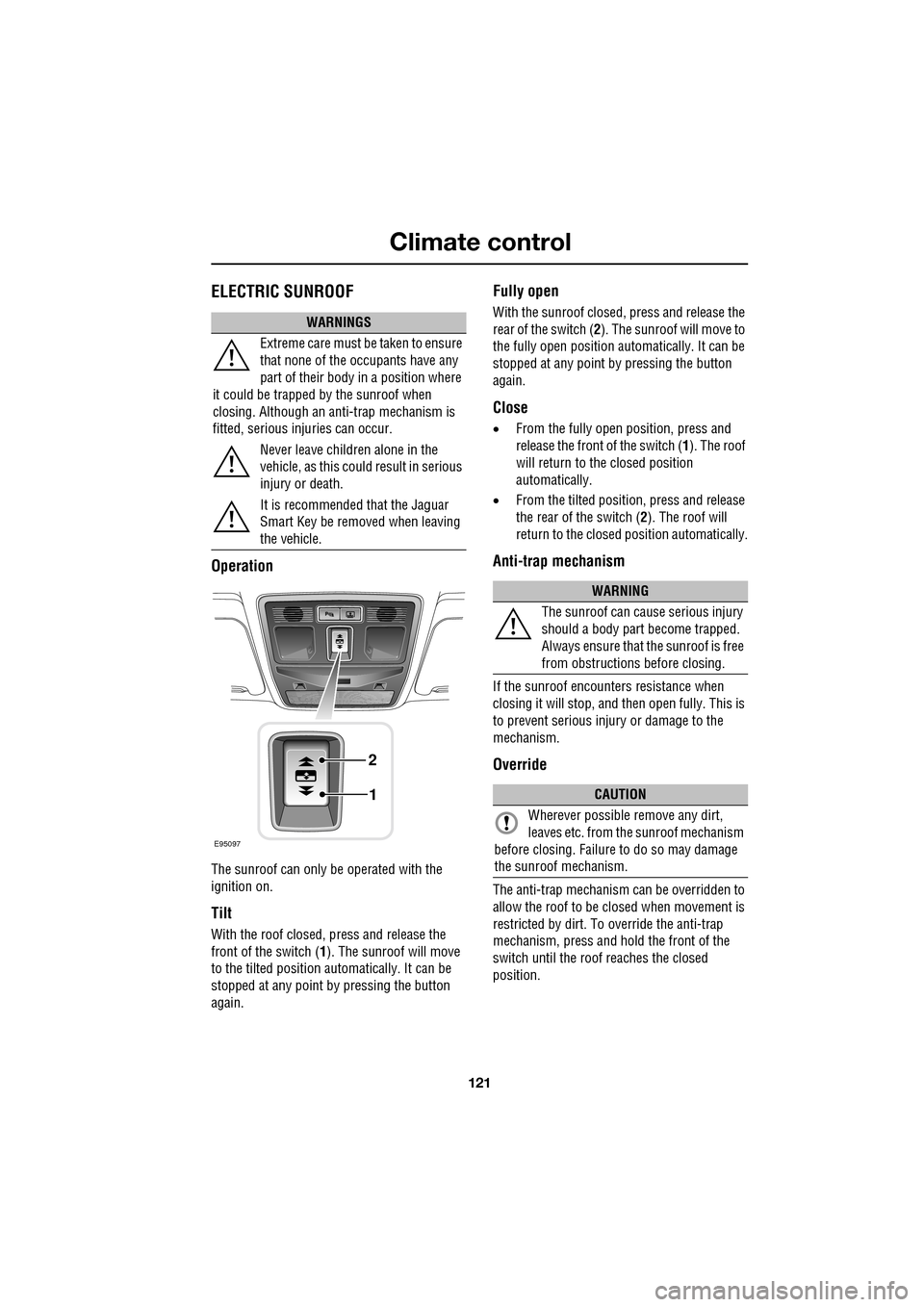
Operation
The sunroof can only be operated with the
ignition on.
Tilt
With the roof closed, press and release the
front of the switch (1). The sunroof will move
to the tilted position automatically. It can be
stopped at any point by pressing the button
again.
Fully open
With the sunroof closed, press and release the
rear of the switch ( 2). The sunroof will move to
the fully open position auto matically. It can be
stopped at any point by pressing the button
again.
Close
• From the fully open position, press and
release the front of the switch ( 1). The roof
will return to the closed position
automatically.
• From the tilted position, press and release
the rear of the switch ( 2). The roof will
return to the closed position automatically.
Anti-trap mechanism
If the sunroof encounters resistance when
closing it will stop, and then open fully. This is
to prevent serious injury or damage to the
mechanism.
Override
The anti-trap mechanism can be overridden to
allow the roof to be closed when movement is
restricted by dirt. To override the anti-trap
mechanism, press and hold the front of the
switch until the roof reaches the closed
position.
WARNINGS
Extreme care must be taken to ensure
that none of the oc cupants have any
part of their body in a position where
it could be trapped by the sunroof when
closing. Although an anti-trap mechanism is
fitted, serious injuries can occur.
Never leave children alone in the
vehicle, as this could result in serious
injury or death.
It is recommended that the Jaguar
Smart Key be removed when leaving
the vehicle.
E95097
1
2
WARNING
The sunroof can cause serious injury
should a body part become trapped.
Always ensure that the sunroof is free
from obstructions before closing.
CAUTION
Wherever possible remove any dirt,
leaves etc. from the sunroof mechanism
before closing. Failure to do so may damage
the sunroof mechanism.
Page 122 of 391
Climate control
122
Calibration
If the battery is disconnected, or the power
supply is interrupted, whilst the sunroof is
partially open it will need to be recalibrated.
Once the battery is reconnected, or the power
supply is restored, recalibrate the sunroof as
follows:
1. Switch the ignition on.
2. Press the front of the switch, so that the
sunroof is in the tilt position, then release
the switch.
3. Press the front of the sunroof switch, and
hold for thirty seconds.
4. After thirty seconds the sunroof will begin
to move. Keep the front of the switch
pressed until the sunroof has fully opened,
then closed.
5. Once the open/close cycle has completed
and the sunroof ha s stopped moving,
release the switch.
The sunroof can now be operated as normal.
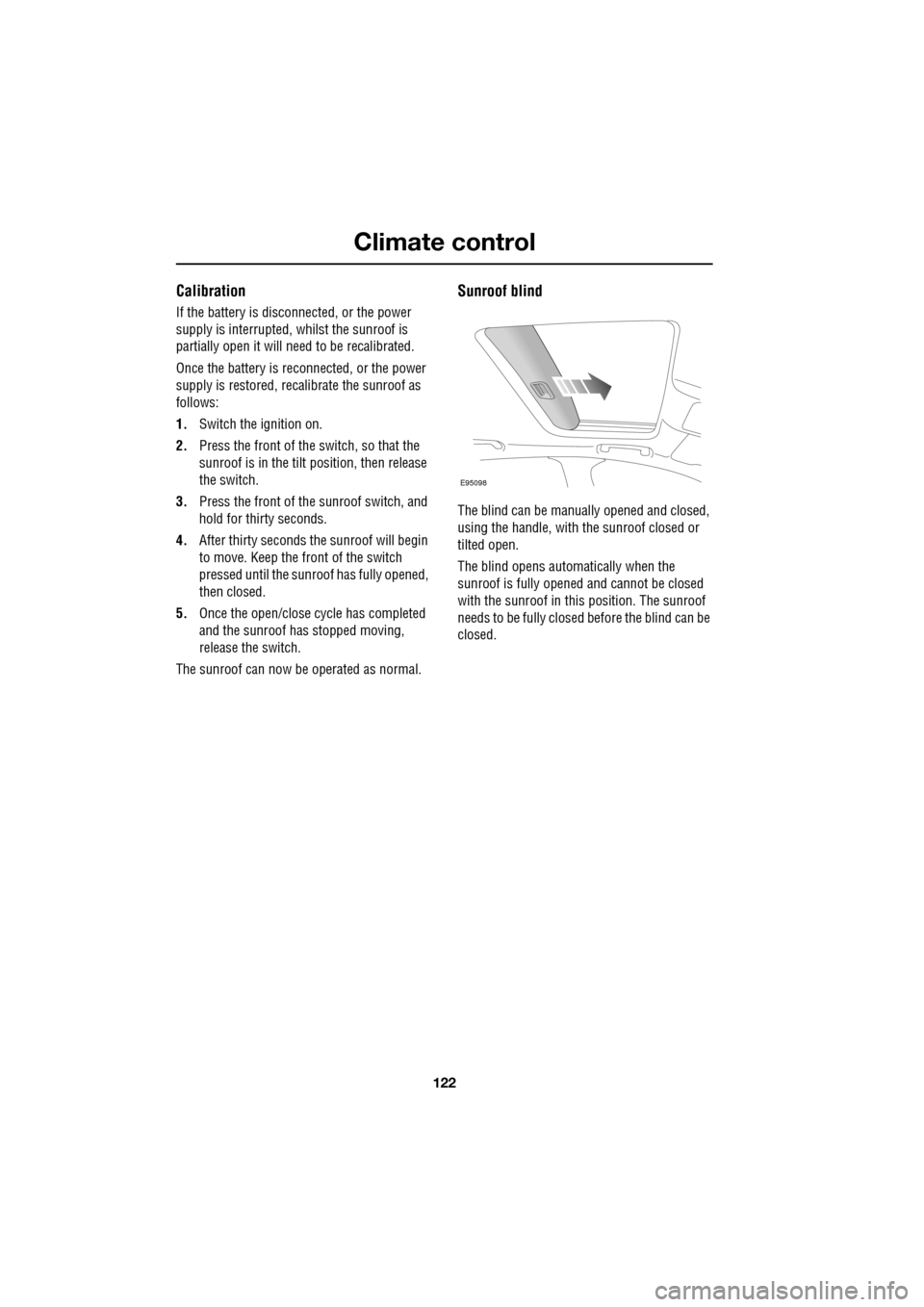
Sunroof blind
The blind can be manua lly opened and closed,
using the handle, with the sunroof closed or
tilted open.
The blind opens automatically when the
sunroof is fully opened and cannot be closed
with the sunroof in this position. The sunroof
needs to be fully closed before the blind can be
closed.
E95098
Page 126 of 391
Convenience features
126
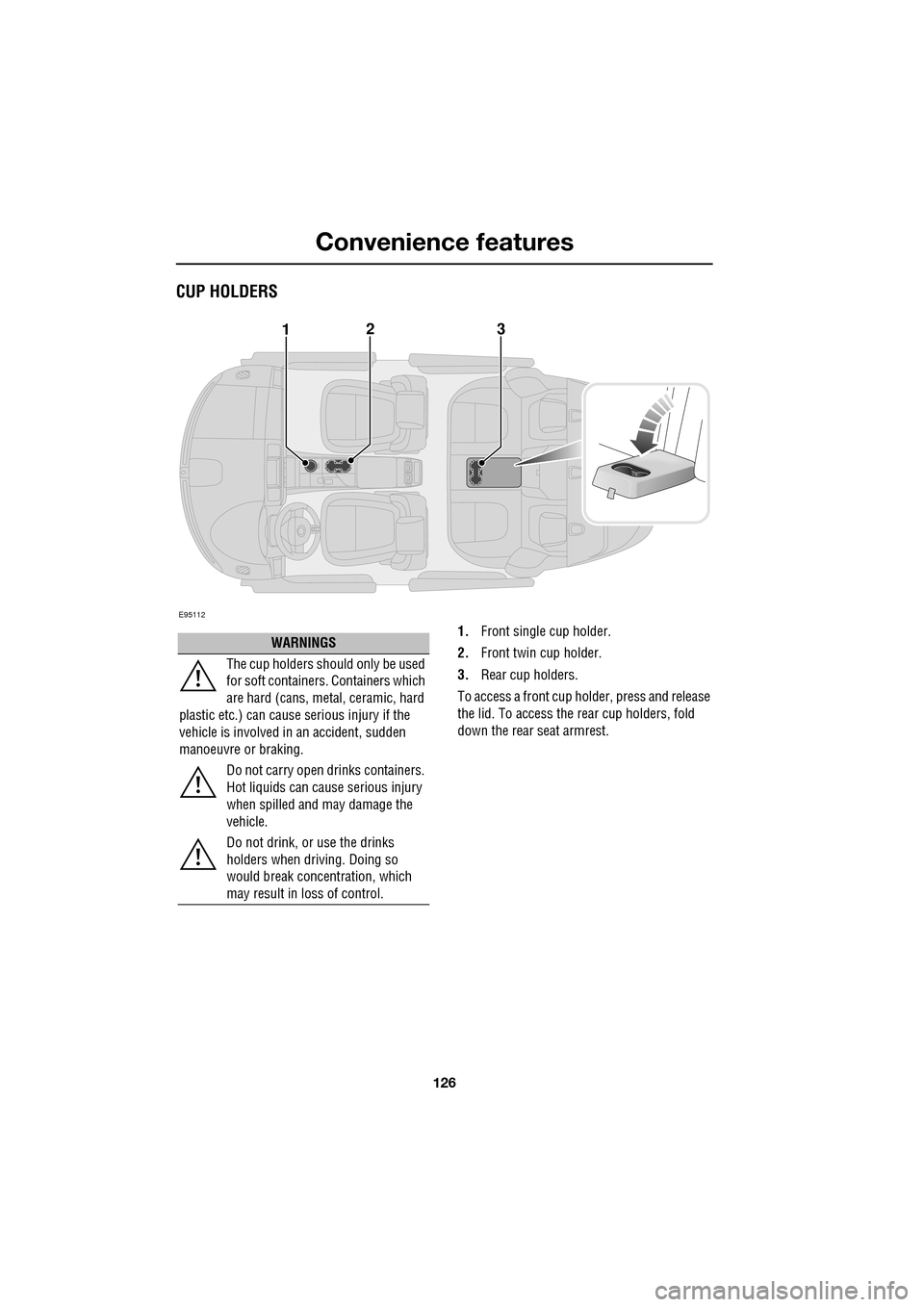
CUP HOLDERS
1.Front single cup holder.
2. Front twin cup holder.
3. Rear cup holders.
To access a front cup holder, press and release
the lid. To access the re ar cup holders, fold
down the rear seat armrest.
E95112
123
WARNINGS
The cup holders shoul d only be used
for soft containers . Containers which
are hard (cans, metal, ceramic, hard
plastic etc.) can cause serious injury if the
vehicle is involved in an accident, sudden
manoeuvre or braking.
Do not carry open drinks containers.
Hot liquids can cause serious injury
when spilled and may damage the
vehicle.
Do not drink, or use the drinks
holders when driving. Doing so
would break concentration, which
may result in loss of control.
Page 127 of 391
127
Convenience features
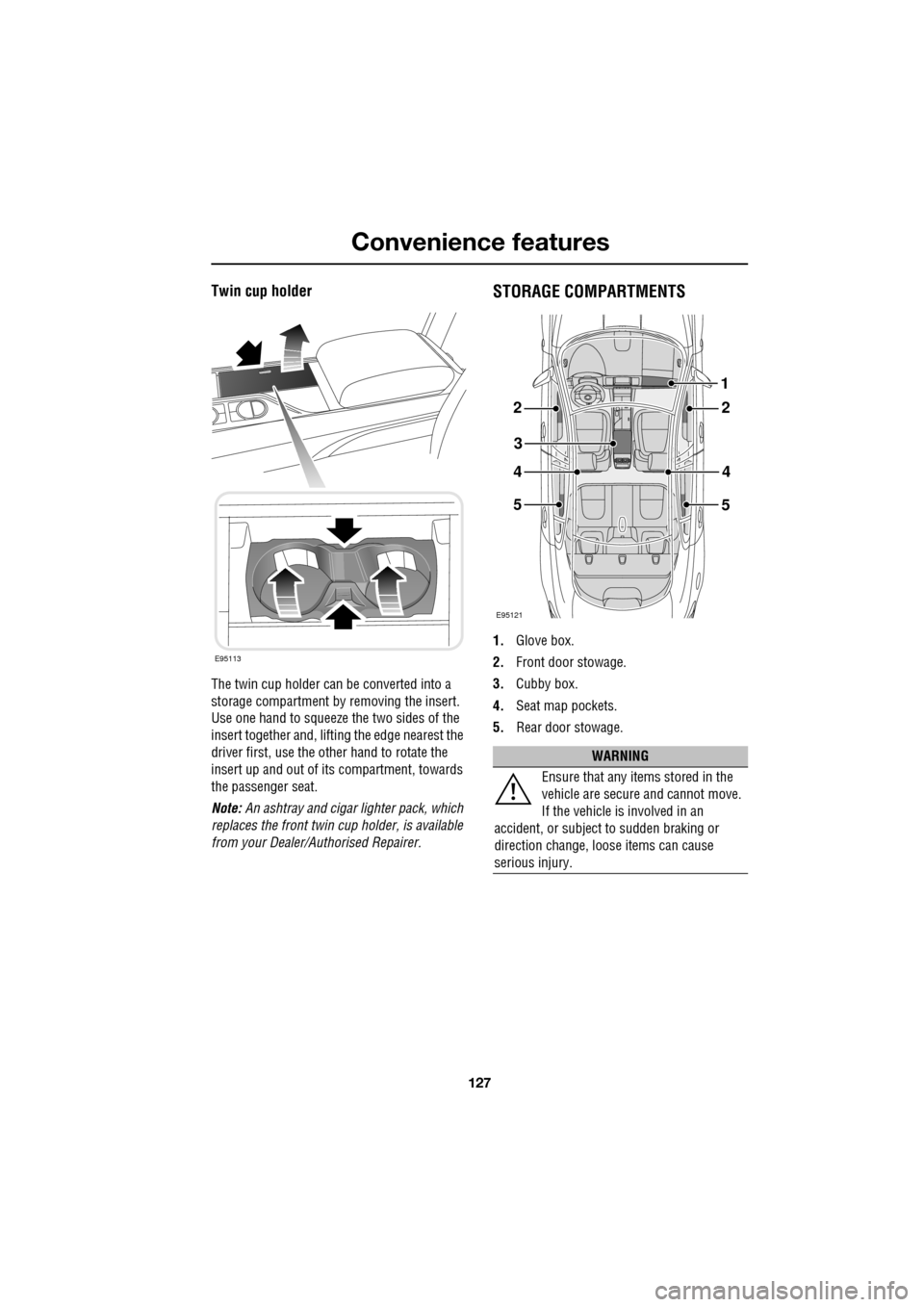
Twin cup holder
The twin cup holder can be converted into a
storage compartment by removing the insert.
Use one hand to squeeze the two sides of the
insert together and, lifting the edge nearest the
driver first, use the other hand to rotate the
insert up and out of it s compartment, towards
the passenger seat.
Note: An ashtray and cigar lighter pack, which
replaces the front twin cup holder, is available
from your Dealer/A uthorised Repairer.
STORAGE COMPARTMENTS
1.Glove box.
2. Front door stowage.
3. Cubby box.
4. Seat map pockets.
5. Rear door stowage.
E95113
WARNING
Ensure that any items stored in the
vehicle are secure and cannot move.
If the vehicle is involved in an
accident, or subject to sudden braking or
direction change, loose items can cause
serious injury.
E95121
22
3
44
5
1
5