vehicle setting JAGUAR XF 2009 1.G Manual PDF
[x] Cancel search | Manufacturer: JAGUAR, Model Year: 2009, Model line: XF, Model: JAGUAR XF 2009 1.GPages: 391, PDF Size: 19.32 MB
Page 333 of 391
333
Television
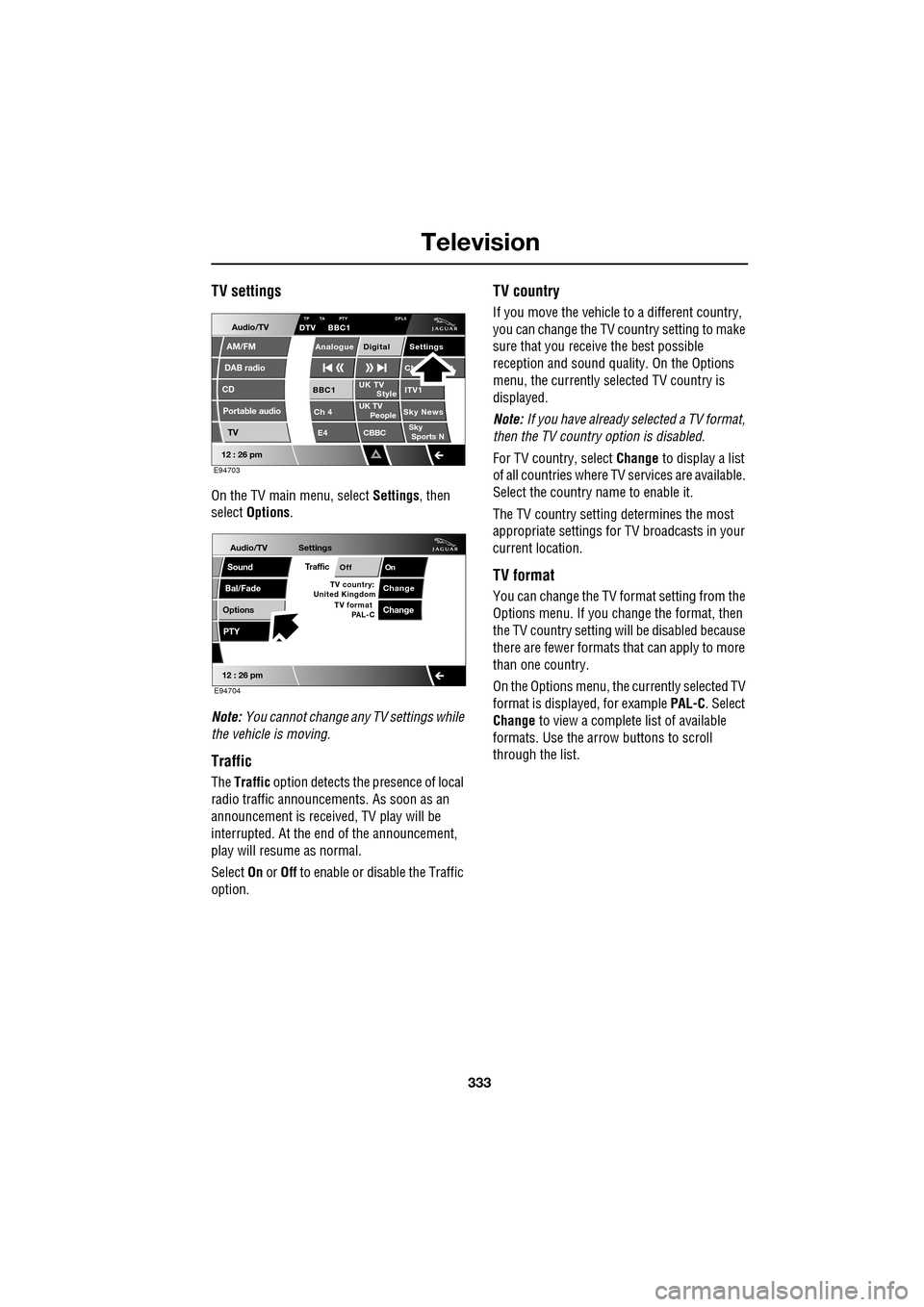
TV settings
On the TV main menu, select Settings, then
select Options .
Note: You cannot change any TV settings while
the vehicle is moving.
Traffic
The Traffic option detects the presence of local
radio traffic announcements. As soon as an
announcement is received, TV play will be
interrupted. At the end of the announcement,
play will resume as normal.
Select On or Off to enable or disable the Traffic
option.
TV country
If you move the vehicle to a different country,
you can change the TV c ountry setting to make
sure that you receive the best possible
reception and sound quali ty. On the Options
menu, the currently sele cted TV country is
displayed.
Note: If you have already selected a TV format,
then the TV country option is disabled.
For TV country, select Change to display a list
of all countries where TV services are available.
Select the country na me to enable it.
The TV country setting determines the most
appropriate settings for TV broadcasts in your
current location.
TV format
You can change the TV format setting from the
Options menu. If you change the format, then
the TV country setting will be disabled because
there are fewer formats that can apply to more
than one country.
On the Options menu, the currently selected TV
format is displayed, for example PAL-C. Select
Change to view a complete list of available
formats. Use the arrow buttons to scroll
through the list.
Audio/TV
DAB radio
CD
AM/FM
12 : 26 pm
Portable audio
TV
UK TV ITV1
Ch 4 Sky News E4 CBBCBBC1
Settings
Ch t
TA PTY DPLIIDTV BBC1
Style
UK TV People
SkySports NTP
Analogue Digital
E94703
Audio/TV
Bal/Fade
Options
Sound
12 : 26 pm
Settings
TrafficOnOff
ChangeTV country:
PTY
United Kingdom TV format
PAL-CChange
E94704
Page 340 of 391
Navigation system
340
MEASUREMENT UNITS
Distances are shown on the screen and given in
voice guidance, either in metric units
(kilometres and metres) or in Imperial units
(miles and yards) and can only be changed
from the vehicle touch-screen menu, not from
the navigation system menu.
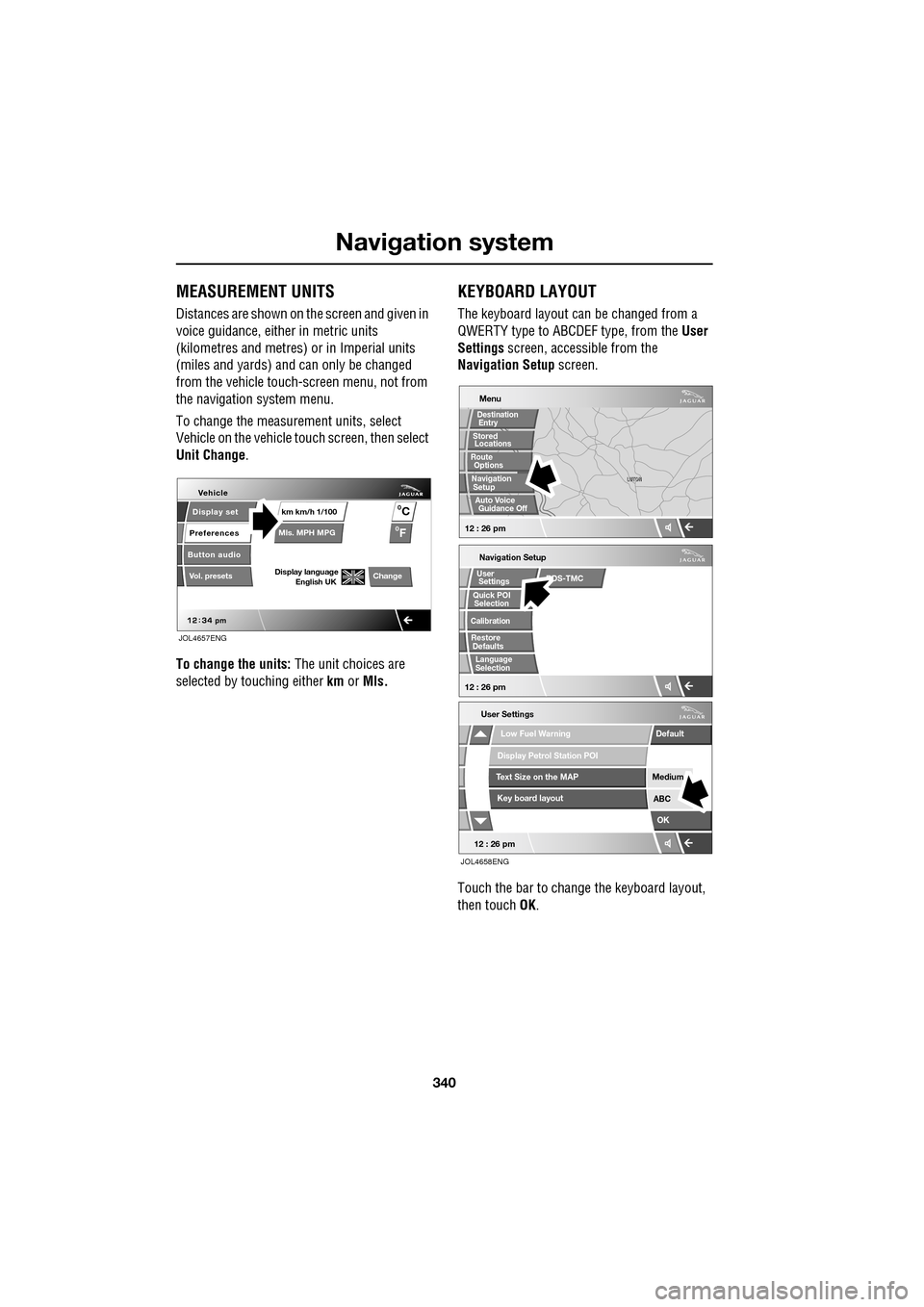
To change the measur ement units, select
Vehicle on the vehicle touch screen, then select
Unit Change .
To change the units: The unit choices are
selected by touching either km or Mls.
KEYBOARD LAYOUT
The keyboard layout ca n be changed from a
QWERTY type to ABC DEF type, from the User
Settings screen, accessible from the
Navigation Setup screen.
Touch the bar to change the keyboard layout,
then touch OK.
Display set
Preferences
Button audio
Mls. MPH MPG km km/h 1/100
VehicleF
C
0
0
Display language English UKVol. presetsChange
JOL4657ENG
Navigation Setup
Selection
Calibration
RestoreUser
Settings
Defaults Quick POI
12 : 26 pm
RDS-TMC
Language
Selection
12 : 26 pm
Low Fuel Warning
User Settings
Display Petrol Station POI
Text Size on the MAP
Key board layout
Medium
OK
Default
ABC
JOL4658ENG
LUTON
LUTON
Menu
12 : 26 pm
Stored
Destination
Auto Voice
Entry
Guidance Off
Locations
Navigation SetupRoute Options
Page 351 of 391
351
Navigation system
CALIBRATION
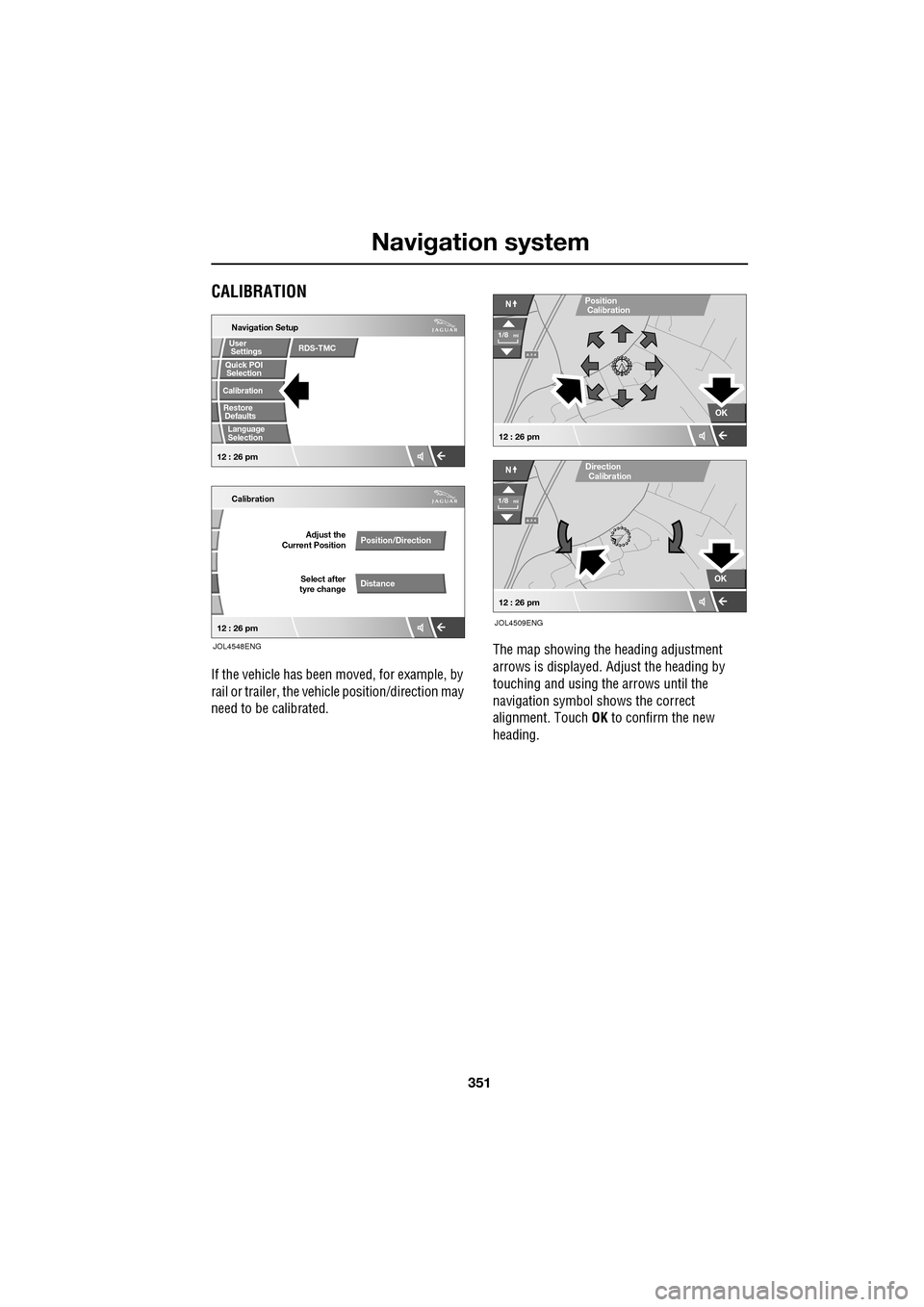
If the vehicle has been moved, for example, by
rail or trailer, the vehi cle position/direction may
need to be calibrated. The map showing the heading adjustment
arrows is displayed. Adjust the heading by
touching and using th
e arrows until the
navigation symbol shows the correct
alignment. Touch OK to confirm the new
heading.
Quick POI
Navigation Setup
Calibration
Select after
tyre change Adjust the
Current Position
Position/Direction
Distance
12 : 26 pm 12 : 26 pm
Selection
Calibration
Restore User
Settings
Defaults Quick POI
JOL4548ENG
RDS-TMC
Language
Selection
A 3 4
OK
NPosition
A 3 4
N
Calibration
OK
1/8mi
1/8mi
12 : 26 pm
12 : 26 pm
Direction
Calibration
JOL4509ENG
Page 367 of 391
367
Navigation system
Changing the Quick POI Categories
The five default Quick POI categories can be
changed as required.
•At the Map screen, touch anywhere on the
map.
• Touch the POI button.
• Select the Quick POI category that you
wish to replace.
The screen shows the full list of POI categories.
• Select the new categor y required from the
list.
The screen shows the new selection of
category icons.
• Repeat for another category icon if
required.
• Touch OK to apply the new settings.
SELECTING A QUICK POI CATEGORY
• Touch the Initial Map screen, then touch
the POI button. The screen shows six
suggested categories th at can be selected
as quick points of interest.
Note: The POI button will not be active if the
zoom level is below 1 km (½ mile).
• Select a Quick POI category.
The map screen is disp layed with POI icons.
Other categories
You can also select from the complete list of
POI categories.
•Touch List Categories and select a
category from the list displayed.
Local POI search
This selects the points of interest in all
categories within 32 kilometres (20 miles) of
the vehicle.
• Touch the All Local POIs button.
MEMORY POINTS
The procedure for using memory points is
functionally the same as for using the Quick
Points of Interest.
The map display shows the location of all
stored memory points in view.
•For information about a particular memory
point, touch the desired memory point
icon.
After touching the memo ry point icon, the
name of the selected memory point is
displayed at the top of the screen.
Note: Unlike POIs, memory points are
displayed at all zoom levels.
Memory point details
• Touch Info. to display the details of the
selected memory point.
The details include Ic on, Name, Position and
Tel.
The telephone number can be called by
touching the telephone button, if a Jaguar
telephone is fitted.
The memory point deta ils can be edited.
Page 370 of 391
Navigation system
370
USING TMC
Dynamic route guidance
Dynamic route guidance will calculate an
alternative route to avoid a traffic event when
the system receives an event warning.
The system calculates a new route for all
sections. However, if any way points are set,
the system calculates for the next way point.
If the event on route is serious (closed road) or
if the new route is shorter than the current one
and the current one was not recalculated within
the last 5 minutes, then a message to confirm
the new route will be displayed. This pop-up
message will be displa yed for 10 minutes and
if the new route is not rejected, then the vehicle
will follow the new route.
Voice guidance
While voice guidance is on, the system will give
audio guidance for tra ffic events on route.
If the on route icon is touched, with audio
guidance switched on, the audio message will
be repeated. If the ic on is grey, the audio
guidance function has been switched off and
touching the icon will no t repeat any message.
After the vehicle passes the event, you will be
notified of the next nearest event on route.
Audio messages are not gi ven if you are in that
event.
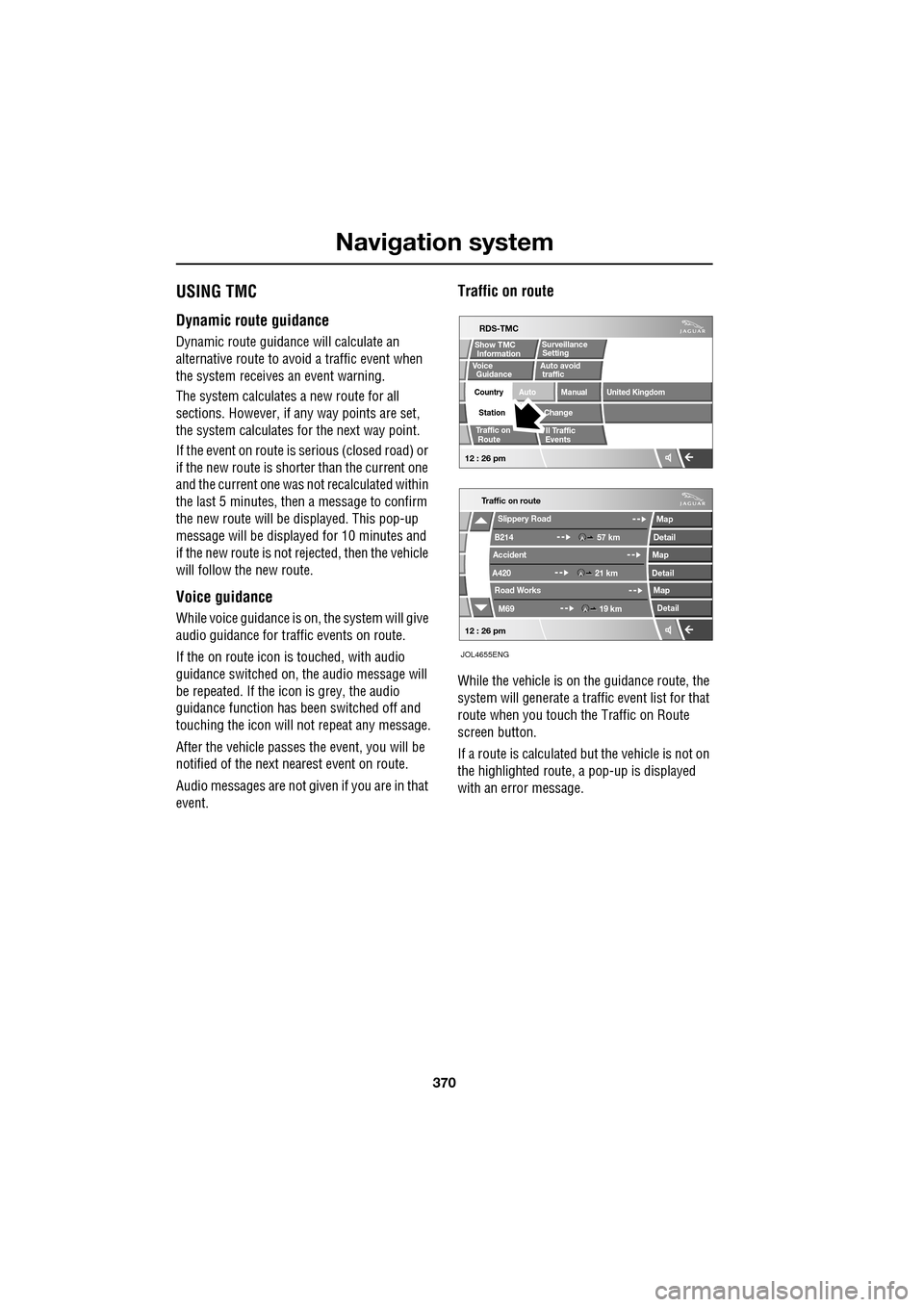
Traffic on route
While the vehicle is on the guidance route, the
system will generate a traffic event list for that
route when you touch the Traffic on Route
screen button.
If a route is calculated but the vehicle is not on
the highlighted route, a pop-up is displayed
with an error message.
Traffic on route
Slippery Road
B214
Accident
A420 Road Works
M69 57 km
21 km 19 km
Map
Detail
Map
Detail Map
Detail
12 : 26 pm
RDS-TMC
Traffic on
Show TMC
Auto avoid
ll Traffic
United Kingdom
Country
Station
Manual
Change
Auto
Surveillance
Events
Voice
Guidance
12 : 26 pm
Information Setting
traffic
Route
JOL4655ENG
Page 371 of 391
371
Navigation system
On route event icon
The on route event icon will show a traffic event
as a line of stationary vehicles with the distance
to the start point of the event. Touch the icon to
repeat audio guidance (when audio guidance is
switched on).
The icon will be displayed on the map with the
following conditions:
•The map scale is between 50 metres and
4 km (1/32 mile and 2 miles).
• RDS-TMC setting is on and there are some
events on the route.
The on route event icon will show the nearest
event on the route and the distance to the
event.
All traffic events
When the All Traffic Events button on the
RDS-TMC setting screen is touched, all traffic
events are listed by road name. If an event
occurs on more than one road of your route,
the system will list it wi th the first road name.
Each event is seen as text information from the
menu.
While the list is being displayed the information
is not updated.
When you select a road the system shows
traffic events, if there are any, with the basic
information.
Note: The maximum text length displayed is 24
characters. The basic informat
ion screen shows:
• Road number.
• Brief information of the event.
• Direction and distance to the start point of
the event (in a straight line).
Up to 20 events can be shown in distance order
from the current vehicle position. If the event
list is longer than three the remaining can be
seen by scrolling the screen.
When the Map button is touc hed, the map
screen will display the place of the event start
point. The scale is always 500 metres (1/4
mile). If the event has finished, the map screen
will still be displayed when the Map button is
touched but no event icon will be shown on the
map.
When the Detail button is touche d, the system
shows the detail of that event.
Page 382 of 391
Index
382
Bulb changing . . . . . . . . . . . . . . . . . . . . . . 83direction indicator bulb (front) . . . . . . . 84
headlamp unit bulbs . . . . . . . . . . . . . . . 83
high level brake lamp . . . . . . . . . . . . . . 86
number plate lamp bulb . . . . . . . . . . . . 86
rear lamp bulbs . . . . . . . . . . . . . . . . . . . 85
side lamp bulb . . . . . . . . . . . . . . . . . . . 85
side repeater lamp . . . . . . . . . . . . . . . . 85
Bulb specification chart . . . . . . . . . . . . . . . 87
C
Cancel guidance . . . . . . . . . . . . . . . . . . . 350
Car wash . . . . . . . . . . . . . . . . . . . . . . . . . 187
Cautions . . . . . . . . . . . . . . . . . . . . . . . . . . . 9
Changing a bulb . . . . . . . . . . . . . . . . . . . . 83 general information . . . . . . . . . . . . . . . . 83
Changing a fuse. . . . . . . . . . . . . . . . . . . . 241 checking or renewing a blown fuse . . . 241
Changing a road wheel . . . . . . . . . . . . . . 225
locking wheel nuts . . . . . . . . . . . . . . . 226
spare wheel location . . . . . . . . . . . . . . 226
temporary use spare wheel . . . . . . . . . 225
tightening the wheel nuts . . . . . . . . . . 229
wheel changing procedure . . . . . . . . . 228
wheel changing safety. . . . . . . . . . . . . 227
Changing the remote cont rol battery . . . . . 24
Changing the vehicle battery . . . . . . . . . . 215
battery disposal. . . . . . . . . . . . . . . . . . 215
Changing the wiper blades . . . . . . . . . . . . 91 changing the wiper blades . . . . . . . . . . 92
service position . . . . . . . . . . . . . . . . . . . 91
Channel automatic tuning . . . . . . . . . . . . 284
Channel options. . . . . . . . . . . . . . . . . . . . 284 DAB search . . . . . . . . . . . . . . . . . . . . . 286
finding a channel. . . . . . . . . . . . . . . . . 285
finding a subchannel . . . . . . . . . . . . . . 285
finding an ensemble . . . . . . . . . . . . . . 286
Charging the vehicle battery . . . . . . . . . . 215
Checking the wiper blades . . . . . . . . . . . . . 90
Child safety locks . . . . . . . . . . . . . . . . . . . 65
Child seat anchor points . . . . . . . . . . . . . . 62 installing an ISOFIX child seat. . . . . . . . 63
ISOFIX anchor points . . . . . . . . . . . . . . 62
tether anchorage points . . . . . . . . . . . . 64
Child seat positioning . . . . . . . . . . . . . . . . 60 Child seats . . . . . . . . . . . . . . . . . . . . . . . . . 59
child restraint check list . . . . . . . . . . . . . 60
Cleaning the alloy wheels . . . . . . . . . . . . . 187
Cleaning the exterior . . . . . . . . . . . . . . . . . 187
bird droppings . . . . . . . . . . . . . . . . . . . 189
cleaning the rear screen . . . . . . . . . . . . 189
glass surfaces . . . . . . . . . . . . . . . . . . . 189
polishing . . . . . . . . . . . . . . . . . . . . . . . 189
removing grease and tar. . . . . . . . . . . . 189
underbonnet cleaning . . . . . . . . . . . . . . 188
using an automatic wash . . . . . . . . . . . 188
washing the vehicle paintwork . . . . . . . 187
Cleaning the interior . . . . . . . . . . . . . . . . . 189 airbag module covers . . . . . . . . . . . . . . 191
carpet and mats . . . . . . . . . . . . . . . . . . 191
cloth and fabric . . . . . . . . . . . . . . . . . . 190
instrument pack, clock, and audio equipment . . . . . . . . . . . . . . . . . . . . 190
leather . . . . . . . . . . . . . . . . . . . . . . . . . 190
removing stains . . . . . . . . . . . . . . . . . . 190
seat belts . . . . . . . . . . . . . . . . . . . . . . . 191
Climate seats . . . . . . . . . . . . . . . . . . . . . . . 48 backrest ventilation only. . . . . . . . . . . . . 48
cooled ventilation . . . . . . . . . . . . . . . . . . 48
heated ventilation . . . . . . . . . . . . . . . . . . 48
Clock. . . . . . . . . . . . . . . . . . . . . . . . . . . . . 124 setting the clock as the screensaver . . . 124
Compact disc display options . . . . . . . . . . 296
Compact disc pause . . . . . . . . . . . . . . . . . 295
Compact disc player CD compatibility . . . . . . . . . . . . . . . . . . 292
loading CDs . . . . . . . . . . . . . . . . . . . . . 292
Compact disc selection . . . . . . . . . . . . . . . 294
Compass view. . . . . . . . . . . . . . . . . . . . . . 360
Condensation - lamps . . . . . . . . . . . . . . . . . 76
Controls overview . . . . . . . . . . . . . . . . . . . . 12
Coolant check . . . . . . . . . . . . . . . . . . . . . . 204
Cornering lamps . . . . . . . . . . . . . . . . . . . . . 79
Cruise control . . . . . . . . . . . . . . . . . . . 74, 156
principle of operation . . . . . . . . . . . . . . 156
Cup holders . . . . . . . . . . . . . . . . . . . . . . . 126 twin cup holder . . . . . . . . . . . . . . . . . . 127
Page 383 of 391
Index
383
D
Destination entry . . . . . . . . . . . . . . . . . . . 356choosing your route . . . . . . . . . . . . . . 356
coordinates . . . . . . . . . . . . . . . . . . . . . 357
map . . . . . . . . . . . . . . . . . . . . . . . . . . 357
memory . . . . . . . . . . . . . . . . . . . . . . . 358
motorway . . . . . . . . . . . . . . . . . . . . . . 359
points of interest. . . . . . . . . . . . . . . . . 356
postcode . . . . . . . . . . . . . . . . . . . . . . . 357
previous . . . . . . . . . . . . . . . . . . . . . . . 358
setting a destination . . . . . . . . . . . . . . 356
start guidance . . . . . . . . . . . . . . . . . . . 356
Diesel particulate filter (DPF). . . . . . . . . . 135 regeneration . . . . . . . . . . . . . . . . . . . . 135
regeneration procedure. . . . . . . . . . . . 136
warning indicators a nd messages. . . . 135
Digital audio broadcasting general information. . . . . . . . . . . . . . . 280
Dimensions . . . . . . . . . . . . . . . . . . . . . . . 260 brake pedal travel (China only) . . . . . . 261
wheel alignment data (C hina only) . . . 261
Dipstick - electronic . . . . . . . . . . . . 199, 202
Direction indicators . . . . . . . . . . . . . . . . . . 78
Disability modifications . . . . . . . . . . . . . . . 11
Disarming . . . . . . . . . . . . . . . . . . . . . . . . . 18
Disarming the alarm . . . . . . . . . . . . . . . . . 38 deactivating the alarm when triggered . 38
disarming when the unlock button fails to work . . . . . . . . . . . . . . . . . . . . . . . . . 38
Display options . . . . . . . . . . . . . . . . . . . . 283
DAB radio text. . . . . . . . . . . . . . . . . . . 283
touch-screen information panel . . . . . 283
Docking the Jaguar Smart Key . . . . . . . . . 20
DPF . . . . . . . . . . . . . . . . . . . . . . . . . . . . . 135
Drive control general information. . . . . . . . . . . . . . . 169
Driving after a collision . . . . . . . . . . . . . . 251 before starting or driving . . . . . . . . . . 251
resetting the fuel cut-off . . . . . . . . . . . 251
when driving . . . . . . . . . . . . . . . . . . . . 252
Dynamic mode . . . . . . . . . . . . . . . . . . . . 170
E
Economical driving . . . . . . . . . . . . . . . . . . 155 driving tips for economy . . . . . . . . . . . 155
maintenance and fuel economy . . . . . . 155
E-Diff (differential) . . . . . . . . . . . . . . . . . . 172
Ejecting compact discs . . . . . . . . . . . . . . . 294
Electric parking brake (EPB) . . . . . . . . . . . 146
Electric seats . . . . . . . . . . . . . . . . . . . . . . . 42 driving position memory . . . . . . . . . . . . 43
Electric sunroof . . . . . . . . . . . . . . . . . . . . 121 anti-trap mechanism . . . . . . . . . . . . . . 121
calibration . . . . . . . . . . . . . . . . . . . . . . 122
operation . . . . . . . . . . . . . . . . . . . . . . . 121
sunroof blind . . . . . . . . . . . . . . . . . . . . 122
Electric windows . . . . . . . . . . . . . . . . . . . . 93
one-shot operation. . . . . . . . . . . . . . . . . 93
overriding anti-trap protection . . . . . . . . 93
window isolator . . . . . . . . . . . . . . . . . . . 94
window reset . . . . . . . . . . . . . . . . . . . . . 93
Emergency brake assist (advanced) . . . . . 165
Emergency key blade . . . . . . . . . . . . . . 25, 28
Engine block heaters . . . . . . . . . . . . . . . . . . . . 134
Engine compartment overview . . . . . . . . . 196
brake fluid reservoir . . . . . . . . . . . . . . . 196
coolant reservoir . . . . . . . . . . . . . . . . . 197
engine oil dipsticks . . . . . . . . . . . . . . . 197
engine oil filler . . . . . . . . . . . . . . . . . . . 196
power steering fluid reservoir . . . . . . . 197
washer fluid reservoir . . . . . . . . . . . . . 196
Engine coolant check . . . . . . . . . . . . . . . . 204 checking the coolant level . . . . . . . . . . 204
topping up the coolant . . . . . . . . . . . . . 205
Engine number . . . . . . . . . . . . . . . . . . . . . 257 diesel engines . . . . . . . . . . . . . . . . . . . 257
petrol engines . . . . . . . . . . . . . . . . . . . 257
Engine oil check engine oil consumption . . . . . . . . 199, 201
engine oil specification. . . . . . . . . . . . . 203
V6 diesel engines . . . . . . . . . . . . . . . . . 201
V6 petrol engines . . . . . . . . . . . . . . . . . 197
V8 petrol engines . . . . . . . . . . . . . . . . . 199
Engine specifications . . . . . . . . . . . . . . . . 258
EPB. . . . . . . . . . . . . . . . . . . . . . . . . . . . . . 146
Errors in vehicle position . . . . . . . . . . . . . 335
Page 384 of 391
Index
384
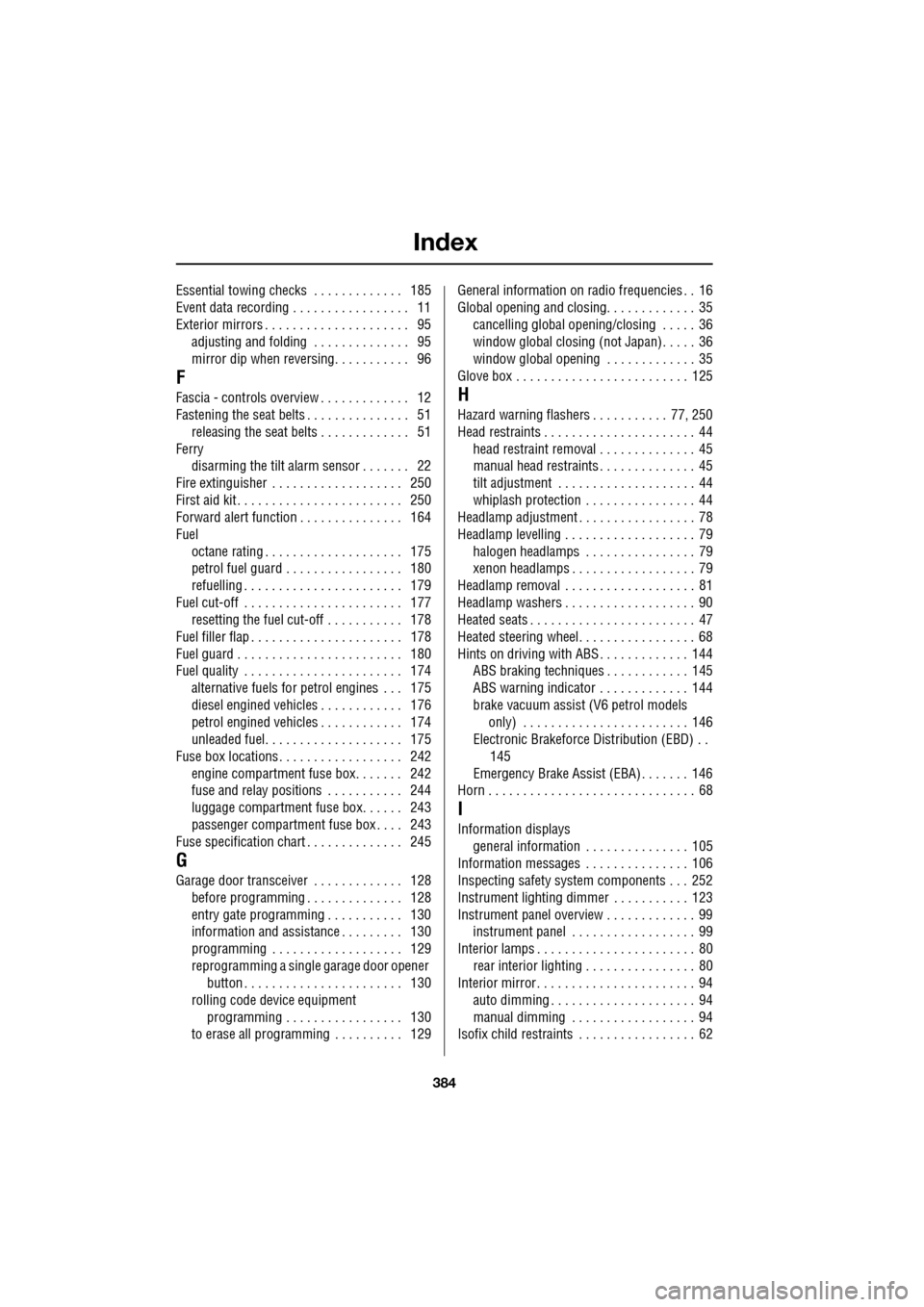
Essential towing checks . . . . . . . . . . . . . 185
Event data recording . . . . . . . . . . . . . . . . . 11
Exterior mirrors . . . . . . . . . . . . . . . . . . . . . 95adjusting and folding . . . . . . . . . . . . . . 95
mirror dip when reversing. . . . . . . . . . . 96
F
Fascia - controls overview . . . . . . . . . . . . . 12
Fastening the seat belts . . . . . . . . . . . . . . . 51releasing the seat belts . . . . . . . . . . . . . 51
Ferry disarming the tilt alarm sensor . . . . . . . 22
Fire extinguisher . . . . . . . . . . . . . . . . . . . 250
First aid kit . . . . . . . . . . . . . . . . . . . . . . . . 250
Forward alert function . . . . . . . . . . . . . . . 164
Fuel
octane rating . . . . . . . . . . . . . . . . . . . . 175
petrol fuel guard . . . . . . . . . . . . . . . . . 180
refuelling . . . . . . . . . . . . . . . . . . . . . . . 179
Fuel cut-off . . . . . . . . . . . . . . . . . . . . . . . 177 resetting the fuel cut-off . . . . . . . . . . . 178
Fuel filler flap . . . . . . . . . . . . . . . . . . . . . . 178
Fuel guard . . . . . . . . . . . . . . . . . . . . . . . . 180
Fuel quality . . . . . . . . . . . . . . . . . . . . . . . 174 alternative fuels for pe trol engines . . . 175
diesel engined vehicles . . . . . . . . . . . . 176
petrol engined vehicles . . . . . . . . . . . . 174
unleaded fuel. . . . . . . . . . . . . . . . . . . . 175
Fuse box locations . . . . . . . . . . . . . . . . . . 242 engine compartment fuse box. . . . . . . 242
fuse and relay positions . . . . . . . . . . . 244
luggage compartment fuse box. . . . . . 243
passenger compartment fuse box . . . . 243
Fuse specification chart . . . . . . . . . . . . . . 245
G
Garage door transceiver . . . . . . . . . . . . . 128 before programming . . . . . . . . . . . . . . 128
entry gate programming . . . . . . . . . . . 130
information and assistance . . . . . . . . . 130
programming . . . . . . . . . . . . . . . . . . . 129
reprogramming a single garage door opener
button . . . . . . . . . . . . . . . . . . . . . . . 130
rolling code device equipment
programming . . . . . . . . . . . . . . . . . 130
to erase all programming . . . . . . . . . . 129 General information on
radio frequencies . . 16
Global opening and closing. . . . . . . . . . . . . 35 cancelling global opening/closing . . . . . 36
window global closing (not Japan). . . . . 36
window global opening . . . . . . . . . . . . . 35
Glove box . . . . . . . . . . . . . . . . . . . . . . . . . 125
H
Hazard warning flashers . . . . . . . . . . . 77, 250
Head restraints . . . . . . . . . . . . . . . . . . . . . . 44
head restraint removal . . . . . . . . . . . . . . 45
manual head restraints . . . . . . . . . . . . . . 45
tilt adjustment . . . . . . . . . . . . . . . . . . . . 44
whiplash protection . . . . . . . . . . . . . . . . 44
Headlamp adjustment . . . . . . . . . . . . . . . . . 78
Headlamp levelling . . . . . . . . . . . . . . . . . . . 79
halogen headlamps . . . . . . . . . . . . . . . . 79
xenon headlamps . . . . . . . . . . . . . . . . . . 79
Headlamp removal . . . . . . . . . . . . . . . . . . . 81
Headlamp washers . . . . . . . . . . . . . . . . . . . 90
Heated seats . . . . . . . . . . . . . . . . . . . . . . . . 47
Heated steering wheel. . . . . . . . . . . . . . . . . 68
Hints on driving with ABS . . . . . . . . . . . . . 144 ABS braking techniques . . . . . . . . . . . . 145
ABS warning indicator . . . . . . . . . . . . . 144
brake vacuum assist (V6 petrol models
only) . . . . . . . . . . . . . . . . . . . . . . . . 146
Electronic Brakeforce Distribution (EBD) . .
145
Emergency Brake Assist (EBA) . . . . . . . 146
Horn . . . . . . . . . . . . . . . . . . . . . . . . . . . . . . 68
I
Information displays general information . . . . . . . . . . . . . . . 105
Information messages . . . . . . . . . . . . . . . 106
Inspecting safety syst em components . . . 252
Instrument lighting dimmer . . . . . . . . . . . 123
Instrument panel overview . . . . . . . . . . . . . 99 instrument panel . . . . . . . . . . . . . . . . . . 99
Interior lamps . . . . . . . . . . . . . . . . . . . . . . . 80
rear interior lighting . . . . . . . . . . . . . . . . 80
Interior mirror . . . . . . . . . . . . . . . . . . . . . . . 94 auto dimming . . . . . . . . . . . . . . . . . . . . . 94
manual dimming . . . . . . . . . . . . . . . . . . 94
Isofix child restraints . . . . . . . . . . . . . . . . . 62
Page 385 of 391
Index
385
J
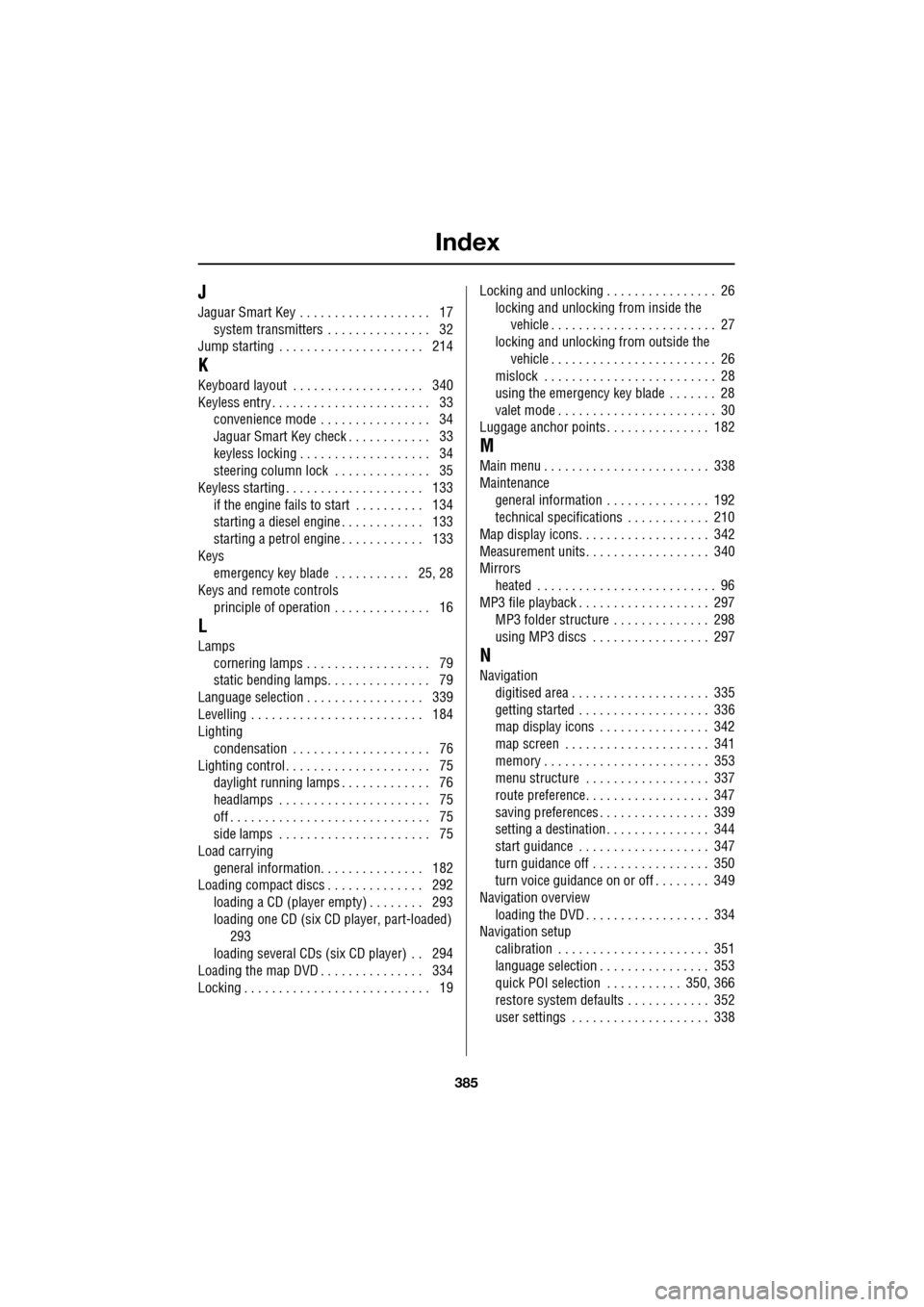
Jaguar Smart Key . . . . . . . . . . . . . . . . . . . 17system transmitters . . . . . . . . . . . . . . . 32
Jump starting . . . . . . . . . . . . . . . . . . . . . 214
K
Keyboard layout . . . . . . . . . . . . . . . . . . . 340
Keyless entry . . . . . . . . . . . . . . . . . . . . . . . 33 convenience mode . . . . . . . . . . . . . . . . 34
Jaguar Smart Key check . . . . . . . . . . . . 33
keyless locking . . . . . . . . . . . . . . . . . . . 34
steering column lock . . . . . . . . . . . . . . 35
Keyless starting . . . . . . . . . . . . . . . . . . . . 133
if the engine fails to start . . . . . . . . . . 134
starting a diesel engine . . . . . . . . . . . . 133
starting a petrol engine . . . . . . . . . . . . 133
Keys emergency key blade . . . . . . . . . . . 25, 28
Keys and remote controls
principle of operation . . . . . . . . . . . . . . 16
L
Lampscornering lamps . . . . . . . . . . . . . . . . . . 79
static bending lamps. . . . . . . . . . . . . . . 79
Language selection . . . . . . . . . . . . . . . . . 339
Levelling . . . . . . . . . . . . . . . . . . . . . . . . . 184
Lighting condensation . . . . . . . . . . . . . . . . . . . . 76
Lighting control . . . . . . . . . . . . . . . . . . . . . 75 daylight running lamps . . . . . . . . . . . . . 76
headlamps . . . . . . . . . . . . . . . . . . . . . . 75
off . . . . . . . . . . . . . . . . . . . . . . . . . . . . . 75
side lamps . . . . . . . . . . . . . . . . . . . . . . 75
Load carrying
general information. . . . . . . . . . . . . . . 182
Loading compact discs . . . . . . . . . . . . . . 292 loading a CD (player empty) . . . . . . . . 293
loading one CD (six CD player, part-loaded)
293
loading several CDs (six CD player) . . 294
Loading the map DVD . . . . . . . . . . . . . . . 334
Locking . . . . . . . . . . . . . . . . . . . . . . . . . . . 19 Locking and unlocking . . . . . . . . . . . . . . . . 26
locking and unlocking from inside the vehicle . . . . . . . . . . . . . . . . . . . . . . . . 27
locking and unlocking from outside the
vehicle . . . . . . . . . . . . . . . . . . . . . . . . 26
mislock . . . . . . . . . . . . . . . . . . . . . . . . . 28
using the emergency key blade . . . . . . . 28
valet mode . . . . . . . . . . . . . . . . . . . . . . . 30
Luggage anchor points . . . . . . . . . . . . . . . 182
M
Main menu . . . . . . . . . . . . . . . . . . . . . . . . 338
Maintenance
general information . . . . . . . . . . . . . . . 192
technical specifications . . . . . . . . . . . . 210
Map display icons. . . . . . . . . . . . . . . . . . . 342
Measurement units. . . . . . . . . . . . . . . . . . 340
Mirrors heated . . . . . . . . . . . . . . . . . . . . . . . . . . 96
MP3 file playback . . . . . . . . . . . . . . . . . . . 297 MP3 folder structure . . . . . . . . . . . . . . 298
using MP3 discs . . . . . . . . . . . . . . . . . 297
N
Navigationdigitised area . . . . . . . . . . . . . . . . . . . . 335
getting started . . . . . . . . . . . . . . . . . . . 336
map display icons . . . . . . . . . . . . . . . . 342
map screen . . . . . . . . . . . . . . . . . . . . . 341
memory . . . . . . . . . . . . . . . . . . . . . . . . 353
menu structure . . . . . . . . . . . . . . . . . . 337
route preference. . . . . . . . . . . . . . . . . . 347
saving preferences . . . . . . . . . . . . . . . . 339
setting a destination . . . . . . . . . . . . . . . 344
start guidance . . . . . . . . . . . . . . . . . . . 347
turn guidance off . . . . . . . . . . . . . . . . . 350
turn voice guidance on or off . . . . . . . . 349
Navigation overview
loading the DVD . . . . . . . . . . . . . . . . . . 334
Navigation setup calibration . . . . . . . . . . . . . . . . . . . . . . 351
language selection . . . . . . . . . . . . . . . . 353
quick POI selection . . . . . . . . . . . 350, 366
restore system defaults . . . . . . . . . . . . 352
user settings . . . . . . . . . . . . . . . . . . . . 338