Rele JAGUAR XF 2009 1.G Owners Manual
[x] Cancel search | Manufacturer: JAGUAR, Model Year: 2009, Model line: XF, Model: JAGUAR XF 2009 1.GPages: 391, PDF Size: 19.32 MB
Page 9 of 391
9
Introduction
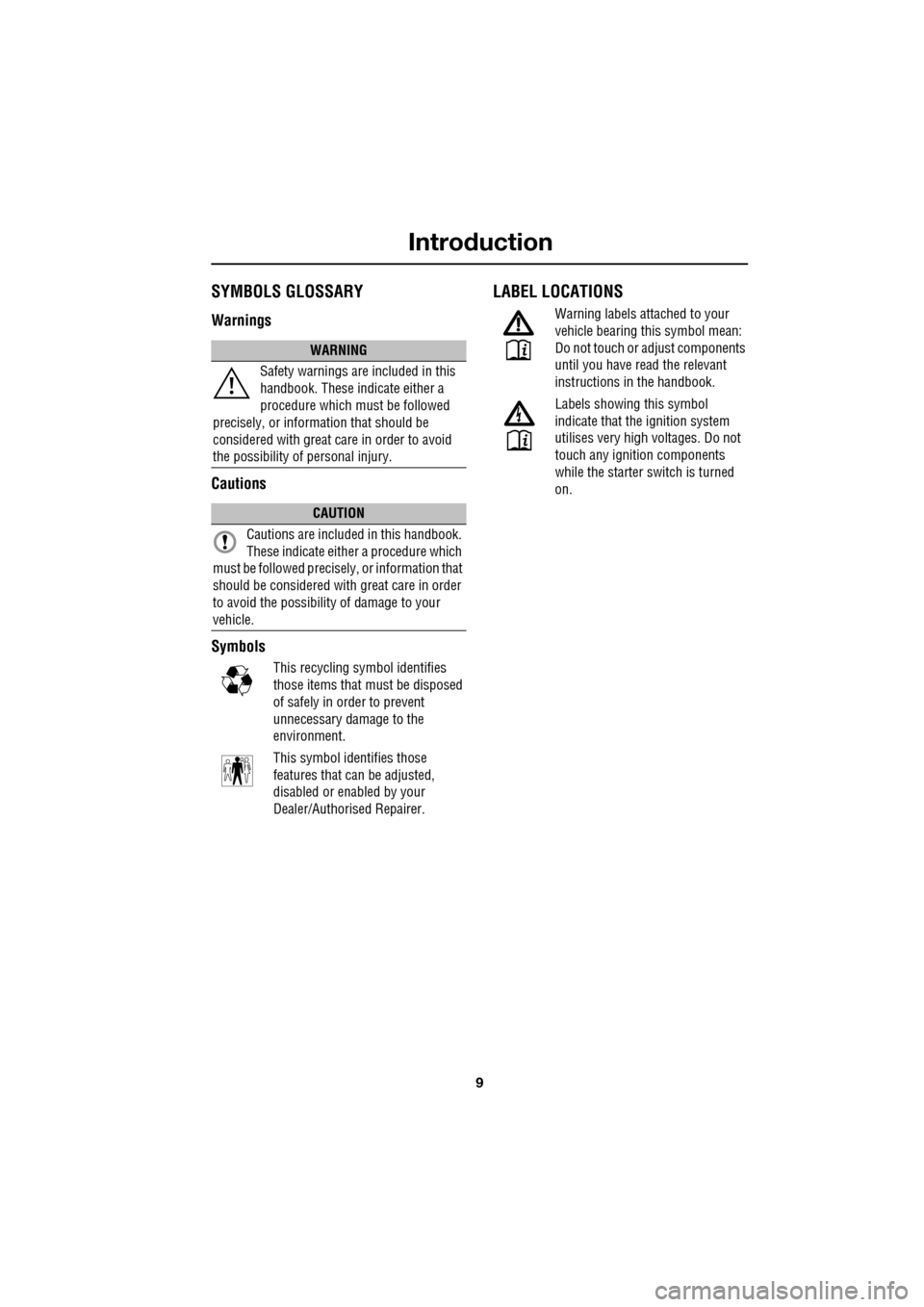
SYMBOLS GLOSSARY
Warnings
Cautions
Symbols
This recycling symbol identifies
those items that must be disposed
of safely in order to prevent
unnecessary damage to the
environment.
This symbol identifies those
features that can be adjusted,
disabled or enabled by your
Dealer/Authorised Repairer.
LABEL LOCATIONS
Warning labels attached to your
vehicle bearing this symbol mean:
Do not touch or adjust components
until you have read the relevant
instructions in the handbook.
Labels showing this symbol
indicate that the ignition system
utilises very high voltages. Do not
touch any ignition components
while the starter switch is turned
on.
WARNING
Safety warnings ar e included in this
handbook. These indicate either a
procedure which must be followed
precisely, or information that should be
considered with great care in order to avoid
the possibility of personal injury.
CAUTION
Cautions are include d in this handbook.
These indicate either a procedure which
must be followed precisely, or information that
should be considered with great care in order
to avoid the possibility of damage to your
vehicle.
Page 10 of 391
Introduction
10
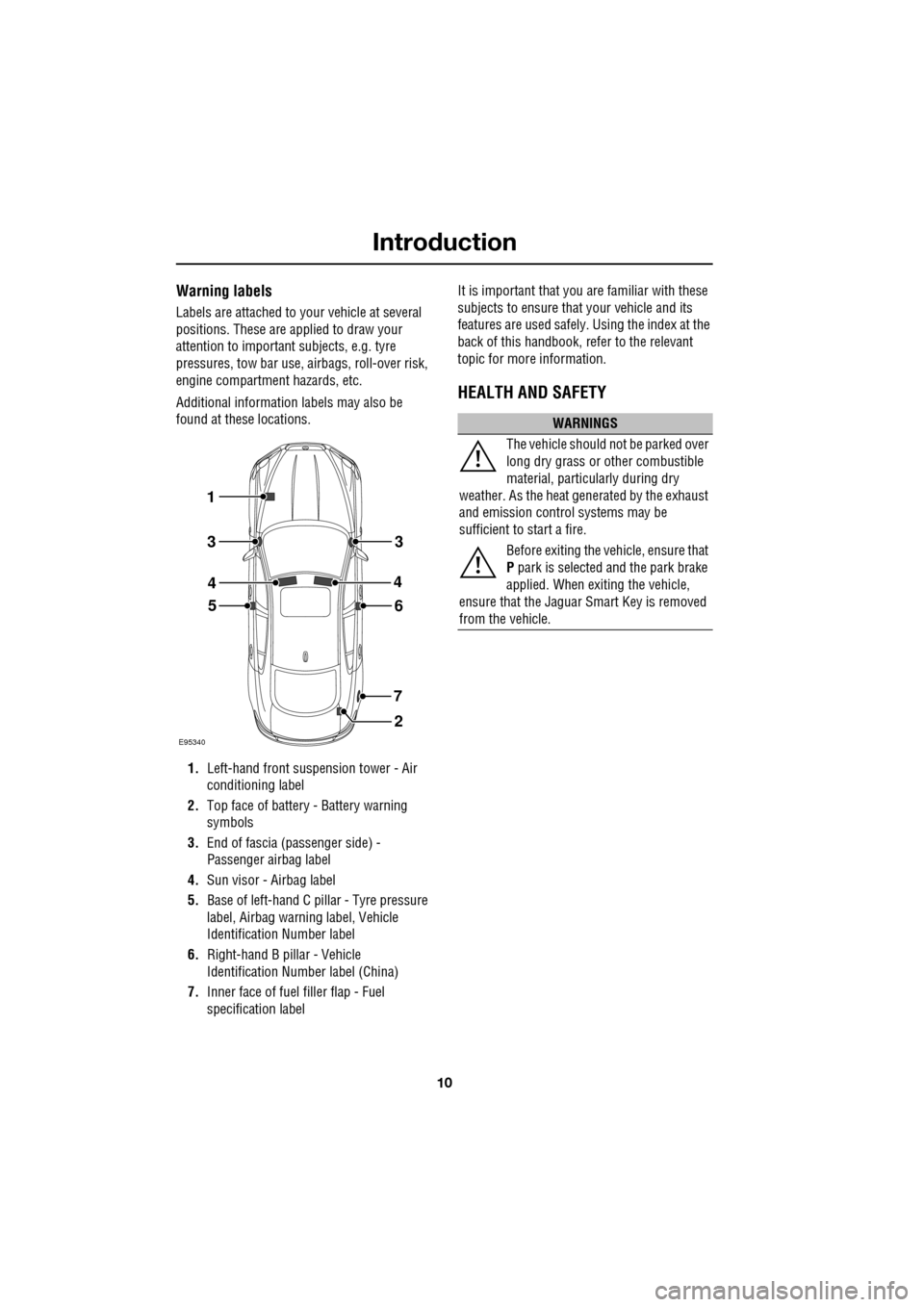
Warning labels
Labels are attached to your vehicle at several
positions. These are applied to draw your
attention to important subjects, e.g. tyre
pressures, tow bar use, airbags, roll-over risk,
engine compartment hazards, etc.
Additional information labels may also be
found at these locations.
1. Left-hand front suspension tower - Air
conditioning label
2. Top face of battery - Battery warning
symbols
3. End of fascia (passenger side) -
Passenger airbag label
4. Sun visor - Airbag label
5. Base of left-hand C p illar - Tyre pressure
label, Airbag warn ing label, Vehicle
Identification Number label
6. Right-hand B pillar - Vehicle
Identification Number label (China)
7. Inner face of fuel filler flap - Fuel
specification label It is important that you are familiar with these
subjects to ensure that your vehicle and its
features are used safely. Using the index at the
back of this handbook, re
fer to the relevant
topic for more information.
HEALTH AND SAFETY
E95340
1
2
56
7
3
4
3
4
WARNINGS
The vehicle should not be parked over
long dry grass or other combustible
material, particul arly during dry
weather. As the heat ge nerated by the exhaust
and emission control systems may be
sufficient to start a fire.
Before exiting the vehicle, ensure that
P park is selected and the park brake
applied. When exiting the vehicle,
ensure that the Jaguar Smart Key is removed
from the vehicle.
Page 13 of 391
13
Introduction
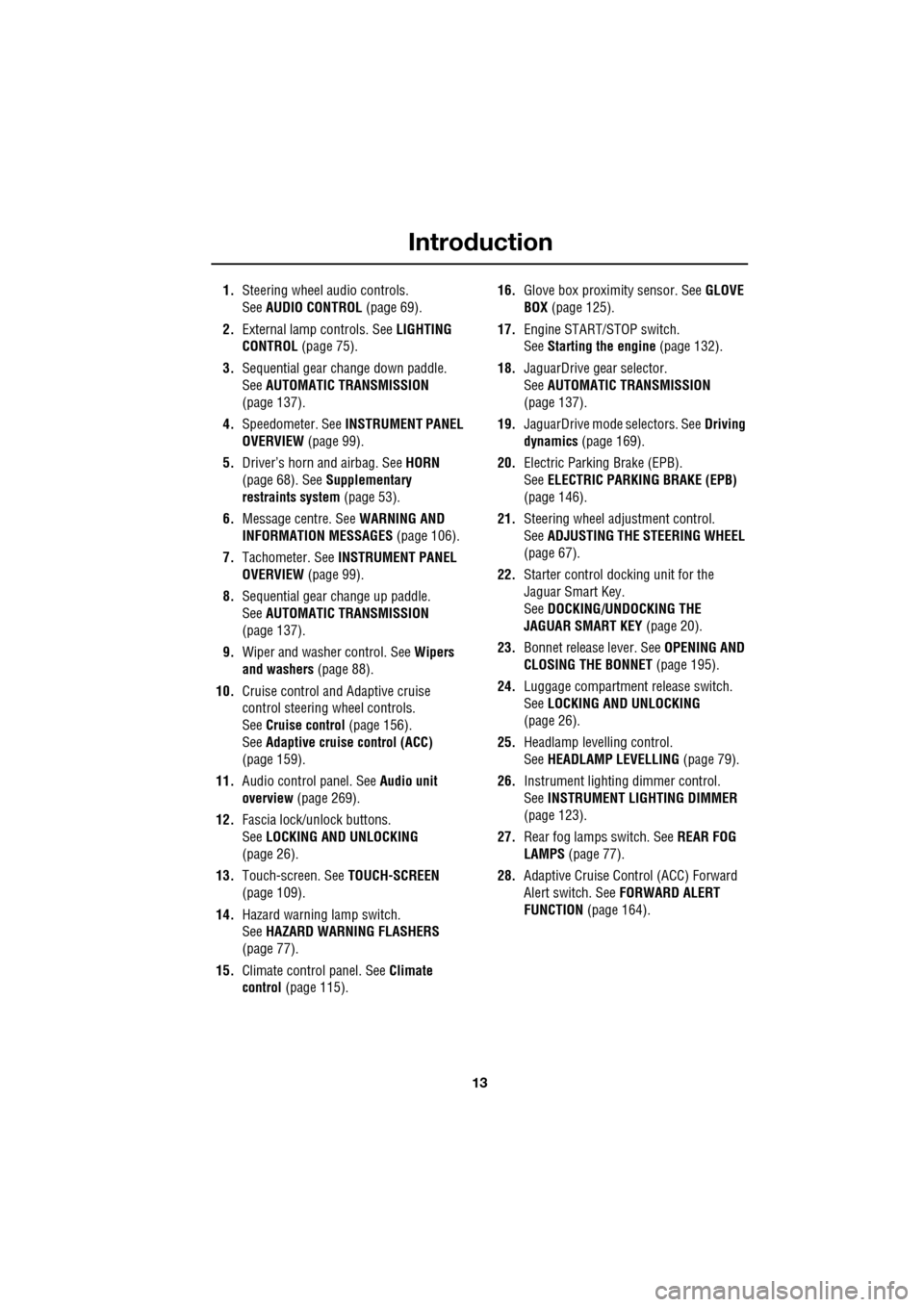
1.Steering wheel audio controls.
See AUDIO CONTROL (page 69).
2. External lamp controls. See LIGHTING
CONTROL (page 75).
3. Sequential gear change down paddle.
See AUTOMATIC TRANSMISSION
(page 137).
4. Speedometer. See INSTRUMENT PANEL
OVERVIEW (page 99).
5. Driver’s horn and airbag. See HORN
(page 68). See Supplementary
restraints system (page 53).
6. Message centre. See WARNING AND
INFORMATION MESSAGES (page 106).
7. Tachometer. See INSTRUMENT PANEL
OVERVIEW (page 99).
8. Sequential gear change up paddle.
See AUTOMATIC TRANSMISSION
(page 137).
9. Wiper and washer control. See Wipers
and washers (page 88).
10. Cruise control and Adaptive cruise
control steering wheel controls.
SeeCruise control (page 156).
See Adaptive cruise control (ACC)
(page 159).
11. Audio control panel. See Audio unit
overview (page 269).
12. Fascia lock/unlock buttons.
SeeLOCKING AND UNLOCKING
(page 26).
13. Touch-screen. See TOUCH-SCREEN
(page 109).
14. Hazard warning lamp switch.
SeeHAZARD WARNING FLASHERS
(page 77).
15. Climate contro l panel. SeeClimate
control (page 115). 16.
Glove box proximity sensor. See GLOVE
BOX (page 125).
17. Engine START/STOP switch.
SeeStarting the engine (page 132).
18. JaguarDrive gear selector.
SeeAUTOMATIC TRANSMISSION
(page
137).
19. JaguarDrive mode selectors. See Driving
dynamics (page 169).
20. Electric Parking Brake (EPB).
SeeELECTRIC PARKIN G BRAKE (EPB)
(page 146).
21. Steering wheel adju stment control.
See ADJUSTING THE STEERING WHEEL
(page 67).
22. Starter control docking unit for the
Jaguar Smart Key.
SeeDOCKING/UNDOCKING THE
JAGUAR SMART KEY (page 20).
23. Bonnet release lever. See OPENING AND
CLOSING THE BONNET (page 195).
24. Luggage compartment release switch.
SeeLOCKING AND UNLOCKING
(page 26).
25. Headlamp levelling control.
SeeHEADLAMP LEVELLING (page 79).
26. Instrument lighting dimmer control.
SeeINSTRUMENT LIGHTING DIMMER
(page 123).
27. Rear fog lamps switch. See REAR FOG
LAMPS (page 77).
28. Adaptive Cruise Control (ACC) Forward
Alert switch. See FORWARD ALERT
FUNCTION (page 164).
Page 16 of 391
Keys and remote controls
16
PRINCIPLE OF OPERATION
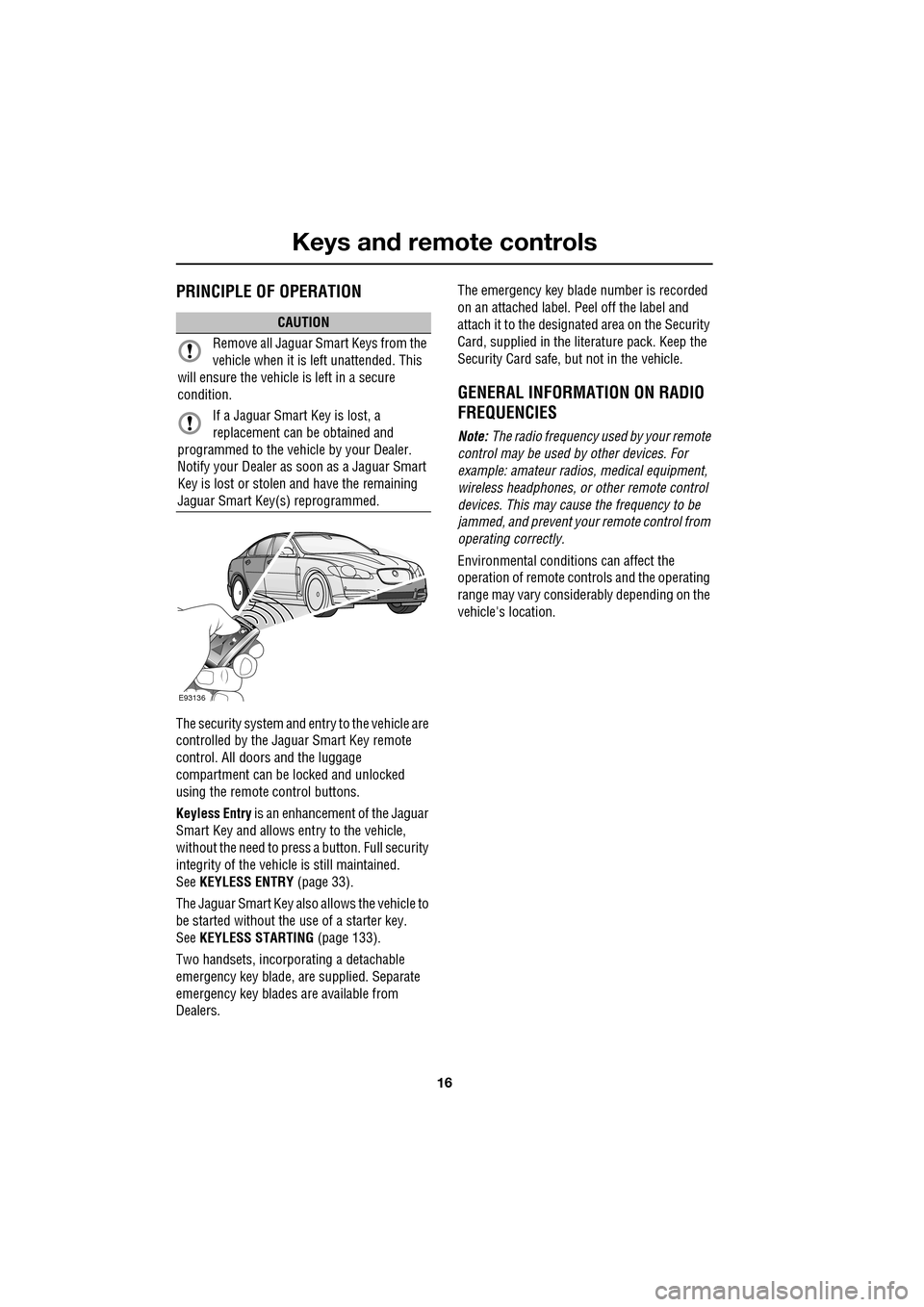
The security system and entry to the vehicle are
controlled by the Jaguar Smart Key remote
control. All doors and the luggage
compartment can be locked and unlocked
using the remote control buttons.
Keyless Entry is an enhancement of the Jaguar
Smart Key and allows entry to the vehicle,
without the need to press a button. Full security
integrity of the vehicl e is still maintained.
See KEYLESS ENTRY (page 33).
The Jaguar Smart Key also allows the vehicle to
be started without the use of a starter key.
See KEYLESS STARTING (page 133).
Two handsets, incorporating a detachable
emergency key blade, are supplied. Separate
emergency key blades are available from
Dealers. The emergency key blade number is recorded
on an attached label. Peel off the label and
attach it to the designated area on the Security
Card, supplied in the lite
rature pack. Keep the
Security Card safe, but not in the vehicle.
GENERAL INFORMATION ON RADIO
FREQUENCIES
Note: The radio frequency used by your remote
control may be used by other devices. For
example: amateur radios , medical equipment,
wireless headphones, or other remote control
devices. This may cause the frequency to be
jammed, and prevent your remote control from
operating correctly.
Environmental conditions can affect the
operation of remote controls and the operating
range may vary considerably depending on the
vehicle's location.
CAUTION
Remove all Jaguar Smart Keys from the
vehicle when it is le ft unattended. This
will ensure the vehicle is left in a secure
condition.
If a Jaguar Smart Key is lost, a
replacement can be obtained and
programmed to the vehi cle by your Dealer.
Notify your Dealer as soon as a Jaguar Smart
Key is lost or stolen and have the remaining
Jaguar Smart Key(s) reprogrammed.
E93136
Page 17 of 391
17
Keys and remote controls
USING THE REMOTE CONTROL
Jaguar Smart Key
Note: The operational range of the Jaguar
Smart Key will vary considerably depending on
atmospheric conditions and interference from
other transmitting devices.
Note: Some features of the security system are
market dependent or ar e options, so may not
be present on your vehicle.
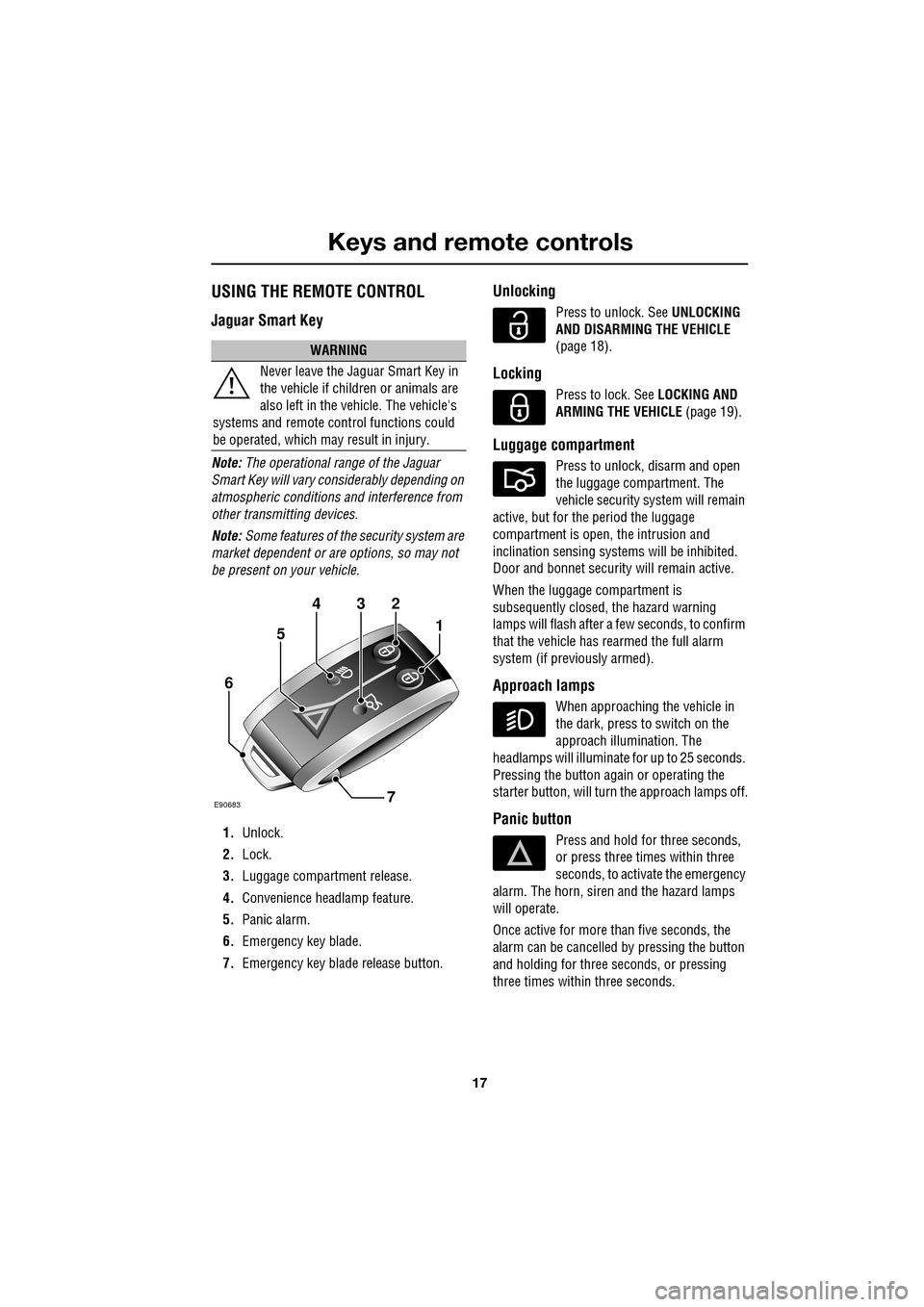
1. Unlock.
2. Lock.
3. Luggage compartment release.
4. Convenience headlamp feature.
5. Panic alarm.
6. Emergency key blade.
7. Emergency key blad e release button.
Unlocking
Press to unlock. See UNLOCKING
AND DISARMING THE VEHICLE
(page 18).
Locking
Press to lock. See LOCKING AND
ARMING THE VEHICLE (page 19).
Luggage compartment
Press to unlock, disarm and open
the luggage compartment. The
vehicle security system will remain
active, but for the period the luggage
compartment is open, the intrusion and
inclination sensing system s will be inhibited.
Door and bonnet security will remain active.
When the luggage compartment is
subsequently closed, the hazard warning
lamps will flash after a few seconds, to confirm
that the vehicle has rearmed the full alarm
system (if previously armed).
Approach lamps
When approaching the vehicle in
the dark, press to switch on the
approach illumination. The
headlamps will illuminate for up to 25 seconds.
Pressing the button again or operating the
starter button, will turn the approach lamps off.
Panic button
Press and hold for three seconds,
or press three times within three
seconds, to activate the emergency
alarm. The horn, siren and the hazard lamps
will operate.
Once active for more than five seconds, the
alarm can be cancelled by pressing the button
and holding for three seconds, or pressing
three times within three seconds.
WARNING
Never leave the Jaguar Smart Key in
the vehicle if children or animals are
also left in the vehicle. The vehicle's
systems and remote c ontrol functions could
be operated, which ma y result in injury.
432
1
7
6
5
E90683
Page 19 of 391
19
Keys and remote controls
LOCKING AND ARMING THE VEHICLE
Press the lock button to secure the
vehicle. The vehicle can be Single
or Double locked, as follows:
Single locking
Press the lock button briefly. Single locking
secures the vehicle and prevents the doors
being opened from outside of the vehicle. The
doors can be unlocked and opened from inside
the vehicle. The haza rd warning lamps will
flash once as confirmation.
Note: In some markets, an audible warning will
sound.
Double locking
Press the lock button twice within three
seconds. Double locki ng secures the vehicle
and prevents the doors being unlocked or
opened from inside or outside of the vehicle,
except with the correct Jaguar Smart Key. The
hazard warning lamps w ill flash twice (with a
long second flash) and an audible warning will
sound, as confirmation. Double locking provides a
dditional security if
the vehicle is left una ttended. The vehicle
cannot be opened by breaking a window and
operating the door locks from inside the
vehicle.
Power-fold mirrors
If automatic power-fold is enabled, the door
mirrors will fold in towards the vehicle body
when the vehicle is locked. The power-fold
feature can be enable d/disabled using the
touch-screen. See PROGRAMMING THE
REMOTE CONTROL (page 21).
Lock confirmation
If you are uncertain whether the vehicle is
locked and armed (either by single or double
locking), press the lock button again. The
hazard warning lights will flash to indicate and
confirm the current lock status.
Note: If the vehicle is not already locked and
armed, pressing the lock button will single lock
the vehicle. Press again to double lock, if
required.
Global closing
Press and hold the lock button for three
seconds. The vehicle wi ll single lock and the
alarm will be fully arme d immediately. After the
three seconds, all the windows and the sunroof
will close.
WARNING
The vehicle will only lock, if all door,
luggage compartment and bonnet
apertures are closed. If a lock attempt
is made when an aperture is open, the vehicle
will not lock and two audible error warnings
will sound.
WARNING
Never double lock the vehicle with
people, children, or pets inside. In the
event of an emergency they would be
unable to escape, and the emergency services
would be unable to release them quickly.
WARNING
Ensure that no children, pets, or
obstructions are in any open aperture
before operating global closing.
Safety mechanisms are in place to prevent
serious injury, however, injuries can still
occur.
Page 21 of 391
21
Keys and remote controls
Undocking the Jaguar Smart Key
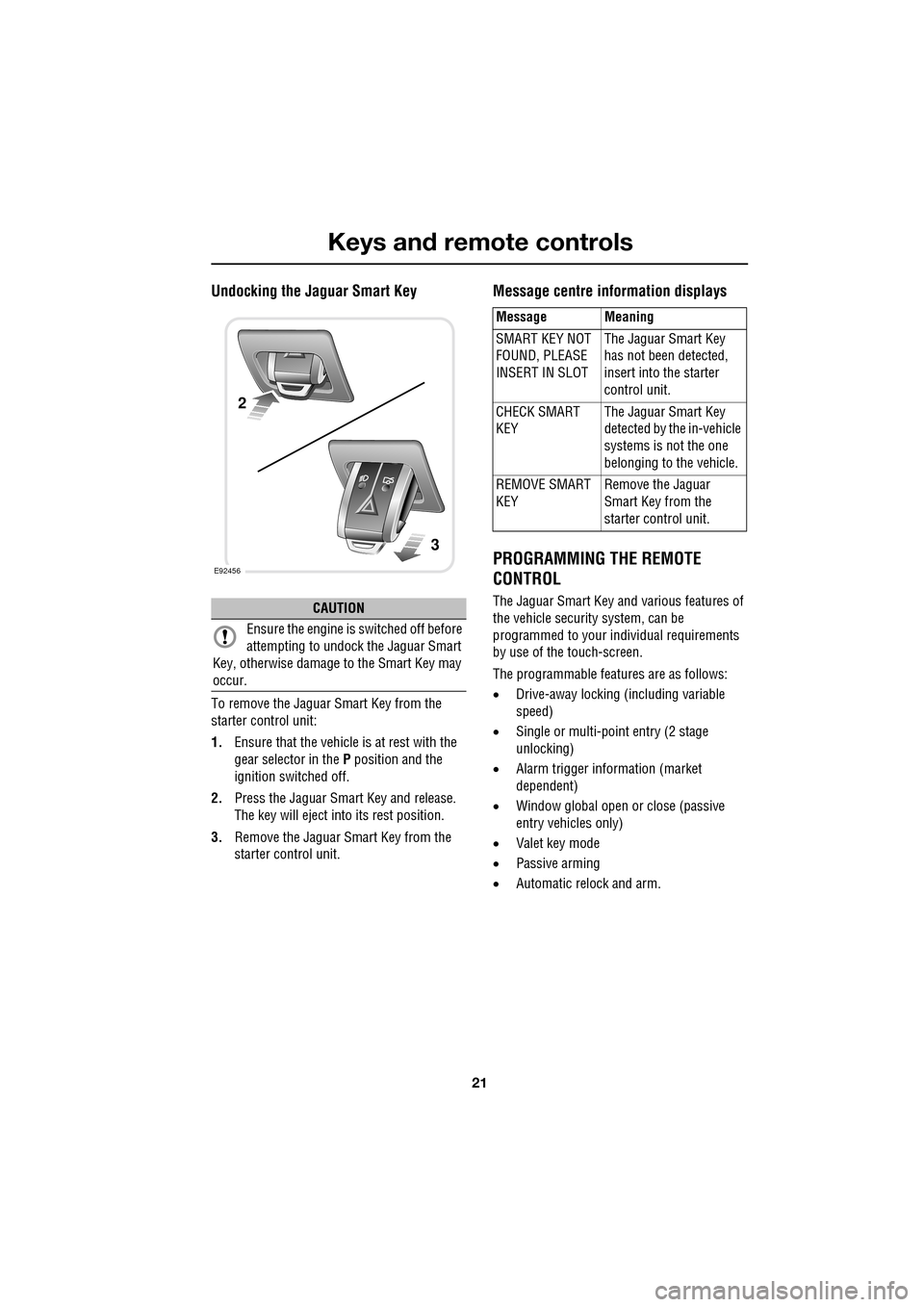
To remove the Jaguar Smart Key from the
starter control unit:
1.Ensure that the vehicle is at rest with the
gear selector in the P position and the
ignition switched off.
2. Press the Jaguar Smart Key and release.
The key will eject into its rest position.
3. Remove the Jaguar Smart Key from the
starter control unit.
Message centre in formation displays
PROGRAMMING THE REMOTE
CONTROL
The Jaguar Smart Key and various features of
the vehicle security system, can be
programmed to your individual requirements
by use of the touch-screen.
The programmable featur es are as follows:
• Drive-away locking (including variable
speed)
• Single or multi-point entry (2 stage
unlocking)
• Alarm trigger information (market
dependent)
• Window global open or close (passive
entry vehicles only)
• Valet key mode
• Passive arming
• Automatic relock and arm.CAUTION
Ensure the engine is switched off before
attempting to undock the Jaguar Smart
Key, otherwise damage to the Smart Key may
occur.
E92456
2
3
Message Meaning
SMART KEY NOT
FOUND, PLEASE
INSERT IN SLOT The Jaguar Smart Key
has not been detected,
insert into the starter
control unit.
CHECK SMART
KEY The Jaguar Smart Key
detected by the in-vehicle
systems is not the one
belonging to the vehicle.
REMOVE SMART
KEY Remove the Jaguar
Smart Key from the
starter control unit.
Page 25 of 391
25
Keys and remote controls
To renew the battery, follow the procedure
below:
1.Remove the key blade from the Jaguar
Smart Key. See USING THE REMOTE
CONTROL (page 17).
2. Remove the two side covers, one at a time,
by inserting a small, flat bladed
screwdriver between the cover and body
and lightly twist the screwdriver.
3. Insert the screwdriver between the two
body halves of th e Jaguar Smart Key.
Apply light pressure to the screwdriver and
separate the two halves.
4. Remove the printed circuit board, taking
care not to touch th e battery terminals.
Remove the old battery and dispose of it
safely.
5. Fit a new battery, type CR2032 (available
from your Dealer/Aut horised Repairer),
with the positive (+) downwards, in the
battery receptacle. Avoid touching the new
battery, as moisture/oil from the fingers
can reduce battery life and corrode the
contacts.
Refit the parts in the reverse order, ensuring
that they click securely into place.
Battery disposal
Used batteries must be disposed of
correctly, as they contain a number
of harmful substances. Seek advise
on disposal from your Dealer/
Authorised Repairer and/or your local
authority.
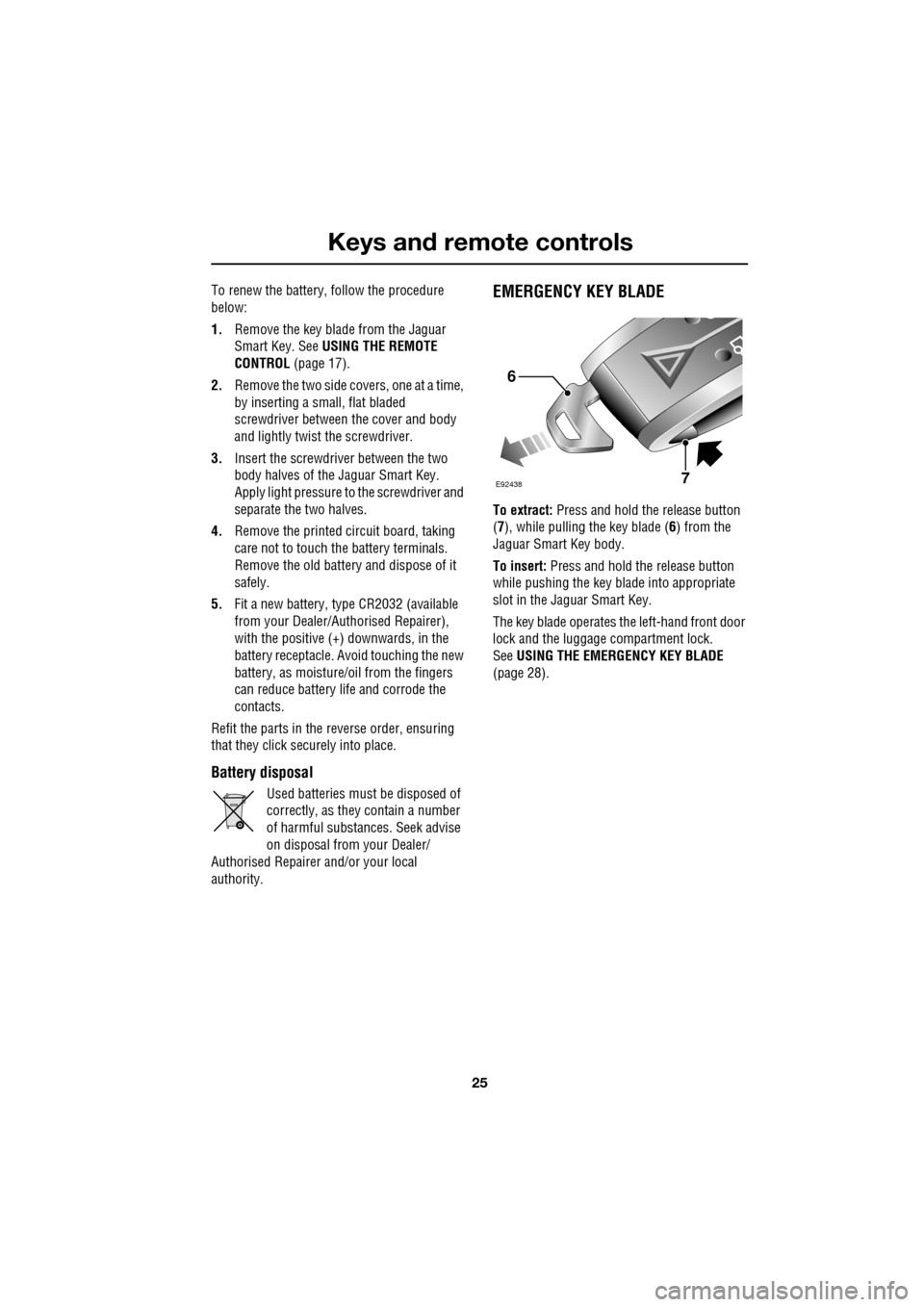
EMERGENCY KEY BLADE
To extract: Press and hold the release button
(7 ), while pulling the key blade ( 6) from the
Jaguar Smart Key body.
To insert: Press and hold th e release button
while pushing the key blade into appropriate
slot in the Jaguar Smart Key.
The key blade operates th e left-hand front door
lock and the luggage compartment lock.
See USING THE EMERGENCY KEY BLADE
(page 28).
E92438
6
7
Page 26 of 391
Locks
26
LOCKING AND UNLOCKING
Locking and unlocking from outside the
vehicle
Locking and unlocking the vehicle using the
Jaguar Smart Key, is explained earlier in this
handbook. See USING THE REMOTE
CONTROL (page 17). Locking and unlocking
the vehicle using the Keyless Entry system is
explained later in this handbook. See KEYLESS
ENTRY (page 33).
Note: To help prevent locking the Jaguar Smart
Key inside the vehicle, it has been made
difficult to slam lock a door using the interior
door locking lever. The door will not lock.
Luggage compartment
Note: If the Jaguar Smart Key is placed within
a metal box, it will not be detected by the
vehicle security system.
The luggage compartment can be opened at
any time, using the appropriate button on the
Jaguar Smart Key or via keyless entry. It can
also be opened using th e exterior release,
provided the doors are unlocked.
Provided the vehicle is not locked or alarmed,
the luggage compartment can also be opened
using the interior release button.
The luggage compartment can also be
unlocked and opened usi ng the emergency key
blade, as described la ter in this section.
Drive-away locking
This feature locks all unsecured locks when the
vehicle reaches a designated forward speed.
This designated speed and whether or not
drive-away locking is en abled, can be set using
the vehicle touch-screen. See PROGRAMMING
THE REMOTE CONTROL (page 21).
WARNING
Never double lock the vehicle with
people, children or pets inside. In the
event of an emergency they would be
unable to escape, and the emergency services
would be unable to release them quickly.
When the vehicle is double-locked the doors
cannot be opened, either from inside or
outside the vehicle.
Breaking a window will not allow a door to be
opened.CAUTION
If the luggage comp artment is opened
after the driver an d passenger doors are
locked, ensure that the Jaguar Smart Key
remains outside the vehicle when it is closed
again. If the Jaguar Smart Key is inadvertently
left inside the luggage compartment, an
audible warning will sound and the luggage
compartment will re-ope n after three seconds.
Page 27 of 391
27
Locks
Locking and unlocking from inside the
vehicle
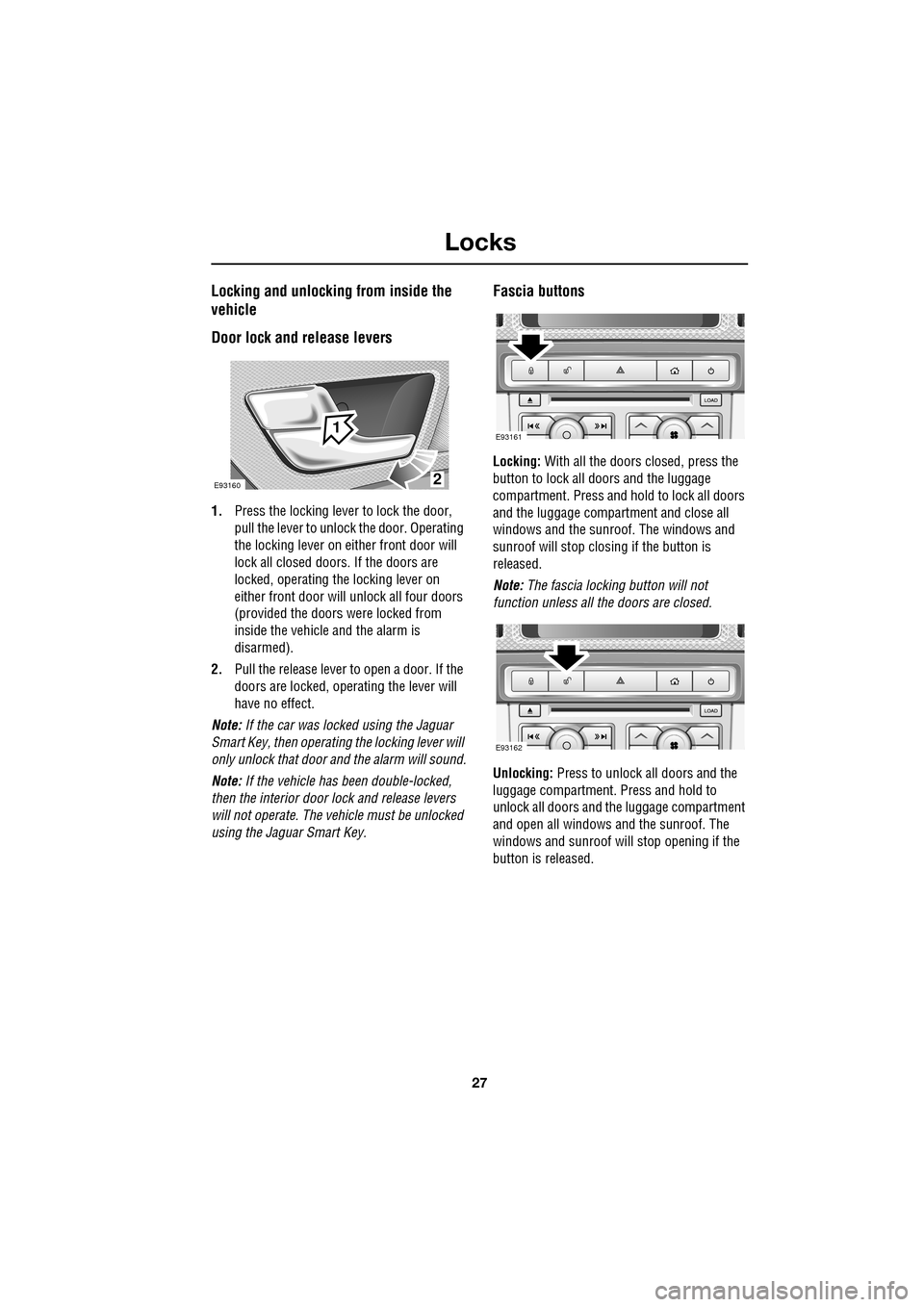
Door lock and release levers
1.Press the locking lever to lock the door,
pull the lever to unlock the door. Operating
the locking lever on ei ther front door will
lock all closed doors. If the doors are
locked, operating the locking lever on
either front door will unlock all four doors
(provided the doors were locked from
inside the vehicle and the alarm is
disarmed).
2. Pull the release lever to open a door. If the
doors are locked, operating the lever will
have no effect.
Note: If the car was locked using the Jaguar
Smart Key, then operating the locking lever will
only unlock that door and the alarm will sound.
Note: If the vehicle has been double-locked,
then the interior door lock and release levers
will not operate. The vehicle must be unlocked
using the Jaguar Smart Key.
Fascia buttons
Locking: With all the doors closed, press the
button to lock all doo rs and the luggage
compartment. Press and hold to lock all doors
and the luggage compartment and close all
windows and the sunroof. The windows and
sunroof will stop closing if the button is
released.
Note: The fascia locking button will not
function unless all the doors are closed.
Unlocking: Press to unlock all doors and the
luggage compartment. Press and hold to
unlock all doors and the luggage compartment
and open all windows and the sunroof. The
windows and sunroof will stop opening if the
button is released.
2
1
E93160
E93161
E93162