ad blue JEEP GLADIATOR 2023 User Guide
[x] Cancel search | Manufacturer: JEEP, Model Year: 2023, Model line: GLADIATOR, Model: JEEP GLADIATOR 2023Pages: 448, PDF Size: 17.37 MB
Page 133 of 448
GETTING TO KNOW YOUR INSTRUMENT PANEL131
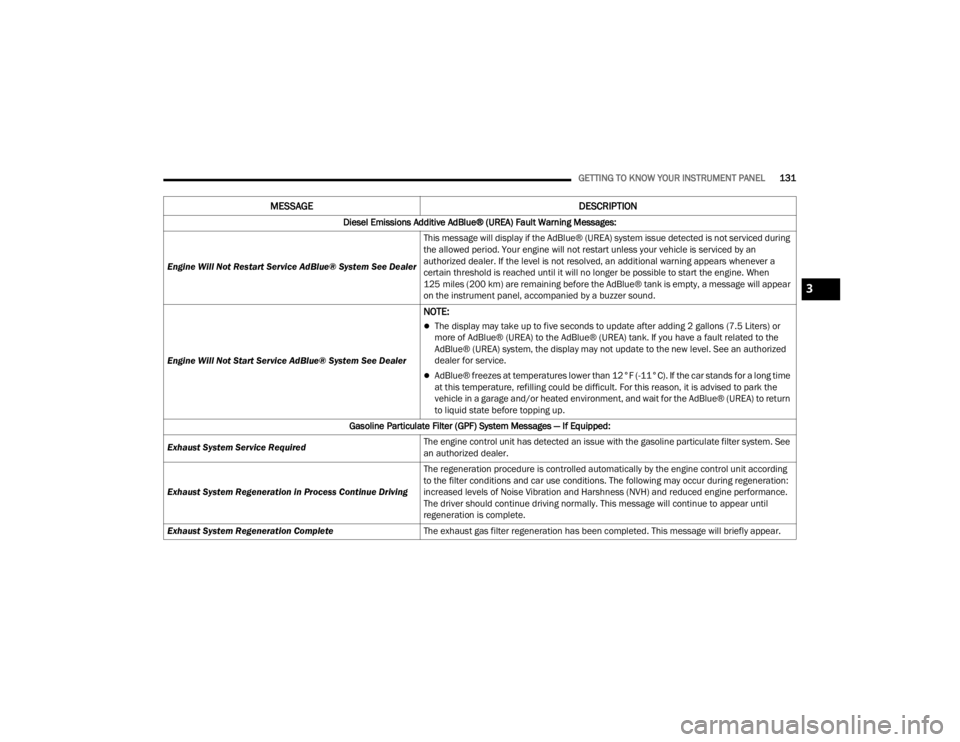
Diesel Emissions Additive AdBlue® (UREA) Fault Warning Messages:
Engine Will Not Restart Service AdBlue® System See Dealer This message will display if the AdBlue® (UREA) system issue detected is not serviced during
the allowed period. Your engine will not restart unless your vehicle is serviced by an
authorized dealer. If the level is not resolved, an additional warning appears whenever a
certain threshold is reached until it will no longer be possible to start the engine. When
125 miles (200 km) are remaining before the AdBlue® tank is empty, a message will appear
on the instrument panel, accompanied by a buzzer sound.
Engine Will Not Start Service AdBlue® System See Dealer
NOTE:
The display may take up to five seconds to update after adding 2 gallons (7.5 Liters) or
more of AdBlue® (UREA) to the AdBlue® (UREA) tank. If you have a fault related to the
AdBlue® (UREA) system, the display may not update to the new level. See an authorized
dealer for service.
AdBlue® freezes at temperatures lower than 12°F (-11°C). If the car stands for a long time
at this temperature, refilling could be difficult. For this reason, it is advised to park the
vehicle in a garage and/or heated environment, and wait for the AdBlue® (UREA) to return
to liquid state before topping up.
Gasoline Particulate Filter (GPF) System Messages — If Equipped:
Exhaust System Service Required The engine control unit has detected an issue with the gasoline particulate filter system. See
an authorized dealer.
Exhaust System Regeneration in Process Continue Driving The regeneration procedure is controlled automatically by the engine control unit according
to the filter conditions and car use conditions. The following may occur during regeneration:
increased levels of Noise Vibration and Harshness (NVH) and reduced engine performance.
The driver should continue driving normally. This message will continue to appear until
regeneration is complete.
Exhaust System Regeneration Complete The exhaust gas filter regeneration has been completed. This message will briefly appear.
MESSAGE DESCRIPTION
3
23_JT_OM_EN_USC_t.book Page 131
Page 140 of 448
138GETTING TO KNOW YOUR INSTRUMENT PANEL
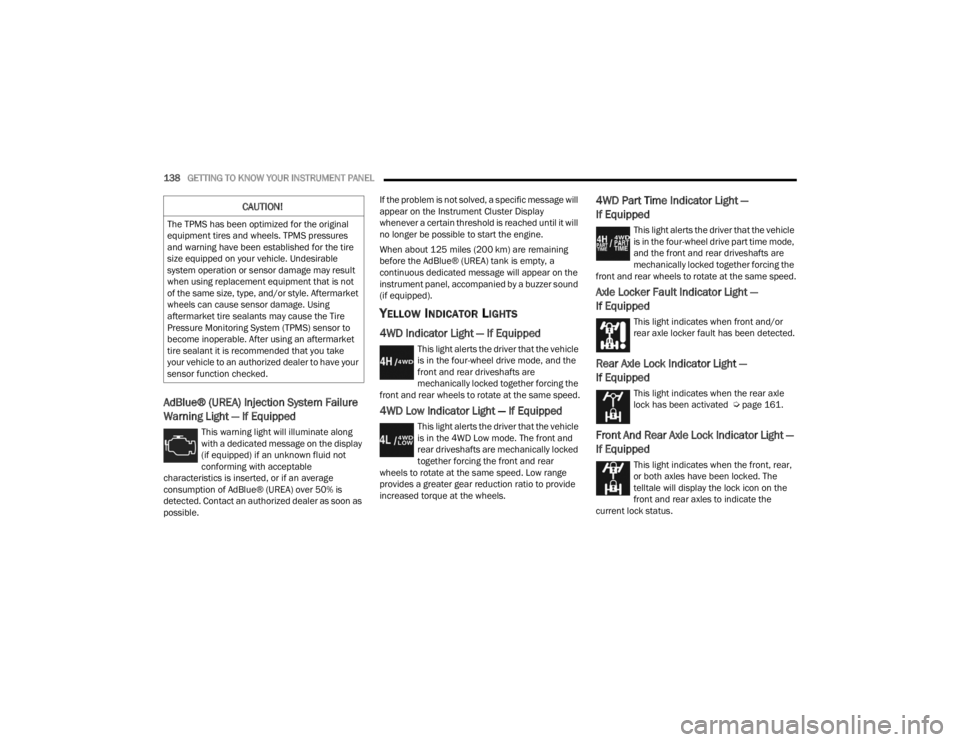
AdBlue® (UREA) Injection System Failure
Warning Light — If Equipped
This warning light will illuminate along
with a dedicated message on the display
(if equipped) if an unknown fluid not
conforming with acceptable
characteristics is inserted, or if an average
consumption of AdBlue® (UREA) over 50% is
detected. Contact an authorized dealer as soon as
possible. If the problem is not solved, a specific message will
appear on the Instrument Cluster Display
whenever a certain threshold is reached until it will
no longer be possible to start the engine.
When about 125 miles (200 km) are remaining
before the AdBlue® (UREA) tank is empty, a
continuous dedicated message will appear on the
instrument panel, accompanied by a buzzer sound
(if equipped).
YELLOW INDICATOR LIGHTS
4WD Indicator Light — If Equipped
This light alerts the driver that the vehicle
is in the four-wheel drive mode, and the
front and rear driveshafts are
mechanically locked together forcing the
front and rear wheels to rotate at the same speed.
4WD Low Indicator Light — If Equipped
This light alerts the driver that the vehicle
is in the 4WD Low mode. The front and
rear driveshafts are mechanically locked
together forcing the front and rear
wheels to rotate at the same speed. Low range
provides a greater gear reduction ratio to provide
increased torque at the wheels.
4WD Part Time Indicator Light —
If Equipped
This light alerts the driver that the vehicle
is in the four-wheel drive part time mode,
and the front and rear driveshafts are
mechanically locked together forcing the
front and rear wheels to rotate at the same speed.
Axle Locker Fault Indicator Light —
If Equipped
This light indicates when front and/or
rear axle locker fault has been detected.
Rear Axle Lock Indicator Light —
If Equipped
This light indicates when the rear axle
lock has been activated Ú page 161.
Front And Rear Axle Lock Indicator Light —
If Equipped
This light indicates when the front, rear,
or both axles have been locked. The
telltale will display the lock icon on the
front and rear axles to indicate the
current lock status.
CAUTION!
The TPMS has been optimized for the original
equipment tires and wheels. TPMS pressures
and warning have been established for the tire
size equipped on your vehicle. Undesirable
system operation or sensor damage may result
when using replacement equipment that is not
of the same size, type, and/or style. Aftermarket
wheels can cause sensor damage. Using
aftermarket tire sealants may cause the Tire
Pressure Monitoring System (TPMS) sensor to
become inoperable. After using an aftermarket
tire sealant it is recommended that you take
your vehicle to an authorized dealer to have your
sensor function checked.
23_JT_OM_EN_USC_t.book Page 138
Page 141 of 448
GETTING TO KNOW YOUR INSTRUMENT PANEL139
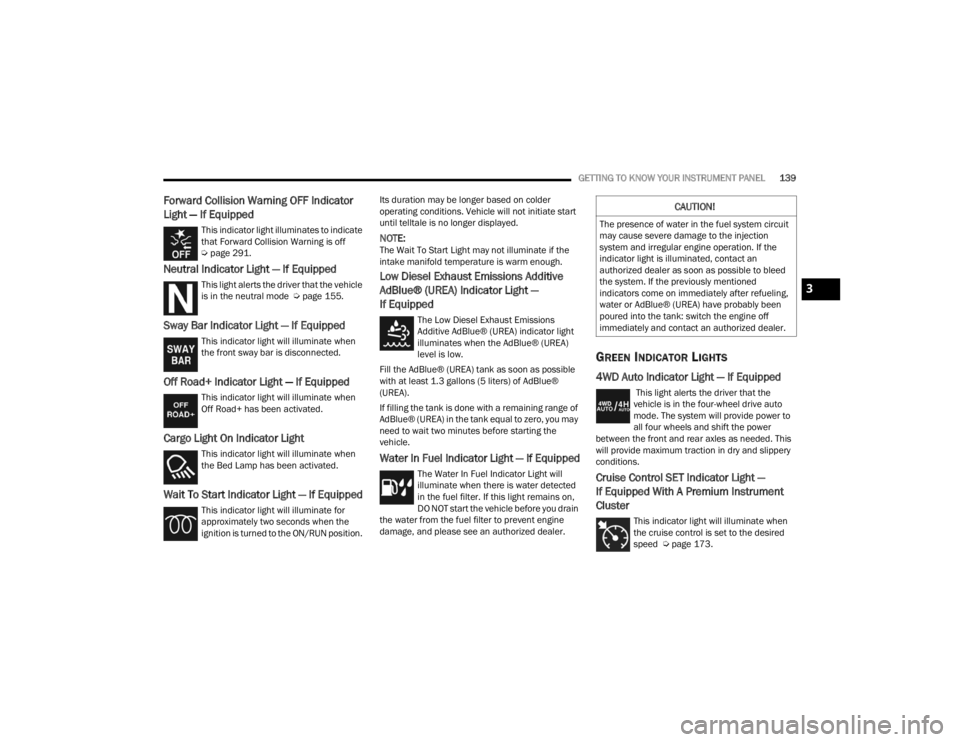
Forward Collision Warning OFF Indicator
Light — If Equipped
This indicator light illuminates to indicate
that Forward Collision Warning is off
Úpage 291.
Neutral Indicator Light — If Equipped
This light alerts the driver that the vehicle
is in the neutral mode Ú page 155.
Sway Bar Indicator Light — If Equipped
This indicator light will illuminate when
the front sway bar is disconnected.
Off Road+ Indicator Light — If Equipped
This indicator light will illuminate when
Off Road+ has been activated.
Cargo Light On Indicator Light
This indicator light will illuminate when
the Bed Lamp has been activated.
Wait To Start Indicator Light — If Equipped
This indicator light will illuminate for
approximately two seconds when the
ignition is turned to the ON/RUN position. Its duration may be longer based on colder
operating conditions. Vehicle will not initiate start
until telltale is no longer displayed.
NOTE:The Wait To Start Light may not illuminate if the
intake manifold temperature is warm enough.
Low Diesel Exhaust Emissions Additive
AdBlue® (UREA) Indicator Light —
If Equipped
The Low Diesel Exhaust Emissions
Additive AdBlue® (UREA) indicator light
illuminates when the AdBlue® (UREA)
level is low.
Fill the AdBlue® (UREA) tank as soon as possible
with at least 1.3 gallons (5 liters) of AdBlue®
(UREA).
If filling the tank is done with a remaining range of
AdBlue® (UREA) in the tank equal to zero, you may
need to wait two minutes before starting the
vehicle.
Water In Fuel Indicator Light — If Equipped
The Water In Fuel Indicator Light will
illuminate when there is water detected
in the fuel filter. If this light remains on,
DO NOT start the vehicle before you drain
the water from the fuel filter to prevent engine
damage, and please see an authorized dealer.
GREEN INDICATOR LIGHTS
4WD Auto Indicator Light — If Equipped
This light alerts the driver that the
vehicle is in the four-wheel drive auto
mode. The system will provide power to
all four wheels and shift the power
between the front and rear axles as needed. This
will provide maximum traction in dry and slippery
conditions.
Cruise Control SET Indicator Light —
If Equipped With A Premium Instrument
Cluster
This indicator light will illuminate when
the cruise control is set to the desired
speed Ú page 173.
CAUTION!
The presence of water in the fuel system circuit
may cause severe damage to the injection
system and irregular engine operation. If the
indicator light is illuminated, contact an
authorized dealer as soon as possible to bleed
the system. If the previously mentioned
indicators come on immediately after refueling,
water or AdBlue® (UREA) have probably been
poured into the tank: switch the engine off
immediately and contact an authorized dealer.
3
23_JT_OM_EN_USC_t.book Page 139
Page 143 of 448
GETTING TO KNOW YOUR INSTRUMENT PANEL141
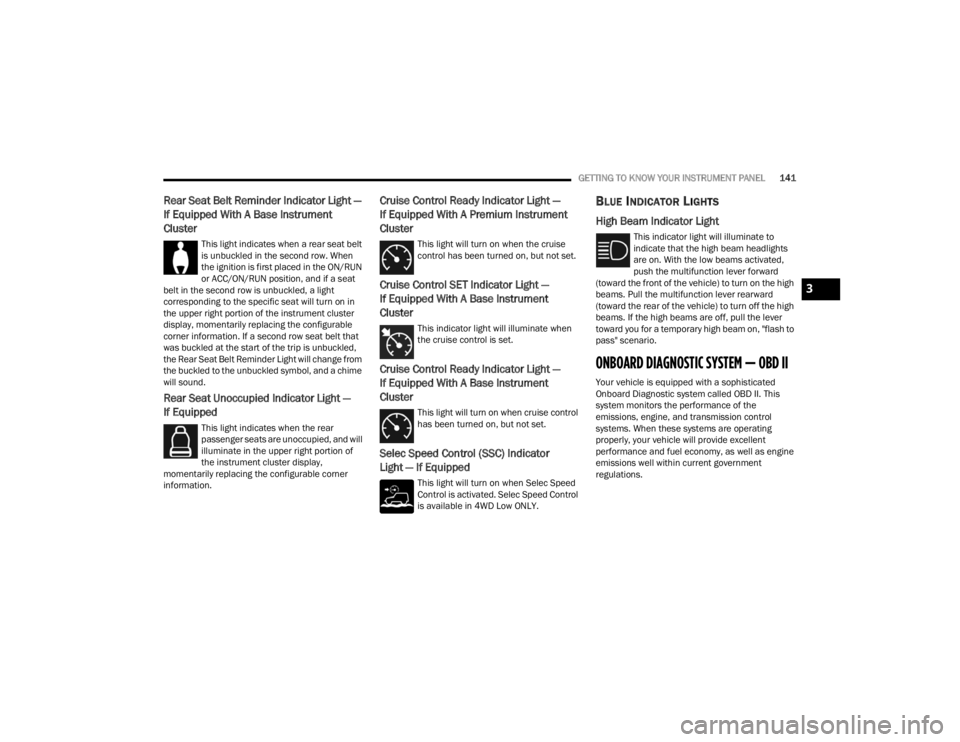
Rear Seat Belt Reminder Indicator Light —
If Equipped With A Base Instrument
Cluster
This light indicates when a rear seat belt
is unbuckled in the second row. When
the ignition is first placed in the ON/RUN
or ACC/ON/RUN position, and if a seat
belt in the second row is unbuckled, a light
corresponding to the specific seat will turn on in
the upper right portion of the instrument cluster
display, momentarily replacing the configurable
corner information. If a second row seat belt that
was buckled at the start of the trip is unbuckled,
the Rear Seat Belt Reminder Light will change from
the buckled to the unbuckled symbol, and a chime
will sound.
Rear Seat Unoccupied Indicator Light —
If Equipped
This light indicates when the rear
passenger seats are unoccupied, and will
illuminate in the upper right portion of
the instrument cluster display,
momentarily replacing the configurable corner
information.
Cruise Control Ready Indicator Light —
If Equipped With A Premium Instrument
Cluster
This light will turn on when the cruise
control has been turned on, but not set.
Cruise Control SET Indicator Light —
If Equipped With A Base Instrument
Cluster
This indicator light will illuminate when
the cruise control is set.
Cruise Control Ready Indicator Light —
If Equipped With A Base Instrument
Cluster
This light will turn on when cruise control
has been turned on, but not set.
Selec Speed Control (SSC) Indicator
Light — If Equipped
This light will turn on when Selec Speed
Control is activated. Selec Speed Control
is available in 4WD Low ONLY.
BLUE INDICATOR LIGHTS
High Beam Indicator Light
This indicator light will illuminate to
indicate that the high beam headlights
are on. With the low beams activated,
push the multifunction lever forward
(toward the front of the vehicle) to turn on the high
beams. Pull the multifunction lever rearward
(toward the rear of the vehicle) to turn off the high
beams. If the high beams are off, pull the lever
toward you for a temporary high beam on, "flash to
pass" scenario.
ONBOARD DIAGNOSTIC SYSTEM — OBD II
Your vehicle is equipped with a sophisticated
Onboard Diagnostic system called OBD II. This
system monitors the performance of the
emissions, engine, and transmission control
systems. When these systems are operating
properly, your vehicle will provide excellent
performance and fuel economy, as well as engine
emissions well within current government
regulations.
3
23_JT_OM_EN_USC_t.book Page 141
Page 229 of 448
MULTIMEDIA227
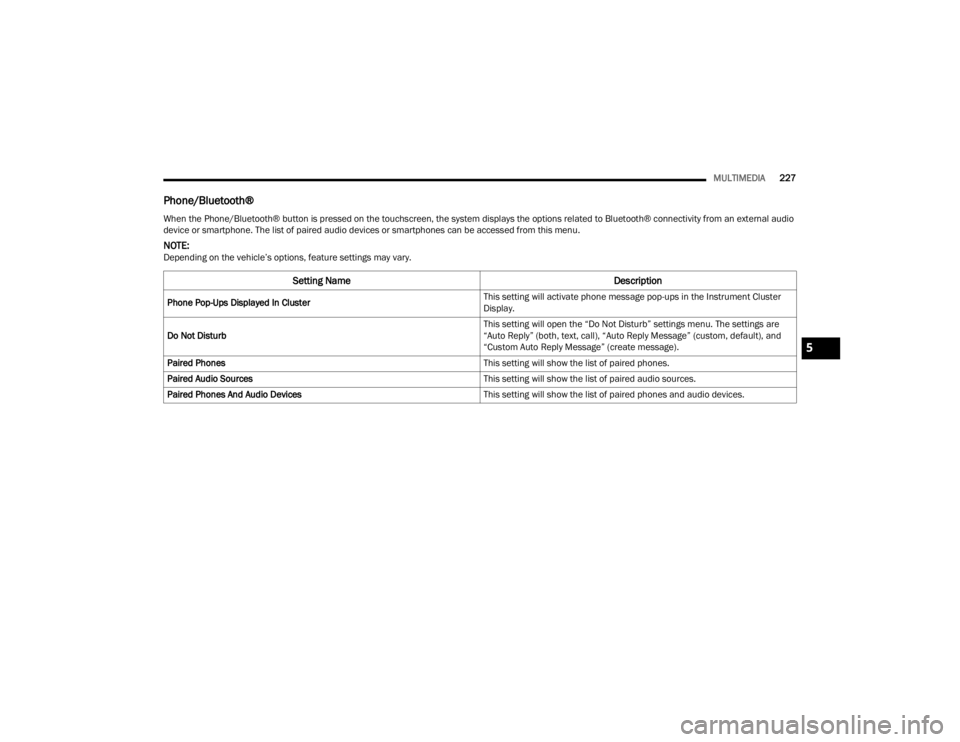
Phone/Bluetooth®
When the Phone/Bluetooth® button is pressed on the touchscreen, the system displays the options related to Bluetooth® connectivity from an external audio
device or smartphone. The list of paired audio devices or smartphones can be accessed from this menu.
NOTE:Depending on the vehicle’s options, feature settings may vary.
Setting Name Description
Phone Pop-Ups Displayed In Cluster This setting will activate phone message pop-ups in the Instrument Cluster
Display.
Do Not Disturb This setting will open the “Do Not Disturb” settings menu. The settings are
“Auto Reply” (both, text, call), “Auto Reply Message” (custom, default), and
“Custom Auto Reply Message” (create message).
Paired Phones This setting will show the list of paired phones.
Paired Audio Sources This setting will show the list of paired audio sources.
Paired Phones And Audio Devices This setting will show the list of paired phones and audio devices.
5
23_JT_OM_EN_USC_t.book Page 227
Page 230 of 448
228MULTIMEDIA
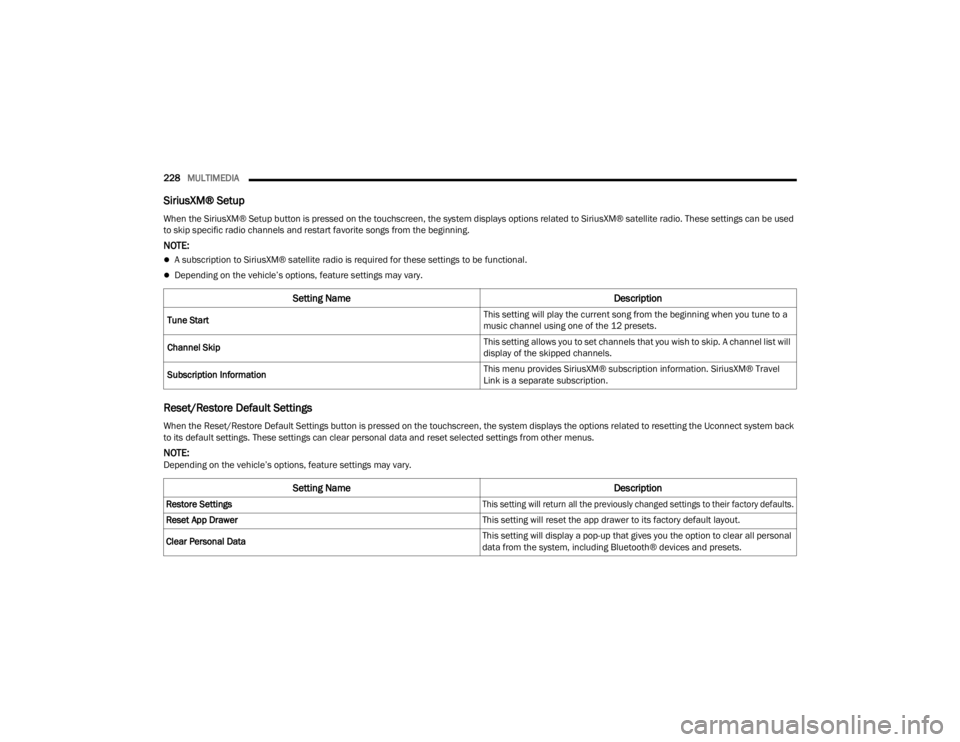
SiriusXM® Setup
Reset/Restore Default Settings
When the SiriusXM® Setup button is pressed on the touchscreen, the system displays options related to SiriusXM® satellite radio. These settings can be used
to skip specific radio channels and restart favorite songs from the beginning.
NOTE:
A subscription to SiriusXM® satellite radio is required for these settings to be functional.
Depending on the vehicle’s options, feature settings may vary.
Setting Name Description
Tune Start This setting will play the current song from the beginning when you tune to a
music channel using one of the 12 presets.
Channel Skip This setting allows you to set channels that you wish to skip. A channel list will
display of the skipped channels.
Subscription Information This menu provides SiriusXM® subscription information. SiriusXM® Travel
Link is a separate subscription.
When the Reset/Restore Default Settings button is pressed on the touchscreen, the system displays the options related to resetting the Uconnect system back
to its default settings. These settings can clear personal data and reset selected settings from other menus.
NOTE:Depending on the vehicle’s options, feature settings may vary.
Setting Name
Description
Restore Settings
This setting will return all the previously changed settings to their factory defaults.
Reset App Drawer This setting will reset the app drawer to its factory default layout.
Clear Personal Data This setting will display a pop-up that gives you the option to clear all personal
data from the system, including Bluetooth® devices and presets.
23_JT_OM_EN_USC_t.book Page 228
Page 231 of 448
MULTIMEDIA229
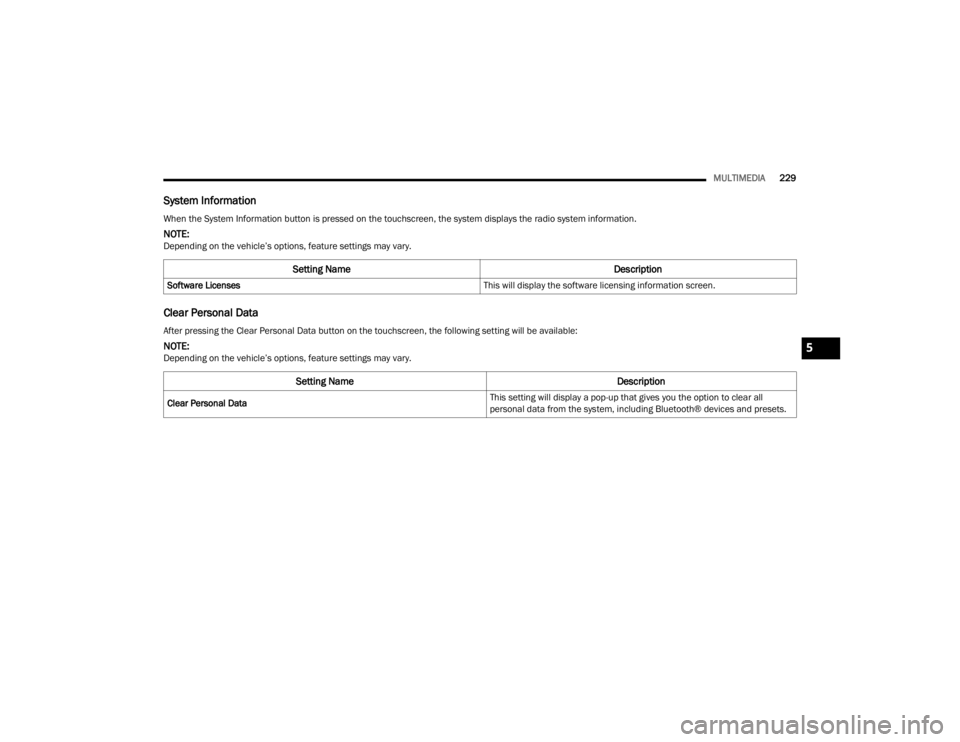
System Information
Clear Personal Data
When the System Information button is pressed on the touchscreen, the system displays the radio system information.
NOTE:Depending on the vehicle’s options, feature settings may vary.
Setting Name Description
Software Licenses This will display the software licensing information screen.
After pressing the Clear Personal Data button on the touchscreen, the following setting will be available:
NOTE:Depending on the vehicle’s options, feature settings may vary.
Setting NameDescription
Clear Personal Data This setting will display a pop-up that gives you the option to clear all
personal data from the system, including Bluetooth® devices and presets.
5
23_JT_OM_EN_USC_t.book Page 229
Page 235 of 448
MULTIMEDIA233
Stop use immediately if a problem occurs.
Failure to do so may cause injury or damage to
the product. See an authorized dealer for repair.
Ensure the volume level of the system is set to a
level that still allows you to hear outside traffic
and emergency vehicles.
Safe Usage Of The Uconnect System
The Uconnect system is a sophisticated elec -
tronic device. Do not let young children use the
system.
Permanent hearing loss may occur if you play
your music or sound system at loud volumes.
Exercise caution when setting the volume on the
system.
Keep drinks, rain and other sources of moisture
away from the system. Besides damage to the
system, moisture can cause electric shocks as
with any electronic device.
NOTE:Many features of this system are speed
dependent. For your own safety, it is not possible to
use some of the touchscreen features while the
vehicle is in motion.
Care And Maintenance
Do not press the touchscreen with any hard or
sharp objects (pen, USB stick, jewelry, etc.),
which could scratch the surface.
Do not spray any liquid or chemicals directly on
the screen! Use a clean and dry microfiber lens
cleaning cloth in order to clean the touchscreen.
If necessary, use a lint-free cloth dampened
with a cleaning solution, such as isopropyl
alcohol or an isopropyl alcohol and water solu -
tion ratio of 50:50. Be sure to follow the solvent
manufacturer's precautions and directions
Ú page 432.
UCONNECT MODES
STEERING WHEEL AUDIO CONTROLS
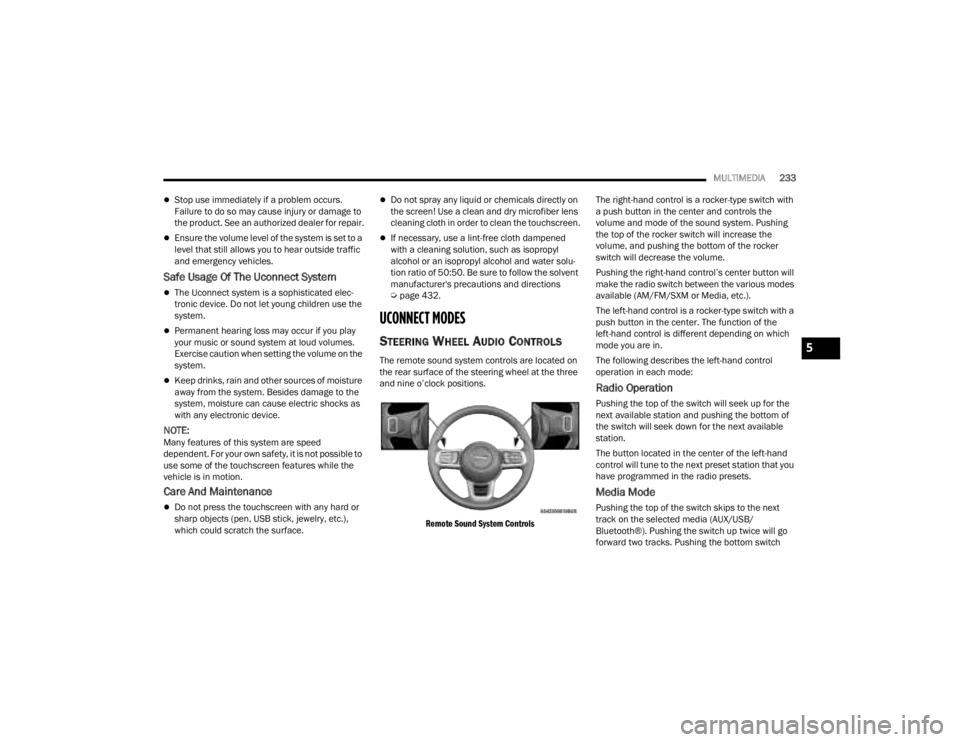
The remote sound system controls are located on
the rear surface of the steering wheel at the three
and nine o’clock positions.
Remote Sound System Controls
The right-hand control is a rocker-type switch with
a push button in the center and controls the
volume and mode of the sound system. Pushing
the top of the rocker switch will increase the
volume, and pushing the bottom of the rocker
switch will decrease the volume.
Pushing the right-hand control’s center button will
make the radio switch between the various modes
available (AM/FM/SXM or Media, etc.).
The left-hand control is a rocker-type switch with a
push button in the center. The function of the
left-hand control is different depending on which
mode you are in.
The following describes the left-hand control
operation in each mode:
Radio Operation
Pushing the top of the switch will seek up for the
next available station and pushing the bottom of
the switch will seek down for the next available
station.
The button located in the center of the left-hand
control will tune to the next preset station that you
have programmed in the radio presets.
Media Mode
Pushing the top of the switch skips to the next
track on the selected media (AUX/USB/
Bluetooth®). Pushing the switch up twice will go
forward two tracks. Pushing the bottom switch
5
23_JT_OM_EN_USC_t.book Page 233
Page 244 of 448
242MULTIMEDIA
MEDIA MODE
Operating Media Mode
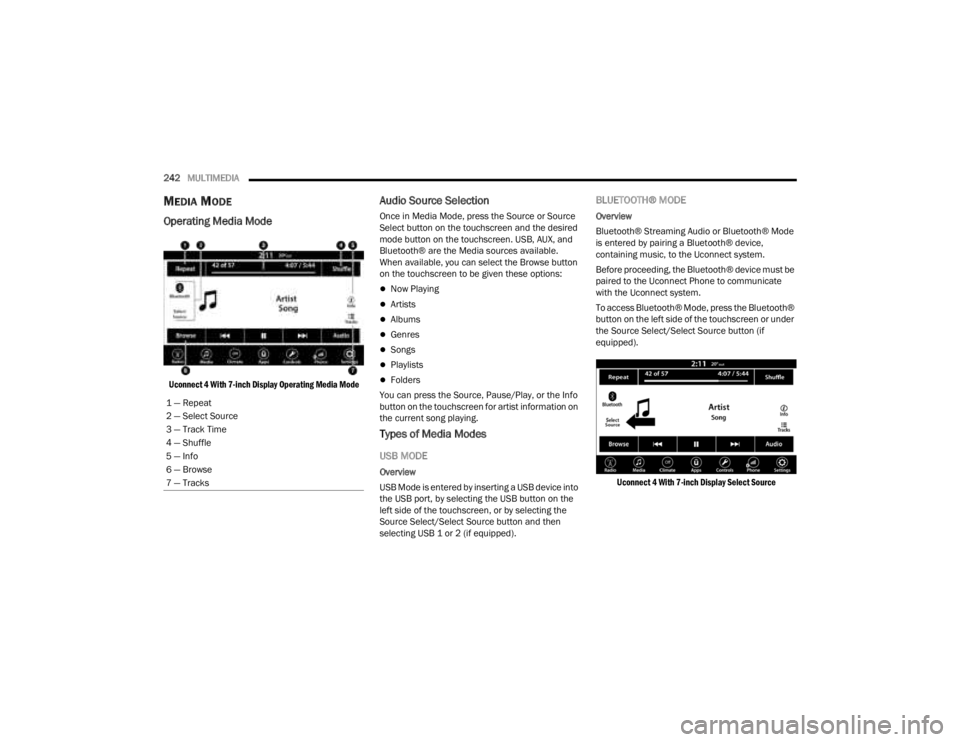
Uconnect 4 With 7-inch Display Operating Media Mode
Audio Source Selection
Once in Media Mode, press the Source or Source
Select button on the touchscreen and the desired
mode button on the touchscreen. USB, AUX, and
Bluetooth® are the Media sources available.
When available, you can select the Browse button
on the touchscreen to be given these options:
Now Playing
Artists
Albums
Genres
Songs
Playlists
Folders
You can press the Source, Pause/Play, or the Info
button on the touchscreen for artist information on
the current song playing.
Types of Media Modes
USB MODE
Overview
USB Mode is entered by inserting a USB device into
the USB port, by selecting the USB button on the
left side of the touchscreen, or by selecting the
Source Select/Select Source button and then
selecting USB 1 or 2 (if equipped).
BLUETOOTH® MODE
Overview
Bluetooth® Streaming Audio or Bluetooth® Mode
is entered by pairing a Bluetooth® device,
containing music, to the Uconnect system.
Before proceeding, the Bluetooth® device must be
paired to the Uconnect Phone to communicate
with the Uconnect system.
To access Bluetooth® Mode, press the Bluetooth®
button on the left side of the touchscreen or under
the Source Select/Select Source button (if
equipped).
Uconnect 4 With 7-inch Display Select Source
1 — Repeat
2 — Select Source
3 — Track Time
4 — Shuffle
5 — Info
6 — Browse
7 — Tracks
23_JT_OM_EN_USC_t.book Page 242
Page 245 of 448
MULTIMEDIA243
AUX MODE
Overview
Auxiliary Mode (AUX) is entered by inserting an AUX
device using a cable with a 3.5 mm audio jack into
the AUX port, or by pressing the AUX button on the
left side of the touchscreen or under the Source
Select button (if equipped).
To insert an Auxiliary device, gently insert the
Auxiliary device cable into the AUX port. If you
insert an Auxiliary device with the ignition and the
radio on, the unit will switch to AUX Mode and
begin to play.
Controlling The Auxiliary Device
Auxiliary Mode (AUX) is entered by inserting an AUX
device using a cable with a 3.5 mm audio jack into
the AUX port or by pressing the AUX button on the
left side of the touchscreen, or under the Source
Select button (if equipped).
NOTE:The radio unit is acting as the amplifier for audio
output from the Auxiliary device. Therefore, if the
volume control on the Auxiliary device is set too
low, there will be insufficient audio signal for the
radio unit to play the music on the device.
Seek Up /Seek Down
In USB Mode, press the Seek Up button on the
touchscreen for the next selection on the USB
device. Press and release the Seek Down button on the touchscreen to return to the beginning of
the current selection, or to return to the beginning
of the previous selection if the USB device is within
the first three seconds of the current selection.
In Bluetooth® Mode, press and release the Seek
Up button on the touchscreen for the next
selection on the Bluetooth® device. Press and
release the Seek Down button on the touchscreen
to return to the beginning of the current selection,
or return to the beginning of the previous selection
if the Bluetooth® device is within the first second
of the current selection.
Browse
In USB Mode, press the Browse button on the
touchscreen to display the browse window. In USB
Mode, the left side of the browse window displays
a list of ways you can browse through the contents
of the USB device. If supported by the device, you
can browse by Folder, Artist, Playlist, Album, Song,
etc. Press the desired button on the touchscreen
on the left side of the screen. The center of the
browse window shows items and their
sub-functions, which can be scrolled through by
pressing the Up and Down buttons to the right. The
TUNE/SCROLL knob can also be used to scroll.
Media Mode
In USB Mode, press the Media button on the
touchscreen to select the desired audio source:
USB.
In Bluetooth® Mode, press the Media button on
the touchscreen to select the desired audio
source: Bluetooth®.
In AUX Mode, press the Media button on the
touchscreen to select the desired audio source:
AUX.
Repeat
In USB Mode, press the Repeat button on the
touchscreen to toggle the repeat functionality. The
Repeat button on the touchscreen is highlighted
when active. The Radio will continue to play the
current track, repeatedly, as long as the repeat is
active. Press the Repeat button again to enter
Repeat All. The radio will continue to play all the
current tracks, repeatedly, as long as the repeat
function is active. To cancel Repeat, press the
Repeat button a third time.
Shuffle
In USB Mode, press the Shuffle button on the
touchscreen to play the selections on the USB
device in random order to provide an interesting
change of pace. Press the Shuffle button on the
touchscreen a second time to turn this feature off.
Audio
Audio settings can be accessed by pressing the
Audio button Ú
page 234.
5
23_JT_OM_EN_USC_t.book Page 243