towing JEEP GRAND CHEROKEE 2013 Owner handbook (in English)
[x] Cancel search | Manufacturer: JEEP, Model Year: 2013, Model line: GRAND CHEROKEE, Model: JEEP GRAND CHEROKEE 2013Pages: 408, PDF Size: 3.21 MB
Page 239 of 408
In the event of a momentary problem, the
transmission can be reset to regain all forward
gears by performing the following steps:
1. Stop the vehicle.
2. Shift the transmission into PARK.
3. Turn the ignition switch to the LOCK/OFF
position.
4. Wait approximately 10 seconds.
5. Restart the engine.
6.
Shift into the desired gear range. If the prob-
lem is no longer detected, the transmission will
return to normal operation.
NOTE:
Even if the transmission can be reset, we
recommend that you visit your authorized
dealer at your earliest possible conve-
nience. Your authorized dealer has diagnos-
tic equipment to determine if the problem
could recur. If the transmission cannot be
reset, authorized dealer service is required. Electronic Range Select (ERS) Operation
The Electronic Range Select (ERS) shift control
allows the driver to limit the highest available
gear when the shift lever is in the DRIVE
position. For example, if you shift the transmis-
sion into 3 (third gear), the transmission will
never shift above third gear, but will shift down
into second and first gears normally.
Use of ERS (or TOW/HAUL mode) also enables
an additional underdrive gear which is not nor-
mally used during through-gear accelerations.
This additional gear can improve vehicle perfor-
mance and cooling capability when towing a
trailer on certain grades. In ERS mode, gears 1
though 3 are underdrive gears, and ERS 4 is
direct drive. ERS 5 and 6 (Overdrive gears ) are
the same as the normal fourth and fifth gears.
You can switch between DRIVE and ERS mode at
any vehicle speed. When the shift lever is in the
DRIVE position, the transmission will operate
automatically, shifting between all available
gears. Tapping the shift lever to the left (-) will
activate ERS mode, display the current gear in
the instrument cluster, and maintain that gear as
the top available gear. Once in ERS mode, tap-
ping the shift lever to the left (-) or right (+) will
change the top available gear.
The instrument cluster display will show the
requested top gear limit, however the transmis-
sion will not downshift to the requested gear if
doing so would overspeed the engine. The
transmission will downshift once the vehicle
speed has slowed sufficiently.
To exit ERS mode, simply press and hold the
shift lever to the right (+) until “D” is once again
displayed in the shift lever position indicator in
the instrument cluster.
WARNING!
Do not downshift for additional engine brak-
ing on a slippery surface. The drive wheels
could lose their grip and the vehicle could
skid, causing a collision or personal injury.
NOTE:
To select the proper gear position for maxi-
mum deceleration (engine braking), simply
press and hold the shift lever to the left (-).
The transmission will shift to the range from
which the vehicle can best be slowed down.
235
Page 240 of 408
Overdrive Operation
The automatic transmission includes an elec-
tronically controlled Overdrive (fourth and fifth
gears). The transmission will automatically shift
into Overdrive if the following conditions are
present:
•the shift lever is in the DRIVE position,
• the transmission fluid has reached an ad-
equate temperature,
• the engine coolant has reached an adequate
temperature,
• vehicle speed is sufficiently high,
• the driver is not heavily pressing the accel-
erator, and
•
the TOW/HAUL switch has not been activated.
When To Use TOW/HAUL Mode
When driving in hilly areas, towing a trailer,
carrying a heavy load, etc., and frequent trans-
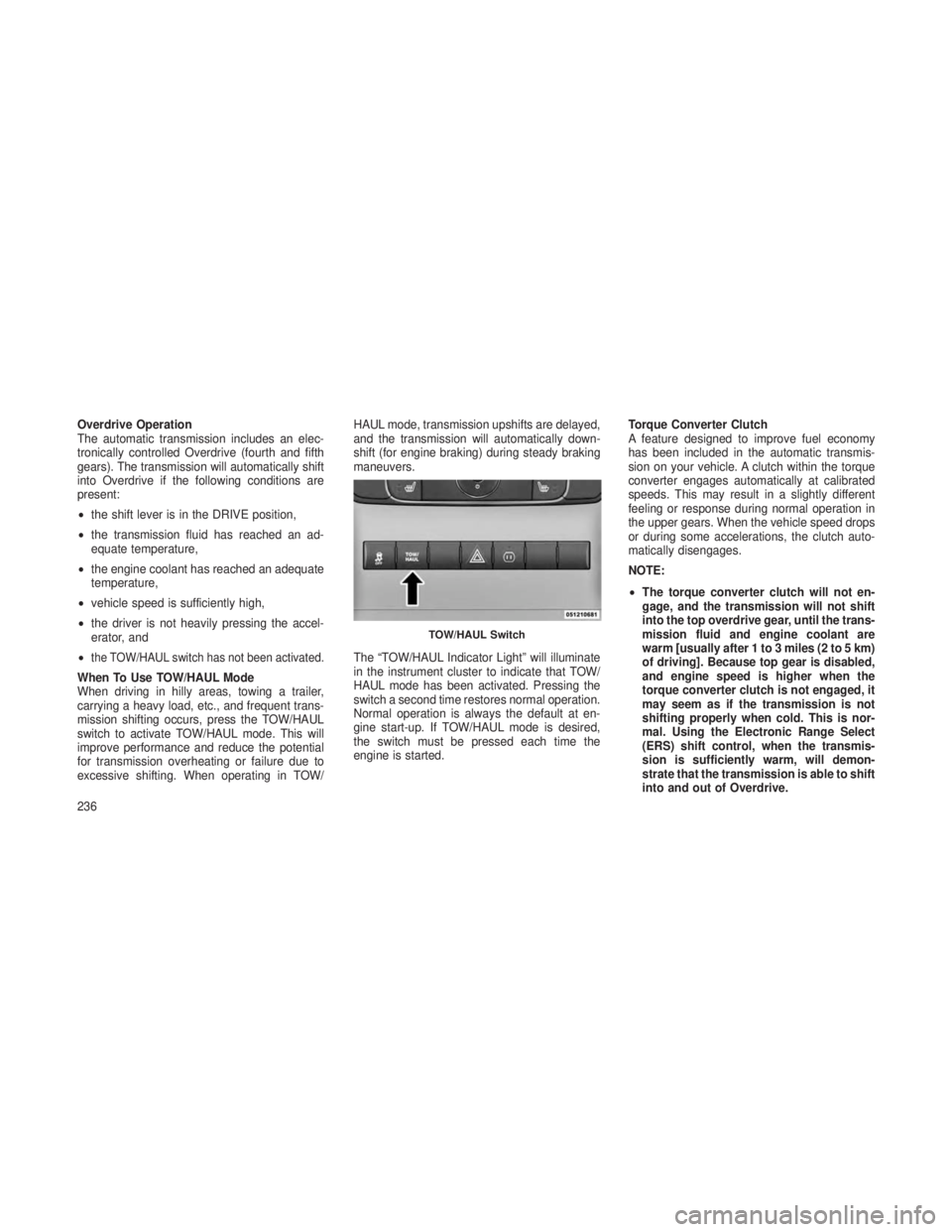
mission shifting occurs, press the TOW/HAUL
switch to activate TOW/HAUL mode. This will
improve performance and reduce the potential
for transmission overheating or failure due to
excessive shifting. When operating in TOW/ HAUL mode, transmission upshifts are delayed,
and the transmission will automatically down-
shift (for engine braking) during steady braking
maneuvers.
The “TOW/HAUL Indicator Light” will illuminate
in the instrument cluster to indicate that TOW/
HAUL mode has been activated. Pressing the
switch a second time restores normal operation.
Normal operation is always the default at en-
gine start-up. If TOW/HAUL mode is desired,
the switch must be pressed each time the
engine is started.
Torque Converter Clutch
A feature designed to improve fuel economy
has been included in the automatic transmis-
sion on your vehicle. A clutch within the torque
converter engages automatically at calibrated
speeds. This may result in a slightly different
feeling or response during normal operation in
the upper gears. When the vehicle speed drops
or during some accelerations, the clutch auto-
matically disengages.
NOTE:
•
The torque converter clutch will not en-
gage, and the transmission will not shift
into the top overdrive gear, until the trans-
mission fluid and engine coolant are
warm [usually after 1 to 3 miles (2 to 5 km)
of driving]. Because top gear is disabled,
and engine speed is higher when the
torque converter clutch is not engaged, it
may seem as if the transmission is not
shifting properly when cold. This is nor-
mal. Using the Electronic Range Select
(ERS) shift control, when the transmis-
sion is sufficiently warm, will demon-
strate that the transmission is able to shift
into and out of Overdrive.
TOW/HAUL Switch
236
Page 242 of 408
Shift PositionsFor additional information on the appropriate
use of each transfer case mode position, see
the information below:
4WD AUTO
This range is used on surfaces such as ice,
snow, gravel, sand, and dry hard pavement.
NOTE:
Refer to “Selec-Terrain® – If Equipped” in
“Starting and Operating” for further infor-
mation on the various positions and their
intended usages.
NEUTRAL
This range disengages both the front and rear
driveshafts from the powertrain. It is to be used
for flat towing behind another vehicle. Refer to
“Recreational Towing” in “Starting and Operat-
ing” for further information.4WD LOW
This range is for low speed four-wheel drive. It
locks the front and rear driveshafts together and
forces the front and rear wheels to rotate at the
same speed. It provides additional traction and
maximum pulling power for loose, slippery road
surfaces only. Do not exceed 25 mph (40 km/h).
NOTE:
Refer to “Selec-Terrain® – If Equipped” for
further information on the various positions
and their intended usages.
Shifting Procedures
4WD HI To 4WD LOW
With the vehicle at speeds of 0 to 3 mph (0 to
5 km/h), the ignition switch in the ON position or
the engine running, shift the transmission into
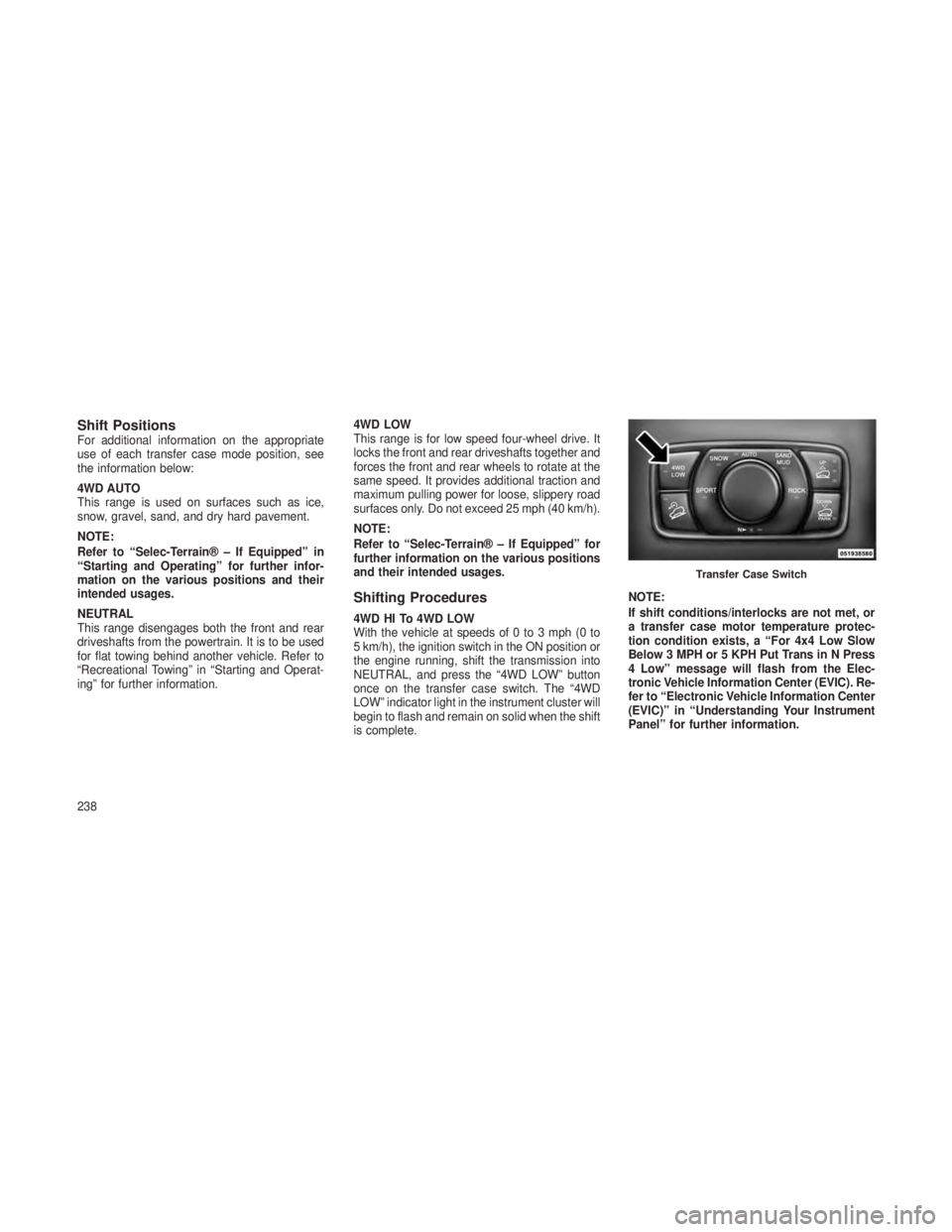
NEUTRAL, and press the “4WD LOW” button
once on the transfer case switch. The “4WD
LOW” indicator light in the instrument cluster will
begin to flash and remain on solid when the shift
is complete.
NOTE:
If shift conditions/interlocks are not met, or
a transfer case motor temperature protec-
tion condition exists, a “For 4x4 Low Slow
Below 3 MPH or 5 KPH Put Trans in N Press
4 Low” message will flash from the Elec-
tronic Vehicle Information Center (EVIC). Re-
fer to “Electronic Vehicle Information Center
(EVIC)” in “Understanding Your Instrument
Panel” for further information.
Transfer Case Switch
238
Page 259 of 408
NOTE:
To improve the vehicle’s traction when driv-
ing with snow chains, or starting off in deep
snow, sand, or gravel, it may be desirable to
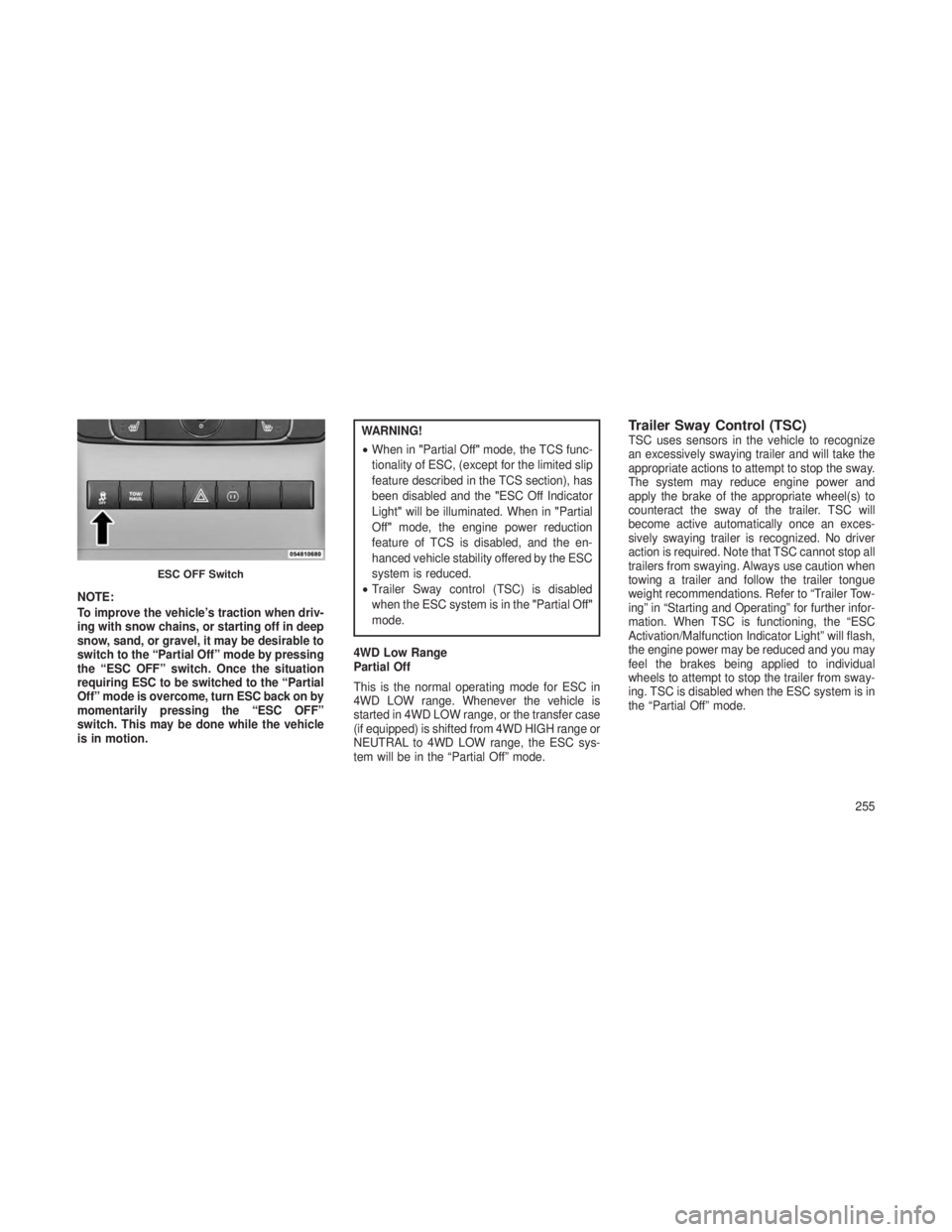
switch to the “Partial Off” mode by pressing
the “ESC OFF” switch. Once the situation
requiring ESC to be switched to the “Partial
Off” mode is overcome, turn ESC back on by
momentarily pressing the “ESC OFF”
switch. This may be done while the vehicle
is in motion.
WARNING!
•When in "Partial Off" mode, the TCS func-
tionality of ESC, (except for the limited slip
feature described in the TCS section), has
been disabled and the "ESC Off Indicator
Light" will be illuminated. When in "Partial
Off" mode, the engine power reduction
feature of TCS is disabled, and the en-
hanced vehicle stability offered by the ESC
system is reduced.
• Trailer Sway control (TSC) is disabled
when the ESC system is in the "Partial Off"
mode.
4WD Low Range
Partial Off
This is the normal operating mode for ESC in
4WD LOW range. Whenever the vehicle is
started in 4WD LOW range, or the transfer case
(if equipped) is shifted from 4WD HIGH range or
NEUTRAL to 4WD LOW range, the ESC sys-
tem will be in the “Partial Off” mode.Trailer Sway Control (TSC)TSC uses sensors in the vehicle to recognize
an excessively swaying trailer and will take the
appropriate actions to attempt to stop the sway.
The system may reduce engine power and
apply the brake of the appropriate wheel(s) to
counteract the sway of the trailer. TSC will
become active automatically once an exces-
sively swaying trailer is recognized. No driver
action is required. Note that TSC cannot stop all
trailers from swaying. Always use caution when
towing a trailer and follow the trailer tongue
weight recommendations. Refer to “Trailer Tow-
ing” in “Starting and Operating” for further infor-
mation. When TSC is functioning, the “ESC
Activation/Malfunction Indicator Light” will flash,
the engine power may be reduced and you may
feel the brakes being applied to individual
wheels to attempt to stop the trailer from sway-
ing. TSC is disabled when the ESC system is in
the “Partial Off” mode.
ESC OFF Switch
255
Page 260 of 408
WARNING!
If TSC activates while driving, slow the vehicle
down, stop at the nearest safe location, and
adjust the trailer load to eliminate trailer sway.
Hill Start Assist (HSA)The HSA system is designed to assist the driver
when starting a vehicle from a stop on a hill.
HSA will maintain the level of brake pressure
the driver applied for a short period of time after
the driver takes their foot off of the brake pedal.
If the driver does not apply the throttle during
this short period of time, the system will release
brake pressure and the vehicle will roll down the
hill. The system will release brake pressure in
proportion to the amount of throttle applied as
the vehicle starts to move in the intended direc-
tion of travel.HSA Activation Criteria
The following criteria must be met in order for
HSA to activate:
•
Vehicle must be stopped.
• Vehicle must be on a 6% (approximate)
grade or greater hill.
•Gear selection matches vehicle uphill direction
(i.e., vehicle facing uphill is in forward gear;
vehicle backing uphill is in REVERSE gear).
HSA will work in REVERSE and all forward
gears when the activation criteria have been
met. The system will not activate if the vehicle is
placed in NEUTRAL or PARK.
WARNING!
There may be situations on minor hills (i.e.,
less than 8%), with a loaded vehicle, or while
pulling a trailer, when the system will not
activate and slight rolling may occur. This
could cause a collision with another vehicle
or object. Always remember the driver is
responsible for braking the vehicle. Towing With HSA
HSA will provide assistance when starting on a
grade when pulling a trailer.
WARNING!
•
If you use a trailer brake controller with
your trailer, your trailer brakes may be
activated and deactivated with the brake
switch. If so, when the brake pedal is
released, there may not be enough brake
pressure to hold the vehicle and trailer on
a hill and this could cause a collision with
another vehicle or object behind you. In
order to avoid rolling down the hill while
resuming acceleration, manually activate
the trailer brake prior to releasing the
brake pedal. Always remember the driver
is responsible for braking the vehicle.
(Continued)
256
Page 282 of 408
Loose Fuel Filler Cap Message
If the vehicle diagnostic system de-
termines that the fuel filler cap is
loose, improperly installed, or dam-
aged, a loose gascap indicator will
display in the EVIC telltale display
area. Refer to “Electronic Vehicle
Information Center (EVIC)” in “Understanding
Your Instrument Panel” for further information.
Tighten the fuel filler cap properly and press the
SELECT button to turn off the message. If the
problem continues, the message will appear the
next time the vehicle is started.
TRAILER TOWING
In this section you will find safety tips and infor-
mation on limits to the type of towing you can
reasonably do with your vehicle. Before towing a
trailer, carefully review this information to tow your
load as efficiently and safely as possible. To maintain warranty coverage, follow the require-
ments and recommendations in this manual con-
cerning vehicles used for trailer towing.
Common Towing DefinitionsThe following trailer towing related definitions
will assist you in understanding the following
information:
Gross Vehicle Weight Rating (GVWR)
The GVWR is the total allowable weight of your
vehicle. This includes driver, passengers, cargo
and tongue weight. The total load must be
limited so that you do not exceed the GVWR.
Refer to “Vehicle Loading/Vehicle Certification
Label” in “Starting and Operating” for further
information.
Gross Trailer Weight (GTW)
The GTW is the weight of the trailer plus the
weight of all cargo, consumables and equip-
ment (permanent or temporary) loaded in or on
the trailer in its
"loaded and ready for operation "
condition. The recommended way to measure
GTW is to put your fully loaded trailer on a
vehicle scale. The entire weight of the trailer
must be supported by the scale.
Gross Combination Weight Rating (GCWR)
The GCWR is the total permissible weight of
your vehicle and trailer when weighed in com-
bination.
NOTE:
The GCWR rating includes a 150 lbs (68 kg)
allowance for the presence of a driver.
Gross Axle Weight Rating (GAWR)
The GAWR is the maximum capacity of the front
and rear axles. Distribute the load over the front
and rear axles evenly. Make sure that you do
not exceed either front or rear GAWR.
278
Page 285 of 408
Trailer Towing Weights (Maximum Trailer Weight Ratings)The following chart provides the maximum trailer weight ratings towable for your given drivetrain.
Engine/TransmissionMax. GTW (Gross Trailer Wt.) —
with Trailer Brake Max. GTW (Gross Trailer Wt.) —
without Trailer Brake Tongue Wt. (See Note)
3.6L Gasoline 5,000 lbs (2 268 kg) 1,653 lbs (750 kg)249 lbs (113 kg)
5.7L Gasoline 7,716 lbs (3 500 kg) 1,653 lbs (750 kg)386 lbs (175 kg)
3.0L Diesel 7,716 lbs (3 500 kg) 1,653 lbs (750 kg)386 lbs (175 kg)
Maximum trailer towing speed is limited to 62 mph (100 km/h) unless local laws require a lower speed.
NOTE:
The trailer tongue weight must be considered as part of the combined weight of occupants and cargo, and should never exceed the weight refer-
enced on the Tire and Loading Information placard. Refer to “Tires – General Information” in “Starting and Operating” for further information.
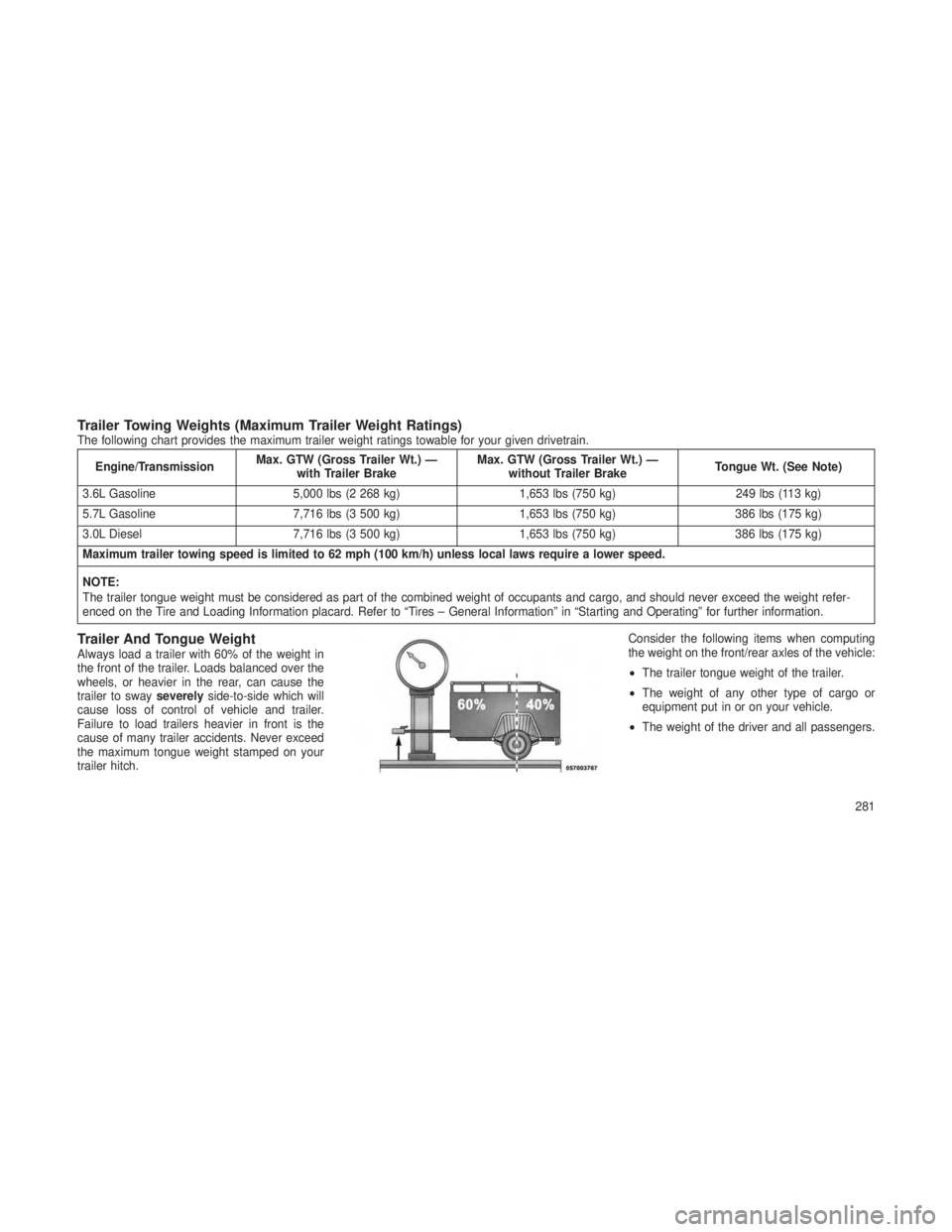
Trailer And Tongue WeightAlways load a trailer with 60% of the weight in
the front of the trailer. Loads balanced over the
wheels, or heavier in the rear, can cause the
trailer to sway severelyside-to-side which will
cause loss of control of vehicle and trailer.
Failure to load trailers heavier in front is the
cause of many trailer accidents. Never exceed
the maximum tongue weight stamped on your
trailer hitch. Consider the following items when computing
the weight on the front/rear axles of the vehicle:
•
The trailer tongue weight of the trailer.
• The weight of any other type of cargo or
equipment put in or on your vehicle.
• The weight of the driver and all passengers.
281
Page 286 of 408
NOTE:
Remember that everything put into or on the
trailer adds to the load on your vehicle. Also,
additional factory-installed options, or au-
thorized dealer-installed options, must be
considered as part of the total load on your
vehicle. Refer to the tire loading information
placard located on the drivers door pillar for
the maximum combined weight of occu-
pants and cargo for your vehicle.
Towing RequirementsTo promote proper break-in of your new vehicle
drivetrain components, the following guidelines
are recommended.
CAUTION!
•Do not tow a trailer at all during the first
500 miles (805 km) the new vehicle is
driven. The engine, axle or other parts
could be damaged.
(Continued)
CAUTION!(Continued)
•Then, during the first 500 miles (805 km)
that a trailer is towed, do not drive over
50 mph (80 km/h) and do not make starts
at full throttle. This helps the engine and
other parts of the vehicle wear in at the
heavier loads.
Perform the maintenance listed in the “Mainte-
nance Schedule.” Refer to “Maintenance Sched-
ule” for the proper maintenance intervals. When
towing a trailer, never exceed the GAWR or
GCWR ratings.
WARNING!
Improper towing can lead to a collision. Fol-
low these guidelines to make your trailer
towing as safe as possible:
•Make certain that the load is secured in the
trailer and will not shift during travel. When
trailering cargo that is not fully secured,
dynamic load shifts can occur that may be
(Continued)
WARNING!(Continued)
difficult for the driver to control. You could
lose control of your vehicle and have a
collision.
• When hauling cargo or towing a trailer, do
not overload your vehicle or trailer. Over-
loading can cause a loss of control, poor
performance or damage to brakes, axle,
engine, transmission, steering, suspen-
sion, chassis structure or tires.
• Safety chains must always be used be-
tween your vehicle and trailer. Always con-
nect the chains to the hook retainers of the
vehicle hitch. Cross the chains under the
trailer tongue and allow enough slack for
turning corners.
(Continued)
282
Page 287 of 408
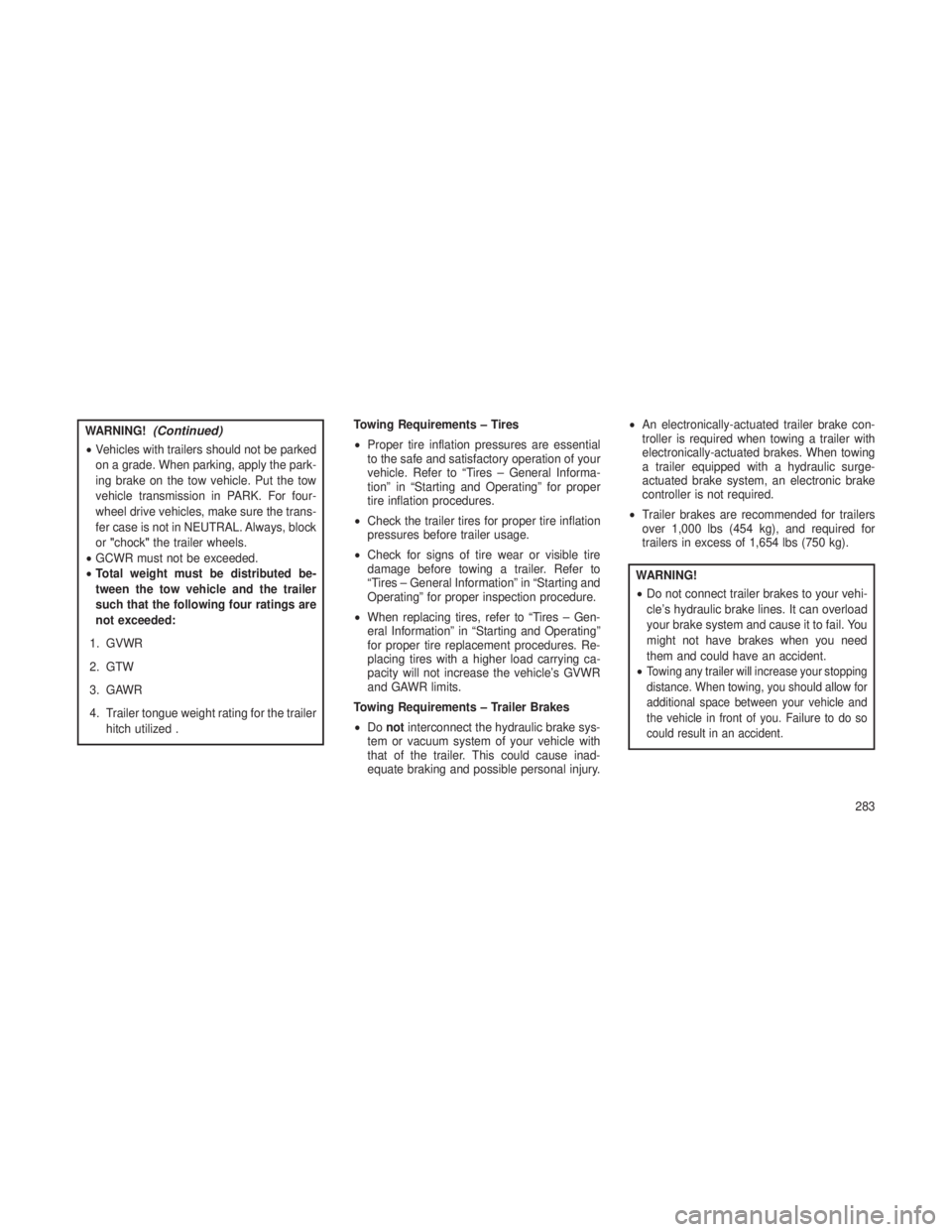
WARNING!(Continued)
•Vehicles with trailers should not be parked
on a grade. When parking, apply the park-
ing brake on the tow vehicle. Put the tow
vehicle transmission in PARK. For four-
wheel drive vehicles, make sure the trans-
fer case is not in NEUTRAL. Always, block
or "chock" the trailer wheels.
• GCWR must not be exceeded.
• Total weight must be distributed be-
tween the tow vehicle and the trailer
such that the following four ratings are
not exceeded:
1. GVWR
2. GTW
3. GAWR
4. Trailer tongue weight rating for the trailer hitch utilized . Towing Requirements – Tires
•
Proper tire inflation pressures are essential
to the safe and satisfactory operation of your
vehicle. Refer to “Tires – General Informa-
tion” in “Starting and Operating” for proper
tire inflation procedures.
• Check the trailer tires for proper tire inflation
pressures before trailer usage.
• Check for signs of tire wear or visible tire
damage before towing a trailer. Refer to
“Tires – General Information” in “Starting and
Operating” for proper inspection procedure.
• When replacing tires, refer to “Tires – Gen-
eral Information” in “Starting and Operating”
for proper tire replacement procedures. Re-
placing tires with a higher load carrying ca-
pacity will not increase the vehicle’s GVWR
and GAWR limits.
Towing Requirements – Trailer Brakes
• Do not interconnect the hydraulic brake sys-
tem or vacuum system of your vehicle with
that of the trailer. This could cause inad-
equate braking and possible personal injury. •
An electronically-actuated trailer brake con-
troller is required when towing a trailer with
electronically-actuated brakes. When towing
a trailer equipped with a hydraulic surge-
actuated brake system, an electronic brake
controller is not required.
• Trailer brakes are recommended for trailers
over 1,000 lbs (454 kg), and required for
trailers in excess of 1,654 lbs (750 kg).
WARNING!
•Do not connect trailer brakes to your vehi-
cle’s hydraulic brake lines. It can overload
your brake system and cause it to fail. You
might not have brakes when you need
them and could have an accident.
•
Towing any trailer will increase your stopping
distance. When towing, you should allow for
additional space between your vehicle and
the vehicle in front of you. Failure to do so
could result in an accident.
283
Page 288 of 408
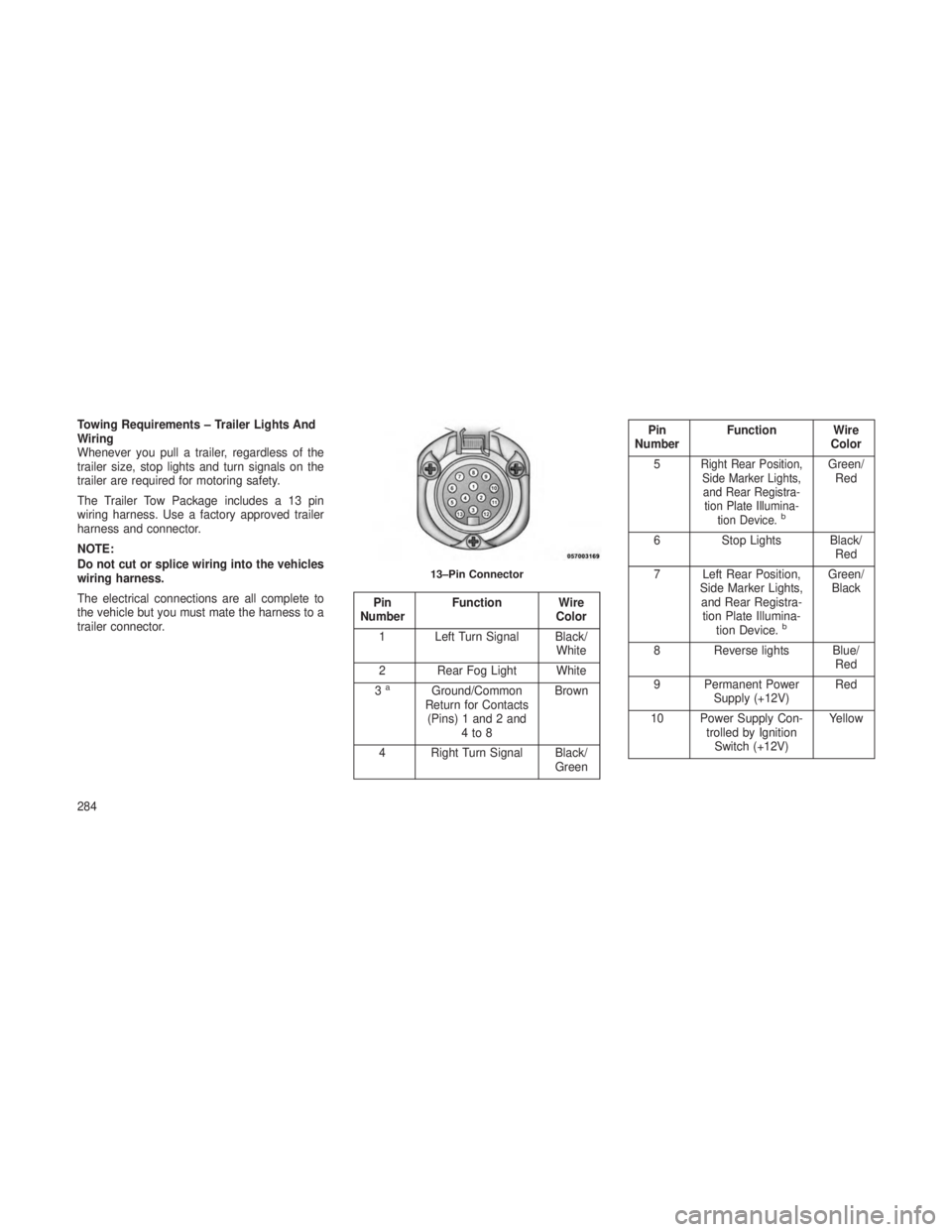
Towing Requirements – Trailer Lights And
Wiring
Whenever you pull a trailer, regardless of the
trailer size, stop lights and turn signals on the
trailer are required for motoring safety.
The Trailer Tow Package includes a 13 pin
wiring harness. Use a factory approved trailer
harness and connector.
NOTE:
Do not cut or splice wiring into the vehicles
wiring harness.
The electrical connections are all complete to
the vehicle but you must mate the harness to a
trailer connector.
Pin
Number Function Wire
Color
1 Left Turn Signal Black/ White
2 Rear Fog Light White
3
aGround/Common
Return for Contacts (Pins) 1 and 2 and 4to8 Brown
4 Right Turn Signal Black/ Green
Pin
Number Function Wire
Color
5
Right Rear Position, Side Marker Lights,and Rear Registra- tion Plate Illumina- tion Device.
b
Green/Red
6 Stop Lights Black/
Red
7 Left Rear Position, Side Marker Lights,and Rear Registra- tion Plate Illumina- tion Device.
b
Green/Black
8 Reverse lights Blue/ Red
9 Permanent Power Supply (+12V) Red
10 Power Supply Con- trolled by IgnitionSwitch (+12V) Yellow13–Pin Connector
284