height JEEP GRAND CHEROKEE 2013 Owner handbook (in English)
[x] Cancel search | Manufacturer: JEEP, Model Year: 2013, Model line: GRAND CHEROKEE, Model: JEEP GRAND CHEROKEE 2013Pages: 408, PDF Size: 3.21 MB
Page 57 of 408
Infants And Child Restraints
Safety experts recommend that children ride
rearward-facing in the vehicle until they are two
years old or until they reach either the height or
weight limit of their rear facing child safety seat.
Two types of child restraints can be used
rearward-facing: infant carriers and convertible
child seats.
The infant carrier is only used rearward-facing
in the vehicle. It is recommended for children
from birth until they reach the weight or height
limit of the infant carrier. Convertible child seats
can be used either rearward-facing or forward-
facing in the vehicle. Convertible child seats
often have a higher weight limit in the rearward-
facing direction than infant carriers do, so they
can be used rearward-facing by children who
have outgrown their infant carrier but are still
less than at least two years old. Children should
remain rearward-facing until they reach the
highest weight or height allowed by their con-
vertible child seat. Both types of child restraints
are held in the vehicle by the lap/shoulder belt
or the ISOFIX child restraint anchor system.
Refer to “ISOFIX — Child Seat Anchorage
System”.When using certain Child Restraint Systems
with rigid attachments ISOFIX and foot stands
extending to the vehicle floor, remove the ve-
hicle floor mat prior to installation to ensure a
secure fit. Refer to the Child Restraint Owner’s
Manual for additional information.
WARNING!
•
Rearward-facing child seats must never be
used in the front seat of a vehicle with a
front passenger air bag. An air bag deploy-
ment could cause severe injury or death to
infants in this position.
• Improper installation can lead to failure of
an infant or child restraint. It could come
loose in a collision. The child could be
badly injured or killed. Follow the manufac-
turer’s directions exactly when installing an
infant or child restraint.
• A rearward-facing child restraint should
only be used in a rear seat. Here are some tips for getting the most out of
your child restraint:
•
Before buying any restraint system, make
sure that it has a label certifying that it meets
all applicable Safety Standards. Chrysler
Group LLC also recommends that you try a
child restraint in the vehicle seats where you
will use it before you buy it.
• The restraint must be appropriate for your
child’s weight and height. Check the label on
the restraint for weight and height limits.
• Carefully follow the instructions that come
with the restraint. If you install the restraint
improperly, it may not work when you need it.
• Buckle the child into the restraint exactly as
the manufacturer’s instructions tell you.
WARNING!
When your child restraint is not in use,
secure it in the vehicle with the seat belt or
remove it from the vehicle. Do not leave it
loose in the vehicle. In a sudden stop or
collision, it could strike the occupants or
seatbacks and cause serious personal injury.
53
Page 58 of 408
Older Children And Child Restraints
Children who are two years old or who have
outgrown their rear-facing convertible child seat
can ride forward-facing in the vehicle. Forward-
facing child seats and convertible child seats
used in the forward-facing direction are for
children who are over two years old or who have
outgrown the rear-facing weight or height limit
of their rear-facing convertible child seat. Chil-
dren should remain in a forward-facing child
seat with a harness for as long as possible, up
to the highest weight or height allowed by the
child seat. These child seats are also held in the
vehicle by the lap/shoulder belt or the ISOFIX
child restraint anchorage system. Refer to “ISO-
FIX — Child Seat Anchorage System”.
All children whose weight or height is above the
forward-facing limit for the child seat should use
a belt-positioning booster seat until the vehicle’s
seat belts fit properly. If the child cannot sit with
knees bent over the vehicle’s seat cushion
while the child’s back is against the seatback,
they should use a belt-positioning booster seat.
The child and belt-positioning booster seat are
held in the vehicle by the lap/shoulder belt.Children Too Large For Booster Seats
Children who are large enough to wear the
shoulder belt comfortably, and whose legs are
long enough to bend over the front of the seat
when their back is against the seatback, should
use the lap/shoulder belt in a rear seat.
•
Make sure that the child is upright in the seat.
• The lap portion should be low on the hips and
as snug as possible.
•
Check belt fit periodically. A child’s squirming or
slouching can move the belt out of position.
• If the shoulder belt contacts the face or neck,
move the child closer to the center of the
vehicle. Never allow a child to put the shoul-
der belt under an arm or behind the back.
ISOFIX — Child Seat Anchorage System
Your vehicle’s rear seat is equipped with the
child restraint anchorage system called ISOFIX.
The ISOFIX system provides for the installation
of the child restraint without using the vehicle’s
seat belts, instead securing the child restraint
using lower anchorages and upper tether straps
from the child restraint to the vehicle structure. ISOFIX-compatible child restraint systems are
now available. Child restraints having tether
straps and hooks for connection to the top
tether anchorages have been available for
some time. You are urged to take advantage of
all the available attachments provided with your
child restraint in any vehicle.
NOTE:
When using the ISOFIX attaching system to
install a child restraint, please ensure that
all seat belts not being used for occupant
restraints are stowed and out of reach of
children. Remind all children in the vehicle
that the seat belts are not toys and should
not be played with, and never leave your
child unattended in the vehicle.
The two outboard rear seating positions have
anchorages, child seats with fixed lower attach-
ments must be installed in the outboard positions
only. Regardless of the specific type of lower
attachment, never install ISOFIX-compatible child
seats such that two seats share a common lower
anchorage.
54
Page 99 of 408
Adjusting The Seat Up Or Down
The height of the seats can be adjusted up or
down. Pull upward or push downward on the
seat switch, the seat will move in the direction of
the switch. Release the switch when the desired
position has been reached.
Tilting The Seat Up Or Down
The angle of the seat cushion can be adjusted
up or down. Pull upward or push downward on
the front of the seat switch, the front of the seat
cushion will move in the direction of the switch.
Release the switch when you have reached the
desired position.
Reclining The Seatback
The angle of the seatback can be adjusted
forward or rearward. Push the seatback switch
forward or rearward, the seat will move in the
direction of the switch. Release the switch when
the desired position is reached.WARNING!
•
Adjusting a seat while driving may be dan-
gerous. Moving a seat while driving could
result in loss of control which could cause a
collision and serious injury or death.
•Seats should be adjusted before fastening
the seat belts and while the vehicle is
parked. Serious injury or death could result
from a poorly adjusted seat belt.
• Do not ride with the seatback reclined so
that the shoulder belt is no longer resting
against your chest. In a collision you could
slide under the seat belt, which could
result in serious injury or death.
CAUTION!
Do not place any article under a power seat
or impede its ability to move as it may cause
damage to the seat controls. Seat travel may
become limited if movement is stopped by an
obstruction in the seat’s path.
Passenger’s Power SeatSome models are equipped with a six-way
power passenger seat. The power seat switch is
located on the outboard side of the seat. The
switch is used to control the movement of the
seat and seat cushion.
Adjusting The Seat Forward Or Rearward
The seat can be adjusted both forward and
rearward. Push the seat switch forward or rear-
ward, the seat will move in the direction of the
switch. Release the switch when the desired
position has been reached.
Adjusting The Seat Up Or Down
The height of the seats can be adjusted up or
down. Pull upward or push downward on the
seat switch, the seat will move in the direction of
the switch. Release the switch when the desired
position is reached.
Tilting The Seat Up Or Down
The angle of the seat cushion can be adjusted
up or down. Pull upward or push downward on
the front of the seat switch, the front of the seat
cushion will move in the direction of the switch.
Release the switch when you have reached the
desired position.
95
Page 113 of 408
Automatic Headlight Leveling — HID
Headlights Only
This feature prevents the headlights from inter-
fering with the vision of oncoming drivers.
Headlight leveling automatically adjusts the
height of the headlight beam in reaction to
changes in vehicle pitch.
Headlight DelayTo aid in your exit, your vehicle is equipped with
a headlight delay that will leave the headlights
on for approximately 90 seconds. This delay is
initiated when the ignition is turned OFF while
the headlight switch is on, and then the head-
light switch is cycled off. Headlight delay can be
cancelled by either turning the headlight switch
on then off, or by turning the ignition ON.
The headlight delay time is programmable on
vehicles equipped with an Electronic Vehicle
Information Center (EVIC). Refer to “Electronic
Vehicle Information Center (EVIC)/Customer-
Programmable Features” in “Understanding
Your Instrument Panel” for further information.
Parking Lights And Panel Lights
To turn on the parking lights and instru-
ment panel lights, rotate the headlight
switch clockwise. To turn off the park-
ing lights, rotate the headlight switch back to the
O (Off) position.
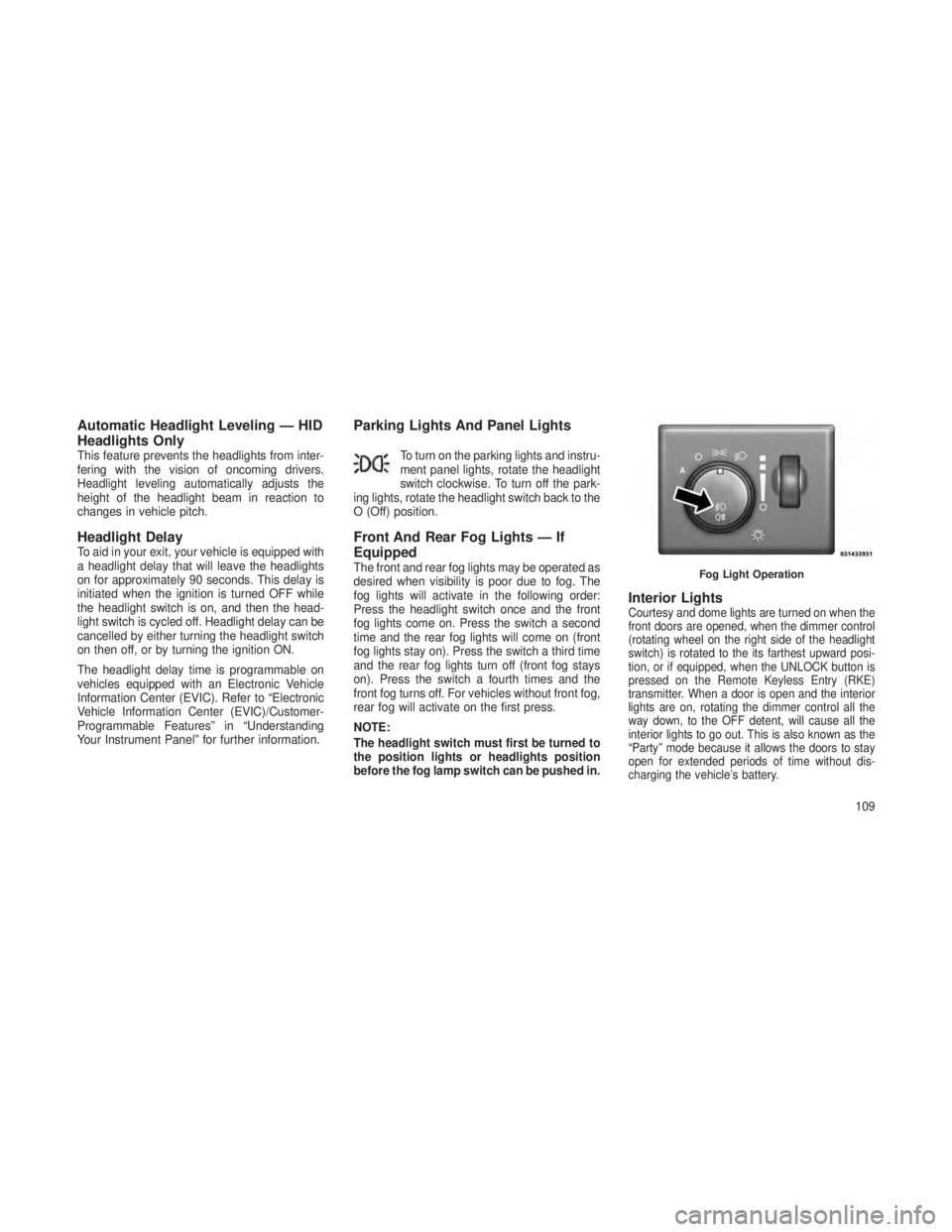
Front And Rear Fog Lights — If
Equipped
The front and rear fog lights may be operated as
desired when visibility is poor due to fog. The
fog lights will activate in the following order:
Press the headlight switch once and the front
fog lights come on. Press the switch a second
time and the rear fog lights will come on (front
fog lights stay on). Press the switch a third time
and the rear fog lights turn off (front fog stays
on). Press the switch a fourth times and the
front fog turns off. For vehicles without front fog,
rear fog will activate on the first press.
NOTE:
The headlight switch must first be turned to
the position lights or headlights position
before the fog lamp switch can be pushed in.
Interior LightsCourtesy and dome lights are turned on when the
front doors are opened, when the dimmer control
(rotating wheel on the right side of the headlight
switch) is rotated to the its farthest upward posi-
tion, or if equipped, when the UNLOCK button is
pressed on the Remote Keyless Entry (RKE)
transmitter. When a door is open and the interior
lights are on, rotating the dimmer control all the
way down, to the OFF detent, will cause all the
interior lights to go out. This is also known as the
“Party” mode because it allows the doors to stay
open for extended periods of time without dis-
charging the vehicle’s battery.
Fog Light Operation
109
Page 176 of 408
•Memory System Unavailable — Not in Park
• Memory System Unavailable — Seatbelt
buckled
• Memory 1 Profile Recall
• Memory 2 Profile Recall
• Press Brake Pedal And Push Button To Start
• Wrong Key
• Damaged Key
• Key Not Programmed
• Function Currently Unavailable — Power
Liftgate
• Unlock To Operate — Power Liftgate
• Put In Park To Operate — Power Liftgate
• Automatic High Beams On
• Automatic High Beams Off
• Service Four Wheel Drive System
• Eco — Fuel Saver Indicator
• Terrain Settings — Automatic
• Terrain Settings — Rock •
Terrain Settings — Sand/Mud
• Terrain Settings — Snow
• Terrain Settings — Sport
• Sport Not Available In 4 Low 4 High Is
Required
• Rock Not Available In 4 Low 4 High Is
Required
• To Tow Vehicle Safely, Read Neutral Shift
Procedure In Owners Manual
• For 4x4 Low Slow Below 5 Mph Or 8 Kph Put
Trans In N Press 4 Low
• For 4x4 High Slow Below 5 Mph Or 8 Kph Put
Trans In N Press 4 Low
• Terrain System Settings Not Available
• Raising Vehicle Ride Height (with icon)
• Lowering Vehicle Ride Height (with icon)
• Normal Vehicle Ride Height — This message
is displayed (for five seconds) when the
vehicle has achieved the Normal Vehicle
Ride Height. •
Off Road Ride Height Level 1 — This mes-
sage is displayed (for five seconds) when the
vehicle has achieved the Off Road Height
Level 1.
• Off Road Ride Height Level 2 — This mes-
sage is displayed (for five seconds) when the
vehicle has achieved the Off Road Height
Level 2.
•
Vehicle Lowered To Entry/Exit (Park) Height —
This message is displayed (for five seconds)
when the vehicle has achieved the Park
Height.
• Entry/Exit (Park) Height in Progress — This
message is displayed (for five seconds)
when the request is made to go into Entry/
Exit Height while the vehicle speed is be-
tween 15 and 25 mph. This shows that the
request has been recognized and will lower
to Entry/Exit height when vehicle is below
15 mph.
• Service Air Suspension System — This is
displayed when a fault has occurred in the
system. The system will have limited opera-
tion at that point.
172
Page 177 of 408
•Immediate Air Suspension Service/Repair
Required — This is displayed when a fault
has occurred in the system which results in a
complete system shutdown. The system will
be non operational at that point.
• Reduce Speed To Maintain Selected Ride
Height — This message is displayed in ad-
vance warning to the driver that the vehicle
will be moved to the next lower preset posi-
tion unless the speed is reduced.
•
Selected Ride Height Not Permitted — The
vehicle speed is too high to enter one of the
preset levels (Entry/Exit Level/Off Road Ride
Height Level 1/Off Road Ride Height Level 2).
• Air Suspension System Cooling Down –
Please Wait — This message is displayed if
the compressor temperature level is too high.
Level control is suspended until the compres-
sor has cooled down.
• Vehicle Cannot Be Lowered – Door Open —
This message is displayed if a door or the
liftgate is ajar and level control is suspended. •
Air Suspension Temporarily Disabled For
Jacking And Tire Change.
• Aerodynamic Ride Height — This is dis-
played (for five seconds) when the vehicle
has achieved the Aerodynamic Height.
EVIC White Telltale LightsThis area will show reconfigurable white caution
telltales. These telltales include:
•Shift Lever Status
The shift lever status “P,R,N,D,L,5,4,3,2,1” are
displayed indicating the shift lever position. Tell-
tales “5,4,3,2,1” indicate the Electronic Range
Select (ERS) feature has been engaged and the
gear selected is displayed. For further information
on ERS, refer to “Starting And Operating”
•Electronic Speed Control ON
This light will turn on when the elec-
tronic speed control is ON. For fur-
ther information, refer to “Electronic
Speed Control” in “Understanding
The Features Of Your Vehicle.”
•Electronic Speed Control SET
This light will turn on when the elec-
tronic speed control is SET. For fur-
ther information, refer to “Electronic
Speed Control” in “Understanding
The Features Of Your Vehicle.”
•Adaptive Cruise Control (ACC) ON
This light will turn on when the ACC
is ON. For further information, refer
to “Adaptive Cruise Control (ACC)”
in “Understanding The Features Of
Your Vehicle.”
• Adaptive Cruise Control (ACC) SET
This light will turn on when the ACC
is SET. For further information, re-
fer to “Adaptive Cruise Control
(ACC)” in “Understanding The Fea-
tures Of Your Vehicle.”
173
Page 244 of 408
Quadra-Drive® II System – If
Equipped
The optional Quadra-Drive® II System features
two torque transfer couplings. The couplings
include an Electronic Limited-Slip Differential
(ELSD) rear axle and the Quadra-Trac II®
transfer case. The optional ELSD axle is fully
automatic and requires no driver input to oper-
ate. Under normal driving conditions, the unit
functions as a standard axle, balancing torque
evenly between left and right wheels. With a
traction difference between left and right
wheels, the coupling will sense a speed differ-
ence. As one wheel begins to spin faster than
the other, torque will automatically transfer from
the wheel that has less traction, to the wheel
that has traction. While the transfer case and
axle coupling differ in design, their operation is
similar. Follow the Quadra-Trac II® transfer
case shifting information, preceding this sec-
tion, for shifting this system.
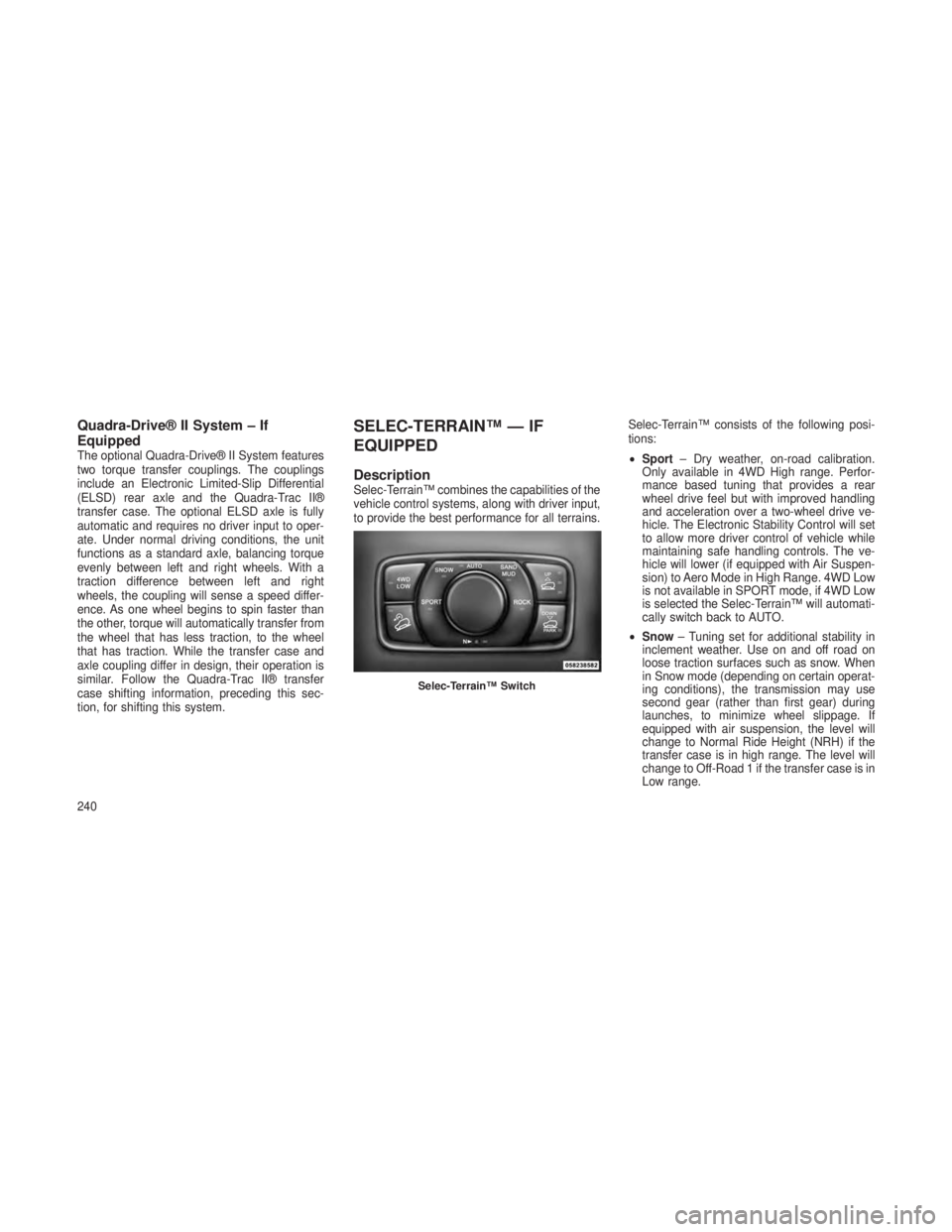
SELEC-TERRAIN™ — IF
EQUIPPED
DescriptionSelec-Terrain™ combines the capabilities of the
vehicle control systems, along with driver input,
to provide the best performance for all terrains.Selec-Terrain™ consists of the following posi-
tions:
•
Sport – Dry weather, on-road calibration.
Only available in 4WD High range. Perfor-
mance based tuning that provides a rear
wheel drive feel but with improved handling
and acceleration over a two-wheel drive ve-
hicle. The Electronic Stability Control will set
to allow more driver control of vehicle while
maintaining safe handling controls. The ve-
hicle will lower (if equipped with Air Suspen-
sion) to Aero Mode in High Range. 4WD Low
is not available in SPORT mode, if 4WD Low
is selected the Selec-Terrain™ will automati-
cally switch back to AUTO.
• Snow – Tuning set for additional stability in
inclement weather. Use on and off road on
loose traction surfaces such as snow. When
in Snow mode (depending on certain operat-
ing conditions), the transmission may use
second gear (rather than first gear) during
launches, to minimize wheel slippage. If
equipped with air suspension, the level will
change to Normal Ride Height (NRH) if the
transfer case is in high range. The level will
change to Off-Road 1 if the transfer case is in
Low range.
Selec-Terrain™ Switch
240
Page 245 of 408
•Auto – Fully automatic full time four-wheel
drive operation can be used on and off road.
Balances traction with seamless steering feel
to provide improved handling and accelera-
tion over two-wheel drive vehicles. If
equipped with air suspension, the level will
change to NRH.
•
Sand/Mud–Off road calibration for use on low
traction surfaces such as mud, sand, or wet
grass. Driveline is maximized for traction.
Some binding may be felt on less forgiving
surfaces. The electronic brake controls are set
to limit traction control management of throttle
and wheel spin. If equipped with air suspen-
sion, the level will change to Off-Road 1.
• Rock – Off-road calibration only available in
4WD Low range. The vehicle is raised (if
equipped with Air Suspension) for improved
ground clearance. Traction based tuning with
improved steer-ability for use on high traction
off-road surfaces. Activate the Hill Descent
Control for steep downhill control. Use for low
speed obstacles such as large rocks, deep ruts, etc. If equipped with air suspension, the
vehicle level will change to Off-Road 2. If the
Selec-Terrain™ switch is in ROCK mode,
and the transfer case is switched from 4WD
Low to 4WD High, the Selec-Terrain™ sys-
tem will return to AUTO.
Electronic Vehicle Information
Center (EVIC) Display Messages
When the appropriate conditions exist, a mes-
sage will appear in the EVIC display. Refer to
“Electronic Vehicle Information Center (EVIC)”
in “Understanding Your Instrument Panel” for
further information.
QUADRA-LIFT™ — IF
EQUIPPED
DescriptionThe Quadra-Lift™ air suspension system pro-
vides full time load leveling capability along with
the benefit of being able to adjust vehicle height
by the push of a button.
•
Normal Ride Height (NRH) – This is the
standard position of the suspension and is
meant for normal driving.
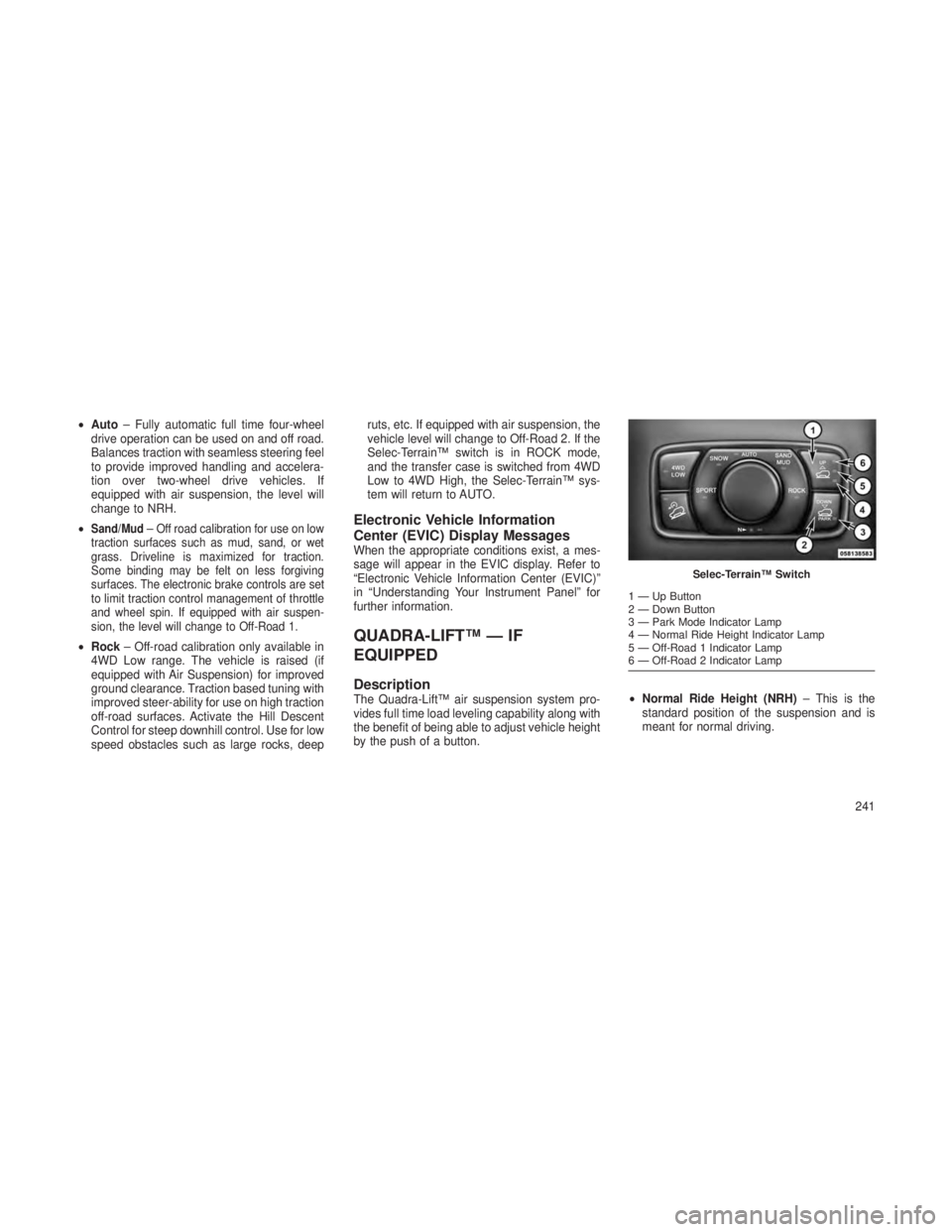
Selec-Terrain™ Switch
1—UpButton
2 — Down Button
3 — Park Mode Indicator Lamp
4 — Normal Ride Height Indicator Lamp
5 — Off-Road 1 Indicator Lamp
6 — Off-Road 2 Indicator Lamp
241
Page 246 of 408
•Off-Road 1 (OR1) (Raises the vehicle ap-
proximately 1.3 in (33 mm) – This is the
primary position for all off-road driving until
OR2 is needed. A smoother and more com-
fortable ride will result. Press the “Up” button
once from the NRH position while the vehicle
speed is below 38 mph (61 km/h). When in
the OR1 position, if the vehicle speed re-
mains between 40 mph (64 km/h) and
50 mph (80 km/h) for greater than 20 sec-
onds or if the vehicle speed exceeds 50 mph
(80 km/h), the vehicle will be automatically
lowered to NRH. Refer to “Off-Road Driving
Tips” in “Starting and Operating” for further
information.
• Off-Road 2 (OR2) (Raises the vehicle ap-
proximately 2.6 in (65 mm) – This position
is intended for off-roading use only where
maximum ground clearance is required. To
enter OR2, press the “Up” button twice from
the NRH position or once from the OR1
position while vehicle speed is below 20 mph
(32 km/h). While in OR2, if the vehicle speed exceeds 25 mph (40 km/h) the vehicle height
will be automatically lowered to OR1. Refer
to “Off-Road Driving Tips” in “Starting and
Operating” for further information.
• Aero Mode (Lowers the vehicle approxi-
mately 0.5 in (13 mm) – This position pro-
vides improved aerodynamics by lowering
the vehicle. The vehicle will automatically
enter Aero Mode when the vehicle speed
remains between 62 mph (99 km/h) and
66 mph (106 km/h) for greater than 20 sec-
onds or if the vehicle speed exceeds 66 mph
(106 km/h). The vehicle will return to NRH
from Aero Mode if the vehicle speed remains
between 30 mph (48 km/h) and 35 mph
(56 km/h) for greater than 20 seconds or if
the vehicle speed falls below 30 mph
(48 km/h). The vehicle will enter Aero Mode,
regardless of vehicle speed if the Selec-
Terrain™ knob is turned to the “SPORT”
position. Turning the Selec-Terrain™ knob to
the “AUTO” position will return the system to
normal operation. •
Park Mode (Lowers the vehicle approxi-
mately 1.5 in (38 mm) – This position lowers
the vehicle for easier passenger entry and
exit as well as lowering the rear of the vehicle
for easier loading and unloading of cargo. To
enter Park Mode, press the “Down” button
once while the vehicle speed is below
25 mph (40 km/h). Once the vehicle speed
goes below 15 mph (24 km/h) the vehicle
height will begin to lower. If the vehicle speed
remains between 15 mph (24 km/h) and
25 mph (40 km/h) for greater than 60 sec-
onds, or the vehicle speed exceeds 25 mph
(40 km/h) the Park Mode change will be
cancelled. To exit Park Mode, press the “Up”
button once while in Park Mode or drive the
vehicle over 15 mph (24 km/h).
The Selec-Terrain™ switch will automatically
change the vehicle to the proper height based on
the position of the Selec-Terrain™ switch. The
height can be changed from the default Selec-
Terrain™ setting by normal use of the air suspen-
sion buttons. Refer to “Selec-Terrain™” in “Start-
ing and Operating” for further information.
242
Page 248 of 408
Pressing the “DOWN” button once will move the
suspension one position lower from the current
level, assuming all conditions are met (i.e. en-
gine running, doors closed, speed below
threshold, etc). The “DOWN” button can be
pressed multiple times. Each press will lower
the requested level by one position down to a
minimum of Park Mode or the lowest position
allowed based on current conditions (i.e. ve-
hicle speed, etc.)
Automatic height changes will occur based on
vehicle speed and the current vehicle height.
The indicator lamps and EVIC messages will
operate the same for automatic changes and
user requested changes.
•Off-Road 2 (OR2) – Indicator lamps 4, 5, and
6 will be illuminated when the vehicle is in
OR2.
• Off-Road 1 (OR1) – Indicator lamps 4 and 5
will be illuminated when the vehicle is in
OR1.
• Normal Ride Height (NRH) – Indicator lamp 4
will be illuminated when the vehicle is in this
position. •
Park Mode – Indicator lamp 3 will be illumi-
nated when the vehicle is in Park Mode. If
Park Mode is requested while vehicle speed
is between 15 mph (24 km/h) and 25 mph
(40 km/h), indicator lamp 4 will remain on
solid and indicator lamp 3 will flash as the
system waits for the vehicle to reduce speed.
If vehicle speed is reduced to, and kept
below, 15 mph (24 km/h) indicator lamp 4 will
turn off and indicator lamp 3 will flash until
Park Mode is achieved at which point indica-
tor lamp 3 will go solid. If during the height
change to Park Mode, the vehicle speed
exceeds 15 mph (24 km/h), the height
change will be paused until the vehicle speed
either goes below 15 mph (24 km/h) and the
height change continues to Park Mode, or
exceeds 25 mph (40 km/h) and the vehicle
height will return to NRH. Park Mode may be
selected while the vehicle is not moving
provided that the engine is still running and
all doors remain closed.ON-ROAD DRIVING TIPS
Utility vehicles have higher ground clearance
and a narrower track to make them capable of
performing in a wide variety of off-road applica-
tions. Specific design characteristics give them
a higher center of gravity than ordinary cars.
An advantage of the higher ground clearance is
a better view of the road, allowing you to
anticipate problems. They are not designed for
cornering at the same speeds as conventional
two-wheel drive vehicles any more than low-
slung sports cars are designed to perform sat-
isfactorily in off-road conditions. If at all pos-
sible, avoid sharp turns or abrupt maneuvers.
As with other vehicles of this type, failure to
operate this vehicle correctly may result in loss
of control or vehicle rollover.
244