ECU JEEP LIBERTY 2002 KJ / 1.G Manual PDF
[x] Cancel search | Manufacturer: JEEP, Model Year: 2002, Model line: LIBERTY, Model: JEEP LIBERTY 2002 KJ / 1.GPages: 1803, PDF Size: 62.3 MB
Page 344 of 1803

(2) Carefully and evenly slide the battery thermal
guard down over the battery case.
(3) Install the battery and the battery thermal
guard into the battery tray as a unit. Refer to Bat-
tery Installation for the proper battery installation
procedures.
BATTERY TRAY
DESCRIPTION
The battery is placed in a molded plastic tray
located in the left front corner of the engine compart-
ment (Fig. 25). The battery hold down hardware is
contained within the battery tray. A hole in the bot-
tom of the battery tray is fitted with a battery tem-
perature sensor. Refer to Charging System for more
information on the battery temperature sensor. Refer
to Battery Hold down for more information on hold
down hardware.
OPERATION
The battery tray provides a secure mounting loca-
tion and supports the battery. On some vehicles, the
battery tray also provides the anchor point/s for the
battery holddown hardware. The battery tray and
the battery holddown hardware combine to secure
and stabilize the battery in the engine compartment,
which prevents battery movement during vehicle
operation. Unrestrained battery movement during
vehicle operation could result in damage to the vehi-
cle, the battery, or both.
REMOVAL
(1) Remove the battery from the battery tray
(Refer to 8 - ELECTRICAL/BATTERY SYSTEM/BAT-
TERY - REMOVAL).
(2) Unlatch and remove the PDC from the battery
tray.
(3) Remove the battery temperature sensor from
the battery tray (Refer to 8 - ELECTRICAL/CHARG-
ING/BATTERY TEMPERATURE SENSOR -
REMOVAL).
(4) Remove the three nuts that secure the battery
tray to the weld studs on the front extension of the
left front wheelhouse inner panel (Fig. 25).
(5) Remove the battery tray from the vehicle.
INSTALLATION
(1) Clean and inspect the battery tray (Refer to 8 -
ELECTRICAL/BATTERY SYSTEM - CLEANING).
(2) Position the battery tray onto the weld studs
on the front extension of the left front wheelhouse
inner panel.
(3) Install the battery temperature sensor onto the
battery tray (Refer to 8 - ELECTRICAL/CHARGING/
BATTERY TEMPERATURE SENSOR - INSTALLA-
TION).
(4) Install and tighten the three nuts that secure
the battery tray to the weld studs on the front exten-
sion of the left front wheelhouse inner panel. Tighten
the nuts to 5 N´m (45 in. lbs.).
(5) Install the PDC on the battery tray.
(6) Install the battery onto the battery tray (Refer
to 8 - ELECTRICAL/BATTERY SYSTEM/BATTERY -
INSTALLATION).
Fig. 24 Battery thermal guard
1 - THERMAL GUARD
2 - BATTERY
Fig. 25 Battery Tray Location
1 - Battery Tray
2 - Battery Tray Retaining Nuts
KJBATTERY SYSTEM 8F - 21
THERMAL GUARD (Continued)
Page 362 of 1803
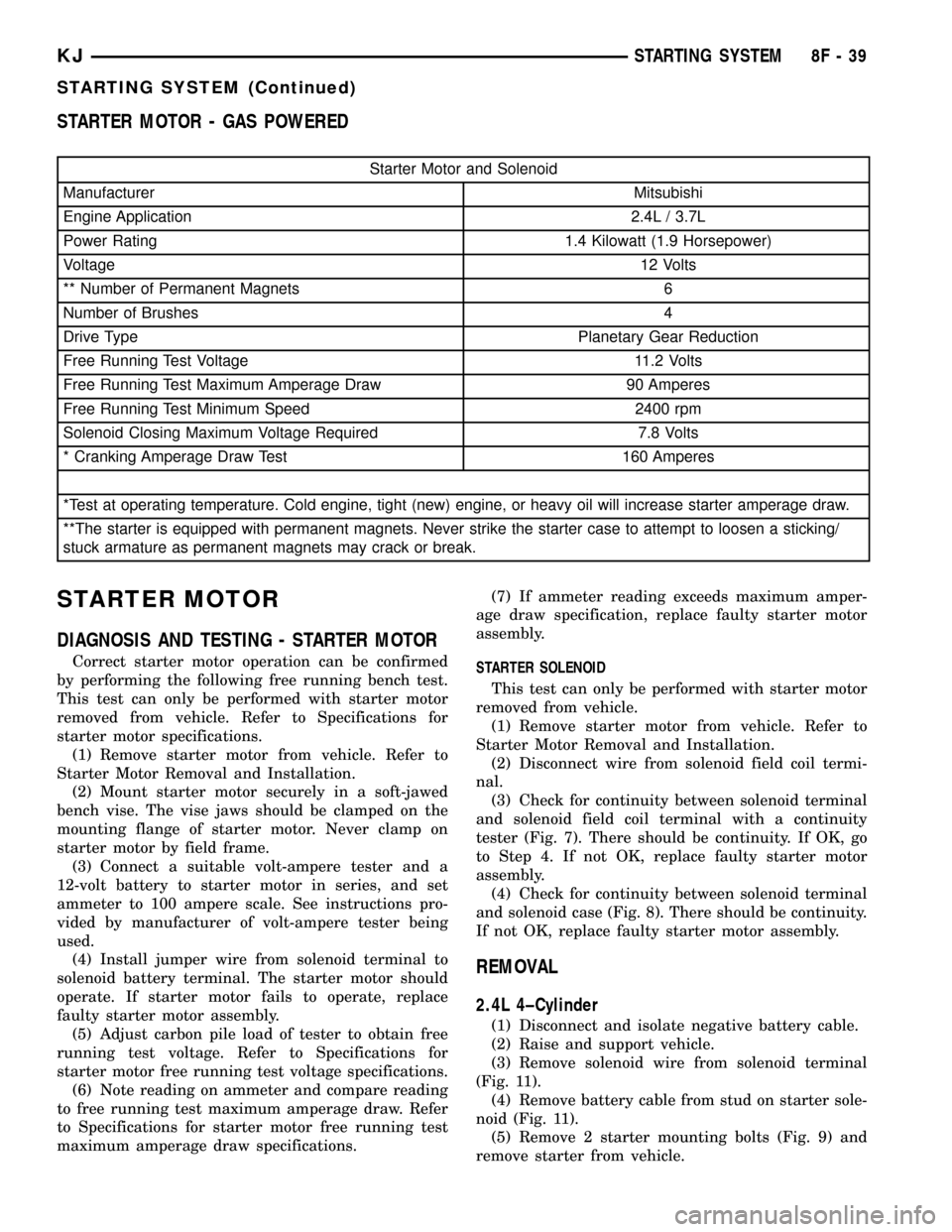
STARTER MOTOR - GAS POWERED
Starter Motor and Solenoid
Manufacturer Mitsubishi
Engine Application 2.4L / 3.7L
Power Rating 1.4 Kilowatt (1.9 Horsepower)
Voltage12 Volts
** Number of Permanent Magnets 6
Number of Brushes 4
Drive Type Planetary Gear Reduction
Free Running Test Voltage 11.2 Volts
Free Running Test Maximum Amperage Draw 90 Amperes
Free Running Test Minimum Speed 2400 rpm
Solenoid Closing Maximum Voltage Required 7.8 Volts
* Cranking Amperage Draw Test 160 Amperes
*Test at operating temperature. Cold engine, tight (new) engine, or heavy oil will increase starter amperage draw.
**The starter is equipped with permanent magnets. Never strike the starter case to attempt to loosen a sticking/
stuck armature as permanent magnets may crack or break.
STARTER MOTOR
DIAGNOSIS AND TESTING - STARTER MOTOR
Correct starter motor operation can be confirmed
by performing the following free running bench test.
This test can only be performed with starter motor
removed from vehicle. Refer to Specifications for
starter motor specifications.
(1) Remove starter motor from vehicle. Refer to
Starter Motor Removal and Installation.
(2) Mount starter motor securely in a soft-jawed
bench vise. The vise jaws should be clamped on the
mounting flange of starter motor. Never clamp on
starter motor by field frame.
(3) Connect a suitable volt-ampere tester and a
12-volt battery to starter motor in series, and set
ammeter to 100 ampere scale. See instructions pro-
vided by manufacturer of volt-ampere tester being
used.
(4) Install jumper wire from solenoid terminal to
solenoid battery terminal. The starter motor should
operate. If starter motor fails to operate, replace
faulty starter motor assembly.
(5) Adjust carbon pile load of tester to obtain free
running test voltage. Refer to Specifications for
starter motor free running test voltage specifications.
(6) Note reading on ammeter and compare reading
to free running test maximum amperage draw. Refer
to Specifications for starter motor free running test
maximum amperage draw specifications.(7) If ammeter reading exceeds maximum amper-
age draw specification, replace faulty starter motor
assembly.
STARTER SOLENOID
This test can only be performed with starter motor
removed from vehicle.
(1) Remove starter motor from vehicle. Refer to
Starter Motor Removal and Installation.
(2) Disconnect wire from solenoid field coil termi-
nal.
(3) Check for continuity between solenoid terminal
and solenoid field coil terminal with a continuity
tester (Fig. 7). There should be continuity. If OK, go
to Step 4. If not OK, replace faulty starter motor
assembly.
(4) Check for continuity between solenoid terminal
and solenoid case (Fig. 8). There should be continuity.
If not OK, replace faulty starter motor assembly.
REMOVAL
2.4L 4±Cylinder
(1) Disconnect and isolate negative battery cable.
(2) Raise and support vehicle.
(3) Remove solenoid wire from solenoid terminal
(Fig. 11).
(4) Remove battery cable from stud on starter sole-
noid (Fig. 11).
(5) Remove 2 starter mounting bolts (Fig. 9) and
remove starter from vehicle.
KJSTARTING SYSTEM 8F - 39
STARTING SYSTEM (Continued)
Page 363 of 1803

3.7L V-6
(1) Disconnect and isolate negative battery cable.
(2) Raise and support vehicle.
(3) Remove 2 flange bolts securing left exhaust
downpipe to crossover pipe. Lower pipe slightly to
allow front propeller shaft removal.
(4) Remove front propeller shaft.
(5) Remove 2 starter heat shield bolts at side of
starter (Fig. 10).
(6) Remove starter heat shield nut at front of
starter (Fig. 10).
(7) Remove starter heat shield.
(8) Remove solenoid wire from solenoid terminal
(Fig. 11).
(9) Remove battery cable from stud on starter sole-
noid (Fig. 11).
(10) Remove 2 starter mounting bolts (Fig. 12).
(11) Position front of starter to face rear of vehicle.
Rotate starter until solenoid position is located below
starter.
(12) Remove starter from vehicle by passing it
between exhaust pipe and transmission bellhousing.
Fig. 7 CONTINUITY BETWEEN SOLENOID AND
FIELD COIL TERMINALS - TYPICAL
1 - OHMMETER
2 - SOLENOID TERMINAL
3 - FIELD COIL TERMINAL
Fig. 8 CONTINUITY BETWEEN SOLENOID
TERMINAL AND CASE - TYPICAL
1 - SOLENOID TERMINAL
2 - OHMMETER
3 - SOLENOID
Fig. 9 STARTER - 2.4L
1-STARTER
2 - MOUNTING BOLTS (2)
Fig. 10 STARTER HEAT SHIELD - 3.7L
1 - STARTER HEAT SHIELD
2 - HEAT SHIELD BOLTS
3 - HEAT SHIELD BOLTS
4-STARTER
8F - 40 STARTING SYSTEMKJ
STARTER MOTOR (Continued)
Page 364 of 1803

INSTALLATION
2.4L 4±Cylinder
(1) Position starter into bellhousing and install 2
bolts. Refer to torque specifications.
(2) Install battery cable and nut to stud on starter
solenoid. Refer to torque specifications.
(3) Install solenoid wire connector to solenoid ter-
minal.
(4) Lower vehicle.
(5) Connect negative battery cable.
3.7L V-6
(1) Position front of starter towards rear of vehicle
with solenoid position rotated until it is located below
starter. Install starter by passing it between exhaust
pipe and transmission bellhousing.
(2) Position starter into bellhousing and install 2
bolts. Refer to torque specifications.
(3) Install battery cable and nut to stud on starter
solenoid. Refer to torque specifications.
(4) Install solenoid wire connector to solenoid ter-
minal.
(5) Position starter heat shield and install nut at
front of starter.
(6) Install 2 starter heat shield bolts at side of
starter.
(7) Install front propeller shaft.
(8) Install 2 flange bolts securing left exhaust
downpipe to crossover pipe.
(9) Lower vehicle.
(10) Connect negative battery cable.
STARTER MOTOR RELAY
DESCRIPTION
The starter relay is an electromechanical device
that switches battery current to the pull-in coil of the
starter solenoid when ignition switch is turned to
Start position. The starter relay is located in the
Power Distribution Center (PDC) in the engine com-
partment. See PDC cover for relay identification and
location.
The starter relay is a International Standards
Organization (ISO) relay. Relays conforming to ISO
specifications have common physical dimensions, cur-
rent capacities, terminal patterns, and terminal func-
tions.
The starter relay cannot be repaired or adjusted
and, if faulty or damaged, it must be replaced.
Fig. 11 STARTER ELECTRICAL CONNECTORS -
2.4L/3.7L
1 - BATERY CABLE NUT
2 - BATTERY CABLE
3 - SOLENOID CONNECTOR
4 - HEAT SHIELD
Fig. 12 STARTER - 3.7L
1-STARTER
2 - MOUNTING BOLTS (2)
KJSTARTING SYSTEM 8F - 41
STARTER MOTOR (Continued)
Page 371 of 1803

DIAGNOSIS AND TESTING - REAR WINDOW
DEFOGGER SYSTEM
For circuit descriptions and diagrams, (Refer to
Appropriate Wiring Information). The operation of
the electrically heated rear window defogger system
can be confirmed in one of the following manners:
²Turn the ignition switch to the run position.
²Set the defogger switch in the run position. The
rear window defogger operation can be checked by
feeling the rear window or outside rear view mirror
glass. A distinct difference in temperature between
the grid lines and the adjacent clear glass or the mir-
ror glass can be detected within three to four min-
utes of operation.
²Using a 12-volt DC voltmeter, contact the rear
glass heating grid terminal B (right side) with the
negative lead, and terminal A (left side) with the pos-
itive lead (Fig. 1). The voltmeter should read battery
voltage.
The above checks will confirm system operation.
Illumination of the defogger switch indicator lamp
means that there is electrical current available at the
output of the defogger relay, but does not confirmthat the electrical current is reaching the rear glass
heating grid lines.
If the defogger system does not operate, the prob-
lem should be isolated in the following manner:
(1) Confirm that the ignition switch is in the run
position.
(2) Ensure that the rear glass heating grid feed
and ground wires are connected to the glass. Confirm
that the ground wire has continuity to ground.
(3) Check the fuses in the Power Distribution Cen-
ter (PDC) and in the junction block. The fuses must
be tight in their receptacles and all electrical connec-
tions must be secure.
When the above steps have been completed and the
rear glass or outside rear view mirror heating grid is
still inoperative, one or more of the following is
faulty:
²Defogger switch
²Defogger relay
²HVAC control head circuitry
²Rear window grid lines (all grid lines would
have to be broken or one of the feed wires discon-
nected for the entire system to be inoperative)
²Outside rear view mirror heating grid.
If setting the defogger switch to the On position
produces a severe voltmeter deflection, check for a
short circuit between the defogger relay output and
the rear glass or outside rear view mirror heating
grids.
STANDARD PROCEDURE - REAR GLASS
HEATING GRID REPAIR
Repair of the rear glass heating grid lines, bus
bars, terminals or pigtail wires can be accomplished
using a Mopar Rear Window Defogger Repair Kit
(Part Number 4267922) or equivalent.
WARNING: MATERIALS CONTAINED IN THE REPAIR
KIT MAY CAUSE SKIN OR EYE IRRITATION. THE
KIT CONTAINS EPOXY RESIN AND AMINE TYPE
HARDENER, WHICH ARE HARMFUL IF SWAL-
LOWED. AVOID CONTACT WITH THE SKIN AND
EYES. FOR SKIN CONTACT, WASH THE AFFECTED
AREAS WITH SOAP AND WATER. FOR CONTACT
WITH THE EYES, FLUSH WITH PLENTY OF WATER.
DO NOT TAKE INTERNALLY. IF TAKEN INTER-
NALLY, INDUCE VOMITING AND CALL A PHYSICIAN
IMMEDIATELY. USE WITH ADEQUATE VENTILA-
TION. DO NOT USE NEAR FIRE OR FLAME. CON-
TAINS FLAMMABLE SOLVENTS. KEEP OUT OF THE
REACH OF CHILDREN.
(1) Mask the repair area so that the conductive
epoxy can be applied neatly. Extend the epoxy appli-
cation onto the grid line or the bus bar on each side
of the break (Fig. 2).
Fig. 1 REAR WINDOW DEFOGGER
1 - DEFOGGER BACKGLASS
2 - HEATED GLASS CONNECTOR9A9
3 - HINDGE MOUNTING SCREWS (2)
4 - HINDGE (LEFT SIDE)
5 - HINDGE MOUNTING SCREWS (2)
6 - HINDGE (RIGHT SIDE)
7 - HEATED GLASS CONNECTOR9B9
8 - BACKGLASS DEFOGGER GRID
8G - 4 WINDOW DEFOGGERKJ
WINDOW DEFOGGER (Continued)
Page 380 of 1803

HEATED SEAT SWITCH CONTINUITY
CONTINUITY
BETWEENSWITCH
POSITIONOHMS
READING +/±
10%
PIN 1 AND 3 OFF 2.2 K (2200)
OHMS
PIN 1 AND 3 LO .415 K (415)
OHMS
PIN 1 AND 3 HI 33 OHMS
REMOVAL
(1) Disconnect and isolate the negative battery
cable.
(2) Remove the appropriate seat cushion side
shield (Refer to 23 - BODY/SEATS/SEAT CUSHION
SIDE COVERS - REMOVAL).
(3) Disconnect the heated seat switch electrical
connector. Depress the locking tab and pull straight
apart.
(4) Working from the underside of the switch, gen-
tly rock the switch back and forth out of its mounting
location.
INSTALLATION
(1) Gently rock the switch back and forth in to its
mounting location.
(2) Connect the heated seat switch electrical con-
nector.
(3) Install the appropriate seat cushion side shield.
Refer to the Body section of the service manual for
the procedure.
(4) Connect the negative battery cable.
HEATED SEAT ELEMENT
DESCRIPTION
The heated seat system includes four seat heating
elements. Two are located in each front seat, one for
the seat cushion and the other for the seat back. All
models use two resistor wire heating elements for
each seat that are connected in series with the
Heated Seat Module (HSM). The temperature sensor
is a Negative Temperature Coefficient (NTC) ther-
mistor. One temperature sensor is used for each seat,
and it is located on the seat cushion heating element
for all models.
The seat heating elements are permanently
attached to the seat cushions. The heated seat ele-
ments and the temperature sensor cannot be
adjusted or repaired and, if faulty or damaged, the
seat cushions must be replaced. Refer to the Body
section for the seat cushion service procedures.
OPERATION
The heated seat elements resist the flow of electrical
current. When battery current is passed through the
elements, the energy lost by the resistance of the ele-
ments to the current flow is released in the form of
heat. When the temperature of the seat cushion cover
rises, the resistance of the sensor decreases. The Heated
Seat Module supplies a five-volt current to one side of
each sensor, and monitors the voltage drop through the
sensor on a return circuit. The Heated Seat Module
uses this temperature sensor input to monitor the tem-
perature of the seat, and regulates the current flow to
the seat heating elements accordingly.
DIAGNOSIS AND TESTING - HEATED SEAT
ELEMENT
SEAT CUSHION ELEMENT
(1) Disconnect and isolate the battery negative
cable. Disconnect the green heated seat cushion ele-
ment wire harness connector from the power seat
wire harness. The power seat wire harness connec-
tors for the seat cushion heating elements are
secured to a bracket located under the seat cushion
frame. Refer toWiringfor connector pin information.
(2) Check for continuity between the two heated
seat element circuit cavities. There should be conti-
nuity. If OK, the elements within the seat assembly
test OK, go to Step 3. If not OK, replace the faulty
seat heating element and cushion assembly.
(3) Test the seat wire harness between the heated
seat module connector and the heated seat wire har-
ness element connector for a shorted or open circuit.
If OK, element is OK, proceed with testing the
heated seat sensor and module. If not OK, repair the
shorted or open seat wire harness as required.
SEAT BACK ELEMENT
(1) Disconnect and isolate the battery negative
cable. Disconnect the green heated seat back element
wire harness connector from the power seat wire har-
ness. The power seat wire harness connectors for the
seat cushion heating elements are secured to a
bracket located under the seat cushion frame. Refer
toWiringfor connector pin information.
(2) Check for continuity between the two heated
seat element circuit cavities. There should be conti-
nuity. If OK, the elements within the seat assembly
test OK, go to Step 3. If not OK, replace the faulty
seat heating element and cushion assembly.
(3) Test the seat wire harness between the heated
seat module connector and the heated seat wire har-
ness element connector for a shorted or open circuit.
If OK, element is OK, proceed with testing the
heated seat sensor and module. If not OK, repair the
shorted or open seat wire harness as required.
KJHEATED SEAT SYSTEM 8G - 13
DRIVER SEAT HEATER SWITCH (Continued)
Page 397 of 1803

cylinders 1 and 4, and coil number two fires cylinders
2 and 3.
The Auto Shutdown (ASD) relay provides battery
voltage to the ignition coil. The PCM provides a
ground contact (circuit) for energizing the coil(s). The
PCM will de-energize the ASD relay if it does not
receive the crankshaft position sensor and camshaft
position sensor inputs.
Base ignition timing is not adjustable.By con-
trolling the coil ground circuit, the PCM is able to set
the base timing and adjust the ignition timing
advance. This is done to meet changing engine oper-
ating conditions.
The ignition coil is not oil filled. The windings are
embedded in an epoxy compound. This provides heat
and vibration resistance that allows the ignition coil
to be mounted on the engine.
Spark plug cables (secondary wires or cables) are
used with the 2.4L engine.
3.7L
Battery voltage is supplied to the 6 ignition coils
from the ASD relay. The Powertrain Control Module
(PCM) opens and closes each ignition coil ground cir-
cuit at a determined time for ignition coil operation.
Base ignition timing is not adjustable.By con-
trolling the coil ground circuit, the PCM is able to set
the base timing and adjust the ignition timing
advance. This is done to meet changing engine oper-
ating conditions.
The ignition coil is not oil filled. The windings are
embedded in an epoxy compound. This provides heat
and vibration resistance that allows the ignition coil
to be mounted on the engine.
Because of coil design, spark plug cables (second-
ary cables) are not used with the 3.7L engine.
REMOVAL
2.4L
(1) Disconnect electrical connector at rear of coil.
(2) Remove all secondary cables from coil.
(3) Remove 4 coil mounting bolts (Fig. 17).
(4) Remove coil from vehicle.
3.7L
An individual ignition coil is used for each spark
plug (Fig. 19). The coil fits into machined holes in the
cylinder head. A mounting stud/nut secures each coil
to the top of the intake manifold (Fig. 18). The bot-
tom of the coil is equipped with a rubber boot to seal
the spark plug to the coil. Inside each rubber boot is
a spring. The spring is used for a mechanical contact
between the coil and the top of the spark plug. These
rubber boots and springs are a permanent part of the
coil and are not serviced separately. An o-ring (Fig.19) is used to seal the coil at the opening into the cyl-
inder head.
(1) Depending on which coil is being removed, the
throttle body air intake tube or intake box may need
to be removed to gain access to coil.
(2) Disconnect electrical connector from coil by
pushing downward on release lock on top of connec-
tor and pull connector from coil.
(3) Clean area at base of coil with compressed air
before removal.
(4) Remove coil mounting nut from mounting stud
(Fig. 18).
(5) Carefully pull up coil from cylinder head open-
ing with a slight twisting action.
(6) Remove coil from vehicle.
INSTALLATION
2.4L
(1) Position coil to engine.
(2) Install 4 mounting bolts. Refer to torque speci-
fications.
(3) Install secondary cables.
(4) Install electrical connector at rear of coil.
(5) Install air cleaner tube and housing.
3.7L
(1) Using compressed air, blow out any dirt or con-
taminants from around top of spark plug.
(2) Check condition of coil o-ring and replace as
necessary. To aid in coil installation, apply silicone to
coil o-ring.
Fig. 17 IGNITION COIL - 2.4L
1 - IGNITION COIL
2 - MOUNTING BOLTS (4)
8I - 10 IGNITION CONTROLKJ
IGNITION COIL (Continued)
Page 404 of 1803

INSTRUMENT CLUSTER
TABLE OF CONTENTS
page page
INSTRUMENT CLUSTER
DESCRIPTION..........................2
OPERATION............................4
DIAGNOSIS AND TESTING - INSTRUMENT
CLUSTER............................7
REMOVAL.............................9
DISASSEMBLY..........................9
ASSEMBLY............................10
INSTALLATION.........................11
ABS INDICATOR
DESCRIPTION.........................11
OPERATION...........................11
AIRBAG INDICATOR
DESCRIPTION.........................12
OPERATION...........................12
BRAKE/PARK BRAKE INDICATOR
DESCRIPTION.........................13
OPERATION...........................13
DIAGNOSIS AND TESTING - BRAKE
INDICATOR..........................14
CHARGING INDICATOR
DESCRIPTION.........................15
OPERATION...........................15
COOLANT LOW INDICATOR
DESCRIPTION.........................15
OPERATION...........................16
CRUISE INDICATOR
DESCRIPTION.........................16
OPERATION...........................17
DOOR AJAR INDICATOR
DESCRIPTION.........................17
OPERATION...........................17
ENGINE TEMPERATURE GAUGE
DESCRIPTION.........................18
OPERATION...........................18
FRONT FOG LAMP INDICATOR
DESCRIPTION.........................19
OPERATION...........................19
FUEL GAUGE
DESCRIPTION.........................19
OPERATION...........................20
GATE AJAR INDICATOR
DESCRIPTION.........................20
OPERATION...........................20
GLASS AJAR INDICATOR
DESCRIPTION.........................21
OPERATION...........................21
HIGH BEAM INDICATOR
DESCRIPTION.........................22OPERATION...........................22
LOW FUEL INDICATOR
DESCRIPTION.........................22
OPERATION...........................22
LOW OIL PRESSURE INDICATOR
DESCRIPTION.........................23
OPERATION...........................23
MALFUNCTION INDICATOR LAMP (MIL)
DESCRIPTION.........................24
OPERATION...........................24
ODOMETER
DESCRIPTION.........................25
OPERATION...........................25
OVERDRIVE OFF INDICATOR
DESCRIPTION.........................26
OPERATION...........................26
REAR FOG LAMP INDICATOR
DESCRIPTION.........................27
OPERATION...........................27
SEATBELT INDICATOR
DESCRIPTION.........................27
OPERATION...........................28
SECURITY INDICATOR
DESCRIPTION.........................28
OPERATION...........................28
SHIFT INDICATOR (TRANSFER CASE)
DESCRIPTION
DESCRIPTION - PART TIME INDICATOR....29
DESCRIPTION - FULL TIME INDICATOR....29
DESCRIPTION - FOUR LOW MODE
INDICATOR..........................29
OPERATION
OPERATION - PART TIME INDICATOR.....29
OPERATION - FULL TIME INDICATOR.....30
OPERATION - FOUR LOW MODE
INDICATOR..........................30
SKIS INDICATOR
DESCRIPTION.........................31
OPERATION...........................31
SPEEDOMETER
DESCRIPTION.........................32
OPERATION...........................32
TACHOMETER
DESCRIPTION.........................33
OPERATION...........................33
TRANS TEMP INDICATOR
DESCRIPTION.........................33
OPERATION...........................34
KJINSTRUMENT CLUSTER 8J - 1
Page 405 of 1803

TURN SIGNAL INDICATOR
DESCRIPTION.........................34
OPERATION...........................34
WAIT-TO-START INDICATOR
DESCRIPTION.........................35
OPERATION...........................35
WASHER FLUID INDICATOR
DESCRIPTION.........................35OPERATION...........................36
DIAGNOSIS AND TESTING - WASHER FLUID
INDICATOR..........................36
WATER-IN-FUEL INDICATOR
DESCRIPTION.........................37
OPERATION...........................37
INSTRUMENT CLUSTER
DESCRIPTION
The instrument cluster for this model is an Elec-
troMechanical Instrument Cluster (EMIC) module
that is located in the instrument panel above the
steering column opening, directly in front of the
driver (Fig. 1). The remainder of the EMIC, including
the mounts and the electrical connections, are con-
cealed behind the cluster bezel. The EMIC gauges
and indicators are protected by an integral clear
plastic cluster lens, and are visible through a dedi-
cated opening in the cluster bezel on the instrument
panel. Just behind the cluster lens is the cluster hood
and an integral cluster mask, which are constructed
of molded black plastic. Two cluster masks are used;
a base black version is used on base models, while a
premium black version features a chrome trim ring
around the perimeter of each gauge opening is used
on premium models. The cluster hood serves as a
visor and shields the face of the cluster from ambient
light and reflections to reduce glare, while the cluster
mask serves to separate and define the individual
gauges and indicators of the EMIC. On the lower
edge of the cluster lens just right of the speedometer,
the black plastic odometer/trip odometer switch but-
ton protrudes through dedicated holes in the clustermask and the cluster lens. The molded plastic EMIC
lens, hood and mask unit has three integral mount-
ing tabs, one each on the lower outboard corners of
the unit and one on the upper surface of the hood
near the center. These mounting tabs are used to
secure the EMIC to the molded plastic instrument
panel cluster carrier with two screws at the top, and
one screw at each outboard tab. A single molded con-
nector receptacle located on the EMIC electronic cir-
cuit board is accessed from the back of the cluster
housing and is connected to the vehicle electrical sys-
tem through a single dedicated take out and connec-
tor of the instrument panel wire harness.
Behind the cluster lens, hood, and mask unit is the
cluster overlay and gauges. The overlay is a lami-
nated plastic unit. The dark, visible, outer surface of
the overlay is marked with all of the gauge dial faces
and graduations, but this layer is also translucent.
The darkness of this outer layer prevents the cluster
from appearing cluttered or busy by concealing the
cluster indicators that are not illuminated, while the
translucence of this layer allows those indicators and
icons that are illuminated to be readily visible. The
underlying layer of the overlay is opaque and allows
light from the various indicators and illumination
lamps behind it to be visible through the outer layer
of the overlay only through predetermined cutouts.
The orange gauge pointers are each illuminated
internally. The EMIC electronic circuitry is protected
by a molded plastic rear cover that features several
round access holes for service of the cluster illumina-
tion lighting and a single rectangular access hole for
the EMIC connector receptacle. The EMIC housing,
circuit board, gauges, and overlay unit are sand-
wiched between the lens, hood, and mask unit and
the rear cover with screws.
Twelve versions of the EMIC module are offered on
this model, six base and six premium. These versions
accommodate all of the variations of optional equip-
ment and regulatory requirements for the various
markets in which the vehicle will be offered. This
module utilizes integrated circuitry and information
carried on the Programmable Communications Inter-
face (PCI) data bus network for control of all gauges
and many of the indicators. (Refer to 8 - ELECTRI-
CAL/ELECTRONIC CONTROL MODULES/COM-
MUNICATION - DESCRIPTION - PCI BUS). The
EMIC also uses several hard wired inputs in order to
Fig. 1 Instrument Cluster
1 - INSTRUMENT PANEL
2 - INSTRUMENT CLUSTER
8J - 2 INSTRUMENT CLUSTERKJ
Page 406 of 1803

perform its many functions. The EMIC module incor-
porates a blue-green digital Vacuum Fluorescent Dis-
play (VFD) for displaying odometer and trip
odometer information, as well as several warning
messages and certain diagnostic information. In addi-
tion to instrumentation and indicators, the EMIC has
the hardware and software needed to provide the fol-
lowing features:
²Chime Warning Service- A chime tone gener-
ator on the EMIC electronic circuit board provides
audible alerts to the vehicle operator and eliminates
the need for a separate chime module. (Refer to 8 -
ELECTRICAL/CHIME WARNING SYSTEM -
DESCRIPTION).
²Panel Lamps Dimming Service- The EMIC
provides a hard wired 12-volt Pulse-Width Modulated
(PWM) output that synchronizes the dimming level
of the radio display, gear selector indicator, heater-air
conditioner control, and all other dimmable lighting
on the panel lamps dimmer circuit with that of the
cluster illumination lamps and VFD.
The EMIC houses four analog gauges and has pro-
visions for up to twenty-four indicators (Fig. 2). The
EMIC includes the following analog gauges:
²Coolant Temperature Gauge
²Fuel Gauge
²Speedometer
²Tachometer
Some of the EMIC indicators are automatically
configured when the EMIC is connected to the vehi-
cle electrical system for compatibility with certain
optional equipment or equipment required for regula-
tory purposes in certain markets. While each EMIC
may have provisions for indicators to support every
available option, the configurable indicators will not
be functional in a vehicle that does not have the
equipment that an indicator supports. The EMIC
includes provisions for the following indicators (Fig.
2):
²Airbag Indicator (with Airbag System only)
²Antilock Brake System (ABS) Indicator
(with ABS only)
²Brake Indicator
²Charging Indicator
²Coolant Low Indicator (with Diesel Engine
only)
²Cruise Indicator (with Speed Control Sys-
tem only)
²Four-Wheel Drive Full Time Indicator (with
Selec-Trac Transfer Case only)
²Four-Wheel Drive Low Mode Indicator
²Four-Wheel Drive Part Time Indicator
²Front Fog Lamp Indicator (with Front Fog
Lamps only)
²High Beam Indicator
²Low Fuel Indicator²Low Oil Pressure Indicator
²Malfunction Indicator Lamp (MIL)
²Overdrive-Off Indicator (with Automatic
Transmission only)
²Rear Fog Lamp Indicator (with Rear Fog
Lamps only)
²Seatbelt Indicator
²Security Indicator (with Vehicle Theft
Security System only)
²Sentry Key Immobilizer System (SKIS)
Indicator (with SKIS only)
²Transmission Overtemp Indicator (with
Automatic Transmission only)
²Turn Signal (Right and Left) Indicators
²Wait-To-Start Indicator (with Diesel Engine
only)
²Water-In-Fuel Indicator (with Diesel Engine
only)
Each indicator in the EMIC is illuminated by a
dedicated Light Emitting Diode (LED) that is sol-
dered onto the EMIC electronic circuit board. The
LEDs are not available for service replacement and,
if damaged or faulty, the entire EMIC must be
replaced. Cluster illumination is accomplished by
dimmable incandescent back lighting, which illumi-
nates the gauges for visibility when the exterior
lighting is turned on. Each of the incandescent bulbs
is secured by an integral bulb holder to the electronic
circuit board from the back of the cluster housing.
The incandescent bulb/bulb holder units are available
for service replacement.
Hard wired circuitry connects the EMIC to the
electrical system of the vehicle. These hard wired cir-
cuits are integral to several wire harnesses, which
are routed throughout the vehicle and retained by
many different methods. These circuits may be con-
nected to each other, to the vehicle electrical system
and to the EMIC through the use of a combination of
soldered splices, splice block connectors, and many
different types of wire harness terminal connectors
and insulators. Refer to the appropriate wiring infor-
mation. The wiring information includes wiring dia-
grams, proper wire and connector repair procedures,
further details on wire harness routing and reten-
tion, as well as pin-out and location views for the
various wire harness connectors, splices and grounds.
The EMIC modules for this model are serviced only
as complete units. The EMIC module cannot be
adjusted or repaired. If a gauge, an LED indicator,
the VFD, the electronic circuit board, the circuit
board hardware, the cluster overlay, or the EMIC
housing are damaged or faulty, the entire EMIC mod-
ule must be replaced. The cluster lens, hood and
mask unit and the individual incandescent lamp
bulbs with holders are available for service replace-
ment.
KJINSTRUMENT CLUSTER 8J - 3
INSTRUMENT CLUSTER (Continued)