lock JEEP WAGONEER 2023 Owners Manual
[x] Cancel search | Manufacturer: JEEP, Model Year: 2023, Model line: WAGONEER, Model: JEEP WAGONEER 2023Pages: 396, PDF Size: 15.17 MB
Page 2 of 396

WARNING: Operating, servicing and maintaining a passenger vehicle or off-highway
motor vehicle can expose you to chemicals including engine exhaust, carbon monoxide,
phthalates, and lead, which are known to the State of California to cause cancer and
birth defects or other reproductive harm. To minimize exposure, avoid breathing exhaust,
do not idle the engine except as necessary, service your vehicle in a well-ventilated area and wear
gloves or wash your hands frequently when servicing your vehicle. For more information go to
www.P65Warnings.ca.gov/passenger-vehicle.
This Owner ’s Manual illustrates and describes the operation of features and equipment that are either standard or optional on this vehicle. This manual may also
include a description of features and equipment that are no longer available or were not ordered on this vehicle. Please disregard any features and equipment
described in this manual that are not on this vehicle. FCA US LLC reserves the right to make changes in design and specifications, and/or make additions to or
improvements to its products without imposing any obligation upon itself to install them on products previously manufactured.
With respect to any vehicles sold in Canada, the name FCA US LLC shall be deemed to be deleted and the name FCA Canada Inc. used in substitution therefore.
This Owner ’s Manual is intended to familiarize you with the important features of your vehicle. Your most up-to-date Owner ’s Manual, Radio Instruction Manual and
Warranty Booklet can be found by visiting the website on the back cover. The driver ’s primary responsibility is the safe operation of the vehicle. Driving while distracted can result in loss of vehicle control, resulting in an accident and
personal injury. FCA US LLC strongly recommends that the driver use extreme caution when using any device or feature that may take their attention off the road.
Use of any electrical devices, such as cellular telephones, computers, portable radios, vehicle navigation or other devices by the driver while the vehicle is moving
is dangerous and could lead to a serious accident. Texting while driving is also dangerous and should never be done while the vehicle is moving. If you find yourself
unable to devote your full attention to vehicle operation, pull off the road to a safe location and stop your vehicle. Some states or provinces prohibit the use of
cellular telephones or texting while driving. It is always the driver ’s responsibility to comply with all local laws.
This Owner ’s Manual has been prepared to help you get acquainted with your new Wagoneer vehicle and to provide a convenient reference source for common
questions.
Not all features shown in this manual may apply to your vehicle. For additional information, visit
mopar.com/om (USA), owners.mopar.ca (Canada) or your local
Chrysler, Dodge, Jeep®, or Ram dealer.
U.S. Residents: If you are the first registered retail owner of your vehicle, you may obtain a complimentary printed copy of the Warranty Booklet by
calling 1-833-667-4825 or by contacting your dealer. Replacement kits can be purchased by visiting www.techauthority.com.
Canadian Residents: If you are the first registered retail owner of your vehicle, you may obtain a complimentary printed copy of the Warranty Booklet or purchase
a replacement kit by calling 1-800-387-1143 or by contacting your dealer.
DRIVING AND ALCOHOL
Drunk driving is one of the most frequent causes of accidents. Your driving ability can be seriously impaired with blood alcohol levels far below the legal
minimum. If you are drinking, don’t drive. Ride with a designated non-drinking driver, call a cab, a rideshare, a friend or use public transportation.
WARNING
Driving after drinking can lead to an accident. Your perceptions are less sharp, your reflexes are slower and your judgment is impaired when you have been
drinking. Never drink and then drive.
FCA US LLC reserves the right to modify the terms or discontinue the Roadside Assistance Program at any time. The Roadside Assistance Program is subject to restrictions and conditions of use, that are
determined solely by FCA US LLC.
ROADSIDE ASSISTANCE
24 HOURS, 7 DAYS A WEEK AT YOUR SERVICE. CALL 1-833-667-4825 (USA)
CALL 1-800-363-4869 (CANADA)
SERVICES: Flat Tire Service, Out Of Gas/Fuel Delivery, Battery Jump Assistance, Lockout Service and Towing Service
Please see the Customer Assistance chapter in this Owner ’s Manual for further information.
Page 4 of 396

2
INTRODUCTION
KNOW & GO ........................................................................... 9
SYMBOLS KEY .....................................................................10
ROLLOVER WARNING .......................................................10
VEHICLE MODIFICATIONS/ALTERATIONS .......................10
SYMBOLS GLOSSARY ........................................................11
GETTING TO KNOW YOUR VEHICLE
KEYS ....................................................................................16 Key Fob ........................................................................ 16
SENTRY KEY ....................................................................... 20
IGNITION SWITCH ...............................................................20 Keyless Enter ‘n Go™ Ignition .................................... 20
REMOTE START ...................................................................22 How To Use Remote Start .......................................... 22
To Exit Remote Start Mode ....................................... 23
Remote Start Front Defrost Activation —
If Equipped .................................................................. 23
Remote Start Comfort Systems — If Equipped.......... 23
Remote Start Windshield Wiper De-Icer
Activation — If Equipped ............................................. 23
Remote Start Abort Message ..................................... 24
VEHICLE SECURITY SYSTEM — IF EQUIPPED ..................24 To Arm The System ..................................................... 24
To Disarm The System ................................................ 24
Rearming Of The System ............................................ 25
Security System Manual Override.............................. 25
Tamper Alert ................................................................ 25 DELUXE VEHICLE SECURITY SYSTEM —
IF EQUIPPED ........................................................................ 25
To Arm The System ......................................................25
To Disarm The System ................................................ 25
Security System Manual Override ..............................26
DOORS ................................................................................ 26 Manual Door Locks......................................................26
Power Door Locks .......................................................27
Power Side Steps — If Equipped ................................. 27
Keyless Enter ‘n Go™ — Passive Entry ...................... 27
Automatic Unlock Doors On Exit ................................. 30
Automatic Door Locks — If Equipped ......................... 30
Child-Protection Door Lock System — Rear Doors.....30
STEERING WHEEL............................................................... 30 Power Tilt/Telescoping Steering Column ................... 30
Heated Steering Wheel ............................................... 31
DRIVER AND PASSENGER MEMORY SETTINGS —
IF EQUIPPED ........................................................................ 31 Programming The Memory Feature............................ 32
Linking And Unlinking The Key Fob To Memory......... 33
Memory Position Recall............................................... 33
SEATS ................................................................................... 33 Manual Adjustment (Rear Seats) ............................... 33
Power Adjustment (Front Seats) — If Equipped ........ 38
Power Adjustment (Rear Seats) — If Equipped .......... 41
Power Seat Massage — If Equipped ........................... 42
Heated Seats — If Equipped ....................................... 43
Ventilated Seats — If Equipped................................... 44
Head Restraints ........................................................... 44 UCONNECT VOICE RECOGNITION
QUICK TIPS — IF EQUIPPED ............................................. 48
Introducing Voice Recognition .................................... 48
Basic Voice Commands .............................................. 48
Get Started .................................................................. 48
Additional Information ................................................ 49
DRIVER ADJUSTABLE PEDALS ......................................... 49
MIRRORS ............................................................................ 50 Inside Rearview Mirror ................................................ 50
Illuminated Vanity Mirrors .......................................... 50
Outside Mirrors ........................................................... 51
Outside Automatic Dimming Mirror — If Equipped .... 51
Conversation Mirror .................................................... 51
Power Mirrors ............................................................. 52
Automatic Power Folding Mirrors — If Equipped ....... 52
Heated Mirrors ............................................................ 53
Tilt Side Mirrors In Reverse ....................................... 53
UNIVERSAL GARAGE DOOR OPENER
(HOMELINK®) .................................................................... 53 Before You Begin Programming HomeLink® ............ 53
Erasing All The HomeLink® Channels ....................... 54
Identifying Whether You Have A Rolling Code Or
Non-Rolling Code Device............................................. 54
Programming HomeLink® To A Garage
Door Opener ................................................................ 54
Programming HomeLink® To A
Miscellaneous Device ................................................. 55
Reprogramming A Single HomeLink® Button ........... 55
Canadian/Gate Operator Programming .................... 55
Security ........................................................................ 56
Troubleshooting Tips ................................................... 56
23_WS_OM_EN_USC_t.book Page 2
Page 5 of 396

3
EXTERIOR LIGHTS ..............................................................57Headlight Switch ........................................................ 57
Multifunction Lever ..................................................... 58
Daytime Running Lights (DRLs) ................................. 58
High/Low Beam Switch .............................................. 58
Automatic High Beams — If Equipped ....................... 58
Flash-To-Pass ............................................................ 58
Automatic Headlights ................................................ 58
Parking Lights And Panel Lights................................. 59
Headlights On Automatically With Wipers ................. 59
Headlight Illumination On Approach .......................... 59
Headlight Delay ........................................................... 59
Lights-On Reminder .................................................... 59
Fog Lights .................................................................... 60
Turn Signals................................................................. 60
Lane Change Assist — If Equipped............................. 60
Battery Saver ............................................................... 60
INTERIOR LIGHTS ...............................................................60 Courtesy Lights............................................................ 60
Illuminated Entry — If Equipped ................................. 62
WINDSHIELD WIPERS AND WASHERS ........................... 62 Windshield Wiper Operation....................................... 62
Rain Sensing Wipers — If Equipped .......................... 63
Rear Wiper And Washer ............................................ 64
Windshield Wiper De-Icer — If Equipped ................... 64
CLIMATE CONTROLS ..........................................................64 Automatic Climate Control Descriptions And
Functions ..................................................................... 64
Automatic Temperature Control (ATC) ....................... 71
Climate Voice Recognition.......................................... 71
Operating Tips ............................................................ 71 INTERIOR STORAGE AND EQUIPMENT ............................ 73
Storage ......................................................................... 73
Center Console Cooler —
If Equipped ................................................................... 75
Center Console Safe — If Equipped ............................ 75
Sun Screens — If Equipped ......................................... 76
USB/AUX Control ......................................................... 76
Electrical Power Outlets ..............................................79
Power Inverter ............................................................. 80
Wireless Charging Pad — If Equipped......................... 81
WINDOWS .......................................................................... 82 Power Window Controls............................................... 82
Wind Buffeting ............................................................ 83
Radio Signal Devices On Windshield —
If Equipped ................................................................... 83
POWER SUNROOF — IF EQUIPPED................................... 83 Tri-Pane Power Sunroof............................................... 83
HOOD.................................................................................... 85 Opening The Hood .......................................................85
Closing The Hood ......................................................... 86
LIFTGATE .............................................................................. 86 To Unlock/Open The Liftgate ......................................86
To Lock/Close The Liftgate ......................................... 86
Adjustable Power Liftgate Height ............................... 87
Hands-Free Liftgate .................................................... 87
Cargo Area Features ................................................... 89
ROOF LUGGAGE RACK — IF EQUIPPED ........................... 91 Installing The Crossbars ..............................................91
Removing The Crossbars ............................................ 95GETTING TO KNOW YOUR
INSTRUMENT PANEL
BASE INSTRUMENT CLUSTER .......................................... 96 Instrument Cluster Descriptions ................................ 97
PREMIUM INSTRUMENT CLUSTER .................................. 98 Instrument Cluster Descriptions ................................ 99
INSTRUMENT CLUSTER DISPLAY ..................................... 99 Location And Controls ................................................. 99
Engine Oil Life Reset ................................................ 101
Display And Messages .............................................. 102Instrument Cluster Display Menu Items ................. 104Head Up Display (HUD) — If Equipped ..................... 106
Battery Saver On/Battery Saver Mode
Message — Electrical Load Reduction
Actions (If Equipped) ................................................ 107
WARNING LIGHTS AND MESSAGES ..............................108 Red Warning Lights ................................................... 109
Yellow Warning Lights ............................................... 111Yellow Indicator Lights .............................................. 114Green Indicator Lights............................................... 115White Indicator Lights ............................................... 116Blue Indicator Lights ................................................. 117
Gray Indicator Lights ................................................. 117
ONBOARD DIAGNOSTIC SYSTEM — OBD II ................... 117 Onboard Diagnostic System
(OBD II) Cybersecurity ............................................... 118
EMISSIONS INSPECTION AND MAINTENANCE
PROGRAMS ......................................................................118
23_WS_OM_EN_USC_t.book Page 3
Page 6 of 396

4
STARTING AND OPERATING
STARTING THE ENGINE ................................................. 119
Automatic Transmission ........................................... 119
Keyless Enter ‘n Go™ — Ignition .............................. 119
Normal Starting ...................................................... 119AutoPark .................................................................... 120Extended Park Starting............................................. 121
If Engine Fails To Start ............................................. 121
Cold Weather Operation
(Below –22°F Or −30°C) ........................................ 122After Starting ............................................................. 122Turbocharger “Cool Down” —
3.0L Engine Only ....................................................... 122
ENGINE BLOCK HEATER — IF EQUIPPED ..................... 122
ENGINE BREAK-IN RECOMMENDATIONS ..................... 122
PARKING BRAKE ........................................................... 122 Electric Park Brake (EPB) ....................................... 122
AUTOMATIC TRANSMISSION ........................................ 125 Ignition Park Interlock............................................... 126Brake/Transmission Shift Interlock (BTSI)
System ...................................................................... 126
8-Speed Automatic Transmission ........................... 126
FOUR-WHEEL DRIVE OPERATION ................................. 129 Quadra-Trac I Operating Instructions/
Precautions — If Equipped........................................ 129Quadra-Trac II Operating Instructions/
Precautions — If Equipped........................................ 130Shift Positions ........................................................... 130
Shifting Procedures .................................................. 130
Quadra-Drive II System — If Equipped ..................... 131
SELEC-TERRAIN — IF EQUIPPED .................................... 131 Selec-Terrain Mode Selection .................................. 131Instrument Cluster Display Messages ..................... 132 QUADRA-LIFT — IF EQUIPPED ........................................ 132
Description ................................................................ 132Air Suspension Modes.............................................. 134
Instrument Cluster Display Messages .................... 134
Operation................................................................... 135
FUEL SAVER TECHNOLOGY 5.7L AND 6.4L
ONLY — IF EQUIPPED ...................................................... 135
POWER STEERING ........................................................... 135
STOP/START SYSTEM — IF EQUIPPED ......................... 136 Autostop Mode.......................................................... 136
Possible Reasons The Engine Does
Not Autostop ............................................................. 136
To Start The Engine While In Autostop Mode ......... 136
To Manually Turn Off The
Stop/Start System .................................................... 137
To Manually Turn On The
Stop/Start System .................................................... 137
System Malfunction.................................................. 137
CRUISE CONTROL SYSTEMS — IF EQUIPPED .............. 137 Cruise Control ........................................................... 138
Adaptive Cruise Control (ACC).................................. 139
TRAFFIC SIGN ASSIST SYSTEM —
IF EQUIPPED ..................................................................... 146 Activation/Deactivation ............................................ 147
Traffic Sign Assist Modes ......................................... 147
Indications On The Display....................................... 147
ACTIVE DRIVING ASSIST SYSTEM —
IF EQUIPPED ..................................................................... 148 Operation................................................................... 148
Turning Active Driving Assist On Or Off ................... 150
Indications On The Display....................................... 152
System Status ........................................................... 152
System Operation/Limitations................................. 153 PARKSENSE FRONT/REAR PARK
ASSIST SYSTEM ................................................................ 154
ParkSense Sensors ................................................... 154
ParkSense Display .................................................... 154
ParkSense Warning Display...................................... 157Enabling And Disabling ParkSense .......................... 157
Service The ParkSense Park Assist System ............ 157
Cleaning The ParkSense System ............................. 157
ParkSense System Usage Precautions .................... 158
Side Distance Warning System —
If Equipped................................................................. 158
PARKSENSE ACTIVE PARK ASSIST
SYSTEM — IF EQUIPPED .................................................. 160 Enabling And Disabling The ParkSense
Active Park Assist System ......................................... 161
ParkSense Automated Parking —
If Equipped................................................................. 162
Semi-Automatic ParkSense Active
Park Assist — If Equipped ......................................... 165
ACTIVE LANE MANAGEMENT SYSTEM —
IF EQUIPPED......................................................................167 Active Lane Management Operation ....................... 167
Turning Active Lane Management On Or Off ........... 168Active Lane Management Warning Message .......... 168Changing Active Lane Management Status ............ 170
PARKVIEW REAR BACK UP CAMERA ........................... 170 Zoom View ................................................................. 171
Viewing At Speed ....................................................... 171
FAMCAM SYSTEM — IF EQUIPPED ................................171
NIGHT VISION CAMERA SYSTEM —
IF EQUIPPED ....................................................................172 Detection Range ........................................................ 173
Service The Night Vision System .............................. 174
Night Vision System Limitations ............................... 174
23_WS_OM_EN_USC_t.book Page 4
Page 8 of 396

6
SAFETY
SAFETY FEATURES........................................................... 239
Anti-Lock Brake System (ABS) ................................. 239Rear Seat Reminder Alert (RSRA) ............................ 240
Drowsy Driver Detection (DDD) — If Equipped ........ 240
Electronic Brake Control (EBC) System .................. 241
AUXILIARY DRIVING SYSTEMS ...................................... 247 Blind Spot Monitoring (BSM) .................................... 247
Forward Collision Warning (FCW)
With Mitigation .......................................................... 250
Tire Pressure Monitoring System (TPMS) ................ 252
OCCUPANT RESTRAINT SYSTEMS ................................ 256 Occupant Restraint Systems Features ................... 256Important Safety Precautions .................................. 256Seat Belt Systems .................................................... 257
Supplemental Restraint Systems (SRS) .................. 264Child Restraints ........................................................ 275
SAFETY TIPS ..................................................................... 287 Transporting Passengers .......................................... 287
Transporting Pets ...................................................... 287Connected Vehicles .................................................. 287
Safety Checks You Should Make Inside
The Vehicle ............................................................... 287
Periodic Safety Checks You Should Make
Outside The Vehicle .................................................. 289
Exhaust Gas .............................................................. 289Carbon Monoxide Warnings ..................................... 289
IN CASE OF EMERGENCY
HAZARD WARNING FLASHERS ..................................... 290
ASSIST AND SOS SYSTEM— IF EQUIPPED ................... 290
JACKING AND TIRE CHANGING...................................... 293 Preparations For Jacking ......................................... 293
Jack And Tools Location ........................................... 294Spare Tire Stowage................................................... 295
Spare Tire Removal .................................................. 295Jacking Instructions ................................................. 296
JUMP STARTING ............................................................. 300 Preparations For Jump Start .................................... 300Jump Starting Procedure.......................................... 301
REFUELING IN EMERGENCY........................................... 302
IF YOUR ENGINE OVERHEATS ........................................ 303
MANUAL PARK RELEASE .............................................. 303
FREEING A STUCK VEHICLE .......................................... 305
TOWING A DISABLED VEHICLE ..................................... 306 Rear-Wheel Drive Models......................................... 307
Four-Wheel Drive Models ......................................... 307
Emergency Tow Hooks — If Equipped ..................... 308
ENHANCED ACCIDENT RESPONSE SYSTEM
(EARS) .............................................................................. 308
EVENT DATA RECORDER (EDR) ..................................... 308
SERVICING AND MAINTENANCE
SCHEDULED SERVICING .................................................. 309 Maintenance Plan ..................................................... 310
ENGINE COMPARTMENT ................................................. 313 3.0L Engine................................................................ 313
5.7L Engine................................................................ 314
6.4L Engine................................................................ 315
Checking Oil Level — 3.0L Engines .......................... 316
Checking Oil Level — 5.7L & 6.4L Engines .............. 317
Adding Washer Fluid ................................................ 317
Maintenance-Free Battery ....................................... 318Pressure Washing ..................................................... 318
VEHICLE MAINTENANCE .................................................. 318 Engine Oil .................................................................. 319
Engine Oil Filter ....................................................... 319
Engine Air Cleaner Filter ........................................ 319Air Conditioner Maintenance ................................. 320
Accessory Drive Belt Inspection ............................... 323Body Lubrication ....................................................... 323
Windshield Wiper Blades ......................................... 324
Exhaust System ........................................................ 325
Cooling System .......................................................... 326
Brake System ........................................................... 328
Automatic Transmission ........................................... 329
Front/Rear Axle Fluid ............................................... 330Transfer Case ............................................................ 330Fuses .......................................................................... 331Bulb Replacement .................................................... 349
23_WS_OM_EN_USC_t.book Page 6
Page 14 of 396
12
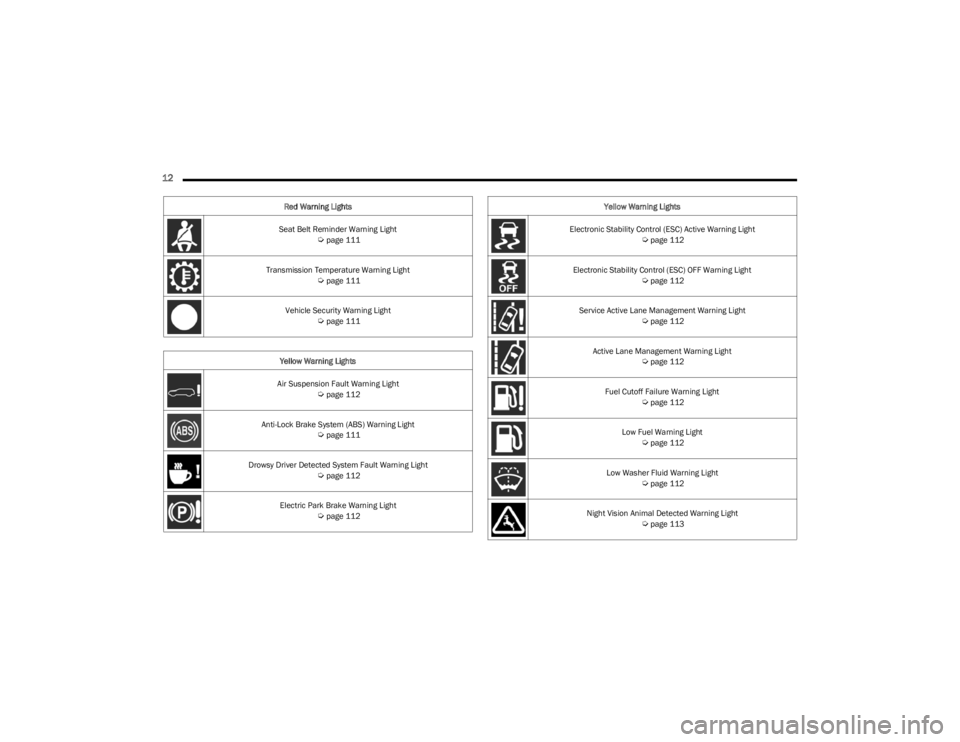
Seat Belt Reminder Warning Light Úpage 111
Transmission Temperature Warning Light
Úpage 111
Vehicle Security Warning Light
Úpage 111
Yellow Warning Lights
Air Suspension Fault Warning Light
Úpage 112
Anti-Lock Brake System (ABS) Warning Light
Úpage 111
Drowsy Driver Detected System Fault Warning Light
Úpage 112
Electric Park Brake Warning Light
Úpage 112
Red Warning Lights
Electronic Stability Control (ESC) Active Warning Light
Úpage 112
Electronic Stability Control (ESC) OFF Warning Light
Úpage 112
Service Active Lane Management Warning Light
Úpage 112
Active Lane Management Warning Light
Úpage 112
Fuel Cutoff Failure Warning Light
Úpage 112
Low Fuel Warning Light
Úpage 112
Low Washer Fluid Warning Light
Úpage 112
Night Vision Animal Detected Warning Light
Úpage 113
Yellow Warning Lights
23_WS_OM_EN_USC_t.book Page 12
Page 18 of 396
16
GETTING TO KNOW YOUR VEHICLE
KEYS
KEY FOB
Your vehicle is equipped with a key fob which supports
Passive Entry, Remote Keyless Entry (RKE), Keyless
Enter ‘n Go™, Remote Air Suspension Lowering, and
Remote Start. The key fob allows you to lock or unlock all
doors and liftgate, as well as activate the Panic Alarm from
distances up to approximately 66 ft (20 m). The key fob does not need to be pointed at the vehicle to activate the
system. The key fob also contains an emergency key,
which is stored in the rear of the key fob.
NOTE:In vehicles equipped with Remote Start, the key fob will
operate at distances up to 328 ft (100 m).
NOTE:
The key fob’s wireless signal may be blocked if the key
fob is located next to a mobile phone, laptop, or other
electronic device. This may result in poor performance.
If your vehicle is equipped with a Wireless Charging
Pad, the key fob may not be detected if it is placed
within 6 inches (15 cm) of the pad
Úpage 81.
With the ignition in the ON position and the vehicle
moving at 2 mph (4 km/h), all RKE commands are
disabled.
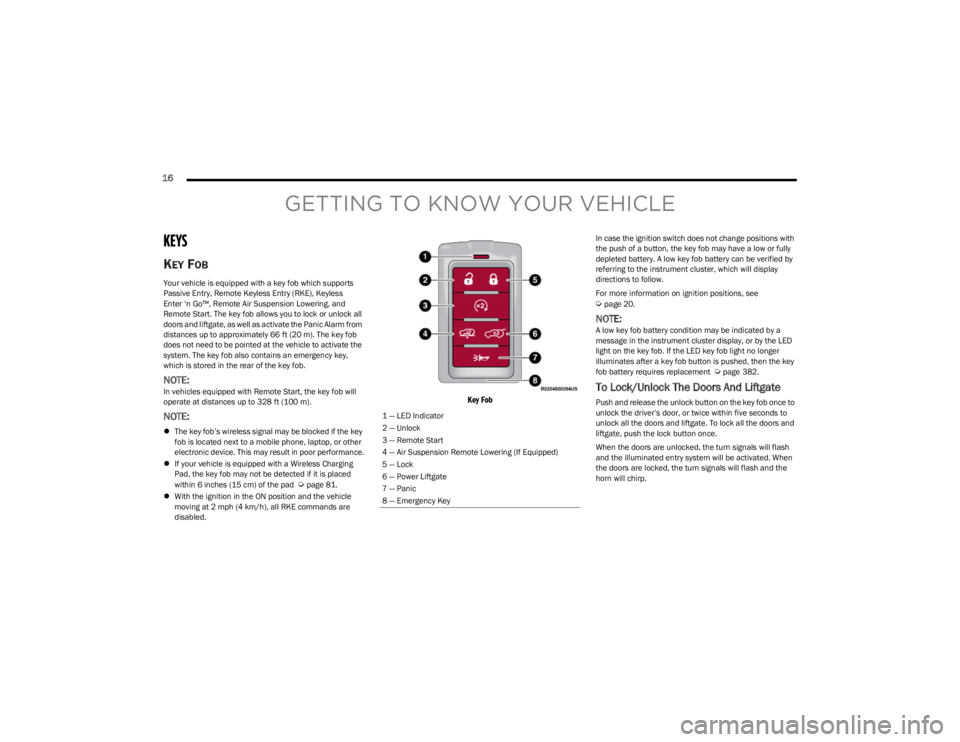
Key Fob
In case the ignition switch does not change positions with
the push of a button, the key fob may have a low or fully
depleted battery. A low key fob battery can be verified by
referring to the instrument cluster, which will display
directions to follow.
For more information on ignition positions, see
Úpage 20.
NOTE:A low key fob battery condition may be indicated by a
message in the instrument cluster display, or by the LED
light on the key fob. If the LED key fob light no longer
illuminates after a key fob button is pushed, then the key
fob battery requires replacement
Úpage 382.
To Lock/Unlock The Doors And Liftgate
Push and release the unlock button on the key fob once to
unlock the driver’s door, or twice within five seconds to
unlock all the doors and liftgate. To lock all the doors and
liftgate, push the lock button once.
When the doors are unlocked, the turn signals will flash
and the illuminated entry system will be activated. When
the doors are locked, the turn signals will flash and the
horn will chirp.
1 — LED Indicator
2 — Unlock
3 — Remote Start
4 — Air Suspension Remote Lowering (If Equipped)
5 — Lock
6 — Power Liftgate
7 — Panic
8 — Emergency Key
23_WS_OM_EN_USC_t.book Page 16
Page 19 of 396

GETTING TO KNOW YOUR VEHICLE17
NOTE:
If the vehicle is equipped with the Auto Relock feature,
and is unlocked with the key fob, and no door is opened
within 60 seconds, the vehicle will relock and the
Vehicle Security system will arm (if equipped). This
feature can be enabled/disabled within Uconnect
Settings.
If one or more doors are open, or the liftgate is open,
the doors will lock. The doors will unlock again auto -
matically if the key fob is left inside the passenger
compartment, otherwise the doors will stay locked.
All doors can be programmed to unlock on the first push
of the unlock button through Uconnect Settings
Úpage 197.
Using The Panic Feature
To turn the Panic feature on or off, push the Panic button
on the key fob. When the Panic feature is activated, the
turn signals will flash, the horn may pulse on and off (if
equipped with horn alarm), and the interior lights will turn
on.
The Panic feature will stay on for three minutes unless you
turn it off by either pushing the Panic button a second time
or drive the vehicle at a speed of 15 mph (24 km/h) or
greater.
NOTE:
The interior lights will turn off if you place the ignition in
the ON/RUN position while the Panic feature is acti -
vated. However, the exterior lights and horn (if
equipped with horn alarm) will remain on.
You may need to be closer than 66 ft (20 m) from the
vehicle when using the key fob to turn off the Panic
feature due to the radio frequency noises emitted by
the system.
Key Left Vehicle Feature
If a valid key fob is no longer detected inside the vehicle
while the vehicle’s ignition system is in the ON/RUN or
START position, the message “Key Fob Has Left The
Vehicle” will be shown in the instrument cluster display
along with an interior chime. An exterior audible and visual
alert will also be activated to warn the driver.
The vehicle’s horn will rapidly chirp three times along with
a single flash of the vehicle’s exterior lights.
NOTE:
The doors have to be open and then closed in order for
the vehicle to detect a key fob; the Key Left Vehicle
feature will not activate until all of the doors are closed.
These alerts will not be activated in situations where
the vehicle’s engine is left running with the key fob
inside.
Air Suspension (Remote Lowering Of The
Vehicle) — If Equipped
For easy entry and loading, your vehicle can be
lowered to Entry/Exit height by pushing the key
fob air suspension button two times. When air
suspension lowering is requested using the key
fob, the vehicle will send a series of chirps and flashes
(when enabled within Uconnect Settings) to alert the
customer that the operation has begun and will continue
these alerts until it successfully lowers. The following conditions must be met for the vehicle to
lower remotely:
The vehicle must not already be in Entry/Exit (Park) ride
height.
The vehicle battery must be fully charged.
All doors must be closed.
The key fob must be out of the vehicle.
NOTE:Ensure the vehicle is clear of all objects, pets, and people
prior to remote lowering.
Canceling Remote Lowering
Vehicle lowering can be canceled at anytime. When
vehicle lowering is canceled, the vehicle will raise up to the
next defined level and lock out the remote lowering
feature for five seconds before a new request can be
made.
To cancel vehicle lowering, push the key fob air
suspension button one time during the lowering process.
When vehicle lowering is canceled, the horn will chirp two
times and the turn signals will flash four times. Once
raising is completed, the horn will chirp one time.
NOTE:For more information on Air Suspension, see Úpage 132.
2
23_WS_OM_EN_USC_t.book Page 17
Page 21 of 396
GETTING TO KNOW YOUR VEHICLE19
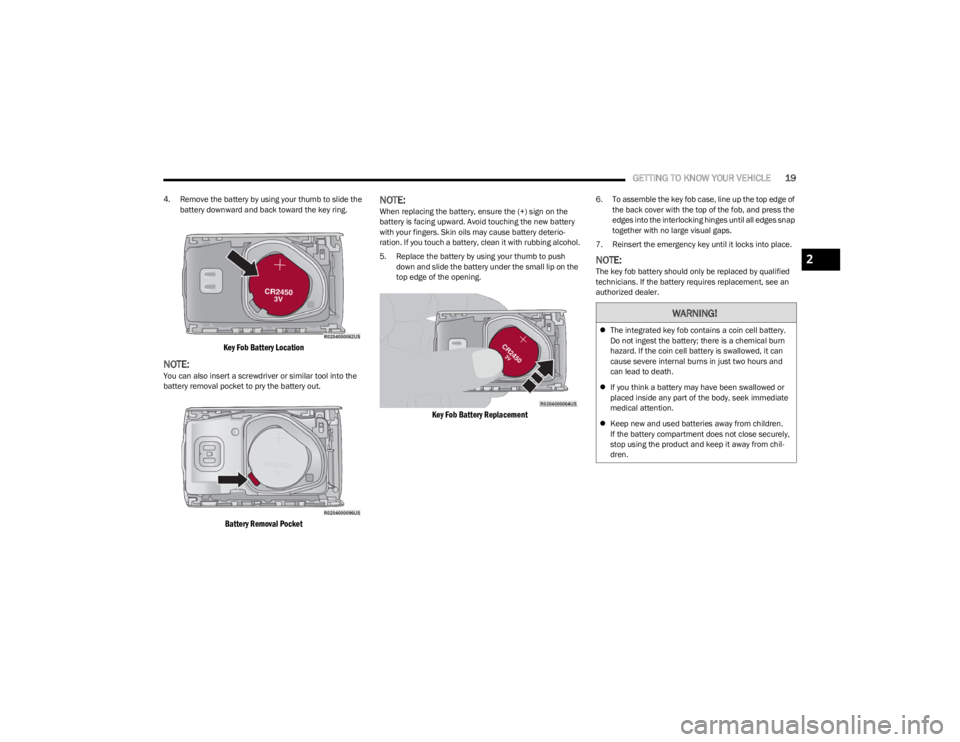
4. Remove the battery by using your thumb to slide the
battery downward and back toward the key ring.
Key Fob Battery Location
NOTE:You can also insert a screwdriver or similar tool into the
battery removal pocket to pry the battery out.
Battery Removal Pocket
NOTE:When replacing the battery, ensure the (+) sign on the
battery is facing upward. Avoid touching the new battery
with your fingers. Skin oils may cause battery deterio -
ration. If you touch a battery, clean it with rubbing alcohol.
5. Replace the battery by using your thumb to push down and slide the battery under the small lip on the
top edge of the opening.
Key Fob Battery Replacement
6. To assemble the key fob case, line up the top edge of the back cover with the top of the fob, and press the
edges into the interlocking hinges until all edges snap
together with no large visual gaps.
7. Reinsert the emergency key until it locks into place.
NOTE:The key fob battery should only be replaced by qualified
technicians. If the battery requires replacement, see an
authorized dealer.
WARNING!
The integrated key fob contains a coin cell battery.
Do not ingest the battery; there is a chemical burn
hazard. If the coin cell battery is swallowed, it can
cause severe internal burns in just two hours and
can lead to death.
If you think a battery may have been swallowed or
placed inside any part of the body, seek immediate
medical attention.
Keep new and used batteries away from children.
If the battery compartment does not close securely,
stop using the product and keep it away from chil -
dren.
2
23_WS_OM_EN_USC_t.book Page 19
Page 22 of 396

20GETTING TO KNOW YOUR VEHICLE
Programming And Requesting Additional
Key Fobs
Programming the key fob may be performed by an
authorized dealer.
NOTE:
Once a key fob is programmed to a vehicle, it cannot be
repurposed and reprogrammed to another vehicle.
Only key fobs that are programmed to the vehicle elec -
tronics can be used to start and operate the vehicle.
Duplication of key fobs may be performed at an authorized
dealer. This procedure consists of programming a blank
key fob to the vehicle electronics. A blank key fob is one
that has never been programmed.
NOTE:
When having the Sentry Key Immobilizer system
serviced, bring all vehicle keys with you to an autho -
rized dealer.
Keys must be ordered to the correct key cut to match
the vehicle locks.
SENTRY KEY
The Sentry Key Immobilizer system prevents unauthorized
vehicle operation by disabling the engine. The system
does not need to be armed or activated. Operation is
automatic, regardless of whether the vehicle is locked or
unlocked.
The system uses a key fob, keyless push button ignition
and a Radio Frequency (RF) receiver to prevent
unauthorized vehicle operation. Therefore, only key fobs
that are programmed to the vehicle can be used to start
and operate the vehicle. The system cannot reprogram a
key fob obtained from another vehicle.
After placing the ignition in the ON/RUN position, the
Vehicle Security Light will turn on for three seconds for a
bulb check. If the light remains on after the bulb check, it
indicates that there is a problem with the electronics. In
addition, if the light begins to flash after the bulb check, it
indicates that someone attempted to start the engine with
an invalid key fob. In the event that a valid key fob is used
to start the engine but there is an issue with the vehicle
electronics, the engine will start and shut off after two
seconds.
If the Vehicle Security Light turns on during normal vehicle
operation (vehicle running for longer than 10 seconds), it
indicates that there is a fault in the electronics. Should
this occur, have the vehicle serviced as soon as possible
by an authorized dealer. All of the key fobs provided with your new vehicle have
been programmed to the vehicle electronics
Úpage 382.
NOTE:A key fob that has not been programmed is also
considered an invalid key.
IGNITION SWITCH
KEYLESS ENTER ‘N GO™ IGNITION
This feature allows the driver to operate the ignition switch
with the push of a button as long as the key fob is in the
passenger compartment.
The START/STOP ignition button has several operating
modes that are labeled and will illuminate when in
position. These modes are OFF, ON/RUN, and START.
WARNING!
Always remove the key fobs from the vehicle and lock
all doors when leaving the vehicle unattended.
For vehicles equipped with Keyless Enter ‘n Go™ Igni -
tion, always remember to place the ignition in the
OFF position when exiting the vehicle.
CAUTION!
The Sentry Key Immobilizer system is not compatible
with some aftermarket Remote Start systems. Use of
these systems may result in vehicle starting problems
and loss of security protection.
23_WS_OM_EN_USC_t.book Page 20