CYLINDER 6 KIA CARNIVAL 2007 Manual Online
[x] Cancel search | Manufacturer: KIA, Model Year: 2007, Model line: CARNIVAL, Model: KIA CARNIVAL 2007Pages: 1575, PDF Size: 44.86 MB
Page 1221 of 1575

ONDon't care OFFONON
DOOR OPEN
ON during 20 min
then directly OFF ON during 20 min
OFF
CLOSE
OFFOFF
OPEN → CLOSE OFF OFF
CLOSE → OPEN ON during 20 min
then directly OFF ON during 20 min
Door Courtesy Lamps
Key Hole Illumination
1.
Working Conditions
The key cylinder is illuminated when the driver and / or the assist door are open.
2. Key hole extinguish conditions:
a. The key cylinder is turned off 10s after the driver and assist doors are closed.
b. The key cylinder is turned off immediately if the key is inserted in the hole and put to RUN or START position.
c. For vehicles equipped with BurglarAlarm, the key cylinder is turned off immediately when the system goes to
ARM WAIT mode during the 10s after the driver and assist doors are closed.
d. For vehicles not equipped with BurglarAlarm, the key cylinder is turned off immediately when RKE lock signal is
received from keyfob during the 10s after the driver and assist doors are closed (4).
3. Functional Diagram
Panel Lights, Switch Illumination
1.Working Conditions
The MF "high beam" and "flash to pass" switches do not influence the management of the Panel Lights and Trip
Computer illumination, Rear Blower illumination and Rear Monitor illumination.
2. Functional Diagram
Page 1227 of 1575

Easy Access
1.Description
The easy access function permits automatic rearward movement of the driver seat when the key is removed from
the cylinder. Automatic forward movement of the driver seat will take place when the key is inserted into the
cylinder. This function will be enabled on IMS equipped vehicles when the AUTO button is pressed.
Inhibit Switch should be in P- Position for the Easy Access operation.
2. Functional Diagram
Driver Information
Cluster Indicators
1.The instument cluster indicators listed below are controlled by the In- Panel Module (IPM), Front Area Module
(FAM), or Rear Area Module (RAM) as applicable.
These indicators are:
a. Gearbox status
b. Oil pressure
c. Sediment fuel filter
d. Vacuum
e. Brake fluid
f. Washer fluid
g. Seat belt
h. Park brake
i. Charging voltage
j. Turn indicators
k. High beam
l. Front fog
m. Doors open
n. Tailgate open
o. Stop lamp failure front and rear
2. Functional Diagram
Page 1231 of 1575

1.The aim of this function is to receive the key fob signal and decode it. There are 8 different data included in the
radio frequency frame sent by the RKE to the IPM module:
a. Central door lock
b. Central door unlock
c. Panic function
d. Driver door window close (long press on RKE lock button)
e. Driver door window open (long press on RKE unlock button)
f. Left sliding door open/close
g. Right sliding door open/close
h. Power tailgate open/close
2. Each vehicle can have at most 2 associated key fobs. The key fob is physically separated from the key itself
(separate device).
3. Input/Output Definition and Characteristics
Central Lock/unlock
1.Central locking/unlocking logic is controlled by IPM. Locking/Unlocking inputs are located in ADM, DDM
(Lock/Unlock switch, door knobs, door key cylinder) and in IPM (RKE receiver).
2. Locking/Unlocking actuators are located in ADM for passenger door, DDM for driver door and RAM for sliding doors
and tailgate.
There are 5 ways of operating central lock/unlock:
a. With Key RKE
b. With Door Lock/Unlock switches located on ADM/DDM
c. With Door Lock Monitoring switches located on the passenger/driver door
d. With Door/Tailgate Key Cylinder Lock/Unlock switches located on the tailgate or passenger/driver door.
3. Functional Diagram
Page 1232 of 1575

Key Reminder Unlock
1.Key reminder door unlock does not take into account the lock/unlock commands from RKE, key cylinder or door
lock switches. It only takes into account the state of the door lock monitoring switch, key reminder switch and door
open status in order to proceed with the unlock sequence or not.
2. Functional Diagram
Remote Keyless Entry Panic
1.Working Conditions
RKE panic function is only active when the key is out of key cylinder.
Once started, panic operation is not stopped when ignition key is inserted, ignition is ACC, RUN or START, or
door is opened or closed.
2. Functional Diagram
Page 1233 of 1575

Horn
1.Working Conditions
Required key positions:
a. At any position of the key in the cylinder for the horn stalk activation,
b. At Key out from the key cylinder for the horn lock activation or for panic activation.
2. Functional Diagram
Burglar Alarm Function
Burglar Alarm
1.Basic Concept
a. The following functions are related to the RKE and burglar alarm systems..
a. Door locking
b. Door unlocking
c. PSD open/close (both for left and right)
d. PTG open/close
e. Panic
b. If IGN key is inserted into the key cylinder, the RKE transmitter functions are inoperative..
c. Door locking by RKE signal:
a. Whenever this signal is received, door LOCK pulse is always issued.
b. Hazard lamp flashes one time for 1 second depending on the burglar alarm state.
c. This signal will make the system possible to enter into the ARM state (or PREARM state depending on the
vehicle condition).
d. Door unlocking by RKE signal.
a. Whenever this signal is received, door UNLOCK pulse is always issued.
b. Hazard lamp flashes two times whenever the key fob unlock signal is received.
c. This signal will make the system possible to enter into the DISARM or 30sec DELAY state depending on
Condition A is true or not.
e. LH or RH PSD open/close by RKE signal.
a. Only with the information received by RKE, the burglar alarm system cannot distinguish the OPEN signal from
CLOSE signal.
Page 1242 of 1575
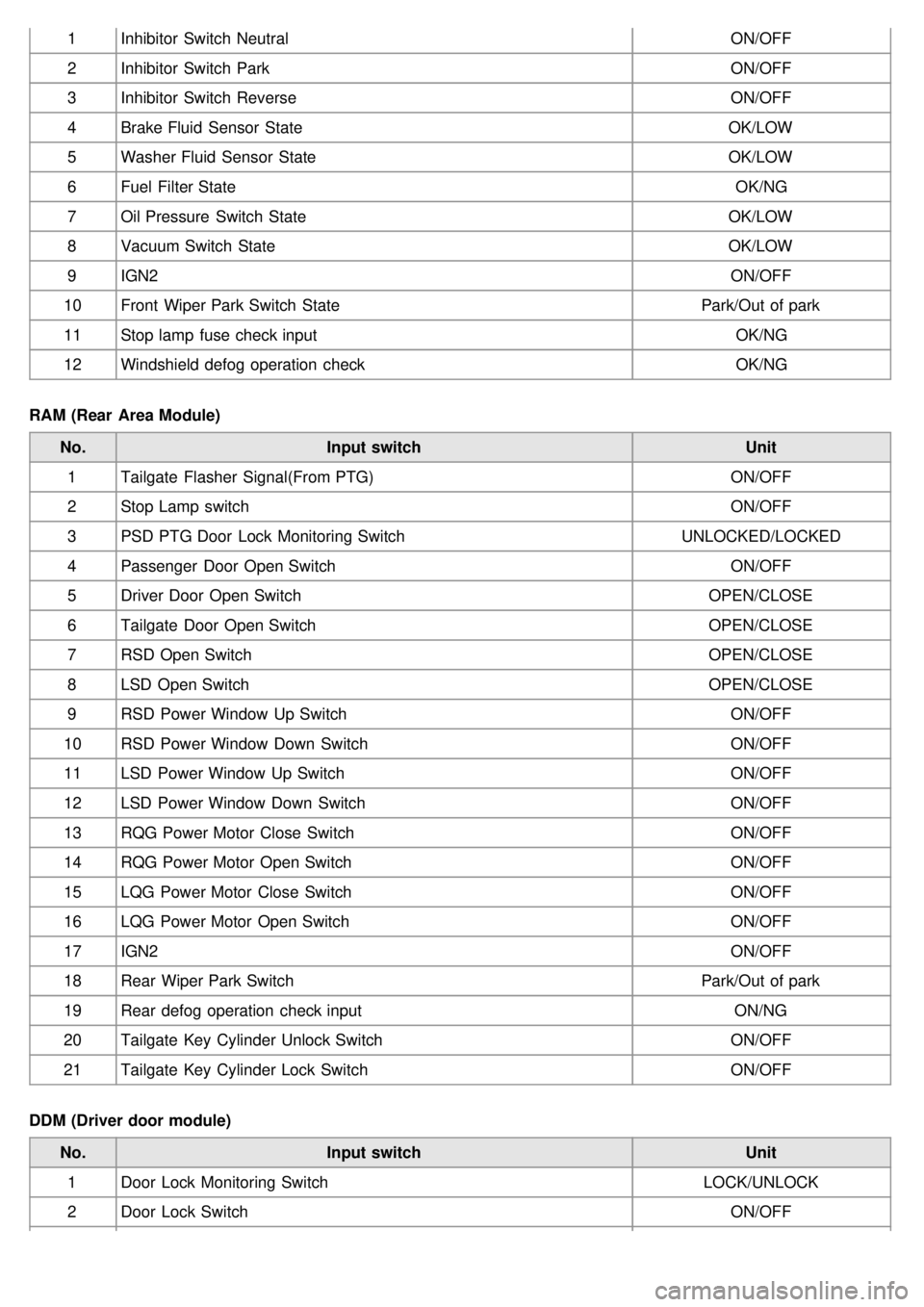
1Inhibitor Switch Neutral ON/OFF
2 Inhibitor Switch Park ON/OFF
3 Inhibitor Switch Reverse ON/OFF
4 Brake Fluid Sensor State OK/LOW
5 Washer Fluid Sensor State OK/LOW
6 Fuel Filter State OK/NG
7 Oil Pressure Switch State OK/LOW
8 Vacuum Switch State OK/LOW
9 IGN2 ON/OFF
10 Front Wiper Park Switch State Park/Out of park
11 Stop lamp fuse check input OK/NG
12 Windshield defog operation check OK/NG
RAM (Rear Area Module) No. Input switch Unit
1 Tailgate Flasher Signal(From PTG) ON/OFF
2 Stop Lamp switch ON/OFF
3 PSD PTG Door Lock Monitoring Switch UNLOCKED/LOCKED
4 Passenger Door Open Switch ON/OFF
5 Driver Door Open Switch OPEN/CLOSE
6 Tailgate Door Open Switch OPEN/CLOSE
7 RSD Open Switch OPEN/CLOSE
8 LSD Open Switch OPEN/CLOSE
9 RSD Power Window Up Switch ON/OFF
10 RSD Power Window Down Switch ON/OFF
11 LSD Power Window Up Switch ON/OFF
12 LSD Power Window Down Switch ON/OFF
13 RQG Power Motor Close Switch ON/OFF
14 RQG Power Motor Open Switch ON/OFF
15 LQG Power Motor Close Switch ON/OFF
16 LQG Power Motor Open Switch ON/OFF
17 IGN2 ON/OFF
18 Rear Wiper Park Switch Park/Out of park
19 Rear defog operation check input ON/NG
20 Tailgate Key Cylinder Unlock Switch ON/OFF
21 Tailgate Key Cylinder Lock Switch ON/OFF
DDM (Driver door module) No. Input switch Unit
1 Door Lock Monitoring Switch LOCK/UNLOCK
2 Door Lock Switch ON/OFF
Page 1243 of 1575
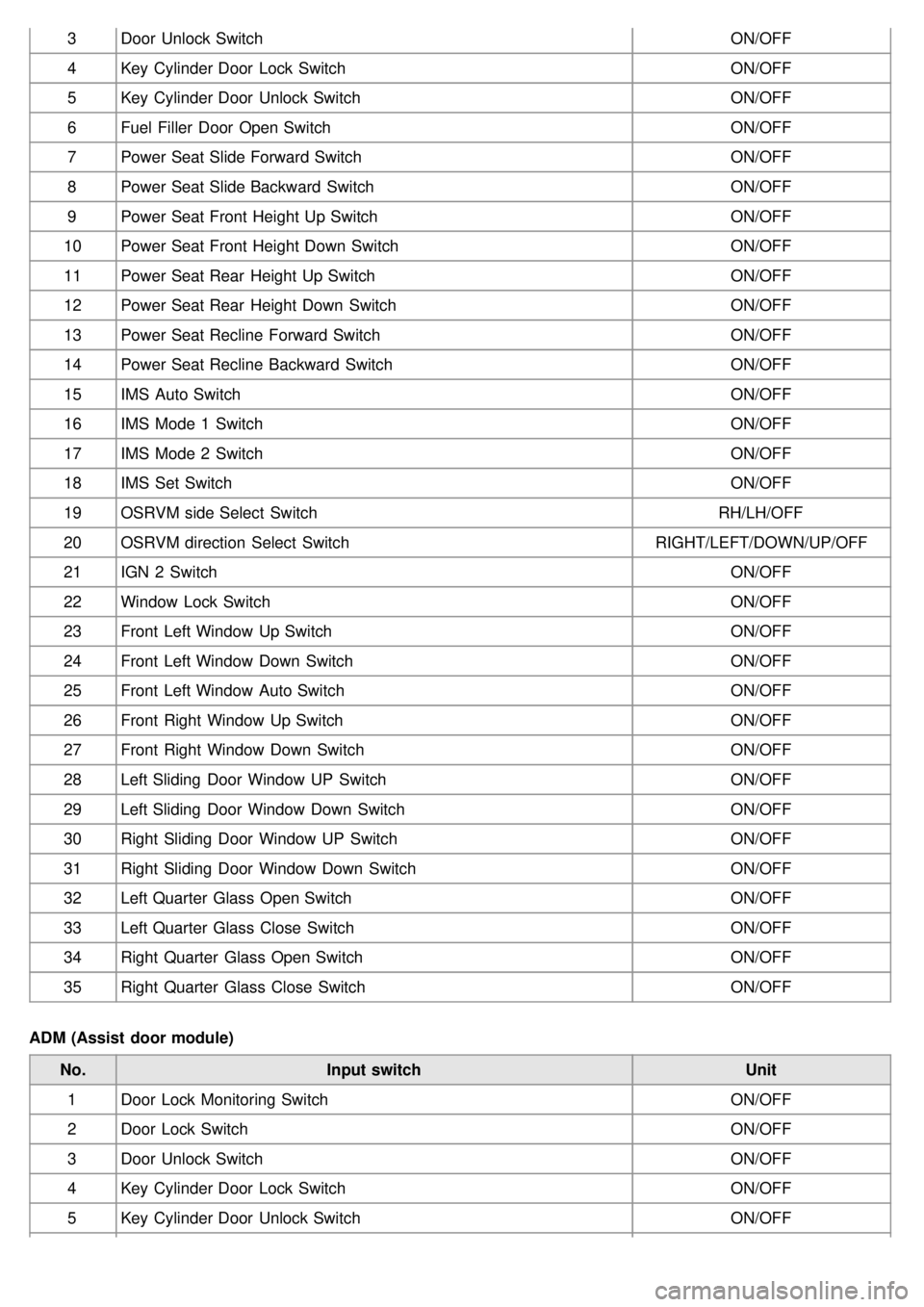
3Door Unlock Switch ON/OFF
4 Key Cylinder Door Lock Switch ON/OFF
5 Key Cylinder Door Unlock Switch ON/OFF
6 Fuel Filler Door Open Switch ON/OFF
7 Power Seat Slide Forward Switch ON/OFF
8 Power Seat Slide Backward Switch ON/OFF
9 Power Seat Front Height Up Switch ON/OFF
10 Power Seat Front Height Down Switch ON/OFF
11 Power Seat Rear Height Up Switch ON/OFF
12 Power Seat Rear Height Down Switch ON/OFF
13 Power Seat Recline Forward Switch ON/OFF
14 Power Seat Recline Backward Switch ON/OFF
15 IMS Auto Switch ON/OFF
16 IMS Mode 1 Switch ON/OFF
17 IMS Mode 2 Switch ON/OFF
18 IMS Set Switch ON/OFF
19 OSRVM side Select Switch RH/LH/OFF
20 OSRVM direction Select Switch RIGHT/LEFT/DOWN/UP/OFF
21 IGN 2 Switch ON/OFF
22 Window Lock Switch ON/OFF
23 Front Left Window Up Switch ON/OFF
24 Front Left Window Down Switch ON/OFF
25 Front Left Window Auto Switch ON/OFF
26 Front Right Window Up Switch ON/OFF
27 Front Right Window Down Switch ON/OFF
28 Left Sliding Door Window UP Switch ON/OFF
29 Left Sliding Door Window Down Switch ON/OFF
30 Right Sliding Door Window UP Switch ON/OFF
31 Right Sliding Door Window Down Switch ON/OFF
32 Left Quarter Glass Open Switch ON/OFF
33 Left Quarter Glass Close Switch ON/OFF
34 Right Quarter Glass Open Switch ON/OFF
35 Right Quarter Glass Close Switch ON/OFF
ADM (Assist door module) No. Input switch Unit
1 Door Lock Monitoring Switch ON/OFF
2 Door Lock Switch ON/OFF
3 Door Unlock Switch ON/OFF
4 Key Cylinder Door Lock Switch ON/OFF
5 Key Cylinder Door Unlock Switch ON/OFF
Page 1548 of 1575
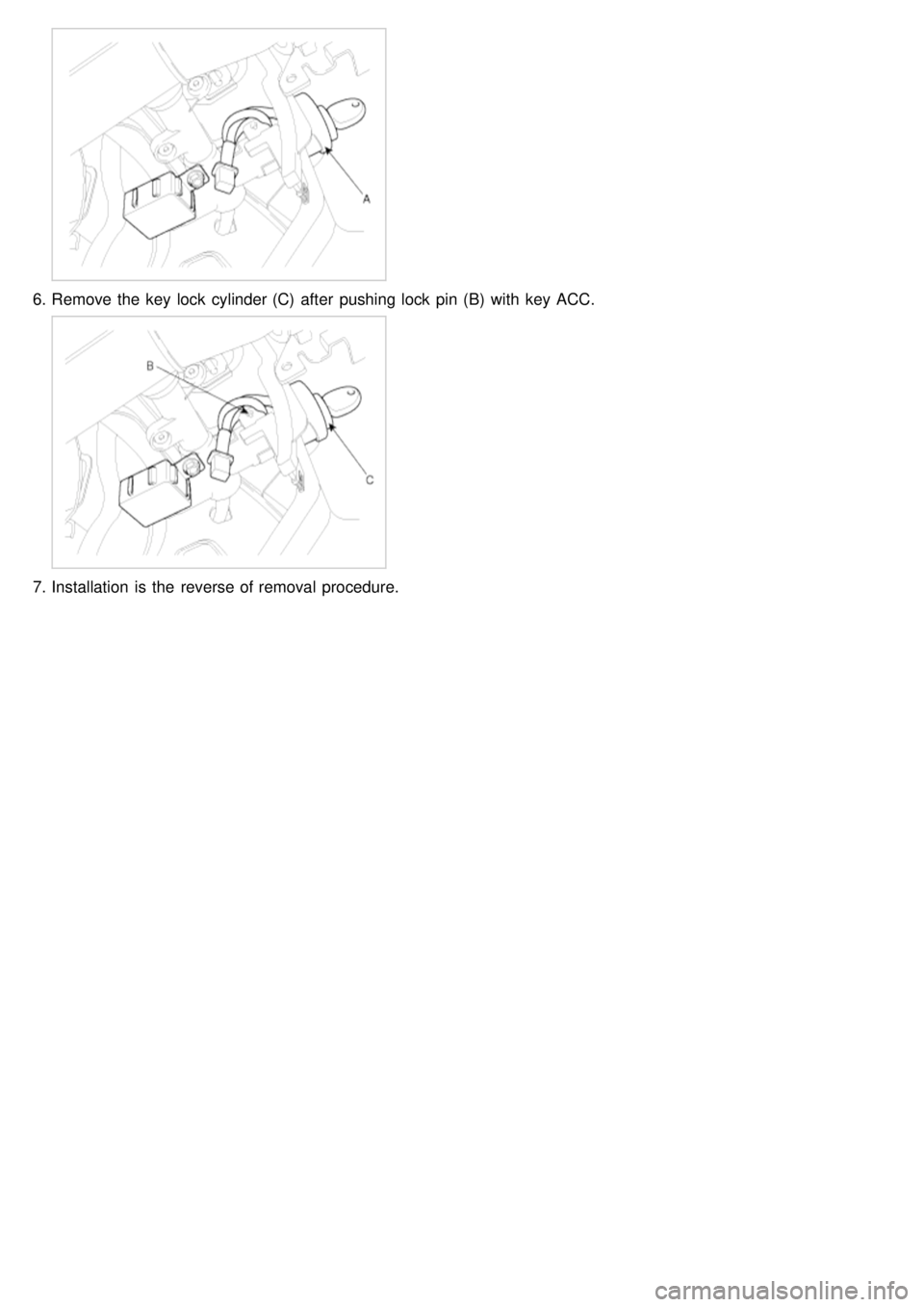
6.Remove the key lock cylinder (C) after pushing lock pin (B) with key ACC.
7.Installation is the reverse of removal procedure.
Page 1551 of 1575

2007 > 2.7L V6 GASOLINE >
DESCRIPTION
The driver door module is a part of a Controller Area Network (CAN), and performs CAN communication with the
BCM, FAM, IPM, RAM, ADM, and IMS. Driver controls driver side power window switch button located inside of the
driver side door to operate power window, mirror, door lock and unlock.
1. Two manual operations (up and down) for four p/windows. However, on the driver's seat the auto up/down
operation must be possible.
2. Opening and closing the quarter glass by the quarter glass switch.
3. Window UP/DOWN operation by RKE.
4. Manually operating the mirror position by the manual switch (Up, Down, Right, and Left)
5. Saving and replacing the mirror position by the MEMORY switch → For 2 persons
6. Saving and replacing the mirror position by RKE → For 2 persons
7. Out side mirror AUTO reverse operation
8. Out side mirror FOLD/UNFOLD power control
9. CENTRAL DOOR LOCK/UNLOCK function
10. DOOR COURTESY LAMP control
11. Out side mirror DEFOG control
12. Illumination control
CONTROL FUNCTION
POWER WINDOW CONTROL
1. This switch controls power window up/down, automatic up/down from driver & assist side.
a. Driver's power window switch sends input signal through CAN communication by the manual up/down and
automatic up/down switch input. At the same time passenger side sends manual up/down and automatic
up/down signals to the wires.
b. Each safety window ECU receives the signal and performs manual up/down and automatic up/down functions.
2. Power window lock
When the driver's power window lock switch is ON, each safety window ECU receives the power window lock
command to prohibit the operation by the passenger side doors except the driver's door.
3. Timer function
Power window switch can be controlled for 30 seconds after the ignition is turned off. This function stops
immediately even within 30 seconds if the front door is opened.
KEY REMINDER
1.If door is locked by using door lock knob after opening door while IGN KEY is inserted to KEY CYLINDER, Unlock
output will be for 1sec and there will be a series of three output signals every 0.5sec if door condition is "Lock".
2. If Key Reminder unlock message is "SHORT UNLOCK", DOOR UNLOCK lasts for 0.5sec.
3. If Key Reminder unlock message is "LONG UNLOCK", DOOR UNLOCK lasts for 1sec.
4. Remained action goes on though Key Reminder Unlock message changes to "OFF".
PRIORITY OF DOOR LOCK/UNLOCK
1.Crash Unlock > Auto Door Lock > Key Reminder > Central Door Lock
2. Higher priority signals take precedence, and will override lower priority signals.
3. If the priority is the same or low, it'll be ignored.
OUT SIDE MIRROR CONTROL BY THE SWITCH
1.If the mirror direction switch (up, down, left and right) is pressed when mirror selection switch on driver side power
window switch is in outside LH(RH) under ACC ON condition, then mirror motor moves to the corresponding
direction.
Page 1557 of 1575

2007 > 2.7L V6 GASOLINE >
DESCRIPTION
The assist door module is a part of CAN, and performs CAN communication with the BCM, FAM, IPM, RAM, DDM,
and IMS. The driver can control the power window, mirror, door(lock/unlock) by using buttons of the ADM on the door
of the driver's seat.
1. Operating the power window by buttons
2. Central Door LOCK/UNLOCK function
3. Manually operating the mirror position by the manual SW (Up, Down, Right, and Left)
4. Saving and replacing the mirror position by the memory switch → For 2 persons
5. Out side mirror AUTO reverse operation
6. Door courtesy lamp control
7. Out side mirror defog control
8. Illumination control
CONTROL FUNCTION
POWER WINDOW CONTROL
1.This switch controls power window up/down from assist side.
a. According to the input of assist Door module window, up/down switch, output window motor up/down.
b. Power window up/down control from assist side.
2. Timer function
Power window switch can be controlled for 30 seconds after the ignition is turned off. This function stops
immediately even within 30 seconds if the front door is opened.
CRASH UNLOCK
1.Under the condition "IGN ON", if Crash Sensor message from IPM is ON, Door UNLOCK is output.(5 ± 0.5sec)
AUTO DOOR LOCK
1.If the vehicle is under any of the following conditions and the condition lasts for 3sec, all doors is locked.
If message from IPM is "Door Lock Control = LOCK ALL", it will be locked for 0.5sec.
a. IGN "RUN" or "START"
b. ALT L ON (Engine is running)
c. Speed of the vehicle is 40Km/h
d. If any door is on "UNLOCK"
2. After LOCK output, if any door is not locked, there will be a series of three Lock output every 0.5sec.
3. If all doors are locked during a series of three output signals, output will be stopped.
4. If any door is not locked after a series of three output signals, output will be stopped.
KEY REMINDER
1.If door is locked by using door lock knob after opening door while IGN KEY is inserted to KEY CYLINDER, Unlock
output will be for 1sec and there will be a series of three output signals every 0.5sec if door condition is "Lock".
2. If Key Reminder unlock message is "SHORT UNLOCK", DOOR UNLOCK lasts for 0.5sec.
3. If Key Reminder unlock message is "LONG UNLOCK", DOOR UNLOCK lasts for 1sec.
4. Remained action goes on though Key Reminder Unlock message changes to "OFF".
PRIORITY OF DOOR LOCK/UNLOCK
1.Crash Unlock > Auto Door Lock > Key Reminder > Central Door Lock
2. Higher priority signals take precedence, and will override lower priority signals.
3. If the priority is the same or low, it'll be ignored.
OUT SIDE MIRROR FOLD/UNFOLD POWER CONTROL
1.Supply folding power for 30sec after ACC ON or ACC OFF.
2. FOLD/UNFOLD operation is controlled by fold switch.