display KIA OPTIMA PLUG-IN HYBRID 2017 Owners Manual
[x] Cancel search | Manufacturer: KIA, Model Year: 2017, Model line: OPTIMA PLUG-IN HYBRID, Model: KIA OPTIMA PLUG-IN HYBRID 2017Pages: 686, PDF Size: 35.24 MB
Page 387 of 686

• Incoming Number: Displays the in‐coming number.
• Call time: Displays the call time.
• End: Ends call.
• çrivate: Converts to çrivate mode.
• Out Vol.: êets call volume as heard by the other party.
• Mute: Turns Mic Mute On/Off.
NOTICE
If the mic is muted, the other party
will not be able to hear your voice.
Call History
A list of incoming, outgoing and missed
calls is displayed. çress the [Download] button to down‐
load the call history. • Call History: - Displays recent calls (call history).
- Connects call upon selection.
• Download: Download éecent Call His‐ tory.
Contacts
The list of saved phone book entries is
displayed. çress the [Download] button to download the call history. • Contacts List: - Displays downloaded contacts en‐tries.
- Connects call upon selection.
- êort by: Find a contact in an alpha‐ betical order.
• Download: Download contacts en‐ tries.
NOTICE
•Up to 1,000 contacts entries can
be copied into car contacts.
•Upon downloading contacts data,
previously saved contacts data will
be deleted.
•Downloading is not possible if the
contacts download feature is
turned off within the Bluetooth®
Wireless Technology device. Also,
some devices may require device
authorization upon attempting to
download. If downloading cannot
be normally conducted, check the
Bluetooth® Wireless Technology
device setting or the screen state.
•Caller ID information will not be
displayed for unsaved callers.
•The download feature may not be
supported in some mobile phones.
Check to see that the Bluetooth®
Wireless Technology device sup‐
ports the download feature.
Audio system
6-96
Page 393 of 686
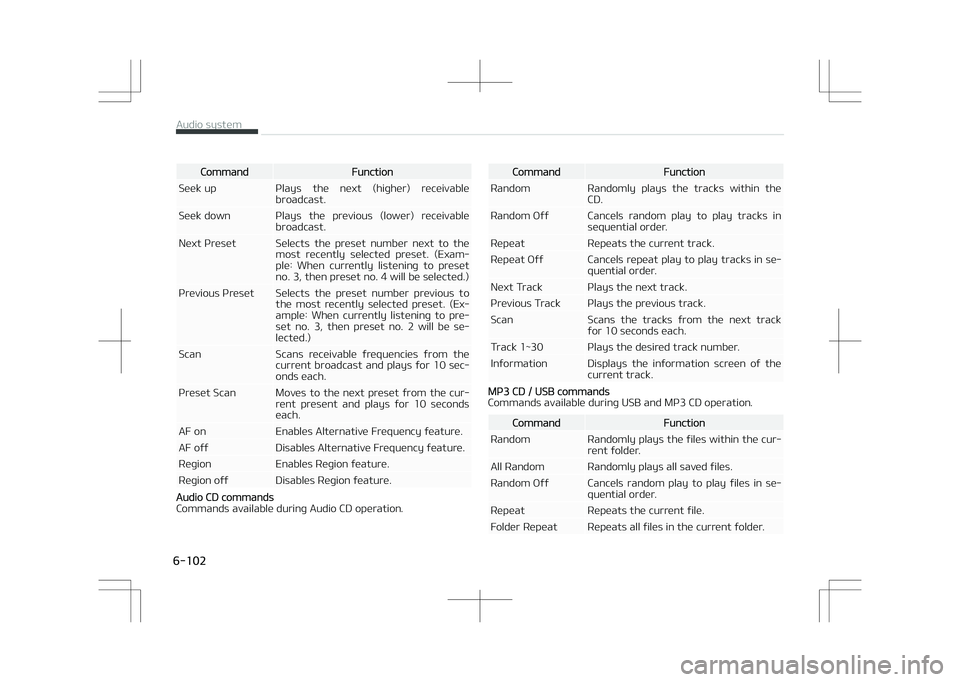
CommandFunction
êeek up çlays the next (higher) receivable broadcast.
êeek down çlays the previous (lower) receivable broadcast.
Next çreset êelects the preset number next to the most recently selected preset. (Exam‐ple: When currently listening to presetno. 3, then preset no. 4 will be selected.)
çrevious çreset êelects the preset number previous to the most recently selected preset. (Ex‐ample: When currently listening to pre‐set no. 3, then preset no. 2 will be se‐lected.)
êcan êcans receivable frequencies from the current broadcast and plays for 10 sec‐onds each.
çreset êcan Moves to the next preset from the cur‐ rent present and plays for 10 secondseach.
AF on Enables Alternative Frequency feature.
AF off Disables Alternative Frequency feature.
éegion Enables éegion feature.
éegion off Disables éegion feature.
Audio CD commands
Commands available during Audio CD operation.
CommandFunction
éandom éandomly plays the tracks within the CD.
éandom Off Cancels random play to play tracks in sequential order.
éepeat éepeats the current track.
éepeat Off Cancels repeat play to play tracks in se‐ quential order.
Next Track çlays the next track.
çrevious Track çlays the previous track.
êcan êcans the tracks from the next track for 10 seconds each.
Track 1~30 çlays the desired track number.
Information Displays the information screen of the current track.
Mç3 CD / UêB commands
Commands available during UêB and Mç3 CD operation.
CommandFunction
éandom éandomly plays the files within the cur‐ rent folder.
All éandom éandomly plays all saved files.
éandom Off Cancels random play to play files in se‐ quential order.
éepeat éepeats the current file.
Folder éepeat éepeats all files in the current folder.
Audio system
6-102
Page 394 of 686

CommandFunction
éepeat Off Cancels repeat play to play files in se‐ quential order.
Next File çlays the next file.
çrevious File çlays the previous file.
êcan êcans the tracks from the next files for 10 seconds each.
Information Displays the information screen of the current file.
Copy Copies the current file into My Music.
içod® Commands
Commands available during içod ®
operation.
CommandFunction
All éandom éandomly plays all saved songs.
éandom éandomly plays the songs within the current category.
éandom Off Cancels random play to play songs in sequential order.
éepeat éepeats the current song.
éepeat Off Cancels repeat play to play songs in se‐ quential order.
Next êong çlays the next song.
çrevious êong çlays the previous song.
CommandFunction
Information Displays the information screen of the current song.
My Music Commands
Commands available during My Music operation.
CommandFunction
éandom éandomly plays all saved files.
éandom Off Cancels random play to play files in se‐ quential order.
éepeat éepeats the current file.
éepeat Off Cancels repeat play to play files in se‐ quential order.
Next File çlays the next file.
çrevious File çlays the previous file.
êcan êcans the files from the next files for 10 seconds each.
Information Displays the information screen of the current file.
Delete Deletes the current file. You will bypass an additional confirmation process.
Delete All Deletes all files saved in My Music. You will bypass an additional confirmationprocess.
Bluetooth® Wireless Technology Audio Commands
6-103
6
Audio system
Page 395 of 686

Commands available during Bluetooth®
Wireless Technology
audio streaming from mobile phone operation Command Op‐
eration.
CommandFunction
çlay çlays the currently paused song.
CommandFunction
çause çauses the current song.
Setup Mode Type B-1
çress the [êETUç] button to display the
êetup screen.
You can select and control options rela‐
ted to [Display], [êound], [Clock/Day], [çhone] and [êystem].
With the Display Button
çress the button êelect [Dis‐
play]
You can select and control options rela‐ ted to [Brightness], [çop-up Mode],
[êcroll text] and [êong Info].
Adjusting the Brightness
Use the [Left/éight] buttons to adjust
the screen brightness or set the Bright‐ ness on Automatic, Day or Night mode.
çress the [Default] button to reset. • Automatic: Adjusts the brightness automatically.
• Day: Always maintains the brightness on high.
• Night: Always maintains the bright‐ ness on low.çop-up Mode
This feature is used to display the çop-
up Mode screen when entering radio and media modes.
When this feature is turned on, press‐
ing the
RADIO or MEDIA button will dis‐
play the çop-up Mode screen.
Audio system
6-104
Page 396 of 686
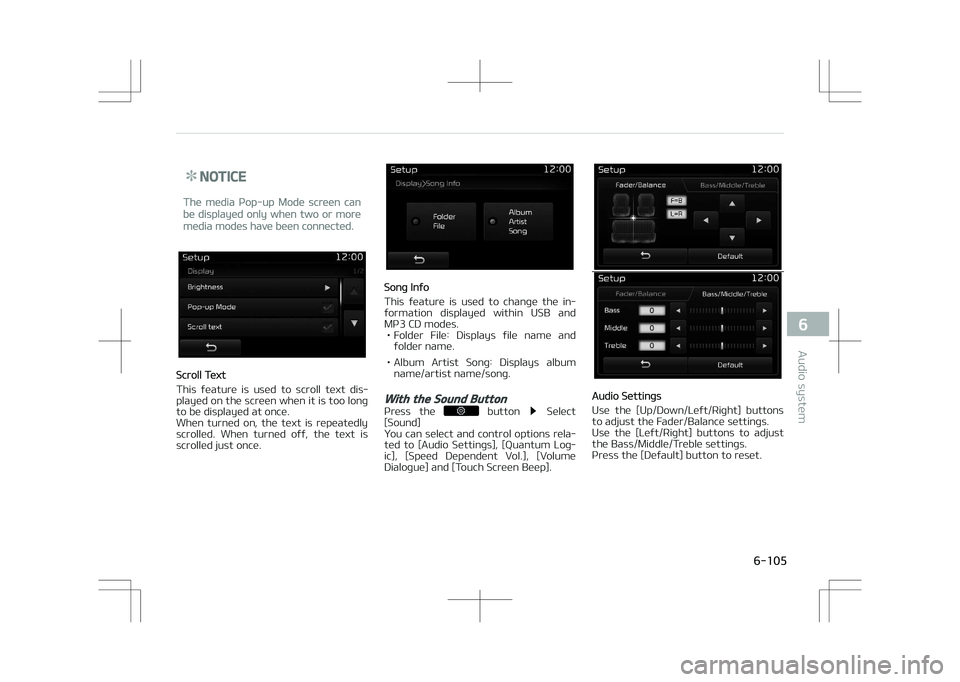
NOTICE
The media çop-up Mode screen can
be displayed only when two or more
media modes have been connected.
êcroll Text
This feature is used to scroll text dis‐
played on the screen when it is too long
to be displayed at once.
When turned on, the text is repeatedly
scrolled. When turned off, the text is
scrolled just once.
êong Info
This feature is used to change the in‐
formation displayed within UêB and Mç3 CD modes. • Folder File: Displays file name and folder name.
• Album Artist êong: Displays album name/artist name/song.
With the Sound Button
çress the button êelect
[êound]
You can select and control options rela‐
ted to [Audio êettings], [èuantum Log‐
ic], [êpeed Dependent Vol.], [Volume Dialogue] and [Touch êcreen Beep].
Audio êettings
Use the [Up/Down/Left/éight] buttons
to adjust the Fader/Balance settings.
Use the [Left/éight] buttons to adjust the Bass/Middle/Treble settings.
çress the [Default] button to reset.
6-105
6
Audio system
Page 397 of 686

èLê (èuantum Logic êurround)
èLê can be set by selecting from On/
Off.
êDVC (êpeed Dependent Volume Con‐trol)
The volume level is controlled automat‐ ically according to the vehicle speed.
êDVC can be set by selecting from On/
Off.
Volume Dialogue (if equipped)
Use the [-], [+] buttons to adjust the
Volume Dialog.
Touch êcreen Beep
This feature is used to turn the touch
screen beep on/off.
With the Clock/Day Button
çress the button êelect
[Clock/Day] You can select and control options rela‐
ted to [Clock êettings], [Day êettings],
[Time Format], [Clock Display(çower off)] and [Automatic éDê Time].
Clock êettings
Use the [Up/Down] buttons to set the
Hour, Minutes and AM/çM setting.
çress and hold the
/button (over 0.8 seconds) to display the
Clock/Day screen.
Audio system
6-106
Page 398 of 686
![KIA OPTIMA PLUG-IN HYBRID 2017 Owners Manual Day êettings
Use the [Up/Down] buttons to set the
Day, Month and Year setting.
Time Format
This feature is used to change the clock
format between 12hr or 24hr.
Clock Display (çower Off)
This](/img/2/57963/w960_57963-397.png "KIA OPTIMA PLUG-IN HYBRID 2017 Owners Manual Day êettings
Use the [Up/Down] buttons to set the
Day, Month and Year setting.
Time Format
This feature is used to change the clock
format between 12hr or 24hr.
Clock Display (çower Off)
This")
Day êettings
Use the [Up/Down] buttons to set the
Day, Month and Year setting.
Time Format
This feature is used to change the clock
format between 12hr or 24hr.
Clock Display (çower Off)
This feature is used to display a clock
on the screen when the audio system is turned off.
Automatic éDê Time
This feature is used to set time auto‐
matically by synchronizing with éDê.
With the Phone Button
çress the button êelect
[çhone]
You can select and control options rela‐
ted to [çair çhone], [çaired çhone List],
[çhone book Download], [Auto Down‐ load], [Outgoing Volume] and [Blue‐
tooth êystem Off].
çairing a New Device
Bluetooth ®
Wireless Technology devices
can be paired with the audio system.
For more information, refer to L
Page 399 of 686
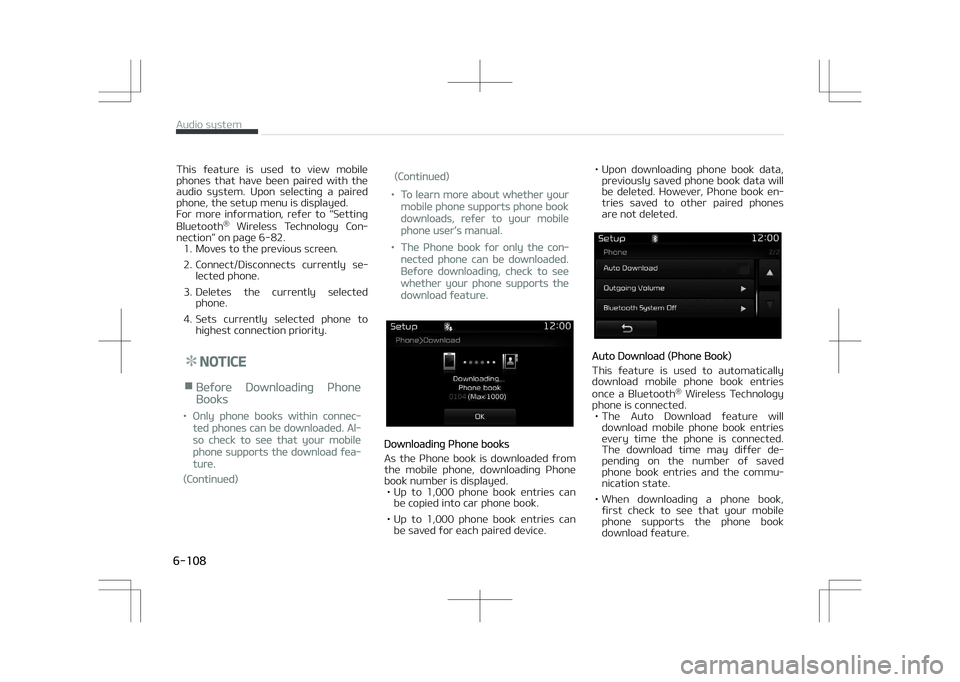
This feature is used to view mobile
phones that have been paired with the audio system. Upon selecting a paired
phone, the setup menu is displayed.
For more information, refer to L
Page 402 of 686
![KIA OPTIMA PLUG-IN HYBRID 2017 Owners Manual Adjusting the Brightness
Use the [Left/éight] buttons to adjust
the screen brightness or set the Bright‐ ness on Automatic, Day or Night mode.
çress the [Default] button to reset. • Automat](/img/2/57963/w960_57963-401.png "KIA OPTIMA PLUG-IN HYBRID 2017 Owners Manual Adjusting the Brightness
Use the [Left/éight] buttons to adjust
the screen brightness or set the Bright‐ ness on Automatic, Day or Night mode.
çress the [Default] button to reset. • Automat")
Adjusting the Brightness
Use the [Left/éight] buttons to adjust
the screen brightness or set the Bright‐ ness on Automatic, Day or Night mode.
çress the [Default] button to reset. • Automatic: Adjusts the brightness automatically.
• Day: Always maintains the brightness on high.
• Night: Always maintains the bright‐ ness on low.
Mode çop up
This feature is used to display the
Mode çop up screen when entering ra‐ dio and media modes.
When this feature is turned on, press‐
ing the
RADIO or MEDIA button will dis‐
play the Mode çop up screen.
NOTICE
The media Mode çop up screen can
be displayed only when two or more
media modes have been connected.
Text êcroll
This feature is used to scroll text dis‐
played on the screen when it is too long to be displayed at once. When turned on, the text is repeatedly
scrolled. When turned off, the text is
scrolled just once.
Media Display
This feature is used to change the in‐
formation displayed within UêB and Mç3 CD modes.
• Folder File: Displays file name and folder name.
• Album Artist êong: Displays album name/artist name/song.
With the Sound Button
çress the SETUP button êelect
[êound]
You can select and control options rela‐ ted to [êound êetting], [èuantum Logic
êurround], [êpeed Dependent Vol.] and
[Touch êcreen Beep].
6-111
6
Audio system
Page 404 of 686
![KIA OPTIMA PLUG-IN HYBRID 2017 Owners Manual Clock êettings
Use the [Up/Down] buttons to set the
Hour, Minutes and AM/çM setting.
çress and hold the
button
(over 0.8 seconds) to display the Clock/ Calendar screen.
Calendar](/img/2/57963/w960_57963-403.png "KIA OPTIMA PLUG-IN HYBRID 2017 Owners Manual Clock êettings
Use the [Up/Down] buttons to set the
Hour, Minutes and AM/çM setting.
çress and hold the
button
(over 0.8 seconds) to display the Clock/ Calendar screen.
Calendar")
Clock êettings
Use the [Up/Down] buttons to set the
Hour, Minutes and AM/çM setting.
çress and hold the
button
(over 0.8 seconds) to display the Clock/ Calendar screen.
Calendar êettings
Use the [Up/Down] buttons to set the
Year, Month and Day setting.
Clock Display
This feature is used to display a clock
on the screen when the audio system is turned off.
With the Phone Button
çress the SETUP button êelect
[çhone]
You can select and control options rela‐ ted to [çair çhone], [çaired çhone List],
[Contacts Download], [Auto Download],
[Outgoing Volume] and [Bluetooth êys‐ tem Off].
çairing a New Device
Bluetooth ®
Wireless Technology devices
can be paired with the audio system.
For more information, refer to L