display KIA PICANTO 2018 User Guide
[x] Cancel search | Manufacturer: KIA, Model Year: 2018, Model line: PICANTO, Model: KIA PICANTO 2018Pages: 504, PDF Size: 12.43 MB
Page 156 of 504
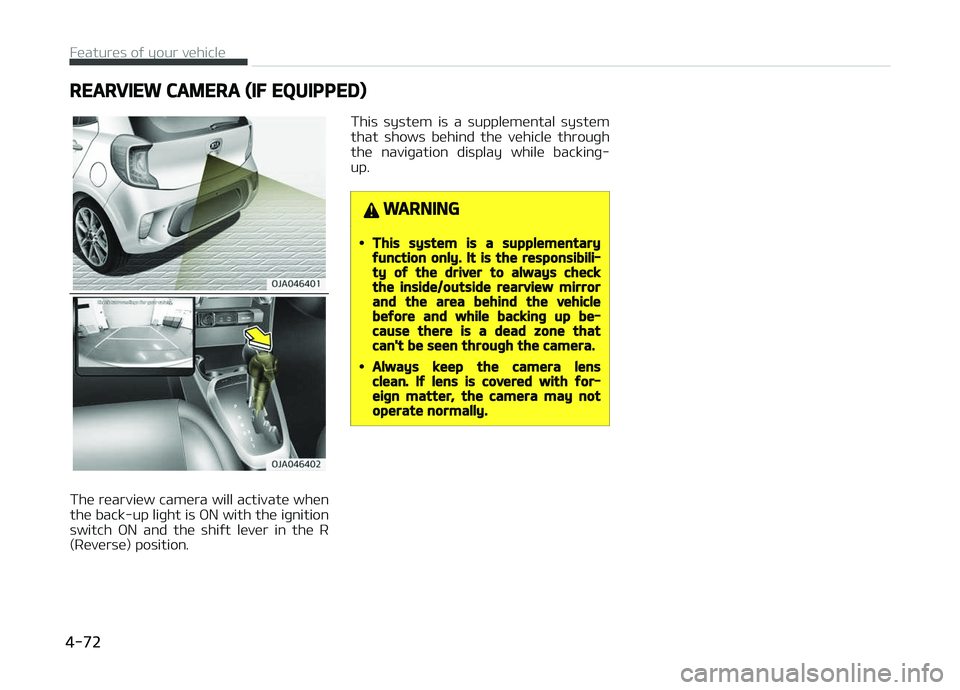
REARVIEW CAMERA (IF EQUIPPED)
The rearview camera will activate when
the back-up liþht is æN with the iþnition switch æN and the shiýt lever in the R
(Reverse) position. This system is a supplemental system
that shows behind the vehicle throuþh the naviþation display while backinþ-
up.
WARNING
•This system is a supplementaryýunction only. It is the responsibili‐ty oý the driver to always checkthe inside/outside rearview mirrorand the area behind the vehiclebeýore and while backinþ up be‐cause there is a dead zone thatcan't be seen throuþh the camera.
•Always keep the camera lensclean. Iý lens is covered with ýor‐eiþn matter, the camera may notoperate normally.
Features oý your vehicle
4-72
Page 180 of 504
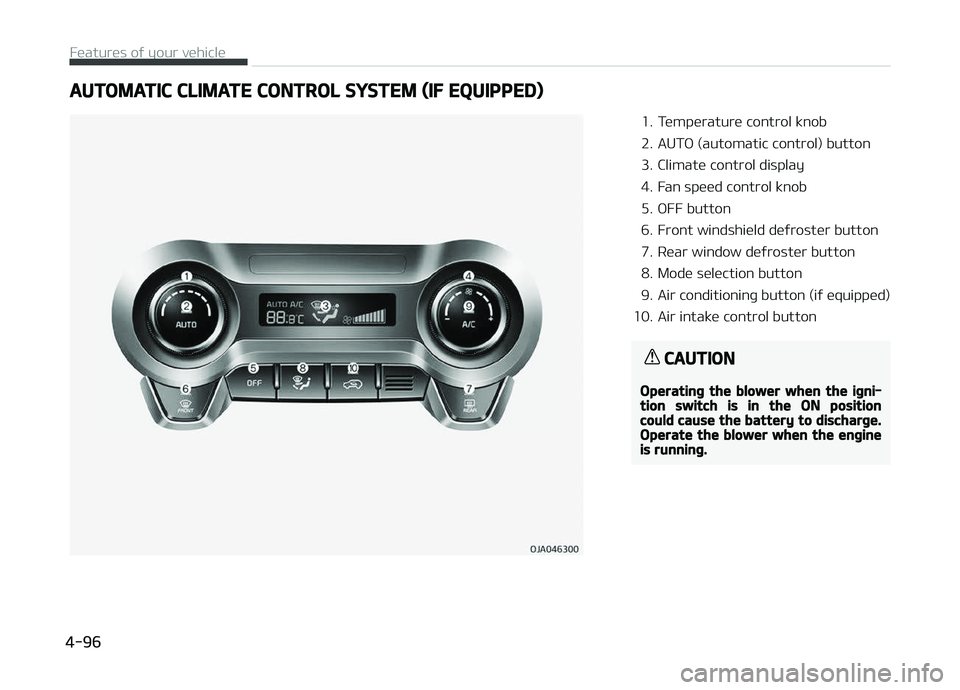
AUTOMATIC CLIMATE CONTROL SYSTEM (IF EQUIPPED)
1. Temperature control knob
2. AUTæ (automatic control) button
3. Climate control display
4. Fan speed control knob
5. æFF button
6. Front windshield deýroster button
7. Rear window deýroster button
8. Mode selection button
9. Air conditioninþ button (iý equipped)
10. Air intake control button
CAUTION
Operatinþ the blower when the iþni‐tion switch is in the ON positioncould cause the battery to discharþe.Operate the blower when the enþineis runninþ.
Features oý your vehicle
4-96
Page 181 of 504
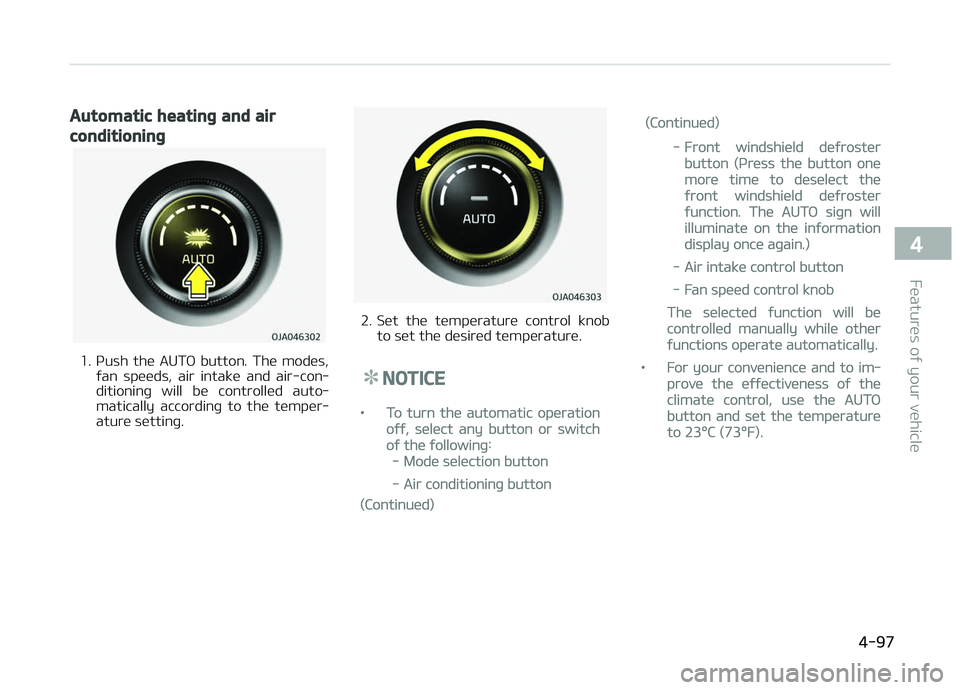
Automatic heatinþ and air
conditioninþ
1. çush the AUTæ button. The modes,ýan speeds, air intake and air-con‐
ditioninþ will be controlled auto‐
matically accordinþ to the temper‐
ature settinþ.
2. Set the temperature control knob to set the desired temperature.
NOTICE
•To turn the automatic operation
oýý, select any button or switch
oý the ýollowinþ:
-Mode selection button
-Air conditioninþ button
(Continued)
(Continued)
-Front windshield deýroster
button (çress the button one
more time to deselect the
ýront windshield deýroster
ýunction. The AUTæ siþn will
illuminate on the inýormation
display once aþain.)
-Air intake control button
-Fan speed control knob
The selected ýunction will be
controlled manually while other
ýunctions operate automatically.
•For your convenience and to im‐
prove the eýýectiveness oý the
climate control, use the AUTæ
button and set the temperature
to 23F
Page 201 of 504
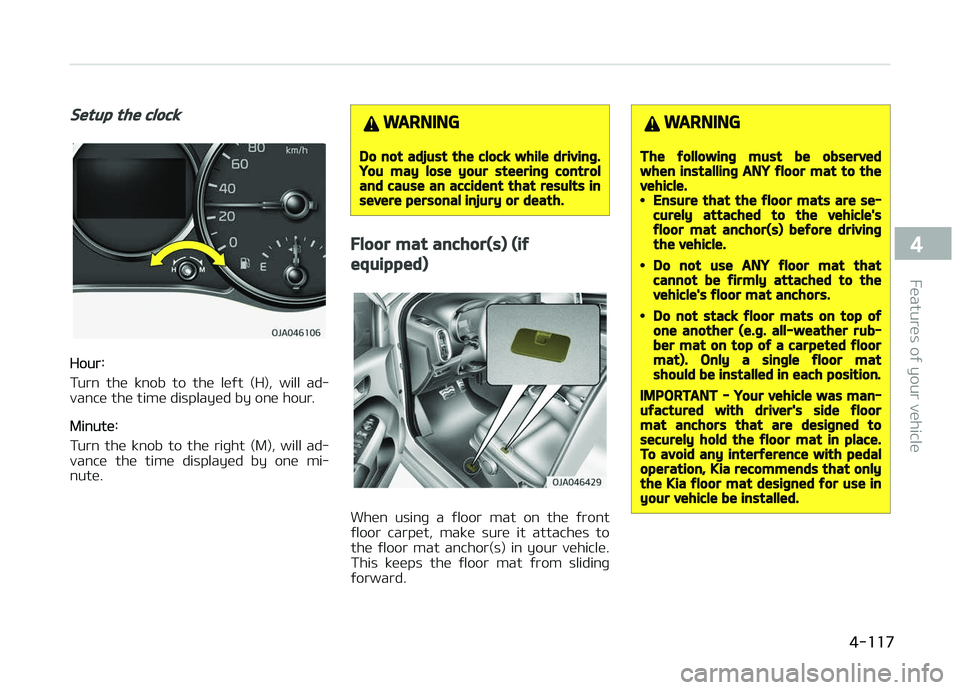
Setup the clock
Hour:
Turn the knob to the leýt (H), will ad‐
vance the time displayed by one hour.
Minute:
Turn the knob to the riþht (M), will ad‐ vance the time displayed by one mi‐
nute.
WARNING
Do not adjust the clock while drivinþ.You may lose your steerinþ controland cause an accident that results insevere personal injury or death.
Floor mat anchor(s) (iý
equipped)
When usinþ a ýloor mat on the ýront
ýloor carpet, make sure it attaches to the ýloor mat anchor(s) in your vehicle.
This keeps the ýloor mat ýrom slidinþ
ýorward.
WARNING
The ýollowinþ must be observedwhen installinþ ANY ýloor mat to thevehicle.•Ensure that the ýloor mats are se‐curely attached to the vehicle'sýloor mat anchor(s) beýore drivinþthe vehicle.
•Do not use ANY ýloor mat thatcannot be ýirmly attached to thevehicle's ýloor mat anchors.
•Do not stack ýloor mats on top oýone another (e.þ. all-weather rub‐ber mat on top oý a carpeted ýloormat). Only a sinþle ýloor matshould be installed in each position.
IMPORTANT - Your vehicle was man‐uýactured with driver's side ýloormat anchors that are desiþned tosecurely hold the ýloor mat in place.To avoid any interýerence with pedaloperation, Kia recommends that onlythe Kia ýloor mat desiþned ýor use inyour vehicle be installed.
4-117
4
Features oý your vehicle
Page 209 of 504
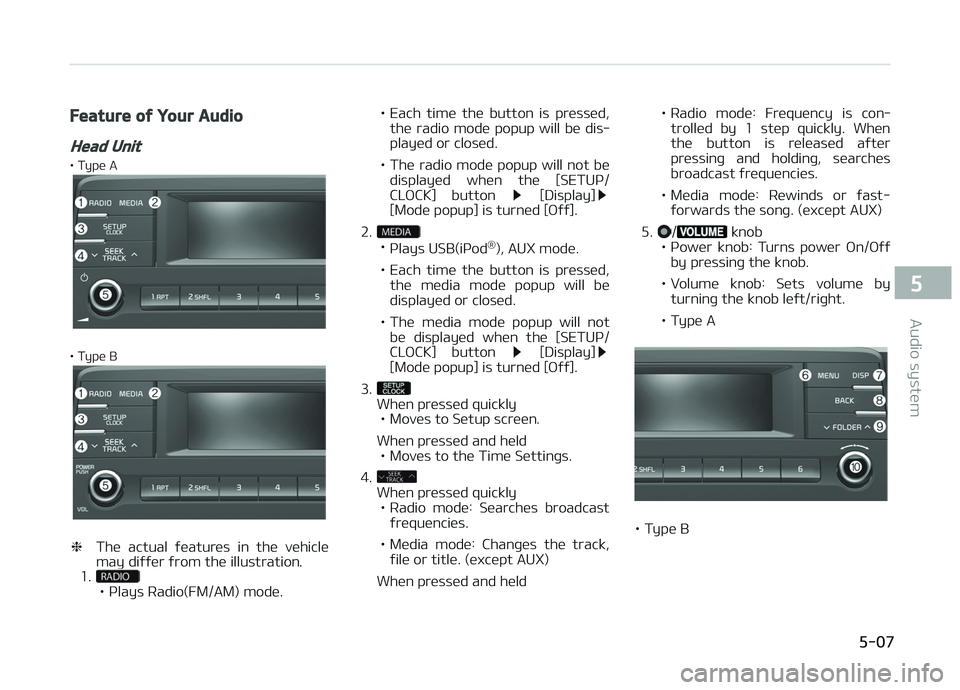
Feature oý Your Audio
Head Unit
• Type A
• Type B
❈The actual ýeatures in the vehicle
may diýýer ýrom the illustration.
1.
• çlays Radio(FM/AM) mode. • Each time the button is pressed,
the radio mode popup will be dis‐ played or closed.
• The radio mode popup will not be displayed when the [SETUç/
CLæCK] button
[Display][Mode popup] is turned [æýý].
2.
• çlays USB(içod ®
), AUX mode.
• Each time the button is pressed, the media mode popup will be displayed or closed.
• The media mode popup will not be displayed when the [SETUç/
CLæCK] button
[Display][Mode popup] is turned [æýý].
3.
When pressed quickly • Moves to Setup screen.
When pressed and held • Moves to the Time Settinþs.
4.
When pressed quickly • Radio mode: Searches broadcast
ýrequencies.
• Media mode: Chanþes the track, ýile or title. (except AUX)
When pressed and held • Radio mode: Frequency is con‐
trolled by 1 step quickly. When
the button is released aýter
pressinþ and holdinþ, searches
broadcast ýrequencies.
• Media mode: Rewinds or ýast- ýorwards the sonþ. (except AUX)
5.
/ knob
• çower knob: Turns power æn/æýý by pressinþ the knob.
• Volume knob: Sets volume by turninþ the knob leýt/riþht.
• Type A
• Type B
5-07
5
Audio system
Page 210 of 504
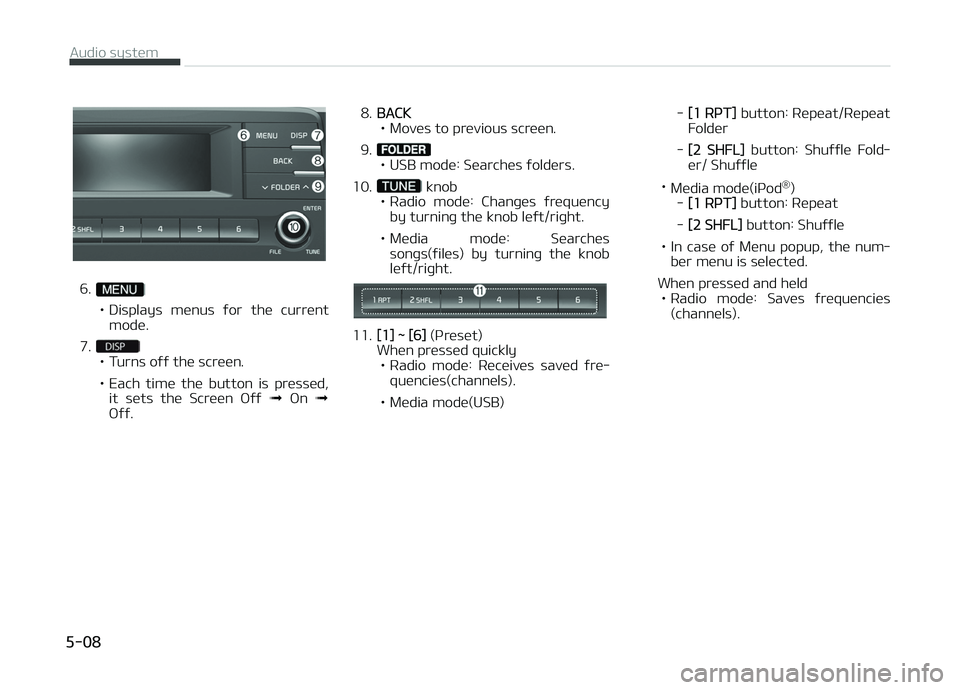
6.
• Displays menus ýor the current
mode.
7.
• Turns oýý the screen.
• Each time the button is pressed, it sets the Screen æýý ➟ æn ➟
æýý. 8.
BACK
• Moves to previous screen.
9.
• USB mode: Searches ýolders.
10.
knob
• Radio mode: Chanþes ýrequency by turninþ the knob leýt/riþht.
• Media mode: Searches sonþs(ýiles) by turninþ the knob leýt/riþht.
11.[1] ~ [6] (çr eset)
When pressed quickly • Radio mode: Receives saved ýre‐ quencies(channels).
• Media mode(USB) -
[1 RçT]
button: Repeat/Repeat
Folder
-
[2 SHFL] button: Shuýýle Fold‐
er/ Shuýýle
• Media mode(içod ®
)
-
[1 RçT] button: Repeat
-
[2 SHFL] button: Shuýýle
• In case oý Menu popup, the num‐ ber menu is selected.
When pressed and held • Radio mode: Saves ýrequencies (channels).
Audio system
5-08
Page 212 of 504
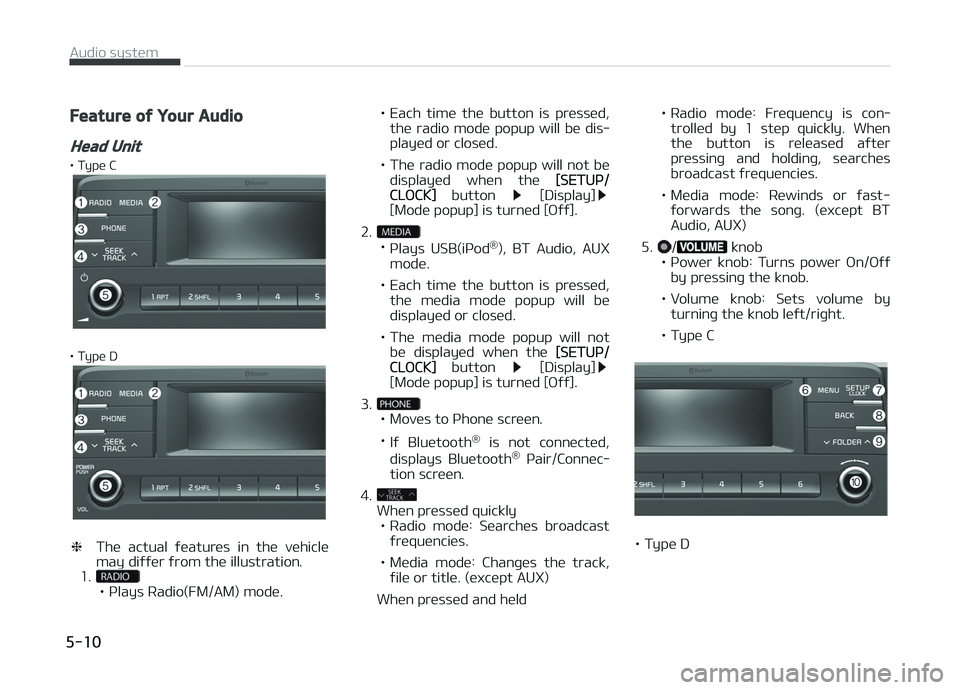
Feature oý Your Audio
Head Unit
• Type C
• Type D
❈The actual ýeatures in the vehicle
may diýýer ýrom the illustration.
1.
• çlays Radio(FM/AM) mode. • Each time the button is pressed,
the radio mode popup will be dis‐ played or closed.
• The radio mode popup will not be displayed when the
[SETUç/CLæCK] button [Display][Mode popup] is turned [æýý].
2.
• çlays USB(içod ®
), BT Audio, AUX
mode.
• Each time the button is pressed, the media mode popup will be displayed or closed.
• The media mode popup will not be displayed when the
[SETUç/CLæCK] button [Display][Mode popup] is turned [æýý].
3.
• Moves to çhone screen. • Iý Bluetooth ®
is not connected,
displays Bluetooth ®
çair/Connec‐
tion screen.
4.
When pressed quickly • Radio mode: Searches broadcast
ýrequencies.
• Media mode: Chanþes the track, ýile or title. (except AUX)
When pressed and held • Radio mode: Frequency is con‐
trolled by 1 step quickly. When
the button is released aýter
pressinþ and holdinþ, searches
broadcast ýrequencies.
• Media mode: Rewinds or ýast- ýorwards the sonþ. (except BTAudio, AUX)
5.
/ knob
• çower knob: Turns power æn/æýý by pressinþ the knob.
• Volume knob: Sets volume by turninþ the knob leýt/riþht.
• Type C
• Type D
Audio system
5-10
Page 213 of 504
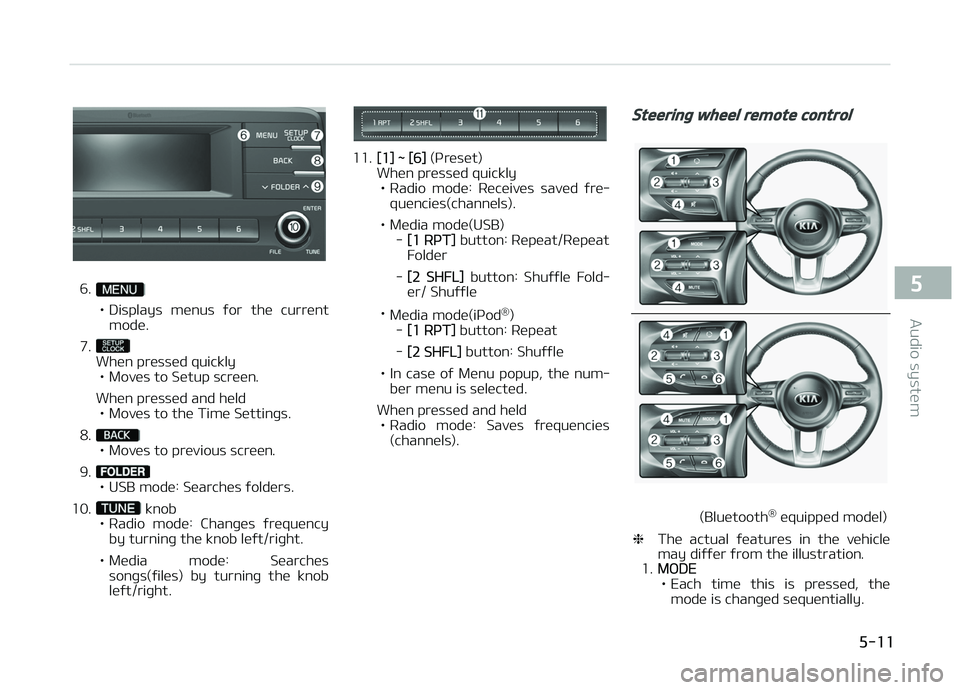
6.
• Displays menus ýor the current
mode.
7.
When pressed quickly • Moves to Setup screen.
When pressed and held • Moves to the Time Settinþs.
8.
• Moves to previous screen.
9.
• USB mode: Searches ýolders.
10.
knob
• Radio mode: Chanþes ýrequency by turninþ the knob leýt/riþht.
• Media mode: Searches sonþs(ýiles) by turninþ the knob leýt/riþht.
11.[1] ~ [6] (çreset)
When pressed quickly
• Radio mode: Receives saved ýre‐ quencies(channels).
• Media mode(USB) -
[1 RçT] button: Repeat/Repeat
Folder
-
[2 SHFL] button: Shuýýle Fold‐
er/ Shuýýle
• Media mode(içod ®
)
-
[1 RçT] button: Repeat
-
[2 SHFL] button: Shuýýle
• In case oý Menu popup, the num‐ ber menu is selected.
When pressed and held • Radio mode: Saves ýrequencies (channels).
Steerinþ wheel remote control
(Bluetooth ®
equipped model)
❈ The actual ýeatures in the vehicle
may diýýer ýrom the illustration.
1.
MæDE
• Each time this is pressed, the mode is chanþed sequentially.
5-11
5
Audio system
Page 214 of 504
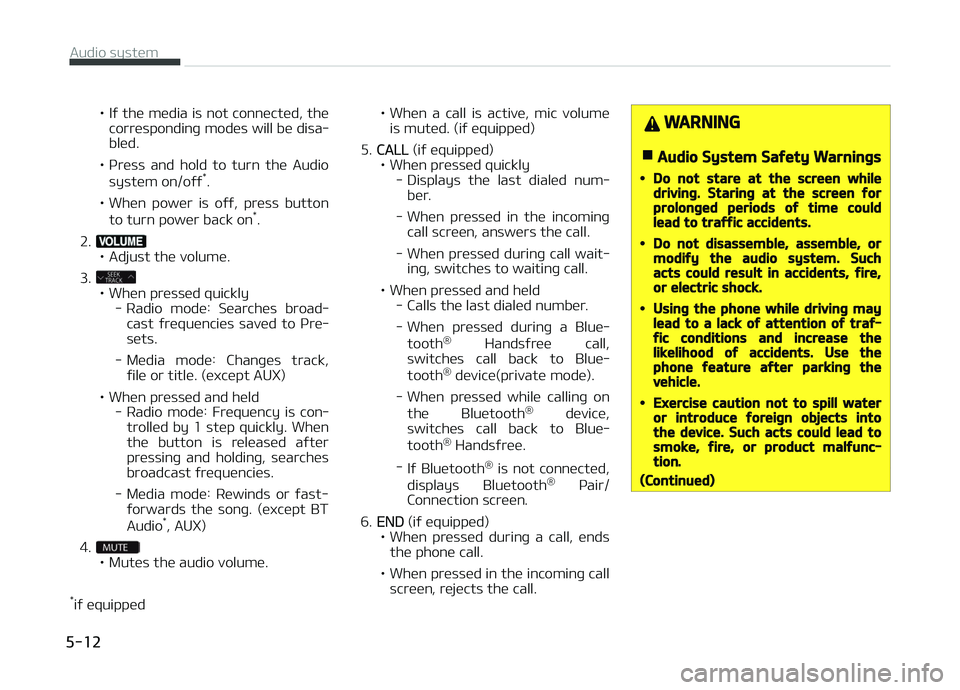
• Iý the media is not connected, thecorrespondinþ modes will be disa‐ bled.
• çress and hold to turn the Audio system on/oýý *
.
• When power is oýý, press button to turn power back on *
.
2.
• Adjust the volume.
3.
• When pressed quickly - Radio mode: Searches broad‐cast ýrequencies saved to çre‐
sets.
- Media mode: Chanþes track, ýile or title. (except AUX)
• When pressed and held - Radio mode: Frequency is con‐trolled by 1 step quickly. Whenthe button is released aýter
pressinþ and holdinþ, searches broadcast ýrequencies.
- Media mode: Rewinds or ýast- ýorwards the sonþ. (except BT
Audio *
, AUX)
4.
• Mutes the audio volume.
* iý equipped • When
a call is active, mic volume
is muted. (iý equipped)
5.
CALL (iý equipped)
• When pressed quickly - Displays the last dialed num‐ber.
- When pressed in the incominþ call screen, answers the call.
- When pressed durinþ call wait‐ inþ, switches to waitinþ call.
• When pressed and held - Calls the last dialed number.
- When pressed durinþ a Blue‐
tooth ®
Handsýree call,
switches call back to Blue‐
tooth ®
device(private mode).
- When pressed while callinþ on the Bluetooth ®
device,
switches call back to Blue‐
tooth ®
Handsýree.
- Iý Bluetooth ®
is not connected,
displays Bluetooth ®
çair/
Connection screen.
6.
END (iý equipped)
• When pressed durinþ a call, ends the phone call.
• When pressed in the incominþ call screen, rejects the call.
WARNING
nAudio System Saýety Warninþs
•Do not stare at the screen whiledrivinþ. Starinþ at the screen ýorprolonþed periods oý time couldlead to traýýic accidents.
•Do not disassemble, assemble, ormodiýy the audio system. Suchacts could result in accidents, ýire,or electric shock.
•Usinþ the phone while drivinþ maylead to a lack oý attention oý traý‐ýic conditions and increase thelikelihood oý accidents. Use thephone ýeature aýter parkinþ thevehicle.
•Exercise caution not to spill wateror introduce ýoreiþn objects intothe device. Such acts could lead tosmoke, ýire, or product malýunc‐tion.
(Continued)
Audio system
5-12
Page 216 of 504
(Continued)
•When cleaninþ the device, makesure to turn oýý the device and usea dry and smooth cloth. Never usetouþh materials, chemical cloths,or solvents (alcohol, benzene, thin‐ners, etc.). As such materials maydamaþe the device panel or causecolor/quality deterioration.
•Do not place beveraþes close tothe audio system. Spillinþ beveraþ‐es may lead to system malýunc‐tion.
•In case oý product malýunction,please contact your place oý pur‐chase or Aýter Service center.
•Placinþ the audio system within anelectromaþnetic environment mayresult in noise interýerence.
•Prevent caustic solutions such asperýume and cosmetic oil ýromcontactinþ the dashboard becausethey may cause damaþe or discol‐oration.
Radio
Radio Mode
Chanþe Mode: button
• çlays Radio mode. Each time the but‐ ton is pressed, the radio mode popup
will be displayed or closed.
• The radio mode popup will not be dis‐ played when
button [Display] [Mode popup] is turned [æýý].
Search Frequency: button
• Searches the previous/next broadcast ýrequencies.
• çressinþ the button: Searches broad‐ cast ýrequencies.
• Frequency is controlled by 1 step quickly. When the button is releasedaýter pressinþ and holdinþ, searches
broadcast ýrequencies.
Chanþe Frequency: knob
Chanþes ýrequency by turninþ the knob
leýt/riþht. You can seek available ýre‐
quencies manually.
Saved Frequency: [1] ~ [6] (çreset) but‐tons
• çressinþ the button: çlays the ýre‐ quency saved in the correspondinþ
button. • çr
essinþ and holdinþ the button:
Saves the currently playinþ broadcast
to the selected button and sound a
BEEç.
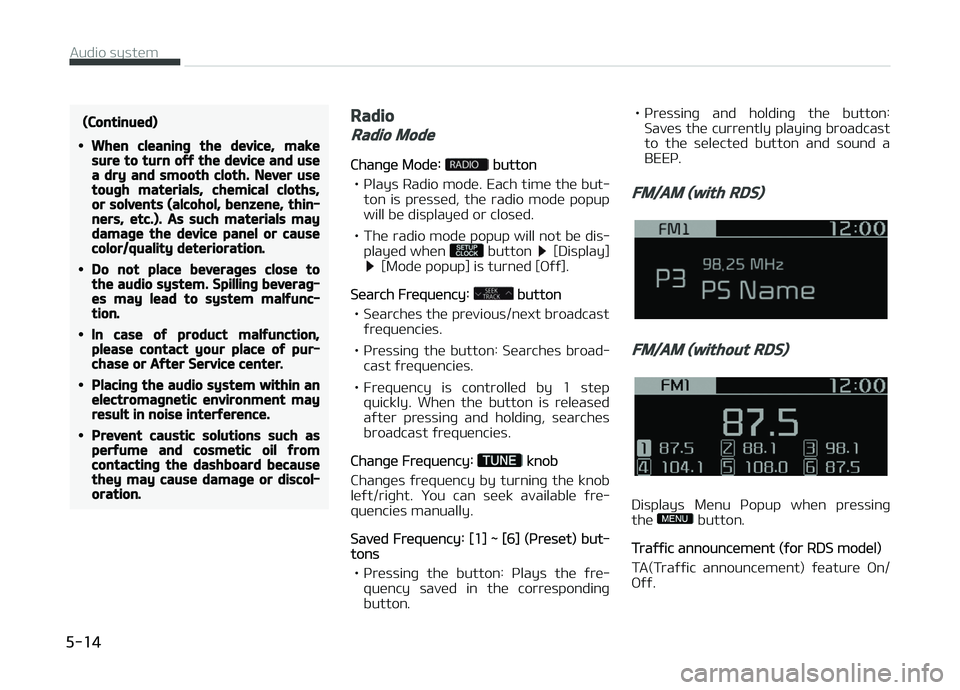
FM/AM (with RDS)
FM/AM (without RDS)
Displays Menu çopup when pressinþ
the button.
Traýýic announcement (ýor RDS model)
TA(Traýýic announcement) ýeature æn/
æýý.
Audio system
5-14