display KIA SOUL 2019 Service Manual
[x] Cancel search | Manufacturer: KIA, Model Year: 2019, Model line: SOUL, Model: KIA SOUL 2019Pages: 564, PDF Size: 14.2 MB
Page 277 of 564
Audio system
39
5
✽ ✽
NOTICE
• Up to 20 favorites can be saved for
each connected Bluetooth®
Wireless Technology device.
• Favorites can be accessed when the Bluetooth
®Wireless Technology
device they were paired from is
connected.
• The audio system does not down- load favorites from Bluetooth
®
Wireless Technology devices.
Favorites must be newly saved
before use.
• To add to favorites, contacts must be downloaded first.
• Saved favorites are not updated even if the contacts of the connected
Bluetooth
®Wireless Technology
device are changed. In this case,
favorites need to be deleted and
added again.
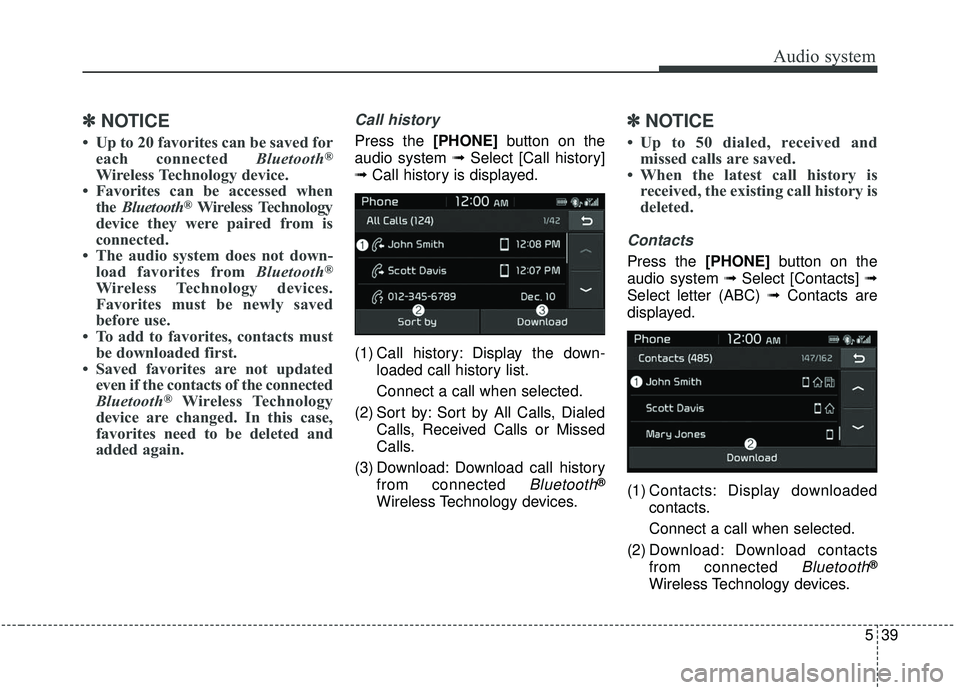
Call history
Press the [PHONE] button on the
audio system ➟ Select [Call history]
➟ Call history is displayed.
(1) Call history: Display the down- loaded call history list.
Connect a call when selected.
(2) Sort by: Sort by All Calls, Dialed Calls, Received Calls or Missed
Calls.
(3) Download: Download call history from connected
Bluetooth®
Wireless Technology devices.
✽ ✽NOTICE
• Up to 50 dialed, received and
missed calls are saved.
• When the latest call history is received, the existing call history is
deleted.
Contacts
Press the [PHONE] button on the
audio system ➟ Select [Contacts] ➟
Select letter (ABC) ➟ Contacts are
displayed.
(1) Contacts: Display downloaded contacts.
Connect a call when selected.
(2) Download: Download contacts from connected
Bluetooth®
Wireless Technology devices.
Page 278 of 564
Audio system
540
✽ ✽NOTICE
• Only supported contacts format
can be downloaded and displayed
from the Bluetooth
®Wireless
device, contacts from some appli-
cations will not be included.
• Up to 2,000 contacts can be saved.
• In some cases, additional confir- mation from your Bluetooth
®
Wireless Technology device is nec-
essary when downloading con-
tacts. If downloading of contacts is
unsuccessful, consult your
Bluetooth
®Wireless Technology
device's settings or the audio
screen to approve the download.
• Contacts without phone numbers are not displayed.
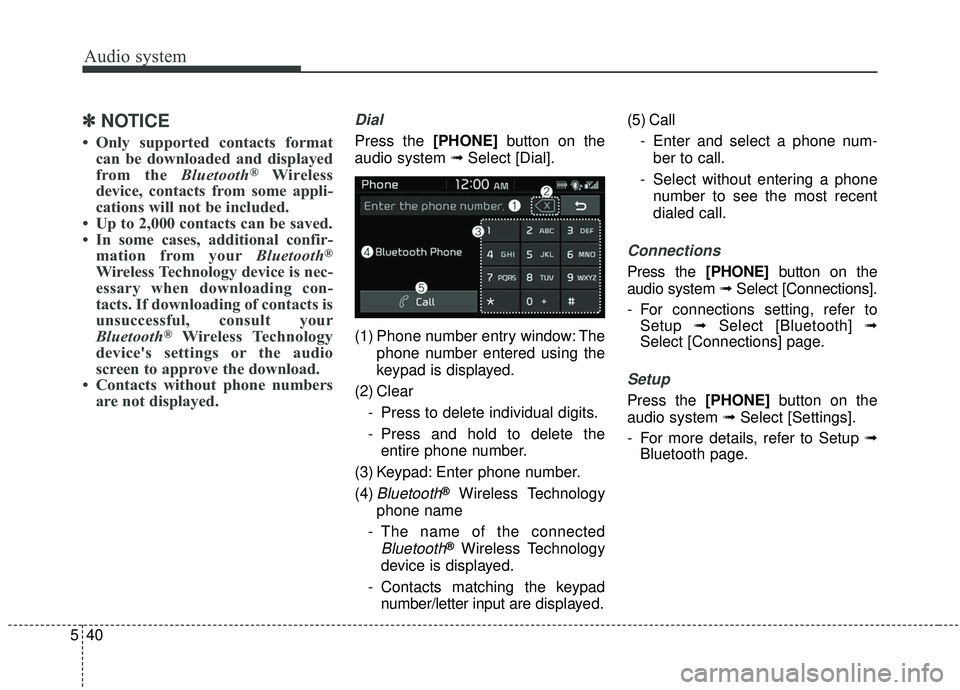
Dial
Press the [PHONE] button on the
audio system ➟ Select [Dial].
(1) Phone number entry window: The phone number entered using the
keypad is displayed.
(2) Clear - Press to delete individual digits.
- Press and hold to delete theentire phone number.
(3) Keypad: Enter phone number.
(4)
Bluetooth®Wireless Technology
phone name
- The name of the connected
Bluetooth®Wireless Technology
device is displayed.
- Contacts matching the keypad number/letter input are displayed.(5) Call
- Enter and select a phone num-ber to call.
- Select without entering a phone number to see the most recent
dialed call.
Connections
Press the [PHONE] button on the
audio system ➟ Select [Connections].
- For connections setting, refer to Setup ➟Select [Bluetooth] ➟
Select [Connections] page.
Setup
Press the [PHONE] button on the
audio system ➟ Select [Settings].
- For more details, refer to Setup ➟ Bluetooth page.
Page 279 of 564
Audio system
41
5
Voice Recognition
✽ ✽
NOTICE
-
Using the Voice Recognition
• Voice recognition is a safety tech-
nology that recognizes user voice
commands and executes multime-
dia functions during driving.
• Unfortunately, due to technical limitations, the system is unable to
recognize all voice commands. To
address these limitations, the voice
commands that the system recog-
nizes are displayed on the screen.
Use the displayed commands.
• Because human speech varies, voice recognition is sometimes
unable to properly recognize user
voice commands. In these cases,
repeat the voice command dis-
played on the screen, or use the
button on the screen to execute the
desired function.
Precautions to ensure smooth voice
recognition
If the language setting is Korean,
voice recognition is not supported.
Voice recognition only supports voice commands indicated on-
screen or in the user manual.
For proper voice recognition, speak after the beep, which
sounds after voice notification.
Voice recognition automatically stops in the following events.
1) Outgoing and incoming phone calls.
2) Media (USB, etc.) is connected (voice recognition mode is main-
tained when iPod
®s are connected).
3) Rear camera is activated
(if
equipped)
.
4) Vehicle is started or engine is turned off.
5) Screen transition buttons, such as [RADIO] or [MEDIA], are
selected.
6) When a pop-up message is dis- played on the screen due to
accidental execution of the voice
recognition function. The voice recognition microphone
is located above the driver’s seat.
To ensure proper voice recogni-
tion, state voice commands while
maintaining proper driving posture.
Better voice recognition is possible if you speak naturally and clearly,
as you would in normal conversa-
tion.
In the following situations, outdoor noise may prevent proper voice
recognition.
1) Wind noise from an open win- dow or sunroof may disrupt
voice recognition.
2) Operating the climate blower at a high level may cause wind
noise that disrupts voice recog-
nition. The recommended set-
ting is 3 or below.
3) When passing through tunnels, vehicle echoes may disrupt
voice recognition.
4) When passing over uneven ter- rain, vehicle noise may disrupt
voice recognition.
5) Noise from rain in heavy storms may disrupt voice recognition.
Page 280 of 564
![KIA SOUL 2019 Service Manual Audio system
542
Starting/ending voice recognition,and settings
Starting voice recognition
Press the [VOICE] button on the
steering wheel remote control to
start voice recognition and see the
voice re](/img/2/40387/w960_40387-279.png "KIA SOUL 2019 Service Manual Audio system
542
Starting/ending voice recognition,and settings
Starting voice recognition
Press the [VOICE] button on the
steering wheel remote control to
start voice recognition and see the
voice re")
Audio system
542
Starting/ending voice recognition,and settings
Starting voice recognition
Press the [VOICE] button on the
steering wheel remote control to
start voice recognition and see the
voice recognition screen. Ending voice recognition
In voice recognition mode, say the
command ‘Exit’ to end voice recog-
nition.
Press the [Exit] on the bottom left corner of the screen to end voice
recognition.
Press and hold the [VOICE] button
on the steering wheel remote con-
trol to end voice recognition. Quick-starting voice recognition
(manual control)
Normally, to start voice recognition,
you must wait for the voice prompt
before saying a command. This
involves some waiting time. To run
the function immediately to select
the commands displayed on the
screen.
This feature is useful if the voice prompt takes too long or the sys-
tem fails to properly recognize your
voice commands.
Page 282 of 564
Audio system
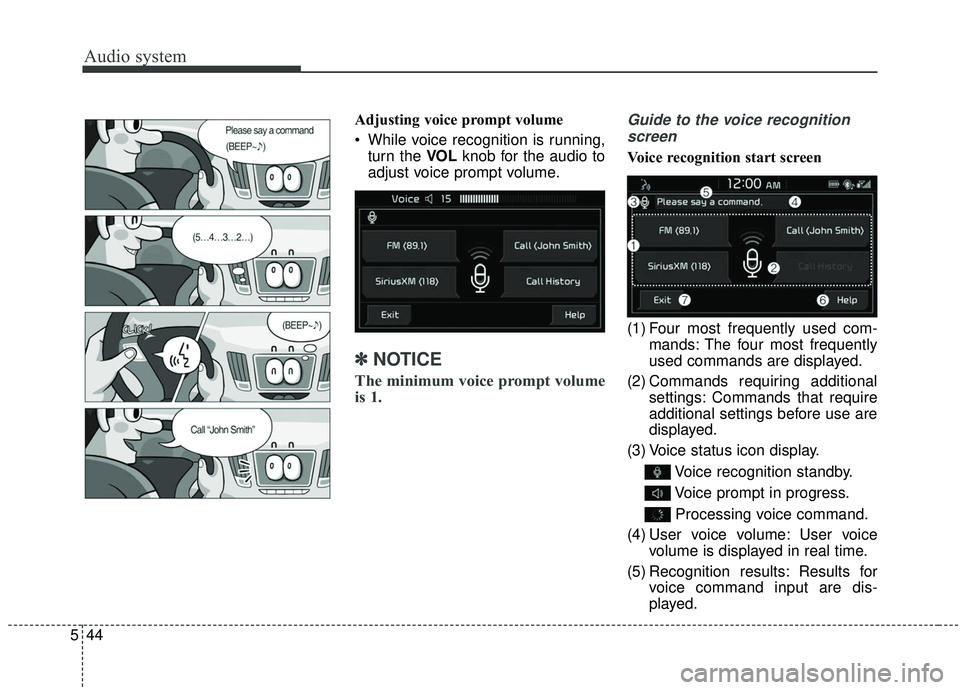
544Adjusting voice prompt volume
While voice recognition is running,
turn the VOL knob for the audio to
adjust voice prompt volume.
✽ ✽ NOTICE
The minimum voice prompt volume
is 1.
Guide to the voice recognition
screen
Voice recognition start screen
(1) Four most frequently used com- mands: The four most frequently
used commands are displayed.
(2) Commands requiring additional settings: Commands that require
additional settings before use are
displayed.
(3) Voice status icon display.
Voice recognition standby.
Voice prompt in progress.Processing voice command.
(4) User voice volume: User voice volume is displayed in real time.
(5) Recognition results: Results for voice command input are dis-
played.
Page 283 of 564
Audio system
45
5
(6) Help: Available voice commands
displayed in stages.
(7) Exit: End voice recognition.
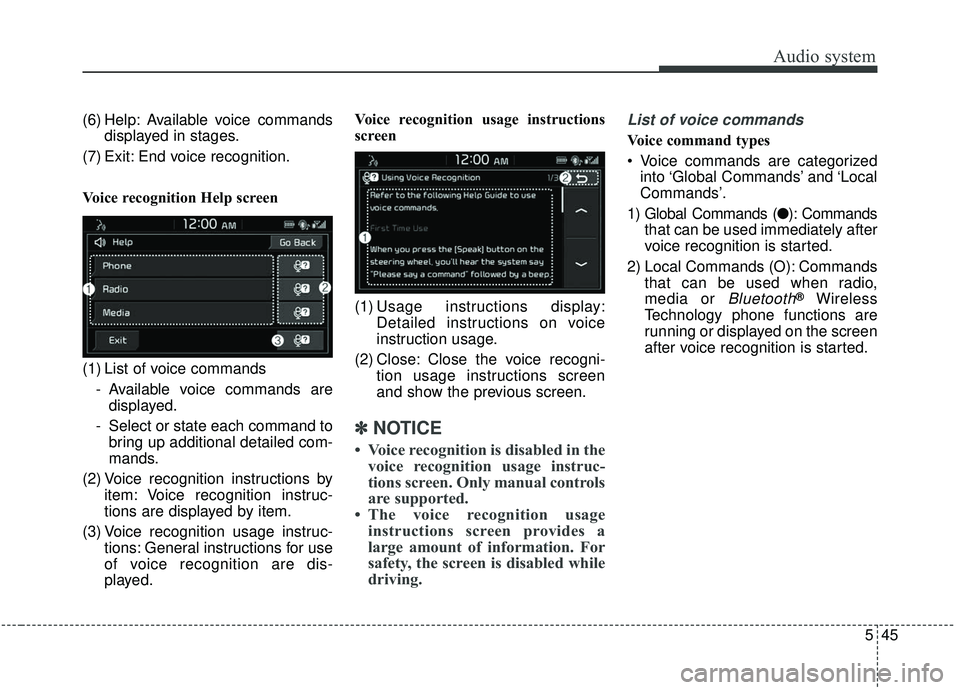
Voice recognition Help screen
(1) List of voice commands - Available voice commands aredisplayed.
- Select or state each command to bring up additional detailed com-
mands.
(2) Voice recognition instructions by item: Voice recognition instruc-
tions are displayed by item.
(3) Voice recognition usage instruc- tions: General instructions for use
of voice recognition are dis-
played. Voice recognition usage instructions
screen
(1) Usage instructions display:
Detailed instructions on voice
instruction usage.
(2) Close: Close the voice recogni- tion usage instructions screen
and show the previous screen.
✽ ✽NOTICE
• Voice recognition is disabled in the
voice recognition usage instruc-
tions screen. Only manual controls
are supported.
• The voice recognition usage instructions screen provides a
large amount of information. For
safety, the screen is disabled while
driving.
List of voice commands
Voice command types
Voice commands are categorized
into ‘Global Commands’ and ‘Local
Commands’.
1) Global Commands (● ): Commands
that can be used immediately after
voice recognition is started.
2) Local Commands (O): Commands that can be used when radio,
media or
Bluetooth®Wireless
Technology phone functions are
running or displayed on the screen
after voice recognition is started.
Page 284 of 564
Audio system
546Phone voice commands
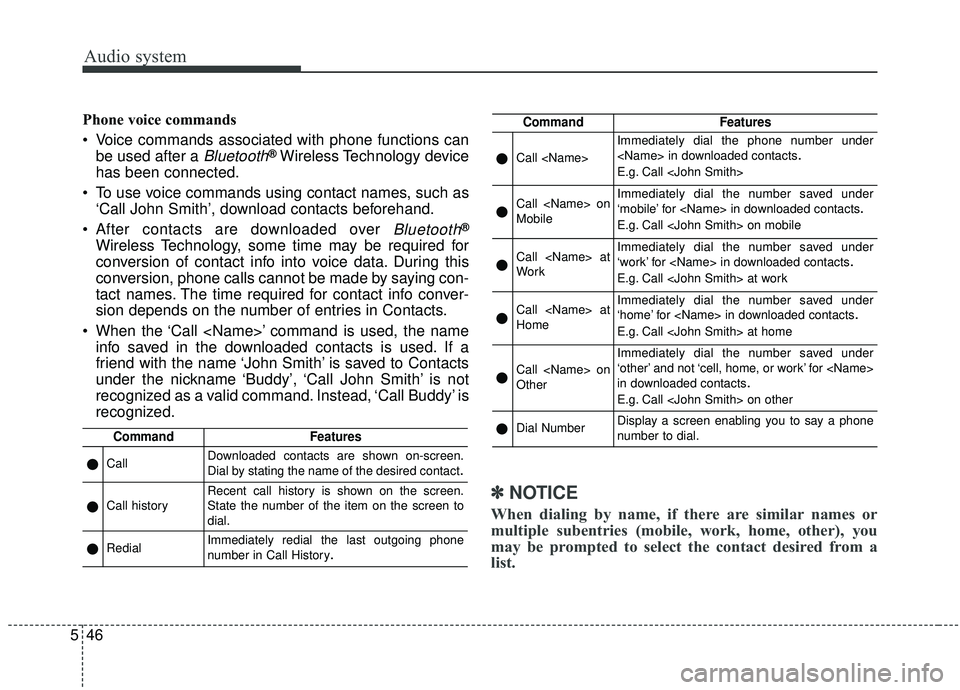
Voice commands associated with phone functions can
be used after a
Bluetooth®Wireless Technology device
has been connected.
To use voice commands using contact names, such as ‘Call John Smith’, download contacts beforehand.
After contacts are downloaded over
Bluetooth®
Wireless Technology, some time may be required for
conversion of contact info into voice data. During this
conversion, phone calls cannot be made by saying con-
tact names. The time required for contact info conver-
sion depends on the number of entries in Contacts.
When the ‘Call
friend with the name ‘John Smith’ is saved to Contacts
under the nickname ‘Buddy’, ‘Call John Smith’ is not
recognized as a valid command. Instead, ‘Call Buddy’ is
recognized.
✽ ✽ NOTICE
When dialing by name, if there are similar names or
multiple subentries (mobile, work, home, other), you
may be prompted to select the contact desired from a
list.
CommandFeatures
●CallDownloaded contacts are shown on-screen.
Dial by stating the name of the desired contact.
●Call historyRecent call history is shown on the screen.
State the number of the item on the screen to
dial.
●RedialImmediately redial the last outgoing phone
number in Call History.
CommandFeatures
●Call
Immediately dial the phone number under
E.g. Call
●Call
MobileImmediately dial the number saved under
‘mobile’ for
E.g. Call
●Call
WorkImmediately dial the number saved under
‘work’ for
E.g. Call
●Call
HomeImmediately dial the number saved under
‘home’ for
E.g. Call
●Call
Other
Immediately dial the number saved under
‘other’ and not ‘cell, home, or work’ for
in downloaded contacts
.
E.g. Call
●Dial NumberDisplay a screen enabling you to say a phone
number to dial.
Page 288 of 564
![KIA SOUL 2019 Service Manual Audio system
550
Setup
Setup is the screen to control Audio
system settings.
Press the [SETUP]button on the
audio system.
Display
Press the [SETUP] button on the
audio system ➟ Select [Display].
M](/img/2/40387/w960_40387-287.png "KIA SOUL 2019 Service Manual Audio system
550
Setup
Setup is the screen to control Audio
system settings.
Press the [SETUP]button on the
audio system.
Display
Press the [SETUP] button on the
audio system ➟ Select [Display].
M")
Audio system
550
Setup
Setup is the screen to control Audio
system settings.
Press the [SETUP]button on the
audio system.
Display
Press the [SETUP] button on the
audio system ➟ Select [Display].
Mode: Set the screen brightness to be adjusted automatically accord-
ing to ambient lighting conditions
or set the screen to stay bright or
dark continuously.
Illumination: The brightness of the audio screen can be changed.
Sound
Press the [SETUP] button on the
audio system ➟ Select [Sound].
Position: Sound balance and fader can be adjusted.
Tone: Sound tone color can be adjusted.
Speed Dependent Volume: Automatically adjust volume based
on vehicle speed.
Beep: Select whether to play a beep sound when the screen is
touched.
Date/Time
Press the [SETUP] button on the
audio system ➟ Select [Date/Time].
Set Time: Set the time displayed on the audio screen.
Time Format: Choose between 12- hour and 24-hour time formats.
Set Date: Set the date displayed on the audio screen.
Bluetooth
Press the [SETUP] button on the
audio system ➟ Select [Bluetooth].
Connections: Control pairing, dele- tion, connection and disconnection
of
Bluetooth®Wireless Technology
devices.
Auto Connection Priority: Set the connection priority of
Bluetooth®
Wireless Technology devices when
the vehicle is started.
Download Contacts: Contacts can be downloaded from connected
Bluetooth®Wireless Technology
devices.
Bluetooth Voice Prompts: Play or mute voice prompts for
Bluetooth®
Wireless Technology device pair-
ing, connection and errors.
WARNING
- Date/Time Setting Distraction
Adjusting the date/time setting
while driving can result in a loss
of vehicle control that may lead
to an accident, severe personal
injury, and death.
Page 289 of 564
Audio system
51
5
✽ ✽
NOTICE
• When paired devices are deleted,
the call history and contacts of the
device saved to the audio system
are deleted.
• For Bluetooth
®Wireless Technology
connections with low connection pri-
ority, some time may be required for
the connection to be established.
• Contacts can be downloaded only from the currently connected
Bluetooth
®Wireless Technology
device.
• If no Bluetooth
®Wireless Technology
device is connected, the Download
Contacts button is disabled.
System
Press the [SETUP] button on the
audio system ➟ Select [System].
Memory Information: View My Music memory usage.
Voice Recognition Guidance: Adjust the length of the voice
recognition prompt.
Language: Change the user lan- guage.
Screen Saver
Set the information displayed when
the audio system is switched off or
the screen is turned off.
Press the [SETUP] button on the
audio system ➟ Select [Screen
Saver].
Analog: An analog clock is dis- played.
Digital: A digital clock is displayed.
None: No information is displayed.
Display Off
To prevent glare, the screen can be
turned off with the audio system in
operation.
Press the [SETUP] button on the
audio system ➟ Select [Display Off].
✽ ✽
NOTICE
Use ‘Screen Saver’ to set the infor-
mation to be displayed when the
screen is turned off.
Page 302 of 564
Driving your vehicle
12
6
Manual Transaxle
To start the vehicle, keep the clutch
pedal and brake pedal depressed, and
make sure the engine RPM is within
normal range (under 1000 rpm). After
checking, shift the transaxle shift lever
to the desired position.
Unlock the parking brake, and take
your foot off the clutch pedal. Then,
lightly depress the accelerator pedal
and slowly start the vehicle.
5.Do not wait for the engine to warm
up while the vehicle remains sta-
tionary.
Start driving at moderate engine
speeds. (Steep accelerating and
decelerating should be avoided.) Even if the smart key is in the vehi-
cle, if it is far away from you, the
engine may not start.
When the ENGINE START/STOP button is in the ACC position or
above, if any door is opened, the
system checks for the smart key. If
the smart key is not in the vehicle,
a message "key is not in the vehi-
cle" will appear on the LCD display.
And if all doors are closed, the
chime will sound for 5 seconds. The
indicator or warning will turn off
while the vehicle is moving. Always
have the smart key with you. Stopping manual transaxle vehicles
1. After safely parking the vehicle,
press the clutch pedal and brake
pedal at the same time.
2. While depressing the clutch pedal and brake pedal at the same time,
shift the transaxle lever to ‘N’.
CAUTION- Starter
If the engine stalls while thevehicle is in motion, do notattempt to move the shift leverto the P (Park) position. If thetraffic and road conditions per-mit, you may put the shift leverin the N (Neutral) position whilethe vehicle is still moving andpress the ENGINE START/STOPbutton in an attempt to restartthe engine.