display KIA SOUL 2019 Repair Manual
[x] Cancel search | Manufacturer: KIA, Model Year: 2019, Model line: SOUL, Model: KIA SOUL 2019Pages: 564, PDF Size: 14.2 MB
Page 367 of 564
677
Driving your vehicle
The vehicle will maintain the setspeed, when the lane ahead is clear.
The vehicle will slow down or speed up within selected speed to
maintain the selected distance,
when there is a vehicle ahead of
you in the lane. (A vehicle will
appear in front of your vehicle in
the LCD display only when there is
an actual vehicle in front of you)
If the vehicle ahead speeds up, your vehicle will travel at a steady
cruising speed after accelerating to
the selected speed.
The warning chime sounds and LCD display blinks if it is hard to
maintain the selected distance to
the vehicle ahead.
If the warning chime sounds, actively adjust the vehicle speed by
depressing the brake pedal
according to the road condition
ahead and driving condition.
Even if the warning chime is not acti- vated, always pay attention to the
driving conditions to prevent danger-
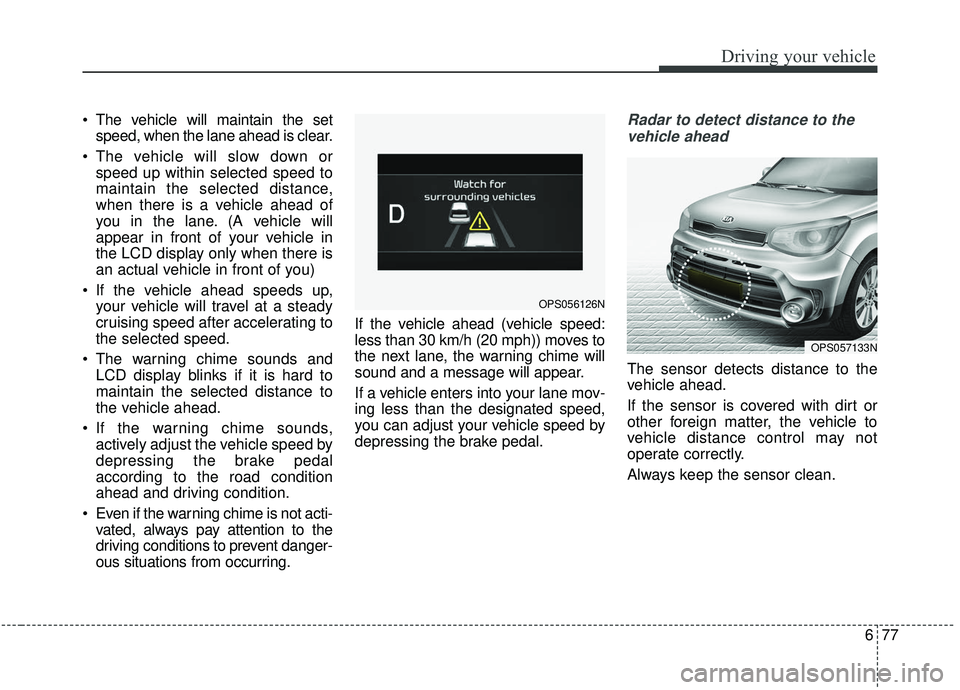
ous situations from occurring. If the vehicle ahead (vehicle speed:
less than 30 km/h (20 mph)) moves to
the next lane, the warning chime will
sound and a message will appear.
If a vehicle enters into your lane mov-
ing less than the designated speed,
you can adjust your vehicle speed by
depressing the brake pedal.Radar to detect distance to the
vehicle ahead
The sensor detects distance to the
vehicle ahead.
If the sensor is covered with dirt or
other foreign matter, the vehicle to
vehicle distance control may not
operate correctly.
Always keep the sensor clean.
OPS057133N
OPS056126N
Page 368 of 564
Driving your vehicle
78
6
Radar check message
If the radar or cover is dirty or
obscured with foreign matter such as
snow, this message (“Smart Cruise
Control disabled temporarily”) will
appear and it will disappear after for
a while. In this case, the system may
not function temporarily, but it does
not indicate a malfunction of the
Smart Cruise Control System. Clean
the radar or cover by using a soft
cloth and it will operate normally.
SCC (Smart Cruise Control)
malfunction message
The message (“Check Smart Cruise
Control System”) will appear when
the vehicle to vehicle distance control
system is not functioning normally.
Take your vehicle to an authorized
Kia dealer and have the system
checked. Always keep the sensor and
bumper clean.
Use only a genuine Kia sensor cover for your vehicle.
Do not install accessories around the sensor and do not replace the
bumper by yourself. It may interfere
with the sensor performance.
Impact damage to the sensor or sensor area may cause the sensor
to move slightly off position and
result in the SCC not operating
correctly without any warning or
indicator from the cluster. If this
occurs, have your vehicle checked
by an authorized Kia dealer as
soon as possible. Do not apply license plate frame or
foreign objects such as a bumper
sticker or a bumper guard near the
radar sensor. Doing so may
adversely affect the sensing per-
formance of the radar.
Always keep the radar sensor and lens cover clean and free of dirt
and debris.
Use only a soft cloth to wash the vehicle. Do not spray pressurized
water directly on the sensor or sen-
sor cover.
Be careful not to apply unneces- sary force on the radar sensor or
sensor cover. If the sensor is
forcibly moved out of proper align-
ment, the Smart Cruise Control
System may not operate correctly.
In this case, a warning message
may not be displayed. Have the
vehicle inspected by an authorized
Kia dealer.
If the front bumper becomes dam- aged in the area around the radar
sensor, the Smart Cruise Control
System may not operate properly.
Have the vehicle inspected by an
authorized Kia dealer.
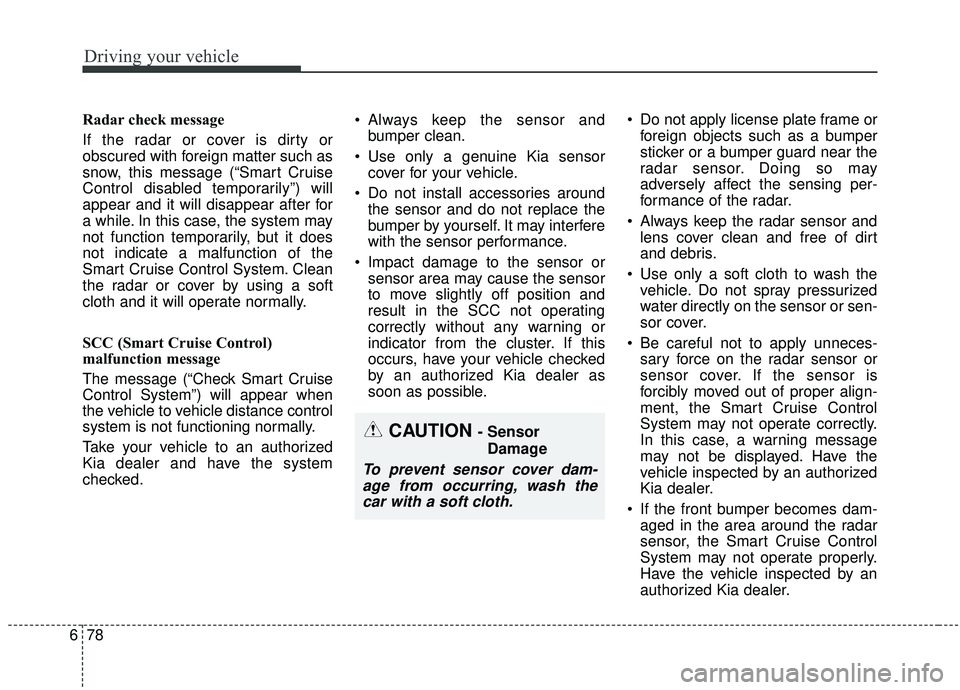
CAUTION - Sensor
Damage
To prevent sensor cover dam-age from occurring, wash thecar with a soft cloth.
Page 376 of 564
Driving your vehicle
86
6
The drive mode may be selected
according to the driver’s preference
or road condition.
The system resets to be in the ECO
mode, when the hybrid system is
restarted.
If there is a problem with the instru-
ment cluster, the drive mode will be
in ECO mode and may not change to
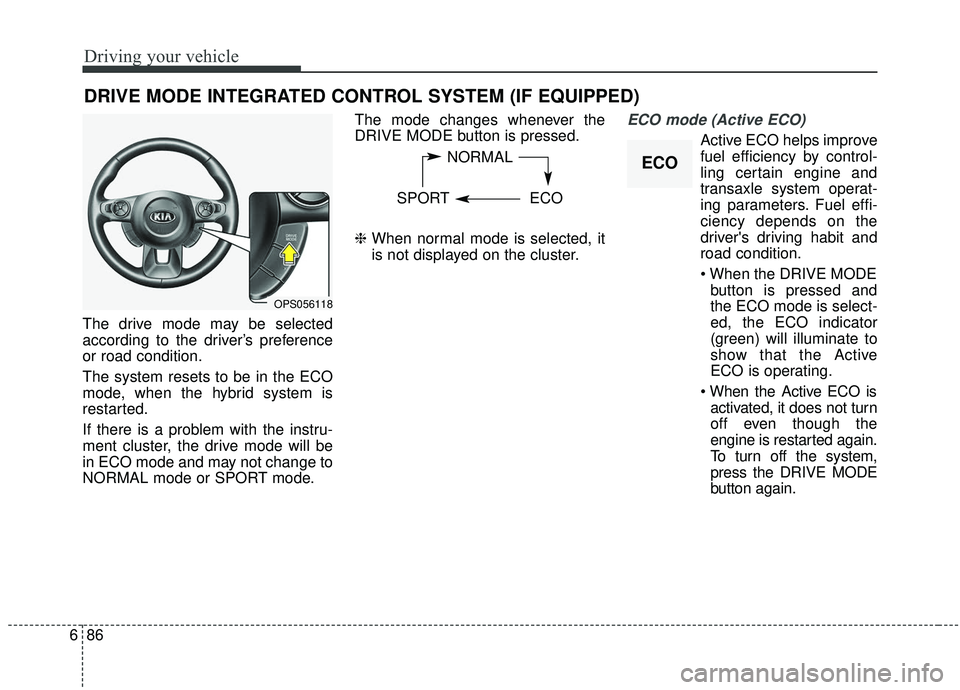
NORMAL mode or SPORT mode. The mode changes whenever the
DRIVE MODE button is pressed.
❈
When normal mode is selected, it
is not displayed on the cluster.
ECO mode (Active ECO)
Active ECO helps improve
fuel efficiency by control-
ling certain engine and
transaxle system operat-
ing parameters. Fuel effi-
ciency depends on the
driver's driving habit and
road condition.
button is pressed and
the ECO mode is select-
ed, the ECO indicator
(green) will illuminate to
show that the Active
ECO is operating.
activated, it does not turn
off even though the
engine is restarted again.
To turn off the system,
press the DRIVE MODE
button again.
DRIVE MODE INTEGRATED CONTROL SYSTEM (IF EQUIPPED)
NORMAL
SPORT ECO
OPS056118
ECO
Page 379 of 564
689
Driving your vehicle
To operate the LDWS, press the but-
ton with the engine start/stop button
in the ON position. The indicator illu-
minates on the cluster. To cancel the
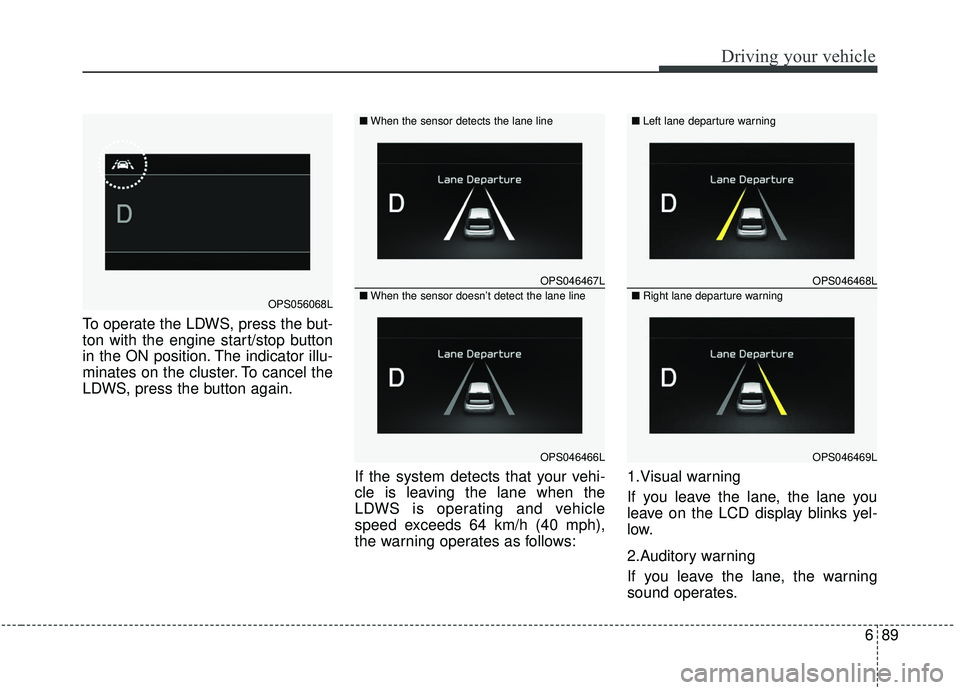
LDWS, press the button again.If the system detects that your vehi-
cle is leaving the lane when the
LDWS is operating and vehicle
speed exceeds 64 km/h (40 mph),
the warning operates as follows:1.Visual warning
If you leave the lane, the lane you
leave on the LCD display blinks yel-
low.
2.Auditory warning
If you leave the lane, the warning
sound operates.
OPS046467L
OPS046466L
■
When the sensor detects the lane line
■When the sensor doesn’t detect the lane lineOPS056068L
OPS046468L
OPS046469L
■ Left lane departure warning
■Right lane departure warning
Page 385 of 564
695
Driving your vehicle
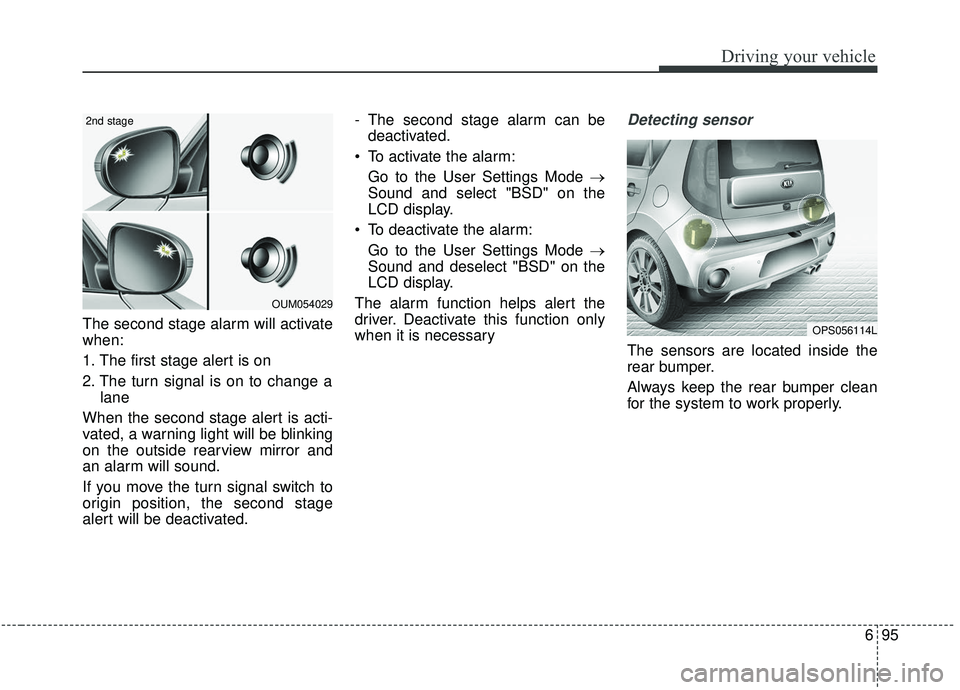
The second stage alarm will activate
when:
1. The first stage alert is on
2. The turn signal is on to change alane
When the second stage alert is acti-
vated, a warning light will be blinking
on the outside rearview mirror and
an alarm will sound.
If you move the turn signal switch to
origin position, the second stage
alert will be deactivated. - The second stage alarm can be
deactivated.
To activate the alarm: Go to the User Settings Mode →
Sound and select "BSD" on the
LCD display.
To deactivate the alarm: Go to the User Settings Mode →
Sound and deselect "BSD" on the
LCD display.
The alarm function helps alert the
driver. Deactivate this function only
when it is necessary
Detecting sensor
The sensors are located inside the
rear bumper.
Always keep the rear bumper clean
for the system to work properly.
OPS056114L
OUM054029
2nd stage
Page 428 of 564
What to do in an emergency
20
7
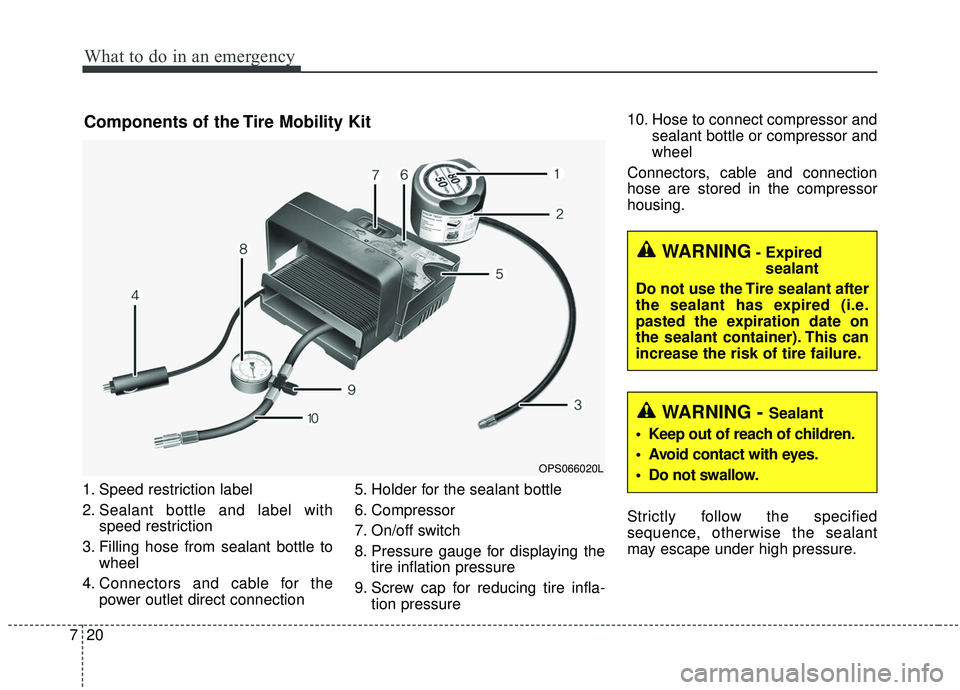
1. Speed restriction label
2. Sealant bottle and label with
speed restriction
3. Filling hose from sealant bottle to wheel
4. Connectors and cable for the power outlet direct connection 5. Holder for the sealant bottle
6. Compressor
7. On/off switch
8. Pressure gauge for displaying the
tire inflation pressure
9. Screw cap for reducing tire infla- tion pressure 10. Hose to connect compressor and
sealant bottle or compressor and
wheel
Connectors, cable and connection
hose are stored in the compressor
housing.
Strictly follow the specified
sequence, otherwise the sealant
may escape under high pressure.
Components of the Tire Mobility Kit
OPS066020L
WARNING- Expired sealant
Do not use the Tire sealant after
the sealant has expired (i.e.
pasted the expiration date on
the sealant container). This can
increase the risk of tire failure.
WARNING - Sealant
Keep out of reach of children.
Avoid contact with eyes.
Do not swallow.
Page 492 of 564
Maintenance
54
8
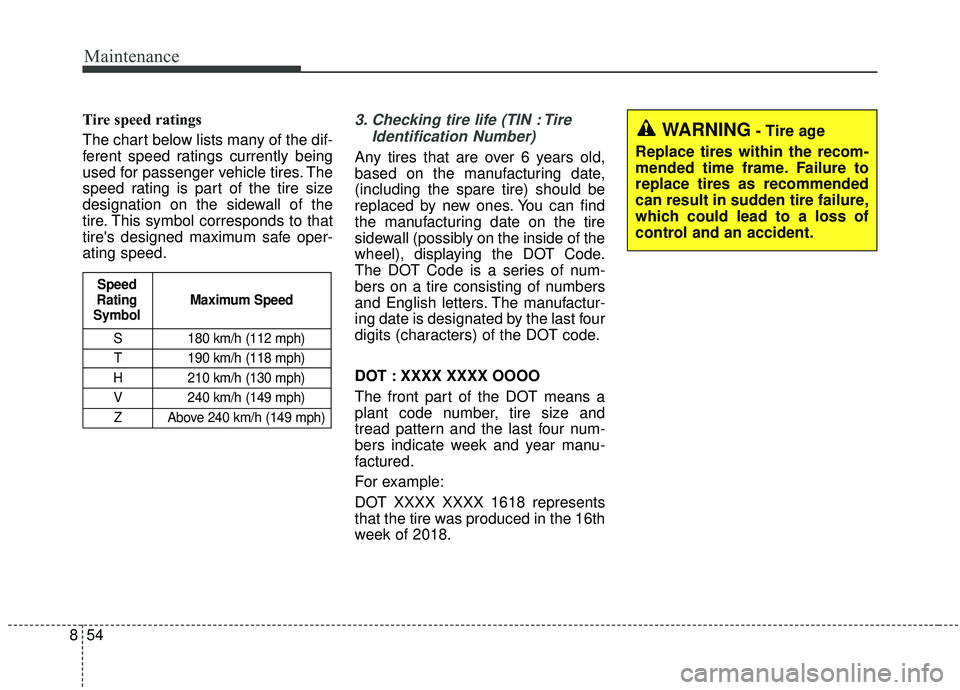
Tire speed ratings
The chart below lists many of the dif-
ferent speed ratings currently being
used for passenger vehicle tires. The
speed rating is part of the tire size
designation on the sidewall of the
tire. This symbol corresponds to that
tire's designed maximum safe oper-
ating speed.3. Checking tire life (TIN : Tire
Identification Number)
Any tires that are over 6 years old,
based on the manufacturing date,
(including the spare tire) should be
replaced by new ones. You can find
the manufacturing date on the tire
sidewall (possibly on the inside of the
wheel), displaying the DOT Code.
The DOT Code is a series of num-
bers on a tire consisting of numbers
and English letters. The manufactur-
ing date is designated by the last four
digits (characters) of the DOT code.
DOT : XXXX XXXX OOOO
The front part of the DOT means a
plant code number, tire size and
tread pattern and the last four num-
bers indicate week and year manu-
factured.
For example:
DOT XXXX XXXX 1618 represents
that the tire was produced in the 16th
week of 2018.
S 180 km/h (112 mph)
T 190 km/h (118 mph)
H 210 km/h (130 mph) V 240 km/h (149 mph)Z Above 240 km/h (149 mph)
Maximum Speed
Speed
Rating
Symbol
WARNING- Tire age
Replace tires within the recom-
mended time frame. Failure to
replace tires as recommended
can result in sudden tire failure,
which could lead to a loss of
control and an accident.
Page 552 of 564
99
Specifications & Consumer information
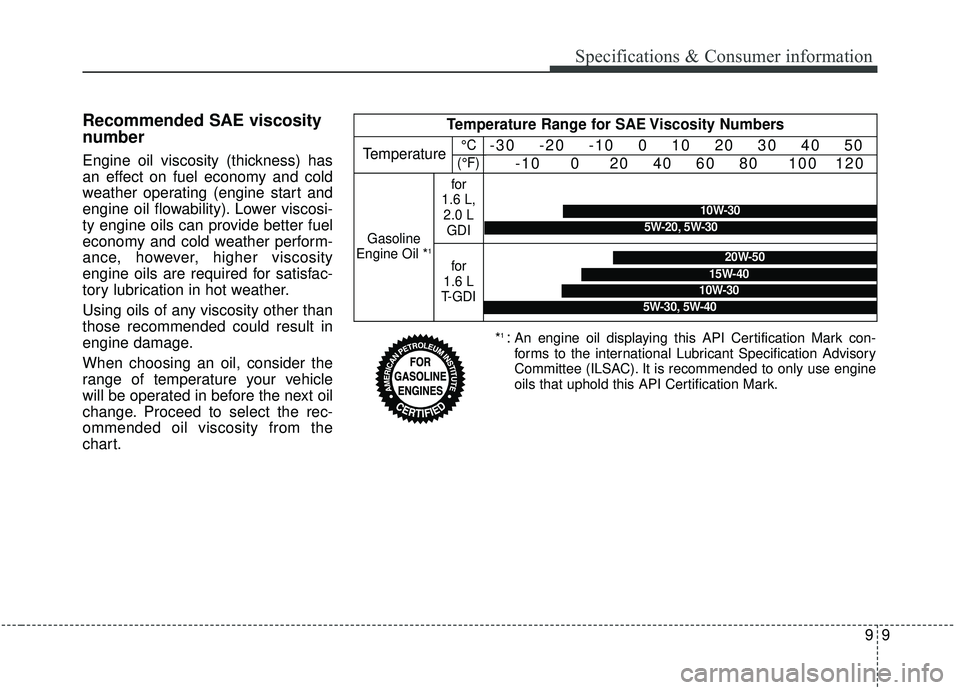
Recommended SAE viscosity
number
Engine oil viscosity (thickness) has
an effect on fuel economy and cold
weather operating (engine start and
engine oil flowability). Lower viscosi-
ty engine oils can provide better fuel
economy and cold weather perform-
ance, however, higher viscosity
engine oils are required for satisfac-
tory lubrication in hot weather.
Using oils of any viscosity other than
those recommended could result in
engine damage.
When choosing an oil, consider the
range of temperature your vehicle
will be operated in before the next oil
change. Proceed to select the rec-
ommended oil viscosity from the
chart.
*1 :An engine oil displaying this API Certification Mark con-
forms to the international Lubricant Specification Advisory
Committee (ILSAC). It is recommended to only use engine
oils that uphold this API Certification Mark.
Temperature Range for SAE Viscosity Numbers
Temperature-30 -20 -10 0 10 20 30 40 50
-10 0 20 40 60 80 100 120
Gasoline
Engine Oil *1
for
1.6 L, 2.0 L GDI
for
1.6 L
T-GDI
10W-30
5W-20, 5W-30
20W-50
10W-30
15W-40
5W-30, 5W-40
°C
(°F)
Page 559 of 564

I5
Index
Fuses . . . . . . . . . . . . . . . . . . . . . . . . . . . . . . . . . . . . \
. . . 8-62Engine compartment fuse replacement . . . . . . . . . . 8-65
Fuse/Relay panel description . . . . . . . . . . . . . . . . . . 8-67
Inner panel fuse replacement . . . . . . . . . . . . . . . . . . 8-64
Hood . . . . . . . . . . . . . . . . . . . . . . . . . . . . . . . . . . . . \
. . . 4-31 Closing the hood . . . . . . . . . . . . . . . . . . . . . . . . . . . 4-31
Opening the hood . . . . . . . . . . . . . . . . . . . . . . . . . . . 4-31
How to use this manual . . . . . . . . . . . . . . . . . . . . . . . . . 1-2
If the engine overheats . . . . . . . . . . . . . . . . . . . . . . . . . . 7-8
If the engine will not start . . . . . . . . . . . . . . . . . . . . . . . 7-4 If engine doesn't turn over or turns over slowly . . . . 7-4
If engine turns over normally but does not start . . . . 7-4
If you have a flat tire (with Spare Tire) . . . . . . . . . . . . . 7-9 Changing tires . . . . . . . . . . . . . . . . . . . . . . . . . . . . . 7-10
Jack and tools . . . . . . . . . . . . . . . . . . . . . . . . . . . . . . . 7-9
Jack label . . . . . . . . . . . . . . . . . . . . . . . . . . . . . . . . . 7-17
Removing and storing the spare tire . . . . . . . . . . . . 7-10
If you have a flat tire (with Tire Mobility Kit). . . . . . . 7-18 Components of the Tire Mobility Kit . . . . . . . . . . . 7-20
Distributing the sealant . . . . . . . . . . . . . . . . . . . . . . 7-23
Introduction . . . . . . . . . . . . . . . . . . . . . . . . . . . . . . . 7-18 Notes on the suggested use of the Tire Mobility Kit
. 7-19
Using the Tire Mobility Kit . . . . . . . . . . . . . . . . . . . 7-21
Important safety precautions . . . . . . . . . . . . . . . . . . . . . 3-2 Air bag hazards . . . . . . . . . . . . . . . . . . . . . . . . . . . . . 3-2
Always wear your seat belt . . . . . . . . . . . . . . . . . . . . 3-2
Control your speed . . . . . . . . . . . . . . . . . . . . . . . . . . . 3-3
Driver distraction . . . . . . . . . . . . . . . . . . . . . . . . . . . . 3-2
Keep your vehicle in safe condition. . . . . . . . . . . . . . 3-3
Restrain all children . . . . . . . . . . . . . . . . . . . . . . . . . . 3-2
In case of an emergency while driving . . . . . . . . . . . . . . 7-3 If the engine stalls at a crossroad or crossing . . . . . . 7-3
If the engine stalls while driving . . . . . . . . . . . . . . . . 7-3
If you have a flat tire while driving . . . . . . . . . . . . . . 7-3
Instrument cluster . . . . . . . . . . . . . . . . . . . . . . . . . . . . . 4-51 Gauges . . . . . . . . . . . . . . . . . . . . . . . . . . . . . . . . . . . 4-\
53
Instrument cluster control . . . . . . . . . . . . . . . . . . . . 4-52
LCD display control . . . . . . . . . . . . . . . . . . . . . . . . . 4-52
Transaxle Shift Indicator . . . . . . . . . . . . . . . . . . . . . 4-57
Instrument panel overview . . . . . . . . . . . . . . . . . . . . . . . 2-5
Interior features. . . . . . . . . . . . . . . . . . . . . . . . . . . . . . 4-139 Cargo area cover. . . . . . . . . . . . . . . . . . . . . . . . . . . 4-147
Coat hook . . . . . . . . . . . . . . . . . . . . . . . . . . . . . . . . 4-145
Cup holder . . . . . . . . . . . . . . . . . . . . . . . . . . . . . . . 4-139
Floor mat anchor(s) . . . . . . . . . . . . . . . . . . . . . . . . 4-146
Luggage net holder. . . . . . . . . . . . . . . . . . . . . . . . . 4-147
Power outlet . . . . . . . . . . . . . . . . . . . . . . . . . . . . . . 4-144
Rear seat warmer . . . . . . . . . . . . . . . . . . . . . . . . . . 4-143
Seat air ventilation . . . . . . . . . . . . . . . . . . . . . . . . . 4-142
H
I
Page 560 of 564
Index
6I
Seat warmer . . . . . . . . . . . . . . . . . . . . . . . . . . . . . . 4-140
Sunvisor . . . . . . . . . . . . . . . . . . . . . . . . . . . . . . . . . 4-140
Interior light . . . . . . . . . . . . . . . . . . . . . . . . . . . . . . . . . 4-99 Glove box lamp . . . . . . . . . . . . . . . . . . . . . . . . . . . 4-103
Interior lamp AUTO cut . . . . . . . . . . . . . . . . . . . . . . 4-99
Luggage room lamp . . . . . . . . . . . . . . . . . . . . . . . . 4-101
Map lamp . . . . . . . . . . . . . . . . . . . . . . . . . . . . . . . . 4-99
Portable lamp usage . . . . . . . . . . . . . . . . . . . . . . . . 4-101
Room lamp . . . . . . . . . . . . . . . . . . . . . . . . . . . . . . . 4-100
Vanity mirror lamp . . . . . . . . . . . . . . . . . . . . . . . . . 4-103
Interior overview. . . . . . . . . . . . . . . . . . . . . . . . . . . . . . . 2-4
Key . . . . . . . . . . . . . . . . . . . . . . . . . . . . . . . . . . . . \
. . . . . 4-4 Battery replacement . . . . . . . . . . . . . . . . . . . . . . . . . . 4-6
Immobilizer system . . . . . . . . . . . . . . . . . . . . . . . . . . 4-7
Key operations . . . . . . . . . . . . . . . . . . . . . . . . . . . . . . 4-4
Record your key number . . . . . . . . . . . . . . . . . . . . . . 4-4
Transmitter precautions . . . . . . . . . . . . . . . . . . . . . . . 4-6
Key positions . . . . . . . . . . . . . . . . . . . . . . . . . . . . . . . . . 6-6 Ignition switch position . . . . . . . . . . . . . . . . . . . . . . . 6-6
Illuminated ignition switch . . . . . . . . . . . . . . . . . . . . 6-6
Starting the engine . . . . . . . . . . . . . . . . . . . . . . . . . . . 6-7 Lane departure warning system (LDWS) . . . . . . . . . . . 6-88
The LDWS does not operate when . . . . . . . . . . . . . 6-91
The LDWS may not warn you even if the vehicle leaves the lane, or may warn you even if the vehicle does not
leave the lane when; . . . . . . . . . . . . . . . . . . . . . . . . 6-91
Warning indicator . . . . . . . . . . . . . . . . . . . . . . . . . . . 6-90
LCD display . . . . . . . . . . . . . . . . . . . . . . . . . . . . . . . . . 4-59 LCD modes (for Type B cluster) . . . . . . . . . . . . . . . 4-59
Service mode . . . . . . . . . . . . . . . . . . . . . . . . . . . . . . 4-60
Turn by turn mode . . . . . . . . . . . . . . . . . . . . . . . . . . 4-67
User settings mode . . . . . . . . . . . . . . . . . . . . . . . . . . 4-61
Warning messages . . . . . . . . . . . . . . . . . . . . . . . . . . 4-67
Liftgate . . . . . . . . . . . . . . . . . . . . . . . . . . . . . . . . . . . . \
. 4-23 Closing the liftgate . . . . . . . . . . . . . . . . . . . . . . . . . . 4-23
Emergency liftgate safety release. . . . . . . . . . . . . . . 4-24
Opening the liftgate . . . . . . . . . . . . . . . . . . . . . . . . . 4-23
Light bulbs . . . . . . . . . . . . . . . . . . . . . . . . . . . . . . . . . . 8-76\
Back-up lamp bulb replacement . . . . . . . . . . . . . . . 8-88
Bulb replacement precaution . . . . . . . . . . . . . . . . . . 8-76
Front fog lamp bulb replacement . . . . . . . . . . . . . . . 8-84
Front side marker bulb replacement. . . . . . . . . . . . . 8-83
Front turn signal lamp bulb replacement . . . . . . . . . 8-81
Glove box lamp bulb replacement . . . . . . . . . . . . . . 8-92
Headlamp (HID type) bulb replacement . . . . . . . . . 8-78
Headlamp (Low/High beam) bulb replacement . . . . 8-79L
K