brake KIA SPORTAGE 2020 Features and Functions Guide
[x] Cancel search | Manufacturer: KIA, Model Year: 2020, Model line: SPORTAGE, Model: KIA SPORTAGE 2020Pages: 52, PDF Size: 3.87 MB
Page 3 of 52
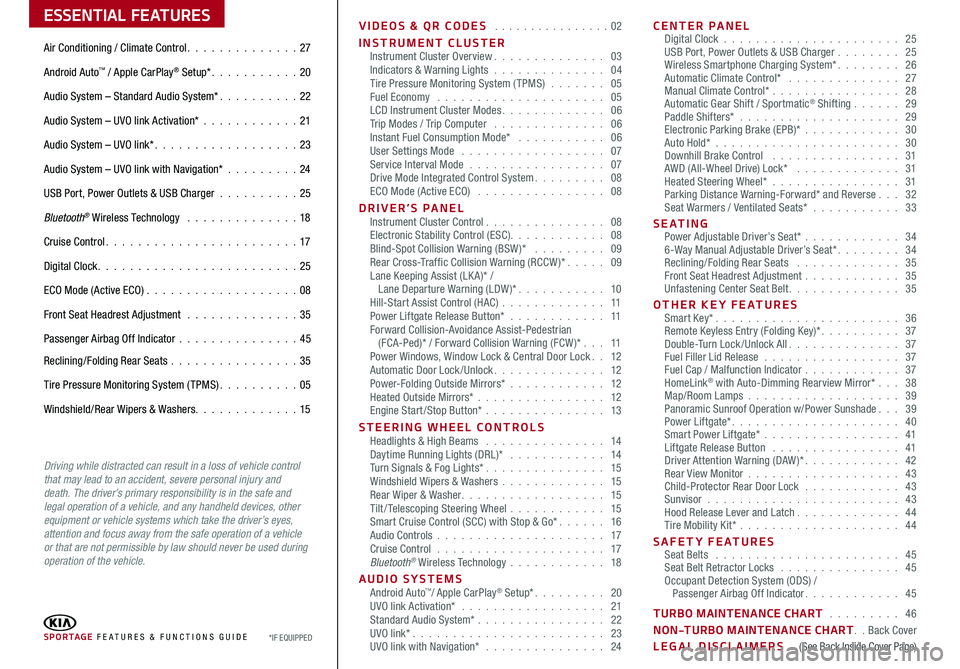
ESSENTIAL FEATURES
SPORTAGE FE ATURES & FUNCTIONS GUIDE*IF EQUIPPED
Air Conditioning / Climate Control 27
Android Auto™ / Apple CarPlay® Setup* 20
Audio System – Standard Audio System* 22
Audio System – UVO link Activation* 21
Audio System – UVO link* 23
Audio System – UVO link with Navigation* 24
USB Port, Power Outlets & USB Charger 25
Bluetooth® Wireless Technology 18
Cruise Control 17
Digital Clock 25
ECO Mode (Active ECO) 08
Front Seat Headrest Adjustment 35
Passenger Airbag Off Indicator 45
Reclining/Folding Rear Seats 35
Tire Pressure Monitoring System (TPMS) 05
Windshield/Rear Wipers & Washers 15
Driving while distracted can result in a loss of vehicle control that may lead to an accident, severe personal injury and death. The driver’s primary responsibility is in the safe and legal operation of a vehicle, and any handheld devices, other equipment or vehicle systems which take the driver’s eyes, attention and focus away from the safe operation of a vehicle or that are not permissible by law should never be used during operation of the vehicle.
VIDEOS & QR CODES 02
INSTRUMENT CLUSTERInstrument Cluster Overview 03Indicators & Warning Lights 04Tire Pressure Monitoring System (TPMS) 05Fuel Economy 05LCD Instrument Cluster Modes 06Trip Modes / Trip Computer 06Instant Fuel Consumption Mode* 06User Settings Mode 07Service Interval Mode 07Drive Mode Integrated Control System 08ECO Mode (Active ECO) 08
DRIVER’S PANEL Instrument Cluster Control 08Electronic Stability Control (ESC) 08Blind-Spot Collision Warning (BSW )* 09Rear Cross-Traffic Collision Warning (RCCW )* 09Lane Keeping Assist (LK A)* / Lane Departure Warning (LDW )* 10Hill-Start Assist Control (HAC) 11Power Liftgate Release Button* 11Forward Collision-Avoidance Assist-Pedestrian (FCA-Ped)* / Forward Collision Warning (FCW )* 11Power Windows, Window Lock & Central Door Lock 12Automatic Door Lock /Unlock 12Power-Folding Outside Mirrors* 12Heated Outside Mirrors* 12Engine Start/Stop Button* 13
STEERING WHEEL CONTROLS Headlights & High Beams 14Daytime Running Lights (DRL)* 14Turn Signals & Fog Lights* 15Windshield Wipers & Washers 15Rear Wiper & Washer 15Tilt/ Telescoping Steering Wheel 15Smart Cruise Control (SCC) with Stop & Go* 16Audio Controls 17Cruise Control 17Bluetooth® Wireless Technology 18
AUDIO SYSTEMS Android Auto™/ Apple CarPlay® Setup* 20UVO link Activation* 21 Standard Audio System* 22UVO link* 23UVO link with Navigation* 24
CENTER PANEL Digital Clock 25USB Port, Power Outlets & USB Charger 25Wireless Smartphone Charging System* 26Automatic Climate Control* 27Manual Climate Control* 28Automatic Gear Shift / Sportmatic® Shifting 29Paddle Shifters* 29Electronic Parking Brake (EPB)* 30Auto Hold*
30Downhill Brake Control 31AWD (All-Wheel Drive) Lock* 31Heated Steering Wheel* 31Parking Distance Warning-Forward* and Reverse 32Seat Warmers / Ventilated Seats* 33
S E AT I N G Power Adjustable Driver’s Seat* 346-Way Manual Adjustable Driver’s Seat* 34Reclining/Folding Rear Seats 35Front Seat Headrest Adjustment 35Unfastening Center Seat Belt 35
OTHER KEY FEATURES Smart Key* 36Remote Keyless Entry (Folding Key)* 37Double-Turn Lock /Unlock All 37Fuel Filler Lid Release 37Fuel Cap / Malfunction Indicator 37HomeLink® with Auto-Dimming Rearview Mirror* 38Map/Room Lamps 39Panoramic Sunroof Operation w/Power Sunshade 39Power Liftgate* 40Smart Power Liftgate* 41 Liftgate Release Button 41Driver Attention Warning (DAW)* 42Rear View Monitor 43Child-Protector Rear Door Lock 43Sunvisor 43Hood Release Lever and Latch 44Tire Mobility Kit* 44
SAFETY FEATURES Seat Belts 45Seat Belt Retractor Locks 45Occupant Detection System (ODS) / Passenger Airbag Off Indicator 45
TURBO MAINTENANCE CHART 46
NON-TURBO MAINTENANCE CHART Back Cover
LEGAL DISCLAIMERS (See Back Inside Cover Page)
Page 6 of 52
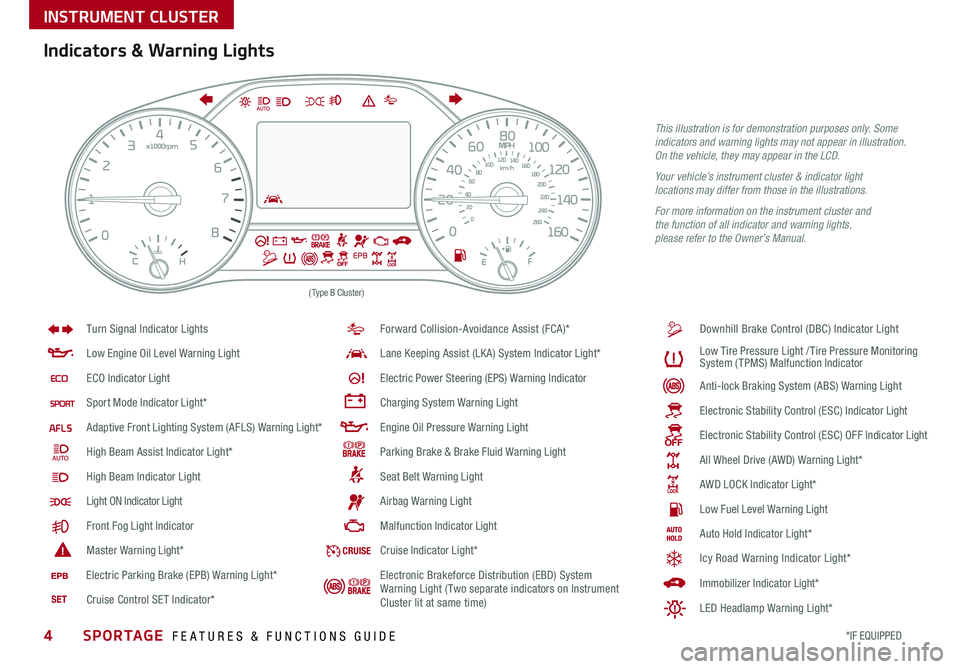
4*IF EQUIPPED SPORTAGE FEATURES & FUNCTIONS GUIDE
INSTRUMENT CLUSTER
(Type B Cluster)
Anti -lo ck B ra k in g S ys te m ( AB S) W arnin g L ight
Low E ngin e O il L eve l W arnin g L ight
EC O I ndic ato r Light
Sport M od e I ndic ato r Ligh t*
Adapt iv e F ro n t L ighti ng S ys te m ( AFL S ) W arnin g L ight*
High B eam A ssis t I ndic ato r Ligh t*
High B eam Indicator Light
Light ON Indicator Light
F ro n t F og L ight Indic ato r
Maste r W arnin g Light*
Forward Collision-Avoidance Assist (FCA)*
Lan e Keeping Assist (LKA) System I ndic ato r Ligh t*
Ele ctr ic P ow er S te erin g (EPS) W arnin g Indic ato r
Chargin g S ys te m W arnin g L ight
Engin e O il P re ssu re W arnin g L ight
Park in g B ra ke & B ra ke F luid W arnin g L ight
Sea t B elt W arnin g L ight Downhill Brake Control (DBC) Indicator Light
A
ir b ag W arnin g L ight
Malf u n ctio n I ndic ato r Light
Turn Signal Indicator Lights
L
ow T ir e P re ssu re L igh t /Tir e P re ssu re M on it o rin g
S ys te m ( TPMS ) Malf u n ctio n I ndic ato r
Ele ctro nic S ta b ili ty C on tro l (ES C ) I ndic ato r Light
Ele ctr o n ic S ta b ili ty C on tro l (ES C ) O FF I ndic ato r Light
All Wheel Drive (AWD) W arnin g L ight*
A W D L OCK I ndic ato r Light*
Low F uel L eve l W arnin g L ight
CR UI SECru is e I ndic ato r Ligh t*
A uto H old I ndic ato r Ligh t*
I m m ob ili ze r I ndic ato r Light*
Icy Road Warning Indicator Light*
LED Headlamp Warning Light*
E le ctr ic P ark in g B ra ke ( EP B ) W arnin g L ight*
Cruise Control SET Indicator* Electronic Brakeforce Distribution (EBD) System
Warning Light (Two separate indicators on Instrument
Cluster lit at same time)
Indicators & Warning Lights
This illustration is for demonstration purposes only. Some indicators and warning lights may not appear in illustration. On the vehicle, they may appear in the LCD.
Your vehicle’s instrument cluster & indicator light locations may differ from those in the illustrations.
For more information on the instrument cluster and the function of all indicator and warning lights, please refer to the Owner’s Manual.
Page 13 of 52
DRIVER'S PANEL
11ALWAYS CHECK THE OWNER’S MANUAL FOR COMPLETE OPER ATING INFORMATION AND SAFET Y WARNINGS *IF EQUIPPED †LEGAL DISCL AIMERS ON BACK INSIDE COVER
Forward Collision-Avoidance Assist-
Pedestrian (FCA-Ped)*†6 /
Forward Collision Warning (FCW)*†6
The FCA-Ped is designed to help alert the driver and, under certain
conditions, apply emergency braking when rapidly approaching a
vehicle that is slowing down, braking or stopped Initially, the FCA-
Ped provides Forward Collision Warning (FCW ) when it detects a
potential collision with a vehicle in front emitting an audible warning
and visual alert on the instrument cluster Adjust the alert settings
(Late, Normal, Early) in the User Settings To turn the FCA-Ped/FCW
off, go to User Settings again and turn off
If the system detects that the collision risk has increased, the Forward
Collision-Avoidance Assist-Pedestrian (FCA-Ped) automatically applies
the brakes to reduce your speed, potentially helping to reduce the
effects of a possible collision FCA-Ped can be turned ON in the User
Settings menu on the Instrument Cluster display
The FCA-Ped/FCW will become active when the:
• Engine Start /Stop button is ON
• Vehicle is traveling faster than 5 mph
• Electronic Stability Control (ESC) is ON
Forward Collision-Avoidance Assist Video
To view a video on your mobile device, snap this QR Code or visit the listed website
Refer to page 2 for more information
www.youtube.com/KiaFeatureVideos
QR CODEHill-Start Assist Control (HAC)†8
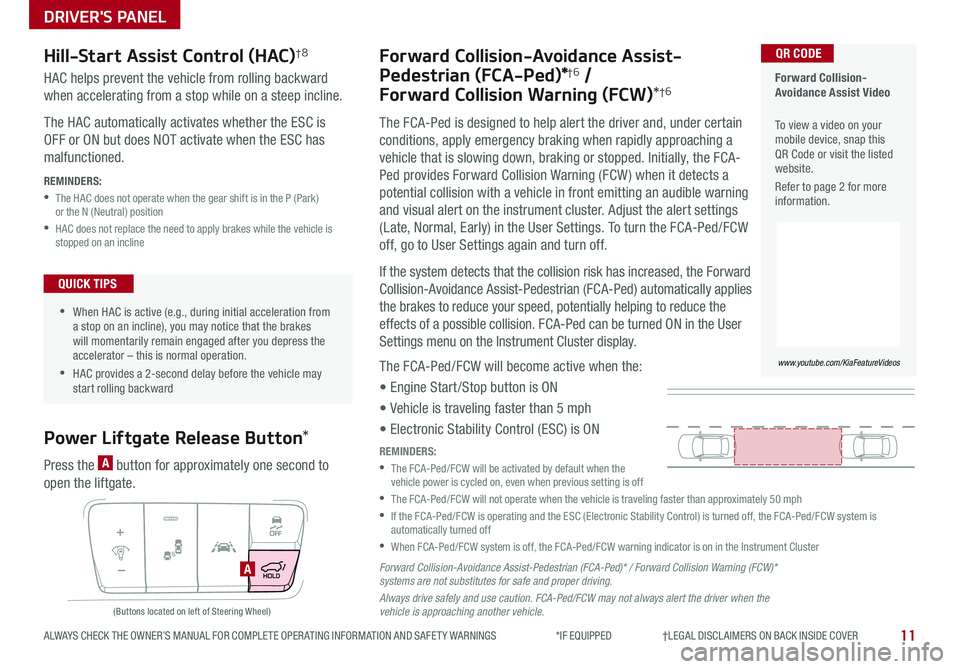
Power Liftgate Release Button*
HAC helps prevent the vehicle from rolling backward
when accelerating from a stop while on a steep incline
The HAC automatically activates whether the ESC is
OFF or ON but does NOT activate when the ESC has
malfunctioned
REMINDERS:
•
The HAC does not operate when the gear shift is in the P (Park) or the N (Neutral) position
•
HAC does not replace the need to apply brakes while the vehicle is stopped on an incline
Press the A button for approximately one second to
open the liftgate
A
(Buttons located on left of Steering Wheel)
•
•When HAC is active (e g , during initial acceleration from a stop on an incline), you may notice that the brakes will momentarily remain engaged after you depress the accelerator – this is normal operation
•HAC provides a 2-second delay before the vehicle may start rolling backward
QUICK TIPS
REMINDERS:
•
The FCA-Ped/FCW will be activated by default when the vehicle power is cycled on, even when previous setting is off
•
The FCA-Ped/FCW will not operate when the vehicle is traveling faster than approximately 50 mph
•
If the FCA-Ped/FCW is operating and the ESC (Electronic Stability Control) is turned off, the FCA-Ped/FCW system is automatically turned off
•When FCA-Ped/FCW system is off, the FCA-Ped/FCW warning indicator is on in the Instrument Cluster
Forward Collision-Avoidance Assist-Pedestrian (FCA-Ped)* / Forward Collision Warning (FCW)* systems are not substitutes for safe and proper driving.
Always drive safely and use caution. FCA-Ped/FCW may not always alert the driver when the vehicle is approaching another vehicle.
Page 15 of 52
DRIVER'S PANEL
13ALWAYS CHECK THE OWNER’S MANUAL FOR COMPLETE OPER ATING INFORMATION AND SAFET Y WARNINGS *IF EQUIPPED †LEGAL DISCL AIMERS ON BACK INSIDE COVER
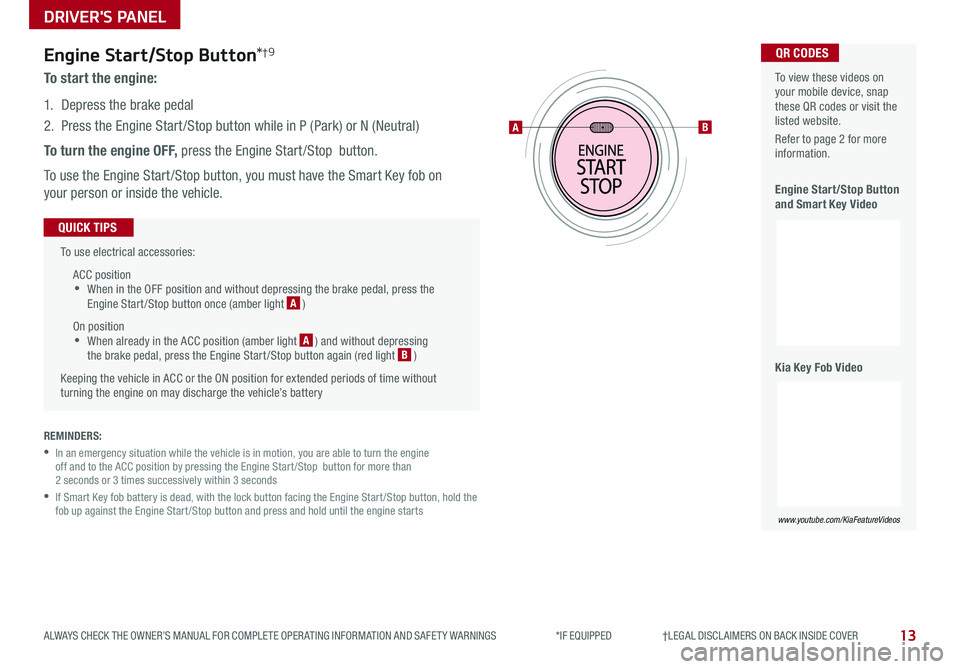
Engine Start/Stop Button*†9
To start the engine:
1 Depress the brake pedal
2
Press the Engine Start /Stop button while in P (Park) or N (Neutral)
To turn the engine OFF, press the Engine Start /Stop button
To use the Engine Start /Stop button, you must have the Smart Key fob on
your person or inside the vehicle
To use electrical accessories:
ACC position •When in the OFF position and without depressing the brake pedal, press the Engine Start /Stop button once (amber light A )
On position •When already in the ACC position (amber light A ) and without depressing the brake pedal, press the Engine Start /Stop button again (red light B )
Keeping the vehicle in ACC or the ON position for extended periods of time without turning the engine on may discharge the vehicle’s battery
QUICK TIPS
AB
To view these videos on your mobile device, snap these QR codes or visit the listed website
Refer to page 2 for more information
Engine Start/Stop Button and Smart Key Video
Kia Key Fob Video
www.youtube.com/KiaFeatureVideos
www.youtube.com/KiaFeatureVideos
QR CODES
REMINDERS:
•
In an emergency situation while the vehicle is in motion, you are able to turn the engine off and to the ACC position by pressing the Engine Start /Stop button for more than 2 seconds or 3 times successively within 3 seconds
•
If Smart Key fob battery is dead, with the lock button facing the Engine Start /Stop button, hold the fob up against the Engine Start /Stop button and press and hold until the engine starts
Page 16 of 52
STEERING WHEEL CONTROLS
14*IF EQUIPPED SPORTAGE FEATURES & FUNCTIONS GUIDE
Headlights & High Beams
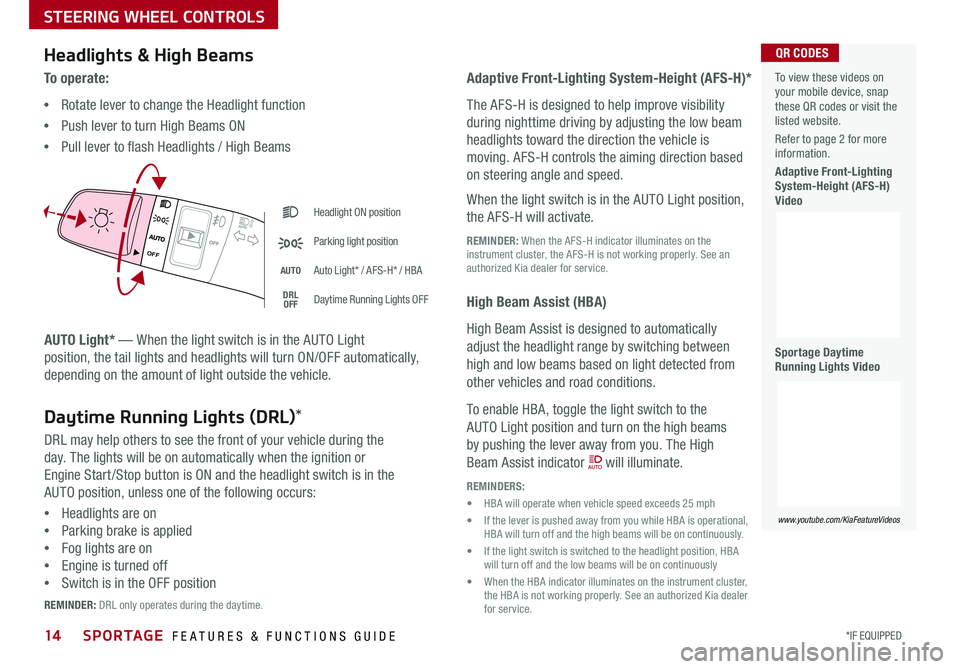
AUTO Light* — When the light switch is in the AUTO Light
position, the tail lights and headlights will turn ON/OFF automatically,
depending on the amount of light outside the vehicle
To o p e r a t e :
•Rotate lever to change the Headlight function
•Push lever to turn High Beams ON
•Pull lever to flash Headlights / High Beams
Adaptive Front-Lighting System-Height (AFS-H)*
The AFS-H is designed to help improve visibility
during nighttime driving by adjusting the low beam
headlights toward the direction the vehicle is
moving AFS-H controls the aiming direction based
on steering angle and speed
When the light switch is in the AUTO Light position,
the AFS-H will activate
REMINDER: When the AFS-H indicator illuminates on the instrument cluster, the AFS-H is not working properly See an authorized Kia dealer for service
High Beam Assist (HBA)
High Beam Assist is designed to automatically
adjust the headlight range by switching between
high and low beams based on light detected from
other vehicles and road conditions
To enable HBA, toggle the light switch to the
AUTO Light position and turn on the high beams
by pushing the lever away from you The High
Beam Assist indicator will illuminate
REMINDERS:
• HBA will operate when vehicle speed exceeds 25 mph
• If the lever is pushed away from you while HBA is operational, HBA will turn off and the high beams will be on continuously
• If the light switch is switched to the headlight position, HBA will turn off and the low beams will be on continuously
• When the HBA indicator illuminates on the instrument cluster, the HBA is not working properly See an authorized Kia dealer for service
Headlight ON position
Parking light position
AUTOAuto Light* / AFS-H* / HBA
DRLOFFDaytime Running Lights OFF
AUTO
OF F
OFF
Daytime Running Lights (DRL)*
DRL may help others to see the front of your vehicle during the
day The lights will be on automatically when the ignition or
Engine Start /Stop button is ON and the headlight switch is in the
AUTO position, unless one of the following occurs:
•Headlights are on
•Parking brake is applied
•Fog lights are on
•Engine is turned off
•Switch is in the OFF position
REMINDER: DRL only operates during the daytime
To view these videos on your mobile device, snap these QR codes or visit the listed website
Refer to page 2 for more information
Adaptive Front-Lighting System-Height (AFS-H) Video
Sportage Daytime Running Lights Video
www.youtube.com/KiaFeatureVideos
QR CODES
Page 18 of 52
SPORTAGE FEATURES & FUNCTIONS GUIDE
STEERING WHEEL CONTROLS
16*IF EQUIPPED †LEGAL DISCL AIMERS ON BACK INSIDE COVER
OK
Images are for illustrative purposes only and may vary on actual vehicle.
60
60
60
60
Smart Cruise ControlCancelledEG
( Type B; buttons located on right side of Steering Wheel)
A
B
DF
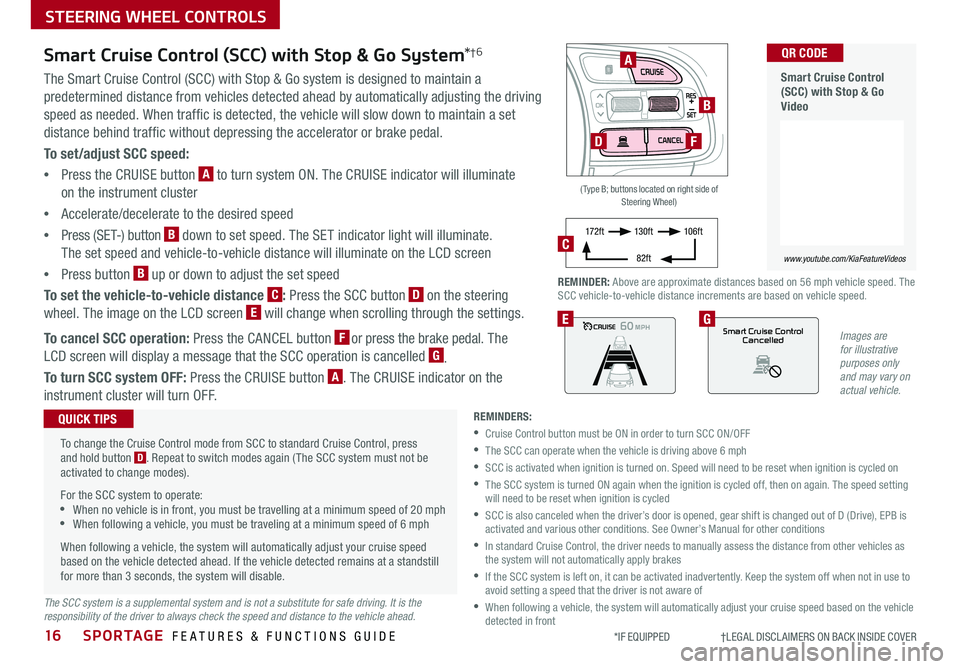
REMINDER: Above are approximate distances based on 56 mph vehicle speed The SCC vehicle-to-vehicle distance increments are based on vehicle speed
17 2 f t13 0 f t
82ft
10 6 f tC
Smart Cruise Control (SCC) with Stop & Go System*†6
The Smart Cruise Control (SCC) with Stop & Go system is designed to maintain a
predetermined distance from vehicles detected ahead by automatically adjusting the driving
speed as needed When traffic is detected, the vehicle will slow down to maintain a set
distance behind traffic without depressing the accelerator or brake pedal
To set/adjust SCC speed:
•Press the CRUISE button A to turn system ON The CRUISE indicator will illuminate
on the instrument cluster
•Accelerate/decelerate to the desired speed
•Press (SET-) button B down to set speed The SET indicator light will illuminate
The set speed and vehicle-to-vehicle distance will illuminate on the LCD screen
•Press button B up or down to adjust the set speed
To set the vehicle-to-vehicle distance C: Press the SCC button D on the steering
wheel The image on the LCD screen E will change when scrolling through the settings
To cancel SCC operation: Press the CANCEL button F or press the brake pedal The
LCD screen will display a message that the SCC operation is cancelled G
To turn SCC system OFF: Press the CRUISE button A The CRUISE indicator on the
instrument cluster will turn OFF
REMINDERS:
•Cruise Control button must be ON in order to turn SCC ON/OFF
•The SCC can operate when the vehicle is driving above 6 mph
•
SCC is activated when ignition is turned on Speed will need to be reset when ignition is cycled on
•
The SCC system is turned ON again when the ignition is cycled off, then on again The speed setting will need to be reset when ignition is cycled
•
SCC is also canceled when the driver’s door is opened, gear shift is changed out of D (Drive), EPB is activated and various other conditions See Owner’s Manual for other conditions
•
In standard Cruise Control, the driver needs to manually assess the distance from other vehicles as the system will not automatically apply brakes
•
If the SCC system is left on, it can be activated inadvertently Keep the system off when not in use to avoid setting a speed that the driver is not aware of
•
When following a vehicle, the system will automatically adjust your cruise speed based on the vehicle detected in front
To change the Cruise Control mode from SCC to standard Cruise Control, press and hold button D Repeat to switch modes again ( The SCC system must not be activated to change modes)
For the SCC system to operate: •When no vehicle is in front, you must be travelling at a minimum speed of 20 mph •When following a vehicle, you must be traveling at a minimum speed of 6 mph
When following a vehicle, the system will automatically adjust your cruise speed based on the vehicle detected ahead If the vehicle detected remains at a standstill for more than 3 seconds, the system will disable
QUICK TIPS
The SCC system is a supplemental system and is not a substitute for safe driving. It is the responsibility of the driver to always check the speed and distance to the vehicle ahead.
Smart Cruise Control (SCC) with Stop & Go Video
QR CODE
www.youtube.com/KiaFeatureVideos
Page 19 of 52
17
STEERING WHEEL CONTROLS
ALWAYS CHECK THE OWNER’S MANUAL FOR COMPLETE OPER ATING INFORMATION AND SAFET Y WARNINGS *IF EQUIPPED †LEGAL DISCL AIMERS ON BACK INSIDE COVER
OK
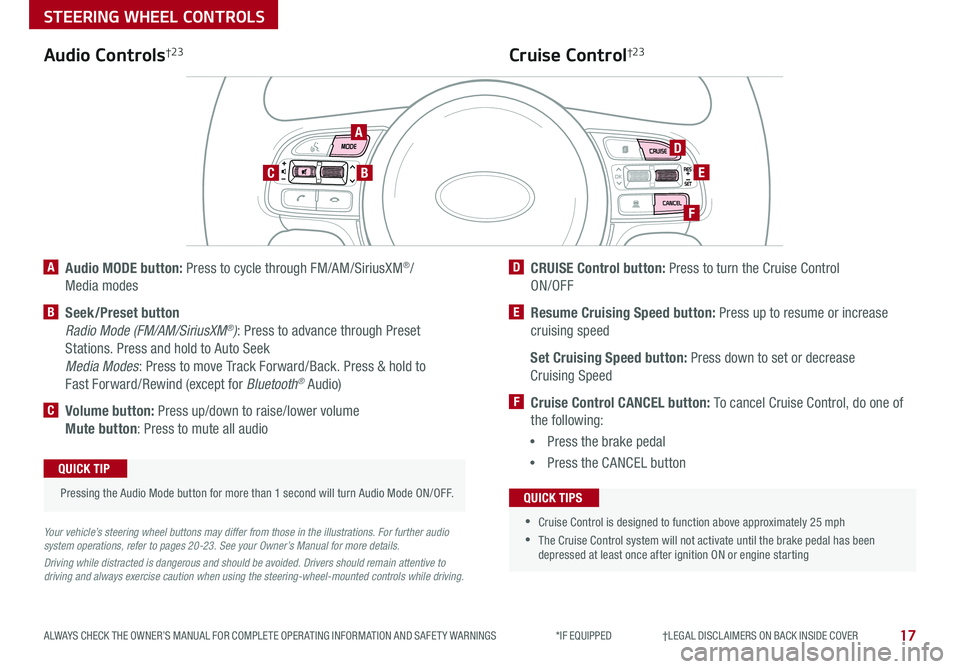
A Audio MODE button: Press to cycle through FM/AM/SiriusXM®/
Media modes
B Seek/Preset button
Radio Mode (FM/AM/SiriusXM®): Press to advance through Preset
Stations Press and hold to Auto Seek
Media Modes: Press to move Track Forward/Back Press & hold to
Fast Forward/Rewind (except for Bluetooth® Audio)
C Volume button: Press up/down to raise/lower volume
Mute button: Press to mute all audio
D CRUISE Control button: Press to turn the Cruise Control
ON/OFF
E Resume Cruising Speed button: Press up to resume or increase
cruising speed
Set Cruising Speed button: Press down to set or decrease
Cruising Speed
F Cruise Control CANCEL button: To cancel Cruise Control, do one of
the following:
•Press the brake pedal
•Press the CANCEL button
Cruise Control†2 3Audio Controls†2 3
Your vehicle’s steering wheel buttons may differ from those in the illustrations. For further audio system operations, refer to pages 20-23. See your Owner’s Manual for more details.
Driving while distracted is dangerous and should be avoided. Drivers should remain attentive to driving and always exercise caution when using the steering-wheel-mounted controls while driving.
Pressing the Audio Mode button for more than 1 second will turn Audio Mode ON/OFF
QUICK TIP
•
•Cruise Control is designed to function above approximately 25 mph
•The Cruise Control system will not activate until the brake pedal has been depressed at least once after ignition ON or engine starting
QUICK TIPS
A
BC
D
E
F
Page 31 of 52
29
CENTER PANEL
ALWAYS CHECK THE OWNER’S MANUAL FOR COMPLETE OPER ATING INFORMATION AND SAFET Y WARNINGS *IF EQUIPPED †LEGAL DISCL AIMERS ON BACK INSIDE COVER
Sportmatic® Shifting Video To view a video on your mobile device, snap this QR Code or visit the listed website
Refer to page 2 for more information
www.youtube.com/KiaFeatureVideos
QR CODE
REMINDER: When in Manual mode, pulling the left and right paddle shifters at the same time will NOT shift gears
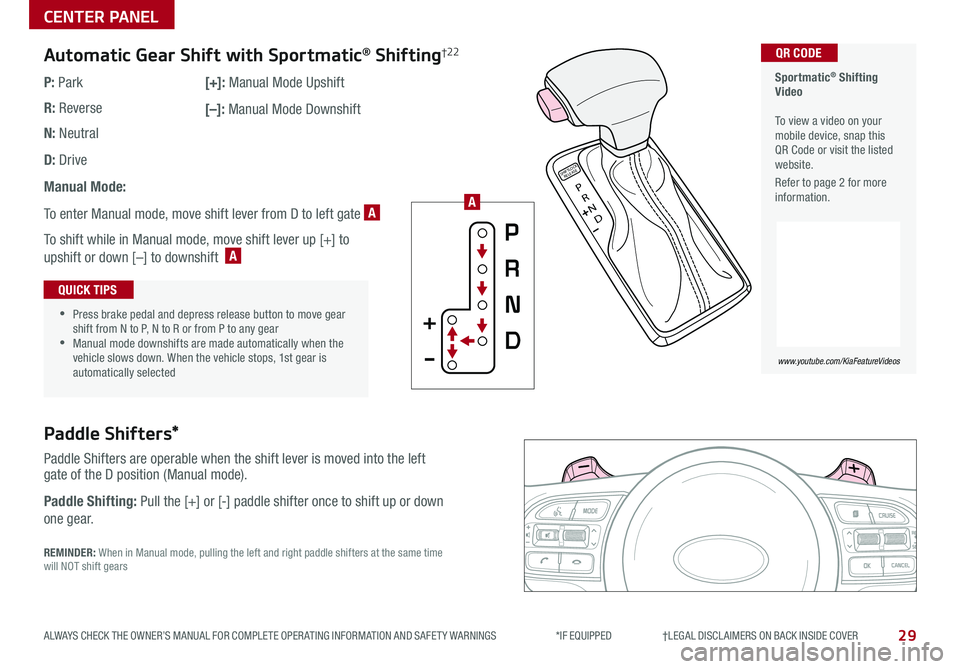
Paddle Shifters*
Paddle Shifters are operable when the shift lever is moved into the left gate of the D position (Manual mode)
Paddle Shifting: Pull the [+] or [-] paddle shifter once to shift up or down
one gear
P
R
N
D
SHIFTL OCK
RELEASE
Automatic Gear Shift with Sportmatic® Shifting†2 2
P: Park
R: Reverse
N: Neutral
D: Drive
Manual Mode:
To enter Manual mode, move shift lever from D to left gate A
To shift while in Manual mode, move shift lever up [+] to
upshift or down [–] to downshift A
[+]: Manual Mode Upshift
[–]: Manual Mode Downshift
•
•Press brake pedal and depress release button to move gear shift from N to P, N to R or from P to any gear •Manual mode downshifts are made automatically when the vehicle slows down When the vehicle stops, 1st gear is automatically selected
QUICK TIPS
A
Page 32 of 52
30SPORTAGE FEATURES & FUNCTIONS GUIDE
CENTER PANEL
*IF EQUIPPED †LEGAL DISCL AIMERS ON BACK INSIDE COVER
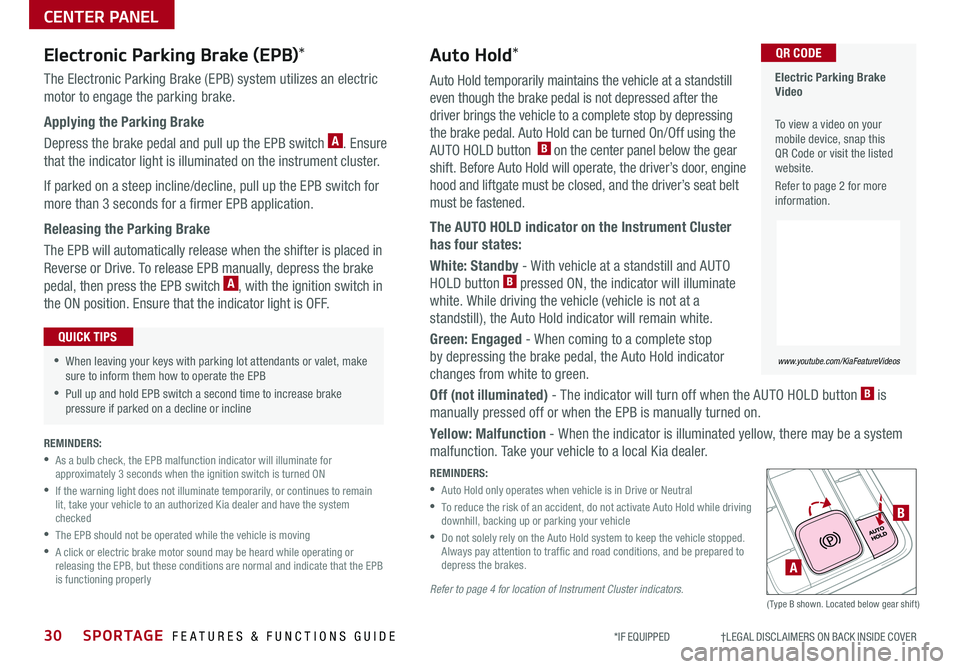
Auto Hold temporarily maintains the vehicle at a standstill
even though the brake pedal is not depressed after the
driver brings the vehicle to a complete stop by depressing
the brake pedal Auto Hold can be turned On/Off using the
AUTO HOLD button B on the center panel below the gear
shift Before Auto Hold will operate, the driver’s door, engine
hood and liftgate must be closed, and the driver’s seat belt
must be fastened
The AUTO HOLD indicator on the Instrument Cluster
has four states:
White: Standby - With vehicle at a standstill and AUTO
HOLD button B pressed ON, the indicator will illuminate
white While driving the vehicle (vehicle is not at a
standstill), the Auto Hold indicator will remain white
Green: Engaged - When coming to a complete stop
by depressing the brake pedal, the Auto Hold indicator
changes from white to green
Off (not illuminated) - The indicator will turn off when the AUTO HOLD button B is
manually pressed off or when the EPB is manually turned on
Yellow: Malfunction - When the indicator is illuminated yellow, there may be a system
malfunction Take your vehicle to a local Kia dealer
REMINDERS:
•
Auto Hold only operates when vehicle is in Drive or Neutral
•
To reduce the risk of an accident, do not activate Auto Hold while driving downhill, backing up or parking your vehicle
•
Do not solely rely on the Auto Hold system to keep the vehicle stopped Always pay attention to traf fic and road conditions, and be prepared to depress the brakes
Refer to page 4 for location of Instrument Cluster indicators.(Type B shown Located below gear shift)
Electronic Parking Brake (EPB)*
The Electronic Parking Brake (EPB) system utilizes an electric
motor to engage the parking brake
Applying the Parking Brake
Depress the brake pedal and pull up the EPB switch A Ensure
that the indicator light is illuminated on the instrument cluster
If parked on a steep incline/decline, pull up the EPB switch for
more than 3 seconds for a firmer EPB application
Releasing the Parking Brake
The EPB will automatically release when the shifter is placed in
Reverse or Drive To release EPB manually, depress the brake
pedal, then press the EPB switch A, with the ignition switch in
the ON position Ensure that the indicator light is O F F
•When leaving your keys with parking lot attendants or valet, make sure to inform them how to operate the EPB
•Pull up and hold EPB switch a second time to increase brake pressure if parked on a decline or incline
QUICK TIPS
A
B
Electric Parking Brake Video
To view a video on your mobile device, snap this QR Code or visit the listed website
Refer to page 2 for more information
www.youtube.com/KiaFeatureVideos
QR CODEAuto Hold*
REMINDERS:
•
As a bulb check, the EPB malfunction indicator will illuminate for approximately 3 seconds when the ignition switch is turned ON
•
If the warning light does not illuminate temporarily, or continues to remain lit, take your vehicle to an authorized Kia dealer and have the system checked
•The EPB should not be operated while the vehicle is moving
•
A click or electric brake motor sound may be heard while operating or releasing the EPB, but these conditions are normal and indicate that the EPB is functioning properly
Page 33 of 52
31
CENTER PANEL
ALWAYS CHECK THE OWNER’S MANUAL FOR COMPLETE OPER ATING INFORMATION AND SAFET Y WARNINGS *IF EQUIPPED †LEGAL DISCL AIMERS ON BACK INSIDE COVER
Downhill Brake Control (DBC)†8AWD (All-Wheel Drive) Lock*
DBC helps drivers maneuver down steep hills by automatically
applying braking inputs , allowing drivers to concentrate on
steering
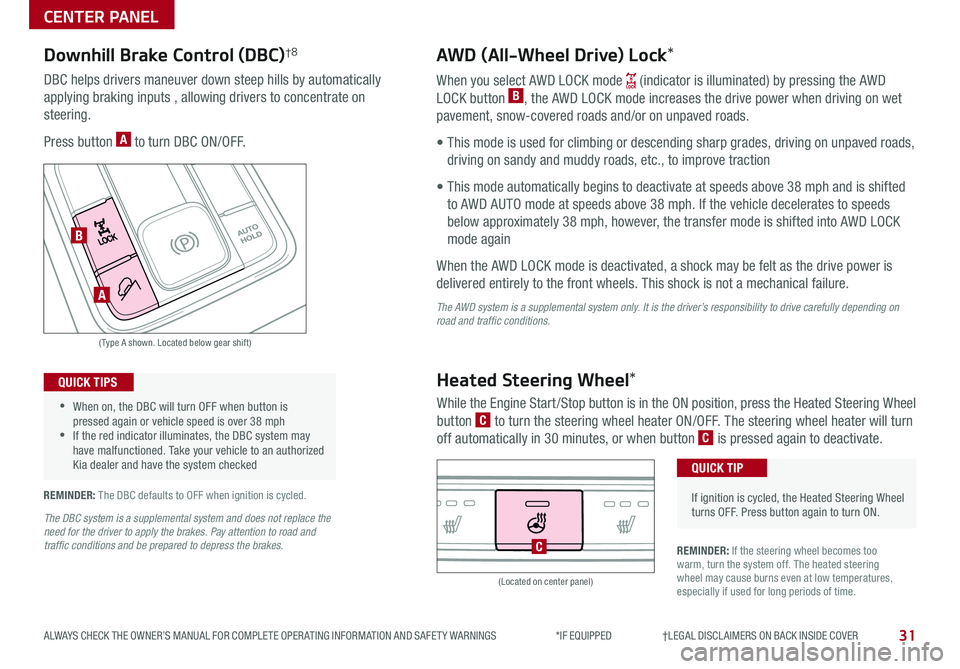
Press button A to turn DBC ON/OFF
When you select AWD LOCK mode (indicator is illuminated) by pressing the AWD
LOCK button B, the AWD LOCK mode increases the drive power when driving on wet
pavement, snow-covered roads and/or on unpaved roads
• This mode is used for climbing or descending sharp grades, driving on unpaved roads,
driving on sandy and muddy roads, etc , to improve traction
• This mode automatically begins to deactivate at speeds above 38 mph and is shifted
to AWD AUTO mode at speeds above 38 mph If the vehicle decelerates to speeds
below approximately 38 mph, however, the transfer mode is shifted into AWD LOCK
mode again
When the AWD LOCK mode is deactivated, a shock may be felt as the drive power is
delivered entirely to the front wheels This shock is not a mechanical failure
The AWD system is a supplemental system only. It is the driver’s responsibility to drive carefully depending on road and traffic conditions.
(Type A shown Located below gear shift)
(Located on center panel)
•
•When on, the DBC will turn OFF when button is pressed again or vehicle speed is over 38 mph •If the red indicator illuminates, the DBC system may have malfunctioned Take your vehicle to an authorized Kia dealer and have the system checked
QUICK TIPS
REMINDER: The DBC defaults to OFF when ignition is cycled
REMINDER: If the steering wheel becomes too warm, turn the system off The heated steering wheel may cause burns even at low temperatures, especially if used for long periods of time
Heated Steering Wheel*
While the Engine Start /Stop button is in the ON position, press the Heated Steering Wheel
button C to turn the steering wheel heater ON/OFF The steering wheel heater will turn
off automatically in 30 minutes, or when button C is pressed again to deactivate
•
If ignition is cycled, the Heated Steering Wheel turns OFF Press button again to turn ON
QUICK TIP
C
A
B
The DBC system is a supplemental system and does not replace the need for the driver to apply the brakes. Pay attention to road and traffic conditions and be prepared to depress the brakes.