Stop and KIA SPORTAGE 2020 Owners Manual
[x] Cancel search | Manufacturer: KIA, Model Year: 2020, Model line: SPORTAGE, Model: KIA SPORTAGE 2020Pages: 611, PDF Size: 15.85 MB
Page 350 of 611
569
Driving your vehicle
FCA warning message and
system control
The FCA system produces warning
messages, warning alarms, and
emergency braking based on the
level of risk of a frontal collision, such
as when a vehicle ahead suddenly
brakes.
The driver can select the initial warn-
ing activation time in the User
Settings in the LCD display. The
options for the initial Forward
Collision Warning include Early,
Normal or Late initial warning time.
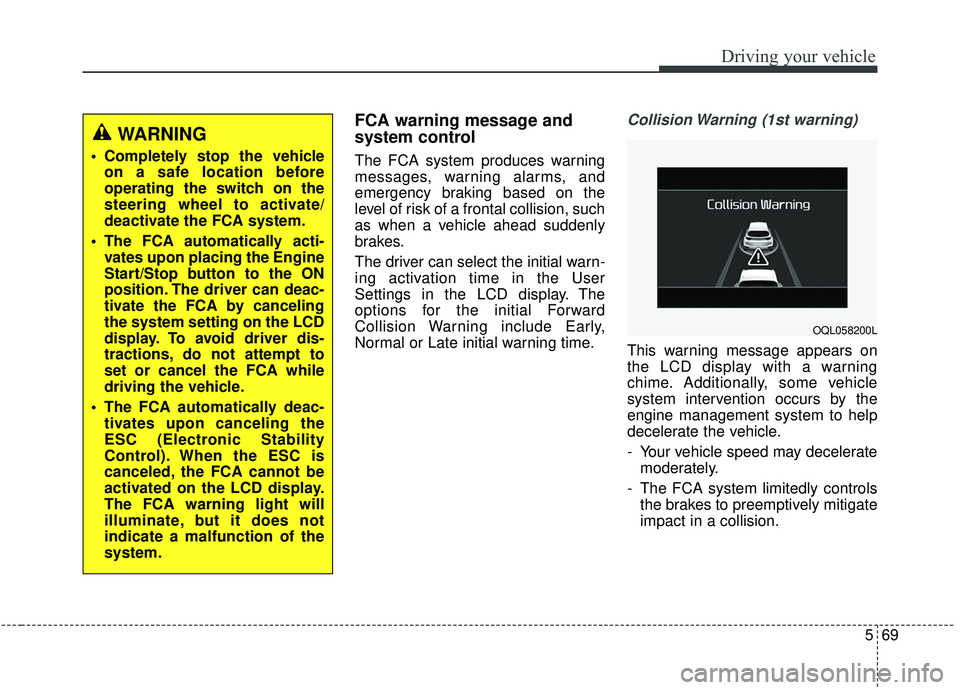
Collision Warning (1st warning)
This warning message appears on
the LCD display with a warning
chime. Additionally, some vehicle
system intervention occurs by the
engine management system to help
decelerate the vehicle.
- Your vehicle speed may deceleratemoderately.
- The FCA system limitedly controls the brakes to preemptively mitigate
impact in a collision.
WARNING
Completely stop the vehicleon a safe location before
operating the switch on the
steering wheel to activate/
deactivate the FCA system.
The FCA automatically acti- vates upon placing the Engine
Start/Stop button to the ON
position. The driver can deac-
tivate the FCA by canceling
the system setting on the LCD
display. To avoid driver dis-
tractions, do not attempt to
set or cancel the FCA while
driving the vehicle.
The FCA automatically deac- tivates upon canceling the
ESC (Electronic Stability
Control). When the ESC is
canceled, the FCA cannot be
activated on the LCD display.
The FCA warning light will
illuminate, but it does not
indicate a malfunction of the
system.
OQL058200L
Page 352 of 611

571
Driving your vehicle
Brake operation
In an urgent situation, the brakingsystem enters into the ready status
for prompt reaction against the dri-
ver’s depressing the brake pedal.
The FCA provides additional brak- ing power for optimum braking per-
formance, when the driver
depresses the brake pedal.
The braking control is automatical- ly deactivated, when the driver
sharply depresses the accelerator
pedal, or when the driver abruptly
operates the steering wheel.
The FCA brake control is automat- ically canceled, when risk factors
disappear.
FCA sensor (Front Radar +
Front View Camera)
In order for the FCA system to oper-
ate properly, always make sure the
sensor or sensor cover are clean and
free of dirt, snow, and debris.
CAUTION
The driver should always paygreat caution to vehicle opera-tion, even though there is nowarning message or warningalarm. The warning of the FCAsystem may not sound if otherwarning sounds are activated.
WARNING
The FCA cannot avoid all colli-
sions. The braking control can-
not completely stop the vehicle.
The driver is responsible to
safely drive and control the
vehicle.
WARNING
The FCA system logic operates
within certain parameters, such
as the distance from the vehicle
or pedestrians ahead, the speed
of the vehicle ahead, and the
driver's vehicle speed. Certain
conditions such as inclement
weather and road conditions
may affect the operation of the
FCA system.
WARNING
Never deliberately drive danger-
ously to activate the system.
OQL058202L
OQL058203L
Page 355 of 611

Driving your vehicle
74
5
System malfunction
When the FCA is not working prop-
erly, the FCA warning light ( ) will
illuminate and the warning mes-
sage will appear for a few seconds.
After the message disappears, the
master warning light ( ) will illu-
minate. In this case, have the vehi-
cle inspected by an authorized Kia
dealer.
The FCA warning message may appear along with the illumination
of the ESC warning light.
OJF058394L
WARNING
The FCA is only a supplemen-tal system for the driver's con-
venience. It is the driver's
responsibility to control the
vehicle operation. Do not
solely depend on the FCA
system. Rather, maintain a
safe braking distance, and, if
necessary, depress the brake
pedal to reduce the driving
speed or stop the vehicle.
In certain instances and under certain driving condi-
tions, the FCA system may
activate unintentionally.
Also, due to sensing limita-
tions, in certain situations,
the front radar sensor or front
view camera recognition sys-
tem may not detect the vehi-
cle or pedestrians ahead. The
FCA system may not activate
and the warning message
may not be displayed.
(Continued)
(Continued)
The FCA system may not acti-vate if the driver applies the
brake pedal to avoid the risk
of a collision.
The brake control may be insufficient, possibly causing
a collision, if a vehicle in front
abruptly stops. Always pay
extreme caution.
The FCA system may not acti- vate according to the road con-
ditions, inclement whether,
driving conditions or traffic
conditions.
The FCA system operates only to detect vehicles and pedestri-
ans in front of the vehicle.
Page 357 of 611

Driving your vehicle
76
5
The camera's field of view is not well
illuminated (either too dark or too
much reflection or too much back-
light that obscures the field of view)
The vehicle in front does not have their rear lights properly turned ON
or their rear lights are located
unusually.
The outside brightness changes suddenly, for example when enter-
ing or exiting a tunnel
When light coming from a street light or an oncoming vehicle is
reflected on a wet road surface
such as a puddle in the road
The field of view in front is obstructed by sun glare or head-
light of oncoming vehicle.
The windshield glass is fogged up
The vehicle in front is driving errat- ically
The vehicle is on unpaved or uneven rough surfaces, or roads
with sudden gradient changes The vehicle is driven near areas
containing metal substances as a
construction zone, railroad, etc.
The vehicle is drives inside a build- ing, such as a basement parking lot
The camera does not recognize the entire vehicle in front.
The camera is damaged.
The brightness outside is too low such as when the headlamps are
not on at night or the vehicle is
going through a tunnel.
Adverse road conditions cause excessive vehicle vibrations while
driving
The sensor recognition changes suddenly when passing over a
speed bump
The shadow is on the road by a median strip, trees, etc.
The vehicle drives through a toll- gate.
The rear part of the vehicle in front is not fully visible. The vehicle in front is moving verti-
cally to the driving direction
The vehicle in front is stopped ver- tically
The vehicle in front is driving towards your vehicle or reversing
You are on a roundabout and the vehicle in front circles
Page 360 of 611

579
Driving your vehicle
When driving in stop-and-go traffic,
and a stopped vehicle in front of you
merges out of the lane, the FCA sys-
tem may not immediately detect the
new vehicle that is now in front of
you. In this case, you must maintain
a safe braking distance, and if nec-
essary, depress the brake pedal to
reduce your driving speed in order to
maintain a safe distance.- Detecting the vehicle in front of you
If the vehicle in front of you has cargo
that extends rearward from the cab,
or when the vehicle in front of you
has higher ground clearance, addi-
tional special attention is required.
The FCA system may not be able to
detect the cargo extending from the
vehicle. In these instances, you must
maintain a safe braking distance
from the rearmost object, and if nec-
essary, depress the brake pedal to
reduce your driving speed in order to
maintain distance.
Detecting pedestrians
The sensor may be limited when:
The pedestrian is not fully detected
by the camera recognition system,
for example, if the pedestrian is
leaning over or is not fully walking
upright
The pedestrian is moving very quickly or appears abruptly in the
camera detection area
The pedestrian is wearing clothing that easily blends into the back-
ground, making it difficult to be
detected by the camera recogni-
tion system
The outside lighting is too bright (e.g. when driving in bright sunlight
or in sun glare) or too dark (e.g.
when driving on a dark rural road
at night)
It is difficult to detect and distin- guish the pedestrian from other
objects in the surroundings, for
example, when there is a group of
pedestrians, or a large crowd.
OUM054046LOQL058204L
Page 362 of 611
581
Driving your vehicle
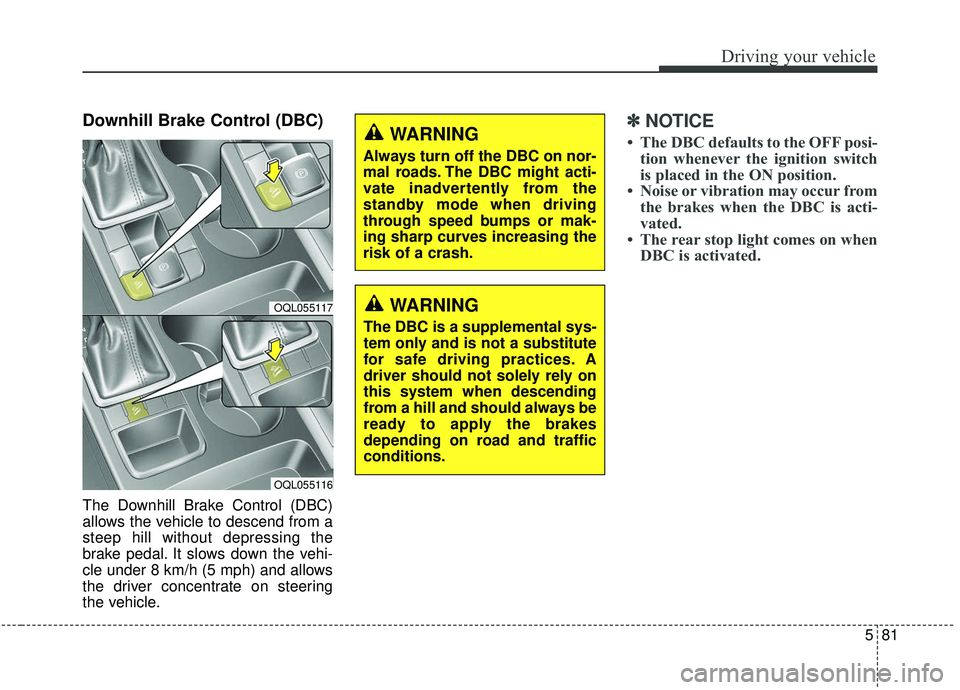
Downhill Brake Control (DBC)
The Downhill Brake Control (DBC)
allows the vehicle to descend from a
steep hill without depressing the
brake pedal. It slows down the vehi-
cle under 8 km/h (5 mph) and allows
the driver concentrate on steering
the vehicle.
✽ ✽NOTICE
• The DBC defaults to the OFF posi-
tion whenever the ignition switch
is placed in the ON position.
• Noise or vibration may occur from the brakes when the DBC is acti-
vated.
• The rear stop light comes on when DBC is activated.
OQL055117
OQL055116
WARNING
Always turn off the DBC on nor-
mal roads. The DBC might acti-
vate inadvertently from the
standby mode when driving
through speed bumps or mak-
ing sharp curves increasing the
risk of a crash.
WARNING
The DBC is a supplemental sys-
tem only and is not a substitute
for safe driving practices. A
driver should not solely rely on
this system when descending
from a hill and should always be
ready to apply the brakes
depending on road and traffic
conditions.
Page 364 of 611
583
Driving your vehicle
Good braking practices
Wet brakes can be dangerous! The
brakes may get wet if the vehicle is
driven through standing water or if it
is washed. Your vehicle will not stop
as quickly if the brakes are wet. Wet
brakes may cause the vehicle to pull
to one side.To dry the brakes, apply the brakes
lightly until the braking action returns
to normal, taking care to keep the
vehicle under control at all times. If
the braking action does not return to
normal, stop as soon as it is safe to
do so and we recommend that you
call an authorized Kia dealer for
assistance.
DO NOT drive with your foot resting
on the brake pedal. Even light, but
constant pedal pressure can result in
the brakes overheating, brake wear,
and possibly even brake failure.
If a tire goes flat while you are driv-
ing, apply the brakes gently and
keep the vehicle pointed straight
ahead while you slow down. When
you are moving slowly enough for it
to be safe to do so, pull off the road
and stop in a safe location.
Keep your foot firmly on the brake
pedal when the vehicle is stopped to
prevent the vehicle from rolling for-
ward.
WARNING
Whenever leaving the vehicle or
parking, always come to a com-
plete stop and continue to
depress the brake pedal. Move
the shift lever into the P (Park)
position, then apply the parking
brake, and place the Engine
Start/Stop button in the OFF
position.
Vehicles with the parking brake
not fully engaged are at risk for
moving inadvertently and caus-
ing injury to yourself or others.
Page 369 of 611
Driving your vehicle
88
5
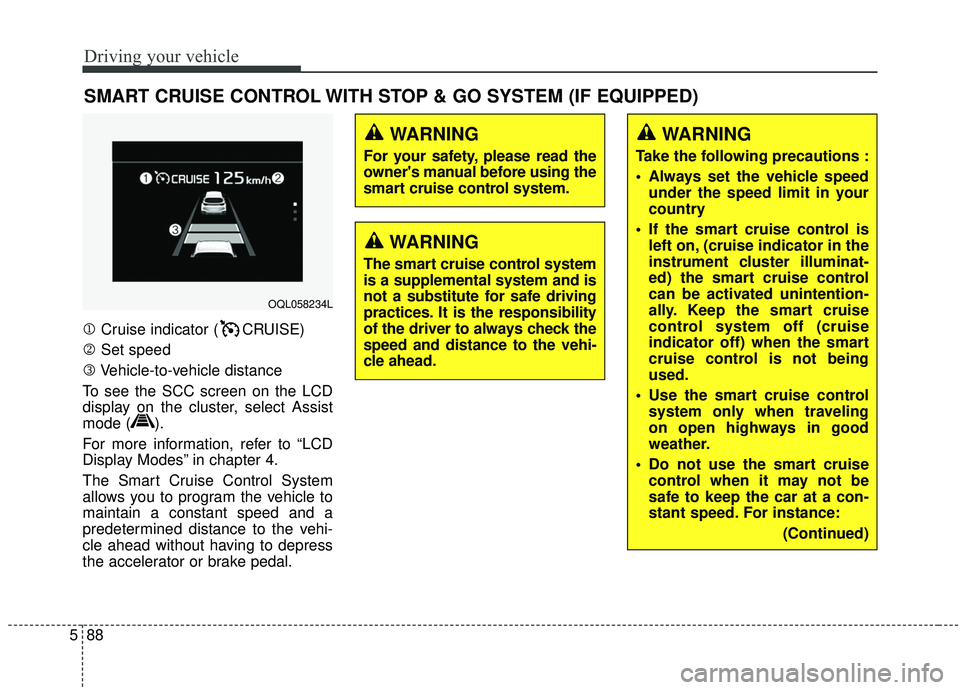
1 Cruise indicator ( CRUISE)
2 Set speed
3 Vehicle-to-vehicle distance
To see the SCC screen on the LCD
display on the cluster, select Assist
mode ( ).
For more information, refer to “LCD
Display Modes” in chapter 4.
The Smart Cruise Control System
allows you to program the vehicle to
maintain a constant speed and a
predetermined distance to the vehi-
cle ahead without having to depress
the accelerator or brake pedal.
SMART CRUISE CONTROL WITH STOP & GO SYSTEM (IF EQUIPPED)
WARNING
For your safety, please read the
owner's manual before using the
smart cruise control system.
WARNING
The smart cruise control system
is a supplemental system and is
not a substitute for safe driving
practices. It is the responsibility
of the driver to always check the
speed and distance to the vehi-
cle ahead.
OQL058234L
WARNING
Take the following precautions :
Always set the vehicle speed under the speed limit in your
country
If the smart cruise control is left on, (cruise indicator in the
instrument cluster illuminat-
ed) the smart cruise control
can be activated unintention-
ally. Keep the smart cruise
control system off (cruise
indicator off) when the smart
cruise control is not being
used.
Use the smart cruise control system only when traveling
on open highways in good
weather.
Do not use the smart cruise control when it may not be
safe to keep the car at a con-
stant speed. For instance:
(Continued)
Page 374 of 611

593
Driving your vehicle
Cancelled automatically
The driver's door is opened.
The shift lever is shifted to N(Neutral), R (Reverse) or P (Paking).
The EPB (electronic parking brake) is applied.
The vehicle speed is over 190 km/h (120 mph).
The ESC, ABS or TCS is operating.
The ESC is turned off.
The sensor or the cover is dirty or covered with foreign matter.
The vehicle is stopped for a certain period of time.
The driver starts driving by pushing the toggle switch up (RES+)/down
(SET-) or depressing the accelera-
tor pedal, after stopping the vehicle
with a vehicle stopped far away in
front.
The accelerator pedal is continu- ously depressed for long time.
When engine is stopped by ISG (Idle Stop and Go) mode.
The engine speed is in dangerous range. When the braking control is operat-
ed for Forward Collision-Avoidance
Assist(FCA).
The driver starts driving by pushing the toggle switch up (RES+)/down
(SET-) or depressing the accelera-
tor pedal, after the vehicle is
stopped by the Smart Cruise
Control system with no other vehi-
cle ahead.
The vehicle stops and goes repeat- edly for a long period of time.
The engine performance is abnor- mal. Each of these actions will cancel the
smart cruise control operation. (the
set speed and vehicle to vehicle dis-
tance on the LCD display will go off.)
If the smart cruise control is can-
celled automatically, the smart cruise
control will not resume even though
the RES+ or SET-lever is moved.
✽ ✽
NOTICE
If the smart cruise control is can-
celled, take your vehicle to an
authorized Kia dealer and have the
system checked.
Page 380 of 611
599
Driving your vehicle
In traffic situation
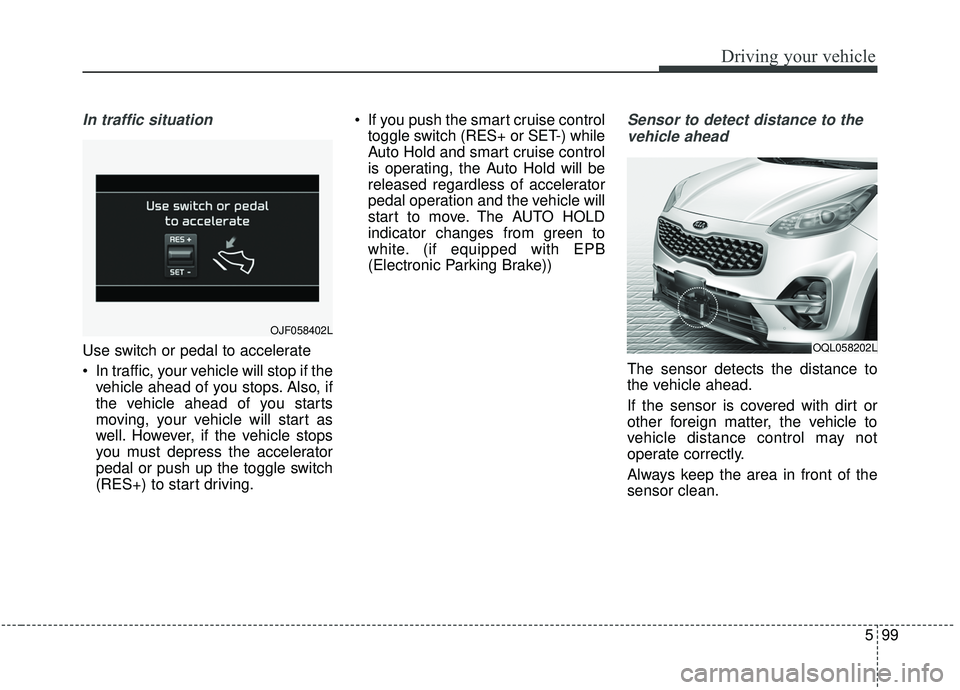
Use switch or pedal to accelerate
In traffic, your vehicle will stop if thevehicle ahead of you stops. Also, if
the vehicle ahead of you starts
moving, your vehicle will start as
well. However, if the vehicle stops
you must depress the accelerator
pedal or push up the toggle switch
(RES+) to start driving. If you push the smart cruise control
toggle switch (RES+ or SET-) while
Auto Hold and smart cruise control
is operating, the Auto Hold will be
released regardless of accelerator
pedal operation and the vehicle will
start to move. The AUTO HOLD
indicator changes from green to
white. (if equipped with EPB
(Electronic Parking Brake))
Sensor to detect distance to the
vehicle ahead
The sensor detects the distance to
the vehicle ahead.
If the sensor is covered with dirt or
other foreign matter, the vehicle to
vehicle distance control may not
operate correctly.
Always keep the area in front of the
sensor clean.
OJF058402L
OQL058202L