key KIA SPORTAGE 2020 Owner's Manual
[x] Cancel search | Manufacturer: KIA, Model Year: 2020, Model line: SPORTAGE, Model: KIA SPORTAGE 2020Pages: 611, PDF Size: 15.85 MB
Page 111 of 611
423
Features of your vehicle
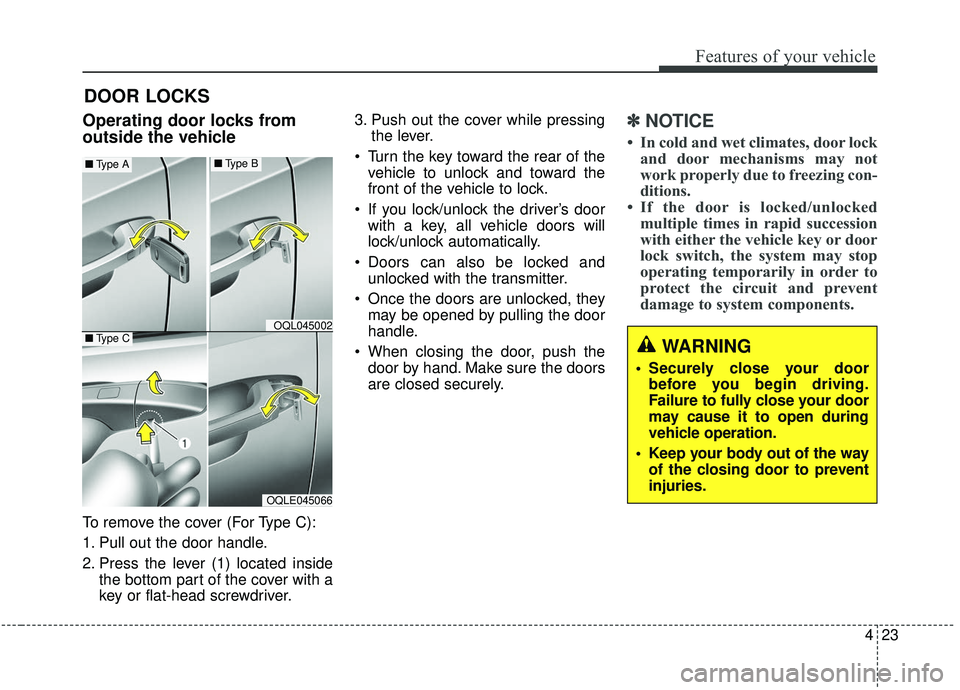
Operating door locks from
outside the vehicle
To remove the cover (For Type C):
1. Pull out the door handle.
2. Press the lever (1) located insidethe bottom part of the cover with a
key or flat-head screwdriver. 3. Push out the cover while pressing
the lever.
Turn the key toward the rear of the vehicle to unlock and toward the
front of the vehicle to lock.
If you lock/unlock the driver’s door with a key, all vehicle doors will
lock/unlock automatically.
Doors can also be locked and unlocked with the transmitter.
Once the doors are unlocked, they may be opened by pulling the door
handle.
When closing the door, push the door by hand. Make sure the doors
are closed securely.
✽ ✽ NOTICE
• In cold and wet climates, door lock
and door mechanisms may not
work properly due to freezing con-
ditions.
• If the door is locked/unlocked multiple times in rapid succession
with either the vehicle key or door
lock switch, the system may stop
operating temporarily in order to
protect the circuit and prevent
damage to system components.
DOOR LOCKS
OQLE045066
OQL045002
■ Type A■Type B
■Type CWARNING
• Securely close your door
before you begin driving.
Failure to fully close your door
may cause it to open during
vehicle operation.
Keep your body out of the way of the closing door to prevent
injuries.
Page 112 of 611
Features of your vehicle
24
4
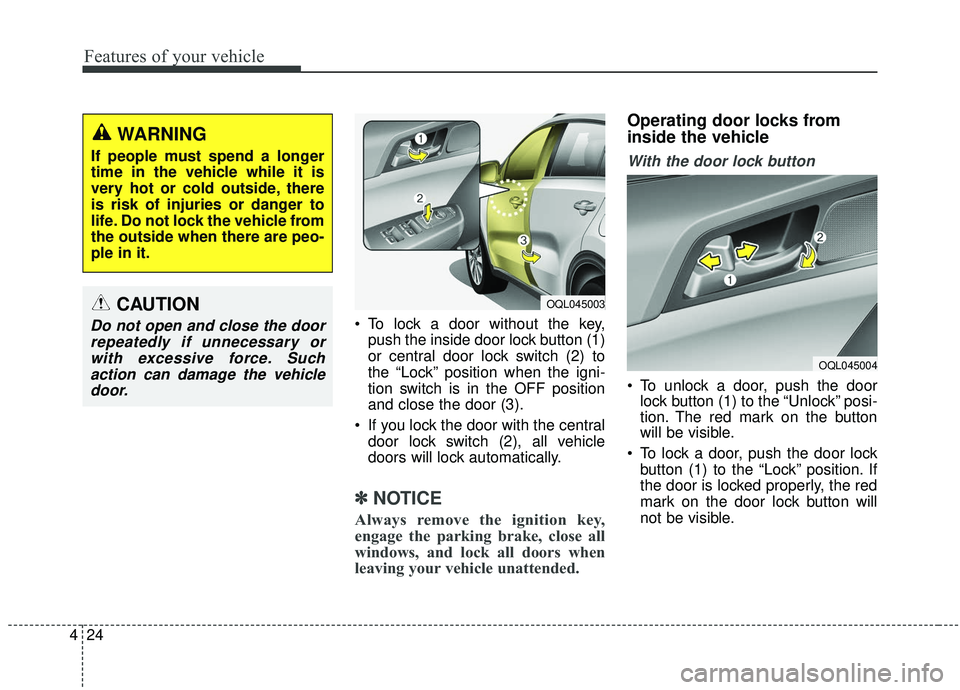
To lock a door without the key,
push the inside door lock button (1)
or central door lock switch (2) to
the “Lock” position when the igni-
tion switch is in the OFF position
and close the door (3).
If you lock the door with the central door lock switch (2), all vehicle
doors will lock automatically.
✽ ✽ NOTICE
Always remove the ignition key,
engage the parking brake, close all
windows, and lock all doors when
leaving your vehicle unattended.
Operating door locks from
inside the vehicle
With the door lock button
To unlock a door, push the door
lock button (1) to the “Unlock” posi-
tion. The red mark on the button
will be visible.
To lock a door, push the door lock button (1) to the “Lock” position. If
the door is locked properly, the red
mark on the door lock button will
not be visible.
WARNING
If people must spend a longer
time in the vehicle while it is
very hot or cold outside, there
is risk of injuries or danger to
life. Do not lock the vehicle from
the outside when there are peo-
ple in it.
CAUTION
Do not open and close the doorrepeatedly if unnecessary orwith excessive force. Suchaction can damage the vehicledoor.
OQL045004
OQL045003
Page 113 of 611
425
Features of your vehicle
To open a door, pull the door handle(2) outward.
If the inner door handle of the dri- ver’s (or front passenger’s) door is
pulled when the door lock button is
in the lock position, the button will
unlock and the door will open. (if
equipped)
Front doors cannot be locked if the ignition key is in the ignition switch
and any front door is opened.
Doors cannot be locked if the smart key is in the vehicle and an
door is open. If a power door lock ever fails to func-
tion while you are in the vehicle, try
one or more of the following tech-
niques to exit:
Operate the door unlock feature
repeatedly (both electronic and
manual) while simultaneously
pulling on the door handle.
Operate the other door locks and handles, front and rear.
Lower a front window and use the key to unlock the door from out-
side.With central door lock switch
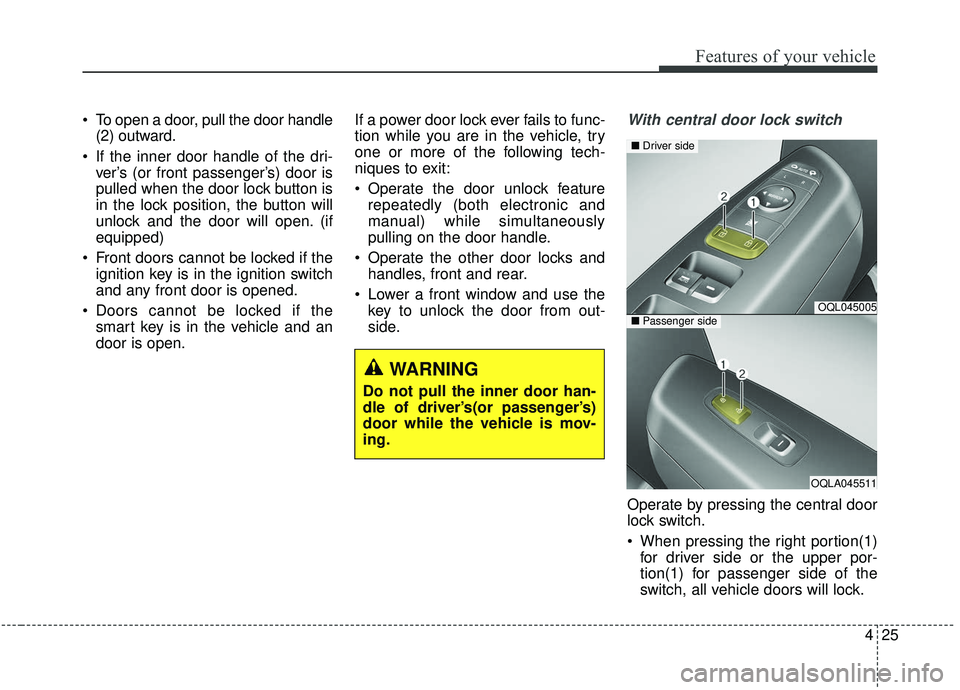
Operate by pressing the central door
lock switch.
When pressing the right portion(1)for driver side or the upper por-
tion(1) for passenger side of the
switch, all vehicle doors will lock.
OQL045005
OQLA045511
■ Driver side
■Passenger side
WARNING
Do not pull the inner door han-
dle of driver’s(or passenger’s)
door while the vehicle is mov-
ing.
Page 114 of 611
Features of your vehicle
26
4
When pressing the left portion(2)
for driver side or the lower por-
tion(2) for passenger side of the
switch, all vehicle doors will unlock.
If the key is in the ignition switch (or if the smart key is in the vehicle)
and any door is opened, the doors
will not lock even though the right
portion(1) for driver side or upper
portion(1) for passenger side of the
central door lock switch is pressed.Impact sensing door unlock
system
In the event of air bag deployment
resulting from a vehicle impact, all
doors will automatically unlock.
Speed sensing door lock system
All doors will automatically lock after
the vehicle speed exceeds 15 km/h
(10 mph).
✽ ✽ NOTICE
You can select some auto door
lock/unlock features in “User
Settings”.
❈ ❈
For more information, refer to
“User Settings” in this chapter.
WARNING - Unattended
children/animals
Never leave children or animals
unattended in your vehicle. An
enclosed vehicle can become
extremely hot, causing death or
severe injury to unattended
children or animals who cannot
escape the vehicle.
WARNING - Doors
The doors should always be fully closed and locked while
the vehicle is in motion to pre-
vent accidental opening of the
door.
Be careful when opening doors and watch for vehicles, motor-
cycles, bicycles or pedestrians
approaching the vehicle in the
path of the door. Opening a
door when something is
approaching can cause dam-
age or injury.
Page 116 of 611
Features of your vehicle
28
4
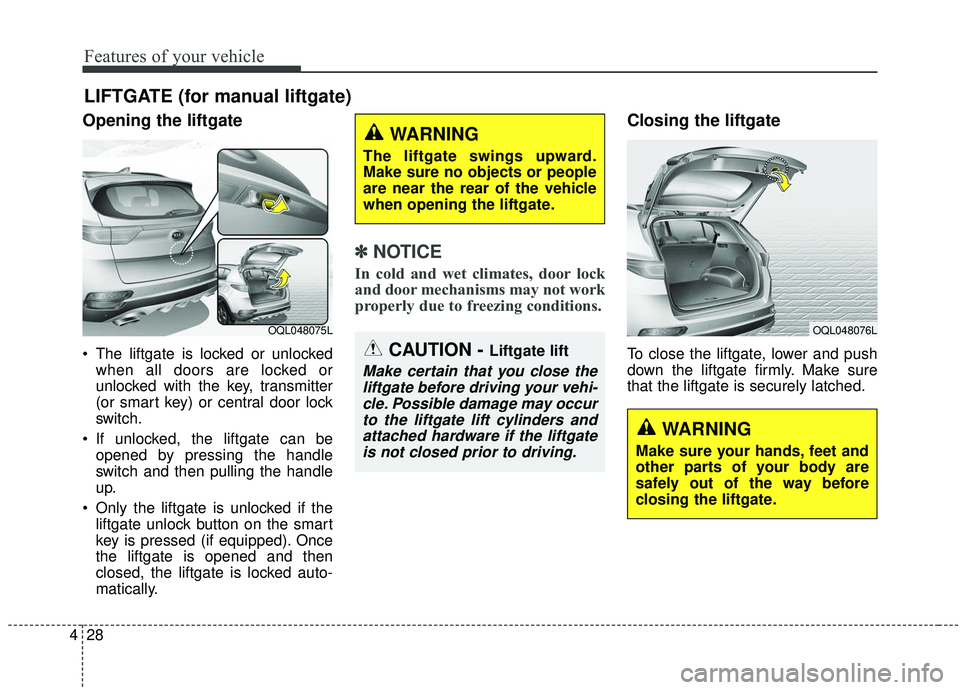
Opening the liftgate
The liftgate is locked or unlocked
when all doors are locked or
unlocked with the key, transmitter
(or smart key) or central door lock
switch.
If unlocked, the liftgate can be opened by pressing the handle
switch and then pulling the handle
up.
Only the liftgate is unlocked if the liftgate unlock button on the smart
key is pressed (if equipped). Once
the liftgate is opened and then
closed, the liftgate is locked auto-
matically.
✽ ✽ NOTICE
In cold and wet climates, door lock
and door mechanisms may not work
properly due to freezing conditions.
Closing the liftgate
To close the liftgate, lower and push
down the liftgate firmly. Make sure
that the liftgate is securely latched.
LIFTGATE (for manual liftgate)
OQL048075LOQL048076L
CAUTION - Liftgate lift
Make certain that you close the
liftgate before driving your vehi-cle. Possible damage may occurto the liftgate lift cylinders andattached hardware if the liftgateis not closed prior to driving.
WARNING
The liftgate swings upward.
Make sure no objects or people
are near the rear of the vehicle
when opening the liftgate.
WARNING
Make sure your hands, feet and
other parts of your body are
safely out of the way before
closing the liftgate.
Page 120 of 611
Features of your vehicle
32
4
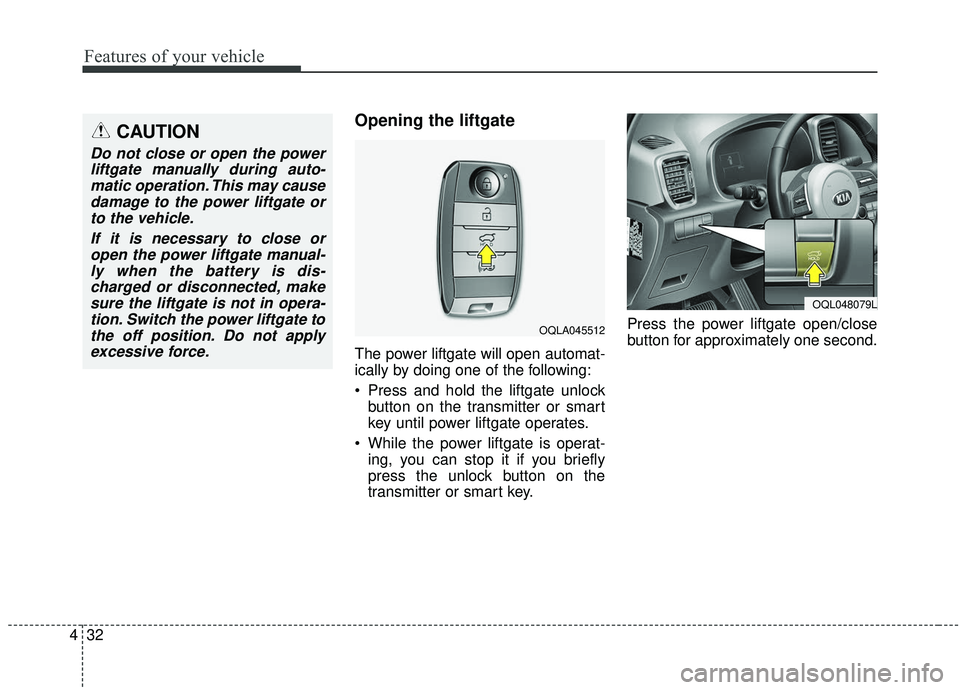
Opening the liftgate
The power liftgate will open automat-
ically by doing one of the following:
Press and hold the liftgate unlock
button on the transmitter or smart
key until power liftgate operates.
While the power liftgate is operat- ing, you can stop it if you briefly
press the unlock button on the
transmitter or smart key. Press the power liftgate open/close
button for approximately one second.
CAUTION
Do not close or open the power
liftgate manually during auto-matic operation. This may causedamage to the power liftgate orto the vehicle.
If it is necessary to close oropen the power liftgate manual-ly when the battery is dis-charged or disconnected, makesure the liftgate is not in opera-tion. Switch the power liftgate tothe off position. Do not applyexcessive force.
OQLA045512
OQL048079L
Page 121 of 611
433
Features of your vehicle
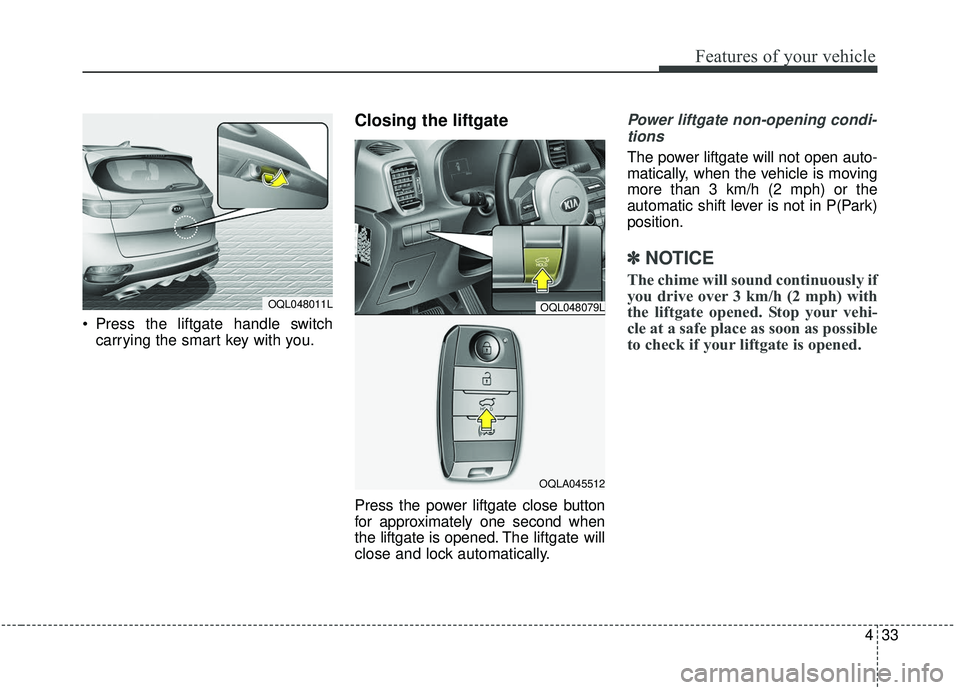
Press the liftgate handle switchcarrying the smart key with you.
Closing the liftgate
Press the power liftgate close button
for approximately one second when
the liftgate is opened. The liftgate will
close and lock automatically.
Power liftgate non-opening condi-
tions
The power liftgate will not open auto-
matically, when the vehicle is moving
more than 3 km/h (2 mph) or the
automatic shift lever is not in P(Park)
position.
✽ ✽ NOTICE
The chime will sound continuously if
you drive over 3 km/h (2 mph) with
the liftgate opened. Stop your vehi-
cle at a safe place as soon as possible
to check if your liftgate is opened.
OQL048011LOQL048079L
OQLA045512
Page 124 of 611
Features of your vehicle
36
4
How to reset the power liftgate
If the battery has been discharged or
disconnected, or if the related fuse has
been replaced or disconnected, for the
power liftgate to operate normally,
reset the power liftgate as follows:
1. Put the automatic shift lever in P
(Park).
2. While pressing the liftgate close button, press the liftgate handle
switch for more than 3 seconds.
(the chime will sound)
3. Close the liftgate manually.
If the power liftgate does not work
properly after the above procedure,
have the system checked by an
authorized Kia dealer.
✽ ✽ NOTICE
If the power liftgate does not operate
normally, first check the following
condition before using the power
liftgate.
Make sure the automatic shift lever
is in P (Park).
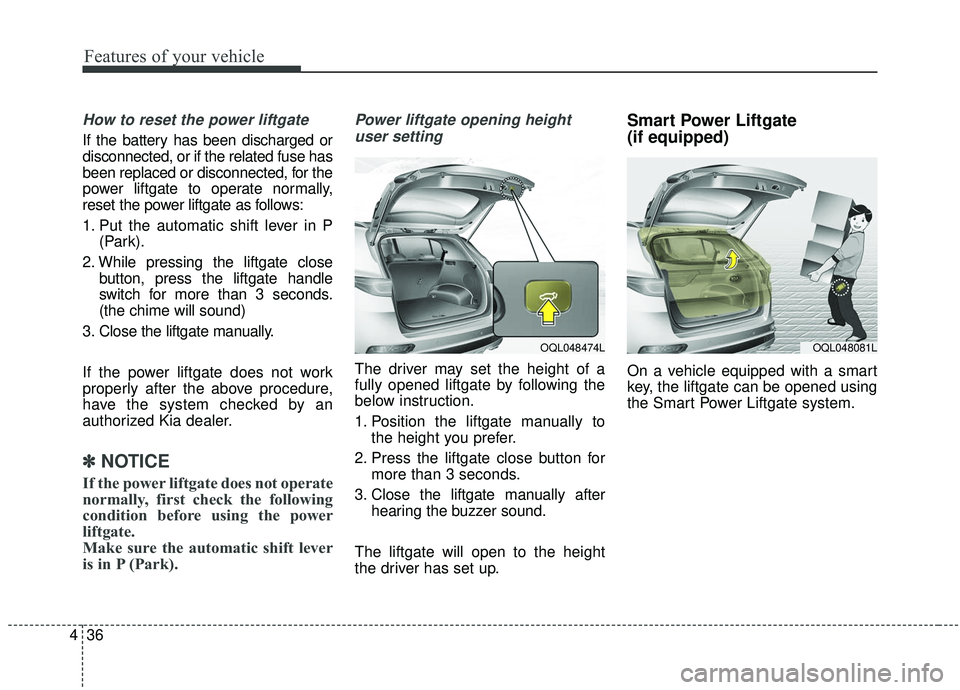
Power liftgate opening height
user setting
The driver may set the height of a
fully opened liftgate by following the
below instruction.
1. Position the liftgate manually to the height you prefer.
2. Press the liftgate close button for more than 3 seconds.
3. Close the liftgate manually after hearing the buzzer sound.
The liftgate will open to the height
the driver has set up.
Smart Power Liftgate
(if equipped)
On a vehicle equipped with a smart
key, the liftgate can be opened using
the Smart Power Liftgate system.
OQL048474LOQL048081L
Page 125 of 611
437
Features of your vehicle
How to use the Smart PowerLiftgate
The liftgate can be opened with no-
touch activation satisfying all the
conditions below.
After 15 seconds when all doors are closed and locked
Positioned in the detecting area for more than 3 seconds.
✽ ✽ NOTICE
• The Smart Power Liftgate does
not operate when:
- The smart key is detected within15 seconds after the doors are
closed and locked, and is contin-
uously detected.
- The smart key is detected within 15 seconds after the doors are
closed and locked, and within
1.5 m (60 inches) from the front
door handles. (for vehicles
equipped with Welcome Light)
- A door is not locked or closed.
- The smart key is in the vehicle.
1. Setting
To activate the Smart Power Liftgate,
go to User Settings Mode and select
Smart Power Liftgate on the LCD
display.
❈ ❈ For more information, refer to
the "LCD Display" section in
this chapter.
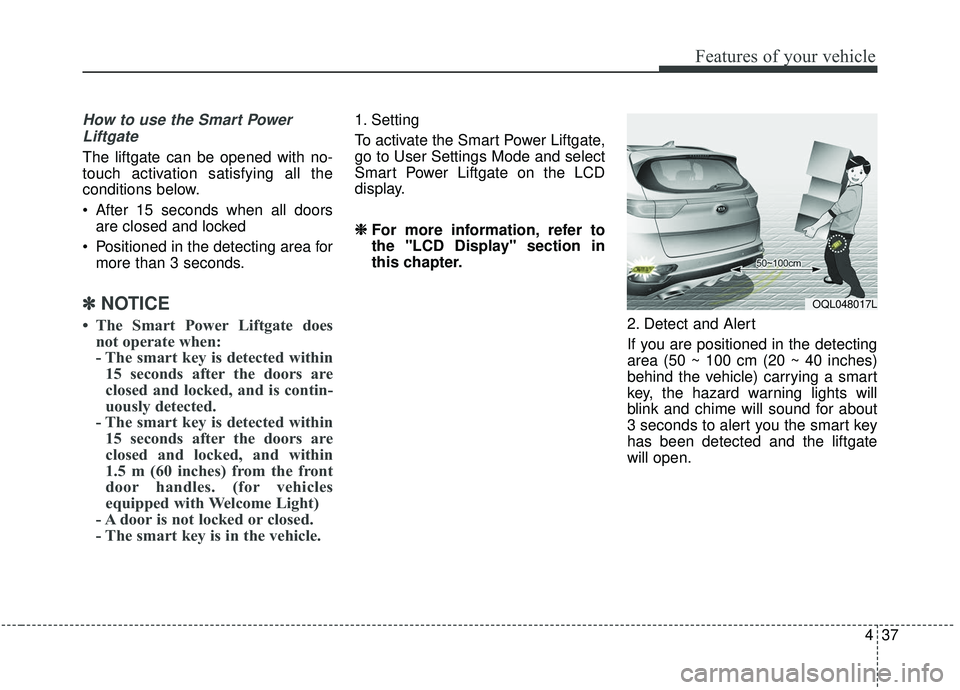
2. Detect and Alert
If you are positioned in the detecting
area (50 ~ 100 cm (20 ~ 40 inches)
behind the vehicle) carrying a smart
key, the hazard warning lights will
blink and chime will sound for about
3 seconds to alert you the smart key
has been detected and the liftgate
will open.
OQL048017L
Page 126 of 611
Features of your vehicle
38
4
✽ ✽
NOTICE
Do not approach the detecting area
if you do not want the liftgate to
open. If you have unintentionally
entered the detecting area and the
hazard warning lights and chime
starts to operate, leave the detecting
area with the smart key. The liftgate
will stay closed.
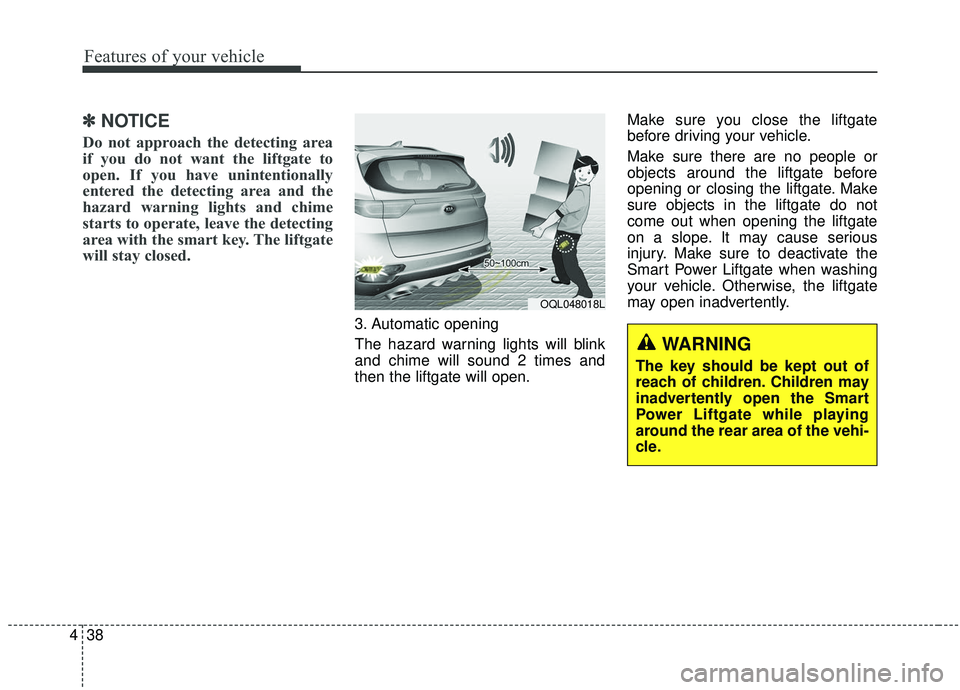
3. Automatic opening
The hazard warning lights will blink
and chime will sound 2 times and
then the liftgate will open. Make sure you close the liftgate
before driving your vehicle.
Make sure there are no people or
objects around the liftgate before
opening or closing the liftgate. Make
sure objects in the liftgate do not
come out when opening the liftgate
on a slope. It may cause serious
injury. Make sure to deactivate the
Smart Power Liftgate when washing
your vehicle. Otherwise, the liftgate
may open inadvertently.
OQL048018L
WARNING
The key should be kept out of
reach of children. Children may
inadvertently open the Smart
Power Liftgate while playing
around the rear area of the vehi-
cle.